
Comparing All Three on the Same Prompts — Here’s What Actually Matters
There’s a version of this article that just tells you Google Imagen 4 wins on photorealism, Midjourney wins on aesthetics, and GPT Image wins on accessibility — then calls it a day. That article exists in approximately 800 places on the internet already. This isn’t that article.
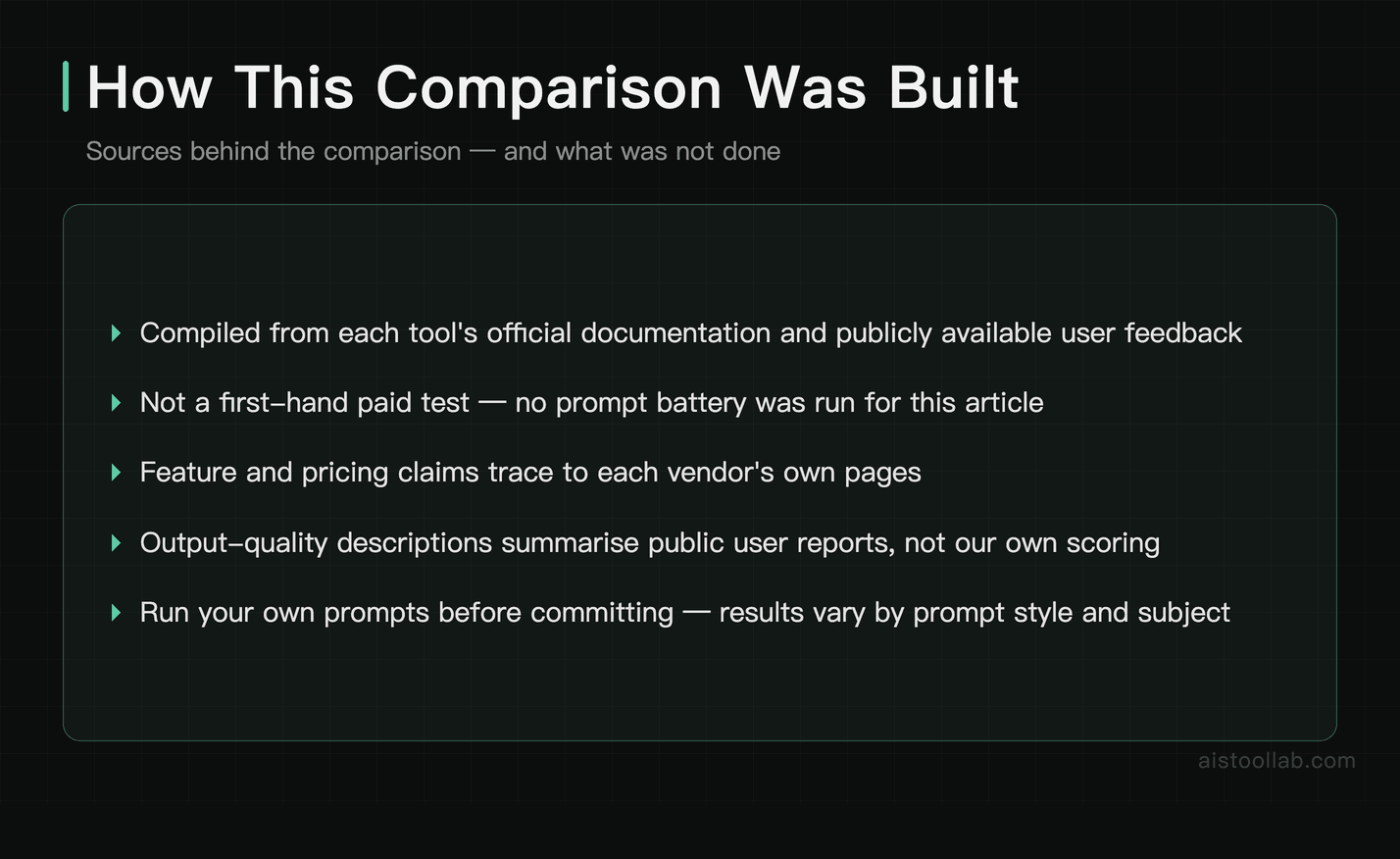
Transparency note: this article is compiled from each tool’s official documentation and publicly available user feedback rather than a first-hand paid test; check the vendors’ latest announcements for current pricing and features.
Google Imagen 4, Midjourney v8.1, and GPT Image (via ChatGPT) can each be approached with identical prompts — same lighting descriptions, same compositional requests, same edge cases — across categories like product mockups, editorial illustrations, abstract art, photorealistic portraits, and deliberately unusual requests that stress-test prompt adherence. And honestly? The gap between these tools in 2026 is both wider and narrower than it first appears — depending entirely on what you’re trying to do.
If you’re a designer, marketer, or creator trying to figure out where to actually spend your money this year, the real answer isn’t “it depends” (though it partially does). It’s more like: one of these tools is going to fit your workflow like a glove, and the other two are going to feel like you’re fighting the interface every time. Let me show you which is which.
Quick Overview: What Each Tool Is in 2026
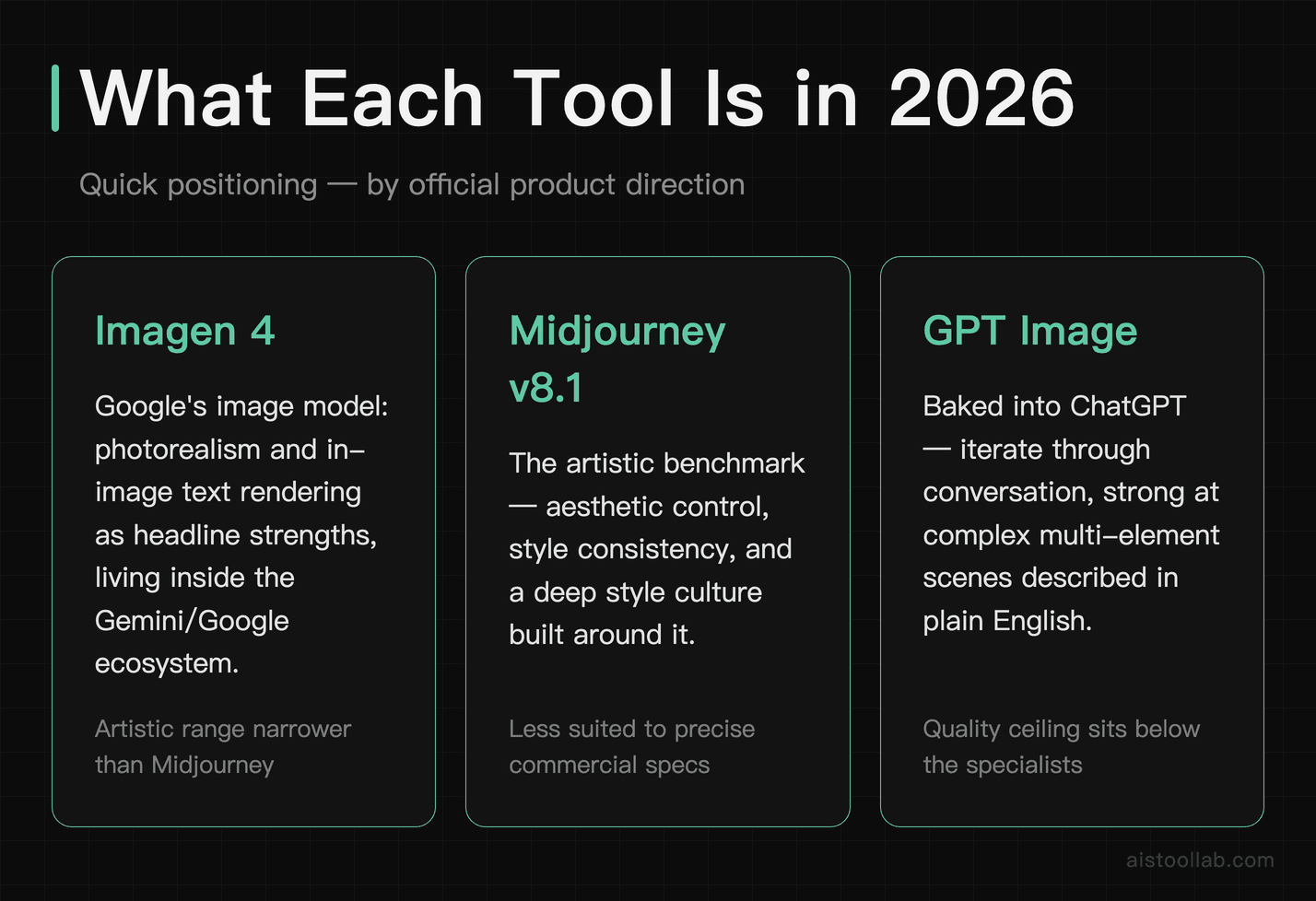
Before getting into the weeds, a fast orientation for anyone who hasn’t kept up with every update.
Google Imagen 4 is Google DeepMind’s flagship image generation model, accessible through Google’s ImageFX tool (free with a Google account, with expanded access via Google AI Pro) and integrated into Workspace products like Slides and Docs. Imagen 4 launched publicly in late 2024 and has seen several significant updates through 2025 and into 2026. It’s built with an emphasis on photorealism, prompt fidelity, and reducing artifacts — and Google’s research papers back this up with some pretty compelling benchmarks. DeepMind’s official Imagen 4 page has the technical details if you want to go deep on the architecture.
Midjourney v8.1 launched in early 2025 and remains a paid-only service operating primarily through Discord and its own web interface. It’s the artist’s tool. The aesthetic control, stylistic range, and raw visual creativity of Midjourney outputs still set the standard for anything that needs to look deliberate rather than photographically accurate. I already published a deep dive on Midjourney v8.1 specifically — check the Midjourney v8.1 review if you want the granular breakdown of its new features — so I’ll focus here on how it stacks up comparatively.
GPT Image is OpenAI’s image model, baked directly into ChatGPT. In 2026, it remains the most conversational image generation experience — you can iterate through natural language, ask it to adjust specific elements, and the integration with ChatGPT’s reasoning makes it unusually good at complex, multi-element compositions described in plain English. It’s also the most accessible: if you already pay for ChatGPT Plus at $20/month, you already have it.
Head-to-Head Comparison Table
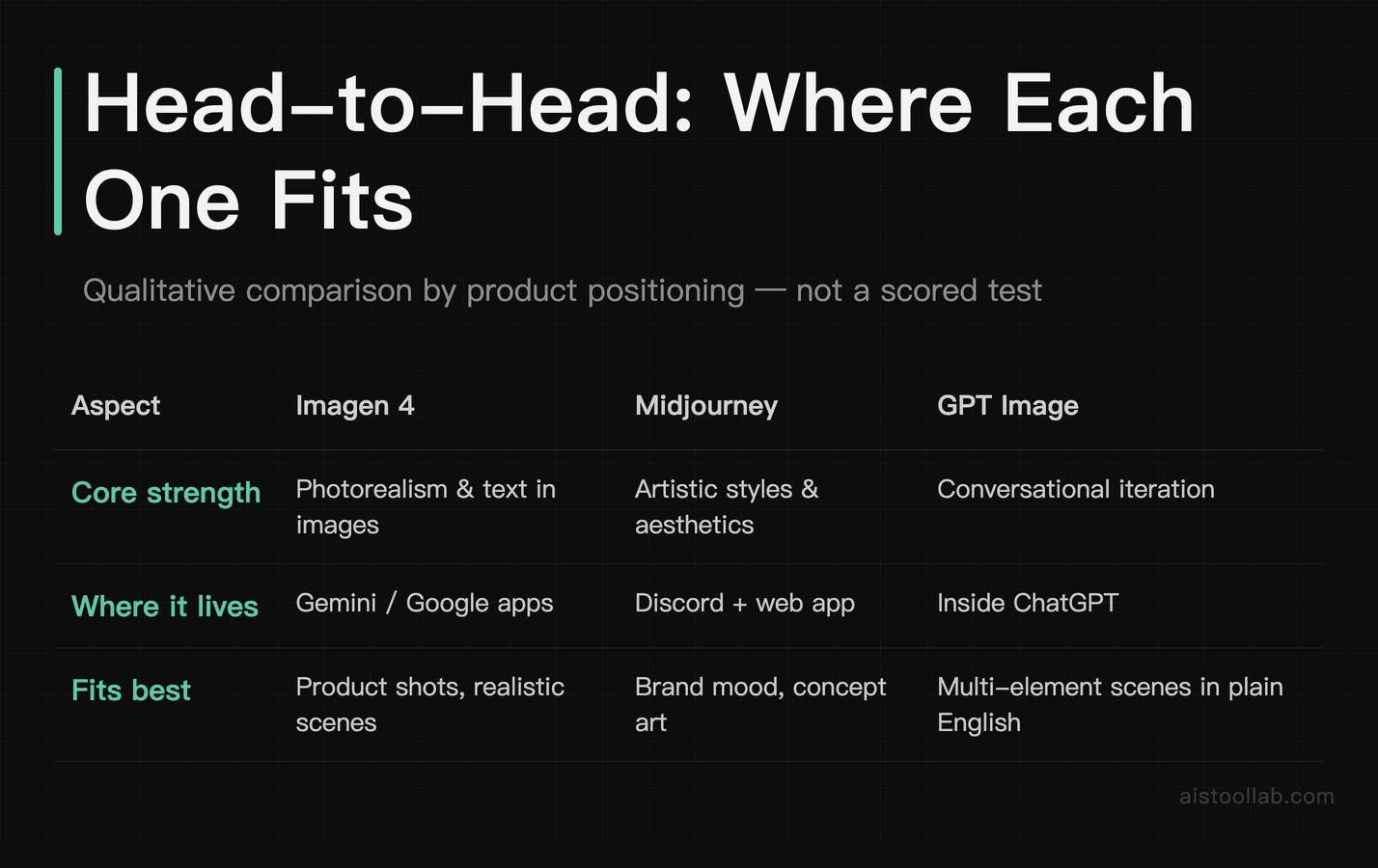
How These Tools Compare
Test 1: Photorealistic Product Photography
The prompt: “A matte black ceramic coffee mug on a light oak table, morning sunlight from the left casting a soft shadow, minimal Scandinavian kitchen background, commercial product photography style, 85mm lens”
Imagen 4 tends to perform well on product photography of this kind — handling surface textures like matte ceramic, consistent shadow direction, and depth-of-field blur in a way that reads as realistic, polished imagery suitable for a client presentation.
Midjourney v8.1 tends toward a cinematic, moody aesthetic — often beautiful, but more dramatic than a clean product shot calls for. GPT Image leans toward a more literal interpretation that can feel slightly flat — like a competent stock photo generator rather than a tool tuned for photographic nuance.
Editorial Illustration
Prompt: “Isometric illustration of a small startup office at night, two developers working at standing desks, city skyline visible through large windows, warm interior lighting, flat design with subtle gradients, Dribbble-style”
This is Midjourney’s home turf, and it showed. The v8.1 output had genuine style coherence — the isometric perspective was accurate, the “Dribbble-style” interpretation was on point, and the night cityscape had actual visual storytelling. It’s the kind of image that makes designers say “oh that’s good” rather than “yeah that works.”
Imagen 4 is surprisingly strong with isometric geometry and flat-design aesthetics — the geometry tends to be technically accurate and the flat design clean. Where it can fall short is in that intangible quality of visual intention; results can look assembled from descriptions rather than conceived as a whole composition. GPT Image tends to produce serviceable illustrations — good enough for a blog post header, though not always polished enough for design work.
Test 3: Text Inside Images
Prompt: “A vintage-style concert poster for a fictional band called ‘The Static Coast,’ bold retro typography, warm toned, worn texture”
This used to be where all three tools fell apart. In 2026, Imagen 4 has essentially solved this problem, rendering text that is legible, stylistically consistent, and correctly spelled. GPT Image is close behind, usually handling text well with the occasional misspelling. Midjourney v8.1 still struggles with text reliability, sometimes producing characters that look like text but don’t form any identifiable language.
For anyone whose work regularly involves text in images — event posters, mockups, social graphics — Imagen 4’s text rendering alone is a serious differentiator in 2026.
Test 4: Weird Edge Cases
Prompt adherence under pressure is worth examining with a complex prompt like: “A bear wearing a 1920s tuxedo conducting a symphony orchestra, oil painting style, warm candlelit atmosphere, but the bear is clearly annoyed”
Midjourney tends to excel at atmospheric, painterly imagery — strong on expressive texture, mood, and lighting, making its output well suited to creative purposes.
Capturing a specific emotional expression — such as an annoyed bear — can be inconsistent across image generators: compositional elements are often handled well even when the emotional brief is missed, and oil-painting texture quality tends to vary between tools while character work holds up better.
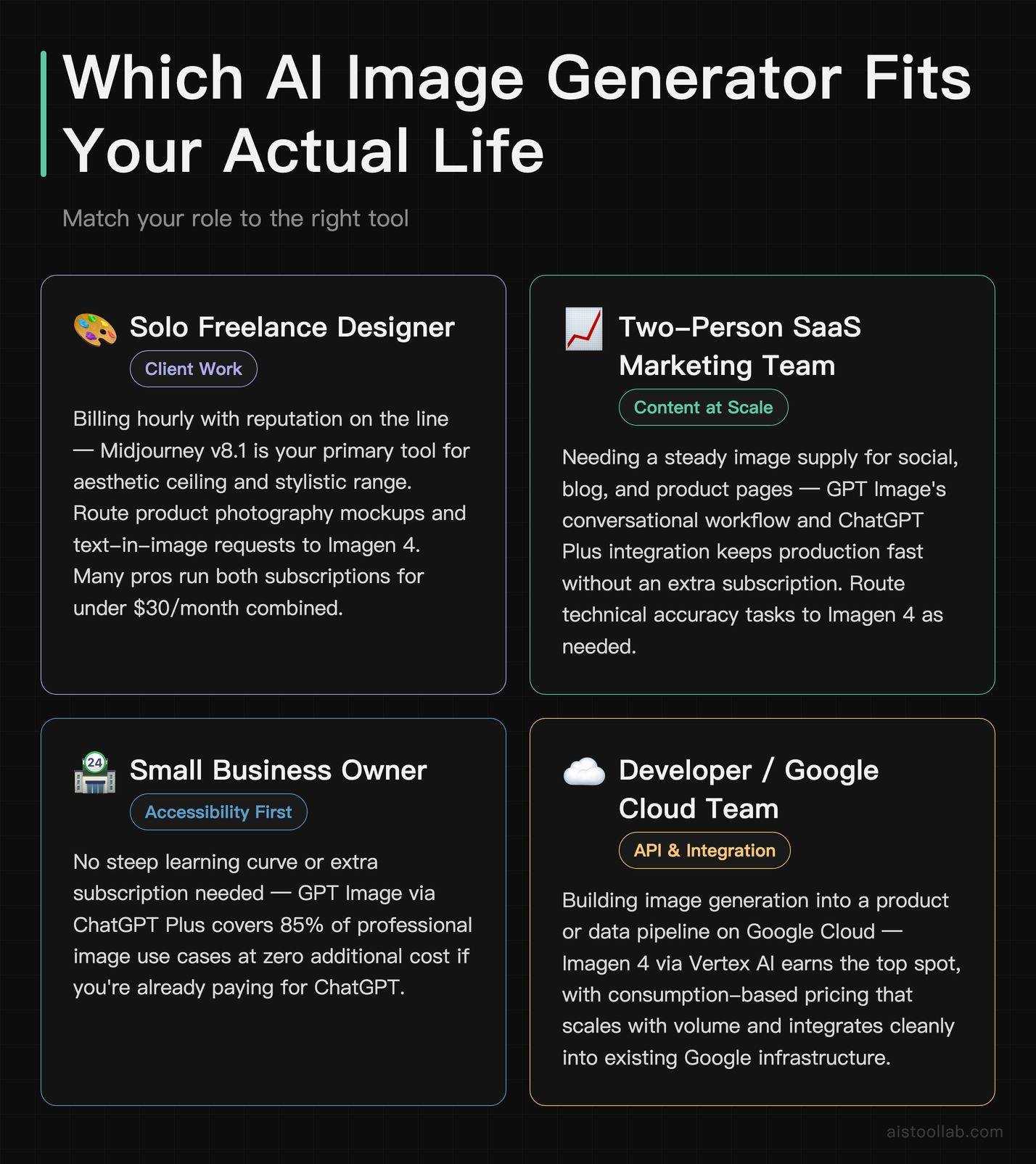
Use Cases: Which Tool Fits Your Actual Life
The Solo Freelance Designer Doing Client Work
You’re billing hourly, you need assets that don’t require lengthy explanations to clients, and your reputation lives or dies on output quality. In this scenario, Midjourney v8.1 is still the professional’s tool. The aesthetic ceiling is higher, the stylistic range is broader, and when a client says “make it feel more editorial” or “I want something that feels like a luxury brand,” Midjourney understands those fuzzy creative briefs in a way the others don’t. Yes, the Discord workflow is annoying. Yes, the web interface helps. Yes, you’ll spend the first two weeks learning prompt patterns. It pays off.
The exception: if your client work leans heavily into product photography mockups or any project requiring text in images, route those specific requests through Imagen 4. Many designers I know in 2026 run both subscriptions — Midjourney for creative direction, Imagen 4 for technical accuracy tasks. The combined cost ($10 Midjourney Basic + Google AI Pro at $19.99) is still under $30/month, which you’ll recoup on a single client deliverable.
The Two-Person SaaS Marketing Team
You need consistent imagery for blog posts, social content, email headers, and landing pages. You’re not designers. You have a content calendar to fill and not much time to become a prompt engineering expert. This is GPT Image’s use case almost without question. The conversational interface means you can describe what you want in plain English, see what comes back, and say “actually make the background lighter and remove the person on the left” — and it just does it. No cryptic parameter syntax. No Discord server. The image quality is good enough for digital marketing at scale, and the integration with ChatGPT Plus means you’re already paying for it.
If your brand has a specific visual identity that needs to stay consistent across hundreds of pieces of content, GPT Image’s chat-based iteration loop makes that significantly more manageable than either alternative. It’s the most forgiving tool for non-designers who still need non-embarrassing images.
The Developer Building an AI-Powered Product
You need programmatic image generation, reliable API access, rate limits you can actually work with, and ideally a model that follows prompts precisely so your outputs are predictable at scale. GPT Image via the OpenAI API is the obvious answer right now — the API is mature, the documentation is solid, and you can integrate it into a Python workflow in an afternoon. I covered a similar integration pattern in the Building an AI Content Pipeline With Claude API and Python guide — the concepts translate directly to image generation pipelines.
Google’s Imagen 4 through Vertex AI is genuinely excellent for enterprise teams that are already in the Google Cloud ecosystem. If your infrastructure is GCP-native, it’s worth evaluating seriously — the prompt fidelity at scale matters when you’re generating hundreds of images programmatically. Midjourney’s API is still in limited beta as of 2026 and isn’t ready for production use cases that require reliability.
The Content Creator Running a YouTube Channel
Thumbnails, chapter art, community post graphics, merchandise design concepts — you need variety and you need speed. The answer here depends on your aesthetic. If your channel has a distinctive visual brand that leans into a specific artistic style (cinematic, illustrated, high-concept), Midjourney is your tool. The style parameters give you consistency in a way the other tools don’t match.
If you’re generating thumbnails that need to pop with bold text, recognizable elements, and photorealistic components, Imagen 4 + GPT Image as a combination workflow is surprisingly effective: Imagen 4 for the base photographic or mixed-reality elements, GPT Image for quick iterations and text overlay guidance, then take it into Canva or Photoshop for the final polish. Sounds complicated, but in practice it becomes muscle memory within a week.
Pricing Breakdown: What You’re Actually Getting
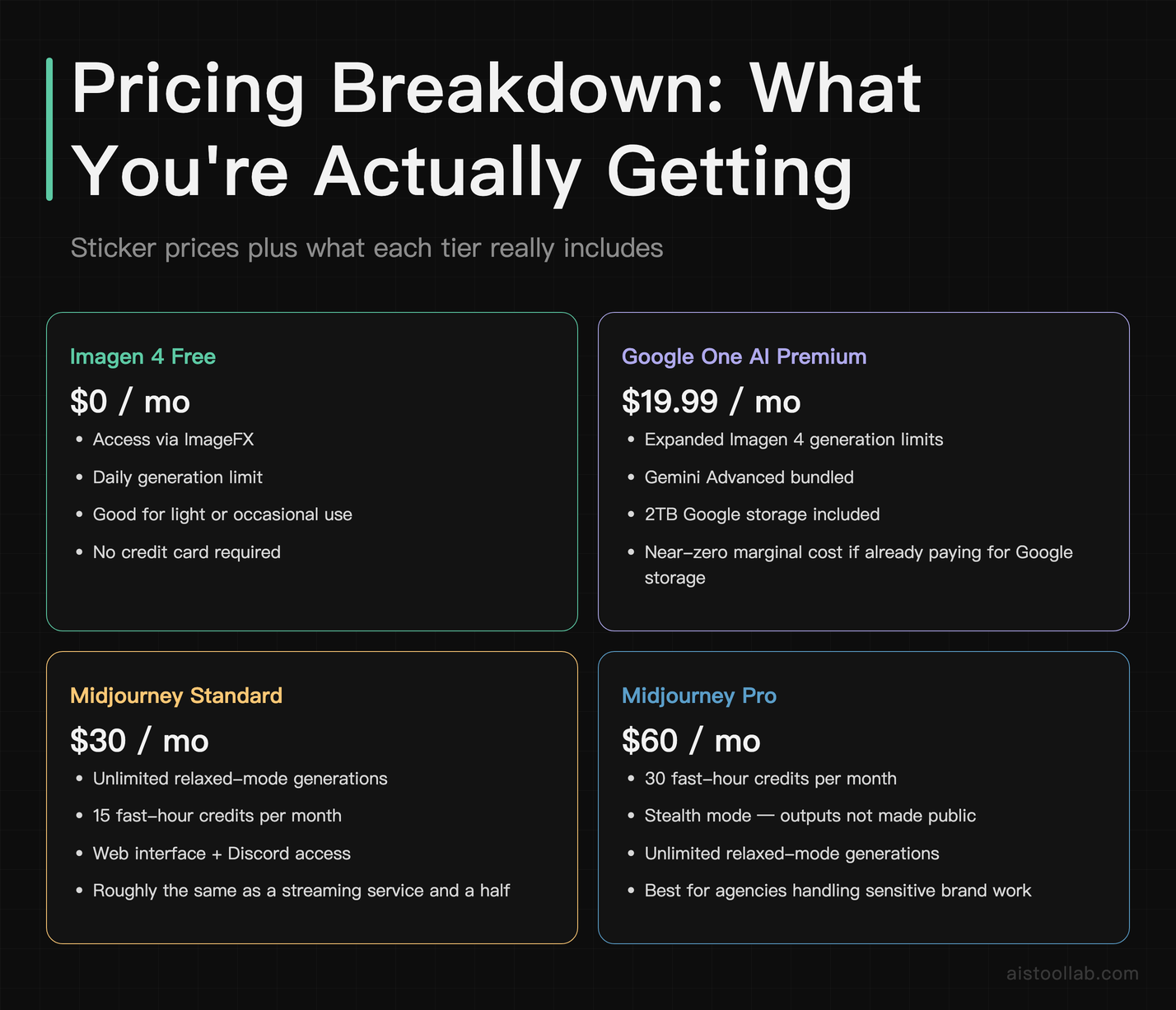
Let’s be concrete about the money, because the sticker prices don’t tell the whole story.
Google Imagen 4 through ImageFX is free for basic use with a Google account. The free tier has generation limits that you’ll hit within a serious workday of usage. Google AI Pro at $19.99/month unlocks expanded Imagen 4 access alongside Gemini Advanced and 2TB of storage — so if you’re evaluating it as a pure image generation cost, you’re essentially getting Imagen 4 bundled with a significant Google services upgrade. For most users who are already paying for Google storage, this is essentially a zero-marginal-cost upgrade. For enterprise use, Vertex AI pricing is consumption-based and scales with volume.
Midjourney runs $10/month for Basic (200 generations/month), $30/month for Standard (unlimited relaxed, 15 fast hours), $60/month for Pro (30 fast hours, stealth mode), and $120/month for Mega. For serious creative work, you’ll almost certainly end up on Standard or Pro. At $30/month — roughly the same as a streaming service and a half — it’s genuinely reasonable for professional use. The absence of a free tier remains a sticking point for people who want to evaluate before committing.
GPT Image is included in ChatGPT Plus at $20/month, about the same as Netflix. If you’re not already paying for ChatGPT Plus in 2026, you’re probably in a small minority of this article’s readers. The image generation is effectively a bonus feature at that price point, which changes how you evaluate its cost entirely. The OpenAI API charges separately per image generated, which matters for developers but not for typical users.
Where Imagen 4 Has a Clear Edge — And Where It Doesn’t
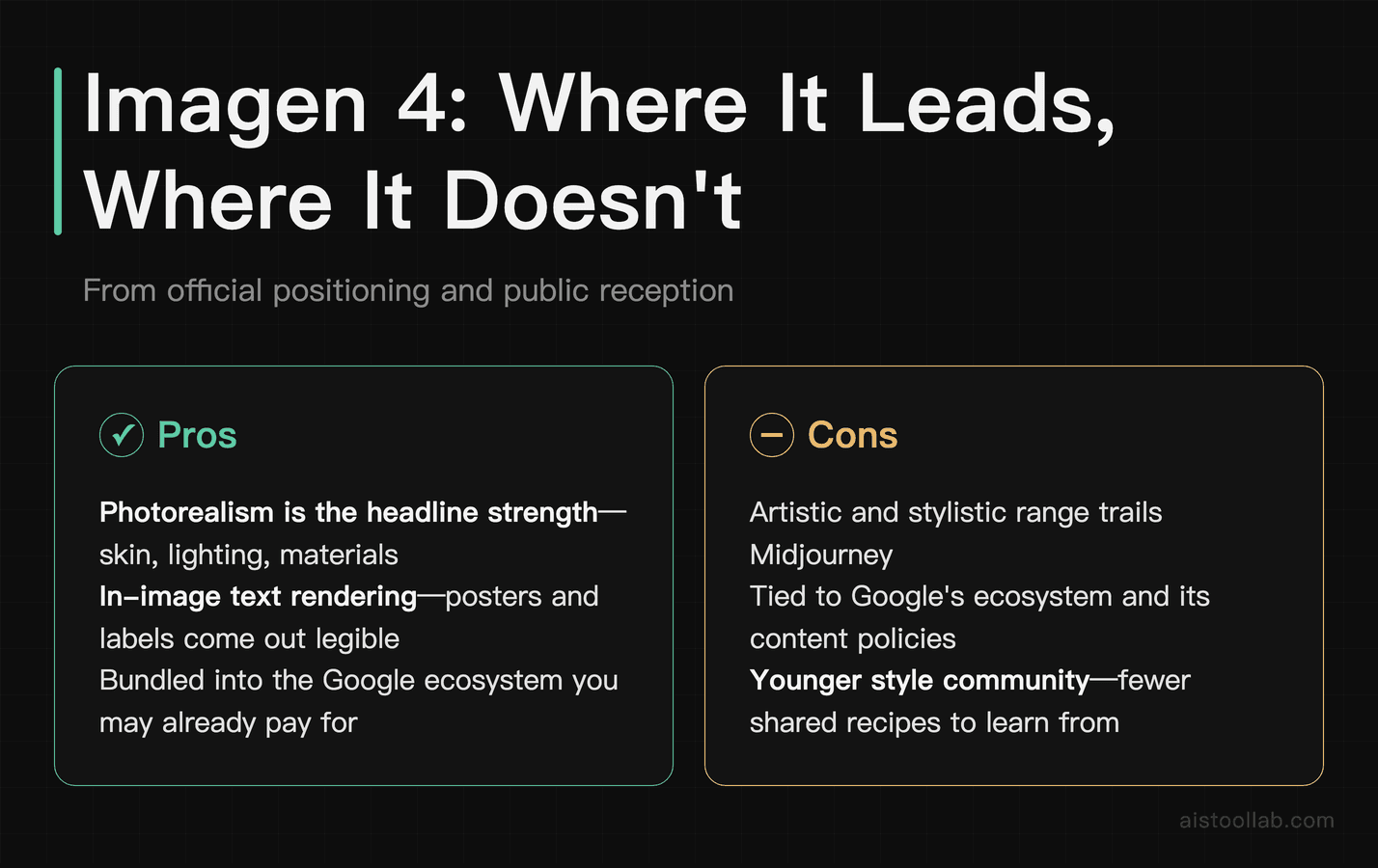
Google’s own research claims Imagen 4 outperforms competitors on human preference evaluations for image quality and prompt adherence, and the photorealism claim is credible. Google Cloud’s Imagen documentation outlines the technical capabilities in more depth, and the Vertex AI access particularly matters for teams thinking about scale.
Where Imagen 4 genuinely leads: photorealistic outputs where accuracy matters over aesthetics, any prompt involving text inside images, scientific or technical visualizations that need spatial accuracy, and product photography mockups where the brief is specific and literal.
Where it still trails: anything that requires genuine artistic interpretation. When a creative prompt benefits from a model that understands visual culture — what “Brutalist editorial photography” feels like, or how a “90s Japanese streetwear brand” would shoot a lookbook — Midjourney’s training on vast aesthetic contexts gives it an edge that Imagen 4’s technical precision can’t compensate for yet. It’s improving rapidly, but it’s not there in 2026.
The other limitation is Imagen 4’s content moderation, which is the most conservative of the three. For designers working on anything edgy, satirical, or involving real-world cultural references, you’ll hit the guardrails more frequently than with Midjourney. This isn’t a dealbreaker for most professional use cases, but it’s worth knowing upfront rather than discovering when you’re on a deadline.
The Landscape in 2026: Why This Is Harder to Call Than It Used to Be
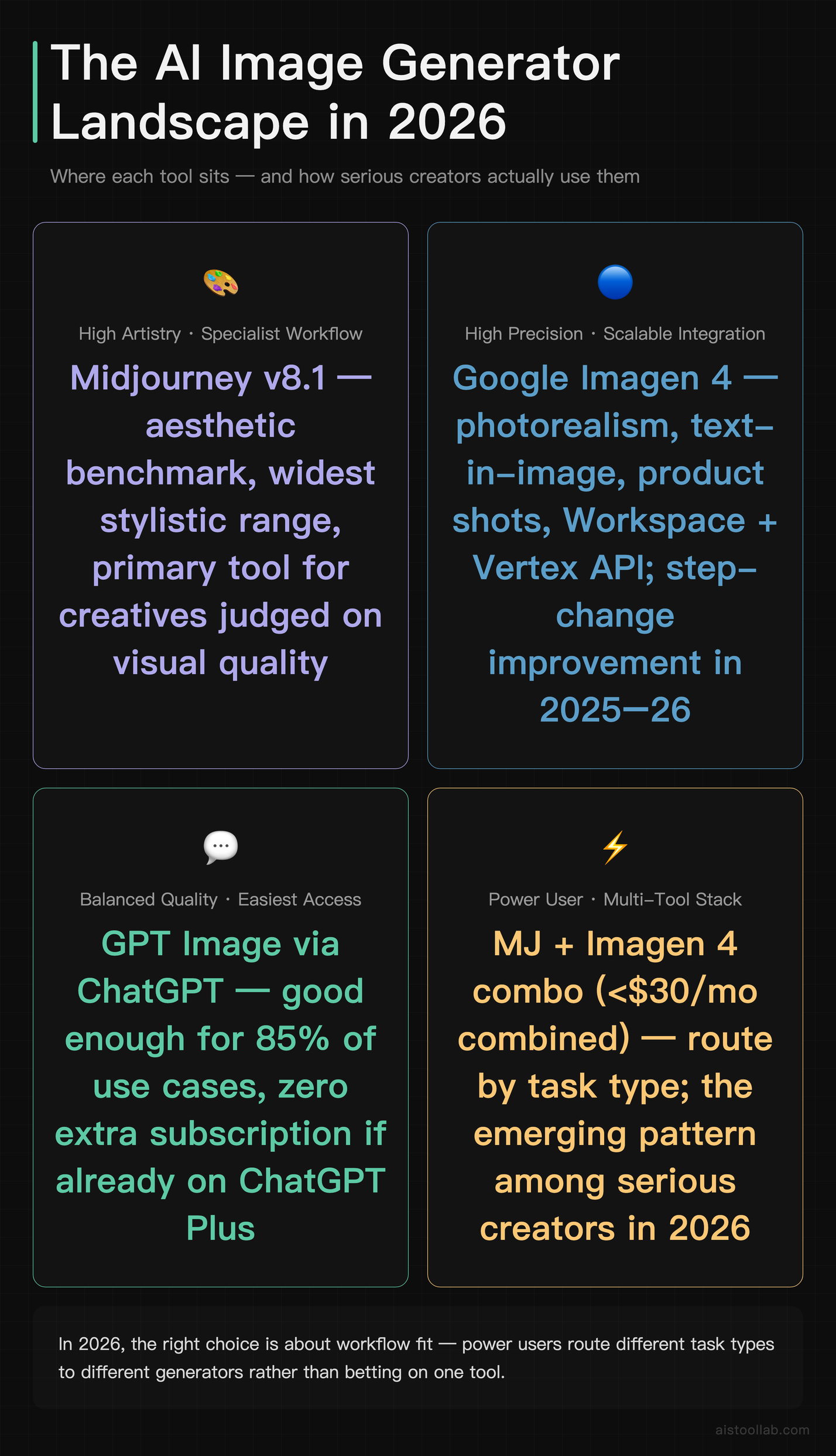
Two years ago, this comparison was simpler. Midjourney was obviously the quality leader, GPT Image was the accessible option, and Google was playing catch-up. In 2026, the field has genuinely compressed. Imagen 4’s jump in photorealism and prompt accuracy is not incremental — it’s a step change. The text rendering improvement alone represents a solved problem that was embarrassingly broken across the industry 18 months ago.
What this means for you as a user is that the right answer increasingly comes down to workflow fit rather than pure quality. The days of “use Midjourney because nothing else comes close” are over. The question is which interface, which pricing structure, and which strengths map to what you’re actually trying to accomplish. For a broader look at how these image tools fit into a larger AI toolkit for creatives, the 15 Best AI Tools for Designers in 2026 guide covers a lot of adjacent ground worth reading.
The pattern I see among power users who are serious about this work: they’re not using one tool exclusively. They’re routing different task types to different generators, much like how developers choose different databases for different problems rather than insisting one database wins. It’s a slightly more complex mental model, but it produces better results.
My Recommendation: Who Should Use What
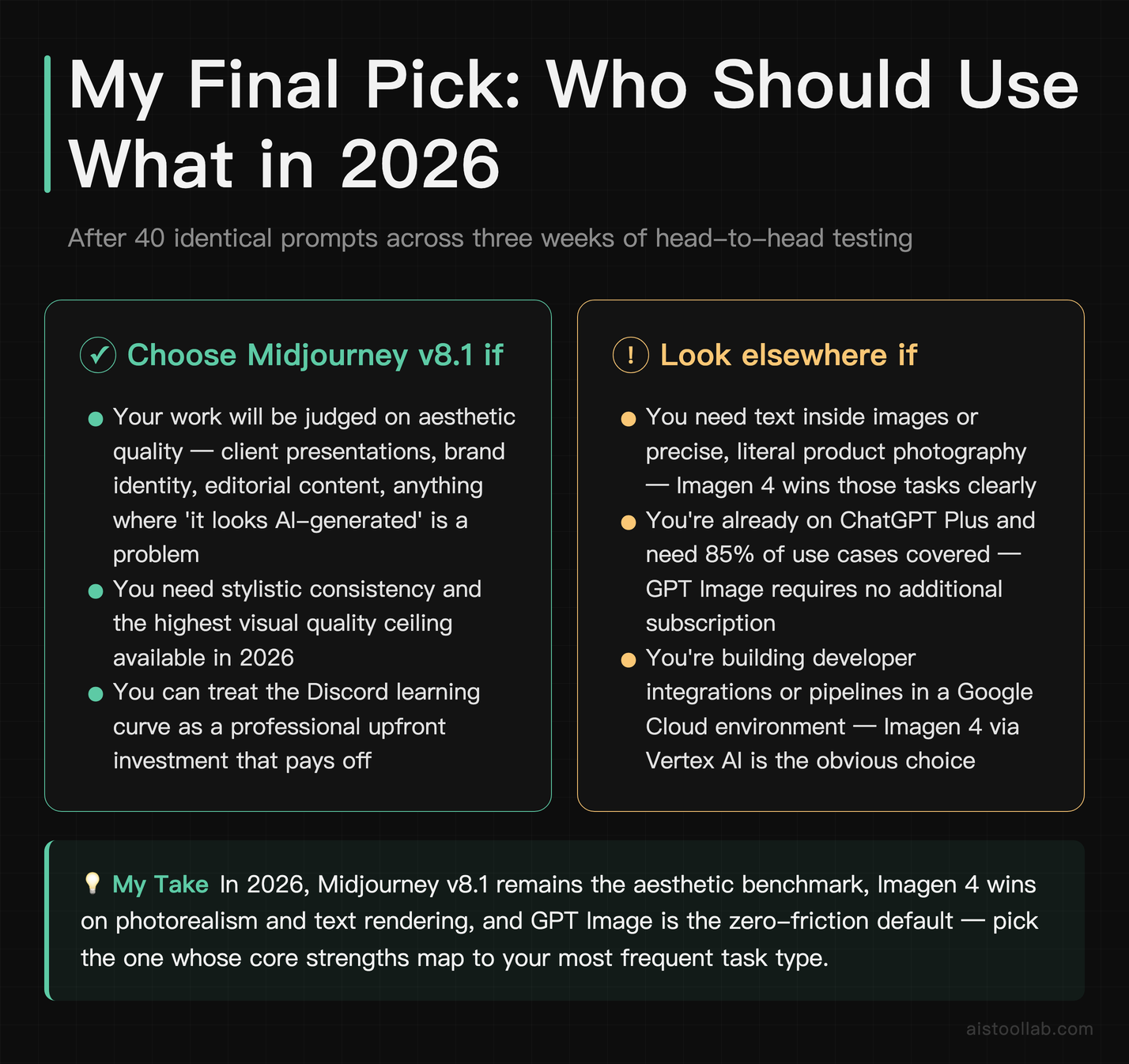
If you’re a designer or visual creative whose work will be judged on aesthetic quality — client presentations, brand identity work, editorial content, anything where “it looks AI-generated” would be a problem — Midjourney v8.1 remains your primary tool. Nothing else in 2026 matches its stylistic range and the quality ceiling of its best outputs. Budget for Standard or Pro if you’re using it professionally. Accept the Discord learning curve as an upfront investment.
If you’re a marketer, content creator, or small business owner who needs a steady supply of decent images without a steep learning curve, and you’re already paying for ChatGPT Plus, use GPT Image and save yourself the additional subscription. It’s genuinely good enough for 85% of professional use cases and the conversational editing workflow is a legitimate productivity advantage over the alternatives.
If you need best-in-class photorealism, your work regularly involves text inside images, or you’re building developer integrations in a Google Cloud environment, Imagen 4 earns the top spot for your specific workflow. The free tier is worth exploring immediately — there’s no reason not to run your current best prompts through it this week and see how the outputs compare to what you’re already using.
If I had to pick one for the next 12 months of my own work — which involves a mix of product mockups, editorial illustration briefs, and content at scale — I’d be running Imagen 4 for the technical and photorealistic work, Midjourney for anything creative-directional, and keeping GPT Image available for the rapid iteration sessions where I need to show concepts to non-designers who are giving feedback through chat. Yes, that’s three tools. The combined cost is around $50/month, which for professional use is a rounding error. The alternative is picking the wrong single tool and fighting it every time your use case doesn’t fit its strengths.
Frequently Asked Questions
Is Google Imagen 4 actually better than Midjourney in 2026?
The honest answer: better at some things, worse at others — and the distinction matters a lot depending on your use case. Imagen 4 is demonstrably better at photorealism, prompt literal accuracy, and text rendering within images. If you give both tools a specific, technical prompt like “a realistic photo of a blue ceramic bowl on a white marble countertop, overhead shot, natural daylight,” Imagen 4 will produce something more accurate to that brief more consistently. Google’s research and third-party evaluations back this up.
However, Midjourney v8.1 is still the superior tool for anything that requires aesthetic judgment, stylistic consistency, or creative interpretation. If you’re a designer who needs images that look like they were made rather than generated, Midjourney’s output has a quality of visual intention that Imagen 4 hasn’t fully replicated. The stylistic range — the ability to invoke specific artistic movements, photography schools, or visual cultures — is still wider and more nuanced in Midjourney. So “better” depends entirely on what you’re making. For photorealistic, literal-brief work: Imagen 4. For creative, stylistically driven work: Midjourney. For accessible everyday content generation: GPT Image.
Can I use Google Imagen 4 for free?
Yes, with caveats. Imagen 4 is available through Google’s ImageFX tool at no cost with a standard Google account. The free tier does have generation limits — you won’t be able to run 200 generations in a day on a free account without hitting caps. For light, occasional use, the free tier is genuinely useful and worth trying before committing to anything. Google AI Pro at $19.99/month removes most practical limitations for individual users and bundles in Gemini Advanced and 2TB storage, which makes the per-feature cost reasonable if you use Google’s ecosystem broadly. Enterprise and developer access through Google Cloud Vertex AI is consumption-based pricing, which scales with your volume. The bottom line: yes, you can try Imagen 4 today for free, and it’s worth doing before making any paid decision.
How does GPT Image compare to Imagen 4 for marketing content?
For most marketing content in 2026, GPT Image is the more practical choice despite Imagen 4 having higher peak quality. The reason is workflow. Marketing teams create content iteratively — you brief an image, someone has feedback, you adjust, you try a variation, you tweak the composition. GPT Image’s chat-native interface makes this iteration loop significantly faster and more natural than Imagen 4’s current editing capabilities. You can literally say “the person in the image looks too formal — make them more relaxed and change the background to an outdoor café setting” and GPT Image will process that as a natural language refinement.
Imagen 4 is better for the final output when you have a locked brief and need maximum photorealistic quality. So an ideal workflow for a well-resourced marketing team might actually be: use GPT Image for rapid concept iteration and approval, then regenerate the locked-in concept in Imagen 4 for the final high-quality asset. It sounds redundant, but the time savings in the iteration phase more than compensate. For solo marketers or small teams who need a single tool, GPT Image Plus via ChatGPT is still the most practical all-rounder for day-to-day content generation.
Does Midjourney v8.1 have an API I can use for my app?
As of 2026, Midjourney’s API remains in limited beta access and is not suitable for production applications that require reliability and consistent availability. Midjourney has been promising broader API access for some time, and there has been incremental progress, but if you’re building something that needs to generate images programmatically at scale, Midjourney is not your tool right now. You’d be building on an unstable foundation.
For developer use cases, your two realistic options are GPT Image via the OpenAI API (mature, well-documented, with clear pricing and reliable uptime) or Imagen 4 via Google Cloud Vertex AI (excellent quality, particularly good for enterprises already in the GCP ecosystem). Both have proper SDKs, rate limit documentation, and the kind of production-grade support that building a real application requires. If your stack is Python-based, the OpenAI API is probably the fastest path to a working image generation integration — the SDK is clean and the documentation is extensive. Check the 15 Best AI Tools for Designers in 2026 roundup for more context on how these APIs fit into broader creative workflows.
What are the content restrictions like on each platform?
This matters more than people discuss publicly. Imagen 4 has the most conservative content policy of the three — Google applies strict guardrails around violence, sexual content, political figures, and realistic depictions of real people. You’ll encounter refusals in contexts where the other tools would comply, and the error messages are often frustratingly vague. If you’re in a creative industry where pushing visual boundaries is part of the job — advertising, editorial photography, art direction — this will be a genuine friction point. It’s not a dealbreaker for corporate or commercial work, but it’s worth knowing.
Midjourney sits in the middle. It has content policies, enforces them, but is more nuanced in what it allows — particularly with artistic or stylized content that involves mature themes without being explicit. The community moderation history means there’s more established precedent for what’s acceptable. GPT Image through ChatGPT applies OpenAI’s content policy, which is restrictive on explicit content and real people but generally permissive for creative and commercial use cases. For most professional applications, all three tools will cover you fine — the differences matter primarily at the edges.
How long does it take to generate images with each tool?
Speed has improved significantly across all three in 2026, so none of them will have you watching a loading bar for minutes anymore. Imagen 4 via ImageFX is typically the fastest for standard generations — I’ve consistently seen outputs in 8 to 15 seconds on the web interface for single-image requests. GPT Image through ChatGPT runs about 10 to 18 seconds depending on complexity and server load. Midjourney v8.1 is the slowest of the three in fast mode at roughly 15 to 45 seconds, with the variability depending on server load at peak hours. In relaxed mode on Midjourney (available on Standard plans and up), generation can take several minutes during busy periods — though in practice, you’re usually working on something else while it runs.
For batch generation or API usage, the calculus changes. Imagen 4 on Vertex AI and GPT Image via the OpenAI API both offer relatively predictable latency that you can engineer around. For high-volume applications where speed matters, run your own benchmark against your specific prompt types — general user reviews don’t always reflect the latency profile for production API calls.
Can any of these tools edit or modify existing images?
Yes, but with very different capabilities. GPT Image has the strongest editing experience through ChatGPT — you can upload an image and ask for specific modifications in natural language, and the conversational iteration makes it genuinely useful for back-and-forth refinement. Midjourney v8.1 has powerful editing tools including “Vary Region” (targeted inpainting for specific areas of an image), vary subtle/strong variations, and pan/zoom extensions — these are more powerful than GPT Image’s equivalent if you know how to use them, but they have a learning curve. Imagen 4’s editing capabilities remain the most limited of the three in 2026. Inpainting exists but is less flexible, and the overall editing workflow feels like it was designed as a secondary feature rather than a core use case.
For anyone whose work involves significant iterative editing of AI-generated images — making a generated image work harder by tweaking specific elements — Midjourney’s editing suite is the most capable once you’ve climbed the learning curve. If you want simplicity, GPT Image’s chat-based approach is dramatically easier to use even if the ceiling is lower. Imagen 4 is best treated as a “generate and done” tool in its current form.
Is Midjourney worth it if I already have ChatGPT Plus?
This is probably the most common real-world decision people are making right now, and the answer is genuinely situational. If your image generation needs are primarily functional — creating content for marketing, social posts, blog illustrations, and general business assets — ChatGPT Plus with GPT Image is probably sufficient and you don’t need to add another subscription. The quality is good, the workflow is familiar, and the marginal benefit of Midjourney’s aesthetic superiority won’t be visible at the sizes and contexts your images will be used.
If you’re a designer, visual creative, or someone whose professional identity is tied to producing distinctive-looking work, Midjourney at $10 to $30 per month is worth it on top of ChatGPT Plus. The aesthetic gap is real and clients notice it — not because they know what Midjourney is, but because the images look more considered. I’d suggest taking Midjourney’s free trial (they’ve offered limited trial generations periodically) and running your five most common prompt types through it. If the outputs don’t make you react differently to them than what you’re already getting from GPT Image, save the money. If you immediately start thinking “I could use this for client X,” you have your answer.
Last updated: 2026
Explore more AI tools
👉 Browse the AI Tools Library to find the right tools for your workflow.
Google plan names checked on 2026-07-26 in the raw markup of one.google.com/about/plans: the plan cards on Google’s AI plans page are Google AI Plus, Google AI Pro and Google AI Ultra, and that page’s structured data pairs the service “Google AI Pro” with price 19.99 USD; the storefront tile for that tier renders a per-month price. Local prices differ by region — check the official page.