
Is Adobe Firefly Actually Worth It, or Are You Just Paying for the Adobe Name?
That’s the question I keep seeing on Reddit and in design Slack channels, and it’s a fair one. Adobe Firefly doesn’t win the “prettiest single image” contest against Midjourney, and it doesn’t undercut the free-tier convenience of Microsoft Designer. So why would a freelancer, an agency, or a startup marketing team pay for it?
The short version: Firefly’s value proposition isn’t really about generating one stunning hero image to post on Dribbble. It’s about what happens after that image — the ten variations, the batch resizes, the retouch pass, the vector export, and the fact that a legal team won’t have a panic attack over the commercial license. Standalone tools win benchmarks. Firefly wins workflows.
So this review compiles what Adobe’s official documentation, release notes, and the broader chorus of public reviews (G2, Capterra, Reddit, YouTube walkthroughs) actually say about the tool in 2026 — with a hard focus on the thing readers here care about most: is the subscription cost justified versus paying per generation somewhere else? Let’s get into it.
What Adobe Firefly Actually Is in 2026
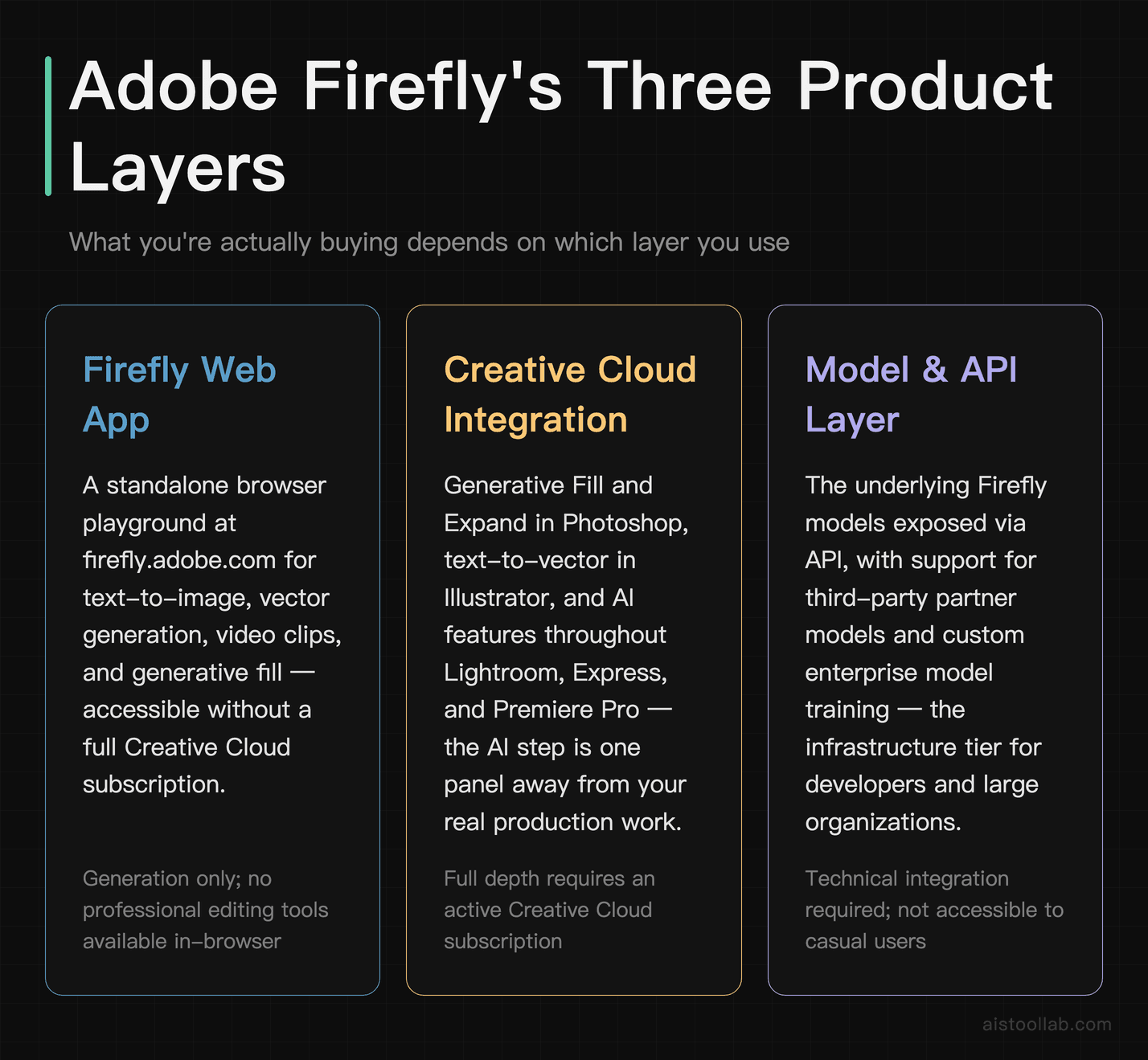
Adobe Firefly started life as Adobe’s family of generative AI models — trained, per Adobe’s official statements, on Adobe Stock, openly licensed content, and public domain material, which is the whole basis of its “commercially safe” pitch. But calling Firefly a single product misses the point. In 2026 it exists in three overlapping places at once, and understanding that is key to judging its value.
The first is the Firefly web app — a standalone playground at firefly.adobe.com where you generate images, vectors, video clips, and do generative fill in a browser. The second is Firefly baked directly into Creative Cloud apps: Generative Fill and Generative Expand in Photoshop, Generative Recolor and text-to-vector in Illustrator, and generative features scattered through Express, Lightroom, and Premiere Pro. The third is the model layer itself, which Adobe now exposes via API and increasingly lets you swap in partner models (Adobe has publicly discussed integrating third-party models like those from Google and others into the Firefly interface).
That three-in-one structure is the reason a straight feature-by-feature fight against a single competitor is a little unfair in both directions. When you buy into Firefly, you’re rarely buying a text-to-image generator in isolation. You’re buying a generation engine that lives inside tools you may already open every day. If you’ve read my Adobe Podcast AI review, you’ll recognize the pattern — Adobe’s real weapon is integration, not any single standout model.
The Honest Pros and Cons
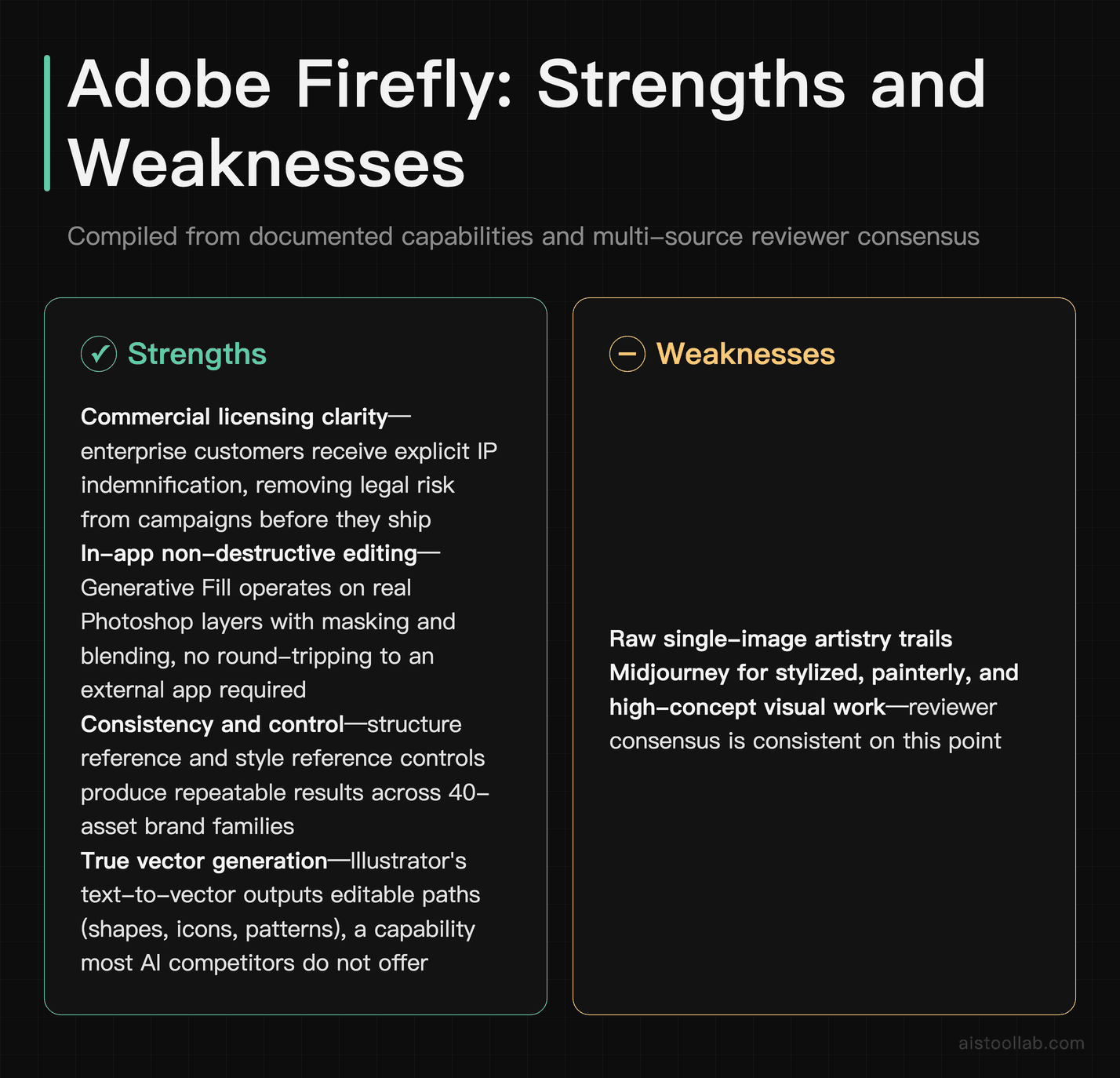
Before the deep dive, here’s the compiled verdict in plain terms, drawn from documented capabilities and reviewer consensus rather than any personal test bench.
Where Firefly genuinely delivers
- Commercial licensing clarity. Adobe explicitly positions Firefly output as designed for commercial use and has publicly offered IP indemnification for enterprise customers. For a business, that’s not a nice-to-have — it’s the difference between shipping a campaign and getting a nervous email from legal.
- In-app editing that actually finishes the job. Generative Fill inside Photoshop operates on a real layer, at real resolution, with masking and blending you already know. No round-tripping through a separate app and back.
- Consistency and control. Structure reference, style reference, and composition controls give repeatable results — vital when a brand needs 40 assets that look like they belong to the same family.
- Vector generation. Illustrator’s text-to-vector and Firefly’s vector output are genuinely rare among AI tools — most competitors only do raster.
Where it falls short
- Raw single-image “wow” factor. Reviewer consensus consistently gives Midjourney the edge on artistic, stylized, jaw-dropping single renders.
- Credit anxiety. Firefly’s generative credit system means heavy users can hit soft or hard limits, and figuring out your real monthly ceiling takes some math.
- It assumes the Adobe ecosystem. If you don’t use Creative Cloud, half the value evaporates and you’re paying for a browser tool that has cheaper rivals.
Who Should Actually Use It — Three Real Scenarios
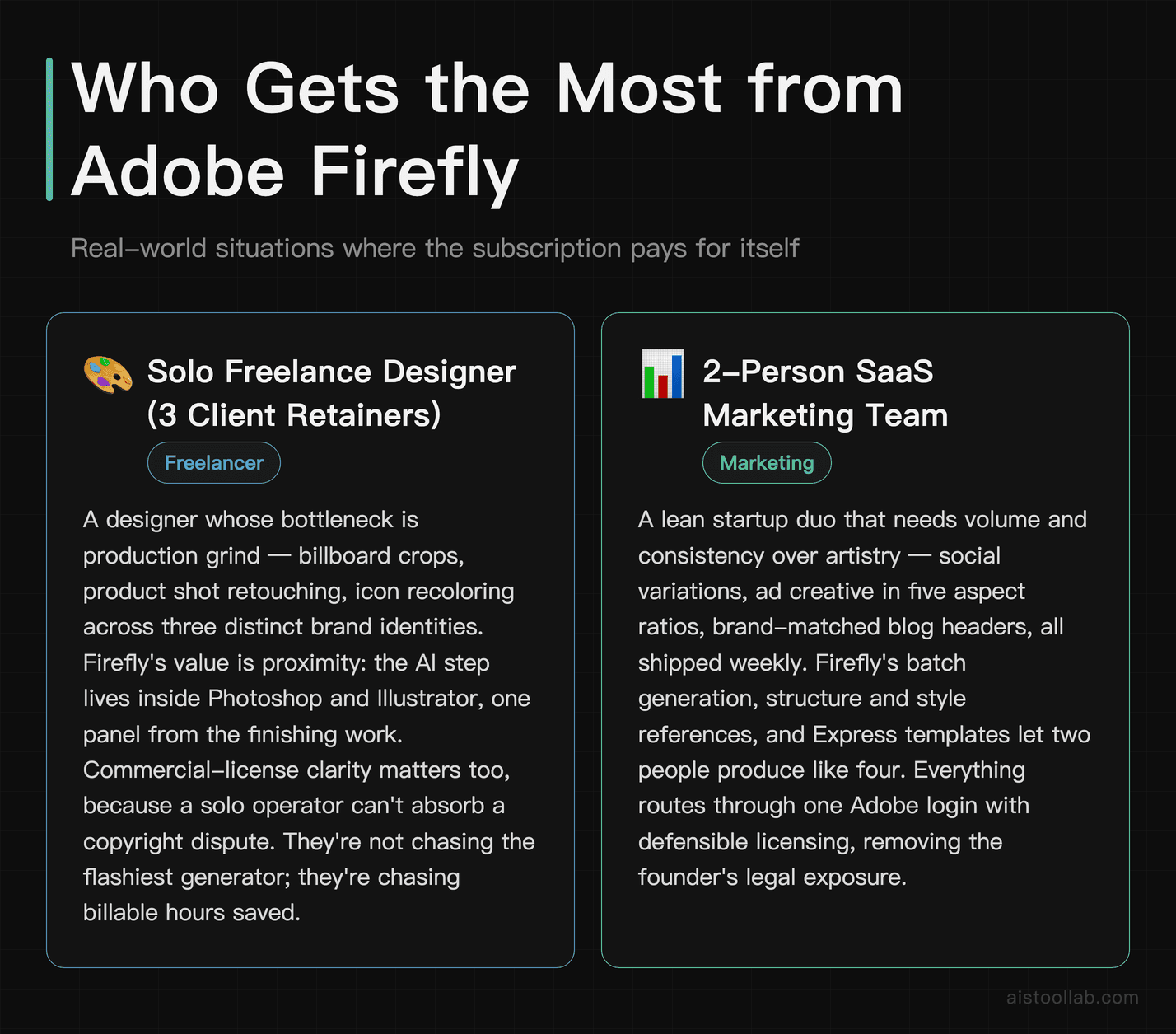
The solo freelance designer juggling three client brands
Picture a freelancer billing hourly who runs three retainer clients, each with a distinct visual identity. Their bottleneck isn’t ideation — it’s production grind: expanding a hero image to fit a billboard crop, removing a stray object from a product shot, recoloring an icon set to match a rebrand. For this person, Firefly’s value is that it lives inside Photoshop and Illustrator, so the AI step is one panel away from the finishing work. The commercial-license clarity matters too, because a solo operator can’t afford a copyright dispute. They’re not chasing the flashiest generator; they’re chasing billable hours saved, and the integration is what saves them.
The 2-person marketing team at a SaaS startup
A lean startup marketing duo needs volume and consistency more than artistry: social variations, ad creative in five aspect ratios, blog headers that match brand colors, all shipped weekly. Firefly’s batch-friendly features (bulk generation, structure and style references, and Express templates) let two people produce like four. Because everything routes through one Adobe login with defensible licensing, the founder isn’t stitching together five separate subscriptions and hoping each one’s terms hold up. This is the sweet spot where a bundled subscription genuinely beats paying per generation across a grab-bag of tools.
The creative agency producing regulated client work
Agencies serving finance, pharma, or big consumer brands live and die by legal defensibility. An agency can’t hand a client an asset generated by a model with murky training data. Adobe’s IP indemnification offer for enterprise Firefly use is, frankly, the whole ballgame here — it’s a business risk transfer, not a feature. Add centralized admin, custom model training on a brand’s own assets (Firefly Custom Models), and Creative Cloud seat management, and Firefly stops competing on image quality and starts competing on procurement checkboxes that standalone tools simply can’t tick.
Feature Deep Dive: How It Performs on Real Design Tasks

Image synthesis and photo enhancement
On text-to-image, the compiled reviewer consensus is remarkably steady: Firefly’s newer image models produce clean, usable, photo-realistic results with strong prompt adherence, especially for commercial subjects like product mockups and lifestyle scenes. Where it’s regularly described as trailing is high-concept, painterly, or heavily stylized work — the stuff Midjourney’s community obsesses over. So if your output is a moody album cover, Firefly is the wrong tool. If it’s a clean image of a product on a marble countertop with room for headline text, it’s arguably the right one.
Photo enhancement is where the ecosystem shows off. Generative Fill and Generative Expand operate non-destructively inside Photoshop, and Lightroom’s generative and AI-assisted masking features handle retouching within the app photographers already use. That “no export, no re-import” loop is the ROI that a browser-only generator structurally can’t match, no matter how good its model is.
Vector creation
This is Firefly’s quietly underrated superpower. Illustrator’s text-to-vector generates editable vector artwork — shapes, icons, patterns, scenes — as actual paths you can recolor and reshape, not a raster you trace afterward. Generative Recolor can re-theme an entire illustration set in seconds. Most standalone image generators, including Midjourney, don’t produce true vectors at all. For anyone doing logo exploration, icon systems, or scalable brand assets, that capability alone can justify staying in the Adobe camp.
Batch operations and consistency
Structure Reference and Style Reference let you lock composition or aesthetic across many generations, which is the practical foundation of batch work. Combined with Firefly’s bulk generation and Express’s template-and-resize automation, a team can spin one approved concept into dozens of on-brand variants. Consistency is the metric that actually maps to business value here — a brand doesn’t need one perfect image, it needs forty images that look related. That’s precisely the axis where per-generation novelty tools tend to wander stylistically.
Pricing and Value: The Part That Actually Decides It
Here’s where I’ll be careful, because Adobe restructures plans often and I won’t quote a figure I can’t stand behind. For current exact numbers, check the official Adobe Firefly page and the Creative Cloud pricing page — treat those as the source of truth over anything you read in a review, including this one.
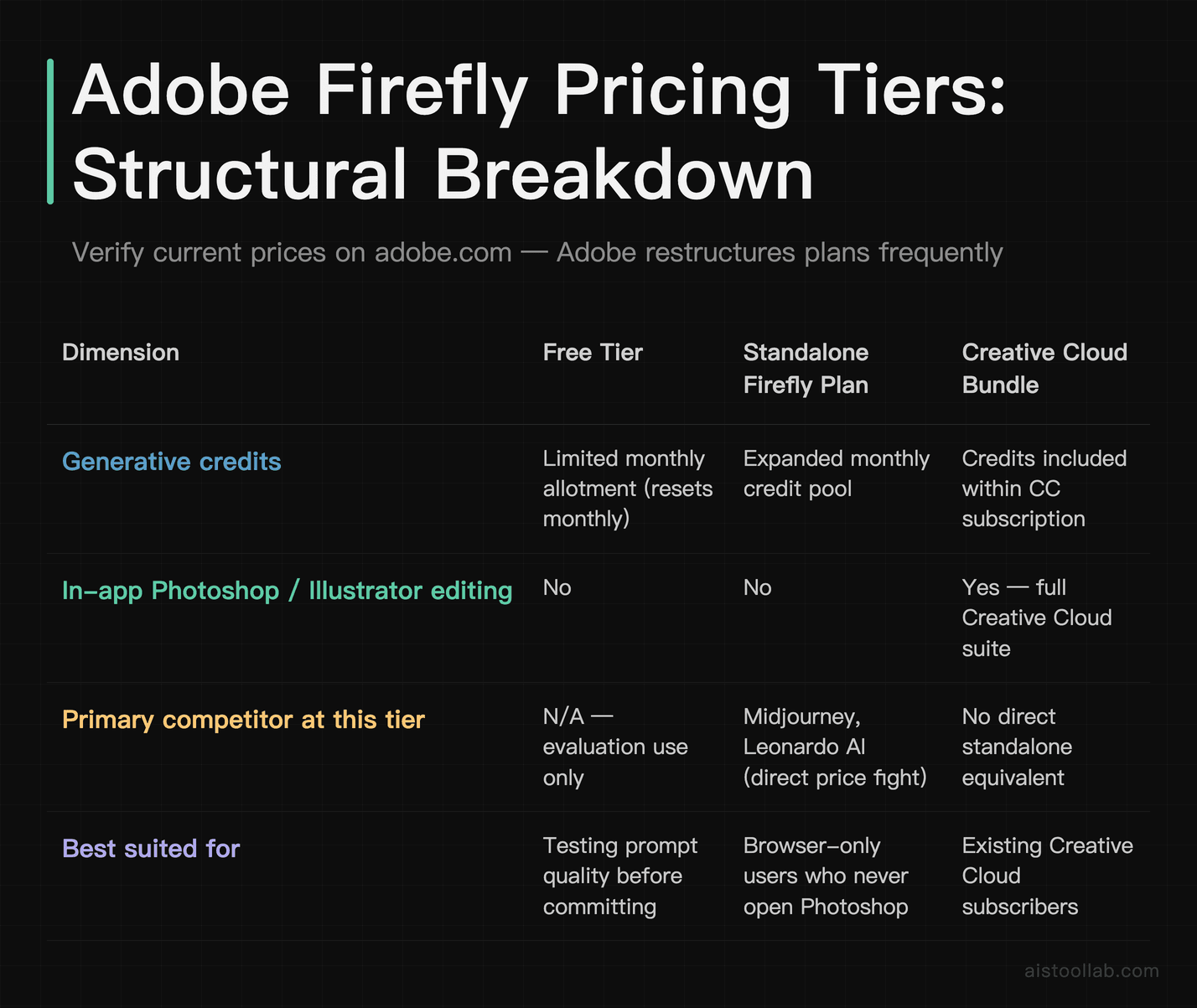
Structurally, though, here’s how the value tiers break down as of the current version:
Free tier. Adobe offers a free Firefly plan with a limited monthly allotment of generative credits — enough to evaluate the tool and do occasional light work, not enough for production volume. If you just want to see whether the output suits your style, start here and spend nothing.
Standalone Firefly paid plan. There’s a dedicated Firefly subscription for people who want more generative credits and premium features without a full Creative Cloud commitment. This is the tier to scrutinize hardest, because it’s the one competing directly on price with Midjourney and others. If you’re a browser-only user who never opens Photoshop, a standalone Firefly plan is competing purely on model quality and credit value — and that’s a closer fight.
Bundled with Creative Cloud. This is where the math tilts. Creative Cloud subscriptions (single-app like Photoshop, or the All Apps plan) include a monthly generative credit allocation. If you’re already paying for Creative Cloud for the apps themselves, a meaningful chunk of Firefly capability arrives at no additional line item. Your “AI cost” is effectively bundled into a subscription you were paying anyway.
Enterprise. Adobe offers enterprise Firefly agreements with higher/negotiated credit volumes, custom model training, admin controls, and the IP indemnification that agencies and large brands specifically pay for. Pricing here is quote-based — as it is with most enterprise creative tooling, and much like the seat-based enterprise math I broke down in my GitHub Copilot Enterprise review.
When the subscription beats pay-per-generation
The decision rule is cleaner than the pricing pages suggest. Ask two questions. One: do you already pay for Creative Cloud? If yes, Firefly is close to a free upgrade and the standalone competitors have to be dramatically better to justify a second subscription — they usually aren’t, for commercial work. Two: does your output need to survive legal review? If yes, the commercial-license and indemnification story pushes the value decisively toward Firefly regardless of raw image quality.
Where pay-per-generation or a cheap standalone tool wins: you don’t use Adobe apps, your work is stylized/artistic rather than commercial, and nobody’s legal team will ever look at the output. In that world, paying into the Adobe ecosystem is buying benefits you won’t use.
Firefly vs Midjourney vs Canva Generative Fill vs Microsoft Designer
Here’s the head-to-head across the dimensions that actually move business decisions. Ratings reflect compiled documentation and reviewer consensus, not a personal test lab.
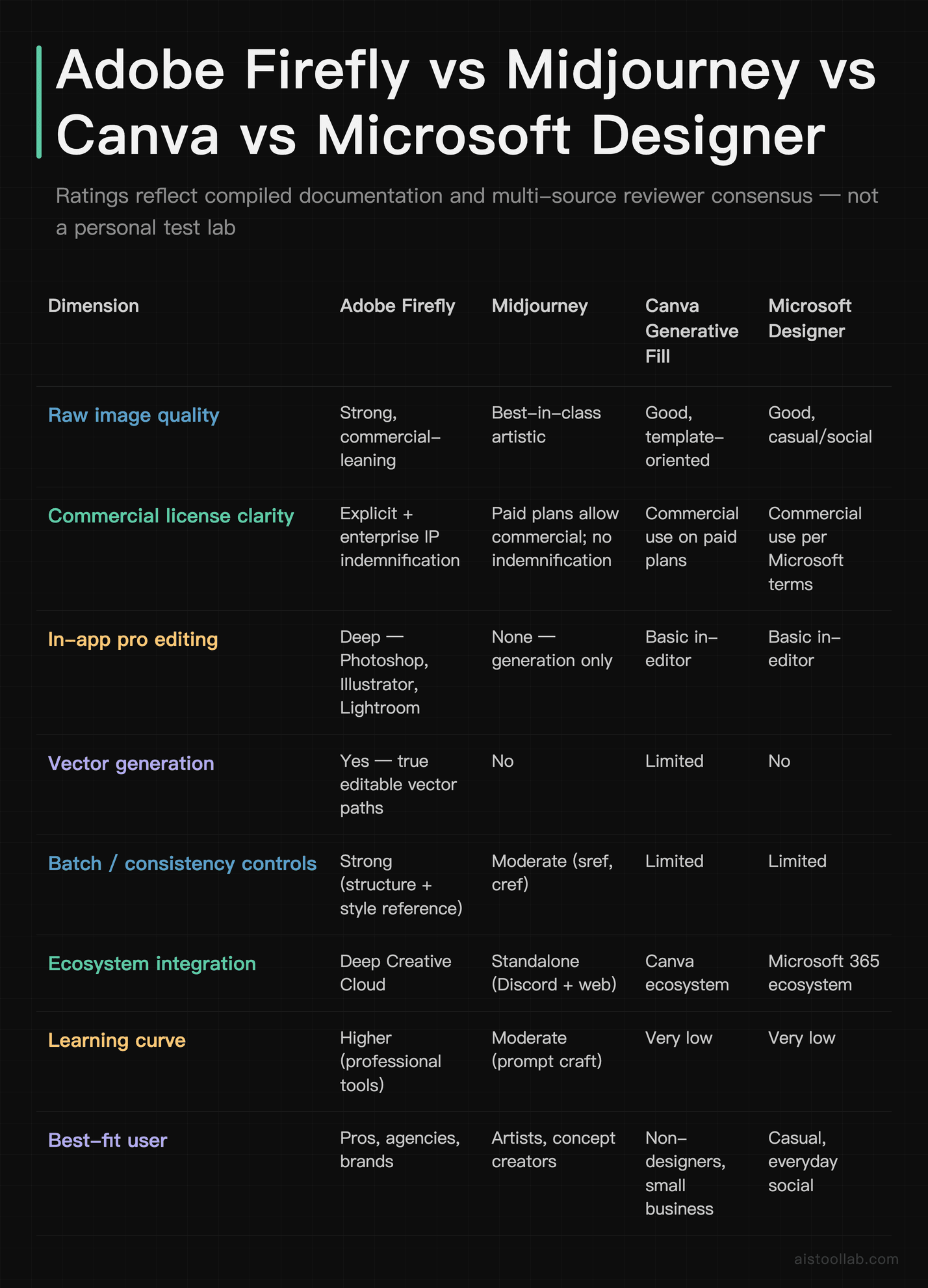
Read that table honestly and the picture is clear: no tool sweeps every column. Midjourney owns the art column, Designer and Canva own the “I’m not a designer and I need something in five minutes” column, and Firefly owns the professional-production-and-legal-safety column. Your job is to know which column you’re actually in.
The Verdict: Who Should Pay for Firefly
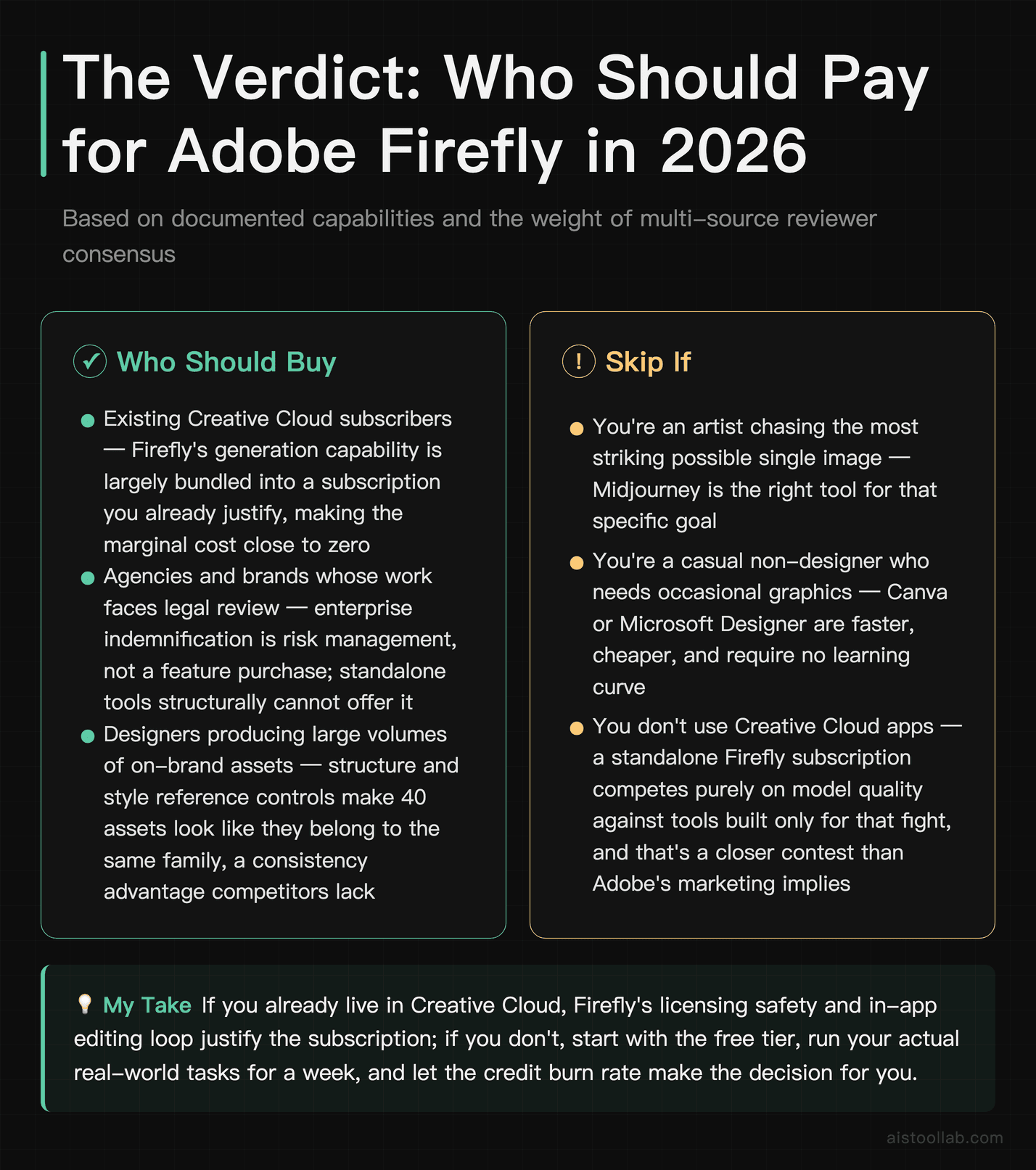
Based on the documented capabilities and the weight of reviewer consensus, here’s my honest call — no fence-sitting.
If you already live in Creative Cloud, Firefly is close to a no-brainer. The generation capability is largely bundled into a subscription you already justify, the in-app editing loop saves real production time, and the commercial-license story removes a genuine business risk. You’d need a very specific reason to bolt on a second subscription elsewhere.
If you’re an agency or a brand doing work that faces legal review, go with Firefly and pay for the enterprise tier specifically for the indemnification and custom model training. That’s not a feature purchase; it’s risk management, and standalone tools structurally can’t offer it.
If you’re an artist chasing the most striking possible single image, or a casual non-designer who needs the occasional graphic, don’t pay for Firefly — use Midjourney for the former and Canva or Microsoft Designer for the latter. Buying into Adobe’s ecosystem to get benefits you won’t use is just spending money.
Next step: if you’re on the fence, start with the free tier and run your actual real-world tasks through it for a week — the exact assets you produce, at your normal volume. Watch how fast the credits drain and whether the output survives your quality bar. You’ll know within a few real projects whether the Adobe ecosystem earns its place in your budget, or whether a leaner standalone tool does the job for less.
Frequently Asked Questions
Is Adobe Firefly’s free plan enough to get real work done?
For evaluation and occasional light use, yes; for production volume, no. Adobe’s free Firefly tier includes a limited monthly allotment of generative credits that resets each month, which is plenty to test prompt quality, try Generative Fill, and decide whether the output style fits your brand. Where it falls short is sustained commercial work — a freelancer producing client assets weekly or a marketing team shipping campaigns will burn through a free allotment quickly, and once credits are exhausted, generation slows or pauses depending on the current policy. The smart move is to treat the free plan as a genuine trial rather than a permanent solution: spend a week generating the kinds of assets you actually produce, track how fast the credits deplete, and extrapolate. If you hit the ceiling in two days of normal work, you have your answer about needing a paid tier. If a month passes and you barely dented it, you may never need to pay at all. Check the official Firefly page for the current free-tier credit amount, since Adobe adjusts these periodically.
How do Firefly’s generative credits actually work, and can I run out?
Generative credits are Firefly’s usage currency, and yes, you can run out — which is the number one frustration in public reviews. Each generative action (an image generation, a fill, certain premium operations) consumes credits, and every plan tier comes with a monthly allocation that resets on your billing cycle. Standard-quality generations typically cost fewer credits than premium or higher-resolution ones. When you exhaust your monthly allocation, Adobe’s policy has historically slowed generation speed or limited premium features rather than hard-stopping everything, but the exact behavior depends on your plan and the current terms, so verify on Adobe’s site. The practical advice: if you do heavy volume, do the arithmetic before committing. Estimate your monthly generation count, compare it against your plan’s credit allocation, and see whether a higher tier or an enterprise agreement with larger credit volumes makes sense. Heavy batch users are the ones most likely to feel the pinch, and they’re also the ones who benefit most from negotiating an enterprise plan where credit volume is part of the contract.
Is Firefly output actually safe to use commercially?
This is Firefly’s strongest selling point and the reason many businesses choose it over technically-superior generators. Adobe has publicly stated that Firefly’s core image models were trained on Adobe Stock, openly licensed content, and public domain material — an intentional design choice to make output commercially defensible. For enterprise customers, Adobe has gone further and offered IP indemnification, meaning Adobe stands behind the output legally under the terms of that agreement. That’s a genuine business differentiator: most standalone generators grant commercial usage rights on paid plans but do not indemnify you against third-party IP claims. For a solo creator, the practical benefit is peace of mind. For an agency or a regulated brand, it can be the deciding factor in a procurement process, because it transfers a real legal risk. That said, always read the current terms for your specific plan and region rather than assuming — licensing details and indemnification scope can differ between individual, teams, and enterprise agreements, and Adobe updates these terms over time.
Firefly vs Midjourney — which should I actually pick?
It depends entirely on what you produce, and the compiled reviewer consensus is unusually consistent on this. Choose Midjourney if your work is artistic, stylized, conceptual, or aesthetic-first — album art, editorial illustration, mood boards, striking single images where visual drama matters more than editability or licensing paperwork. Its community and models are widely praised for exactly that. Choose Firefly if your work is commercial production — product imagery, ad creative, brand assets, anything that needs editing inside professional tools, true vector output, batch consistency, or legal defensibility. The two aren’t really competing for the same job despite both being “text to image.” A useful test: if your final deliverable goes to a client’s legal team or needs 40 consistent variations, Firefly. If it goes to your portfolio or an art director who wants something striking, Midjourney. Plenty of professionals actually pay for both and use each where it’s strongest, treating Midjourney as the ideation engine and Firefly as the production-and-finishing engine.
Do I need Creative Cloud to use Firefly, or can I use it standalone?
You can use Firefly standalone through the web app and a dedicated Firefly subscription — you do not need a full Creative Cloud plan just to generate images. But here’s the honest caveat: standalone Firefly gives you the generation engine without the deep in-app editing that makes Firefly special. Generative Fill inside Photoshop, text-to-vector inside Illustrator, and generative masking inside Lightroom all require those respective apps. So a standalone Firefly user is essentially getting a browser-based generator competing directly on price and quality with Midjourney, Canva, and Microsoft Designer — a much closer contest. If you already subscribe to Creative Cloud for the apps, Firefly capability is largely bundled in via your monthly credit allocation, which is where the value math becomes lopsided in Adobe’s favor. My read: standalone Firefly makes sense only if you specifically want Adobe’s commercial-safe output but genuinely don’t need the pro apps. Everyone else either uses the free tier to dabble or gets Firefly as part of a Creative Cloud plan they already justify for other reasons.
How does Firefly handle vector graphics, and is it really different?
Yes, and this is genuinely one of Firefly’s most differentiated capabilities. Through Illustrator’s text-to-vector feature, Firefly generates actual editable vector artwork — real paths, shapes, and fills you can select, recolor, reshape, and scale infinitely without quality loss. This is fundamentally different from raster generators like Midjourney, which output pixel images that you’d then have to trace or auto-vectorize (a lossy, imperfect process). Firefly can produce icons, patterns, subjects, and full scenes as vectors, and Generative Recolor can re-theme an entire piece of vector art in seconds while keeping it editable. For anyone doing logo exploration, icon systems, illustration for scalable use, or any brand asset that needs to work at both business-card and billboard size, this capability alone can justify choosing the Adobe ecosystem. It’s the kind of feature that doesn’t show up in a “which AI makes prettier images” comparison but massively affects real production work. If vector output matters to your workflow, Firefly has very few genuine competitors here.
What about batch work and keeping outputs consistent across a campaign?
Consistency is arguably more important than peak quality for real brand work, and Firefly is built with this in mind. Structure Reference lets you lock the composition or layout of a source image while changing its content, and Style Reference lets you apply a consistent aesthetic across many generations — so 40 assets can share a visual family rather than wandering off in 40 directions. Combined with bulk generation features and Adobe Express’s template-and-resize automation, a small team can turn one approved concept into a full campaign’s worth of on-brand variants across multiple aspect ratios. This is precisely where per-generation novelty tools tend to struggle: they’re optimized to surprise you, not to repeat a look faithfully. For a marketing team that needs Instagram, story, banner, and email versions of the same creative, all matching brand colors, Firefly’s reference controls plus Creative Cloud’s resizing tools do the heavy lifting. Just budget your credits accordingly, because batch generation naturally consumes them faster than one-off work.
Is Firefly worth it for a non-designer who just needs occasional graphics?
Probably not as your first choice, and I’d rather be honest than upsell you. If you’re a non-designer who occasionally needs a social graphic, a presentation image, or a quick marketing visual, tools like Canva Generative Fill or Microsoft Designer are likely a better fit — they have a far gentler learning curve, they’re built around templates that do the design thinking for you, and they integrate into ecosystems (Canva’s editor, Microsoft 365) that casual users already navigate comfortably. Firefly’s deepest value lives inside professional apps that carry their own learning curve, so paying for the Adobe ecosystem to make the occasional graphic is overkill. The exceptions: if you specifically need commercially-indemnified output for business use, or if your organization already runs on Creative Cloud, Firefly becomes reasonable even for lighter users. But for a solopreneur who just wants a decent-looking header for a blog post now and then, start with Firefly’s free tier or a simpler tool, and only step up to a paid Adobe plan if your needs genuinely grow into professional production territory.
Last updated: 2026
Found this review helpful?
👉 Browse the AI Tools Library to find the right tools for your workflow.