
The $39 Question Every Engineering Lead Is Asking in 2026
Here’s the number that makes finance teams pause: GitHub Copilot Enterprise lists at $39 per user, per month. For a 50-developer org, that’s roughly $23,400 a year before you’ve shipped a single line of AI-assisted code. Double the headcount and you’re staring at a five-figure recurring line item that someone in procurement will eventually circle in red.
And yet engineering organizations keep buying it. GitHub has publicly stated that Copilot is its fastest-growing product ever, and Microsoft’s earnings commentary has repeatedly singled out Copilot adoption among enterprise customers. So either thousands of CTOs are collectively wrong, or the math actually works out once you account for what a senior developer’s hour costs. That tension — premium price versus genuine productivity payoff — is exactly what this review digs into.
To be clear about method: this is a compiled analysis built from GitHub’s official documentation, published pricing pages, release notes, and the consensus from public reviews on G2, Reddit’s r/programming and r/ExperiencedDevs, and Hacker News threads. It’s not a personal hands-on test. The goal is to help you decide whether GitHub Copilot Enterprise earns its premium over the cheaper Business tier — and over the growing pile of competitors trying to undercut it.
Copilot’s Pricing Tiers at a Glance
Before the deep dive, here’s how the plans stack up. GitHub currently sells Copilot across several tiers, and the jump that matters most for organizations is Business versus Enterprise. The table below reflects publicly listed pricing as of mid-2026; always confirm on GitHub’s pricing page before budgeting, since AI tooling prices move fast.
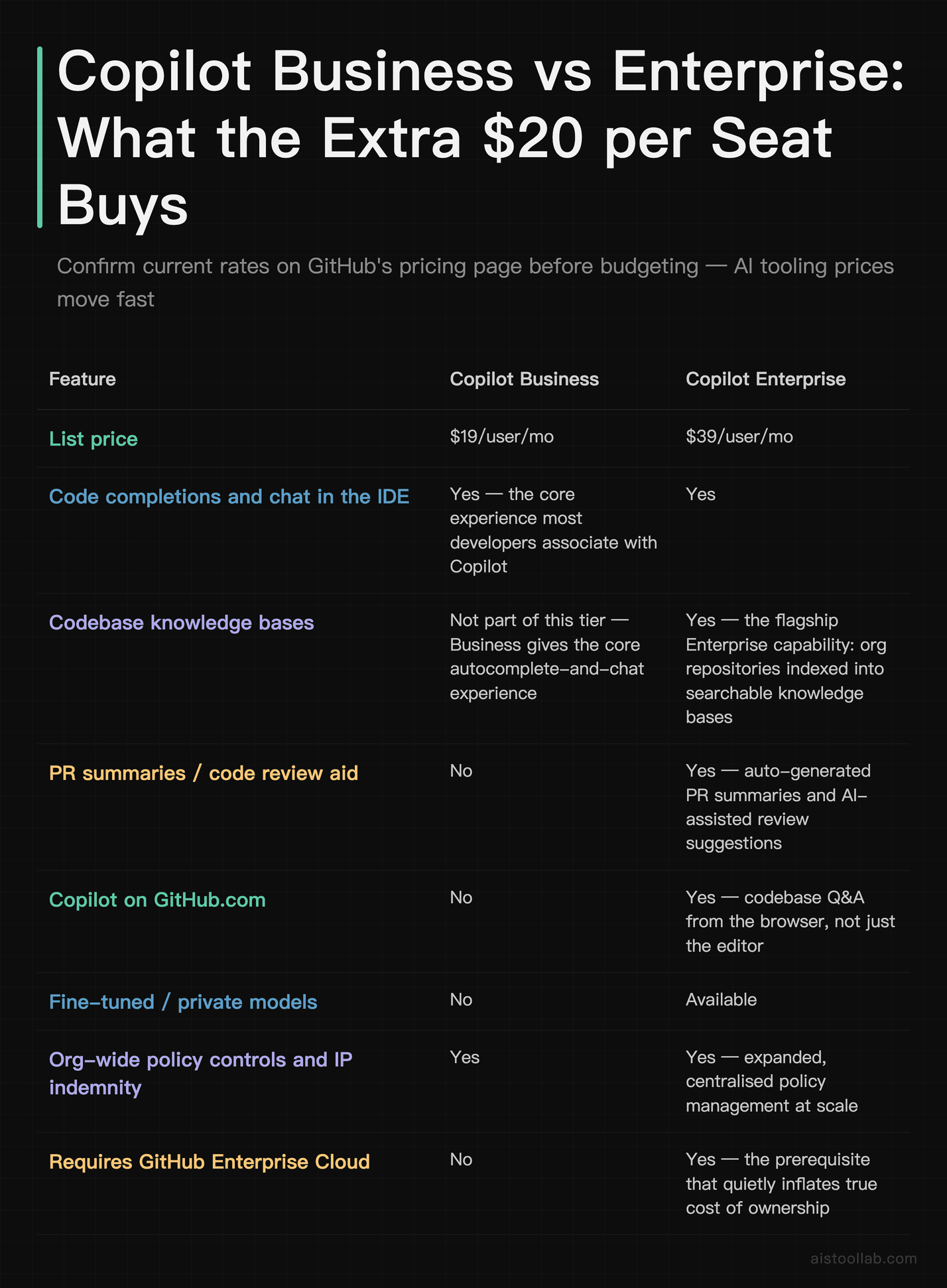
The headline takeaway: Enterprise costs roughly double Business, and the single biggest reason is that it pushes Copilot out of the editor and into GitHub.com itself — pull requests, issues, and organization-wide knowledge bases. Whether that’s worth $20 extra per seat depends entirely on how much your team lives inside GitHub’s web platform versus just the IDE. We’ll come back to that.
What the Enterprise Tier Actually Adds
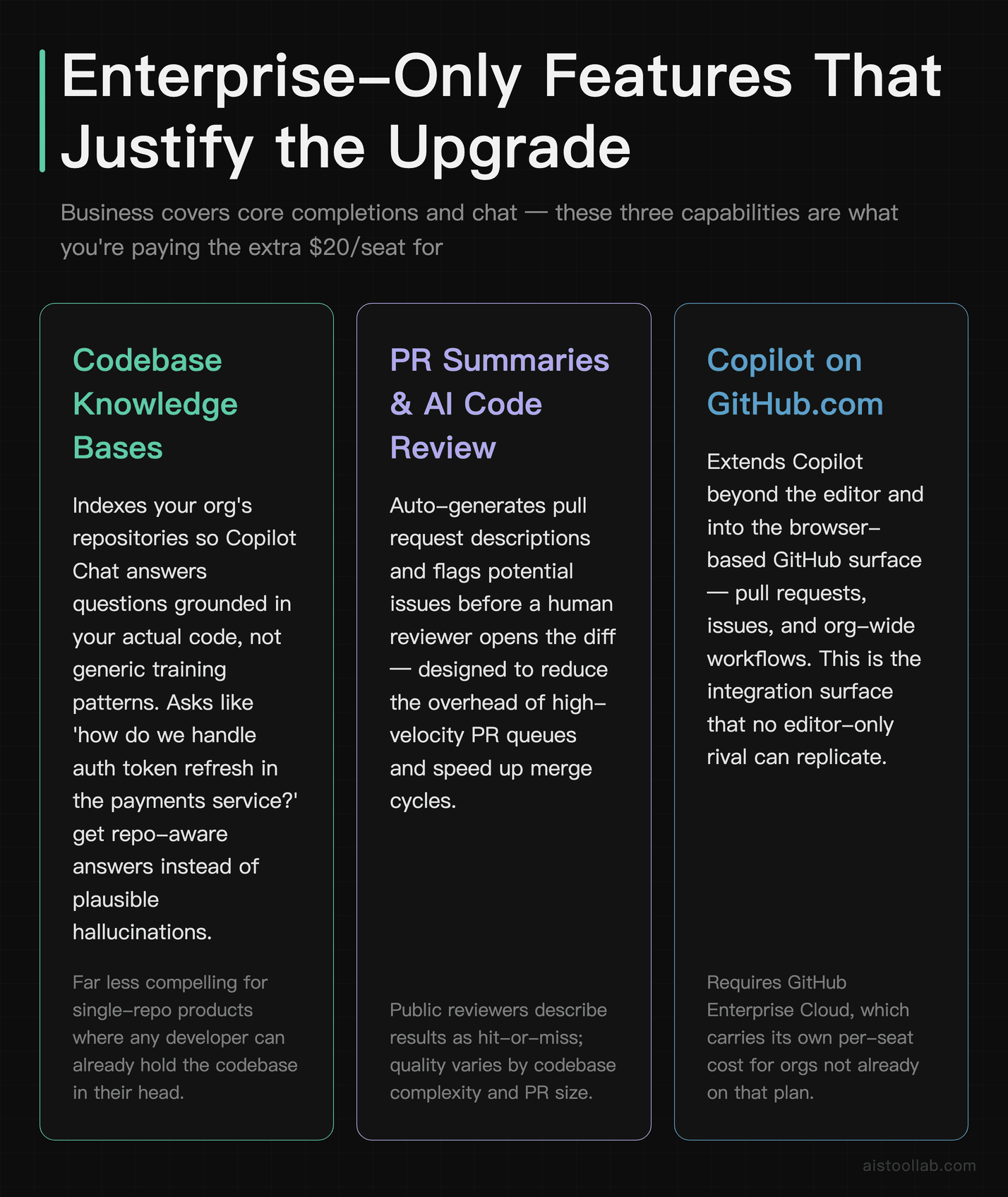
If you only read GitHub’s marketing, every tier sounds magical. The honest framing from the documentation and reviewer chatter is narrower: Business already gives you the core autocomplete-and-chat experience that most developers associate with Copilot. Enterprise is about organizational features that a 5-person startup will barely touch but a 500-engineer company will lean on daily.
Codebase knowledge bases
The flagship Enterprise capability is indexing your organization’s repositories into searchable knowledge bases, so Copilot Chat can answer questions grounded in your actual code, not just generic patterns from its training data. Ask “how do we handle auth token refresh in the payments service?” and it can pull from the relevant repos rather than hallucinating a plausible-but-wrong answer. For large monorepos and sprawling microservice estates, this is the feature that justifies the upgrade. For a single-repo product, it’s far less compelling.
Pull request and code review assistance
Enterprise brings Copilot into the PR flow: auto-generated PR summaries, and AI-assisted review suggestions that flag potential issues before a human reviewer opens the diff. Public reviews are split here — some teams call the PR summaries a genuine time-saver during sprint crunch, while others find them verbose and end up rewriting them. Treat this as a helpful first draft, not a replacement for human review. It shortens the “what does this PR even do?” cold-start, which for a busy reviewer juggling a dozen open PRs is not nothing.
Documentation and codebase Q&A on GitHub.com
Because Enterprise extends Copilot to the web platform, new joiners can interrogate the codebase from the browser during onboarding instead of pinging a senior dev every twenty minutes in Slack. That onboarding-acceleration angle shows up repeatedly in enterprise testimonials, and it’s arguably the most underrated part of the value proposition — the cost of a senior engineer’s interrupted focus is real money.
Security and policy controls
Both Business and Enterprise include vulnerability filtering that blocks common insecure code patterns in suggestions, plus IP indemnification and the ability to exclude specific files from being used as context. Enterprise layers on more granular org-wide policy management. If your security and compliance team needs centralized control across hundreds of seats, this matters; if you’re a scrappy team that trusts everyone, it’s overhead you won’t notice.
The True Cost of Ownership (Beyond the Sticker Price)
Sticker price is the easy part. The real total cost of ownership for Copilot Enterprise has a few line items teams forget at budgeting time.
The biggest hidden requirement: Enterprise Copilot requires GitHub Enterprise Cloud. If you’re currently on GitHub Team or a lower plan, you can’t just bolt Copilot Enterprise on top — you’re also buying into Enterprise Cloud seats, which carry their own per-user cost. For organizations already on Enterprise Cloud, this is a non-issue. For everyone else, it adds a second per-seat line item underneath the Copilot license, so the real per-developer spend is the sum of the two — model both numbers before you budget. This single fact reshapes the entire ROI calculation, and it’s the thing most “Copilot is too expensive” complaints actually trip over.
Then there’s the soft cost of rollout: admin time to configure policies, index repositories into knowledge bases, run an internal pilot, and train developers to prompt effectively. None of that is huge, but it’s not zero, and the productivity gains don’t fully materialize on day one. A ramp period of a few weeks before usage habits settle comes up repeatedly in reviews.
Here’s the back-of-napkin math that makes leadership comfortable, using conservative assumptions you can adjust: plug in your own fully loaded hourly rate for a senior developer (salary plus benefits and overhead). If that rate is above $39 an hour, a seat costs you less than one of those hours a month — and on that arithmetic the break-even bar is low: saving a developer even one hour a month covers the seat. Use your real numbers rather than a figure I picked; the point is the shape of the maths, not a specific rate. The interesting debate isn’t whether it saves any time — it’s whether the marginal jump from Business to Enterprise saves enough additional time to justify the second $19.
Does the Productivity Claim Hold Up?
GitHub has published research suggesting developers using Copilot completed certain coding tasks meaningfully faster than a control group, and a frequently cited figure from GitHub’s own studies points to a large share of code being authored with Copilot’s help in some files. I’d treat vendor-published productivity numbers with healthy skepticism — they’re real studies, but they’re commissioned by the company selling the product, and task speed in a controlled experiment doesn’t perfectly map to shipped business value.
The more credible signal comes from the consistency of independent reviews. Across G2, Reddit, and Hacker News, the recurring theme is that Copilot is genuinely useful for boilerplate, test scaffolding, repetitive refactors, and “I forgot the exact syntax” moments — and less reliable for complex architectural decisions or novel algorithms. In those reviews the disagreement is rarely about whether it helps at all — it is about how much it helps, and whether it occasionally introduces subtle bugs that eat the time it saved. That’s a far more honest picture than “10x your output.”
If you want to reason rigorously about where AI assistants help versus hurt, it’s worth pairing this with a framework for evaluating model behavior generally — I touched on related trade-offs in our AI Model Performance Metrics 2026 Guide, because raw benchmark speed and real-world coding usefulness are not the same thing.
Integration Depth Across Editors
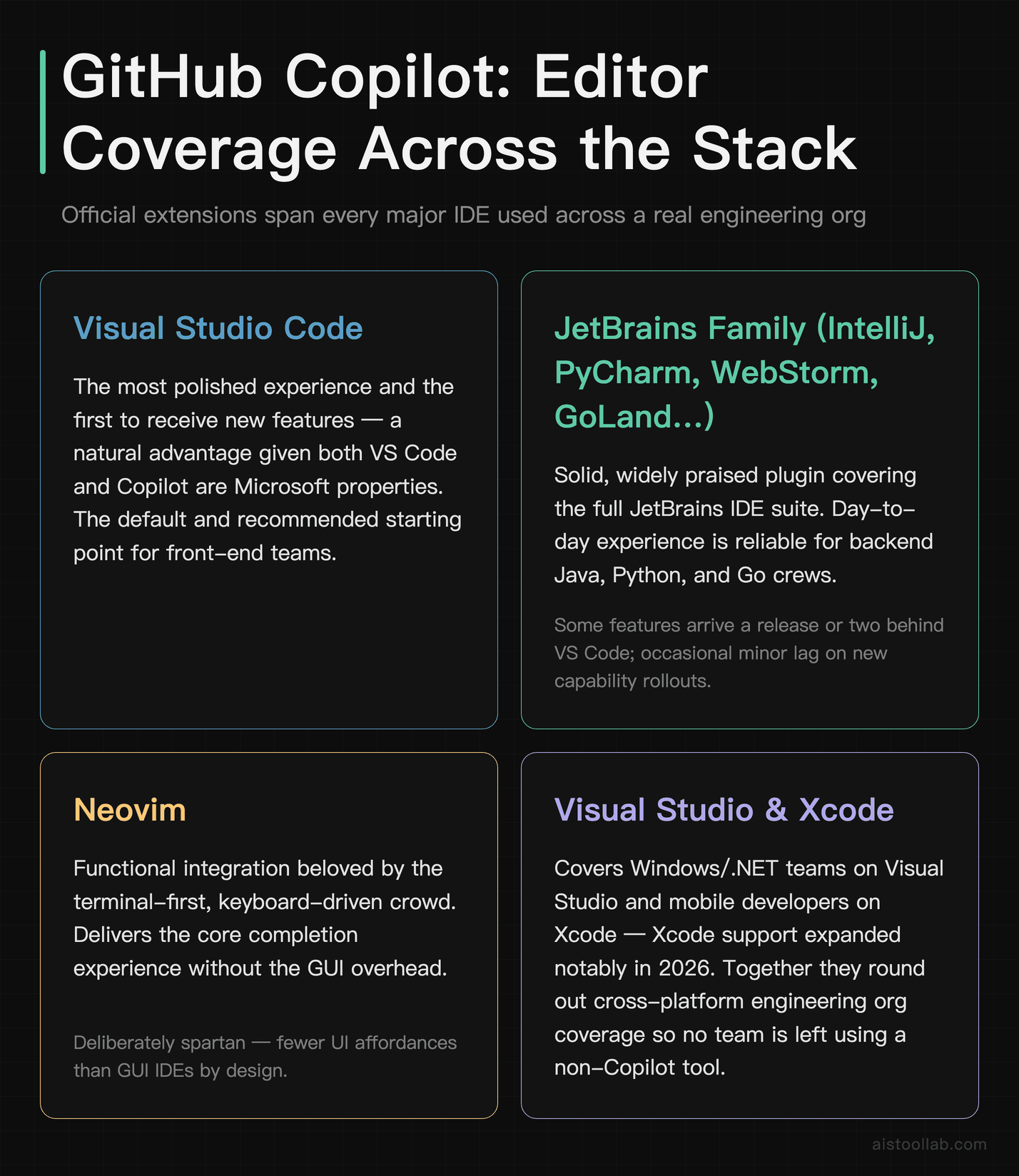
One area where Copilot earns its incumbency is editor reach. According to GitHub’s documentation, Copilot ships official extensions for Visual Studio Code, Visual Studio, the JetBrains IDE family (IntelliJ, PyCharm, WebStorm, GoLand, and the rest), Neovim, and Xcode support has expanded as well. This breadth matters more than it sounds: in a real engineering org you’ve got the front-end team in VS Code, the backend Java crew in IntelliJ, a couple of die-hards in Neovim, and someone on Xcode for the iOS app. A tool that only works in one editor forces fragmentation.
The VS Code experience is the most polished and gets new features first — unsurprising, since both are Microsoft properties. The JetBrains plugin is solid and widely praised, though some reviewers note features occasionally land there a release or two behind VS Code. The Neovim integration is functional and beloved by the terminal crowd, but it’s a more spartan experience by nature. The deepest integration, of course, is with GitHub itself — and that GitHub.com surface area is exactly what the Enterprise tier unlocks and what genuinely separates Copilot from editor-only competitors like Cursor.
Who Should Actually Buy It: Three Real Scenarios
The 200-engineer fintech already on Enterprise Cloud
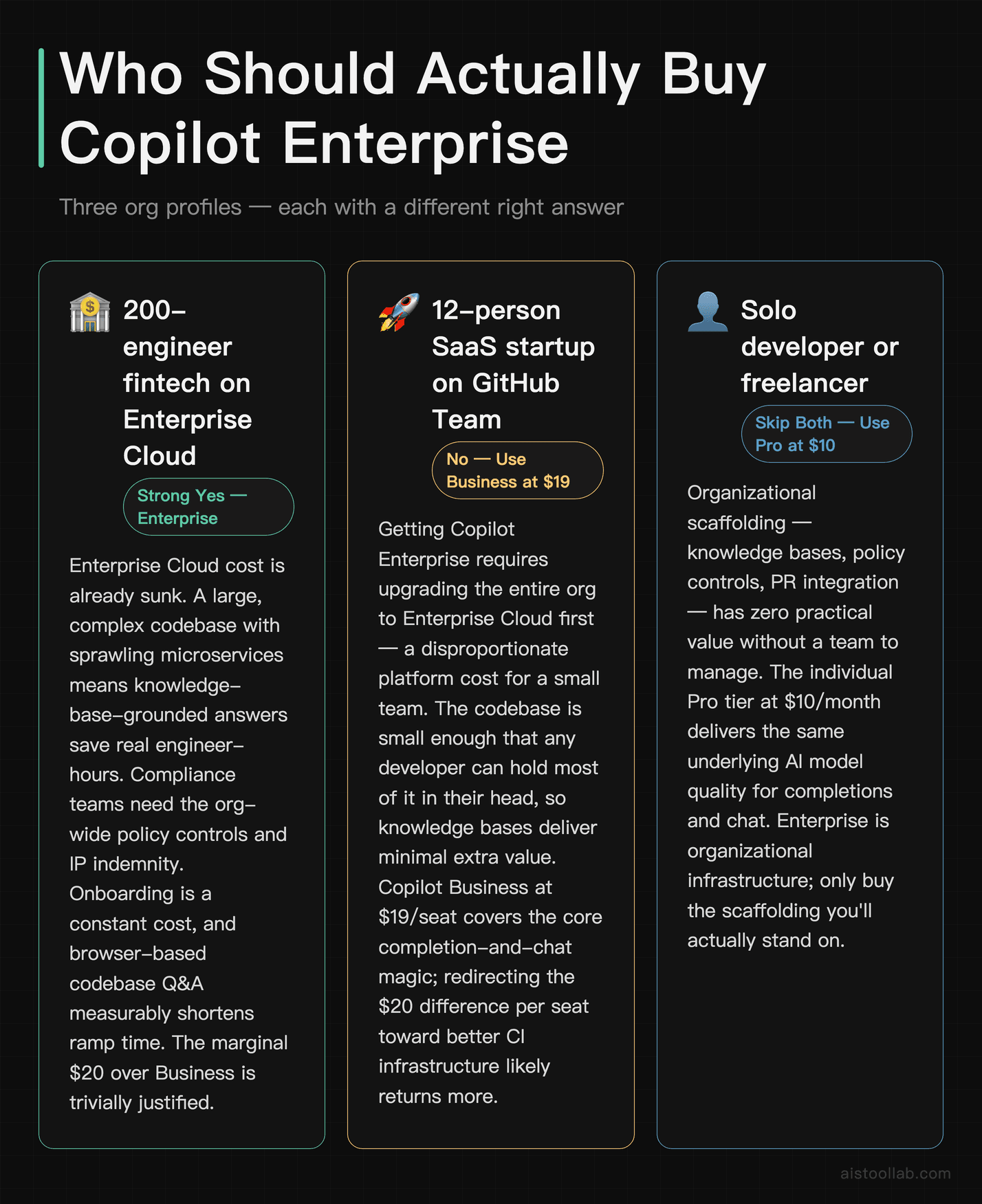
This is Copilot Enterprise’s sweet spot. They’re already paying for GitHub Enterprise Cloud, so the platform cost is sunk. They have a large, complex codebase where knowledge-base-grounded answers slash the time engineers spend spelunking through unfamiliar services. Their compliance team needs the org-wide policy controls and IP indemnity. Onboarding new hires is a constant cost, and browser-based codebase Q&A is aimed squarely at shortening that ramp. For them, the $39 seat is an easy yes, and the marginal cost over Business is trivially justified.
The 12-person SaaS startup on GitHub Team
Here the calculus flips. To get Copilot Enterprise they’d have to upgrade their entire org to Enterprise Cloud first — a big jump for a small team. Their codebase is small enough that a developer can hold most of it in their head, so the knowledge-base feature delivers limited extra value. For this team, Copilot Business at $19/seat is almost certainly the smarter buy: they get the core completion-and-chat magic without paying for organizational features they won’t use. The difference might well be better spent elsewhere — better CI infrastructure, say.
The solo founder or freelance developer
Neither Business nor Enterprise is aimed at them. An individual is far better served by Copilot Pro at $10/month (or Pro+ for heavier usage), which delivers the same in-editor experience. The Enterprise tier’s value is entirely organizational — team policies, shared knowledge bases, admin controls — none of which a one-person shop needs. If you’re billing clients hourly and want AI assistance, the individual tiers are the value play; the Enterprise pitch is simply not for you.
Cost-Benefit vs the Competition
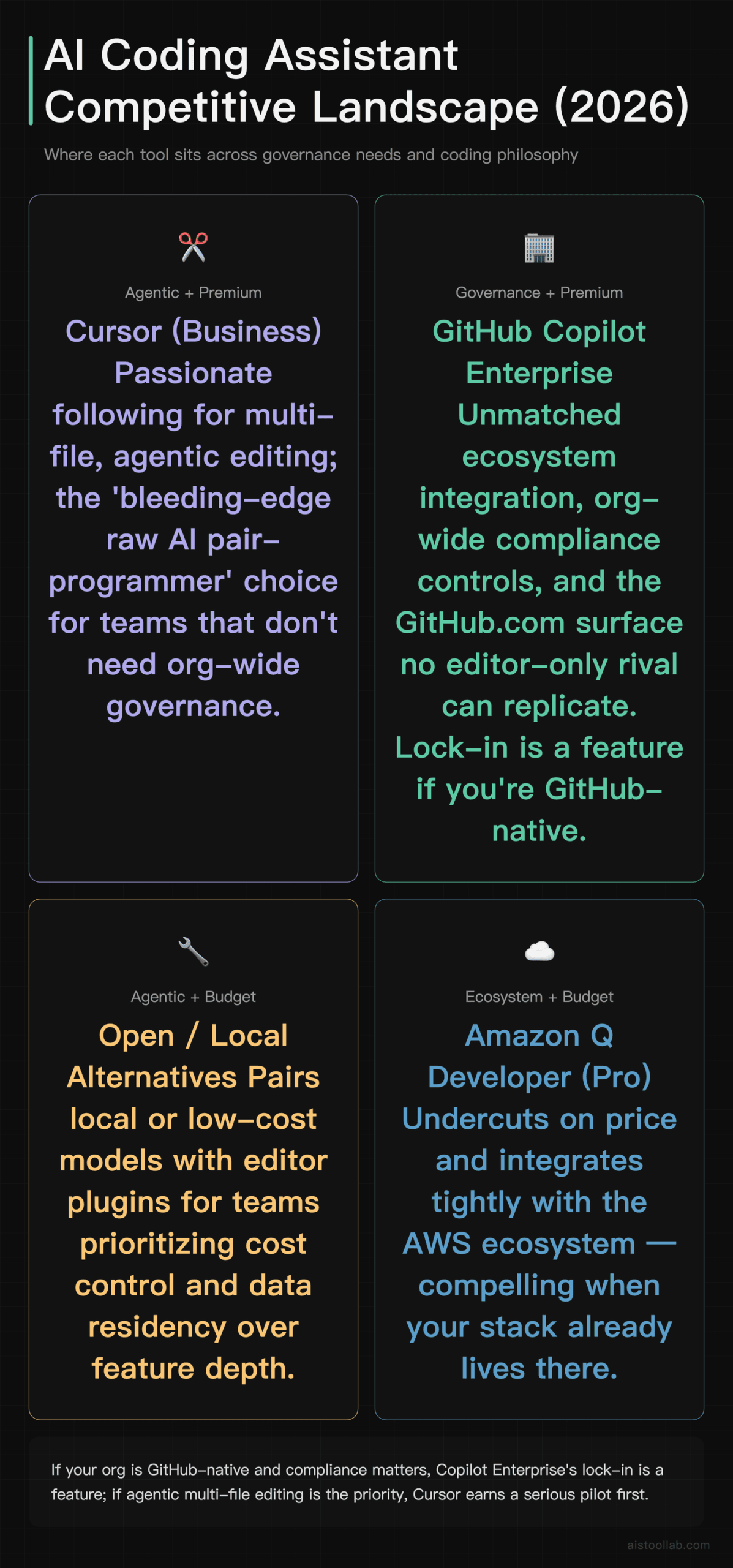
Copilot doesn’t exist in a vacuum anymore. Cursor has won a passionate following for its agentic, multi-file editing flow and is priced in a similar range for teams. Amazon Q Developer undercuts on price and integrates tightly with the AWS ecosystem, which is compelling if your stack lives there. There’s also a healthy field of open-and-cheaper alternatives that pair local or low-cost models with editor plugins for teams that want to control spend and data residency.
The honest reviewer consensus is that Cursor often feels ahead on the raw “AI pair-programmer that rewrites whole files” experience, while Copilot wins on ecosystem integration, enterprise governance, and the GitHub.com surface that competitors simply can’t replicate. If your organization is GitHub-native and cares about compliance, Copilot’s lock-in is a feature, not a bug. If you’re chasing the bleeding edge of agentic coding and don’t need org-wide governance, Cursor deserves a serious pilot. For teams weighing the underlying model trade-offs, our rundown of 10 Essential AI Models Every Developer Should Know in 2026 is a useful companion, since the assistant is only as good as the model behind it.
Pros and Cons
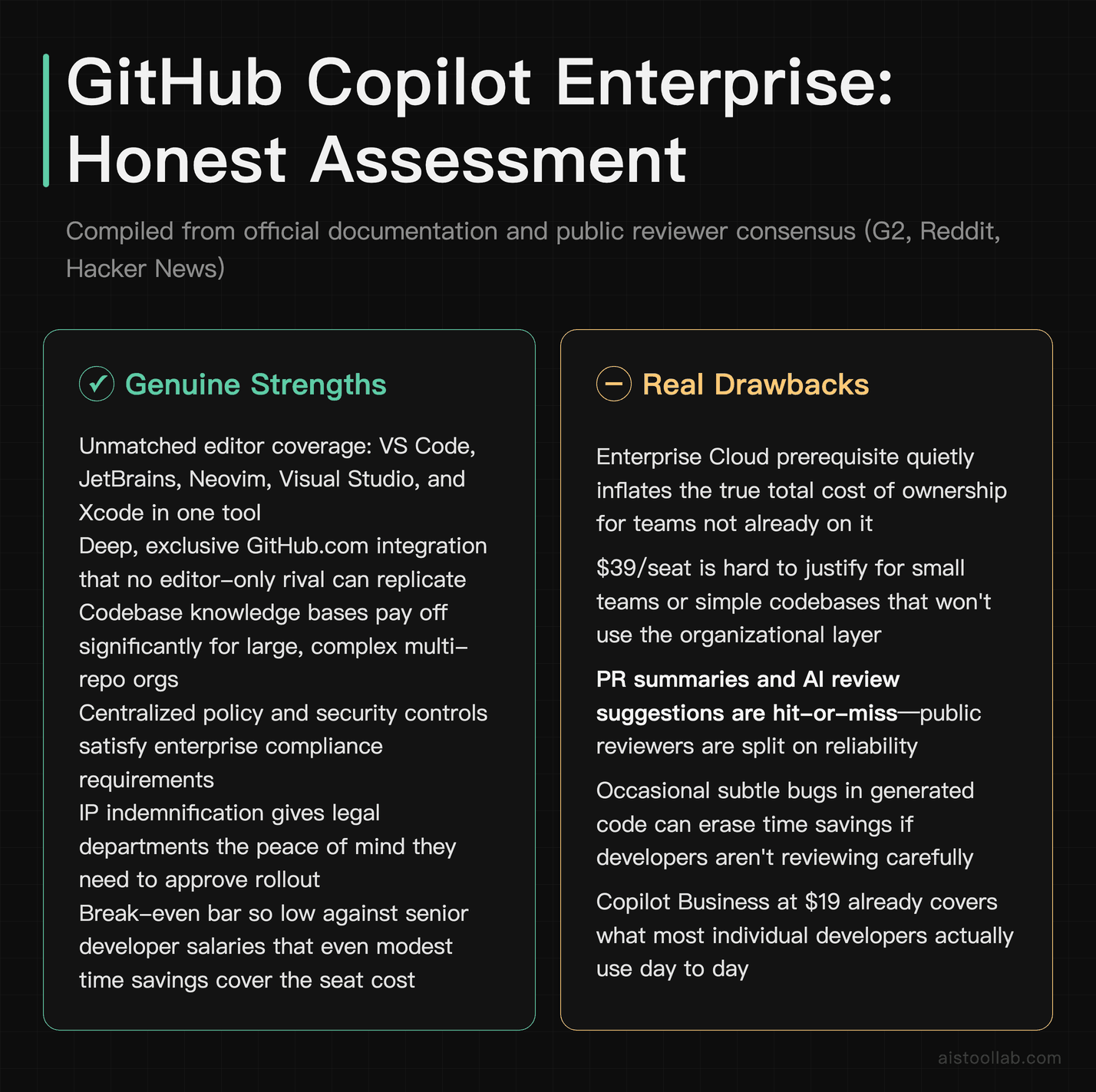
Stripping away the marketing, here’s the balanced view compiled from the documentation and public reviews.
What’s genuinely strong: broad editor coverage (VS Code, JetBrains, Neovim, Visual Studio, Xcode); GitHub.com integration that an editor-only tool does not have; codebase knowledge bases that pay off for large, complex orgs; centralized policy and security controls that compliance teams ask for; IP indemnification; and — on the salary arithmetic above — a break-even bar low enough that modest time savings cover the seat cost.
What gives buyers pause: the Enterprise Cloud prerequisite that quietly inflates true cost of ownership; a $39 price that’s hard to justify for small teams or simple codebases; PR summaries and review suggestions that reviewers describe as hit-or-miss; occasional subtle bugs in generated code that can erase time savings if you’re not reviewing carefully; and a feature gap where Business already covers what most individual developers actually use day to day. The premium is real — you have to want the organizational layer to feel it’s worth the money.
The Verdict: Right Tool, Specific Buyer
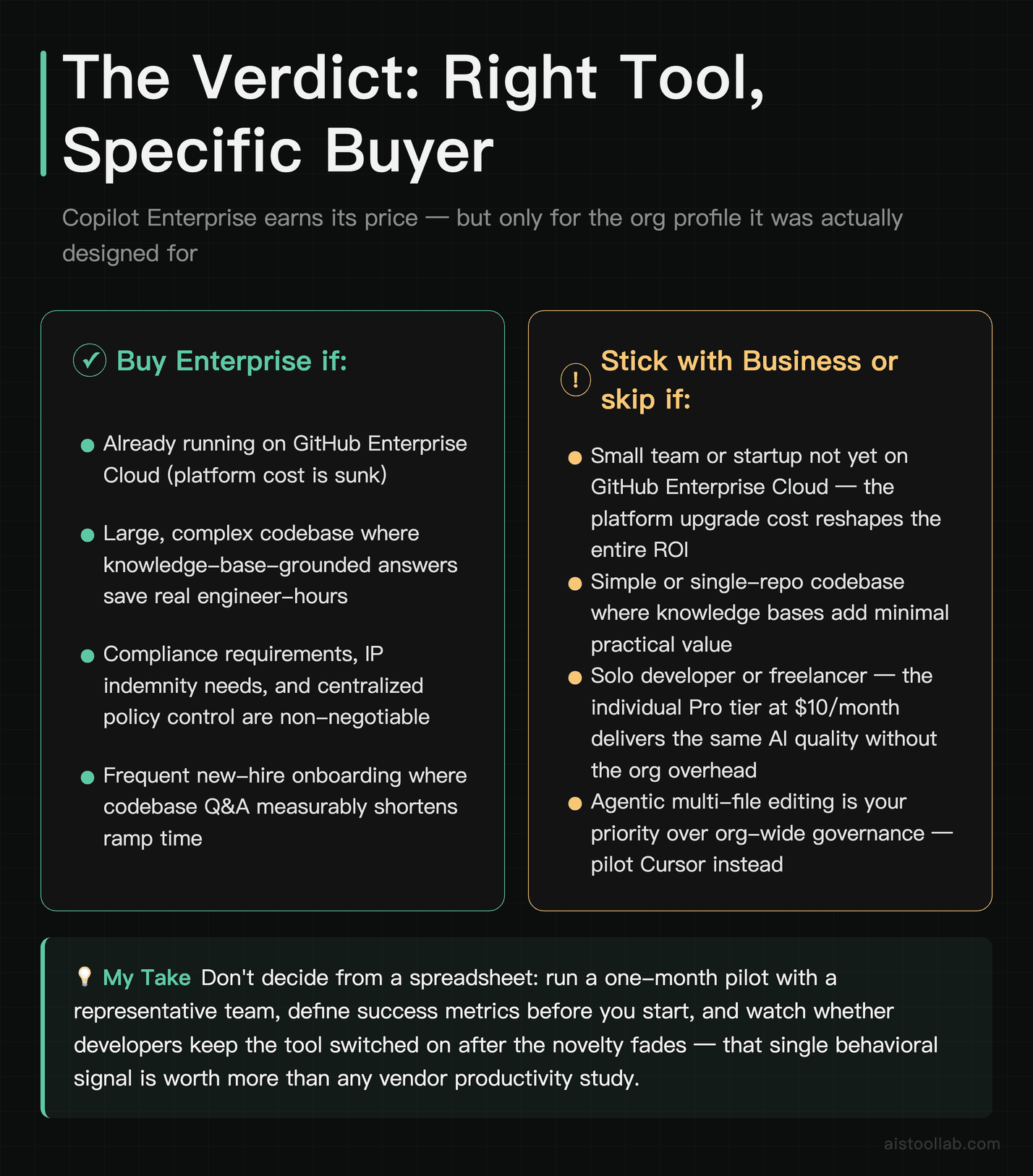
Copilot Enterprise is not overpriced — but it is precisely targeted, and buying it without understanding that target is how teams end up feeling burned. If you’re a mid-to-large organization already running on GitHub Enterprise Cloud, with a complex codebase, real compliance needs, and steady onboarding, this is close to a no-brainer: the marginal $20 per seat over Business buys genuinely useful organizational features, and the break-even bar is laughably low against developer salaries.
If you’re a small team or a startup on GitHub Team, save your money — Copilot Business at $19 gives you the part of Copilot that developers actually fall in love with, without dragging you into an Enterprise Cloud migration you don’t need. And if you’re a solo developer or freelancer, the individual Pro tier at $10 is the obvious value play. The AI quality is the same across tiers; you’re paying for organizational scaffolding, so only buy the scaffolding you’ll stand on.
My recommendation: don’t decide from a spreadsheet. Run a one-month pilot with a representative team, define success before you start, and watch whether people keep the tool switched on once the novelty fades. That single behavioral signal will tell you more than any vendor benchmark — and you’ll know within a billing cycle whether the premium is your money well spent.
Frequently Asked Questions
Is Copilot Enterprise worth it over Copilot Business?
For most small and mid-sized teams, no — Business at $19/seat already delivers the core completion and chat experience that developers love, and that’s where the bulk of the day-to-day productivity comes from. The Enterprise tier earns its $39 price specifically when you need its organizational features: codebase knowledge bases indexed across many repositories, Copilot embedded in GitHub.com pull requests and issues, fine-tuned private models, and centralized policy management at scale. The deciding factor is usually whether your team already runs on GitHub Enterprise Cloud (since Enterprise Copilot requires it) and whether your codebase is large and complex enough that grounded, repo-aware answers save meaningful time. A 300-engineer company drowning in microservices will feel the value immediately. A 15-person startup with one tidy repo almost certainly won’t, and should save the $20 difference per seat. Run a paid pilot with a representative team for a month and measure before you roll it org-wide — the answer is genuinely situational.
What is the true cost of ownership beyond the $39 per seat?
The most commonly overlooked cost is the GitHub Enterprise Cloud requirement. Copilot Enterprise cannot run on lower GitHub plans, so if you’re currently on GitHub Team or Free, you’re effectively buying two things: the Enterprise Cloud platform seats and the Copilot Enterprise license stacked on top. For organizations already on Enterprise Cloud this is a non-event, but for everyone else the real per-developer spend is the sum of two per-seat licences, not just the Copilot one. Beyond licensing, budget for soft costs: admin time to configure policies and index repositories into knowledge bases, a pilot phase, and a few weeks of ramp before developers prompt effectively enough to hit peak productivity. None of these are enormous individually, but they’re real, and they explain why some “Copilot is too expensive” complaints are really complaints about the platform prerequisite rather than the AI itself. Model the fully loaded number, not just the sticker price, when you take this to finance.
How does Copilot Enterprise compare to Cursor for teams?
Reviewer consensus is that Cursor often feels ahead on the raw agentic coding experience — multi-file edits, rewriting large chunks of a codebase from a single prompt, and a tightly designed AI-first editor. Developers who want the most aggressive “AI does the heavy lifting” workflow frequently prefer it. Copilot’s advantages are different and structural: broad editor coverage across VS Code, JetBrains, Neovim, Visual Studio, and Xcode; deep integration with GitHub.com itself (PRs, issues, knowledge bases) that an editor-only tool simply can’t replicate; and enterprise governance features like centralized policy and IP indemnification that compliance teams require. If your organization is GitHub-native and cares about security controls, Copilot’s ecosystem lock-in works in your favor. If you’re a smaller, fast-moving team chasing the cutting edge of agentic editing and don’t need org-wide governance, Cursor is worth a serious side-by-side pilot. Many teams actually run both and let developers choose, which is a defensible if pricier strategy.
Does Copilot really make developers more productive, or is that hype?
It’s somewhere in between, and the honest answer depends heavily on the task. GitHub has published research indicating measurable speed gains on certain coding tasks, but those are vendor-commissioned studies, so treat the specific percentages with caution. The more durable evidence is the remarkable consistency of independent reviews: the recurring report is that Copilot shines at boilerplate, test scaffolding, repetitive refactors, and recalling syntax you half-remember. It’s weaker at complex architecture, novel algorithms, and anything requiring deep domain context, where it can produce confident-but-wrong suggestions. The risk reviewers flag most is subtle bugs slipping into generated code that, if not caught in review, can erase the time the tool saved. So the realistic framing is: Copilot is a genuine accelerant for a large fraction of everyday coding, not a magic 10x multiplier, and it pays off most when developers treat its output as a fast first draft they still review critically rather than as finished, trustworthy code.
Which IDEs and editors does Copilot Enterprise support?
According to GitHub’s official documentation, Copilot provides extensions for Visual Studio Code, Visual Studio, the full JetBrains IDE family (IntelliJ IDEA, PyCharm, WebStorm, GoLand, RubyMine, and others), Neovim, and Apple’s Xcode. This breadth is one of Copilot’s strongest structural advantages, because real engineering organizations are rarely standardized on a single editor — your front-end team might live in VS Code while your backend Java developers prefer IntelliJ and a few engineers swear by Neovim. The VS Code experience is the most polished and typically receives new features first, given the shared Microsoft ownership. The JetBrains plugin is well-regarded but sometimes trails VS Code by a release. The Neovim integration is functional and popular with terminal-focused developers, though more minimal by design. The deepest integration of all is with GitHub.com, and that web-platform surface — PR summaries, issue assistance, organization-wide knowledge bases — is the part exclusive to the Enterprise tier and the clearest thing separating it from editor-only competitors.
Can I exclude sensitive files from being used by Copilot?
Yes. Both Business and Enterprise tiers include content exclusion controls that let administrators specify files, paths, or repositories Copilot should not use as context or reference in suggestions. This is an important governance feature for teams handling secrets, proprietary algorithms, or regulated data, and it’s one of the reasons enterprises are willing to pay a premium over consumer plans. GitHub also states that for Business and Enterprise customers, prompts and code snippets are not retained to train the underlying models, which addresses one of the most common security objections from legal and compliance teams. That said, no exclusion system is a substitute for sound secrets management — you should never be committing live credentials to a repository in the first place, with or without an AI assistant in the loop. Configure exclusions during rollout, document them, and audit periodically. The Enterprise tier’s expanded, organization-wide policy controls make managing these settings across hundreds of seats considerably more practical than handling them repository by repository.
How big does my team need to be for Enterprise to make ROI sense?
There’s no hard threshold, but the practical pattern from public reviews is that the Enterprise-specific features start clearly paying off for organizations large enough to have multiple teams, multiple repositories, dedicated security or compliance requirements, and frequent onboarding. That tends to mean dozens of engineers and up, not a handful. The reason isn’t the AI quality — that’s identical to Business at the editor level — it’s that knowledge bases, org-wide policy management, and GitHub.com integration deliver value proportional to organizational complexity. A small team has a small codebase a developer can mostly hold in their head, minimal compliance overhead, and infrequent onboarding, so it pays for capabilities it barely touches. The crossover point also depends heavily on whether you’re already on GitHub Enterprise Cloud; if you are, the marginal cost of upgrading Copilot from Business to Enterprise is just $20 per seat, which lowers the bar significantly. If you’d have to adopt Enterprise Cloud purely to access Copilot Enterprise, the bar is much higher and the team needs to be sizeable to justify it.
Is there a free way to try Copilot before committing budget?
Yes. GitHub offers a Copilot Free tier with limited monthly completions and chat interactions, which is enough to get a feel for the core in-editor experience, and Copilot is free for verified students, teachers, and maintainers of popular open-source projects. For evaluating the paid organizational features, the better approach is a structured pilot: enroll a representative team on Copilot Business or Enterprise for a billing cycle, define what “success” means up front (faster PR cycle time, less time spent on boilerplate, smoother onboarding), and measure against it before scaling. Don’t rely on vibes — the productivity question is genuinely situational, and a one-month pilot with real engineers on real work will tell you far more than any vendor case study. Pay particular attention to whether developers actually keep the tool enabled after the novelty wears off; sustained voluntary usage is a strong signal that a tool is delivering value. If half your pilot group turns it off within two weeks, that’s your answer, regardless of what the marketing promised.
Last updated: 2026
Found this review helpful?
👉 Browse the AI Tools Library to find the right tools for your workflow.
All prices in this article were verified against official pricing pages in July 2026; plans and fees may change, so please refer to the official page for current details.