
The model at the top of the leaderboard is probably the wrong one for you
Here’s a scenario that plays out in Slack threads every week. Someone drops a link to the latest benchmark leaderboard, points at the model sitting in first place, and says “let’s use this one.” Three weeks later the team is staring at a cloud bill that looks like a phone number, response times that make users rage-quit, and a model that’s genuinely brilliant at PhD-level chemistry questions nobody on the team will ever ask it.
The uncomfortable truth is that benchmark rank and production fitness are two almost completely different things. A model can top MMLU and still be a terrible choice for your autocomplete feature, your nightly batch job, or your on-prem deployment where you don’t have a spare A100 lying around. The number that matters isn’t “how smart is this model in the abstract” — it’s “how well does this model do the specific job I’m hiring it for, at a price and speed I can live with.”
So this guide isn’t another leaderboard. It’s a decision framework. By the end you’ll have a repeatable way to look at any model — open or closed, big or small — and answer the only question that counts: is this the right one for my use case? We’ll go role by role, build a decision tree you can actually follow, and walk through real trade-offs where the “best” model loses to a cheaper, dumber one. And there’s a whole section for the non-technical folks who have to sign off on these decisions without an ML PhD.
Do you even need to care about this? (Yes, but differently)
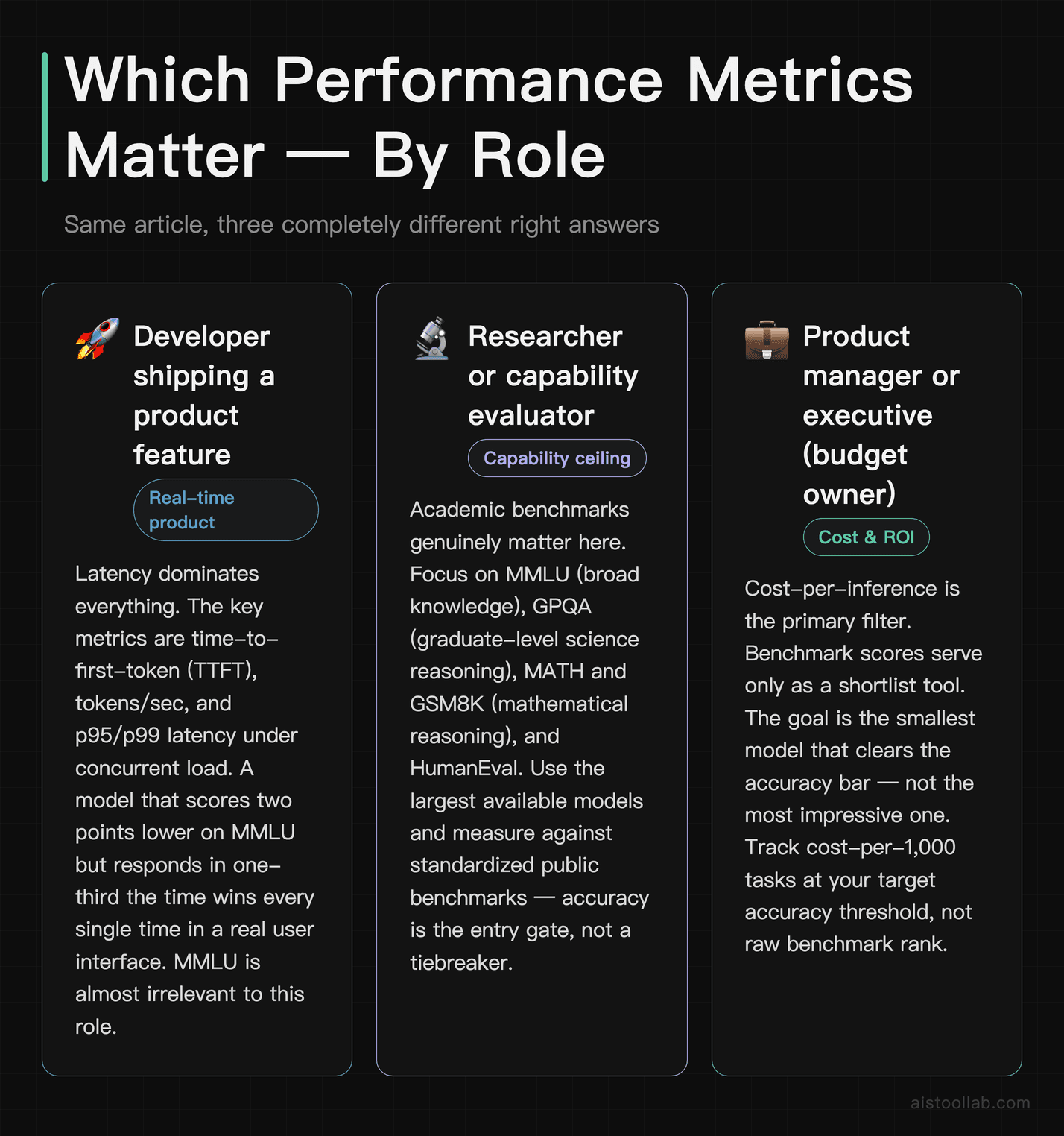
Before the how-to, let’s figure out which version of “performance” actually applies to you. Because the word means radically different things depending on where you sit. A researcher and a backend engineer can both say “this model performs great” and mean opposite things — one’s talking about reasoning accuracy on hard exams, the other’s talking about how many tokens per second it streams under load.
If you’re a developer shipping a product feature
You care about latency and throughput first, accuracy second. A chatbot that takes 11 seconds to start responding feels broken even if every answer is perfect. The metrics that should live in your dashboard are time-to-first-token (TTFT), tokens per second, p95 and p99 latency (the slow tail, not the average), and concurrent request throughput. MMLU is almost irrelevant to you. A model that scores two points lower on a reasoning benchmark but responds in a third of the time will win every single time in a real interface.
If you’re a researcher or evaluating capability ceilings
Now the academic benchmarks genuinely matter. MMLU (broad knowledge), GPQA (graduate-level science reasoning), MATH and GSM8K (mathematical reasoning), and HumanEval (code generation) tell you where the frontier is. You’re not deploying to a million users; you’re probing what a model can and can’t do. Here, the half-point differences that production teams ignore are the whole point. If this is your world, the MMLU vs GPQA vs GSM8K breakdown is worth a read for why these scores diverge so much.
If you’re a product manager or founder watching the budget
Your north star is cost-per-inference against accuracy that’s good enough for the job. Not maximum accuracy — sufficient accuracy. The difference between a model that’s 94% accurate at your task and one that’s 96% might be a 5x cost increase, and for a customer-support classifier, that 2% probably isn’t worth it. For a medical triage tool, it absolutely is. Your job is matching the accuracy bar to the stakes, then finding the cheapest model that clears it.
The decision tree: which metrics actually matter for your application
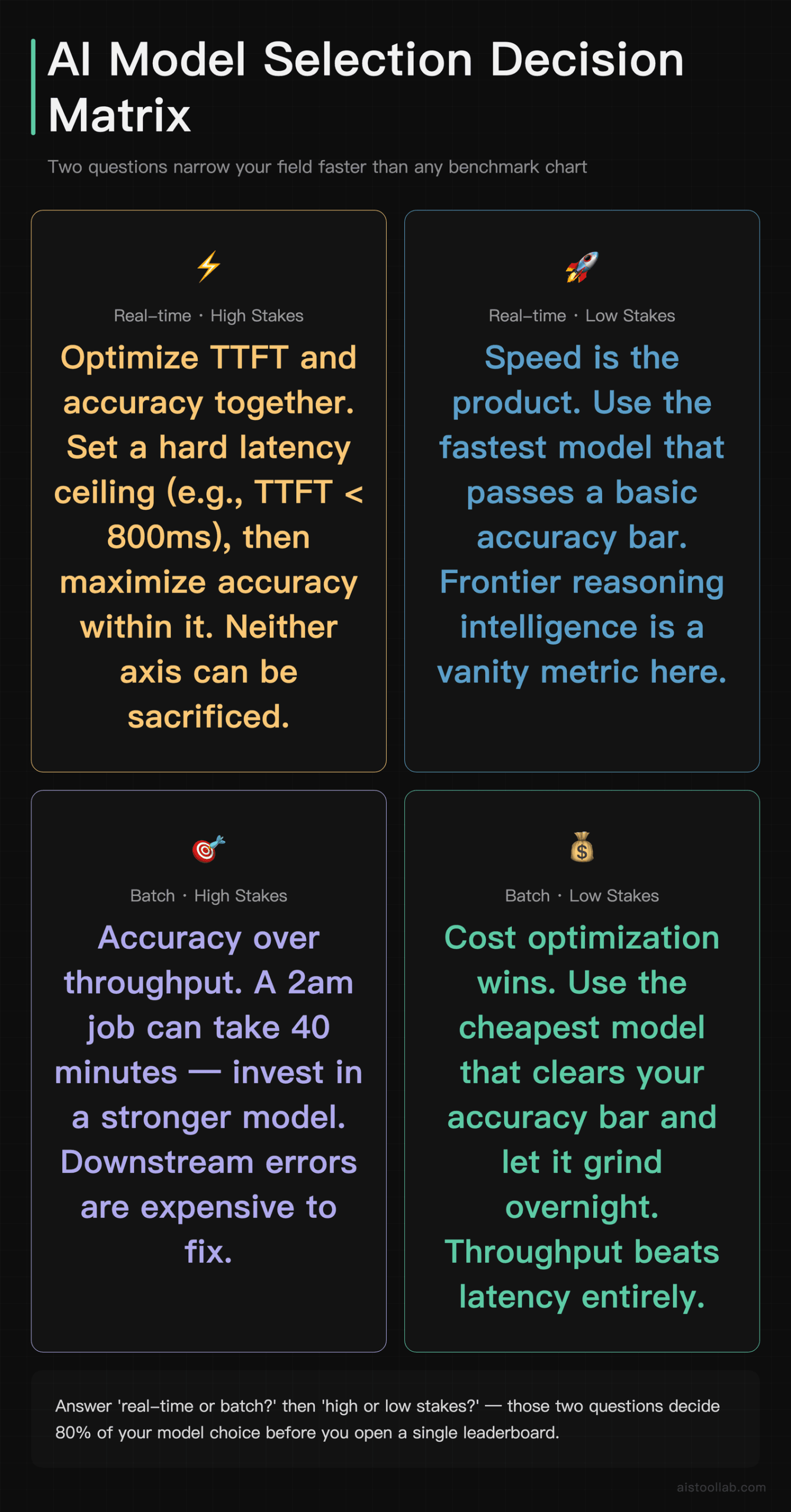
Walk through these in order. Each branch points you at the two or three metrics that should drive your choice — and lets you ignore the rest, which is honestly the more valuable part.
Step 1 — Is a human waiting in real time for the output?
If yes (chat interfaces, code autocomplete, live search, voice assistants), latency is king. Optimize for time-to-first-token and streaming speed. Set a hard ceiling — say, TTFT under 800ms for chat, under 200ms for autocomplete — and only consider models that clear it. Accuracy is a tiebreaker among the models fast enough to qualify, not the entry gate.
If no (batch processing, overnight summarization, document pipelines, data enrichment), latency barely matters. A job that runs at 2am can take 40 minutes. Here you flip entirely to cost-per-million-tokens and throughput. Pick the cheapest model that hits your accuracy bar and let it grind.
Step 2 — What’s the cost of a wrong answer?
Low stakes (tagging blog posts, drafting marketing copy, internal search): a small, cheap model is almost always the right call. Errors are easy to catch and cheap to fix. Don’t pay frontier prices for a job a mid-tier model does fine.
High stakes (financial summaries, legal drafts, healthcare, anything customer-facing with brand risk): now accuracy and reliability metrics earn their keep. Look hard at TruthfulQA (hallucination resistance), domain-specific eval scores, and — critically — your own held-out test set, because public benchmarks won’t reflect your data. The Production vs Synthetic discussion on why benchmark scores don’t predict real-world performance is essential reading here.
Step 3 — Where does the model run?
Cloud API: you’re paying per token and someone else handles the GPUs. Your variables are price, rate limits, and latency from your region. Easy mode.
Local or self-hosted: now model size, quantization, and VRAM requirements dominate everything. A model that needs 80GB of VRAM is irrelevant if your box has 24GB, no matter how it scores. You’ll be looking at 7B–14B parameter models, quantized to 4-bit, and the relevant “benchmark” is whether it fits and runs at acceptable speed on your hardware. The Hugging Face Model Hub Tutorial covers how to filter models by these practical constraints.
Step 4 — How predictable is your traffic?
Spiky, unpredictable load pushes you toward serverless API pricing where you pay only for what you use. Steady, high-volume traffic makes dedicated or self-hosted inference cheaper past a certain break-even — often somewhere in the millions of tokens per day, though the exact crossover depends heavily on your provider and model. Platforms like Together AI sit in the middle, offering cheaper per-token rates for open models than the big closed-API providers.
Real trade-offs: when the “best” model loses
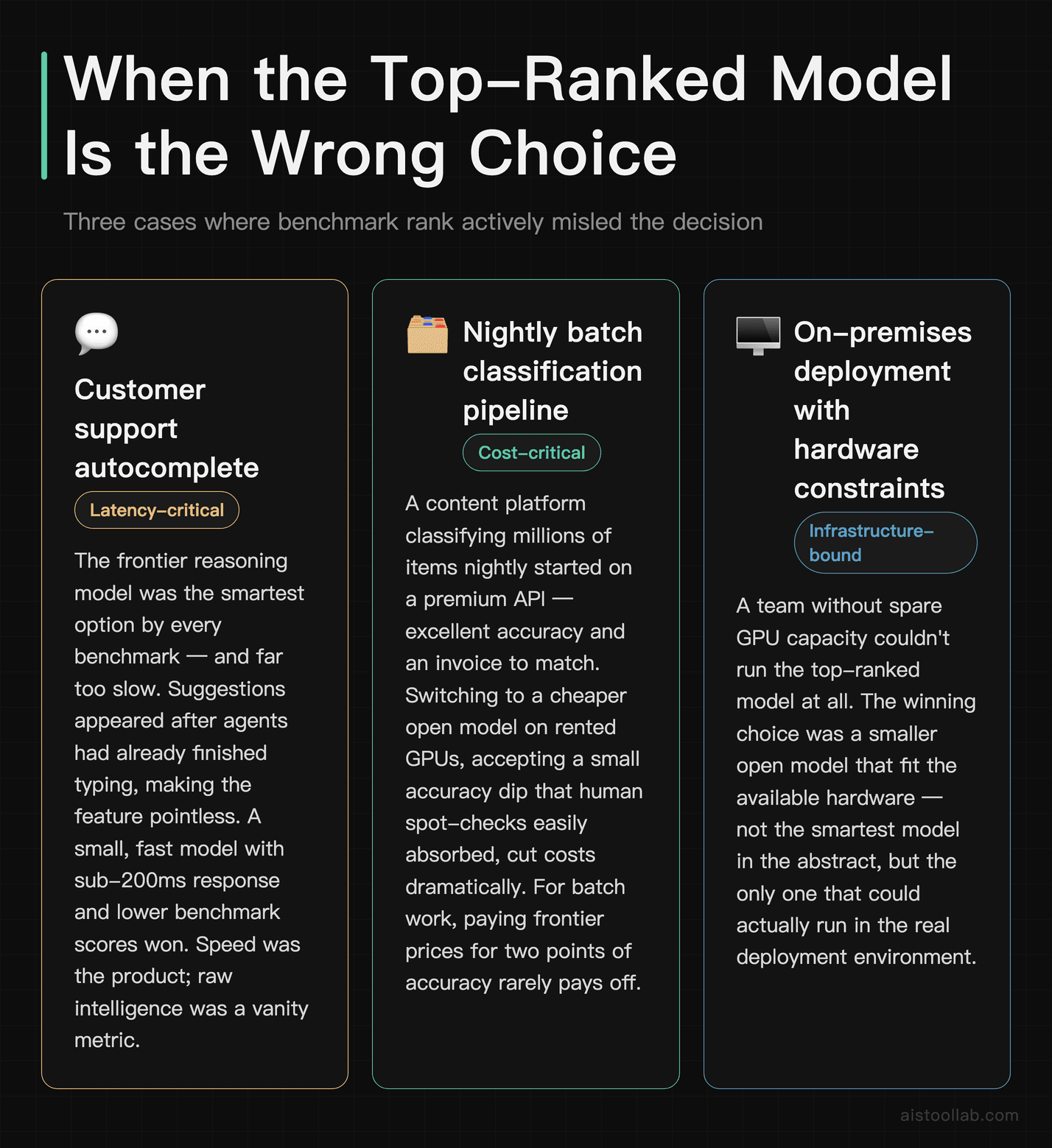
This is where theory meets the cloud bill. Here are three concrete scenarios where picking the top-ranked model would be a mistake.
The customer support autocomplete that needed speed, not genius
Imagine a support tool that suggests reply completions as agents type. The team’s first instinct was a frontier reasoning model. It was, by every benchmark, the smartest option. It was also far too slow — suggestions appeared after the agent had already finished typing the sentence, which makes the feature pointless. The right answer was a small, fast model with much lower benchmark scores but sub-200ms response. The “worse” model delivered a feature people actually used. Speed was the product; raw intelligence was a vanity metric.
The batch classification job bleeding money
A content platform classifying millions of items nightly started on a premium API. The accuracy was excellent and so was the invoice. Because nothing was waiting in real time, they switched to a cheaper open model running on rented GPUs, accepting a small accuracy dip that human spot-checks easily absorbed. The cost dropped dramatically. The lesson: for batch work, paying frontier prices for two points of accuracy you don’t need is just lighting money on fire.
The research prototype that should have used the frontier model
The mirror image: a team building a tool to draft scientific literature reviews tried to save money with a mid-tier model. It hallucinated citations and fumbled domain reasoning, and the human review time to catch the errors cost more than the model savings. Here the high-GPQA frontier model was correct precisely because the task was hard and the cost of a wrong answer was high. Cheap was expensive. Matching the model to the stakes goes both directions.
Comparison: how the priorities shift by role
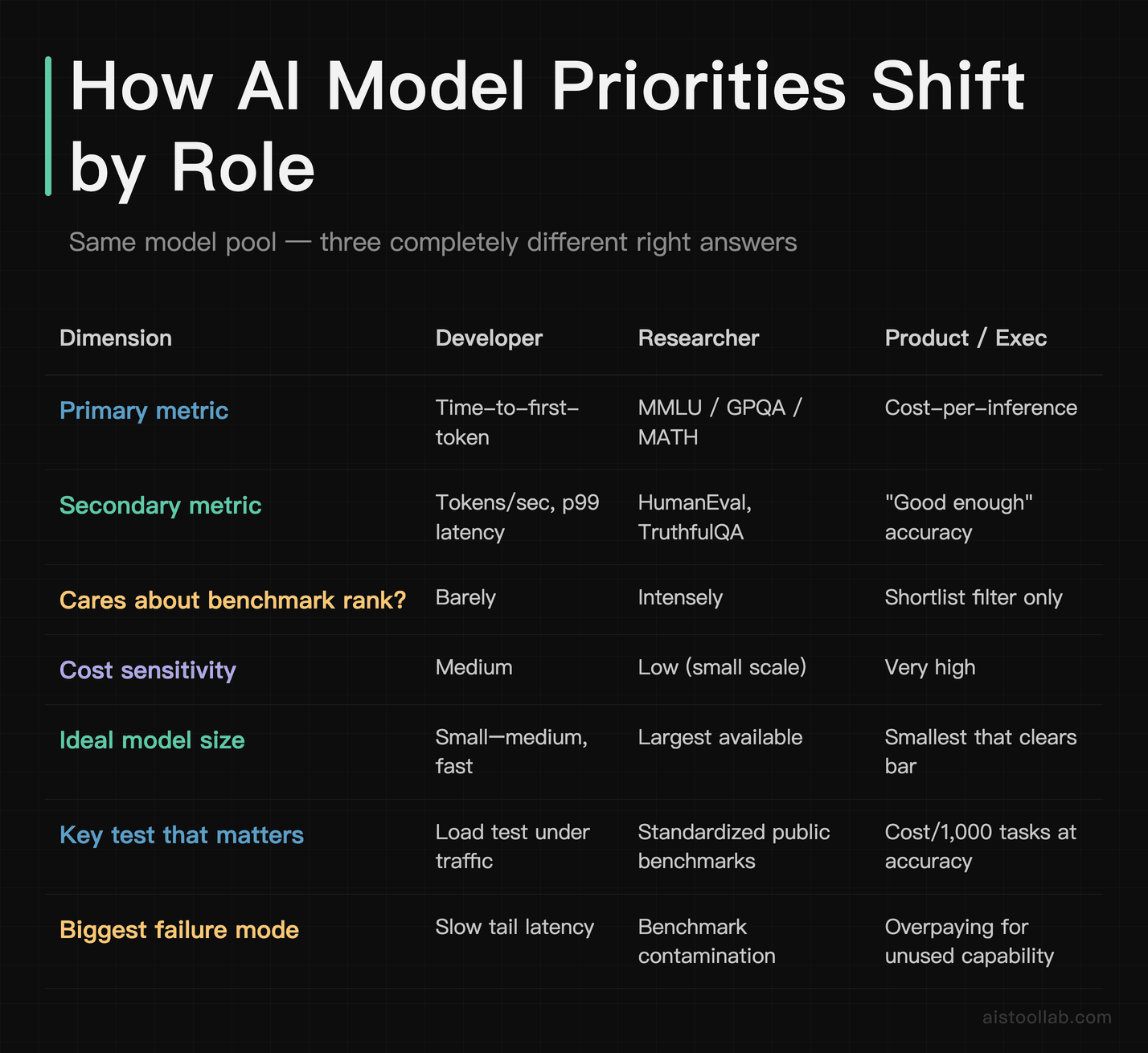
The table makes the core point visible: there is no single “best model” because these three people are optimizing three different equations. A choice that’s obviously correct for the researcher is obviously wrong for the developer. Anyone who hands you a single ranked list and calls it the answer hasn’t asked what you’re building.
Explaining benchmarks to non-technical stakeholders (without dumbing them down)
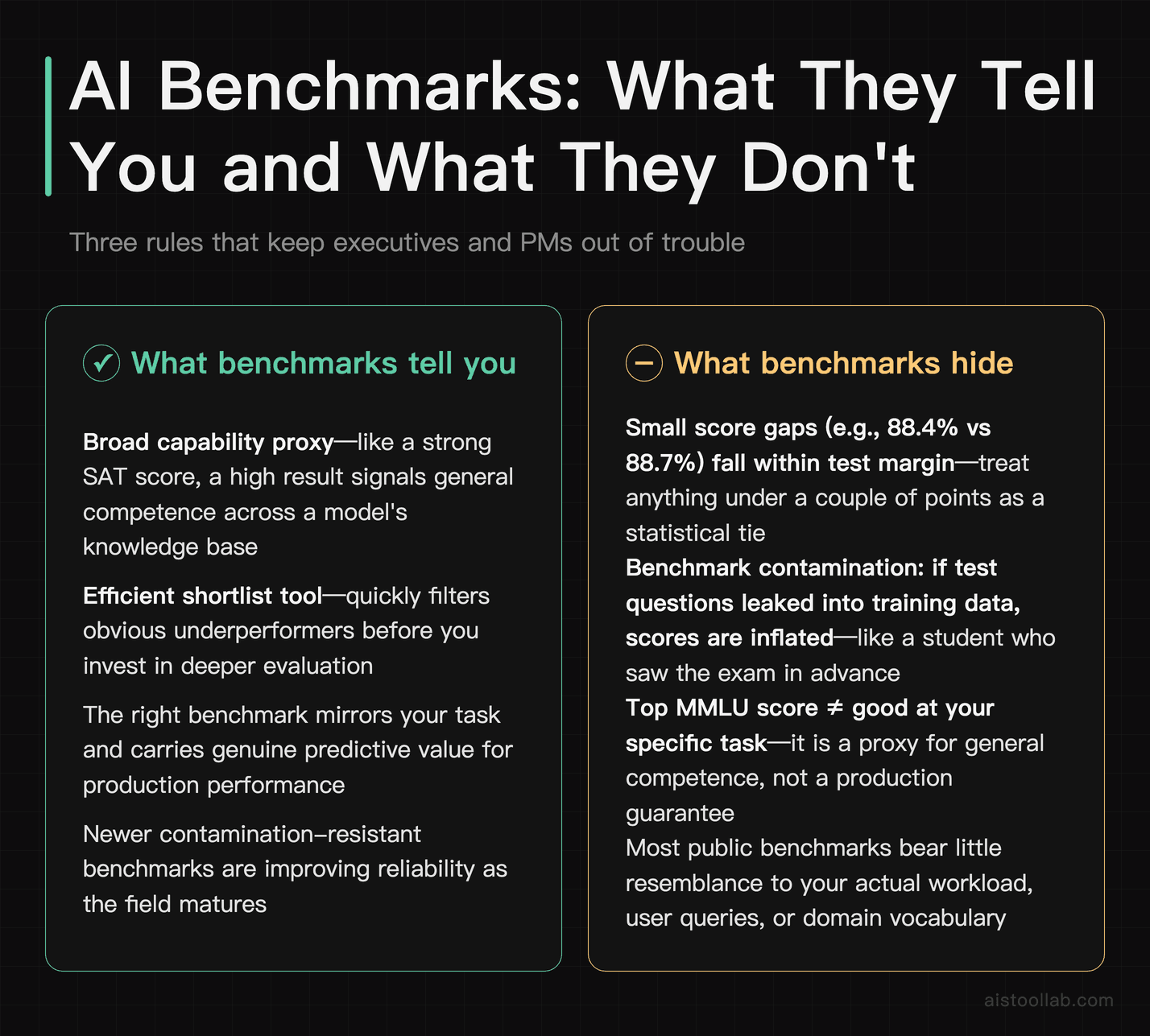
If you’re a PM, founder, or engineer who doesn’t live in ML, here’s how to read a benchmark score without getting fooled — and without pretending it’s meaningless.
Think of benchmarks as standardized tests, with all the same caveats. MMLU is like the SAT: broad, multiple-choice, covers a lot of ground, and a high score tells you someone is generally capable. But just as a top SAT score doesn’t tell you whether someone will be a good employee, a top MMLU score doesn’t tell you whether a model will be good at your task. It’s a proxy, not a guarantee.
A few rules that keep executives out of trouble. First, small score gaps are noise. The difference between 88.4% and 88.7% on a benchmark is within the margin of how the test was run and almost never matters in production. Treat anything under a couple of points as a tie. Second, beware benchmark contamination — if test questions leaked into a model’s training data, the score is inflated, like a student who saw the exam in advance. This is a real and ongoing problem, which is why newer benchmarks get released specifically to be “uncontaminated.” Third, the benchmark that matters is the one that looks like your job. If you’re building a coding tool, HumanEval and SWE-bench tell you more than MMLU ever will.
The honest framing for a leadership deck: “These scores get us to a shortlist of three or four credible models. From there, the decision is made by testing them on our actual data and our actual budget — not by who’s number one on a public chart.” That’s not hand-waving; that’s the correct process. For a deeper walkthrough of reading scores like an analyst rather than a fan, the How to Evaluate AI Model Performance Like a Pro guide goes further than we can here.
Your practical evaluation checklist
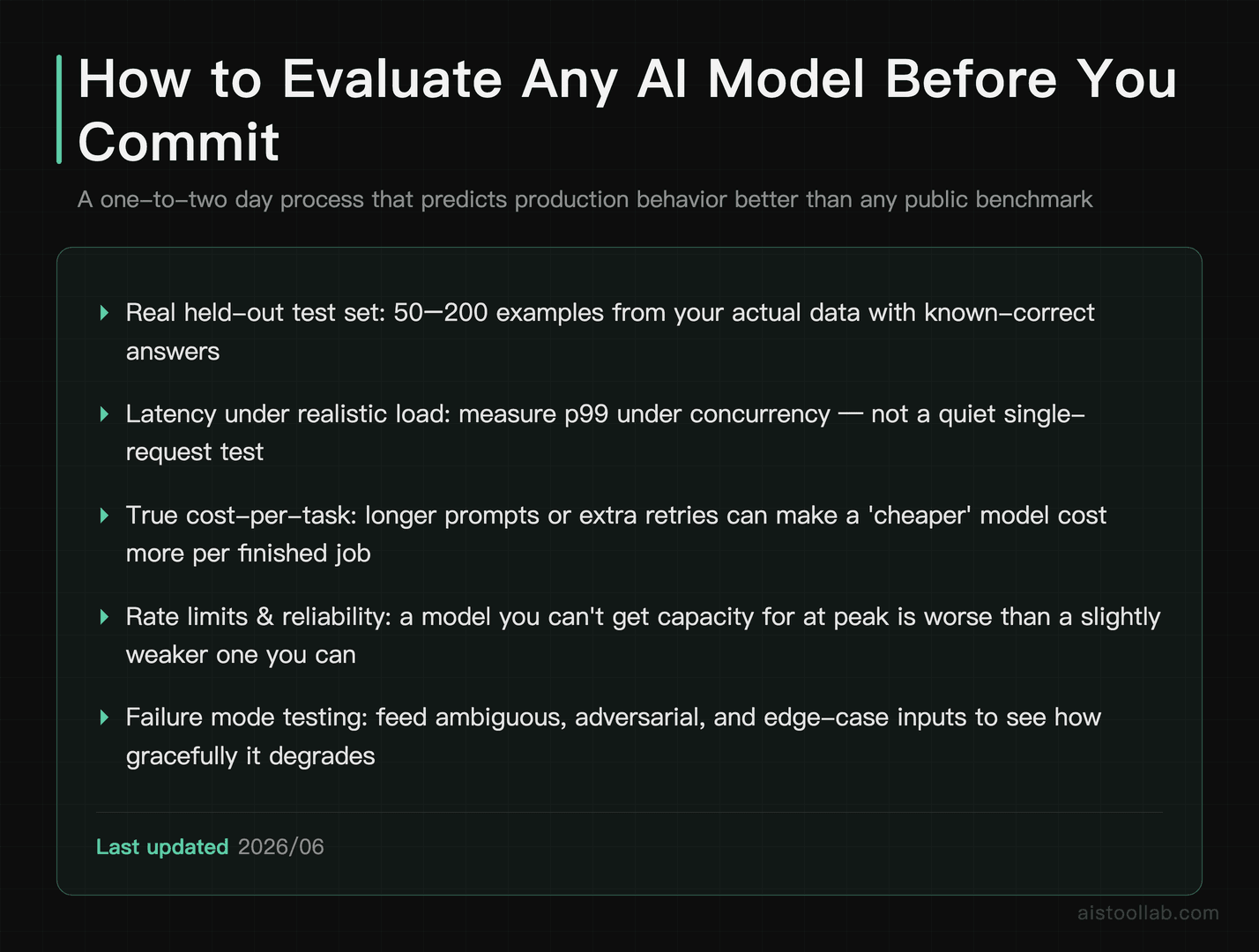
Once the decision tree has narrowed your field, run your shortlist through this before committing:
- Build a held-out test set from your real data — 50 to 200 representative examples with known-correct answers. This single step beats every public benchmark for predicting production behavior.
- Measure latency under realistic load, not in a quiet single-request test. The p99 number under concurrency is what your users will actually feel.
- Calculate true cost-per-task, not cost-per-token. A “cheaper” model that needs longer prompts or more retries can cost more per finished job.
- Check rate limits and reliability — a model you can’t get capacity for at peak is worse than a slightly weaker one you can.
- Test the failure modes, not just the happy path. Feed it ambiguous, adversarial, and edge-case inputs and see how gracefully it degrades.
This process takes a day or two and saves weeks of regret. The teams that skip it are the ones in that opening Slack thread three weeks later.
Frequently Asked Questions
What’s the single most important metric for choosing an AI model?
There isn’t one, and anyone who tells you otherwise is selling something. The most important metric is entirely determined by your use case, which is exactly why this guide is built around a decision tree rather than a ranking. For a real-time chat feature, time-to-first-token is your make-or-break number — users abandon slow interfaces regardless of how smart the answers are. For an overnight batch pipeline, cost-per-million-tokens dominates because nothing is waiting and you’re optimizing pure economics. For a research prototype probing capability limits, reasoning benchmarks like GPQA and MATH are what you live by. The skill isn’t memorizing which metric is “best” — it’s knowing how to identify, in thirty seconds, which two or three metrics matter for the specific thing you’re building and confidently ignoring the rest. Most bad model decisions come from optimizing the wrong metric: chasing benchmark scores for a latency-bound feature, or chasing speed for a task where accuracy is everything.
Why does the top model on the leaderboard cost so much more?
Frontier models are usually the largest, with the most parameters and the highest compute cost per token to run, and that cost gets passed to you. They earn their leaderboard position on the hardest reasoning tasks — graduate-level science, competition math, complex multi-step logic. The catch is that most production workloads don’t require that ceiling. Classifying support tickets, drafting marketing copy, summarizing documents, or powering an autocomplete feature are tasks where a model several tiers down performs essentially identically for a fraction of the price. You’re paying for headroom you’ll never use. The right mental model is hiring: you don’t bring in a PhD specialist to answer the front desk phone. Match the model’s capability tier to the difficulty of your actual task. Pay frontier prices only when the task genuinely lives at the frontier — hard reasoning, high stakes, or where a wrong answer is expensive. For everything else, the cheaper model is not a compromise; it’s the correct engineering decision.
How do I know if a benchmark score is trustworthy?
Start with healthy skepticism about contamination — the risk that benchmark questions leaked into the model’s training data, inflating the score the way a student who saw the exam beforehand “aces” it. This is a documented, ongoing problem in the field, which is why fresh benchmarks are periodically released specifically to be uncontaminated. A few practical checks: prefer newer or held-out benchmarks for capability claims; be suspicious of suspiciously high scores on older, widely-published test sets; and treat any gap under a couple of percentage points as statistical noise rather than a meaningful difference. Most importantly, never let a public benchmark be your final word. It’s a filter to build a shortlist of credible candidates, not the decision itself. The trustworthy “benchmark” for your project is a test set built from your own real data, because that’s the only thing that reflects your actual inputs, your edge cases, and your definition of a correct answer. Public scores get you to the shortlist; your own data picks the winner.
What latency numbers should I actually target?
It depends on the interaction, but here are reasonable starting ceilings. For code autocomplete or anything that fires as the user types, you want suggestions back in roughly 200 milliseconds or less — beyond that the feature feels laggy and gets ignored. For conversational chat, time-to-first-token under about 800 milliseconds keeps the experience feeling responsive, since streaming output covers the rest. For search or recommendation features, sub-second total response is the usual expectation. For batch and asynchronous jobs, there’s effectively no latency requirement — optimize purely for throughput and cost. The critical detail most teams miss: measure these under realistic concurrent load, not in a quiet single-request test. The number that matters is p95 or p99 latency — the slow tail — because that’s what a meaningful slice of your users will actually experience during busy periods. An average latency of 400ms hides the fact that one in twenty requests might take three seconds. Load-test before you commit, every time.
Should I use a closed API model or self-host an open model?
For most teams starting out, closed API models win on convenience — no GPU management, no infrastructure, you pay per token and scale automatically. The crossover toward self-hosting an open model happens on two axes: volume and control. Past a certain steady, high-volume traffic level, dedicated or self-hosted inference becomes cheaper per token, though the exact break-even depends heavily on your provider, model size, and how well you keep the hardware utilized — idle GPUs destroy the economics. The other driver is control: data privacy requirements, the need to run on-premise, or wanting to fine-tune deeply may force self-hosting regardless of cost. Open models on managed inference platforms split the difference, giving you cheaper open-model pricing without owning hardware. A sensible path is to prototype on a closed API to validate the product, then evaluate self-hosting or a managed open-model provider once your volume is predictable and large enough that the savings justify the operational overhead. Don’t self-host on day one to save money you’re not yet spending.
How is cost-per-inference different from cost-per-token?
Cost-per-token is the sticker price — what the provider charges per million input and output tokens. Cost-per-inference (or cost-per-task) is what you actually care about: the total cost to complete one real unit of work. These can diverge sharply. A model with a lower per-token price might need longer system prompts, more few-shot examples, or multiple retries to get a usable answer — and suddenly the “cheaper” model costs more per finished task. Conversely, a pricier but more capable model might one-shot the job with a short prompt and no retries, coming out cheaper overall. Output tokens also typically cost more than input tokens, so a model that’s verbose can quietly inflate your bill. To compare honestly, run each candidate on the same set of real tasks, count the total tokens consumed including retries and prompt overhead, and compute the actual dollar cost per completed task. That number, not the headline per-token rate, is what belongs in your budget projections and your decision.
I’m a non-technical PM — how do I sanity-check an engineer’s model recommendation?
You don’t need to read the architecture, but you can ask sharp questions. Ask “what task did we test this on, using our own data?” — if the answer is only public benchmark scores, push for a real-data evaluation before committing. Ask “what’s the cost per thousand tasks at our expected volume?” rather than accepting a per-token figure you can’t translate. Ask “what’s the p99 latency under load?” if it’s a user-facing feature, because averages hide the slow tail that frustrates users. Ask “what happens when it gets an answer wrong, and how would we catch it?” to surface whether the accuracy bar matches the stakes. And ask “is there a cheaper model that’s good enough?” to make sure you’re not overpaying for unused capability. None of these require ML expertise — they’re the same business questions you’d ask about any vendor decision. A good engineer will have crisp answers. Vague answers or pure benchmark-rank justifications are a signal to dig deeper before signing off.
How often should I re-evaluate my model choice?
The field moves fast enough that a model decision has a real shelf life, but re-evaluating constantly wastes engineering time. A reasonable cadence is a lightweight check each quarter and a deeper review whenever a major new model lands in your relevant tier or a provider significantly changes pricing. The triggers that should prompt an immediate look: a price cut that changes your cost math, a new model that’s notably faster or cheaper at your task, a shift in your own volume that changes the self-host break-even, or degraded performance you can measure on your test set. The good news is that if you built a proper held-out evaluation set during your first decision, re-evaluating is cheap — you just run the new candidate through the same tests and compare on the metrics that matter to you. Keep that test harness maintained. Teams that built one evaluate new models in an afternoon; teams that didn’t treat every model decision as a fresh research project. The harness is the asset, not the model choice itself.
The bottom line: build the process, not the leaderboard obsession
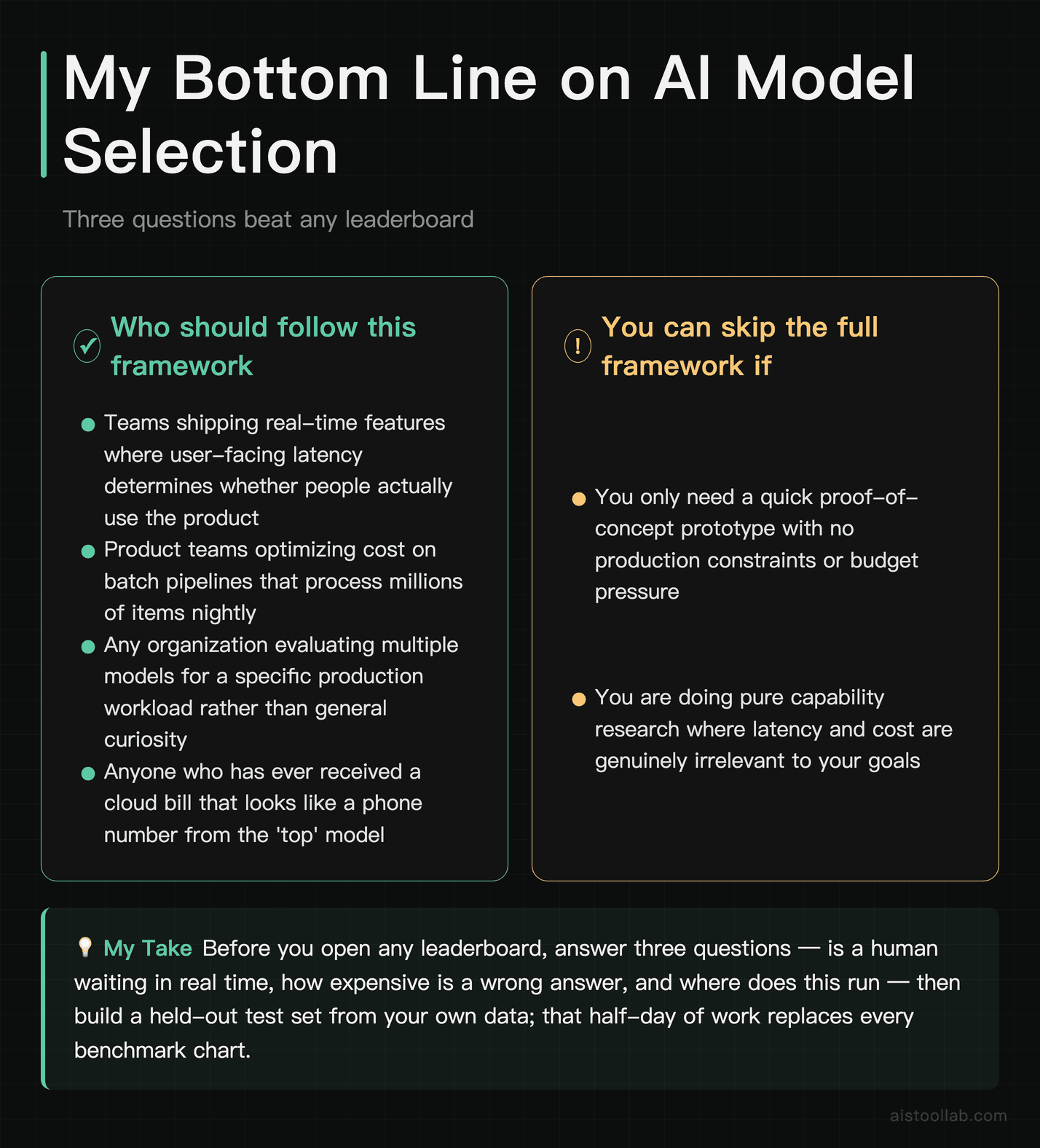
If it were my call on a real project, I’d ignore the top of the leaderboard entirely until I’d answered three questions: is a human waiting in real time, how expensive is a wrong answer, and where does this thing run? Those three answers narrow the field faster than any benchmark chart, and they point you at the two or three metrics that actually decide the outcome for your specific job.
The single highest-leverage move is building a held-out test set from your own data and a quick load test under realistic traffic. That afternoon of work predicts production behavior better than every public benchmark combined, and it turns future model decisions into a fast comparison instead of a research project. The leaderboard tells you who’s smart in the abstract. Your test set tells you who’s right for you — and those are rarely the same model. Start there, and the cloud-bill horror stories mostly take care of themselves.
Last updated: 2026
Found this review helpful?
👉 Browse the AI Tools Library to find the right tools for your workflow.