
Stop Asking “What’s the Best AI Model” — You’re Asking the Wrong Question
Every few weeks a new model tops some leaderboard, a thread blows up on Hacker News, and half the developer community starts wondering whether they backed the wrong horse. Here’s the uncomfortable truth that benchmark charts won’t tell you: there is no single “best” model in 2026, and chasing the top of the MMLU table is one of the fastest ways to overspend on inference for a job a smaller model could handle in half the time.
The real skill isn’t memorizing scores — it’s understanding what those scores translate to in production. A model that crushes graduate-level reasoning benchmarks might be overkill (and overpriced) for classifying support tickets. A coding specialist that nobody talks about at dinner parties might outperform a famous generalist on your actual repo. And open-source options that were jokes two years ago now trade blows with closed-source flagships on specific tasks while costing a fraction to self-host.
So this ranking is built around practical value for developers building real systems — not bragging rights. I’ve compiled this from official model documentation, public benchmark reports, and the consensus you’ll find across developer communities. Numbers move fast, so where I’m not certain of an exact figure, I’ll say so rather than invent one.
How I Ranked These (The Criteria That Actually Matter)
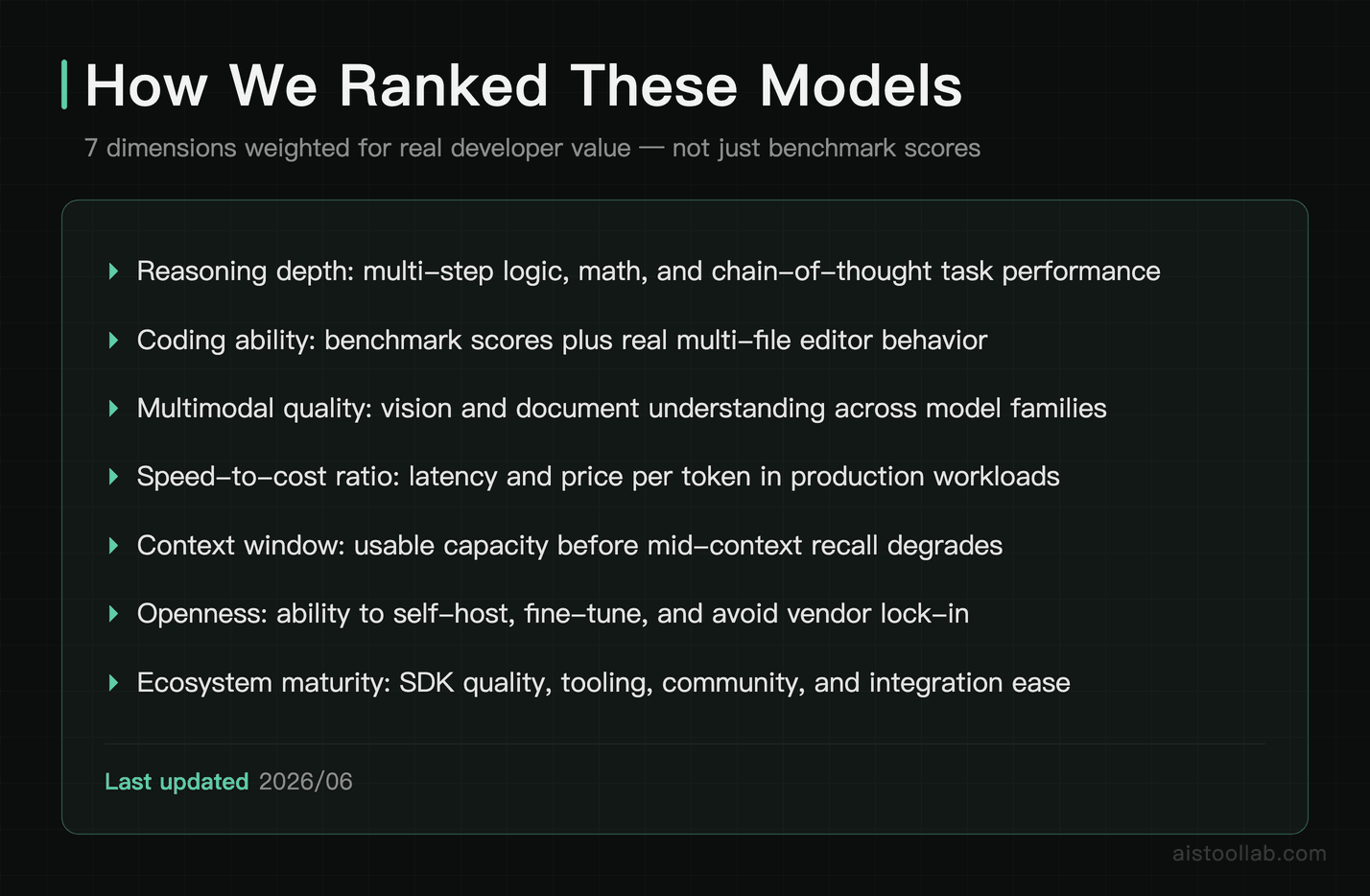
Before the list, here’s the lens. Raw benchmark dominance is one input, not the whole story. If you want the deep dive on why a model can win MMLU and still flop on your task, I broke that down in MMLU vs GPQA vs GSM8K: Why Different Benchmarks Rank AI Models Differently — worth reading alongside this.
The dimensions I weighted:
- Reasoning depth — how the model holds up on multi-step logic, math, and “think before answering” tasks, where reasoning-tuned models pull ahead.
- Coding ability — performance on coding-focused benchmarks and, more importantly, how it behaves inside a real editor across a multi-file project.
- Multimodal quality — vision and document understanding vary dramatically between models, even ones that score similarly on text.
- Speed-to-cost ratio — latency and price per token, because a model that’s 2% more accurate but five times slower rarely wins in production.
- Context window — how much you can stuff in before it starts forgetting the middle.
- Openness — whether you can self-host, fine-tune freely, and avoid vendor lock-in.
- Ecosystem maturity — SDKs, tooling, community support, and how painful integration is.
One pattern dominated the 2026 benchmark wars: task-specific models keep beating generalists on their home turf, and the gap between “frontier” and “good enough” has narrowed sharply. That changes the math for anyone watching their cloud bill.
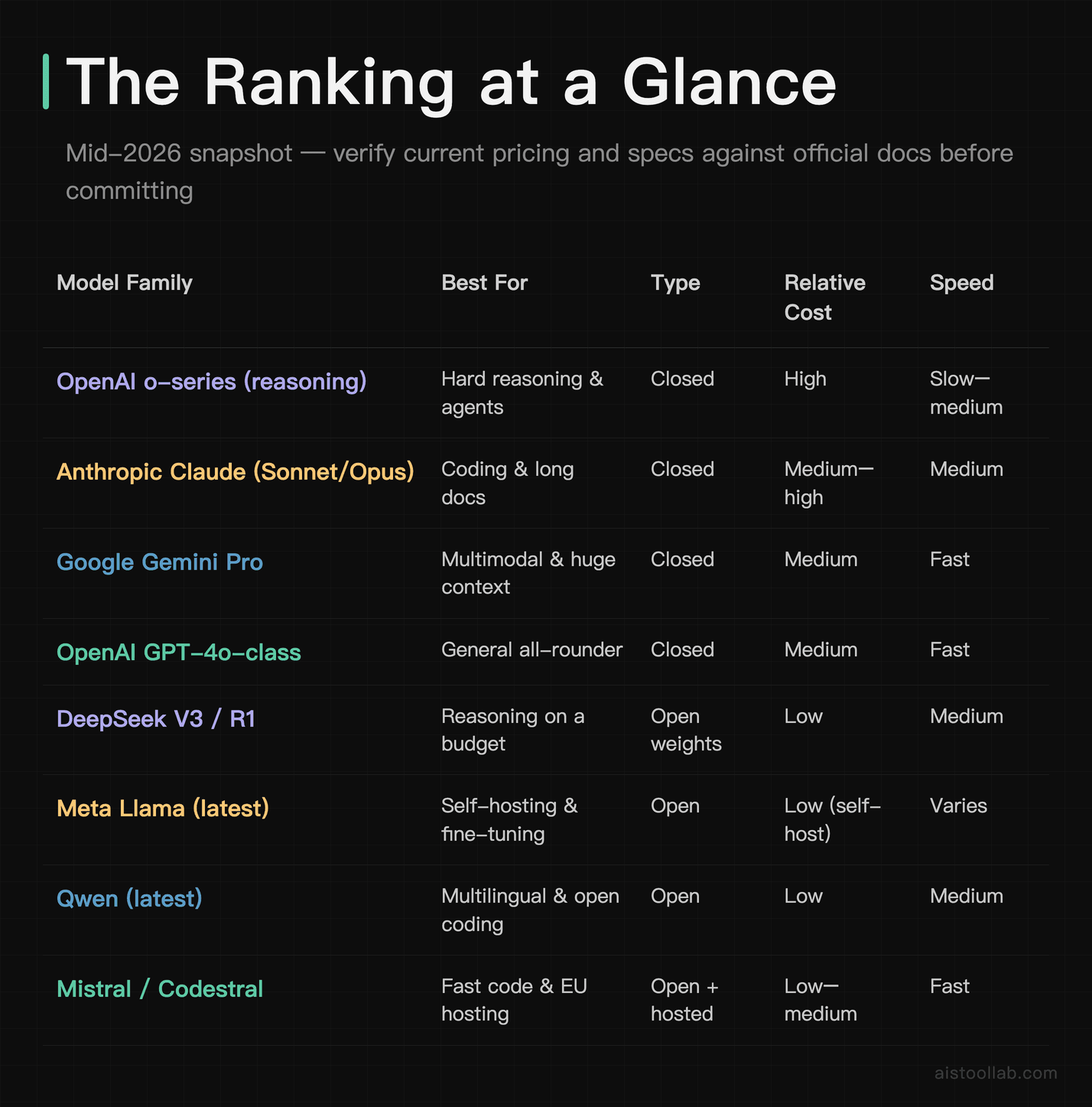
The Ranking at a Glance
Treat this table as a map, not gospel — exact specs and pricing shift constantly, so verify against official docs before you commit. Model families below reflect what’s documented and widely available as of mid-2026; specific version names evolve, so I’m referring to families and tiers.
The Models, Profiled
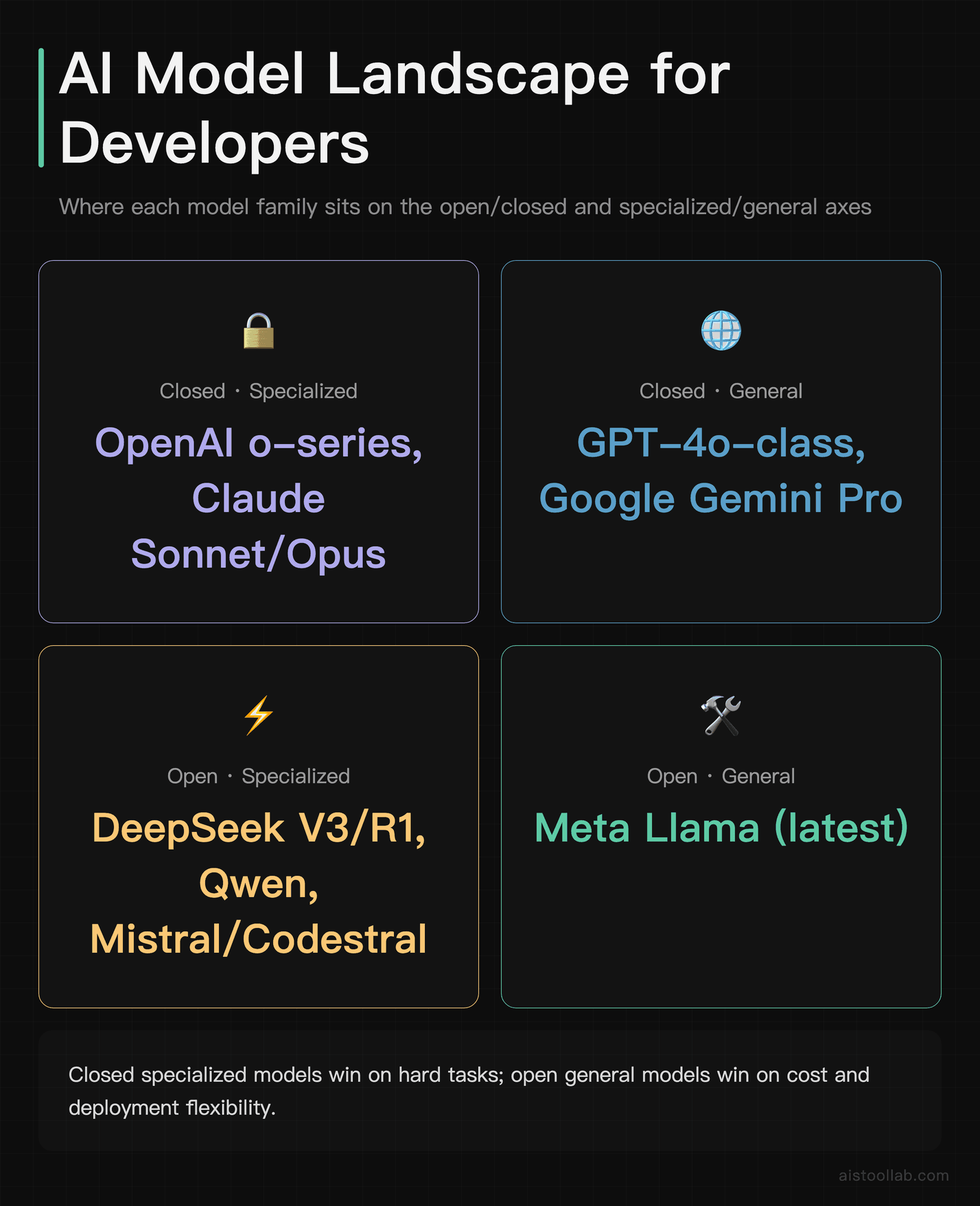
1. OpenAI’s reasoning series — when the answer has to be right
The “think before you speak” reasoning models reset expectations on hard problems: competition math, multi-step logic, and agentic workflows where the model has to plan. According to OpenAI’s published materials, these models trade speed for deliberate chain-of-thought reasoning, and that shows up on reasoning-heavy benchmarks. The catch for developers is real: they’re slower and pricier per task, so reserve them for genuinely hard problems — code architecture decisions, complex data transformations, agent planning — not for summarizing a paragraph. Used indiscriminately, they’ll torch your budget. Used surgically, they solve things cheaper models simply can’t.
2. Anthropic’s Claude — the developer’s daily driver
If you poll working developers about coding assistants, Claude’s Sonnet and Opus tiers come up constantly, and for good reason: reviewer consensus and public feedback consistently praise its reliability, lower tendency to hallucinate, and how well it follows complex instructions across large codebases. The roughly 200K-token context window comfortably swallows entire repositories. This is the model many teams default to inside editors — I went deeper on tooling in my Cursor AI Code Editor Review 2026, where the model choice matters as much as the IDE. For production coding agents and long-document analysis, it’s hard to go wrong here.
3. Google Gemini — the context monster with eyes
Gemini’s headline feature remains its enormous context window — reportedly up to a million tokens or more on the Pro tier — plus genuinely strong multimodal handling of images, video, and documents. For developers building over large knowledge bases, video pipelines, or document-heavy workflows, that context capacity changes what’s architecturally possible (sometimes letting you skip a retrieval layer entirely). Multimodal vision quality varies dramatically between models, and Gemini is among the stronger options here per Google’s documentation and public testing.
4. GPT-5-class — the safe all-rounder
The GPT-5 generation is the model that does everything competently: text, vision, audio, fast responses, mature SDKs, and the deepest third-party ecosystem of any provider. It rarely tops a single specialized benchmark anymore, but it almost never embarrasses itself either. For a startup that wants one model for ten different features and minimal integration headaches, this is the pragmatic pick. The ecosystem maturity alone — tutorials, libraries, Stack Overflow answers — saves real engineering hours.
5. DeepSeek — open weights that punch up
DeepSeek’s V3 and R1 line genuinely shook the “you must pay frontier prices for frontier reasoning” assumption. Published benchmarks showed open-weight reasoning competitive with far more expensive closed models on specific tasks, and the cost-to-performance ratio is the standout. If you’re cost-sensitive and reasoning matters, this deserves a serious look — verify current benchmarks yourself, since this space moves weekly.
6. Meta Llama — the foundation of the open ecosystem
Llama isn’t always the single highest scorer, but it’s the gravitational center of open-source AI: permissive-ish licensing, an enormous fine-tuning community, and broad tooling support. If your requirements include self-hosting, data privacy, or custom fine-tunes, Llama is usually the starting point. Pair it with a serving stack — I compared the options in AI Model Serving Platforms Compared 2026: vLLM vs TensorRT vs Ollama — and your per-token cost can drop dramatically versus API pricing.
7. Qwen — the quietly excellent open option
Qwen’s recent releases post strong numbers on open benchmarks, particularly for multilingual and coding tasks, and the family ships in many sizes so you can match the model to the job. For developers outside pure English workflows, or anyone wanting an open coding model, it’s underrated in Western discussions relative to its documented performance.
8. Mistral / Codestral — fast, lean, and code-focused
Mistral’s models, and the code-specialized Codestral, prioritize low latency and efficiency. Codestral specifically targets code completion and generation, and a smaller specialized model that’s fast often beats a giant generalist for autocomplete-style workloads where latency is everything. European hosting options are a bonus for data-residency-conscious teams.
9. xAI Grok — the real-time conversationalist
Grok’s differentiator is its tie-in with fresh, real-time data and a more casual conversational style. For chat products that benefit from current information, it’s worth evaluating, though for heads-down coding and reasoning the models above tend to lead.
10. Small and edge models — the unsung budget heroes
The Phi and Gemma class of small models is where the “speed-to-accuracy inflection point” lives. These tiny models increasingly match much larger ones on narrow tasks — classification, extraction, routing — while running on-device or for pennies. For high-volume, simple jobs, deploying a 3-billion-parameter model instead of a frontier giant can cut costs by an order of magnitude with negligible quality loss.
Real-World Use Cases: Who Should Pick What
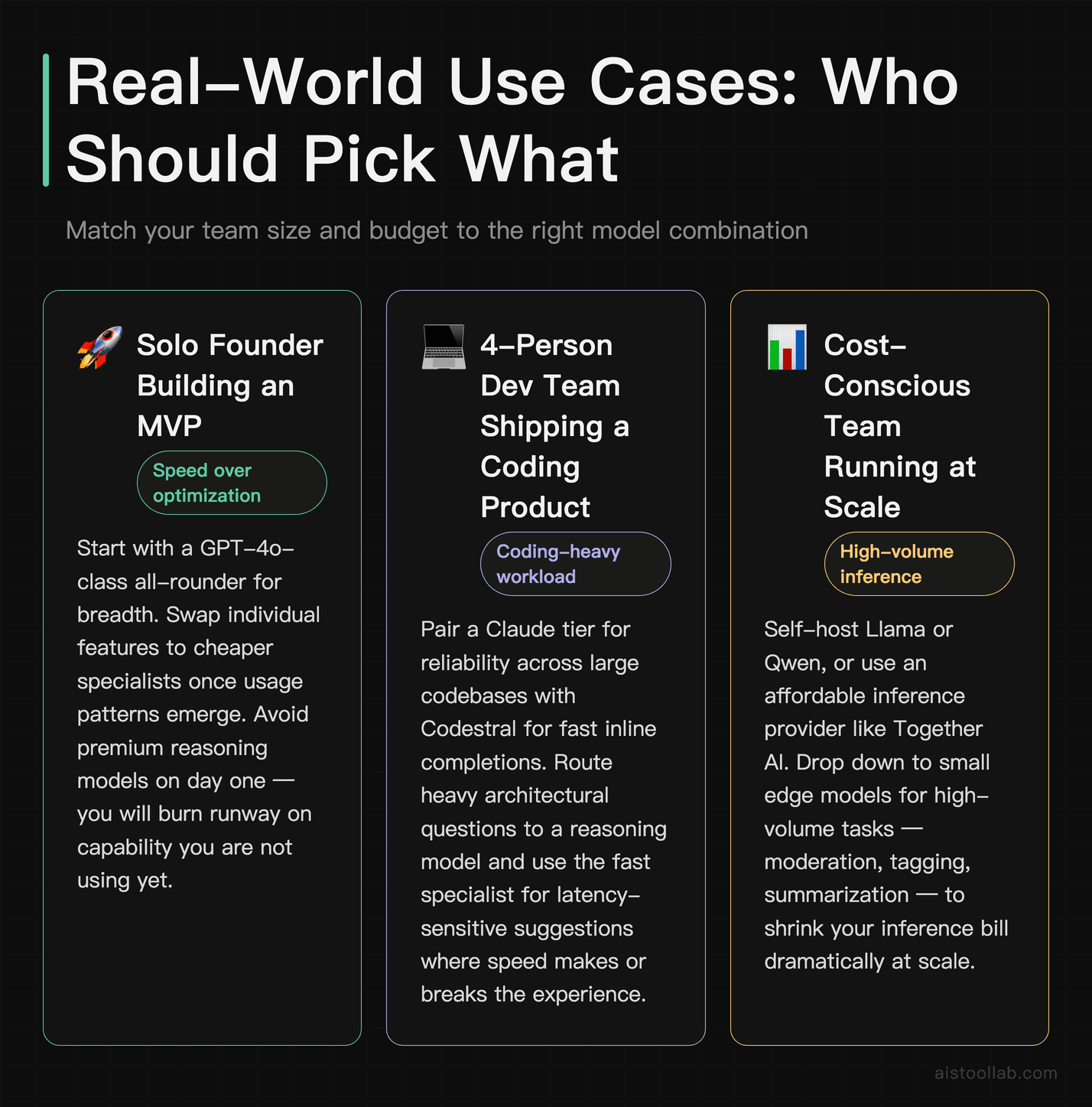
The solo founder building an MVP
You’re a one-person startup shipping fast, juggling features, and watching every dollar. Start with a GPT-5-class all-rounder for breadth, then swap individual features to cheaper specialists once you see usage patterns. Don’t reach for a premium reasoning model on day one — you’ll burn runway on capability you aren’t using yet.
The 4-person dev team shipping a coding product
If your product is a code assistant or your team lives in an AI-powered IDE, the Claude tier plus a fast code specialist like Codestral for completions is a proven combination. Route the heavy architectural questions to a reasoning model, and use the fast specialist for inline suggestions where latency makes or breaks the experience.
The cost-conscious team running at scale
A startup processing millions of requests — moderation, tagging, summarization — should look hard at open weights. Self-host Llama or Qwen, or use an affordable inference provider; Together AI is one platform developers turn to for cheaper hosted access to open models, and I covered it in my Together AI Review 2026. For the simplest high-volume tasks, drop down to a small edge model and watch your bill shrink.
My Recommendation
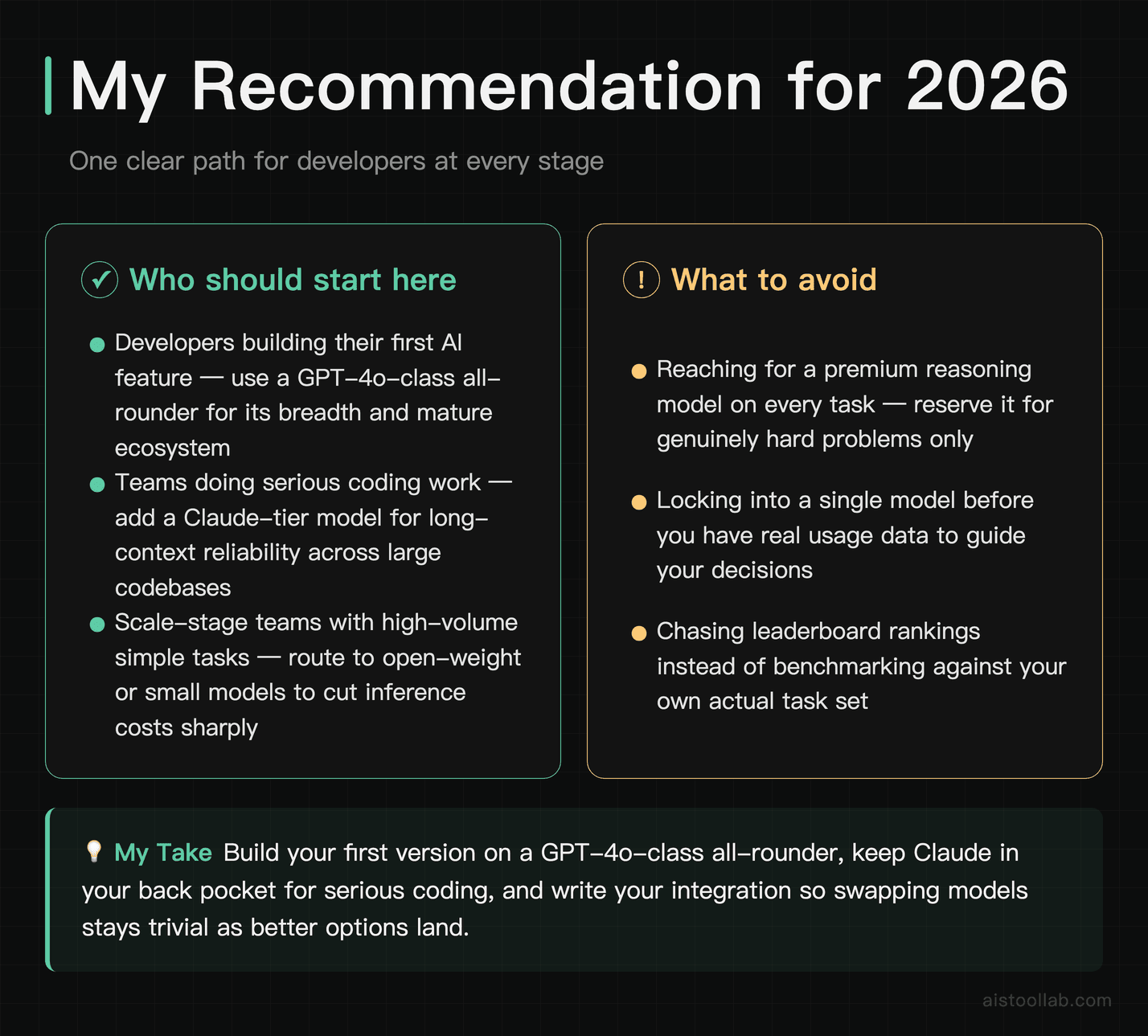
If you’re just getting started and want one clear path: build your first version on a GPT-5-class all-rounder for its breadth and mature ecosystem, keep a Claude-tier model in your back pocket for serious coding work, and design your code so swapping models is trivial. That setup gets you shipping today without locking you into expensive decisions you’ll regret.
Once you have real usage data, the picture changes. Route your high-volume simple tasks to small or open models, escalate only the genuinely hard reasoning to a premium model, and benchmark new releases against your own task set rather than someone else’s leaderboard. The developers winning the 2026 model game aren’t the ones using the single highest-ranked model — they’re the ones matching the right model to each job and staying flexible enough to swap when something better lands. Pick a model, build something, and let your own evaluation data guide the upgrades from there.
Frequently Asked Questions
Do I need the highest-ranked model for my project?
Almost certainly not, and this is the single most expensive misconception in AI development. The model at the top of this list excels at hard reasoning, but most production workloads — summarizing text, answering FAQs, extracting structured data, classifying inputs — don’t require graduate-level reasoning. They require consistency, acceptable latency, and a price you can afford at scale. Picking a frontier reasoning model for a classification task is like renting a moving truck to carry a single grocery bag. The smarter approach is to start with a mid-tier all-rounder, identify which specific tasks actually struggle, and only then upgrade those individual calls to a more capable model. Many mature production systems route different requests to different models — cheap and fast for the simple 80%, expensive and powerful for the hard 20%. That routing logic typically saves far more money than any single model choice, and it’s worth building early rather than retrofitting once your inference costs spike.
What’s the catch with open-source models being “competitive” now?
The benchmark parity is real on specific tasks, but “competitive on benchmarks” and “drop-in replacement” aren’t the same thing. Open-weight models like Llama, Qwen, and DeepSeek can match or beat closed models on particular metrics, and self-hosting can slash per-token costs. The catches: you’re now responsible for infrastructure, scaling, uptime, and security that an API provider handles for you. Latency under load depends entirely on your serving setup. And the polish around edge cases — refusing genuinely harmful requests, handling ambiguous instructions gracefully — is sometimes less refined than the heavily-tuned closed flagships. For teams with ML infrastructure expertise or strict data-privacy needs, open weights are a genuine win. For a solo founder who’d rather ship features than babysit GPUs, the convenience of a hosted API often justifies the higher per-token price. Run the numbers for your actual volume before deciding — the breakeven point depends heavily on how many requests you serve.
How much should I trust benchmark scores when choosing?
Treat them as a starting filter, never the final answer. Benchmarks like MMLU, GPQA, and coding test suites measure performance on standardized tasks that may look nothing like yours, and there’s persistent concern in the research community about benchmark contamination — models trained on data that includes the test questions. A model topping a leaderboard tells you it’s capable in general, not that it’s best for your specific prompts, your domain, or your latency budget. The reliable approach is to build a small evaluation set of 20–50 examples from your real use case and test your shortlist of models against it directly. This catches things benchmarks miss entirely: how a model handles your domain jargon, your formatting requirements, your edge cases. I dug into which benchmarks actually correlate with real-world quality in AI Model Performance Metrics Comparison 2026 — the short version is that benchmark relevance varies enormously by task type.
Why do coding specialists beat general models at coding?
It comes down to training focus. A general-purpose model spreads its training across everything — essays, conversation, trivia, math, code — while a coding specialist concentrates a much larger share of training and fine-tuning on source code, documentation, and programming patterns. That specialization shows up in autocomplete quality, awareness of library idioms, and fewer hallucinated function calls. For inline completion specifically, specialists also tend to be smaller and faster, which matters enormously when suggestions need to appear in milliseconds as you type. That said, the gap narrows for complex, reasoning-heavy coding tasks like debugging subtle logic errors or designing system architecture, where a top general reasoning model’s broader knowledge can pull ahead. The practical takeaway: use a fast code specialist for the high-frequency, low-latency work (completions, boilerplate) and a strong reasoning model for the occasional hard problem. Many of the best developer setups quietly combine both rather than forcing one model to do everything.
What does “context window” actually mean for my app?
The context window is how much text — measured in tokens, roughly three-quarters of a word each — the model can consider at once, including both your input and its output. A larger window lets you feed in entire documents, long conversation histories, or whole codebases without splitting them up. But bigger isn’t automatically better in practice. Models often exhibit a “lost in the middle” effect, where information buried in the center of a very long context gets less attention than content at the start or end. Stuffing a million tokens in doesn’t guarantee the model will use all of it well. Large context also costs more and can increase latency, since the model processes everything you send. For many applications, a well-designed retrieval system that feeds the model only the relevant chunks outperforms dumping everything into a giant context window — it’s cheaper, faster, and often more accurate. Reserve the massive context windows for cases where the relationships across a whole document genuinely matter.
Are smaller models really good enough to replace big ones?
For the right tasks, increasingly yes — and this is one of the most important shifts of the 2026 landscape. Small models in the Phi and Gemma class now handle classification, data extraction, intent routing, and simple summarization at quality levels that would have required a flagship model not long ago. The “speed-to-accuracy inflection point” means that for narrow, well-defined tasks, a small model can match a giant one on the metric you care about while running far faster and cheaper, often on-device with no API call at all. Where small models still fall short is open-ended reasoning, complex multi-step problems, broad world knowledge, and nuanced creative work. The honest framing is that small models haven’t replaced large ones — they’ve carved out a huge swath of tasks that no longer justify a large model. Smart architecture in 2026 uses small models as the default workhorse and escalates to larger ones only when the task genuinely demands it.
How do I keep up when models change every few weeks?
Stop trying to chase every release — it’s a treadmill that wastes time. Instead, build infrastructure that makes switching models cheap. Abstract your model calls behind a thin interface so swapping providers is a config change, not a rewrite. Maintain your own small evaluation set so that when a promising new model drops, you can test it against your real tasks in an hour rather than relying on hype. Subscribe to a couple of trustworthy sources rather than every announcement, and re-evaluate your model choices on a schedule — monthly or quarterly — rather than reactively. The teams that handle this well treat models as interchangeable, swappable components rather than permanent architectural commitments. That mindset turns the rapid pace from a source of anxiety into an advantage: when something better and cheaper appears, you adopt it in minutes while competitors are still rewriting their integration code.
Is it worth paying for closed models when open ones are free?
“Free” open models aren’t actually free once you account for hosting, GPU costs, engineering time, and operational overhead. The real comparison is total cost of ownership, not sticker price. Closed API models bundle infrastructure, scaling, security, and continuous improvements into a per-token price, which for low-to-moderate volume often works out cheaper than running your own GPUs — and dramatically simpler. Open models become economically compelling at high, steady volume where you can keep hardware busy, or when data privacy and regulatory requirements rule out sending data to third parties. There’s also a middle path: hosted inference providers run open models for you at competitive prices, giving you open-model economics without managing infrastructure. The right answer depends on your volume, your team’s expertise, and your privacy constraints. Calculate your expected monthly token usage, price it across a closed API, a hosted open-model provider, and self-hosting, and let the numbers decide rather than ideology about open versus closed.
Last updated: 2026
Found this review helpful?
👉 Browse the AI Tools Library to find the right tools for your workflow.
Claude Fable 5: Compiled from Official Documentation and Public Information (2026)