
The Real Question Isn’t “Which AI Is Smarter”
Picture a Tuesday morning. You’ve got a client proposal due by lunch, a messy pile of meeting notes from last week, and a Slack thread where someone just asked you to “summarise the Q3 plan.” You open two tabs: one for Notion AI, one for ChatGPT. Both can write. Both can summarise. Both promise to save you an hour. So which one do you actually reach for?
Here’s the thing most comparison posts get wrong — they treat this like a boxing match where one tool has to win on raw intelligence. But that framing misses the point entirely. Notion AI and ChatGPT are built on similar underlying large language models (Notion has publicly stated it works with models from OpenAI and Anthropic), so the gap in raw “smarts” is narrower than the marketing suggests. The real difference is where the AI lives and what it can see.
One of these tools sits inside the document you’re already writing, with full context of your workspace. The other lives in a separate chat window that knows nothing about your projects unless you paste it in. That single architectural difference changes everything about which one fits your workflow — and it’s the lens I’ll use throughout this breakdown, compiled from official documentation, release notes, and the consensus across public reviews on G2, Reddit, and Capterra.
How Each Tool Handles a Real Scenario
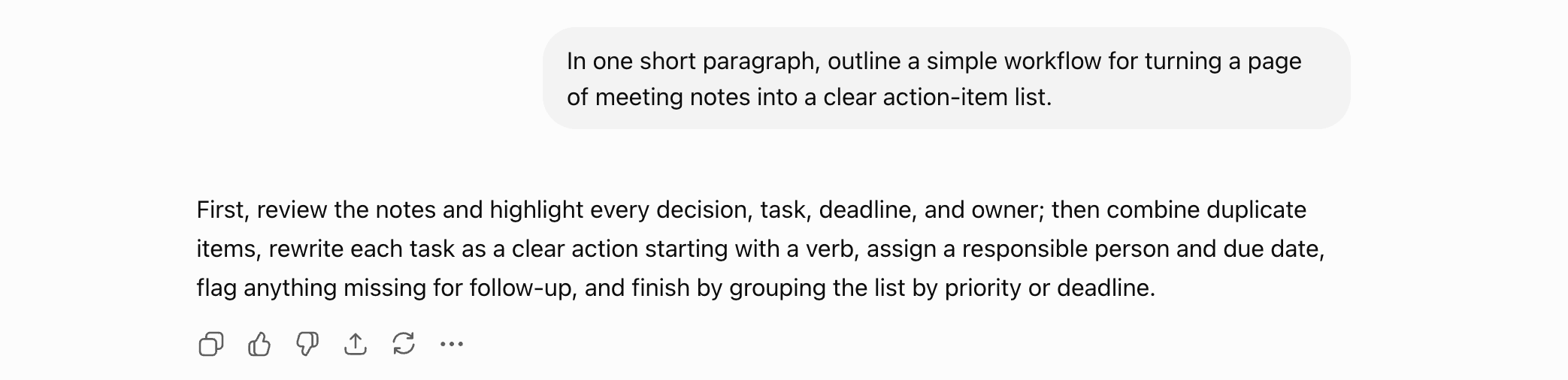
To ground the workflow comparison, here’s a quick hands-on run (logged-in account). Asked to turn a page of meeting notes into action items, ChatGPT gave a tidy step-by-step: pull out every decision, task, deadline and owner; merge duplicates; rewrite each as a clear action statement. Fast and sensible — the open question this article tackles is whether that beats a tool where your notes already live.
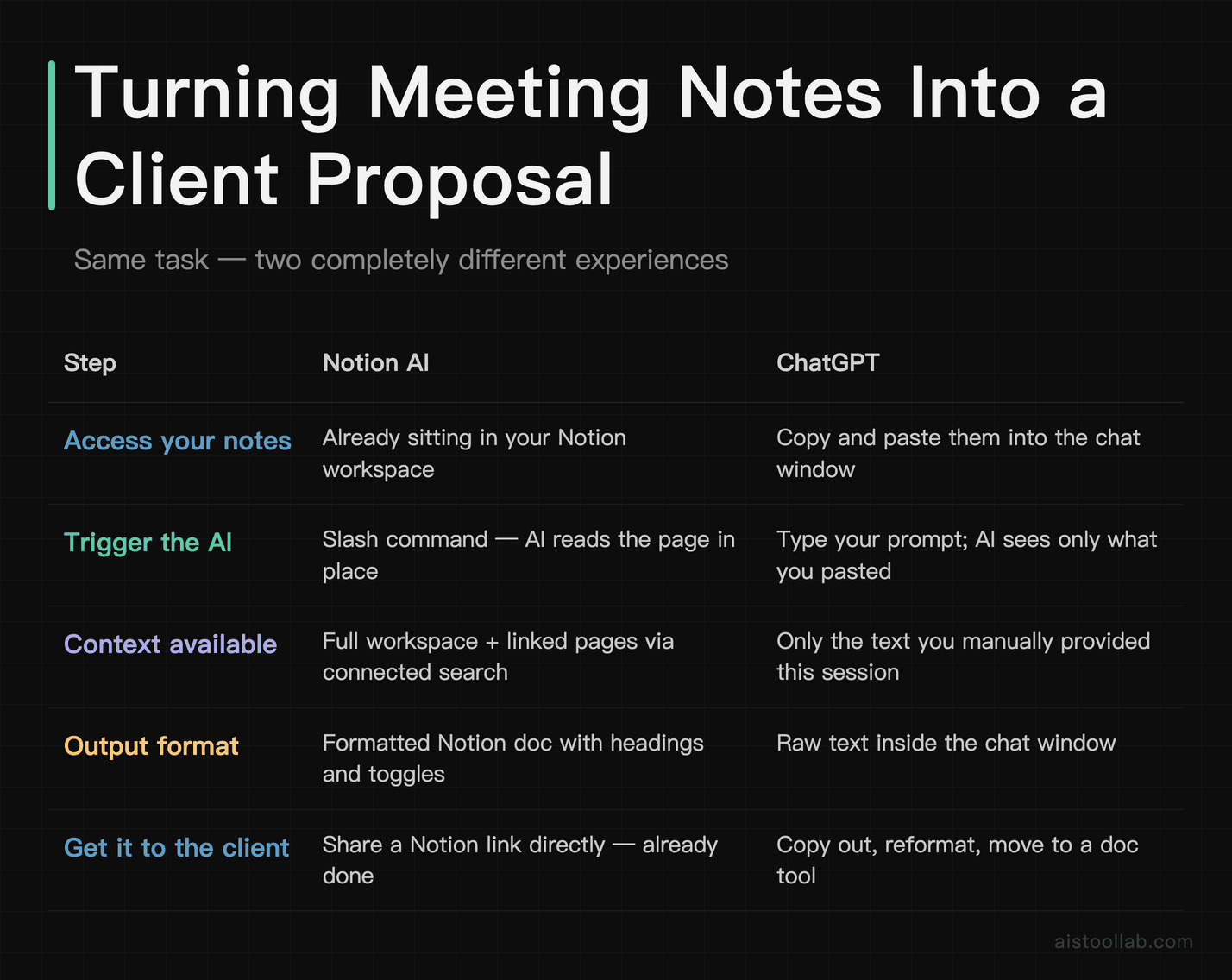
Let’s run that Tuesday-morning scenario through both tools, because the abstract feature lists never tell you what actually happens.
The task: turn last week’s messy meeting notes into a clean client proposal.
With Notion AI ↗, the notes are already sitting in your workspace. You type a slash command, ask it to summarise the notes into an executive summary, and it pulls directly from the page — and, with Notion’s connected workspace search, from related pages you’ve linked. There’s no copy-pasting. The output lands formatted as a Notion doc, with headings and toggles, ready to share via a link. According to Notion’s official documentation, its AI can now search across your entire workspace and connected apps to answer questions, which is the feature they’ve leaned into hardest through 2025 and into 2026.
With ChatGPT, you copy the notes out of wherever they live, paste them into the chat, and prompt it. The draft that comes back is often more polished in pure prose terms — ChatGPT tends to produce more natural long-form writing, a point reviewers make repeatedly. But now you’ve got a proposal trapped in a chat window. You copy it back out, reformat it, and drop it into your actual document. Two extra context-switches that Notion AI skips.
Flip the scenario, though. Say the task is “explain the difference between two database indexing strategies and write me sample code.” Now ChatGPT pulls ahead decisively. Its reasoning models handle multi-step logic, coding, and open-ended research far better than Notion AI, which is optimised for document work rather than deep technical problem-solving. Ask Notion AI to debug a Python function and you’ll feel it straining outside its lane.
That’s the whole game in miniature: Notion AI wins on context and workflow integration, ChatGPT wins on raw reasoning range and standalone power. Keep that in mind as we get specific.
Side-by-Side: The Dimensions That Actually Matter
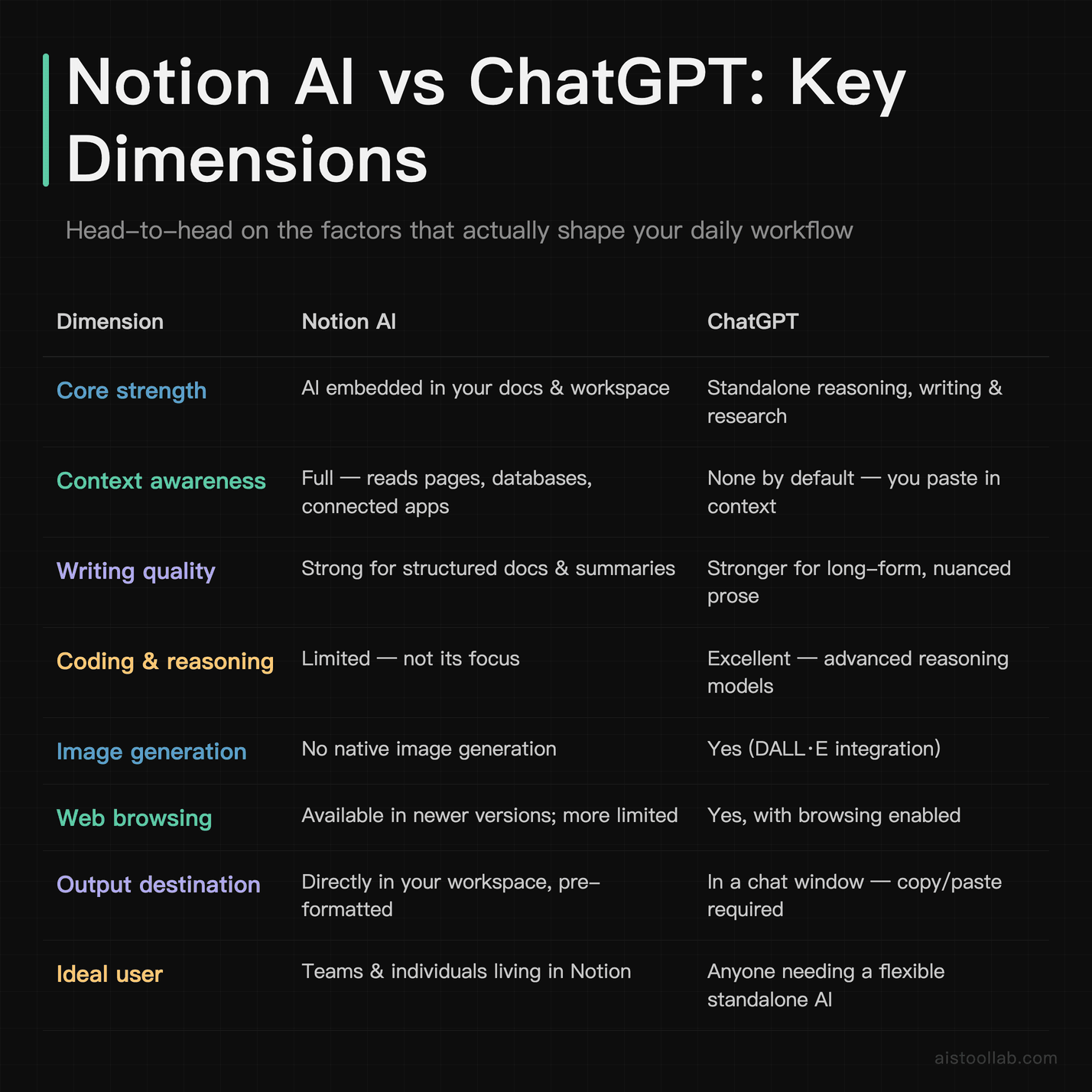
A note on that pricing row, because it trips people up. Notion changed its AI packaging — rather than a separate add-on, AI features are now included in Notion’s paid Business plan tier. You can confirm the current structure on Notion’s official pricing page. ChatGPT offers a capable free tier plus a paid subscription for access to its most advanced models and higher limits; OpenAI’s official pricing page has the current figure. I’m deliberately keeping the numbers qualitative here because both companies adjust them, and an outdated price is worse than no price.
Where Notion AI Genuinely Shines
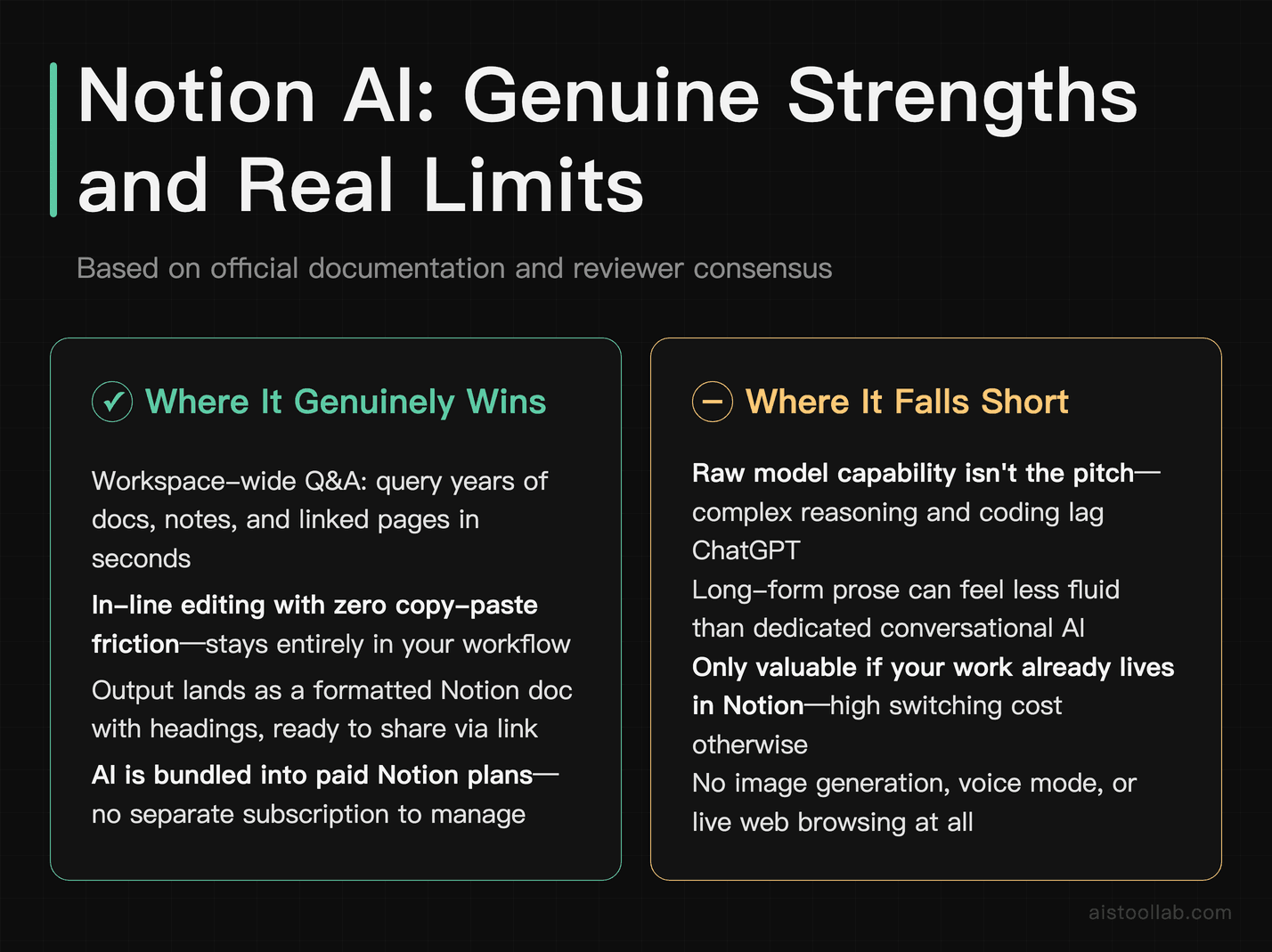
The pitch for Notion AI isn’t “it’s the smartest model.” It’s “the AI is already where your work lives.” That sounds like a small thing until you actually experience the friction of not having it.
The standout capability, based on the official documentation and reviewer feedback, is workspace-wide Q&A. You can ask something like “what did we decide about the pricing tiers in the last product review?” and Notion AI searches across your pages and connected tools to answer, citing the source pages. For a team with two years of accumulated docs, that’s genuinely transformative — it turns a graveyard of forgotten notes into something you can actually query. ChatGPT simply cannot do this unless you manually feed it everything, which nobody does.
The second real strength is in-line editing without leaving the flow. Highlight a paragraph, ask it to tighten the tone, make it more formal, translate it, or turn a wall of text into a bulleted list — and it happens right there in the doc. Public reviews consistently praise this for reducing the copy-paste tax that standalone chatbots impose. Writers, project managers, and anyone drafting inside Notion describe it as the feature they didn’t know they needed until it was there.
Where it’s weaker: Notion AI is not the tool you want for deep research, complex coding, or nuanced creative writing that needs several rounds of back-and-forth reasoning. It’s a workflow accelerator, not a general-purpose brain. Push it past document-and-workspace tasks and the seams show quickly.
Where ChatGPT Pulls Ahead
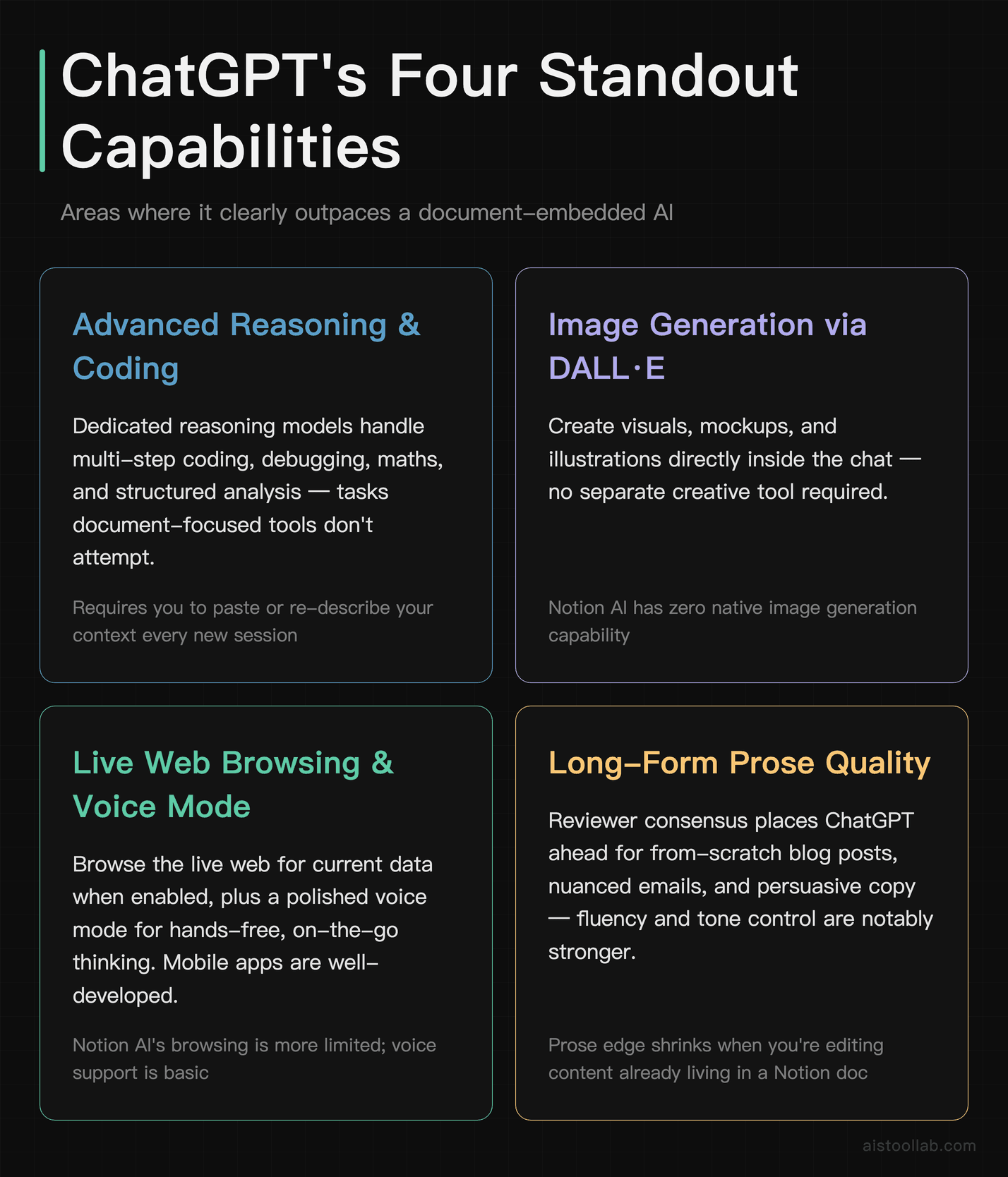
ChatGPT is the Swiss Army knife, and the breadth is genuinely hard to overstate. Its advanced reasoning models handle multi-step problems — coding, maths, structured analysis, planning — in a way that document-focused tools don’t attempt. If your Tuesday task involves “write and debug this function” or “walk me through the trade-offs of three architectures,” this is the tool.
The ecosystem is the other big differentiator. ChatGPT does image generation via DALL·E, has a genuinely useful voice mode for hands-free chatting (handy while, say, walking the dog and thinking through a problem), browses the live web when you enable it, and runs custom GPTs that other people have built for niche tasks. According to OpenAI’s official announcements, the platform has steadily expanded these capabilities, and the mobile apps are polished. Notion AI, by design, does none of this — it’s not trying to.
ChatGPT’s long-form writing also tends to read more naturally. Reviewer consensus, and my read of the compiled evidence, is that for a from-scratch blog post, a nuanced email, or a piece of persuasive copy, ChatGPT’s prose has an edge in fluency and tone control. Notion AI writes competently, but ChatGPT writes with a bit more range.
The catch — and it’s the whole reason this comparison exists — is that ChatGPT is context-blind by default. It doesn’t know your projects, your team’s decisions, or last week’s notes. Everything has to be pasted in, and that manual overhead is exactly where Notion AI’s integration quietly wins back the time ChatGPT’s superior output saves you. If you want to understand how model capabilities are actually measured across tasks like these, my breakdown of AI Model Benchmarks in 2026 digs into which metrics genuinely matter.
Use Cases: Which One Fits Whom
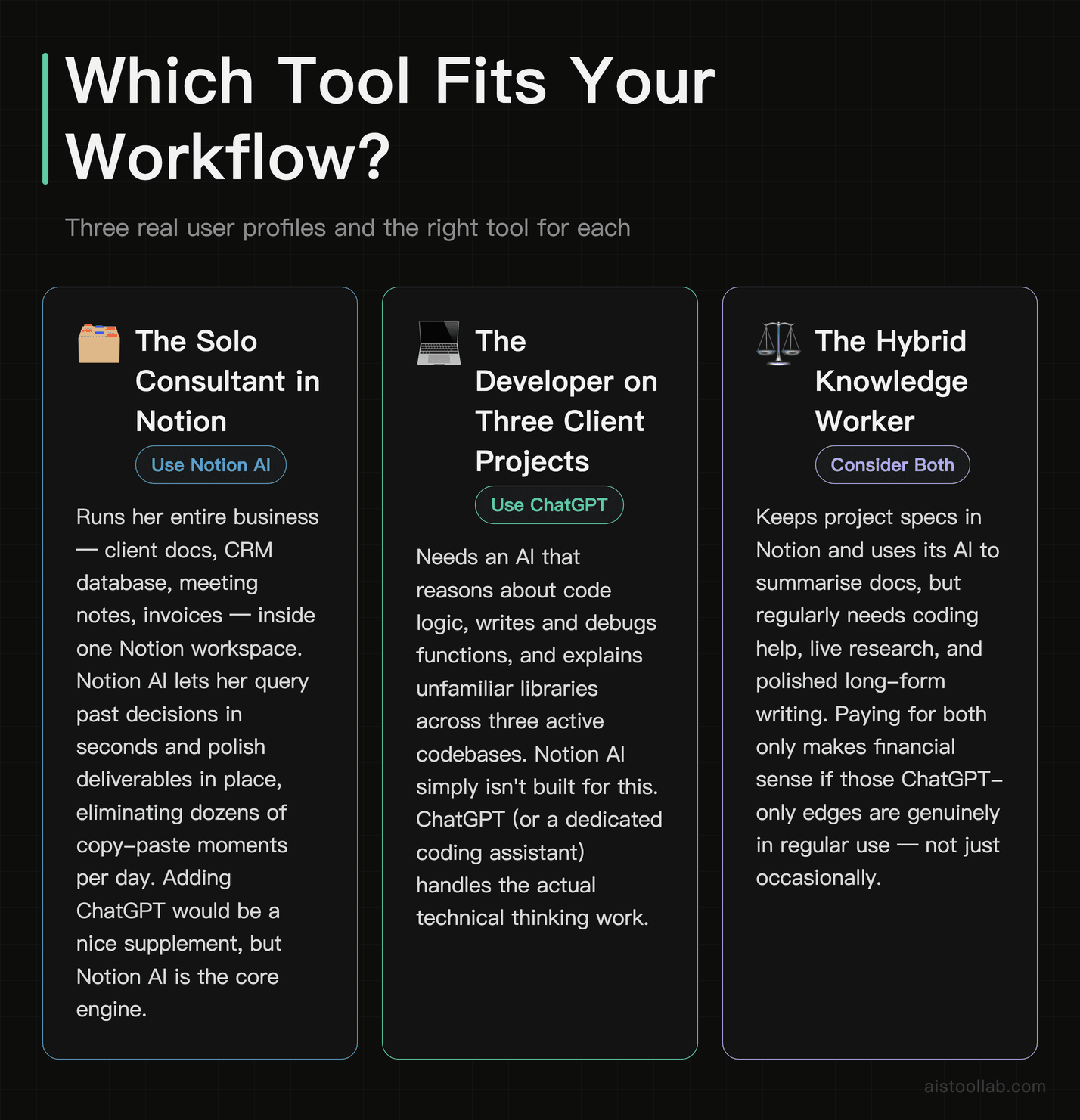
The solo consultant who lives in Notion
Imagine a freelance strategy consultant running her entire business — client docs, CRM database, meeting notes, invoices — inside a single Notion workspace. For her, Notion AI is close to a no-brainer. When a client emails asking “what did we agree on scope?”, she queries her workspace and gets an answer sourced from her own notes in seconds. When she’s drafting a deliverable, the AI polishes it in place. She rarely needs coding or image generation. The integration eliminates dozens of tiny copy-paste moments per day, and those add up fast when you’re billing hourly and your time literally is the product. For this person, adding ChatGPT would be a nice supplement but not the core engine.
The developer juggling three client projects
A solo developer working across three codebases needs an AI that reasons about logic, writes and debugs code, and explains unfamiliar libraries. This is ChatGPT territory, full stop. Notion AI simply isn’t built for it. He might keep project docs in Notion and occasionally use its AI to summarise a spec, but the heavy lifting — the actual thinking work — happens in ChatGPT or a dedicated coding assistant. If his work leans heavily on code, he’d also want to weigh a purpose-built tool; I compared that landscape in my GitHub Copilot coverage, and for pure coding, a specialised assistant often beats a general chatbot.
The two-person startup marketing team
Here it gets interesting, because the honest answer is “both.” A small marketing team drafting campaigns benefits from Notion AI to manage their content calendar, summarise research, and keep everything organised and queryable in one workspace. But when they need a genuinely creative long-form blog post, a batch of ad variations, or a quick campaign image, ChatGPT’s broader toolkit wins. Many small teams I see discussed on Reddit run exactly this hybrid: Notion AI as the organisational backbone, ChatGPT as the creative and research firepower. They’re not really competitors for this team — they’re complementary.
The student or researcher synthesising sources
Someone writing a thesis or a long report will lean toward ChatGPT for its reasoning depth, web browsing, and ability to work through complex arguments across multiple turns. But if they’re organising a large body of notes and want to query that accumulated knowledge later, Notion AI’s workspace search becomes valuable. The split again comes down to: ChatGPT for the thinking, Notion AI for the remembering.
The Honest Overlap Problem
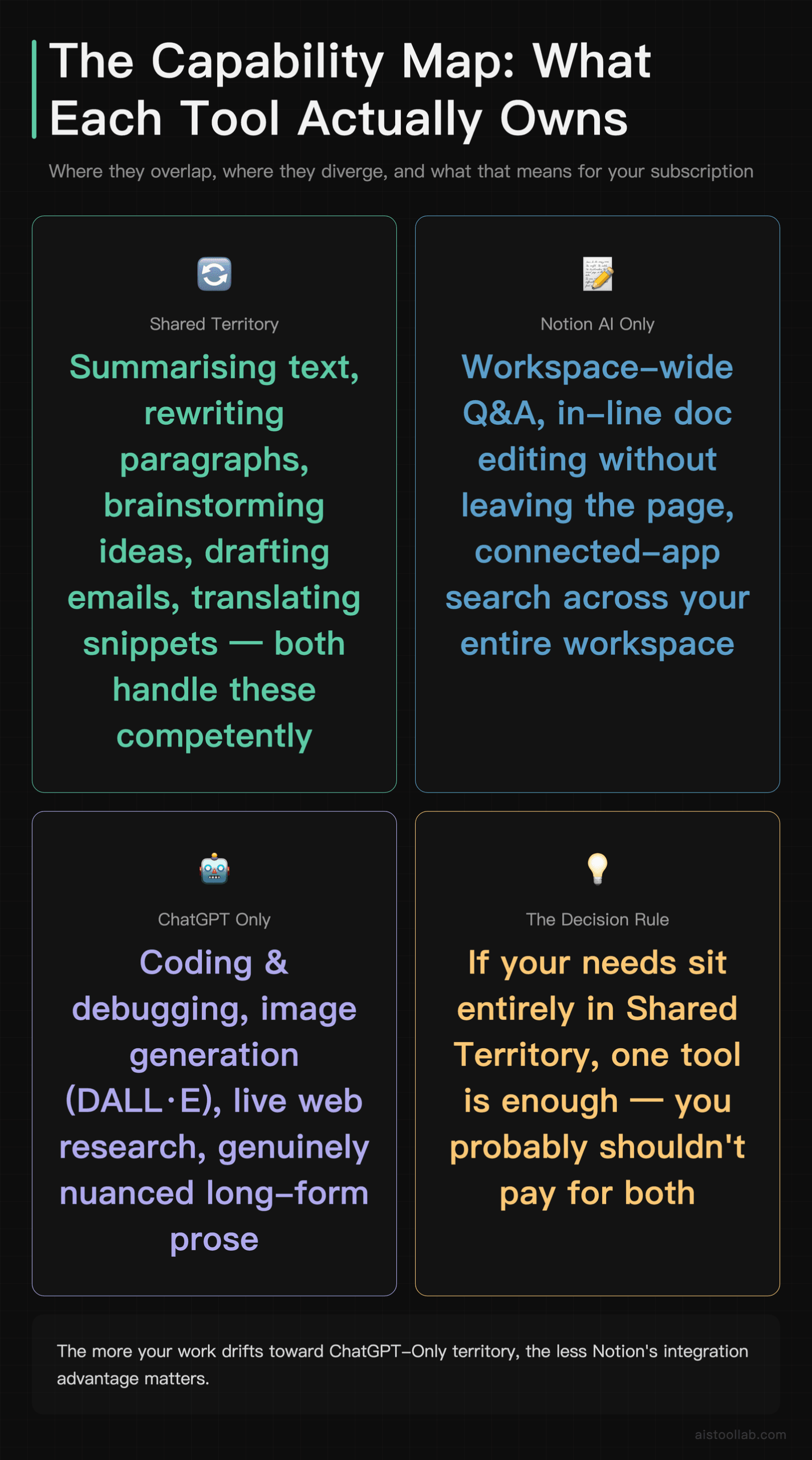
Something worth saying plainly: for a huge share of everyday tasks, these two tools do genuinely overlap, and paying attention to that overlap can save you money. Summarising text, rewriting a paragraph, brainstorming ideas, drafting an email, translating a snippet — both handle all of this competently. If your needs sit entirely in that overlap zone, you don’t need both, and you probably shouldn’t pay for both.
The decision then collapses to a simple question: do you already live inside Notion? If your work — notes, tasks, docs, wikis — is already in a Notion workspace, the bundled AI is the pragmatic choice because the integration removes friction you’d otherwise pay in time. If you don’t use Notion, spinning it up just to get its AI makes no sense; ChatGPT gives you more raw capability with zero workspace lock-in.
Where the “just pick one” logic breaks down is at the edges — coding, image generation, live web research, and truly nuanced long-form writing. Those are ChatGPT-only, and no amount of Notion integration changes that. So the more your work drifts toward those edges, the more ChatGPT (or a specialised tool) becomes non-negotiable regardless of where your docs live.
The Verdict: Match the Tool to Where You Work
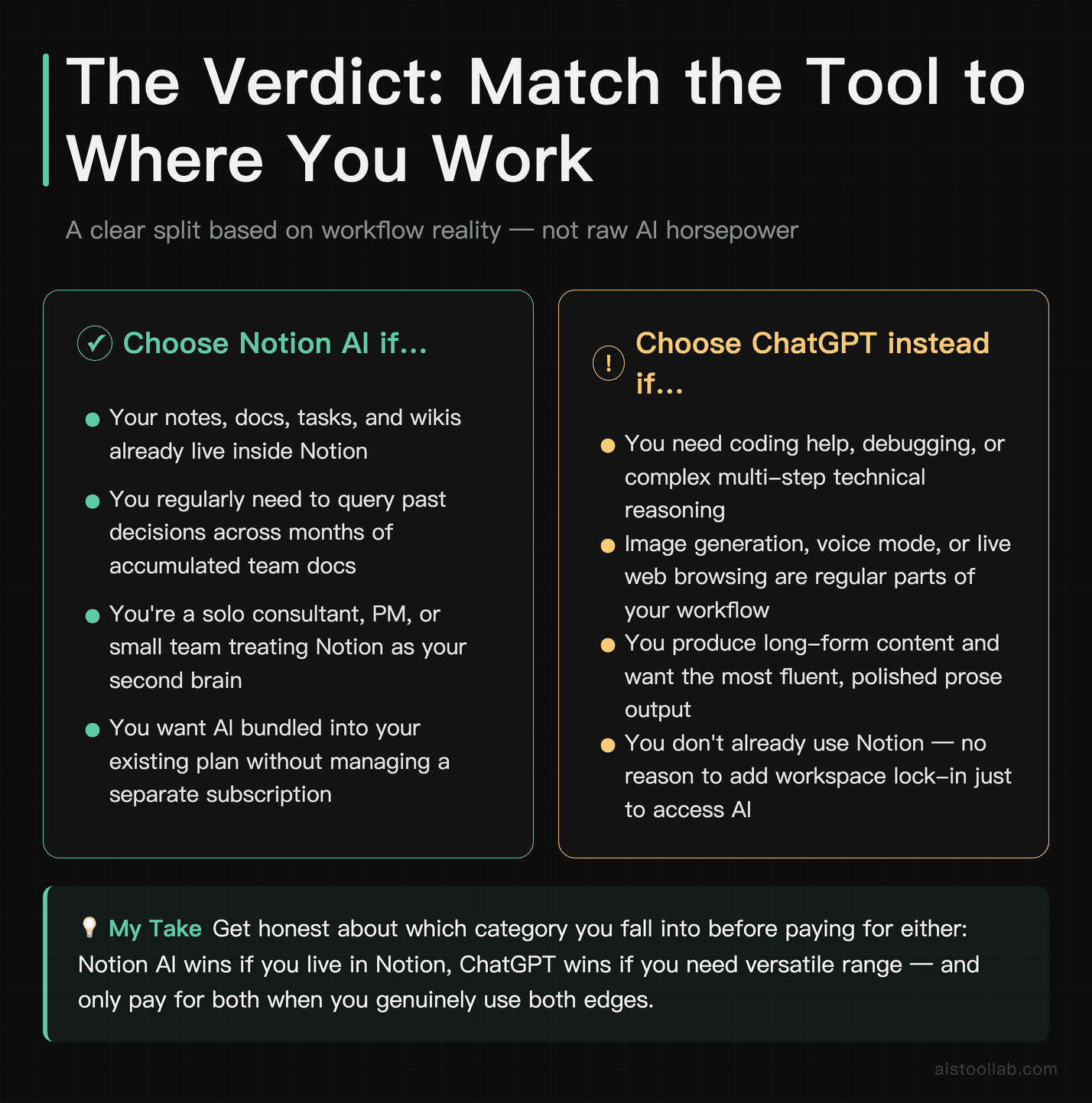
After weighing the documented capabilities and the reviewer consensus, this was never going to end in a tidy “Notion AI beats ChatGPT” or vice versa — because they’re solving different problems, and pretending otherwise would be doing you a disservice.
If your work already lives in Notion — notes, docs, tasks, team wikis all in one place — Notion AI is the pragmatic winner. The workspace-wide Q&A and in-line editing remove real friction, and the AI being bundled into a paid Notion plan means you’re not managing a separate subscription. For a solo consultant, a project manager, or a small team that treats Notion as their second brain, that integration is worth more than a marginally better model in a separate window.
If you need range — coding, deep research, image generation, live web data, or genuinely polished long-form writing — ChatGPT is the stronger standalone tool, and it’s the better single choice for anyone who doesn’t already live in Notion. Its breadth simply covers more ground.
And if it were my money on the line? I’d get honest about which category I fall into before paying for either. Live in Notion and mostly wrangle documents — Notion AI. Need a flexible thinking machine that goes wherever you do — ChatGPT. Straddle both worlds like a lot of small teams do — run ChatGPT’s free tier alongside a Notion plan and let each do the job it’s actually good at. The worst move is paying for both out of FOMO before you know which wall you’ll hit first. Give one a two-week trial on your real work, and you’ll know within the first few tasks whether it fits.
Frequently Asked Questions
Is Notion AI just ChatGPT with a different interface?
Not exactly, though the confusion is understandable. Notion has publicly stated that its AI draws on models from providers including OpenAI and Anthropic, so some of the underlying intelligence may come from the same family of models that powers ChatGPT. But the products are fundamentally different in design and purpose. ChatGPT is a general-purpose conversational assistant that operates in isolation — it knows only what you tell it in the chat. Notion AI is a layer built into the Notion workspace, engineered to read your pages, search your databases, and act on documents in context. The value of Notion AI isn’t the model; it’s the integration and the workspace awareness. Think of it this way: two cars can share an engine but be built for completely different roads. Notion AI is tuned for the “everything lives in my workspace” road, while ChatGPT is the versatile all-terrain vehicle. Calling one a reskin of the other misunderstands what you’re actually paying for in each case.
Which one is better for writing long-form content?
Based on reviewer consensus across G2, Capterra, and Reddit, ChatGPT generally has the edge for from-scratch long-form writing — blog posts, essays, persuasive copy, anything needing tonal nuance across several paragraphs. Its prose tends to read more naturally, and its ability to iterate over multiple conversational turns lets you refine voice and structure in a way that feels more collaborative. Notion AI writes perfectly competently and is excellent at structured documents, summaries, and transforming existing text — tightening, reformatting, changing tone — but it’s optimised for document work rather than open-ended creative composition. The practical distinction: if you’re staring at a blank page and need something genuinely well-crafted, reach for ChatGPT. If you already have raw material in a Notion doc and want to shape it, Notion AI keeps you in the flow and does the job without the copy-paste tax. Many writers use both — ChatGPT to generate, Notion AI to organise and refine inside their actual workspace.
Can Notion AI access information from across my whole workspace?
Yes, and this is arguably its single most compelling feature. According to Notion’s official documentation, its AI can search across your pages, databases, and connected apps to answer questions, and it cites the source pages it draws from. So you can ask something like “what were the action items from the last three project meetings?” and get an answer synthesised from your actual notes, without hunting through pages manually. This is genuinely something ChatGPT cannot replicate out of the box — ChatGPT only knows what you paste into the conversation. For teams with a large accumulated body of documentation, this workspace-wide Q&A turns a sprawling, half-forgotten archive into something queryable. The quality of answers naturally depends on how well-organised your workspace is; garbage in, garbage out still applies. But if you’ve invested in keeping your Notion tidy, this feature alone can justify the AI-inclusive plan for a lot of teams.
Do I have to pay for both, or can I get by with one?
For most people, one is enough — and which one depends on your workflow, not your budget. If your work already lives in Notion and your AI needs are mostly writing, summarising, organising, and querying your own documents, Notion AI (bundled into a paid Notion plan) covers you without needing a separate ChatGPT subscription. If you don’t use Notion, or your work involves coding, complex research, image generation, or heavy creative writing, ChatGPT — even its free tier for lighter use — is the more sensible single choice. The overlap between the two is large for everyday tasks, so paying for both is only worth it when you genuinely need Notion AI’s workspace integration and ChatGPT’s broader capabilities. Plenty of small teams do run both because they serve different jobs — organisation versus raw AI horsepower — but I’d start with one, use it for a couple of weeks, and only add the second when you hit a specific wall the first one can’t handle. Check both companies’ official pricing pages for current figures before deciding.
Which is better for coding tasks?
ChatGPT, without hesitation. Its advanced reasoning models are built to handle multi-step logical problems, write and debug code across many languages, explain unfamiliar libraries, and work through architectural trade-offs. Notion AI simply isn’t designed for this — it’s a document and workspace tool, and pushing it into serious coding territory quickly exposes its limits. If a meaningful part of your work is technical, ChatGPT is the baseline, and you might even want a purpose-built coding assistant on top. That said, for a developer, Notion AI still has a role: summarising technical specs, organising project documentation, and keeping your knowledge base queryable. The two aren’t really competing for the coding job at all — one does the thinking, the other keeps the paperwork straight. If you’re specifically weighing coding-focused AI tools, it’s worth reading dedicated comparisons of developer assistants rather than treating a general chatbot or a document tool as your primary coding solution, because the specialised tools integrate directly into your editor.
Does either tool work offline or keep my data private?
Neither works offline — both are cloud-based services that send your input to remote servers for processing, so an internet connection is required for both. On privacy, the details matter and you should read each company’s current policies directly rather than trust a summary, because these terms change. Broadly, both Notion and OpenAI publish data-handling and privacy documentation, and both offer business or enterprise tiers with stronger data-protection commitments — for example, controls around whether your data is used to train models. For sensitive or regulated work, the enterprise plans of either service typically provide the contractual guarantees (SLAs and compliance terms) that regulated work calls for, and you should involve whoever handles compliance at your organisation. As a general rule, don’t paste highly confidential information — client secrets, personal data, unreleased financials — into any consumer AI tool without first confirming the data-handling terms. Both companies have improved their enterprise privacy posture over time, but “improved” is not the same as “verify it yourself,” which you absolutely should before trusting either with sensitive material.
Can ChatGPT integrate into my existing tools the way Notion AI does?
Partially, but not in the same seamless, native way. Notion AI’s advantage is that it’s built directly into the Notion workspace — there’s no integration to configure; it just sees your docs. ChatGPT, by contrast, is a standalone product, but it has expanded its connective tissue considerably: it offers custom GPTs, and there are numerous third-party integrations, browser extensions, and API-based connections that developers and teams use to wire ChatGPT into other tools. So you can bring ChatGPT-style capability into other apps, but it typically requires setup, and it won’t automatically have context about your specific documents the way Notion AI does within Notion. The honest framing: Notion AI gives you deep integration with one ecosystem (Notion) out of the box, while ChatGPT gives you broad, flexible connectivity that you assemble yourself. Which is better depends on whether you want zero-config depth in one place or configurable breadth across many places. For non-technical users, Notion AI’s native integration is far easier; for teams with developer resources, ChatGPT’s API opens more doors.
What’s the learning curve like for each?
Both are approachable, but in different ways. ChatGPT has essentially zero learning curve for basic use — you type a question, you get an answer, and the conversational format is intuitive to anyone who has ever sent a text message. The skill ceiling comes with prompt engineering: getting genuinely great, consistent output takes practice, and there’s a real difference between a lazy prompt and a well-structured one. Notion AI’s learning curve is tangled up with Notion itself. If you already know Notion, the AI features are easy — slash commands and highlight-to-edit feel natural. If you’re new to Notion, you’re learning the whole workspace paradigm (pages, databases, blocks) at the same time, which is a steeper hill. So the fair comparison is: ChatGPT is easier to start using in isolation, while Notion AI is easy if you’re already a Notion user and steeper if you’re not. Neither requires technical skill, and both reward the time you invest in learning how to prompt them well. For most people, a weekend of casual use is enough to know whether a tool clicks with the way they work.
Last updated: 2026
Found this review helpful?
👉 Browse the AI Tools Library to find the right tools for your workflow.
Related reading: Rytr Review 2026: Hands-On With the Free Plan, Plus Full Pricing & Features
Related reading: Typeform AI vs JotForm AI: Which No-Code Form Builder Actually Saves Time in 2026?