
Transparency note: this review separates two kinds of content. ✋ Hands-on marks what I personally did and saw inside Rytr. 📋 Researched marks features and pricing I compiled from Rytr’s official site and public sources — I did not deep-test every paid feature, and I say so where that’s the case.
This article contains affiliate links. If you buy through them I may earn a commission at no extra cost to you. All opinions are my own.
Rytr is one of the cheapest AI writing tools that still gets recommended in 2026 — its paid tier starts at well under half the price of most “premium” copywriting suites. But cheap only matters if the output is usable. So I opened the free plan, ran one of its core workflows myself, and then pulled together the full feature and pricing picture from Rytr’s official site. Here’s the honest result.
The AI-writing market in 2026 has split into two camps: heavyweight long-form platforms that cost several times more per month, and lean, template-first assistants built for fast everyday copy. Rytr sits firmly in the second camp — and it has stayed relevant precisely because it does the cheap-and-fast job well rather than trying to be everything. The question this review answers is simple: is the output good enough to justify even its low price, and which plan (if any) is worth paying for?
Who this is for: solo bloggers, freelancers and small teams weighing a low-cost AI writer against just using ChatGPT. If you came looking for an AI voice tool rather than an AI writer, the same free-plan treatment is here: the Murf AI review.
✋ Hands-On: Generating a Blog Outline on the Free Plan
What I actually did: I used Rytr’s free plan and ran a single, focused test of its Blog Idea & Outline use case — no paid upgrade, no months of usage, just one real run so I could see the workflow and judge the raw output quality.
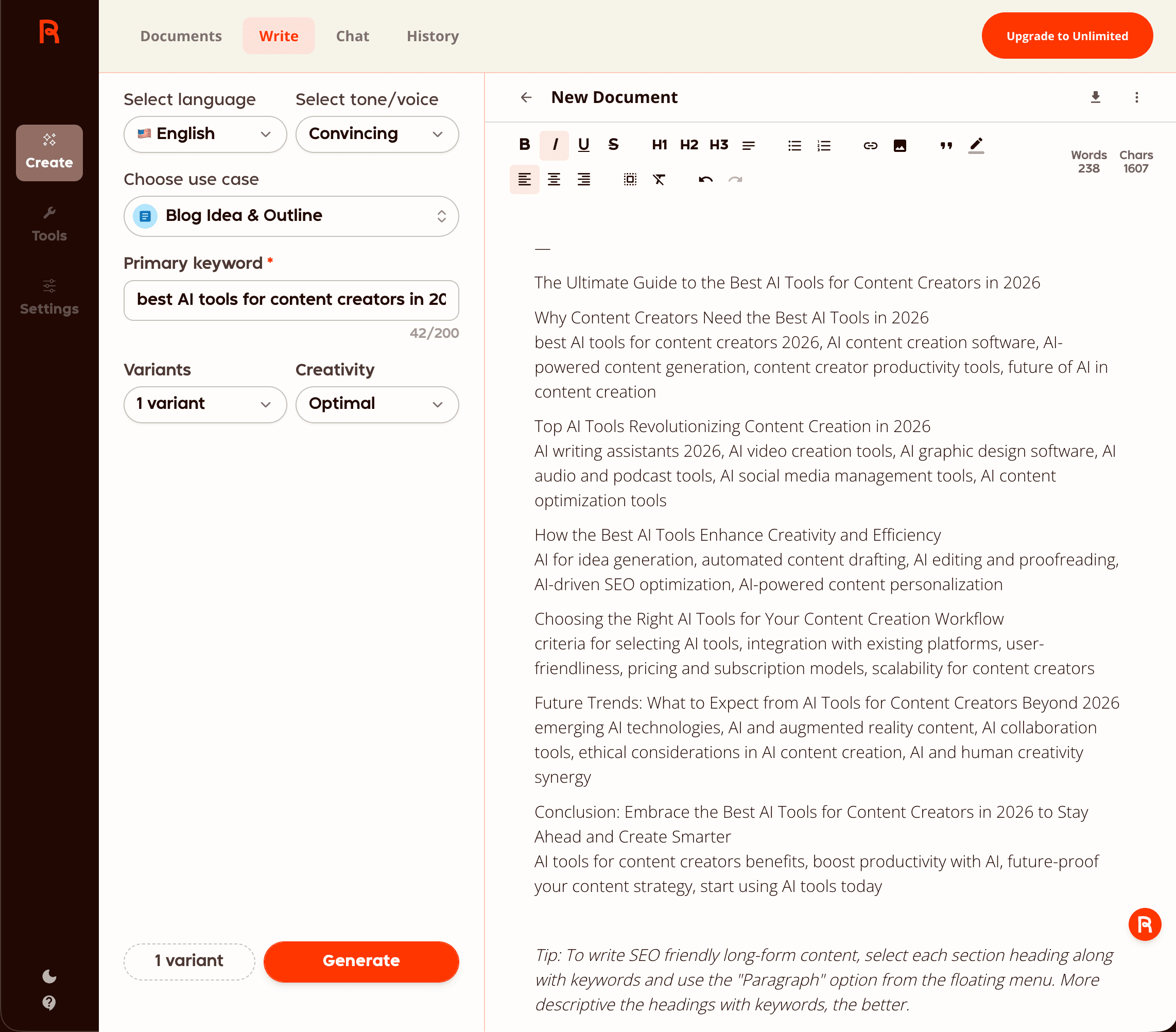
The flow was simple and took only a few clicks: pick the language (English) → choose a tone/voice (I picked “Convincing”) → select the use case (Blog Idea & Outline) → type a primary keyword (best AI tools for content creators in 2026) → hit Generate.
My honest impressions (this one test, nothing more):
- A few fields in, a whole outline out — the screen asks for language (English), tone (Convincing), use case (Blog Idea & Outline) and a primary keyword; what came back was a headline, six section headings and a line of keyword suggestions under each (the counter read 238 words / 1,607 characters). The interface, to my eye, needs no learning at all. (I didn’t time it, so I won’t hand you a number.)
- Quality was decent. It returned a full, usable structure: a headline (“The Ultimate Guide to the Best AI Tools for Content Creators in 2026”), about six logical sections — from “Why content creators need AI tools” through to a conclusion — and a short list of relevant sub-keywords under each section.
- The interface is simple and easy to understand. Every choice (language, tone, use case, keyword) is on one screen; there’s nothing to figure out before you can generate.
- The free plan was enough to do this — I didn’t need to pay to produce a complete outline.
To be clear about scope: I tested one use case on the free tier. I did not stress-test long-form drafting, the plagiarism checker, or the custom-voice features — so everything below on those is researched, not hands-on.
📋 What Rytr Actually Does (Features)
Compiled from rytr.me, 2026-06. Rytr is a template-driven generator rather than an open chat canvas. You pick a use case, feed it a short input, and it produces copy in that format. The main pieces:
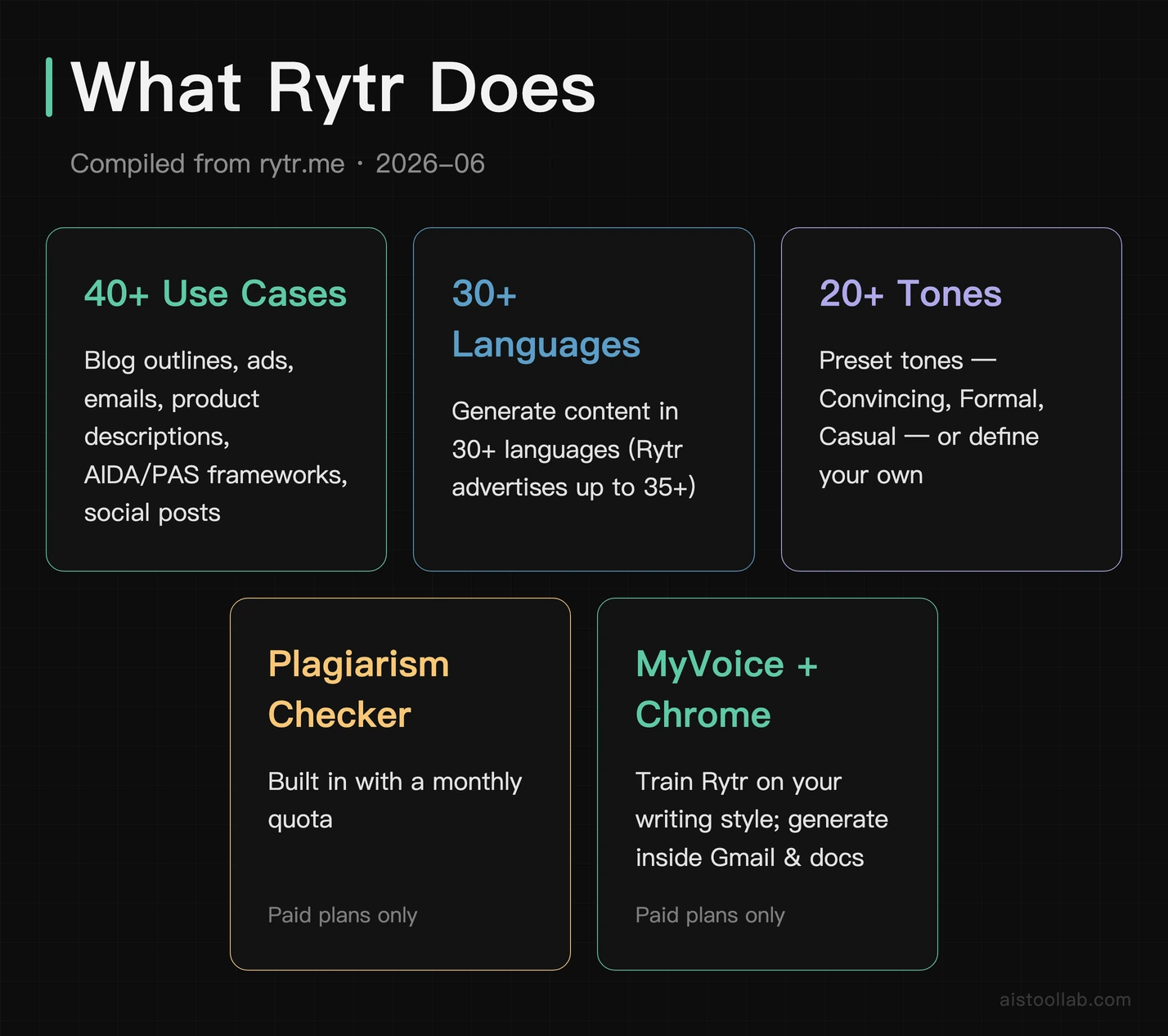
- 40+ use cases & templates — blog outlines, emails, product descriptions, ad copy, social posts, the AIDA/PAS copywriting frameworks, and more.
- 30+ languages for generating content (Rytr advertises up to 35+).
- 20+ preset tones (Convincing, Formal, Casual, etc.) you choose before generating; you can also define a custom tone.
- Plagiarism checker — built in on paid plans (a monthly check quota, not unlimited).
- MyVoice — trains Rytr on samples of your own writing so output matches your style (paid).
- Chrome extension — generate inside Gmail, docs, and other web apps (paid).
📋 The 40+ use cases, grouped
Template names below are taken from Rytr’s published use-case pages (rytr.me/use-cases/*). Rather than one open chatbox, Rytr gives you purpose-built templates. They fall into roughly five groups:
- Long-form & SEO — Blog Idea & Outline (the one I tested), Blog Writing, section expanders, and SEO meta title/description helpers. Good for planning and drafting, less so for finishing a long article in one shot.
- Marketing & copywriting — ad copy, product descriptions, and the classic conversion frameworks like AIDA (Attention-Interest-Desire-Action) and PAS. This is where short-form template tools earn their keep.
- Email & social — emails, reply generators, and social-media posts/captions for the platforms you publish to daily.
- Creative writing — Story Plot, song lyrics, and other open-ended generators for when you want ideas rather than conversions.
- Editing & shortcuts — Grammar Checker & Readability Improver, Continue Writing, rephrase/expand/shorten, plus personal/professional shortcuts like Cover Letter and job descriptions.
The practical upshot: Rytr is at its best when your task fits a template and is short. The more your job looks like “produce a polished 2,000-word article end to end,” the more manual work you’ll add on top.
📋 Rytr Pricing in 2026
Current as of 2026-06 from rytr.me. Always confirm on the official pricing page before subscribing — AI tools change plans often.
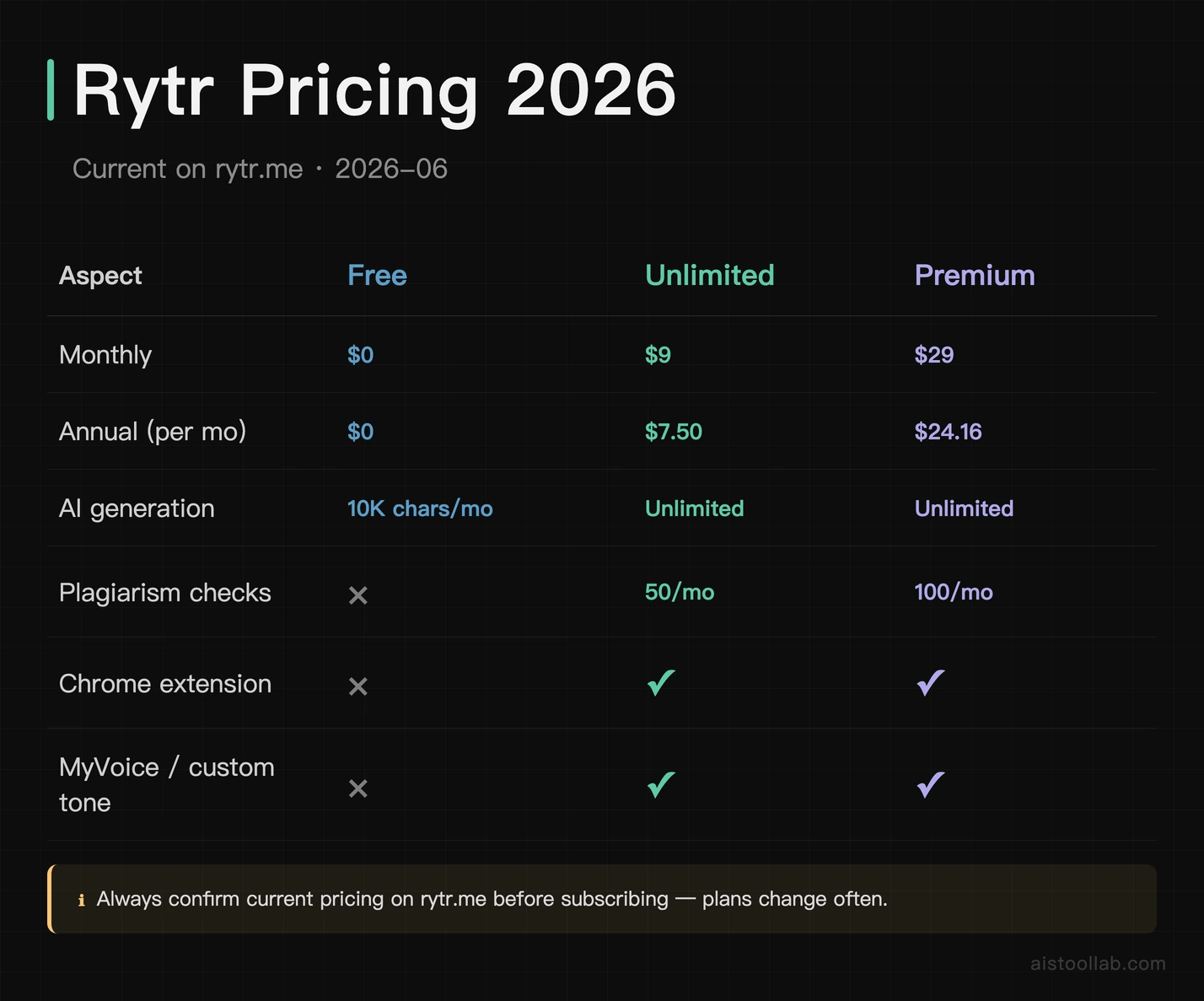
- Free — $0 (Rytr’s official pricing page, as of July 2026). 10,000 characters per month, the use-case library, and preset tones. No plagiarism checker, no MyVoice, no Chrome extension. Genuinely usable for light, occasional writing — it’s what I ran my test on.
- Unlimited — $9/month, or $7.50/month billed annually (“2 months free”; per Rytr’s official pricing page, as of July 2026). Unlimited generation, the Chrome extension, 50 plagiarism checks/month, and custom tone matching. This is the plan most solo writers will actually want.
- Premium — $29/month, or $24.16/month billed annually (per the official pricing page, as of July 2026). Everything in Unlimited plus the widest language coverage (35+), a higher input limit, 100 plagiarism checks/month, custom use cases, and priority support.
Prices verified against Rytr’s official pricing page as of July 2026 — plans and prices change, so treat these as a snapshot and check the official page for current rates.
The headline takeaway: Unlimited at $7.50–$9/month is the real selling point. Very few credible AI writers offer unlimited generation at that price.
Which plan should you pick? Start on Free to confirm the output suits your work — it costs nothing and, as my test showed, it’s enough to generate a real outline. If you write regularly and keep hitting the 10K-character wall, jump to Unlimited (annual billing makes it $7.50/month). Premium is only worth it if you specifically need 35+ languages, custom use cases, or the higher input limit; most solo writers won’t.
📋 Rytr Next to Jasper, Copy.ai and ChatGPT
General positioning, compiled from public information — not a head-to-head test. Rytr’s niche is “cheapest credible unlimited short-form.” Against the common alternatives:
- vs. Jasper — Jasper is the premium long-form and brand-voice option, with deeper templates, brand-voice controls, and team/workflow features — but it costs several times Rytr’s price and has no free tier of comparable usefulness. If budget is the priority and your work is short-form, Rytr wins on value; if you need polished long-form at scale with team governance, Jasper is the stronger (pricier) tool.
- vs. Copy.ai — Copy.ai sits between the two on price and leans hard into marketing copy and, more recently, go-to-market/sales workflows. For a solo writer who just wants cheap, fast short-form drafts, Rytr is simpler and cheaper; for marketing teams wanting workflow automation around copy, Copy.ai aims higher (and charges for it).
- vs. ChatGPT — ChatGPT is a flexible general-purpose chat model with no fixed templates. It can out-reason and out-write Rytr on long, nuanced answers, but Rytr’s structured use cases get you a formatted draft faster for repetitive copy (ads, product descriptions, outlines) without prompt-engineering each time. Many writers use both: ChatGPT for thinking, Rytr for churning out templated short-form cheaply.
- The honest summary — Rytr’s edge is price and speed-through-templates for short-form, not raw power. It doesn’t beat the premium tools on quality ceiling; it beats them on cost-per-output for the everyday stuff.
What Rytr Gets Right, and What It Costs You
Pros
- Simple, low-friction — ✋ in my test filling in those few fields produced the whole outline, and the UI needed zero learning.
- Cheapest “unlimited” tier worth taking seriously — 📋 $7.50–$9/month for unlimited output undercuts almost everyone.
- A real free plan — ✋ I produced a complete, usable blog outline without paying.
- Broad template + language coverage — 📋 40+ use cases and 30+ languages cover most everyday short-form needs.
Cons (📋 objective, known limitations — not from my single test)
- Strong on short-form, weaker on long-form. Rytr shines at outlines, emails, and ad copy; full long articles need more manual stitching and editing than premium long-form tools.
- Output is relatively easy for AI-detection tools to flag — if undetectability matters for your use case, plan to edit heavily.
- The editor and chat feel separate — the workflow is template-first rather than a single fluid writing surface.
- Plagiarism checks are quota-limited, and the cheapest paid tier caps languages until you reach Premium.
Who Rytr Is For (and Who Should Skip It)
A good fit if you’re a blogger, freelancer, student, or small-business owner who needs fast short-form drafts — outlines, emails, product blurbs, social captions — at the lowest credible price, and you’re happy to edit the output yourself. Concrete cases where Rytr earns its keep:
- The solo blogger who wants an outline and first-draft sections to beat the blank page, then rewrites in their own voice — exactly the workflow I tested.
- The e-commerce seller generating dozens of product descriptions and ad variations, where unlimited cheap output matters more than literary polish.
- The freelancer or job-seeker firing off cover letters, client emails, and proposals from templates instead of writing each from scratch.
- The social/marketing one-person team producing captions and short ad copy at volume on a tiny budget.
Probably not for you if you need polished long-form articles end-to-end, AI output that passes detection with minimal editing, brand-voice consistency across a team, or a single integrated long-document workspace — a heavier (and pricier) long-form tool like Jasper will serve you better.
Does Rytr Earn a Slot in a Writing Stack?
Rytr isn’t trying to be the most powerful AI writer — it’s trying to be the most accessible one, and it succeeds. ✋ In my hands-on test the free plan produced a clean, usable blog outline (title, six sections, keyword suggestions under each — the counter read 238 words) with a dead-simple interface, and 📋 the $7.50–$9/month Unlimited tier is one of the best price-to-output deals in the category. If your work is mostly short-form and you don’t mind editing, it’s an easy tool to recommend trying — especially since the free plan costs nothing to evaluate.
If you want to try it yourself, you can start with Rytr’s free plan ↗ and only upgrade if the output earns it.
Frequently Asked Questions
Is Rytr’s free plan actually usable?
Yes — ✋ I generated a complete blog outline on the free plan without paying. The cap is 10,000 characters per month, which is fine for light or occasional writing but runs out fast if you write daily.
How much does Rytr cost?
📋 Free ($0), Unlimited ($9/month or $7.50/month billed annually), and Premium ($29/month or $24.16/month billed annually), per Rytr’s official pricing page, as of 2026-06.
Is Rytr good for long-form articles?
📋 It can draft sections, but it’s built around short-form templates. For long articles you’ll do more manual assembly and editing than with dedicated long-form tools.
Will Rytr’s output pass AI detectors?
📋 Not reliably. Like most template AI writers, raw Rytr output is relatively easy to flag, so edit it into your own voice if that matters.
How many languages and use cases does Rytr support?
📋 40+ use cases/templates and 30+ languages (35+ on the top plan), plus 20+ preset tones, per rytr.me.
Does Rytr have a plagiarism checker?
📋 Yes, but only on paid plans and with a monthly quota — 50 checks/month on Unlimited and 100/month on Premium. The free plan has none.
What is MyVoice in Rytr?
📋 MyVoice lets you train Rytr on samples of your own writing so generated copy matches your style. It’s a paid feature; I did not test it (my hands-on was the free plan only).
Is the annual plan worth it over monthly?
📋 If you’ll use Rytr for more than a couple of months, yes — annual billing drops Unlimited from $9 to $7.50/month (Rytr frames it as “2 months free”). For a short trial, start monthly or on the free plan.
Can Rytr replace a writer?
A realistic take: no — it speeds up drafting, but the output still needs a human to fact-check, restructure, and add real voice. ✋ Even my decent-looking outline was a starting point, not a finished post.
Is there a Rytr free trial or free plan?
📋 There’s a permanent free plan (not just a trial): $0/month with a 10,000-character monthly cap (per the official pricing page, as of July 2026). ✋ I used it to run my outline test without entering payment details.