
What Cursor Gets Right, and Where the Bill Starts to Hurt
Cursor has done something impressive: it took the VS Code experience developers already know and layered in genuinely useful AI features — tab completion that actually anticipates what you’re building, an agent mode that can refactor across files, and a codebase-aware chat that doesn’t just answer questions but understands context. For a lot of developers, it clicked immediately. For others, the $20/month Pro plan (or $40/user/month for the Teams plan, per Cursor’s official pricing page, checked 2026-07-29) feels steep when they’re hitting usage caps mid-sprint, or when their company’s security policy won’t allow proprietary code to leave the building.
Transparency note: this article is compiled from each tool’s official documentation and publicly available user feedback rather than a first-hand paid test; check the vendors’ latest announcements for current pricing and features.
That’s the honest tension with Cursor. It’s one of the best AI coding experiences available right now, but the subscription cost adds up fast for teams, the context window can run dry on large monorepos, and if you’re working with sensitive code — healthcare data, fintech systems, anything with compliance requirements — sending it to Cursor’s servers is a conversation you’ll need to have with your legal team. Some people pass that conversation. Many don’t.
This guide covers six serious alternatives: GitHub Copilot, Windsurf (now called Devin Desktop; verified 2026-08-02, source: devin.ai/desktop official page), Amazon Q Developer, Zed AI, Sourcegraph Cody, and Continue.dev. Each one is genuinely worth considering depending on your situation — and I’ll tell you exactly which one fits which scenario.
What People Are Actually Trying to Escape When They Leave Cursor
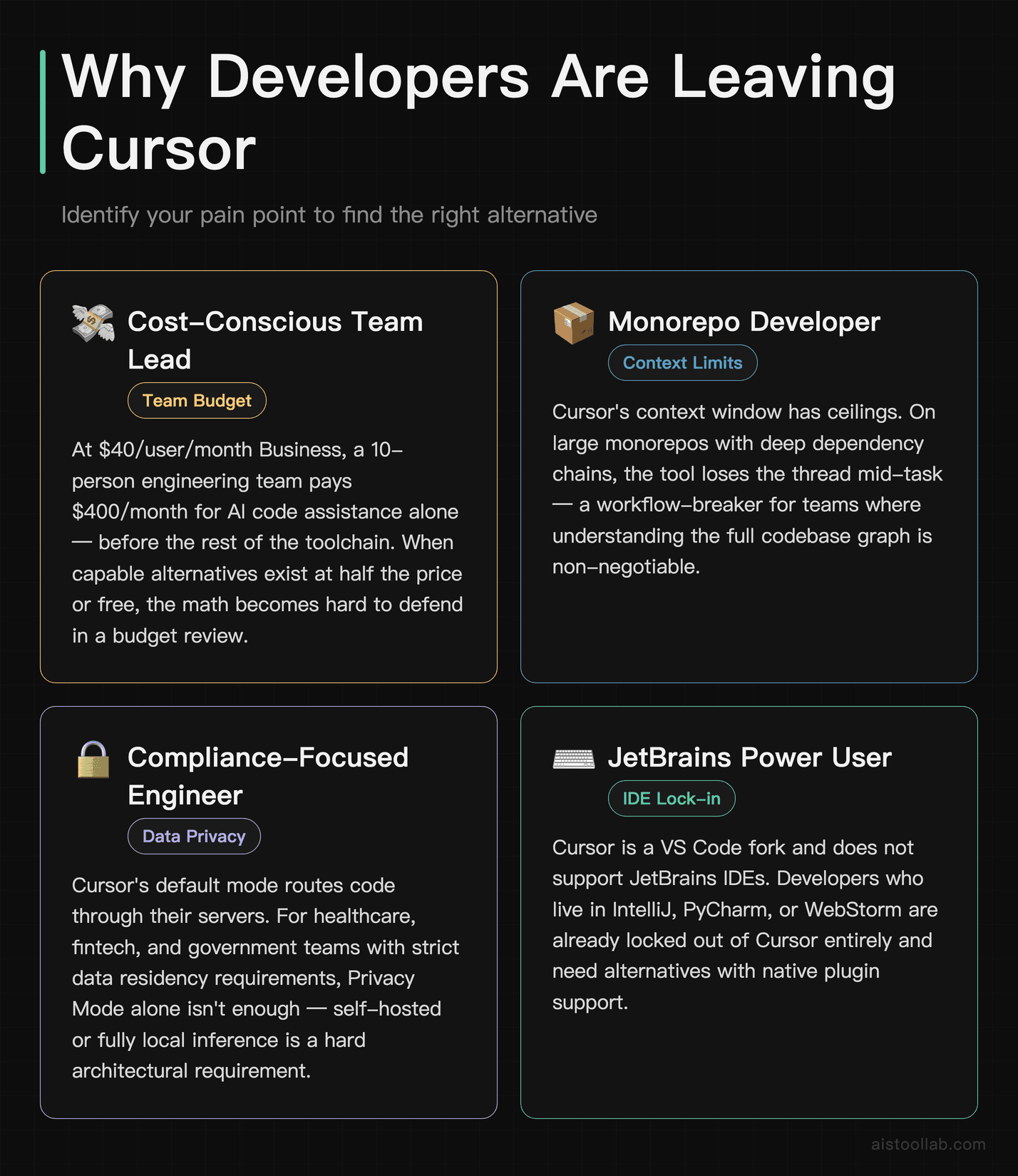
Before jumping to the list, it’s worth naming the specific pain points driving people here — because the right alternative depends entirely on which problem you’re actually trying to solve.
- Subscription cost at team scale: At $40/user/month for Teams (Cursor’s official pricing page, checked 2026-07-29), a 10-person engineering team is paying $400/month just for AI code assistance. That’s before the rest of your toolchain. Some teams find that math hard to justify when alternatives exist at half the price — or free.
- Context window limits on large codebases: Cursor’s context window is generous compared to most tools, but it still has ceilings. If you’re working on a large monorepo with deep dependency chains, you’ll notice the tool losing the thread. This is a workflow-breaker for some.
- Privacy and data residency concerns: Cursor’s default mode routes your code through their servers. The Privacy Mode option helps, but it’s not always enough for regulated industries or enterprises with strict data policies. Some teams need self-hosted or fully local inference — full stop.
- IDE lock-in: Cursor is a VS Code fork. If your team uses JetBrains (IntelliJ, PyCharm, WebStorm), Neovim, or Emacs, Cursor simply doesn’t apply. You need something that comes to your editor, not the other way around.
- Usage caps and slowdowns: Several users report that on the free tier, and even on Pro, response speed and quality degrade during peak hours or after hitting request thresholds. That unpredictability is frustrating when you’re in flow.
Coming from GitHub Copilot rather than Cursor? Several of the same tools appear there too, but the trade-offs look different from that starting point — see our GitHub Copilot alternatives guide.
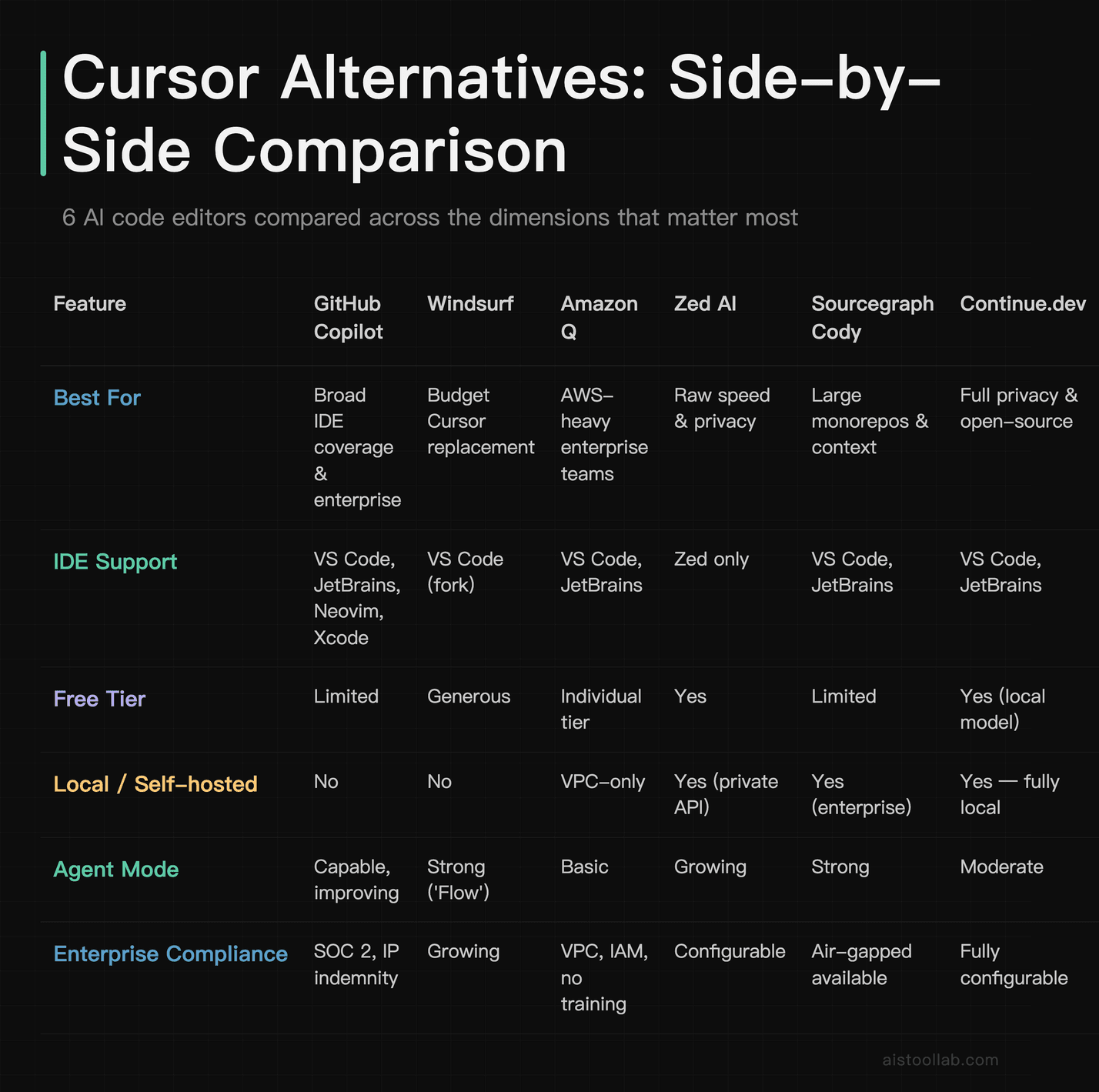
The Six Options at a Glance
GitHub Copilot: stay in the editor you already have
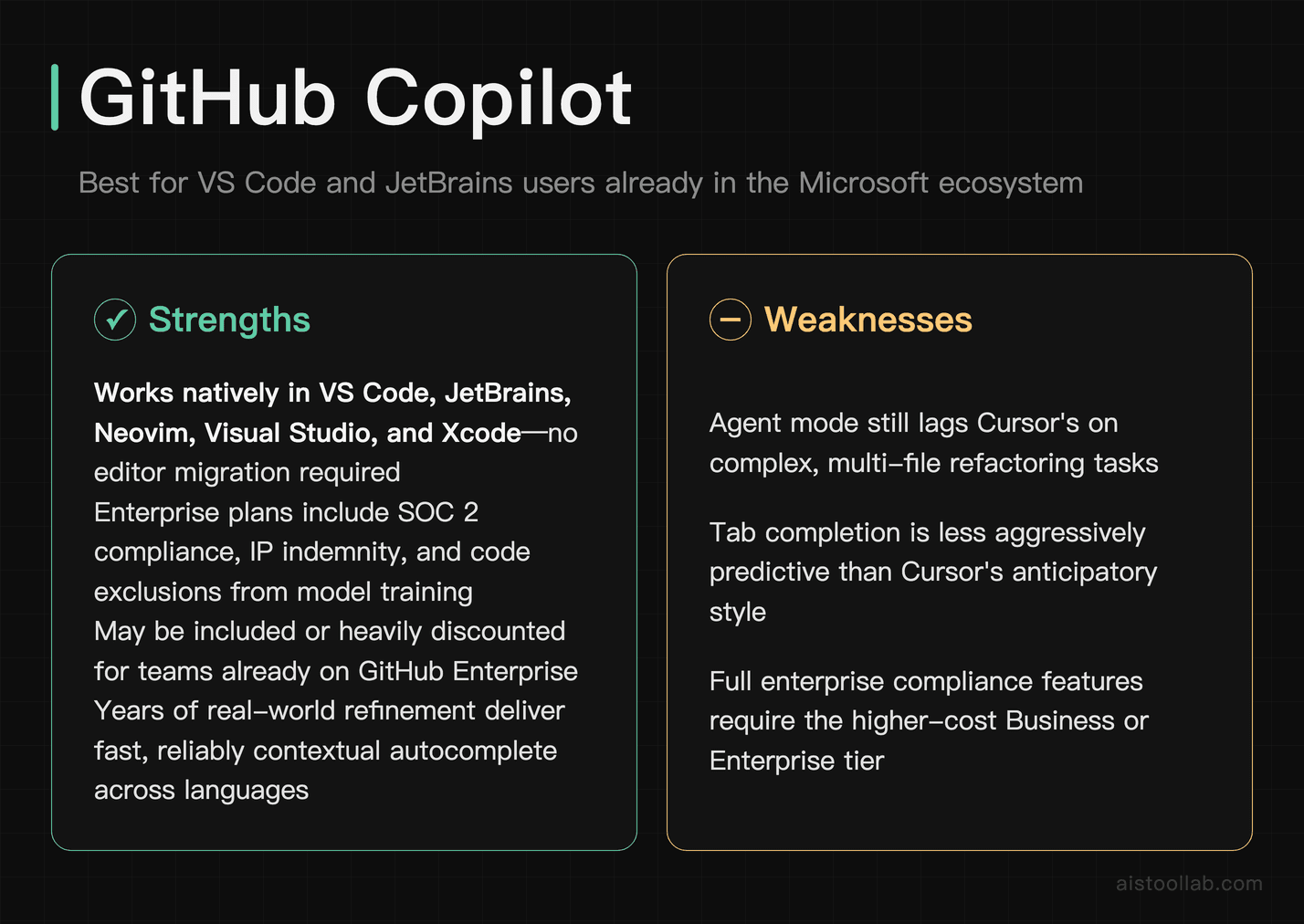
GitHub Copilot is the closest thing to a “safe bet” in this space. It’s backed by Microsoft, integrated directly into VS Code and all major JetBrains IDEs, and has been refined over multiple years of real-world usage. The autocomplete is fast and contextually decent — not as aggressive as Cursor’s tab completion, but reliable. The newer Copilot Chat and Copilot Workspace features have pushed it closer to Cursor’s agent capabilities, though it still lags in multi-file reasoning in my experience.
Where Copilot genuinely wins is breadth of IDE support and enterprise trust. It works in VS Code, Visual Studio, JetBrains, Neovim, and Xcode — meaning you don’t ask your team to switch editors. Enterprise plans include IP indemnity, SOC 2 compliance, and code exclusions that keep proprietary snippets out of model training. If your company is already paying for GitHub Enterprise, Copilot Enterprise may be included or heavily discounted. That’s a real financial argument. See our for a deeper breakdown of how it performs day-to-day.
The honest weakness: Copilot’s agent mode is still catching up to Cursor’s. For complex, multi-step refactoring tasks — “rename this pattern across the whole codebase and update all the tests” — Cursor tends to execute more cleanly. Copilot is excellent at line-by-line and function-level assistance; it’s less impressive when the task requires understanding large architectural context.
Pricing: $10/month for individuals, $19/user/month for Business, $39/user/month for Enterprise. Free tier available for verified students and open-source maintainers, and now also a limited free tier for all GitHub users.
Windsurf — the closest thing to Cursor on this list
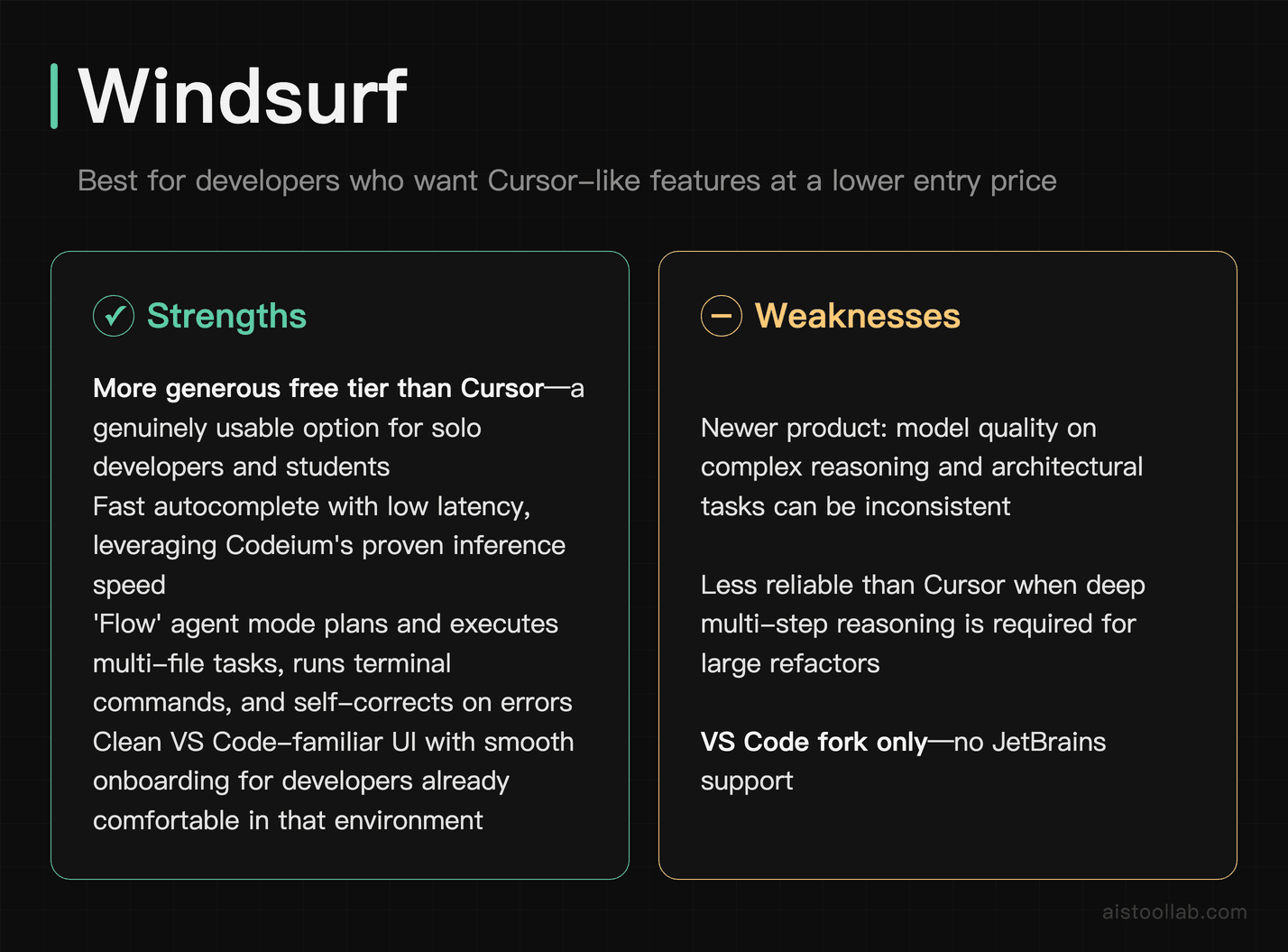
Windsurf (built by Codeium) is probably the most direct Cursor competitor on this list. It’s a standalone AI-native editor — also a VS Code fork — with a strong emphasis on what they call “Flow,” their take on agentic coding. In practice, this means Windsurf can plan multi-step tasks, write code across files, run terminal commands, and loop back based on errors in a way that feels genuinely capable, not just demo-ready.
The autocomplete is fast — Codeium (folded into Windsurf, now called Devin Desktop; verified 2026-08-02, source: devin.ai/desktop official page) has always been competitive on latency — and the agent mode handles refactoring tasks with less hand-holding than you’d expect. Where it pulls ahead of Cursor for some users is the free tier: Windsurf’s free plan is more generous than Cursor’s, making it a real option for solo developers or students who can’t stomach a monthly subscription. The UI is clean and the onboarding is smooth if you’re already comfortable in VS Code.
The weakness worth naming: Windsurf is newer and the model quality on complex reasoning tasks can be inconsistent compared to Cursor’s GPT-4/Claude integration. It’s improving quickly, but if you’re doing heavy architectural work or need reliable multi-thousand-line context handling, it doesn’t always match Cursor’s consistency. Also, like Cursor, it’s a fork — JetBrains users are out.
Pricing: Free tier available with meaningful usage limits. The pricing URL now redirects: windsurf.com now returns a redirect to devin.ai/desktop and windsurf.com/pricing redirects to devin.ai/pricing, whose page displays $0 / $20 / $40 / $80 / $200 per month (checked 2026-07-26). Check devin.ai/pricing for current rates.
Amazon Q Developer, the AWS-native option with a compliance story

Amazon Q Developer (formerly CodeWhisperer) is purpose-built for teams running on AWS infrastructure. If your stack involves Lambda, CDK, CloudFormation, or any of the 200+ AWS services, Q Developer has been trained with deep context on those patterns and APIs in a way that general-purpose tools simply haven’t matched. It can generate Infrastructure as Code, suggest security remediations, and scan for vulnerabilities as part of the same workflow.
The enterprise compliance story is strong: Q Developer supports VPC-only deployments, integrates with AWS IAM for access control, and explicitly does not use your code for model training — a major point for regulated industries. If you’re working in finance, healthcare, or government and already in the AWS ecosystem, this is the first alternative you should evaluate. Plugin support covers VS Code and JetBrains, which covers most enterprise dev environments.
The honest limitation: outside of AWS-specific work, Q Developer’s general code completion and chat quality are noticeably weaker than Cursor or GitHub Copilot. If you’re building a Node.js API that doesn’t touch AWS, you’ll notice the gap. It’s a specialist tool masquerading as a generalist one — use it for the right job.
Pricing: Free tier with meaningful limits (available to individual developers). Pro plan at $19/user/month. Enterprise pricing on request with additional security and admin features.
Zed AI, for when editor latency is the thing slowing you down
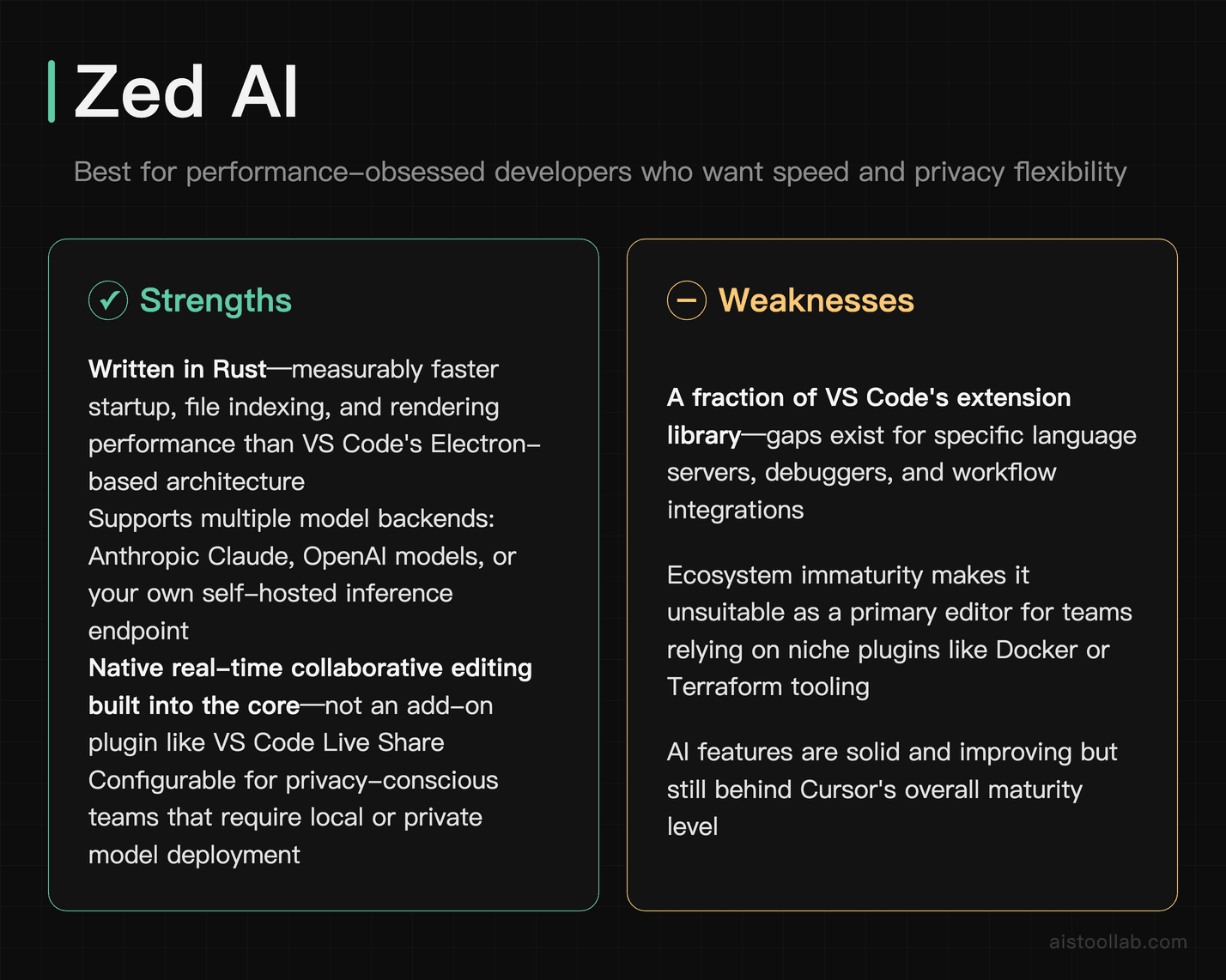
Zed is a code editor written in Rust, built from the ground up for speed. It is, measurably, one of the fastest editors you can use — startup time, file indexing, and rendering performance that makes VS Code feel sluggish by comparison. Zed AI layers language model features (autocomplete, inline edits, assistant panel) directly into that fast foundation. If editor latency is genuinely your bottleneck, or if you’re working on a machine where VS Code’s Electron overhead is a real problem, Zed is worth a serious look.
The AI features are solid and improving. Zed supports multiple model backends — you can connect it to Anthropic’s Claude, OpenAI models, or your own self-hosted inference endpoint. That flexibility is important for privacy-conscious teams who want local or private model deployment. The collaborative editing features are also native and real-time in a way that VS Code’s Live Share never quite nailed.
The weakness is ecosystem maturity. Zed has a fraction of VS Code’s extension library. If you rely on specific language servers, debuggers, or workflow integrations (think: Docker plugin, Terraform syntax, specific linters), you may hit gaps. It’s also Linux/macOS only as of this writing — Windows support is in progress but not production-ready. This is a tool for developers who are willing to trade some ecosystem breadth for raw performance.
Pricing: Free for individuals. Team/enterprise pricing available. The AI features that use Zed’s hosted models consume credits; bring-your-own-API-key usage costs depend on your model provider.
Sourcegraph Cody: built for repos too big to hold in context
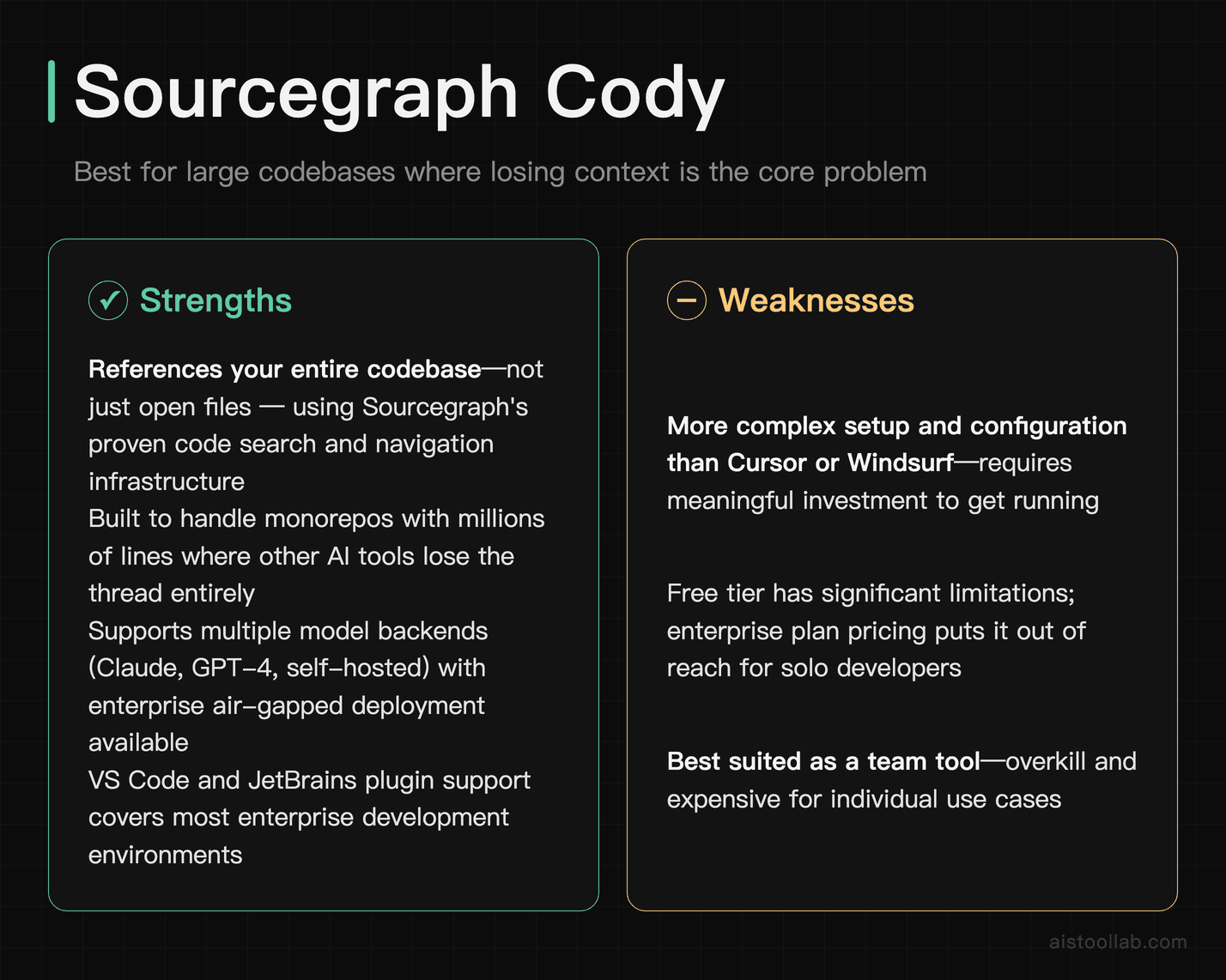
Cody, built by Sourcegraph, attacks the problem that frustrates Cursor users the most: losing context in large codebases. Sourcegraph’s underlying technology was built for code search and navigation across massive repositories — we’re talking monorepos with millions of lines. Cody inherits that infrastructure, meaning it can reference across your entire codebase (not just the files you have open) when answering questions or generating code.
For teams working on large, complex systems where “the AI only knows about the three files I currently have open” is a constant friction point, Cody is genuinely differentiated. It also supports multiple model backends — you can run it against Claude, GPT-4, or self-hosted models — and the enterprise plan supports air-gapped deployment, which is meaningful for high-security environments. Plugin support covers VS Code and JetBrains.
The trade-off is complexity. Cody is more powerful in the right context, but it requires more setup than Cursor or Windsurf. There is no self-serve tier on the pricing page, and the Enterprise plan pricing puts it out of reach for solo developers. This is a team tool, really — specifically for teams with large codebases and the budget to address that problem properly.
Pricing: Sourcegraph’s official pricing page does not mention Cody at all — the only price shown there is “Starting at $16K” for the Enterprise plan, with no free or self-serve paid tier listed; sourcegraph.com/cody redirects to the Cody documentation, which marks Cody as supported on Sourcegraph Enterprise (checked 2026-07-29).
Continue.dev — bring your own model, keep the code in-house
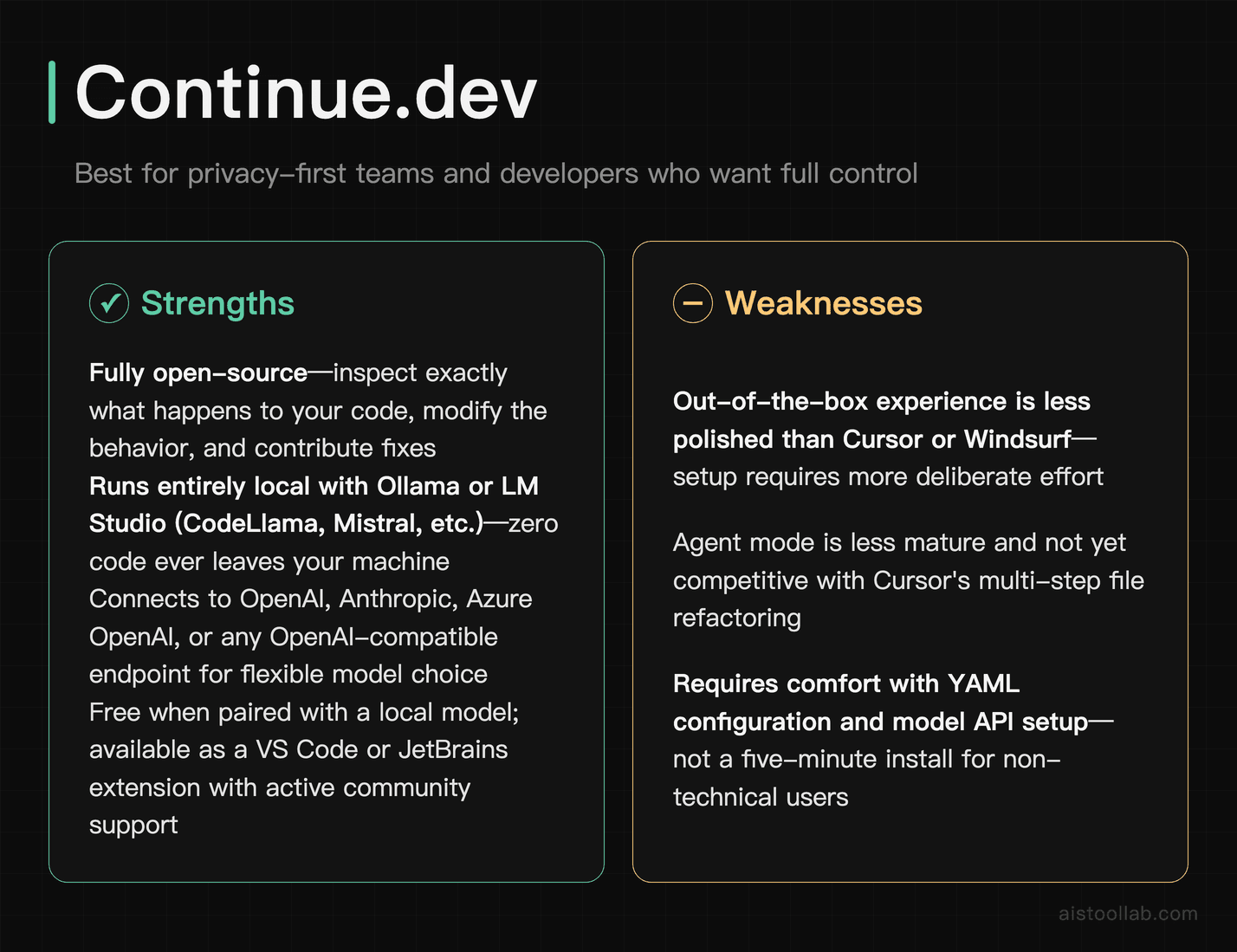
Continue.dev is the open-source option on this list — and it’s not a consolation prize. It’s a VS Code and JetBrains extension that connects to whatever model backend you configure: OpenAI, Anthropic, local models via Ollama or LM Studio, Azure OpenAI, or any OpenAI-compatible endpoint. This means you can run Continue with a fully local model like CodeLlama or Mistral, with no code ever leaving your machine. For teams with strict data policies, this is the cleanest answer available.
The autocomplete and chat features are functional and customizable. Because it’s open-source, you can inspect exactly what’s happening with your data, modify the behavior, and contribute fixes. The community around it is active, and integration with local models via Ollama has improved significantly. If your team is already running self-hosted inference for other reasons, adding Continue as the editor layer is a natural fit.
The honest weakness: Continue.dev’s out-of-the-box experience doesn’t match Cursor or Windsurf for polish. Agent mode is less mature. Configuration requires comfort with YAML files and model API setup — it’s not a five-minute install if you’re going the fully private route. But for developers who value control over convenience, this is the right trade.
Pricing: Free and open-source. You pay only for whatever model API you connect to — or nothing if you run local models. This is the only tool on this list with a truly zero-cost path.
Pick by the Constraint You Can’t Move
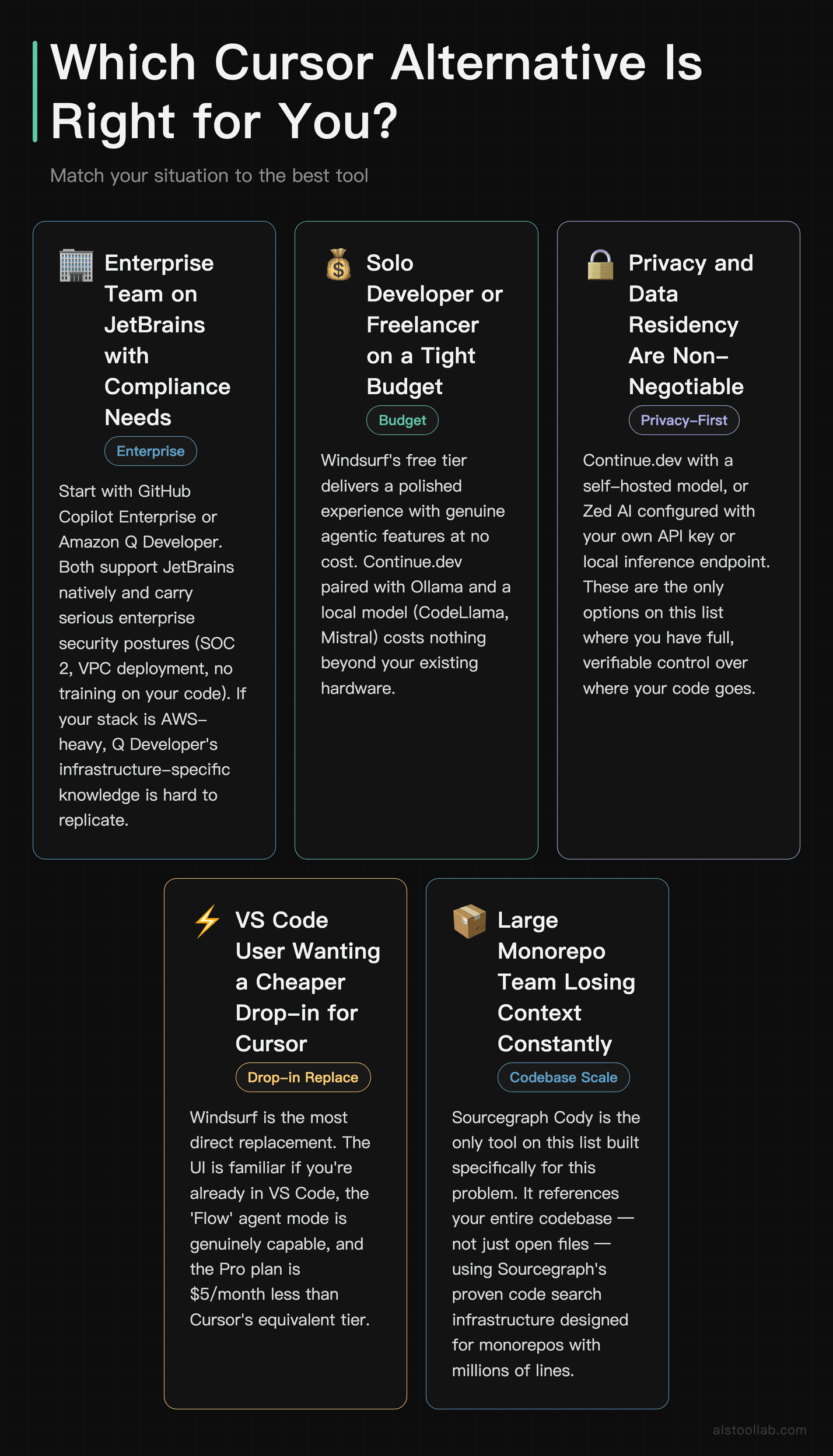
- If you’re at an enterprise with JetBrains IDEs and compliance requirements → Start with GitHub Copilot Enterprise or Amazon Q Developer. Both support JetBrains, both have serious enterprise security postures, and if you’re AWS-heavy, Q Developer’s infrastructure knowledge is hard to replicate elsewhere.
- If you’re a solo developer or freelancer on a tight budget → Windsurf’s free tier or Continue.dev with Ollama. Windsurf gives you a polished experience with real agentic features for free. Continue.dev with a local model costs you nothing beyond your hardware.
- If privacy and data residency are non-negotiable → Continue.dev with a self-hosted model, or Zed AI configured with your own API key or local inference. These are the only options where you have full verifiable control over where your code goes.
- If you live in VS Code and just want something cheaper than Cursor with similar feel → Windsurf is the most direct drop-in. The UI is familiar, the agent is capable, and the Pro price is $5/month less than Cursor.
- If you work on a massive monorepo and context loss is your core complaint → Sourcegraph Cody is built for exactly this. It’s the only tool here with native whole-codebase indexing as a core architectural feature, not an afterthought.
- If raw editor speed matters to you or you’re on Linux without VS Code love → Zed AI is worth a week of your time. It’s genuinely fast, the AI features are flexible, and the local model support is real.
Regardless of which AI coding tool you choose, these free browser utilities handle daily friction: JSON Formatter for validating API responses, Regex Tester for pattern testing, and Base64 Encoder for tokens and payloads — all zero-install.
Frequently Asked Questions
Is there a free alternative to Cursor that’s actually usable?
Yes — a few. Windsurf’s free tier is the most polished free experience with genuine agentic capabilities. Continue.dev is fully free if you pair it with a local model via Ollama (CodeLlama, Mistral, etc.) and runs entirely on your machine. GitHub Copilot now has a limited free tier for all GitHub users. None of these match Cursor Pro one-for-one, but for a significant portion of day-to-day coding work, they’re more than adequate.
Is Cursor worth $20/month in 2026?
For many individual developers: yes. The tab completion is genuinely faster than most alternatives, and the agent mode handles real multi-file tasks. The question is whether you hit the context and request ceilings regularly — if you’re bumping into them, you’re paying for a capped experience. At team scale ($40/user/month for the Teams plan), the math gets harder to justify when GitHub Copilot Business at $19/user/month covers most of the same ground with better IDE breadth.
Which Cursor alternative is best for JetBrains users?
Cursor doesn’t support JetBrains at all, so any JetBrains user is already looking for an alternative. The strongest options are GitHub Copilot (mature, well-integrated plugin), Amazon Q Developer (strong for AWS teams), Sourcegraph Cody (best for large codebases), and Continue.dev (best for privacy/local inference). All four have real JetBrains plugin support.
Can I use Cursor alternatives with local AI models to keep my code private?
Yes — and this is one of the strongest reasons to look at alternatives. Continue.dev is purpose-built for this: connect it to Ollama, LM Studio, or any local inference server and no code leaves your machine. Zed AI also supports bring-your-own-API-key and local model configurations. Cody supports self-hosted model deployment on enterprise plans. If local inference is your requirement, these are your options. For a broader look at what current AI models can actually do for developers, our covers the model-level tradeoffs in detail.
How does GitHub Copilot compare to Cursor for everyday coding?
For autocomplete and single-file assistance, they’re genuinely competitive — Copilot is fast and the suggestions are reliable. Where Cursor pulls ahead is multi-file agentic tasks and the overall “AI-native” feel of the interface: the chat is embedded more naturally, the tab completion is more aggressive in a useful way, and the whole editor is designed around AI interaction rather than having AI bolted on. Whether that delta is worth the price difference and the IDE restriction depends on your workflow. Our gets into the practical day-to-day details if you want a deeper comparison.
Last updated: 2026
All prices in this article were verified against official pricing pages in July 2026; plans and fees may change, so please refer to the official page for current details.