
The Real Problem With Finding AI Writing Tools That Actually Work
If you’ve spent any time searching for AI writing tools, you already know the frustration. Every “best of” list looks identical — the same 20 tools, the same recycled feature bullets, and zero honest opinion about which ones actually hold up when you’re on a deadline at 11pm trying to finish a 2,000-word article. Worse, most lists are quietly optimised for affiliate commissions, not your workflow. So you end up subscribing to three different tools, using none of them consistently, and still writing everything yourself.
There’s also a more specific fear that’s completely justified in 2026: AI-generated content that sounds like it was written by a chatbot having a slow day. Flat tone, repetitive sentence structure, transitions that feel copy-pasted from a template. Readers notice. Editors notice. And increasingly, search engines are getting better at flagging thin AI content. The tools on this list were chosen specifically because they help you avoid that outcome — whether that means better tone control, stronger editing support, or smarter SEO integration.
This guide covers seven tools that genuinely matter for writers and content creators: ChatGPT, Claude, Jasper, Copy.ai, Grammarly, Notion AI, and Hemingway Editor. We’ll tell you what each one does best, where it falls short, what you’ll actually pay, and — most importantly — which type of writer should pick which tool. No fluff, no directory padding.
How We Picked These Tools

Every tool here was evaluated against four criteria that matter specifically to writers and content creators — not general productivity users:
- Output quality for writing tasks: Does it produce drafts you can actually use, or do you spend more time rewriting than you saved generating?
- Tone and voice consistency: Can you reliably get the same voice across a whole content calendar, or does every output feel like a different writer?
- Pricing relative to real value: We flagged tools where the useful tier is significantly more expensive than what’s advertised, and noted where free plans are genuinely functional.
- Learning curve for non-technical users: A novelist shouldn’t need to understand API calls to use an AI writing assistant effectively.
The Best AI Tools for Writers and Content Creators in 2026
#1. ChatGPT — Best For Drafting Speed and Flexible Writing Tasks
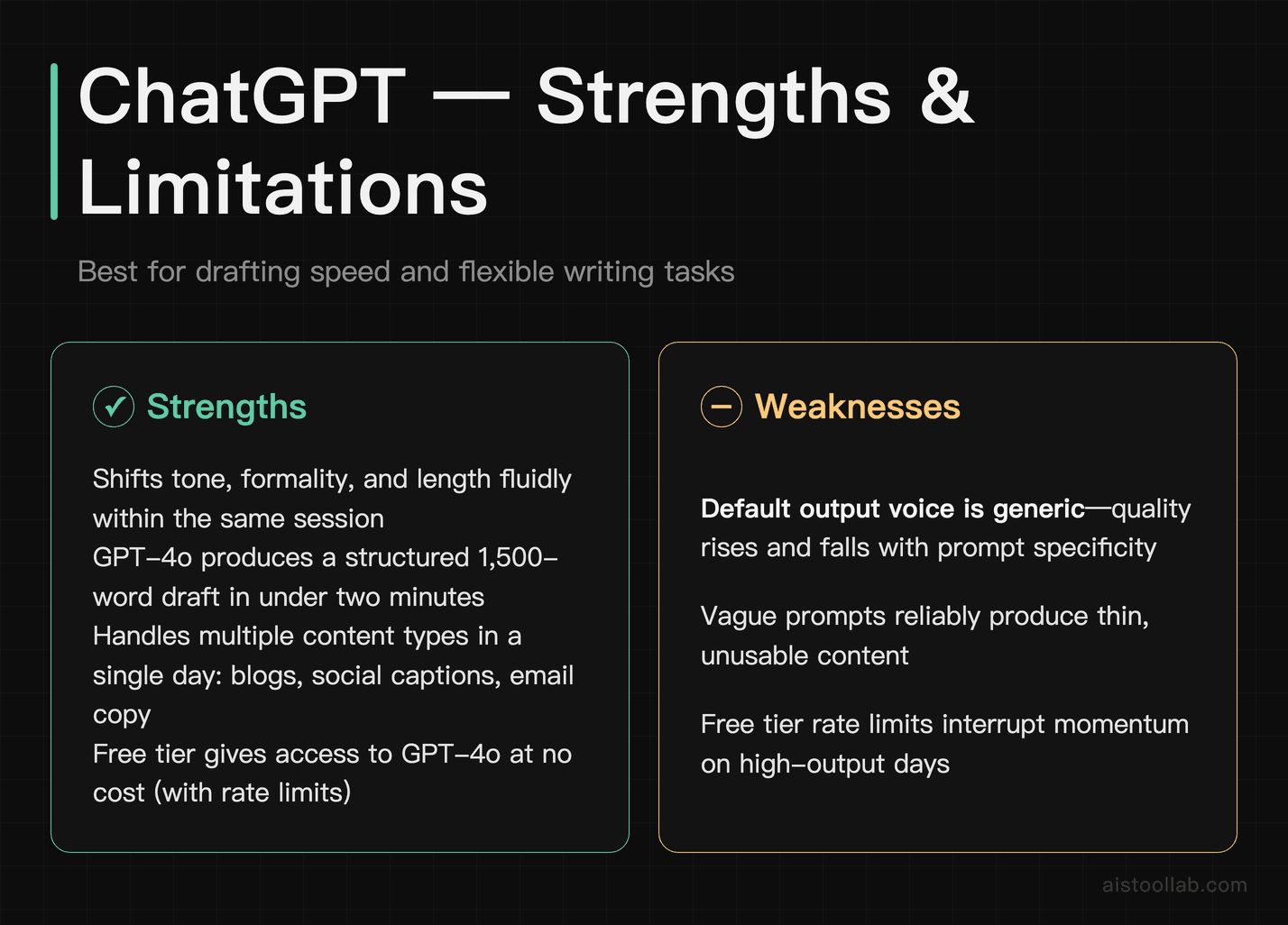
ChatGPT is the generalist of this list, and that is its advantage: it shifts between writing modes without you having to reset the conversation. Ask it to write a punchy intro paragraph, then immediately tell it “now make that more formal and cut it to two sentences” — it handles that context fluidly. For bloggers and content marketers who are producing multiple different content types in a single day (social captions, email copy, article drafts), that flexibility is genuinely time-saving.
ChatGPT, available on the free tier with usage limits and fully unlocked on ChatGPT Plus, handles long-form drafts well. You can paste in a rough outline and a few notes and get back a structured long-form draft in one pass. Whether that draft needs significant editing depends almost entirely on how specific your prompt is. Vague prompts produce generic content — that’s not a bug, it’s the single most important thing to understand about this tool. Getting your prompts right makes an enormous difference to output quality, and it’s a skill worth investing 30 minutes to learn.
The honest limitation: ChatGPT’s default output voice is recognisable if you’re not actively steering it. There’s a certain cadence — enthusiastic, slightly over-structured, fond of three-point lists — that shows up repeatedly unless you give it strong stylistic instructions. It also has no built-in SEO tooling, so it won’t suggest keyword density or heading structure on its own.
Pricing: Free tier available (with rate limits). ChatGPT Plus is $20/month and removes most practical limitations for writers. The $200/month Pro plan is unnecessary for most writing use cases.
One-line verdict: The best starting point for any writer who needs to produce varied content quickly — especially if you’re willing to spend a little time learning to write good prompts.
#2. Claude — Best For Long-Form Content and Maintaining Your Voice
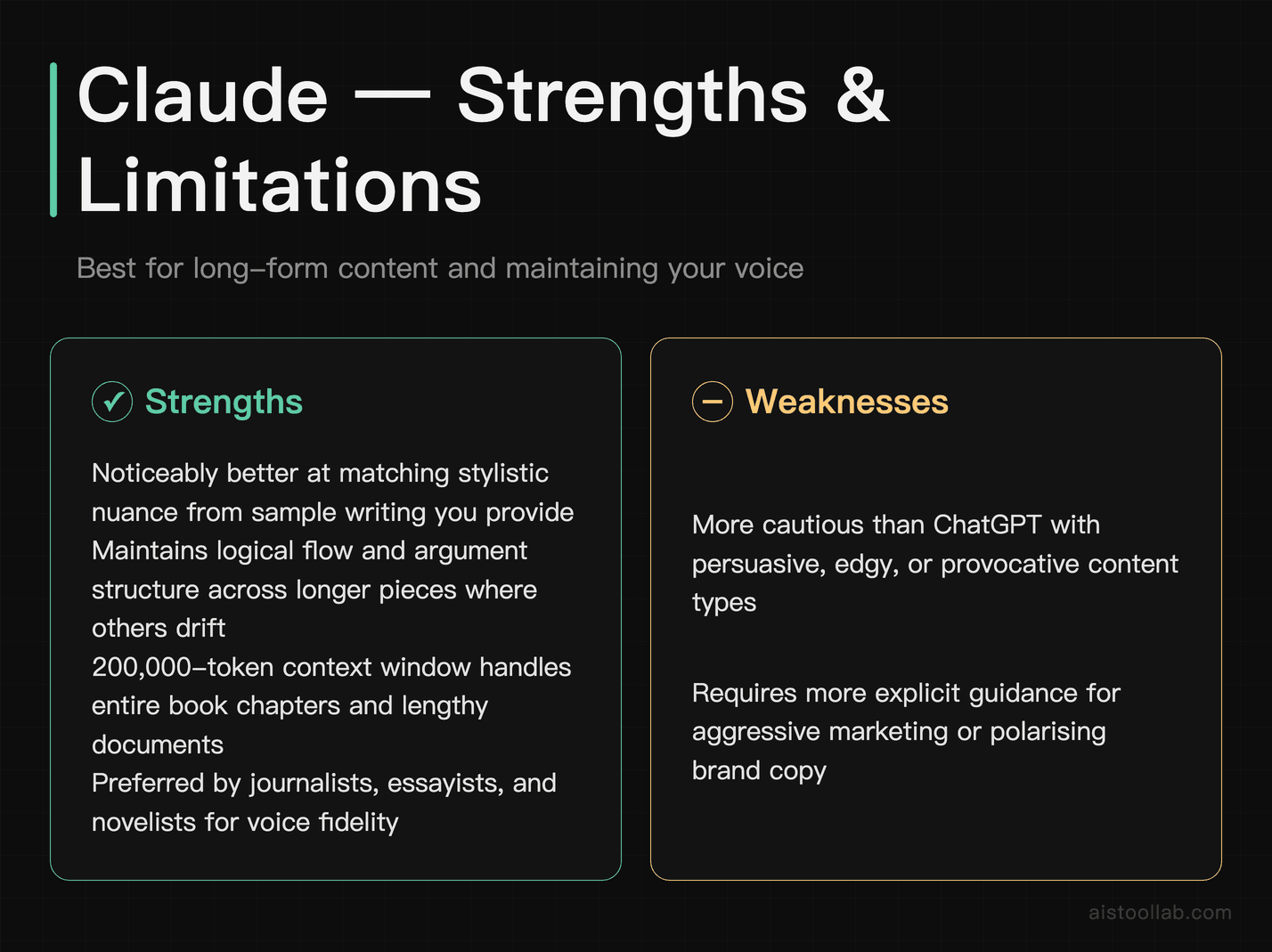
Claude, made by Anthropic, is the one to look at if tone matters more to you than raw speed. Claude is built to pick up stylistic nuance from the examples you give it. If you paste in three paragraphs of your existing writing and say “match this voice,” you generally get something closer to your own style than a cold-start prompt would produce — though how close is worth testing on your own writing before you commit. For journalists, essayists, and novelists, that’s a significant difference.
Claude also handles long-form content more coherently. Long pieces are where models tend to drift — repeating points, losing the thread of an argument — and holding structure across that length is what Claude is tuned for. Its 200,000-token context window on the paid tier means you can paste an entire book chapter and ask it to help you with continuity, consistency of character voice, or structural edits. For a deeper comparison of Claude and ChatGPT’s respective strengths, we’ve covered that in detail separately.
The limitation: Claude can be more cautious than ChatGPT about certain types of persuasive or edgy content. If you’re writing aggressive marketing copy or dark fiction, you may run into more refusals or hedged outputs than you’d like. It also lacks the plugin and tool integrations that ChatGPT has built up.
Pricing: Claude.ai free tier is functional but has message limits. Claude Pro is $20/month and gives you access to the most capable models. For heavy users, the API route may be more cost-effective.
One-line verdict: The best choice for writers who care about voice — journalists, novelists, and anyone producing long-form editorial content where sounding human matters most.
#3. Jasper — Best For SEO-Focused Content Marketing at Scale
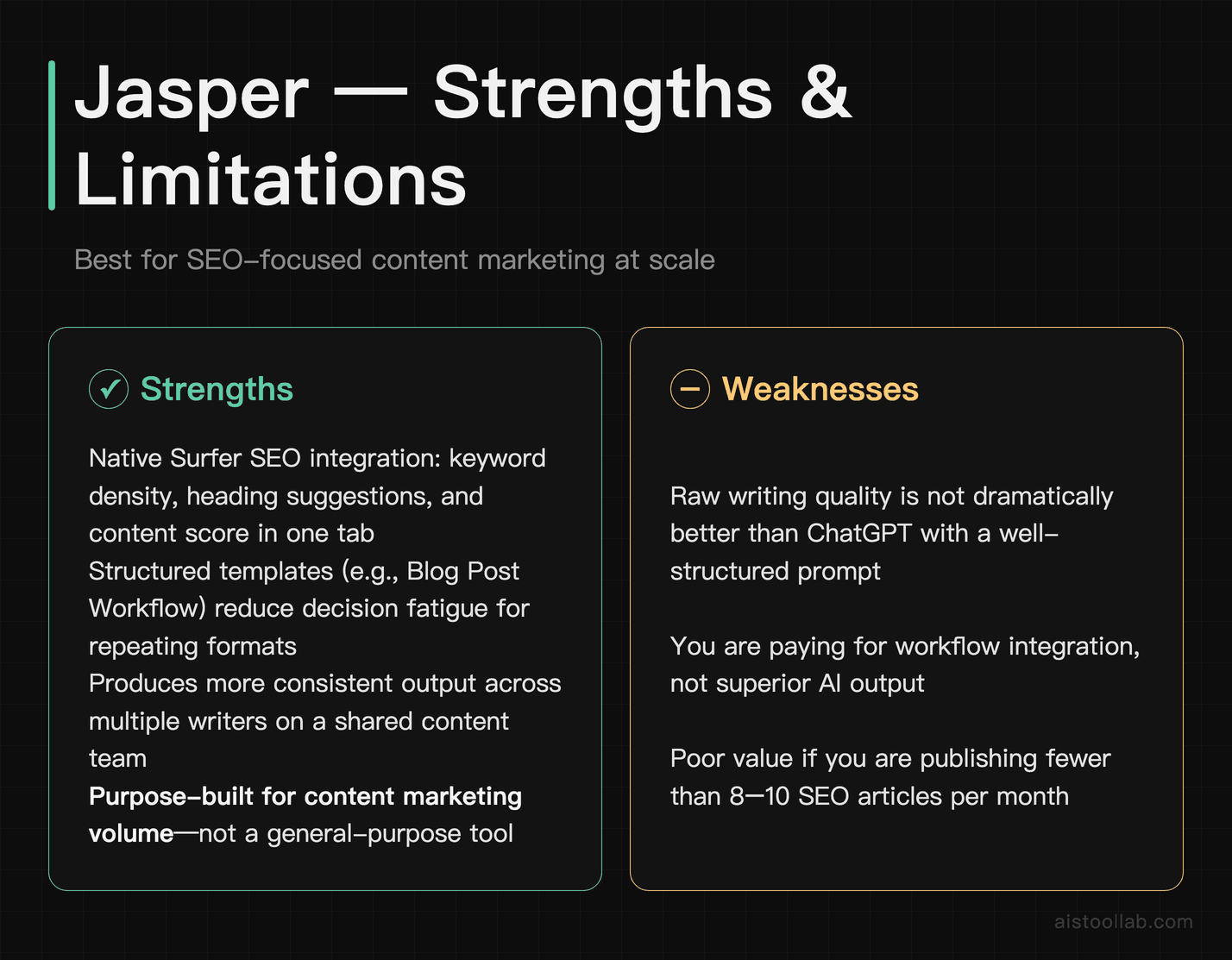
Jasper is built for one specific type of writer: the content marketer who needs to produce SEO-optimised articles, product descriptions, and campaign copy at volume. It integrates directly with Surfer SEO, which means you can get keyword density guidance, heading structure suggestions, and content score feedback without switching between five browser tabs. For a small marketing team running a content-heavy growth strategy, that workflow integration saves real time every week.
Jasper’s templates are more useful than they first appear. The “Blog Post Workflow” template, for example, walks you through brief, outline, intro, body sections, and meta description as a structured process rather than a blank prompt box. For content marketers who produce the same content types repeatedly, this reduces decision fatigue and makes output more consistent across writers on a team.
The honest limitation: Jasper’s output quality leans on the same underlying models as other tools (it uses a mix of providers), so the raw writing quality isn’t dramatically different from what you’d get in ChatGPT with a well-structured prompt. What you’re paying for is workflow, templates, and integrations — not a fundamentally superior model. If you’re a solo blogger without an SEO tool subscription, Jasper is hard to justify at its price point.
Pricing: As of 2026-07-26 Jasper’s official pricing page does not publish a $49 Creator price. Its only priced structured offers are “Pro Plan (Monthly)”, “Pro Plan (Annual)” and “Business Plan”, with Pro at $59/month billed yearly or $69/month billed monthly and Business at custom pricing. There’s a seven-day free trial but no permanent free tier. At this price, the Surfer SEO integration needs to be part of your workflow to make it worthwhile.
One-line verdict: Built for content marketing teams running SEO-driven content at scale — overkill and overpriced for solo writers who don’t need the integrations.
#4. Copy.ai — Best For Short-Form Copy and Campaign Ideation
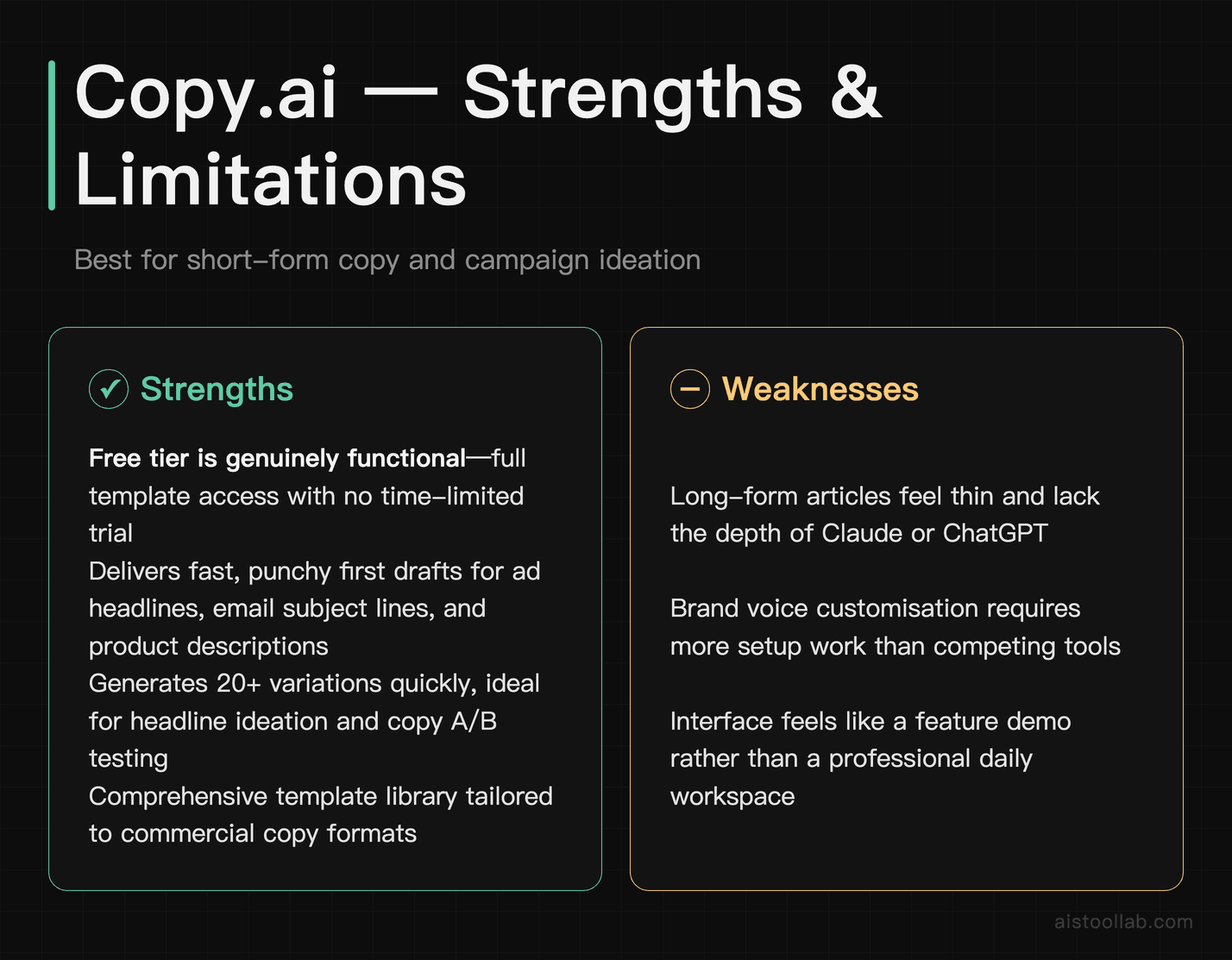
Copy.ai has shifted its focus significantly over the past two years and now positions itself as a “go-to-market AI platform” — which is a roundabout way of saying it’s very good at short-form commercial copy. Ad headlines, email subject lines, product descriptions, social media posts, landing page copy: these are the formats its templates are built around, and the outputs land closer to usable on the first pass.
The free tier is genuinely useful, which is worth noting. You get access to a wide range of templates and the core chat interface without a time-limited trial. For freelance copywriters who want to speed up the ideation phase of a project — generating 20 headline variations to pick the best three — Copy.ai’s template library is comprehensive and the outputs are typically punchy rather than verbose.
Where Copy.ai struggles is with anything requiring depth or nuance. Long-form articles feel thin. Brand voice customisation, while present, requires more setup work than tools like Claude or Jasper. And the interface, while clean, feels more like a feature demo than a professional workspace if you’re spending four hours a day in it.
Pricing: Free tier available (limited but functional). Paid plan pricing is on Copy.ai’s official pricing page; check it there for the current tiers. Teams should expect significantly higher costs at the Pro or business tiers.
One-line verdict: An excellent free-to-start option for copywriters focused on short-form commercial content — less useful if long-form or editorial writing is your primary output.
#5. Grammarly — Best For Editing, Proofreading, and Tone Consistency
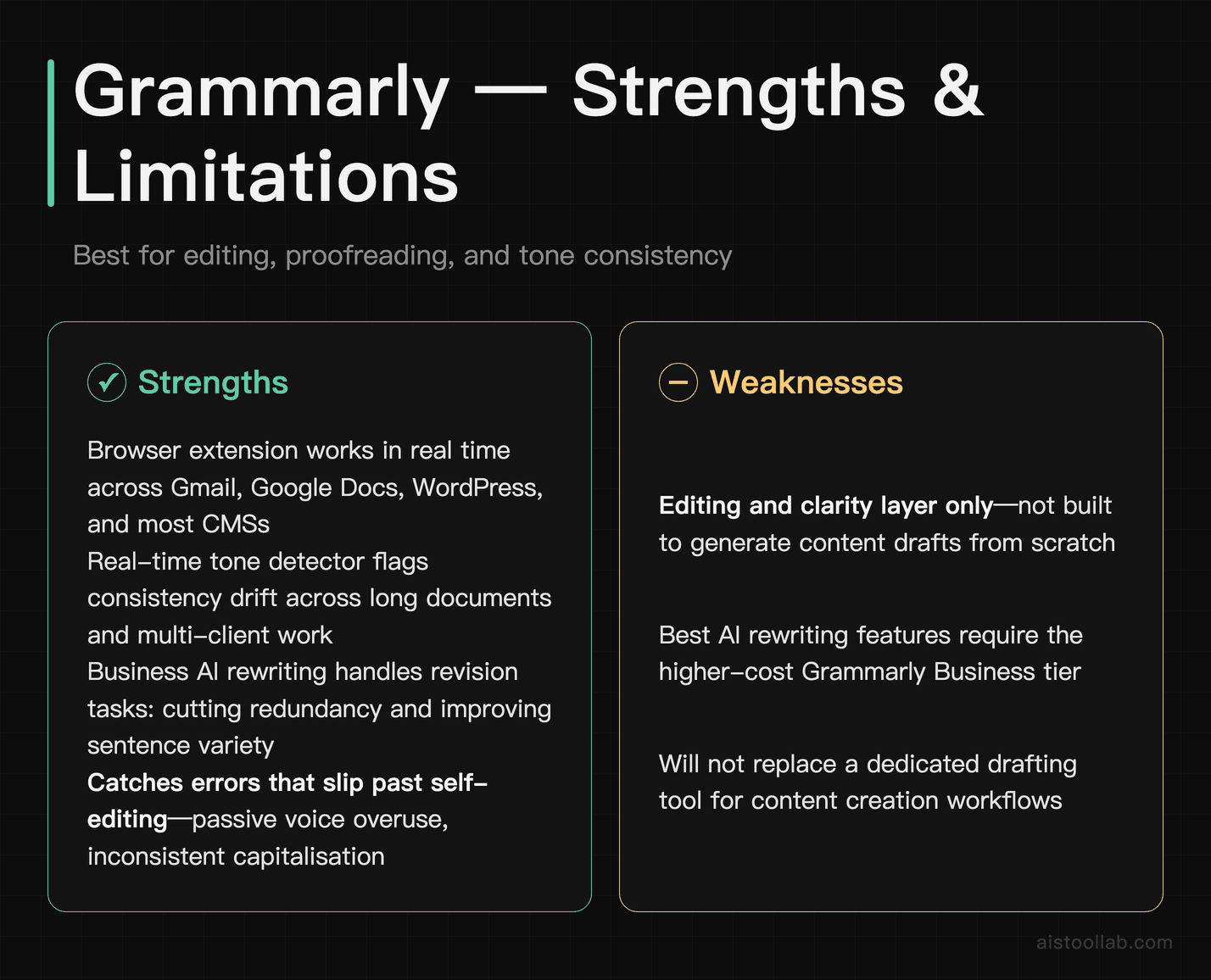
Grammarly occupies a different category from the drafting tools above — it’s an editing and clarity layer rather than a content generator, and that is still what it does best. The browser extension alone saves time: it catches the kind of errors that slip past self-editing (missing commas, passive voice overuse, inconsistent capitalisation) in real time across Gmail, Google Docs, WordPress, and most content management systems.
The tone detector feature is more useful for writers than it might sound. When you’re producing content across multiple clients or brand voices, it’s easy to let tonal consistency drift across a long document. Grammarly’s real-time tone feedback — “This paragraph reads as formal; your target is conversational” — serves as a useful check without interrupting your writing flow.
Grammarly Business now includes an AI-assisted rewriting tool that’s stronger than its earlier versions. It won’t replace a dedicated drafting tool for generating content from scratch, but for reworking an existing draft — cutting redundancy, improving sentence variety, adjusting reading level — it handles revision tasks smoothly.
The limitation: Grammarly Premium is genuinely expensive for what it offers if you’re already subscribed to one of the AI writing tools above. The free tier catches basic errors; the premium features (clarity, style, tone) are useful, but if budget is a constraint, they’re not essential.
Pricing: Free tier covers basic grammar and spelling. Grammarly Pro is $12/month billed annually ($144/year) or $30/month billed monthly — checked in the raw markup of grammarly.com/plans on 2026-07-29. Grammarly Business is priced per member; see the official plans page for the current per-seat rate.
One-line verdict: Hard to skip if you publish under your own name or a client’s — the free version alone is worth installing today.
#6. Notion AI — Best For Writers Who Plan, Research, and Draft in One Place
Notion AI is not the most powerful AI writing tool on this list. But for a specific type of writer — the organised one who lives in Notion for project management, research notes, content calendars, and drafting — it has the least friction of anything on this list. The AI features are built directly into the same workspace where your brief, your notes, and your outline already live.
In practice, this means you can highlight your research notes and ask Notion AI to summarise them, then ask it to turn that summary into a draft introduction, all without leaving the document. For content marketers managing multiple campaigns in Notion, this cuts down the copy-paste shuffle between tools — the kind of overhead that never shows up on a timesheet but adds up across a working day. We’ve compared Notion AI against Microsoft Copilot in depth if you’re trying to decide between the two for a team environment.
The honest limitation: if you don’t already use Notion, the barrier to entry is real. The tool works best when it’s embedded in an existing Notion workspace with populated databases and templates. Starting from scratch with Notion just for the AI features is not a good investment.
Pricing: Notion AI is no longer a separate add-on — full AI access is bundled into the Business plan at $20/member/month (billed annually; per Notion’s official pricing page, checked July 2026). The base Notion plan starts free for personal use, but Free and Plus tiers only include a limited AI trial.
One-line verdict: A natural extension for Notion power users — not worth adopting as a standalone writing tool if you don’t already live in that ecosystem.
#7. Hemingway Editor — Best For Clarity, Readability, and Cutting Bloat
Hemingway Editor does one thing: it shows you exactly where your writing is too dense, too passive, or too complicated for your target reading level. It highlights adverbs, passive voice constructions, sentences that are hard to read, and sentences that are very hard to read — colour-coded, so the problem is visible at a glance. There’s no AI generation here, no chatbot, no subscription to a model provider. It’s a focused editing tool.
For bloggers and content marketers writing for a general audience, Hemingway’s readability scoring (targeting Grade 6–8 level for accessible web content) is a practical guardrail. Paste in an AI-generated draft and you’ll immediately see where the AI has produced the long, clause-heavy sentences that make content feel robotic and hard to skim. Hemingway forces you to cut them.
The web version is free. The desktop app is a one-time purchase, which in a market saturated with monthly subscriptions is worth mentioning. It works offline, it’s fast, and it does exactly what it says. It’s also worth noting that running AI-generated content through Hemingway is one of the fastest ways to humanise it — the act of addressing its flagged issues forces structural and sentence-level rewrites that move the final output away from AI-default patterns.
Pricing: Web version free at hemingwayapp.com. Desktop app is a one-time purchase — current price on hemingwayapp.com.
One-line verdict: A one-time purchase that makes the density problems in a draft visible at a glance — and the free web version costs nothing to try.
If you want a quick readability check before publishing, our free Readability Score tool calculates Flesch Reading Ease, average sentence length, and complexity — paste your text and get results instantly. For word and character counts, the Word Counter tool works the same way.
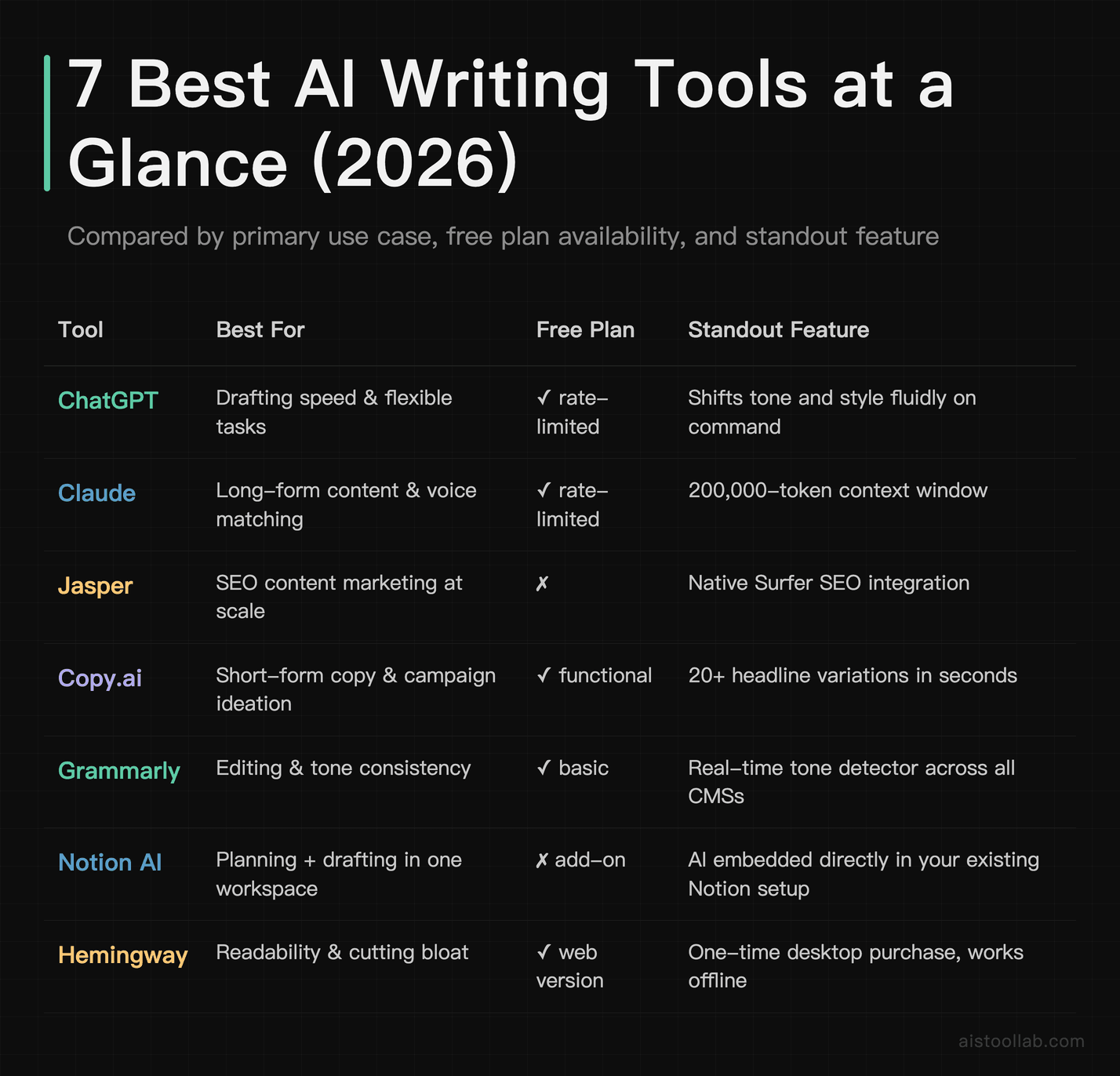
Quick Comparison Table
How to Choose the Right Tool for Your Situation
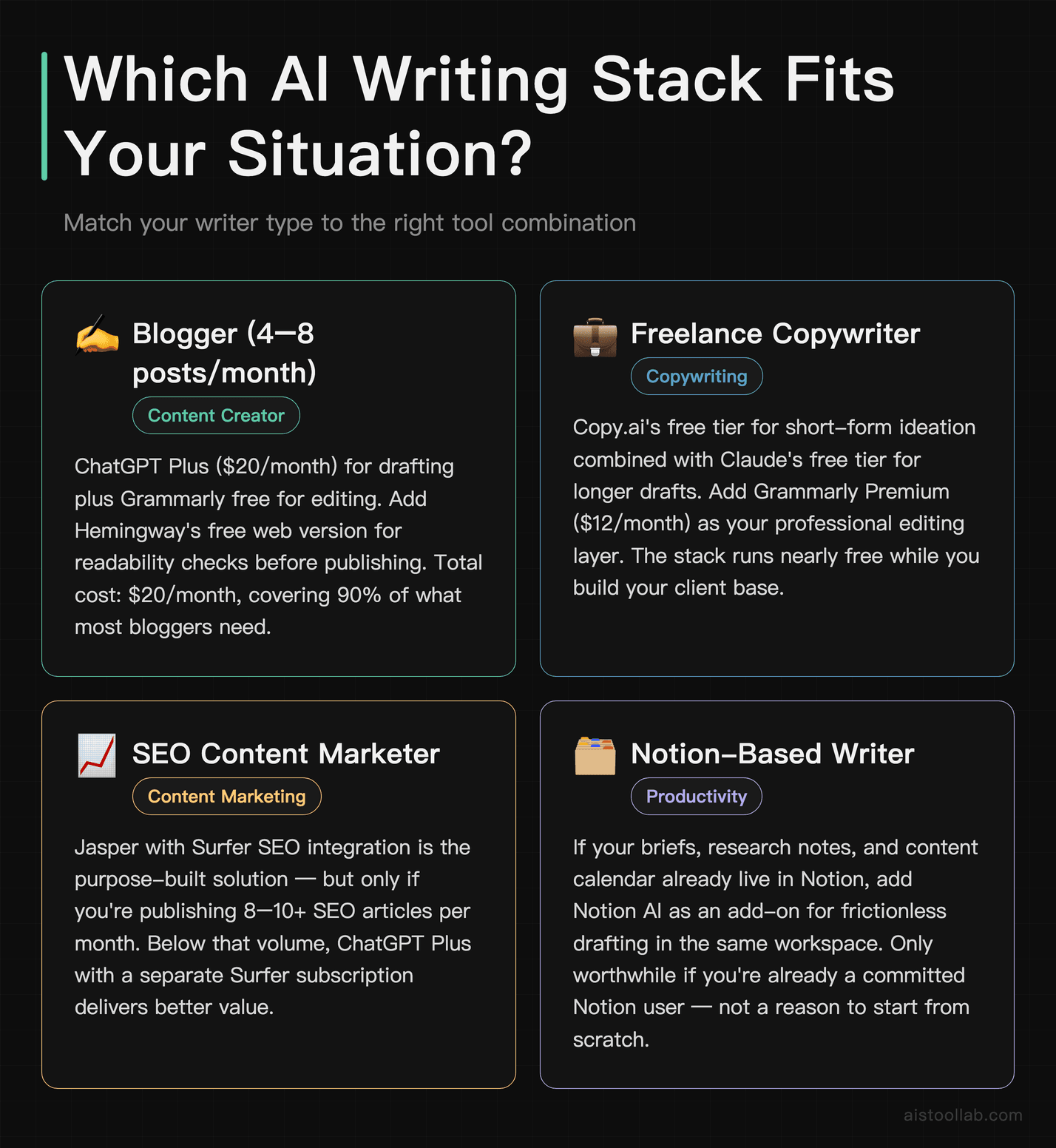
The tools above aren’t mutually exclusive — most professional writers end up using two or three in combination. But if you’re deciding where to start, or trying to rationalise your current stack, here’s how to think about it by writer type:
- If you’re a blogger producing 4–8 posts per month: Start with ChatGPT Plus ($20/month) for drafting and Grammarly free for editing. Add Hemingway’s web version for readability checks before publishing. That stack is one paid subscription (ChatGPT Plus) plus the free tiers of Grammarly and Hemingway, and it covers the drafting, editing and readability layers.
- If you’re a freelance copywriter billing by the hour: Copy.ai’s free tier for short-form ideation, combined with Claude’s free tier for longer copy drafts. Use Grammarly Premium ($12/month) as your professional editing layer. This stack can be run almost entirely free while you’re building your client base.
- If you’re a content marketer running SEO-driven content: Jasper with Surfer SEO integration is the purpose-built solution, but only if you’re producing enough volume to justify the cost. If you’re publishing fewer than 8–10 SEO articles per month, ChatGPT Plus with a separate Surfer SEO subscription will likely deliver similar results at lower cost.
- If you’re a journalist or editorial writer: Claude Pro ($20/month) is the strongest single tool for maintaining voice, handling long research documents, and producing nuanced, structured prose. Pair it with Grammarly Premium for a final editing pass.
- If you’re writing fiction or long-form narrative content: long-form coherence and character voice are the things Claude is designed around. Use it for drafting and structural assistance, and rely on Hemingway for sentence-level clarity passes on your own edited drafts.
- If your whole team works in Notion: Notion AI is the most frictionless addition you can make. Via the Business plan at $20/member/month it’s not cheap, but eliminating the tool-switching overhead across a content team has a real productivity value. For a broader look at AI workflow integration for marketing teams, we’ve mapped out the full process separately.
Frequently Asked Questions
What’s the best free AI writing tool in 2026?
For drafting, Claude’s free tier and ChatGPT’s free tier are both genuinely functional starting points — not stripped-down trials designed to force an upgrade. ChatGPT’s free tier gives you access to its current model with rate limits; Claude’s free tier gives you access to Claude with similar restrictions. For editing, Grammarly’s free tier is the clear answer — install the browser extension and start using it today at no cost. If you want to combine drafting and editing in a free stack, Claude (drafting) plus Grammarly free (editing) plus Hemingway web (readability) gives you a complete workflow that costs nothing.
Will AI writing tools get my content flagged as AI-generated?
This is a legitimate concern, and the honest answer is nuanced. AI detection tools (GPTZero, Originality.ai, and others) have improved, but they’re still producing meaningful rates of false positives — flagging human-written content as AI, and missing AI content that’s been lightly edited. The more important issue for most writers is quality, not detection: content that’s thin, generic, and poorly structured is a problem regardless of what tool produced it. Using AI as a drafting or research assistant, then editing heavily for your own voice, produces content that reads as human because it has been substantially shaped by a human. Running drafts through Hemingway and rewriting flagged sections is one of the most practical steps you can take in this direction.
Is Jasper worth the price for a solo content creator?
In most cases, no. As of 2026-07-26 Jasper’s cheapest published plan is Pro at $59/month billed yearly ($69/month billed monthly), roughly 3x the cost of ChatGPT Plus or Claude Pro. The core drafting quality isn’t significantly better than either — what you’re paying for is workflow templates, team collaboration features, and the Surfer SEO integration. If you’re a solo writer without a Surfer subscription and without a team to collaborate with, you’re paying a premium for features you won’t use. Start with ChatGPT Plus or Claude Pro and move to Jasper only if you find yourself producing enough SEO content at volume that the integrated tooling would genuinely save hours each week.
Can I use AI writing tools if I’m not technical?
Yes — every tool on this list is designed for non-technical users. None of them require API setup, coding knowledge, or technical configuration to use at a basic level. The closest thing to a “technical skill” required is learning to write effective prompts, which is really just learning to be more specific about what you want. Investing an hour in learning prompt fundamentals will return that time many times over in better, more usable outputs. If you’re completely new to AI tools and want a structured starting point, a beginner-focused overview of the core tools is a good first step before committing to a paid subscription.
Do I need multiple AI tools, or can one tool do everything?
One tool can handle most of it, but the highest-quality professional writing workflow typically uses two: one drafting tool (ChatGPT, Claude, or Jasper depending on your use case) and one editing tool (Grammarly as the baseline, with Hemingway as an optional add-on for readability). The drafting tool handles speed and volume; the editing layer handles quality and consistency. Trying to use a single AI tool for every writing task — generation, editing, SEO, planning — typically means using one tool poorly for half the tasks rather than two tools well for their specific strengths.
Last updated: 2026
Related reading: Emoji Finder Tools Comparison 2026: Sentiment Analysis Accuracy, Context Understanding, and Performance Ranked
Related reading: AI Emoji Recommendation Tools Compared: How Different Algorithms Analyze Sentiment and Context in 2026
Related reading: AI Grammar Checkers Compared 2026: Grammarly, LanguageTool and ProWritingAid
Jasper pricing checked on 2026-07-26 in the raw markup of jasper.ai/pricing: the structured plan offers on that page are exactly “Pro Plan (Monthly)”, “Pro Plan (Annual)” and “Business Plan”; the FAQ text reads “Pro: $59/month billed yearly or $69/month billed monthly” and “Business: custom pricing”. The string “$49” does not appear anywhere on the page. Prices may change.