
📌 Editor’s note (July 2026): This article reflects the AI models and product tiers current when it was written. Model lineups have moved on since — as of July 2026 the current flagships are OpenAI’s GPT-5.6 family, Google’s Gemini 3 generation, and Anthropic’s latest Claude models (see OpenAI, Google, and Anthropic for current versions). References to older models such as GPT-4o and Claude 3.5 below are kept as a snapshot from that period rather than rewritten.
The 2026 AI Tool Explosion Is Real — And Most Coverage Is Missing the Point
Dozens of “new AI tool” launches appear in any given week of 2026. Most of them are either wrappers around GPT-5 with a fresh coat of paint, vaporware backed by a slick landing page, or niche productivity tools that solve problems nobody actually has. But buried in that noise? A handful of genuinely interesting tools that are changing how developers, researchers, and content teams actually work — and they’re getting almost no serious coverage because everyone’s too busy writing their 400th “ChatGPT vs Claude” comparison.
This is a look at nine tools that stand out for different reasons. Some are from established players swinging into new categories — Claude Code and Perplexity Comet being the obvious headliners. Others are quieter launches from smaller teams that deserve a proper look. This isn’t a feature spec dump. It’s about what these tools are actually like to use day-to-day, where they fall apart, and whether you should spend your money on them.
Fair warning: this is a long one. Grab your coffee. Or don’t — some of these tools might make you spill it in surprise.
The 9 Tools at a Glance
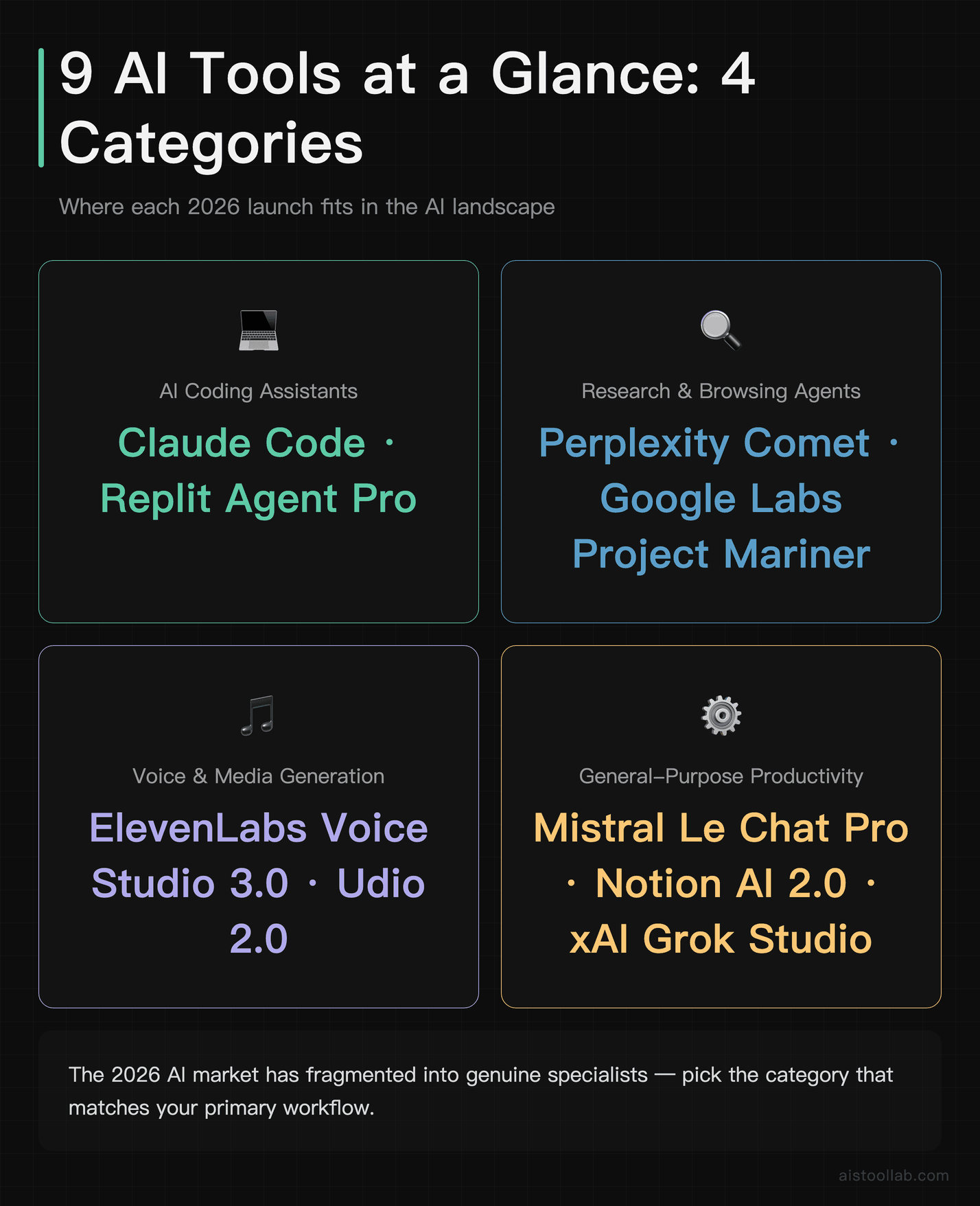
Before diving deep, here’s a quick orientation. The tools I’m covering span four rough categories: AI coding assistants, research and browsing agents, voice and media generation, and general-purpose productivity. They’re not all trying to do the same thing, which is actually one of the more interesting things about the 2026 AI landscape — the market has started to fragment in ways that are genuinely useful rather than just confusing.
The nine tools are: Claude Code (Anthropic’s terminal-native coding agent), Perplexity Comet (an agentic browser that does research for you), Mistral Le Chat Pro (the European dark horse), ElevenLabs Voice Studio 3.0 (voice cloning that’s gotten uncomfortably good), Notion AI 2.0 (a meaningful upgrade or just rebranding?), Replit Agent Pro (full-stack app deployment from a prompt), Udio 2.0 (AI music generation that’s crossed a quality threshold), xAI Grok Studio (Grok’s new creative workspace), and Google Labs Project Mariner (agentic web browsing from the search giant). Let’s get into it.
Claude Code: The One That Actually Surprised Me
I’ll be honest — when Anthropic announced Claude Code, I expected it to be a better version of what Copilot already does. A smarter autocomplete. Maybe a decent test writer. What it turned out to be instead was something that genuinely changes how you think about the relationship between a developer and an AI assistant.
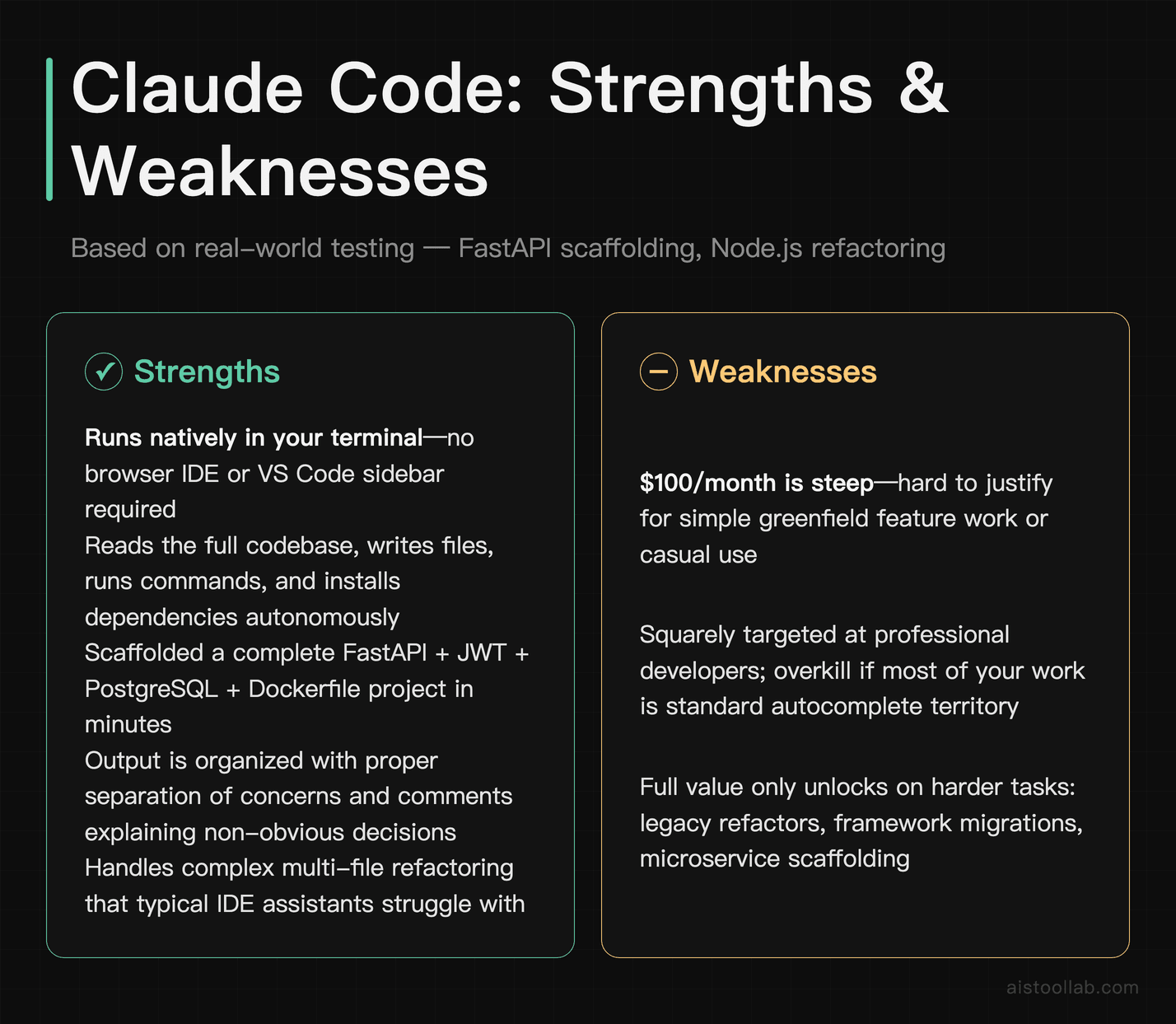
Claude Code runs in your terminal. Not in a browser IDE, not in a VS Code sidebar — in your actual shell. You give it a task in natural language, and it reads your codebase, writes files, runs commands, installs dependencies, and iterates until the thing works. Give it a prompt like “Set up a FastAPI backend with JWT authentication, a PostgreSQL database using SQLAlchemy, and write the Dockerfile,” and it can scaffold the full project in a matter of minutes. The output tends to be more than just functional — code is often organized with proper separation of concerns and comments that explain non-obvious decisions.
Where it gets genuinely interesting is in multi-file refactoring. It can work through a project systematically — applying changes like switching to async/await, tightening error handling, and adding TypeScript types — while flagging places where it needs a decision rather than guessing (for example, when a function is called in several places with inconsistent argument patterns).
The pricing is where things get complicated. Claude Code is available on the Max plan at $100/month, which also gives you expanded Claude access. For a full-time developer, that’s genuinely justifiable. For a casual user or someone who codes occasionally, it’s steep. I’ve covered the competitive landscape in more depth in my Claude Code vs Cursor vs Lovable piece, but the short version is: Claude Code wins on complex multi-file tasks, loses on IDE integration and the overall developer experience for beginners.
Perplexity Comet: The Research Agent That Actually Browses
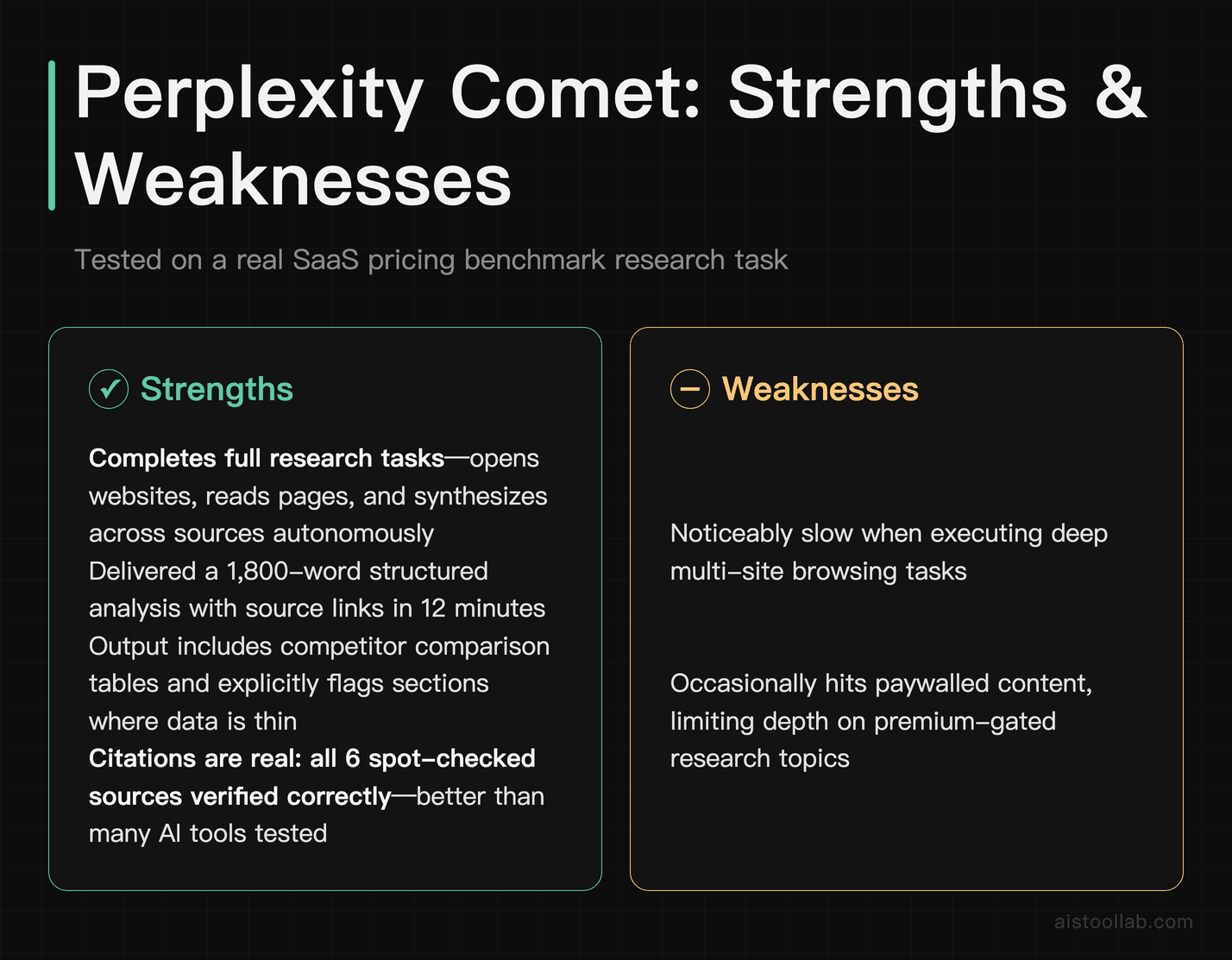
Perplexity Comet is probably the tool I’ve recommended most to people in my immediate circle since it launched. The pitch is simple: it’s not a search engine that answers questions, it’s an agent that completes research tasks. You tell it “research the current state of the residential solar market in the UK, including top installers, average ROI, and government incentives” and it goes and does that — opening websites, reading pages, synthesizing across sources, and delivering a structured report with citations.
Perplexity Comet can handle open-ended research briefs, producing structured analyses with source links, comparison tables, and notes flagging where data is thin. Its citations generally point to real sources, which makes it easier to verify the output.
The catch is that Comet can be slow when it’s doing deep browsing tasks, and occasionally it hits paywalled content and just… skips it without telling you clearly that it did. It can also confidently summarize a page that has been updated since the last crawl, which is a subtle but real accuracy risk for time-sensitive research. Now that the Comet browser is free to download (with Pro at $20/month adding higher limits and model choice; per Perplexity’s official pricing, checked July 2026), it’s hard to argue against for anyone who does regular research work.
The Perplexity website has a decent breakdown of what Comet can and can’t do, though as always the marketing undersells the limitations.
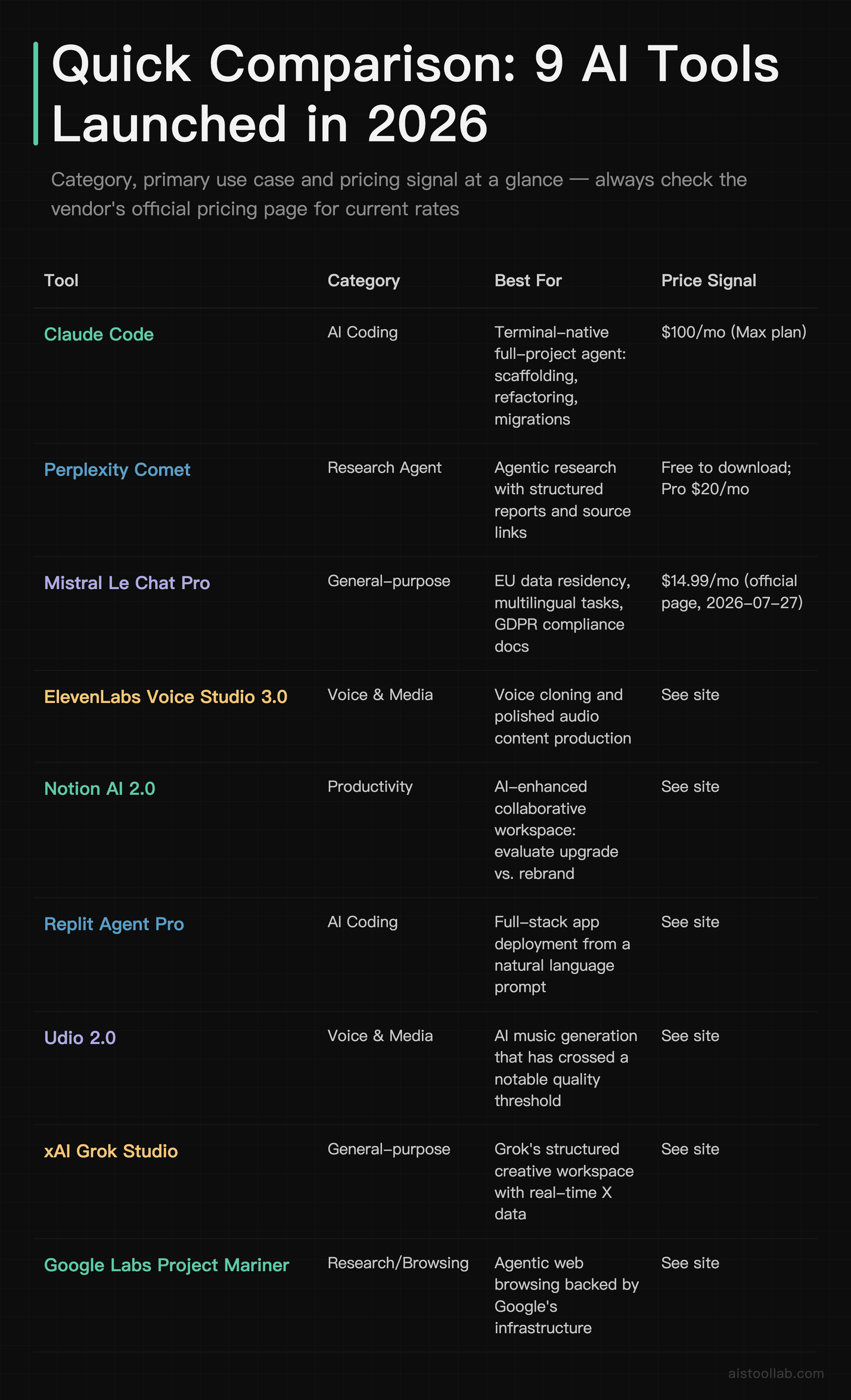
Quick Comparison: All 9 Tools
The Rest of the Lineup: Shorter Takes
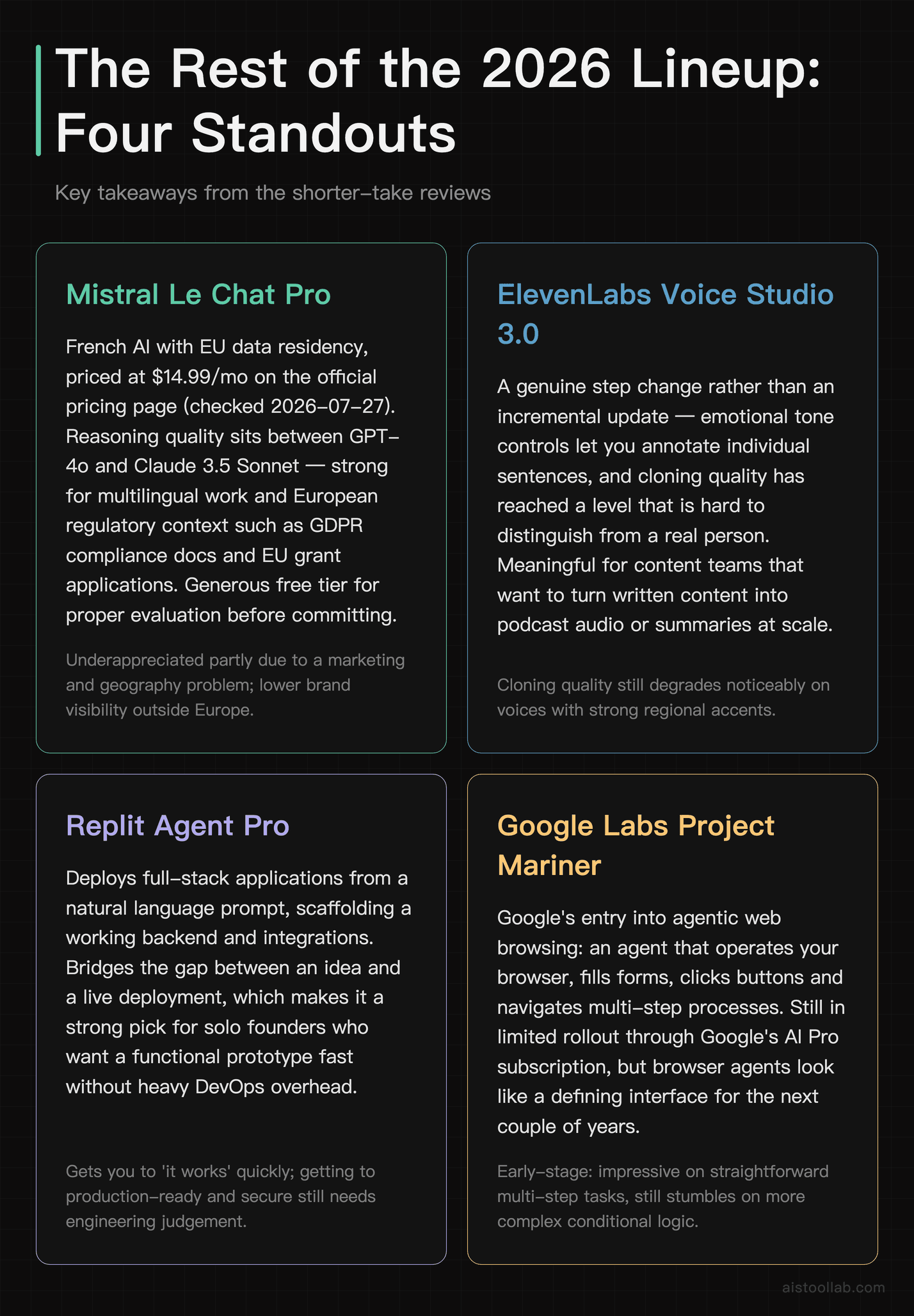
Mistral Le Chat Pro — The Privacy-First Contender
Mistral Le Chat Pro is probably the most underappreciated model in the current landscape, and I suspect that’s partly a marketing problem and partly geography. It’s a French company, it stores your data in the EU, and it’s priced at $14.99/month on the official pricing page (2026-07-27), which is genuinely competitive. The reasoning quality tends to sit comfortably between GPT-4o and Claude 3.5 Sonnet on most tasks, which is not a knock — that’s excellent company. Where it genuinely pulls ahead is multilingual work and anything with European regulatory context (think GDPR compliance documentation, EU grant applications, etc.). If you’re working in a space where data residency actually matters — and more B2B users are waking up to this — Le Chat Pro deserves serious consideration. The free tier is generous enough to evaluate it properly before committing.
This article contains affiliate links. If you buy through them I may earn a commission at no extra cost to you. All opinions are my own.
ElevenLabs Voice Studio 3.0 — A Meaningful Upgrade
ElevenLabs Version 3.0 (see the ElevenLabs Review for full background) represents a genuine step change rather than the incremental updates seen before. The new emotional tone controls are the headline feature: you can now annotate individual sentences with emotional instructions — [excited], [somber], [hesitant] — and the model applies them naturally enough that clips can be hard to distinguish from a real person. Real-time generation is now available on the Starter plan at $22/month. The main limitation is that cloning quality still degrades noticeably on voices with strong regional accents.
Notion AI 2.0 — Better, But Only If You’re Already In the Ecosystem
The upgrade to Notion AI 2.0 is real and I don’t want to dismiss it, but I do want to be precise about who it’s for. The new context-awareness — where the AI can reference information across your entire workspace, not just the current page — is a genuine quality-of-life improvement for teams who live in Notion. The writing assistance has improved noticeably, and the new “AI database queries” feature (ask a question, get a filtered view of your database) is clever. But at $16/month as an add-on on top of an existing Notion subscription, you’re looking at ~$32/month total for a solo user. For that money, you could have Claude Pro or a current ChatGPT plan and use them alongside Notion manually. The value proposition is strongest for teams of 5+ who have deeply built out their Notion workspace over time.
Replit Agent Pro — The No-Code Dream That’s Getting Real
Replit Agent Pro is doing something that felt like a parlor trick a year ago and is starting to feel like the future. Give it a prompt like “Build a simple SaaS landing page with a waitlist signup form that stores emails in a database and sends a confirmation email,” and it can scaffold a deployable app with a working Supabase backend and SendGrid integration. It won’t be perfect — the design tends to be functional rather than beautiful, and email templates may need tweaking — but the bones are solid and deployable. At $25/month it’s aimed squarely at solo founders and non-developers who need functional prototypes fast. It can knock out boilerplate that would otherwise take hours to set up by hand. There’s a lesson there.
Udio 2.0 — Music Generation That Crossed a Line
I’m going to be careful about the word “good” here because music quality is subjective in a way that code quality isn’t. What I can say is that Udio 2.0 produces music that holds up well enough to fit naturally on a playlist. The 2.0 update brought significantly better structural coherence — songs now have actual arrangements with verses, choruses, and transitions rather than 90 seconds of pleasant sameness. The style-consistent album generation is a standout feature: you define a sonic palette and it generates 8–10 tracks that actually sound like they belong together. For YouTube creators, podcast producers, or anyone who needs custom background music without paying licensing fees, at $10/month this is a no-brainer. The legal situation around training data is still murky, which I’d mention if you’re using it commercially at scale.
xAI Grok Studio — Smart, But The Price Needs Justification
Grok Studio is interesting because its differentiator is genuinely unique: real-time access to X/Twitter data integrated directly into a creative workspace. For anyone doing trend analysis, social listening, or journalism, this is legitimately useful in ways that other tools can’t replicate. The writing quality is strong — competitive with Claude 3.5 — and the interface is cleaner than I expected from a company that moves as fast as xAI. At $30/month for the SuperGrok tier that unlocks Studio, the value proposition depends almost entirely on whether you need that X data integration. If you do, it’s worth it. If you’re paying for it primarily as a general-purpose AI assistant, you can do better for the money.
Google Labs Project Mariner — The One to Watch
Project Mariner is still in limited rollout through Google’s AI Pro subscription ($20/month), and it’s the one I’m most cautious about over-hyping because it’s clearly still early. The concept — an AI agent that can actually operate your browser, fill forms, click buttons, navigate multi-step processes — works well enough to be genuinely impressive in demos and occasionally frustrating in practice. It can handle straightforward multi-step tasks like form-based bookings, but it can still stumble on more complex conditional logic. The Google Labs page has the current access details if you want to get on the waitlist. I think this category — true browser agents — will be one of the defining AI interfaces of the next two years, and Mariner is a significant early entry even if it’s not fully baked yet.
Use Cases: Who Should Actually Use Which Tool
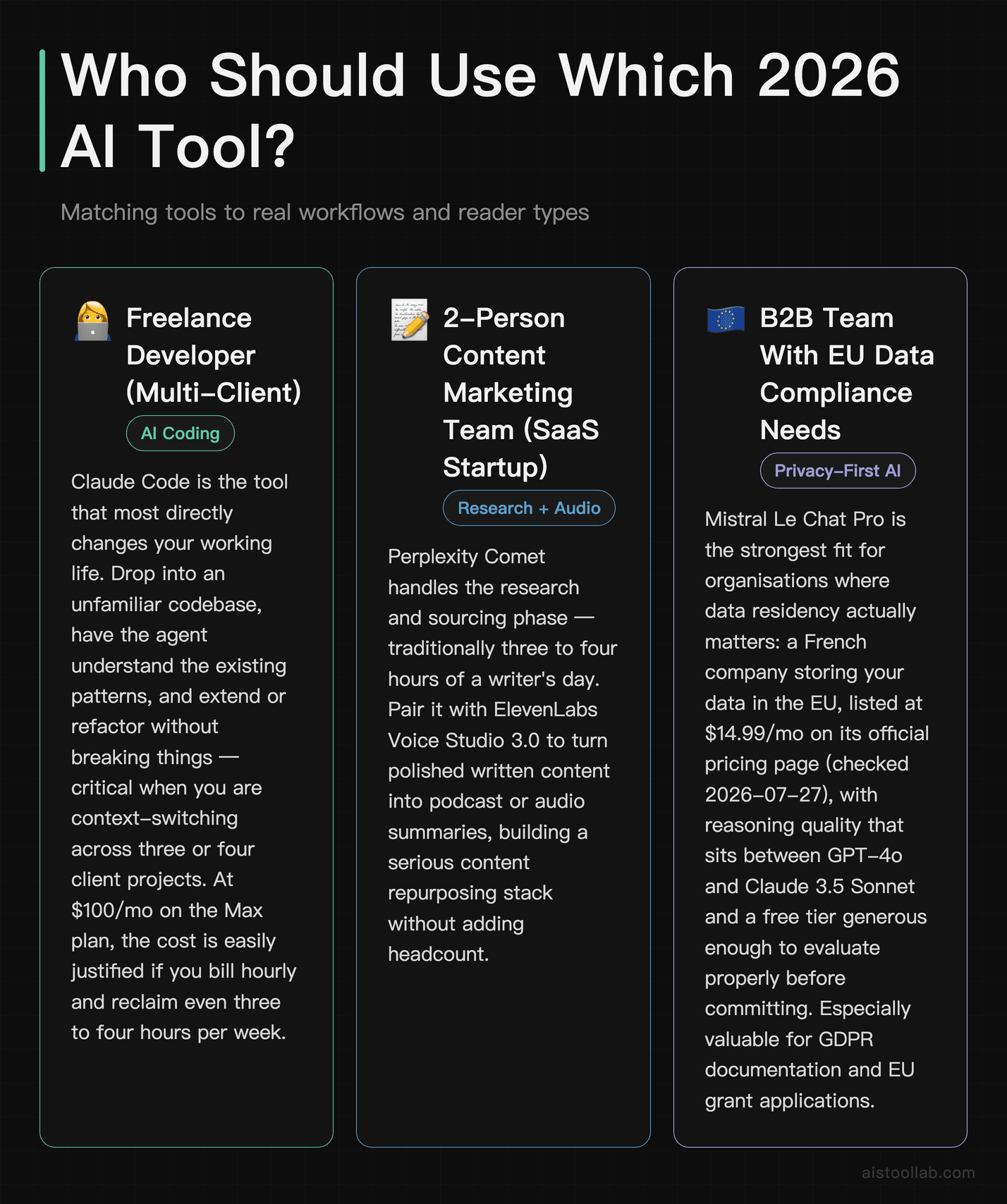
The Freelance Developer Working Across Multiple Client Projects
If you’re a freelance developer juggling three or four client codebases simultaneously, Claude Code is the tool that will most directly change your working life. The ability to drop into an unfamiliar codebase, have the agent understand the existing patterns, and either extend or refactor them without breaking things is genuinely valuable when you’re context-switching constantly. Pair it with the Claude API and Python pipeline I covered earlier for automating documentation generation, and you’ve got a serious productivity stack. The $100/month price point is easily justified if you’re billing hourly and can reclaim even three to four hours per week.
The 2-Person Content Marketing Team at a SaaS Startup
For a small marketing team that needs to produce research-backed content at scale, Perplexity Comet plus ElevenLabs Voice Studio 3.0 is a combination worth thinking about seriously. Comet handles the research and sourcing phase — the part that traditionally eats three to four hours of a writer’s day — while ElevenLabs turns polished written content into podcast or audio summaries for repurposing across channels. Notion AI 2.0 rounds out the stack if the team already lives in Notion. The combined cost is around $58/month for one person using all three, which sounds like a lot until you compare it to the cost of an additional content hire.
The Solo Founder Building a First Product
Replit Agent Pro was built for exactly this situation: you have a clear product idea, limited or no coding background, and you need to move from concept to working prototype without burning three months learning full-stack development. The caveat is that Replit Agent Pro gets you to “it works” quickly, but getting from “it works” to “it’s production-ready and secure” still requires engineering judgment. Think of it as a way to validate your idea cheaply and quickly before you invest in proper development. For a solo founder who just needs something to show investors or early users, it genuinely delivers.
The Independent Research Professional
Think management consultants, market researchers, academic researchers who need current data — anyone whose work involves gathering and synthesizing information from diverse sources. Perplexity Comet handles the breadth well (covering a lot of ground quickly), while Grok Studio’s real-time X data access fills in the gap for emerging trends and real-time social signals that traditional research tools miss. Mistral Le Chat Pro is worth adding if any of your clients have EU data requirements and you need to document where their information is being processed.
What 2026’s AI Launches Tell Us About Where This Is Going
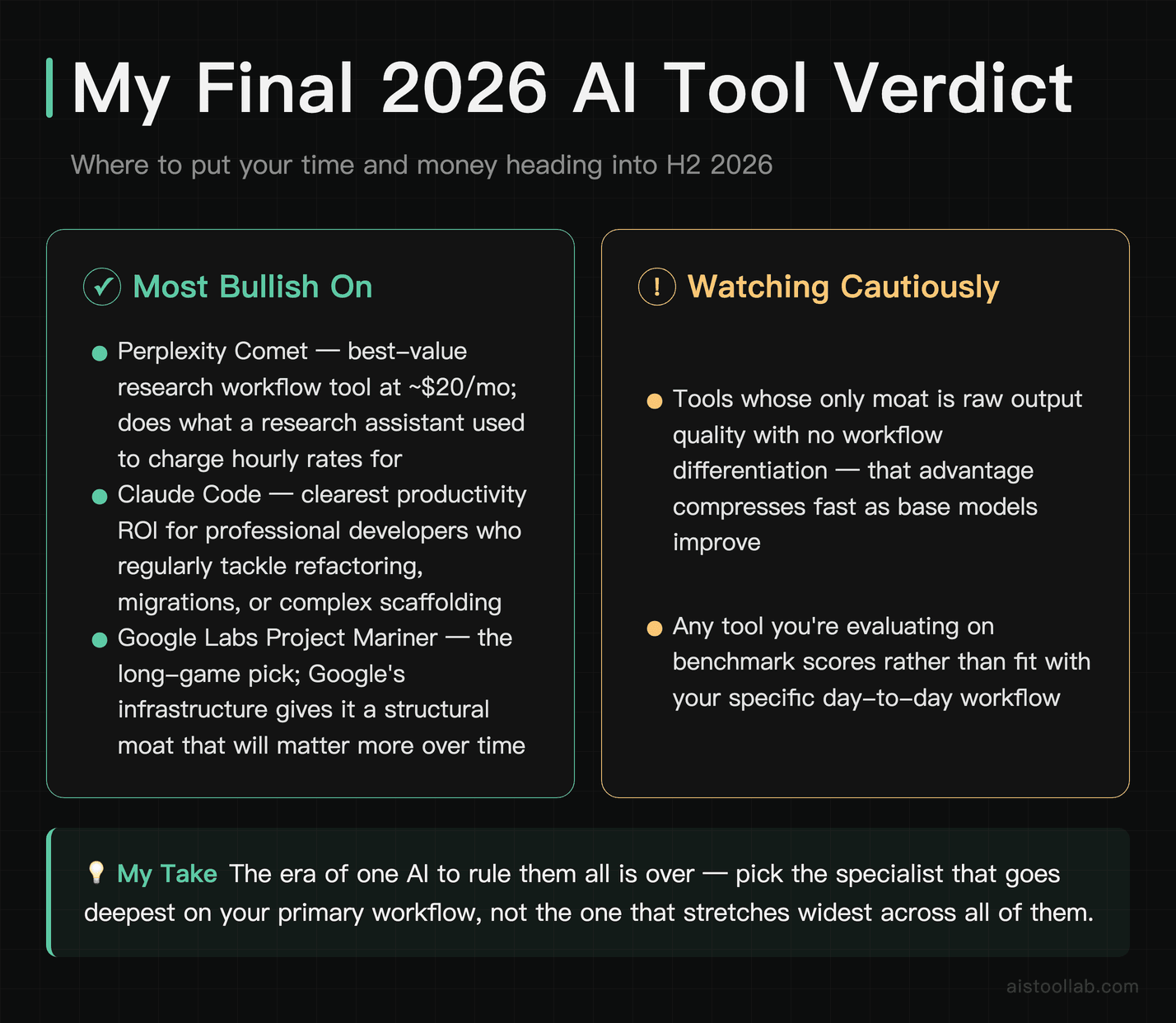
Looking across these nine tools, a pattern is pretty clear: the era of “one AI to rule them all” is over, and the players who acknowledge that are building better products because of it. Claude Code isn’t trying to be a general-purpose assistant — it’s trying to be the best possible coding agent for professional developers. Perplexity Comet isn’t trying to compete with ChatGPT’s writing — it’s going deep on research. ElevenLabs isn’t adding a coding feature. These tools have figured out what they’re for, and they’re better for it.
The other thing worth noting is the price compression happening at the quality tier. A year ago, $20/month got you decent AI. Today, the free Comet browser does things that would have required a research assistant at an hourly rate. The tools I’m most bullish on heading into the second half of 2026 are Comet (for research workflows), Claude Code (for professional development), and Project Mariner (for the long game on agentic browsing). The tools I’m watching cautiously are the ones whose moats are purely about output quality with no workflow differentiation — that’s increasingly a race to the bottom.
If you want a broader lens on what’s worth your attention across the AI tool landscape this year, my earlier roundup of 9 Best New AI Tools Launched in 2026 covers a different set of tools that complement this list well. The market is big enough now that no single article captures everything worth knowing — which, honestly, is a good problem to have.
There’s no universal recommendation I can make that covers everyone reading this. But if you put a gun to my head and asked me to pick two tools from this list for a typical solo professional — developer, marketer, or founder — I’d say Perplexity Comet for research and either Claude Code or Replit Agent Pro depending on whether you write code. Those two cover more of the daily workflow friction points than anything else in this list, at a combined price that’s less than a gym membership you actually use.
Frequently Asked Questions
Is Claude Code worth $100/month for a solo developer?
This is probably the question I’ve gotten most since writing about Claude Code, and my honest answer is: it depends on what kind of developer you are and how much of your time goes to the tasks it handles well. If you’re primarily doing greenfield development on well-scoped features, Claude Code will feel like overkill and you’d probably be better served by a cheaper option like GitHub Copilot or even the standard Claude Pro subscription. But if you’re regularly doing things like: migrating a codebase to a new framework, refactoring old code that nobody left documentation for, debugging obscure dependency conflicts, or standing up full microservices from a spec — that’s where Claude Code earns its money. I’ve spoken to several freelancers who say they’ve recouped the monthly cost in the first week by handling a client’s messy legacy codebase refactor in hours rather than days. The $100/month is genuinely steep, but it’s also targeting users for whom that’s a rounding error on their billable hours. One last note: use the free trial period seriously. Give it a real, hairy task from your actual work — not a toy project — and you’ll know within one session whether the price makes sense for you.
How accurate is Perplexity Comet compared to just using ChatGPT with browsing?
Comet is meaningfully better than ChatGPT’s browsing for tasks that involve synthesizing across multiple sources — it tends to be more thorough, better at organizing information into usable formats, and more reliable with citations. Where they’re roughly equivalent is for quick single-source lookups. The key architectural difference is that Comet is built as a research agent from the ground up, so it’s designed to plan a research task, execute multiple search and browse steps, and synthesize the results. ChatGPT’s browsing mode is more of a bolt-on that retrieves and reads a page to answer a specific question. For anything requiring genuine multi-source research — competitive analysis, industry overviews, due diligence tasks — Comet is the better tool by a clear margin. The main scenario where I’d reach for ChatGPT instead is when the research needs to be tightly integrated with a longer piece of writing in the same session. The workflows are different enough that they’re not really direct competitors so much as tools suited to different moments in a research and writing pipeline.
Can ElevenLabs Voice Studio 3.0 actually clone my voice convincingly?
Yes, and with enough fidelity that it’s genuinely a little unsettling the first time you hear it. The cloning process requires a minimum of about 3 minutes of clean audio — more is better, ideally 10–15 minutes across varied speech patterns and sentence structures. With a clean source recording, a cloned voice can sound convincingly close to the original. Emotional control adds another layer of naturalism: you can tell it to deliver a sentence with hesitation or excitement and it adjusts convincingly. The limitations are: strong regional accents (like a thick Glaswegian) and unusual phoneme patterns can still degrade quality, audio quality of the source recording matters a lot, and there are content policy restrictions on what you can generate with a cloned voice. For legitimate use cases — content creators building an audio presence, educators creating accessible versions of their materials, people who’ve lost their voice due to illness — this is genuinely transformative technology at a price point that’s accessible. For my full thoughts on the platform, check out my ElevenLabs Review.
Is Google Project Mariner actually available, or is it still vaporware?
It’s real, but it’s in a limited access phase. As of early 2026, you can access it through the Google One AI Pro subscription at $20/month, but availability has been rolling out gradually and not every subscriber has it activated yet. The functionality is genuine — it does actually control the browser and complete multi-step tasks — but it’s clearly still in active development. The error rate on complex or non-standard web interfaces is higher than you’d want for anything mission-critical, and the speed is slow enough (it moves deliberately rather than quickly) that for simple tasks it’s actually faster to just do it yourself. Where it earns its place is in repetitive multi-step web tasks: filling out the same type of form repeatedly, gathering data from multiple similar pages, navigating bureaucratic web interfaces that require clicking through many steps. For those use cases, the early access roughness is worth tolerating. I’d give it six months before making strong judgments — this is the kind of tool that tends to improve dramatically and fast. Keep an eye on the Google Labs announcements for rollout updates.
How does Mistral Le Chat Pro compare to Claude and GPT-4o?
On raw reasoning and writing quality benchmarks, Le Chat Pro sits in a competitive but second-tier position relative to Claude Opus or GPT-4o — it’s not going to outperform the flagship models on complex reasoning chains or highly nuanced writing tasks. Where it competes directly or even pulls ahead is on speed (it’s genuinely fast), cost efficiency ($16/month vs $20+ for comparable plans elsewhere), multilingual tasks involving European languages, and anything where EU data residency is a hard requirement rather than a preference. I’ve started recommending it to clients in regulated European industries who ask for AI tools they can actually use without triggering data compliance concerns. For US or UK-based users without data residency requirements, it’s still a solid choice at the price point, but I wouldn’t tell you to drop Claude or GPT-4o for it unless cost or compliance is driving the decision. The free tier is substantial enough to evaluate it properly — I’d spend a week with it on your actual tasks before paying.
Is Udio 2.0 legal to use for commercial projects?
This is legitimately complicated and I want to be honest that I’m not a lawyer and the legal landscape is still evolving. The short version: Udio operates under a terms of service that grants you ownership of the output you create using the platform, and they maintain that their training was conducted in accordance with applicable laws. However, several ongoing lawsuits involving AI music generation companies (not specific to Udio, but in the same space) mean the legal picture isn’t fully settled. For small-scale commercial use — YouTube videos, podcast background music, indie game soundtracks — the practical risk is low and most creators are using AI music tools without issue. For large-scale commercial deployment where a licensing challenge could be seriously damaging — think a major advertising campaign or a widely distributed product — I’d recommend consulting an entertainment lawyer and making sure you understand the current state of the litigation landscape before committing. The platform itself is clear in its terms about what rights you have; the uncertainty is more about the upstream training data question, which is a live legal issue across the entire AI industry.
What’s the difference between Replit Agent Pro and just using Claude Code or Cursor?
These tools are solving different problems for different users, even though they all involve AI and code. Claude Code (and to a similar extent Cursor — I’ve done a full comparison in my Claude Code vs Cursor vs GitHub Copilot piece) is aimed at developers who know what they’re doing and want a powerful AI collaborator that works within their existing environment and workflow. Replit Agent Pro is aimed at people who don’t have a “developer environment” or “existing workflow” — they have an idea and they want an app. Replit handles the entire stack: it writes the code, manages the deployment environment, provisions the database, and gives you a live URL. You don’t need to understand any of that infrastructure. The tradeoff is control and portability: what Replit Agent builds lives in Replit’s ecosystem, and while you can export the code, moving it elsewhere requires more work. For a developer, Claude Code is the better tool. For a founder or marketer who needs a working prototype and doesn’t want to spend three weeks learning DevOps, Replit Agent Pro is genuinely impressive and comparatively affordable at $25/month.
Are any of these tools good enough to replace my current AI subscription?
For most people reading this, probably not as a replacement — but potentially as a consolidation or a strategic swap. If you’re paying for Claude Pro and you’re primarily using it for research tasks, Perplexity Comet (free to use, with Pro at $20/month for higher limits) might actually serve that specific need better and free up your Claude subscription for the generative writing and reasoning tasks it excels at. If you’re on a GPT-4o subscription and your main use case is coding, Claude Code at $100/month is a meaningfully better investment if the budget is there — though that’s an upgrade, not a lateral move. The honest answer is that 2026’s AI landscape rewards people who think about their actual workflows and match tools to specific jobs rather than looking for one subscription to rule them all. Many power users run two to three AI tools in rotation: a general-purpose model, a specialized coding or research agent, and something for media generation. That’s not subscription creep — it’s the right architecture for what AI tools are currently good at. And given that the pricing across these tools ranges from $10 to $100/month, being intentional about which two or three you actually use will save you more money than trying to find one perfect tool.
Last updated: 2026
Explore more AI tools
👉 Browse the AI Tools Library to find the right tools for your workflow.