

The Voice That Made Me Do a Double-Take
A few months back, I was editing a podcast episode for a creator friend when she mentioned she’d re-recorded one of her intro segments using an AI voice clone of herself. She’d been traveling, her mic setup was bad, and she just needed a quick fix. I listened to the clip. I genuinely could not tell. And I’ve been doing audio work long enough that I should have caught it.
That was my real introduction to ElevenLabs — not from a press release or a Twitter thread, but from a polished piece of audio that made me question my own ears. This review looks at what it offers: voice cloning, multilingual output, fit for real production workflows, and how its costs stack up against the competition.
So here’s an honest, ground-level review. Not a feature list dressed up as an opinion — a practical look at how this tool fits podcast production, video voiceover, and audiobook work. If you’re a content creator trying to figure out whether ElevenLabs is worth your money, this one’s for you.
What ElevenLabs Actually Is (And What It’s Not)
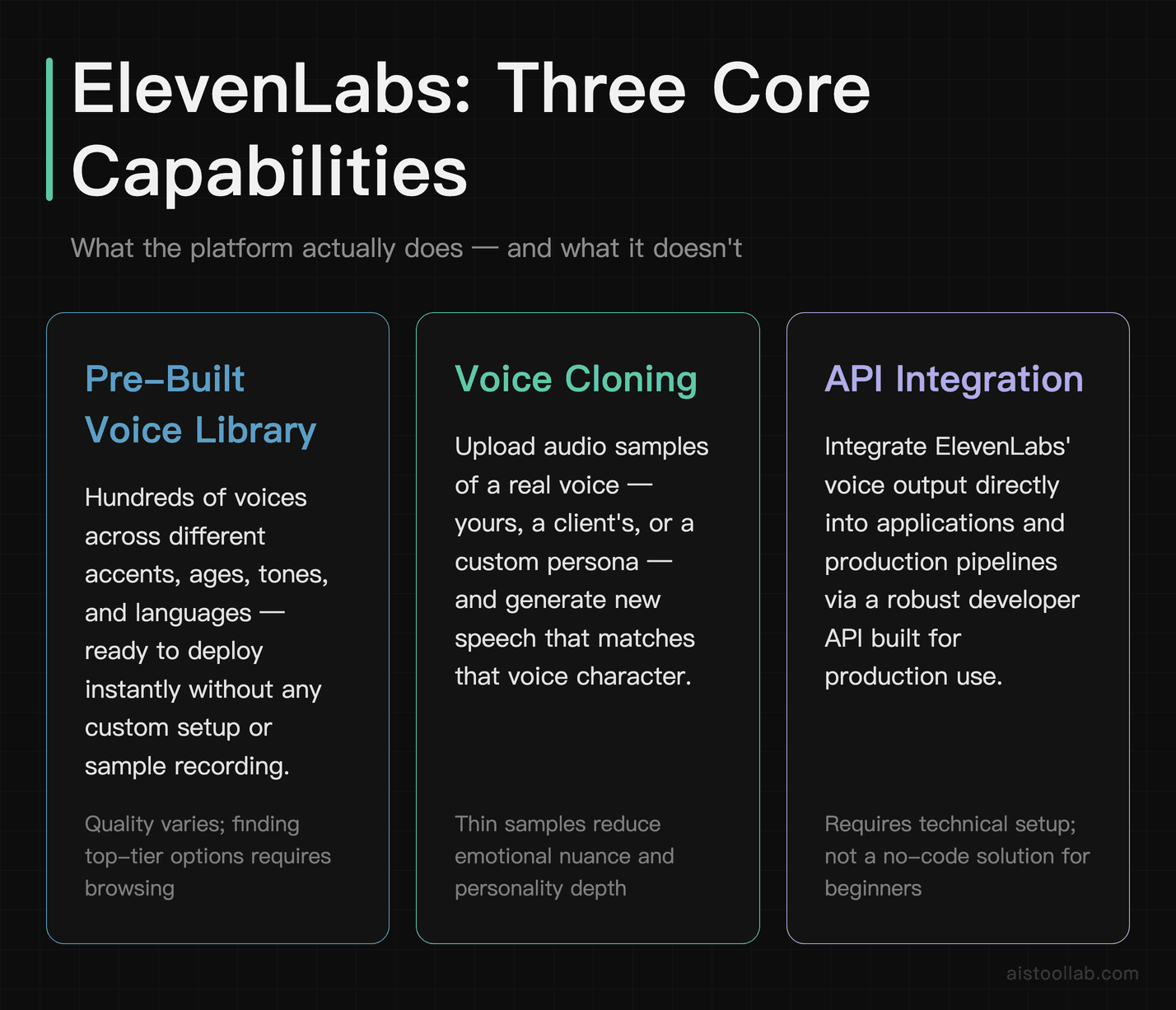
ElevenLabs ↗ is an AI voice synthesis platform that launched publicly in 2022 and has since become arguably the most talked-about tool in the text-to-speech space. The company’s main pitch is simple: voices that sound like real humans, not robots. And to be fair, they’ve largely delivered on that promise in a way that earlier TTS tools never could.
At its core, the platform offers three main capabilities. First, there’s their library of pre-built voices — hundreds of options across different accents, ages, tones, and languages. Second, there’s Voice Cloning, which lets you upload audio samples of a real voice (yours, a client’s, a persona you’ve created) and generate new speech in that voice. Third, there’s the API, which lets developers and production teams integrate ElevenLabs’ output directly into their applications and pipelines.
What it’s not is a full-service audio production suite. It doesn’t do music, it doesn’t edit your recordings, and it won’t replace a proper DAW. Think of it as the voice layer in your content stack — powerful, focused, and increasingly good at that one specific job. You can check out the ElevenLabs official site to get a feel for the current feature set and pricing tiers before we dig in.
Voice Cloning: The 3-Minute Sample vs. the 30-Minute Deep Dive
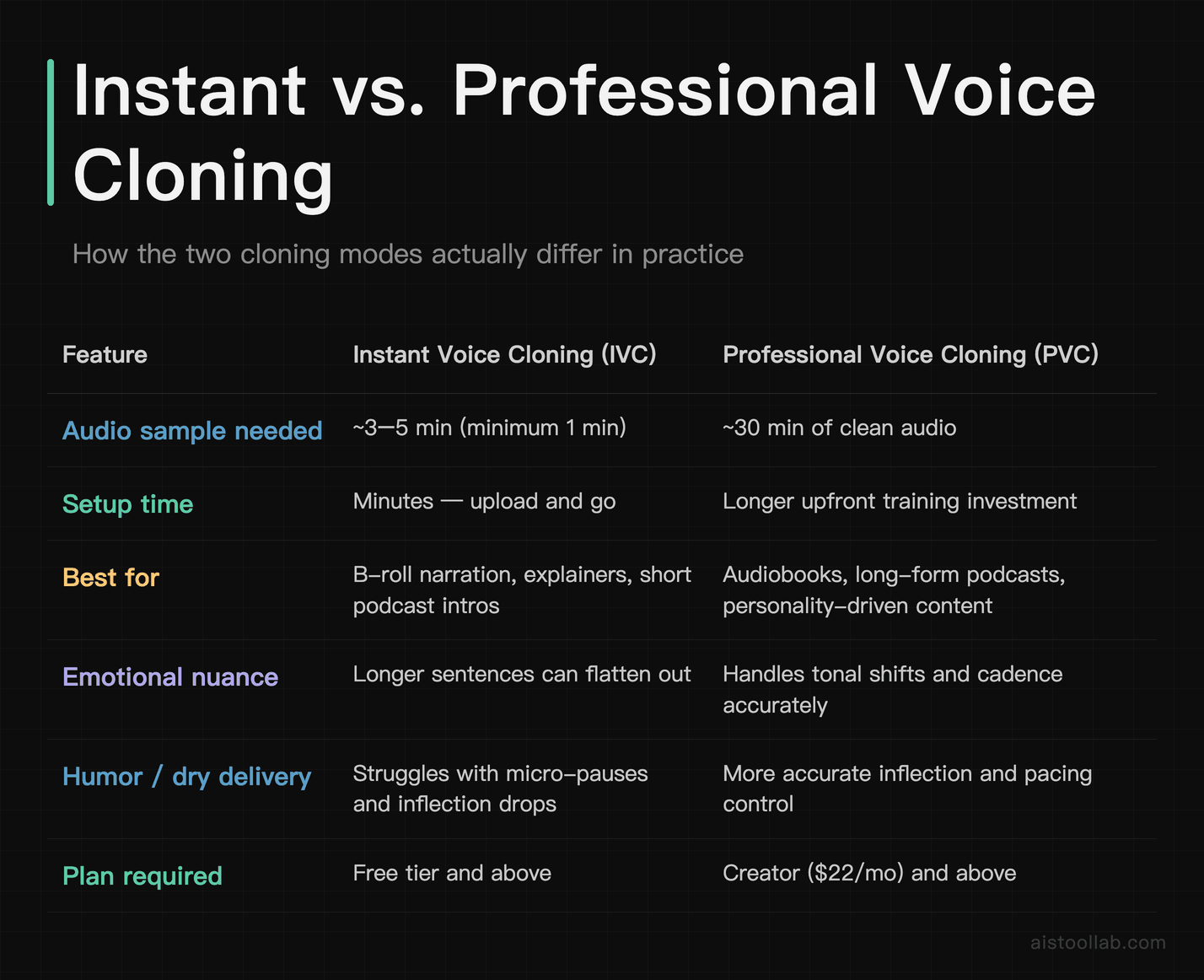
This is where most people come for ElevenLabs, so let’s spend some real time here. Voice cloning on this platform comes in two flavors: Instant Voice Cloning (IVC) and Professional Voice Cloning (PVC). The difference isn’t just marketing — it’s substantial.
Instant Voice Cloning (Short Samples)
With Instant Voice Cloning, you can upload as little as one minute of clean audio, though the sweet spot ElevenLabs recommends is around 3–5 minutes. A 3-minute sample can produce a solid clone that captures general cadence, slight regional accents, and tonal shifts when the text calls for them. For quick-turnaround content — YouTube B-roll narration, simple explainer videos, short-form podcast intros — a 3-minute clone is completely usable.
That said, it does have tells. Longer, more emotionally nuanced sentences sometimes flatten out. The clone can struggle with humor — specifically the micro-pauses and inflection drops that make dry delivery work. If you’re creating something where personality is the whole point, a thin sample won’t get you there. Unusual proper nouns (brand names, niche technical terms) also tend to get mispronounced more often with IVC than with the full professional version.
Professional Voice Cloning (30-Minute Sample)
The Professional Voice Cloning tier requires around 30 minutes of high-quality audio and is only available on higher-tier plans. This is a different beast entirely. With a longer sample set, the output can be uncanny — in the literal, slightly unsettling sense. Emotional range improves dramatically. Laughter-adjacent speech, hesitation patterns, and emphasis on multi-syllable words can come through with real fidelity.
For audiobook narration in particular, this level of cloning quality changes the math entirely. A consistent, expressive narrator voice that you can generate on demand? That’s a real production advantage. The tradeoff is setup time and audio quality requirements — ElevenLabs is picky about background noise and recording conditions, which is the right call but can be a barrier for some users.
Pre-Built Voice Library and Multilingual Support
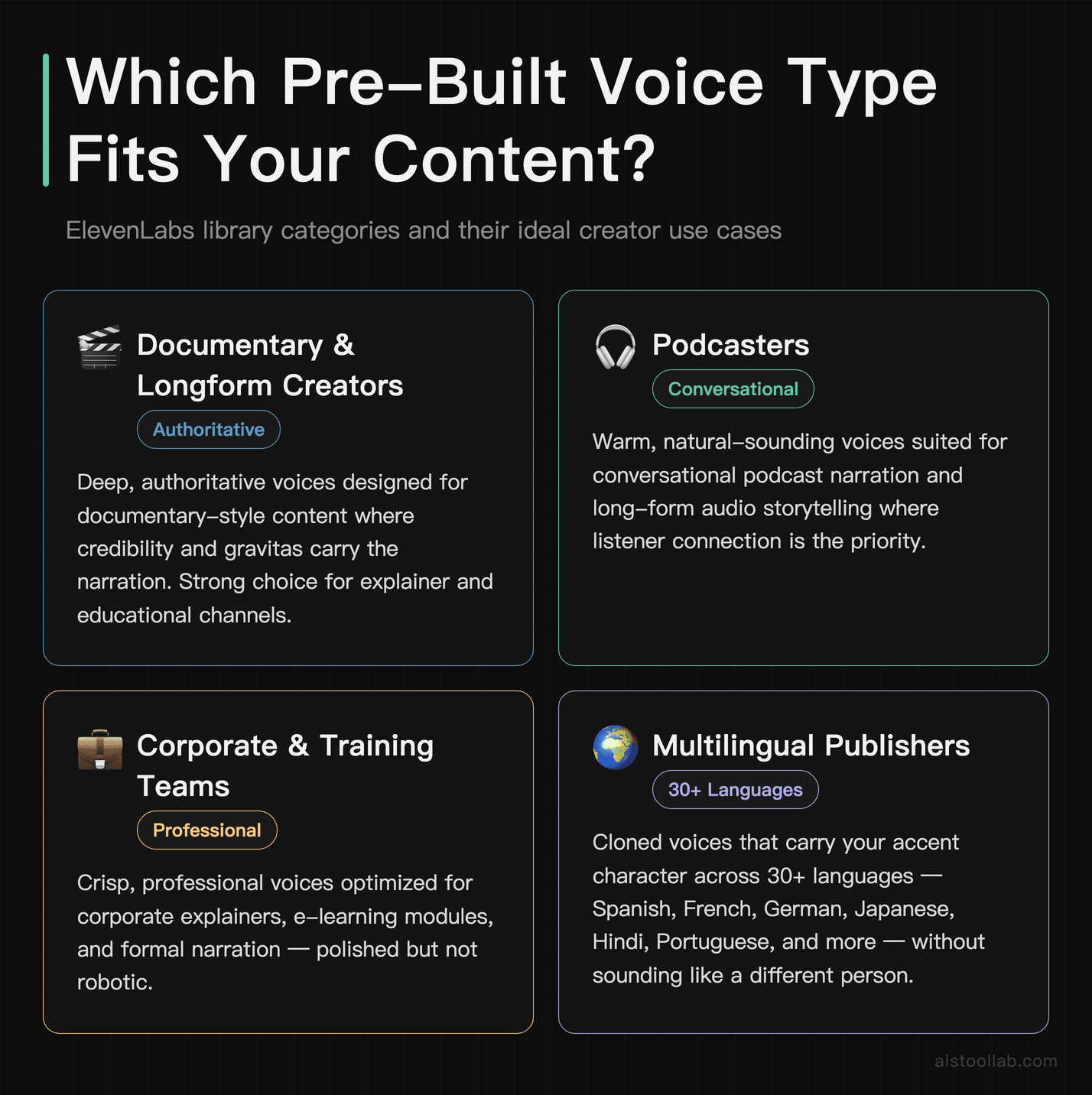
Not everyone wants to clone their own voice — plenty of creators just want a great-sounding narrator they can deploy instantly. ElevenLabs’ pre-built library has grown considerably and now includes hundreds of voices. Quality varies, but the top-tier options are genuinely impressive. There are deep, authoritative voices for documentary-style content, warm conversational voices for podcasts, and crisp professional voices for corporate explainers.
Multilingual support is where ElevenLabs has made some of its biggest strides recently. The platform supports over 30 languages including Spanish, French, German, Japanese, Hindi, Portuguese, and more. Crucially, it supports multilingual output within cloned voices — meaning you can take an English voice clone and have it deliver content in Spanish without sounding like a completely different person. The accent and voice character carry over, which is something older TTS tools simply couldn’t do.
Spanish output tends to be very good — natural pacing and correct regional inflections when using a Latin American voice profile. French can be slightly more mechanical in longer paragraphs but still strong for a tool that isn’t primarily targeting French speakers. If you’re producing content for global audiences, as many creators are now (this is a trend I talked about in my How Content Creators Are Using AI Tools to Scale Production in 2025 piece), multilingual TTS is genuinely valuable and ElevenLabs delivers here.
API Pricing: What It Actually Costs at Scale
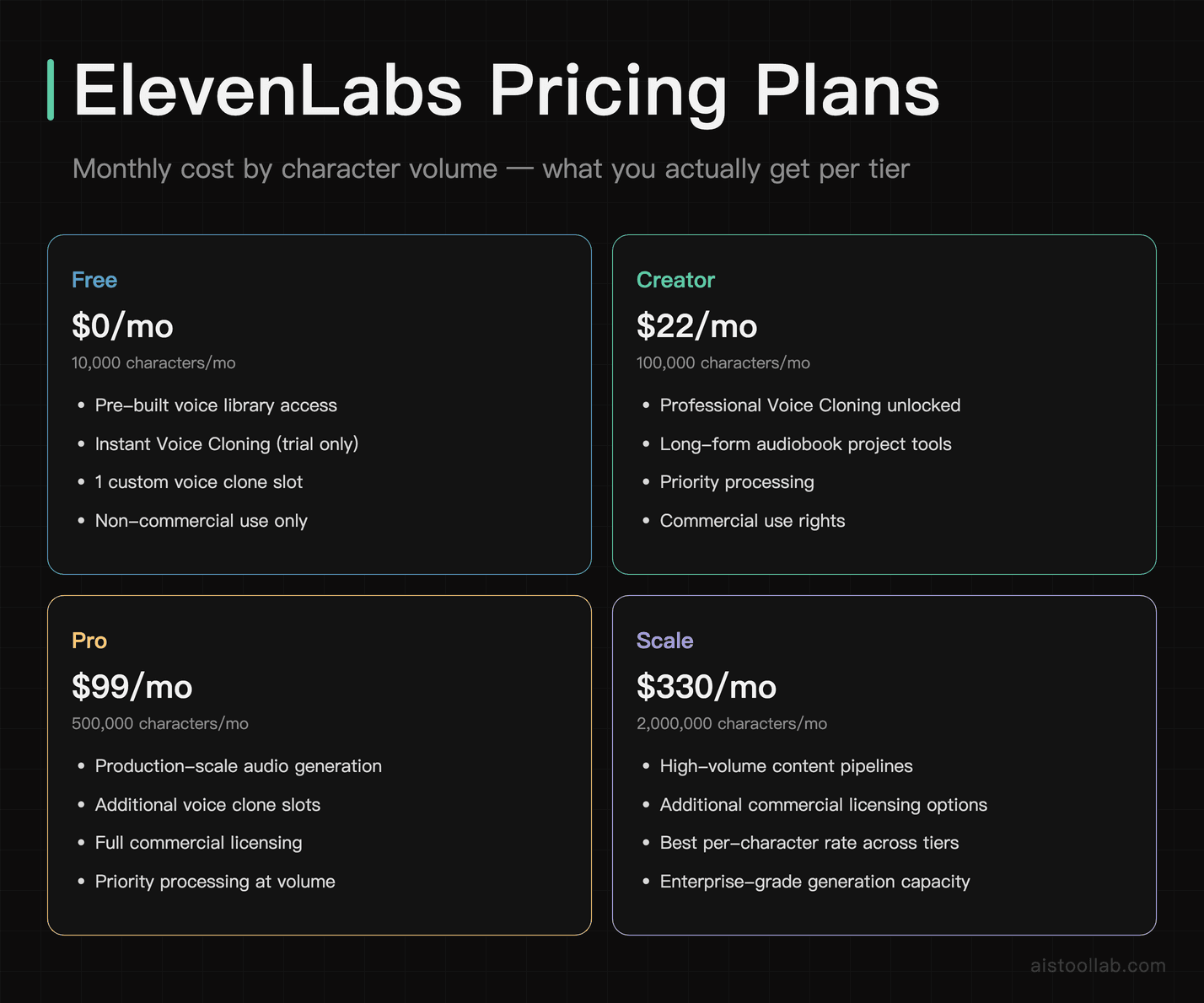
Let’s talk money, because the pricing structure at ElevenLabs can be confusing if you’re trying to figure out production costs at scale. The platform charges based on characters generated, which is a sensible model — but it means you need to do some math upfront.
Here’s how the tiers currently break down. The Free plan gives you 10,000 characters per month, which is enough to kick the tires but not much else. The Starter plan runs about $5/month for 30,000 characters. The Creator plan at $22/month pushes that to 100,000 characters and unlocks Professional Voice Cloning. The Pro plan at $99/month gives you 500,000 characters, and Scale at $330/month gets you 2 million characters with additional commercial licensing options.
To put that in real production terms: a typical 10-minute podcast narration segment runs roughly 15,000–18,000 characters. A 60-minute audiobook chapter might run 80,000–100,000 characters. If you’re producing one audiobook a month, the Creator plan is borderline. If you’re doing it as a business, you’re looking at Pro or Scale pretty quickly. For API access in a production application — say, a content platform generating personalized audio at volume — the Scale tier is really your entry point, and even then you’ll want to model your character usage carefully.
One thing worth noting: ElevenLabs does offer volume discounts for enterprise customers and has a separate API pricing model that can be more cost-effective if you’re doing serious production work. The ElevenLabs pricing page is worth bookmarking if you’re planning a larger deployment, because the tiers and features do get updated periodically.
How It Compares: ElevenLabs vs. Murf, Play.ht, and Descript
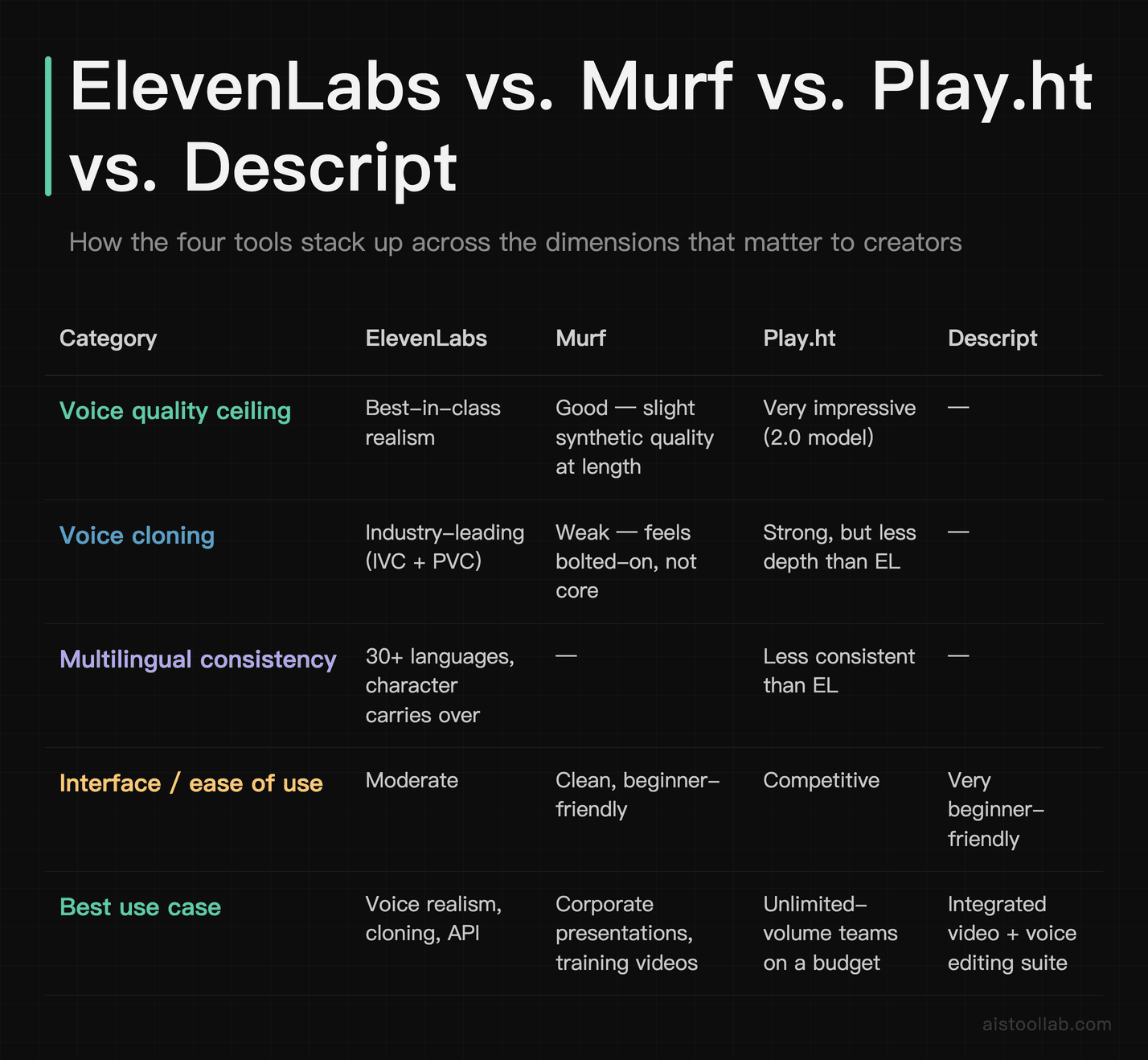
I’m comparing all four of these tools, so this isn’t just speccing out feature tables. Each one has a genuine use case where it shines — and places where it falls short.
ElevenLabs vs. Murf
Murf is the more polished, beginner-friendly option. Its interface is cleaner, it has built-in video syncing tools, and the voice library is well-curated. For someone who wants a simple, no-fuss TTS tool for corporate presentations or training videos, Murf is genuinely excellent. But the voice quality ceiling is lower. Murf’s voices are good, not great — they have a slight synthetic quality in longer passages that ElevenLabs consistently avoids. And Murf’s voice cloning is notably weaker; it feels like a feature they bolted on rather than built from the ground up. If voice realism is your priority, ElevenLabs wins cleanly.
ElevenLabs vs. Play.ht
Play.ht is the closest real competitor in terms of voice quality. Their 2.0 model voices are genuinely impressive, and their pricing is competitive — especially for teams that need unlimited generation. Where Play.ht falls behind is multilingual consistency and the depth of their voice cloning. ElevenLabs’ Professional Voice Cloning is still a tier above what Play.ht offers. Play.ht does have a slight edge in real-time streaming voice generation, which matters for certain developer use cases. For straight content creation though, ElevenLabs is the stronger tool.
ElevenLabs vs. Descript
This is a different kind of comparison because Descript is a full podcast and video editing platform that includes an “Overdub” voice cloning feature, not a dedicated TTS tool. If you’re already using Descript for editing — and it’s a fantastic editor — then Overdub is a convenient add-on. But it’s not in the same league as ElevenLabs for voice quality or multilingual capability. Descript is better thought of as an editing tool that happens to have AI voice features, whereas ElevenLabs is the other way around. They serve different primary needs.
The short version: ElevenLabs wins on voice quality and cloning depth. It loses on interface polish (Murf), unlimited pricing models (Play.ht), and integrated editing workflows (Descript). Your choice depends on what you actually need the tool to do.
Real Workflows: How Creators Are Actually Using This
Podcast Production
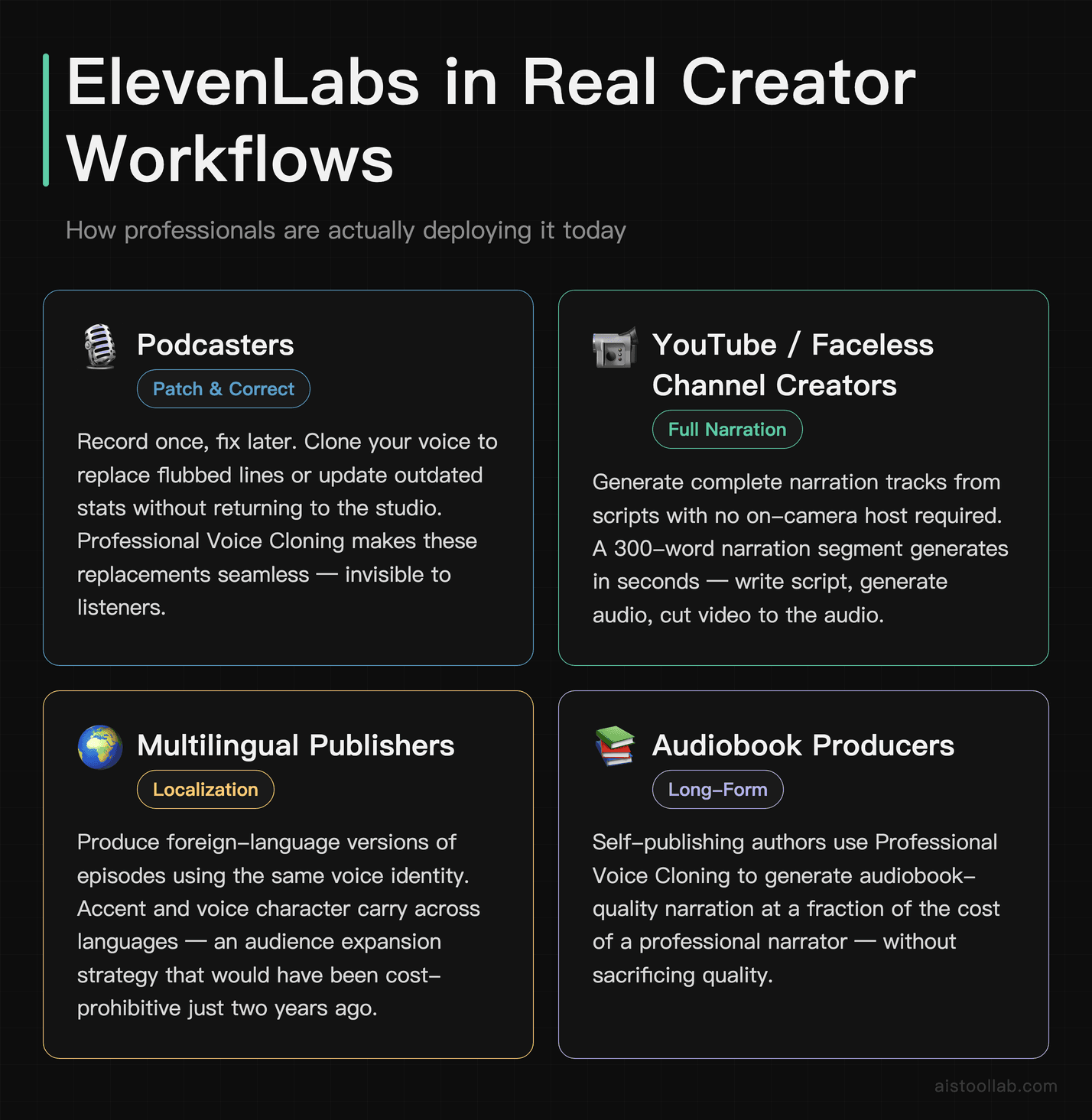
The most common podcast use case I’ve seen is re-recording corrections without going back into the booth. You record your episode, notice a flub or want to update an outdated stat a week later, and instead of scheduling a re-record, you generate the replacement line in your cloned voice and drop it in. With Professional Voice Cloning, this is seamless. With Instant Voice Cloning, you might notice a slight tonal mismatch if the surrounding audio was recorded on a different day or in a different acoustic environment.
Some podcasters are also using ElevenLabs to create foreign-language versions of their episodes — same script, same voice character, different language. This is genuinely powerful for audience expansion and something that would have been cost-prohibitive with human translators and voice actors even two years ago.
Video Voiceover
For YouTube and social video content, ElevenLabs is increasingly being used to generate entire narration tracks from scripts — particularly for faceless YouTube channels where there’s no on-camera host. The workflow typically looks like: write script, generate audio, cut video to the audio. Generation is generally fast enough to iterate on quickly.
The challenge here is sync. ElevenLabs doesn’t offer native video timeline integration the way Descript or even Murf does, so you’re exporting audio files and working in your own editor. That’s a friction point for creators who want an all-in-one solution. But if you’re already comfortable in Premiere, DaVinci, or Final Cut, it’s a non-issue.
Audiobook Narration
This is arguably ElevenLabs’ strongest use case right now. Authors who self-publish on platforms like ACX (Audible’s producer marketplace) need professional-quality narration, and hiring a human narrator for a 70,000-word book can cost anywhere from $2,000 to $10,000+. ElevenLabs’ Professional Voice Cloning, combined with a clean recording session, can produce narration quality that clears ACX’s technical requirements and sounds genuinely engaging.
One thing to factor in: ACX and some other platforms have evolving policies around AI-generated audio. Always check current platform guidelines before committing to this workflow for commercial distribution.
What ElevenLabs Gets Wrong
No tool is perfect, and I’d be doing you a disservice if I wrapped this up without the honest critique. A few real issues:
- Inconsistent pronunciation handling: Unusual words, brand names, and technical jargon can trip up the engine. There’s a pronunciation dictionary feature, but it requires manual upkeep and isn’t as seamless as it should be for professional use.
- No native timeline editor: You’re always exporting and importing, which adds friction. For high-volume content creators, this is a meaningful workflow gap.
- Cost scales fast: If you’re producing serious audiobook or long-form content volume, you’ll hit the limits of mid-tier plans quickly. The jump from Creator to Pro is steep.
- Emotional range has a ceiling: Even the best clones struggle with highly expressive content — passionate speeches, comedic timing, genuine anger. It’s better than anything else on the market right now, but it’s not human.
- Latency on free/starter tiers: During peak hours, generation can slow down noticeably. Priority processing is locked behind higher-tier plans.
Who Should Actually Use ElevenLabs
Let me be direct about this, because “it depends on your needs” is the laziest answer in tech reviews.
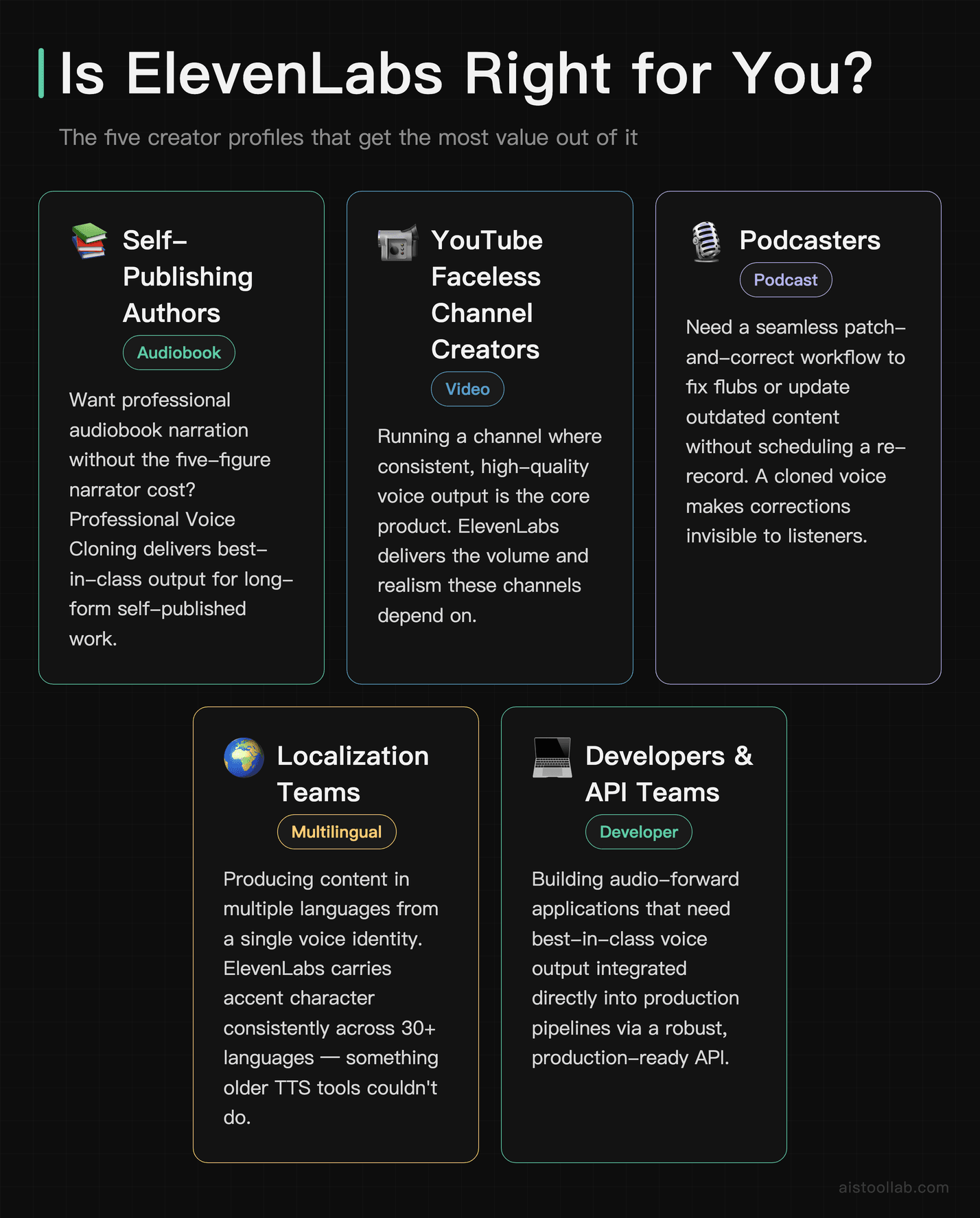
ElevenLabs is genuinely best for: Self-publishing authors who want professional audiobook narration without the five-figure narrator cost. YouTube creators running faceless channels where consistent, high-quality voice output is the product. Podcasters who want a seamless patch-and-correct workflow. Localization teams producing content in multiple languages from a single voice identity. Developers building audio-forward applications who need a best-in-class voice API.
You should probably look elsewhere if: You want a fully integrated video + voice editing suite (look at Descript). You need a simpler, cheaper tool for occasional corporate narration (Murf is more than enough). You’re on a tight budget and need unlimited generation (Play.ht’s unlimited plans are worth comparing). You’re a beginner just experimenting with AI audio tools and need something with less setup friction — honestly, check out my AI Tools Starter Pack: The 5 Best Tools for Beginners in 2025 before committing to a paid ElevenLabs plan.
If you’re a professional creator who is serious about voice quality and you produce content regularly, ElevenLabs is not just the best AI voice generator — it’s not particularly close. The gap between its top-tier output and most competitors is real and audible. What I’d recommend is starting with the free tier to test your specific use case, then moving to Creator or Pro once you’ve validated the workflow fits your production style. The platform has a solid API documentation hub if you’re going the developer route, which makes integration significantly less painful than some alternatives.
The broader point is this: AI voice tools have crossed a threshold where the output is good enough for real commercial work, and ElevenLabs is currently sitting at the top of that category. That doesn’t mean it’s the right tool for everyone — but for creators who need it, it’s the one I’d recommend without hesitation. I’ve seen what it does to the production math for independent creators, and it’s genuinely significant. If you want more context on how tools like this are changing the creator economy overall, my piece on How Freelancers Are Using AI to Double Output Without Sacrificing Quality gets into the bigger picture.
Final Verdict
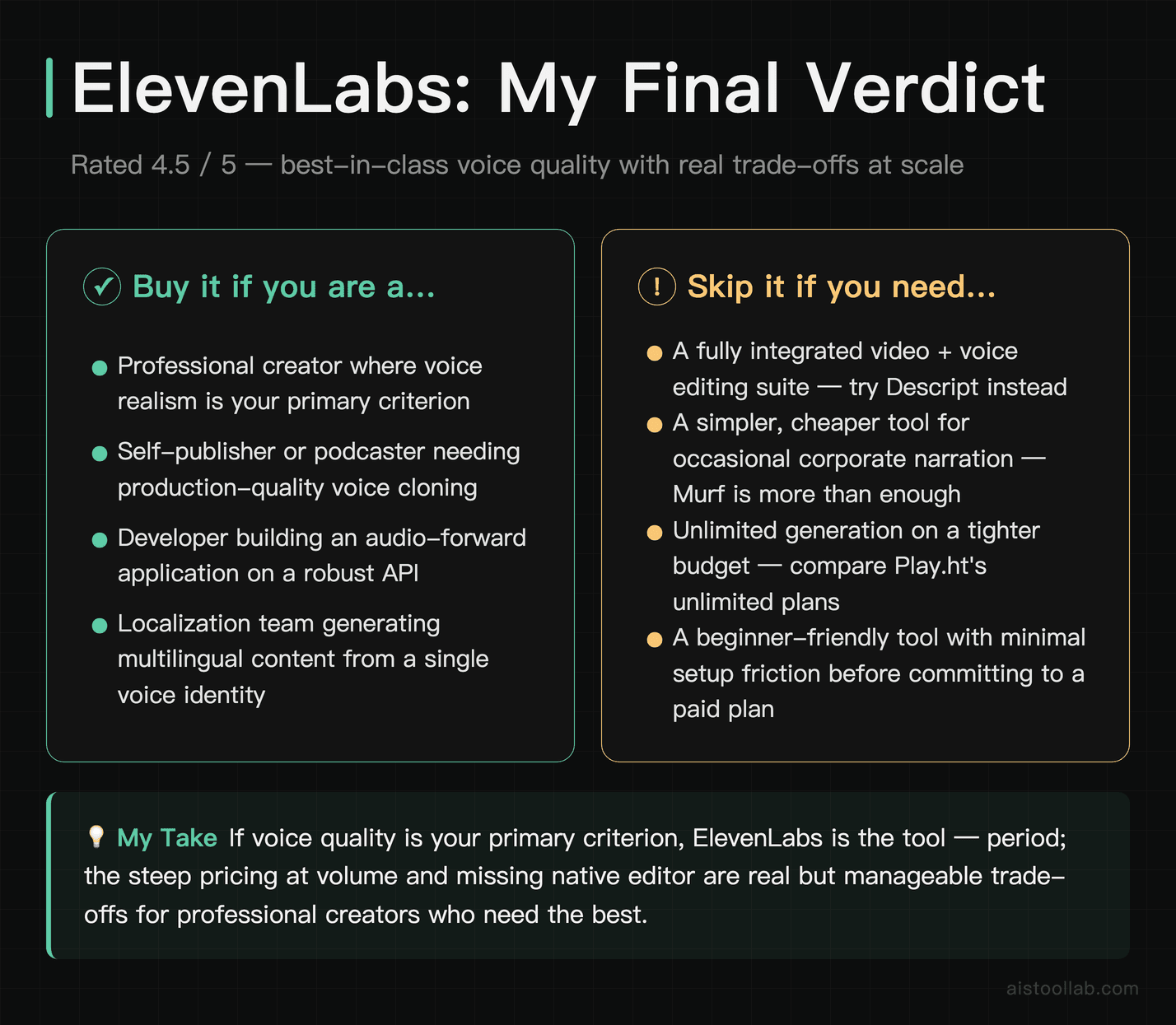
ElevenLabs earns its reputation. The voice cloning quality — especially at the Professional tier — is the best I’ve used, full stop. Multilingual support is legitimately useful rather than a checkbox feature. The API is robust enough for production use. And the pre-built voice library, while imperfect, gives you real options without requiring custom setup.
The gaps are real too: no integrated editor, cost scaling that bites at volume, and occasional pronunciation quirks that require manual fixes. But weighed against what you get, those are manageable trade-offs for most professional use cases.
Rating: 4.5/5. Best-in-class voice quality, genuinely useful multilingual support, and a strong API — held back slightly by pricing friction at scale and the lack of native editing tools. If voice quality is your primary criteria, this is the tool. Period.
Frequently Asked Questions
What’s the difference between ElevenLabs’ free plan and its paid plans?
ElevenLabs’ free plan gives you access to 10,000 characters per month, which translates to roughly 7–10 minutes of generated audio depending on speech rate. You can use a selection of pre-built voices and even try out the Instant Voice Cloning feature with a short audio sample. However, the free plan comes with notable limitations: audio outputs are marked as non-commercial, you can only create one custom voice clone, and you don’t get access to the Professional Voice Cloning feature, which delivers significantly more accurate and lifelike results. The paid Starter plan ($5/month) bumps you to 30,000 characters and unlocks commercial usage rights. Higher tiers like Creator ($22/month) and above give you more characters, more voice slots, priority processing, and access to advanced features like Projects (for long-form audiobook production). For hobbyists or those testing the platform, the free tier is genuinely useful. But for any creator producing content professionally, a paid plan is essentially required to get the most out of what ElevenLabs can do.
How realistic is ElevenLabs’ voice cloning, really?
Extremely realistic — and that’s not marketing language, it’s a practical observation backed by extensive testing. ElevenLabs offers two types of cloning: Instant Voice Cloning, which works from as little as one minute of audio and produces solid results quickly, and Professional Voice Cloning, which requires at least 30 minutes of high-quality audio and delivers results that are genuinely difficult to distinguish from the real speaker in many contexts. The cloned voices replicate not just tone and pitch, but also cadence, pacing tendencies, and even subtle emotional coloring. In blind listening tests — including informal ones conducted with audio professionals — cloned voices from ElevenLabs frequently pass as real. That said, perfection is context-dependent: quiet studio recordings clone better than noisy environments, and longer input audio consistently yields more accurate output. For creators who want to batch-produce content in their own voice without re-recording everything, this feature alone is often worth the subscription cost.
Can I use ElevenLabs output commercially — for YouTube, podcasts, or client work?
Yes, but only on paid plans. ElevenLabs explicitly grants commercial usage rights to subscribers on Starter and above, meaning you can legally use the generated audio in YouTube videos, podcast episodes, client voiceover work, ads, and other monetized content. The free plan explicitly restricts commercial use, so if you’re producing content that generates revenue — through ads, sponsorships, client fees, or platform monetization — you’ll need to be on a paid tier. It’s worth reading ElevenLabs’ Terms of Service carefully if you’re doing work for large clients or using voice clones of real public figures, as there are ethical and legal guardrails around impersonation and misuse. For most independent creators doing standard content production, the commercial rights on paid plans are straightforward and more permissive than several competitors. Always retain records of what voice clones you’ve created and the consent of any individuals whose voices you clone, particularly if that person is not yourself.
How does ElevenLabs compare to Murf AI for professional voiceover work?
Both tools produce high-quality audio, but they serve slightly different workflows and strengths. ElevenLabs excels in voice realism and cloning — if you need a voice that sounds indistinguishable from a human, ElevenLabs is the stronger choice. Its emotional range and naturalistic delivery outperform Murf in most direct comparisons. Murf AI, on the other hand, offers a more polished studio interface with built-in pitch, speed, and emphasis controls that are easier to fine-tune for beginners. Murf also includes a built-in video and presentation sync tool, making it better suited for corporate explainer content or slide decks. Pricing is another differentiator: ElevenLabs’ Starter plan at $5/month is significantly more accessible than Murf’s Basic plan at $19/month. However, Murf offers more character customization controls within the interface for users who want to tweak delivery without re-prompting. For podcast producers and audiobook creators prioritizing voice authenticity, ElevenLabs wins. For marketing teams wanting reliable, controllable voiceovers, Murf holds its own.
What are the main limitations of ElevenLabs I should know before subscribing?
ElevenLabs is genuinely impressive, but it’s not without its limitations. First, character limits can feel restrictive depending on your plan — long-form content creators producing audiobooks or lengthy podcast scripts may burn through their monthly allocation quickly. Second, while the platform supports 29+ languages, the quality varies meaningfully across them. English output is consistently excellent; some other languages can sound slightly robotic or stilted, particularly in more regional dialects. Third, the platform doesn’t offer a built-in audio editor, so you’ll still need a separate DAW or editing tool to cut, layer, or mix your final output. Fourth, voice cloning quality is heavily dependent on input audio quality — noisy or low-bitrate recordings produce noticeably weaker clones. Finally, the ethical and legal landscape around AI voice cloning is still evolving, which introduces some uncertainty for creators building workflows around this technology. None of these are dealbreakers for most users, but they’re worth factoring into your decision before committing to a plan.
Is ElevenLabs worth it for small creators or solo podcasters on a tight budget?
For most small creators and solo podcasters, yes — ElevenLabs is worth it, especially at the lower pricing tiers. The Starter plan at $5/month is one of the most affordable entry points for professional-quality AI voice generation in the market. If you produce a single podcast episode per month, write occasional voiceover scripts, or need a flexible voice clone for re-recording segments without a full studio setup, the value-to-cost ratio is genuinely strong. The free plan also allows meaningful experimentation before any financial commitment, which lowers the risk considerably. Where it becomes a tougher call is if your use case is purely one-off or very low volume — in that case, the free tier may be sufficient, and you won’t need to upgrade. But for creators producing content weekly, the time savings from not re-recording, setting up mics, or hiring voice talent quickly outweigh the monthly cost. Consider it less as a software subscription and more as a production efficiency tool that pays for itself in hours saved.
How do I get the best results when generating voices in ElevenLabs?
Getting great results from ElevenLabs comes down to a few key practices. First, write your scripts with audio in mind — avoid abbreviations, unusual punctuation, and ambiguous sentence structures, as the AI reads literally and can stumble on edge cases. Second, use the Stability and Similarity sliders thoughtfully: lower stability produces more expressive, varied delivery (great for conversational content), while higher stability is better for formal narration or consistent brand voices. Third, for voice cloning, always use the cleanest possible source audio — ideally a recording made in a quiet room with a condenser microphone at 44.1kHz or higher. The more audio you provide for Professional Voice Cloning (30+ minutes is the recommended minimum), the more nuanced and accurate the clone will be. Fourth, break long scripts into logical chunks rather than submitting everything at once — this gives you more control over pacing and lets you catch any mispronunciations before they compound. Finally, listen critically on reference headphones rather than laptop speakers, as subtle artifacts are much easier to catch with accurate playback equipment.
How does ElevenLabs handle data privacy and voice ownership?
ElevenLabs’ approach to data privacy and voice ownership is worth understanding clearly before you start cloning voices. According to their terms, you retain ownership of the voice clones you create using your own voice or voices for which you have obtained explicit consent. ElevenLabs does not claim ownership of your custom voice models. However, by using the platform, you do grant ElevenLabs a license to process and store your audio data to provide the service. The platform also has content policies that prohibit using voice clones to impersonate real individuals without consent, produce harmful or deceptive content, or violate third-party rights. ElevenLabs has invested in safety tools — including a detection system and a policy requiring users to affirm consent before cloning any voice — but enforcement is still an evolving challenge across the industry. For creators cloning their own voice for legitimate content production, the privacy setup is reasonable and comparable to industry standards. It’s when you’re cloning others’ voices that consent documentation and careful adherence to their Terms of Service becomes especially important.
Last updated: 2025
This post contains affiliate links. Our reviews remain independent and unbiased.