

Everyone’s Still Talking About ChatGPT. Meanwhile, These Tools Are Quietly Doing the Real Work.
Here’s a pattern I’ve noticed over the last six months: the AI tools getting the most coverage aren’t necessarily the ones people are actually using to get stuff done. The big names — ChatGPT, Claude, Gemini — dominate every roundup because they’re safe bets for engagement. But if you spend enough time in developer Slack channels, freelance Discord servers, and startup Notion workspaces, you start hearing about a different layer of tools. Quieter launches. More focused workflows. Less hype, more utility.
New launches have been coming out steadily over the last several months, with betas to sign up for and a range of real tasks they can be put through. Not benchmark tests. Real tasks: writing client briefs, generating production code, researching competitors, building workflows. The kind of stuff where you know within 20 minutes whether something is genuinely useful or just another demo dressed up as a product.
These are the tools that made the cut. Nine tools that launched or hit meaningful public releases in 2026, with honest takes on what’s working and what’s still rough around the edges. If you want another rehash of ChatGPT’s latest update, you’re in the wrong place.
Contents
The Tools at a Glance
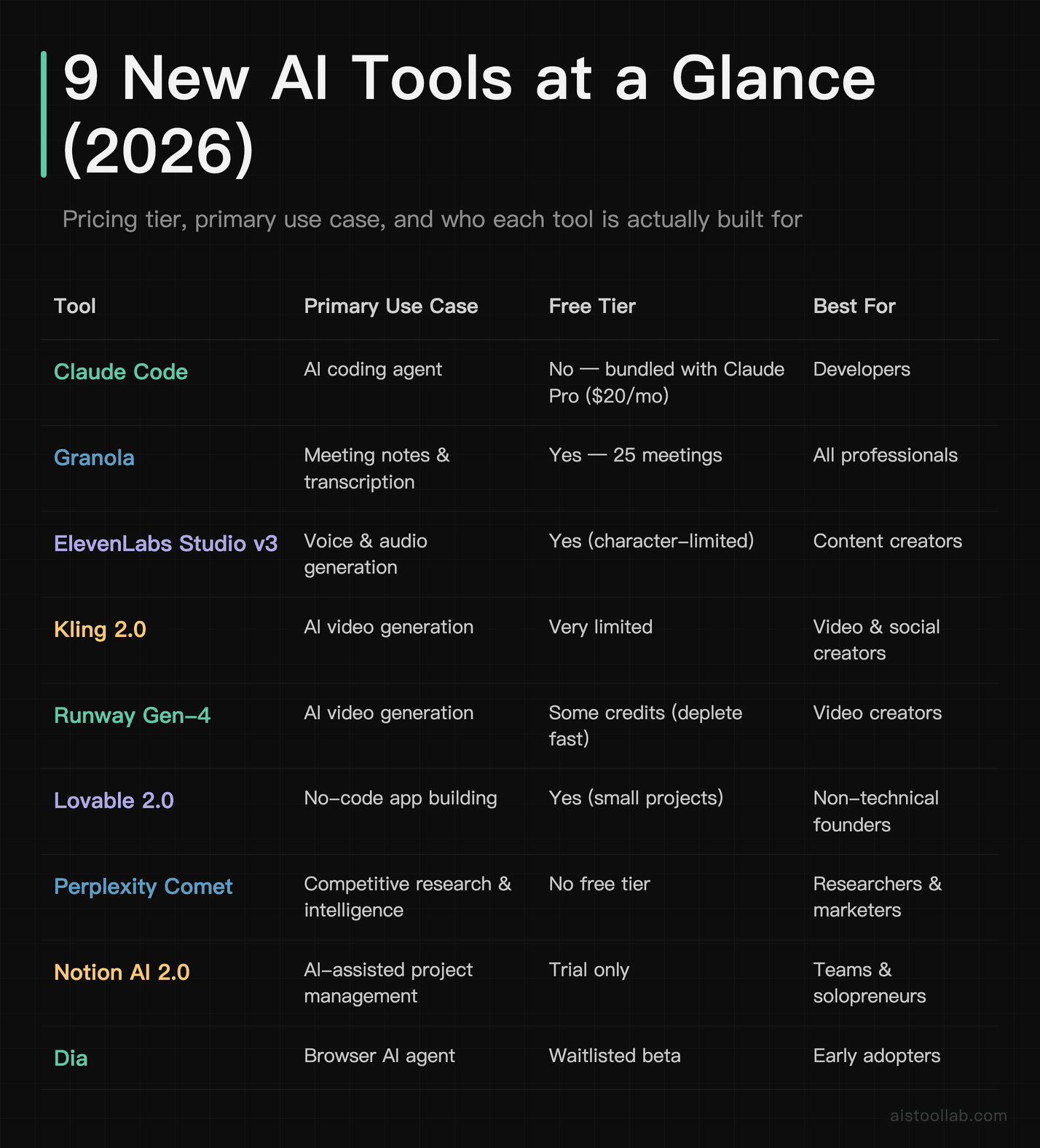
Before diving deep, here’s a comparison across the tools covered — pricing, primary use case, and who it’s actually built for. I’ll expand on each one after this.
The Deep Dives: What Actually Works
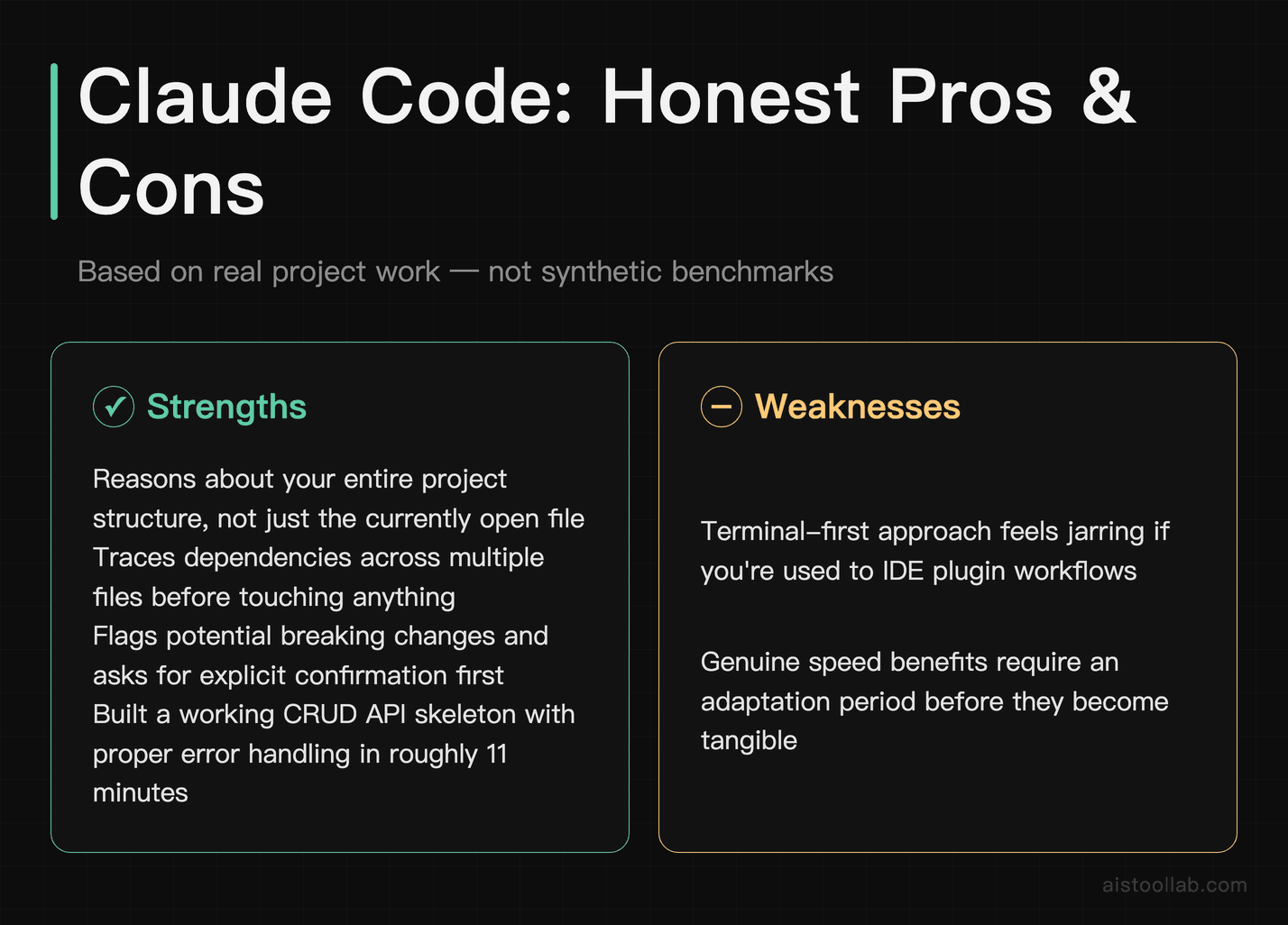
1. Claude Code — The Coding Agent That Actually Understands Your Codebase
My honest take is that Claude Code is the first AI coding tool that doesn’t feel like autocomplete on steroids. It reasons about your entire project structure, not just the file you have open — tracing dependencies across multiple files and flagging potential breaking changes before making edits. That kind of caution — combined with real capability — is genuinely rare.
The terminal-first approach will feel weird if you’re used to IDE plugins, but it’s actually faster once you adapt. Claude Code can scaffold a working skeleton for something like a CRUD API with PostgreSQL and Express, producing actual runnable code rather than pseudocode. For a deeper head-to-head comparison, see Claude Code vs Cursor vs GitHub Copilot: The Best AI Coding Assistants in 2026.
The main complaint I’ve seen from other developers is that it can over-edit on large files — it’ll sometimes rewrite more than you asked it to. That’s a real issue, but it’s manageable if you’re specific in your prompts and use version control like a normal person. At $20/month bundled with Claude Pro, it’s arguably the best value in AI coding tools right now.
2. Perplexity Comet — Research That Actually Browses the Web Like You Would
Perplexity Comet is what happens when a research tool graduates from “search with citations” to “agent that uses the browser on your behalf.” The pitch is that Comet doesn’t just answer questions — it navigates pages, fills forms, extracts structured data, and compiles reports across multiple sources autonomously. For a task like competitive research — pulling pricing, feature lists, and customer reviews for several SaaS tools — it can compile a structured document with sourced comparisons.
That’s the good news. The not-so-good: it’s still early, and it makes confident mistakes—occasionally pulling outdated pricing from cached pages or citing a review meant for a different product version. For anything where accuracy is mission-critical, you still need to verify. But as a first-pass research accelerator? It’s genuinely impressive and miles ahead of what Perplexity’s base product was doing 12 months ago.
The pricing has since moved in users’ favor — the Comet browser is now free to download and use, with Pro ($20/month) and Max unlocking higher usage limits and more advanced models (per Perplexity’s official pricing, checked July 2026). If you’re running more than a couple of these research tasks per week, the math works easily. Worth watching as the reliability improves.
3. Kling 2.0 — Video Generation That’s Actually Getting Scary Good
Kling was already turning heads in late 2025, and version 2.0 pushed the quality to a point where clips can be hard to distinguish from real footage. The motion handling in particular — the way liquid moves, how fabric folds, human hand physics — is noticeably better than anything from six months ago. It can generate short product videos from a single text prompt and a reference image, with output often clean enough to use in a social ad with little post-processing.
Where Kling still trips is prompt sensitivity. Small wording changes produce drastically different results, and there’s no reliable way to lock down a specific visual style across multiple clips (though the “reference video” feature helps). For YouTube creators and social media marketers who need fast B-roll or product visuals, this is a legitimate timesaver. For narrative filmmaking, it’s more of a prototyping tool — useful for pitching ideas, not final delivery.
The free tier exists but it’s extremely limited. The entry paid tier is $6.99 for the first month and $8.80 on renewal, against a $10 list price (regional pricing and promotions vary; see Kling’s official pricing, verified July 2026), which is genuinely affordable for the output quality. If you’re a content creator spending hours hunting for stock footage, this is worth a two-week trial immediately.
4. Dia Browser — The AI-Native Browser Everyone on the Waitlist Is Excited About
To be upfront: Dia from The Browser Company isn’t fully public yet — it’s still in limited beta. But it deserves a spot here because the concept — and the early execution — is genuinely different from bolting AI onto an existing browser.
Dia treats AI as a first-class citizen in the browsing experience, not a sidebar panel. You can ask questions about the page you’re on, summarize tabs, compare content across multiple open pages, and run multi-step tasks without switching to a separate interface. It can, for example, read several open pricing pages, compare features, and suggest which plan fits a given scenario. Arc was interesting. Dia is actually useful in a different way.
The caveat: it’s Mac-first, still waitlisted for most people, and pricing hasn’t been officially announced. But watch this one. If they execute on the full vision, it’s the kind of tool that changes how you work at the OS level, not just the app level.
5. Lovable 2.0 — Non-Developers Are Building Real Products With This
Lovable has been around for a bit, but version 2.0 hit a threshold where I can no longer call it a toy. It can handle real builds from prompts alone — for example, a waitlist landing page with email capture, a basic admin dashboard to view signups, and Stripe integration for a paid early-access tier.
For a project like this, getting to something publishable can still take meaningful back-and-forth prompting, and integrations like Stripe webhooks may need a few iterations to work properly. Still, the fact that a non-developer could realistically get there without touching raw code is remarkable. This kind of tool can suit solopreneurs looking to validate SaaS ideas over a weekend, get their first paying customers, and only then decide if it’s worth hiring a developer to rebuild it properly.
The free tier is functional for exploration, and the $20/month plan covers most solo projects. It does hit walls on complex business logic, and anything that requires deep database optimization will eventually need a real developer’s hands. But for the “I have an idea and want to test it fast” crowd, this is arguably the most useful tool in this entire list. The Claude Code vs Cursor vs Lovable: Which AI Coding Tool Should You Choose in 2026? piece goes deeper on where Lovable sits in the stack.
This article contains affiliate links. If you buy through them I may earn a commission at no extra cost to you. All opinions are my own.
6. ElevenLabs Studio v3 — Voice AI That’s Finally Cracked Emotion
Many AI voice tools sound fine until a sentence requires actual emotional nuance — then they turn robotic. ElevenLabs Studio v3, which rolled out in early 2026, is one of the first versions where the synthetic audio can be hard to distinguish from real speech under normal listening conditions. The “emotion control” feature lets you dial in not just tone but specific emotional registers — subdued excitement, measured authority, casual warmth — and it actually translates to the output.
For podcasters, course creators, and marketers running voiceover at scale, this is a legitimate game-changer. It can turn a short explainer script into clean narration quickly, often rivalling professional voiceover quality. Long-form pacing can still feel slightly off on pieces over 10 minutes — there’s an uncanny flatness that creeps in — but for anything under that, it’s excellent. See the full ElevenLabs Review: Is This the Best AI Voice Generator for Creators? for the deep comparison.
7. Granola v2 — Meeting Notes That Don’t Sound Like a Robot Took Them
Granola is one of those tools I recommended quietly to people for months before it felt right to put it in a public article. The premise sounds boring: AI meeting notes. But the execution is weirdly delightful. Most AI note-takers produce transcripts with a thin summary layer on top. Granola produces notes that read like a thoughtful colleague wrote them — organized around decisions and action items, not just chronological speech.
Version 2 added better multi-speaker differentiation, a “my notes” layer where you can type quick annotations during the meeting that get woven into the final output, and improved calendar integration.
The main limitation is still the platform: Mac only. If your team is Windows-first, you’re out of luck for now. The 25-meeting free tier is genuinely generous — enough to make a real evaluation — and at around $14/month for the paid Business plan (per Granola’s official pricing, verified July 2026) it’s one of the fairer pricing models in this space. Consultants, startup teams, and anyone who leaves calls and immediately thinks “wait, what did we actually decide?” — this one’s for you.
8. Runway Gen-4 — Consistent Characters Across Scenes Changes Everything
Runway Gen-4’s headline feature is character consistency — the ability to generate multiple video clips that feature the same character without them morphing into a different person every shot. For AI video, this is a genuinely significant technical achievement. Previous generations made it nearly impossible to tell a coherent visual story with a consistent protagonist. Gen-4 changes that.
Character consistency holds reasonably well across multiple scenes — keeping the same character recognizable through different environments in a connected story — though minor variation in facial structure between shots can still appear. For designers doing concept pitches, indie filmmakers storyboarding, or social media creators who want branded characters, this is a major unlock.
The credit system is the frustrating part. High-quality generations chew through credits fast, and the cost can balloon if you’re iterating heavily. A lot of users end up on the $35/month plan pretty quickly. If you’re using it seriously, budget for that rather than expecting to stay on the base tier.
9. Notion AI 2.0 — Finally Worth Paying For (If You Live in Notion)
Notion AI 2.0 is a weird one to review because the tool is genuinely good now, but it’s also the most context-dependent product on this list. The big upgrade in 2026 is that it actually understands your entire workspace — not just the page you’re on, but linked databases, connected docs, team wikis, everything you’ve built in Notion over years. Ask it to “summarize all the open action items across my current sprint projects” and it pulls from the right databases and gives you a useful answer.
That context-awareness is what makes it worth it for heavy Notion users — note the standalone AI add-on was retired and Notion AI is now bundled into the Business plan (per Notion’s official pricing, verified July 2026). But if you’re not already deeply embedded in the Notion ecosystem, this tool offers you almost nothing over just using Claude or ChatGPT directly. It doesn’t travel. It doesn’t integrate meaningfully outside Notion’s world. It’s essentially a very smart power-up for an existing investment.
For solopreneurs and small teams who run their entire operation in Notion — task management, wikis, client projects, CRM — this is now a no-brainer addition. For everyone else, skip it and spend that budget on something with broader reach.
Who Should Be Using These Tools: Real Use Cases
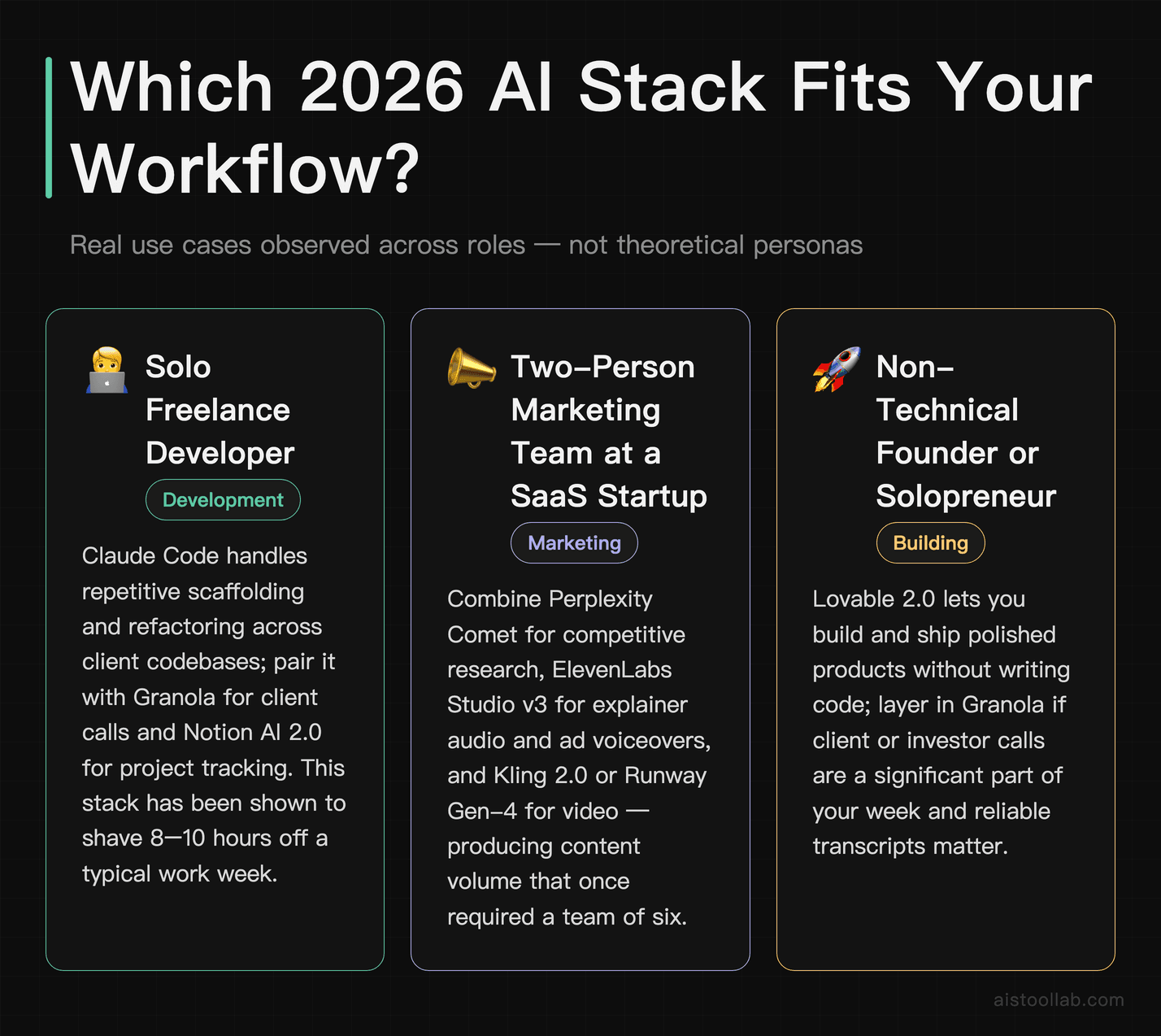
The Solo Freelance Developer Juggling Three Client Projects
This is honestly the profile where 2026 AI tooling has created the biggest productivity delta. If you’re a freelance developer billing hourly and managing multiple codebases, Claude Code handles the repetitive scaffolding and refactoring work that used to eat whole afternoons. Pair it with Granola for client calls and Notion AI 2.0 if you’re managing your projects there, and you’ve genuinely got something close to the “virtual junior developer” setup that was theoretical 18 months ago. I’ve seen freelancers using this combination shave 8-10 hours off a typical work week. How Freelancers Are Using AI to Double Output Without Sacrificing Quality goes deeper on this exact workflow.
The Two-Person Marketing Team at a SaaS Startup
Small marketing teams in 2026 are producing content and creative volume that would have required a team of six just three years ago. The combo that’s working: Perplexity Comet for competitive research and market intelligence, ElevenLabs Studio v3 for explainer audio and ads, Kling 2.0 or Runway Gen-4 for video content, and Lovable 2.0 if they need a quick landing page variant to test. None of these tools requires a technical background to get meaningful output from. The challenge is quality control — AI-assisted volume can dilute brand voice fast if no one’s editing with intent.
The Non-Technical Founder Validating a Product Idea
This is where Lovable 2.0 is genuinely transformative. Three months ago, a non-technical founder who wanted to test a SaaS concept needed to either learn to code, hire a developer, or use a no-code tool that severely limited what they could build. Lovable 2.0 lets them describe what they want in plain English, iterate in real time, and have something actually functional — not just a mockup — within a day or two. Combined with Perplexity Comet for market research and ElevenLabs for product demo voiceovers, you can go from idea to investable prototype faster than ever before.
The Creative Professional Working in Video and Audio
If your work lives in video and audio production, 2026 is genuinely a strange and exciting time. Runway Gen-4 and Kling 2.0 together cover different parts of the video generation spectrum — Runway for narrative and character consistency, Kling for realistic product and lifestyle footage. ElevenLabs Studio v3 handles voiceover with a quality ceiling that’s now competitive with commercial VO work. The combination doesn’t replace skilled creative professionals, but it does dramatically compress the time between concept and deliverable, especially at the pitching and prototyping stage.
A Few Caveats About This List
Some of these tools — particularly Dia — are still in early or limited release. Their quality will change, hopefully for the better, possibly in ways that make my current assessment too conservative or too generous. AI development cycles in 2026 are moving fast enough that a tool that felt rough in January can feel polished by March.
Some tools have been left out of this list because there wasn’t enough information to give a fair assessment. There are a half-dozen other 2026 launches worth watching that didn’t make the cut. If you’re looking for a broader view of the tools landscape beyond just the newest entrants, the 15 AI Tools Worth Knowing in 2026 piece covers more ground.
What I can say with confidence: the gap between “mainstream AI tools everyone knows about” and “specialized tools that solve specific problems really well” is widening. The nine tools here represent that second category — and if even two or three of them fit your specific workflow, they’re worth the subscription cost many times over.
My Recommendation — Based on What You Actually Do
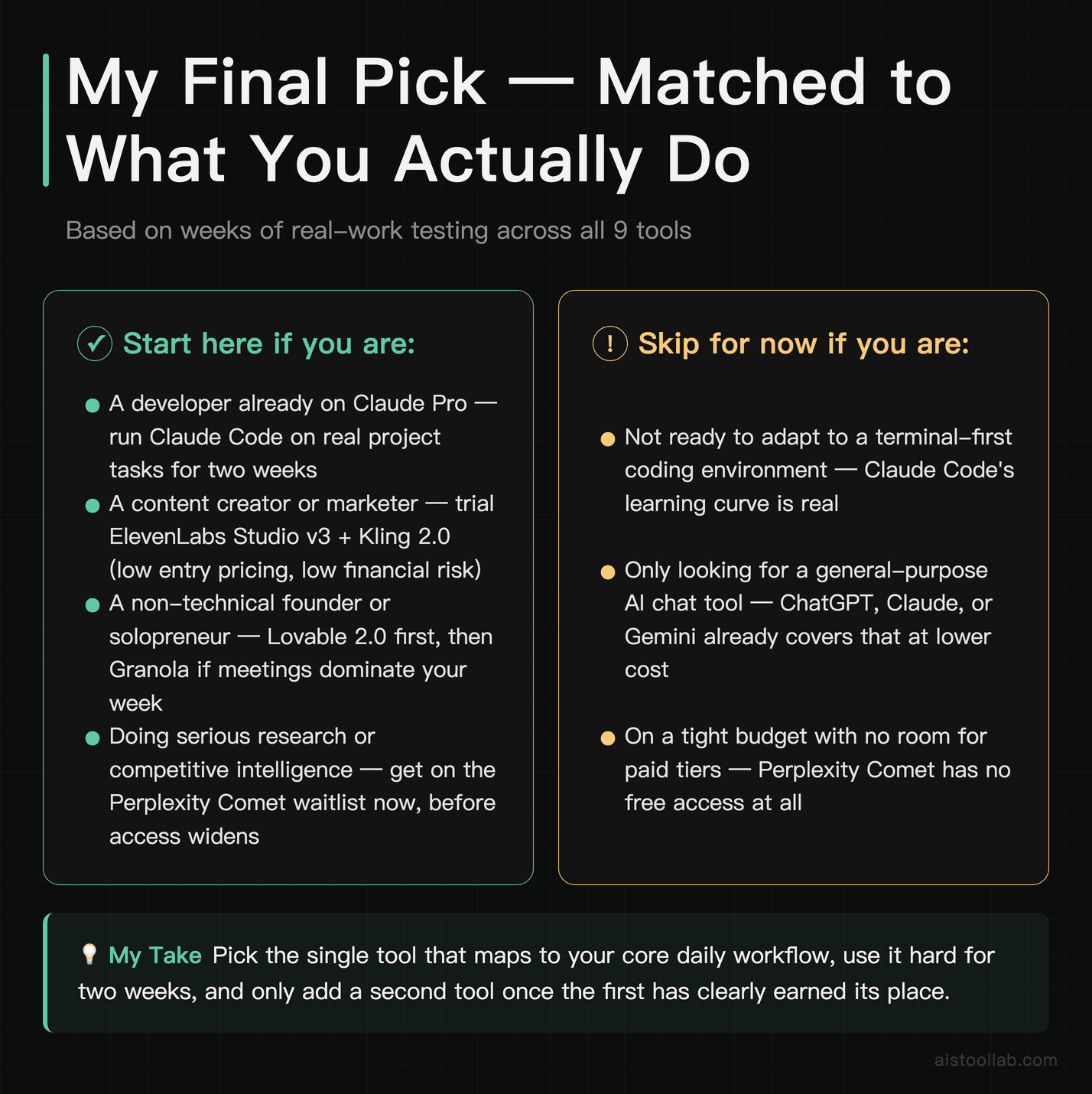
If you’re a developer: start with Claude Code. Bundle it with your existing Claude Pro subscription and give it a two-week run on real project tasks. The shift in how you approach tasks that used to take a few hours is immediate and tangible. Also see the official Claude documentation for current Claude Code setup guides, because the onboarding has improved significantly from the early days.
If you’re a content creator or marketer: ElevenLabs Studio v3 and Kling 2.0 are the combination I’d trial first. Both have low enough entry pricing that you can test them seriously without significant financial risk. ElevenLabs in particular has a strong track record — their recent studio releases have been consistently good at following through on what they promise at launch.
If you’re a non-technical founder or solopreneur: Lovable 2.0 is the first tool on this list I’d point you toward, followed by Granola if meetings are a significant part of your week. And if you’re doing any meaningful research work, keep Perplexity Comet on your radar — it’s now free to download from Perplexity’s official site, so you can try it on a real research task today.
Next step: pick the one tool from this list that fits your primary pain point and try the free tier or lowest paid plan this week. You don’t need all nine. You probably need one or two, and you’ll know within a day of real use whether it’s working for you or not.
Frequently Asked Questions
Are any of these tools actually free to use seriously, or is it all bait-and-switch free tiers?
Honestly, it varies a lot. Granola’s free tier — 25 meetings — is genuinely one of the most useful free tiers I’ve seen in this category. That’s enough for five or six weeks of real-world use before you need to commit, and you’ll know within two weeks if it’s working for you. Lovable’s free tier lets you build and test small projects, which is enough to validate whether the tool fits your workflow. ElevenLabs has a free tier with monthly character limits that works for light experimentation but hits walls quickly if you’re doing any volume. Kling’s free tier is very limited — mostly useful for understanding the interface before buying. Runway gives you some credits but they go fast. Claude Code is bundled with Claude Pro at $20/month with no meaningful free tier for the coding agent specifically. Perplexity Comet is now free to download and use (per Perplexity’s official site, checked July 2026). Notion AI has a trial but no ongoing free access. Dia is still in waitlisted beta, so technically free but not widely accessible. The short answer: Granola, Lovable, and Comet are genuinely worth testing for free. The others you’ll need to pay or go through beta processes to evaluate properly.
How does Claude Code compare to GitHub Copilot for day-to-day development?
They’re solving slightly different problems, which is part of why comparing them directly can be misleading. GitHub Copilot is an inline autocomplete and suggestion tool — it lives inside your IDE and helps as you write. Claude Code is more of an autonomous agent: you describe a goal, and it works through files, makes changes, runs commands, and reports back. For developers who want to stay in control of each line they write, Copilot is a better fit. For developers who want to delegate entire tasks — “refactor this module,” “add authentication,” “write tests for this service” — Claude Code is more powerful. The learning curve for Claude Code is also steeper because it requires comfort with terminal-first workflows. Most developers I know are now using both: Copilot for in-the-flow coding, Claude Code for larger discrete tasks.
Is Perplexity Pro worth $20/month now that the Comet browser is free?
Only if you’re doing significant research work regularly. Comet itself is now free to download (per Perplexity’s official pricing, checked July 2026); paying for Pro is about higher usage limits and advanced model access on top of the agentic browser capability — the ability to autonomously navigate and extract information across multiple pages without you directing every step. For a researcher, analyst, or strategist who does competitive intelligence, market research, or sourcing tasks multiple times per week, that automation can genuinely save two to four hours weekly. With Comet free and Pro at $20/month, that math works easily. If you’re primarily using Perplexity as a search enhancement tool and don’t need the autonomous browsing, the free tier is more than enough and Comet won’t change your daily workflow significantly. My honest recommendation: since the browser itself is now free, install it and test it on your own research tasks. If the agentic browsing saves you real hours, Pro at $20/month is an easy upgrade; otherwise the free tier is the better value right now.
Can Lovable 2.0 actually replace a developer for building a real product?
For a real, production-grade product with complex business logic, data security requirements, or high traffic demands — no, not yet. You’ll hit walls. But here’s what I’ve seen it genuinely replace: the early validation phase of product development. Instead of spending $5,000-$15,000 on a developer to build an MVP before you’ve tested your assumptions, you can use Lovable to get to a functional, testable version for $20-$40/month. Get your first customers, validate the model, understand what features actually matter — and then bring in a developer to build the proper version with that information in hand. That’s the mental model that makes the most sense for founders. It’s not a replacement for engineering skill; it’s a dramatic reduction in the cost of early-stage experimentation.
How realistic is AI video in 2026 — can I actually use Kling or Runway for client work?
Closer than you’d think, but still with caveats. For social media content, product showcases, concept pitches, and B-roll style footage, yes — both Kling 2.0 and Runway Gen-4 are producing outputs that can go straight to publish with minimal editing. I’ve seen marketers run entire paid social campaigns built primarily on AI-generated video, and they perform competitively with traditionally produced content. For narrative filmmaking, commercials with specific brand guidelines, or anything requiring true shot-for-shot control, you’ll still encounter significant limitations. Character consistency in Runway Gen-4 is genuinely impressive but not perfect across long-form sequences. The other challenge is prompt sensitivity — getting consistently good results requires some skill and iteration, and early users often underestimate how much. My honest assessment: budget 30-40% more time than you think for iteration, and you’ll get usable results for most marketing and content applications.
What’s the deal with Dia Browser — is it actually different from using Arc with Claude, or is it just marketing?
It’s genuinely architecturally different, not just a marketing distinction. Arc is a fundamentally Chrome-based browser that added features on top. Dia is built from the ground up with AI as part of the core interaction model, not a sidebar or extension. The key difference in practice is that AI in Dia has visibility into your entire browsing context — multiple tabs, page contents, your history within a session — rather than operating on just the active page. Asking it to compare information across three open tabs simultaneously, for example, is a native capability rather than a workaround. That said: it’s still beta, Mac-only, and the full product vision isn’t fully realized yet. I’d be cautious about betting workflows on it until it hits stable public release. But as a signal of where browsers are heading, it’s one of the more interesting things I’ve seen this year.
Is Granola worth it if my team already uses Otter.ai or Fireflies for meeting notes?
Yes, and the reason comes down to output quality. Otter and Fireflies are primarily transcription services with summary layers on top. The output still reads like a transcript — it captures what was said, organized roughly by time. Granola’s output reads like notes a thoughtful person took. It surfaces decisions, action items, and key points in a format that’s actually useful in a post-meeting context without requiring editing. The “my notes” feature in v2 — where your real-time annotations during the meeting get woven into the final output — is a genuinely clever design choice that the transcript-first tools haven’t matched. If you’re currently taking manual notes alongside Otter or Fireflies because the auto-generated summaries aren’t good enough to stand alone, Granola is likely worth switching to. The 25-meeting free tier is the right way to evaluate — put it through a real work sprint before committing.
Should I be worried about AI tool fatigue — is it worth investing time in learning new tools every few months?
This is a real concern and it’s worth taking seriously. The honest answer is that most AI tools don’t require much learning investment — they’re designed to be intuitive, and you can evaluate usefulness within an hour of signing up. The real cost isn’t learning time; it’s workflow switching. Moving your meeting notes process from one tool to another, or reconfiguring how your team handles research, takes coordination and creates temporary friction. My approach: be selective about what enters your active workflow versus what you just keep an eye on. The tools in this list that I’d actually recommend integrating right now for most people are Claude Code (if you’re a developer), Granola (if you have regular meetings), and either Kling or Runway (if you produce video content). The others are worth knowing about and trialing, but don’t disrupt your existing setup for them until they stabilize further. Sustainable AI adoption is about adding tools when the ROI is clear, not chasing every launch.
Last updated: 2026
Explore more AI tools
👉 Browse the AI Tools Library to find the right tools for your workflow.
Related reading: Let’s Enhance Tutorial 2026: Master AI Image Upscaling with Real-World Use Cases
Related reading: Suno AI Review 2026: Advanced Production Techniques for AI-Generated Music