
Rewriting the prompt won’t fix a badly packaged file
When an AI tool hands back something vague, generic, or plain wrong, the instinct is to go back to the prompt — add a role (“you are a senior lawyer”), tighten the wording, maybe promise it a tip. Sometimes that helps. But a lot of the time the prompt was fine, and the real problem was the thing you fed it: a PDF that came apart into scrambled text on extraction, a screenshot compressed until the labels are unreadable, or a 40-page brief where the one paragraph that mattered is stranded somewhere in the middle.
There’s actual research behind that last example. The paper “Lost in the Middle: How Language Models Use Long Contexts” (Liu et al., 2023) tested how reliably models pull a specific fact out of a long input depending on where that fact sits. Accuracy was highest when the relevant text was near the beginning or the end of the context, and it dropped off when the same text was buried in the middle. That’s a finding about position, not formatting — but it points at the same underlying truth: how you arrange and package your input changes what the model can actually use.
Beyond that specific position effect, I’ll be honest about the evidence: solid, public, apples-to-apples data on “which file format produces better answers” is thin, and a lot of what circulates online is engineering folklore rather than measured results. So the rest of this is a mix of one well-documented research finding, provider documentation on how these systems ingest content, and mechanism-based reasoning about why cleaner structure helps — flagged as such, not dressed up as benchmark numbers I can’t point you to. Three things carry most of the weight: give the model unambiguous structure, keep the important part where it can find it, and don’t make it reconstruct information you scrambled on the way in.
Step 1: Sort out the document format before you paste anything
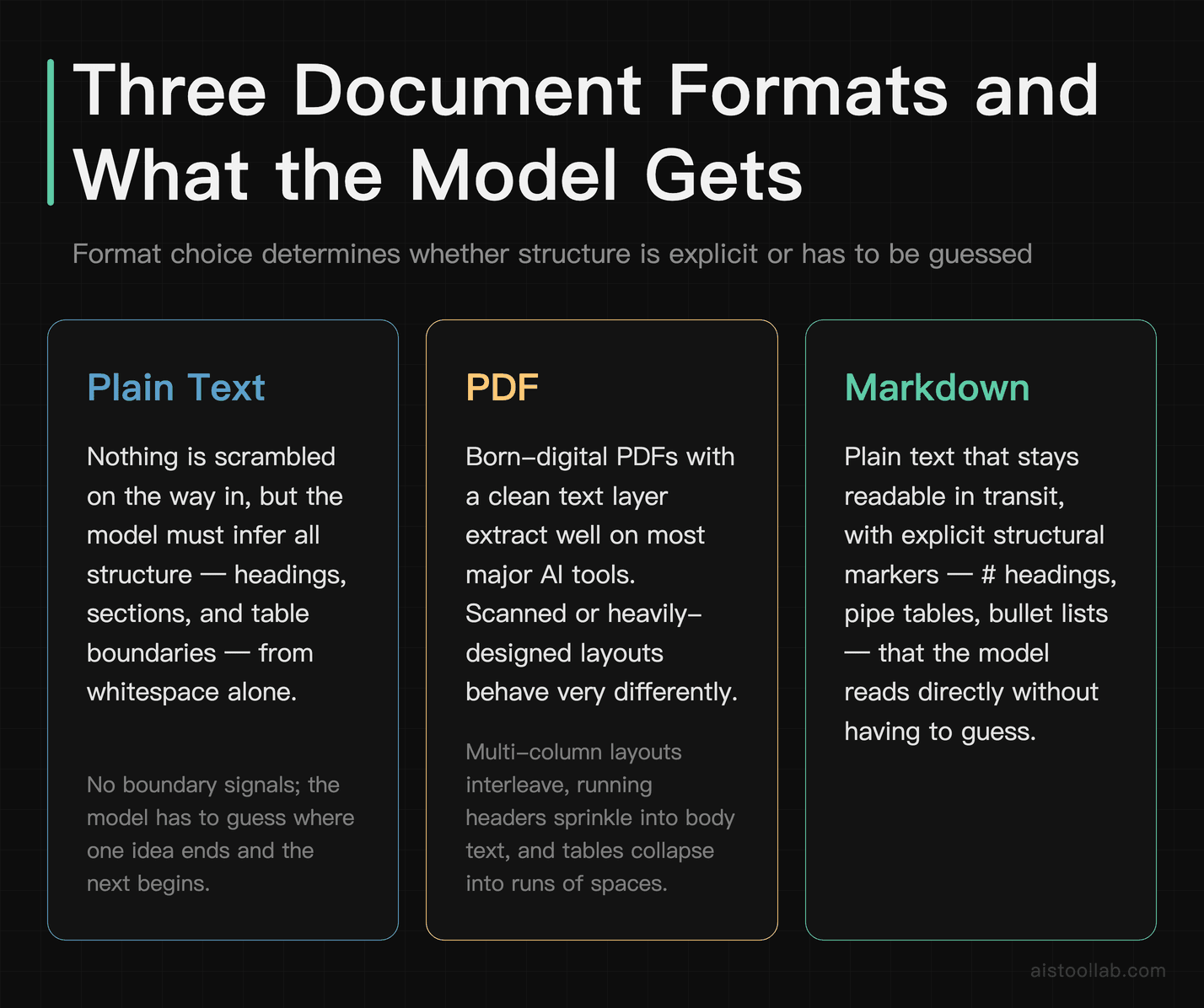
The format you submit decides how much work the model has to do just to figure out where one idea ends and the next begins. Plain text hands over words with no structural signal — the model has to infer headings, sections, and table boundaries from whitespace alone. A PDF looks structured to you, but text extraction often flattens it: multi-column layouts can interleave, running headers and page numbers get sprinkled into the body, and tables collapse into runs of spaces. Markdown sits in between — it’s plain text, so nothing gets scrambled on the way in, but it carries explicit structural markers (# for headings, pipe tables, bullet lists) that the model doesn’t have to guess at.
That’s the mechanism worth internalising: markdown gives the model unambiguous boundaries in characters it can read directly. That’s not me claiming a measured “X% better output” — I have no such number to give you — it’s a claim about structure being explicit versus implied. If your source is already a clean PDF born from a text document (not a scan), most major AI chat tools will extract it fine. If it’s a scanned or heavily-designed PDF, you’re better off copying the text out, cleaning it, and pasting markdown.
preserves when it lands in front of a model. It’s a description of format properties, not a scoreboard — the “best fit” row is my editorial call tied to content type, not a claim that one format objectively produces better answers.
- Explicit heading hierarchy — PDF: Visual only (font size); usually lost on text extraction; Plain text (.txt): None; Markdown (.md): Yes (#, ##)
- Survives copy-paste cleanly — PDF: Often adds stray line breaks, page headers/footers; Plain text (.txt): Yes; Markdown (.md): Yes
- Table structure retained — PDF: Frequently scrambled on extraction; Plain text (.txt): No (collapses to spaces); Markdown (.md): Yes (pipe tables)
- Multi-column layout risk — PDF: High — columns can interleave; Plain text (.txt): Not applicable; Markdown (.md): Not applicable
- Embedded images/figures — PDF: Present, but ignored by text extraction; Plain text (.txt): No; Markdown (.md): Referenced by link, not embedded
- Extraction noise/artifacts — PDF: Can carry headers, footers, watermarks into the text; Plain text (.txt): Low; Markdown (.md): Low; syntax is lightweight
- Accepted by many major AI chat tools — PDF: Widely, as an upload; Plain text (.txt): Widely, as upload or paste; Markdown (.md): Widely; often read as text
- Easy to trim before sending — PDF: Hard — needs a viewer/editor; Plain text (.txt): Easy; Markdown (.md): Easy
- Best fit (editorial, condition-bound) — PDF: When the visual layout is the content (scanned forms, design proofs) — pair with a vision-capable tool; Plain text (.txt): Short, single-topic snippets; Markdown (.md): Multi-section documents where hierarchy matters
One more habit that follows straight from the “Lost in the Middle” finding: if there’s a single clause or section you most want the model to reason about, don’t rely on it noticing something in the middle of a long document. Quote it near the top of your message, then attach the full context below. If your source text is rough to begin with, running it through AI grammar checkers to tidy sentence structure before you submit can remove a layer of ambiguity the model would otherwise have to work around.
Use case: flagging risky clauses in a contract
Say you’re a solo founder about to sign a vendor agreement and you want an AI assistant to flag one-sided clauses. Don’t drop the raw signed PDF and ask “anything I should worry about?” If it’s a scanned copy, the extracted text may be garbled and the model is now guessing. Instead, paste the clauses as markdown with headings (## Termination, ## Liability), put the two or three sections you’re most nervous about at the top, and state your position (“I’m the customer, I have low leverage”). The structure tells the model where each obligation lives, and the ordering keeps your priorities out of the dead zone in the middle.
Step 2: What a vision model actually needs from your image
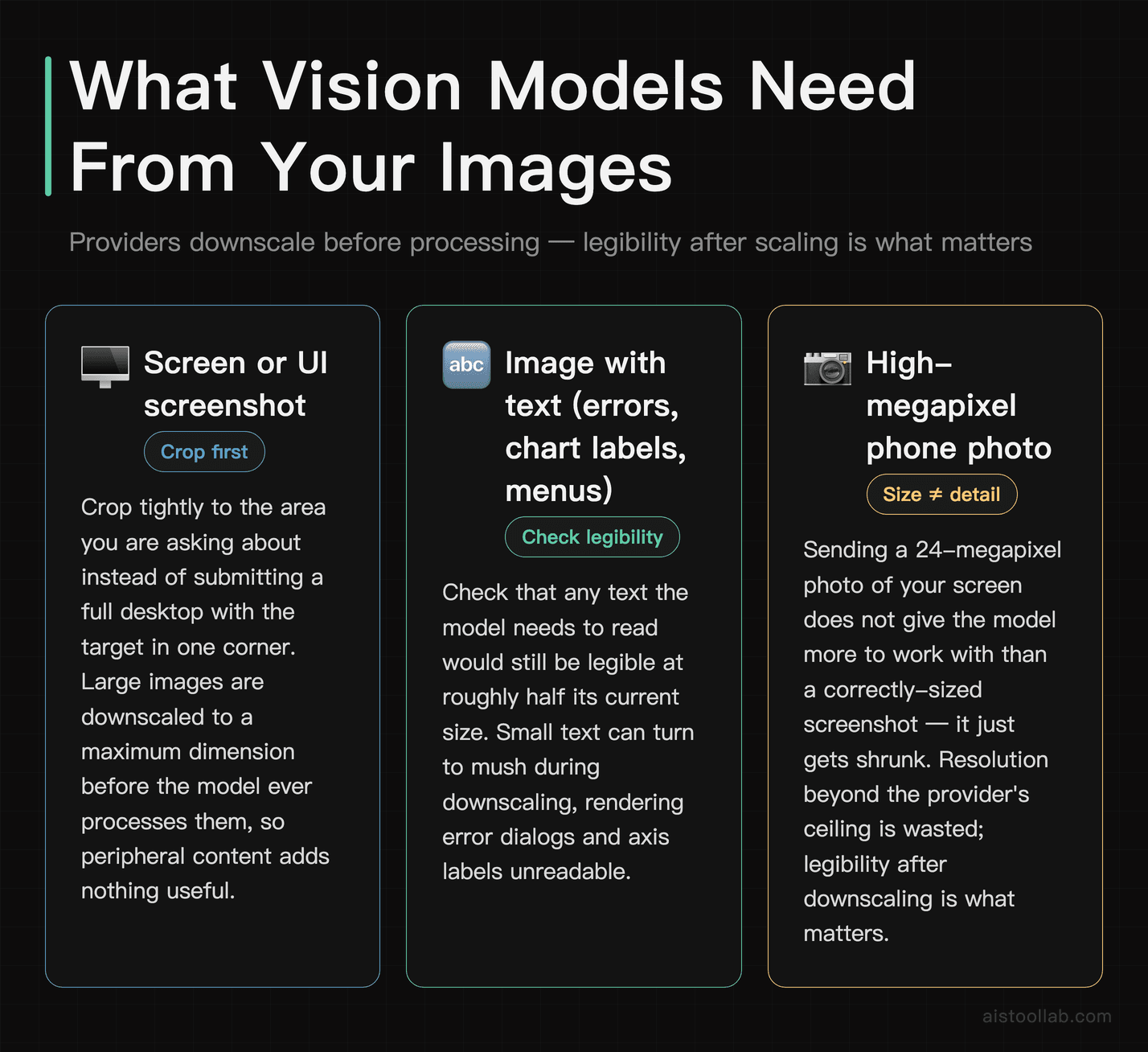
Vision-capable models don’t see your image at full resolution the way you do. Per the major providers’ vision documentation (for example OpenAI’s and Anthropic’s official vision/image guides, as of 2026-08), large images are downscaled to fit a maximum dimension before the model ever processes them, and they’re read in tiles rather than as one giant grid. The practical consequence: sending a 24-megapixel phone photo of your screen doesn’t give the model more to work with than a tight, correctly-sized screenshot — it just gets shrunk, and small text can turn to mush on the way down. Resolution beyond the provider’s ceiling is wasted; legibility after downscaling is what matters.
So the goal isn’t “biggest possible image,” it’s “the relevant thing is still readable once it’s been scaled.” Crop tightly to the part you’re asking about instead of submitting a full desktop with the target in one corner. If you need the model to read text in the image — an error dialog, a chart’s axis labels, a menu — check that the text would survive being halved in size. OpenAI’s vision documentation (as of 2026-08) also describes a detail setting (low or high) that trades image resolution against token cost, which is worth knowing when you’re deciding whether fine detail actually matters for the question you’re asking.
A few format and metadata specifics that trip people up. For screenshots, UI, diagrams, and anything with sharp text, PNG avoids the compression blur that JPEG can introduce around small characters; JPEG is fine for photos. Aspect ratio matters at the extremes — a very long, thin image (a full webpage screenshot, say) may be tiled in a way that spreads context thin, so consider splitting it into a couple of focused captures. And don’t lean on metadata as a communication channel: EXIF orientation flags aren’t always honoured by the pipeline, so a photo that looks upright to you can arrive rotated — flatten and rotate it yourself first. Filenames and captions embedded in the file aren’t a reliable way to pass context either. Put the context in your prompt text, where you know it’ll be read.
Use case: getting feedback on a design mockup
Say you’re a designer and you want a vision model to critique a landing-page mockup. A phone photo of your monitor — glare, keystone distortion, moiré on the screen — forces the model to fight your capture before it can even judge the layout. Export a clean PNG straight from your design tool at a size where the body copy is still readable, crop to the section you care about, and tell it what you’re optimising for (“above-the-fold clarity for first-time visitors”). You’ll get feedback about your hierarchy instead of an apology about not being able to make out the text.
Step 3: Hand over code the way you’d brief a new teammate
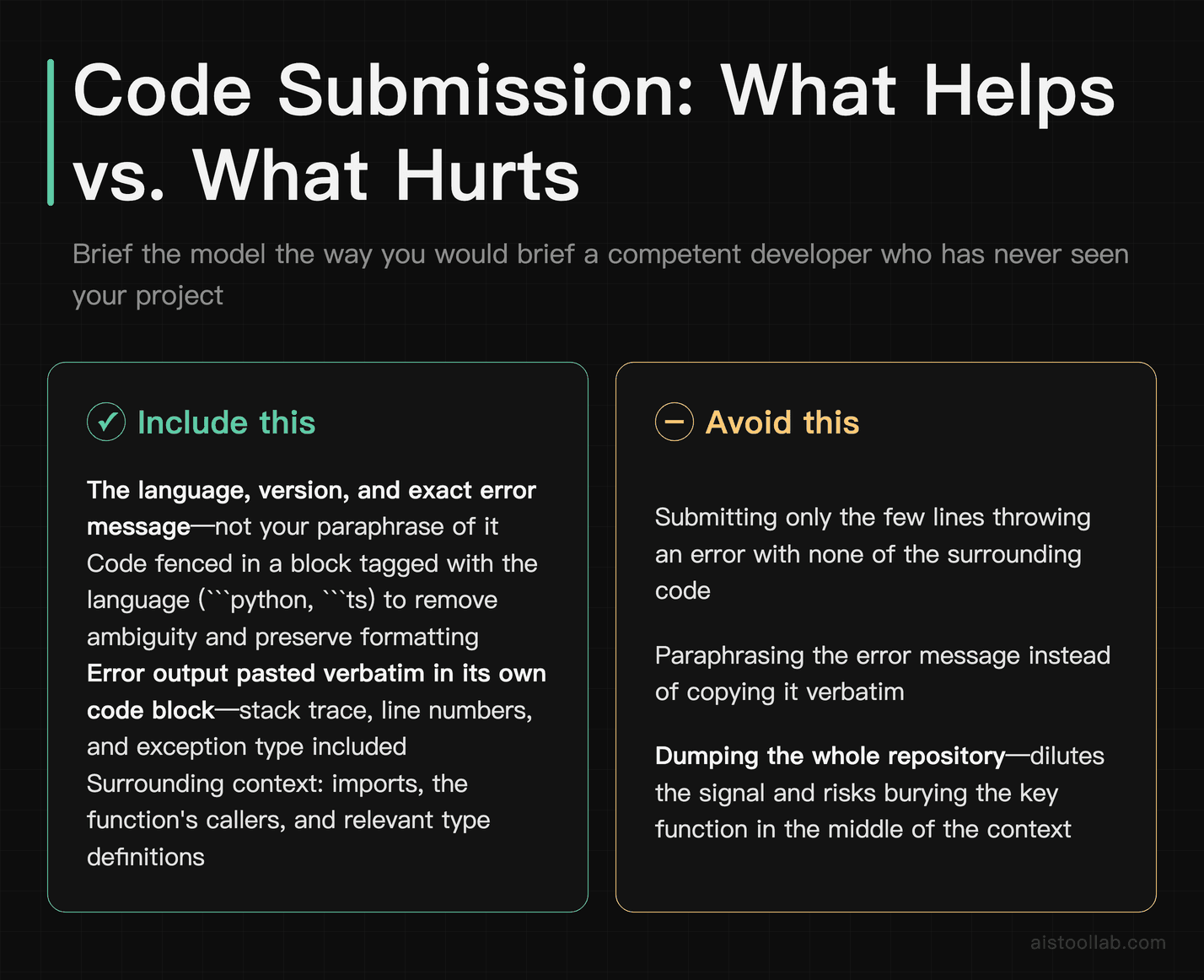
The single most useful mental model for technical submissions: imagine you’re pasting this into a chat with a competent developer who has never seen your project. What would they need before they could help? Almost always it’s more than the ten lines that are throwing an error. They’d want the language and version, the exact error message (not your paraphrase of it), what you already tried, and enough of the surrounding code — imports, the function’s callers, the relevant type definitions — to reason about cause rather than guess.
Fence your code in a block and tag the language (```python, ```ts). Models can usually infer the language, but the tag removes ambiguity for lookalike syntaxes and keeps formatting intact so indentation-sensitive languages don’t get mangled. Paste error output verbatim inside its own code block — the stack trace, line numbers, and exception type carry information your summary drops. And resist the urge to dump the whole repository: a huge, mostly-irrelevant paste both dilutes the signal and risks pushing the one function that matters into the middle of the context, which is exactly the position the “Lost in the Middle” work found models handle worst. Give the failing function, its direct dependencies, and a one-line statement of what you expected versus what happened.
Structure the message the way documentation is structured: goal first, then the code, then the error, then your constraints (“has to stay on Node 18,” “can’t add a dependency”). That ordering keeps your objective and the failing code near the top and bottom, not buried. If you’re working with model-hosting platforms rather than a chat assistant, the submission mechanics differ — I covered that side in the Hugging Face guide — but the principle carries: give the receiving system clean, well-labelled, appropriately-scoped input and it has far less to reconstruct.
Use case: getting help with a stack trace
Say you’re a freelance dev and a client’s app is throwing an exception you don’t recognise. Don’t type “getting a weird error in my Python script, any ideas?” Paste the full traceback verbatim in a code block, add the function it originates in plus any helper it calls, state the Python version and the key libraries with their versions, and note the one thing you already ruled out. That turns a guessing game into a diagnosis. For quick, self-contained utilities you might not need a full model at all — some jobs are better served by small, single-purpose AI developer utility tools — but when you do want the model reasoning about your code, the quality of the paste sets the ceiling on the answer.
Clean input, fewer retries
Package the payload so the model isn’t reconstructing what you already knew — put the important part where it can be found, hand over structure instead of implying it — and the prompt has a lot less to fix.
Frequently Asked Questions
Should I always convert PDFs to markdown before uploading?
No — it depends on where the PDF came from. If it’s a “born-digital” PDF exported from a word processor, the text layer is usually clean and most major AI tools extract it fine, so converting adds work for little gain. The conversion pays off with scanned documents, heavily-designed layouts, multi-column pages, and anything with tables, because those are exactly the cases where extraction interleaves columns, sprinkles in headers and footers, or collapses tables into meaningless spacing. A quick test: copy a paragraph out of the PDF and paste it into a plain text editor. If what you get back is readable and in order, the PDF is probably fine to submit as-is. If it’s scrambled, out of sequence, or full of stray line breaks, that’s what the model would receive too, and cleaning it into markdown first is worth the few minutes. There’s no universal rule here, only the cost of the reformatting weighed against how badly the raw extraction breaks.
Does splitting a long document into chunks actually help, or is one big paste fine?
The honest answer is that it depends on the model’s context window and what you’re asking, and I don’t have a single canonical chunk size to hand you — anyone who gives you one exact number is usually guessing. What the “Lost in the Middle: How Language Models Use Long Contexts” (Liu et al., 2023) research does establish is that position matters: relevant information near the start or end of a long input is used more reliably than the same information stranded in the middle. So the practical move isn’t necessarily to chop everything up — it’s to make sure the part you most want reasoned about isn’t buried mid-document. If your source genuinely is very long and only a slice is relevant, extracting that slice and submitting it directly beats pasting the whole thing and hoping. If you do need the full document considered, quote the key section up top, then attach the rest below.
What image resolution should I send to a vision model?
Enough that the thing you’re asking about stays legible after downscaling, and no more. Per the major providers’ vision documentation (OpenAI’s and Anthropic’s official vision guides, as of 2026-08), large images are scaled down to a maximum dimension before processing, so sending a huge original doesn’t preserve extra detail — it just gets shrunk, and tiny text can blur in the process. The useful check is to imagine your image halved in size and ask whether the labels, code, or fine lines would still be readable. If yes, you’re fine; if not, crop tighter so the relevant region occupies more of the frame, rather than reaching for more megapixels. Because behaviour and limits differ by provider and change over time, confirm the current numbers in your specific tool’s vision documentation before optimising around any exact pixel figure — the mechanism (downscaling, tiling, legibility over raw resolution) is the stable part.
Is it better to paste code inline or attach it as a file?
For most chat-style assistance, a focused inline paste in a fenced code block with a language tag is easier to work with than a large attached file, because you control exactly what the model sees and you’re not relying on it to locate the relevant function inside a big upload. Inline also keeps your goal, the code, and the error message together in one readable message. Attachments make more sense when the file genuinely needs to travel intact — a full script the model should run or transform, or a document too long to paste comfortably. The failure mode to avoid either way is dumping an entire file or repository when only one function matters: it dilutes the signal and can push the important part into the middle of the context, which is the weakest position for retrieval. Scope down to the failing function plus its direct dependencies, and paste the error output verbatim rather than summarising it.
Do AI tools read image metadata like EXIF or filenames?
Treat metadata as unreliable and don’t build your request around it. EXIF orientation flags in particular aren’t always honoured by the processing pipeline, which is why a photo that looks upright on your phone can reach the model rotated — the safe move is to flatten and rotate the image yourself before submitting. Descriptive filenames and any caption baked into the file aren’t a dependable way to pass context either; there’s no guarantee that channel is read, and even when it is, it’s easy to miss. The reliable place for context is your prompt text, where you know it will be seen: state what the image is, what you want assessed, and any constraints in plain words alongside the picture. Think of the image as evidence and your text as the brief — don’t hide instructions inside the file and hope they surface.
How much surrounding context should I include with a code snippet?
Enough that a competent developer who’d never seen your project could reason about the problem, and not much more. That usually means the failing function, the functions or types it directly depends on, the exact error or unexpected output, the language and relevant library versions, and a one-line statement of expected-versus-actual behaviour. What you can leave out is the rest of the codebase, boilerplate unrelated to the issue, and configuration that has no bearing on the bug. Over-including is a real cost, not just wasted space: a giant paste dilutes the signal and risks stranding the key lines mid-context, where models handle them least well. Under-including is the more common mistake, though — pasting ten lines with no error text, no versions, and no goal forces the model to guess at everything you left implicit. When in doubt, add the error message verbatim and a sentence about what you were trying to do; those two things resolve most ambiguity.
Will formatting my input differently really change the output, or am I overthinking it?
For a short, simple question it barely matters — asking a one-liner in messy text still works fine, and reformatting it would be overthinking. Formatting starts to matter as the input gets longer, more structured, or more error-prone to ingest: multi-section documents, tables, scanned PDFs, screenshots with small text, and code with dependencies. In those cases the model spends effort reconstructing structure you could have handed over cleanly, and that reconstruction is where things go wrong. The mechanism is straightforward — explicit boundaries and sensible ordering leave less to guess at — but I’d stop short of promising a measured quality jump, since public head-to-head data on formatting is limited. A reasonable way to think about it: clean packaging doesn’t guarantee a better answer, but sloppy packaging reliably caps how good the answer can be. Spend the effort proportional to how long and how structured your input is.
Last updated: 2026
Found this review helpful?
👉 Browse the AI Tools Library to find the right tools for your workflow.