

The content creation industry is undergoing its most dramatic transformation since the smartphone made everyone a potential filmmaker. By 2026, AI-powered tools have moved from novelty to necessity. Many professional YouTubers, TikTokers, and indie filmmakers report that AI assists in at least one stage of their production pipeline. The global AI video market alone is projected to exceed $4.5 billion by the end of 2026, and the tools available today would have seemed like science fiction just three years ago. Whether you’re a solo creator grinding out daily Reels or a small production house delivering commercial content, the right AI toolkit can significantly reduce your editing time and voiceover costs, with potential savings varying by tool and workflow, and help you publish content that looks like it came from a studio with a six-figure budget. This guide breaks down every essential AI tool for content creators in 2026, with real pricing, honest capability assessments, and workflow advice tailored to your specific role.
This article contains affiliate links. If you buy through them I may earn a commission at no extra cost to you. All opinions are my own.
Contents
The 2026 AI Content Creator Toolkit: Comprehensive Comparison
Before diving into individual tool reviews, here’s a side-by-side breakdown of the most powerful AI tools available to content creators this year. Pricing is per each tool’s official site and may change; figures below were checked June 2026.
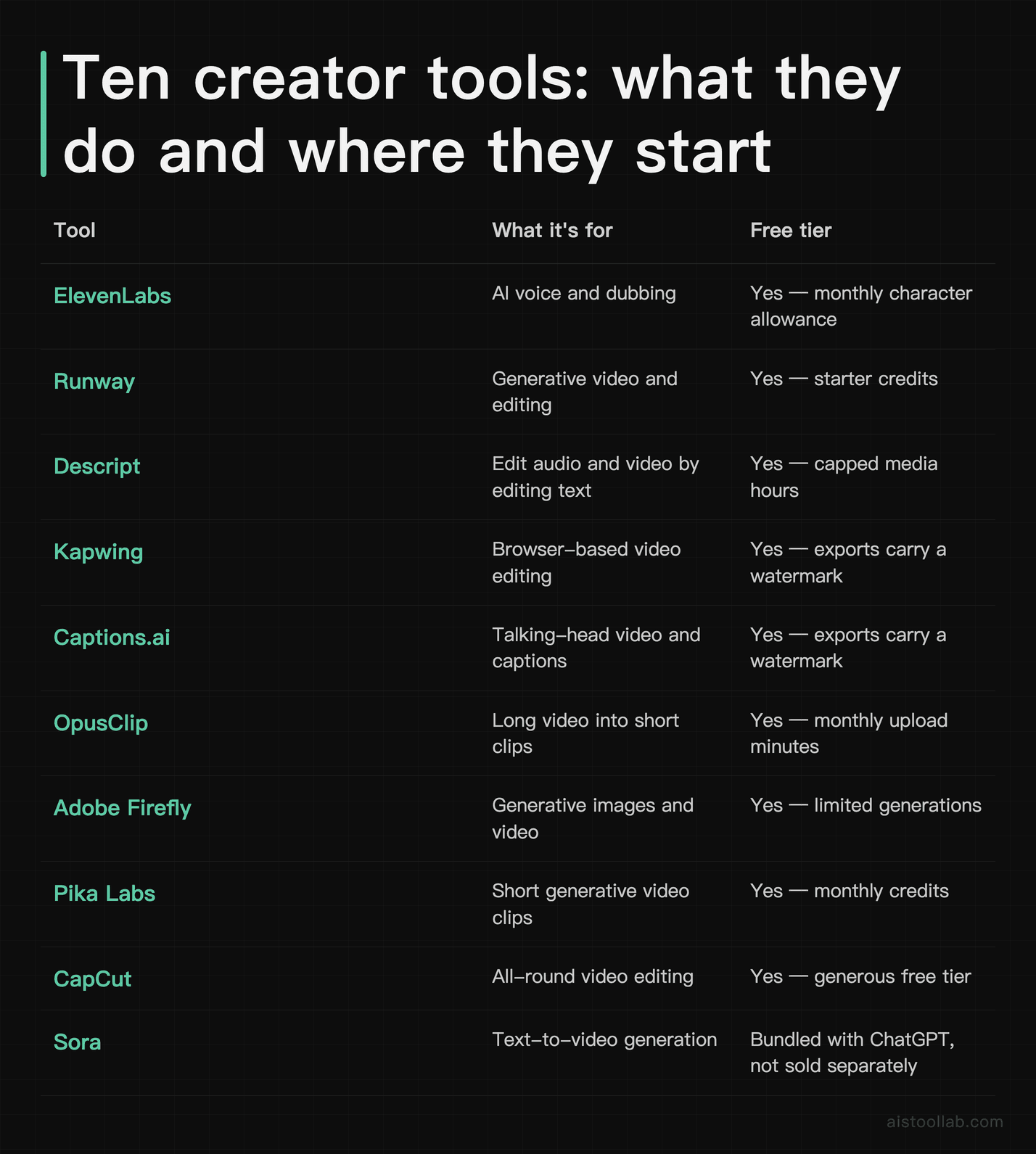
Free tiers and paid entry points (checked against each vendor’s official pricing page on 2026-07-27): ElevenLabs starts free and its entry paid tier is Starter at about $6/mo, with Creator around $22/mo. Runway has a free tier and starts at about $12/mo for Standard. Descript is free to start, with Hobbyist about $16/mo billed annually ($24 month-to-month). Kapwing’s free exports are watermarked; Pro runs about $16/member/mo on annual billing and $24 monthly. Captions.ai starts around $24.99/mo for Max and $69.99/mo for Scale. OpusClip starts around $15/mo, with Pro about $29/mo. Adobe Firefly’s plans have been restructured and CapCut’s Pro pricing varies by region, so check those two directly. Pika Labs publishes its prices through a script-rendered page that could not be read from the served HTML, so treat its tiers as unconfirmed here and check the official page. Sora is bundled with ChatGPT rather than sold as a standalone plan. Every one of these moves faster than an article does — the vendor’s own pricing page is always the authority.
Runway: The Filmmaker’s AI Studio (tested on Gen-3)
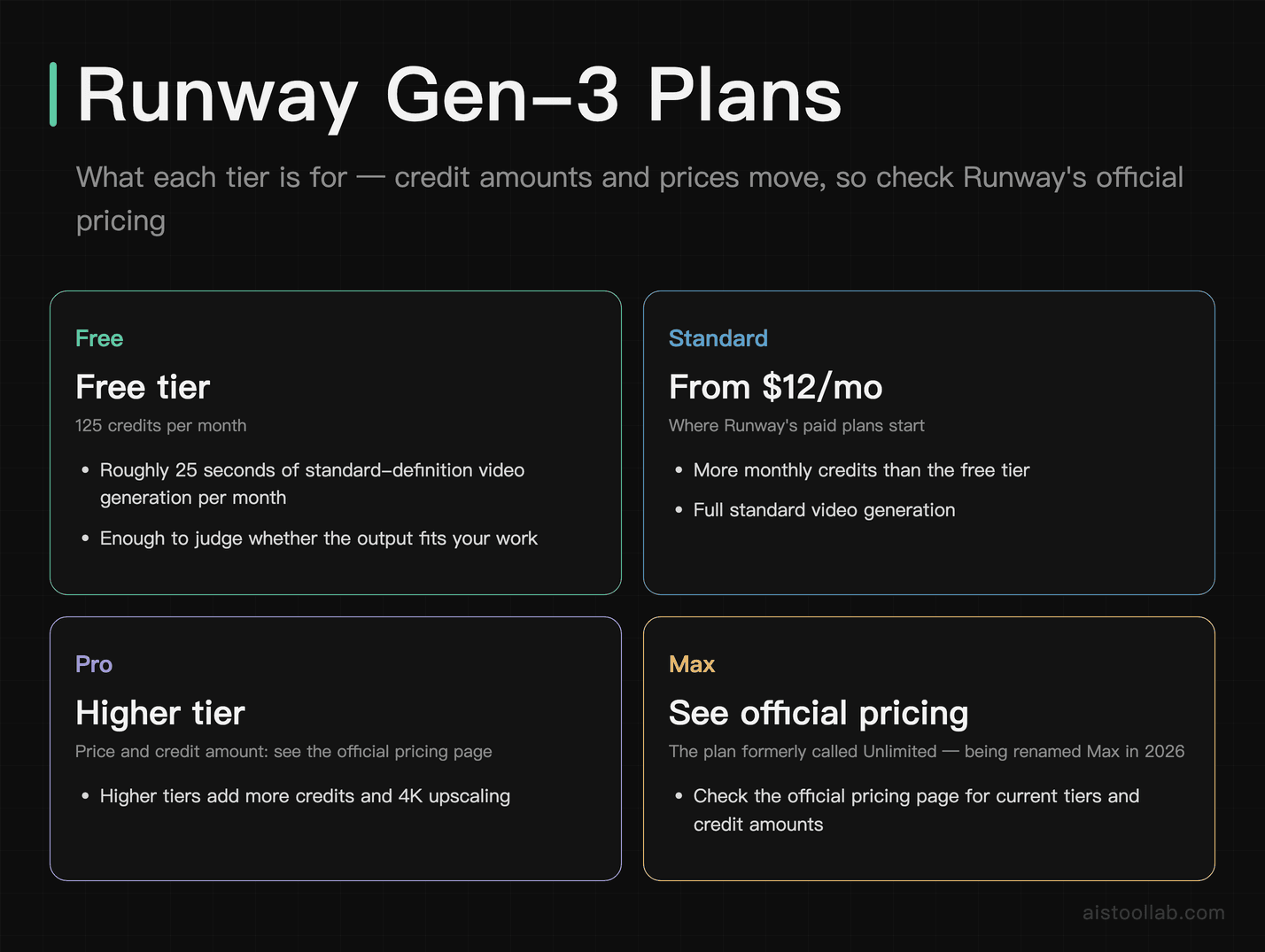
Runway is widely used by professional creators and indie filmmakers for AI video generation. Gen-3 Alpha Turbo was what put Runway on this list, delivering sequences of up to 10 seconds with far better temporal consistency than earlier models — objects, characters and lighting actually staying coherent through a clip. Runway retired Gen-3 Alpha on July 8, 2026 and Gen-3 Alpha Turbo on July 30, 2026; text-to-video and image-to-video now run on Gen-4.5, which still tops out at 10 seconds per generation. The Motion Brush feature remains one of the most unique tools in any AI video editor’s arsenal, allowing creators to paint specific regions of an image and dictate the direction and intensity of movement independently. A static ocean photograph can be transformed into crashing waves while the sky remains perfectly still.
Runway’s pricing starts with a free tier that gives a one-time deposit of 125 credits that don’t expire — by Runway’s own reckoning about 25 seconds of Gen-4 Turbo video, or 25 image generations. Paid plans start at $12/month billed annually ($15 month-to-month) for 625 credits a month, with higher tiers adding credits and 4K upscaling. Max is not a rename of Unlimited: it launched on June 1, 2026 with 9,500 credits a month at $95, existing Unlimited subscribers keep their plan through August 31, 2026, and move across on September 1. Check Runway’s official pricing for current tiers and credit amounts. For indie filmmakers, the most valuable use cases include generating establishing shots, creating fantastical environments that would be impossible to film practically, and extending existing footage with AI-generated transitions. Runway integrates with Adobe Premiere Pro via a plugin and exports in formats compatible with DaVinci Resolve and Final Cut Pro.
The platform’s Video-to-Video feature deserves special mention for its ability to apply cinematic styles to raw footage — turning a handheld iPhone clip into something that looks stylistically consistent with a specific aesthetic or film reference. For creators who want to punch above their production budget, Runway remains the essential first stop.
Descript: The Podcast and Long-Form Video Revolution
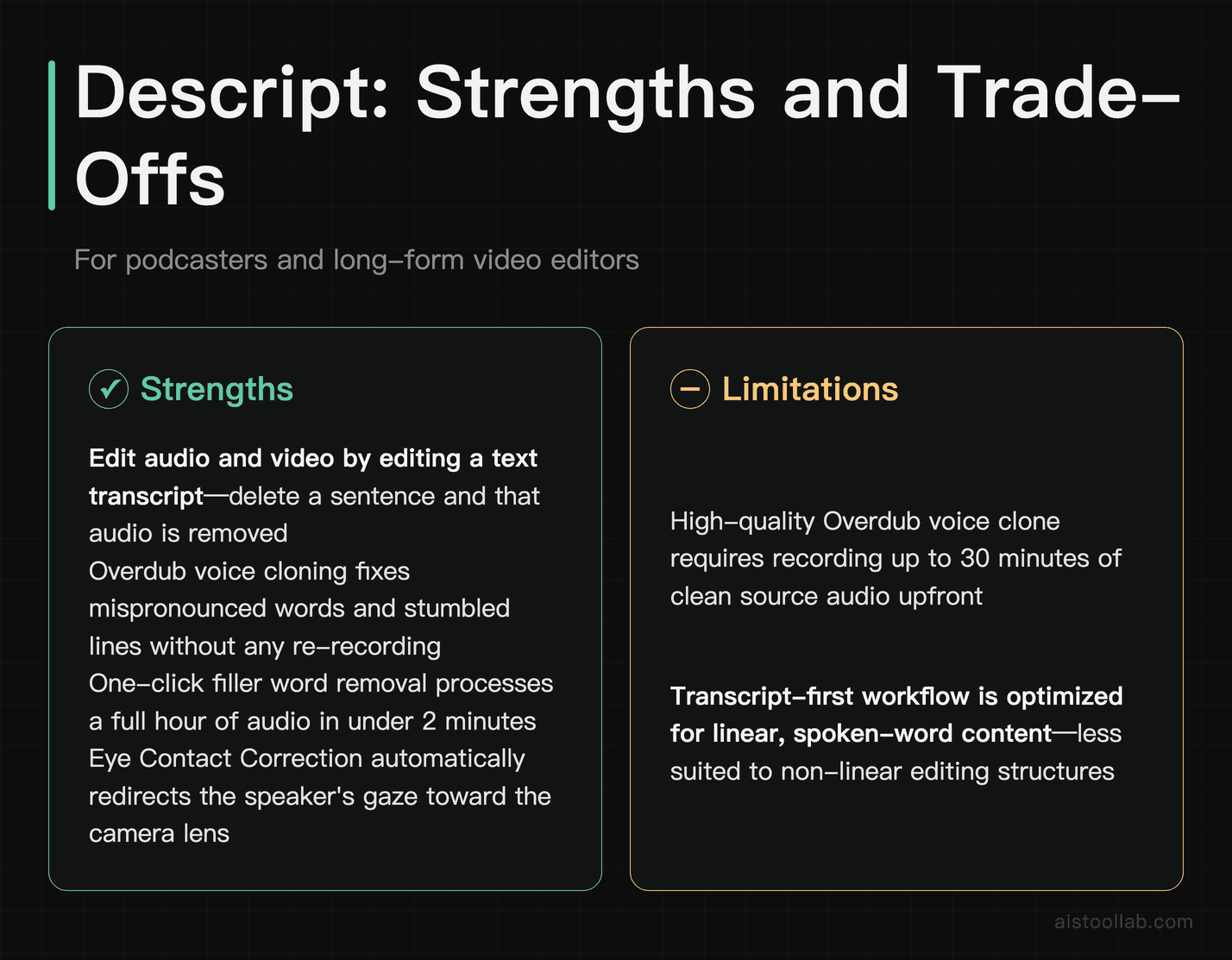
Descript has fundamentally changed how podcasters and YouTubers approach editing, and by 2026, it has grown into one of the most complete long-form content production platforms available. The core concept remains brilliantly simple: upload your audio or video, and Descript generates a text transcript. You edit the transcript like a document, and the audio and video edits happen automatically. Delete a sentence of text, and that audio is removed. It sounds almost too convenient, because it genuinely is.
The Overdub feature — Descript’s AI voice cloning technology — allows creators to fix mispronounced words, stumbled lines, or forgotten information by simply typing the corrected text. After recording a 30-minute voice sample, the AI generates a voice clone indistinguishable from the original speaker at normal listening speeds. The filler word removal tool (eliminating “um,” “uh,” “like,” and other verbal tics) works with a single click and processes an hour-long recording in under two minutes. The Eye Contact Correction feature uses AI to redirect a speaker’s gaze toward the camera even when they’re reading from notes or a second monitor — a game-changer for creators who struggle with teleprompter eye contact.
Pricing is genuinely accessible: the free tier allows 1 hour of transcription per month, which suits occasional creators testing the platform. The Creator plan at $12/month unlocks 10 hours of transcription and removes watermarks. The Pro plan at $24/month provides unlimited transcription, which is what serious podcasters and YouTubers will need. Descript integrates natively with Riverside.fm for remote recording, Google Drive for file management, and exports directly to YouTube and popular podcast hosting platforms like Buzzsprout and Transistor.
ElevenLabs: The Voice Generation Platform
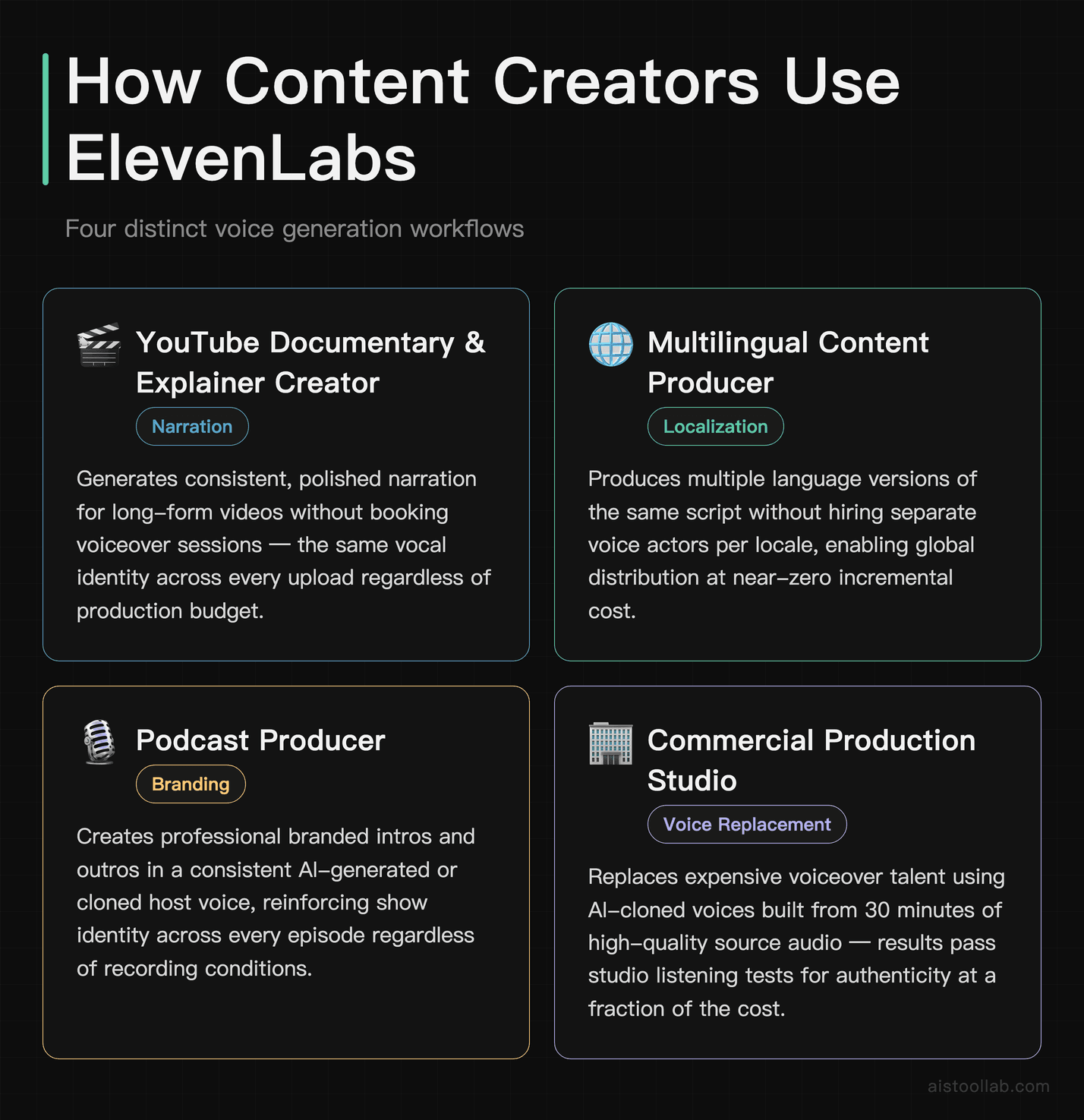
ElevenLabs is the undisputed leader in AI voice generation, and by 2026 the platform’s capabilities have expanded far beyond what most creators initially expected from a text-to-speech service. The quality of voice output is so naturalistic — complete with breathing patterns, emotional inflection, and conversational pacing — that production studios have integrated it into commercial workflows without viewers or listeners detecting any artificiality. For content creators specifically, ElevenLabs serves several distinct purposes: replacing expensive voiceover talent, creating consistent narration for YouTube documentaries and explainer videos, generating multilingual versions of content without hiring separate voice actors, and producing podcast intros and outros in a branded voice.
The Voice Cloning feature requires as little as one minute of clean audio to generate a passable clone, and with 30 minutes of high-quality source material, the results become genuinely difficult to distinguish from real speech in a studio test. Creators maintain full ownership of their cloned voices and can set permissions controlling how they’re used through the platform’s sharing features. The free tier provides 10,000 characters per month (roughly 7–10 minutes of spoken content), which suits occasional use. The Starter plan at $5/month expands this to 30,000 characters, the Creator plan at $22/month provides 100,000 characters, and the Pro plan at $99/month serves high-volume creators with 500,000 characters and commercial licensing for all content.
Integration support is extensive: ElevenLabs connects via API to Descript, Notion, Google Docs, and has native plugins for Premiere Pro and DaVinci Resolve. Podcast producers working in 2026 frequently use ElevenLabs to generate voiceovers for ad reads during post-production rather than interrupting recording sessions, and documentary filmmakers use it for narration tracks with consistent tonality across episodes recorded months apart.
Kapwing: Team-Friendly Social Video Production
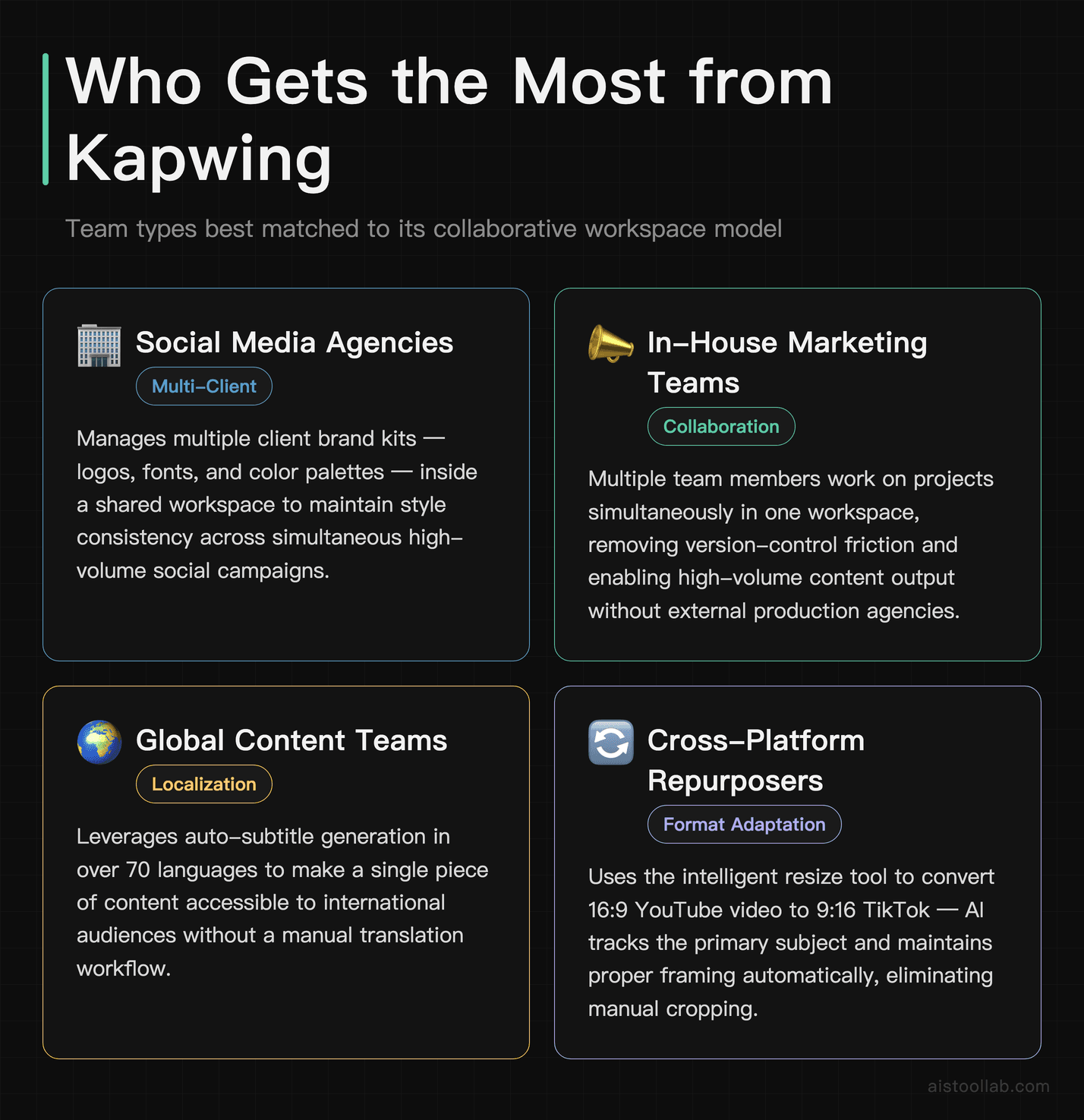
Kapwing occupies a unique and valuable niche in the 2026 creator toolkit as the platform most optimized for collaborative team workflows. Where many AI video tools are designed for solo creators, Kapwing’s workspace model allows multiple team members to work on projects simultaneously, share brand kits with logos, fonts, and color palettes, and maintain style consistency across a high volume of output. This makes it the go-to platform for social media agencies and in-house marketing teams producing content for multiple clients or brand accounts.
The AI feature set covers all the essential bases: automatic subtitle generation in over 70 languages, smart cut that removes silence and dead air from recordings, AI-powered background removal for green-screen-free setups, and a resize tool that intelligently reframes content for different aspect ratios — a 16:9 YouTube video becomes a 9:16 TikTok with the subject properly centered in frame without manual cropping. The free tier includes basic access but applies a watermark to exports, which limits professional use. The Pro plan starts at $16/month per member (billed annually; about $24 month-to-month) and removes watermarks. The Business plan starts at $50/month per member and adds the brand kit, approval workflows, and shared asset libraries.
Kapwing integrates directly with Google Drive, Dropbox, YouTube, and TikTok for direct publishing. For social media managers who need to produce 20 to 50 pieces of content per week across multiple platforms and maintain brand consistency without the overhead of a full production team, Kapwing’s combination of AI efficiency and collaborative infrastructure is difficult to match.
Captions.ai: Mobile-First AI for Short-Form Creators
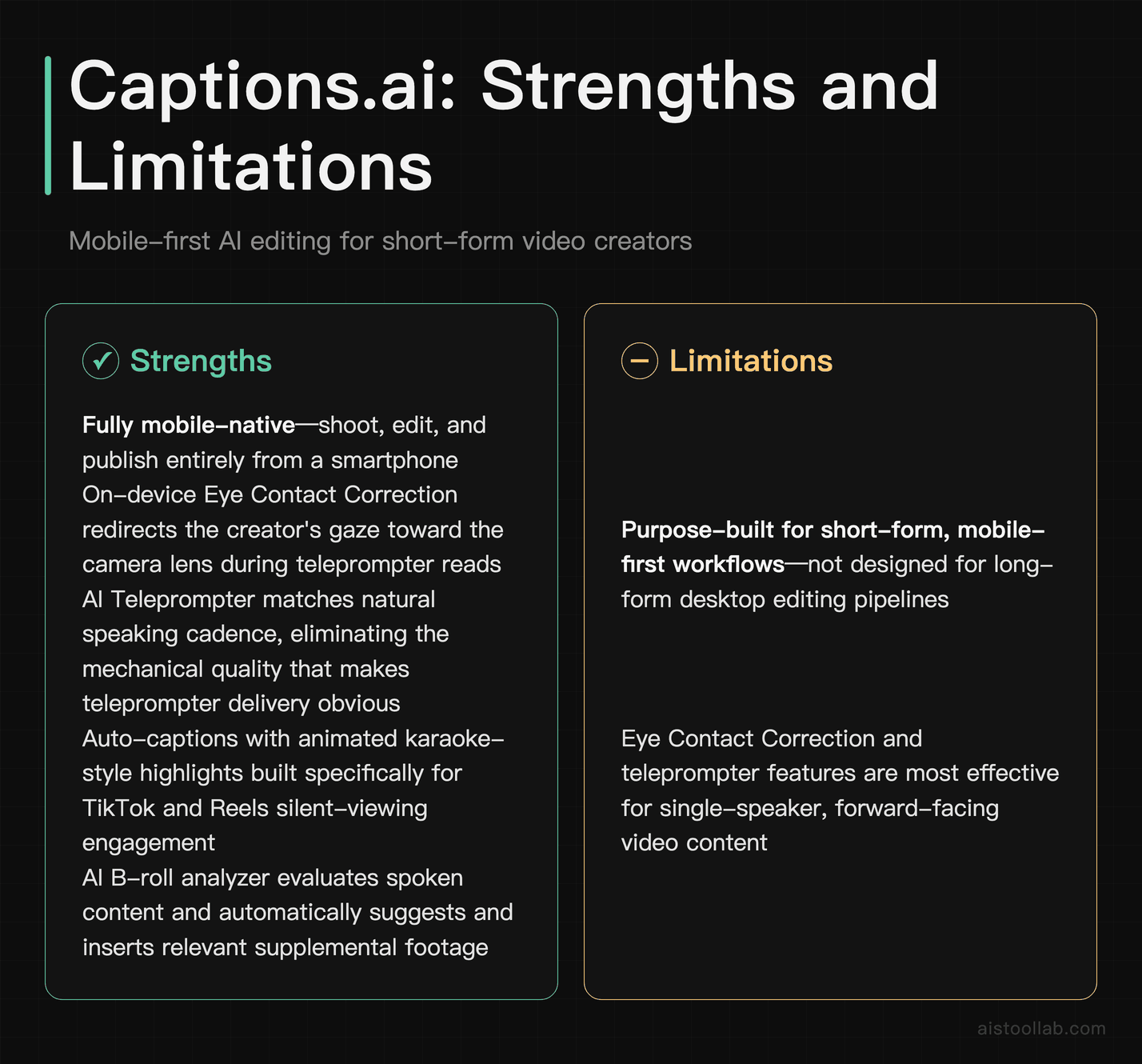
Captions.ai was designed from the ground up for the creator who shoots on their phone, edits on their phone, and publishes from their phone. By 2026, the app has evolved into one of the most powerful mobile-native AI editing tools available, with a feature set that would have required desktop software and professional expertise just two years ago. The app’s signature feature remains Eye Contact Correction, which uses on-device AI to redirect the creator’s gaze toward the camera lens even while reading from a teleprompter or looking at their screen — solving one of the most persistent authenticity challenges for smartphone creators.
The AI Teleprompter function allows creators to write their script, have it read back through an in-ear monitor or displayed on screen, and then uses AI to match the natural speaking cadence and remove the mechanical quality that typically makes teleprompter delivery obvious to viewers. Auto-captions generate in real time with customizable styles including animated karaoke-style highlights popular on TikTok and Reels. The AI B-roll feature is genuinely innovative: it analyzes your spoken content and automatically suggests and inserts relevant stock footage from the built-in library at the appropriate moments.
Free tier access includes limited exports per month with a Captions.ai watermark. Captions.ai restructured its paid plans in 2026 — Max at $24.99/month and Scale at $69.99/month — unlocking higher limits, priority processing, and advanced features. Check Captions.ai’s official pricing for current details. The app is iOS and Android native, with iCloud and Google Drive integration for project backup. For TikTokers and Reels creators producing daily content, Captions.ai compresses a workflow that once required multiple apps and significant post-production time into a single mobile-native experience.
OpusClip: Turning Long Videos Into Viral Clips Automatically
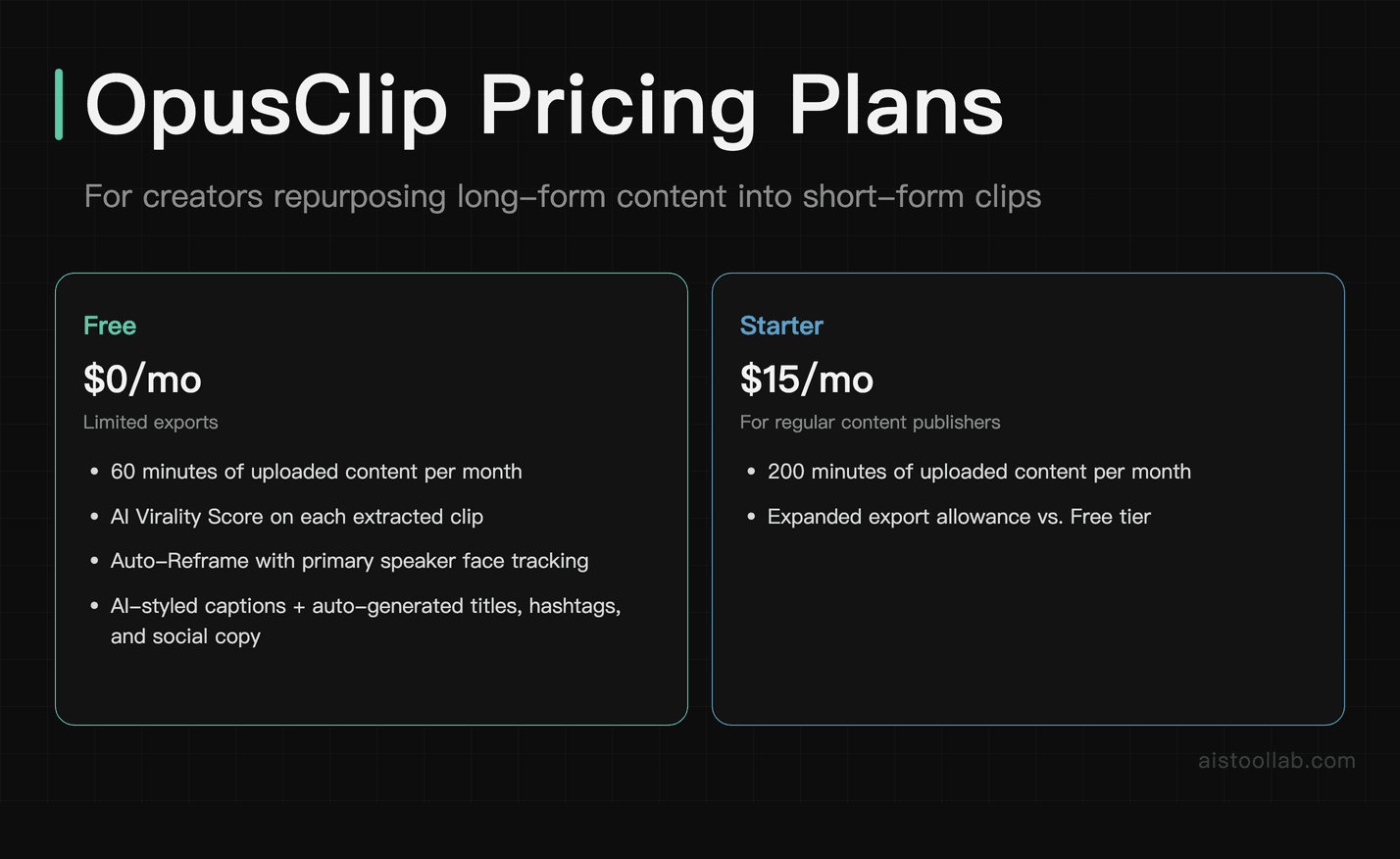
OpusClip addresses one of the most time-consuming challenges for long-form content creators: identifying and extracting the most compelling moments from a 30-minute or 2-hour video to create short-form clips for TikTok, YouTube Shorts, and Instagram Reels. The platform’s AI analyzes uploaded video for virality signals — strong hooks, emotional peaks, quotable statements, and moments of high energy — and assigns each potential clip a Virality Score before you even review the suggestions. This allows creators to prioritize the highest-potential clips without watching hours of footage manually.
The Auto-Reframe feature handles the aspect ratio conversion intelligently, tracking the primary speaker’s face and maintaining proper framing as they move. AI-generated captions are applied automatically in styled formats optimized for silent-viewing engagement. The platform also generates clip titles, hashtags, and social media copy for each extracted clip, reducing the metadata workload that consumes significant time for high-volume creators. The free tier allows 60 minutes of uploaded content per month with limited exports. The Starter plan at $15/month provides about 150 minutes of uploads, while the Pro plan at $29/month adds more processing minutes plus customization features like custom caption styles and multi-speaker tracking. Check OpusClip’s official pricing for current allowances.
For YouTubers who produce regular long-form content and want to grow simultaneously on short-form platforms without doubling their editing workload, OpusClip provides a compelling answer. A creator who uploads one 45-minute podcast episode per week can extract 8–12 platform-optimized clips in under 20 minutes of active work.
Adobe Firefly Video, Pika Labs, CapCut Desktop, and OpenAI Sora
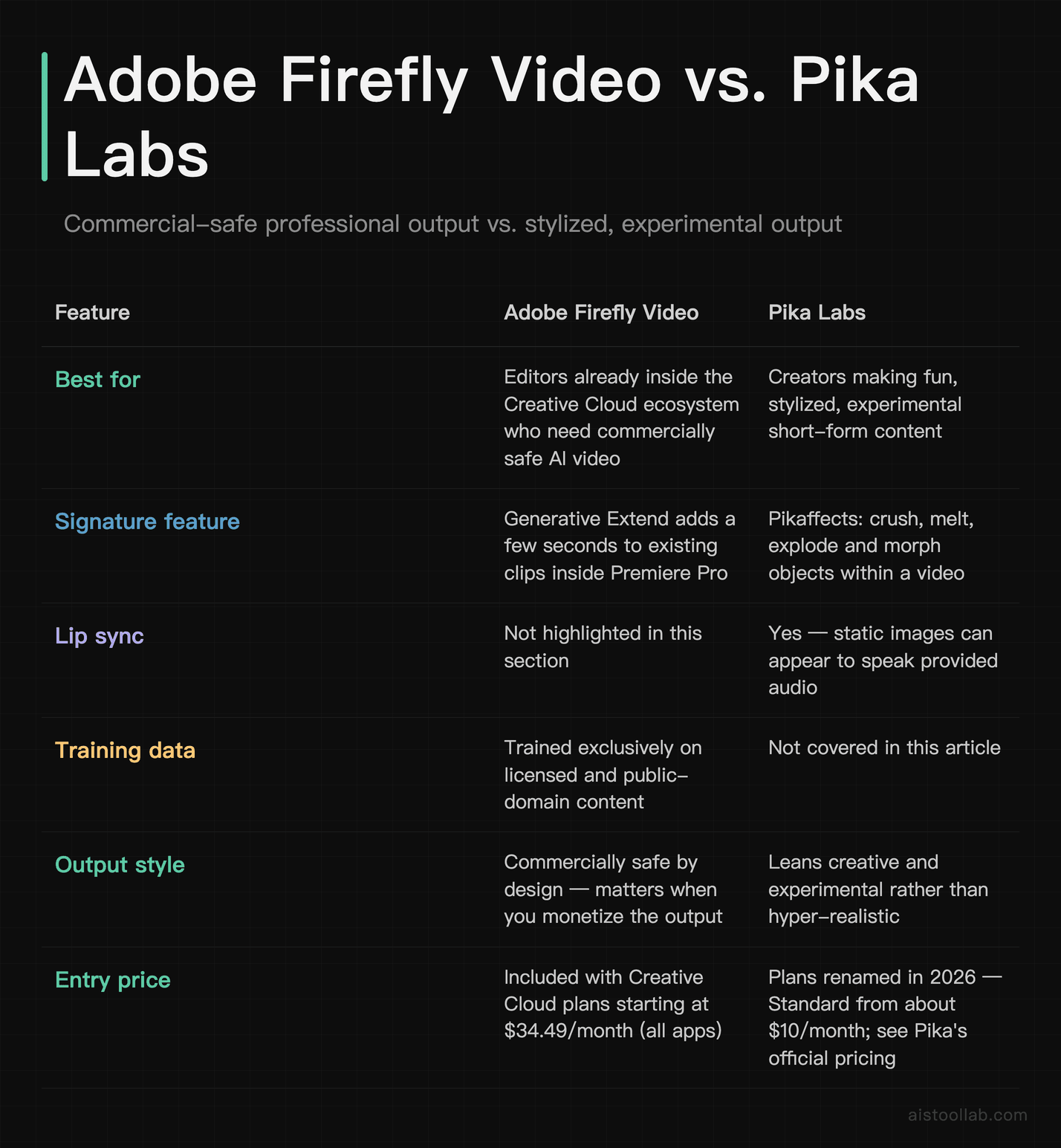
Adobe Firefly Video is the professional’s choice for creators already embedded in the Adobe ecosystem. The Generative Extend feature within Premiere Pro uses AI to seamlessly extend video clips by up to a few seconds — solving the perennial problem of a shot being just slightly too short for an edit. The text-to-video capabilities are commercially safe by design, trained exclusively on licensed and public domain content, which matters significantly for creators monetizing professional productions. Included with Creative Cloud plans starting at $34.49/month (all apps), it’s the most seamlessly integrated AI video tool for traditional editors.
Pika Labs has carved out its niche with creative, stylized video generation that leans into the fun and experimental rather than the hyper-realistic. The Pikaffects system allows creators to apply dramatic visual transformations — crushing, melting, exploding, and morphing objects within videos — producing the kind of shareable, surprising content that thrives on TikTok. Lip sync capabilities allow static images to appear to speak provided audio. Pika renamed its plans in 2026 — Standard (from about $10/month), Pro (from about $35/month), and Fancy (~$76) — keeping it one of the more accessible premium tools; see Pika’s official pricing for current figures.
CapCut Desktop remains the people’s champion — a remarkably capable free-to-use platform that has democratized professional-quality video editing for creators who can’t justify subscription costs. The AI suite includes auto-captions in 15+ languages, background removal, AI enhancement for low-quality footage, text-to-video generation, and an expanding library of AI-driven templates optimized for TikTok and YouTube. Pro features unlock at $7.99/month (individual) or $19.99/month (team).
OpenAI Sora sits at the frontier of what AI video generation can produce in 2026. Now Sora 2, it’s included with a ChatGPT subscription rather than sold as a separate product (higher-tier ChatGPT plans get more access) — see OpenAI’s official pricing. Sora generates video sequences with cinematic quality that exceeds competing platforms in prompt adherence, camera motion realism, and multi-scene narrative consistency. For advanced creators building experimental or premium content, Sora represents the ceiling of what AI video generation currently achieves.
Use Cases: AI Tools in Real Creator Workflows
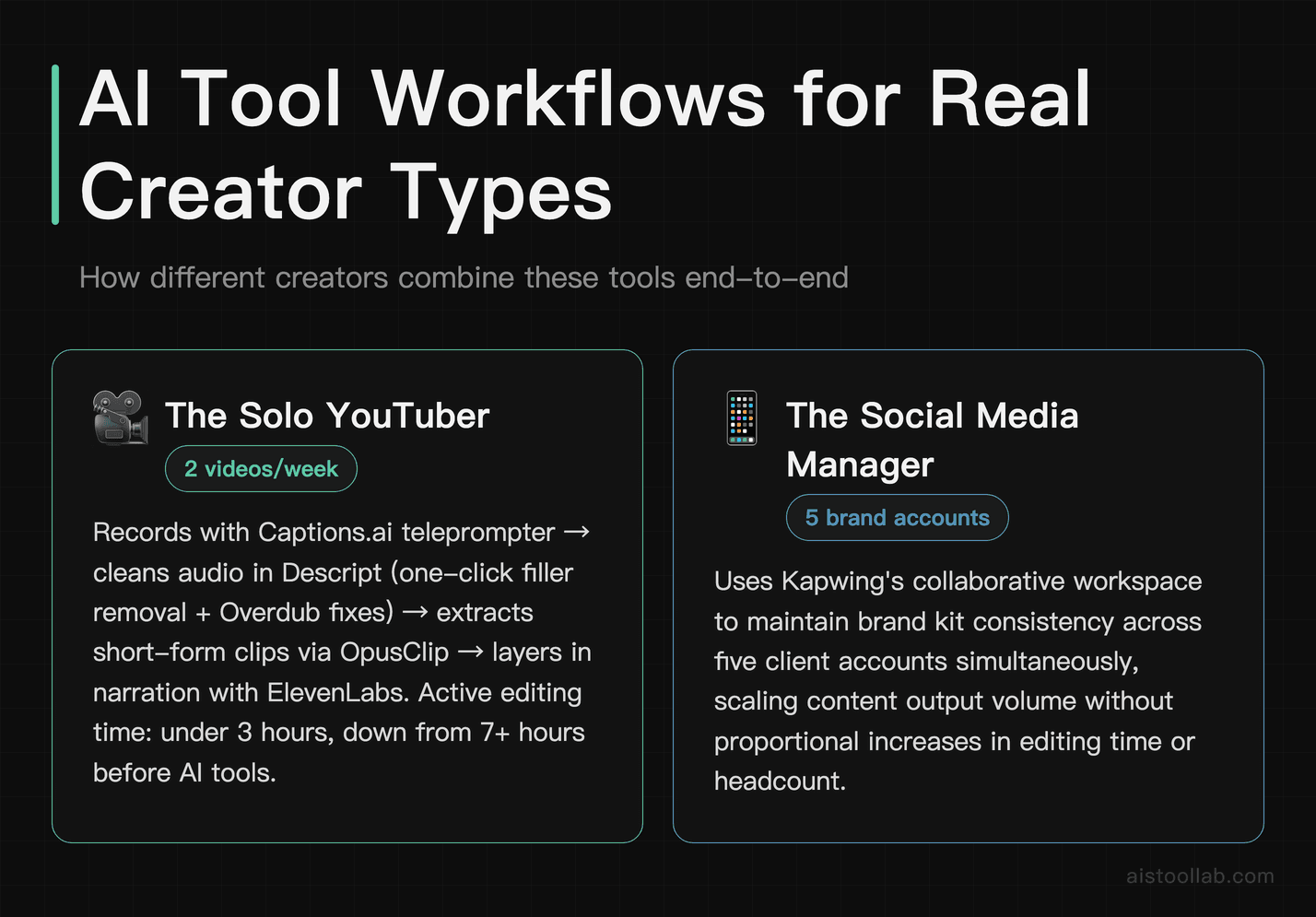
The Solo YouTuber: From Recording to Publishing in Under 3 Hours
Meet a typical independent YouTube creator producing two videos per week on a personal finance channel. Before AI tools, a single 15-minute video required 6–8 hours of editing, thumbnail creation, caption writing, and promotion planning. In 2026, the workflow looks fundamentally different. Recording happens with Captions.ai’s teleprompter ensuring natural delivery without fumbled lines. The raw footage is uploaded to Descript, where a transcript is generated in minutes. Filler words are removed with one click, and two stumbled explanations are fixed using Overdub without re-recording. The edited video exports to OpusClip, which automatically extracts three clips for YouTube Shorts and two for TikTok, complete with captions and suggested titles. For the main video’s intro narration segment, ElevenLabs generates a polished voiceover using the creator’s cloned voice from notes that weren’t recorded on camera. Total active editing time: under 3 hours. Total active editing time before AI: 7+ hours.
The Social Media Manager: Scaling Content Across Five Brand Accounts
A social media manager at a mid-sized marketing agency handles content production for five client accounts spanning fitness, food, tech, lifestyle, and finance verticals. Each account requires 5–7 posts per week across Instagram, TikTok, YouTube Shorts, and LinkedIn. Without AI tools, this volume would require a team of four editors. With AI tools, one skilled manager with one part-time assistant handles the full pipeline. Kapwing serves as the command center — all client brand kits live in shared workspaces, and the AI resize tool converts each piece of content into all required aspect ratios simultaneously. CapCut Desktop handles rapid-turnaround video edits for the food and lifestyle accounts using AI templates. ElevenLabs generates voiceovers for any video requiring narration without the delay and cost of scheduling voice talent. OpusClip processes the monthly long-form content from the fitness client’s YouTube channel into dozens of short clips that feed the entire month’s short-form calendar. Captions.ai handles all caption styling and ensures accessibility compliance across platforms. The result: a two-person operation delivering output that would have required a team of five, with higher consistency and faster turnaround times than traditional production workflows.
The Indie Filmmaker: A Feature Short on a Shoestring Budget
An indie filmmaker in Austin, Texas is producing a 20-minute sci-fi short with a $5,000 total budget — a figure that once made certain visual ambitions impossible. By 2026, AI tools collapse the gap between vision and budget in ways previously unimaginable. Establishing shots of futuristic cityscapes were generated in Runway Gen-3 using the Motion Brush to add atmospheric movement to AI-generated skylines; the same workflow now runs on Gen-4.5. Shots that would require location permits and travel are replaced with Sora-generated environments that match the production’s visual palette. Adobe Firefly Video extends several takes that were just barely too short, and the Generative Fill feature removes an unwanted boom mic shadow from a key dramatic scene — work that would have required expensive reshoots. Descript handles all dialogue editing and ADR replacement for a scene where ambient sound was damaged during production. ElevenLabs generates the film’s narration track, which the director tweaks over three iterations through the interface until the tone and pacing match the intended emotional register. The finished film, submitted to festivals, is indistinguishable in production quality from shorts produced with budgets five times higher. The filmmaker’s total AI tool spend for the production period: approximately $180 across three months of subscriptions.
Frequently Asked Questions
Are these AI video tools safe to use for commercial content monetization?
The answer varies significantly by platform and deserves careful attention before you publish commercially monetized content. Adobe Firefly Video is the most explicitly commercially safe option, as Adobe has trained its models exclusively on licensed Adobe Stock content and public domain material, providing legal indemnification for commercial use within certain guidelines. ElevenLabs offers commercial licensing explicitly in its Creator and Pro tiers. Runway, Pika Labs, and Sora have terms of service that generally allow commercial use of outputs, but creators should review the specific tier terms because lower tiers sometimes restrict commercial application. CapCut requires attention since ByteDance’s data policies may affect brand clients with specific compliance requirements. OpusClip and Descript work with your own content, so commercial use of the output is generally not restricted by the platform. The safest practice for commercially monetized content is always to read the specific commercial use terms in your subscription tier’s terms of service, and when in doubt, email the platform’s legal or support team for written clarification before publishing. For high-value brand partnerships or licensed content distribution, consulting an entertainment lawyer familiar with AI-generated content is still recommended.
How realistic is the AI voice cloning in ElevenLabs and Descript — can audiences tell?
As of 2026, the highest-quality AI voice clones produced by ElevenLabs — particularly those trained on 30 or more minutes of high-quality, studio-recorded source audio — are effectively indistinguishable from the original speaker in casual listening conditions. In controlled tests with attentive listeners specifically looking for artificiality, subtle tells can sometimes be detected in unusual prosody patterns or slightly unnatural emphasis on certain syllables, particularly in emotionally complex passages. For the vast majority of content creator use cases — YouTube narration, podcast ad reads, explainer video voiceovers — the quality is well beyond the threshold where audiences notice any difference. Descript’s Overdub is optimized for dialogue correction rather than full narration replacement and performs best when used for short substitutions of 10 words or fewer, where it’s virtually seamless. Both platforms require explicit consent from the voice owner to create a clone, and ElevenLabs has implemented voice verification systems to prevent unauthorized cloning. The practical takeaway: for standard creator workflows, voice cloning quality is no longer a meaningful limitation.
What’s the best free AI video tool for a creator just starting out with zero budget?
CapCut Desktop is the clear answer for creators starting with zero budget in 2026. The free tier is genuinely generous by industry standards — there’s no watermark restriction on standard exports (watermarks appear only on certain template-based outputs), and the AI feature set available for free includes auto-captions in multiple languages, background removal, AI enhancement for improving low-quality footage, and access to a substantial library of AI-generated effects and transitions. The desktop application runs on both Mac and Windows, and the mobile version provides a consistent experience on iOS and Android, allowing creators to work across devices without paying for cloud storage separately. For voice generation on a zero budget, ElevenLabs’ free tier at 10,000 characters per month provides enough for 7–10 minutes of spoken content, which can cover intros, outros, and short narration segments. Captions.ai’s free tier handles basic captioning for mobile-first creators. The combination of CapCut Desktop for video editing, ElevenLabs free tier for voiceover, and Captions.ai for mobile captioning creates a functional zero-budget AI toolkit that delivers results significantly above what was possible with paid tools in 2022.
Can I use Sora for content creation without a $200/month subscription?
Yes, though access is limited. OpenAI Sora is available to ChatGPT Plus subscribers at $20/month, but this access comes with meaningful restrictions in 2026: lower resolution output options, a cap on the number of videos generated per month, and queue priority behind higher-tier subscribers during peak usage periods. For most individual creators testing Sora’s capabilities or generating occasional AI video sequences for specific projects, the ChatGPT Plus access point provides a reasonable entry. The quality of even the Plus-tier Sora outputs frequently exceeds competing platforms’ premium outputs. The $200/month Pro tier is designed for production studios, agencies, or creators whose entire workflow is centered on AI video generation and who need high volume, priority processing, and API access for workflow automation. A practical strategy for budget-conscious creators is to use Sora at the Plus tier for hero content — that one viral video concept or a showcase short film — and rely on Pika Labs, Runway’s standard tier, or CapCut’s text-to-video for routine content. Timing large Sora generation tasks during off-peak hours also improves queue wait times noticeably.
How does OpusClip’s virality score actually work, and how accurate is it?
OpusClip’s Virality Score is generated by an AI model trained on a large dataset of social media content performance data — analyzing patterns in engagement rates, watch time, share velocity, and audience retention across platforms including TikTok, YouTube Shorts, and Instagram Reels. The model evaluates potential clips on multiple dimensions simultaneously: the strength of the opening hook (does it create an immediate question or emotional response?), the presence of emotional peaks like laughter, surprise, or emphasis, the quotability of key statements, the pacing relative to platform-specific attention patterns, and the overall narrative completeness of the extracted segment as a standalone piece. In independent creator tests across 2025 and early 2026, clips scored above 80 on the Virality Scale outperformed lower-scored clips from the same source video in real engagement metrics approximately 65–70% of the time — a meaningful correlation, though not a guarantee. The score is most accurate for educational and commentary-style content and somewhat less predictive for highly niche or community-specific content where audience familiarity with the creator is a dominant engagement driver. Treat it as an informed starting point for clip selection rather than an absolute metric, and combine it with your own knowledge of your specific audience.
What’s the most efficient AI workflow for a TikTok creator posting daily?
The most efficient daily TikTok workflow in 2026 combines Captions.ai as the primary mobile production tool with CapCut Desktop for any more complex edits, and ElevenLabs for voiceover when the creator’s voice isn’t being used directly. A practical daily structure looks like this: record the raw content using Captions.ai’s built-in teleprompter and eye contact correction for talking-head videos, or using the native camera app for lifestyle or B-roll content. Import directly into Captions.ai for caption styling, AI B-roll insertion, and audio enhancement. For concepts requiring screen recording, text overlays, or more complex layering, export the Captions.ai output into CapCut Desktop for final assembly. Caption styles should be pre-saved as templates to eliminate repetitive formatting decisions. Use CapCut’s AI enhancement to improve footage quality for anything shot in suboptimal lighting. Publish directly from CapCut or Captions.ai to TikTok using their native integrations. Total active editing time for a standard talking-head TikTok using this workflow should be under 25 minutes from raw recording to published post for an experienced creator. Batching three to five videos on a single production day using this workflow and scheduling them through TikTok’s native scheduler or a third-party tool like Buffer is the most sustainable approach to consistent daily publishing without creative burnout.
Are there privacy concerns with uploading podcast recordings or personal video to these platforms?
This is a legitimate and important consideration that every creator — and especially those creating content about sensitive topics or for corporate clients — should evaluate carefully. Each platform has its own data handling policy, and these differ substantially. Descript stores uploaded audio and video on cloud servers and uses recordings with consent opt-outs available for improving its AI models — creators handling sensitive interviews or proprietary client content should review Descript’s enterprise privacy settings and opt out of training data contribution. ElevenLabs handles voice clone data with stated ownership protections for the voice owner, but voice data does reside on their servers — the Professional tier includes stronger data handling guarantees. CapCut, owned by ByteDance, has faced regulatory scrutiny in the United States regarding data handling, and some corporate clients explicitly prohibit its use for brand content under their vendor security policies. Runway and Pika Labs have standard enterprise cloud security practices. Adobe Firefly Video benefits from Adobe’s enterprise-grade security infrastructure and GDPR compliance frameworks. For creators handling sensitive content, personally identifiable information, or working under corporate NDAs, the safest approach is to thoroughly read each platform’s privacy policy, use a dedicated email and account separated from personal use, and prefer platforms with explicit enterprise data processing agreements available.
How do these tools handle content in languages other than English?
Multilingual support has improved dramatically across the AI creator toolkit by 2026, though the depth of capability varies significantly by tool and by specific language. ElevenLabs leads the category with voice generation and cloning available in 32 languages including Spanish, French, German, Italian, Portuguese, Japanese, Korean, Chinese (Mandarin), Hindi, Arabic, and Polish, with quality varying by language — Western European languages and Japanese perform at near-native quality, while some languages with smaller training datasets produce outputs with occasional unnatural phrasing. Descript’s transcription engine handles over 23 languages with high accuracy, though the Overdub voice cloning feature is still strongest in English. Kapwing generates auto-subtitles in over 70 languages, making it the best tool for multilingual subtitle localization workflows. Captions.ai supports captioning in over 100 languages, with dubbing in 30+, with English remaining its strongest.
Related reading: Emoji Finder Tools Comparison 2026: Sentiment Analysis Accuracy, Context Understanding, and Performance Ranked
Descript row re-verified against the official pricing page (descript.com/pricing) on 2026-07-26. The former “Pro” tier no longer exists; current paid tiers are Hobbyist, Creator, Business and Enterprise. Other rows carry their own check date.