
Getting Your Weekends Back Without Sacrificing Output
Freelance copywriting has a way of eating weekends. Client briefs, competitor analysis, outline drafts, proposal templates — the prep work that keeps you running just to stay in place. The promise of an AI-assisted workflow is that some of those hours come back without clients noticing any drop in quality.
That promise deserves skepticism. There are enough “AI will 10x your productivity” hot takes to last a lifetime, and most of them are written by people who used ChatGPT to write a grocery list and declared themselves productivity gurus. What actually works is more specific: the right tools in the right places, carefully structured prompts, and a clear line between the parts AI handles and the parts where a human still does the heavy lifting.
This isn’t a “use AI to replace your brain” tutorial. It’s a practical guide to using tools like Claude, ChatGPT, and Perplexity to handle the parts of freelance work that eat your time without adding proportional value — so you can focus your real energy on the parts that clients actually pay a premium for.
Understanding Where Freelance Time Actually Goes
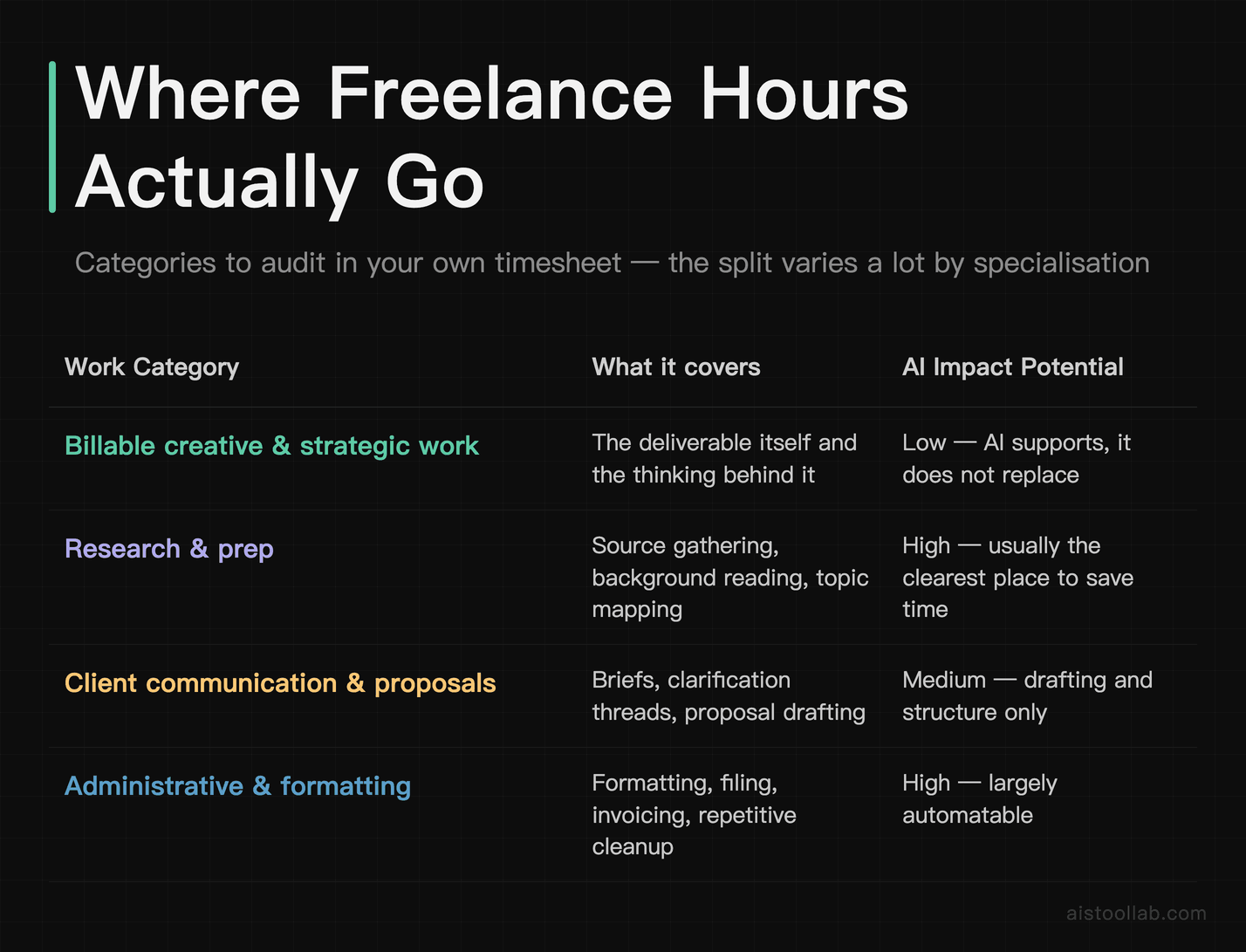
Before you can use AI effectively, you need an honest accounting of where your hours disappear. Non-billable time is easy to underestimate, because it hides in the places you never log. They track the time they spend writing the article or building the design, but they don’t track the research spiral, the three drafts of a proposal that didn’t convert, the back-and-forth emails trying to clarify a brief, or the thirty minutes spent formatting a deliverable that probably took ten minutes to actually create.
Freelancer time tends to be distributed across billable work, research/prep, client communication/proposals, and administrative tasks — though distributions likely vary significantly by specialization. The research, communication, and admin layers around the core creative work are where AI tools are legitimately transformative. Not in replacing the creative work, but in compressing the scaffolding around it.
The productive pattern isn’t using AI to write everything. It’s using it on the blank page, on research synthesis, and on the structural heavy lifting — so that by the time you sit down to do the actual skilled work, you’re working with momentum instead of starting from zero every single time.
The AI-Assisted Research Workflow That Compresses Prep Time
Research is where most freelancers hemorrhage time without realizing it. You open a brief, you need to understand an industry you’re not an expert in, and before you know it you’ve got fourteen browser tabs open, three contradictory statistics, and a vague sense of anxiety. Sound familiar?
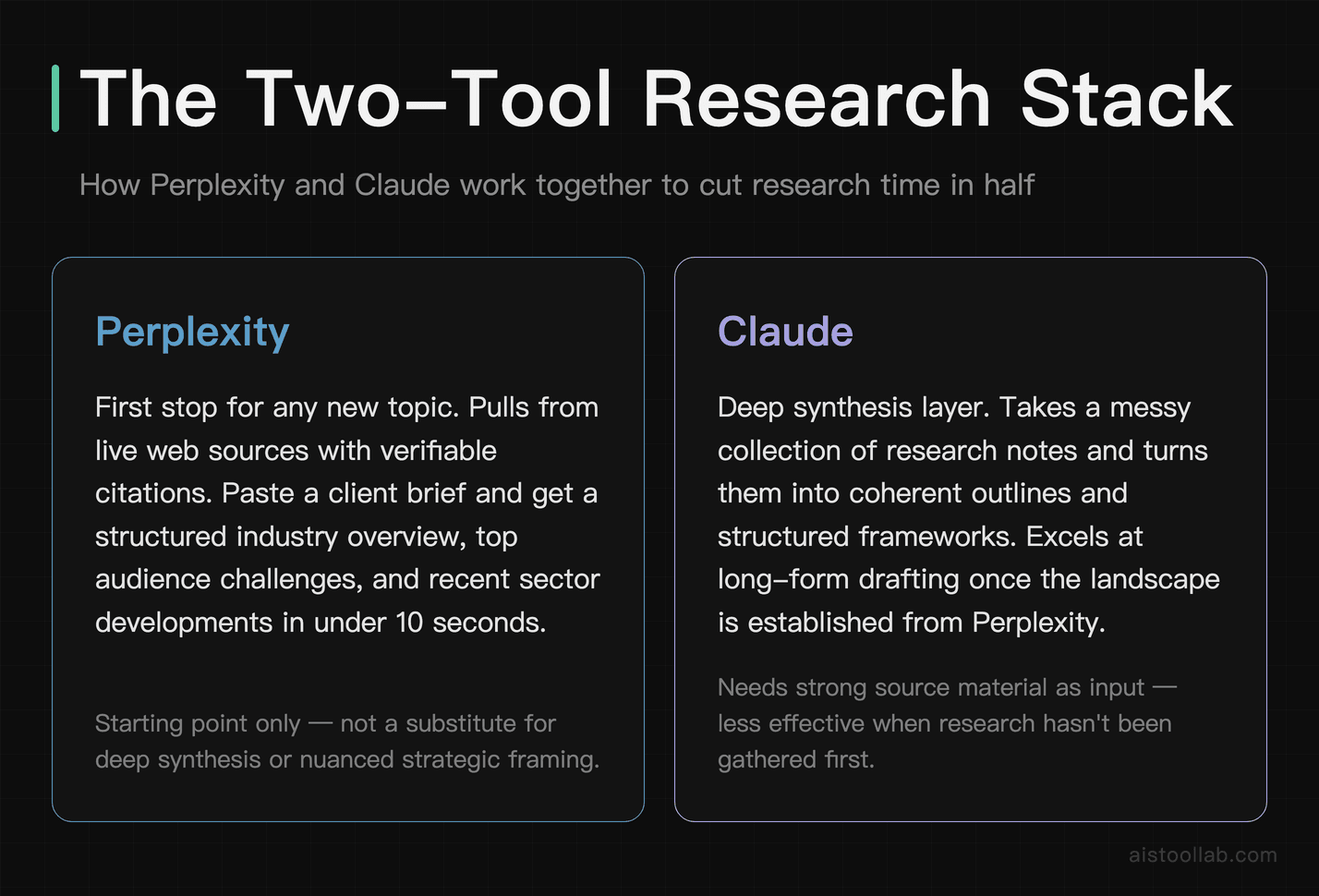
One tool that stands out here is Perplexity. Unlike ChatGPT or Claude used in isolation, Perplexity pulls from live web sources and cites them, which means you can actually verify what it’s telling you. It works well as a first stop for any new topic. You can paste in the client brief and ask something like: “Give me a structured overview of [industry], the top three challenges facing [target audience] right now, and three recent developments I should know about before writing for this sector.” The kind of structured overview it returns can replace a lot of manual tab-diving.
But Perplexity is just the starting point. After mapping the landscape, the next step is Claude for deeper synthesis. Claude is particularly good at taking a messy collection of research notes and turning them into a coherent framework. You can drop in Perplexity output, a few key articles, and any notes from a client call, then ask Claude to identify the key themes, flag any contradictions, and suggest angles you might not have considered. This synthesis step can move quickly with a bit of prompting followed by reviewing and refining the output.
I covered the Perplexity vs. ChatGPT research question in more depth in my Perplexity AI vs ChatGPT for Research: Which Wins for Deep Dives? piece, but the short version for freelancers is: use Perplexity for fact-finding with sources, use Claude for synthesis and strategic thinking. They’re not competitors in practice — they’re complementary tools in the same pipeline.
A Practical Research Stack for Freelancers
- Step 1 — Topic mapping: Perplexity with a structured prompt asking for an industry overview, key players, and recent developments. Budget five minutes.
- Step 2 — Source verification: Skim the cited sources Perplexity surfaces. Don’t skip this. AI can misrepresent sources even when it cites them. Budget ten minutes.
- Step 3 — Synthesis: Paste your verified notes into Claude and ask for a structured brief with key themes, tensions in the space, and potential angles. Budget five minutes of prompting, ten minutes of reviewing.
- Step 4 — Outline generation: Ask Claude to draft two or three outline options based on the synthesized brief. Pick the best bones and restructure as needed. Budget ten minutes.
A topic you know nothing about can come together much faster than researching it manually. The quality of the output isn’t lower — if anything it can be more consistent, since it doesn’t depend on whatever tabs you happened to find first.
A Quick Hands-On Check: Perplexity’s Free Version for Topic Mapping
To see how that Step 1 topic-mapping move actually plays out, I ran a single freelancer-style query on Perplexity’s free web version without logging in — asking for a structured overview of an unfamiliar industry (electric vehicles), including key players, recent developments, and sources. Here is what that one run returned:
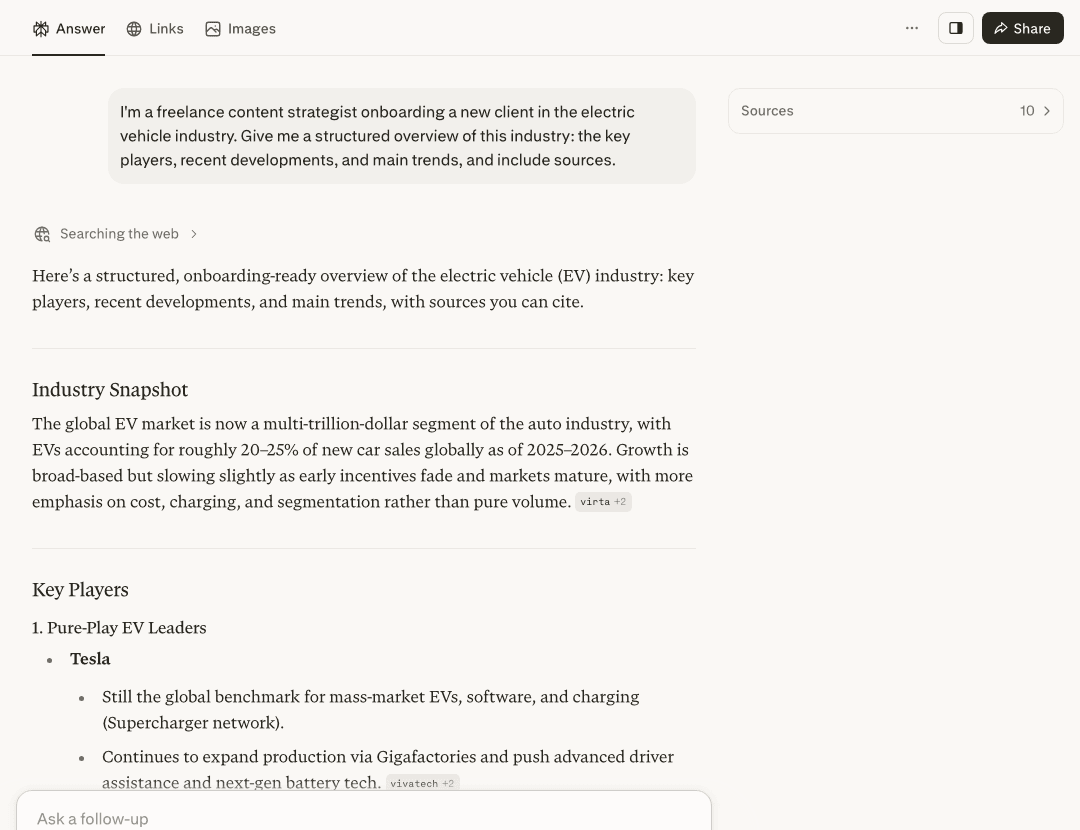
What stood out in this run: the answer came back already segmented into headings like Industry Snapshot and Key Players, with specific company names and product lines rather than vague summaries — the kind of scaffold a strategist can lift bullet points from. Several claims carried a compact source label (for example “virta +2”), which is the sourcing behavior that makes the verification step above realistic.
The honest limits of this quick test: this was the free version, not logged in, and a single query on one day — not a benchmark. Before I could type, I had to dismiss a cookie banner and a sign-up popup. The inline labels are compact (just a name and a “+2”), and in this run I did not expand the full source list or click through to confirm each source actually supports the claim — which is exactly why the “skim the cited sources” step in the stack above is not optional.
Client Proposals and Deliverables: Where AI Helps Most
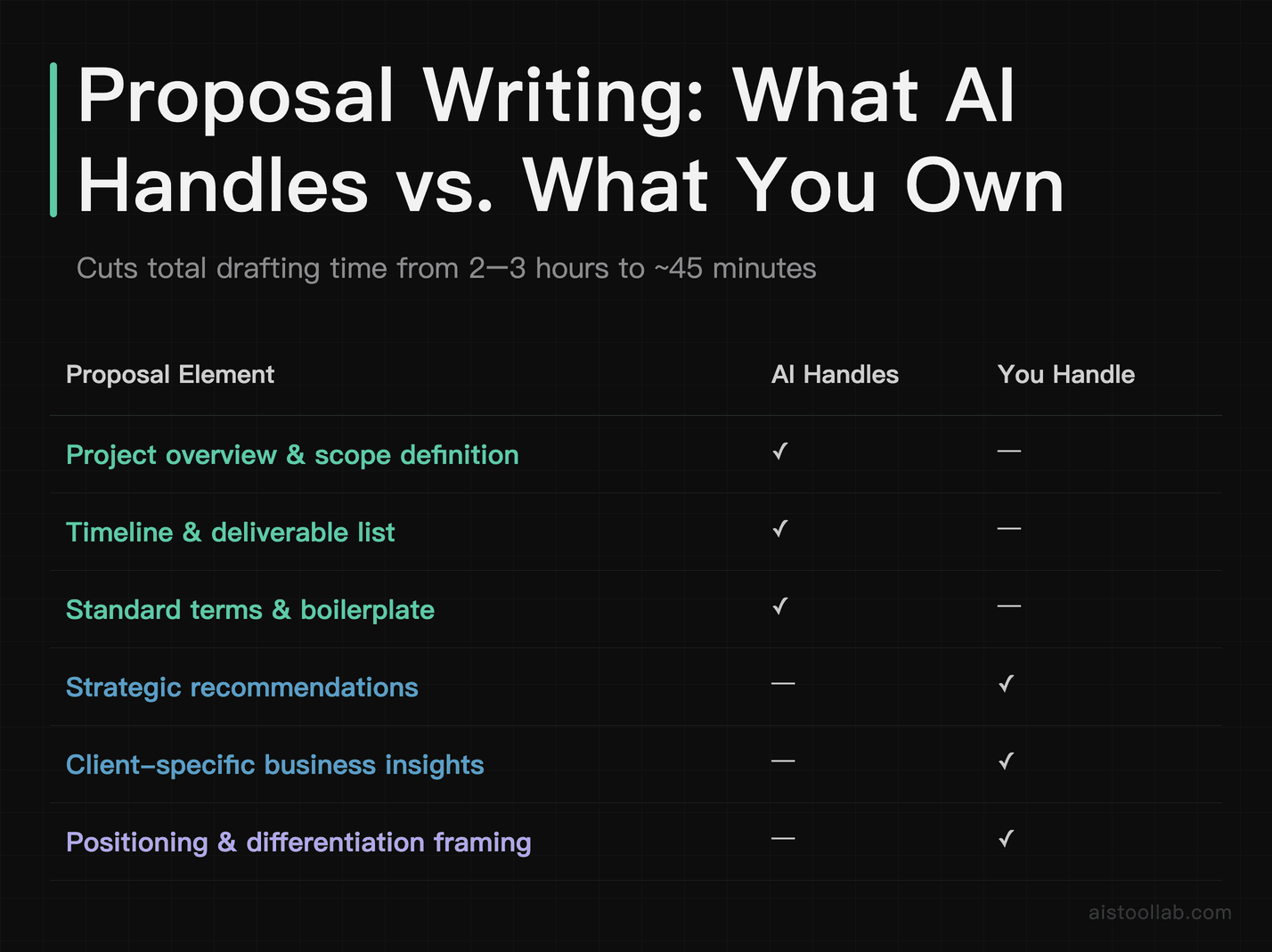
Writing proposals is one of those tasks that is easy to underprice in terms of the time it costs. A solid proposal for a mid-sized project can take two to three hours if you’re writing it carefully — and if the client says no, that time is gone. AI doesn’t eliminate the strategic thinking in a proposal, but it can take over the drafting and formatting overhead.
One effective process: keep a master prompt that describes your services, typical project structures, and pricing logic. When a new prospect comes in, feed in the relevant details from the call or email exchange and ask Claude to draft a proposal structure. It handles the boilerplate — project overview, scope definition, timeline, deliverable list, terms — leaving more energy for the parts that actually differentiate the proposal: the strategic recommendations, the specific insights about the client’s business, and the framing of why a given approach is the right one for their problem.
The AI can handle the structure while the human provides the substance, which keeps quality more consistent. For deliverables like blog posts, reports, and email sequences, the split works similarly. Claude can draft the structural scaffolding and a rough first pass, leaving the writer to do what they’re actually paid for: the specific voice, the sharp insights, the transitions that make a piece read like it was written by someone who actually cares about the topic.
One thing worth noting: AI is significantly better at some deliverable types than others. Long-form research reports, email sequences, social media content calendars, and first drafts of evergreen content are areas where AI assistance is genuinely high-value. Thought leadership pieces that require an authentic point of view, highly technical content in specialized fields, and any deliverable where the client is specifically paying for your individual perspective — those are areas where AI is more of a supporting tool than a primary one.
Maintaining Authentic Voice in AI-Assisted Writing: The Editing Layer
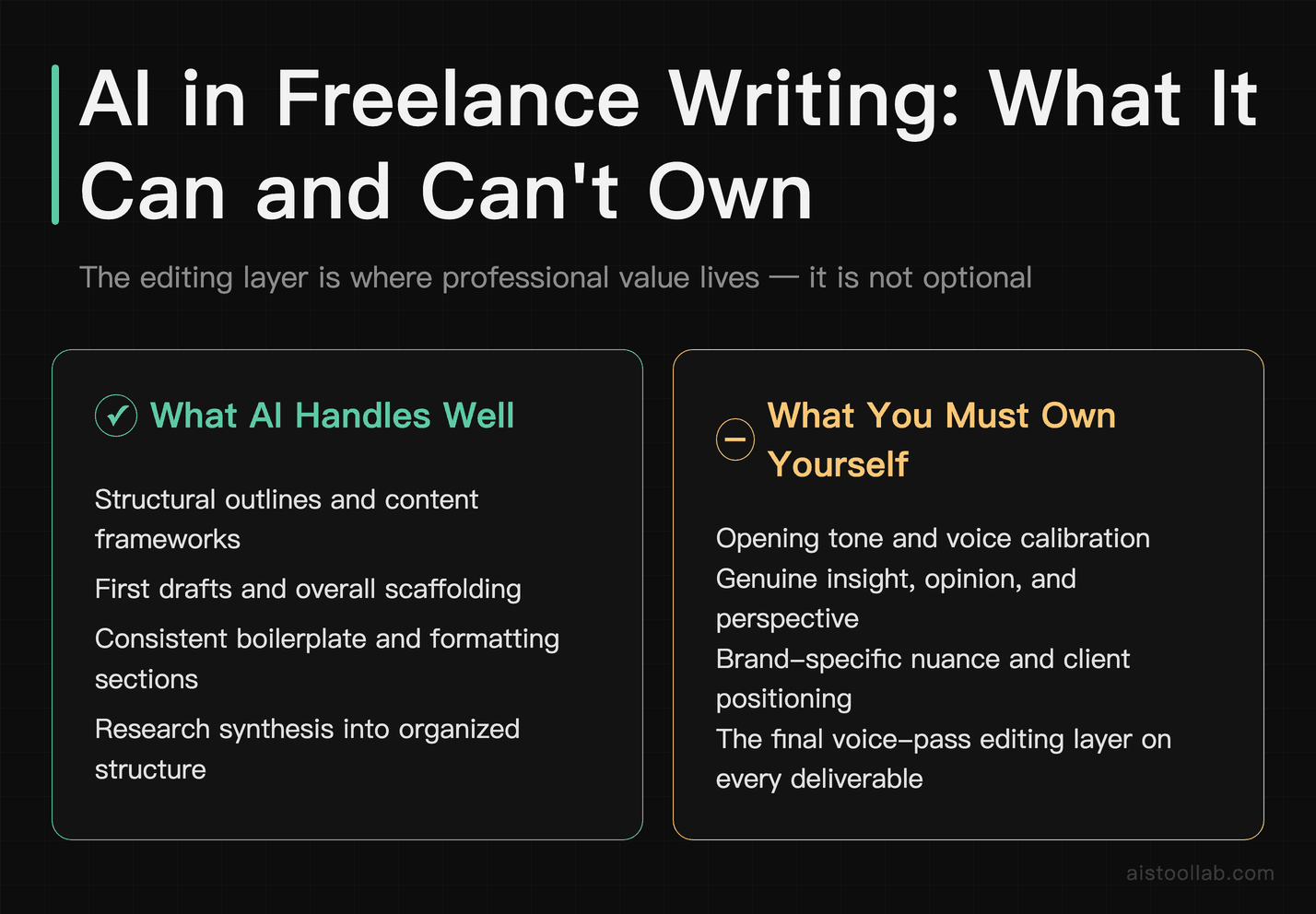
This is the part that most AI productivity tutorials skip, and it’s the part that matters most for freelancers whose value proposition is their voice and perspective. Using AI to write everything and delivering it unedited is how you end up with flat, generic content that clients eventually notice and stop paying for. The editing layer isn’t optional — it’s where the professional value lives.
A rule worth adopting: never let AI have the last word on anything client-facing. Put every deliverable through a “voice pass” — a dedicated editing phase that is not just about fixing errors, but about actively asking whether the piece sounds like you (or like the client’s brand, if you’re ghostwriting), whether the insights are genuinely sharp, and whether there is anything in it that a competent AI couldn’t have produced without your input.
Practical techniques that help maintain voice in AI-assisted writing:
- Write your own opening paragraph first. Before you let AI touch a piece, write the first paragraph yourself. This sets the tone and gives you something to calibrate against when you’re editing the AI output.
- Use AI for structure, not sentences. The more you let AI generate complete sentences and paragraphs wholesale, the more editing work you’ll create for yourself. Use it for outlines, bullet points, and rough drafts, then rewrite in your own voice.
- Keep a “voice document.” A running document with examples of your best work, phrases you use frequently, and stylistic preferences. Feed it to Claude when you need it to match your register more closely.
- The “would I have said this?” test. Read every sentence out loud. Anything that feels slightly off, slightly too formal, slightly too generic — rewrite it. It usually takes less than thirty seconds per sentence.
The goal is a finished product that feels completely human — because it is. You’re using AI the way a skilled chef uses a food processor: it handles the prep work, you handle the cooking. Nobody tasting the meal can tell which parts were machine-chopped.
Quality Control: Verifying AI Output Before It Reaches Your Clients
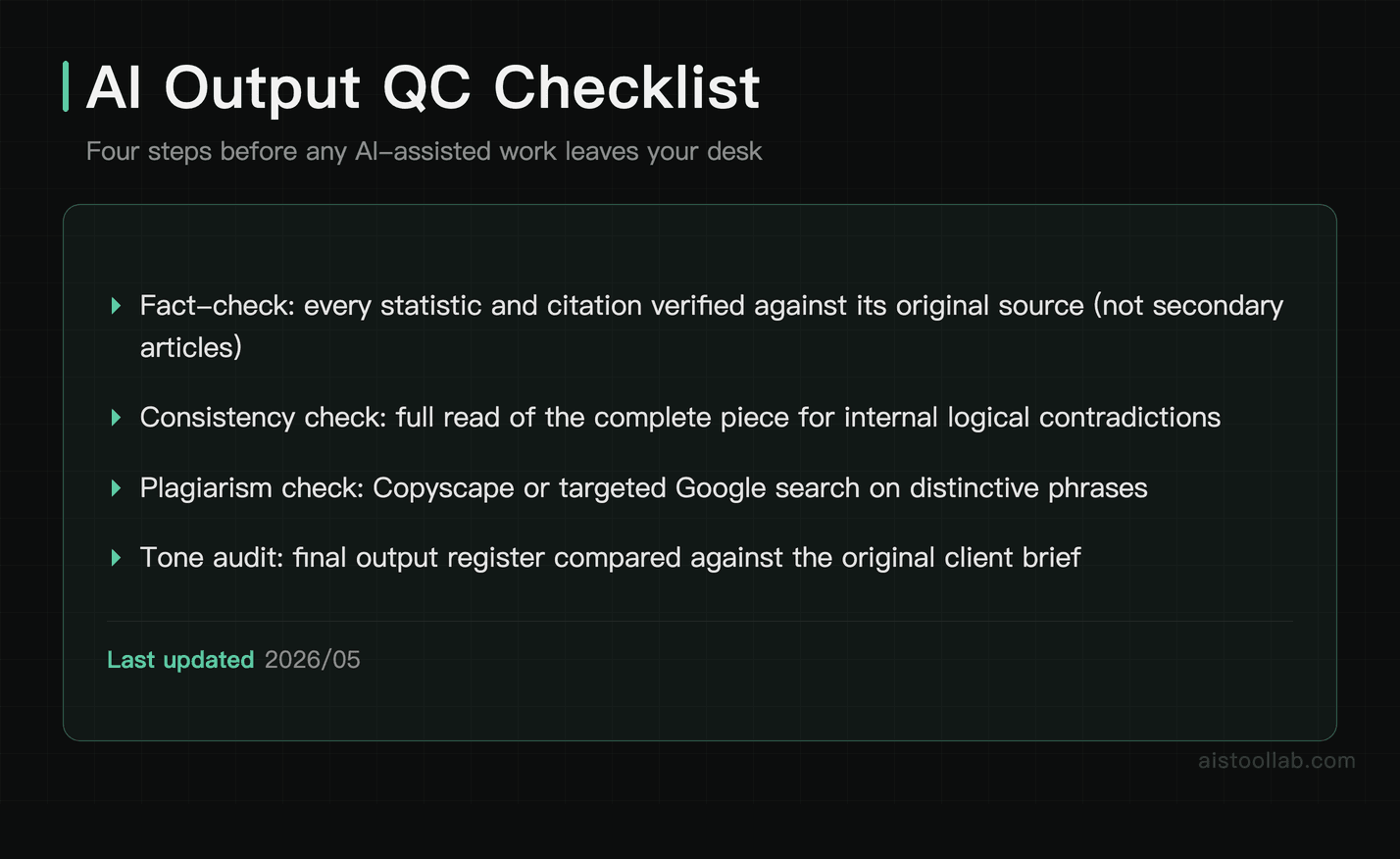
I want to be blunt here: AI makes confident mistakes. Claude will occasionally assert something that’s subtly wrong. ChatGPT will sometimes invent a statistic that sounds plausible but doesn’t exist. Perplexity is better about sourcing but not immune. If you’re sending AI-assisted work to clients without a verification pass, you’re taking a reputational risk that isn’t worth the time savings.
A quality-control checklist worth running before anything ships:
- Fact-check every specific claim. Any number, statistic, study citation, or named source gets verified against an original source. Not a secondary article — the actual source. This catches AI hallucinations before they become your problem.
- Check for internal consistency. AI can contradict itself across a long document without flagging it. Read the full piece looking for logical inconsistencies or arguments that undermine each other.
- Run a plagiarism check on long-form content. Tools like Copyscape or even a targeted Google search for distinctive phrases can catch instances where AI has reproduced existing text too closely.
- Check the tone against the brief. AI will sometimes default to a register that doesn’t match what the client asked for — too formal, too casual, too generic. Compare the output against the original brief before delivery.
- Read it as the client would. Put the document away for at least fifteen minutes, then come back and read it as if you’re seeing it for the first time. Does it actually answer the brief? Does it feel complete?
This process can take around twenty minutes for a 1,500-word piece. That’s time well spent compared to the alternative, which is a client coming back to you with “this statistic is wrong” or “this doesn’t sound like our brand at all.” Both of those conversations are expensive in ways that go beyond the time to fix them.
If you’re new to working with AI tools and want a solid foundation before building out a full workflow, I’d recommend starting with the AI Tools Starter Pack: The 5 Best Tools for Beginners in 2025 as a baseline — then layering in the more advanced workflow pieces as you get comfortable.
Measuring Real Productivity Gains: Time Tracking That Actually Tells You Something
You can’t manage what you don’t measure, and “AI doubled my productivity” is easy to say and hard to verify without tracking. If you want to actually understand whether your AI workflow is working — and where it’s working most — you need a few weeks of real tracking.
One way to find where AI helps is to track time in four categories — Research & Prep, Drafting & Creation, Editing & QC, and Client Communication & Admin — for a couple of weeks before changing your workflow, then again afterward. The comparison can be illuminating. Research and drafting tend to see the biggest time savings, while editing and QC may rise slightly, since AI output requires a verification pass.
The most important metric isn’t total time saved — it’s whether the quality of your output is holding steady or improving. Track both. If your time savings are coming at the cost of revision requests and client complaints, you’re not ahead.
Tools for tracking this honestly: Toggl and Harvest are the standards for freelancers, and they’re both solid. Even a simple spreadsheet works if you’re consistent about logging. The key is granularity — don’t just log “worked on Project X for 3 hours.” Log what you were doing within those three hours.
Which Freelance Specializations Benefit Most — and Which Should Be Cautious
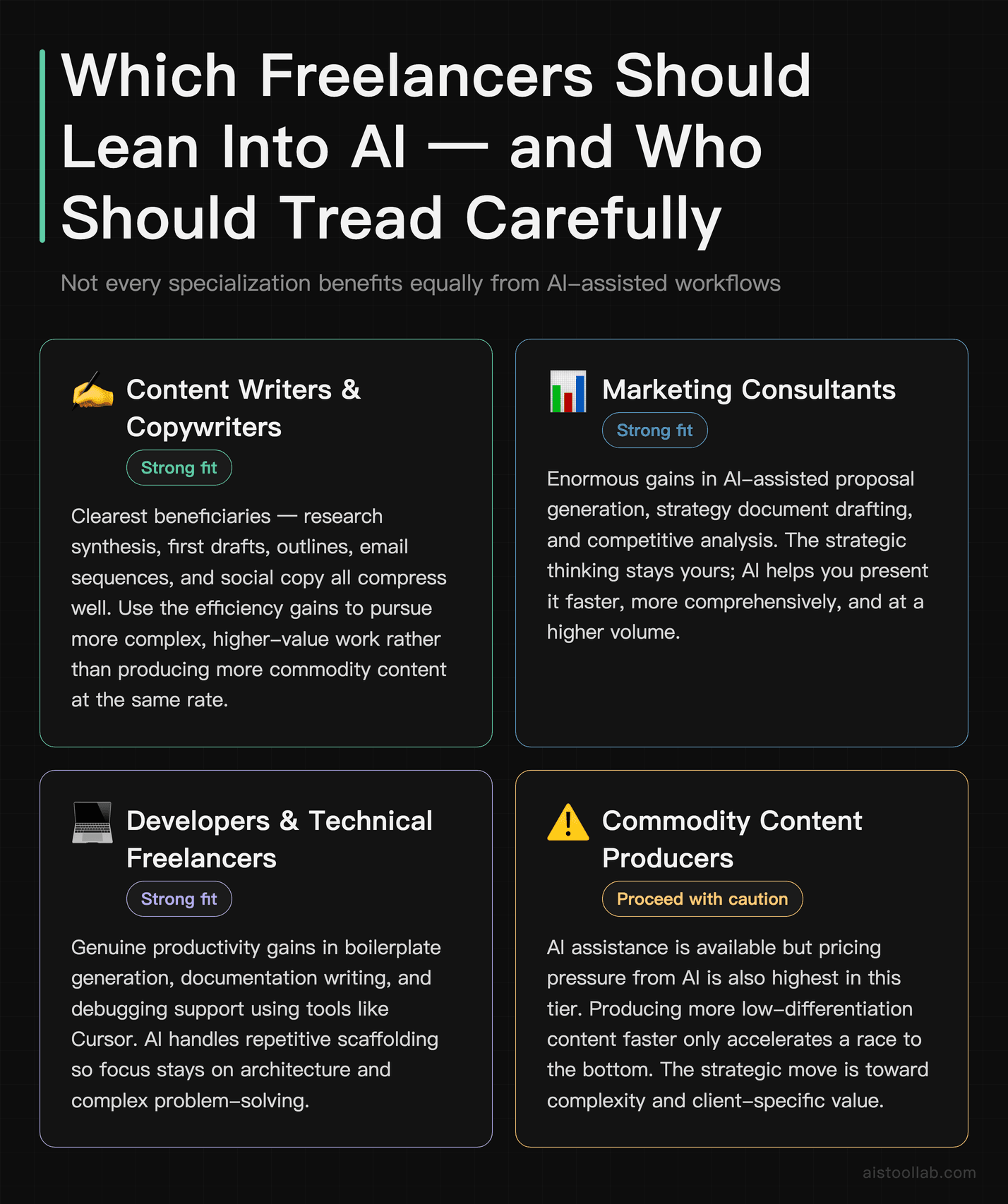
Not every freelance specialization benefits equally from AI assistance, and some should approach it with real caution. Being honest about this is more useful than the blanket “AI helps everyone” narrative that gets pushed a lot.
Strong Candidates for AI-Assisted Workflows
Content writing and copywriting map onto AI assistance directly. Research synthesis, first drafts, structural outlines, email sequences, social copy — AI handles the scaffolding well, and the editing layer is manageable. The caveat is that commodity content writing also faces direct pricing pressure from AI, so the move is to use AI efficiency to take on more complex, higher-value work rather than just producing more of the same.
Marketing consultants can use AI for proposal generation, strategy document drafting, and competitive analysis. The strategic thinking is still yours; AI helps you present it faster and more comprehensively.
Developers and technical freelancers using tools like Cursor for boilerplate generation, documentation, and debugging support. I went deeper on this in my Cursor Review 2025: The AI Code Editor That Actually Changes How You Work piece if you want the specifics.
Virtual assistants and operations freelancers can use AI to handle email drafting, document summarization, and workflow documentation at a scale that wasn’t previously possible for a solo operator.
Specializations That Should Tread Carefully
Journalists and investigative researchers should be cautious. The core value of journalism is original reporting — sources, interviews, verification. AI can help with background research and drafting, but over-reliance on it creates real professional and ethical risk. The “confident mistake” problem is particularly dangerous in a field where factual accuracy is the entire product.
Legal and financial writers face similar issues. AI-generated legal content that contains errors isn’t just embarrassing — it can cause real harm. If you work in these spaces, AI assistance is best limited to structural help and first-pass drafting that gets heavily reviewed by subject matter experts before delivery.
Brand voice specialists hired specifically for their distinctive creative perspective need to be careful that AI assistance doesn’t homogenize their output. Clients pay a premium for a specific voice; if the work starts feeling generic, they’ll notice, and the premium goes away.
The through-line across all of these is the same: AI works best when it’s handling the parts of your work that are structural, repetitive, or research-heavy — and when a skilled human is still making the judgments that actually require expertise. The moment AI starts making the expert judgments too, you’re not doing freelance work anymore; you’re just doing quality control on someone else’s output, and that’s worth a lot less.
Building the Workflow: A Practical Starting Point
If you want to actually implement this rather than just read about it, here’s where I’d start. Don’t try to overhaul your entire process at once. Pick the one part of your workflow that eats the most non-billable time, and build an AI-assisted system for that specific thing first.
For most freelancers, that’s either research or proposals. Spend one week building a repeatable prompt sequence for that task — something you can run in fifteen minutes and get a solid first pass from. Refine it. Then, once that part of your workflow feels solid, layer in the next piece. The freelancers who try to implement everything at once usually end up with a half-built system they don’t trust and revert to doing everything manually.
The Claude interface is a good starting point for most of the synthesis and drafting tasks described here, and Perplexity handles the research side. You don’t need a stack of ten AI tools — you need two or three that you actually understand how to use well. Depth beats breadth every time.
Also worth reading before you dive in: my piece on Why Prompt Engineering Is Overhyped (And What Actually Improves AI Output) — because the quality of your AI output has less to do with magic prompt formulas and more to do with giving the model good context, clear constraints, and specific examples. That’s the actual skill, and it’s learnable in a week.
The Bottom Line
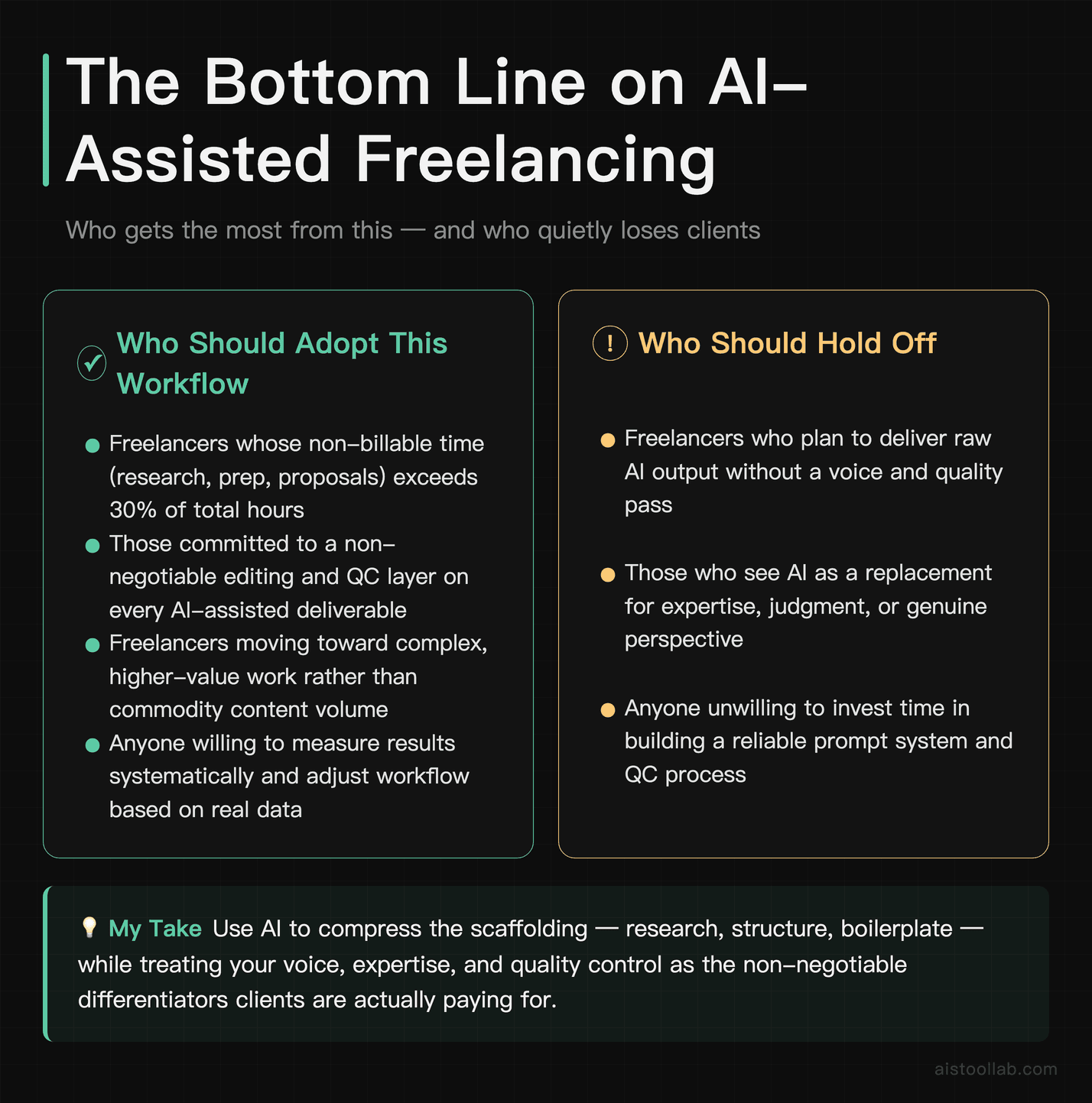
Doubling your output without working more hours isn’t a fantasy — but it requires being strategic about where AI actually helps versus where it creates more work. What separates a workflow that pays off from one that does not: staying honest about your own workflow, measuring the results systematically, and keeping the quality control process non-negotiable.
AI is genuinely useful for research synthesis, first drafts, proposal scaffolding, and handling the structural parts of almost any deliverable. It is not a replacement for expertise, voice, or judgment. The freelancers who treat it as the former and protect the latter are the ones still charging premium rates two years from now. The ones who outsource everything to AI and skip the editing layer are the ones whose clients quietly start looking elsewhere.
Getting your weekends back and keeping clients who think you’re one of the best writers they work with are compatible goals — but only if you’re deliberate about which parts of your work you hand off and which parts you keep.
Use Cases
Scenario: A Freelance Copywriter Scaling a Solo Practice
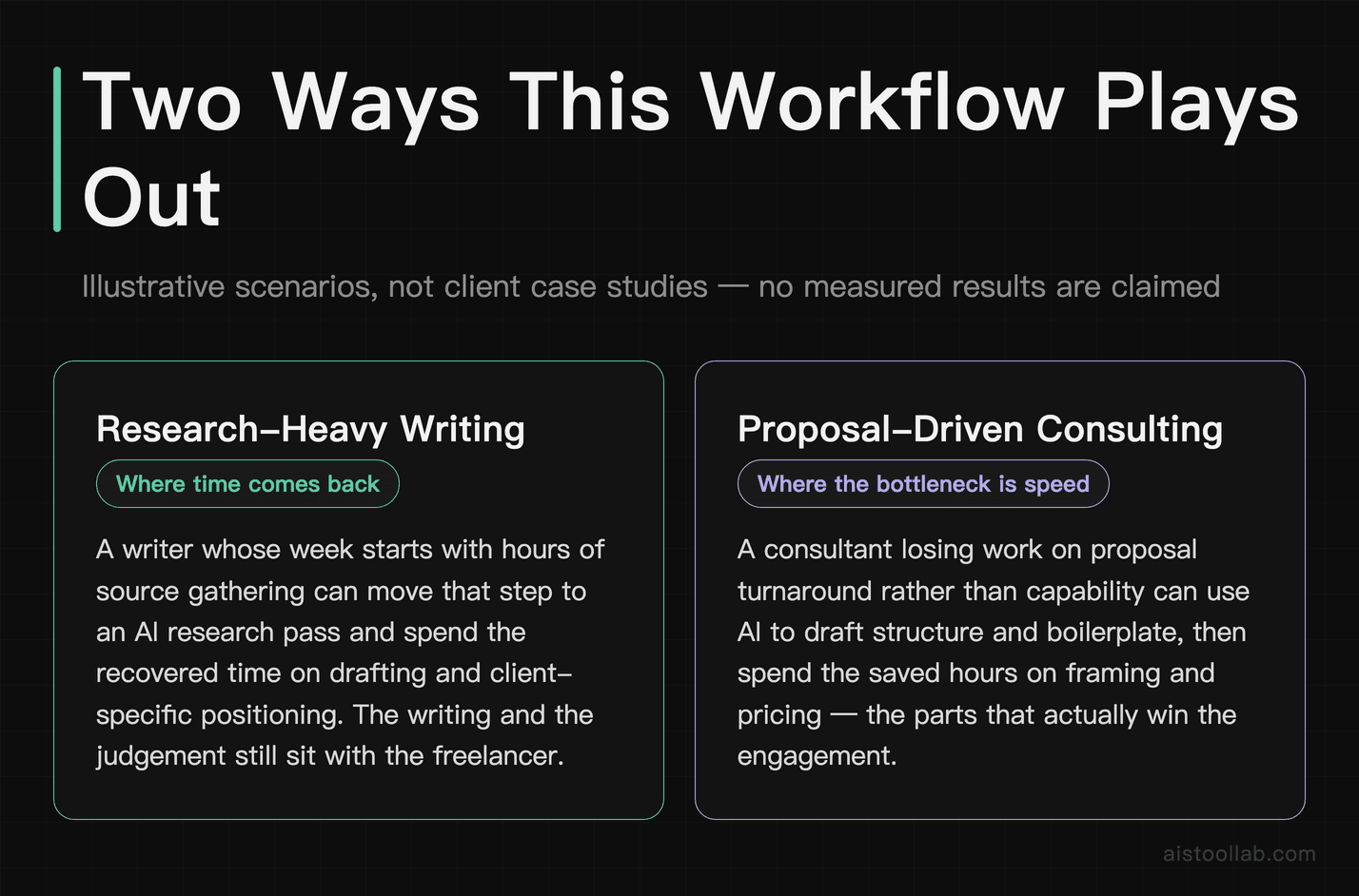
Say you are a freelance copywriter specializing in B2B SaaS content, and most of your unpaid hours go to research, outlining, and first-draft generation. A layered workflow — Perplexity for competitive research, Claude for long-form drafting, ChatGPT for repurposing content into social snippets and email sequences — turns that prep work into a repeatable sequence instead of a fresh start each time. How many hours that frees up depends on your deliverable mix; this article has no measured figures to quote, so it does not give one. What the split does not change: you still write every final piece yourself — the AI handles scaffolding, you handle voice, nuance, and client-specific positioning. That is the distinction that separates sustainable AI-assisted freelancing from low-quality content mills.
Scenario: An Independent UX Consultant Trying to Win More Proposals
Say you are a UX consultant working with mid-size e-commerce brands, and you are losing potential contracts to proposal fatigue rather than to skill gaps. Writing a detailed, customized proposal for every prospect is unpaid work, and conversion rates rarely justify it. A prompt library in Claude can take a discovery call transcript — generated via a transcription tool such as Otter.ai — and produce a draft you then edit, leaving your time for tone, specific brand references, and strategic recommendations. This article has no measured figures for how much that changes proposal volume or close rate, so it does not give any. The AI never pitches the strategy — that’s still entirely human — but it removes the blank-page paralysis that makes proposals feel like punishment.
Scenario: A Two-Person Marketing Startup Trying to Run Like a Full Agency
Say you are a bootstrapped two-person marketing startup competing against established agencies. Your differentiator is responsiveness and strategic thinking, but you are bottlenecked by execution bandwidth — content calendars, ad copy variations, client reports, and consistent output across several accounts at once. An AI-assisted production stack — Claude for long-form strategy documents and content drafts, ChatGPT for ad copy iteration and A/B variants, Perplexity for market research — lets one founder handle client relationships and high-level strategy while the other runs the AI workflow and quality control. How many accounts that supports, and at what retainer, depends on the accounts; this article has no measured figures to quote.
Frequently Asked Questions
Is the free version of Claude or ChatGPT enough to build a real freelance workflow?
For light experimentation, yes — but for serious freelance production, the free tiers of both Claude and ChatGPT have meaningful limitations that will frustrate you quickly. Claude’s free tier throttles usage fairly aggressively, meaning you can hit daily limits mid-project during a heavy workday. ChatGPT’s free tier now runs on a GPT-5-class instant model (a big step up from the old GPT-3.5 days), but usage limits can still affect which model or mode you get, so output quality for nuanced writing tasks lags behind the deeper GPT-5 reasoning tiers you get on Plus. If you’re billing clients and using AI as a core part of your workflow, the subscription is small next to one billable hour: Claude Pro is $20/month billed monthly, or $17/month billed annually (claude.com/pricing, checked 2026-07-29); check OpenAI’s pricing page for the current ChatGPT Plus figure. Whether it pays back depends on how much of your week the tool actually touches, which is what the tracking section above is for. Start free to test whether the tool fits your style, but budget for the paid plan if you’re serious about scaling output.
Will clients be able to tell that AI was involved in the work?
This depends almost entirely on how you use the tools — and it’s the right question to be asking. Unedited AI output has recognizable patterns: overuse of em dashes, transitions like ‘it’s worth noting,’ generic sentence structures, and a flatness of voice that experienced readers can often detect. However, when AI is used as a first-draft engine and a human writer substantially edits, restructures, and injects specific client knowledge and brand voice, the final product reads as the writer’s own work — because the writer spent their attention on refinement rather than on generation. The pattern that holds up is using AI for structure and scaffolding, then applying your expertise to everything that makes the work valuable: insight, specificity, strategic framing, and tone. Clients aren’t paying for keystrokes — they’re paying for judgment. AI handles the former; you supply the latter.
What are the biggest limitations of relying on AI tools for freelance work?
Several limitations are worth acknowledging honestly. First, AI models have knowledge cutoffs, meaning they can produce confidently wrong information about recent events, new product releases, or current market conditions — Perplexity addresses this for research tasks, but writing models like Claude and ChatGPT do not unless connected to browsing tools. Second, AI has no genuine understanding of your specific client’s business, competitive positioning, audience psychology, or internal politics — that context has to come from you, and the quality of your prompts and briefing documents determines how relevant the output is. Third, there is a real risk of over-reliance leading to skill atrophy: freelancers who stop practicing the core craft risk losing the expertise that makes their editing valuable. Fourth, ethical and contractual considerations are real — some clients explicitly prohibit AI-assisted work, and you should always disclose your workflow if asked directly or if client agreements require it.
How does Claude compare to ChatGPT specifically for freelance writing tasks?
Both are capable tools, but they have meaningful differences in where they excel. Claude is built around a long context window and instruction-following, which is why it gets reached for on article writing, white papers, strategy documents, and detailed client proposals. This article has not run a same-period comparison, so it does not rank the two on output quality. ChatGPT, now running on the GPT-5 family, excels at versatility — it handles a broader range of task types, has a more developed plugin and integration ecosystem, and tends to be better for iterative back-and-forth tasks like brainstorming, rewriting variations, or working through creative problems in conversation. You can also use both: Claude for production drafting, ChatGPT for ideation and repurposing. If you can only choose one, assess your primary task type — long-form drafting points toward Claude, varied quick tasks point toward ChatGPT.
Is using AI for client work ethical, and should I disclose it?
This is a nuanced area and the honest answer is: it depends on your client agreements and the nature of the deliverable. Many professional services have historically used tools, templates, and assistants without itemizing every resource — a copywriter using a style guide or a consultant referencing a research database doesn’t typically need to disclose every tool in the chain. That said, AI represents a qualitatively different kind of assistance, and client expectations and contracts are evolving rapidly. Some clients include explicit AI clauses in their agreements; others don’t address it at all. A workable ethical baseline: read your contracts carefully, don’t misrepresent your process if directly asked, ensure the work actually meets the quality standard the client is paying for, and always be transparent if a client asks how you work. The value you provide is your expertise, judgment, and accountability for the final product — AI is a tool in that process, not a replacement for professional responsibility.
Can AI tools help with freelance tasks beyond writing, like invoicing or client management?
Absolutely — and this is an underexplored area where AI adds significant value without the quality concerns that apply to client-facing deliverables. For administrative tasks, ChatGPT and Claude can draft client onboarding emails, create project scope documents, generate invoice line-item descriptions, write follow-up sequences for late payments, and build contract templates. Perplexity can help you research fair market rates for new service areas or quickly understand an unfamiliar industry before a discovery call. AI can also assist with business development — analyzing a prospect’s website and LinkedIn presence to prepare for a pitch, generating questions to ask during a discovery call, or drafting case study outlines from project notes you provide. Some freelancers also use AI to build personal knowledge management systems: summarizing articles, extracting key points from long PDFs, and organizing research into structured formats they can reference later. The administrative and operational gains are often as significant as the content production gains.
How much time realistically does it take to build an AI-assisted freelance workflow from scratch?
There is a setup phase: active experimentation against your real work before the workflow feels genuinely efficient rather than just interesting. This article has no survey data on how long that takes, so it does not give a number. The first week typically involves testing tools against your actual work tasks — not hypothetical prompts, but real client projects — and identifying where AI produces usable output versus where it wastes more time than it saves. The second and third weeks involve building a personal prompt library: reusable prompt templates calibrated to your voice, your typical deliverable formats, and your common client types. After a few rounds of that, the system starts running without much conscious thought. After that, the workflow compounds: you refine prompts based on what works, add new use cases, and the efficiency gains grow over time. The investment is real but front-loaded. Trying one tool on one task, getting mediocre results, and giving up is what misses the compounding returns that come from systematic workflow development.
Is this kind of AI-assisted workflow worth it if you’re already a high-earning freelancer?
Arguably, it’s more worth it the higher your rate — because your time has a higher opportunity cost. A freelancer billing $200/hour who spends 10 hours per week on research, outlines, and administrative work is leaving $2,000/week on the table relative to billable time. If AI can recover even half of that through workflow efficiency, the return is substantial. Beyond raw revenue, high-earning freelancers often face a ceiling determined not by demand but by bandwidth — there are only so many hours available to service clients personally. AI-assisted workflows allow you to either serve more clients at the same quality level, offer faster turnaround times as a premium differentiator, or maintain current revenue with fewer working hours. The latter is particularly compelling for freelancers dealing with burnout. The risk of complacency is real — you must continue developing the expertise and judgment that makes your editing and oversight valuable — but for freelancers who manage that balance, the efficiency gains are genuinely transformative rather than marginal.
Last updated: 2026