

📌 Editor’s note (July 2026): This article reflects the AI models and versions current at the time of writing. The AI landscape moves quickly and newer model versions may have been released since. We’ve kept the original references as a snapshot from that period rather than rewriting the analysis.
Contents
Nobody Told Me Where to Start — So I’m Telling You
It’s easy to spend three weeks “researching AI tools” before actually using one: reading comparison posts, watching YouTube deep-dives, bookmarking a dozen browser tabs — and still never typing a single prompt. The problem usually isn’t information overload. It’s that nobody just says: start here, do this, then do that.
That’s what this guide is. Not a feature spec sheet. Not a sponsored rundown of tools nobody has actually touched. I use some of these daily — Claude and Perplexity especially — and have spent real time with others; where I haven’t used a tool hands-on, I lean on official information and public reviews and say so. I’m going to tell you exactly what each one is good for, where the free tier actually holds up, what beginners consistently get wrong, and how to get productive with them relatively quickly.
The five tools: ChatGPT, Claude, Perplexity, Midjourney, and Cursor. Different tools, different jobs. Let’s get into it.
The 5 Tools — What They’re Actually For
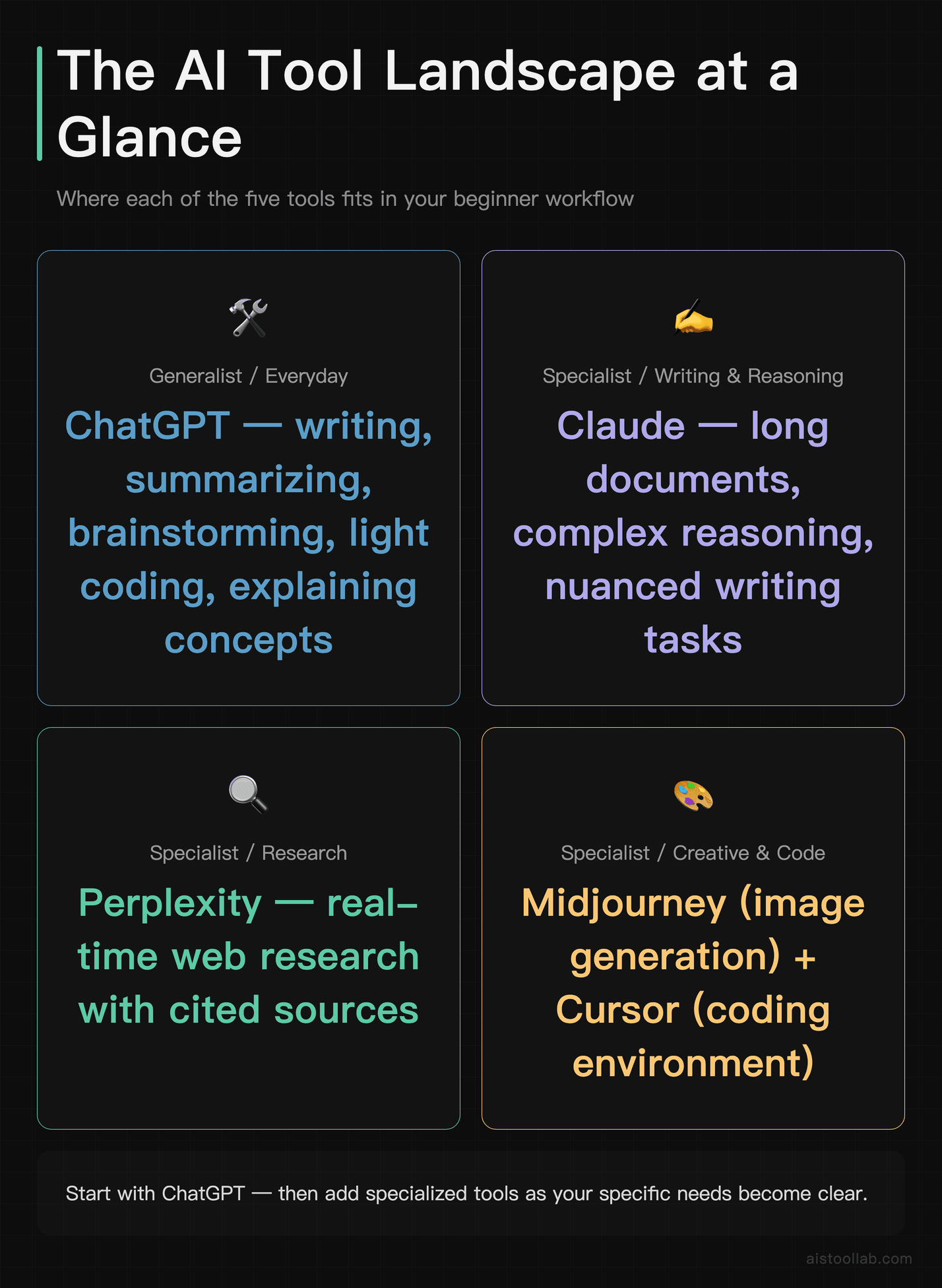
ChatGPT: The Swiss Army Knife
ChatGPT is the one your coworker mentioned at lunch. It’s probably the reason you’re reading this article. And honestly? The reputation is mostly deserved — not because it’s the best at any single thing, but because it’s competent at almost everything. Writing, summarizing, brainstorming, light coding, explaining concepts, role-playing customer scenarios — it handles all of it without breaking a sweat.
What makes ChatGPT especially powerful for beginners is the breadth of the ecosystem. The GPT Store has pre-built assistants for specific tasks, the voice mode is genuinely useful for thinking out loud, and the integration with tools like DALL·E and code interpreter (now called Advanced Data Analysis) means you can do more without switching apps. OpenAI’s ChatGPT has become something of an all-purpose AI operating system at this point.
The free tier gives you GPT-5.5 with usage limits — you’ll hit those limits during heavy sessions, but for casual daily use, it’s genuinely workable. The paid tier (ChatGPT Plus at $20/month) unlocks higher limits, access to newer models, and more plugin integrations. It’s the most well-rounded starting point if you can only pick one tool.
Claude: The One That Actually Reads Your Whole Document
I was a ChatGPT loyalist until about a year ago when I pasted a 40-page research report into Claude and asked it to extract the five most actionable recommendations. It did this effectively and quickly, with context that clearly reflected having read the whole document — not just the first and last paragraphs.
Claude, made by Anthropic, has a massive context window and a writing style that feels more natural and less robotic than most models. It’s the tool I reach for when I need to work with long documents, draft anything that needs a human tone, or think through a complex problem with nuance. It’s also noticeably more careful about giving you hedged, accurate answers rather than confidently wrong ones.
The free tier is real — Claude Sonnet is available without a subscription, and it handles most everyday tasks. For heavier lifting (the Opus model, higher limits, longer conversations), Claude Pro at $20/month is worth it. I covered the model differences in depth in my Claude vs ChatGPT comparison comparison if you want a more granular breakdown.
Perplexity: Search That Actually Answers Questions
Here’s the thing about Perplexity that took me too long to appreciate: it’s not really an AI chatbot. It’s a research tool. There’s a difference. When you ask ChatGPT “what’s the best CRM for a 10-person sales team in 2026,” it gives you an answer based on training data that may be a year old. When you ask Perplexity the same question, it searches the web in real time, synthesizes current sources, and gives you an answer with citations you can actually click.
For anyone who does research — journalists, marketers, consultants, students, curious humans — Perplexity is a revelation. The free tier is surprisingly capable: real-time web search, decent response quality, unlimited basic queries. The paid Pro tier ($20/month) adds access to GPT-5.5 and Claude models under the hood, more detailed searches, and a feature called Pro Search that goes deeper on complex questions.
I use Perplexity every single morning as my first research pass on anything news-related or topic-specific. I’ve compared it more thoroughly with ChatGPT in my Perplexity AI vs ChatGPT for Research article — the short version is: for research, Perplexity wins by a lot.
Hands-on: a beginner question on the free tier (no login)
Because this is the beginner pack, I tested exactly that use case — on the free tier, without logging in. I asked a plain beginner question (index fund vs ETF, which is better for a beginner, with sources). This is the actual result.
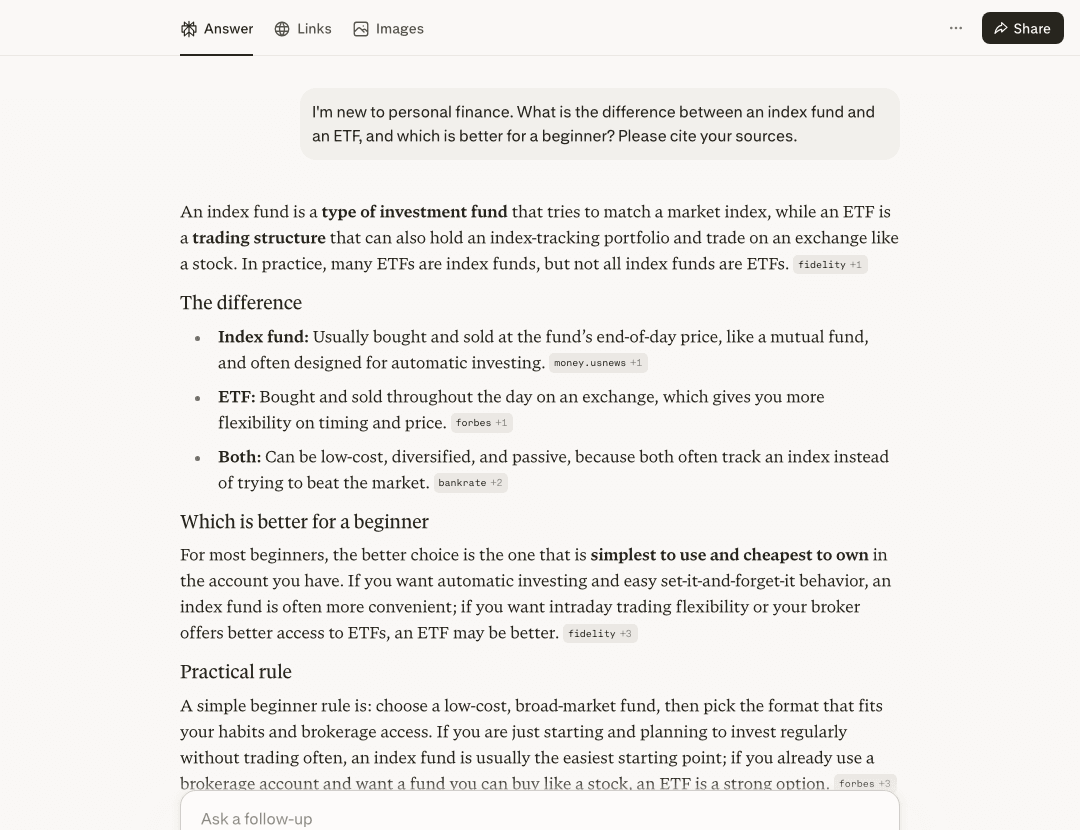
What I saw in this run: even without an account it answered in plain language, split the answer into “The difference / Which is better for a beginner / Practical rule”, and put source labels (e.g. fidelity, forbes, bankrate) next to the points. For a nervous beginner, getting a readable answer with recognisable sources attached is exactly the value this section is pointing at.
Honest limits from this single run: I only viewed the source labels on screen — I did not click each one through to confirm the link resolves or that it backs the point, and financial answers in particular should be checked against the primary source; This run also does not test the ChatGPT comparison mentioned just above; and I had to dismiss a cookie banner and a sign-in prompt first. This is one free-tier run at this moment, not a benchmark.
Midjourney: Still the Best for Serious Image Work
If you want to generate images, there are a dozen tools competing for your attention. But by most public reviews and official showcases — DALL·E, Stable Diffusion, Ideogram, Firefly — Midjourney still produces the most aesthetically compelling output for most use cases. The lighting, composition, and texture quality at v8.1 is genuinely impressive — provided your prompt is precise; when the prompt is vague, the drop-off in output quality is obvious. It’s the tool professional designers and content creators reach for when quality matters.
The catch: Midjourney has no meaningful free tier anymore. You used to get 25 free images; now the free trial is essentially gone or extremely limited depending on when you’re reading this. The basic plan starts at around $10/month. That’s the honest truth — it’s a paid tool. But if visual content is part of your work, it pays for itself fast. Midjourney’s website has the current plan details.
For beginners, the learning curve is the prompt language. Midjourney responds to a specific style of descriptive prompting that takes some practice. I went deep on what changed in the latest version in my Midjourney v8.1 Review — worth reading before you spend money on a subscription.
Cursor: The AI Code Editor That Makes Developers Faster
Cursor is an AI-powered code editor built on top of VS Code. If you’re a developer — or someone who writes code occasionally — it’s the most impactful tool on this list, full stop. The core magic is that it doesn’t just autocomplete lines; it understands your entire codebase and can write functions, refactor logic, explain errors, and generate tests based on what your project actually does.
Cursor is built for multi-file projects, and it can meaningfully cut the time spent on boilerplate and error-chasing. It’s not magic — you still need to understand what the code does — but it significantly compresses the time between having an idea and having working code.
The free tier gives you a limited number of “fast” AI requests per month before throttling to slower completions. It’s enough to genuinely evaluate whether it fits your workflow. The Pro plan at $20/month removes those limits. For professional developers, this pays off within the first week. For non-developers who are just starting to dabble in code, the free tier is a perfectly reasonable place to experiment. Cursor’s official site has the latest plan comparison.
Free Tiers: What’s Genuinely Useful vs. What’s Just a Demo
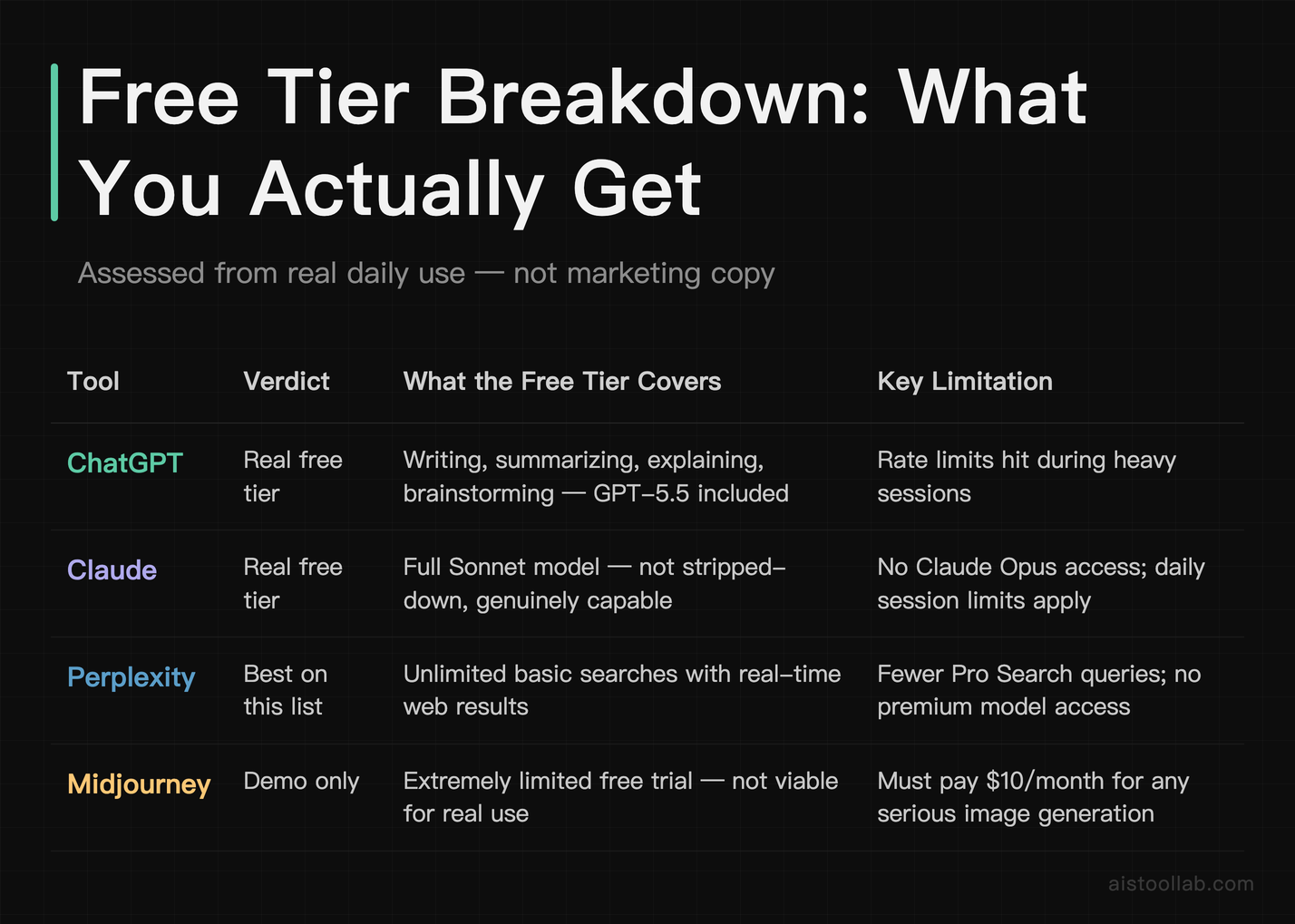
This is probably the most practically useful section in this article, so let me be direct.
ChatGPT free: Genuinely useful. GPT-5.5 on the free tier handles most everyday tasks — writing, summarizing, explaining, light brainstorming. You’ll hit rate limits during heavy use, but for one to two hours of daily usage, it holds up. This is a real free tier, not a demo.
Claude free: Also genuinely useful. Claude Sonnet (the mid-tier model) is available for free and it’s legitimately good. You’ll hit session limits before you hit a paywall on most days. The free tier doesn’t give you Claude Opus (the most powerful model), but Sonnet is not a stripped-down version — it’s a capable model in its own right.
Perplexity free: Probably the best free tier on this list. Unlimited basic searches with real-time web results. The limitations (no access to premium models, fewer Pro Search queries) matter more as your use cases get advanced. For a beginner using it as a research assistant? The free tier is excellent.
Midjourney free: Nearly nonexistent. Be honest with yourself: if you want to use Midjourney seriously, budget for the $10/month plan. The “free trial” in its current form is not a viable daily driver.
Cursor free: Useful for evaluation, limited for daily use. You get a set number of fast completions per month, after which the AI assistance slows significantly. If you’re just learning to code or doing occasional scripting, it might be enough. For professional daily use, plan on the paid tier.
The Most Common Beginner Mistakes (And What to Do Instead)
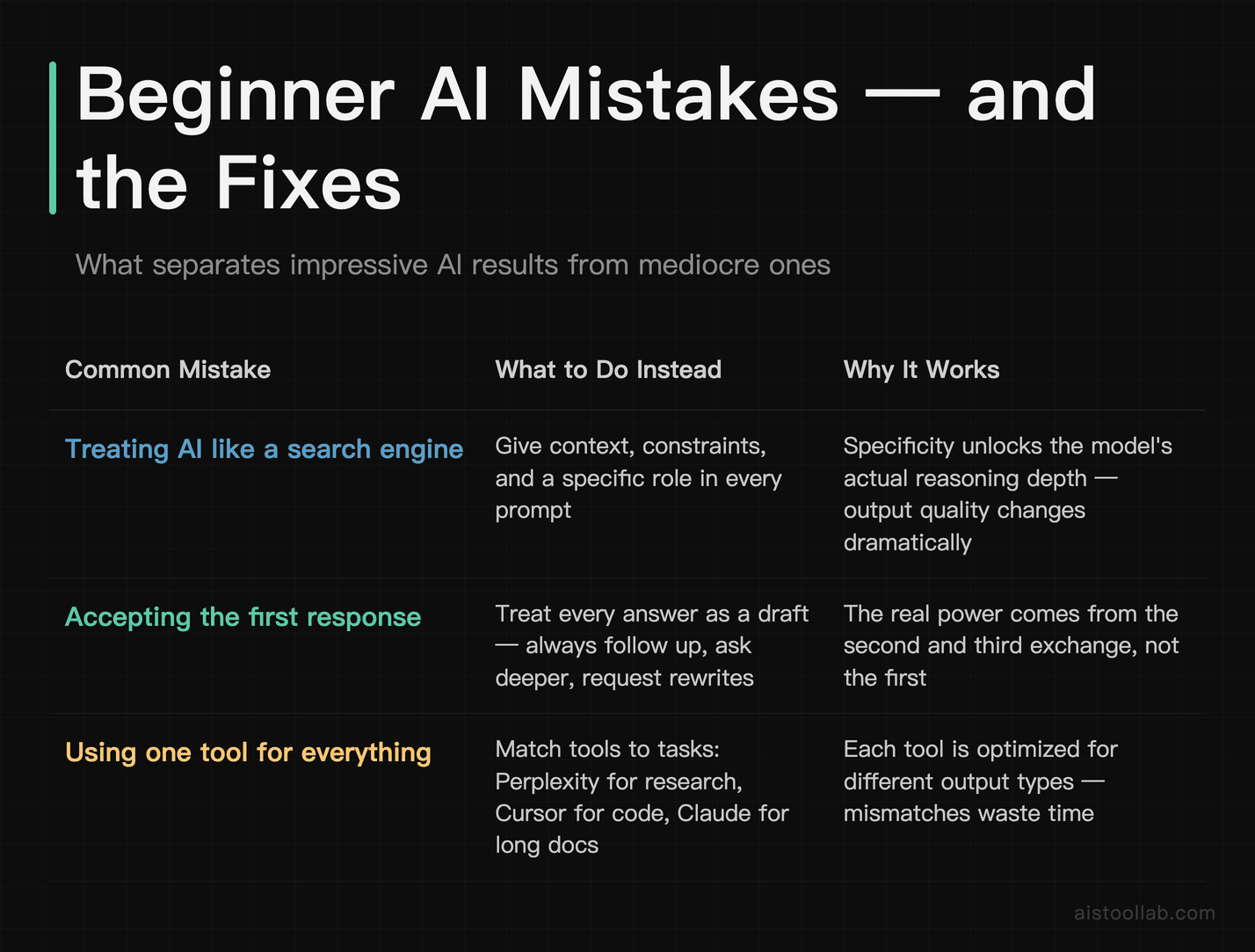
I’ve introduced a lot of people to AI tools over the past two years. The mistakes are almost always the same.
Mistake #1: Treating it like a search engine. The biggest one. Typing “best productivity apps 2026” into ChatGPT and expecting a Google-style results page is using a Ferrari as a delivery van. AI tools are most powerful when you give them context, constraints, and a specific role. Instead of “best productivity apps,” try: “I’m a freelance designer who works alone, struggles with time tracking, and hates subscription fees. What are three productivity tools that would actually fit my situation?” The output difference is night and day.
Mistake #2: Accepting the first response. The first answer is a draft. Always. The real power comes from the follow-up. Ask it to go deeper on one point, rewrite in a different tone, give you the counterargument, or explain its reasoning. People who get impressive results from AI tools are the ones who iterate.
Mistake #3: Using one tool for everything. ChatGPT is not the right tool for image generation. Midjourney can’t do your research. Cursor is for code, not content. The biggest productivity unlock comes from using each tool for what it’s actually good at — which is exactly what the next section is about.
Mistake #4: Not saving good prompts. When a prompt works really well — produces exactly the tone or format or analysis you needed — save it. A document of fifteen to twenty proven prompts for your specific work is worth more than any prompt guide you’ll find online. Build your own library as you go.
Mistake #5: Over-trusting the output. These tools hallucinate. They sound confident when they’re wrong. Perplexity is better than most because it cites sources you can check, but even then, verify anything that matters. Use AI to accelerate your thinking, not replace your judgment.
The 30-Day Ramp-Up Plan: Zero to Daily AI User
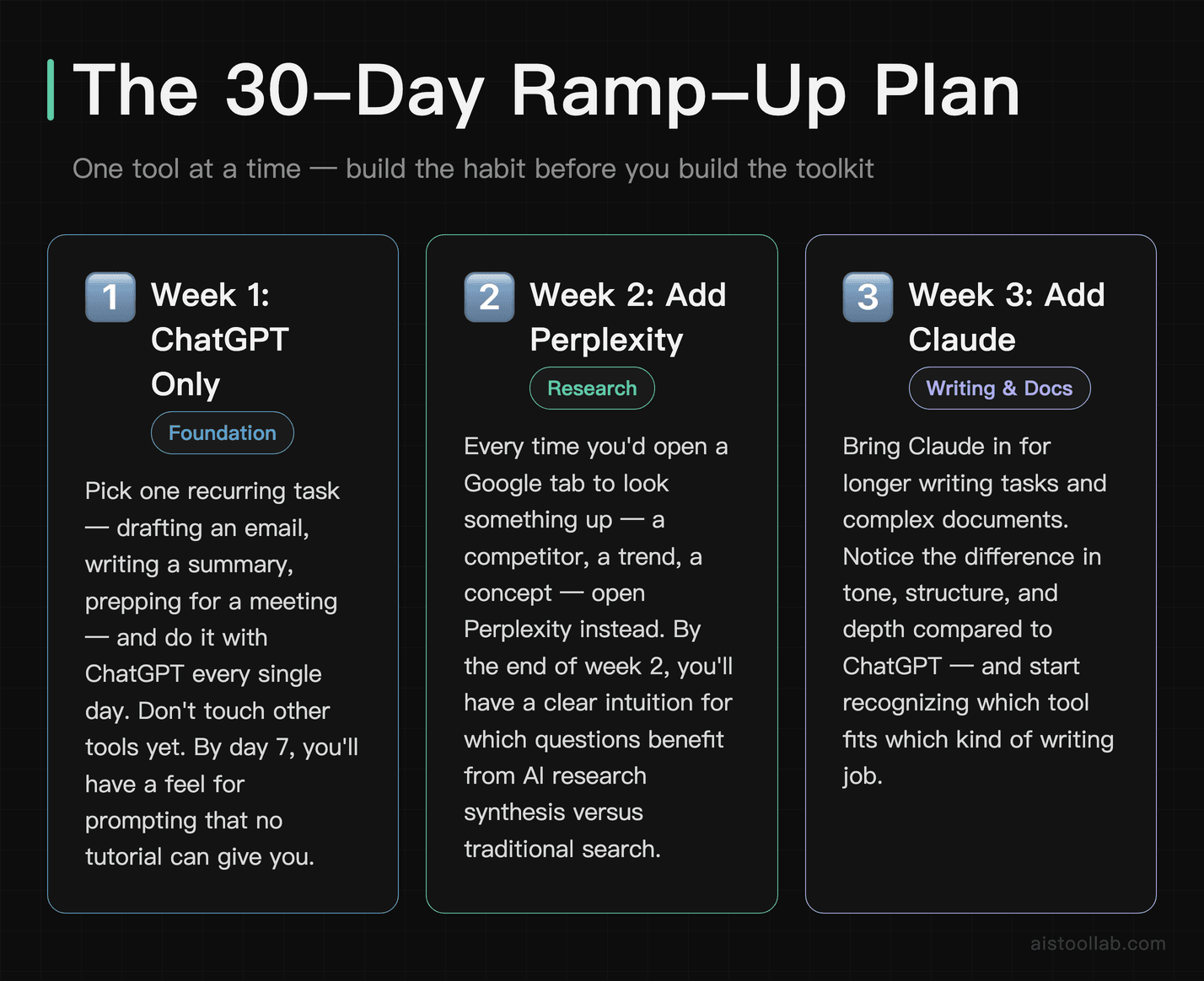
This is the practical plan I’d give to someone starting from scratch. It’s intentionally slow at the beginning — not because these tools are hard, but because building the habit matters more than learning all the features.
Week 1: Just ChatGPT, Nothing Else
Pick one recurring task you do every week — writing a summary, drafting an email, preparing for a meeting — and do it with ChatGPT instead. Don’t try to automate your whole workflow. Just replace one task, do it every day, and pay attention to what the prompts that work have in common. By day 7, you’ll have a feel for how to talk to an AI model that no tutorial can give you.
Week 2: Add Perplexity for Research
Any time you’re about to open a new Google tab to look something up — a competitor, a market trend, a technical concept — open Perplexity instead. Notice the difference in how the answer is packaged. You’re not replacing Google entirely; you’re training yourself to recognize which questions benefit from an AI research synthesis versus a traditional search. By the end of week 2, you’ll have a clear intuition for this.
Week 3: Add Claude for Writing and Long Documents
Take something you’d normally write or summarize and run it through Claude instead of (or alongside) ChatGPT. Try feeding it a long document and asking specific questions about it. Notice the tone difference in the writing output. This week is about discovering which tool fits which task in your specific workflow — not following a generic rule.
Week 4: Add Your Job-Specific Tool
If you work with visuals, this is when you start Midjourney. If you write code, this is when you install Cursor. Don’t try to learn all five tools simultaneously — that’s the fastest path to using none of them consistently. Add the one that’s most relevant to your work and spend a full week integrating it before you consider expanding further.
By day 30, you won’t be an AI power user — but you’ll be a daily AI user with real habits and a growing sense of where each tool earns its place in your workflow. That’s the goal.
When to Upgrade to Paid: The Specific Trigger Points
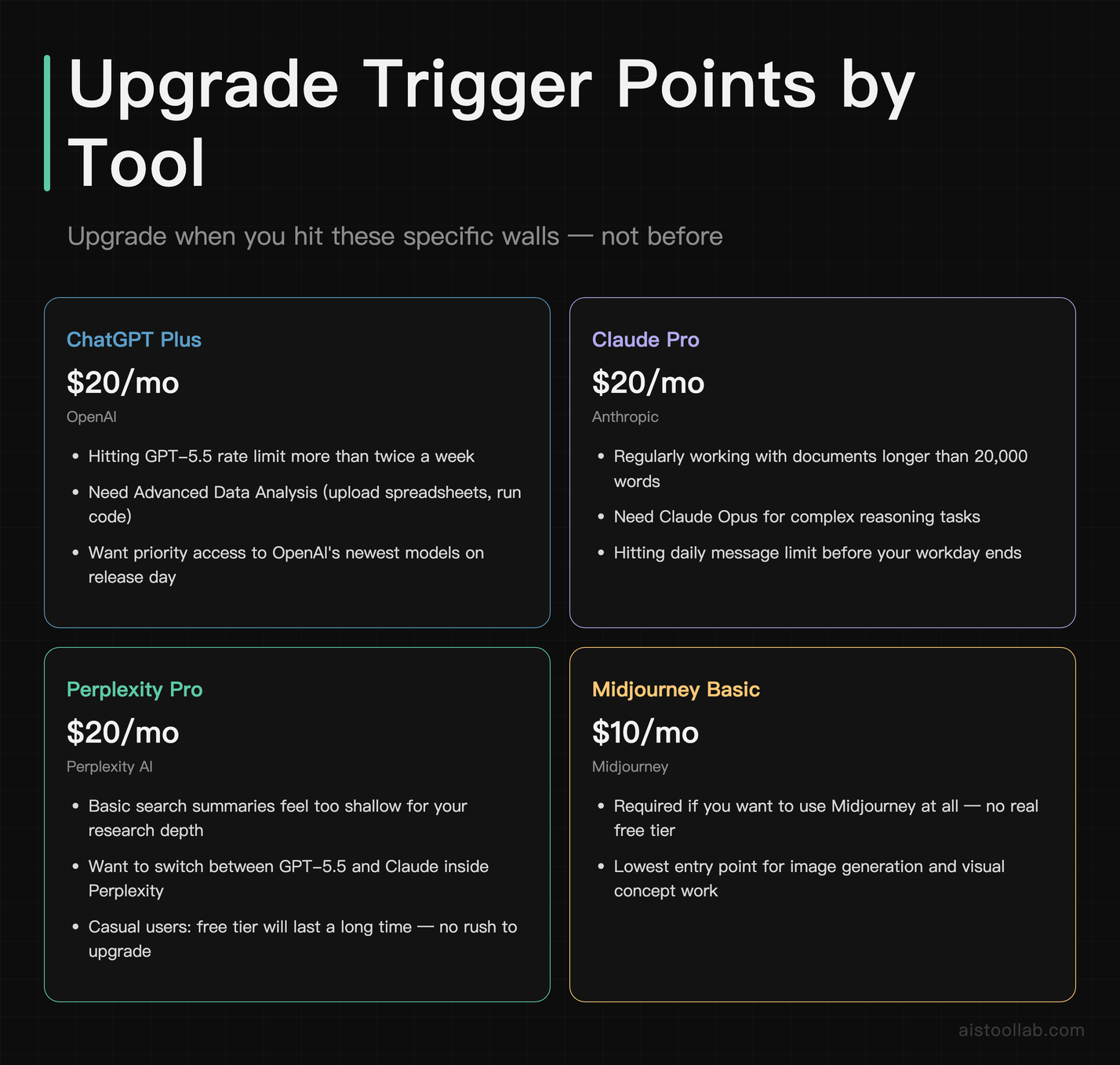
Generic advice says “upgrade when the free tier feels limiting.” Here’s what that actually looks like in practice for each tool.
ChatGPT Plus ($20/month): Upgrade when you’re hitting the GPT-5.5 rate limit more than twice a week, or when you need to use Advanced Data Analysis (uploading spreadsheets, running code) regularly. Also worth it if you want access to OpenAI’s latest models as they release — Plus subscribers get priority access.
Claude Pro ($20/month): Upgrade when you’re regularly working with documents longer than 20,000 words, when you need Claude Opus for complex reasoning tasks, or when you’re hitting the daily message limit before your workday is done. Also consider it if you’ve read my Claude Opus 4.8 review and the use cases resonate with your work.
Perplexity Pro ($20/month): Upgrade when you find yourself wanting to go deeper on complex research questions and the basic search summaries feel too shallow, or when you want to switch between different AI models (GPT-5.5, Claude) inside Perplexity for different research tasks. If you’re a casual user, the free tier will last you a long time.
Midjourney Basic ($10/month): There’s no meaningful free tier to graduate from — just start with the Basic plan if visual content is part of your work. Upgrade to Standard ($30/month) when you’re running into generation limits or need faster queue times.
Cursor Pro ($20/month): Upgrade the moment AI completions start slowing down during your workday. If you’re a developer using this professionally, the free tier is really just an extended trial. The productivity loss from slow completions is immediate and obvious.
Tool Combinations That Work Well Together
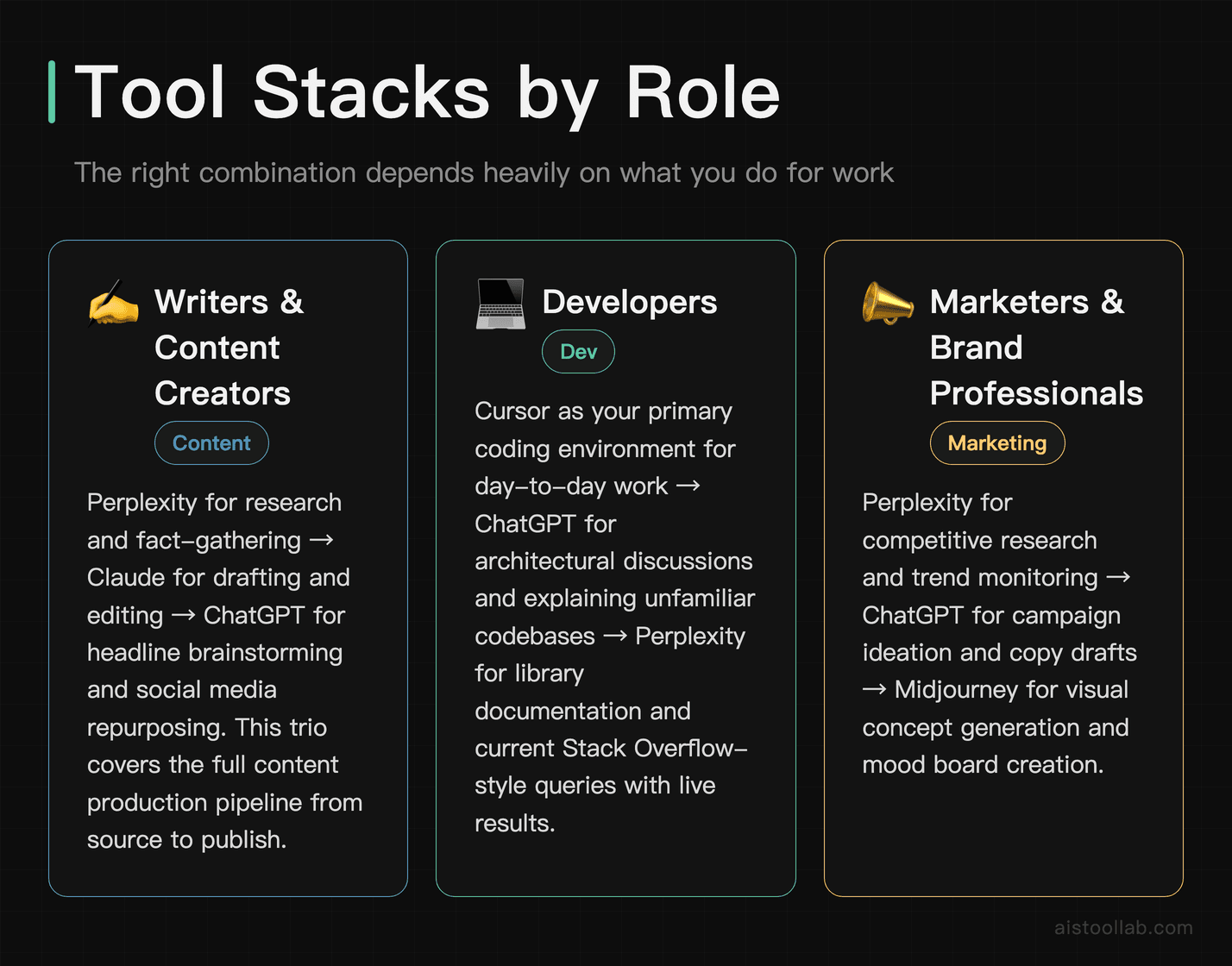
This is where things get genuinely interesting. The right combination of tools depends heavily on what you do for work. Here’s how I think about stacking them.
For writers and content creators: Perplexity for research and fact-gathering → Claude for drafting and editing → ChatGPT for headline brainstorming and social repurposing. This trio covers the full content production pipeline. I’ve seen how teams structure this in detail — there’s a useful breakdown in my How Content Creators Are Using AI Tools article.
For developers: Cursor as your primary coding environment (it handles most day-to-day coding tasks) → ChatGPT for architectural discussions and explaining unfamiliar codebases → Perplexity for looking up library documentation and Stack Overflow-style questions with current results. You can also go deeper and build your own tools — the Claude API tutorial on this site walks you through building a functional app in under 30 minutes if you want to go that route.
For marketers and brand professionals: Perplexity for competitive research and trend monitoring → ChatGPT for campaign ideation and copy drafts → Midjourney for visual concept generation and mood boards. This combination compresses the early stages of a campaign from days to hours.
For students and researchers: Perplexity as your primary research tool (with citations you can actually check) → Claude for synthesizing long readings and generating structured study notes → ChatGPT for explaining concepts in plain language and testing your understanding through Q&A. The combination is genuinely powerful for academic work, as long as you’re using it to enhance comprehension rather than bypass it.
For solopreneurs and freelancers: All three text-based tools earn their place here, but if you need to prioritize, start with ChatGPT (breadth), add Perplexity (research), and add Claude when document-heavy work becomes a regular part of your week. Midjourney is worth adding if client-facing visual work is part of your service offering.
Final Recommendation: The Actual Starting Point
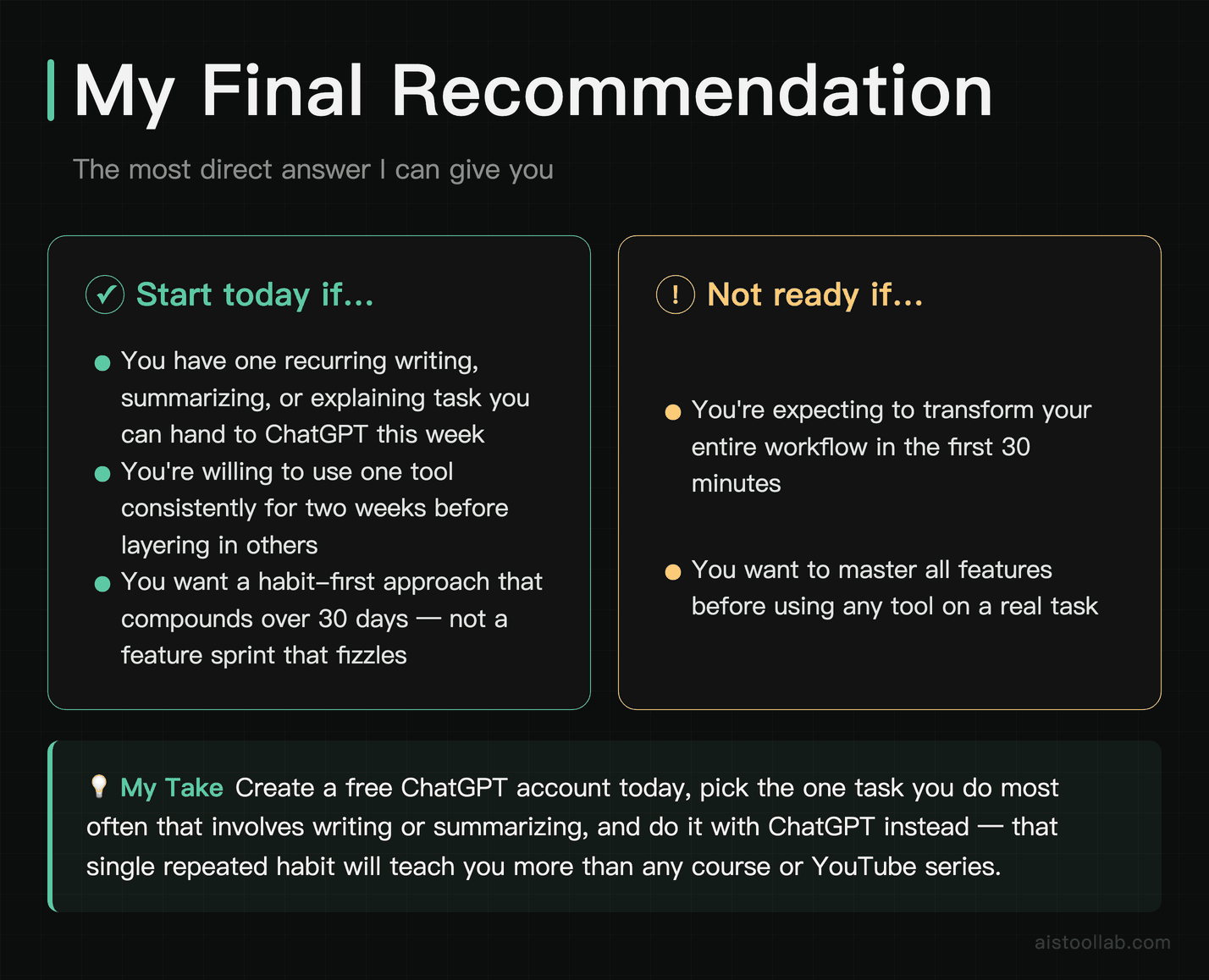
If you’ve read this far and you’re still not sure where to begin, here’s the most direct answer I can give you: create a free ChatGPT account today and use it for one specific task this week. Not five tasks. One. Pick the thing you do most often that involves writing, summarizing, or explaining — and do it with ChatGPT instead of alone.
That single habit, repeated consistently for two weeks, will teach you more about how to use AI tools effectively than any article, course, or YouTube series. The rest of the tools — Claude, Perplexity, Midjourney, Cursor — layer in naturally once you have the baseline habit. You’ll know when you need them because you’ll hit the specific wall each one is designed to break through.
The people who get the most out of AI tools aren’t the ones who learned the most features fastest. They’re the ones who started using them consistently, stayed curious about what else was possible, and gradually built a workflow that’s genuinely faster and better than what they had before. That’s a 30-day project, not a 30-minute one. But it starts today.
Frequently Asked Questions
Do I need to pay for any of these tools to get real value?
No — at least not immediately. ChatGPT, Claude, and Perplexity all have free tiers that are genuinely useful for beginners. Midjourney is the exception; it has essentially no viable free tier anymore. For your first 30 days, you can get substantial value from the free versions of the text-based tools before you need to think about upgrading.
Which tool is best if I can only choose one?
ChatGPT. Not because it’s the best at any single thing, but because it’s good at enough things that it covers most beginner use cases in one place. Once you have a sense of your specific needs, you’ll naturally add the others as they become relevant.
Are these tools safe to use for work documents?
With caution. Most providers use conversation data for model improvement by default — you can usually opt out in settings, and enterprise plans typically offer stricter data policies. Don’t paste confidential client data, proprietary financials, or anything covered by NDA into a free-tier chatbot without checking the provider’s data policy first. This is the unsexy caveat that nobody puts in their intro articles, but it matters.
How long does it realistically take to become productive with these tools?
Honest answer: two to four weeks for basic productivity gains, two to three months to develop a workflow that feels genuinely integrated. The learning curve isn’t steep, but building the habit of reaching for the right tool at the right moment takes time and repetition. The 30-day plan above is designed to get you to “daily user” level — real power user fluency takes longer.
Should I be worried about AI making my skills obsolete?
Probably not in the way the headlines suggest. What these tools do is compress the time it takes to produce a first draft, a research summary, or a block of code. The judgment, taste, strategy, and domain expertise that make those outputs actually good? That’s still you. The people most at risk are those who use AI as a crutch and stop developing their own skills. Use these tools to go faster and think bigger — not to think less.
Last updated: June 2026
Related reading: Let’s Enhance Tutorial 2026: Master AI Image Upscaling with Real-World Use Cases