

Midjourney v8.1 Is Here — Does the Speed Bump Change the Verdict?
On April 30, 2026, Midjourney quietly pushed V8.1 to midjourney.com. According to the official version notes, it builds on V8.0 (March 2026), Midjourney’s big speed jump that the official notes describe as roughly 5x faster than V7. V8.1 then adds further speed on top of V8.0 — officially HD mode 3x faster and standard resolution 50% faster than V8.0 — and it walks back toward the warmer, more “considered” aesthetic that a lot of longtime users associated with V7. That’s a notable pivot, because the previous big release (V8.0 in March) had leaned hard into raw speed and technical accuracy.
Here’s the thing most “best AI image generator” roundups gloss over: V8.1 being the newest model doesn’t mean it’s what you’ll actually be generating with by default. Per Midjourney’s own documentation, V7 is still the recommended or default version for a chunk of the user base, and V8.1 can require unlocking a personalization profile before it kicks in. So the real question isn’t just “is V8.1 good” — it’s “is the whole Midjourney stack, as it exists in mid-2026, still the one to beat?”
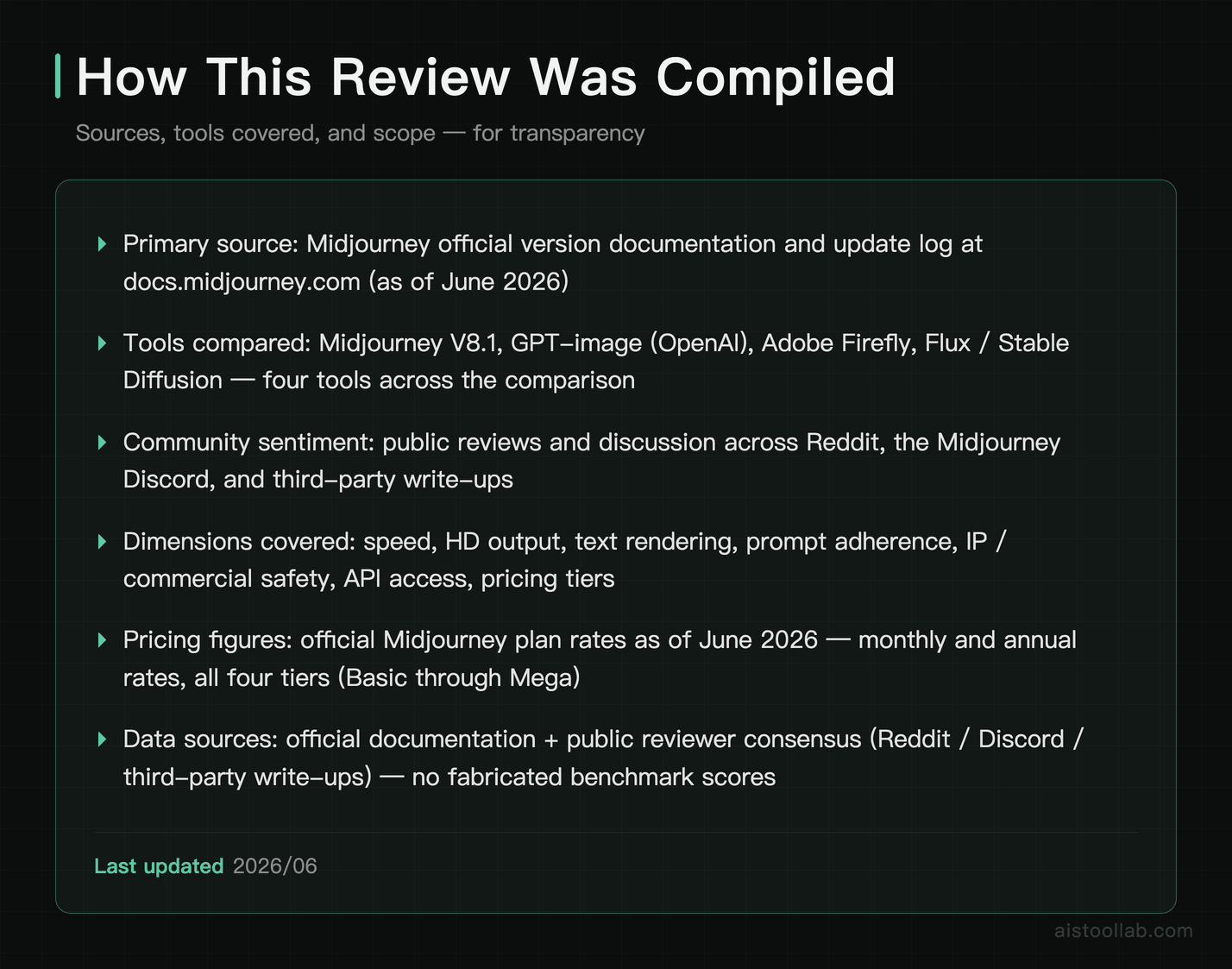
This breakdown is compiled from Midjourney’s official version docs and update log, plus public reviews and community reaction across Reddit, the Midjourney Discord, and third-party write-ups. No marketing fluff, no invented benchmarks — just what the documentation says, what reviewers are reporting, and a clear-eyed read on where Midjourney ↗ sits against the rest of the field.
Midjourney V8.1 vs V8.0 vs V7: What Actually Changed
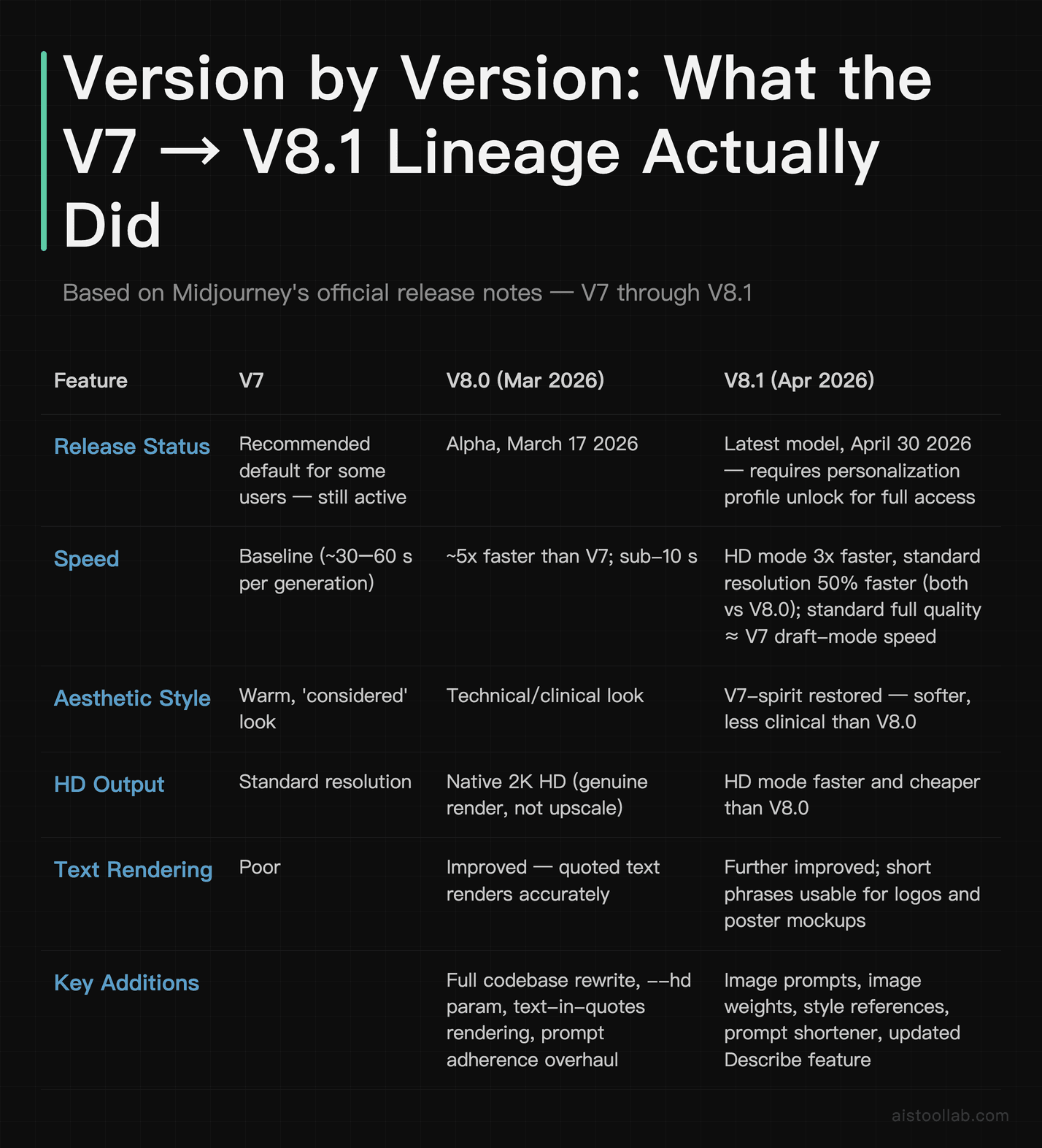
Midjourney’s release cadence got busy in early 2026, and it’s easy to lose track of which version did what. Based on the official documentation at docs.midjourney.com, here’s the lineage that matters.
V8.0 landed on March 17, 2026 as an alpha. The headline was a rewritten codebase that, per Midjourney’s notes, runs roughly five times faster than V7 — generation times reportedly dropped from the old 30–60 second range to under 10 seconds. It also added native 2K HD output via the --hd parameter (genuine high-res rendering rather than upscaling after the fact), much-improved text rendering — text placed inside quotation marks renders accurately now — and better overall prompt adherence.
V8.1 followed on April 30, 2026 and is currently the latest model. Per the official V8.1 alpha notes, V8.1 is faster than V8.0 — HD mode 3x faster and 3x cheaper, and standard resolution 50% faster and 25% cheaper, with standard-resolution full quality now roughly as fast as V7’s draft mode. (The big ~5x leap came earlier, from V8.0 over V7.) The aesthetic was deliberately pulled back toward a “V7-spirit” look — softer, less clinical than V8.0. It also brought more stable moodboards and style references, a faster and cheaper HD mode, image prompts, image weights, a prompt shortener, and an updated Describe feature.
The nuance worth repeating: V8.1 isn’t a universal default. Official docs still list V7 as a recommended version for some users, and accessing V8.1’s full personalization can require unlocking a profile first. So if you sign up tomorrow and wonder why your results look like “classic” Midjourney, that’s expected behavior, not a bug.
How Midjourney Stacks Up Against the 2026 Field
The competitive landscape is genuinely crowded now in a way it wasn’t a couple of years ago. OpenAI’s GPT-image generation (the successor lineage to DALL·E, accessed through ChatGPT subscriptions and the OpenAI API), Google’s Imagen/Gemini image models, Black Forest Labs’ Flux, and Ideogram all have real strengths. Here’s a compiled comparison based on official documentation and reviewer consensus — not head-to-head benchmark scores, which vary wildly by prompt and shouldn’t be presented as gospel.
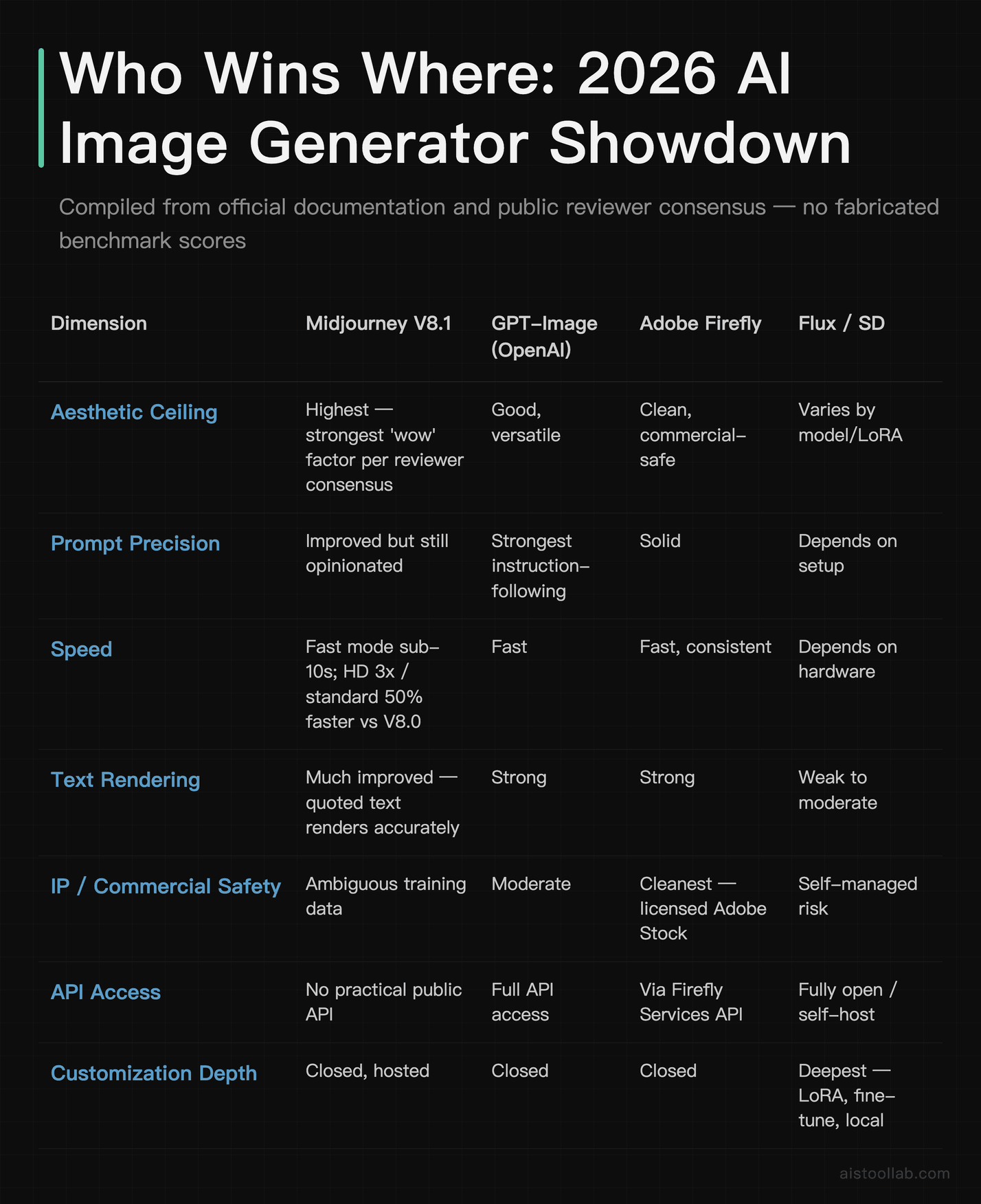
The short read: Midjourney still owns the aesthetic high ground according to broad reviewer consensus, GPT-image wins on literal instruction-following, Firefly wins on IP cleanliness, and the Flux/Stable Diffusion ecosystem wins on control. None of that is new — but the gaps have narrowed on every axis except raw artistic quality.
The Feature Story: Speed, HD, and Text Rendering
Three changes stand out as genuinely meaningful rather than incremental, based on the official notes and public reaction.
Speed is the big one. The ~5x leap came with V8.0’s codebase rewrite, which per Midjourney’s notes cut generation from the old 30–60 second range to under 10 seconds; V8.1 then added more on top — officially HD mode 3x faster and standard resolution 50% faster than V8.0. For anyone iterating on a concept — generating 20-plus variations of a single idea — that compounds fast. Public reviews repeatedly call out the new responsiveness as the thing that changes the actual feel of using the tool, not just the spec sheet.
Native 2K HD matters more than it sounds. The --hd mode introduced with V8.0 produces genuine high-resolution output rather than upscaling a smaller image after the fact, and V8.1 made HD faster and cheaper to run. For print work, large-format mockups, or anything that needs to hold up beyond a phone screen, that’s a real workflow improvement.
Text rendering finally crossed the “usable” line. Historically, AI image generators butchered any text inside an image. Per Midjourney’s documentation, text placed inside quotation marks now renders accurately. Reviewers note that short words and simple phrases come out clean enough for logo concepts and poster mockups, while longer sentences still drift. It’s no longer an automatic disqualifier for design briefs that involve a word or two of copy.
Add the V8.1 niceties — the prompt shortener, image weights, more stable moodboards and style references, and the updated Describe feature — and the practical experience is smoother end to end, especially for users who lean on style consistency across a batch of images.
Prompt Adherence: Better, But Midjourney Still Has Opinions
This is the complaint that follows Midjourney around: it does what it thinks looks best, not always what you literally asked. The official notes for V8.0 and V8.1 both cite improved prompt adherence, and public reviews broadly agree it’s better at juggling multi-element prompts — subject, lighting, palette, camera angle, mood — without dropping half of them.
Where it still trails, according to community reports, is negation and exclusion. Instructions like “no text,” “avoid warm colors,” or “without shadows” remain more suggestion than command. The --no parameter helps but isn’t bulletproof. This is the structural reason GPT-image keeps coming up for precise, functional briefs — its instruction-following architecture, built on a reasoning model, tends to honor exclusions and exact layouts more reliably.
The flip side, and reviewers make this point often, is that even when Midjourney “misreads” a prompt, the output is usually beautiful. GPT-image will follow you more literally and occasionally hand back something technically correct and visually flat. Which failure mode you can live with depends entirely on whether you’re making art or making a diagram. For a deeper look at how the underlying reasoning models differ — and why that shows up in image instruction-following — the Claude 4 Opus review unpacks how reasoning capability translates into real tasks.
Pricing in 2026: Exactly What You Pay
Midjourney’s pricing is straightforward, and the official figures as of June 2026 are below. There is no free tier right now — that’s worth knowing before you sign up expecting to dabble for nothing.
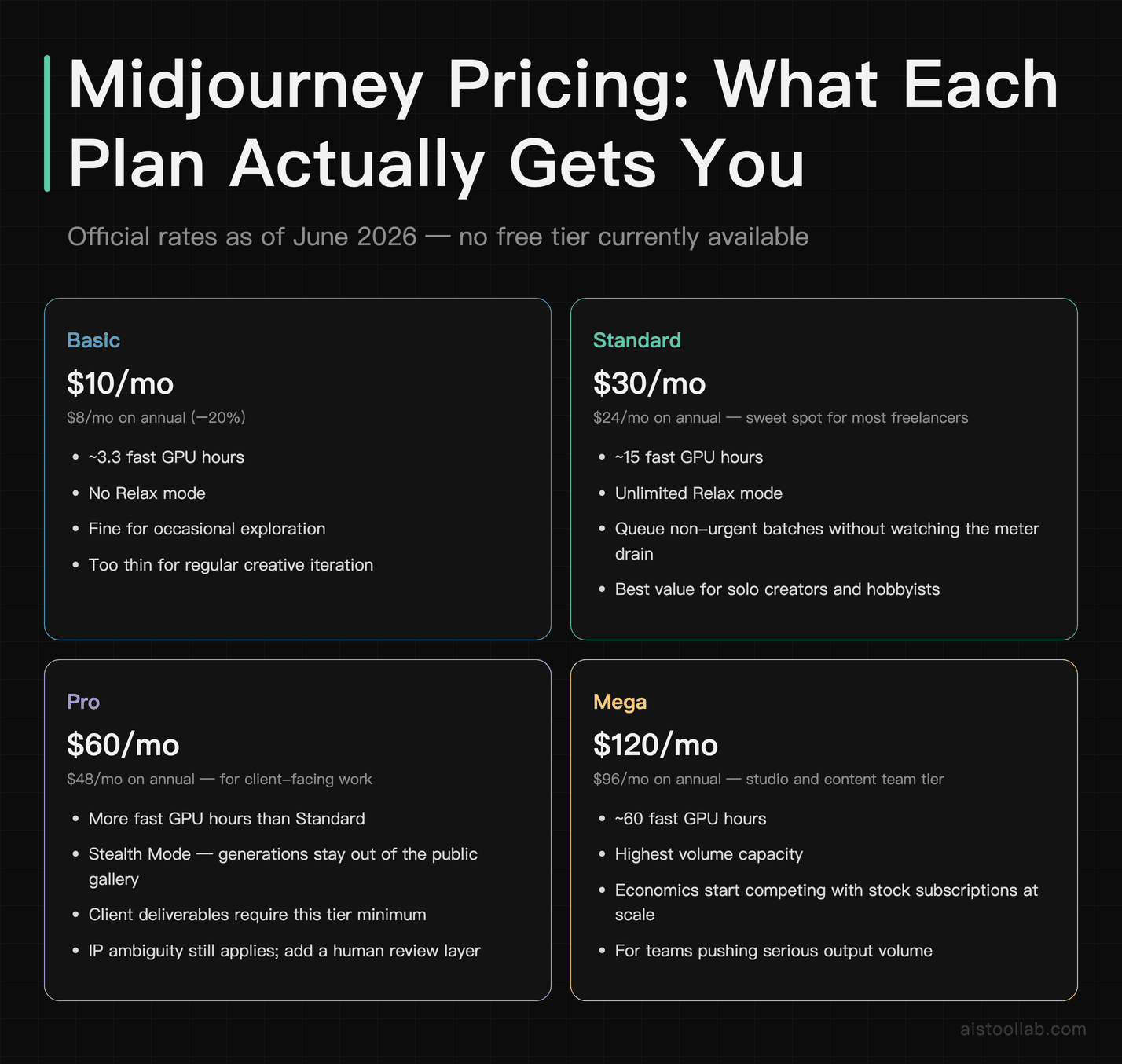
The value math shifts sharply by user type. Basic at $10/month — about half a Netflix subscription — gets you roughly 3.3 fast GPU hours and no Relax mode at all. That’s fine for occasional exploration but thin for any regular creative work, because real iteration eats GPU time quickly.
Standard at $30/month is the sweet spot for most freelancers and hobbyists. You get around 15 fast GPU hours plus unlimited Relax mode, which is the quiet hero here: queue up a batch of non-urgent prompts, go grab your coffee, come back to a folder of results without watching a meter drain.
Pro at $60/month earns its keep mainly through Stealth Mode. If you do client work, having your generations sit in a public gallery is a non-starter, and Stealth alone often justifies the jump. Mega at $120/month is for studios and content teams pushing serious volume — at that price you’re comparing it against stock subscriptions and freelance illustration budgets, where it frequently wins on both cost and turnaround. Annual billing knocks 20% off every tier, so committed users should factor that in.
Who Should Actually Pay for It
“It depends on your needs” is the lazy answer, so here’s the specific version.
Concept artists and illustrators
Yes — Standard or Pro. For ideation, reference generation, and mood boarding, Midjourney’s aesthetic ceiling is the highest in the field according to reviewer consensus, and the faster V8.1 render times make rapid iteration painless. A freelance illustrator juggling three client briefs can explore a dozen directions before lunch.
Brand designers and art directors
Yes, with caveats — Pro tier for Stealth Mode. Use it for style exploration and client presentations, not as a final production asset without a human review layer. The training-data IP ambiguity means you want a designer between the raw output and the deliverable, especially for brands with a legal department.
Social media content creators
Standard plan. Unlimited Relax mode is built for volume — a creator running a YouTube channel or a busy Instagram feed can generate editorial and aesthetic content without metering anxiety. Just keep commercial-advertising work (the kind that gets legal review) on a tighter leash.
Developers and technical teams
Probably not your primary tool. There’s still no practical, developer-friendly public API for Midjourney, so for programmatic generation inside a product or automated pipeline, GPT-image via the OpenAI API or a self-hosted Flux/Stable Diffusion setup is the realistic choice. If you’re weighing which AI ecosystem to build around more broadly, the Midjourney beginner’s guide covers how to match an image model to your actual workflow rather than the hype.
Where Midjourney Wins — And Where It Genuinely Doesn’t
Compiled from the documentation and the weight of public review sentiment, the strengths and weaknesses sort cleanly.
It wins on artistic ceiling and style range. When the goal is the most striking image possible and you’re willing to craft the prompt, Midjourney consistently produces outputs reviewers describe as stopping you mid-scroll — across photorealism, oil painting, anime, brutalist graphic design, you name it. Firefly is competent and safe; GPT-image is versatile and literal; neither tends to match Midjourney’s “this feels alive” quality. The personalization system, once trained, also locks in a consistent visual identity that’s hard to replicate elsewhere.
It loses on precision, IP safety, and developer access. For functionally exact work — a flowchart with five labeled boxes in a specific layout — GPT-image is the right call. For enterprise commercial use where IP indemnification matters, Adobe Firefly’s licensed-and-Adobe-Stock training story is cleaner, and Midjourney’s training data remains legally ambiguous. And for anyone who needs API automation, the lack of a practical public API is a hard blocker. These aren’t nitpicks; they’re the exact reasons a serious shop might run two tools instead of one.
Frequently Asked Questions
Is Midjourney V8.1 the version I’ll get by default?
Not necessarily. V8.1, released April 30, 2026, is the latest model, but Midjourney’s official documentation still lists V7 as a recommended or default version for some users, and the full V8.1 experience can require unlocking a personalization profile first. So if you sign up and your results look more like “classic” Midjourney than the newest model, that’s expected rather than broken. You can typically switch versions in your settings or with a version parameter on your prompt. The practical takeaway: don’t assume newest equals active. Check which model you’re actually generating with before judging the output, and spend the few minutes it takes to set up your personalization profile if you want V8.1’s intended aesthetic. This rollout approach — newest model available but not forced on everyone — is fairly normal for Midjourney, which tends to let versions coexist rather than hard-cutting users over to each release.
How much faster is V8.1, really?
Per Midjourney’s official notes, the big speed jump was V8.0 (March 2026): a full codebase rewrite the company describes as roughly 5x faster than V7, dropping generation times from the old 30–60 second range to under 10 seconds. V8.1 then built further on top of V8.0 — the official V8.1 notes cite HD mode 3x faster and standard resolution 50% faster than V8.0, with standard-resolution full quality now roughly as fast as V7’s draft mode. In real use, public reviews consistently flag the speed as the change that most alters how the tool feels — fast enough that iterating on 20-plus variations of a concept stops feeling like a chore. Keep in mind speed also depends on your plan’s mode: fast GPU hours deliver these quick times but draw down your monthly allowance, while Relax mode (Standard tier and up) is unlimited but slower and subject to queueing. Heavy iterators on lower tiers can burn through fast hours quickly, so match your plan to how often you’re under time pressure.
Is there a free version of Midjourney in 2026?
No. As of June 2026, there is no free tier. Midjourney has experimented with free trials in the past, but availability has been inconsistent and isn’t something to count on. The reliable entry point is the Basic plan at $10 per month — about the cost of a couple of coffees — which gets you roughly 3.3 fast GPU hours and no Relax mode. If you find yourself running low within the first week, that’s a strong signal to move up to Standard at $30 per month, which adds unlimited Relax mode. Because Midjourney has changed its free-access policy multiple times, it’s worth confirming the current state directly on midjourney.com before assuming anything. For casual experimenters who want to try AI image generation at zero cost first, tools with genuine free tiers (Adobe Firefly, or self-hosted open-source models) are a more realistic starting point than waiting for a Midjourney trial to reappear.
Can I use Midjourney outputs commercially?
Paid subscribers can use Midjourney outputs commercially under the current Terms of Service. The caveat that matters for businesses is provenance: Midjourney’s training data situation is more legally ambiguous than some competitors, which is why enterprises with strict legal review sometimes prefer Adobe Firefly, trained exclusively on licensed and Adobe Stock imagery, or Getty’s generative products. For a solo creator or small studio, the standard commercial terms are generally workable. For a brand with a legal department that asks pointed questions about AI content sourcing, you’ll want a human design layer between the raw output and the final deliverable, and you may want to route IP-sensitive work through a cleaner-provenance tool. Always read the current Terms of Service language directly before using outputs in a paid campaign, since these terms get updated periodically and the specifics around commercial rights and ownership can shift between revisions.
How does the Personalization feature work?
You rate pairs of images in Midjourney’s interface, and the model builds a preference profile that nudges your outputs toward your taste when you add the personalization parameter to a prompt. The more pairs you rank, the more refined it gets. Community reports suggest meaningful stylistic consistency emerges after a few hundred ratings, with diminishing returns well beyond that. With V8.1, personalization also ties into accessing the model’s full intended aesthetic — which is part of why some users see “classic” results until they’ve set their profile up. It’s a feature that rewards power users and makes casual users feel like they’re leaving quality on the table, which is clever product design. The practical advice from reviewers: spend the initial 15–20 minutes ranking images early on rather than treating it as optional. It’s the single fastest way to make your outputs feel cohesive across a project instead of stylistically scattered.
Do I still need Discord, or is the web app enough?
The web application at midjourney.com is now a full-featured interface and is generally the recommended starting point for new users. Discord was the original and historically primary home for Midjourney, and it still works, but the web UI has matured considerably with a cleaner prompt interface and proper image organization tools. For most people in 2026 — especially anyone who found the Discord workflow confusing — the web app is the better experience. You get your generations laid out visually, easier access to settings like version selection and HD mode, and a more conventional product feel rather than typing commands into a chat channel. Power users who’ve built Discord-based habits or use community channels for inspiration may stick with Discord, but it’s no longer a requirement. If you’re onboarding a team or clients who aren’t Discord-native, the web interface removes a real friction point that used to scare off newcomers.
Midjourney vs GPT-image: which should I pick?
It comes down to art versus precision. Midjourney wins when aesthetic quality is the primary metric — concept art, brand visuals, editorial illustration, anything where the image needs to feel considered and striking. GPT-image, accessed through ChatGPT subscriptions or the OpenAI API, wins when you need literal instruction-following: exact layouts, labeled diagrams, precise text placement, or programmatic generation inside a product. GPT-image also handles negation and exclusion prompts more reliably, and it has a real developer API, which Midjourney lacks. Many professionals run both — Midjourney for the hero visuals, GPT-image for the functional and automated work. If you can only justify one subscription, ask yourself whether your output is judged on how it looks or on how accurately it follows a spec. Designers and creators usually land on Midjourney; developers, marketers building automated pipelines, and anyone making functional graphics usually land on GPT-image.
Is Midjourney still worth it compared to free open-source models?
If you want the most polished results out of the box without managing infrastructure, yes. Stable Diffusion and Flux, with ecosystems like ComfyUI and AUTOMATIC1111, offer far deeper control — custom models, LoRAs, fine-tuning, full local generation at zero per-image cost. That flexibility is unmatched if you have the technical appetite and hardware for it. But it comes with real setup, maintenance, and a learning curve, and getting Midjourney-level polish out of the box is genuinely hard. Midjourney is a closed, hosted service tuned for quality with minimal effort — you trade control and openness for a much shorter path to a great image. For developers and tinkerers who enjoy the process, open-source wins. For working creatives who bill by the hour and just need consistently excellent output fast, the $30 Standard plan usually pays for itself in saved time. The two aren’t really the same product; they serve different temperaments and workflows.
The Verdict: Still the One to Beat, But Pick the Right Tool for the Job
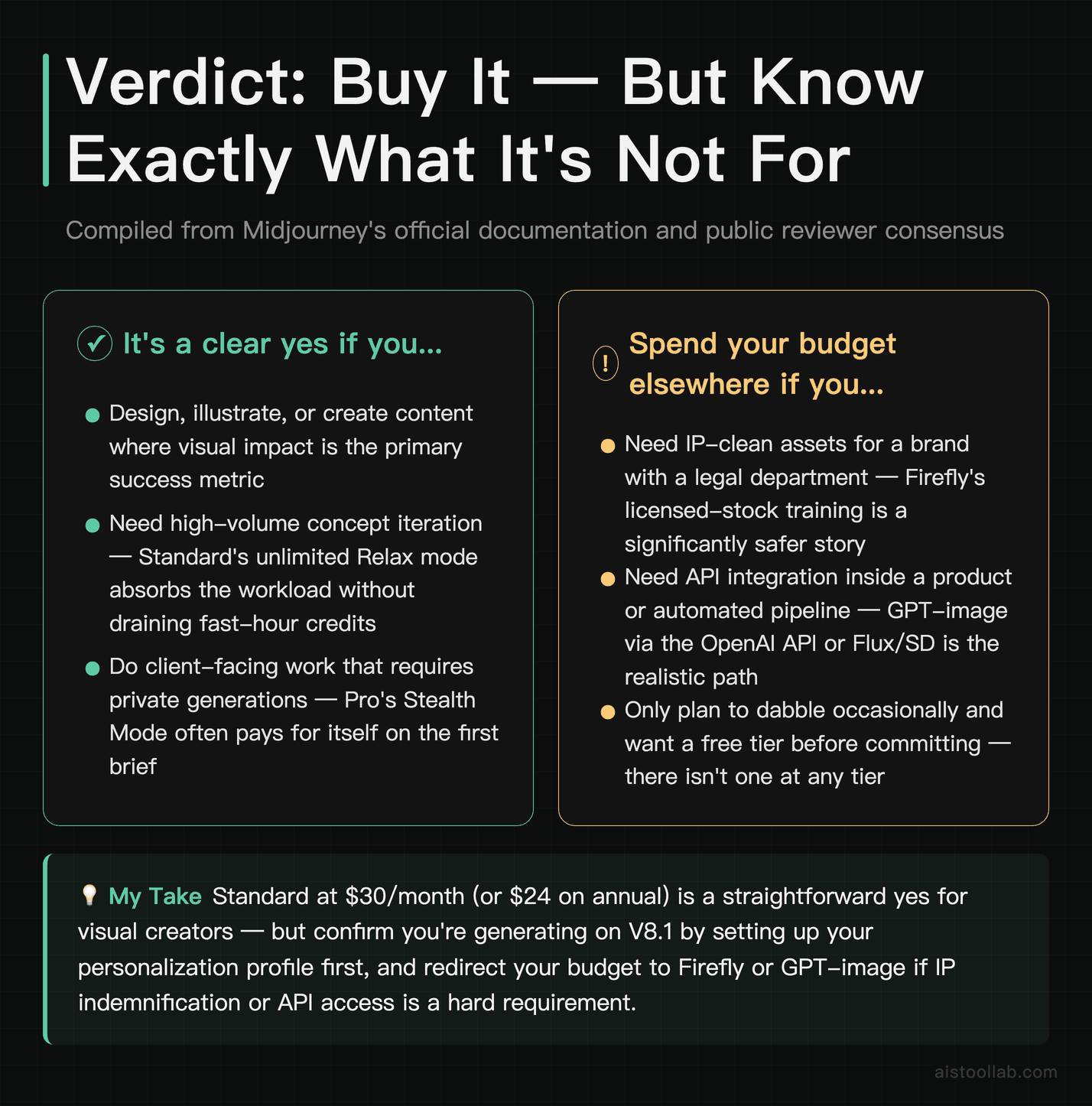
Based on the compiled evidence — Midjourney’s official version documentation, the update log, and the weight of public review sentiment — V8.1 keeps Midjourney ahead on pure creative output quality in 2026 — the one axis rivals still haven’t closed. The speed gains are real and reviewer-confirmed, the HD and text-rendering improvements remove old friction, and nothing else on the market reliably matches its aesthetic ceiling or style range.
But “still the one to beat” needs a footnote, and it’s not a hedge. Adobe Firefly is the safer pick for IP-sensitive commercial work. GPT-image is the more precise pick for instruction-heavy or functional briefs and the only realistic option if you need an API. Flux and Stable Diffusion are the better pick for developers who want deep control and zero per-image cost. Midjourney wins specifically when the metric is how good the image looks and feels.
So if it were my money on the line: if you’re a designer, illustrator, or content creator who sells on visuals, the Standard plan at $30/month (or $24 on annual) is an easy yes — and remember V7 may still be your default until you set up V8.1’s profile. If you’re a developer or you need provenance-clean assets for a brand with lawyers, spend your budget elsewhere and keep Midjourney as the tool you reach for when something just needs to look extraordinary.
Last updated: 2026