
The Skeptic’s Case Against Synthesia — and Why It Doesn’t Hold Up
Synthesia tends to draw skepticism on first contact. The reflex reaction is easy to imagine — “AI avatars reading scripts? That’s going to look like a deepfake from 2019.” Anyone who has sat through enough uncanny-valley corporate training videos has reason to be wary, and the idea of replacing a real human presenter with a digital clone can feel gimmicky at best, unsettling at worst. Public reviews repeatedly start from exactly this doubt — before the output changes their mind.
This article contains affiliate links. If you buy through them I may earn a commission at no extra cost to you. All opinions are my own.
The reality is more impressive than that first impression suggests. Not entirely — there are still things about Synthesia ↗ that make me wince — but the gap between expectations and what the platform actually delivers is genuinely surprising. If you’re a solopreneur trying to produce onboarding videos without hiring a video crew, a marketer localizing content into six languages, or a startup founder who needs polished training materials by Thursday, Synthesia is worth a serious look. The question isn’t really “is this impressive?” anymore. It’s “is it worth the money, and does it fit your actual workflow?”
That’s what this review answers. This review looks at real production tasks — multilingual explainer videos, internal training content, marketing demos — and explains exactly where it shines, where it stumbles, and whether the pricing makes sense for your situation.
What Synthesia Actually Is (And Isn’t)
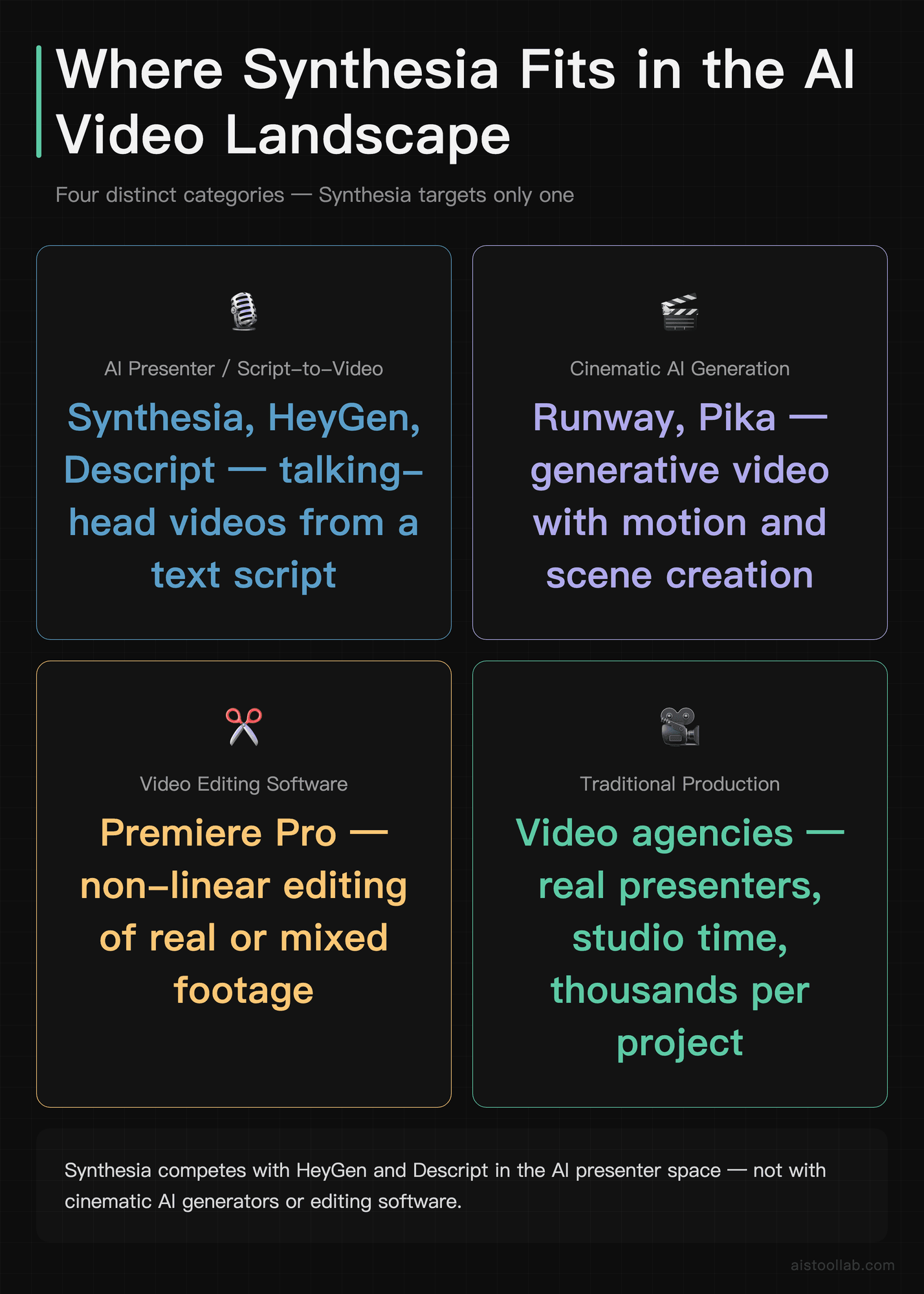
Synthesia is an AI video generation platform that lets you create presenter-style videos using AI avatars reading from a text script. You type what you want the avatar to say, pick a visual template, and the platform renders a finished video — no camera, no microphone, no green screen, no video editing software. The whole pipeline from script to exported video can happen in under 30 minutes for a simple project.
It’s worth being clear about what this tool is designed to replace: it targets the specific category of “talking head” videos. Think product explainers, corporate training modules, software walkthroughs, employee onboarding, and internal communications. It’s not trying to compete with Runway or Pika for cinematic AI video generation. It’s not a competitor to Premiere Pro. The comparison points are more like traditional production studios charging thousands per video, or tools like Descript and HeyGen in the AI presenter space.
The company has been around since 2017 and has built a significant customer base among enterprise clients and L&D (learning and development) teams. Their platform has matured considerably from its early days, with avatar quality, language support, and template variety all seeing meaningful improvements in recent product cycles. The platform offers over 230 AI avatars, support for over 140 languages and accents, and a slide-based editor that will feel familiar if you’ve ever used PowerPoint or Google Slides.
Avatar Quality and Realism: How Close Is “Close Enough”?
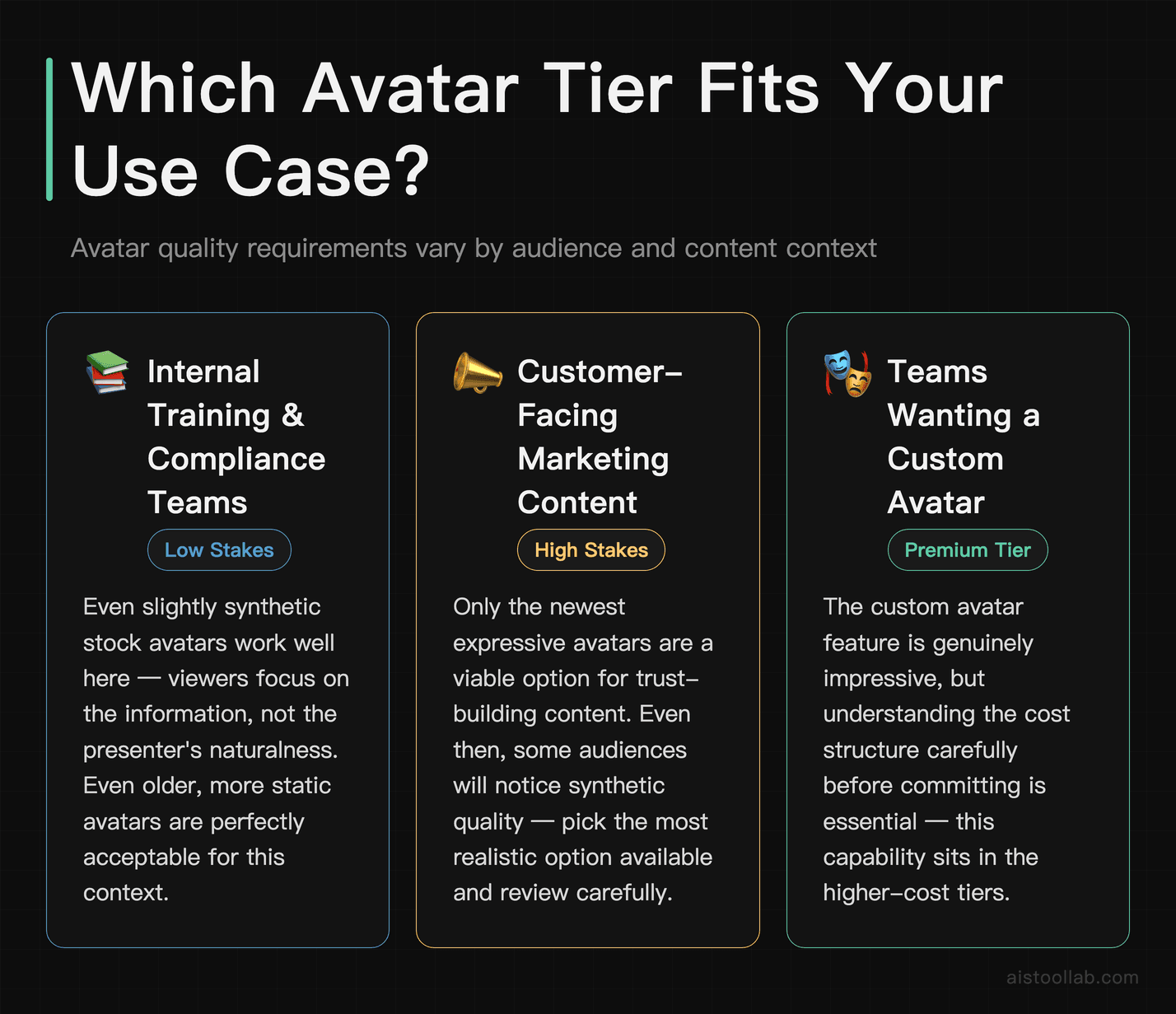
This is the question everyone asks first, so let’s address it directly. The avatars in Synthesia range from convincingly realistic to noticeably synthetic, depending on which one you pick and how closely your viewer is paying attention. The stock avatars — the pre-built ones included in all plans — vary in quality. The newer ones, particularly the “expressive” avatars added in more recent updates, have noticeably more natural head movement, eye blinking, and subtle facial micro-expressions. The older stock avatars look more static and are easier to clock as artificial.
In practical terms, this matters a lot for your use case. For internal training videos or software tutorials where the content is the point, even a slightly synthetic avatar is perfectly acceptable. Viewers are focused on the information. But for customer-facing marketing content where you’re trying to build trust and emotional connection, the most realistic avatars are the only viable option — and even then, some audiences will notice.
The custom avatar feature is where things get genuinely impressive, and it’s also where you need to understand the cost structure carefully. With higher-tier plans, you can create a personal AI avatar by recording a short video of yourself reading a consent script. Synthesia then trains a model on your likeness. The result isn’t perfect — there’s still some smoothness to the skin texture and occasional lip-sync imperfections — but for most professional contexts, it’s startlingly good. Custom avatar videos can be convincing enough that some viewers may not realize they’re watching AI on first viewing.
Lip-sync accuracy is solid across most supported languages, according to public reviews and Synthesia’s documentation. English, Spanish, and French are reported to show very tight sync. Some of the less common languages can show occasional slight drift where the mouth movements don’t quite match the phonemes. It’s not distracting at normal viewing speed, but if you’re frame-stepping through it, you’ll notice. For anything being published publicly at scale, always watch the full video before exporting.
Use Cases: Who Actually Gets Value From This?
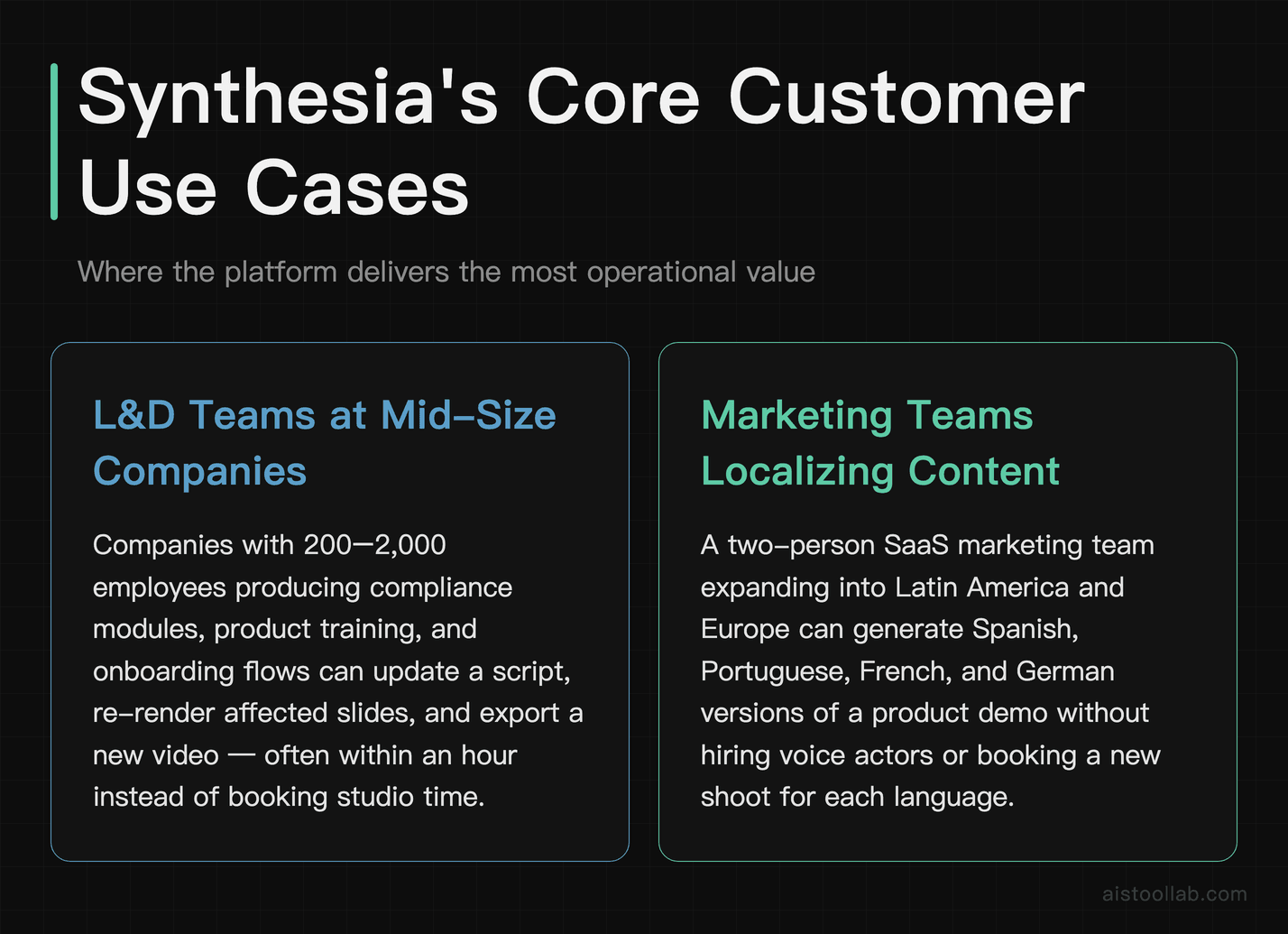
1. L&D Teams at Mid-Size Companies
This is Synthesia’s strongest use case, and it’s where most of the platform’s enterprise customers live. A learning and development team at a company with, say, 200 to 2,000 employees spends a significant amount of time producing training content — compliance modules, product training, onboarding flows — that needs to be updated regularly. Traditional video production for this content is expensive and slow. Every time a policy changes or a product UI updates, you’re back to booking studio time, coordinating with a presenter, and waiting on editing. Synthesia collapses that cycle dramatically. You update the script, regenerate the affected slides, and export a new video — often within an hour. For teams producing dozens of training videos per year, this time saving is genuinely transformative.
2. Marketing Teams Localizing Content Across Regions
Imagine you’re a two-person marketing team at a SaaS startup that’s expanding into Latin America and Europe. You’ve got a product demo video that performs well in the US market, and you need versions in Spanish, Portuguese, French, and German. Hiring voice actors, re-recording, and re-editing for four languages would take weeks and cost thousands. With Synthesia, you duplicate the project, switch the script to the target language (either translate yourself or use a translation tool), and re-render. The avatar speaks the new language with appropriate accent and lip-sync. It’s not a flawless process — translated scripts sometimes need manual adjustment for timing and phrasing — but the speed and cost reduction are dramatic compared to traditional production.
3. Freelance Consultants and Solopreneurs Creating Course Content
A freelance UX consultant building an online course on Teachable or Maven doesn’t have a video production budget. They might have a decent webcam, but they hate how they look on camera, they’re not confident on video, and they don’t have time to learn video editing. Synthesia removes all of those friction points. You write your lesson script, build slides in the editor, and produce professional-looking lesson videos without ever turning on a camera. The quality is consistent (no bad lighting days, no mid-afternoon energy slumps), and you can update individual lessons without re-recording anything. For this user, Synthesia at the Starter plan pricing is a legitimate productivity unlock.
4. Internal Communications and Executive Messaging
Some companies are using Synthesia for CEO or executive update videos — creating a custom avatar of a senior leader so that they can send consistent, professional video messages to a global workforce without scheduling recording sessions. It’s a genuinely interesting use case, and it works well when the custom avatar quality is high. There are obvious sensitivity considerations around consent and disclosure here, but for internal use with appropriate transparency, it’s a practical solution to the “executive time is expensive” problem.
Three Real Tasks
Task 1: A 5-minute product explainer video. Synthesia can be used to build a product walkthrough video for something like a SaaS tool — the kind of thing you’d embed on a pricing page or use in a sales email. The workflow involves writing a script, picking one of the newer expressive stock avatars, building out slides in the editor with screen recording inserts and text overlays, and rendering. The output can look genuinely professional, with natural-feeling avatar transitions between speaking and pausing, and a production value that’s often higher than what a webcam and basic editing software can achieve in the same timeframe.
Task 2: Multilingual localization. The same explainer can be generated in languages like Spanish and Japanese, and the language coverage is impressive in breadth. Quality tends to vary by language family: lip-sync and pacing can feel more natural for languages closer to English, while languages with very different phoneme patterns — such as Japanese — may produce less tight lip-sync and less natural expressions. For those, it’s worth having a native speaker review the output before publishing.
Task 3: Updating an existing video. Consider a common real-world scenario: a training video that needs a single slide updated because a UI changed. You can edit one slide’s script and visuals, regenerate just that slide, and re-export. This is one of Synthesia’s most underrated advantages — the ability to surgically update a specific part of a video without touching the rest. For teams maintaining large libraries of training content, this is huge.
Pricing Breakdown: Is It Worth the Cost?
Synthesia’s pricing has evolved, and there are a few tiers worth understanding. Pricing can change, so I’d recommend verifying the current structure directly on their site, but here’s what the structure looks like.
The Starter plan is aimed at individuals and small teams who need a fixed number of video minutes per month. It covers the core avatar library, the template editor, and basic export options. For a solopreneur or freelancer producing a modest volume of content, this is the entry point to evaluate.
The Creator plan steps up the video minutes and adds features like custom avatars, priority rendering, and more advanced collaboration options. This is where the platform starts to feel fully capable for professional use.
The Enterprise plan is custom-priced for larger organizations and adds SSO, advanced brand kit controls, API access, dedicated support, and the ability to create multiple custom avatars across a team.
My honest read on the cost: Synthesia is not cheap relative to some AI tools. But it’s cheap relative to video production. If you’re comparing it to hiring a video production agency at several thousand dollars per project, the math works out strongly in Synthesia’s favor for any team producing more than a handful of videos per year. If you’re comparing it to just using your webcam and a free tool like Loom, the value proposition depends heavily on how much the production quality delta matters to your audience.
Synthesia vs. Alternatives: How Does It Stack Up?
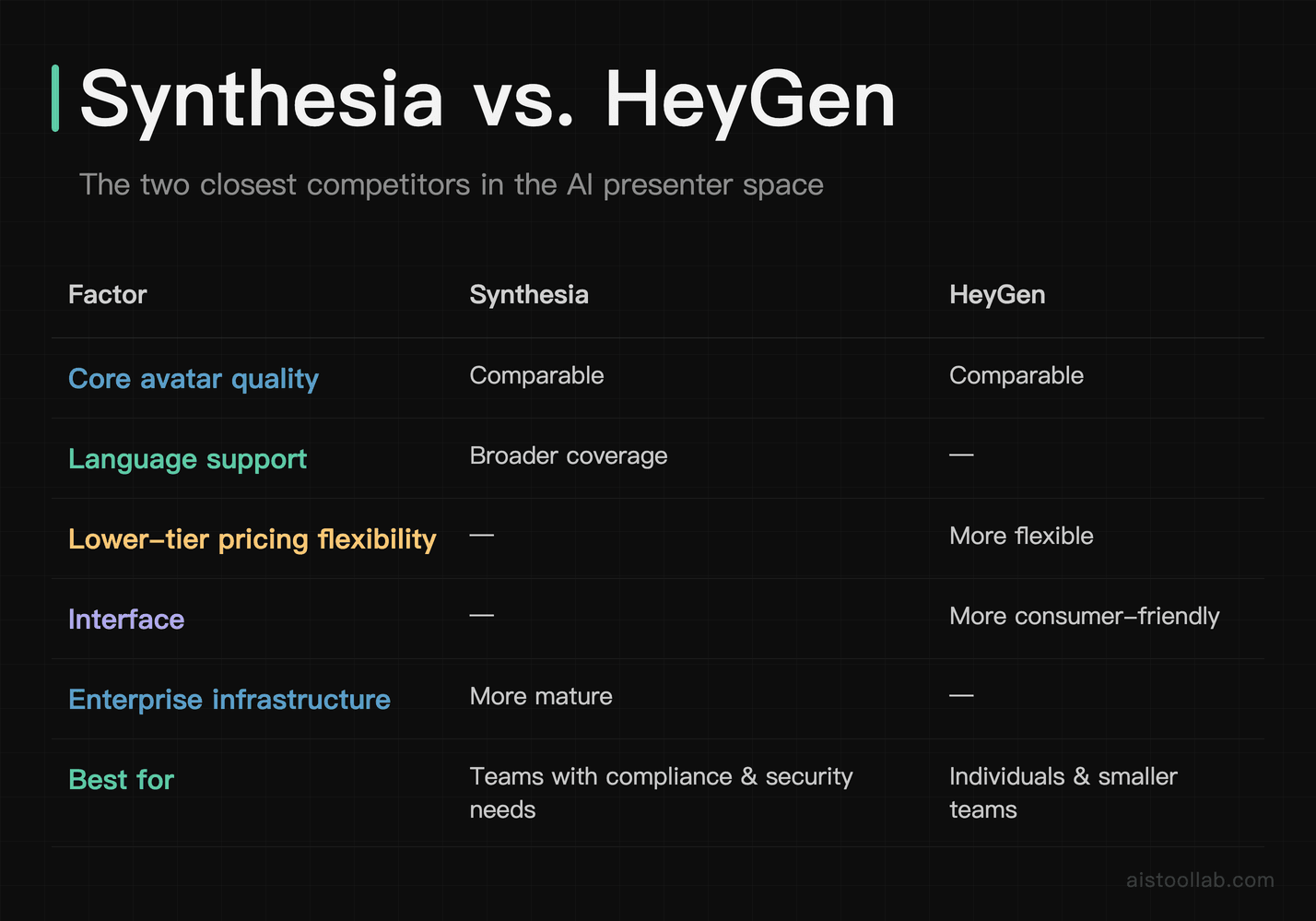
HeyGen is probably Synthesia’s closest direct competitor, and the honest truth is they’re fairly evenly matched on core avatar quality. HeyGen’s advantage tends to be flexibility in its lower pricing tiers and a slightly more consumer-friendly interface. Synthesia’s advantage is its breadth of language support and more mature enterprise infrastructure — it’s the safer choice if you’re buying for a team with compliance and security requirements.
If you’re doing heavy video editing with real footage, check out our Descript AI Editing Deep Dive: How to Edit Videos by Editing Transcripts in 2026 — it’s a genuinely different category of tool and the two complement each other well rather than being straight substitutes.
Pros and Cons
What Synthesia Gets Right
- Language coverage is genuinely class-leading. 140+ languages with reasonable quality is a substantial operational advantage for any team doing international content.
- The update workflow is a genuine superpower. Edit a slide, re-render, done. For content libraries that need regular maintenance, this changes the economics of video production.
- Enterprise-grade team features. If you’re rolling this out to a 50-person marketing org, the brand kits, role permissions, and API access are well thought-out.
- Consistent output quality. Unlike human presenters, the avatar doesn’t have off days, bad lighting, or audio inconsistencies across sessions.
- Low barrier to entry. The editor is genuinely intuitive, making it possible to produce a presentable video without watching a tutorial.
Where It Falls Short
- The uncanny valley hasn’t fully closed. Some stock avatars, especially older ones, still look synthetic enough to be distracting. Pick carefully.
- Not a full video editor. If your project needs complex transitions, dynamic graphics, or non-linear editing, you’ll need to export and finish in Premiere or DaVinci Resolve.
- Language quality varies significantly. The more widely-spoken languages get excellent treatment. Some less-common languages have noticeably weaker lip-sync and pacing.
- Custom avatars take time and care. The recording requirements for creating a high-quality personal avatar are specific — bad lighting or inconsistent framing during your source recording will produce a noticeably worse result.
- Pricing can add up for high-volume users. If you’re producing a large number of long-form videos monthly, you’ll want to do the per-minute math carefully before committing to a plan.
My Verdict: Stop Comparing It to “Real” Video and Start Comparing It to the Alternative
The mental trap most people fall into when evaluating Synthesia is comparing it to a professional video shoot with a real presenter in a well-lit studio. Of course it doesn’t win that comparison. But that’s not the real choice. The real choice, for most of the teams who would actually use this tool, is: Synthesia versus not having a video at all, or versus a grainy webcam recording with inconsistent audio, or versus waiting three weeks for production budget approval.
Against those alternatives, Synthesia looks very different. The production quality is high. The workflow is genuinely fast. The localization capability is a legitimate operational advantage that I’ve seen few other platforms match. And the ability to update videos without re-recording is the kind of quiet superpower that only reveals its value over time.
If you’re a marketing team or L&D professional producing a steady volume of informational, training, or explainer content — especially across multiple languages — Synthesia is worth every dollar of the subscription. The math is not close. If you’re a solopreneur building course content or a consultant who needs polished explainer videos without a production crew, the Starter plan is a legitimate unlock. If you’re mostly producing brand-level storytelling content where emotional authenticity is the whole point, this isn’t your primary tool — but it might still earn a spot in your stack for the functional content that surrounds your hero brand pieces.
My recommendation: sign up for the demo, run your actual use case through it (not a test scenario — a real project), and you’ll know within an afternoon whether it belongs in your workflow. For most content-heavy teams, I suspect it will.
For teams also evaluating broader AI tool stacks, our Best AI Tools for Marketing and SEO in 2026 and Best AI Tools for Small Business Owners in 2026 roundups are worth a read alongside this review — Synthesia fits differently depending on how the rest of your toolkit is set up.
Frequently Asked Questions
Is Synthesia good enough for customer-facing videos, or is it only suitable for internal use?
It depends on the quality tier you’re working with and the context. For customer-facing content like product demos, explainer videos, or onboarding flows, Synthesia can absolutely produce professional-quality output — provided you’re using the newer expressive avatars and investing time in a well-written script. The production value is competitive with mid-tier video agency work. That said, for content where emotional resonance is critical — think brand storytelling, testimonial-style videos, or anything requiring genuine human connection — even the best AI avatars aren’t quite there yet. A real human presenter in a thoughtfully lit environment still has an edge in trust-building. My practical recommendation: use Synthesia for informational and functional video content (tutorials, demos, training), and reserve real-person production for brand-level content where the emotional connection matters most. A hybrid approach is probably the right call.
How does the multilingual support actually work — do I need to provide translated scripts?
Yes, you provide the translated script yourself, and Synthesia handles the rendering — including having the avatar speak in the target language with appropriate lip-sync and accent. The platform doesn’t automatically translate your script (though you can use a tool like DeepL or ChatGPT to do that step), and it doesn’t auto-localize cultural references or adjust phrasing for regional audiences. What it does is take your translated text and render it convincingly through the chosen avatar. The quality of the output is therefore a combination of two things: the quality of your translation, and the quality of Synthesia’s language model for that particular language. For major world languages — Spanish, French, German, Mandarin, Japanese — the rendering quality is strong. For less common languages, I’d strongly recommend having a native speaker review the output before publishing, both for accuracy and for natural pacing. The platform gives you control over pronunciation of specific words and names via its pronunciation dictionary, which is genuinely useful for brand names and technical terms.
What’s the difference between a stock avatar and a custom avatar, and is the custom avatar worth the extra cost?
Stock avatars are pre-built AI presenters included in the platform — a diverse library of different appearances, ages, and ethnicities that you can use immediately without any setup. Custom avatars are trained on video footage of a specific real person (you, an employee, or a spokesperson), creating a digital double that uses that person’s likeness when speaking your scripts. The custom avatar option requires a supported plan tier and involves recording a specific consent and training video under controlled lighting conditions. Whether it’s worth the cost depends on your use case. If you’re producing internal training content where brand consistency matters more than personal identity, stock avatars are absolutely fine. If you’re producing content where a specific person’s face matters — executive communications, a branded course from a named expert, or personal brand content — the custom avatar justifies its cost quickly, especially if that person’s time for recording is expensive or scarce.
How long does rendering actually take?
For typical projects — a 3 to 5 minute video with 10 to 15 slides — render time varies by project length, plan tier, and server load, depending on server load. Longer videos take proportionally longer. Higher-tier plans get priority rendering, which noticeably reduces wait times during peak usage periods. In practice, you submit your video for render and come back to it, rather than watching a progress bar — which is fine once you’re used to the workflow, but can feel slow if you’re used to real-time editing tools. For urgent turnarounds, the priority rendering on paid plans is worth having. One thing worth noting: if you spot an error in your script after rendering starts, you’ll need to cancel and restart, so it’s worth doing a careful script review before hitting the render button.
Can Synthesia integrate with my existing tools and LMS platforms?
Yes, and this is one of the areas where Synthesia’s enterprise focus shows. The platform supports direct export to common video formats (MP4) that can be uploaded anywhere, and it has native integrations with several learning management systems. The API access available on enterprise plans allows for more sophisticated integrations — programmatically generating videos from data sources, for example, which some companies use for personalized video at scale. For standard workflows, the export-and-upload path is straightforward and compatible with platforms like Workday Learning, Docebo, Cornerstone, and most other corporate LMS tools. If you’re on a free or entry-level plan, your integration options are more limited, but for straightforward content publishing, the manual upload workflow is simple enough that it doesn’t represent a meaningful friction point.
Is there a free trial or free plan?
Synthesia has historically offered a limited free demo experience that lets you generate a short video to evaluate the output quality before committing to a paid plan. This is different from a full-featured free tier — you won’t get unlimited access to the editor or a meaningful video credit allowance on a free account. For evaluation purposes, the demo is enough to judge avatar quality and get a feel for the editor. For meaningful workflow testing, you’ll need to commit to at least the entry-level paid plan. Given that the core value of the platform shows up over time — in the update workflow, the localization use cases, the content library management — I’d recommend trialing it for a genuine project rather than a test scenario, so you can evaluate whether it fits your actual production needs.
How does Synthesia compare to HeyGen for someone primarily focused on marketing videos?
For marketing-focused video production, HeyGen is the closest competitor and the comparison is genuinely close. HeyGen tends to have a more consumer-friendly interface and competitive pricing at the lower tiers, making it slightly more accessible for individual creators and small teams experimenting with AI video. Synthesia’s advantages become clearer at the team and enterprise level: more robust brand controls, superior language breadth (significantly more languages than HeyGen), and stronger enterprise security features. For a solo marketer or a small startup producing mostly English-language content, HeyGen is worth evaluating alongside Synthesia. For a marketing team at a company operating in multiple regions with a real localization need, Synthesia’s language support likely tips the balance. Avatar quality between the two is comparable at the high end — both platforms have invested heavily in this area and neither has a decisive advantage on realism alone.
What kind of videos is Synthesia not suitable for?
There are a few categories where Synthesia is clearly the wrong tool, and it’s worth being direct about them. Any video requiring genuine emotional storytelling — a brand origin story, a customer testimonial, a fundraising appeal — benefits from real human authenticity that AI avatars can’t replicate convincingly. Highly dynamic content with complex visuals, animations, or cinematic production values (product launch films, brand commercials) needs a proper video production workflow. Interview-format content obviously can’t be faked with an AI avatar without significant ethical concerns. And anything requiring the camera to capture real-world environments, physical products, or live events is outside Synthesia’s scope entirely. The platform is purpose-built for information delivery through a presenter-style format, and that’s where it excels. If your video needs are primarily in that category, it’s excellent. If you’re frequently working outside that category, you’ll find yourself supplementing with other tools regularly, which changes the value equation.
Related reading: Hailuo AI Capabilities: What the Official Docs Say
Last updated: 2026
Explore more AI tools
👉 Browse the AI Tools Library to find the right tools for your workflow.
Related reading: Runway Gen-3 AI Video Generator Review: Quality, Speed, and Use Cases for Content Teams