
The model was never the hard part — the GPU under it was
Here’s an assumption worth poking at: that the difficult bit of shipping an AI feature is the machine learning. Picking the model, tuning the prompt, wrangling the outputs. For a lot of developers, that part is genuinely the fun part. The wall shows up later, and it’s made of infrastructure — provisioning a GPU box, keeping drivers and CUDA versions in sync, handling a traffic spike at 2am, and paying for a card that sits warm and idle between requests.
That gap is exactly where a lot of promising side projects quietly die. You get a demo working on your laptop, and then the road from “runs locally” to “runs for other people, reliably, at scale” turns out to be paved with DevOps you never signed up for. Replicate is built around removing that specific wall — not by making the model smarter, but by taking the servers off your plate entirely.
So this piece is a feature-level breakdown of what Replicate actually does, compiled from its official documentation and pricing page (checked 2026-08-07). By handling the infrastructure layer, it removes a friction point that previously kept solo developers and small teams from deploying AI tools at production scale: you don’t have to become a platform engineer to ship an AI service. Whether that trade is right for your project is a judgement I’ll get to — but let’s start with what happens when you actually call it.
Step 1: What one API call actually sets in motion
The headline mechanic is simple to state and does a lot of work: you make an API call that references a model, and inference runs on Replicate’s serverless GPU infrastructure. You didn’t spin up a server. You didn’t reserve a GPU. You sent a request, a machine somewhere ran the model, and you got a result back. The provisioning, the scaling, the teardown — that’s the platform’s job, not yours.
Per Replicate’s official docs (checked 2026-08-07), you can call models from more than one environment: run a model from Python, run a model from Node.js, and work from Google Colab if you’re prototyping in a notebook. That coverage matters because it maps to how people actually build. A backend engineer wiring inference into a Node service, a data person poking at a model in Colab, and a Python script batch-processing a folder of images are all hitting the same platform through the tooling they already use.
Replicate also documents deploying custom models — you’re not limited to a fixed catalogue of hosted options. And its docs describe scaffolding a full web app with a serverless backend and a React frontend in under 60 seconds (per Replicate’s official docs, checked 2026-08-07; that’s the vendor’s own description of the flow, not a figure I timed independently). If you want to put a real interface in front of that inference call rather than exposing a raw endpoint, that’s the same territory as building a shareable demo with Gradio — you’re wrapping the model in something a non-developer can click.
The practical upshot: the distance between “I found a model” and “I can call it from my app” collapses to roughly the length of one HTTP request.
Replicate versus rolling your own GPU stack
This table is descriptive, not a scorecard — I’m not rating one approach as the winner, just laying out who handles what. The self-hosted column reflects the definitional reality of running your own infrastructure; the Replicate column is sourced to its official pages.
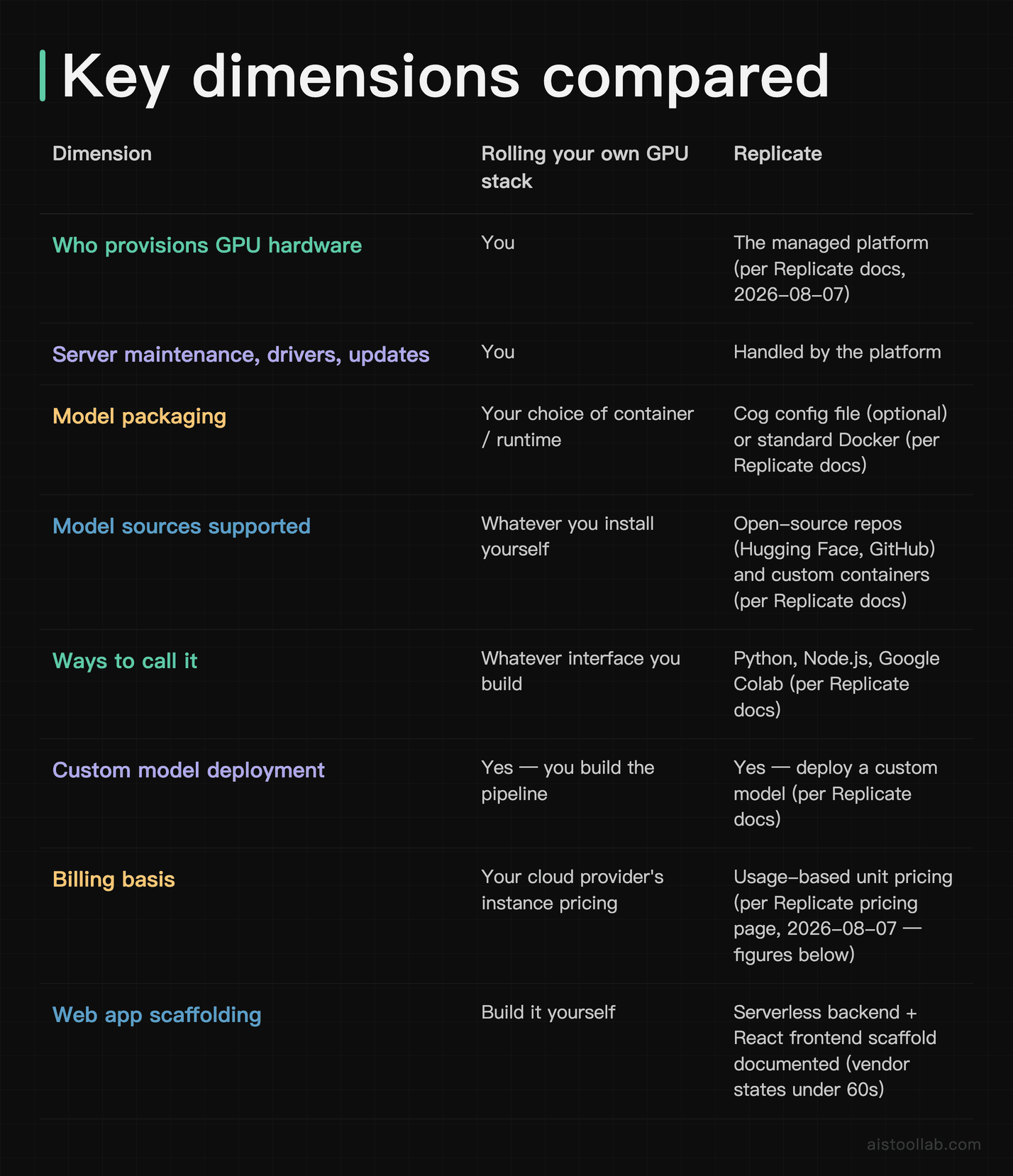
Read it the way you’d read a “who owns which chore” list. Everything in the “you” column is work you can do — plenty of teams do — but it’s work. Replicate’s pitch is that most of those chores stop being your problem. Whether that’s a good deal depends entirely on how much you value owning that stack versus offloading it.
Step 2: Bringing your own model without a DevOps team
A hosted-inference platform is only interesting if it runs the model you care about, not just a fixed menu. This is where Replicate’s design gets more flexible than “pick from a list.”
Its API accepts model references from major open-source repositories — Hugging Face and GitHub — as well as custom Docker containers. That last part removes a decision that usually forces a hard choice: do I use a hosted model I don’t control, or do I self-host something bespoke? Here you don’t have to pick a lane. A public open-source model and a container you built yourself both live on the same platform and get called the same way.
To define how your model behaves, Replicate gives you two on-ramps: its Cog framework — an open-source tool that uses an optional configuration file to package a model — or standard Docker if that’s what you already know. Cog is the smoother path if you want the platform’s conventions handled for you; Docker is the escape hatch if you’d rather bring your own container and not learn a new abstraction. You describe the environment and the inputs, and the thing becomes callable.
This matters most for people who are shipping something novel. If you’ve fine-tuned a model, stitched together a pipeline, or built something that doesn’t exist as an off-the-shelf endpoint, deploying custom models is a first-class feature, not a workaround. The same mechanism that runs a popular open-source image model runs your weird one-off — which is the whole reason it’s useful for real products rather than just demos. It’s also the layer that makes model orchestration realistic for small teams: if you’re building something where AI agents call out to several specialised models, having them all reachable through one consistent API is a meaningful simplification.
Step 3: What it costs, and where it actually fits
Replicate bills for compute time rather than for a machine you rent by the month, and the unit is the second. Per its official pricing page (checked 2026-08-08), the per-second rate is set by the hardware your run lands on:
- Nvidia T4 GPU (
gpu-t4): $0.000225 per second, listed as $0.81 per hour - Nvidia L40S GPU (
gpu-l40s): $0.000975 per second, listed as $3.51 per hour - Nvidia A100 (80GB) GPU (
gpu-a100-large): $0.001400 per second, listed as $5.04 per hour - Nvidia H100 GPU (
gpu-h100): $0.001525 per second, listed as $5.49 per hour
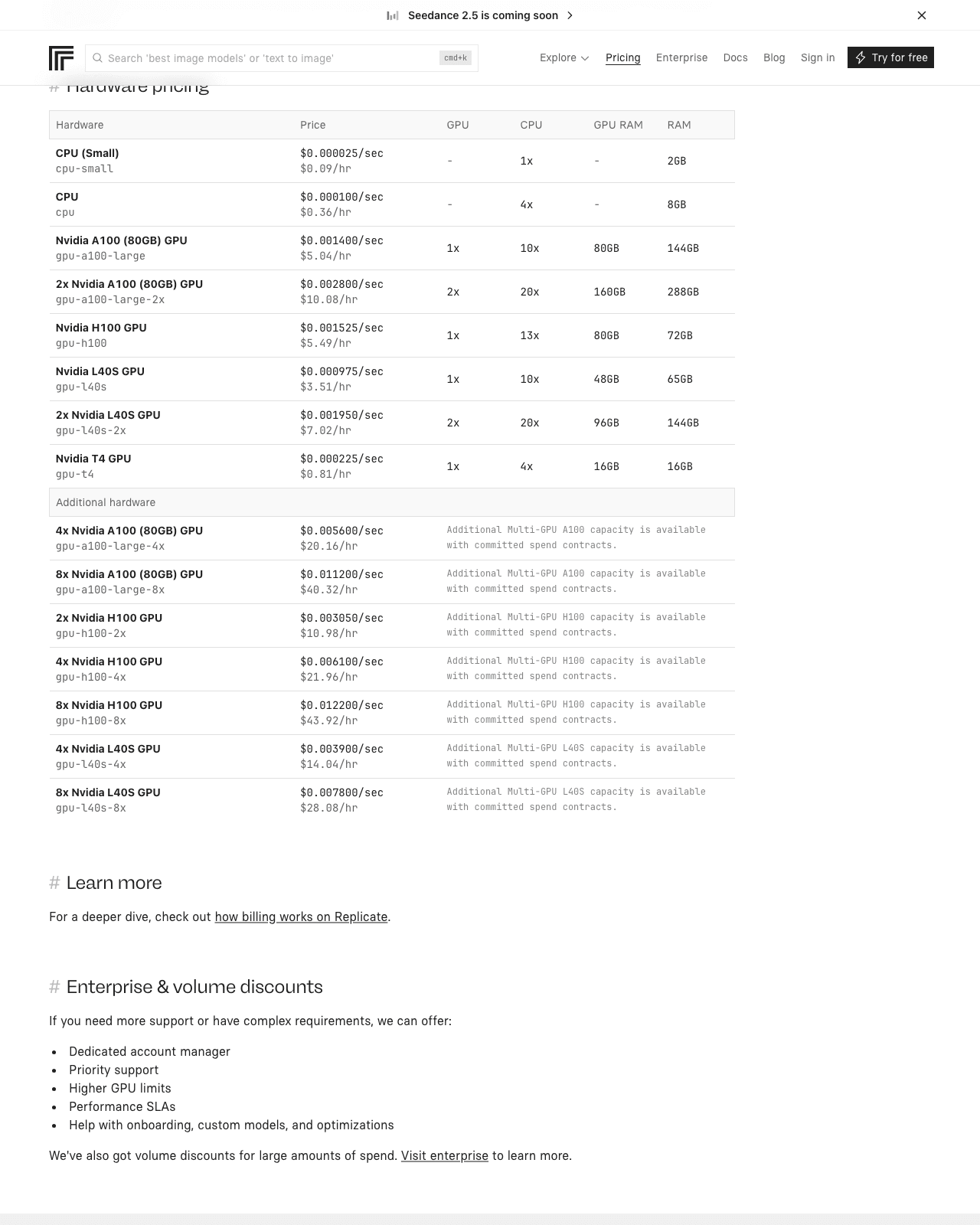
Two details decide whether that model is cheap or expensive for you, and both are on the same page. For public models, you pay only for the time it takes to process your request. For private models — your own, deployed with Cog or Docker — most of them also bill the time the model spends booting and sitting idle; the exception is what the page calls fast-booting fine-tunes, which are labelled as such in a model’s version list. If your traffic is bursty and your model is private and slow to boot, the idle time is the line item that will surprise you.
A separate thing worth getting right, because the earlier version of this article got it wrong: some popular public models are listed with their own per-token or per-image prices instead of a per-second rate. The pricing page shows $3.00 per million input tokens and $0.015 per thousand output tokens for a language model listed under anthropic, and $0.04 per output image for flux-1.1-pro from Black Forest Labs (both checked 2026-08-08). Those are prices for those specific models — not a platform-wide rate card. Check the model page for the one you actually intend to call.
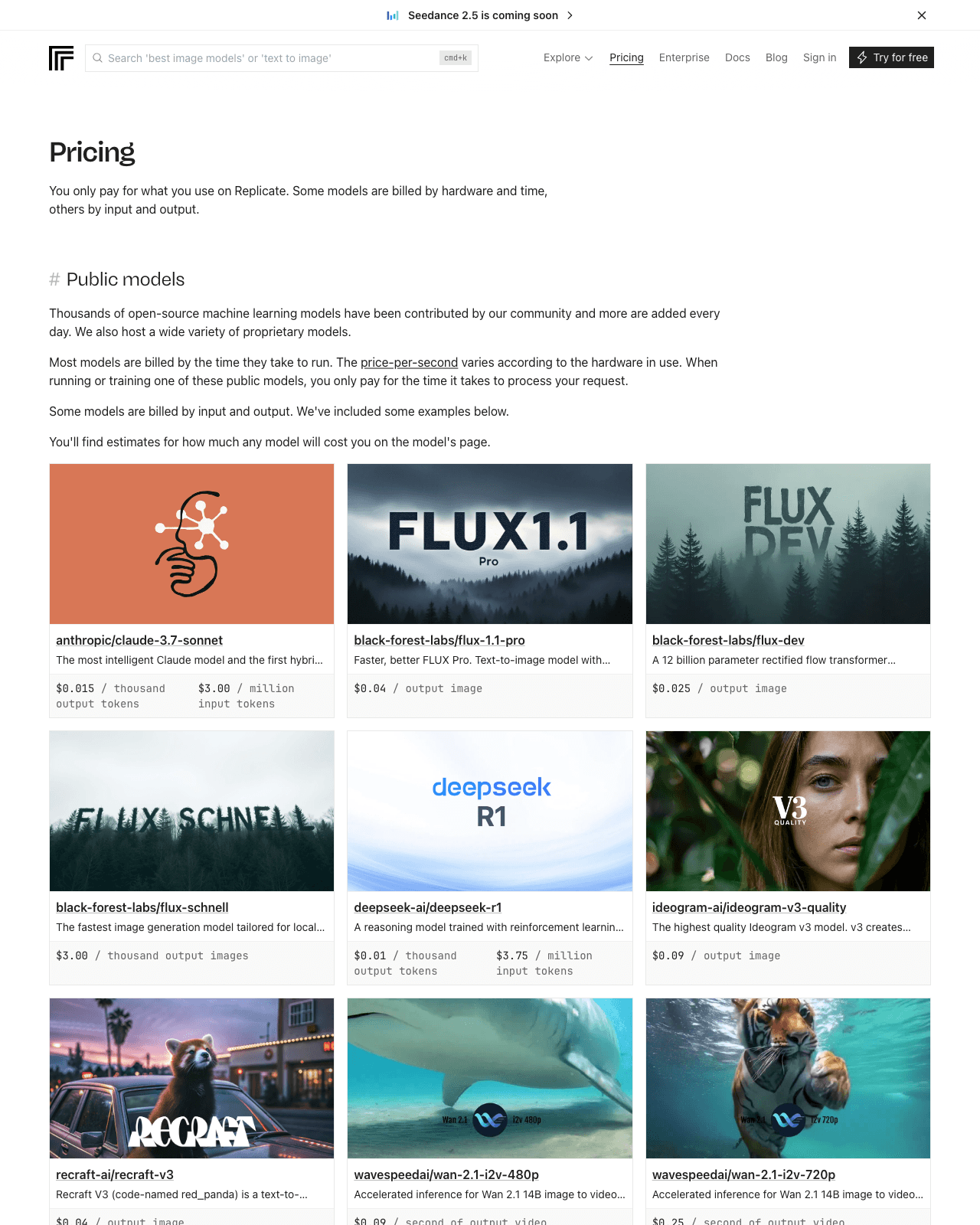
That structure is why usage-based inference tends to suit variable workloads. If your traffic is spiky or unpredictable, paying per unit of work maps cleanly to demand. If your traffic is enormous and constant, the maths can tip the other way — at true scale, owning your own hardware is a calculation worth running, and Replicate doesn’t publish a break-even figure, so you’d have to model it against your own volume. The honest version: the pricing is attractive for the “I’m not sure how much traffic this’ll get” phase, and worth re-checking once you do know.
One more thing the pricing page tells you that is easy to miss: you do not have to guess any of this before you commit. It states that you will find an estimate of what a given model costs on that model’s own page, which means the cost question is answerable per model, up front, without writing a line of code or entering a card. It also draws the line between what is on offer — thousands of open-source models contributed by the community, with more added continuously, alongside hosted proprietary models — so the catalogue you are pricing against is not fixed. Check the estimate on the specific model page you intend to call, on the day you intend to call it, rather than budgeting from a rate you read in an article, including this one.
What per-second billing does to the arithmetic
Take the published A100 (80GB) rate of $0.001400 per second. A run that takes five seconds costs $0.007; a thousand of those runs costs $7. Leave the same class of machine running continuously for thirty days at the listed hourly rate of $5.04 and you are at $3,628.80. That is straightforward arithmetic on Replicate’s own numbers, not a benchmark or a quote from another provider — but it is the whole argument for per-second billing in one line: it favours workloads that are spiky and idle most of the time, and it stops favouring you the moment your GPU is busy around the clock.
Which is also the honest limit of this pricing model. If you reach steady, high utilisation, per-second billing on someone else’s hardware is no longer obviously the cheap option, and the comparison you should be running is against a reserved instance rather than against the pain of setting one up. The case for a hosted platform at that point is operational, not financial.
Two practical questions come up often enough to answer here rather than at the bottom of the page. First, what you can point it at: per Replicate’s official docs (checked 2026-08-08), the API accepts model references from Hugging Face and GitHub as well as custom Docker containers, so deploying something you trained yourself is a documented path rather than a workaround. Second, whether it is only an API: the docs describe scaffolding a web app with a serverless backend and a React frontend in under sixty seconds — that is the vendor’s description of its own tooling, not something measured here — so an interface in front of the endpoint is a starting template away, though most teams will still wire the API into an app they already have.
The short version, for your stack
If your blocker has ever been the GPU rather than the model — you had something working locally and stalled at “now host it reliably” — that’s precisely the gap Replicate is built to close, and for a solo dev or small team with variable traffic, it’s worth wiring a test call into your project (per the official docs and pricing above) before you assume you need to run servers at all.
Frequently Asked Questions
What programming languages can I call Replicate from?
Per Replicate’s official documentation (checked 2026-08-07), you can run a model from Python and from Node.js, and you can also work from Google Colab if you’re prototyping in a notebook environment. Those three cover a big slice of how AI features actually get built: Python for scripts, data pipelines, and ML-adjacent work; Node.js for web and API backends; and Colab for quick experimentation before you commit to anything. Because inference is exposed as an HTTP API underneath, the practical reality is that you’re calling a web endpoint — so even outside those documented paths, anything that can make an HTTP request can talk to it, though the officially supported and documented routes are the ones above. If you’re a backend engineer, you’ll likely wire it into your existing Node or Python service; if you’re exploring, Colab lets you poke at a model with almost no setup before deciding whether it belongs in your stack.
What is Cog, and do I have to use it?
Cog is Replicate’s open-source framework for packaging a machine learning model so it can run as a reproducible, callable service. It uses a configuration file to describe the environment and the model’s inputs and outputs, and it handles a lot of the containerisation boilerplate for you. The short answer to “do I have to use it” is no — Replicate’s documentation lists Cog’s configuration file as optional, and you can bring a standard Docker container instead (per Replicate’s official docs, checked 2026-08-07). The trade-off is roughly this: Cog is the smoother, more opinionated path that handles conventions for you, which is handy if you’d rather not think about the packaging layer. Plain Docker is the escape hatch if you already have a container and would prefer to control it yourself without learning a new abstraction. Either way, the goal is the same — turning a model into something deployable without a platform-engineering project attached.
Last updated: 2026-08-08
Found this review helpful?
👉 Browse the AI Tools Library to find the right tools for your workflow.