

First, the thing a hash identifier can’t do for you
Let’s clear up a common misconception that sends beginners to these tools in the first place: a hash identifier does not crack, decrypt, or reverse a hash. It doesn’t hand you back the original password or file. All it does is look at a string like 5f4dcc3b5aa765d61d8327deb882cf99 and make an educated guess about which algorithm produced it. That’s it. The word “identifier” is doing exactly what it says, and nothing more.
Why does that distinction matter so much? Because hashing is designed to be a one-way street. You can turn a file into a hash, and for a secure hash function there is no known, practical method to reverse the digest back to its input — that’s the whole point of it. When someone “cracks” a hash, they’re not reversing anything; they’re guessing inputs, hashing each guess, and checking for a match. Knowing the algorithm just tells the cracking tool which door to try. So a hash identifier is the step before the work, not the work itself.
Once you internalize that, the rest of this topic gets a lot less intimidating. So let’s walk through what a hash is, the algorithm families you’ll keep bumping into, how these detection tools actually make their guesses, and — the part people skip — where the whole approach quietly falls apart.
Contents
What a hash actually is, and why anyone bothers
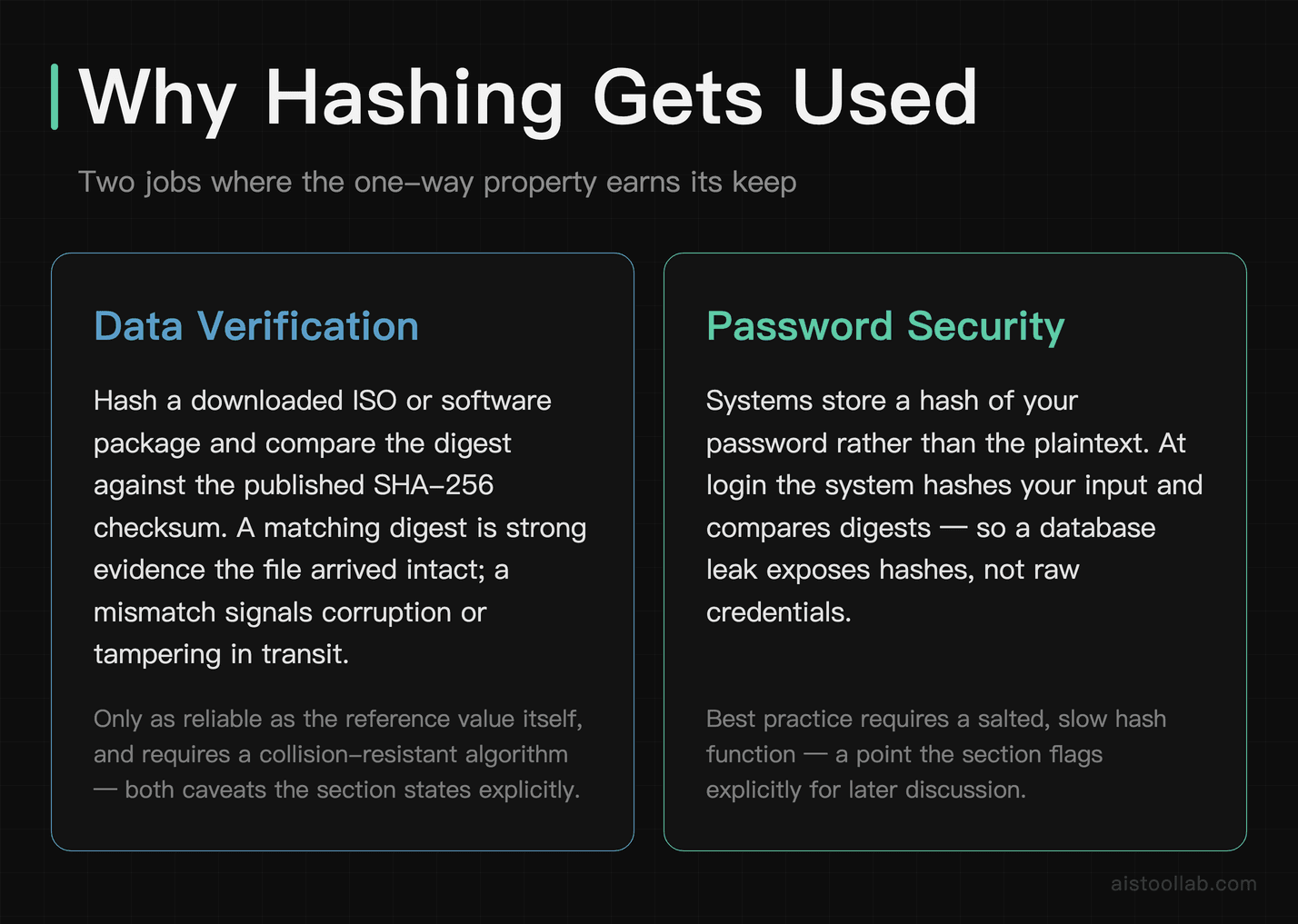
A cryptographic hash function takes any input — a one-character password, a 4GB disk image, the entire text of a novel — and produces a fixed-length string of characters called a digest. Feed it the same input twice and you get the identical digest every time. Change a single byte of the input and the output changes unpredictably, bearing no usable resemblance to the digest you started with. That combination of properties is what makes hashing useful across a surprising number of jobs.
Data verification. When you download an ISO or a software package and the site lists a “SHA-256 checksum,” you can hash your downloaded copy and compare. If the two digests match, that’s strong evidence your file arrived intact — assuming the checksum was produced with a collision-resistant algorithm and the reference value itself is trustworthy. If they don’t, something got corrupted or tampered with in transit.
Security. A widely recommended practice is for systems not to store your actual password. Instead they store a hash of it (ideally a salted, slow one — more on that later). When you log in, the system hashes what you typed and compares digests. That way, if the database leaks, attackers get hashes rather than plaintext passwords.
Forensics and integrity. Digital investigators hash evidence the moment they seize it, so they can later check that the data still matches the fingerprint recorded at seizure. Supply-chain tooling hashes build artifacts so you can check the binary you’re running against the digest of the one that was actually published. In all these cases, the hash is a compact, tamper-evident fingerprint of something much bigger.
The families you’ll actually run into
You could spend a career studying hash functions, but out in the wild you’ll encounter maybe a handful of families. Here’s the honest state of each.
MD5 — deprecated, but everywhere
MD5 (RFC 1321, designed by Ronald Rivest, 1992) produces a 128-bit digest, which shows up as 32 hexadecimal characters. It’s genuinely broken for security purposes: practical collision attacks — two different inputs producing the same digest — were demonstrated publicly back in the mid-2000s, and the Flame malware notably abused an MD5 collision around 2012 to forge a code-signing certificate. Despite all that, MD5 is still widely used because it’s fast and fine as a non-security checksum for spotting accidental corruption. Just never use it to protect anything an adversary cares about.
SHA-1 — also deprecated, for the same reason
SHA-1 (NIST, FIPS 180-1, 1995) gives a 160-bit digest, or 40 hex characters. For years it was the workhorse of Git, TLS certificates, and version control. Then in February 2017, researchers at Google and CWI Amsterdam published “SHAttered,” the first practical SHA-1 collision. That was the nail in the coffin — browsers and certificate authorities had already been phasing it out, and it’s no longer considered safe for signatures or integrity guarantees against a motivated attacker.
SHA-2 — the current default
SHA-2 (NIST, FIPS 180-2, 2001) is a family, not a single algorithm — SHA-224, SHA-256, SHA-384, SHA-512 and a couple of others. SHA-256 (64 hex characters) shows up in many systems: it backs modern TLS, package checksums, and blockchain systems. As of this writing there’s no publicly known practical collision against SHA-256, which is exactly why it’s the sensible default for general use.
SHA-3 — a different design, on purpose
SHA-3 (NIST, FIPS 202, standardized 2015; based on the Keccak design that won NIST’s public competition in 2012) offers the same output sizes as SHA-2 but is built on a completely different internal structure called a sponge construction. That was deliberate: the idea was to have a strong backup that wouldn’t fall to the same class of attack if someone ever broke SHA-2’s design. It’s not as widely deployed in practice, in part because SHA-2 still works fine.
BLAKE2 — the speed-focused option
BLAKE2 (Aumasson, Neves, Wilcox-O’Hearn, and Winnerlein, 2013) comes in BLAKE2b and BLAKE2s variants with configurable output lengths. Its authors’ paper — titled, cheekily, “BLAKE2: simpler, smaller, fast as MD5” — pitches it as a high-performance secure hash, and you’ll find it inside tools like Argon2 and various package managers. The output length being configurable is worth remembering, because it makes BLAKE2 harder to pin down by length alone.
How the common algorithms stack up
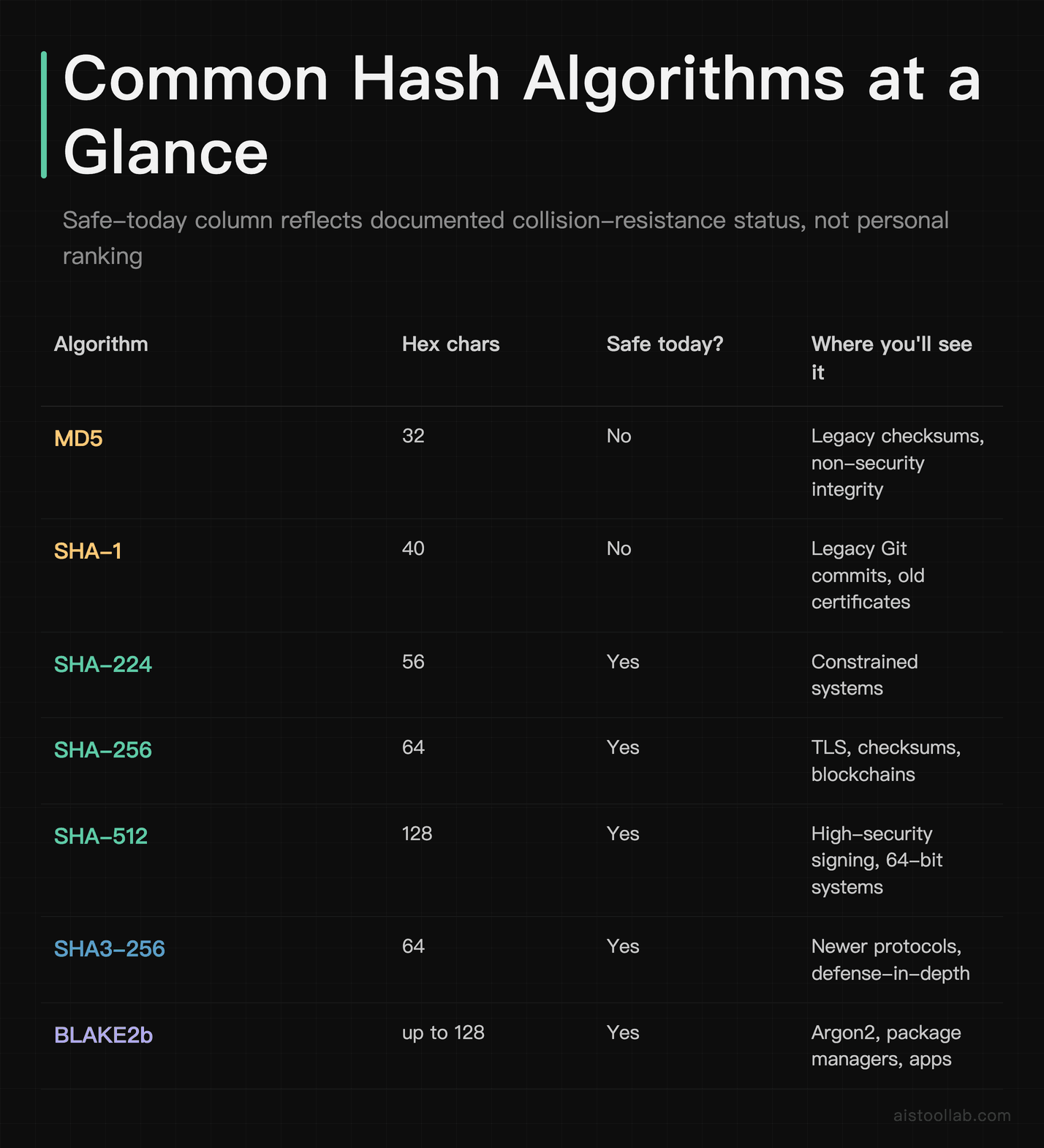
This table is a factual reference sheet, not a scoreboard, and the “Safe for security use today?” column is narrower than the heading sounds — so read it with this scope in mind. It reports one thing only: whether the algorithm itself still has no publicly demonstrated practical collision break, which is the documented status these algorithms are tracked under. The transition guidance behind the “No” rows is NIST’s SP 800-131A Rev. 2, Transitioning the Use of Cryptographic Algorithms and Key Lengths; BLAKE2 is specified in RFC 7693. What a “Yes” does not mean is “correct for every security job”: password storage still needs a deliberately slow, salted password hash such as Argon2, scrypt or bcrypt, no matter what this column says — that is covered further down. Output lengths are the standard specification values.
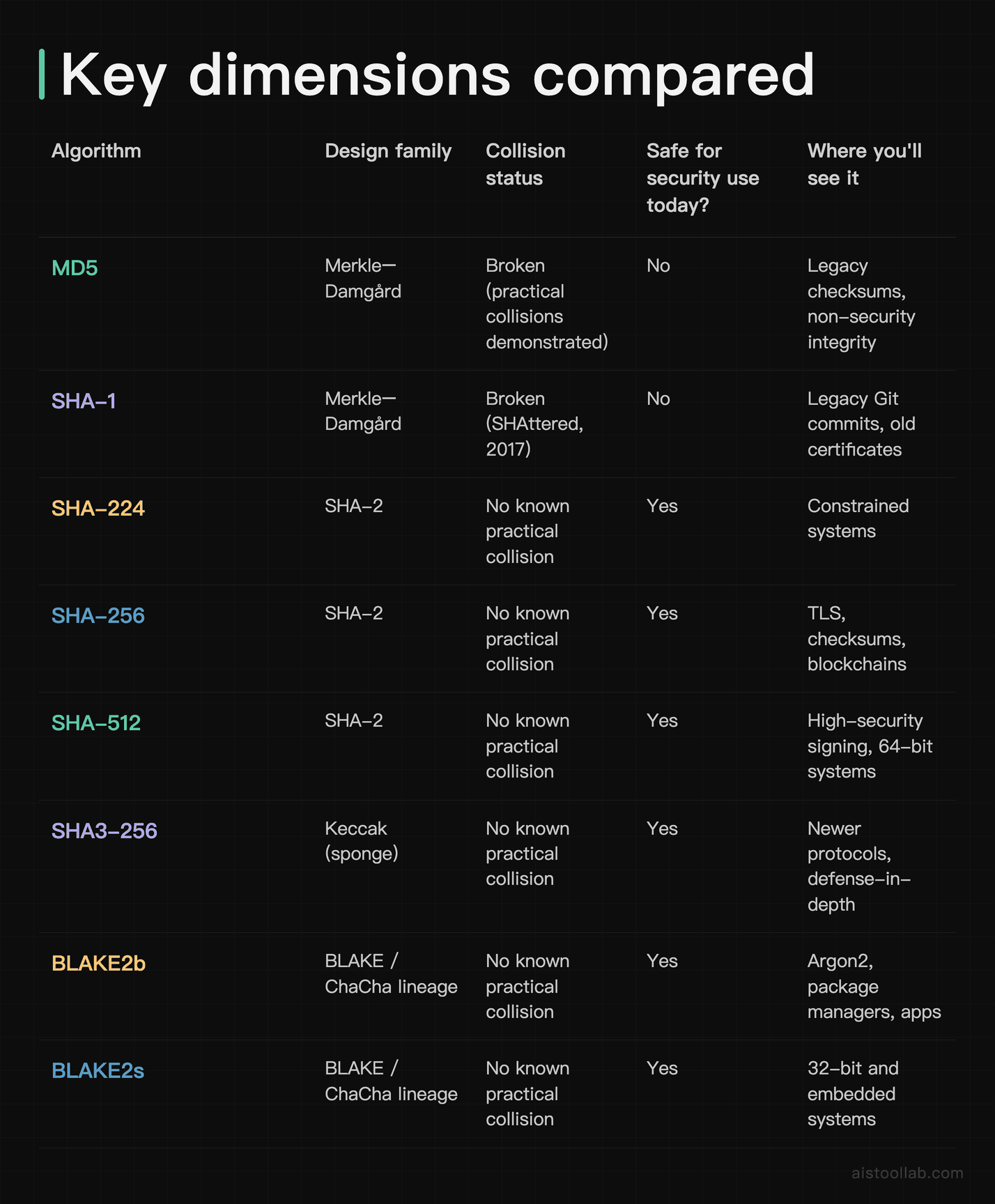
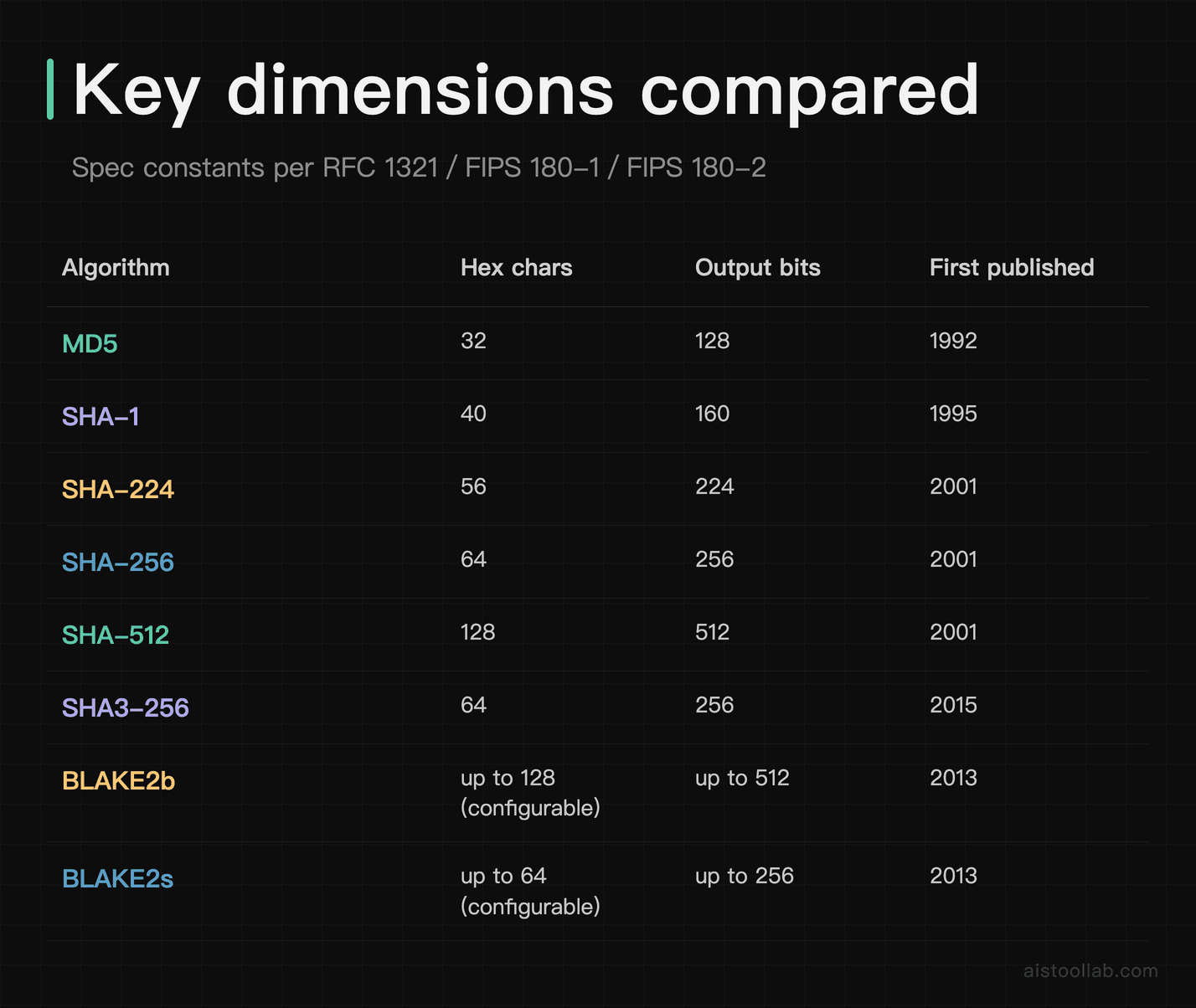
Notice the collision in the table itself: SHA-256, SHA3-256, and a 256-bit BLAKE2 output all land on 64 hex characters. That single row of overlap is a core reason hash identification is a probabilistic guess rather than a lookup.
How a hash identifier makes its guess
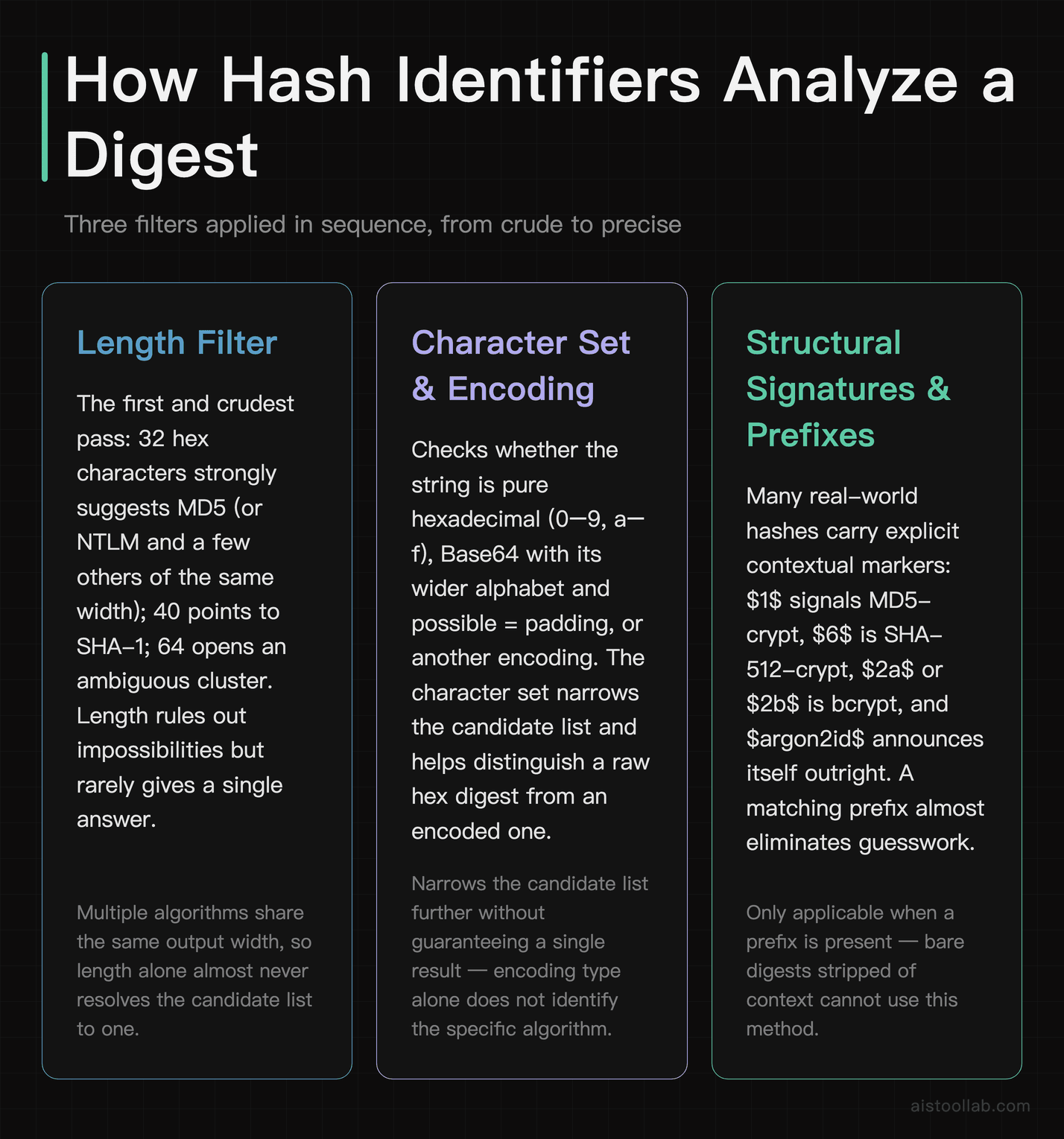
Under the hood, these tools are running a chain of pattern-matching heuristics. None of them “know” the algorithm with certainty from the digest alone — they narrow the field and rank the likely candidates. Here’s the logic, roughly in the order most tools apply it.
Length. The first and crudest filter. 32 hex characters strongly suggests MD5 (or NTLM, or a few others of the same width). 40 points at SHA-1. 64 opens up the ambiguous cluster above. Length rules out impossibilities, but it rarely gives a single answer.
Character set and encoding. Is the string pure hexadecimal (0–9, a–f)? Is it Base64, with its wider alphabet and possible = padding? Some formats are binary encoded differently. The character set narrows the candidate list further and helps distinguish, say, a raw hex digest from an encoded one.
Structural signatures and prefixes. This is where identification gets more reliable, because many real-world hashes carry contextual markers. Unix password hashes are the classic example: a string starting with $1$ is MD5-crypt, $6$ is SHA-512-crypt, $2a$ or $2b$ is bcrypt, and $argon2id$ announces itself outright. When one of these prefixes is present, the tool isn’t guessing at all — it’s reading a label. Tools such as hashid, the older hash-identifier script, and hashcat’s example-hash catalog lean heavily on these signatures.
Ranked output. Put it all together and a good identifier returns a shortlist, often ordered by likelihood, rather than one confident verdict. That’s a feature, not a weakness — the honest answer to “what algorithm made this bare 64-char hex string?” is “one of several, and I can’t be sure without more context.” I dug into the mechanics of that detection pipeline further in How Hash Identifiers Work, if you want the deeper version.
Where this shows up in real work
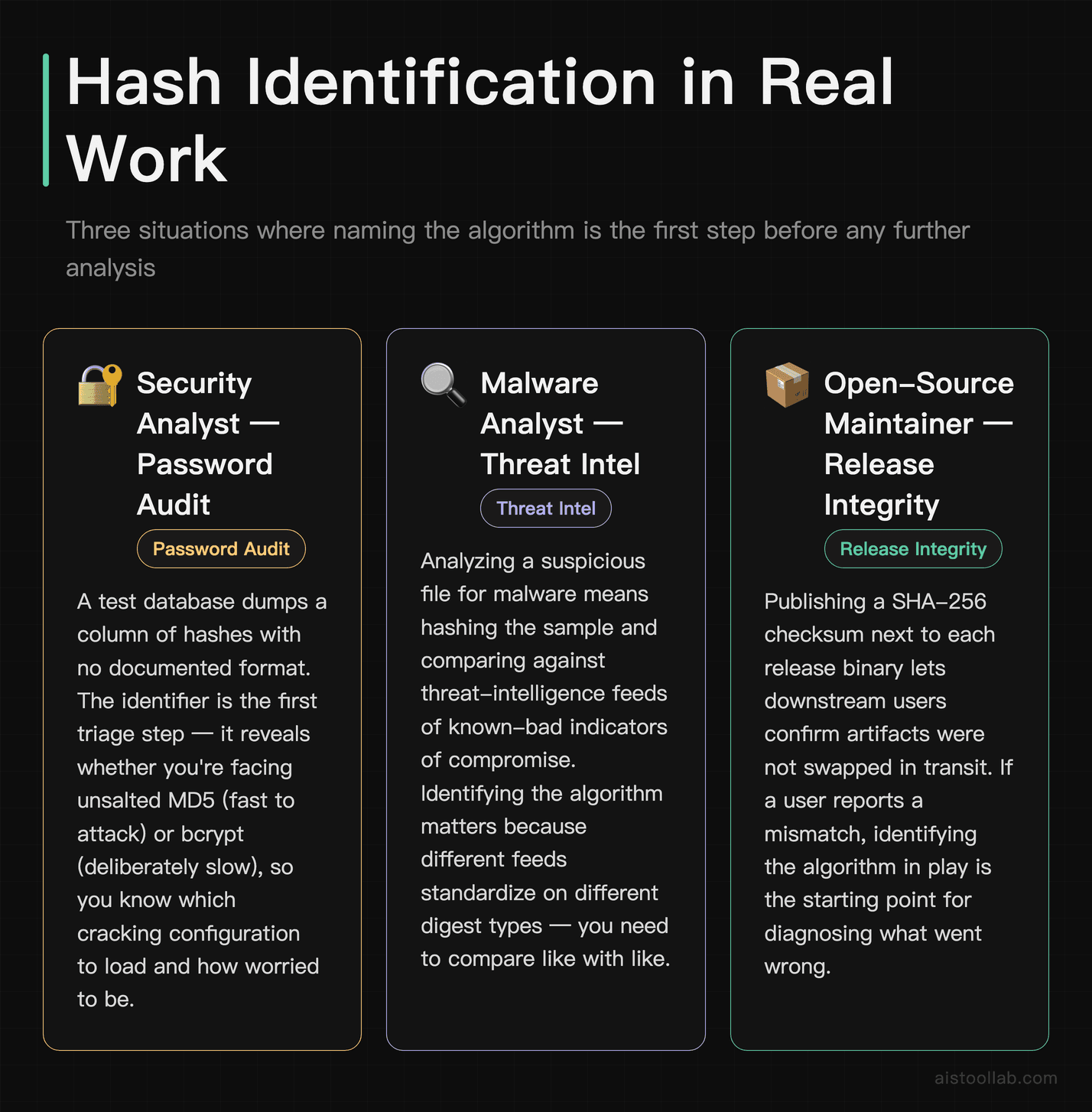
Abstract cryptography gets a lot more concrete once you see who’s actually reaching for these tools. A few realistic scenarios:
Say you’re a junior on a security team doing a password audit. A test database dumps a column of hashes and nobody documented the format. Before you can even estimate how crackable they are, you need to know whether you’re staring at unsalted MD5 (fast to attack) or bcrypt (deliberately slow). A hash identifier is your first triage step — it tells you which cracking configuration to load and how worried to be.
Imagine you’re analyzing a suspicious file for malware. Threat intelligence feeds and services publish known-bad file hashes as indicators of compromise. You hash the sample, identify the format, and check it against those feeds. Identifying the algorithm matters here because different feeds standardize on different digest types, and you need to compare like with like.
If you run releases for an open-source project, hashes are how downstream users verify your artifacts weren’t swapped out somewhere in the supply chain. Publishing a SHA-256 checksum next to each binary lets anyone confirm integrity — and if a user reports a mismatch, being able to identify and reason about the hash format is part of triaging whether it’s corruption or something worse.
And in digital forensics, investigators hash a drive image on acquisition, then re-hash it before analysis to check the digest still matches, supporting the claim that the evidence is unchanged. Understanding hash types keeps that chain of custody defensible when it’s questioned later. If you’re weighing which specific utilities fit these workflows, I compared a batch of them in Hash Identifier Tools Compared.
Frequently Asked Questions
Can a hash identifier tool decrypt or reverse my hash?
No, and this is worth being blunt about because it’s a common expectation people bring to these tools. A hash identifier only tells you which algorithm likely produced a digest — it does not recover the original input. Hashing is designed to be one-way; for well-designed cryptographic hashes there is no known, practical way to run the computation backward. What people call “cracking” a hash is really brute force or dictionary guessing: a tool hashes millions of candidate inputs and looks for one whose digest matches yours. That process needs to know the algorithm, which is where identification helps, but it succeeds only when the original input was weak, common, or unsalted. A strong, unique, salted password can be functionally impossible to recover in any realistic timeframe. So think of a hash identifier as the reconnaissance step, not the payoff — it points cracking software at the right door, but it does not by itself recover the input for you. If a tool claims to instantly “decrypt any hash,” it’s either doing a reverse-lookup against a database of previously seen values or overselling itself.
Why do two different algorithms produce a hash of the same length?
Because output length is a design choice, not a fingerprint. SHA-256, SHA3-256, and a 256-bit BLAKE2 configuration all produce 256 bits of output, which renders as 64 hexadecimal characters. The internal machinery differs enormously — SHA-2 uses a Merkle–Damgård construction, SHA-3 uses a sponge, BLAKE2 descends from a different lineage entirely — but the final digest is just a fixed number of bits, and multiple algorithms happen to target the same size. This is precisely why length-based identification is only a starting filter. A 64-character hex string genuinely could be any of several algorithms, and no amount of staring at the raw digest resolves it. You need extra context: where the hash came from, what generated it, any surrounding format markers, or metadata from the system that produced it. Honest identifier tools acknowledge this by returning a ranked list of candidates for ambiguous lengths rather than pretending to a certainty they don’t have.
Is MD5 completely useless now?
For anything security-related, treat it as unsafe — practical collision attacks against MD5 have been public since the mid-2000s, and real-world abuse (the Flame malware forging a certificate via an MD5 collision around 2012) proved the risk isn’t theoretical. Never use MD5 to store passwords, sign anything, or guarantee that a file wasn’t deliberately tampered with by an adversary. That said, “broken for security” isn’t the same as “broken for everything.” MD5 is fast and, in non-adversarial use, is still commonly used as a checksum — spotting accidental file corruption, deduplicating data, or generating quick cache keys where nobody is actively trying to engineer a collision. Plenty of legacy systems still emit MD5 for exactly these reasons. The rule of thumb: if the threat model includes someone who wants to fool you, MD5 is the wrong tool. If you’re only guarding against random bit-rot or a truncated download, it’s fine, though SHA-256 is a reasonable modern default even there.
How do I tell SHA-256 from SHA3-256 if they’re the same length?
From the digest string alone, you often can’t — and that’s the honest answer. Both produce 64 hex characters and neither carries an inherent visible marker in the raw output. What actually resolves the ambiguity is context outside the hash itself. Where did it come from? A checksum file on a download page usually names the algorithm right next to it. A configuration setting, a protocol specification, or documentation tells you what the generating system uses. If you control the environment, you can simply re-hash a known input with each candidate algorithm and see which one reproduces the digest — that’s definitive. If you have no other information, the digest alone doesn’t reveal which algorithm produced it, so any single-answer verdict is a guess rather than proof. When it truly matters, get the context or run the re-hash test rather than trusting a single-answer verdict.
Are online hash identifier websites safe to paste hashes into?
Pasting a hash into a website means handing that string to a third party, so it depends entirely on what the hash represents and your organization’s rules. A hash of a public file’s checksum carries little risk to share. But a password hash pulled from a live system, or any hash tied to sensitive or regulated data, is different — some online services log submissions or check them against reverse-lookup databases, which is exactly the kind of exposure a security policy exists to prevent. For anything sensitive, prefer a local, offline tool that never transmits the input anywhere: command-line utilities and offline scripts can do this pattern-matching locally without a network round-trip. The identification logic isn’t complicated enough to require a cloud service, so there’s rarely a good reason to send confidential material off your machine. If you’re just curious about a checksum from a public GitHub release, a web tool is fine. If you’re doing incident response on production credentials, keep it local.
What’s the actual difference between hashing and encryption?
They get confused constantly, but they solve opposite problems. Encryption is two-way and reversible: you scramble data with a key, and anyone with the right key can unscramble it back to the original. The whole point is confidential storage or transmission where the intended recipient recovers the plaintext. Hashing is one-way: it’s designed so that a well-built hash function is computationally infeasible to reverse in practice, and there’s no key and no “unhashing.” You use it when you never want to recover the original — you only want to verify it or fingerprint it. Password storage is the textbook case: a system can store just a hash and verify a login by hashing what you type and comparing it, so it need not keep your actual password. Because of this, “decrypt this hash” is a category error — there’s nothing to decrypt. When people succeed in recovering an input from a hash, they didn’t reverse it; they guessed inputs until one hashed to a match. Keeping these two concepts separate clears up most beginner confusion about what hash tools can and can’t do.
What is salting, and does it change what the hash looks like?
Salting means adding a unique random value to each input before hashing it, then storing that salt alongside the resulting digest. Its job is to defeat precomputed attacks: without salt, identical passwords always produce identical hashes, so an attacker can precompute a giant table of common-password hashes (a rainbow table) and, if yours is already in that table, look it up with a simple table lookup instead of cracking it from scratch. A unique salt per user means the same password produces a different hash every time, making those precomputed tables useless — the attacker has to attack each hash individually. Does it change what the hash looks like? Often yes, in a helpful way: salted password formats usually embed the salt and algorithm in a structured string, like the $6$... or $2b$... prefixes you’ll see in Unix systems. That structure actually makes identification easier, because the format announces itself. Peppering is a related idea — a secret value applied on top of the salt but stored separately, so a database leak alone doesn’t reveal it. Modern password hashing (bcrypt, scrypt, Argon2) bakes salting in by default.
Do I need to install a tool, or can I just use a browser tab?
Either works for casual identification, and the right choice comes down to sensitivity and workflow rather than capability. For a quick check on a non-sensitive hash — a public checksum, a learning exercise, a hash you found in a blog post — a browser-based identifier is fast and requires nothing installed. For anything you’d be uncomfortable emailing to a stranger, install a local tool: command-line identifiers and offline scripts run the matching logic on your own machine with no data leaving it. If you’re doing this regularly as part of security or forensics work, local tooling also integrates directly with scripts and pipelines, and it keeps you compliant with policies that forbid sending sensitive data to external services. This article doesn’t compare the detection accuracy of specific online versus offline tools, so treat the decision as really about privacy, repeatability, and how the task fits into the rest of your work rather than assuming one approach identifies better.
Where hash identification quietly hits a wall
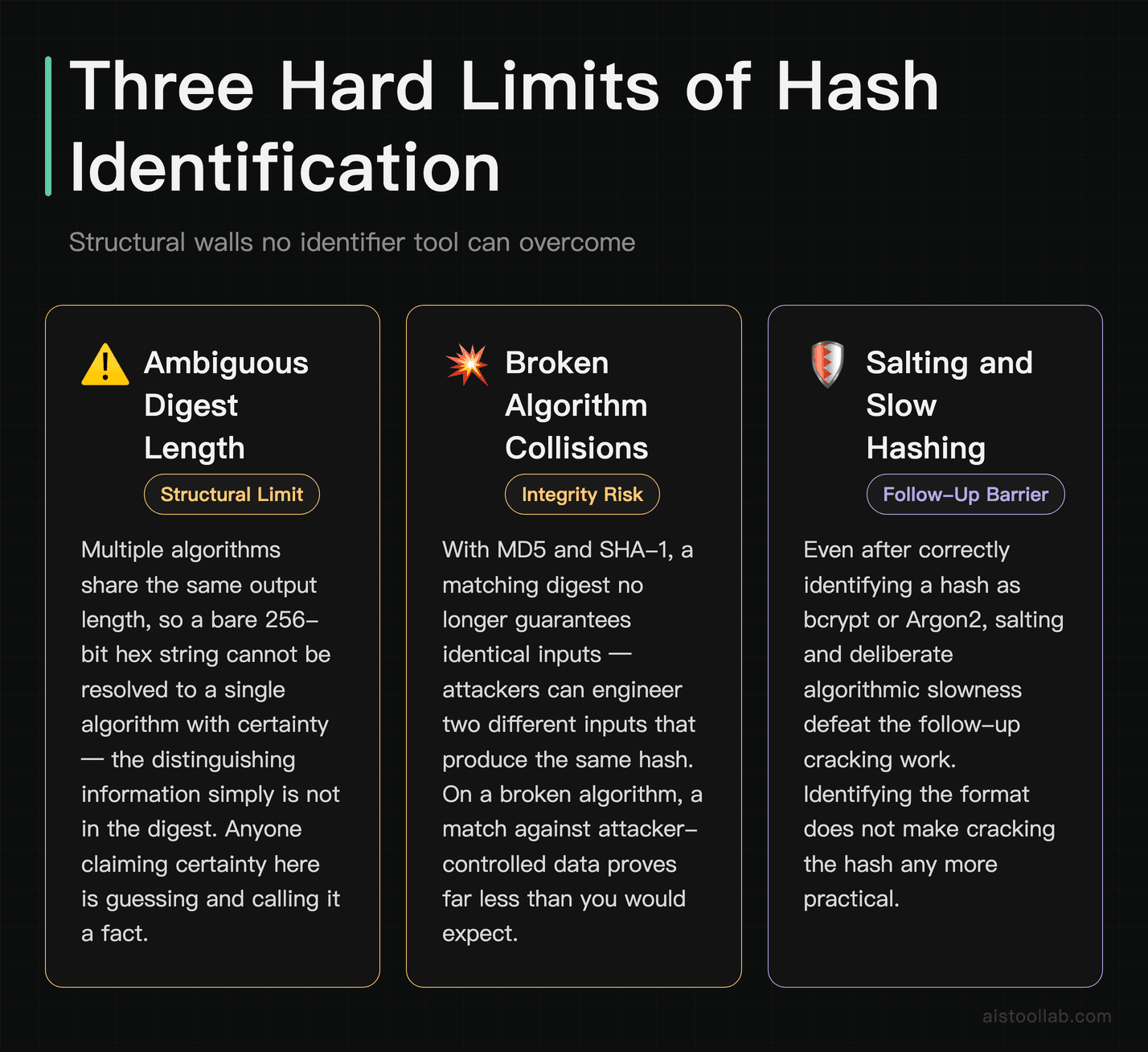
Here’s the part that separates people who understand hashing from people who just run the tool. Hash identification has hard limits, and knowing them is what keeps you from drawing wrong conclusions.
Ambiguity is structural, not a bug. As the comparison table showed, multiple algorithms share output lengths. When several algorithms produce the same output length, an identifier cannot resolve a bare 256-bit hex string to a single algorithm with certainty — the distinguishing information simply isn’t in the digest. Anyone who tells you otherwise is guessing and calling it a fact.
Collisions change what a match even means. With MD5 and SHA-1, a matching digest no longer guarantees identical inputs, because attackers can engineer two different inputs that hash the same. That’s why a matched checksum only carries an adversarial integrity guarantee when the algorithm is collision-resistant; for non-adversarial corruption checks a match can still be useful even on a weaker algorithm. On a broken algorithm, a match against attacker-controlled data proves less than you’d think.
Salting and slow hashing defeat the follow-up work. Even after you’ve perfectly identified a hash as bcrypt or Argon2, identification hasn’t gotten you closer to the input. Those algorithms are deliberately slow and per-user salted, so brute forcing them is expensive by design. Identification tells you the door; it doesn’t tell you the door is easy to open. Often it’s telling you the opposite.
Rainbow tables are mainly a risk for unsalted hashes. Precomputed lookup tables can reverse unsalted hashes of common inputs when those inputs are already present in the table, without further per-guess computation — which is a real risk for legacy systems that stored raw MD5 or SHA-1 passwords, and a non-issue for anything properly salted. So “is this hash crackable?” depends far more on how it was generated than on which algorithm it used.
If there’s one thing to carry away from all of this, it’s to treat a hash identifier as the first five minutes of a job, never the conclusion. It narrows possibilities, reads any format markers it can find, and points you toward the right next step. For low-stakes checksum work that’s often all you need. For security and forensics, it’s the beginning of a longer, more careful process — and the moment you start treating a probabilistic guess as a certain answer is the moment you’ll get burned. I keep a running comparison of the utility tools in this space in AI Developer Utility Tools Compared if you want to see how they differ in practice.
Last updated: 2026
Found this review helpful?
👉 Browse the AI Tools Library to find the right tools for your workflow.