

Do You Usually Need to Pay to Identify a Hash? Here’s Where Money Actually Buys You Something
Here’s the question that sends people down a rabbit hole: “Which hash identifier should I use?” It sounds like it has a clean answer, the way “which password manager” or “which VPN” almost does. It doesn’t. Much of hash identification is pattern matching (string length, character set, telltale prefixes like $2y$ for bcrypt or $6$ for SHA-512 crypt), and that logic exists in open-source tooling that has been around for years.
So the honest framing isn’t “which tool wins.” It’s “what are you actually trying to do, and at what scale?” A malware analyst pasting one suspicious string into a browser has completely different needs from a pentester who just pulled 40,000 hashes out of a database dump and needs to feed them into a cracking pipeline before the engagement ends. The value question — the thing this whole piece is really about — is when, if ever, you’d pay for any of this.
Let me walk through the realistic candidates, what each is built for, and the scenarios where one may fit your workflow better than another. No leaderboard, no “the #1 hash identifier of 2026,” because that framing would be dishonest — there’s no independent head-to-head benchmark that would let me crown one, and which one suits you depends entirely on your workflow.
Contents
First, the Uncomfortable Truth About “Accuracy”
Before comparing anything, you need to internalize one thing: no hash identifier can tell you the algorithm with certainty, and any tool that implies otherwise is overselling. A raw MD5 hash and an NTLM hash are both 32 hexadecimal characters. A raw SHA-256 and a hex-encoded SHA3-256 are both 64 hex characters. There is nothing in the output string itself that definitively separates them — the encoding is lossy by design.
What these tools actually do is return a ranked list of candidates: “this is most likely MD5, but it could also be NTLM, LM, or a handful of others.” The good ones are transparent about that ambiguity and order candidates by likelihood. The weak ones spit out a single answer that looks authoritative and quietly misleads you. So when you evaluate “accuracy,” what you’re really evaluating is: does the tool show its uncertainty honestly, and does it cover the candidate you actually care about?
Algorithms with structured prefixes are the exception. Bcrypt, Argon2 ($argon2id$), SHA-512 crypt, and PHPass ($P$) carry distinctive prefix markers, so identification there is close to unambiguous. Bare hex digests — MD5, SHA-1, SHA-256, NTLM — are where the guessing lives. Keep that split in mind; it matters more than any feature checklist.
The Realistic Candidates
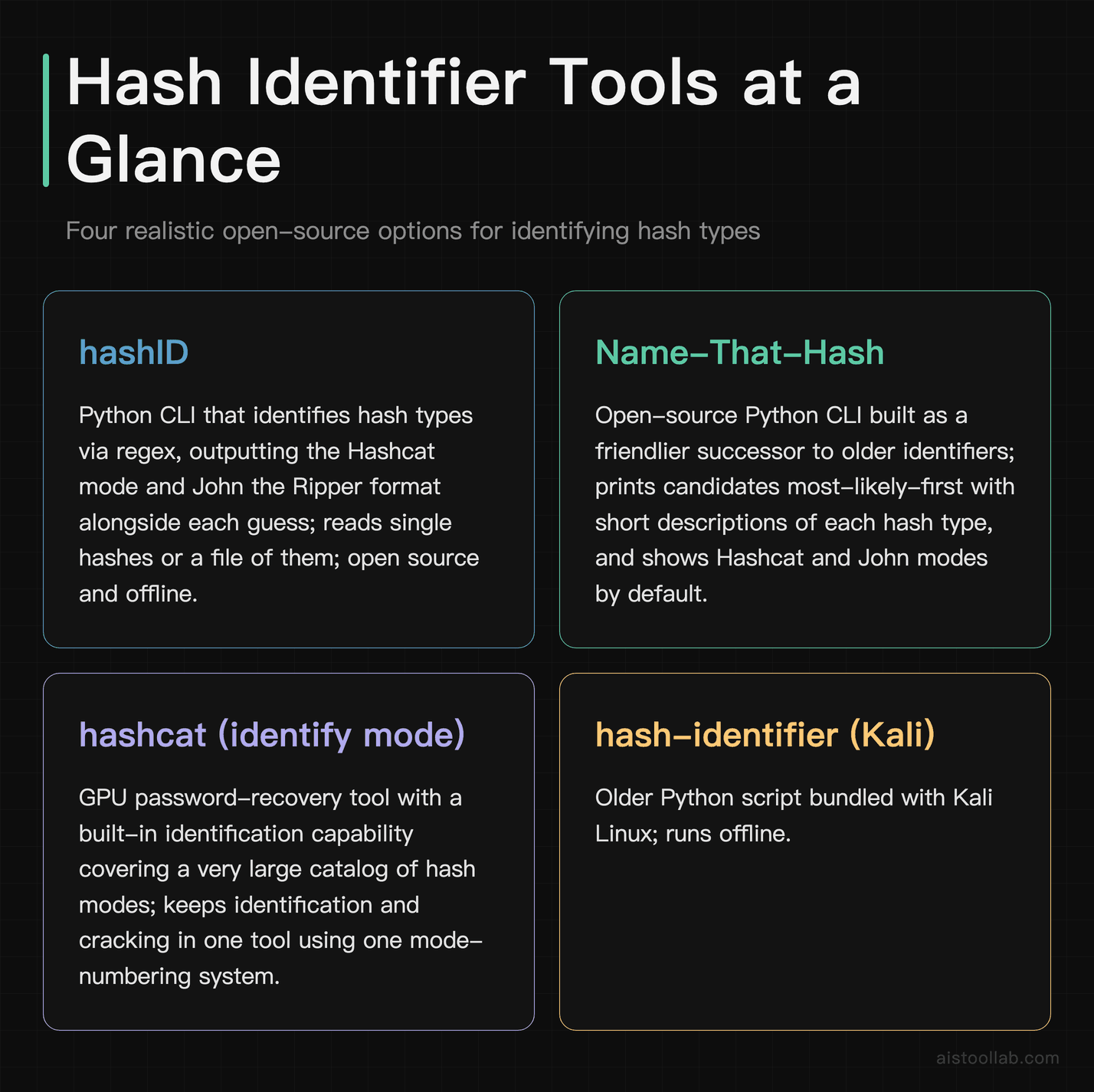
hashID — a Python command-line tool (the psypanda/hashID project on GitHub). Per its README, it identifies supported hash types using regular expressions and can output the corresponding Hashcat mode and John the Ripper format alongside each guess. It reads single hashes or a file of them. Per its GitHub project, it’s open source and runs offline. This is a long-established tool of this kind.
Name-That-Hash — an open-source CLI (HashPals/Name-That-Hash). It was built as a friendlier successor to older identifiers: it prints candidates most-likely-first, includes short descriptions and a summary of each hash type, and shows Hashcat and John modes by default. It focuses on presenting its output with descriptions rather than as raw CLI text.
hashcat’s built-in identify mode — hashcat is a GPU password-recovery tool, not primarily an identifier, but it has an identification capability and knows a very large catalog of hash modes (its example-hashes reference on hashcat.net lists them). If you’re going to crack the hash anyway, letting hashcat identify it keeps you in one tool and one mode-numbering system.
hash-identifier — the older Python script bundled with Kali. It’s offline and simple. Fine in a pinch.
Online identifiers — services like Hashes.com and CrackStation include browser-based identification (CrackStation is primarily a lookup-table cracker; Hashes.com pairs identification with a cracking marketplace). Zero install, instant, but you’re pasting data into someone else’s server — see the privacy warning in the FAQ.
CyberChef — GCHQ’s open-source, browser-based “cyber Swiss Army knife” (hosted at gchq.github.io/CyberChef). It has an “Analyse hash” operation and runs entirely client-side, so nothing leaves your browser. Handy when you’re already living in CyberChef for decoding work.
Feature and Value Comparison
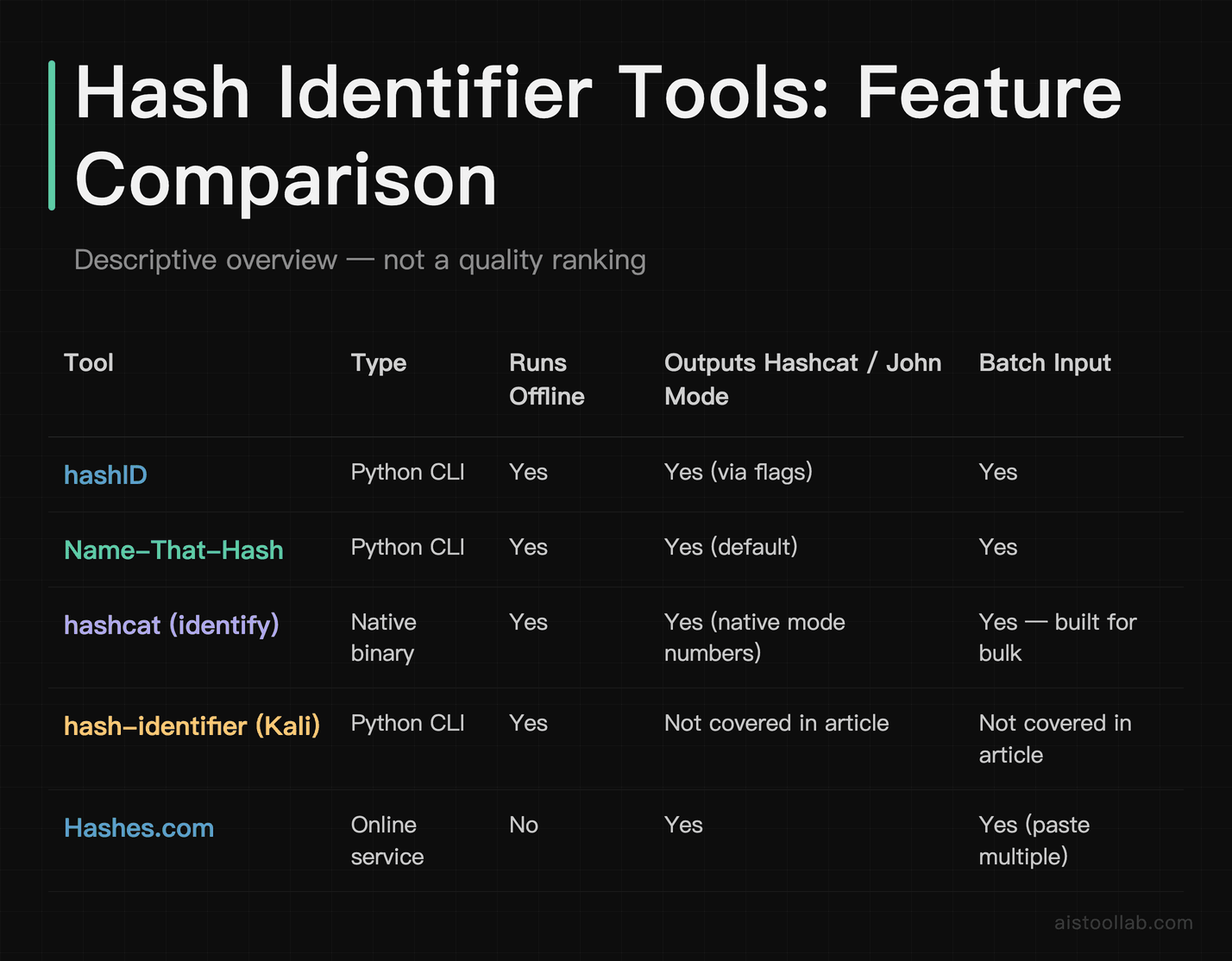
The table below is descriptive, not a scoreboard — the “design leaning” column is my read of what each tool is built around, derived from the factual columns beside it, not a quality ranking. Cost is described qualitatively; where I couldn’t confirm a current price from an official page, I’ve said so rather than guess.
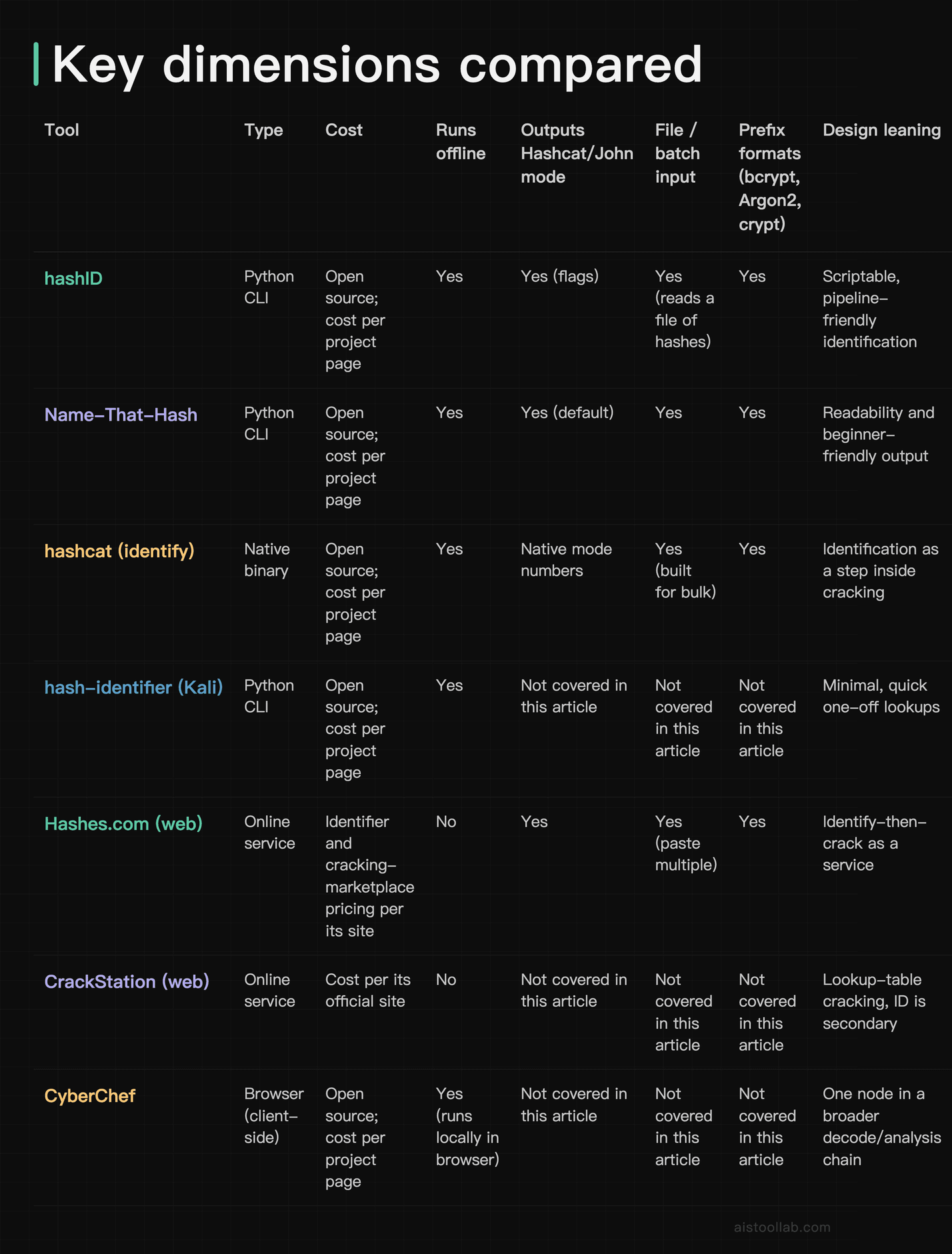
Notice what the “cost” column is telling you: for identification specifically, the tools in this table are open-source projects or online services, with current pricing and terms described on their own sites. Where money enters the picture is cracking and API-scale automation — not the act of naming a hash. That reframes the entire “free vs premium” debate, which I’ll come back to.
Which One Fits Which Situation
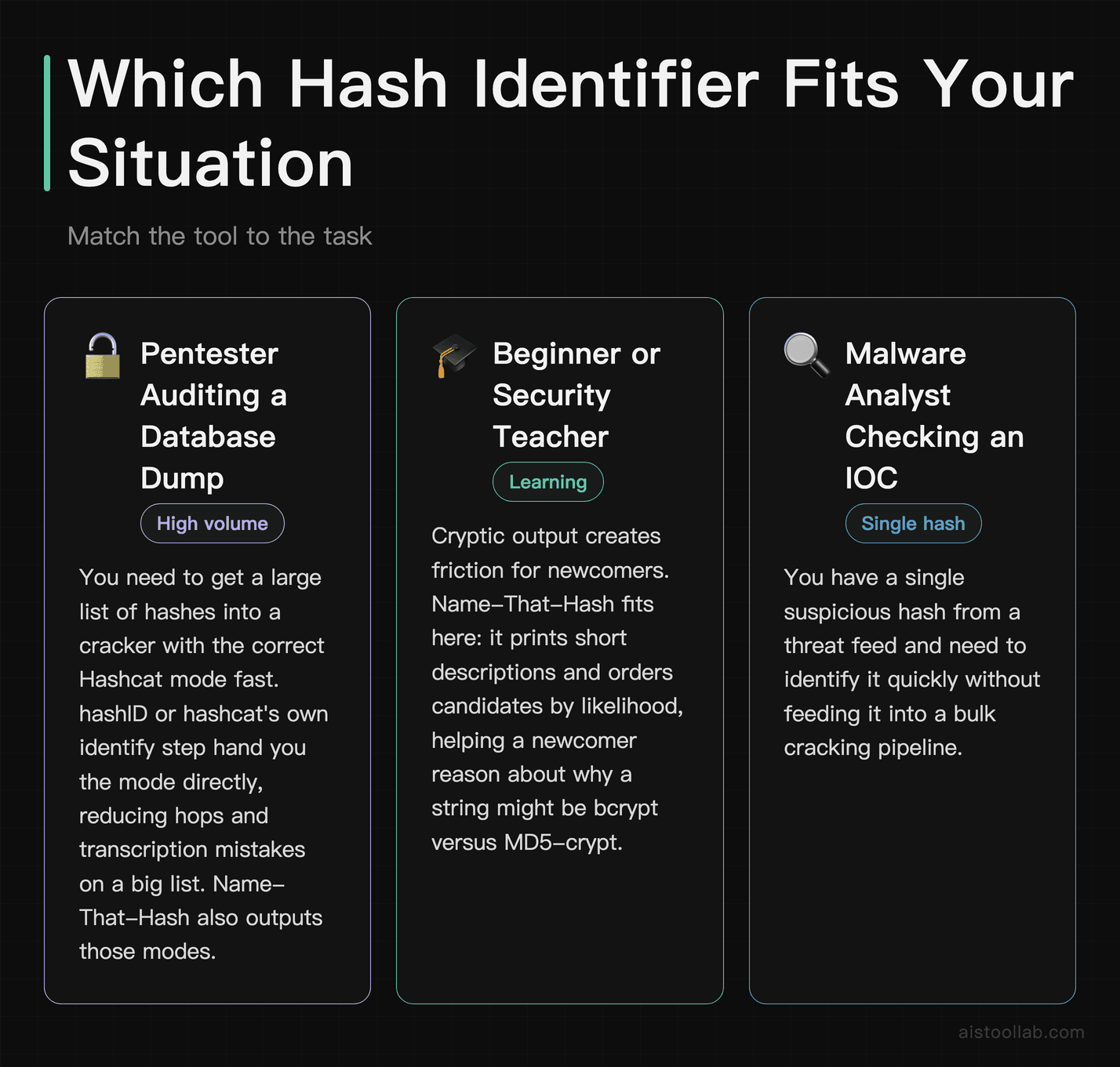
If you’re auditing a password database dump
Say you’re a pentester who just extracted a table of hashes and the clock is running. Your job isn’t to admire the hashes — it’s to get them into a cracker with the correct mode number, fast. Here, hashID or hashcat’s own identify step help on one specific dimension: they hand you the Hashcat mode directly, so there’s no manual translation between “this is NTLM” and “so that’s -m 1000.” Fewer hops, fewer transcription mistakes on a big list. Name-That-Hash also outputs those modes if you prefer its readout.
If you’re a beginner or teaching a class
If you’re learning security, or running a CTF workshop, the cryptic-output tools create friction — a wall of candidate names with no context. On the dimension of explaining what you’re looking at, Name-That-Hash fits well because it prints short descriptions and orders candidates by likelihood, so a newcomer can reason about why a string might be bcrypt versus MD5-crypt. I covered how I weigh this kind of “learnability” trade-off across dev tools in AI Developer Utility Tools Compared 2026.
If you’re a malware analyst checking an IOC
Imagine you’ve got a single suspicious hash from a threat feed and you want to know whether it’s an MD5, SHA-1, or SHA-256 file digest before you go pivot on it in a sandbox or lookup service. For a fast one-off where the data isn’t sensitive, a browser tool runs directly in the browser. But if the string might itself be sensitive — say it’s tied to internal artifacts — CyberChef‘s “Analyse hash” runs client-side, so nothing gets shipped to a third-party server.
If you need to process thousands of hashes in a pipeline
For batch and automation, the CLI tools have a concrete, checkable property: they read files and can be scripted into a shell pipeline, whereas a copy-paste web box doesn’t scale the same way. hashID reads a file of hashes; hashcat is engineered around bulk workloads from the ground up. If your endgame is cracking at volume, doing identification inside hashcat keeps everything in one toolchain.
The Free-vs-Premium Cost-Benefit, Honestly
For a solo researcher or a small team, the open-source CLI tools cover MD5, SHA-1, SHA-256, bcrypt, NTLM, LM, the crypt family, and a long tail of prefixed formats for the identification task. Paid offerings, as the next paragraph notes, address steps beyond identification rather than identification itself.
Paid offerings become relevant one step downstream. Cracking-as-a-service marketplaces (Hashes.com is the well-known example) let you outsource the actual recovery of a hash’s plaintext, which is a compute-and-time problem, not an identification problem. Commercial API subscriptions matter when you’re embedding hash analysis into a product or SOC pipeline and need uptime, rate guarantees, and support rather than a script someone maintains on GitHub. And if you’re doing serious cracking, the “cost” is really GPU hardware or cloud GPU time, not identifier software.
So the value framing for different team sizes: a one-person shop or a startup security team can get the identification step from free tooling. A larger org paying for something is usually paying for scale, support, and integration around cracking or automation — not for the naming step. I wouldn’t let a vendor sell you “premium hash identification” as if that alone were worth a subscription; on the identification task specifically, based on the feature facts in the table above, the free open-source route covers it. If you want a broader lens on judging tool value versus hype, I’ve written about that framework in What Makes an AI Tool Effective.
Frequently Asked Questions
Can a hash identifier tell me the algorithm with 100% certainty?
No, and this is an important thing to understand. For bare hexadecimal digests — MD5, NTLM, SHA-1, SHA-256 — the output string doesn’t contain enough information to uniquely identify the algorithm. A 32-character hex string is equally consistent with MD5, NTLM, LM, and several others, so any identifier can only return a ranked list of likely candidates. Tools that present a single confident answer are hiding that ambiguity from you. The exception is hashes with structured prefixes: bcrypt (a paid monthly subscriptiony$), Argon2 ($argon2id$), SHA-512 crypt (a paid monthly subscription$) and similar formats carry explicit markers, so identification there is near-certain. Practically, treat any bare-hex identification as a “best guess, verify by context” — the surrounding system, the database it came from, or the way it was stored usually tells you more than the string itself. Good tools help by ranking candidates and showing you the alternatives rather than pretending the answer is definitive.
Are free hash identifiers good enough for professional work?
For the identification task itself, yes — the open-source CLI tools cover the mainstream algorithms teams encounter (MD5, SHA-1, SHA-256, bcrypt, NTLM, the crypt family, and many prefixed formats). The value of paid products generally shows up in adjacent problems: outsourced cracking, uptime-committed APIs for product integration, or vendor support. If your need is “tell me what this hash probably is so I can pick the right cracking mode,” free tooling handles it. Where I’d caution against assuming free is enough is at organizational scale, where you might want the support contract, SLAs, and audit trail that a commercial platform provides — but that’s a procurement and reliability decision, not an accuracy one. Don’t let anyone frame basic identification as a premium capability; the open-source tools listed here cover it.
What’s the difference between identifying a hash and cracking it?
Identifying means figuring out which algorithm likely produced the hash (is it MD5? bcrypt? SHA-256?). Cracking means recovering the original plaintext that was hashed — the actual password or file content. These are completely different problems with completely different costs. Identification is fast, cheap, and mostly free; it’s pattern matching. Cracking is a compute-intensive brute-force or dictionary search that can take seconds for a weak MD5 password or effectively forever for a strong password behind a slow algorithm like bcrypt or Argon2 (which are deliberately designed to be expensive to attack). Tools like hashcat and John the Ripper do the cracking, and that’s where GPU hardware, cloud compute time, or cracking-as-a-service marketplaces come in. You identify first so you know which cracking mode to run — feeding a hash into the wrong mode wastes all that compute.
Which tool supports the most hash types?
There isn’t a clean, independently verified answer I can point you to, and the honest position is that “most types” is less useful than “covers the types you’ll actually meet.” hashcat maintains a very large catalog of hash modes (its example-hashes page on hashcat.net lists them), and identifiers like hashID and Name-That-Hash aim to recognize a broad range per their project documentation. But raw count is misleading, because for ambiguous bare-hex hashes, more “supported types” just means a longer list of guesses, not more certainty. What matters more is whether the tool covers your target — bcrypt, NTLM, SHA-256, the crypt family — and whether it maps cleanly to your cracking tool’s mode numbers. For that, hashID and hashcat’s own identify step speak hashcat mode numbers directly.
Do I need to pay for a hash identifier API?
Only if you’re integrating identification into a product or automated pipeline where you need reliability guarantees, rate limits you can depend on, and someone to call when it breaks. For interactive or scripted use, the open-source CLI tools run locally on your own machine, so they aren’t subject to server-side rate limits or per-request API fees — you’re bounded only by your own hardware. A paid API makes sense when hash analysis is one feature of a larger service you’re shipping, or inside a SOC workflow where an unmaintained GitHub script is an operational risk. But paying purely to name hashes, when a free local tool does the same job offline, is spending on the wrong layer. I’d scope any API purchase around the automation and support you need, not around the identification itself.
Is it safe to paste password hashes into an online identifier?
Treat this as a real risk, not a formality. When you paste a hash into a web-based identifier or cracker, that string travels to a third-party server, and depending on the service it may be logged, stored, or added to a lookup database. For a random test hash, who cares. For a hash pulled from a client system, an internal database, or anything tied to a live account, that’s potentially sensitive material leaving your control — and in some engagements it could breach the scope or confidentiality terms you’re working under. When the data is sensitive, use an offline tool: hashID, Name-That-Hash, and hash-identifier all run locally, and CyberChef’s hash analysis runs client-side in your browser without shipping the string anywhere. The convenience of a web box isn’t worth it when the input is real credential data.
Can these tools reliably identify bcrypt, NTLM, and SHA-256 specifically?
It depends heavily on which of the three. Bcrypt is the easy case — its a paid monthly subscriptiona$/a paid monthly subscriptionb$/a paid monthly subscriptiony$ prefix is a distinctive format marker, so identification from the string alone is essentially unambiguous. NTLM and raw SHA-256 are harder, because they’re bare hex with no format marker. NTLM (32 hex chars) collides with MD5 and others; SHA-256 (64 hex chars) collides with other 256-bit hex digests. Tools will list these as candidates and usually rank them sensibly, but they can’t be certain from the string alone — context tells you the rest (an NTLM hash almost always comes from a Windows credential source, for instance). So: bcrypt, straightforward; NTLM and SHA-256, treated as top candidates rather than certainties. This is inherent to how the hashes are encoded, not a flaw in any particular tool.
What about batch processing thousands of hashes at once?
This is where the CLI tools separate from the web boxes on a concrete, checkable dimension: file input and scriptability. hashID reads a file containing many hashes, and hashcat is engineered around bulk workloads because cracking large lists is its entire reason for existing. That makes them the natural fit when you’ve got a dump of thousands of hashes and want identification as a scripted pipeline step rather than thousands of copy-pastes. Web-based identifiers can handle modest paste batches but aren’t built for automation, and pushing large volumes of real hashes through a third-party site reintroduces the privacy concern above. For genuine scale, keep it local: pipe your hash file through a CLI identifier, then feed the results straight into your cracking tool using the mode numbers it hands you. That single-toolchain approach avoids re-typing entries by hand across thousands of hashes. For adjacent developer utilities I compared throughput and workflow in Prime Number Checker Tools Explained.
My Take
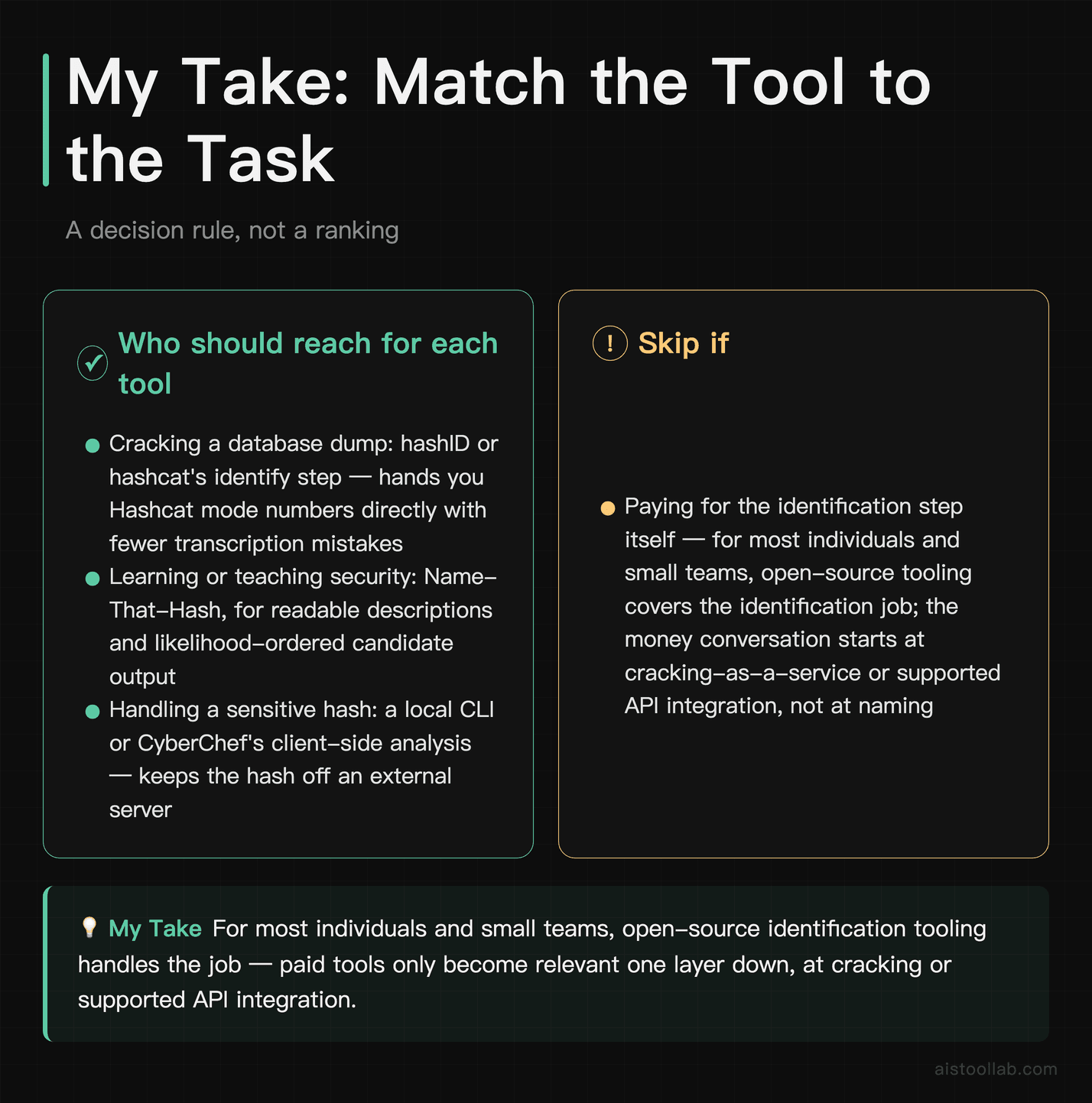
If I had to leave you with one decision rule rather than a ranking: match the tool to the task, and consider whether you need to pay for the naming step at all. If you’re cracking anyway and want to minimize friction, on the “one toolchain, correct mode numbers” dimension I’d reach for hashID or hashcat’s own identify step. If you’re learning or teaching and want output you can actually reason about, Name-That-Hash’s readable candidate list fits that goal. If the hash is sensitive, keep it offline with a local CLI or CyberChef’s client-side analysis rather than pasting it into someone else’s server.
The money conversation only starts one layer down — cracking-as-a-service, GPU time, or a supported API for product integration — and those are scale-and-reliability decisions, not identification ones. For most individuals and small teams, based on the feature facts laid out above, open-source identification tooling can handle the identification job. Grab one, run it against a couple of hashes you already know the origin of, and see whether its output style clicks with how you work — that quick self-test can tell you more about your own workflow than a comparison table.
Last updated: 2026
Found this review helpful?
👉 Browse the AI Tools Library to find the right tools for your workflow.