

The Humble Emoji Picker Is Doing More Machine Learning Than You Think
Here’s an assumption worth challenging: most people believe an emoji finder is basically a search box with a dictionary behind it. You type “happy,” it returns 😀 😃 😄, and everyone moves on. Simple keyword matching, right? A glorified Ctrl+F for pictures.
That was true around 2015. It is emphatically not true for the tools being built today. Modern emoji recommendation — the kind baked into smart keyboards, messaging apps, and standalone emoji finder sites — increasingly leans on sentiment analysis, semantic embeddings, and context modelling that would have been research-paper material a decade ago. When your phone suggests 🎉 after you type “we just closed the round,” it isn’t matching a keyword. There’s no word “celebration” in that sentence. The model inferred emotional intent.
That gap — between what you literally typed and what you actually meant — is the whole game. And understanding how these tools bridge it tells you a lot about why some emoji finders feel eerily good and others feel like they’re guessing. Let me break down the machinery, where the tools genuinely differ, and how to use them without embarrassing yourself in a client Slack thread.
Contents
How AI Reads the Feeling Behind Your Words
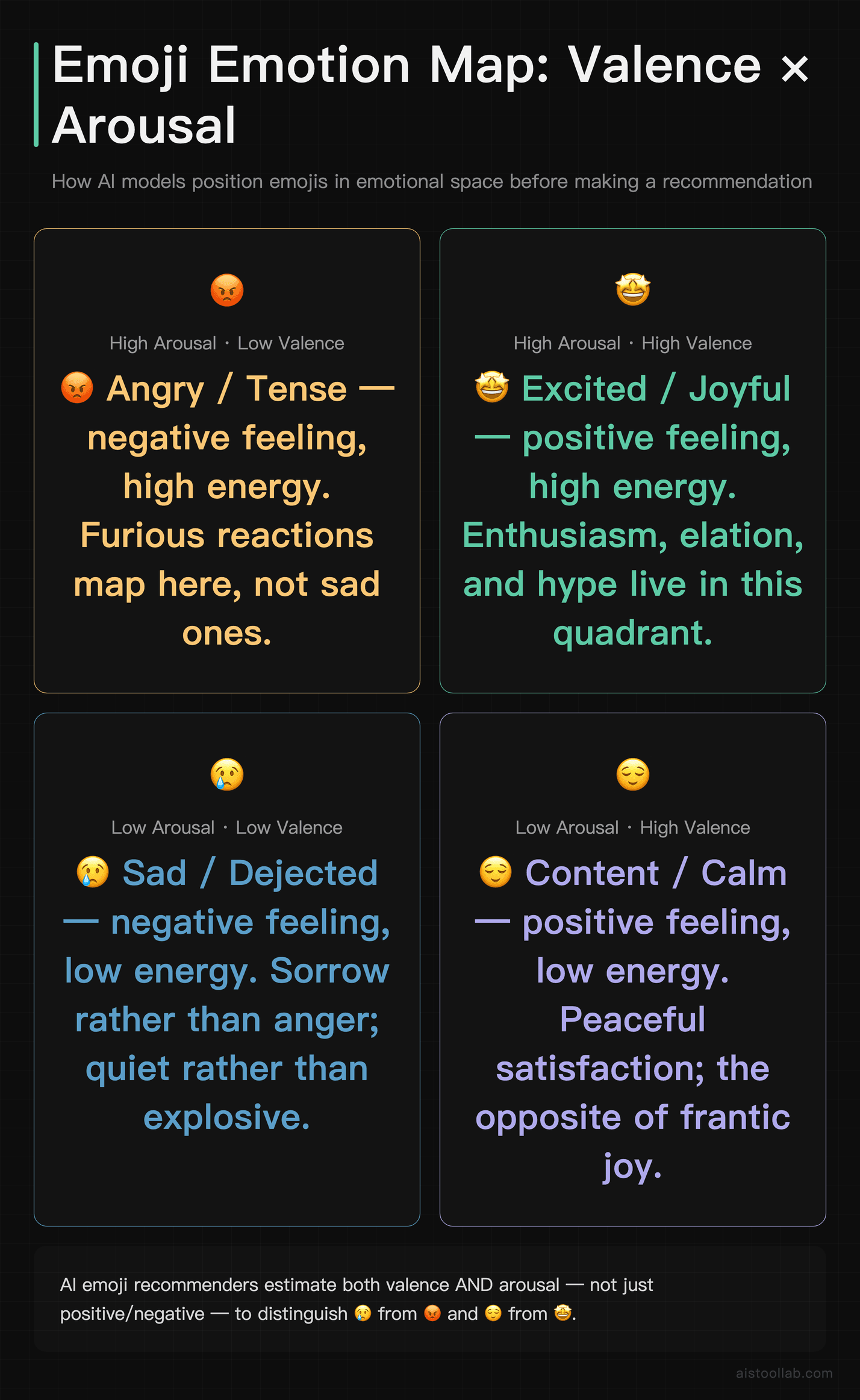
The foundation of any good emoji recommendation is sentiment analysis — the process of classifying text along emotional dimensions. At its simplest, sentiment analysis sorts text into positive, negative, or neutral. But emoji recommendation needs something richer, because emojis don’t map to a three-way split. 😢 and 😡 are both “negative,” yet suggesting a crying face when someone’s furious is a small disaster.
So the better systems model emotion along multiple axes. A common framework in affective computing describes emotion using dimensions like valence (pleasant vs unpleasant) and arousal (calm vs excited), sometimes with a dominance axis too. Under that lens, 😌 is high-valence, low-arousal, while 🤩 is high-valence, high-arousal. The model doesn’t just decide “this text is positive” — it estimates how positive and how energetic, then matches emojis whose learned emotional profile sits nearby.
How does a model learn an emoji’s emotional profile in the first place? Largely from us. Platforms trained on enormous volumes of public social media text where people naturally paired words with emojis. If millions of posts containing “finally friday” end with 🙌 or 🍻, the model absorbs that statistical association. This is why emoji prediction improved so dramatically once large text corpora with real emoji usage became available — the training signal was essentially free and human-generated. Research groups have released emoji-prediction datasets built from public tweets precisely for this reason, and emoji-based pretraining (the DeepMoji project from MIT Media Lab is a well-known example) showed that predicting emojis actually teaches models a surprising amount about sarcasm and emotional nuance.
That last point matters more than it sounds. Because emojis carry emotional weight, learning to predict them forces a model to pick up on tone — including tricky cases like irony, where the literal words are positive but the intent is not. “Oh great, another Monday meeting” is textbook sarcasm, and a model that only reads keywords would cheerfully suggest 😄. A model trained on how humans actually use emojis has a fighting chance of suggesting 🙄 instead.
The NLP Techniques Doing the Heavy Lifting
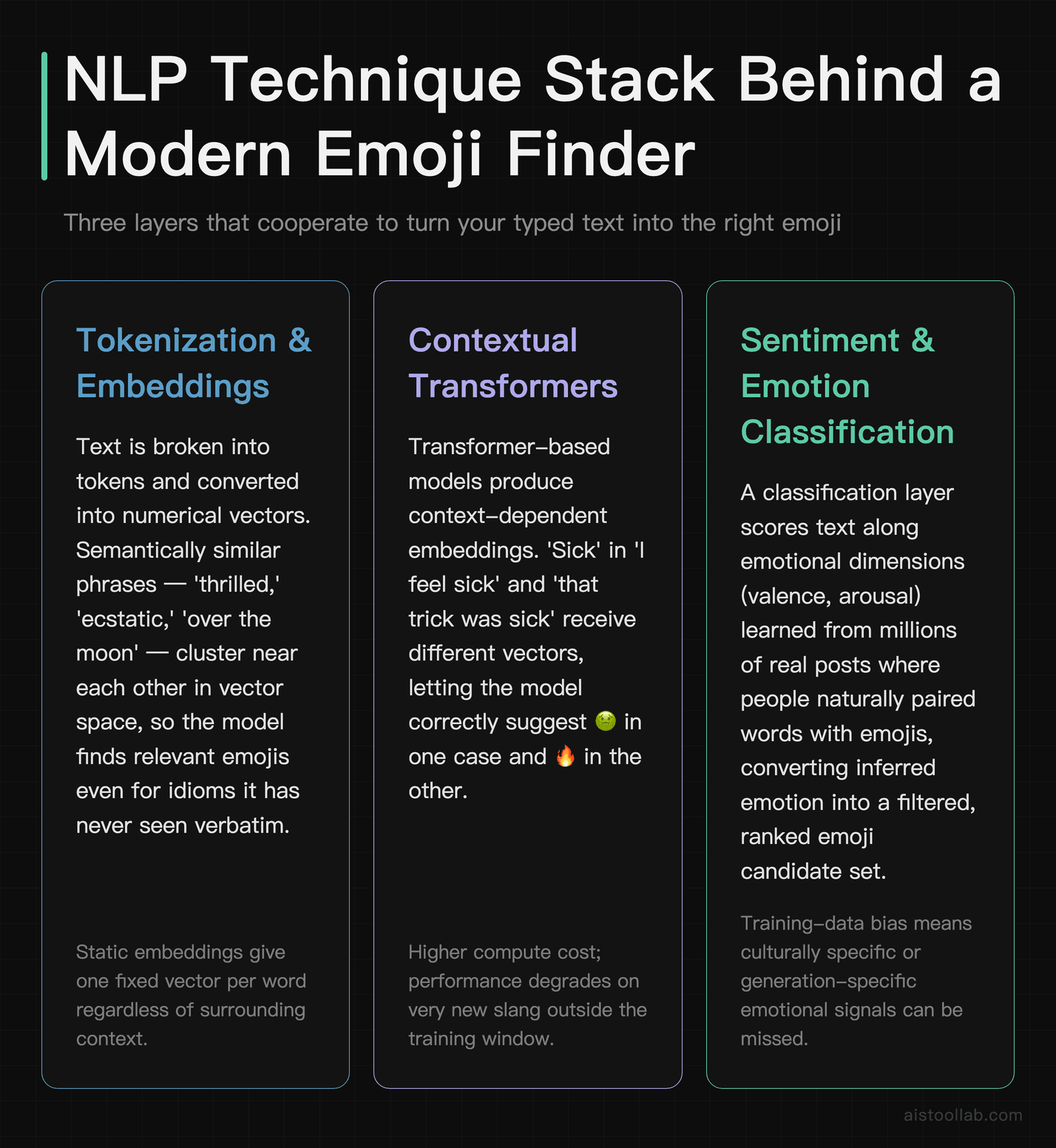
Underneath the sentiment layer sits a stack of natural language processing techniques, and the sophistication of that stack is what separates a clumsy emoji picker from a genuinely helpful one.
Tokenization and embeddings. Before anything else, text gets broken into tokens and converted into numerical vectors — embeddings — that capture meaning. The key property of modern embeddings is that semantically similar words land near each other in vector space. “Thrilled,” “ecstatic,” and “over the moon” cluster together even though they share no letters. This is why you can type an idiom your emoji finder has literally never seen and still get a sensible suggestion.
Contextual models. Older systems used static embeddings where a word had one fixed vector. Transformer-based models changed that by making embeddings context-dependent. The word “sick” means something very different in “I feel sick” versus “that trick was sick,” and a contextual model represents those two “sicks” differently. For emoji recommendation, that’s the difference between suggesting 🤢 and 🔥. If you’ve read my breakdown of Constitutional AI and AI Alignment, the same transformer backbone that powers alignment research also powers this humble task.
Sequence understanding. Good recommenders read the whole message, not isolated words. “I’m not happy about this” contains “happy,” but the negation flips the meaning. Sequence models track these dependencies so the recommendation reflects the sentence as a unit rather than a bag of words. This is exactly where keyword-only emoji finders fall apart — they see “happy” and stop thinking.
Semantic Matching: From Meaning to the Right Little Picture
Sentiment tells you the emotional tone. Semantic matching handles everything else — the topics, objects, and concepts that deserve a literal emoji. Type “just adopted a puppy” and you want 🐶, not merely a happy face. That requires the tool to map meaning to a candidate set of emojis, then rank them.
The elegant approach embeds both the text and the emoji descriptions into the same vector space. Each emoji has associated metadata — its official Unicode name, common keywords, and often crowd-sourced tags. By embedding those descriptions, the system can compute similarity between your message and every emoji, then surface the closest matches. Because it’s operating on meaning rather than exact strings, “my flight got delayed again” can surface ✈️ 😤 ⏰ without you naming any of those concepts.
Ranking is where nuance lives. A strong recommender balances several signals: semantic relevance, sentiment fit, popularity (frequently used emojis get a gentle boost because they’re safer bets), and sometimes personalization based on your own history. The tradeoff is real — lean too hard on popularity and everyone gets the same five emojis; lean too hard on raw semantic similarity and you get obscure suggestions like 🛗 for “I’m stuck.” The tuning of that ranking function is a big part of why two tools with similar underlying models still feel different to use.
There’s also the messy problem of emoji ambiguity. 🙏 means “thank you,” “please,” “prayer,” or “high five” depending on who’s reading and where they live. 😂 reads as joy to some and, to a chunk of younger users, as dated or even passive-aggressive. A context-aware system that knows your audience skews one way can weight suggestions accordingly, but most tools don’t have that signal and just play the averages.
Why Two Emoji Finders Give You Different Answers
If the core techniques are broadly shared, why does one tool nail your tone while another feels tone-deaf? The differences come down to three things: database organization, training data, and the ranking philosophy layered on top.
Database organization. Every emoji finder is built on the Unicode emoji set, but how they annotate it varies enormously. Some rely purely on official Unicode short names, which are literal and sparse — 😅 is officially “grinning face with sweat,” which tells you nothing about its actual “phew, that was close” usage. Better tools layer on rich keyword sets, emotional tags, and slang mappings. The depth and quality of that annotation layer is doing quiet, unglamorous work every time you search.
Training data and model choice. A tool trained on formal corpora will behave differently from one trained on Twitter and Reddit. The social-media-trained model understands “no cap fr” and “it’s giving chaos”; the formal one stares blankly. Neither is universally better — it depends on your audience. This is the same principle I touched on in AI Model Performance Beyond Accuracy: the benchmark that matters is the one matching your actual use case, not a generic leaderboard.
Privacy and processing location. Some recommenders run entirely on-device (your keystrokes never leave your phone), while others send text to a server. On-device models are lighter and more private but usually less capable; server-side models can be larger and smarter but raise obvious questions about where your half-typed messages go. For anyone drafting sensitive work communication, that distinction is not academic.
Comparison: Approaches to Emoji Recommendation
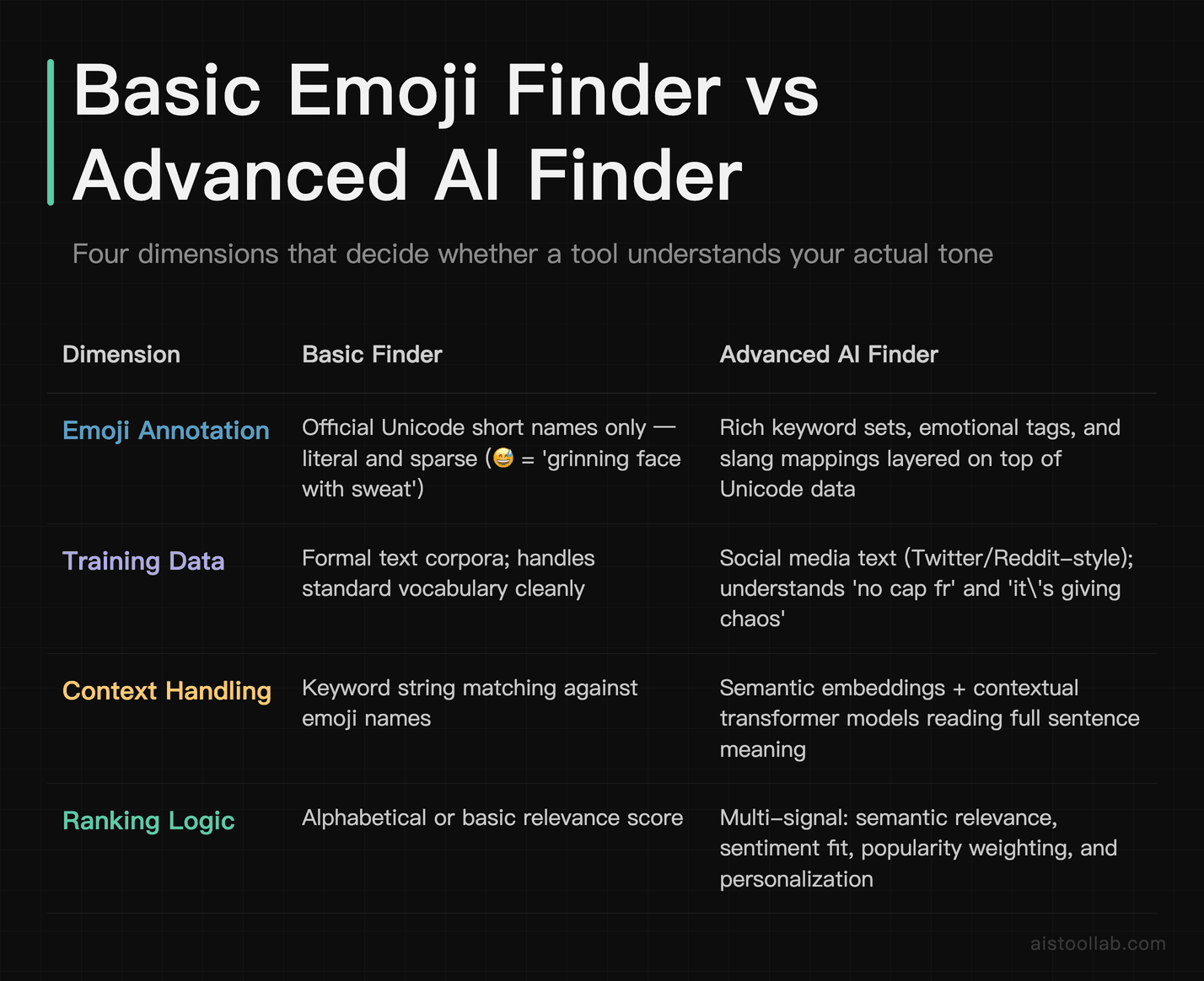
Notice there’s no single winner. A keyword finder is genuinely the right tool when you know exactly which emoji you want and just need to locate it fast. The contextual model earns its keep when you’re not sure what fits the vibe. Matching the tool to the job beats chasing the “smartest” option.
Where This Actually Gets Used
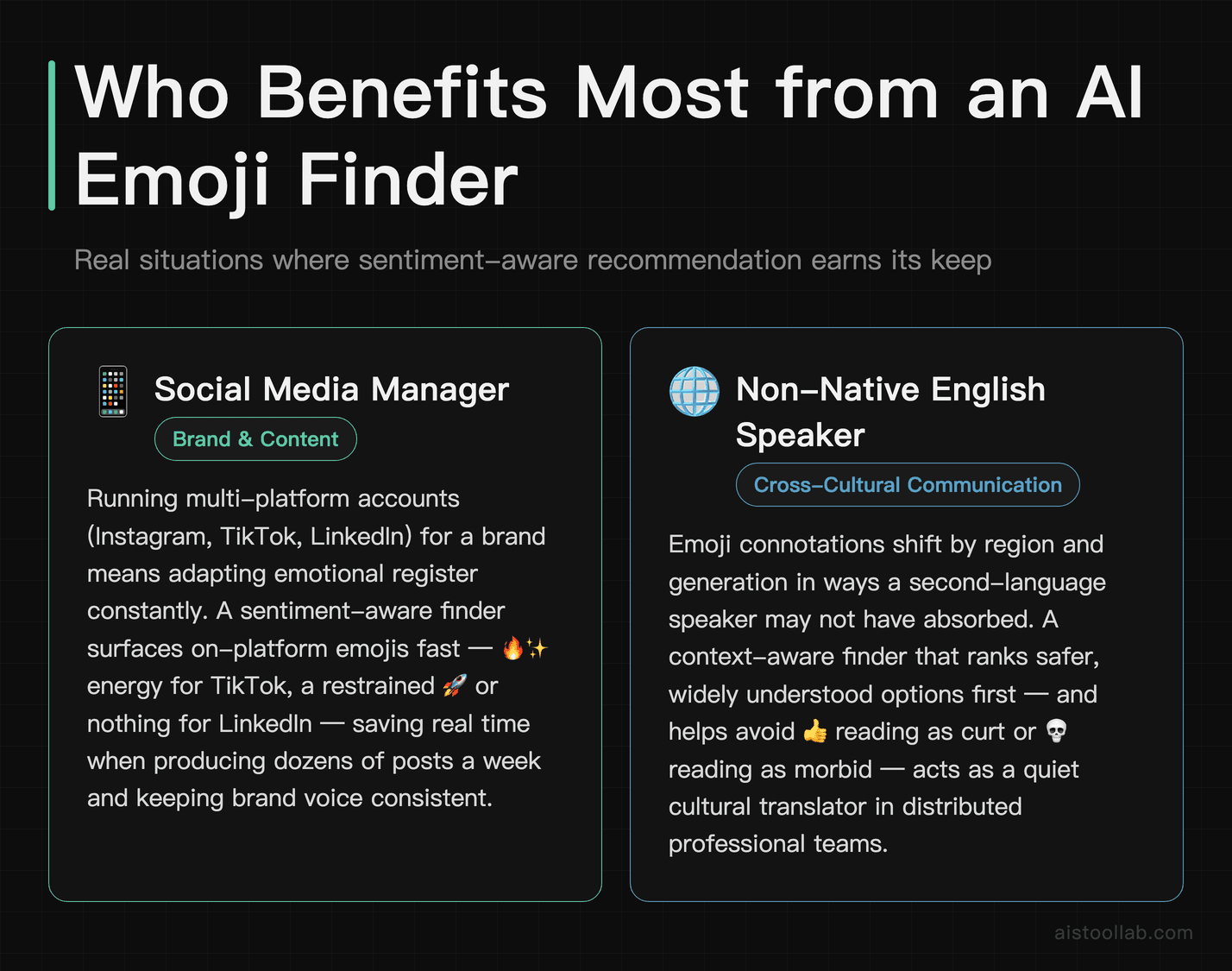
The social media manager juggling brand voice across platforms
Consider a marketer running social accounts for a mid-size DTC brand across Instagram, TikTok, and LinkedIn. The same product launch needs 🔥✨ energy on TikTok and a restrained 🚀 (maybe none at all) on LinkedIn. A sentiment-aware emoji finder helps them draft on-tone captions quickly, but the real value is consistency — surfacing emojis that fit the emotional register of each platform without the manager second-guessing every 😂. When you’re producing dozens of posts a week, that friction adds up, and offloading the “which emoji reads right here” decision saves genuine time.
The non-native English speaker avoiding tone landmines
Emojis are cultural, and their connotations shift by region and generation. A developer in a distributed team who speaks English as a second language might not know that 👍 can read as curt or dismissive to some readers, or that 💀 means “I’m dying laughing,” not something morbid. A context-aware recommender that explains why it’s suggesting an emoji — or at least ranks safer options first — acts as a quiet cultural translator, reducing the risk of an accidentally cold or confusing message in a professional channel.
The accessibility and content team standardizing usage
Emojis carry meaning for screen-reader users too — each one is read aloud by its Unicode description. A content team that cares about accessibility uses emoji tooling to check what an emoji actually announces (“face with tears of joy”) and to avoid strings of decorative emojis that turn into an unreadable audio mess. Here the emoji finder’s job flips: instead of maximizing expressiveness, it’s about restraint and clarity, choosing a single meaningful emoji over a cluttered row of them.
Professional vs Social: Using Emoji Finders Without Regret
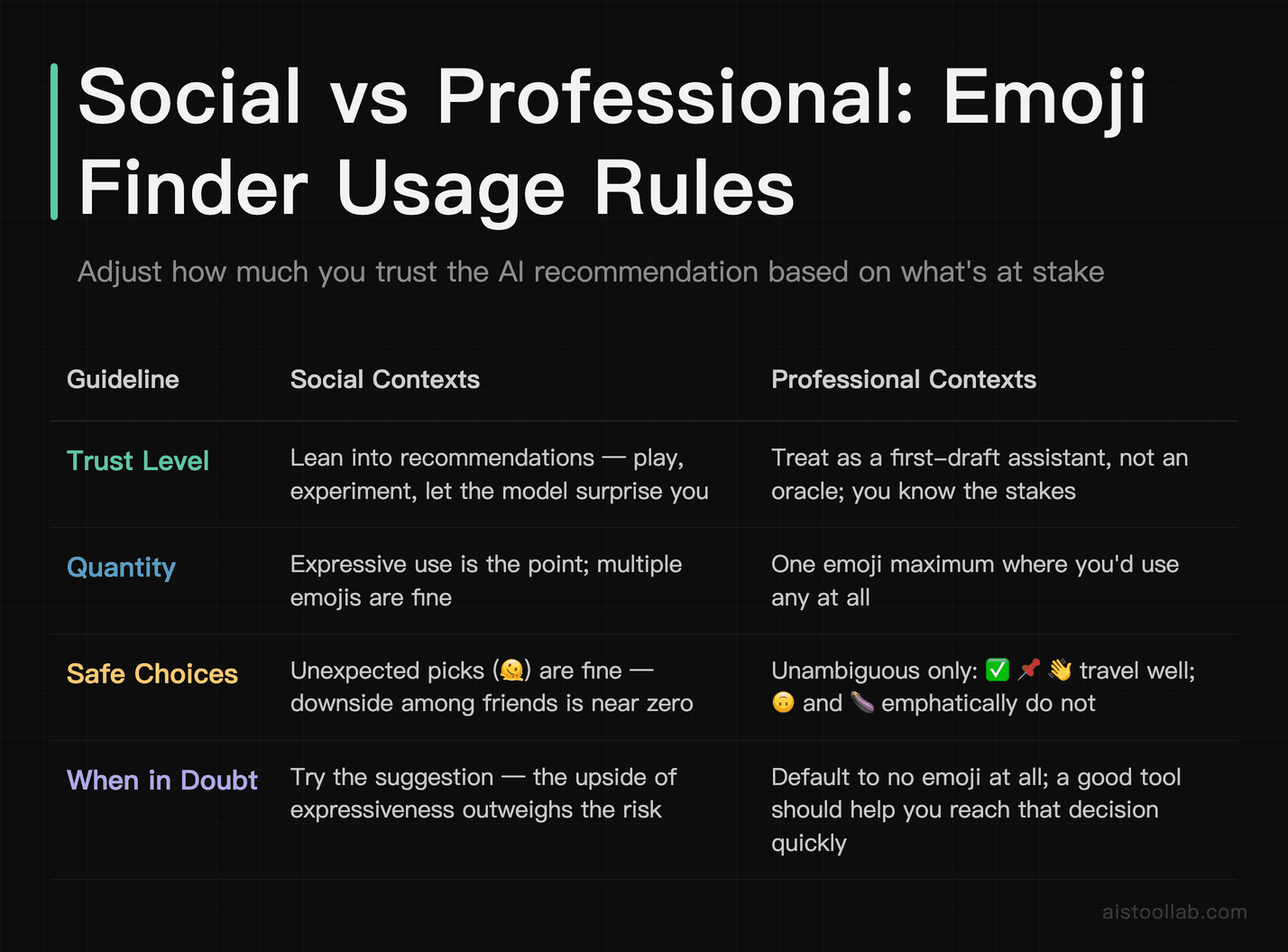
The single biggest mistake I see is treating all contexts the same. An emoji finder will happily suggest the same 🎉 for a text to your friend and a message to a new enterprise client. The tool doesn’t know your stakes; you do.
In social contexts, lean into the recommendations. Play, experiment, let the model suggest the unexpected 🫠 that captures your mood better than words. The downside of a weird emoji among friends is basically zero, and expressiveness is the point. This is the arena these tools were trained for, since most training data came from casual social text in the first place.
In professional contexts, treat the emoji finder as a first-draft assistant, not an oracle. A few guidelines worth internalizing: keep it to one emoji where you’d use any, favor unambiguous ones (✅ 📌 👋 travel well; 🙃 and 🍆 emphatically do not), and always sanity-check against your specific audience. A startup Slack tolerates more than a law firm email. When in doubt, the safest professional move is often no emoji at all — and a good tool should make it easy to decide that quickly rather than pressuring you into decoration. The debate over whether emojis belong in workplace communication is genuinely unsettled, with reasonable people landing on opposite sides, so calibrate to your own culture rather than a universal rule.
Frequently Asked Questions
Do emoji finders actually understand meaning, or is it clever pattern matching?
Honestly, this depends on your philosophical definition of “understand,” but practically speaking, modern emoji recommenders do far more than pattern matching. Keyword-based finders from the early days genuinely were just string lookups — they matched the letters you typed against emoji names. Today’s better tools use embeddings that represent meaning numerically, so they can connect “over the moon” to happiness emojis without either phrase sharing words with “happy.” They also read full-sentence context, which lets them handle negation (“not happy”) and sometimes sarcasm. That said, they don’t “understand” in a human sense — they’re modeling statistical relationships learned from enormous amounts of text where people paired words with emojis. When you strip away the mystique, it’s sophisticated correlation rather than comprehension. But the practical result is close enough that for everyday use, treating it as “the tool gets what I mean” is a reasonable working assumption. Where it breaks is edge cases: rare idioms, brand-new slang, or culturally specific references the training data never covered.
Why does my keyboard suggest a completely wrong emoji sometimes?
A few things cause this. On-device keyboard predictors run compact models to stay fast and private, and that compactness means a smaller vocabulary and shorter context window — so they occasionally miss the emotional read of a longer message. Another common culprit is negation and sarcasm, which trip up lighter models: “wow, so helpful” typed sarcastically may still surface a positive emoji because the model weighs the literal words. Ambiguous emojis add noise too, since something like 🙏 legitimately fits multiple intents and the ranker sometimes picks the less relevant one. Personalization can also backfire — if you’ve used an emoji ironically before, the model may over-suggest it. And plain old training-data gaps matter: if the model was trained on text from a different era or region than yours, current slang confuses it. None of these are bugs exactly; they’re the visible edges of a probabilistic system doing its best with limited signal. The fix is usually just typing one more word of context, which gives the model a clearer emotional target.
Are AI emoji finders safe to use with private or work messages?
The honest answer is: it depends entirely on where the processing happens, and you should check before typing anything sensitive. On-device recommenders — the kind built into most modern phone keyboards — process your text locally and don’t transmit it, which is the privacy-friendly option. Server-side tools, including some browser-based emoji finders and AI-powered writing assistants, send your text to a remote server for analysis. For a casual message that’s fine, but for confidential work content, draft financials, or anything under NDA, that data leaving your device is a real consideration. Read the tool’s privacy policy and look specifically for whether input text is logged, stored, or used for training. Reputable tools disclose this. As a practical rule, I’d keep genuinely sensitive drafting away from any cloud-based emoji or writing tool, and rely on on-device suggestions or manual selection instead. The convenience of a smart suggestion isn’t worth leaking a message you wouldn’t want screenshotted. When you can’t verify the data handling, assume the cautious default.
What’s the difference between sentiment analysis and semantic matching in these tools?
They solve different halves of the problem and good tools use both together. Sentiment analysis figures out the emotional tone of your text — how positive or negative, how energized or calm — and matches emojis whose learned emotional profile fits. That’s what surfaces 🥳 for excitement or 😔 for disappointment even when you never name the emotion. Semantic matching handles the literal and topical content — the objects, activities, and concepts that deserve a specific picture. That’s what surfaces 🍕 for “let’s order dinner” or ✈️ for “booking my flight.” Sentiment is about feeling; semantics is about subject. A message like “so nervous about my first flight tomorrow” needs both working in concert: semantic matching catches ✈️, sentiment analysis catches 😰. When a recommender feels shallow, it’s often because it’s strong on one and weak on the other — nailing the topic but missing the mood, or vice versa. The best experience comes from a ranking layer that blends both signals intelligently rather than treating them as separate searches.
Can these tools handle sarcasm and irony?
Partially, and better than you’d expect, thanks to how they’re trained. Because emojis themselves are how people signal tone in text, models that learned to predict emojis from social media absorbed a lot about non-literal language along the way. Interestingly, research on emoji-based pretraining (the DeepMoji work from MIT Media Lab is the canonical example) found that predicting emojis improved a model’s ability to detect sarcasm — the two skills are linked, because sarcastic posts often rely on emojis to flip meaning. So a well-trained contextual recommender can sometimes catch that “oh fantastic, the printer’s broken again” wants 🙄 rather than 🎉. But it’s far from reliable. Sarcasm depends heavily on shared context, tone of voice, and relationship — things absent from raw text. Lighter on-device models struggle the most. If you rely on the suggestion for a sarcastic message and it whiffs, that’s expected; sarcasm remains one of the hardest problems in NLP generally, not just for emoji tools. When precision matters, pick the emoji yourself.
Do I even need a dedicated emoji finder if my keyboard already suggests them?
For most everyday texting, no — your phone’s built-in predictor covers the common cases, runs locally, and requires zero extra effort. A dedicated emoji finder earns its place in specific situations. If you’re a content creator or social media manager producing lots of copy, a web-based tool with rich search and tone filtering is faster than scrolling your keyboard’s emoji grid. If you frequently need less common emojis whose names you don’t know, a good semantic search finder beats hunting through categories. And if you write across cultures or in a second language, a tool that surfaces meaning and connotation helps you avoid tone mistakes your keyboard won’t flag. For casual users, the built-in option is genuinely enough, and adding another tool is overkill. The value scales with volume and stakes — the more emojis you place and the more they matter professionally, the more a purpose-built finder pays off. Try your keyboard first; upgrade only if you hit its limits regularly.
How do emoji meanings differ across cultures and platforms, and do tools account for this?
Significantly, and most tools account for it poorly. The same Unicode emoji renders differently across platforms — Apple, Google, Samsung, and Microsoft each draw their own versions, and historically some designs diverged enough to cause real miscommunication (the infamous case of a “grinning” face that looked pained on one platform and cheerful on another). Beyond rendering, connotations shift culturally: 👍 is friendly in much of the West but can be offensive in parts of the Middle East, and 🙏 reads as prayer, thanks, or a high-five depending on who you ask. Generational drift adds another layer — younger users read 😂 as dated and 💀 as peak laughter. Most emoji finders don’t model any of this; they play the statistical average of their training data, which usually skews toward one dominant culture and era. A few advanced tools offer region or platform awareness, but it’s not standard. The practical takeaway: if you’re communicating cross-culturally, don’t blindly trust the top suggestion. Understanding your specific audience still beats any algorithm here.
Will general AI assistants like ChatGPT replace dedicated emoji finders?
For some use cases, they already overlap. A general assistant can absolutely suggest emojis for a piece of text, explain what an emoji connotes, or rewrite a message with appropriate tone markers — and it often does this with strong context understanding because it’s running a large, capable model. I compared broad-assistant versus specialized-tool tradeoffs in my Notion AI vs ChatGPT piece, and the same logic applies here. Where dedicated emoji finders still win is speed and friction: opening a chat, typing a prompt, and reading a response is slower than a one-tap keyboard suggestion or an instant search box. For high-volume, in-the-moment emoji placement, the specialized tool is more ergonomic. For occasional “help me phrase this warmly” tasks, a general assistant is more flexible and probably already open in your browser. My honest read is that built-in keyboard predictors and general AI assistants are quietly squeezing standalone emoji finders from both ends — the simple cases go to keyboards, the complex cases go to assistants — leaving dedicated tools to defend the high-volume professional middle. That middle is real, but it’s narrower than it used to be.
The Bottom Line
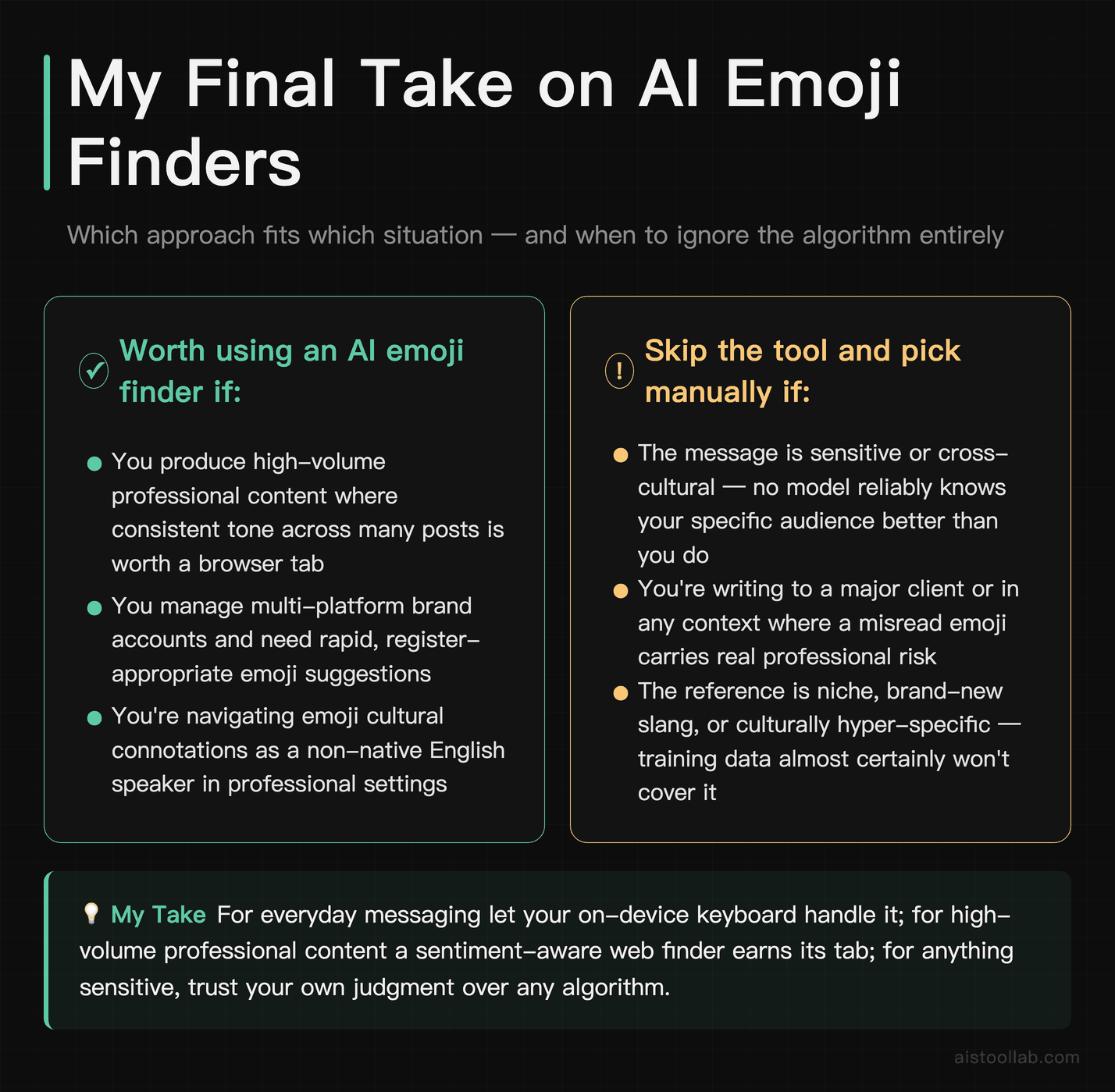
If it were my workflow on the line, here’s how I’d split it. For everyday personal messaging, lean on your on-device keyboard predictor — it’s private, instant, and good enough. For high-volume professional content where tone consistency matters, a sentiment-aware web finder is worth the tab. And for anything sensitive or cross-cultural, slow down and pick the emoji yourself, because no model reliably knows your specific audience better than you do.
The bigger point is that the “dumb little emoji picker” mental model is outdated. There’s real NLP under the hood — embeddings, contextual transformers, sentiment modeling, and ranking functions all cooperating to turn “we just closed the round” into 🎉 without you spelling out the feeling. Knowing that machinery exists is what lets you use it well: trust it where it’s strong, override it where it’s blind, and never let an algorithm put a 🙃 in an email to your biggest client.
Last updated: 2026
Found this review helpful?
Subscribe to aistoollab.com for weekly AI tool reviews, tutorials, and comparisons — straight to your inbox.
👉 Browse the AI Tools Library to find the right tools for your workflow.