
Giving Claude Control of a Computer — What Actually Happens
Watching Claude move a mouse cursor across the screen, open a browser tab, and fill out a form without anyone touching the keyboard can give you that same slightly unsettled feeling I imagine people had watching the first elevator operate without an attendant. Not scared exactly — just aware that something has shifted in a fundamental way.
I’ve been covering AI tools long enough to be genuinely difficult to impress. Chatbots that write essays? Fine. Code assistants that autocomplete functions? Useful, sure. But an AI that can actually operate software — clicking buttons, navigating menus, reading what’s on screen and responding to it — that’s a different category of capability entirely. Claude Computer Use isn’t just another feature update. It’s Anthropic betting that the next frontier isn’t smarter text generation, it’s AI that can actually do things in the software environment most of us spend our entire workdays inside.
Claude with Computer Use is built for real workloads rather than demos or toy examples — tasks like data entry workflows, web research, UI testing across applications, and genuinely messy multi-step admin jobs. The reality is more nuanced than the launch announcement suggested. Let me walk you through what it can do, where it stumbles, how to set it up properly, and whether it’s worth your time and budget.
What Claude Computer Use Actually Is (And What It Isn’t)
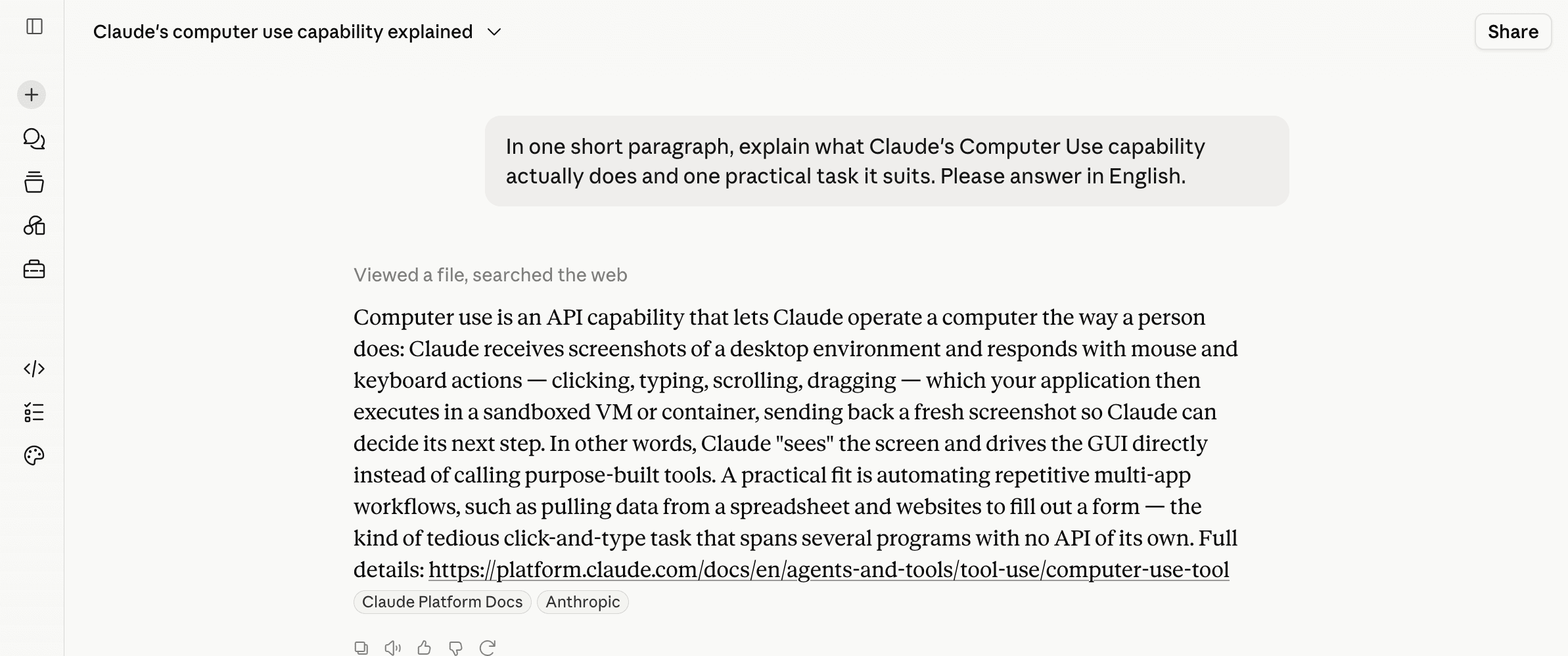
Straight from the source: we asked what Computer Use actually does. It explained the loop — the model sees a screenshot, decides, and returns actions like click, type and scroll that your app executes, then sends the next screenshot back. Its own caveat matches this review: it is slower and error-prone, so keep it in a sandboxed VM with human oversight.
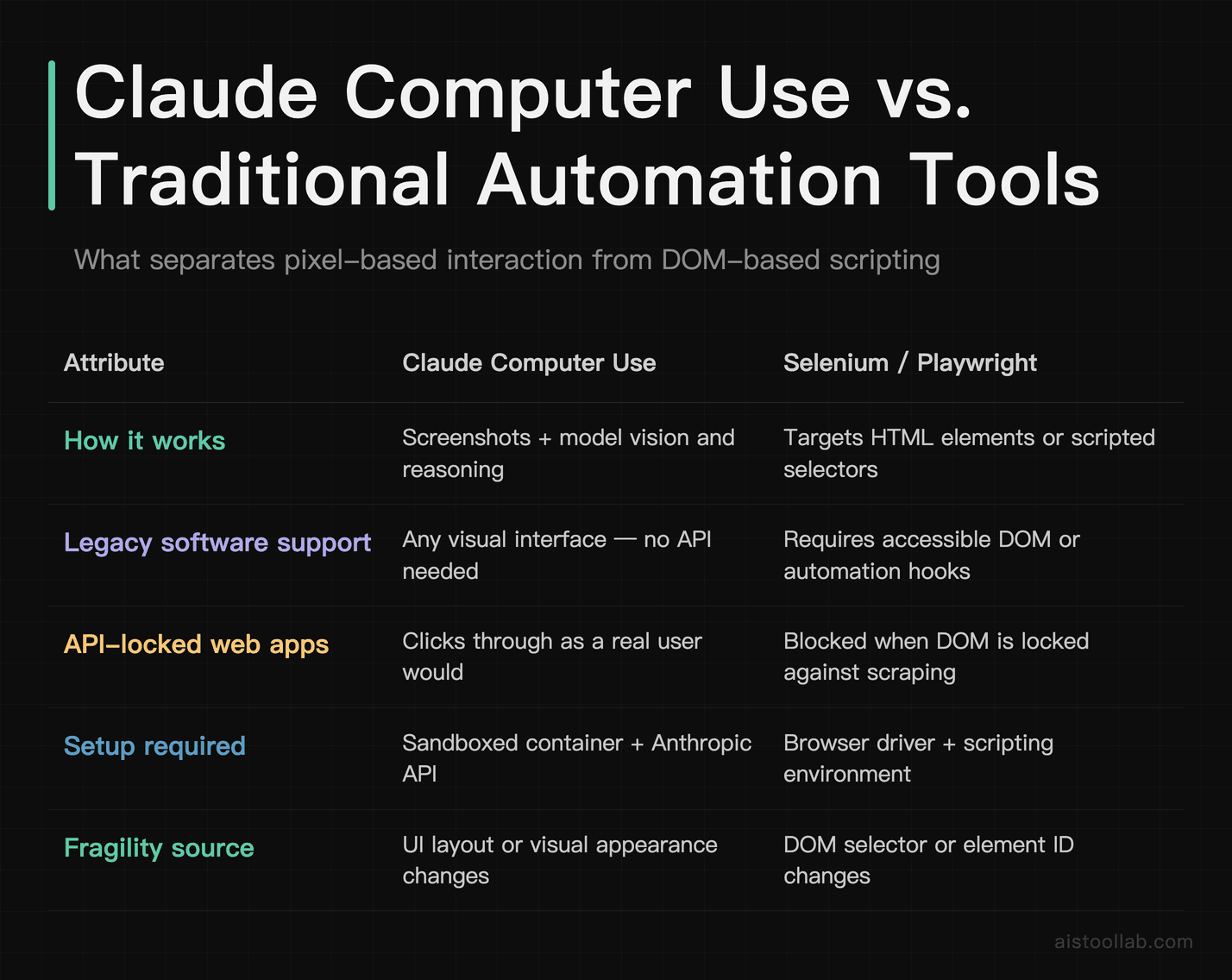
Before we get into implementation details, it’s worth being precise about the mechanism here, because a lot of coverage has been fuzzy on this point. Claude Computer Use gives the model the ability to interact with a computer through three core actions: taking screenshots to see the current state of a screen, moving and clicking a mouse, and typing keyboard input. That’s it. No secret API hooks into your OS, no special software integrations — it’s essentially doing what a remote desktop operator would do, just driven by Claude’s vision and reasoning capabilities rather than a human.
This means it works across any application that has a visual interface. Legacy software with no API? Claude doesn’t care — it sees pixels the same way you do. A web app that locks down its DOM for scraping? Claude just clicks through it like a user would. That’s the genuinely powerful part. Traditional automation tools like Selenium or Playwright require you to target specific HTML elements or build elaborate scripts. Claude just… looks at the screen and figures it out.
The flip side is that this approach also inherits all the fragility of visual interaction. If a UI element moves slightly, if a modal pops up unexpectedly, if a page loads slowly — Claude can get confused in ways that a well-written Selenium script wouldn’t. It’s more flexible than traditional automation in breadth, but less reliable in any single specific workflow than a purpose-built script. Keep that tension in mind — it runs through everything in this review.
Setting Up Claude Computer Use: The Technical Reality
Let’s get into the actual implementation, because the setup is more involved than casual coverage suggests, and the details matter a lot for whether this works in your environment.
Prerequisites and Environment
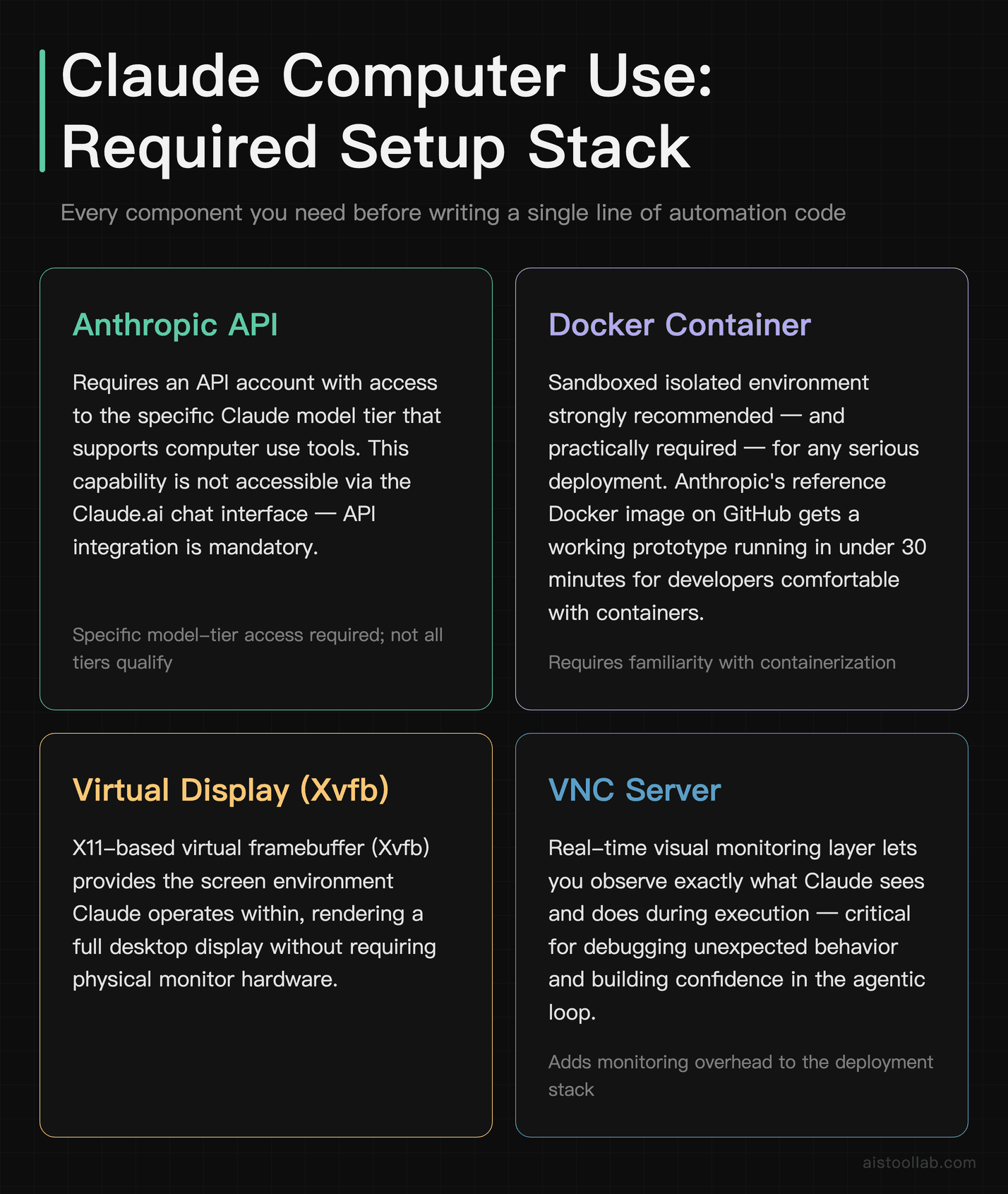
Claude Computer Use is available through the Anthropic API — it’s not something you can access through Claude.ai’s chat interface. You’ll need an Anthropic API account with access to the relevant Claude model tier that supports computer use features. As of current documentation, the capability is built into Claude’s tool use framework, where computer interaction is treated as a set of callable tools the model can invoke during a response.
Critically, Anthropic strongly recommends — and I’d upgrade that to requires in any serious deployment — running Claude Computer Use inside a sandboxed environment. Their reference implementation uses Docker containers with a virtual display (X11 via Xvfb), a VNC server for viewing what’s happening, and a web-based interface. The official Anthropic quickstart on their GitHub provides a Docker image that gets you running in under 30 minutes if you’re comfortable with containers.
Here’s the basic structure of an API call that enables computer use tools:
import anthropic

client = anthropic.Anthropic()

response = client.beta.messages.create(
    model="claude-opus-4-5",
    max_tokens=4096,
    tools=[
        {
            "type": "computer_20241022",
            "name": "computer",
            "display_width_px": 1280,
            "display_height_px": 800,
            "display_number": 1
        }
    ],
    messages=[
        {
            "role": "user",
            "content": "Open Firefox, navigate to example.com, and take a screenshot of the homepage."
        }
    ],
    betas=["computer-use-2024-10-22"]
)
The betas parameter is required — this feature is still under an explicit beta flag in the API. The model then returns a sequence of tool calls (screenshot, mouse_move, left_click, type, etc.) interspersed with its reasoning, and your code is responsible for actually executing those actions on the virtual machine and feeding results back to the model. It’s an agentic loop, not a single call-response.
Rate Limits and Latency
Here’s where production deployment gets complicated. Each “step” in a computer use task involves at least one screenshot (feeding the visual state to the model), a model inference call, one or more actions, and then another screenshot to verify the result. Even a simple 10-step task can involve 20+ API calls. Anthropic’s rate limits apply per API call, so complex workflows can hit limits faster than you’d expect.
Latency is also non-trivial. For a basic data entry task like filling in fields across a form, the full workflow can take several minutes depending on model response times and screenshot processing — comparable to, or slower than, a human doing the same task. So for simple tasks, you’re not saving time so much as you’re freeing your attention. The value multiplies when you’re running multiple instances in parallel, or when the task requires judgment calls a script can’t handle.
Cost Considerations
Claude Computer Use runs on the same token-based pricing as the underlying model. The screenshots are processed as image inputs, and complex tasks accumulate token costs quickly — both from the images and from the back-and-forth reasoning. For low-volume internal automation (say, a task run once a day), the costs are likely negligible. For high-volume production workflows, you’ll want to benchmark your specific use case before committing. Compare this against the development cost of building and maintaining equivalent traditional automation — that’s often where Claude Computer Use wins on economics even if per-run costs are higher.
Use Cases: Where Claude Computer Use Genuinely Shines
Data Entry Across Legacy Systems
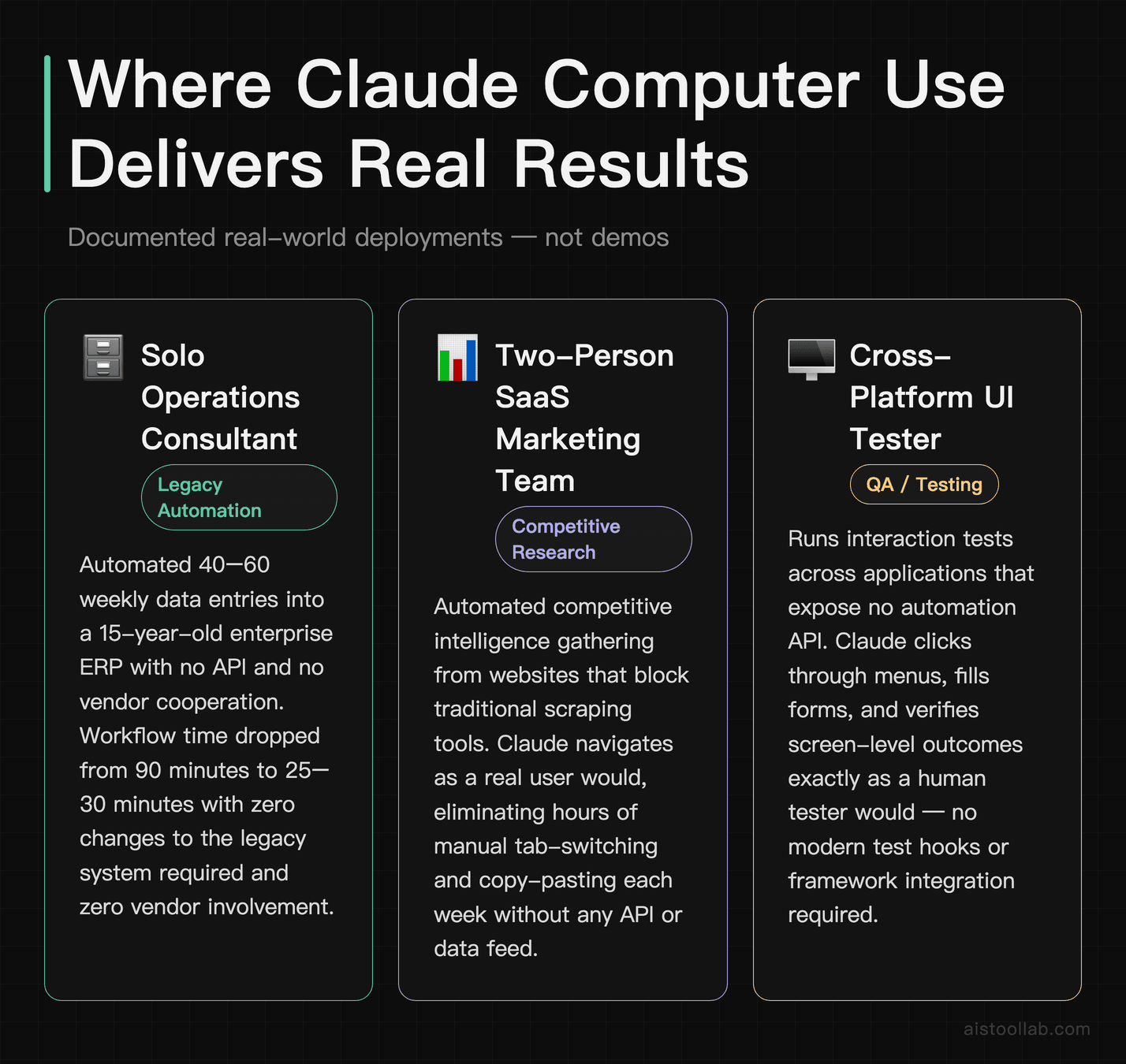
This is the use case that deserves the most attention. A classic scenario: a company runs a 15-year-old enterprise resource planning system with no API, no export function that works reliably, and a vendor who responds to feature requests at geological speed. Every Monday morning, someone manually copies data from a spreadsheet into that system — dozens of entries, easily an hour or more of pure drudgery.
Claude Computer Use can be run in a sandboxed VM with access to both a spreadsheet and legacy software. For workflows like this, it can operate across applications without human involvement once edge cases are handled — and it requires no changes to the legacy system, no vendor cooperation, and no complex scripting.
Web Research and Data Aggregation Without APIs
Picture a two-person SaaS marketing team manually compiling competitive intelligence reports — visiting competitor websites, checking pricing pages, noting feature updates, and pulling it all into a shared doc. The sites they were monitoring either blocked scraping or required JavaScript rendering that made traditional scrapers unreliable.
Claude Computer Use handles tasks like this well. It can navigate to each site, read the content visually, extract the relevant information, and synthesize a structured summary. It can handle sites with login walls (when provided credentials), JavaScript-heavy pages, and even modal pop-ups that would trip up automated scrapers. The output isn’t always perfectly formatted on the first run, but with a clear prompt structure it can produce usable competitive summaries for work that would otherwise take hours per week.
UI and Cross-Platform Testing
For developers and QA teams, one of the most interesting applications is using Claude Computer Use as an intelligent UI tester. Unlike Selenium, which needs brittle element selectors that break every time a dev updates the frontend, Claude can understand interface intent. Ask it to “find the checkout button and complete a purchase with the test card details” and it will adapt if the button moves or gets relabeled — because it’s reading the screen the same way a user would.
Claude can navigate a checkout flow, surface potential field-validation issues, and flag layout problems on mobile viewports. It’s not a replacement for comprehensive test suites, but as a first-pass exploratory tester that can describe what it sees? Genuinely useful.
Repetitive Admin Work With Judgment Requirements
This is where Claude Computer Use separates itself from traditional RPA (Robotic Process Automation) tools. Traditional RPA tools are rigid — they follow a script, and when something unexpected happens, they fail and alert a human. Claude can handle variation. On a task like processing a mixed inbox of vendor invoices — opening attachments, reading amounts and due dates, and entering them into a tracking spreadsheet — invoice formats vary wildly: some are PDFs, some are images, and vendors format things differently. Claude can handle much of this kind of work autonomously and flag edge cases (unusual currencies, missing data fields) for human review. A Zapier or UiPath workflow doing this would either require extensive setup per invoice type or fail on anything unexpected.
Comparison: Claude Computer Use vs. The Alternatives
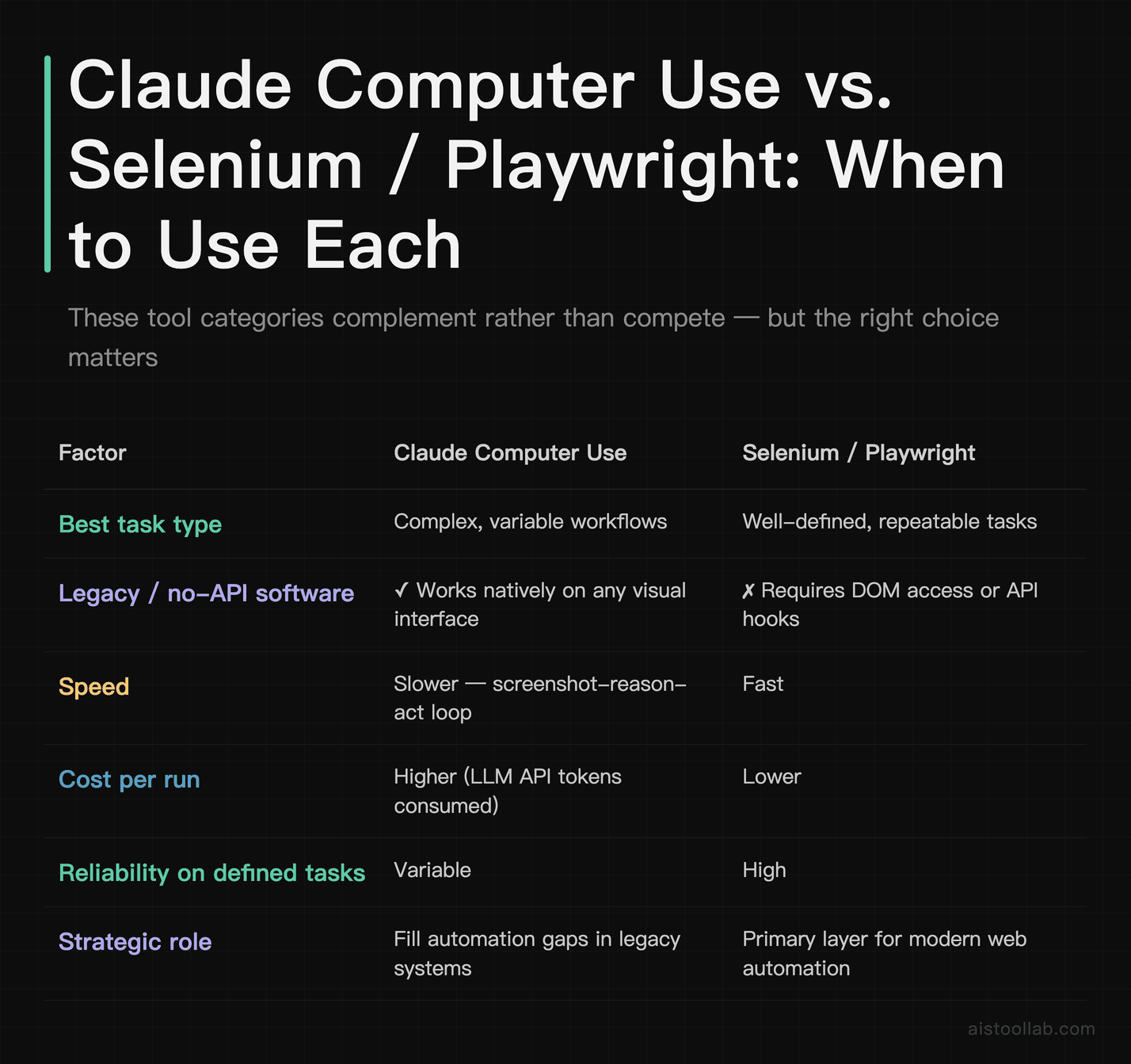
The honest summary: if you have a well-defined, repeatable web automation task, Selenium or Playwright will be faster, cheaper, and more reliable. If you have a complex, variable workflow involving software that resists traditional automation — especially legacy systems — Claude Computer Use is in a class of its own. The tool categories complement more than they compete.
Where Claude Computer Use Falls Short
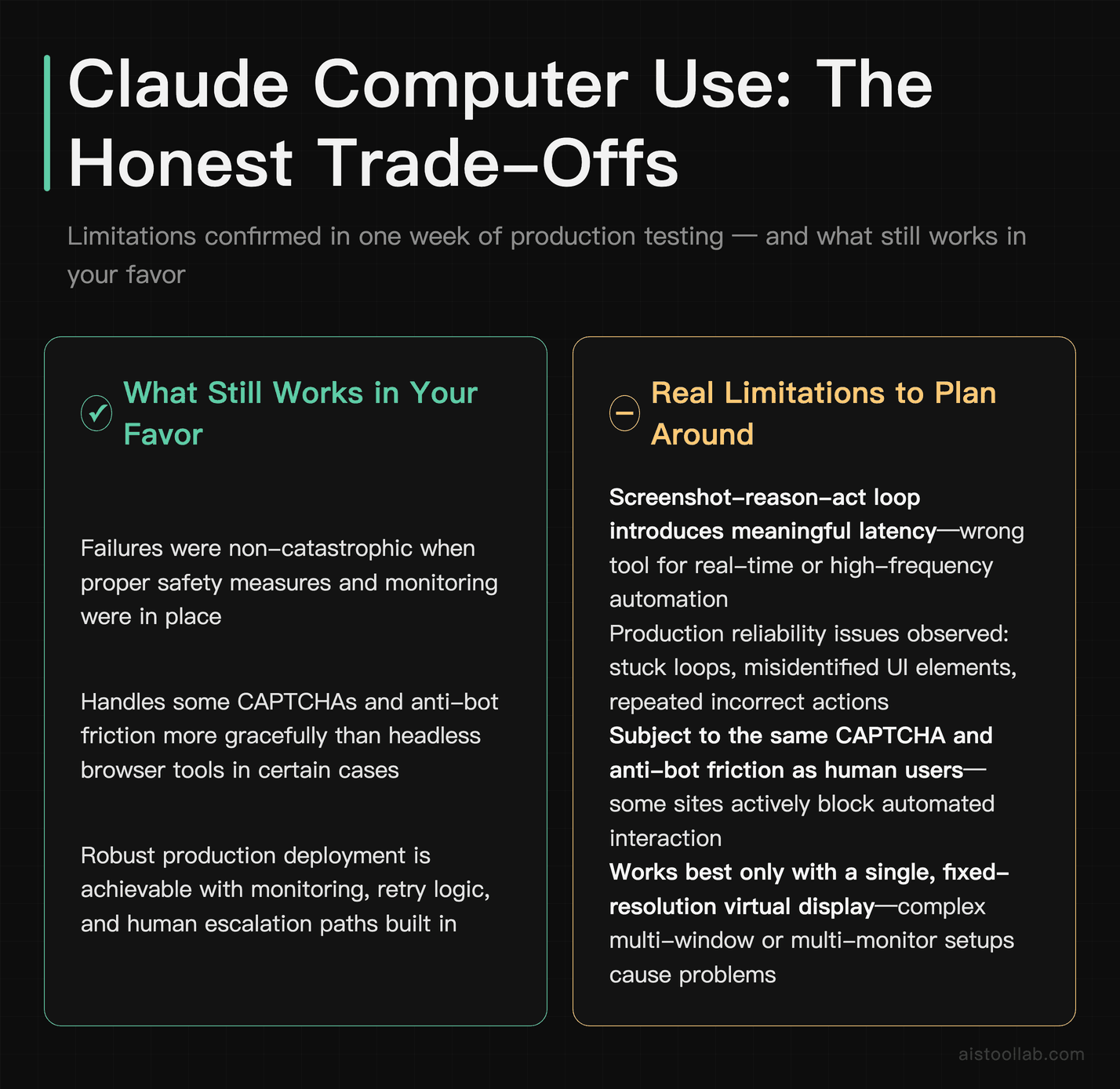
I want to be direct here, because the hype around this capability is real and the limitations are equally real.
Speed and latency: This is not a real-time automation tool. The screenshot-reason-act loop introduces meaningful delays. For anything time-sensitive or high-frequency, it’s the wrong tool.
Reliability in production: Claude can occasionally get “stuck” — misidentifying a UI element, clicking the wrong area, or repeating an action in a loop when a page doesn’t respond as expected. None of these failures tend to be catastrophic, especially with safety measures in place, but they do happen. Any production deployment needs robust monitoring, retry logic, and human escalation paths.
CAPTCHAs and anti-bot measures: Some sites actively block automated interaction. Claude Computer Use is subject to the same friction humans face (and some designed specifically for bots), though it handles them more gracefully than headless browsers in some cases.
Multi-monitor and complex display setups: The current implementation works best with a single, fixed-resolution virtual display. Complex setups with multiple windows, overlapping applications, or dynamic content that changes rapidly can trip it up.
Cost at scale: For genuinely high-volume tasks, the per-token cost structure can add up significantly. Do the math before assuming it replaces a purpose-built solution at enterprise scale.
Security and Safe Deployment: This Part Is Not Optional
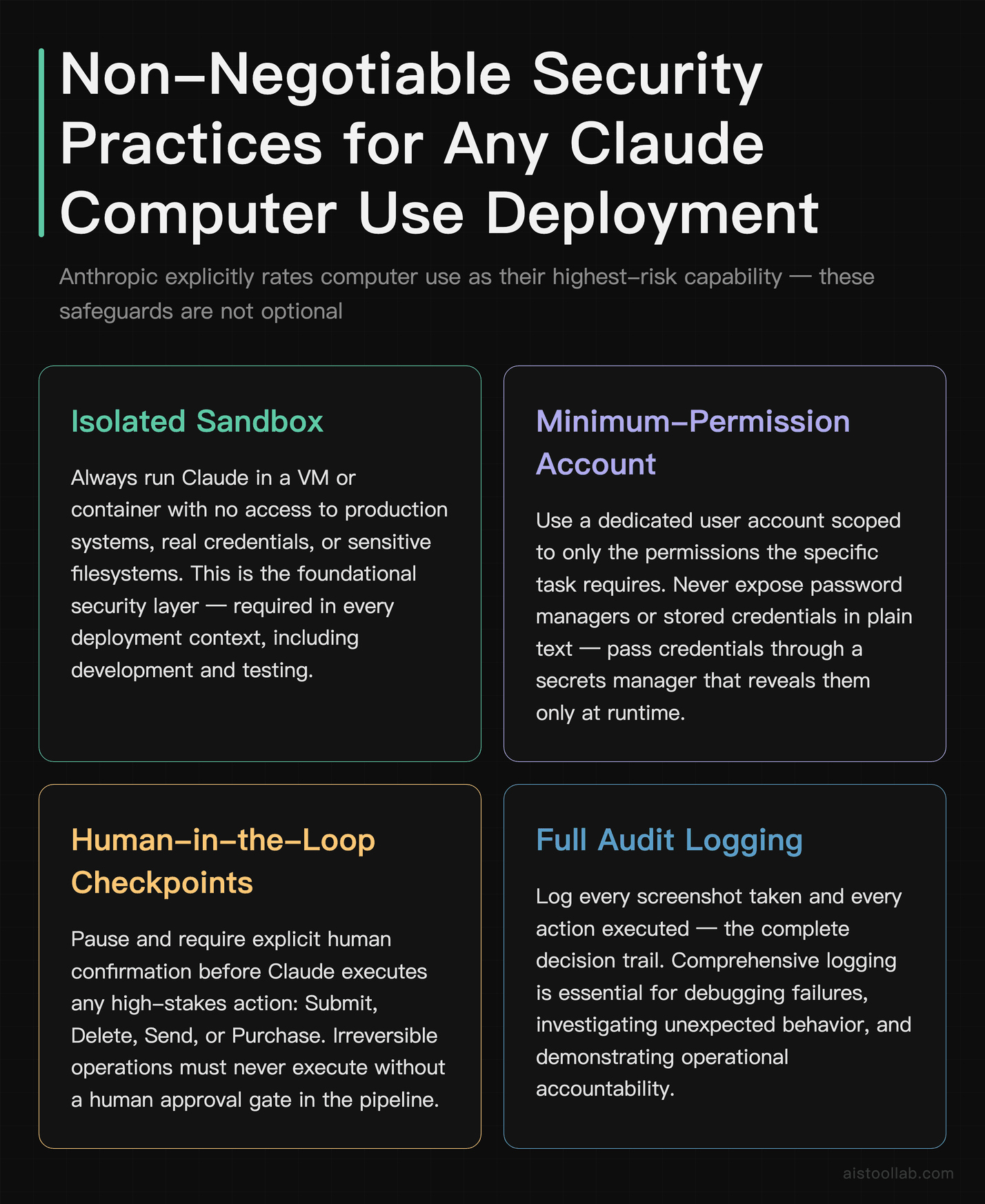
Giving an AI system control of a computer that has access to your files, your accounts, and your internal systems is not something to do casually. Anthropic is refreshingly direct about this in their own documentation — they flag computer use as their highest-risk capability and explicitly warn about prompt injection attacks, where malicious content on a webpage could attempt to hijack Claude’s actions.
Here are the practices I’d treat as non-negotiable for any serious deployment:
- Always use a sandboxed environment. Claude should operate in a VM or container with no access to production systems, real credentials, or sensitive file systems. Use a dedicated user account with minimum necessary permissions.
- Never give it access to password managers or stored credentials in plain text. If Claude needs to log into a system, pass credentials through a secrets manager that reveals them only at runtime.
- Implement human-in-the-loop checkpoints for high-stakes actions. Before Claude clicks “Submit”, “Delete”, “Send”, or “Purchase”, have your system pause and request explicit human confirmation.
- Log everything. Every screenshot taken, every action executed. If something goes wrong, you need a complete audit trail to understand what happened.
- Be paranoid about web content. A webpage that Claude is reading could contain hidden instructions designed to redirect its behavior. Keep browsing tasks isolated from sensitive system access — don’t have Claude browse the open web and access internal systems in the same session.
- Start with read-only tasks. Before you let Claude write, submit, or modify anything, run it exclusively on tasks where it can only read and report. Build confidence in its behavior before escalating privileges.
The risk here isn’t that Anthropic built something dangerous — it’s that computer control is an inherently powerful capability, and the blast radius of an error (or a successful prompt injection) is larger than a bad chatbot response. Treat the security setup with the same seriousness you’d apply to any privileged automation service.
My Verdict: Genuinely Useful, Not Yet Plug-and-Play
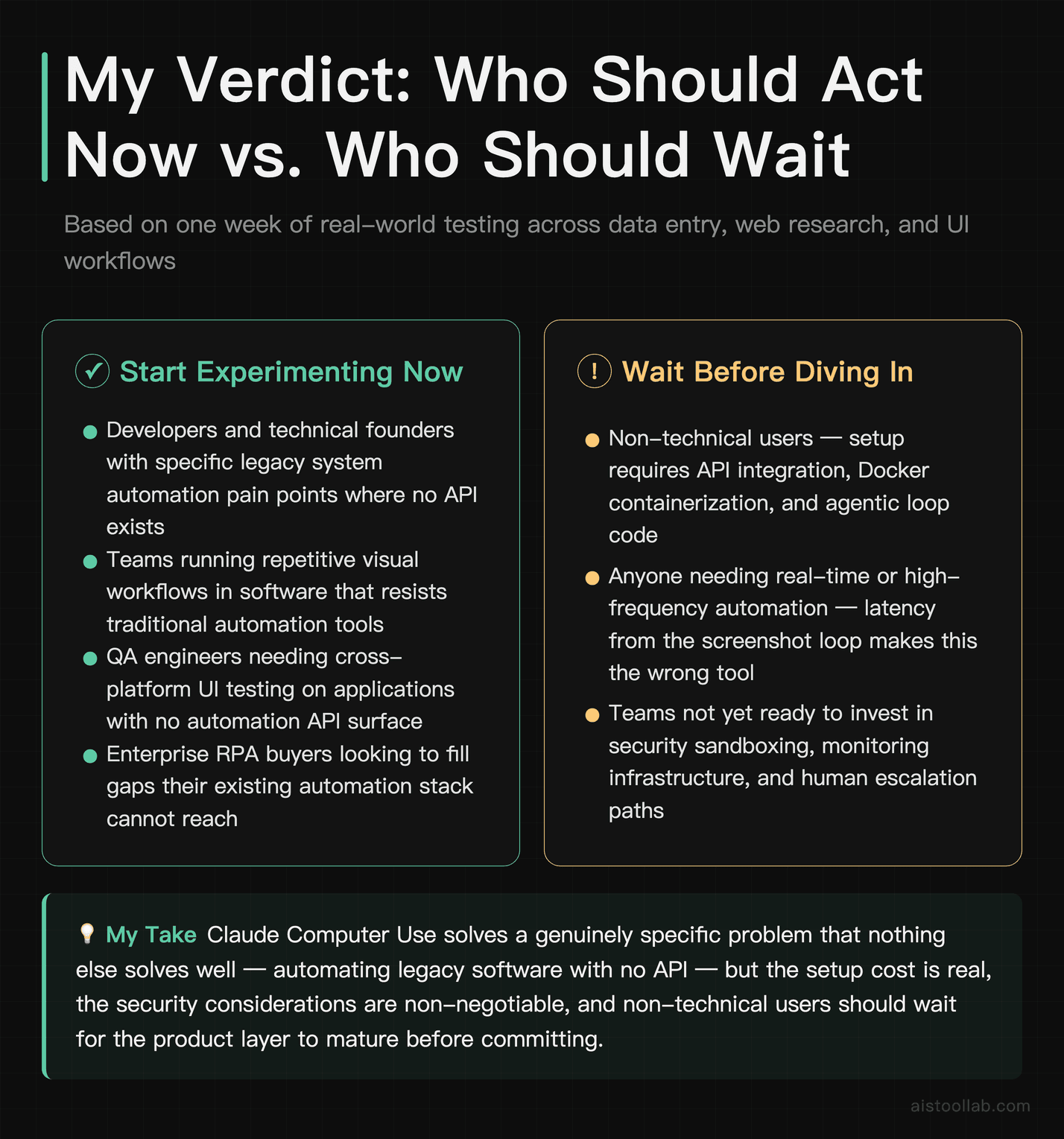
Here’s where I land: Claude Computer Use is the most interesting new development in practical AI tooling I’ve seen in a while. Not because it’s magic, but because it solves a genuine, specific problem that nothing else solves well — automating workflows in software that has no API, no modern scraping surface, and no appetite for change.
If you’re a developer or technical founder with a specific pain point around legacy system automation, repetitive visual workflows, or cross-platform UI testing, you should absolutely be experimenting with this right now. The setup cost is real, but the capability payoff for the right use case is significant. For the enterprise RPA buyers: this isn’t a replacement for your existing automation stack, but it fills gaps your current tools can’t.
For non-technical users: this isn’t ready for you to use directly yet. Wait for the product layer to mature, or find a developer who can build it for your specific workflow. The underlying capability is there; the consumer-friendly packaging isn’t.
The security considerations are real and shouldn’t be glossed over. Giving any AI system — however capable — control over your computer requires thoughtful architecture, not just enthusiasm. Build the guardrails first, then expand the autonomy as you build trust in the system’s behavior.
This technology is early enough that the people who invest time understanding it now will have a meaningful advantage as it matures. That’s not hype — that’s just pattern recognition from watching how previous waves of automation tooling played out. The Neural Networks in 2026: What New Capabilities Like Continual Learning Actually Mean for AI piece I wrote earlier this year covers some of the underlying capability trajectory that makes me genuinely bullish on where computer use AI goes from here.
The elevator still needs someone to decide which floor to go to. For now, Claude is a very good elevator operator. What it does with that role over the next year or two is going to be worth watching closely.
Frequently Asked Questions
Do I need to be a developer to use Claude Computer Use?
Realistically, yes — at least at this stage. Accessing Claude Computer Use requires API integration, Docker setup for the sandboxed environment, and writing the agentic loop code that sends screenshots to the model and executes its returned actions. This isn’t a polished no-code product yet; it’s a powerful API capability that requires meaningful technical setup. If you’re a developer comfortable with Python and basic containerization, you can get a working prototype running in a few hours using Anthropic’s reference implementation. If you’re a non-technical user, you’d need a developer to build the integration for you, or wait for third-party tools to productize this capability behind a friendlier interface. A few early-stage products are starting to build on top of Claude Computer Use, so the accessibility gap should narrow over time — but right now, this is firmly in the hands-on technical user category. That said, the underlying task prompting (what you tell Claude to do) requires no technical skill; you just describe what you want in plain English. The complexity is all in the infrastructure layer, not the instruction layer.
How does Claude Computer Use compare to OpenAI’s Operator?
Both are tackling the same broad category of computer-using AI, but with different approaches and deployment models. OpenAI’s Operator is built as a more consumer-facing product integrated with the ChatGPT ecosystem, while Claude Computer Use is primarily an API capability aimed at developers building custom workflows. Claude’s visual reasoning — its ability to describe what it sees on screen and reason about interface state — tends to be particularly strong, which makes sense given Anthropic’s focus on Claude’s analytical and instruction-following capabilities. That said, this space is moving extremely fast, and by the time you’re reading this, the capability gap between these tools may have shifted considerably. For a detailed side-by-side of the broader assistant comparison, check out the ChatGPT vs Claude vs Gemini: Which AI Assistant Actually Delivers in 2026 piece covering how these models stack up across different task types.
What are the rate limits for Claude Computer Use in production?
Anthropic’s rate limits for API access apply across all usage, including computer use. The specific limits depend on your API tier — Anthropic operates a usage tier system where limits increase as your account demonstrates usage history and spend. The key thing to understand for computer use specifically is that each task involves multiple API calls (at minimum one per action-observe cycle), so your effective task throughput is lower than your raw requests-per-minute limit might suggest. For production deployments, you’ll want to design your system with rate limit handling built in — exponential backoff on 429 errors, task queuing, and realistic throughput expectations based on your specific workflow’s step count. Anthropic’s documentation provides current rate limit details by tier, and I’d recommend checking that directly rather than relying on any figure I publish here, since they adjust these as the product scales.
Can Claude Computer Use access any application, including desktop software?
In principle, yes — if it runs on the virtual machine’s desktop, Claude can interact with it. In practice, the quality of interaction varies by application type. Web applications in a browser tend to work best, because the layouts are relatively predictable and Claude has seen vast amounts of web UI in its training. Native desktop applications work well when interfaces are clean and standard. Older or more idiosyncratic interfaces (think: DOS-era terminal emulators, highly customized enterprise dashboards, or software with unusual interaction patterns) can be harder for Claude to navigate reliably. The performance also depends significantly on screen resolution — higher resolution means more pixels for Claude to process per screenshot, which can improve accuracy but also increases image token costs. Start with your most straightforward target application and expand from there as you build confidence in the system’s reliability for your specific environment.
Is Claude Computer Use suitable for handling sensitive data?
This requires a nuanced answer. The capability itself can technically interact with systems that contain sensitive data — that’s often the point, since many legacy systems holding sensitive data have no API. Whether it’s appropriate to do so depends entirely on your security architecture. Screenshots of sensitive screens are transmitted to Anthropic’s API for processing, which means you need to understand and accept Anthropic’s data handling and privacy policies before using Claude Computer Use on anything involving personal data, financial information, or protected health information. For many regulatory environments (HIPAA, GDPR, certain financial regulations), this warrants legal review. Anthropic does offer enterprise agreements with enhanced data privacy terms, which may address some of these concerns for enterprise buyers. My strong recommendation: do not deploy Claude Computer Use against sensitive data in production without a formal security and compliance review. The operational capability is real; the governance requirements are equally real.
How reliable is it for production use — can I replace a human data entry person entirely?
Not quite yet, in most cases. Claude Computer Use handles the majority of standard cases reliably, but edge cases, unexpected UI states, and occasional reasoning errors mean you should plan for a failure rate that requires human review or intervention. Think of it more like a highly capable junior employee who works autonomously most of the time but needs a supervisor available for unusual situations, rather than a fully autonomous replacement. The practical deployment model that makes the most sense right now is human-in-the-loop automation: Claude handles the bulk of the repetitive work, a human reviews flagged edge cases, and you have monitoring in place to catch when things go sideways. As the technology matures and you build workflow-specific reliability data, you can progressively reduce the human oversight on well-understood task types. Full autonomous replacement of complex human roles is the longer-term trajectory, not the current reality.
What’s the cost comparison against hiring a virtual assistant or building a custom automation?
This is the calculation that actually matters for most people evaluating this. The economics depend heavily on your specific workflow and volume. For low-volume tasks (a few hours of automation per day), Claude Computer Use can be extremely cost-effective compared to a human VA — API costs for a moderate workflow might run to tens of dollars per month, while a part-time VA starts at several hundred. The comparison against custom automation (Selenium scripts, UiPath licenses) is more nuanced: custom automation has higher upfront development cost and ongoing maintenance cost, but lower per-run marginal cost at scale. Claude Computer Use has lower setup cost for new task types and handles variation better, but higher per-run cost in token terms. The crossover point depends on task volume, variability, and how often your target interfaces change. For startups and small teams automating occasional complex workflows, Claude Computer Use often wins on total cost. For enterprise-scale, high-frequency, stable workflows, purpose-built automation usually wins on unit economics.
What should I automate first if I’m just getting started?
Start with something that meets three criteria: it’s genuinely painful (so you’ll notice the improvement), it’s relatively low-stakes (so errors are recoverable), and it has clear success criteria (so you can tell if it’s working). Good first candidates include: compiling data from multiple websites into a spreadsheet, filling out standardized forms in internal systems, capturing screenshots of competitor pages on a schedule, or processing standardized documents from a known set of vendors. Avoid starting with anything that touches financial transactions, external communications (emails, messages), or permanent data deletion — these have high blast radius if something goes wrong. Once you’ve seen Claude Computer Use work reliably on a low-stakes task and you understand its behavior patterns in your environment, expanding to higher-stakes workflows is much less risky. Also, check out my coverage of Retrieval-Augmented Generation (RAG) Explained: How AI Tools Actually Use Your Data Without Hallucinating — combining Claude Computer Use with RAG-powered knowledge retrieval is a particularly powerful pattern for research and data aggregation workflows.
Last updated: 2026
Explore more AI tools
👉 Browse the AI Tools Library to find the right tools for your workflow.