
Can It Replace Google for Research? For Many Tasks, Yes
Research workflows often fall apart the same way: three browser tabs open, a Google Doc filling up with half-sourced bullet points, and a general-purpose chatbot like ChatGPT occasionally hallucinating facts such as a regulatory change that never happened. Sound familiar? This is where Perplexity Pro takes a different approach: it can assemble a structured research brief with live citations, sourced from actual news articles. That capability is what moves Perplexity from a novelty toward something closer to infrastructure.
That said — I want to be honest upfront. Perplexity Pro isn’t perfect, it isn’t magic, and it won’t replace a skilled human researcher. But for the kind of daily, high-volume research tasks that professionals actually do — tracking industry news, building market landscapes, vetting sources, drafting briefs — it can genuinely change a research workflow in ways that aren’t obvious at first. And at $20/month, it costs about the same as a Netflix subscription, which makes the value question surprisingly easy to answer for most people.
So let me walk you through the real strengths, the real frustrations, the use cases where it shines, and the ones where you’ll still want something else. No fluff, no feature list recitation. Just a clear look at what this thing does well and where it falls short.
What Is Perplexity Pro, Actually?

If you haven’t used it before, here’s the short version: Perplexity is an AI-powered search and research tool that combines a conversational interface with real-time web search. Unlike asking ChatGPT a question and getting an answer from training data that may be months or years old, Perplexity actively fetches live web results and synthesizes them into a coherent, cited response. Every claim it makes is (in theory) linked back to a source you can click through and verify.
The Pro tier, at $20/month, unlocks access to more powerful underlying models — including the option to route queries through Claude, GPT-4o, or Gemini Pro depending on the task — along with higher daily usage limits, a file upload feature for analyzing documents, and what Perplexity calls “Pro Search,” a more thorough multi-step search mode that asks clarifying questions before diving in. There’s a free tier too, but it’s noticeably limited in how deeply it searches, and you don’t get model switching.
Technically, the architecture is a form of Retrieval-Augmented Generation (RAG) — the AI retrieves relevant documents from the web in real time and uses them as context for generating its response. If you want to understand how that actually works under the hood, I’d point you to our explainer on Retrieval-Augmented Generation (RAG) Explained: How AI Tools Actually Use Your Data Without Hallucinating — it’s worth understanding because it explains both why Perplexity is more accurate than a pure LLM and where it still makes mistakes.
Real-World Use Cases: Where Perplexity Pro Actually Delivers
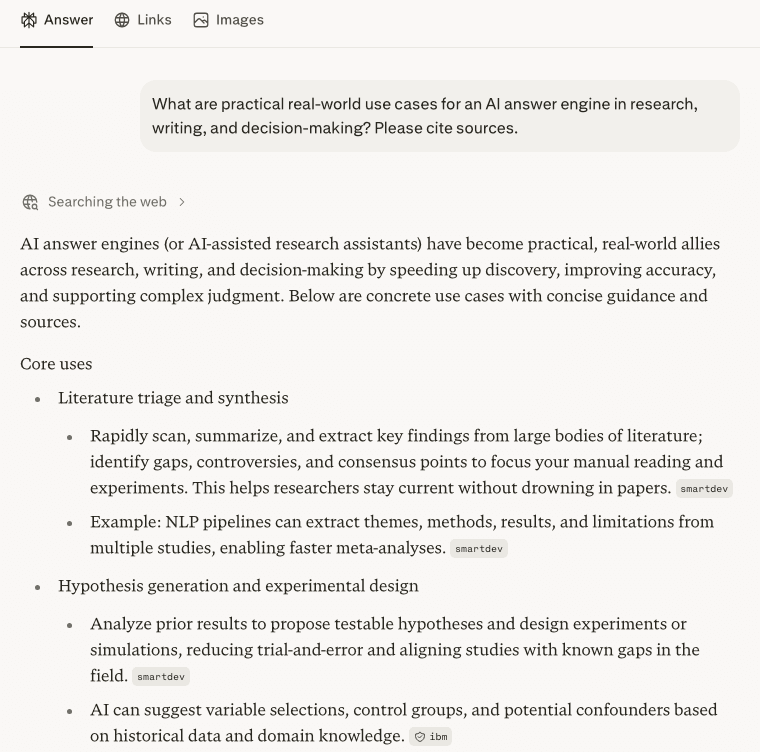
To show the real-world angle, here’s a quick free-tier check (no login). Asked where an AI answer engine actually helps across research, writing and decisions, it laid out concrete uses — literature triage, hypothesis framing, drafting — each with a source marker. Honest limit: the free tier is enough to see the pattern, but the heavier Pro-only depth (longer context, more sources per answer) is where the paid tier earns its price.
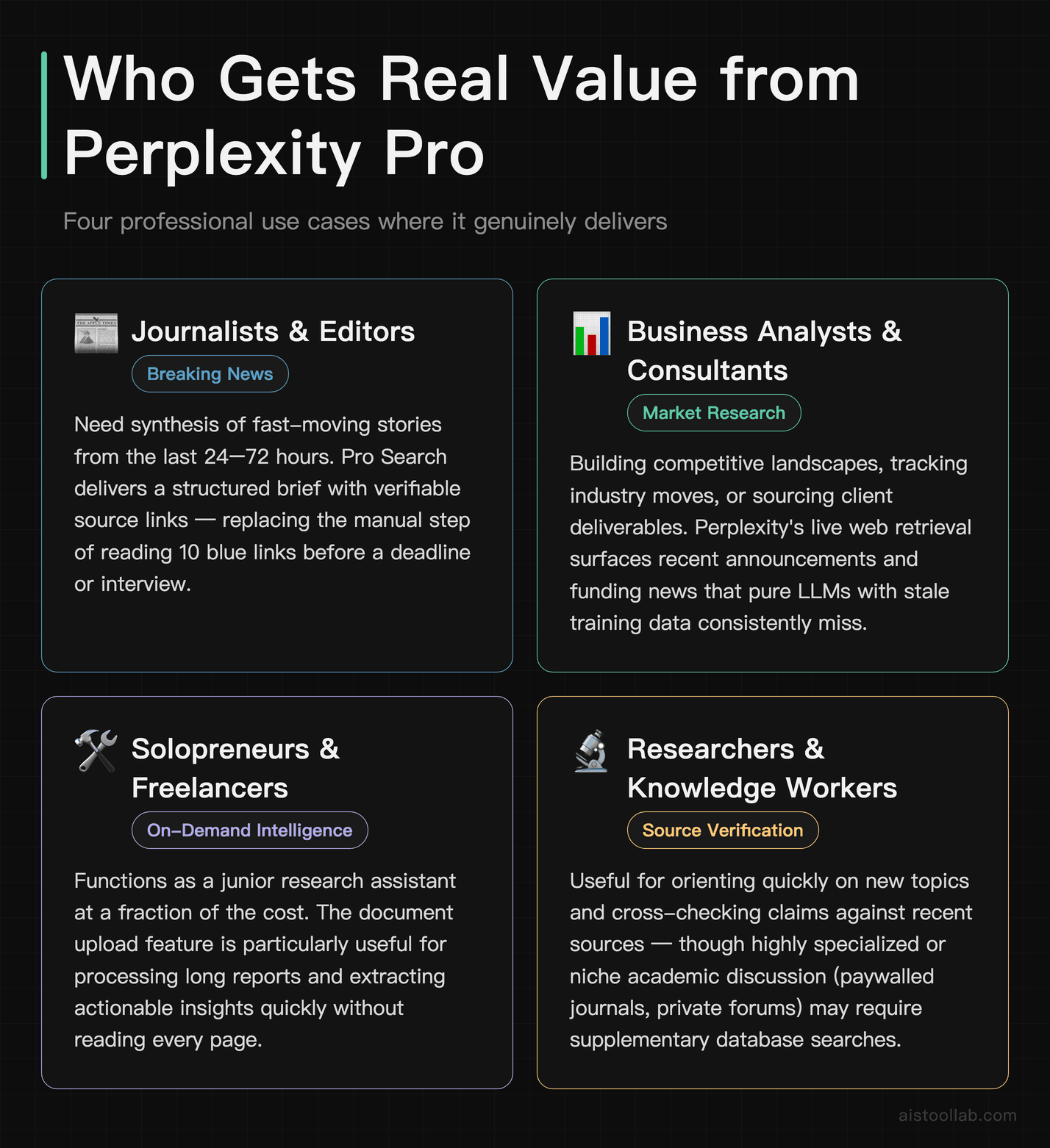
1. Journalists and Editors Tracking Fast-Moving Stories
This is probably the strongest use case in the whole product. When a story is breaking or evolving quickly — say, a regulatory shift, an earnings surprise, or a geopolitical event — you need information from the last 24 to 72 hours, not from a model’s training snapshot. Perplexity Pro’s real-time search means you can ask something like “What has happened with the EU’s AI Act enforcement in the last two weeks?” and get a synthesized answer drawing from recent news articles, with links you can immediately verify.
Compared to just Googling the same query, the difference isn’t in what information is available — it’s in the synthesis. With Google, you get ten blue links and have to do the reading yourself. With Perplexity, you get a structured summary with key developments, followed by source links in case you want to go deeper. For a journalist on deadline who needs a quick brief before an interview, that synthesis step is genuinely valuable time savings.
One caveat: Perplexity is only as good as the sources it finds. If a story is being covered by paywalled outlets or obscure trade publications not indexed well, it may miss important context. For high-stakes journalism, you still want a human doing primary source verification. But as a first-pass research accelerator? It’s excellent.
2. Business Analysts and Strategy Teams Doing Competitive Intelligence
A common use case in this area is competitive landscape work — “Who are the top five players in the SMB accounting software space and what have they announced in the last quarter?” — which Perplexity handles impressively well. It pulls recent press releases, funding announcements, product updates, and news coverage, and gives a structured overview that works as a starting brief before going deeper.
What makes the Pro tier specifically useful here is the Pro Search mode, which essentially lets Perplexity conduct a more iterative investigation. It may ask you clarifying questions like “Are you focused on US market players or global?” before running multiple searches and synthesizing across them. This more closely mimics how a human researcher would approach the task rather than just firing off a single search query.
The citation feature is particularly valuable in this context. When building a deck or a brief that needs sourcing, you can quickly reference where each data point came from. That said — and this is important — you absolutely need to click through and verify the key stats. Perplexity occasionally misattributes a specific number to the wrong article, or pulls a figure that was accurate when the article was written but has since been updated. Never quote a specific statistic from Perplexity without checking the source directly.
Hands-on: a real-world decision query on the free tier (no login)
The competitive-intelligence use case above is exactly the sort of thing I could test cheaply, so I did — on the free tier, without logging in. I asked it to compare three project-management tools for a small remote team and to cite sources. Here is the actual result.

What I saw in this run: even on the free plan it produced a tidy comparison table — each tool with a “best for / strengths / trade-offs” row — followed by a short recommendation, with source labels such as asana and saashub visible next to parts of the table, and a Sources panel of 10. That “structured overview you can use as a starting brief” the section describes held up without an account.
Honest limits from this single run: this is the free tier, so I did not exercise the Pro-only features this review focuses on — Pro Search, model switching, file upload; I only viewed the source labels on screen without clicking each one through or confirming the page backs the row; and, exactly as this review warns, you would still verify any specific figure at the source. The answer’s final sentence was also cut off in this run, and I had to dismiss a cookie banner and a sign-in prompt first. One free-tier run at this moment, not a benchmark.
3. Researchers and Academics Doing Literature Surveys
For academic researchers, this use case has some nuance. Perplexity is not a replacement for Google Scholar or a proper literature review tool — it doesn’t search academic databases systematically, and it can miss papers. But as a way to quickly map the landscape of a topic — “What are the current main debates in climate attribution science?” or “Summarize recent developments in GLP-1 drug research” — it gives you a solid orientation you can then refine with more specialized tools.
The file upload feature in Perplexity Pro is underrated here. You can drop in a PDF — a research paper, a report, a white paper — and ask questions about it directly. It can quickly extract key findings from long technical reports without reading them cover to cover. It’s not perfect at nuanced interpretation, but for “give me the main conclusions and methodology of this paper,” it works well.
4. Solopreneurs and Freelancers Who Need Daily Market Context
A freelance developer working on a SaaS product, a consultant needing to brief themselves on a client’s industry, a designer trying to understand brand positioning in a new sector — these are all people who need high-quality contextual information on demand without having a research team behind them. Perplexity Pro is essentially a junior research assistant that’s available at 2am when you’re prepping for a pitch the next morning.
I’ve seen this use case resonate especially with people who previously spent a lot of time just reading newsletters and industry blogs to stay current. Perplexity lets you pull targeted intelligence on exactly what you need right now, rather than passively consuming a feed. At $20/month, for a freelancer billing hourly, the time it saves easily justifies itself within the first week of use.
How Perplexity Pro Stacks Up: Comparison Table
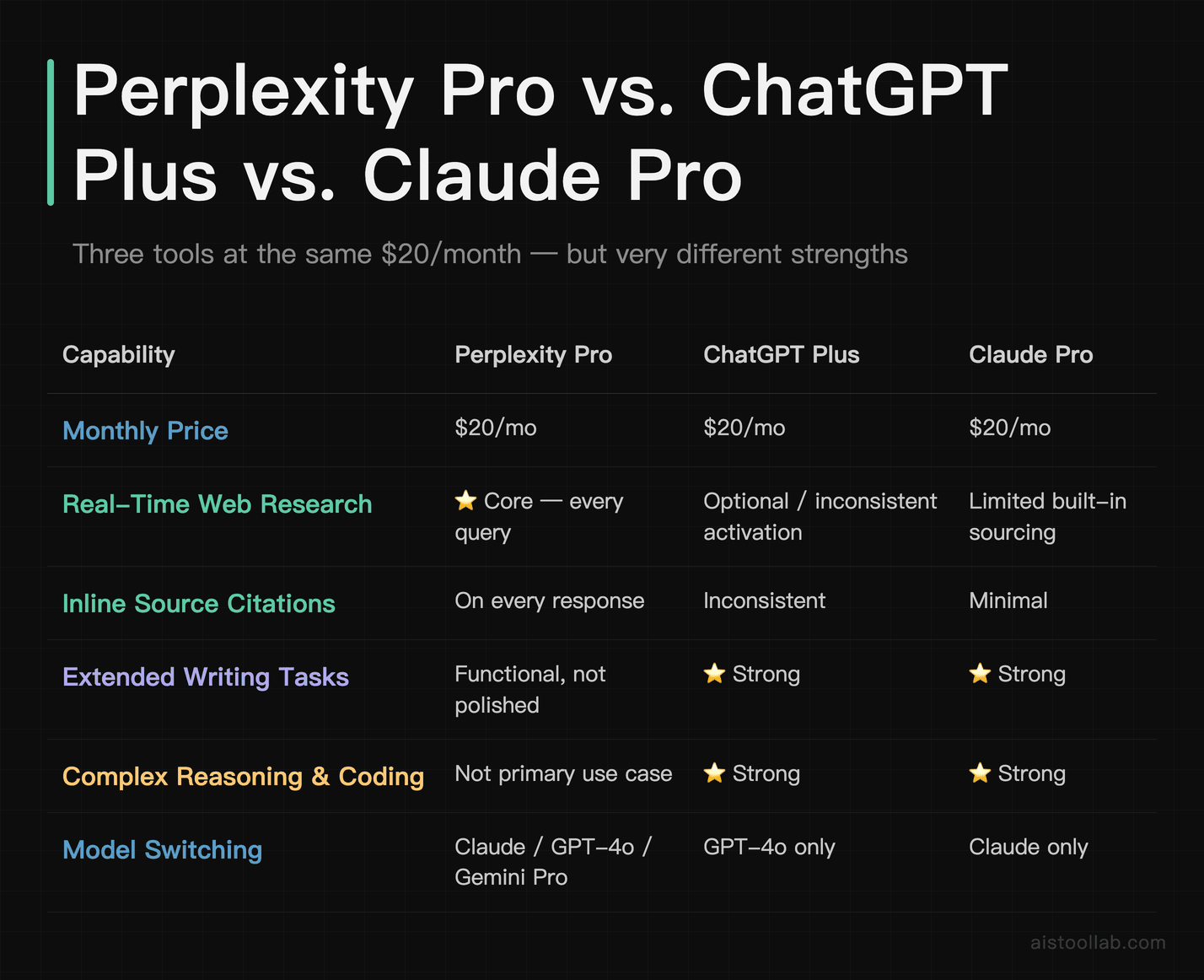
A few things worth calling out in this table. First, the fact that ChatGPT, Claude, and Perplexity all sit at $20/month is worth thinking about if you’re deciding where to put your one subscription. They’re not really competing products in the sense that they do very different things well. Perplexity is clearly the winner on real-time sourced research. ChatGPT and Claude are clearly better for extended writing tasks, complex reasoning, and coding. If you’re doing both, you may end up paying for two — which is a real budget consideration.
For a deeper look at how the underlying models compare on various benchmarks, I’d recommend checking out How AI Models Actually Compare in 2026: Benchmarks, Real Performance Data, and What the Numbers Really Mean — it puts some useful context around what “better” actually means across different task types.
Where Perplexity Pro Falls Short
I want to spend real time here because I think the marketing around Perplexity sometimes oversells it as a Google killer or a research panacea. It’s neither.
Citation errors are still a real problem. Perplexity occasionally cites a source for a claim that, when you click through, either doesn’t contain that specific claim or says something slightly different. This is the same hallucination-adjacent problem that affects all RAG-based systems — the model sometimes generates a plausible claim and retroactively attaches a citation to it rather than the other way around. For casual research this might be fine. For anything you’re publishing or presenting as fact, you need to verify every key claim directly. Full stop.
Depth is limited on highly technical or niche topics. If you’re researching something highly specialized — obscure regulatory law, rare disease research, deep technical architecture decisions — Perplexity often gives you surface-level synthesis from popular coverage rather than expert sources. It’s indexing the same public web that everyone else is indexing, so if the expert discussion is happening in academic papers, private Slack groups, or paywalled trade journals, you’re not going to get it here.
It’s not a writing tool. Perplexity is a research and synthesis tool. The prose it generates is functional but not polished. If you’re trying to write a compelling essay, a piece of marketing copy, or a long-form article, ChatGPT or Claude will serve you much better. Perplexity’s output is more like a well-organized research brief than a finished document.
Spaces (its collaborative feature) is still maturing. Perplexity has a feature called Spaces that lets you create shared research environments with custom instructions. In theory this is great for teams. In practice it’s useful but rough around the edges — the collaborative and customization features feel like they’re still being developed. Worth keeping an eye on, but not a reason to buy the subscription yet by itself.
Multi-Step Research Tasks Compared
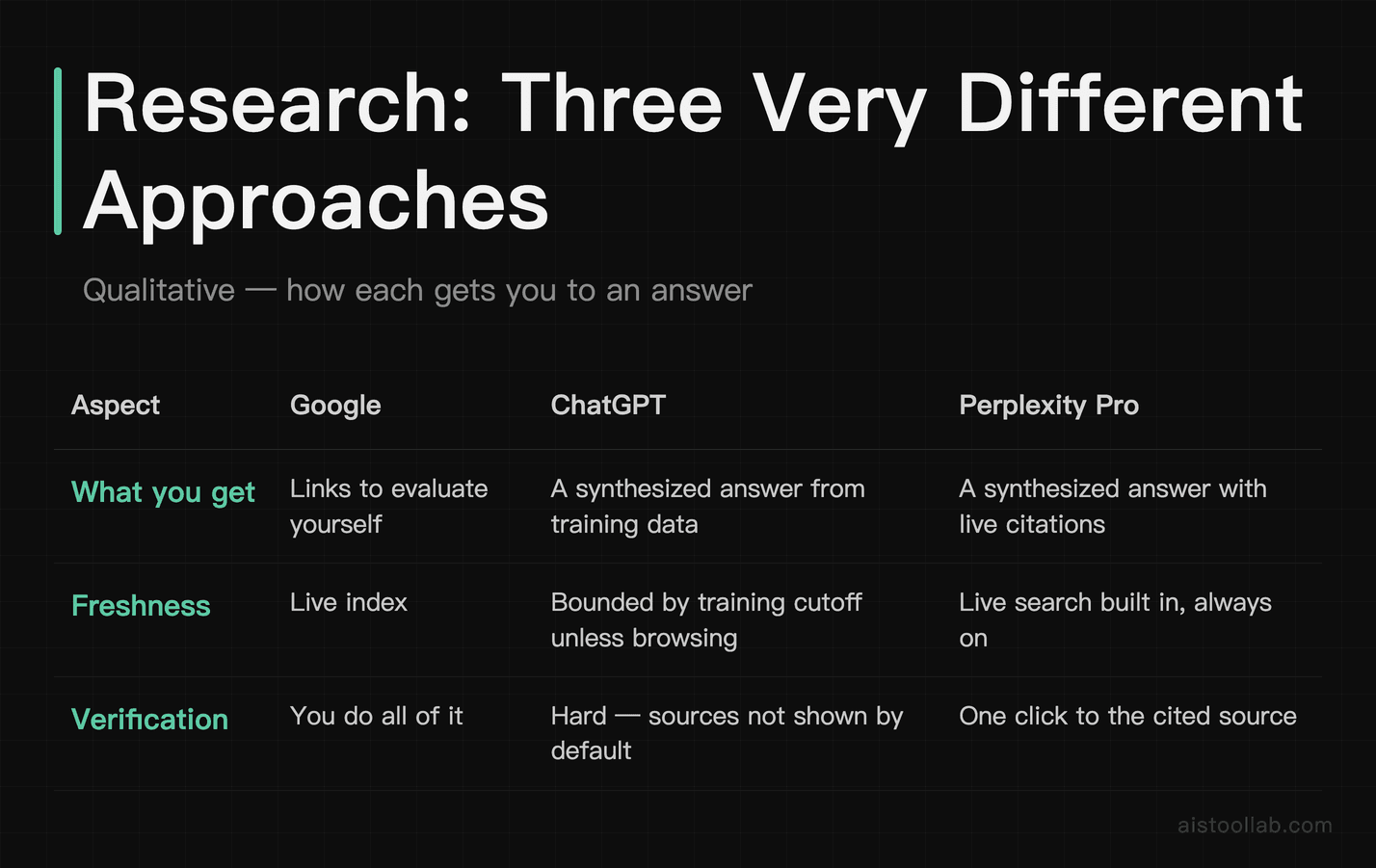
This kind of multi-step research task illustrates the performance differences well — for example: “Build me a landscape of AI-powered customer service tools for mid-market SaaS companies — who the major players are, how they differentiate, what they’ve announced recently, and what pricing looks like.”
With standard Google: a typical search returns a mix of vendor websites, a few listicle articles of varying quality, and some G2 review pages — useful starting material, but the synthesis is left to you: reading multiple articles, cross-referencing, and building the picture manually.
With ChatGPT (without web search enabled): A static model can give a good synthesis of the landscape as it existed at training time, but it dates fast — tools get acquired, pivot, or launch major products after the cutoff. The result reads as well-structured yet factually stale in ways that matter for competitive analysis.
With Perplexity Pro (Pro Search mode): It may ask a clarifying question first — for example, narrowing whether the focus is voice, chat, or omnichannel tools — which pushes you to be more specific (useful in itself). The synthesis can cover recent funding announcements, product launches, and pricing pages with inline citations you can click through to verify, making it well suited to building a research brief with higher confidence in recency.
That’s the practical pitch: not a dramatic benchmark number, but steady time savings — and the confidence that you’re not working from stale information, which is genuinely the more valuable part.
Pricing: Is $20/Month Actually Worth It?
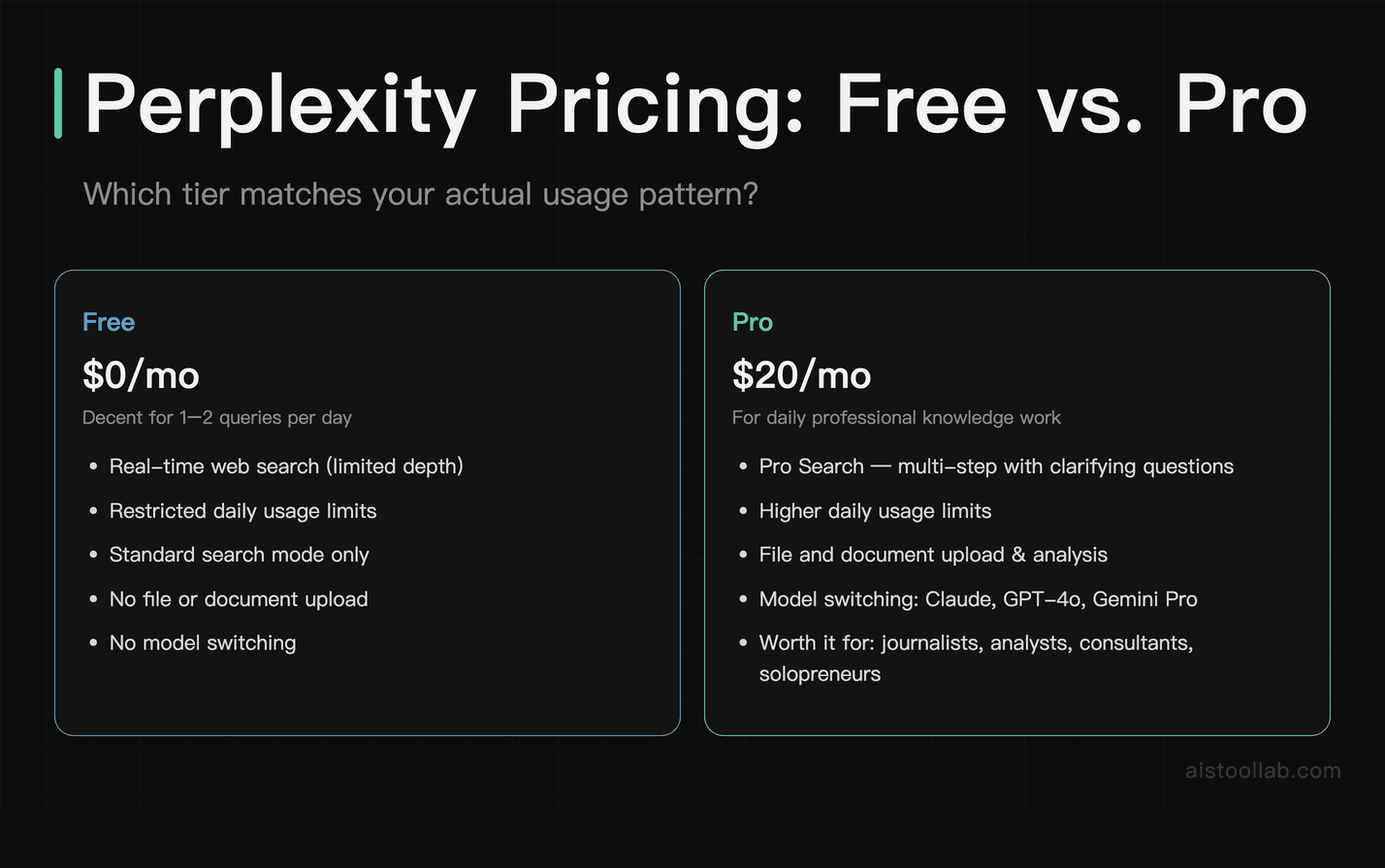
Let’s be direct about this. $20/month for a professional research tool is not a hard sell. Compared to the cost of a single hour of a researcher’s or consultant’s time, it’s negligible. The question isn’t really whether it’s affordable — for most professionals it is — but whether you’ll actually use it enough to justify it over the free tier or over just using Google.
Here’s my honest take: the free tier of Perplexity is actually decent for occasional use. If you’re using it once or twice a day for quick research checks, you might be fine there. The Pro tier starts pulling its weight when you’re doing substantive research sessions multiple times a day, when you need Pro Search mode’s deeper analysis, when you’re uploading documents to analyze, or when you want the model-switching flexibility to route a complex writing task through Claude instead.
For journalists, business analysts, consultants, researchers, and solopreneurs doing daily knowledge work — yes, it’s worth it. For someone who just wants to look things up occasionally, the free tier or just using Google is probably fine. Don’t feel pressured to upgrade if your use case doesn’t actually demand it.
One more thing worth noting: Perplexity has also introduced an Enterprise Pro tier for teams, which adds features like SSO, admin controls, and higher usage limits. I haven’t done a full review of that tier yet, but for a startup team doing regular market intelligence work, it might be worth investigating.
Pros and Cons
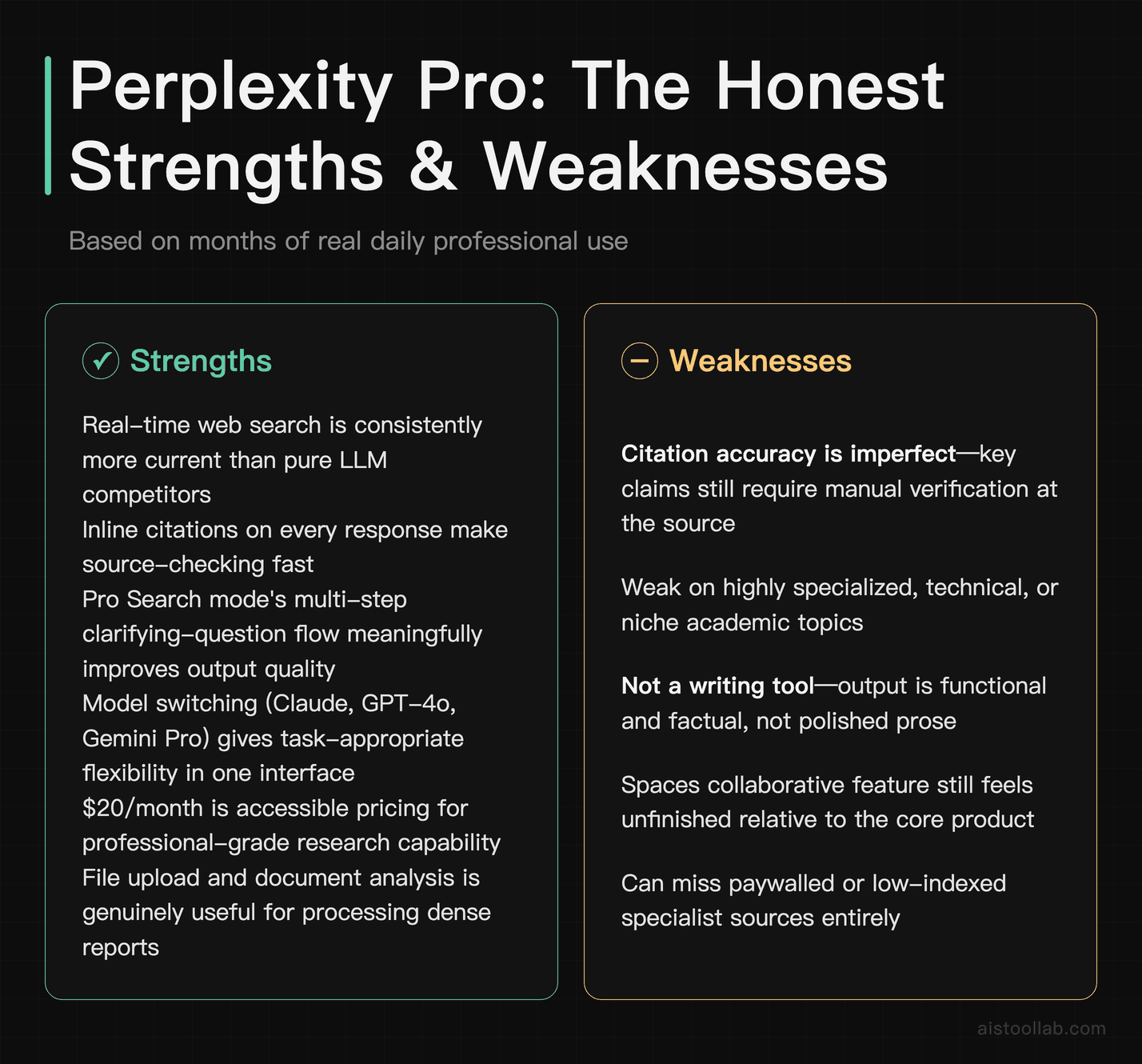
- Pro: Real-time web search is genuinely reliable and consistently more current than pure LLM competitors
- Pro: Inline citations on every response make source-checking fast (though still necessary)
- Pro: Pro Search mode’s multi-step research with clarifying questions meaningfully improves output quality
- Pro: Model switching (Claude, GPT-4o, Gemini) gives you flexibility in one interface
- Pro: $20/month is accessible pricing for what it delivers professionally
- Pro: File upload and document analysis is genuinely useful for dense reports
- Con: Citation accuracy is imperfect — you still need to verify key claims manually
- Con: Weak on highly specialized, technical, or niche academic topics
- Con: Not a writing tool — output is functional but not polished
- Con: Spaces collaborative feature still feels unfinished
- Con: Can miss paywalled or low-indexed specialist sources
My Verdict: Who Should Actually Get Perplexity Pro
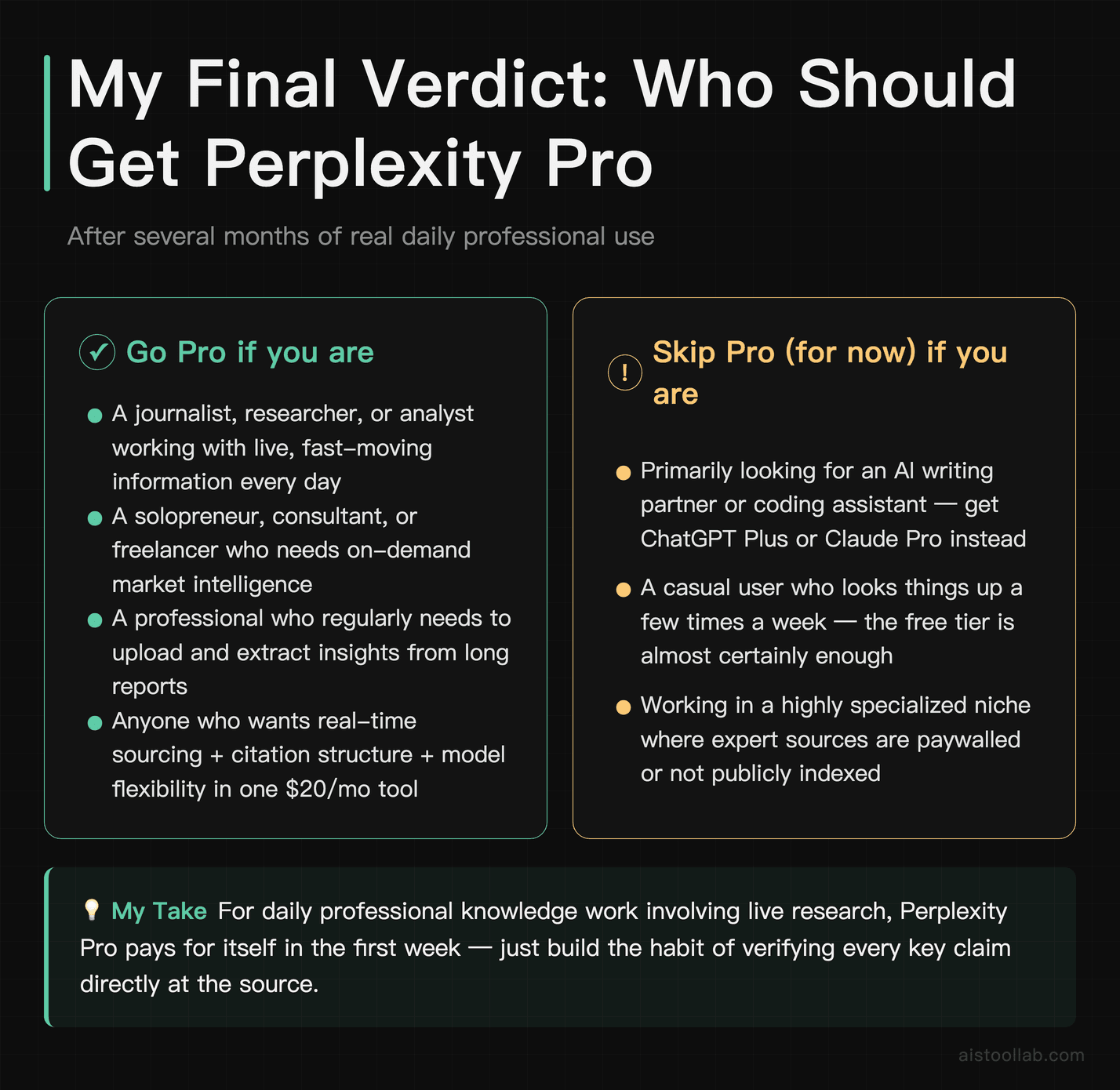
After several months of real daily use, here’s my honest breakdown by user type:
If you’re a journalist, researcher, or analyst who works with live information every day — buy it. The real-time sourcing, citation structure, and Pro Search mode will meaningfully change how quickly you can orient yourself on a new story or topic. The $20/month will pay for itself in the first week. Just build in the habit of verifying key claims at the source.
If you’re a solopreneur, consultant, or freelancer who needs market intelligence on demand — this is essentially a junior research assistant at a fraction of the cost. The document upload feature alone is worth it if you regularly need to process long reports. Go Pro.
If you primarily need an AI writing partner or coding assistant — Perplexity is not your primary tool. Get ChatGPT Plus or Claude Pro instead. You might use Perplexity’s free tier as a secondary research layer, but don’t pay $20/month for it if writing or code is your main use case.
If you’re a casual user who looks things up a few times a week — the free tier is almost certainly enough. You don’t need Pro Search for occasional queries. Stay free, appreciate the product, and upgrade if your usage intensifies.
Next step: sign up for the free tier, run it for a week on real research tasks you’re currently doing. If you hit the Pro Search limit regularly and find yourself frustrated by it, that’s your signal to upgrade. You’ll know within a few sessions whether this belongs in your daily toolkit.
Frequently Asked Questions
How is Perplexity Pro different from just using ChatGPT with web search enabled?
This is the question I get most often, and it’s a fair one because on the surface they sound similar. The key difference is that web search is Perplexity’s primary architecture — it was built from the ground up to retrieve, cite, and synthesize live web content on every query. For ChatGPT, web search is an added capability grafted onto what is fundamentally a text generation model; it doesn’t activate on every query, and the citation behavior is less systematic.
In practice, I find Perplexity significantly more reliable at surfacing current information with proper sourcing. When I’ve run the same research query through both, Perplexity’s citations are more consistent and the responses feel more grounded in what’s actually on the web right now. ChatGPT, even with search enabled, sometimes leans on training data and only spot-checks with web results, which can lead to a mix of current and outdated information in the same response. That said, for tasks where real-time information isn’t the point — writing, coding, complex reasoning — ChatGPT and Claude are still stronger. The two tools complement each other rather than one replacing the other. If you want a fuller head-to-head of the major chatbots, see our article on ChatGPT vs Claude vs Gemini: Which AI Assistant Actually Delivers in 2026.
Is Perplexity Pro accurate enough to trust for professional research?
Trust, but verify — that’s the correct operating posture. Perplexity Pro is more reliable than a pure LLM on factual recency because it’s actually pulling from live sources. But it’s not infallible. The most common failure mode I’ve encountered is citation misattribution: a claim appears in the response with a citation number attached, but when you click through to the source, the source either doesn’t quite say that, says something more nuanced, or only peripherally relates to the claim. This happens less often than outright hallucination in a closed LLM, but it does happen.
My workflow: use Perplexity to build the initial research landscape and identify key sources, then open the most important citations directly and read them. Never quote a specific statistic or factual claim from Perplexity in a published piece or professional deliverable without verifying it at the source. Treat it as a very fast, reasonably accurate first-pass research assistant, not as the final word. For truly high-stakes research — legal, medical, regulatory — the same applies: use it to orient yourself, then do primary source verification through appropriate databases and official publications.
What’s the difference between the free tier and Perplexity Pro in real use?
The free tier gives you access to standard search-based responses but limits the number of Pro Search queries you can run per day — the more thorough, multi-step research mode that asks clarifying questions before generating a response. You also don’t get model switching, so you’re using Perplexity’s default model rather than being able to route to Claude or GPT-4o for specific tasks. File upload for document analysis is also a Pro-only feature.
For light, occasional use — checking a fact, getting a quick overview of a topic, looking something up while on the go — the free tier is genuinely fine. The gap becomes noticeable when you’re doing substantive research sessions. Pro Search mode produces meaningfully more thorough and better-structured responses on complex questions. If you’re doing research-intensive work daily, that improvement compounds across dozens of queries and makes the $20/month an easy call. I’d suggest using the free tier for a week first to get a feel for the interface, then upgrading if you find yourself hitting the Pro Search limit regularly.
Can Perplexity Pro handle documents and internal research materials?
Yes, to a useful degree. The file upload feature in Pro lets you upload PDFs and ask questions about them. I’ve used this for annual reports, technical white papers, research papers, and lengthy policy documents. It handles “summarize this,” “what are the key conclusions,” and “what does this say about X topic” queries well. It’s less reliable on highly nuanced interpretive questions — “how does the methodology in section 3 undermine the conclusion in section 7” — where you’d get better results from Claude with its large context window.
One important limitation: uploaded documents are analyzed in the context of that conversation, but Perplexity doesn’t have a persistent document library the way some dedicated RAG tools do. Each session is fresh. If you’re regularly working with a large collection of internal documents and need to query across them over time, a dedicated tool built on RAG architecture would serve you better. For one-off document analysis sessions, Perplexity’s upload feature is convenient and works well enough for most purposes.
How does Perplexity handle sensitive or contested topics — political, medical, legal?
Perplexity generally takes a balanced approach on contested topics, presenting multiple perspectives and citing sources across different viewpoints rather than taking strong editorial positions. This is usually the right call for a research tool — you want the information landscape, not the tool’s opinion. On medical and legal topics, it typically includes disclaimers directing you to consult professionals, which is the appropriate behavior.
That said, it’s worth understanding that the sources Perplexity surfaces reflect what’s prominent on the web, which has its own biases and quality distribution. A highly covered story may crowd out more nuanced or specialized analysis. On genuinely contested empirical questions — areas where scientific evidence is actively debated — it doesn’t always surface that complexity well, sometimes presenting a cleaner “consensus” than actually exists. For research on contested topics, always look at the specific sources cited and consider their perspective and credibility independently rather than trusting the synthesis uncritically.
Is Perplexity Pro good for writing assistance, or just research?
Primarily research, if I’m being honest. The prose Perplexity generates is serviceable — clear, structured, readable — but it doesn’t have the stylistic range or creative quality you get from ChatGPT or Claude when you’re trying to produce polished content. Perplexity’s output tends toward the informational and functional: it’s great at “give me a summary of X with sources” and less impressive at “write me a compelling intro for a blog post about X” or “help me rework this paragraph to be more persuasive.”
Where Perplexity’s writing assistance actually shines is in research-backed drafting: ask it to draft a section of a research brief, a competitive landscape summary for a deck, or an overview of a topic area with citations — tasks where the writing is meant to be informational and well-sourced rather than literary or persuasive. For that kind of content, the built-in sourcing is an asset. For creative or long-form writing, I’d switch to Claude or ChatGPT. A useful workflow: use Perplexity to research and build your source base, then take that content into ChatGPT or Claude to write the final piece.
How does Perplexity Pro compare to using a traditional research database like LexisNexis or Bloomberg?
These are different tools serving different needs, and it’s worth being clear about that rather than positioning Perplexity as a replacement. Professional databases like LexisNexis, Bloomberg Terminal, or Factiva offer curated, authoritative, legally defensible access to specific content categories — legal cases, financial data, licensed news archives — with reliability and depth that a public web search tool cannot match. If your job requires that level of data integrity or access to licensed content, Perplexity is not a substitute.
What Perplexity does offer is much faster, more accessible synthesis of the public web and open-source information landscape, at a price point radically lower than enterprise database subscriptions. For a startup founder, a freelance journalist, a small consulting firm, or a researcher doing preliminary landscape work before diving into specialist databases, it fills a genuinely useful role. Think of it as the most capable free-web research layer you’ve ever had access to — not a replacement for specialist data infrastructure, but a very powerful complement to it.
Will Perplexity Pro replace traditional search engines for research workflows?
For synthesis-heavy research tasks, it’s already replaced Google as my default for many things — and I don’t think I’m unusual in that. The core value proposition is that you get structured synthesis with sourcing rather than a list of links to read yourself. For time-pressed professionals doing research at volume, that’s a meaningful workflow change.
But Google isn’t going away from my workflow entirely. For very specific searches — finding a particular webpage, looking up an exact document, navigating to a specific tool or product — Google’s precision and familiarity still wins. For image search, shopping, maps, or anything where I’m looking for a specific destination rather than synthesized information, Google is still the right tool. The most accurate framing is probably this: Perplexity is replacing the research-and-read workflow (where I’d Google something and then read 5-10 articles), not the find-and-navigate workflow. Both still have a place. The interesting question is how much of your daily search behavior falls into the first category versus the second — for most knowledge workers, I’d guess it’s more than you think.
Last updated: 2026
Explore more AI tools
👉 Browse the AI Tools Library to find the right tools for your workflow.