
Reaching for the Most Powerful Cloud API by Reflex Is How Teams Overpay
Here’s a mistake that quietly runs up cloud bills: reaching for the most capable (and most expensive) option by reflex, even for narrow, high-volume tasks that a much smaller and cheaper model could handle just as well. It’s the reflex of grabbing a name-brand painkiller without checking whether the generic does exactly the same job — and on metered billing, that reflex shows up directly on the invoice.
That’s the trap a lot of teams fall into in 2026. The default assumption is that proprietary cloud models — Claude Opus and today’s frontier models from OpenAI and Google — are simply “the good ones,” and open-source models like Llama 3.1, Mistral, and DeepSeek are the budget option you settle for when you can’t afford the real thing. That framing is outdated and occasionally expensive.
The honest answer to “which should I use?” isn’t about which model is smarter. It’s about matching the model to the job, your privacy constraints, your latency budget, and how much engineering time you’re willing to spend. Let me walk you through how I actually think about this decision, with real tradeoffs instead of leaderboard worship.
The Two Camps, Quickly
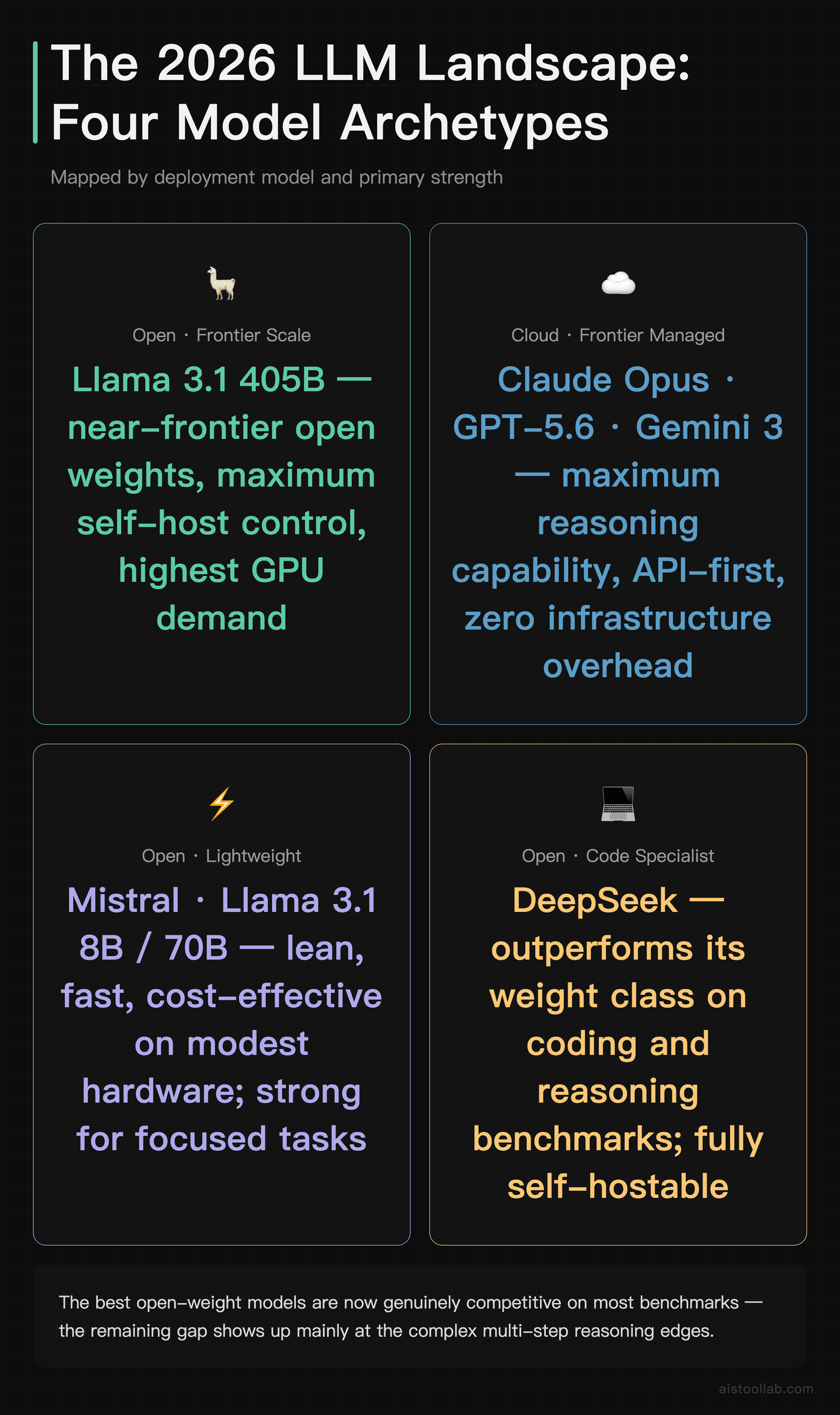
On the open-source side, the heavy hitters are Meta’s Llama family (the widely used Llama 3.1 ships in 8B, 70B, and 405B sizes; the Llama lineup keeps evolving, so check Meta’s official Llama page for the current generation); Mistral’s family of models, which punch well above their weight class for their size; and DeepSeek, which earned a reputation for being scarily good at coding and reasoning relative to its training cost. These are models you can download, inspect, fine-tune, and run on your own machines — whether that’s a beefy workstation under your desk or a rented GPU cluster.
On the proprietary side, you’ve got Anthropic’s Claude Opus line, OpenAI’s GPT-5.6, and Google’s Gemini 3. You access these through APIs. You don’t see the weights, you can’t run them offline, and you’re paying per token — but in exchange you get frontier-level capability, massive context windows, and someone else’s engineering team handling the infrastructure, scaling, and reliability headaches.
The gap between these two camps has narrowed dramatically. A couple of years ago, open models felt like a generation behind. Today the best open-weight models are genuinely competitive on a lot of benchmarks, and the remaining gap shows up mostly in the messy edges — complex multi-step reasoning, nuanced instruction following, and the kind of polish that’s hard to quantify. I dug into the raw scores more in my best LLMs comparison breakdown, but here I want to focus on the decision rather than the scoreboard.
What the Benchmarks Actually Say (And Don’t)
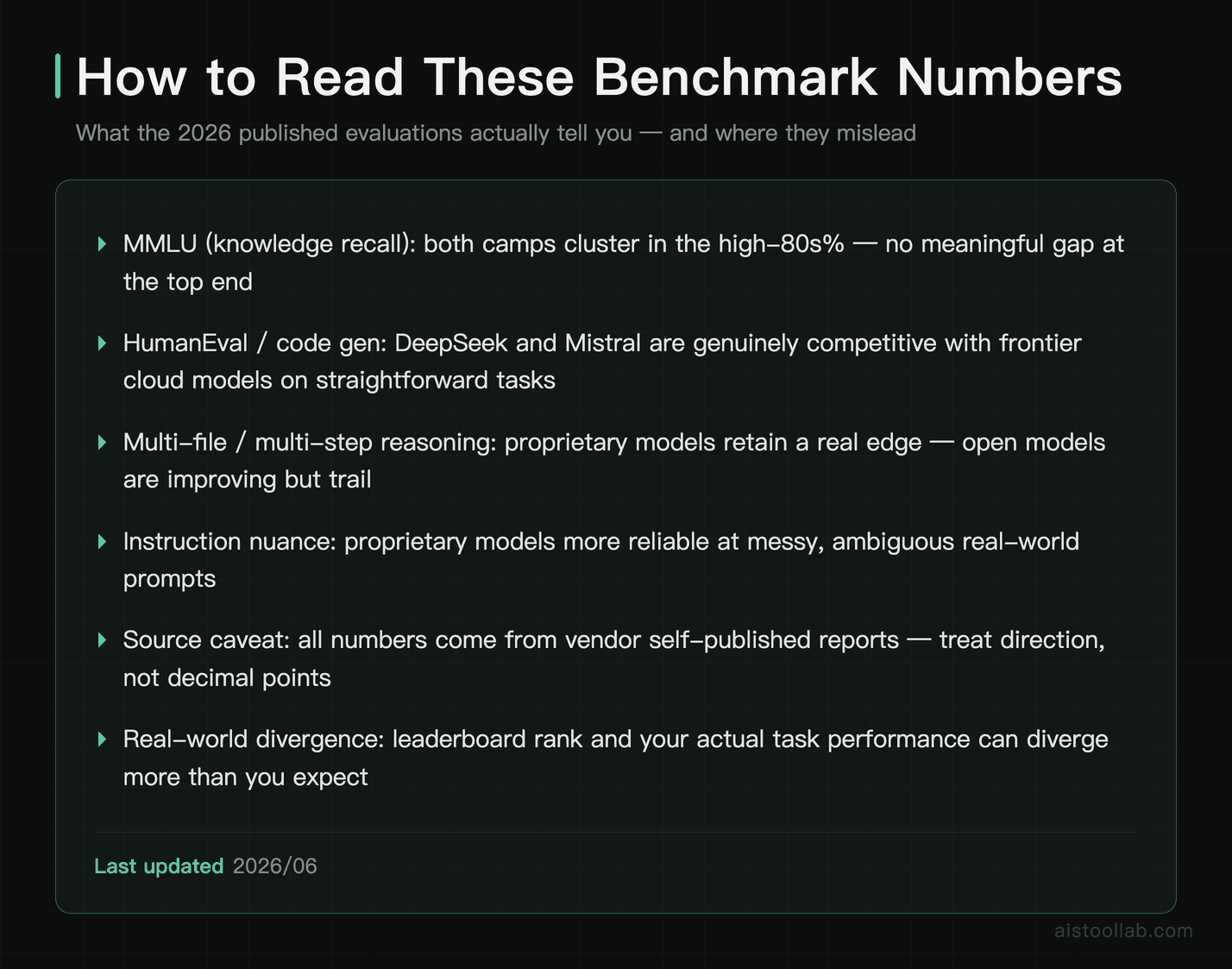
Let’s talk numbers, but with appropriate caution — benchmark figures shift with every model revision, and vendors love to cherry-pick the test where they look best. According to Meta’s own published evaluations, the largest Llama 3.1 405B model lands in the same broad neighborhood as the frontier proprietary models on MMLU, the multiple-choice knowledge benchmark, sitting in the high 80s percentage-wise. The top proprietary models of that generation also cluster in that high-80s range based on their published reports. The takeaway isn’t “model X wins by 1.2 points” — it’s that on raw knowledge recall, the top open and closed models are roughly in a dead heat.
Coding is where things get more interesting. DeepSeek’s models have consistently impressed on code-generation benchmarks like HumanEval and the more practical SWE-bench style evaluations, and they often match the cloud models on straightforward function-writing tasks. Where the proprietary models tend to pull ahead is in longer, multi-file reasoning — the “here’s my whole repo, figure out why this race condition happens” type of problem. That’s the kind of work cloud models tend to handle better, which is also why the workflow angle came up in our OpenAI Canvas write-up.
Here’s the part nobody puts on a slide: benchmark scores and production quality are not the same thing. A model can ace MMLU and still produce frustratingly literal answers when you ask it to rewrite a marketing email with the right tone. A model with a higher leaderboard score can still come out worse in side-by-side comparisons if it follows instructions too rigidly. If you only trust the numbers, you’ll occasionally pick the wrong model. Always run your own evaluation on your actual tasks. Why these gaps exist is explored further in our AI Model Performance Metrics Explained 2026 piece.
Head-to-Head: The Comparison Table
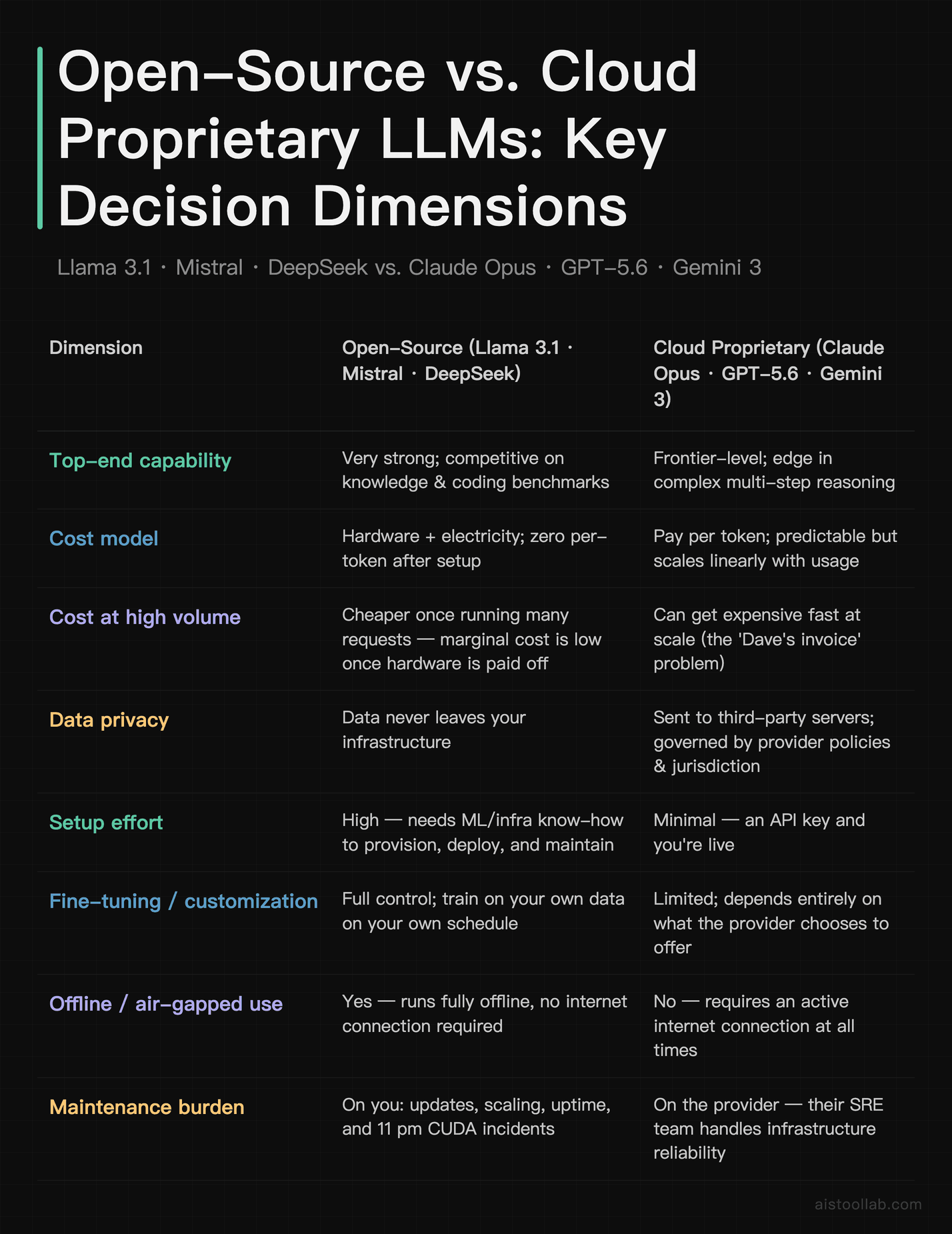
If you read only one row, make it the cost-versus-effort tradeoff. Open-source shifts your spending from a per-token meter to upfront hardware and ongoing engineering time. That math flips entirely depending on your scale and how much your team’s time is worth.
The Cost Story Is More Nuanced Than “Free vs Paid”
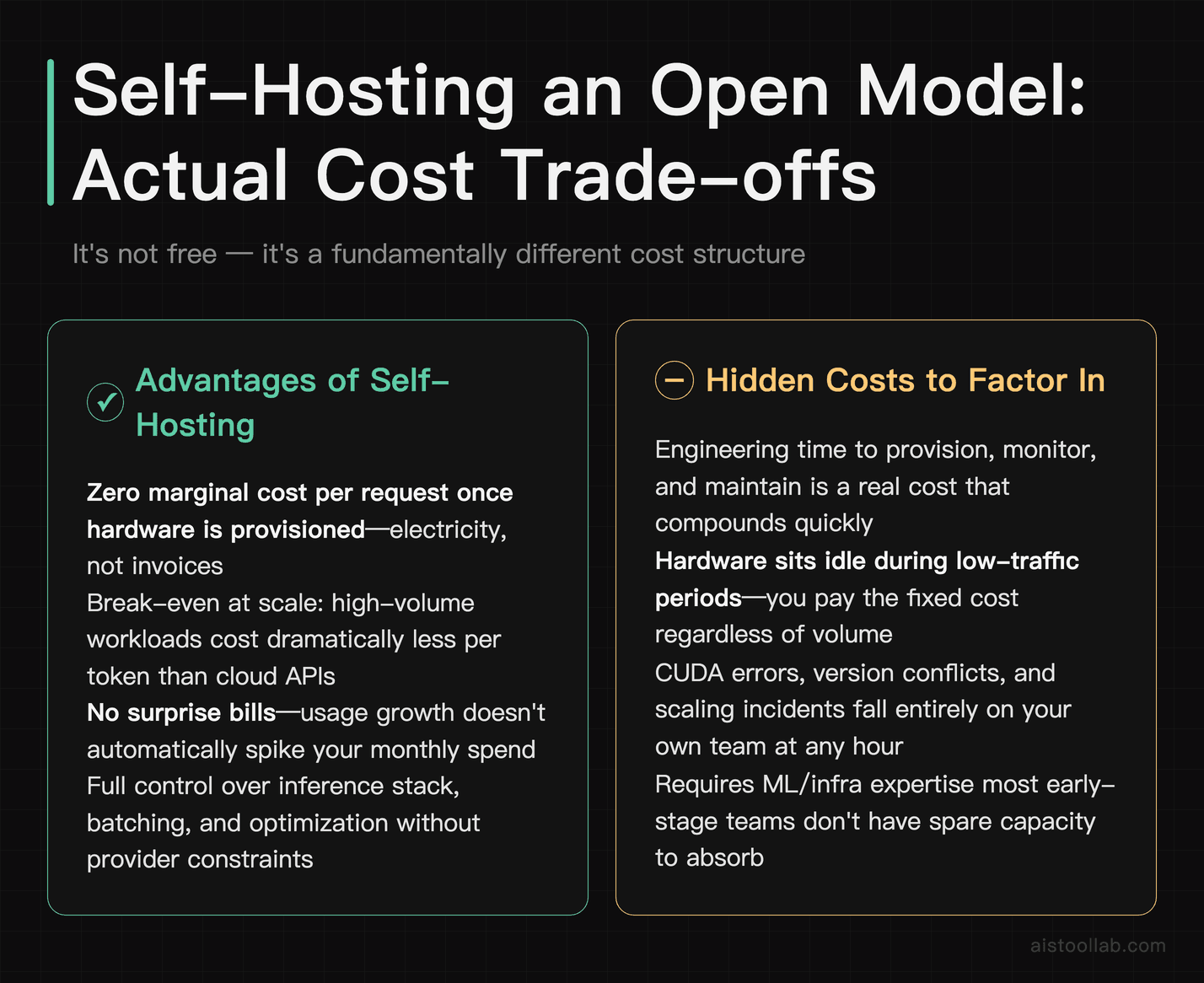
People hear “open-source” and think “free.” It’s not. It’s a different cost structure. With cloud APIs, you pay a clean per-token rate — easy to forecast, easy to expense, zero infrastructure to babysit. The catch is that the meter never stops. Every summary, every chat turn, every retry costs money, and at scale those fractions of a cent compound into exactly that kind of surprise invoice.
Self-hosting an open model inverts that. You pay for hardware or a rented GPU instance, and then the marginal cost of each additional request is basically electricity. Run a single Llama 3.1 8B model on a consumer GPU and you can serve a genuinely large number of requests for the price of keeping the lights on. The break-even point is the whole game: below a certain volume, cloud APIs are cheaper because you’re not paying for idle hardware; above it, self-hosting wins, sometimes dramatically.
But — and this is the part the “just self-host, bro” crowd on Reddit conveniently skips — engineering time is a real cost. Setting up inference servers, handling model updates, monitoring uptime, autoscaling under load, and debugging a CUDA error at 11pm are not free. For a solo founder, that time often costs more than the API bill it was meant to save. For a team with an ML engineer already on payroll, the calculus changes completely. There’s no universal answer, only your answer.
Latency: The Spec Sheet Lies
Latency is where assumptions and reality diverge most. The conventional wisdom is that cloud models are faster because they run on industrial-grade hardware. Often true — but not always. Cloud APIs are subject to rate limits, regional routing, and the occasional capacity crunch when everyone hammers the same provider at once. Perfectly normal requests can hang for several seconds during peak hours, which is brutal if you’re powering a real-time chat feature.
A locally hosted smaller model, by contrast, gives you deterministic latency. There’s no network round trip, no queue, no shared tenancy. For a small model on decent hardware, time-to-first-token can be genuinely snappy and, crucially, consistent. That consistency matters more than raw speed for user-facing products — users forgive “always 800 milliseconds” far more readily than “usually fast but sometimes five seconds.”
The flip side: a large open model like Llama 3.1 405B running on hardware you cobbled together can be slower than the cloud equivalent, because the cloud providers have optimized inference stacks and serious silicon behind them. So the latency winner depends entirely on the model size and your hardware. Test it under realistic load before you commit. A benchmark number generated on an idle test rig tells you almost nothing about a Tuesday-afternoon production spike. I went deeper on throughput and latency mechanics in my AI Model Performance Metrics 2026 article.
Privacy and Data Governance: The Underrated Deciding Factor
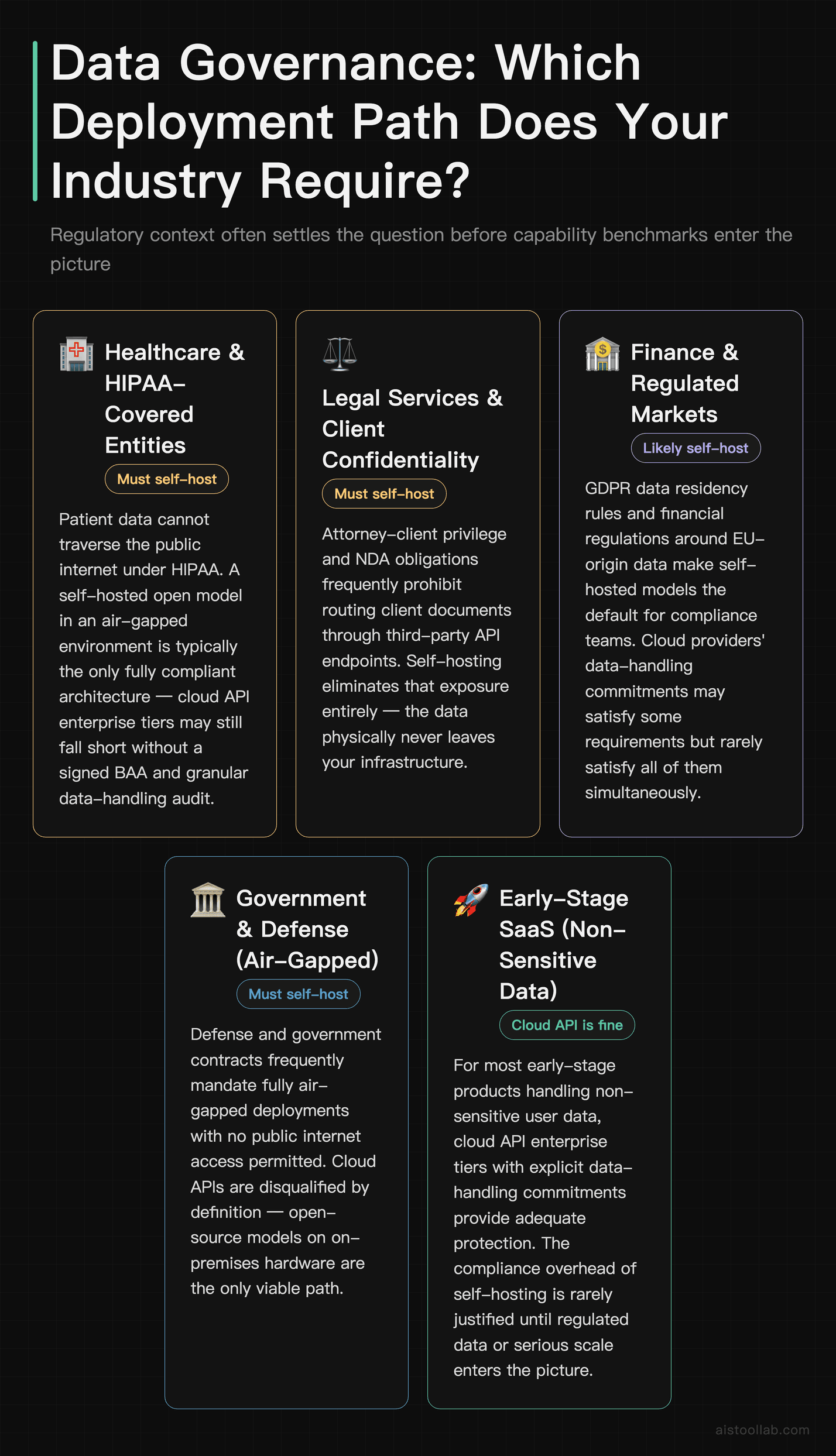
For a lot of teams, this is the section that actually makes the decision, and capability benchmarks are a sideshow. When you send data to a cloud API, that data leaves your infrastructure and lands on someone else’s servers, governed by their terms, their retention policies, and their jurisdiction. The major providers offer enterprise tiers with data-handling commitments — no training on your inputs, defined retention windows, and so on — and those are genuinely meaningful. But “we promise not to look” is a different risk posture than “the data physically never left our building.”
If you’re in healthcare, legal, finance, or government, or you’re handling anything covered by GDPR, HIPAA, or strict client confidentiality agreements, self-hosted open models can be the only path that satisfies your compliance team. The data never traverses the public internet, never touches a third party, and you can run the whole thing in an air-gapped environment if you need to. That’s not a “nice to have” — for some contracts it’s a hard requirement that no amount of cloud capability can override.
There’s also the strategic dependency angle. Building your core product entirely on one proprietary API means your costs, your rate limits, and your model behavior are all subject to decisions made by a company you don’t control. Prices change, models get deprecated, terms get rewritten. Owning your model weights insulates you from that. It’s the same reason some teams self-host databases instead of going fully managed — control has value that doesn’t show up on a feature comparison.
Who Should Use What: Real-World Use Cases
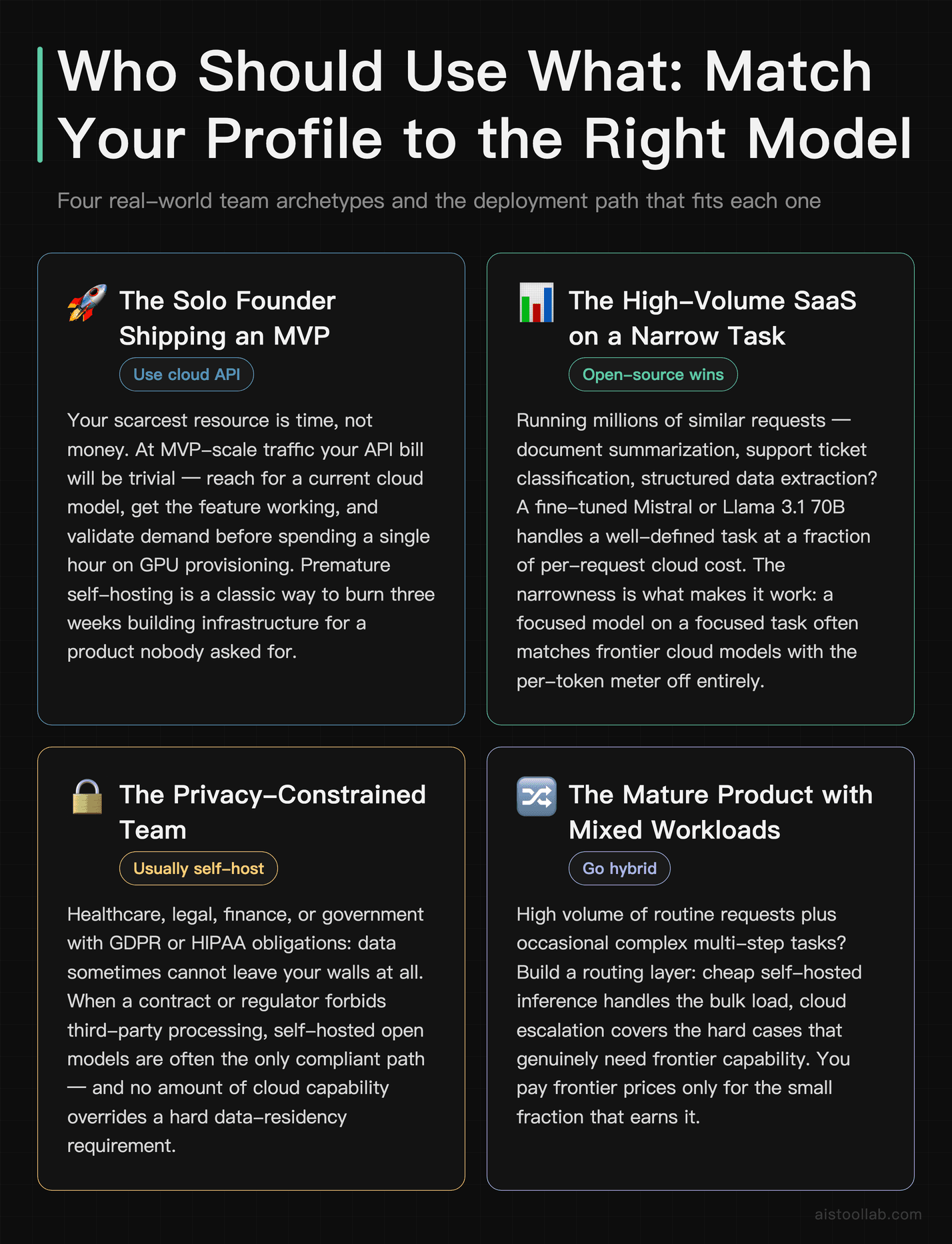
The Solo Founder Shipping an MVP
If you’re one person trying to get a product in front of users this month, use a cloud API. Full stop. Your scarcest resource is time, not money, and at MVP-scale traffic your API bill will be trivial. Reach for a current cloud model, get your feature working, and validate that anyone actually wants it before you spend a single hour thinking about GPU provisioning. Premature self-hosting is a classic way to burn three weeks building infrastructure for a product nobody asked for. Revisit the question when your usage — and your bill — actually grows.
The High-Volume SaaS Doing One Narrow Task
This is exactly that high-volume, narrow-task situation, and it’s the textbook case for open-source. If you’re running millions of similar requests — summarizing documents, classifying support tickets, extracting structured data — you almost certainly don’t need a frontier model for each one. A fine-tuned Mistral or Llama 3.1 70B can handle a well-defined task at a fraction of the per-request cost once you’re at scale. The narrowness is what makes it work: a focused model on a focused task often matches the big cloud models, and you keep the per-token meter from running at all.
The Privacy-Bound Enterprise
A law firm building an internal tool to search privileged case files, or a hospital summarizing patient records, simply cannot ship that data to a third-party API without a serious compliance fight. Here, a self-hosted DeepSeek or Llama deployment inside the firewall isn’t the cheaper option — it’s the only viable one. The capability tradeoff (if any) is a price worth paying for keeping sensitive data in-house and staying on the right side of regulators and clients.
The Team That Needs the Absolute Best Reasoning
If your product lives or dies on complex, multi-step reasoning — agentic workflows that plan and execute long task chains, sophisticated code analysis across a large codebase, nuanced legal or research synthesis — the frontier cloud models still have an edge at the hard end. If you’re building the kind of Agentic AI Systems Explained workflows where the model has to chain dozens of decisions reliably, the extra polish of Claude Opus or a comparable frontier model can be worth every cent. Don’t be penny-wise here; a cheaper model that derails a 20-step agent run isn’t actually cheaper.
The Hybrid Approach Nobody Talks About Enough
The smartest setups don’t pick a side. They route. Cheap, high-volume, simple requests go to a self-hosted open model; the hard, rare, high-stakes requests get escalated to a cloud API. You build a little routing layer that classifies the incoming request and sends it to the appropriate model. The result is that you pay frontier prices only for the small fraction of requests that genuinely need frontier capability, and you eat the rest of your volume on cheap local inference.
This is more engineering work, obviously, and it’s overkill for an MVP. But for a maturing product with serious volume, a tiered routing strategy is often the cost-optimal answer by a wide margin. It also gives you a graceful fallback: if your local model produces a low-confidence answer, you can automatically escalate to the cloud rather than shipping a bad result. Think of it less as “open vs cloud” and more as building a portfolio where each model does what it’s best at.
My Verdict: Match the Model to the Job, Not the Hype
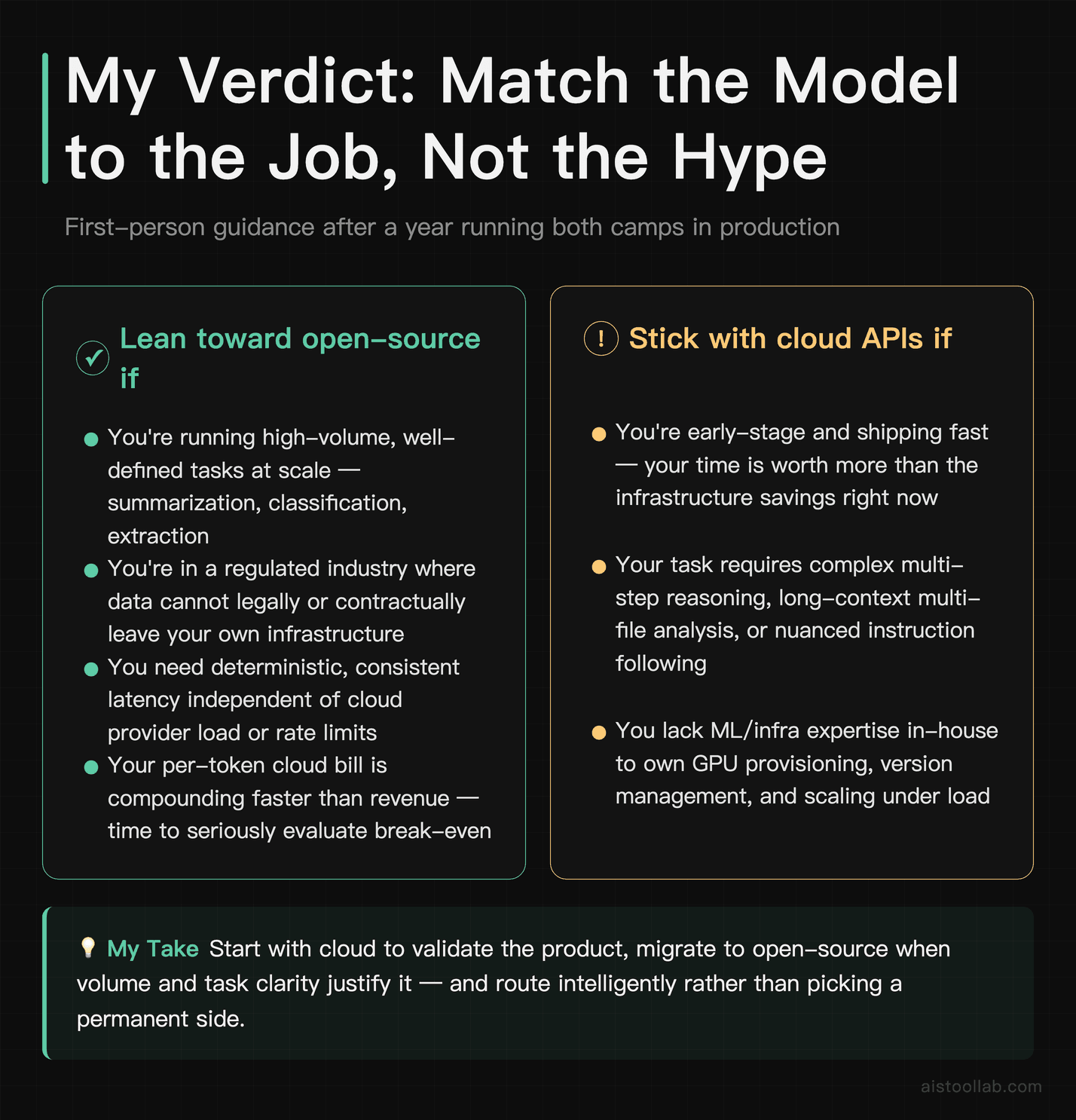
If it were my money and my product on the line, here’s how I’d actually decide. If you’re early-stage and shipping fast, start with a cloud API — from Anthropic, OpenAI, or Google — because your time is worth more than the trivial bill, and you need to validate the product before optimizing the infrastructure. Don’t let Reddit guilt you into self-hosting on day one.
Once you have real volume on a well-defined task, seriously evaluate open-source. A fine-tuned Llama 3.1, Mistral, or DeepSeek deployment can slash your per-request costs, give you deterministic latency, and keep sensitive data in-house. And if you’re in a regulated industry where data simply cannot leave your walls, that decision is already made for you — self-host and don’t look back.
The teams getting it right aren’t picking a tribe. They’re routing cheap work to local models and reserving frontier cloud capability for the genuinely hard requests. That hybrid posture is more work, but it’s where the smart money is heading. Whatever you choose, do one thing before you commit: run both options on your own real tasks under realistic load. The benchmark leaderboard will tell you who scored higher on a test. Only your own evaluation tells you who’s actually better for what you’re building.
Frequently Asked Questions
Are open-source LLMs actually as good as GPT-5.6 or Claude Opus in 2026?
On many tasks, yes — close enough that you’d struggle to tell them apart in a blind test. The best open models like Llama 3.1 405B and DeepSeek’s larger variants land in the same broad range as the frontier proprietary models on standard knowledge and coding benchmarks, based on their published evaluations. Where the cloud models still tend to lead is the hard tail: long multi-step reasoning, nuanced instruction following, and the kind of polish that’s difficult to capture in a benchmark score. For everyday tasks — summarization, classification, straightforward code generation, drafting — open models are genuinely competitive and sometimes indistinguishable. For the most demanding reasoning chains, the proprietary models retain a real edge. The practical answer is that “as good” depends entirely on your task. Run both on your own representative workload and judge for yourself, because the leaderboard ranking and your real-world experience can diverge more than you’d expect.
Is self-hosting an open model really cheaper than paying for an API?
It depends almost entirely on your volume and how you value engineering time. At low usage, cloud APIs are cheaper because you’re not paying for idle hardware — you only pay for what you use. At high, sustained volume, self-hosting usually wins because the marginal cost of each additional request drops to basically electricity once your hardware is paid for. The crucial caveat people forget is engineering time. Setting up and maintaining inference infrastructure, handling updates, monitoring uptime, and scaling under load all cost real hours. For a solo founder, that time often outweighs the API savings; for a team with existing ML infrastructure and an engineer who can own it, the math tilts toward self-hosting. Calculate your actual break-even point rather than assuming “open-source equals free.” The honest answer for most early-stage products is that the API is cheaper until you hit serious scale.
Which open-source model should I start with: Llama 3.1, Mistral, or DeepSeek?
Start by matching the model to your primary task. If you’re doing general-purpose work and want the widest ecosystem, tooling, and community support, For general-purpose work with the widest ecosystem, tooling, and community support, a mature and widely adopted model is usually the safest starting point — check Meta’s official Llama page for the current generation’s flagship and available sizes, then pick the one that fits your task and hardware. If you’re constrained on hardware and want strong performance from a smaller, more efficient model, Mistral’s family is excellent at punching above its size class. If your core workload is coding or technical reasoning, DeepSeek has earned a strong reputation on code benchmarks for that specific domain. There’s no single best — there’s the best fit for your task and hardware. It’s worth testing two or three on a representative sample of your actual workload before committing. Start with the 8B or smaller variants to prototype quickly, then move up to larger sizes only if the quality genuinely demands it. Don’t over-provision before you’ve validated the use case.
What hardware do I need to run these models locally?
It scales with the model size. A smaller model like Llama 3.1 8B or a comparable Mistral can run on a single consumer-grade GPU with enough VRAM, or even on a modern Apple Silicon Mac with sufficient unified memory — I’ve run quantized small models on an M2 MacBook and gotten usable speeds for prototyping. Mid-sized models in the 70B range need serious hardware: typically multiple high-VRAM GPUs or a single data-center-class card. The largest models like Llama 3.1 405B realistically require a multi-GPU server setup or rented cloud GPU instances, which starts to blur the line between “self-hosting” and “renting infrastructure.” Quantization — running the model at reduced numerical precision — can dramatically lower the hardware bar with a modest quality tradeoff, and it’s how most people fit larger models onto smaller machines. My advice: start with a quantized small model on hardware you already own to learn the workflow, then scale up only when your use case proves it needs the extra capability.
How do cloud model rate limits affect production apps?
More than most people anticipate. Cloud APIs impose rate limits — caps on requests or tokens per minute — and during peak demand you can hit throttling or elevated latency even within your allowance. For a batch job that runs overnight, this is irrelevant. For a real-time, user-facing feature, it can be a genuine problem: a request that normally returns in under a second occasionally stalling for several seconds creates a janky experience users notice and complain about. Providers offer higher tiers and dedicated capacity for a price, which mitigates this, and the major APIs are generally reliable. But you’re still sharing infrastructure with everyone else and subject to their capacity decisions. This is one of the underrated arguments for self-hosting: a local model gives you deterministic, consistent latency with no external rate limits. If predictable response time is critical to your product, factor rate-limit behavior into your decision and load-test against realistic traffic before launch.
Can I fine-tune these models on my own data?
This is one of the strongest arguments for open-source. With open-weight models, you have full control to fine-tune on your proprietary data, adapt the model to your domain’s vocabulary and style, and own the resulting weights entirely. This is enormously valuable if your use case involves specialized terminology — medical, legal, technical — where a general model underperforms and a tuned one shines. Proprietary cloud providers do offer fine-tuning or customization on some models, but it’s more limited, the tuned model still lives on their infrastructure, and you’re dependent on whatever options they expose. With open models, the customization ceiling is effectively as high as your data and engineering skill allow. The tradeoff is that fine-tuning well is a genuine skill — bad fine-tuning can make a model worse, and you need a quality dataset and evaluation process. But for teams with a defensible data advantage, the ability to bake that data into an owned model is a serious strategic moat that cloud APIs simply can’t match.
Is data sent to cloud APIs used to train their models?
This depends on the provider and your tier, and you should read the actual terms rather than trust a forum comment. As a general pattern, the major providers’ enterprise and API tiers typically commit to not training on your inputs by default, while consumer-facing free products have historically had looser policies. Anthropic, OpenAI, and Google all publish data-usage terms, and the enterprise offerings generally include commitments around not using your data for training plus defined retention windows. That said, “not used for training” is not the same as “never stored” — data may still be retained temporarily for abuse monitoring or operational reasons. If your compliance requirements are strict, you need to verify the specific terms for the specific tier you’re on, ideally with your legal team’s review. And if your requirement is that sensitive data physically never leaves your infrastructure — which is the case for many regulated industries — then no cloud policy satisfies that, and self-hosting an open model becomes the only compliant path.
Should I worry about open models being deprecated or losing support?
Less than you’d worry about a proprietary model being deprecated, actually. When you’ve downloaded an open-weight model, you have it — it doesn’t disappear because a vendor decided to sunset it. A proprietary API model, by contrast, can be deprecated on the provider’s schedule, forcing you to migrate to a newer version that may behave differently and break your carefully tuned prompts. That said, “having the weights” doesn’t mean the ecosystem keeps improving around an old model; the community moves on, tooling evolves, and you’ll eventually want to upgrade for the better capabilities. The difference is that with open models the upgrade happens on your timeline, not someone else’s. You can keep running a known-good version indefinitely while you test its successor, which is a real operational advantage for products that need stability. With cloud APIs you’re more exposed to forced migrations, though the major providers generally give reasonable deprecation notice and overlap periods.
Last updated: 2026
Explore more AI tools
👉 Browse the AI Tools Library to find the right tools for your workflow.