
Sort Out Which Gemini Bill You’re Actually Reading
Here’s the thing most “Google Gemini pricing” searches get wrong before they even start: they assume there’s one price. There isn’t. The word “Gemini” covers a consumer chat app you subscribe to like Netflix, and a Developer API you pay for by the token like electricity. Those two are billed on completely different logic, and lumping them together is how people end up quoting a monthly subscription figure to a developer who’s about to send ten million tokens through an endpoint, or vice versa.
So before any dollar signs, split the question in half. If you open the Gemini app in a browser or on your phone and chat with it, you’re on the consumer side — that’s a subscription question. If you’re calling generateContent from your own code, you’re on the Developer API side — that’s a per-token question, and it’s the side where Google has published exact, dated numbers that are about to move.
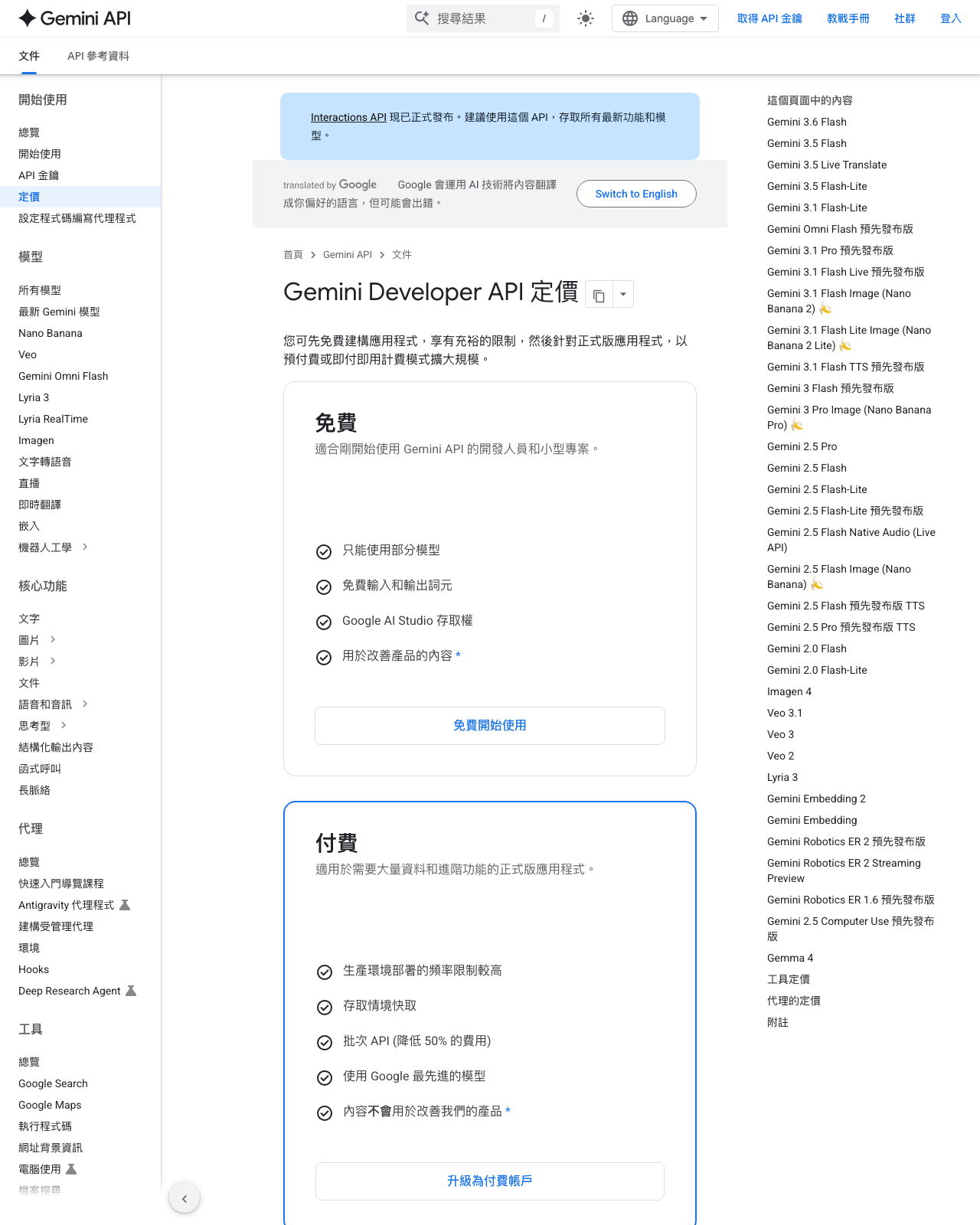
This piece is mostly about that second side, because that’s where I can point you at hard, sourced figures — and where there’s a deadline worth circling. Google’s Gemini Developer API pricing page (checked 2026-08-14) is running promotional rates that are scheduled to roughly double on January 1, 2027. If you’re building anything that outlives this year, that single date matters more than any feature comparison you’ll read.
The Promo Clock That’s Easy to Miss on the Calendar
The most important fact about Gemini API pricing right now isn’t a single rate — it’s that almost every rate on the page carries two numbers: one “through December 31, 2026” and one “starting January 1, 2027.” And the pattern is brutally consistent: the 2027 number is double the current one.
Here’s the rate ladder as it stands, per Google’s official Gemini Developer API pricing page (checked 2026-08-14). These are per 1,000,000 tokens unless noted, and they’re API rates — not the consumer app subscription:
- $0.0375 per 1M tokens through December 31, 2026 → $0.075 (official pricing page, checked 2026-08-14) starting January 1, 2027.
- $0.375 (official pricing page, checked 2026-08-14) per 1M tokens through December 31, 2026 → $0.75 (official pricing page, checked 2026-08-14) starting January 1, 2027.
- $0.75 per 1M tokens through December 31, 2026 → $1.50 (official pricing page, checked 2026-08-14) starting January 1, 2027.
- $1.875 (official pricing page, checked 2026-08-14) per 1M tokens through December 31, 2026 → $3.75 (official pricing page, checked 2026-08-14) starting January 1, 2027.
- $3.75 per 1M tokens through December 31, 2026 → $7.50 (official pricing page, checked 2026-08-14) starting January 1, 2027.
- Context/cache storage: $0.50 (official pricing page, checked 2026-08-14) per 1,000,000 tokens per hour through December 31, 2026 → $1.00 (official pricing page, checked 2026-08-14) per 1,000,000 tokens per hour starting January 1, 2027.
I’m deliberately listing these as a ladder rather than pinning each one to “this is Flash input, that is Pro output.” Google’s page maps specific rate points to specific models and token types (input, output, cached), and those assignments shift as models get renamed and re-tiered. What the page states plainly is the rate itself and its scheduled change — the mapping you should confirm against your own model on the live page before you commit.
Why does this matter more than it looks? Because the storage line especially compounds. A per-token, per-hour charge is a rate you pay continuously for as long as cached context sits there. If you’re modeling long-lived context caches, model both the pre- and post-2027 rate, not just today’s.
Two Ways to Pay, Side by Side
Before the table, a note on what it’s rating and what it isn’t. The API column below is built from Google’s Developer API pricing page (checked 2026-08-14). The consumer-app column is intentionally light on numbers: The API rates here are the ones that page states; the current app subscription price is not in those sources, so this column stays qualitative rather than quoting a figure with no citation behind it. If you need the exact app subscription cost, that lives on Google’s consumer plan page, and prices there change — treat this column as “how it’s billed,” not “what it costs to the cent.”
- How you’re billed — Gemini Developer API: Pay-per-token (official pricing page, checked 2026-08-14); Gemini consumer app: A paid monthly subscription (exact price not in the sources cited here — check Google’s plan page)
- Unit of cost — Gemini Developer API: Per 1,000,000 tokens; Gemini consumer app: Per user, per month
- Free access — Gemini Developer API: A free tier exists for testing; confirm current allowances on the pricing page; Gemini consumer app: A free tier of the app exists; a paid tier unlocks more
- Lowest published rate point (through Dec 31, 2026) — Gemini Developer API: $0.0375 (official pricing page, checked 2026-08-14) / 1M tokens; Gemini consumer app: Not applicable
- Same point from Jan 1, 2027 — Gemini Developer API: $0.075 / 1M tokens; Gemini consumer app: Not applicable
- A higher published rate point — Gemini Developer API: $3.75 / 1M tokens → $7.50 from Jan 1, 2027; Gemini consumer app: Not applicable
- Context / cache storage — Gemini Developer API: $0.50 / 1M tokens per hour → $1.00 from Jan 1, 2027; Gemini consumer app: Not billed separately
- Who it’s built for — Gemini Developer API: Developers wiring Gemini into their own apps; Gemini consumer app: People who want the chatbot as a finished product
The practical read: if you’re an end user who just wants a smart assistant, the subscription is a fixed, predictable line item and the whole “doubling in 2027” story doesn’t touch you. The right column is a budgeting choice; the left column is an engineering choice.
If You’re Prototyping This Quarter vs. Shipping Into 2027
This is where the deadline earns its keep. Say you’re a solo developer building a demo you plan to throw away after a hackathon or a client pitch in the next few weeks. The promotional rates through December 31, 2026 are genuinely in your favor — the lowest published point sits at $0.0375 per million tokens, and even the higher points are at half of what they become in the new year.
Now flip it. Imagine you’re shipping something that goes live in November and is meant to still be running in February. Your cost model has to straddle the reset. A workload that costs you, say, one unit of the $0.75 rate through December becomes the $1.50 rate on January 1 — same code, same traffic, twice the token bill. If you write a budget that quietly assumes today’s promotional pricing continues forever, your first January invoice is going to be an unpleasant surprise. Build two lines into the spreadsheet: “now” and “2027-on,” and make the decision to launch with your eyes open.
There’s a strategic wrinkle too. That’s not a reason to rush shoddy work into production, but if you already had a big one-time job on the roadmap, the current rates are a real argument for scheduling it sooner rather than in Q1. Compare that mindset with how usage-priced infrastructure works elsewhere; I dug into a similar pay-as-you-go structure in my Fireworks AI pricing breakdown, and the same “model the compounding, not the sticker” lesson applies.
If Your Workload Leans Input-Heavy vs. Output-Heavy
Token pricing has a quiet asymmetry that trips up first-time API budgeters: the rate you pay usually depends on whether tokens are going in or coming out, and cached context is priced differently again. Google’s page lists a spread precisely because of this — the ladder of published rate points (through December 31, 2026) isn’t arbitrary, it’s different cost buckets for different kinds of tokens and models.
So the shape of your workload changes which end of the ladder you live on.
Caching sits underneath both. If your app reuses the same big system prompt or the same reference document across thousands of calls, context caching can cut your effective cost, but remember it carries that storage rate — $0.50 per million tokens per hour now, $1.00 from January 1, 2027. Caching pays off when the reuse rate is high enough that the storage charge is cheaper than re-sending the tokens every time. That’s a real calculation, not a default; for low-reuse workloads, the storage line can quietly outweigh the savings. The honest move is to estimate your input:output ratio first, then decide which rate point actually drives your spend — don’t budget off the headline number, budget off the number your traffic actually hits.
If You Just Want the App, Not the API
Not everyone reading a “Gemini pricing” article is a developer. Plenty of people land here because they’ve been using the free Gemini app, hit a wall, and saw a prompt to upgrade. If that’s you, none of the token math above applies — you’re looking at a subscription, and the calculus is simpler: is the paid tier worth a recurring monthly charge for how you actually use it?
I’m going to be careful here rather than quote a number I didn’t verify. The consumer subscription price lives on Google’s own plan page, and consumer pricing is exactly the kind of thing that gets restructured and re-tiered without warning. Whether it’s worth it depends entirely on frequency — if you’re opening it a few times a week for quick questions, the free tier probably covers you; if it’s part of your daily working rhythm and the free limits keep interrupting you, the subscription stops being a luxury and starts being a tool you’d miss.
One thing worth flagging for app users specifically: the subscription and the API are separate purchases. If you find yourself wanting both — the polished chat interface for personal use and programmatic access for a project — you’re looking at two bills, not one. That surprises people often enough that it’s worth stating plainly before you click “upgrade.”
So What Should You Actually Do Before January
If I had to compress this into a decision: match the tab you’re stuck on to the right cost model, then respect the deadline: the whole Gemini Developer API schedule — including the $0.50-per-million-tokens-per-hour storage line — is set to double on January 1, 2027, per Google’s pricing page checked 2026-08-14.
The single most useful habit here is dull but reliable: write your cost estimate twice — once at today’s rates, once at the 2027 rates — and make sure the project still makes sense at the higher one. Anything that only pencils out at promotional pricing was never really affordable; it was just borrowing against a deadline.
Frequently Asked Questions
Will the January 1, 2027 rates apply to work I’m already running, or only new usage?
This is the question I couldn’t fully answer from the pricing page alone, so this answer stays inside what the pricing page actually states rather than guessing. Google’s Gemini Developer API pricing page (checked 2026-08-14) lists rates by date — a promotional figure “through December 31, 2026” and a higher figure “starting January 1, 2027” — but the cited excerpt states the rates and the dates, not whether existing projects, committed usage, or enterprise agreements get grandfathered at the old rate. The safe assumption for planning is that on-demand, pay-as-you-go usage bills at whatever the current published rate is on the day the tokens are processed, meaning usage that runs on or after January 1 likely bills at the doubled rate regardless of when you built the app. But “likely” is not “confirmed.” If a rate change materially affects your budget or you’re on a negotiated Google Cloud contract, don’t take a blog’s word for it — check the current pricing page and your billing terms directly, because that’s the document Google enforces against.
How do I even estimate token counts so these per-million rates mean something?
Fair — a rate of “$0.75 per 1,000,000 tokens” is meaningless until you know how many tokens your workload actually moves, and that’s where most first-time API budgeters freeze. A rough working intuition: a token is smaller than a word, so a chunk of English text lands somewhere in the ballpark of a token per three-quarters of a word, but that varies by language and content, and code tokenizes differently from prose. The reliable move isn’t to guess from a rule of thumb — it’s to run a representative sample of your real prompts and outputs through the API’s own token-counting, then multiply by your expected call volume, then apply the rate for your model at both the current and the 2027 level. Separate input from output when you do this, because they often price differently, and add the storage line if you’re caching context. The reason this matters: a workload that looks trivially cheap per call can become a real monthly number once you multiply by thousands of daily requests, and the doubling on January 1, 2027 amplifies whatever that base number is. Estimate the shape of your traffic before you commit to the architecture, not after the first invoice.
Last updated: 2026
This is one way to choose.
👉 Browse the AI Tools Library to see what else is worth a look.