

The Benchmark Trap: Why the “Best” AI Tool on Paper Often Flops in Production
Here’s a scene that plays out in Slack threads and engineering standups every week: someone shares a leaderboard screenshot, points at the model sitting at the top, and says “we should switch to this one.” Six weeks later, the same team is quietly rolling back the change because the “winner” turned out to be slower, more expensive per request, and a nightmare to wire into their existing stack. The benchmark said one thing. Reality said another.
The uncomfortable truth is that benchmark scores — MMLU, HumanEval, LMSYS Arena rankings, whatever’s trending — are measuring something real, but it’s almost never the thing you actually care about. A model that scores a fraction of a percent higher on a reasoning benchmark can still be the wrong choice if it takes three seconds longer to respond, charges more per completed task, or ships with an API that fights your framework at every turn.
Evaluating an AI tool well is less about “which model is smartest” and more about systems thinking: how latency, accuracy, integration cost, and pricing interact under your specific workload. Below is the technical framework I’d use to cut through the marketing — compiled from official documentation, published benchmarks, and the recurring themes in public reviews on G2, Reddit, and Hacker News. No hands-on lab claims here, just a structured way to think about a genuinely messy decision.
Contents
The Four Dimensions That Actually Predict Real-World Performance
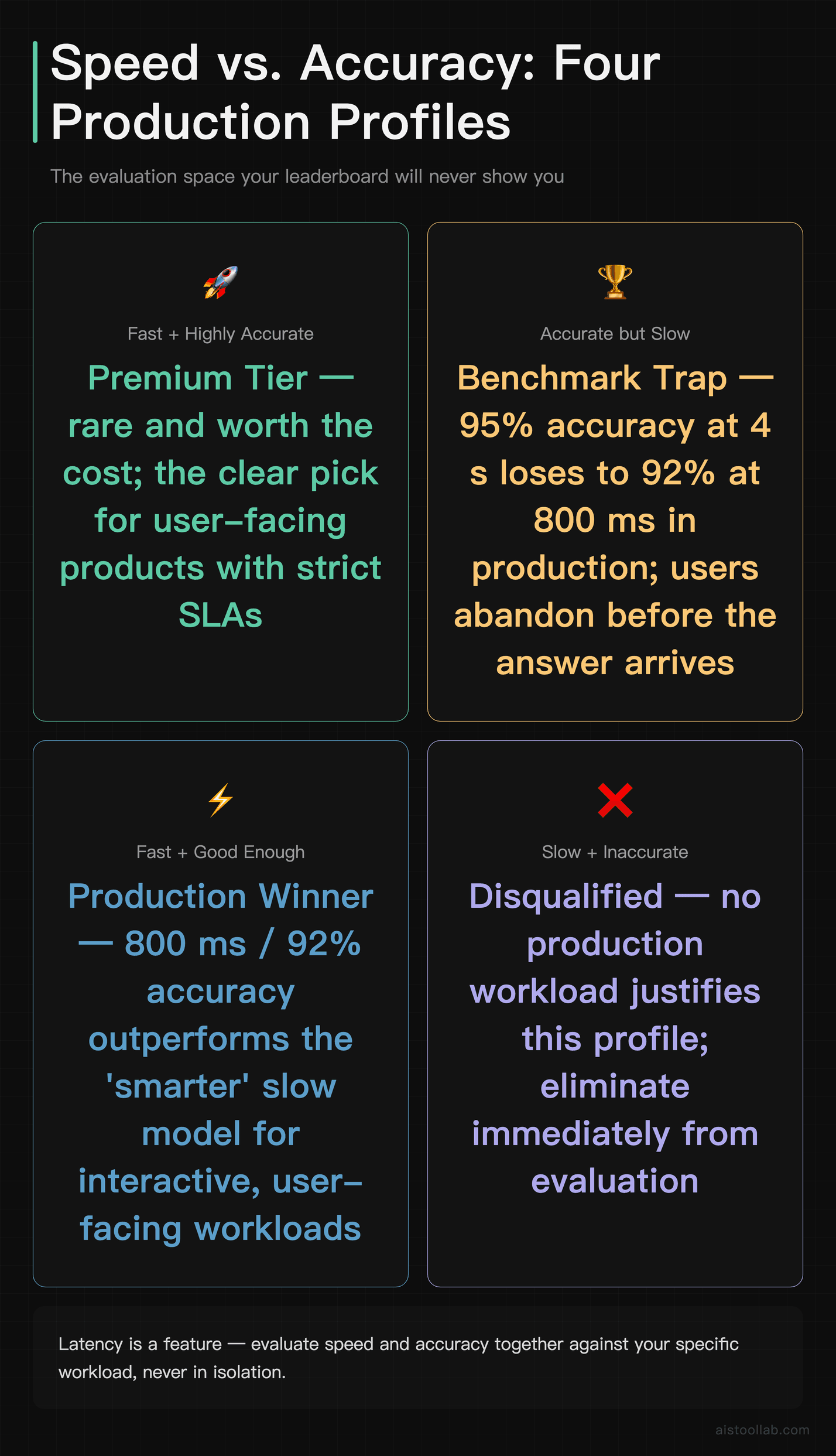
Every effective evaluation I’ve seen boils down to four interacting variables. Score a tool on all four for your workload — not in the abstract — and you’ll be right far more often than the leaderboard-chasers.
1. Latency vs. Accuracy Is a Tradeoff, Not a Ranking
The single biggest mistake teams make is treating accuracy as the only axis that matters. In production, latency is a feature. A customer-facing chatbot that answers in 800 milliseconds with 92% accuracy will almost always beat one that answers in four seconds with 95% accuracy, because users abandon slow interfaces long before they notice the marginally better answer.
The relationship isn’t linear either. Larger, more capable models generally cost you response time, and that cost compounds when you chain multiple calls together — think retrieval, then reasoning, then formatting. If your architecture makes three sequential model calls, a one-second-per-call latency difference becomes three seconds of dead air. I broke down how the major models stack up on raw inference speed in the AI Model Latency Showdown 2026, and the gaps are wider than most people assume from reading spec sheets.
The practical move: define your latency budget first, as a hard constraint, then pick the most accurate tool that fits inside it. Not the other way around.
2. API Design Quality Is an Adoption Barrier Nobody Puts on the Leaderboard
You will never see “developer experience” on a benchmark chart, and that’s a shame, because it’s often the deciding factor for whether a tool actually gets deployed. A model with a clean, well-documented API — predictable error codes, sensible rate-limit headers, streaming support that works, SDKs that match the docs — can save a team days of integration work. A model with a slightly better score but a flaky, under-documented API can burn those days right back and then some.
Watch for the tells: Does the tool support structured output (JSON mode, function calling) natively, or do you have to parse free text with regex and pray? Are the SDKs maintained across the languages your team actually uses? How does it handle failures — graceful retries with backoff guidance, or cryptic 500s? Integration complexity is a real, recurring cost, and it shows up loudly in public developer reviews even when it’s invisible on the benchmark.
3. Pricing Models Should Map to Cost-Per-Completed-Task
Per-token, per-request, per-seat, per-minute of audio, flat monthly tiers — pricing structures vary wildly, and the sticker figure tells you almost nothing until you translate it into cost per completed task. A tool that looks cheap per token can be expensive per task if it’s verbose, needs multiple retries, or requires a larger context window to get the job done.
Run the real math for your workload. If Tool A charges more per token but reliably finishes a task in one call, while Tool B is cheaper per token but needs two or three attempts plus longer prompts, Tool B may quietly cost more. Because concrete prices change often, always confirm the current figure on the vendor’s official pricing page before you commit — and model your actual monthly volume, not a single call.
4. Reliability and Consistency Under Load
A model that’s brilliant 95% of the time and catastrophically wrong 5% of the time can be unusable in a regulated or high-stakes context, where that failure mode needs guardrails, human review, or a fallback chain. Consistency — how tightly the output quality clusters — matters as much as the average. This is also where alignment and safety behavior come in; I dug into how modern systems are trained to stay within bounds in the Constitutional AI and AI Alignment Explained piece, and it’s directly relevant to whether you can trust a tool unsupervised.
A Practical Evaluation Framework at a Glance
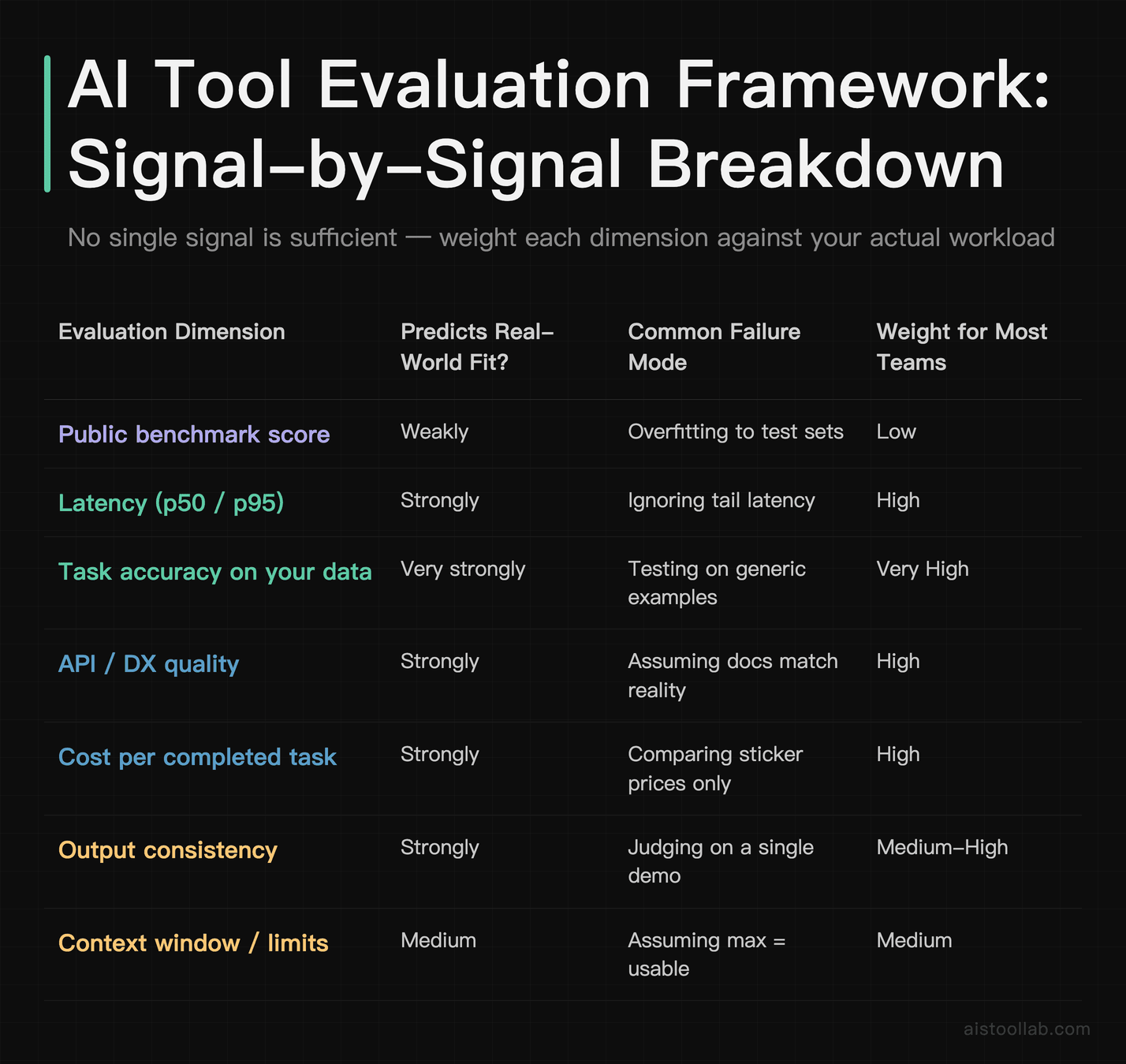
Here’s how these dimensions map against the evaluation signals people actually reach for. The point of this table is to show what each signal is good and bad at — no single row is enough on its own.
Why Benchmark Scores Don’t Predict Real-World Performance
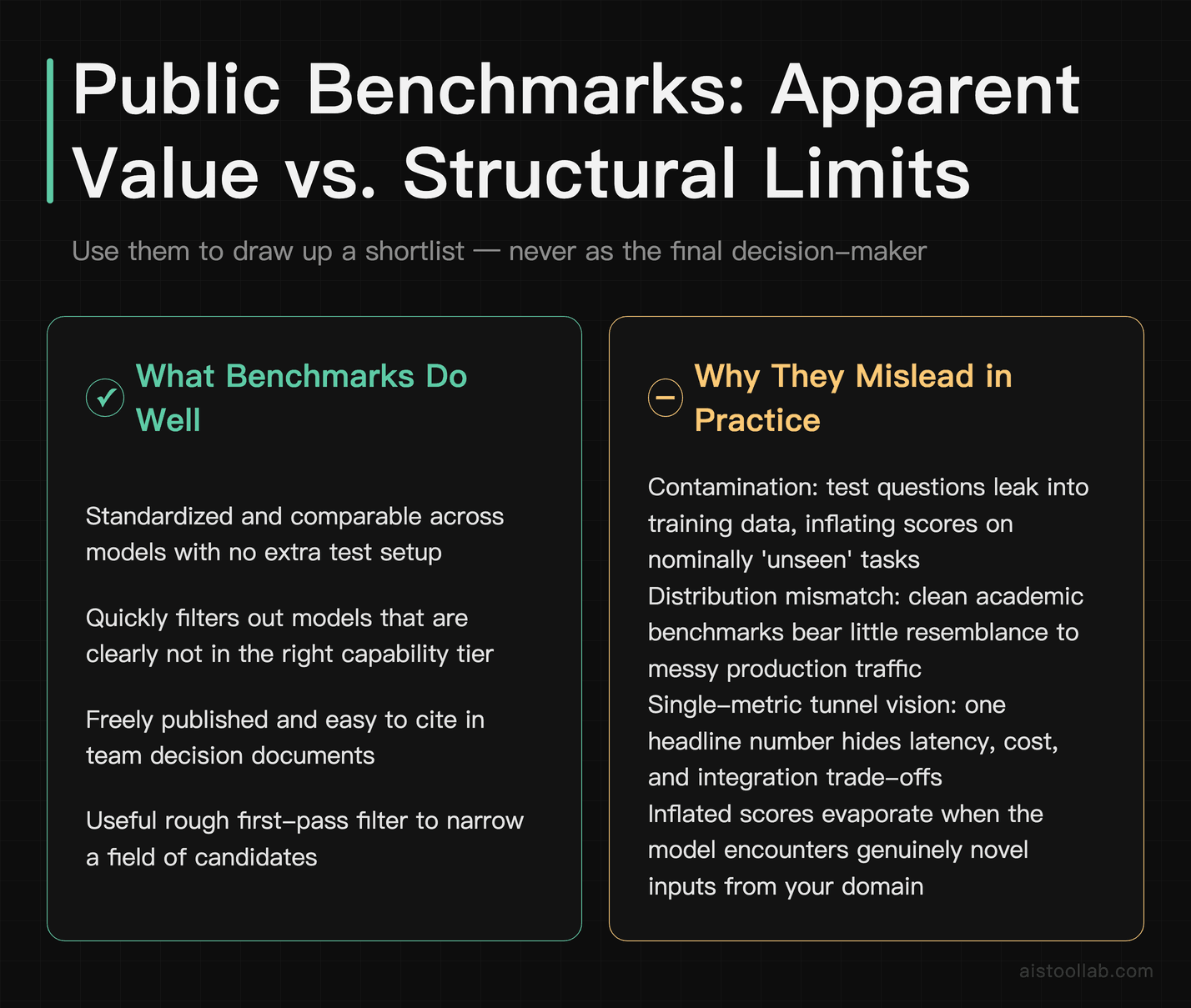
If benchmarks are so shaky, why do they dominate the conversation? Because they’re standardized, quotable, and easy to put on a slide. But there are structural reasons they mislead.
Contamination and overfitting. When a benchmark becomes famous, its test questions leak into training data — directly or through paraphrases all over the web. A model can score highly partly because it has effectively seen the answers, not because it reasons better. That inflated number evaporates the moment you point it at genuinely novel inputs from your domain.
Distribution mismatch. Benchmarks are curated, clean, and often academic. Your production traffic is messy: typos, half-formed questions, domain jargon, adversarial users, and edge cases nobody anticipated. A model tuned to ace tidy exam questions can stumble badly on the ambiguous, real-world version of the same task.
Single-metric tunnel vision. A leaderboard reports one number. Your decision depends on at least six (see the table). Optimizing for the headline metric while ignoring latency, cost, and integration is how teams end up with a technically-impressive tool that nobody wants to maintain. The fix is boring but effective: build a small evaluation set from your own real tasks — even 50 to 100 labeled examples — and measure the candidates against that. It’s the closest thing to ground truth you’ll get, and it consistently outperforms trusting a public number.
Who Needs This Framework — Three Real Scenarios
The Solo SaaS Founder Shipping an AI Feature
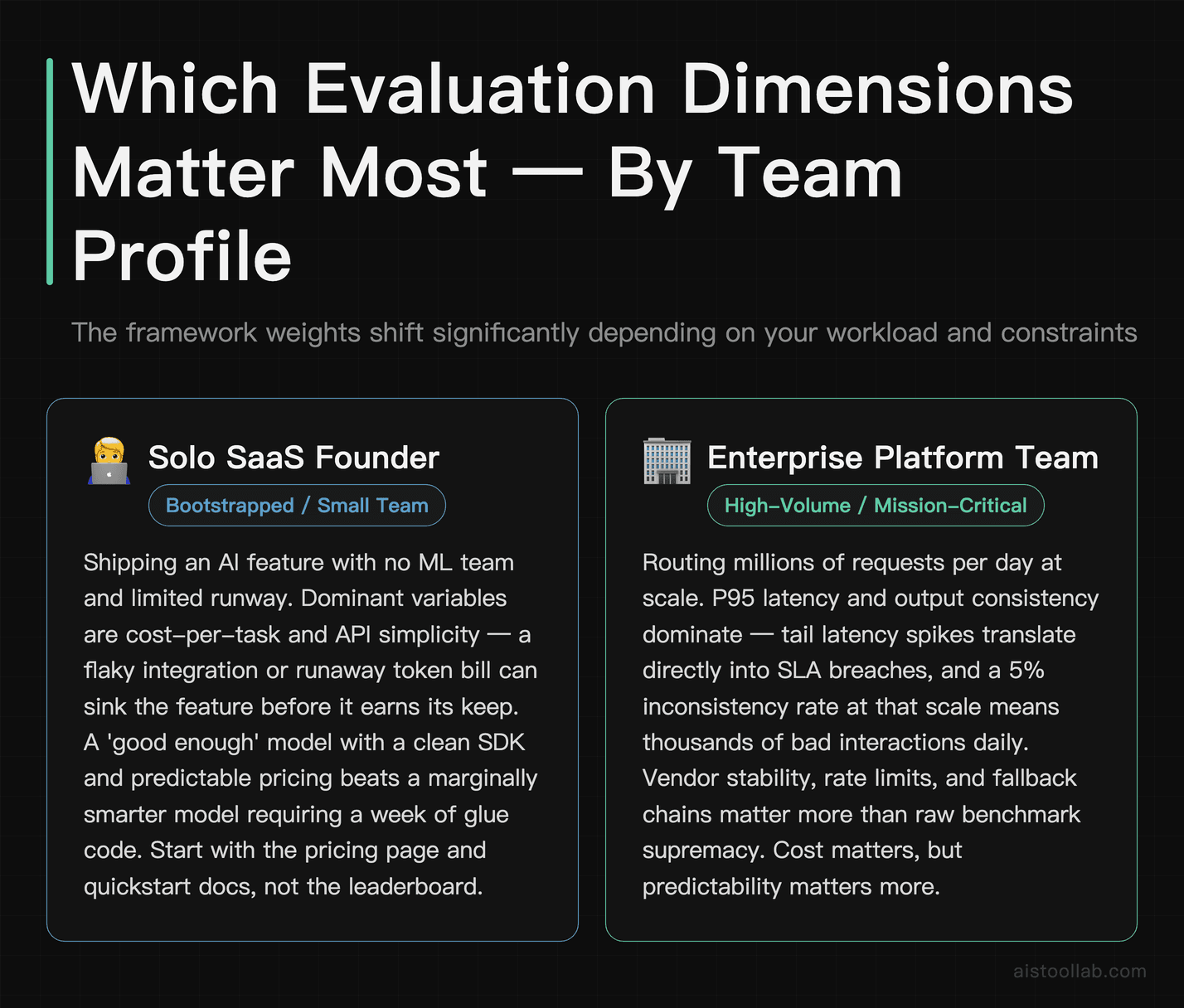
Picture a bootstrapped founder in Austin adding an AI summarization feature to their B2B app. They have no ML team and limited runway. For them, the dominant variables are cost-per-task and API simplicity — a flaky integration or runaway token bill could sink the feature before it earns its keep. Benchmark supremacy is almost irrelevant; a “good enough” model with a clean SDK and predictable pricing beats a marginally smarter one that requires a week of glue code. Their checklist should start with the pricing page and the quickstart docs, not the leaderboard.
The Enterprise Platform Team Serving Millions of Requests
Now picture a platform team at a mid-sized fintech routing millions of requests a day. Here, p95 latency and consistency dominate — tail latency spikes translate directly into SLA breaches and angry customers, and a 5% inconsistent-output rate at that scale is thousands of bad interactions daily. They’ll care deeply about vendor stability, rate limits, and fallback chains. Cost matters, but predictability matters more. This is exactly the calculus behind evaluating something like GitHub Copilot Enterprise, where team-wide reliability and admin controls outweigh any single capability benchmark.
The Content Team Choosing an Everyday Assistant
A three-person marketing team picking between general assistants faces a different problem entirely: workflow fit. Raw model capability is table stakes; what wins is how the tool slots into where they already work — docs, chat, their CMS. That’s the whole tension I unpacked in Notion AI vs ChatGPT. For them, “effective” means fewer context switches and less copy-pasting, not a higher reasoning score.
The Selection Checklist: Matching Tools to Workload Requirements
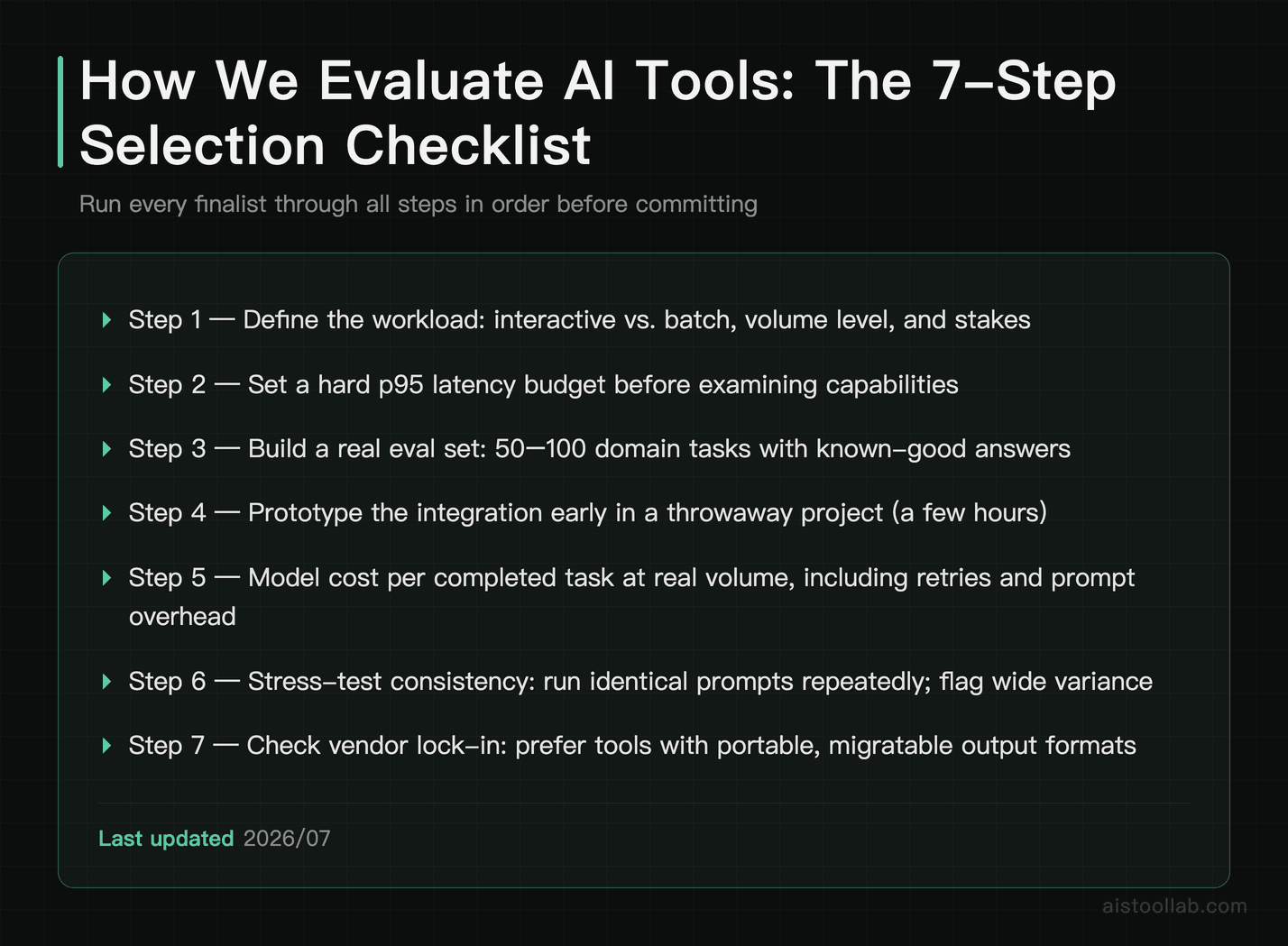
Turn the framework into a repeatable process. Before you commit to any AI tool, walk through this in order:
- Define the workload precisely. Interactive (user waiting) or batch (background)? High-volume or occasional? High-stakes or low-stakes? This single answer reshapes every weight below.
- Set a hard latency budget. Decide the maximum acceptable p95 response time before you look at capabilities, and treat it as a filter, not a preference.
- Build a small, real eval set. Collect 50–100 actual tasks from your domain with known-good answers. This is your ground truth — worth more than any leaderboard.
- Prototype the integration early. Spend a few hours wiring each finalist into a throwaway project. API pain reveals itself fast, and it’s cheaper to discover now.
- Model cost per completed task. Not per token — per finished job at your real volume, including retries and prompt overhead. Confirm current prices on official pricing pages.
- Stress-test consistency. Run the same prompts repeatedly. Wide variance is a red flag for anything unsupervised.
- Check the exits. How hard is it to switch later? Prefer tools that don’t lock you into proprietary formats you can’t migrate.
Run every candidate through the same gauntlet. The winner is rarely the one with the flashiest benchmark — it’s the one that clears your latency budget, fits your budget-per-task, and doesn’t make your engineers sigh when they open the docs.
Frequently Asked Questions
Are benchmark scores completely useless for choosing an AI tool?
No, and it’s worth being precise here. Benchmarks are useful as a rough filter — they can tell you which models are broadly in the right capability tier and which ones are clearly not serious contenders for a complex task. Where they fail is as a final decision-maker. The gap between “scores well on MMLU” and “works well on your customer support tickets” is enormous, driven by data contamination, distribution mismatch, and the fact that a leaderboard reports one number while your decision depends on many. Treat benchmarks the way you’d treat a candidate’s GPA on a résumé: a signal worth glancing at to narrow the field, never a substitute for the actual interview. The interview, in this case, is your own small evaluation set built from real tasks. Use benchmarks to draw up a shortlist of three or four candidates, then let your own data pick the winner.
How do I actually measure latency before committing to a tool?
Start by distinguishing average (p50) latency from tail (p95 or p99) latency — the tail is what your slowest users actually experience, and it’s where most nasty surprises live. Don’t trust vendor-published numbers alone; they’re often measured under ideal conditions. Instead, send a batch of realistic requests — same length and complexity as your production traffic — during different times of day, since load varies. Measure the full round trip including network overhead from your actual deployment region, not just the model’s compute time. If your architecture chains multiple calls, measure the end-to-end sequence, because a one-second per-call difference compounds fast. Streaming can dramatically improve perceived latency even when total time is unchanged, so factor that in for interactive use cases. The published AI Model Latency Showdown 2026 is a good starting reference for relative speed, but your own numbers from your own region and workload are what should drive the decision.
What does “cost per completed task” mean and why does it beat per-token pricing?
Per-token or per-request pricing is the sticker price; cost per completed task is the true unit economic. The difference matters because tools vary in how efficiently they finish a job. A model that charges more per token but reliably completes a task in a single, concise call can be cheaper overall than one that’s cheaper per token but is verbose, needs a longer prompt, or requires two or three retries to get it right. To calculate it, take a representative task, run it end to end including any retries and system-prompt overhead, and total the actual cost to reach a correct result. Multiply by your real monthly volume. This is also where hidden costs surface — larger context windows, function-calling overhead, or safety-filter re-runs. Because vendors adjust pricing frequently, always pull the current figure from the official pricing page when you model this, and never rely on a number you saw in a blog post six months ago.
Why does API design matter more than most people expect?
Because a tool that never gets integrated delivers exactly zero value, no matter how capable it is. API quality is the difference between a two-day integration and a two-week one. The specifics that matter: native structured output (JSON mode or function calling) so you’re not writing brittle text parsers; well-maintained SDKs in the languages your team uses; clear, honest documentation that matches actual behavior; sensible error handling with retry guidance; and predictable rate limits with informative headers. Public developer reviews on Reddit and Hacker News are gold here, because integration pain is exactly the kind of thing that never appears on a benchmark but shows up loudly in real usage. A clean API also lowers ongoing maintenance cost — fewer edge-case bugs, easier onboarding for new engineers, less time spent deciphering cryptic failures. When two tools are close on capability, developer experience should often be the tiebreaker, and it’s cheap to test with a few hours of prototyping.
How big should my custom evaluation set be to be useful?
You need less than you think to get a meaningful signal. Even 50 to 100 carefully chosen, representative tasks with known-good answers will tell you far more about real-world fit than any public benchmark. The key is representativeness, not volume: include your common cases, your tricky edge cases, the ambiguous half-formed queries real users send, and any adversarial or safety-sensitive inputs you’re worried about. Label each with what a correct or acceptable answer looks like, then run every candidate tool against the identical set and score the results consistently. If you have the resources, having two people score independently reduces bias. This approach catches exactly the failures benchmarks miss — the domain-specific stumbles, the formatting quirks, the cases where a “smart” model confidently gets your niche wrong. As your product matures, grow the set by adding real failures you observe in production, so your eval harness keeps pace with reality and becomes a durable regression test for future model swaps.
Should I prioritize a single powerful model or a mix of specialized ones?
It depends heavily on your workload diversity and engineering capacity. A single strong general-purpose model is simpler to maintain, easier to reason about, and reduces integration surface area — a sensible default for small teams or products with a narrow set of tasks. A routing approach, where cheaper or faster models handle simple requests and a more capable model handles hard ones, can cut costs and latency substantially, but it adds real complexity: you need routing logic, monitoring per model, and fallback handling. The honest answer for most teams starting out is to begin with one solid model, instrument everything, and only introduce specialization once you have data showing a specific class of requests is over- or under-served. Premature optimization into a multi-model architecture is a common way to spend engineering time you didn’t need to spend. Let observed cost and latency pain drive the decision, not a theoretical elegance you read about in an architecture blog.
How do I evaluate output consistency, and why does it matter so much?
Consistency is how tightly output quality clusters when you run the same or similar prompts repeatedly. It matters because averages hide the failures that actually hurt you. A tool that’s excellent on average but occasionally produces confidently wrong output can be worse in practice than a slightly less capable tool that’s dependably steady — especially for anything running unsupervised or in a regulated context. To test it, take a set of prompts and run each many times, then look at the variance in quality, format, and correctness, not just the best-case result. Pay attention to failure modes: does it fail gracefully with a hedge, or does it fabricate plausibly? For high-stakes use cases, this is where you decide whether you need guardrails, human-in-the-loop review, or a fallback chain. Alignment and safety training directly shape these failure behaviors, which is why understanding Constitutional AI approaches is relevant when you’re judging whether a tool can be trusted to run without a human watching every output.
What’s the most common evaluation mistake teams make in 2026?
Judging a tool on a single impressive demo. It’s the AI equivalent of buying a car after one smooth test drive on an empty road. A demo is cherry-picked, run under ideal conditions, on inputs the presenter knows the tool handles well. It tells you almost nothing about tail latency under load, consistency across thousands of varied requests, cost at real volume, or how the API behaves when things go wrong. The runner-up mistake is chasing leaderboard rankings without checking whether the winning model fits your latency budget and cost structure. Both mistakes share a root cause: substituting an easy, quotable signal for the harder work of testing against your own reality. The antidote is the same in every case — define your workload precisely, set hard constraints, build a small real eval set, prototype the integration, and model true cost per task. It’s more work than screenshotting a leaderboard, but it’s the difference between a tool that ships and one you quietly roll back six weeks later.
The Bottom Line: Effective Means “Effective for Your Workload”
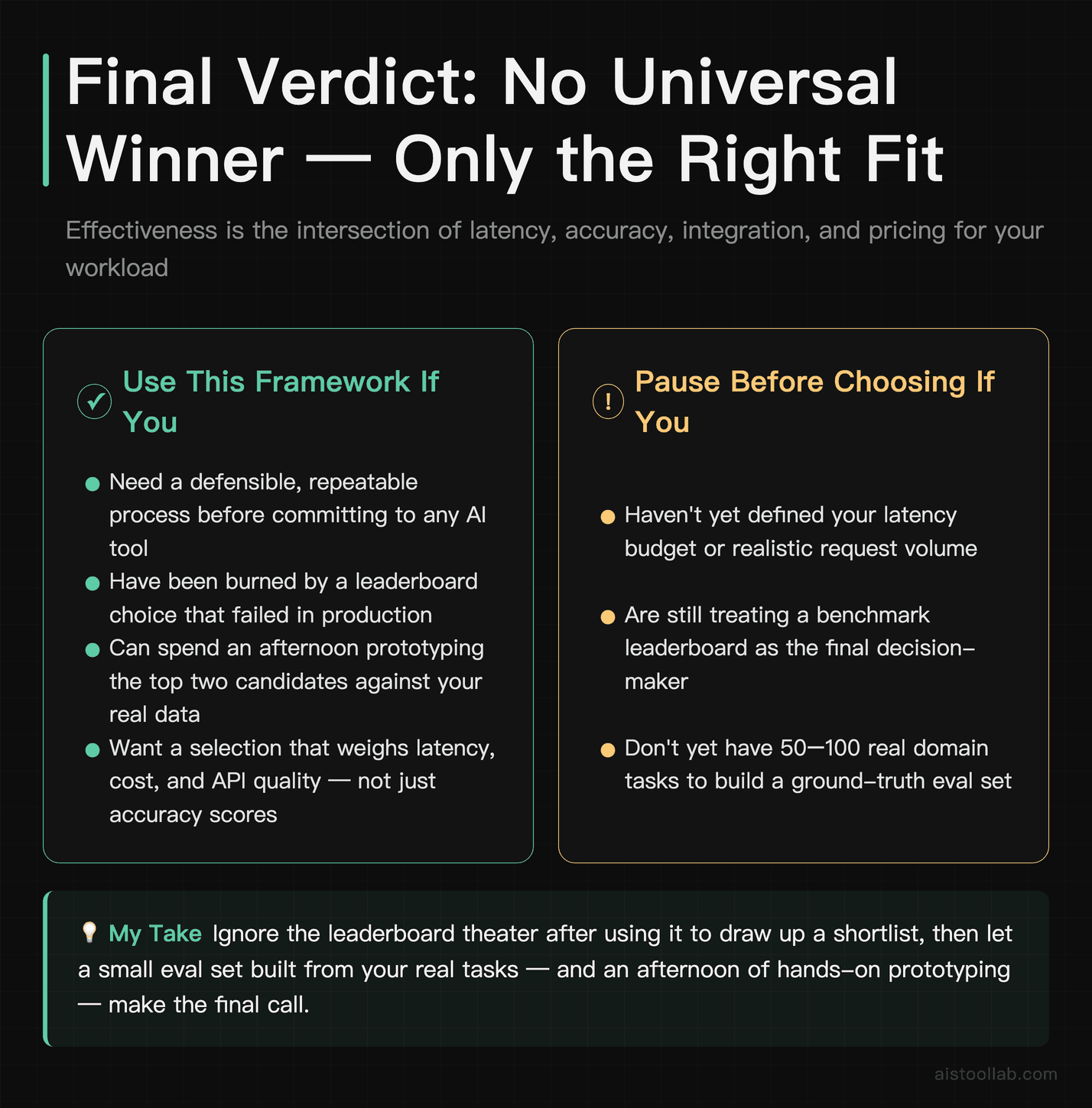
There’s no universal “best” AI tool, and any article that hands you a single winner is selling simplicity you can’t actually use. Effectiveness is contextual: it’s the intersection of latency that fits your budget, accuracy on your data, an API your team can integrate without cursing, and pricing that pencils out at your real volume. Benchmarks are a starting filter, never the verdict.
If it were my decision on the line, I’d ignore the leaderboard theater entirely after using it to draw up a shortlist, then let a small evaluation set built from real tasks make the final call. Spend an afternoon prototyping the top two candidates against your own data and your own latency budget — you’ll learn more in those few hours than in a week of reading benchmark comparisons. The framework above is portable; the answer it produces will be specific to you, and that’s exactly the point.
Last updated: 2026
Found this review helpful?
👉 Browse the AI Tools Library to find the right tools for your workflow.