
Three grammar checkers, three completely different design philosophies
Here’s the thing that trips people up about grammar checkers: they look interchangeable from the outside. Red squiggly line, suggestion pops up, you click accept, move on. So the natural assumption is that picking one is like picking a bottled water brand — mostly marketing, functionally identical.
That assumption falls apart the moment you actually look at what these tools were built to do. Grammarly, LanguageTool, and ProWritingAid share a category, but they were designed around different users solving different problems. One leans toward everyday clarity and tone across every app you touch. One leans toward multilingual coverage and data privacy. One leans toward deep manuscript-level analysis for people who write long-form. Treating them as the same tool is how you end up paying for features you’ll never open.
So instead of asking “which is best” (a question with no honest answer, because it depends entirely on what you write), this comparison lays out what each tool is actually built for, where the feature sets genuinely differ, and which situations point toward which pick. I’m compiling this from each vendor’s official documentation and publicly available feature descriptions — not from a lab test with a stopwatch — so I’ll be clear about what’s a verifiable feature versus what’s a design leaning.
The quick version of who each tool is
Grammarly is the one most people have already bumped into — it runs as a browser extension, a desktop app, and a mobile keyboard, and it checks grammar, spelling, punctuation, and tone across pretty much anywhere you type. Its official product pages describe a free tier plus paid plans, and in recent years it’s layered generative-AI writing assistance on top of the core correction engine. Its whole design bias is “meet you wherever you’re writing” — email, Slack, docs, social posts.
LanguageTool comes from a different angle. It’s a multilingual proofreading tool (its official site describes support for many languages beyond English), and it’s notable for offering a self-hosting option and an open-source core, which matters a lot to privacy-conscious teams and developers. It has a free tier and a premium subscription, browser extensions, and integrations, but its identity is really “grammar checking that isn’t locked to English and doesn’t force your text through one company’s cloud.”
ProWritingAid is the specialist. It’s built for long-form writers — novelists, non-fiction authors, academics, anyone staring down thousands of words at a time. Its official feature set centers on detailed writing reports: style, overused words, sentence-length variation, readability, pacing, dialogue tags, and so on. It integrates with tools like Microsoft Word, Google Docs, and Scrivener (a fiction-writing staple), which tells you exactly who it’s chasing.
Feature comparison at a glance
Before the table, a note on how to read it. The cells below are objective feature-existence facts — whether a capability exists, based on each vendor’s official product documentation as of July 2026 — plus a plain-language “primary design focus” row that summarizes the emphasis each tool’s own feature set points to. There are no invented scores or “winner” cells here, because grammar-check quality across tools isn’t something I can independently benchmark, and I’m not going to fake a number. Verify current details on each official site before you buy, since feature availability and plan boundaries shift.
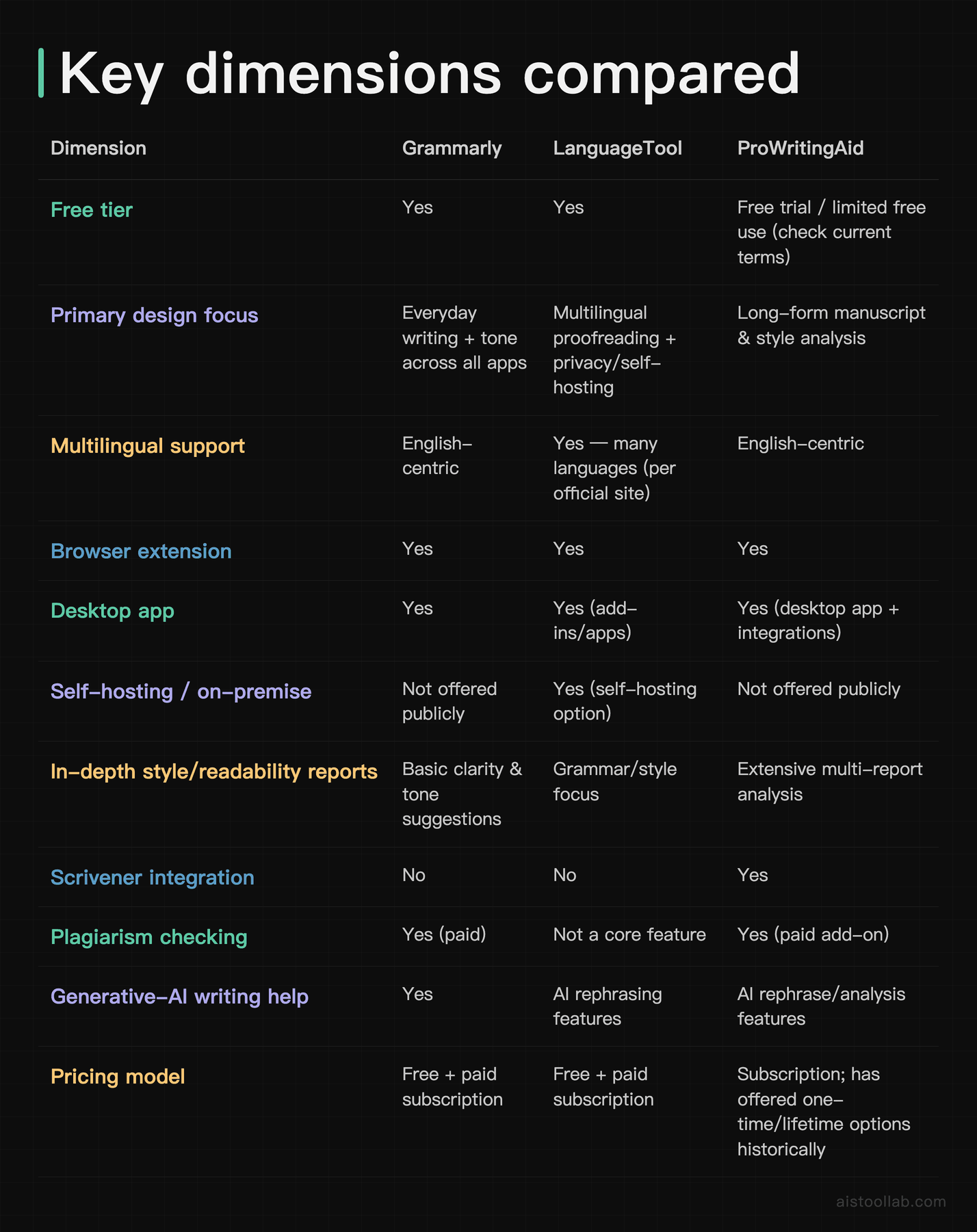
If you take one thing from that table, make it this: the rows where these tools genuinely diverge are multilingual support, self-hosting, Scrivener integration, and depth of reporting. Everything else — browser extensions, basic grammar catching, a free tier — is table stakes that all three offer. So your decision should hinge on the divergent rows, not the shared ones.
Where the real differences live

Coverage: everywhere you type vs. deep in one document
Grammarly’s design bias is ubiquity. The extension and keyboard mean it’s checking your Gmail drafts, your LinkedIn comments, your Notion pages, and your Slack messages without you thinking about it. If your writing is scattered across a dozen apps in a day — which describes a lot of marketers, founders, and customer-facing folks — that “it’s just always there” quality is the entire value proposition.
ProWritingAid inverts that. It’s less about catching a typo in a two-line Slack message and more about sitting inside a 60,000-word draft and telling you that you’ve used the word “just” 214 times, that your sentence lengths are monotonous in chapter four, and that your dialogue tags are getting repetitive. That’s a workflow built for people who open one enormous document and stay there for hours. LanguageTool sits between the two on coverage but pulls ahead on languages — if you write in German, French, Spanish, or Dutch, it’s the only one of the three positioned around that from the ground up.
Privacy and control
This is LanguageTool’s standout dimension, and it’s a genuine feature difference, not a vibe. LanguageTool publicly offers a self-hosting option and an open-source core, which means an organization can run the checker on its own infrastructure rather than sending text to a third-party cloud. For a law firm, a healthcare company, or any team handling sensitive drafts, that’s not a nice-to-have — it can be a compliance requirement. Neither Grammarly nor ProWritingAid advertises an equivalent self-hosting path for individuals, so if “our text cannot leave our servers” is on your checklist, LanguageTool is effectively the default candidate. If you want a broader mental model for weighing this kind of trade-off, I walk through it in What Makes an AI Tool Effective.
Depth of feedback
All three will catch a subject-verb disagreement. Where they split is what happens after the basics. Grammarly layers on tone detection and clarity rewrites aimed at making everyday writing more direct and appropriately formal. ProWritingAid goes much further into craft: its reports break down pacing, echoes, sticky sentences, readability grades, and structural patterns that only matter when you’re editing something long. LanguageTool keeps its focus tighter on correctness and style suggestions across languages.
I want to be careful here: “deeper” doesn’t automatically mean “better for you.” A busy marketer does not need a 20-section manuscript report on a product announcement — that’s friction, not help. A novelist absolutely does. Depth is only an advantage when the writing task is deep. That’s the whole reason I’d resist crowning any single tool.
Pricing shape
I’m deliberately not quoting exact dollar figures, because plan prices for all three shift and I’d rather you check the current official pricing page than trust a number that may be stale by the time you read this. What’s worth knowing structurally: all three offer a free way in, all three sell a paid subscription, and ProWritingAid has historically offered a one-time/lifetime purchase option in addition to subscriptions — which, if it’s still available when you look, is unusual in this category and appealing if you dislike recurring fees. Confirm the current model on each vendor’s official pricing page before committing.
Use cases: which tool fits which situation

You’re the sole marketer at a small SaaS startup
Say you’re writing across email campaigns, landing pages, social posts, and internal docs all day, and English is your working language. Your bottleneck isn’t manuscript depth — it’s speed and consistency across a scattered set of apps. On the “checks everywhere I type without me thinking about it” dimension, Grammarly’s browser-extension-plus-keyboard coverage is the natural fit here, and the tone suggestions are genuinely useful when you’re switching between a formal investor update and a casual launch tweet within the same hour.
You’re a novelist or non-fiction author working in Scrivener
Imagine you’re 40,000 words into a manuscript and the problem isn’t typos — it’s that the middle sags, you overuse certain words, and your sentence rhythm has gone flat. This is exactly the job ProWritingAid’s reporting suite was built for, and it’s the only one of the three with Scrivener integration. On the “deep, structural editing of long-form work” dimension, backed by the report types listed in its official feature set, it’s the pick I’d point a serious author toward first.
You run a multilingual team with data-sensitivity requirements
Picture a European agency drafting client work in German, French, and English, with a policy that text can’t be routed through an outside cloud. On two dimensions at once — multilingual coverage and self-hosting, both features LanguageTool publicly documents — LanguageTool is the candidate that actually matches the constraint. The other two are English-centric and don’t advertise self-hosting for this use case, so this is less a preference and more a fit-or-doesn’t-fit call.
You’re a student or academic on a budget
If you’re writing essays and the occasional long paper, your needs straddle “catch my grammar reliably” and “help me tighten structure without a subscription I’ll forget to cancel.” Here the free tiers of all three are worth trialing directly, and ProWritingAid’s historical one-time-purchase option (verify it’s still offered) is worth a look if you’d rather pay once. Plagiarism checking, if your institution cares about it, is a paid feature on Grammarly and a paid add-on on ProWritingAid — factor that into the math. A resume is another writing task students sweat over; I compared dedicated tools for that in AI Resume Builder Tools Compared.
So which should you actually pick?
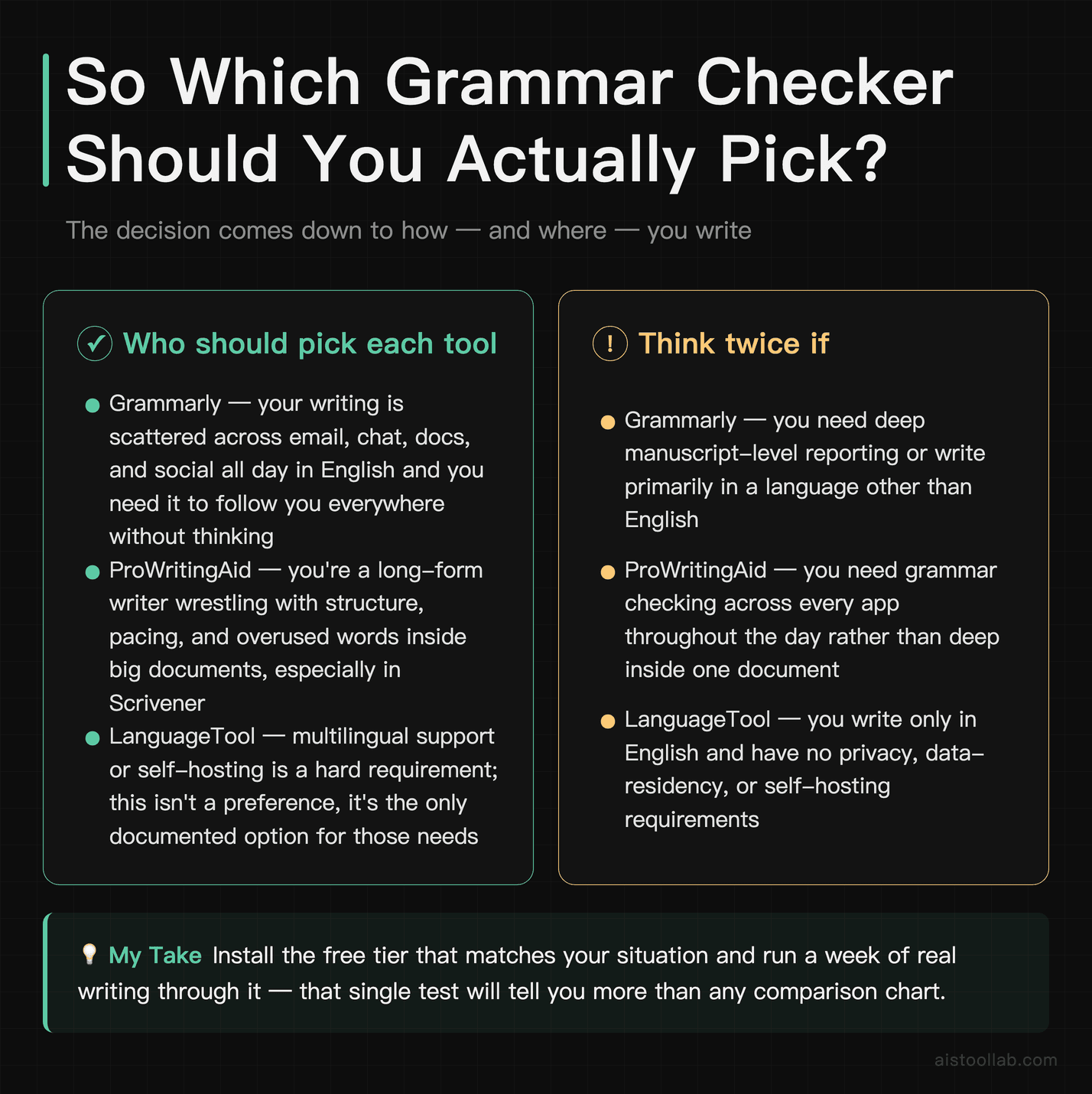
I’m not going to pretend one of these is objectively the best, because they’re built for different jobs and I have no independent benchmark that would justify crowning a winner. Instead, here’s how I’d decide based on the feature differences laid out above.
If your writing is scattered across email, chat, and docs all day and you write in English, the “always there, everywhere I type” coverage points me toward Grammarly first — that’s the dimension where its design bias pays off. If you’re a long-form writer wrestling with structure, pacing, and overused words inside big documents — especially in Scrivener — ProWritingAid’s reporting depth is the match, and it’s the only one of the three with that integration. And if multilingual support or self-hosting is a hard requirement, that’s not even a preference call: LanguageTool is the one that documents those capabilities, so it’s your candidate by default.
The best next step costs nothing: install the free tier of whichever tool matches your situation and run a week of your real writing through it. A short trial won’t give you a definitive verdict, but it’ll tell you fast whether the tool’s suggestions feel like help or noise — and that’s the only signal that actually matters for your workflow.
Frequently Asked Questions
Is the free version of any of these actually usable, or just bait?
The free tiers are genuinely functional for core grammar and spelling, not just a locked demo. Grammarly’s free version catches grammar, spelling, and punctuation issues across its extension and apps, and plenty of people never upgrade because that covers their needs. LanguageTool’s free tier handles grammar and style across its supported languages, with premium unlocking more advanced checks and longer text handling. ProWritingAid offers free access with limits (check current terms, since they adjust word counts and report access). What you’re paying for when you upgrade is generally advanced suggestions, deeper rewrites, longer document handling, tone/style depth, and extras like plagiarism checks. My honest advice: install the free version of whichever tool matches your use case from the sections above and use it for a week on your real writing before you pay for anything. The free tiers are more than enough to tell you whether the paid version’s specific extras would actually change your workflow, and that beats any comparison chart — including this one — for your particular situation.
Which one has the most accurate grammar checking?
I can’t honestly hand you a winner here, and I’d be suspicious of anyone who does without an independent, current benchmark to show. Grammar-check accuracy varies by the type of text, the language, the specific error, and how each engine has been updated recently — and I haven’t run a controlled head-to-head test, so I won’t pretend a “most accurate” ranking exists. What I can tell you factually: all three catch standard grammar, spelling, and punctuation errors as their baseline function, and they differ more in what they add on top (tone, style depth, languages) than in whether they spot a basic mistake. The practical move is to run the same sample of your own writing — ideally a piece with the kind of errors you actually make — through the free tier of each and see which suggestions feel most useful and least noisy to you. Accuracy that annoys you with false flags isn’t accuracy you’ll keep using. Your own text is the only benchmark that matters for your decision.
Does ProWritingAid work for short everyday writing, or only books?
It works for short writing — it has a browser extension and integrations like any of them — but it’s arguably overkill for a two-line Slack message, and that’s the honest framing. ProWritingAid’s design center of gravity is long-form: its signature value is the suite of reports analyzing style, pacing, overused words, readability, and sentence structure across thousands of words. On a short email, most of that machinery has nothing to chew on, so you’re essentially using a manuscript tool as a basic grammar checker. It’ll do the job, but you’re paying for depth you’re not touching. If the bulk of your writing is short and scattered across apps, a coverage-first tool fits the workflow more naturally. If your writing is a mix — some long projects, some quick messages — ProWritingAid can genuinely serve both, and the long-form reports become the reason you tolerate it for the short stuff. Match the tool to where the bulk of your writing volume actually sits.
Can LanguageTool really be self-hosted, and why would I want that?
Yes — LanguageTool publicly offers a self-hosting option and has an open-source core, which is one of its clearest differentiators from the other two. Self-hosting means you can run the grammar-checking engine on your own server or infrastructure rather than sending your text to an external company’s cloud service. Why care? For individuals, honestly, you often don’t need to. But for organizations handling sensitive material — legal drafts, medical information, unreleased financial documents, confidential client work — routing text through a third-party cloud can violate internal policy or regulatory requirements. Self-hosting keeps the text inside your own walls. It also appeals to developers and privacy-minded users who simply prefer not to feed their writing into someone else’s servers. Neither Grammarly nor ProWritingAid advertises an equivalent self-hosting path for this scenario, so if on-premise control is a hard requirement, LanguageTool is effectively your default candidate rather than one option among three. Verify the current self-hosting terms and any technical requirements on LanguageTool’s official documentation before planning a deployment.
Do any of these replace a human editor?
No, and it’s worth being blunt about it. These tools are excellent at the mechanical layer — grammar, spelling, punctuation, consistency, flagging overused words and awkward structures. What they don’t do is understand your argument, catch a factual error, know your audience’s context, or tell you that your third chapter should be cut entirely because it kills the pacing. They flag patterns; a human editor makes judgments. ProWritingAid’s reports get closest to editorial-style feedback by surfacing structural issues, but even those are suggestions a writer has to evaluate, not verdicts. Where they genuinely help is by handling the tedious surface-level cleanup so a human editor (or you, editing yourself later) can spend attention on the higher-order stuff that machines can’t do. Think of them as a very diligent proofreading pass, not a replacement for the editorial thinking that actually makes writing good. Used that way, they’re a real time-saver; expected to be an editor, they’ll disappoint you.
Which is best for non-native English writers?
This depends on what “help” means for you. If you write primarily in English but want it to sound more natural and correct, all three can assist, and the tone/clarity suggestions in a coverage-focused tool can be especially reassuring when you’re unsure whether a phrasing reads as too formal or too casual. If you also write in your first language and want one tool that handles both, LanguageTool’s multilingual support (documented across many languages on its official site) makes it the structural fit, since the other two are English-centric. There’s no universal answer because “non-native English writer” covers everyone from near-fluent to early learner. My practical suggestion: if you need multilingual coverage, start with LanguageTool because that’s a hard feature match; if you write only in English and want maximum “does this sound right” guidance across every app, trial Grammarly’s coverage. Run your own writing through the free tiers — the suggestions that feel genuinely instructive to you, versus merely corrective, are the ones that’ll actually improve your English over time.
Is the generative-AI writing feature worth it, or is the grammar engine the real point?
All three have added AI rephrasing or generative writing features on top of their correction engines, and whether that’s worth anything to you depends on your relationship with AI-drafted text. If you want help getting unstuck — turning a rough sentence into three cleaner options, or rephrasing something that’s technically correct but clunky — the rephrase features can save real friction. If you’re wary of your writing losing its own voice, or you’re in a field where AI-generated phrasing is frowned upon, you can largely ignore these features and use the tools purely as grammar checkers, which is still their core competency. I wouldn’t choose between these three tools primarily on their generative-AI extras, because that layer evolves fast and the differences shift with each update. The stable, comparable value is in the correction engine, the coverage model, the language support, and the depth of reporting — those reflect each tool’s actual design intent. Treat the AI writing features as a bonus to test, not the deciding factor.
Can I use more than one of these at the same time?
Technically you can install multiple, but running two grammar-checker browser extensions simultaneously tends to cause conflicts — overlapping underlines, competing pop-ups, and general interface clutter as each tool tries to annotate the same text. It’s usually more annoyance than benefit. A more sensible split, if you genuinely want two, is to use them in different contexts: for example, a coverage-focused checker as your always-on extension for everyday writing across apps, and a depth-focused tool like ProWritingAid opened deliberately inside long documents when you’re in serious editing mode. That way they’re not fighting over the same textbox. But for most people, one well-chosen tool that matches your primary writing task is cleaner and cheaper than juggling two subscriptions. Figure out where the bulk of your writing lives — scattered short messages, single long manuscripts, or multilingual documents — pick the tool built for that, and resist the urge to stack them. Two overlapping tools rarely give you twice the value; more often they give you twice the notifications.
Last updated: 2026
Found this review helpful?
👉 Browse the AI Tools Library to find the right tools for your workflow.