
Three Résumé Builders, Three Very Different Philosophies
Picture the usual job-hunt scene: you’ve got a half-finished résumé in Google Docs, a spreadsheet of roles you meant to apply to last week, and a nagging suspicion that some applicant tracking system (ATS) is quietly filing your PDF into a black hole. So you go looking for an AI résumé tool, type “best AI resume builder” into a search bar, and immediately hit a wall — because Rezi, Teal, and Kickresume all call themselves the answer, and they all look reasonable from the pricing page.
Here’s the thing that took me a while to appreciate while reading through their official docs and public reviews: these three tools aren’t really competing to do the same job. One is built around beating the ATS parser, one is built around managing your whole application pipeline, and one is built around getting a polished, good-looking document out the door fast. Calling one “the best” without asking what you’re actually trying to do is how people end up paying for a subscription they barely touch.
So instead of crowning a winner, I want to lay out what each tool is designed to do, where the feature sets genuinely diverge, and which kind of job seeker each one seems built for. I’ve compiled this from each company’s official product pages plus public user commentary — I haven’t run all three through a live job search myself, so treat the verdicts as reasoning about features and design intent, not a stopwatch test.
Quick Intro to Each Tool
Rezi
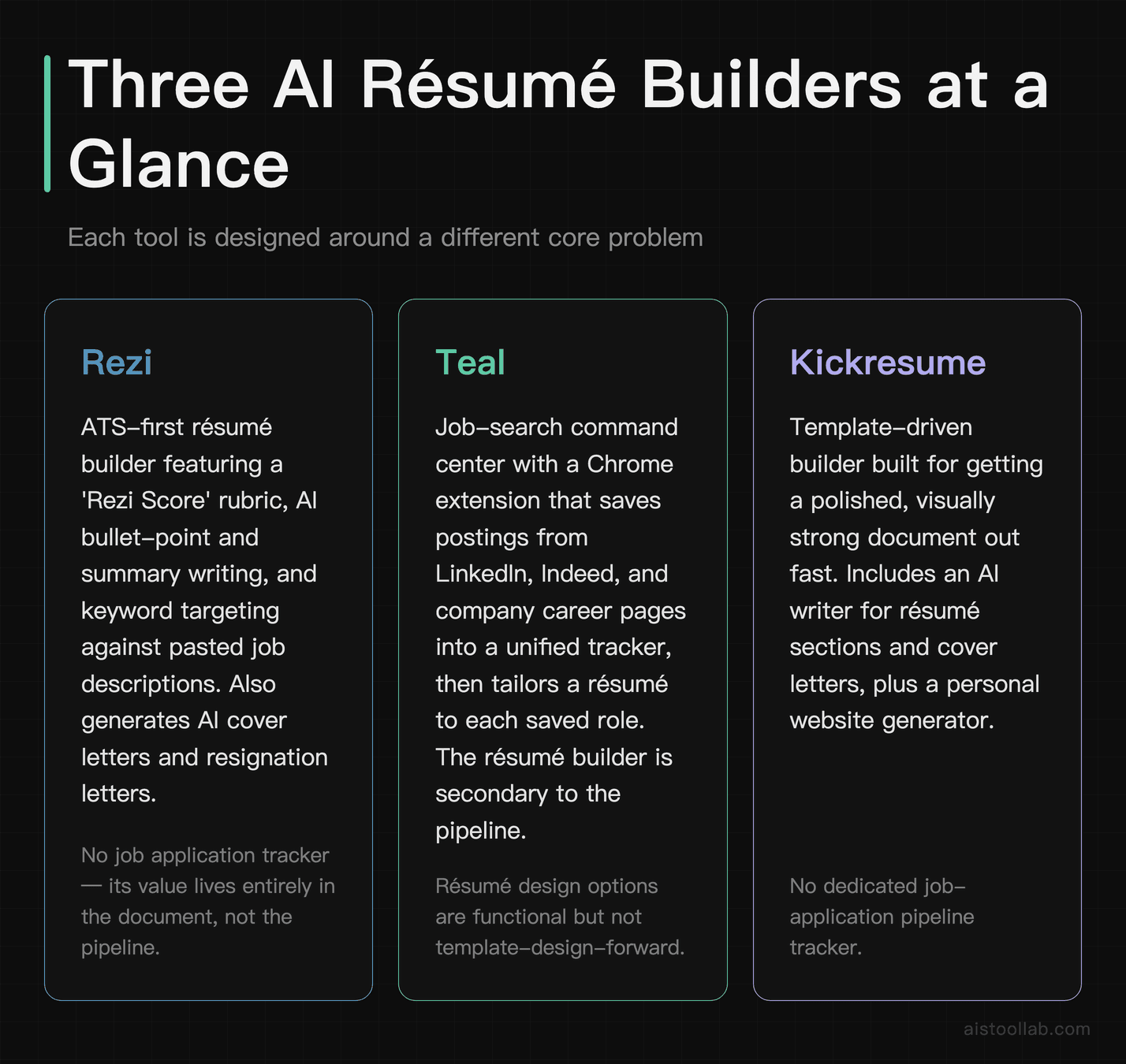
Rezi positions itself squarely around ATS compatibility. The product’s headline features are AI-assisted bullet-point writing, a “Rezi Score” that grades your résumé against a checklist of content and formatting rules, and keyword targeting that maps your résumé against a pasted job description. It also offers AI cover letters and resignation letters. If you’ve ever worried that a résumé template with two columns and a headshot might confuse an automated parser, Rezi is the tool that leans hardest into that anxiety and builds its whole pitch around it.
Teal
Teal is less of a document builder and more of a job-search command center. Its standout piece is a Chrome extension that lets you save job postings from LinkedIn, Indeed, and company career pages straight into a tracker, then tailor a résumé to each one. The résumé builder itself is clean and includes AI generation for summaries and bullet points, but the reason people reach for Teal is usually the pipeline management — the ability to see every role you’ve applied to, its status, and how well your résumé matches the posting, all in one board.
Kickresume
Kickresume comes at the problem from the design-and-content angle. It offers a library of templates, an AI writer that drafts résumé and cover-letter content, a LinkedIn import to bootstrap your first draft, and even a personal-website generator that turns your résumé into a hosted page. It also has a resume-checker feature. Kickresume tends to appeal to people who want the finished document to look sharp and don’t want to fight with formatting to get there.
How They Compare, Feature by Feature
Before the table: this is my editorial framing, aimed at an individual job seeker applying to knowledge-work roles who wants AI help with writing and ATS formatting. The cells below are feature-existence facts pulled from each tool’s official product pages (as of 2026-07) wherever I could confirm them; where a cell is a judgment about fit, I’ve tied it to a stated condition rather than a gut-feel rating. Where I couldn’t confirm a detail from an identifiable official source, I say so instead of guessing.
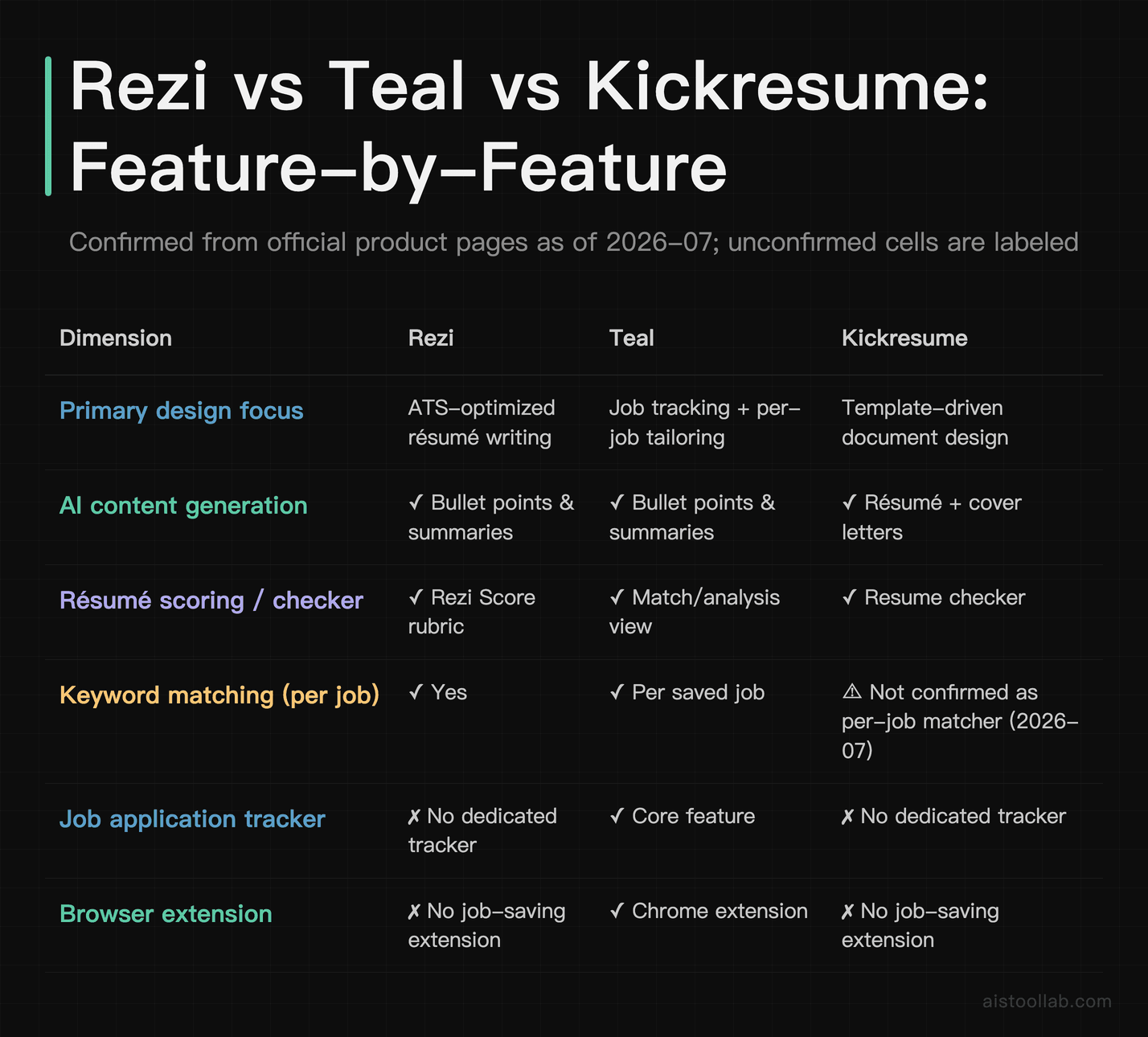
A note on pricing: all three publish tiered plans that change periodically, so I’m deliberately not quoting dollar figures here. Before you commit, open each tool’s current official pricing page and confirm the number and what the free tier actually includes — the free tiers in particular tend to gate different things (some limit downloads, some limit AI generations, some watermark exports).
Where the Real Differences Show Up
ATS optimization: Rezi’s home turf
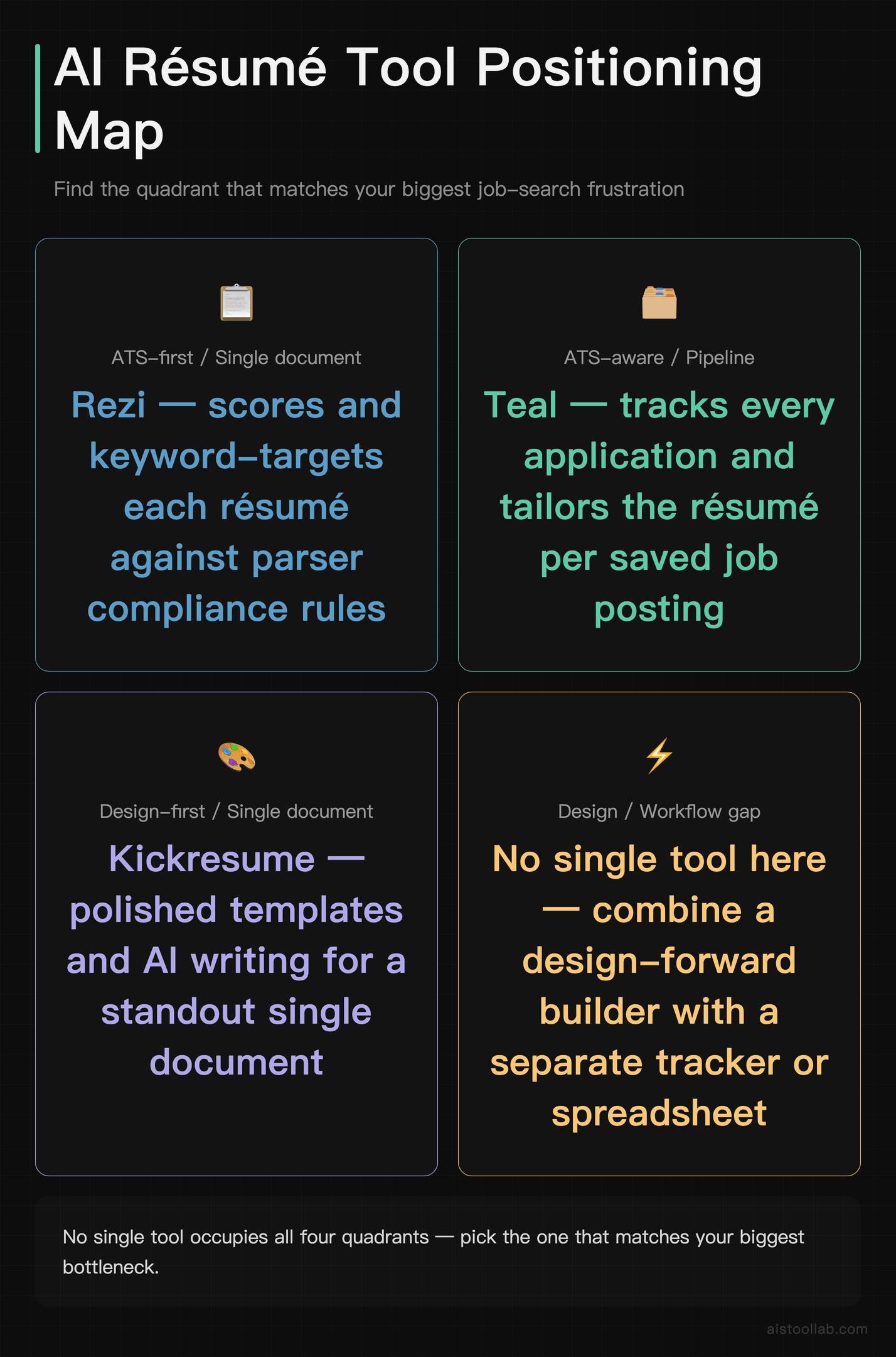
If your single biggest fear is that your résumé won’t survive an automated parser, Rezi is the tool built explicitly around that worry. The Rezi Score gives you a running checklist — things like whether your bullet points use action verbs, whether you’ve quantified achievements, whether the formatting is parser-friendly — and the keyword targeting lets you paste a job description and see which terms you’re missing. That’s a genuinely useful feedback loop for someone who wants structure.
I’ll be honest about the limits of what I can claim here, though: whether that scoring translates into more interviews is not something I can verify, and I haven’t seen an independent, controlled study that measures Rezi’s output against other builders on real ATS pass-through rates. So I’d frame Rezi’s value as “a disciplined, checklist-driven writing assistant for ATS formatting,” not “a shortcut that gets you past the robots on its own.” Discipline and a clear rubric are worth something on their own, especially if you find a blank page paralyzing.
Pipeline management: Teal’s whole reason to exist
Teal is the only one of the three where the résumé is arguably not the main event. The Chrome extension lets you clip a posting while you’re browsing, and the tracker turns your scattered applications into a board with statuses. For anyone applying to a lot of roles at once, that’s the difference between a chaotic spreadsheet and a system you actually maintain.
The tailoring workflow ties into this: you save a job, and Teal helps you match your résumé’s language to that specific posting. If you’re the kind of applicant who sends a slightly different résumé to every role — which many career coaches suggest — Teal’s structure is designed around exactly that habit. The trade-off is that if you only need to produce one solid résumé and be done, a lot of Teal’s machinery is overhead you won’t use.
Design and polish: Kickresume’s angle
Kickresume leans into the “I want this to look good and I want it done today” use case. The template library, the AI writer that drafts content section by section, and the LinkedIn import all point toward getting a presentable document out quickly. The website generator is a nice extra for people in fields where a personal landing page helps — designers, developers, consultants — though I’d treat it as a bonus rather than a headline reason to subscribe.
The thing to watch with any heavily templated builder is whether the visual flourishes that look great to a human hurt you with a parser. Two-column layouts, icons, and graphical rating bars can render beautifully on screen and still confuse some ATS software. Kickresume does offer a checker, so the tooling to catch this exists — just don’t assume the prettiest template is automatically the safest one to submit.
Use Cases: Which Tool Fits Which Situation
Say you’re a career-switcher applying to a handful of very specific roles
Imagine you’re moving from, say, agency marketing into a product-marketing role at a SaaS company, and you’ve identified maybe eight jobs that genuinely fit. Each posting uses slightly different language, and you want each résumé to speak that role’s dialect. This is where a per-job matching workflow earns its keep — you want to paste each description, see the keyword gaps, and tailor accordingly. Both Rezi (via keyword targeting) and Teal (via saved-job matching) are built for this kind of deliberate, targeted tailoring; if you also want to track where each application stands, Teal’s pipeline view leans toward your workflow specifically.
Say you’re a new grad who needs one strong résumé, fast
If you’re finishing a degree and applying broadly with essentially one résumé, you don’t need a tracker or complex per-job tailoring yet — you need a clean, credible document and help turning “I did a group project” into a real bullet point. A template-driven builder with an AI writer, like Kickresume, is oriented toward that “get a polished draft out today” job. Rezi’s checklist-style scoring is also well suited here if you’d rather have a rubric guiding you than a gallery of designs to choose from. On a tight budget, start with whichever free tier lets you export the format you need without a watermark, then decide if paying unlocks anything you’ll actually use.
Say you’re a mid-career professional running a long, quiet search
If you’re employed but casually looking, applying to a few roles a month over several months, the failure mode isn’t writing — it’s losing track. Which company did you talk to? What version of your résumé did you send? A tracker-first tool like Teal is designed around keeping that pipeline organized over a long horizon. Pair it with disciplined tailoring and you’ve got a system that survives the months where you barely touch it. If, on the other hand, you’ve got a personal-brand angle — you want a hosted page alongside the PDF — Kickresume’s website generator addresses that need without a second tool.
My Take: Match the Tool to the Job You’re Actually Doing
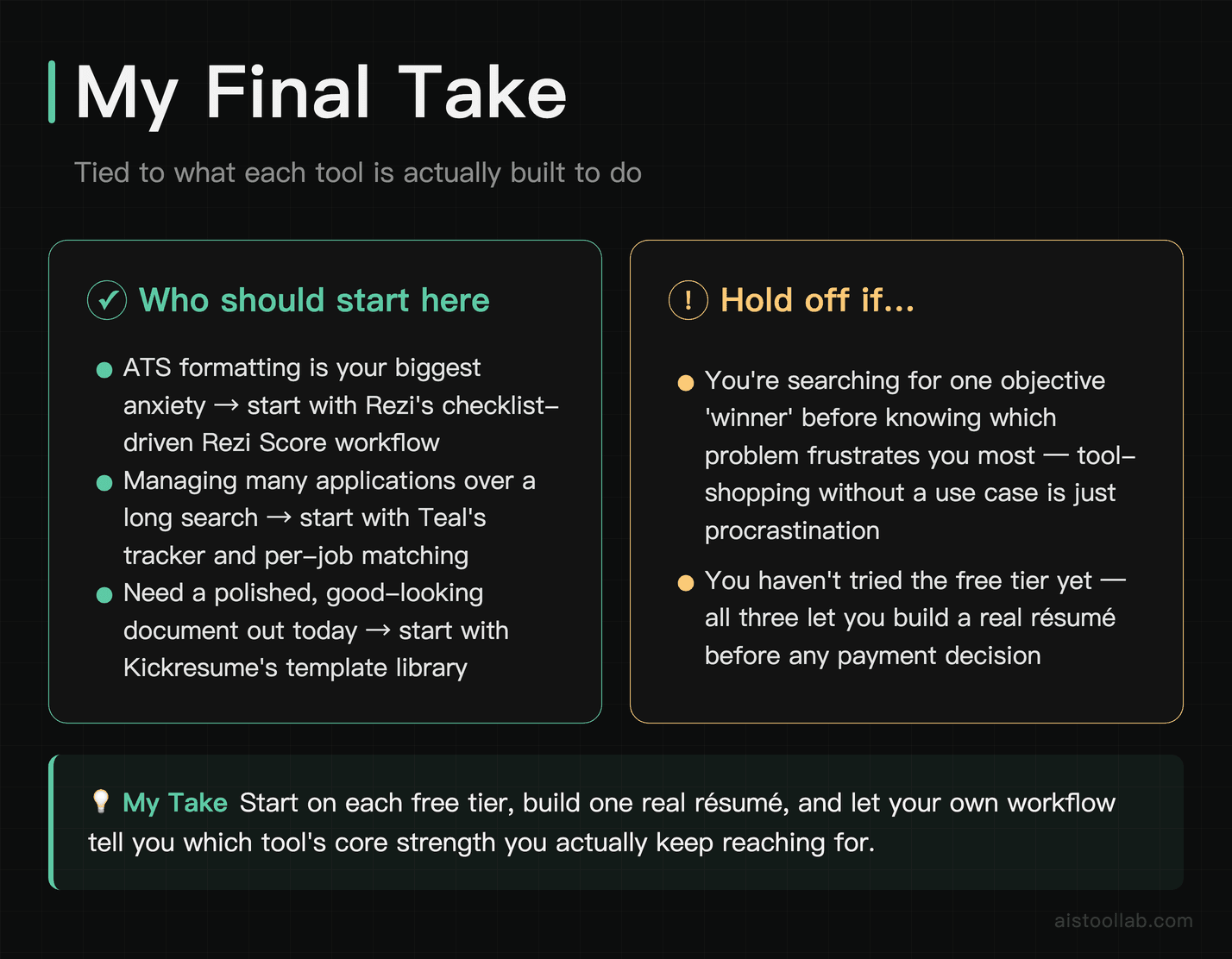
If I have to leave you with a decision framework rather than a single name, here it is, tied to what each tool is built around. If your defining problem is ATS formatting and you want a rubric telling you what to fix, Rezi is designed around that checklist-driven workflow, so I’d start there. If your defining problem is managing a lot of applications over a long search and keeping the pipeline organized, Teal’s tracker and per-job matching are the reason it exists, so on that dimension I’d lean Teal. And if your defining problem is getting a polished, good-looking document out quickly, maybe with a personal page attached, Kickresume’s templates and website generator are oriented toward that, so I’d point you there.
None of these is objectively “the best résumé builder,” and any review that tells you one flatly beats the other two is skipping the only question that matters: what are you actually trying to fix? Start on each free tier, build one real résumé, and notice which tool’s core strength you keep reaching for. That signal — from your own workflow, not a scorecard — is the most honest recommendation there is. And since the free tiers cost nothing but an evening, there’s no reason to guess when you can test.
Frequently Asked Questions
Are the free versions of these tools actually usable, or just a teaser?
All three offer a free tier, but they gate different things, and that’s the detail that matters more than the headline “free.” Generally speaking, free plans on résumé builders limit some combination of downloads, export formats, number of documents, AI generation credits, or apply a watermark to the output. Rezi, Teal, and Kickresume each publish exactly what their free tier includes on their pricing pages, and those terms change, so I’d check the current page rather than trust an old blog post. My practical advice: build a full résumé on the free tier first and try to export the exact format you need (usually a clean PDF). If the free tier lets you get a usable, unwatermarked document out the door, you may not need to pay at all for a short search. If it blocks the export or the AI feature you actually came for, that tells you precisely what you’d be paying to unlock — which is a much better basis for a decision than a monthly price in the abstract.
Which one is best for getting past ATS software?
Rezi is the tool that markets itself most explicitly around ATS compatibility, with its scoring rubric and keyword targeting built for that purpose. But I want to be careful here: “designed around ATS” isn’t the same as “proven to beat ATS more often than the others,” and I haven’t found an independent, controlled study measuring real parse-through rates across these three tools. What actually helps any résumé survive a parser is fairly well understood and tool-agnostic — a single-column layout, standard section headings, real text rather than text-in-images, and keywords that genuinely match the job description. All three tools can produce a parser-friendly document if you choose a simple layout and use their checker. So if ATS is your main worry, Rezi’s checklist gives you the most structured nudging toward those habits, but you can achieve a clean, parseable result in any of them by avoiding graphical templates. Don’t assume the fanciest template is the safest — the visual flourishes that impress a human recruiter are sometimes the exact things that trip a parser.
Is Teal worth it if I don’t need the job tracker?
Honestly, if you strip out the tracker and the browser extension, you’re evaluating Teal purely as a résumé builder — and at that point you’re paying for a slice of the product while ignoring its main draw. Teal’s tracker, saved-job workflow, and per-posting matching are the reasons it exists as a distinct product; the résumé editor is competent but it’s not the differentiator. So the honest question is whether you’re the kind of applicant who benefits from pipeline management. If you’re firing off applications to many roles and losing track of who you’ve contacted, the tracker is arguably the whole value proposition and the résumé builder is a bonus. If you only need to produce one document and you’re not managing a pipeline, a lot of Teal’s machinery sits unused, and a builder-first tool like Kickresume or a scoring-first tool like Rezi may map more closely to what you actually do. Try the free tier and notice whether you find yourself living in the tracker or just in the editor — that answers the question for your situation better than any review can.
Can Kickresume’s templates hurt my chances with automated screening?
They can, but not because the tool is flawed — it’s a general risk with any design-forward résumé builder. Multi-column layouts, icons, graphical skill bars, and headshots look polished to a human but can confuse some ATS parsers that read the document as a stream of text. The safe move is to pick one of the simpler, single-column templates and run it through Kickresume’s résumé checker before submitting. If a role clearly routes through a large ATS platform, err toward the plainest layout you can tolerate and save the visually rich version for contexts where a human reads it first — like a direct email to a hiring manager, or a portfolio page. Kickresume’s flexibility cuts both ways: it lets you make something beautiful, and it also lets you make something a parser dislikes, so the responsibility to choose the right template for the channel sits with you. The good news is you can maintain both a “pretty” version and a “parser-safe” version and deploy each where it fits.
Do I need AI to write my résumé at all?
No — AI here is a drafting aid, not a requirement, and it’s worth being clear-eyed about what it does. The AI writers in all three tools are good at turning a vague description (“managed social media”) into a structured, action-verb bullet (“Grew the company’s LinkedIn following through a weekly content calendar”). What they can’t do is invent your actual accomplishments or verify the numbers, so treat every AI-generated line as a first draft you then correct with real specifics. The genuine value is beating the blank page and getting phrasing that follows résumé conventions, which is especially helpful if writing isn’t your strength or English isn’t your first language. But an AI-written bullet that’s generic or inflated is worse than a plain, honest one you wrote yourself. My rule of thumb: let the AI propose structure, then you supply the truth — the real metric, the real scope, the real outcome. Used that way, the AI saves time; used as a ghost-writer you never edit, it produces résumés that all sound suspiciously alike.
Which tool is best for a total beginner who’s never made a résumé?
For a first-timer, the biggest hurdles are structure (“what sections do I even include?”) and phrasing (“how do I describe what I did?”), so a tool that guides you step by step matters more than one with the deepest customization. A template-driven builder like Kickresume walks you through sections and gives you a visual starting point, which many beginners find less intimidating than a blank editor. Rezi’s checklist-style scoring is also beginner-friendly in a different way — instead of leaving you to guess, it tells you concretely what’s missing, which acts like a tutor. Teal is more than a beginner strictly needs on day one, since its strength is managing many applications rather than building your very first document. Whichever you pick, use the LinkedIn import if you have a profile — it bootstraps your first draft from information you’ve already written. And lean on the free tier before paying: a beginner’s first goal is simply a clean, complete, honest one-page document, and every one of these tools can produce that at no cost with a bit of patience.
Can I use more than one of these together?
You can, and for some people it makes sense, though I’d be cautious about paying for two subscriptions at once. A common combination is using Teal for the tracking and pipeline side while writing the actual document wherever you’re most comfortable, since Teal’s tracker is its distinctive strength and the résumé can live elsewhere. Similarly, you might draft in Kickresume for the visual polish, then run the content through Rezi’s scoring to sanity-check it against a job description. Nothing stops you from exporting a résumé from one tool and importing or rebuilding it in another. The practical caution is cost and duplication: two overlapping subscriptions for a job search that might last a few weeks is often more than you need. My suggestion is to identify your single biggest pain — is it tracking, ATS formatting, or design? — commit to the tool built around that pain, and only reach for a second one if a concrete gap actually shows up in your workflow rather than pre-emptively.
How do the paid plans compare in value?
I’m not going to quote specific prices, because all three adjust their tiers periodically and an out-of-date figure is worse than none — check each official pricing page for the current number and, crucially, for what the paid tier unlocks versus the free one. What I can say about value structurally: you’re not really comparing three identical products at three price points, so “which is cheapest” is the wrong question. You’re deciding which capability is worth paying for. If ATS scoring and keyword targeting are what you value, Rezi’s paid tier is priced around that. If pipeline tracking across many applications is your need, Teal+ is priced around that. If templates, unlimited documents, and the website generator matter to you, Kickresume’s paid tier targets that. So the value comparison only makes sense once you’ve named your priority. A tool can be excellent value for one person and a waste for another at the identical price — the variable isn’t the price tag, it’s the match between what’s gated and what you’ll actually use.
Last updated: 2026
Found this review helpful?
👉 Browse the AI Tools Library to find the right tools for your workflow.