
Transparency note: ✋ Hands-on marks what I personally did inside Make. 📋 Researched marks features and pricing compiled from Make’s official site and public sources. Importantly, the hands-on below covers a two-module flow that ran end to end on the free plan; the OpenAI and WordPress steps were not run, and that boundary is marked where it matters.
This article contains affiliate links. If you buy through them I may earn a commission at no extra cost to you. All opinions are my own.
Make (formerly Integromat) is a visual automation platform — a canvas where you wire together apps and APIs into “scenarios” that run on their own. 📋 In third-party positioning it is commonly described as a cheaper, deeper alternative to other no-code automation tools (see the Make vs Zapier section below for how that positioning is sourced). The hands-on section below is a flow built and run on the free plan; the full feature and pricing picture is compiled from Make’s site. Here’s the honest result — including the steps that were left out and why.
✋ Hands-On: This Time I Actually Built and Ran a Working Flow
Update (July 2026): Last time I tried to build a complex “HTTP → OpenAI → WordPress” flow from scratch and couldn’t get it running end to end. This time I narrowed the goal to a flow that actually runs on the free plan and touches no live production data — and I built it, hit Run, and got real results.
What I actually built: “HTTP request (fetch a public API’s JSON) → Set variable (turn the returned data into a variable).” Free plan, signed in with Google, zero cost.
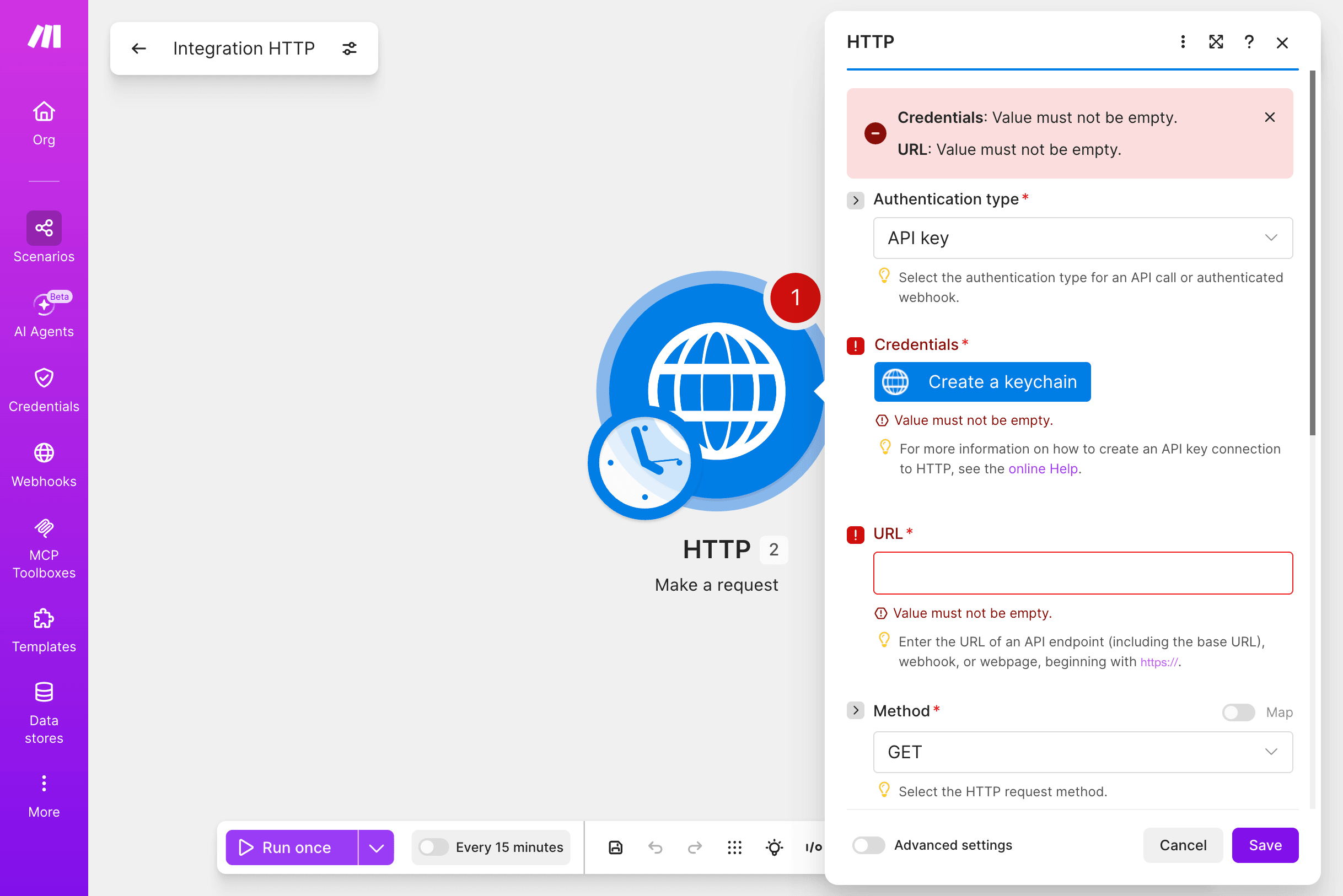
The first real gotcha (easy for beginners to hit): When adding the HTTP request module, I fumbled and picked “API key” as the Authentication type — which immediately demanded I create a credentials keychain and blocked Save with “Credentials: Value must not be empty.” The public API I was calling needs no auth at all — the right choice there is “No authentication.” I got stuck here a few times before spotting it.
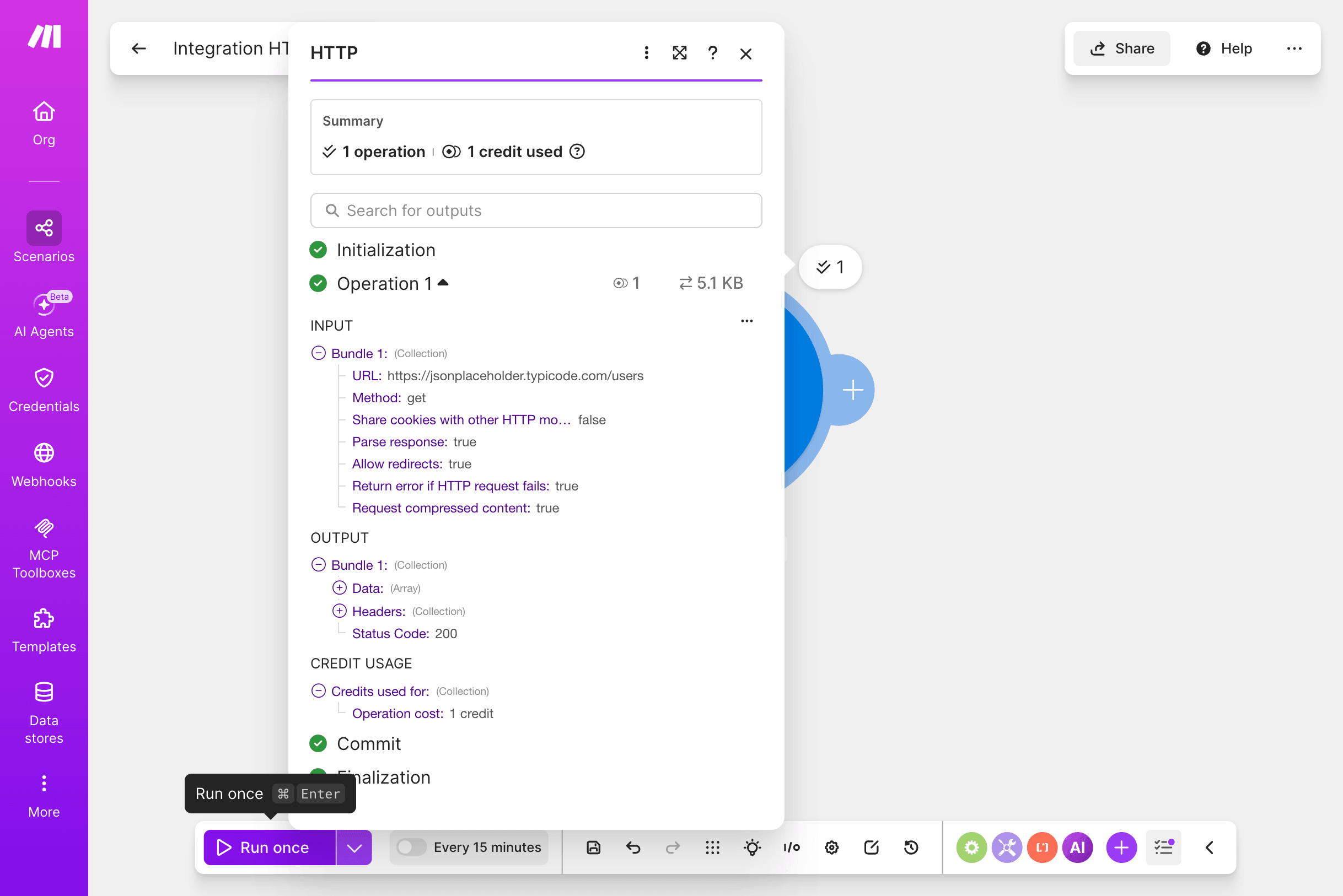
The real run result: After switching to no-auth, filling in a public JSON API URL, and leaving the method on GET, I hit “Run once” — and the request genuinely fired: status code 200, a returned data array, 5.1 KB transferred, 1 credit used. The execution panel lays out INPUT / OUTPUT / status code / credit usage in full, which is genuinely clear.
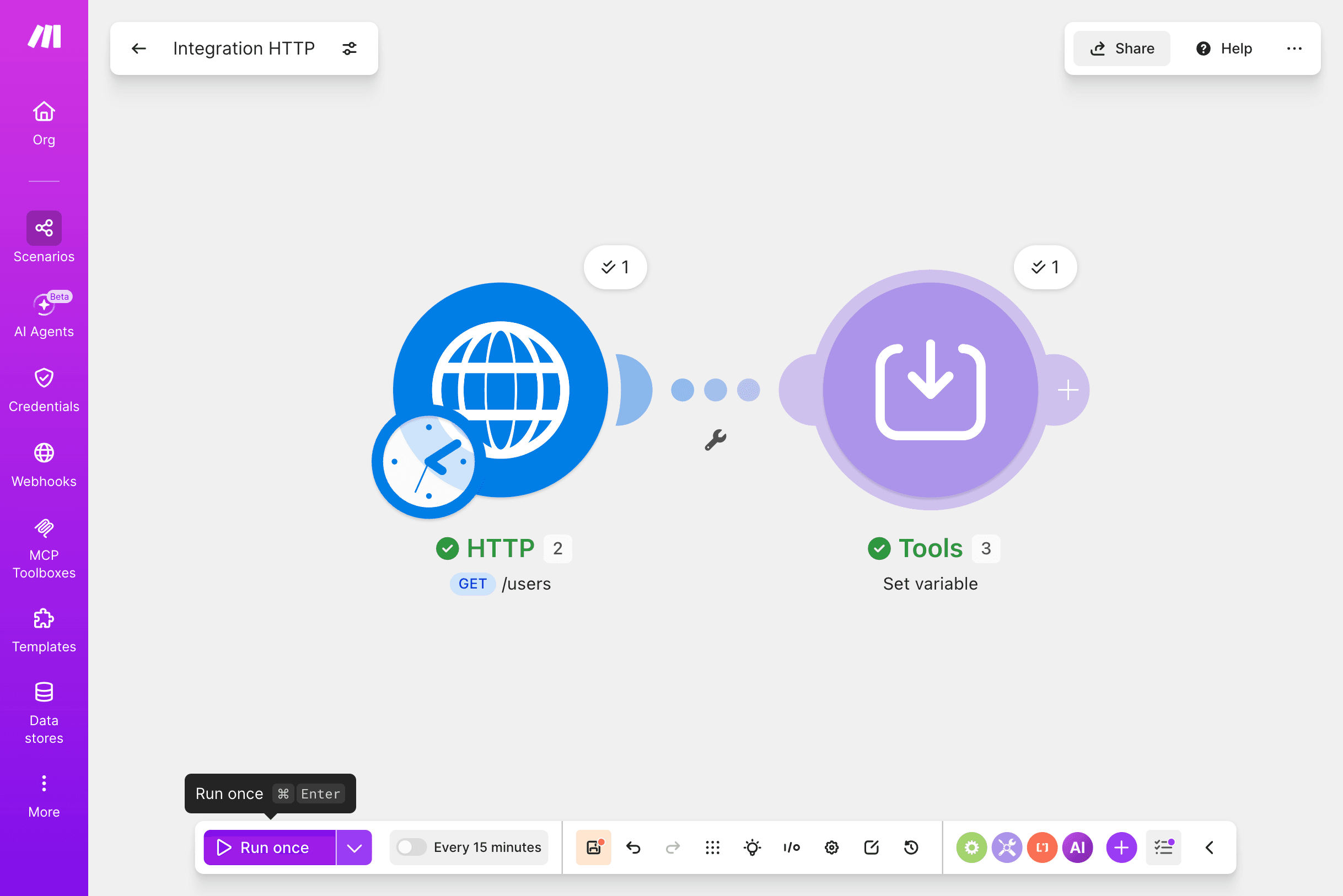
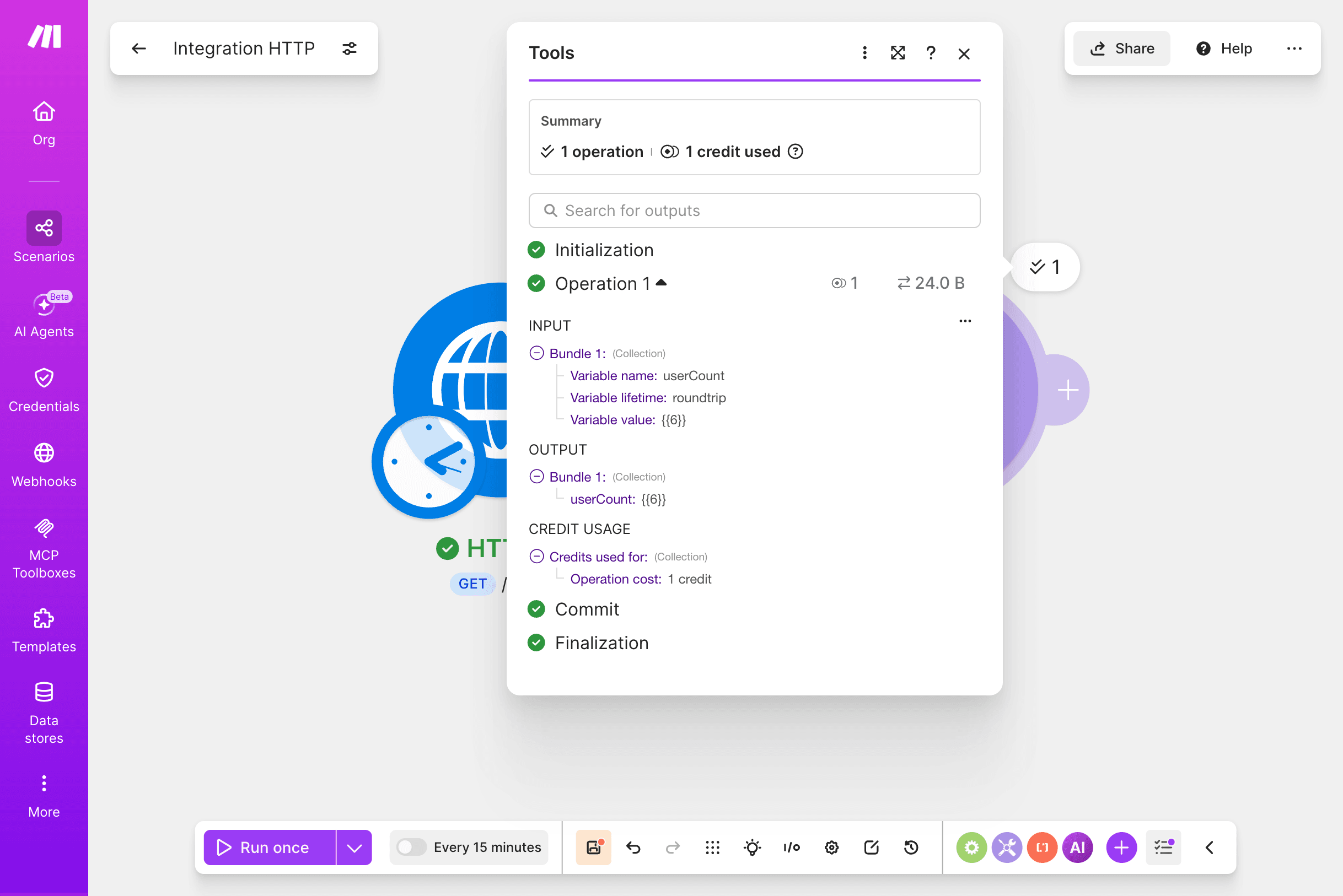
Adding a “process” step to make it a complete flow: I then chained a “Set variable” module after it, turning the API response into a variable (I used it to compute the length of the returned array). Hit Run again — both modules lit up green, 1 credit each, and the data genuinely flowed from step one into step two and got processed into a new value. That’s a full “fetch → process → output” flow, running start to finish.
So what about the OpenAI and WordPress steps? Honestly — I didn’t run them, and the reason may apply to you too:
- The OpenAI module needs an “OpenAI API key” — a separately paid key from the OpenAI platform, which is not the same as a ChatGPT subscription. I didn’t actually open or connect this module — I only confirmed from the app list that Make has an OpenAI app; I don’t have an API key, and wiring it up for real still requires creating a connection with an OpenAI API key. If you don’t have an OpenAI API key either, it’s worth knowing up front: the free plan lets you build the flow’s skeleton, but wiring in an AI step like OpenAI means going and enabling a paid OpenAI API yourself.
- I also didn’t open or run the WordPress module — because it would actually publish to your live site, and I didn’t want to post a test article to a production site just to demo it, so I skipped it this time.
What it actually feels like to use (my take): The canvas looks approachable, but the real work is in the details — each module I touched needed field-by-field configuration, picking the wrong auth type stalls you (as it did me), and data had to be mapped by hand between the two steps. It genuinely can chain APIs, AI, and app actions into a powerful flow; the ceiling is high. But with zero automation background, expecting to self-build a complex flow on a blank canvas will be frustrating. My advice: start with a simple 2-3 module flow (like my fetch + process one), run it once to get the feel, then chain up to something bigger — or start from a template. The free plan (📋 1,000 credits/month and 2 active scenarios, per make.com, compiled 2026-06) is plenty for practice.
Everything below — the full feature list, pricing, and the Zapier comparison — is organized research, not step-by-step hands-on, and I mark it clearly. The flow above is the part I actually built and ran this time.
📋 What Make Does (Features)
Compiled from make.com, 2026-06. Make is a visual automation builder — you assemble “scenarios” from modules instead of writing code:
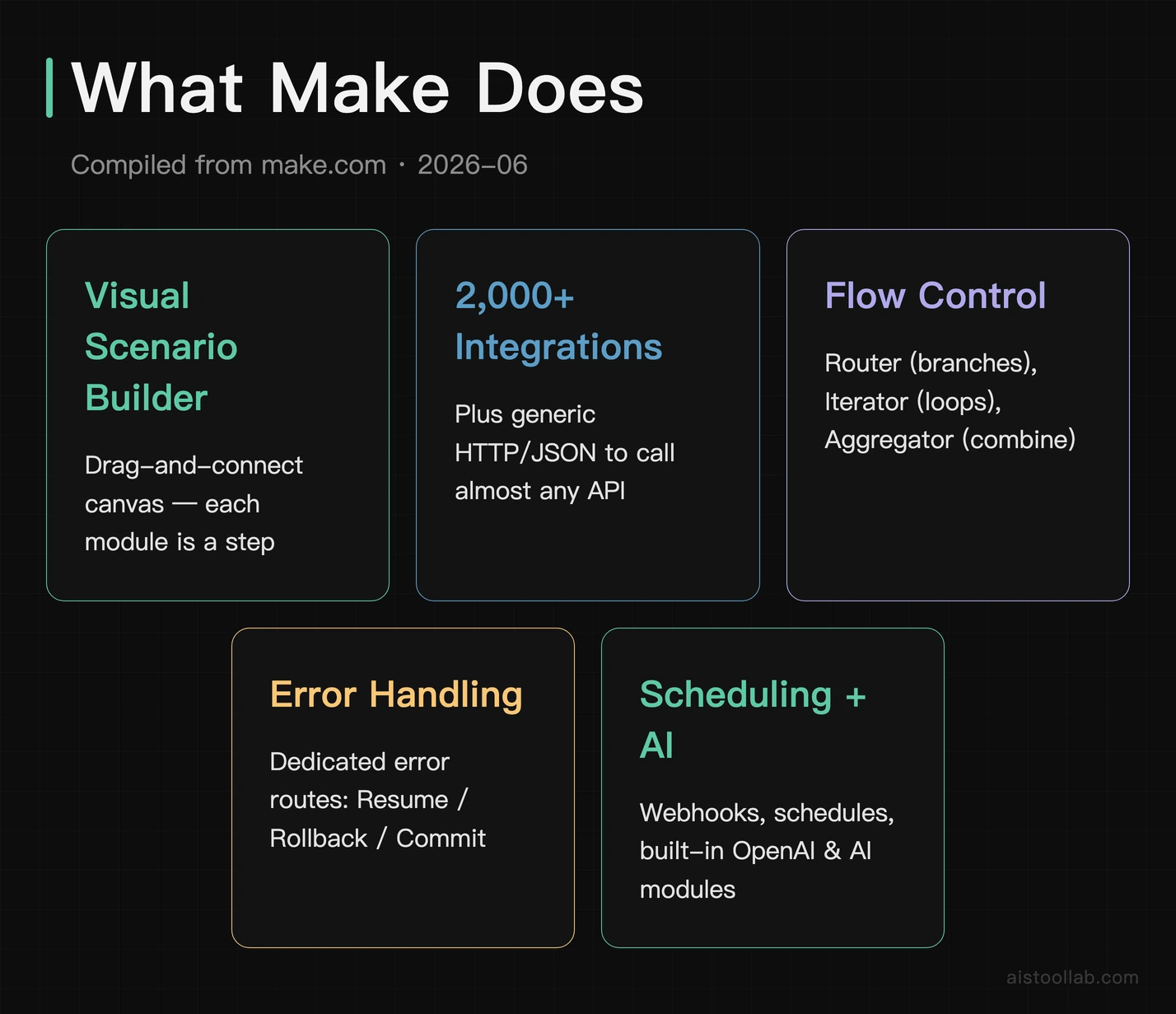
- Visual scenario builder — a drag-and-connect canvas (the one in my screenshot) where each module is a step.
- 2,000+ app integrations plus generic HTTP/JSON modules to call almost any API (the HTTP step I used).
- Flow control — Router (conditional branches), Iterator (loop over arrays), and Aggregator (combine many items into one) for non-trivial logic.
- Error handling — dedicated error routes with Resume / Rollback / Commit, so a failed step can fall back instead of silently breaking.
- Scheduling & webhooks — run on a schedule or trigger instantly from an incoming webhook.
- AI modules — built-in OpenAI and other AI steps, plus newer AI-agent features.
The takeaway from researching it alongside the hands-on run: the feature depth is exactly why it’s powerful and why it’s hard for a beginner to self-build — those flow-control and error modules are capability, but also complexity.
📋 What people build with Make
Compiled from make.com use cases — examples of what the platform is built for (not things I completed myself):
- Lead & CRM sync — push form submissions or ad leads into a CRM, spreadsheet, and notification channel automatically.
- E-commerce order flows — on a new order, update inventory, notify fulfillment, and trigger follow-up emails.
- Content pipelines — generate or transform content with AI, then post it to a CMS like WordPress (the category my own attempt fell into).
- Cross-app data sync — keep records consistent across multiple SaaS tools without manual copying.
- Internal notifications & reporting — scheduled pulls that summarize data and post it to Slack or email.
These are the kinds of high-value, repeatable flows Make is designed for.
📋 Make Pricing in 2026
📋 Compiled from make.com, 2026-06, based on 10,000 credits/month; cost scales with usage. These figures could not be re-checked at the time of this update (make.com returned HTTP 403 to an automated fetch on 2026-07-29), so treat them as of 2026-06 and check make.com for current pricing. Make bills by “credits” (operations) — higher usage means a higher tier:
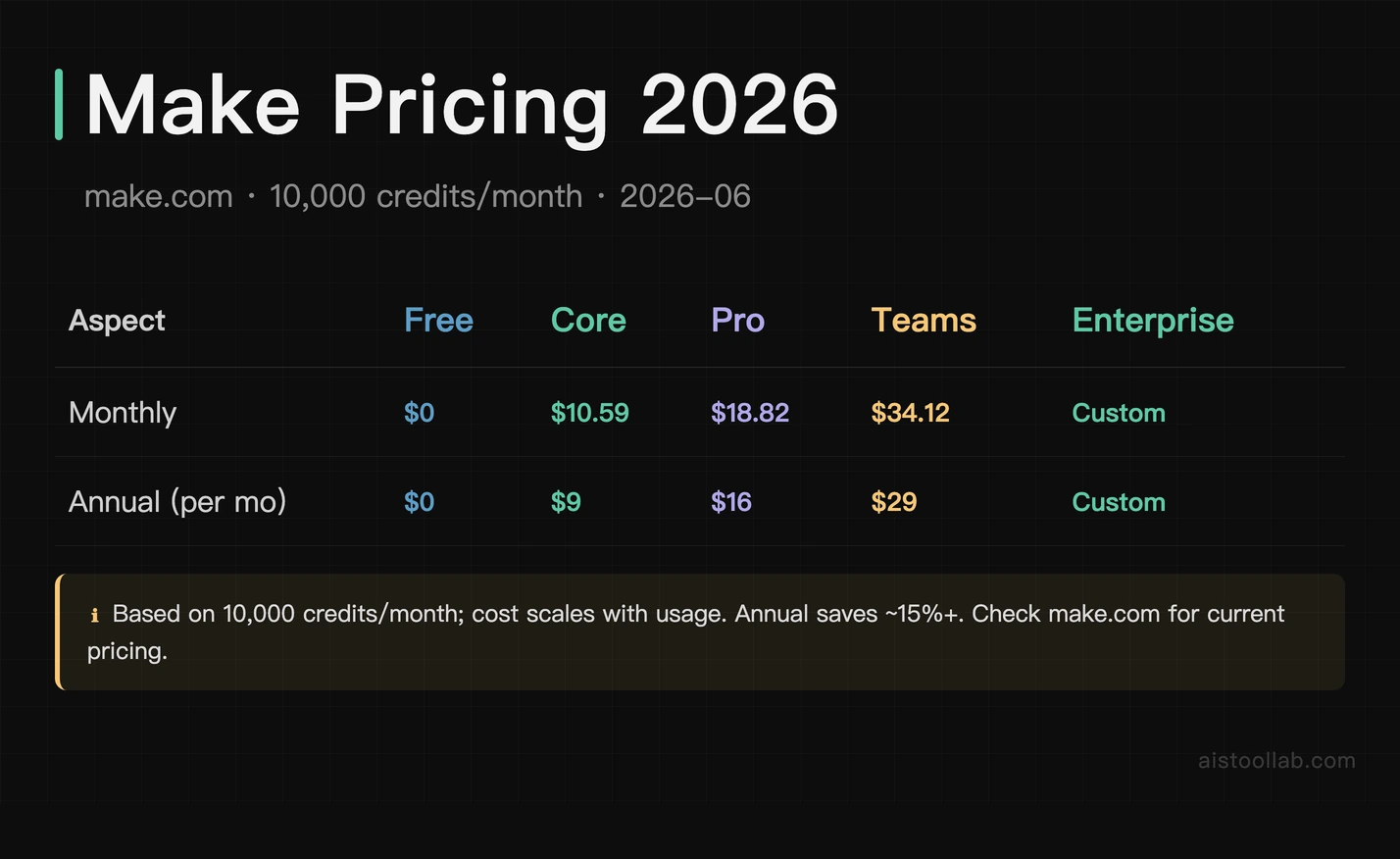
- Free — $0. A limited number of operations to try the builder — enough to experiment (it’s the tier I attempted on).
- Core — $10.59/month, or $9/month billed annually. For individuals running real personal automations.
- Pro — $18.82/month, or $16/month billed annually. More operations and advanced features for heavier use.
- Teams — $34.12/month, or $29/month billed annually. Collaboration and shared scenarios for groups.
- Enterprise — custom. Advanced security, support, and scale.
All figures are based on 10,000 credits/month; your cost scales with usage, and annual billing saves roughly 15%+. Always check make.com for current pricing.
📋 Make vs Zapier (Objective — Not Personally Compared)
I did not personally test Zapier, so this is objective, third-party positioning only — not a hands-on comparison. I also have no benchmark I can point you to, so I am not going to rank them. What I can state from the Make side, with sources: the free plan runs (✦ my own two-module flow above), and Make bills by operations rather than per task, with routers, iterators and aggregators for branching and array handling (📋 make.com, compiled 2026-06). Whether that ends up cheaper or harder for you depends on how many operations your flow consumes — compare both vendors’ current pricing pages against your own expected volume before deciding. The one thing my own attempt does support is the “depth = steeper curve” side of Make’s reputation; I can’t vouch for anything about Zapier, because I haven’t used it.
Pros & Cons
Pros
- Genuinely powerful — ✋ even a two-module flow made the canvas’s ability to chain real API calls obvious; 📋 the AI, file, and app-action modules come from Make’s app list, not from anything I ran.
- Deep flow control & error handling — 📋 routers, iterators, aggregators, and dedicated error routes.
- Cost-efficient at scale — 📋 operations-based pricing is positioned for high-volume flows; I have not price-compared it against per-task rivals.
- A real free tier to experiment — ✋ I could try building without paying.
Cons
- Steep for beginners building from scratch — ✋ picking the wrong authentication type blocked Save on the very first module, and fields have to be mapped by hand.
- Not “template-and-go” when you self-build — ✋ a blank canvas asks a lot before anything runs.
- Credit/operations model needs watching — 📋 cost scales with usage, so complex high-frequency flows can climb.
- Power = complexity — 📋 the same flow-control depth that makes it strong is what makes it hard to learn.
Who Make Is For (and Who Should Be Careful)
A good fit if you’re technically comfortable — a developer, ops person, or someone who enjoys wiring systems together — or a team that needs deep, cost-efficient automation and is willing to invest in the learning curve (or start from templates).
- Technical users / developers who want HTTP/JSON control and complex branching.
- Teams automating high-volume, multi-step processes where operations-based pricing pays off.
- People willing to start from a template rather than a blank canvas.
Be careful if you’re a non-technical beginner expecting to self-build a complex flow with no prior automation experience — ✋ that’s exactly where the first module stalled on the wrong auth type. You may finish faster with a ready-made template, or with a simpler tool, and grow into Make later.
The Verdict
Make is a genuinely powerful automation platform — ✋ even a two-module flow made its depth obvious. The honest boundary: the simple fetch → process flow ran fine on the free plan, while the full HTTP → OpenAI → WordPress scenario was not run — the AI step needs a separately paid OpenAI API key and the WordPress step would publish to a live site. Without an automation background the learning curve is steep, and this is not a plug-in-a-template-and-go tool when you self-build. If you’re technical, or a team ready to invest in learning (or to start from templates), Make’s power and scale-friendly pricing are compelling. If you’re a non-technical beginner, go in with realistic expectations — start from a template, and don’t assume a blank canvas will “just work.”
If you want to try it yourself, you can start with Make’s free plan ↗ — just know the learning curve is real.
Frequently Asked Questions
Is Make hard to learn?
✋ Moderately — the two-module “fetch → process” flow above ran on the free plan, but even that stalled on picking the wrong authentication type, and fields have to be mapped by hand. The power comes with a real learning curve.
Did you get your Make automation working?
✋ Yes — a two-module “HTTP request → Set variable” flow ran end to end on the free plan: status 200, both modules green. The larger HTTP → OpenAI → WordPress scenario was not run — the OpenAI module needs a separately paid OpenAI API key, and the WordPress module would publish to a live production site.
How much does Make cost?
📋 Based on 10,000 credits/month: Free $0, Core $10.59/mo ($9 annual), Pro $18.82/mo ($16 annual), Teams $34.12/mo ($29 annual), Enterprise custom. Cost scales with usage — check make.com for current pricing.
Is Make better than Zapier?
📋 I did not personally compare them and I have no benchmark to cite, so I won’t rank them. What is documented: Make bills by operations rather than per task and exposes routers, iterators and aggregators for complex flows (📋 make.com, compiled 2026-06). Check both vendors’ current pricing pages against your own expected operation count, and pick on that.
Does Make have templates?
📋 Yes — Make offers pre-built templates; starting from a template is the approach I’d suggest over a blank canvas if you’re new.
Can Make use AI / OpenAI?
📋 Yes — it has built-in AI modules. The OpenAI module was not connected here: it needs a separately paid OpenAI API key, which is not the same thing as a ChatGPT subscription.
Is the free plan enough to try Make?
✋ Yes — the entire two-module flow above was built and run on the free plan at zero cost (📋 the free tier’s 1,000 credits/month and 2 active scenarios are from make.com, compiled 2026-06 — my run only proves the flow executed, not the plan’s full limits). What the free plan does not cover is the separately paid OpenAI API key an AI step would need.
What is a “credit” or operation in Make?
📋 Make bills by operations/credits — roughly each module run consumes one. Pricing tiers are sized by monthly credits (the figures above assume 10,000/month), so heavier flows cost more.
Is Make really “no-code”?
It’s marketed as no-code/low-code, and you don’t write traditional code. But ✋ in the hands-on run it felt closer to low-code for anything non-trivial — you still reason about data structures, mapping, and API behavior, which is why a complex from-scratch build is a big step up from a two-module flow.
What happens when a Make scenario fails?
📋 Make has error handling — you can attach dedicated error routes with options like Resume, Rollback, and Commit so a failed step falls back gracefully instead of breaking silently. Error routes were not configured in the hands-on; this part is from the docs.