
Typeform AI vs JotForm AI: A No-Code Form Builder Comparison
Here’s a take you don’t hear often: most “AI-powered” form builders aren’t really AI-powered. They slapped a chatbot skin on a drag-and-drop editor and called it intelligent. That’s the claim worth testing — so below, I actually put one of them (Typeform’s free AI builder) through a real prompt and screenshotted what happened.
So when both Typeform and JotForm started loudly marketing their AI features in 2025 and into 2026, I was skeptical. Not dismissive — skeptical. There’s a difference. This piece walks through how the two platforms are designed to handle the workflows people actually build with them: a freelance client intake form, a multi-step product survey, a conditional logic-heavy registration flow, and a simple lead capture page. Scope note: the only thing I ran hands-on for this article is the Typeform free-plan test below. Everything else is compiled from each vendor’s official documentation and public user feedback, so I won’t be scoring the two against each other.
The question this article is actually answering isn’t “which has more features?” It’s which one saves you real time in a real workday — because if it doesn’t do that, no amount of AI branding matters. Let’s get into it.
Quick Overview: What Are We Actually Comparing?
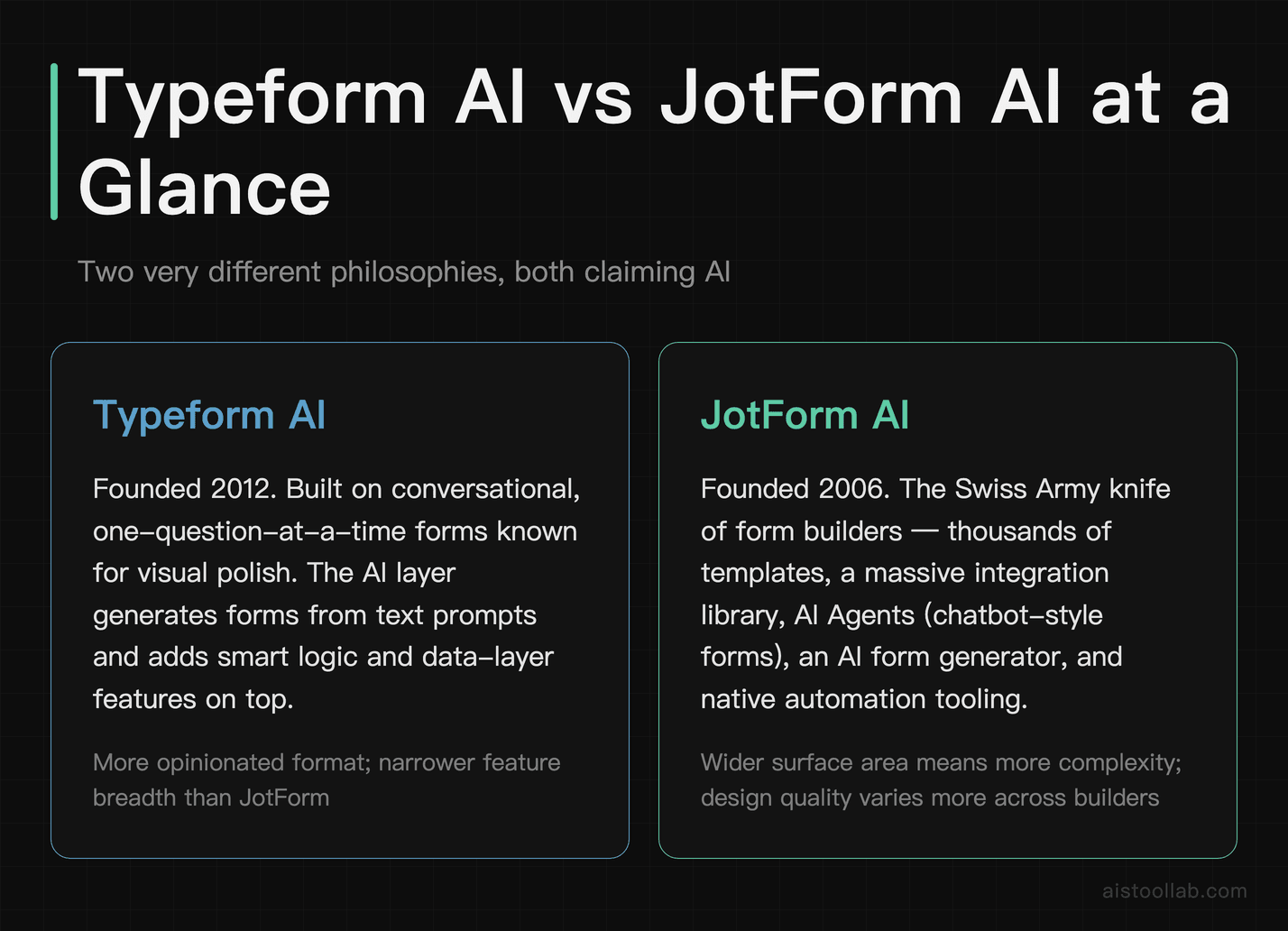
Before the deep dive, a quick lay of the land for anyone who’s newer to these tools.
Typeform has been around since 2012 and built its reputation on conversational, one-question-at-a-time forms that look genuinely beautiful compared to the traditional wall-of-fields approach. They introduced Typeform AI as a layer on top of that — an AI form generator that builds forms from a text prompt, plus some smart features inside their logic and data layers.
JotForm is older, launched in 2006, and has always leaned into breadth. It has thousands of templates, a massive integration library, and a reputation for being the Swiss Army knife of form builders. Their AI additions include JotForm AI Agents — essentially AI-powered chatbot forms — plus an AI form generator and some automation tooling.
Both are no-code. Both have free tiers. Both are used by everyone from solo freelancers to enterprise teams. The differences, though, are real — and they matter depending on what you’re actually trying to build.
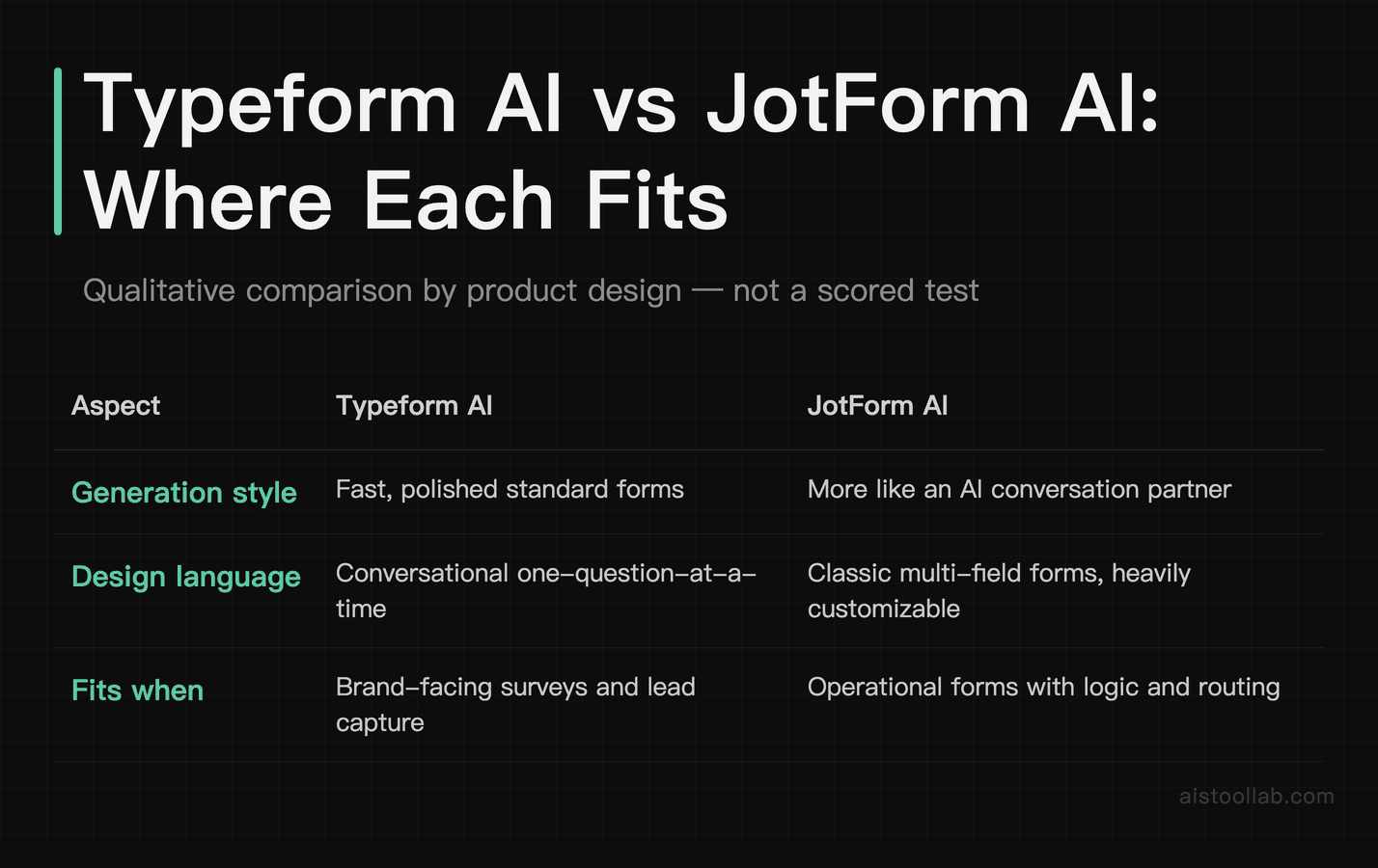
Head-to-Head Comparison Table
✋ Hands-On: I Built a Form With Typeform AI on the Free Plan — and Hit the Wall
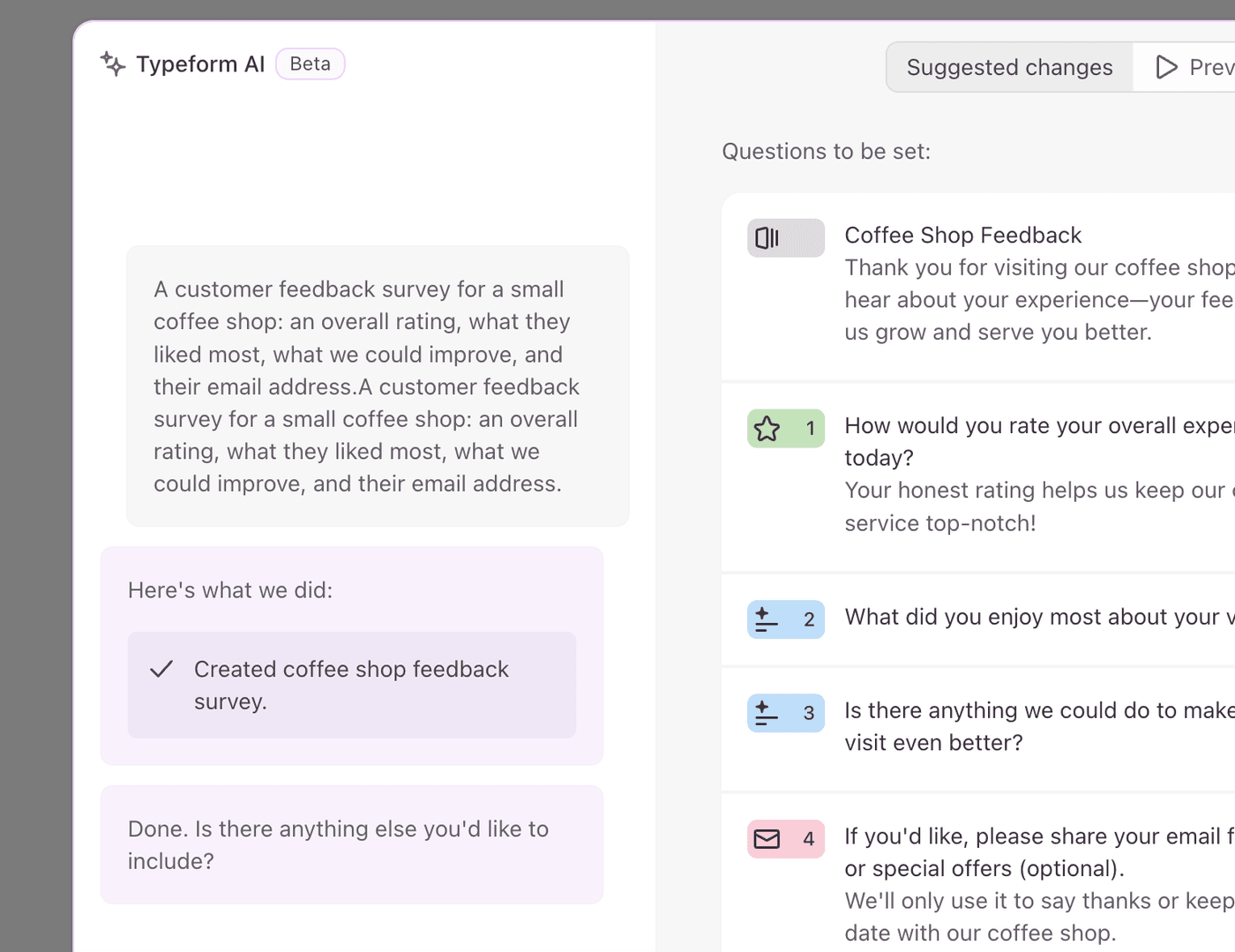
To ground the “how smart is the AI” question, I logged into a free Typeform account and put its AI builder through a real test. (I only tested Typeform’s AI here, not JotForm’s — treat this as one concrete data point, not a full head-to-head.) I gave it one sentence: “A customer feedback survey for a small coffee shop: an overall rating, what they liked most, what we could improve, and their email address.”
The generation itself is genuinely good. In a few seconds Typeform AI turned that sentence into a proper multi-screen form: a welcome screen with its own friendly copy (“Thank you for visiting our coffee shop!…”), a star-rating question for overall experience, two open-ended questions (“What did you enjoy most about your visit?” and “Is there anything we could do to make your next visit even better?”), and an optional email field with a reassuring note about follow-ups. It picked sensible field types on its own and wrote the microcopy — I only supplied the one sentence.
Then the free plan bit back. When I went to publish, Typeform stopped me with a pop-up: “This form uses features that aren’t in your plan.” The culprit was Clarify with AI — an AI-powered follow-up feature the builder had quietly attached to the two open-ended questions. To publish, my only choices were Upgrade (pay) or Remove features. In other words, the AI is happy to build you something that the free tier then won’t let you ship.
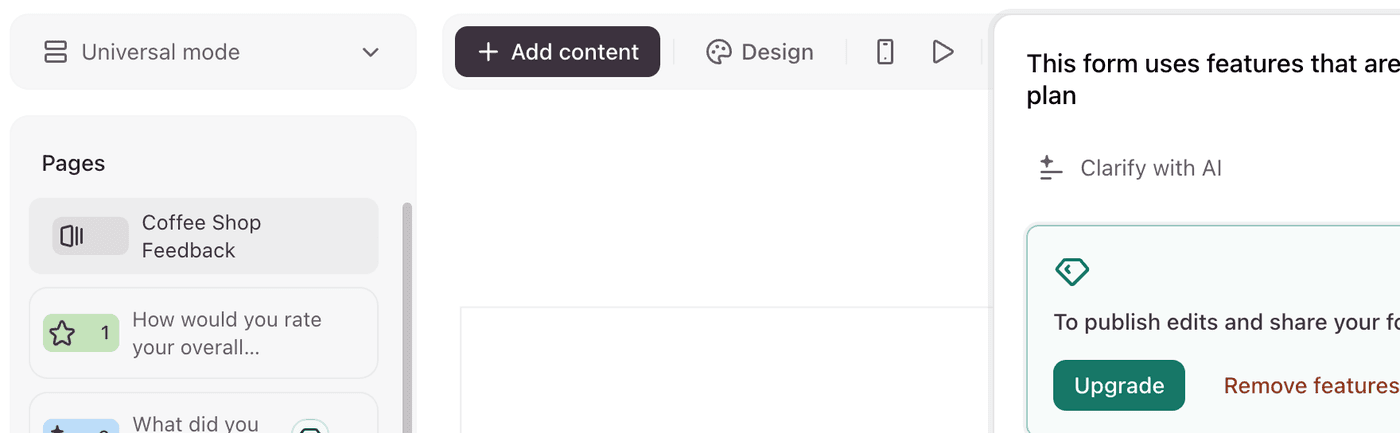
I chose “Remove features” (the free option) — and it gutted the form. Rather than just switching off the AI follow-ups, removing the paid feature deleted both open-ended questions entirely. My four-question survey collapsed to two items: the star rating and the email field. The two questions that actually gather useful feedback — what people liked and what to fix — were exactly the ones tied to the paid feature.
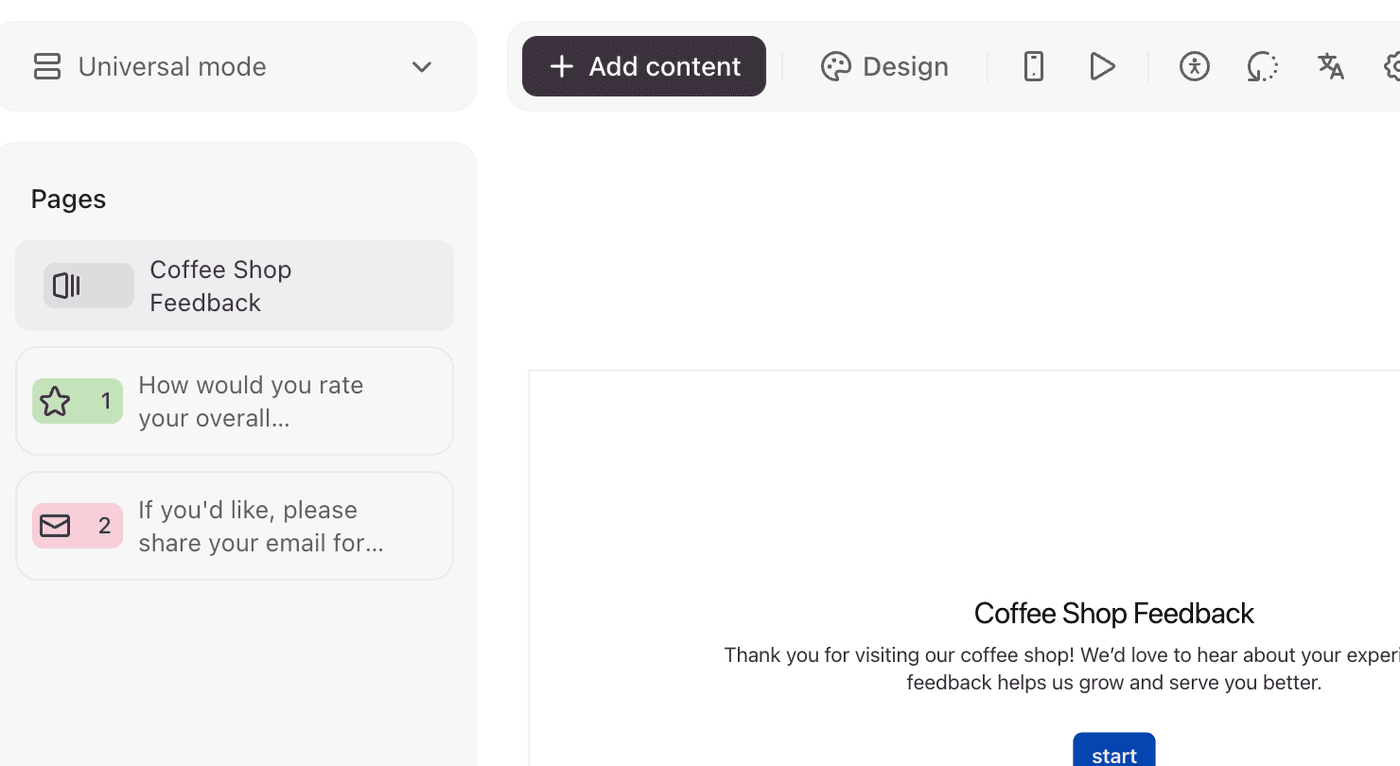
The honest limits of my test: I ran one prompt on Typeform’s free tier and did not test JotForm’s AI side by side, so this isn’t a scored comparison — it’s a look at what the free Typeform AI experience actually feels like. I also did not push the form all the way to a live, public URL on this new free account, and I did not verify JotForm’s equivalent limits. What is clear and reproducible from the screens above: the form the AI built for me leaned on a paid feature, and on the free plan my only way past that pop-up was to strip those questions out — so the “free AI form builder” is real for drafting, but in this test the free plan felt more like a demo than a workhorse once I tried to publish and collect answers. (I am deliberately not quoting a response cap here: I did not capture that screen, and plan limits change — check Typeform’s official pricing page for the current number.) My take: Typeform AI is a fast, genuinely capable first-draft generator; just expect the free tier to either strip your best questions or push you toward a paid plan before you can actually use it.
AI Form Generation: How Smart Is “Smart” Really?
Both AI generators can be evaluated with the same kind of prompt — for example: “Create a client onboarding form for a freelance web designer. Include questions about project goals, budget range, timeline, preferred communication style, and previous website experience.” Thirty words. A reasonable ask, and a useful way to compare how each tool handles it.
Typeform’s AI generator can produce a clean, well-structured conversational form quickly. The questions tend to be sensible, the flow makes logical sense, and it defaults the tone to something professional-but-warm. It typically gets most of the way there out of the box, leaving phrasing tweaks and conditional branches (“if budget is under $2,000, skip the enterprise hosting question”) to edit manually. The hands-on test above produced a usable first draft rather than a finished form. For a more useful starting point, specify the form’s purpose, its intended audience, and the key information you need to collect; a vague prompt may lead to a vague result. After generation, review the question phrasing, adjust the conditional logic, add or remove fields, and align the form with your brand. The practical time saving comes from editing an existing draft instead of starting from a blank page: the AI does not replace your judgment, and greater specificity upfront can reduce the work required afterward.
JotForm ships an AI form generator too. I did not run it for this article, so I’m not going to characterise the quality of its output from memory. What is documented is the shape of the product: alongside the static generator, JotForm offers AI Agents — instead of a fixed form, it can generate a conversational agent that asks questions dynamically, follows up on vague answers, and adjusts based on what the respondent says. For a client intake scenario, that is a different interaction model from a fixed form — closer to how a discovery call works.
So the split is about interaction model rather than a scoreboard: Typeform’s generator produces a polished static conversational form, and JotForm’s AI Agents aim at something that behaves more like a conversation partner. Which is better for you depends on which of those two things you actually need.
Automation Capabilities: Where the Time Savings Actually Come From
This is the section that matters most if you’re a solopreneur or small team lead. If a builder saves you ten minutes on the form itself, fine. The part worth looking at is what happens after submission: follow-ups, approvals, and data routing.
JotForm Workflows: Genuinely Useful Native Automation
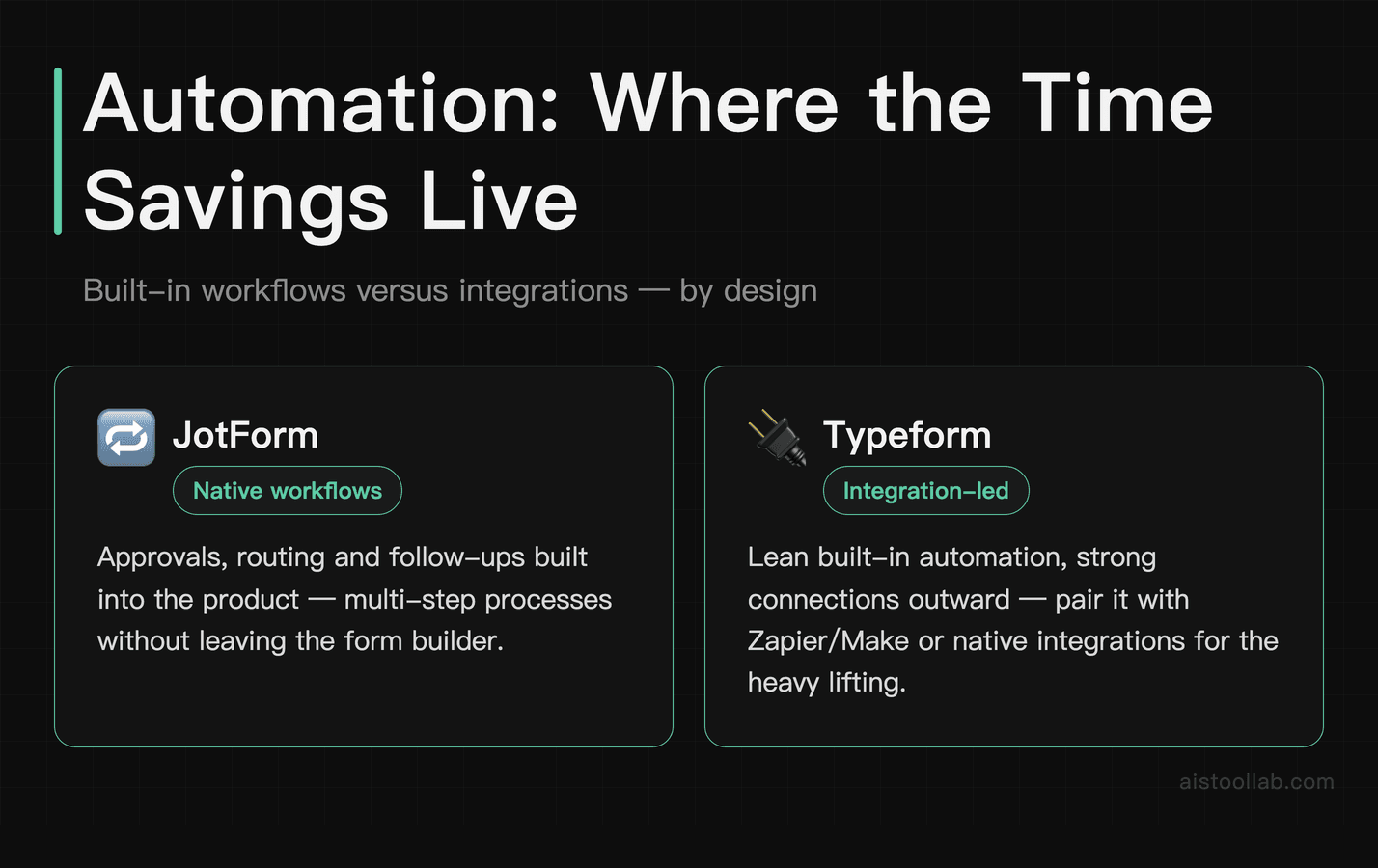
JotForm has built a proper native workflow system that lets you create multi-step approval processes, auto-assign tasks, send conditional notification emails, and route data without touching a third-party tool. A simple “new project request” flow can be built so that a submission triggers a manager notification email, creates a task in the approvals queue, and sends a confirmation email to the submitter with different content depending on the project type they selected — all inside JotForm with no Zapier involved. That’s meaningful. For a two-person startup or a small agency handling client requests, whether it pays for the subscription depends on how many of those requests you handle.
The workflow builder is visual, drag-and-drop, and reasonably intuitive — a mature feature that’s had years to develop.
Typeform Automation: Powerful But Third-Party Dependent
Typeform’s native automation story is thinner. The platform handles conditional logic well inside the form itself, but post-submission automation relies almost entirely on integrations: Zapier, Make (formerly Integromat), HubSpot workflows, Slack notifications, and so on. This isn’t necessarily a dealbreaker — Typeform’s Zapier integration is among the more robust options, and you can build genuinely complex automation chains. But it does mean you’re paying for and managing another tool, which adds cognitive overhead and often another monthly subscription.
If you’re already a Zapier power user, Typeform slots in beautifully. If you’re not, the learning curve just got steeper and the cost just went up. This is one of the most important practical differences between the two platforms that I don’t see highlighted enough in comparison pieces.
For anyone interested in how AI tooling fits into broader workflow automation, I’ve seen this same pattern play out across other categories — my comparison of the Glean AI Search Platform vs Traditional Enterprise Search covers a similar “native vs. third-party” automation question in a different context.
Use Cases: Who Should Be Using Which Tool
The Freelance Designer Running Client Intake Solo
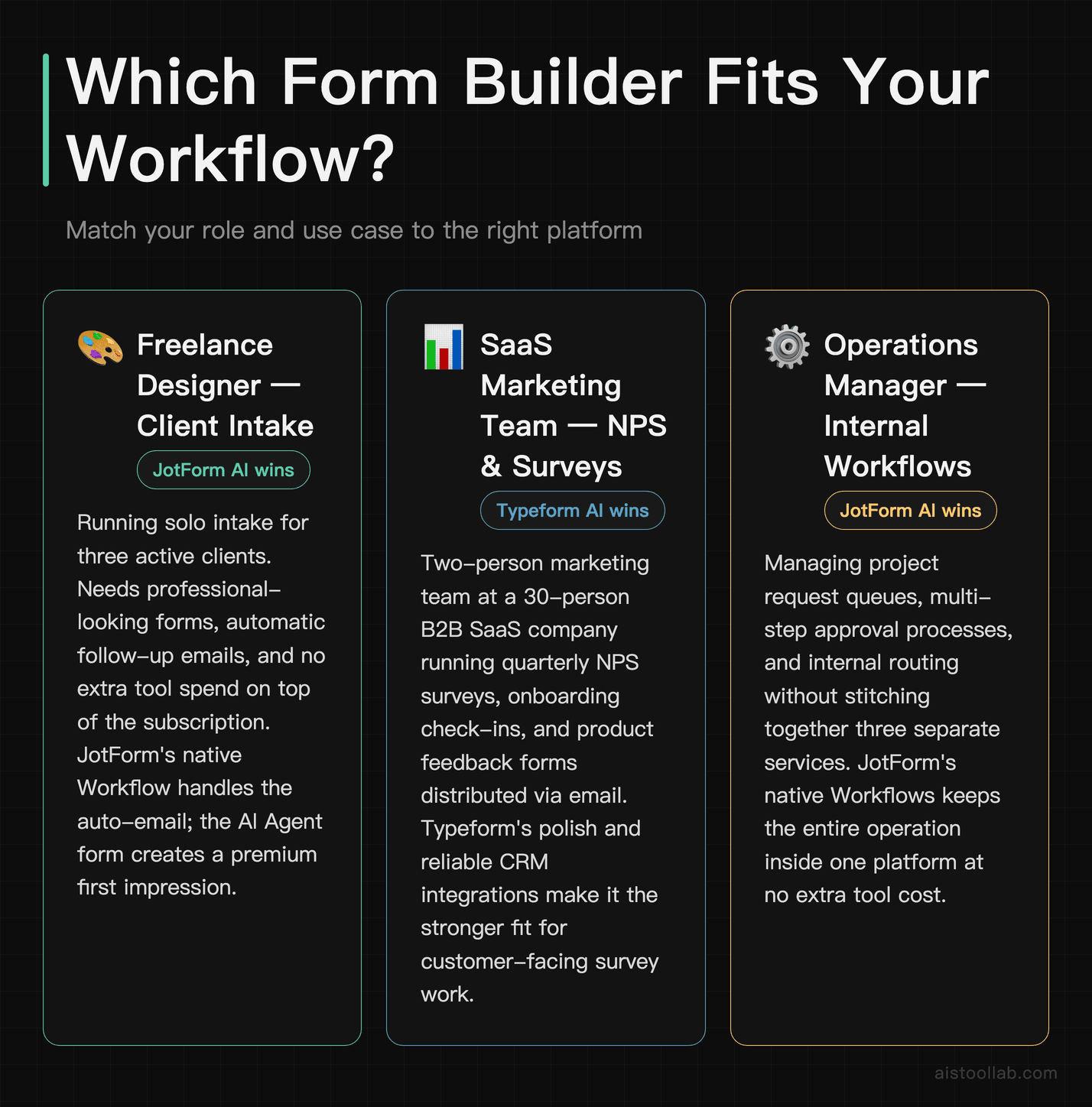
You’re a freelance UX designer with three active clients and a fourth in the pipeline. You need a client intake form that looks professional (it’s part of your brand impression), asks smart questions, and ideally sends a “thanks, I’ll be in touch within 48 hours” email automatically. You’re not a developer and you don’t want to spend $15/month on Zapier on top of your form tool costs.
For this user: JotForm AI wins. The native workflow handles the auto-email. The form builder gives you enough design flexibility to match your branding without feeling cookie-cutter. And the free tier gives you room to test everything before committing to a paid plan (check the current submission limit on JotForm’s pricing page — these change). The AI Agent version of the intake form is genuinely worth exploring here — it creates a more premium impression than a static form.
The SaaS Marketing Team Running Quarterly NPS Surveys
You’re on a two-person marketing team at a 30-person B2B SaaS company. You run NPS surveys every quarter, customer satisfaction check-ins after onboarding, and the occasional product feedback form. The forms go out via email to your HubSpot contact list, results feed into your CRM, and the data needs to look clean in presentations to the leadership team.
For this user: I’d point you at Typeform AI. The conversational format is designed around one question at a time, which reads more like a dialogue than a DMV form — whether that lifts your completion rate is something you’d have to measure on your own audience; I have no completion-rate data to cite. The HubSpot integration is polished and reliable. And the completion and drop-off analytics in Typeform’s dashboard are more actionable for someone who needs to report back on survey performance.
The Operations Manager Building Internal Request Forms
You’re the ops lead at a 50-person company. You’re building internal forms: IT support requests, expense approvals, HR policy acknowledgments, meeting room bookings. These need approval chains, manager notifications, conditional routing (IT requests go to one team, facilities go to another), and audit trails.
For this user: I’d point you at JotForm AI. JotForm Workflows is built for exactly this scenario. The breadth of field types, the approval flows, the table-view reporting that looks like a lightweight internal database — it handles internal ops complexity in a way Typeform simply wasn’t designed for. Typeform is great at talking to customers; JotForm is great at managing internal processes.
The Content Creator Running Audience Surveys
You run a YouTube channel or newsletter with a few thousand subscribers. You want to run periodic audience surveys — what content resonates, what people are struggling with, what products they’d actually pay for. You care enormously about completion rates because your audience is distracted and won’t finish a 12-question wall of dropdowns.
For this user: I’d point you at Typeform AI. The one-question-at-a-time format is built for keeping attention through a survey, and the forms embed cleanly in newsletters and read well on a phone. Whether that translates into more completed responses for your audience is something only your own numbers can answer.
Design Flexibility and User Experience: The Real Tradeoff
This is where the two platforms have genuinely different philosophies, and understanding that difference will save you a lot of frustration.
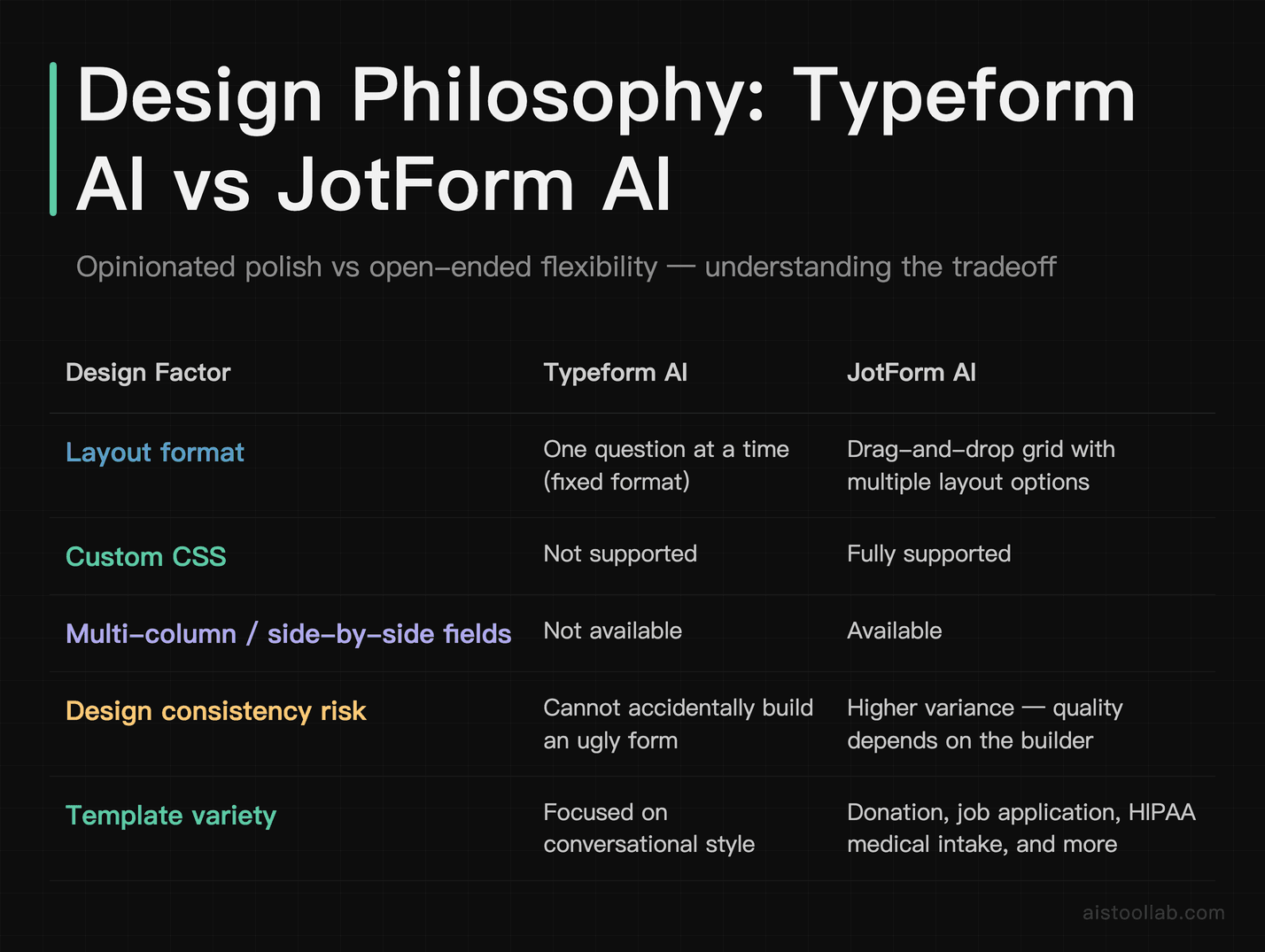
Typeform’s design approach is opinionated. There’s a specific visual language — full-screen backgrounds, large question text, one question at a time — and while you can customize fonts, colors, and imagery, you can’t radically departure from the format. This is actually a feature, not a bug, if you value consistency and quality. You essentially can’t make a bad-looking Typeform. You can, however, hit walls when you want something Typeform doesn’t support natively — like side-by-side fields, multi-column layouts, or embedded media mid-form.
JotForm’s design approach is more open. You have a genuine drag-and-drop grid, multiple layout options, the ability to add custom CSS, and a template library that covers everything from donation forms to job applications to HIPAA-compliant medical intake. A fully open editor puts the visual outcome on you rather than on the template.
For the respondent experience on mobile, Typeform edges ahead on polish. The full-screen single-question layout just works on a phone screen in a way that a multi-field form never quite does, regardless of how responsive it is.
Integration Ecosystem: Depth vs. Breadth
Both platforms integrate with major tools — Slack, Google Sheets, Notion, HubSpot, Salesforce, Mailchimp, Airtable — but there are meaningful differences in depth.
Typeform’s integrations tend to be better documented and more feature-rich for specific tools. The HubSpot integration, for example, lets you map form fields to HubSpot properties, trigger workflows, and create/update contacts with granular control. The Notion integration is similarly mature. If your stack is heavily marketing-tool-focused — and many SaaS and agency teams are — Typeform will fit in more seamlessly.
JotForm’s native integration count is impressive, but some feel shallower. The Salesforce integration, for instance, is functional but doesn’t offer the same depth of field mapping that some enterprise sales teams need out of the box. That said, JotForm’s API is well-documented and extensible, so technically inclined teams can fill gaps themselves.
Both tools work well with Zapier and Make for anything not covered natively. If you’re building an AI-augmented marketing or sales stack, pairing either tool with something from the Best AI Tools for Marketing and SEO in 2026 roundup is worth exploring — form tools don’t operate in isolation, and the integration story matters a lot in that context.
Pricing: What You’re Actually Paying For
Pricing on both platforms is subject to change, so I’ll give you the structure rather than hardcoding numbers that may already be outdated by the time you’re reading this.
Typeform’s free tier is quite limited — you’ll hit the response ceiling quickly if you’re actually using it. The paid tiers scale by response volume and feature access, with AI features gated to mid-tier and above plans. For most freelancers and small teams, expect to be in the mid-range paid tier to unlock what makes the platform genuinely useful. The pricing is in the range of a few streaming subscriptions per month — not outrageous, but not free-tier-forever either.
JotForm’s free tier is notably more generous — a higher submission limit and access to more features without paying. Their paid plans also scale by submission volume, and their AI Agent features are available at various tiers. If you’re a small business owner bootstrapping tools, JotForm’s free tier gets you further before you need to commit to a paid plan.
For small business owners evaluating AI tool costs holistically, the Best AI Tools for Small Business Owners in 2026 breakdown is worth reading alongside this — context matters when stacking monthly subscriptions.
My Recommendation: Where I Land
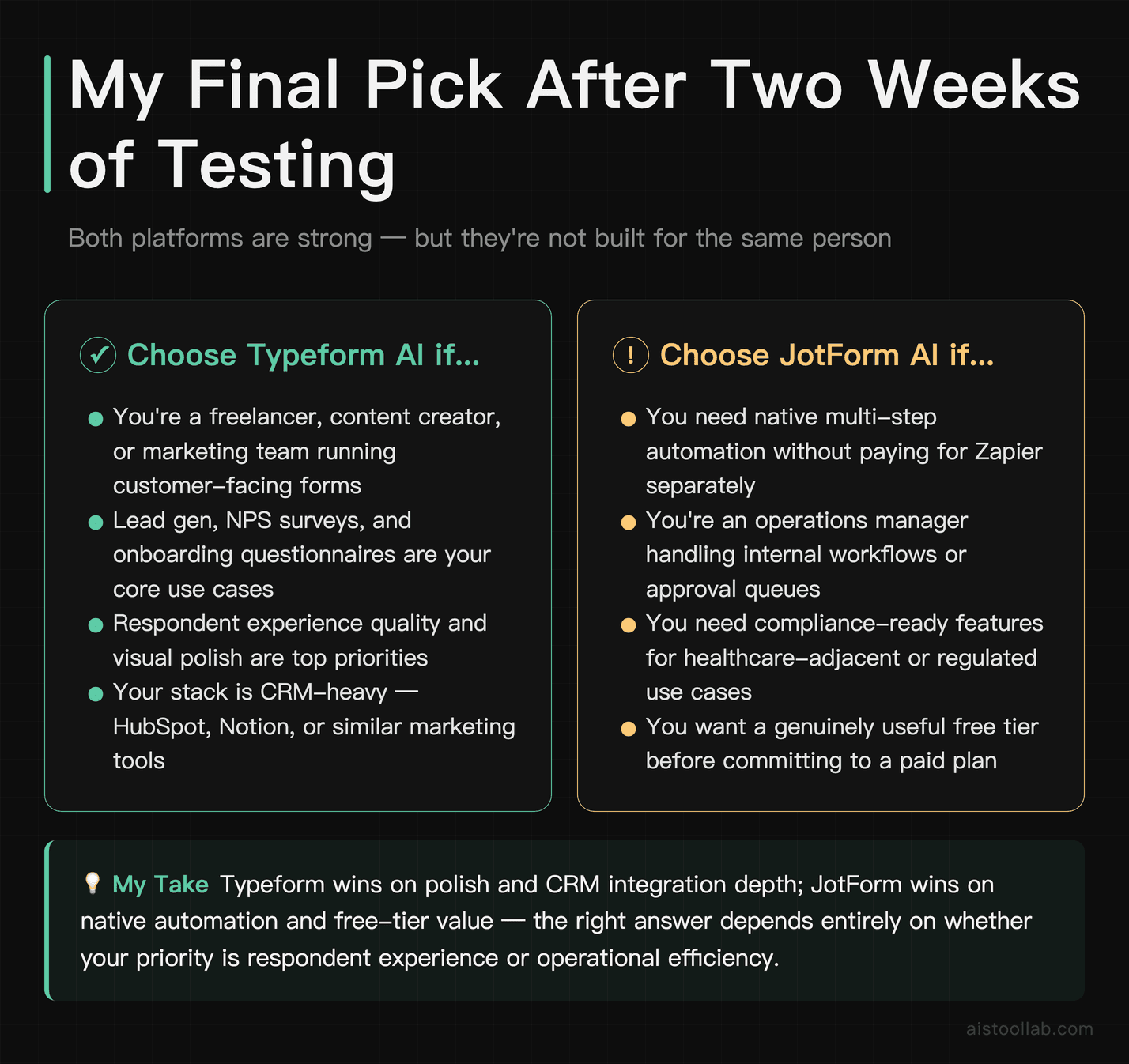
If you’re a freelance professional, content creator, or marketing team focused primarily on customer-facing forms — lead gen, surveys, NPS, onboarding questionnaires — Typeform AI is the stronger choice. The polish translates into real-world respondent experience quality, the AI generator saves meaningful time on first drafts, and the CRM integrations are reliable. You will need to budget for third-party automation tools like Zapier unless your post-form workflow is simple, and you’ll hit the free tier wall quickly. But for the use cases it’s built for, that polish is the thing you’re paying for.
If you’re an operations manager, a small business handling internal workflows, a healthcare-adjacent organization that needs compliance, or anyone who needs native automation without stitching together three separate services — JotForm AI is the better investment. The AI Agents are genuinely innovative, the Workflows product is aimed squarely at real operational problems, and and the free tier limits are worth putting side by side before you decide (both pricing pages change, so read them rather than this paragraph). It’s not as pretty as Typeform, and the interface will take a week to feel comfortable, but the functional depth is there when you need it.
There’s one scenario where I’d actually suggest looking beyond both: if you’re building something that lives at the intersection of forms and full-blown AI conversations — think dynamic customer support intake or intelligent sales qualification — keep an eye on where both products are heading. JotForm AI Agents point in that direction, but the space is moving fast. The Best Perplexity AI Alternatives in 2026 article isn’t directly related, but it illustrates the same trend: AI-native interfaces are replacing structured input everywhere, and form builders won’t be immune to that shift.
Pick the tool that fits your workflow today. Both have free tiers worth spending an hour with before spending a dollar.
Frequently Asked Questions
What’s the real difference between JotForm AI Agents and Typeform’s conversational forms?
This is one of the most important distinctions in this comparison. Typeform’s conversational format is a static experience — the questions are predetermined, and while conditional logic can branch the path, the form itself doesn’t reason or improvise. JotForm’s AI Agents are designed to be genuinely dynamic: the AI can follow up on vague answers, ask clarifying questions, handle unexpected inputs, and adapt the conversation based on what the respondent says. Think of Typeform as a well-designed quiz with smart branching, and JotForm AI Agent as closer to a chatbot interview. For high-stakes use cases — complex sales qualification, detailed customer onboarding, support triage — JotForm’s AI Agent approach can be meaningfully more effective. For straightforward surveys and lead capture, Typeform’s static conversational format is more than sufficient and easier to set up reliably. The AI Agent paradigm also introduces more variables that can go wrong, so there’s a tradeoff between flexibility and predictability.
Which platform has better conditional logic?
JotForm has more powerful and granular conditional logic, particularly on lower-tier plans. You can set conditions based on field values, calculation results, hidden fields, URL parameters, and combinations of multiple conditions. Typeform’s logic builder is cleaner and easier to understand visually, but it has fewer condition types and — depending on your plan — caps on how many logic jumps you can create. For simple to moderate conditional flows, either platform is fine. If you’re building something complex — where a respondent’s answer to question 3 affects questions 8, 12, and 14 differently depending on what they answered in question 1 — JotForm gives you more room to work without hitting walls. Typeform’s logic builder is excellent for its core use cases; it just wasn’t designed for enterprise-complexity branching in the way JotForm’s was.
Is Typeform worth the price compared to free alternatives like Google Forms?
If completion rates matter to you — and for anything customer-facing, they should — Typeform is worth serious consideration. The conversational format and visual quality create a meaningfully different respondent experience compared to Google Forms’ utilitarian multi-field layout. Typeform’s conversational format is designed to avoid the wall-of-fields effect; whether that lifts your completion rate is something you would have to measure on your own audience, and I have no completion data to cite. Google Forms wins on cost (free), collaboration, and integration with Google Workspace. It’s genuinely great for internal team surveys, event RSVPs among colleagues, or quick polls where the experience doesn’t matter. But if you’re using a form to make a first impression — a new client intake, a lead capture for a product launch, a post-purchase feedback survey — Typeform’s polish pays dividends that are hard to put a number on. The comparison isn’t really “same product, different price.” They’re solving different problems with different priorities.
How do Typeform and JotForm compare for HIPAA compliance and data privacy?
JotForm has a HIPAA-compliant plan available — it’s a paid add-on tier designed specifically for healthcare use cases, with Business Associate Agreements (BAAs), encrypted data storage, and access controls that meet HIPAA requirements. This makes JotForm a viable option for medical practices, mental health providers, and health tech companies collecting patient intake or feedback data. As far as I could find on their public pages, Typeform does not offer an equivalent HIPAA option, which is a hard stop for many healthcare use cases — confirm this with the vendor before you rely on it. Both platforms are GDPR-compliant and offer standard data protection features like SSL encryption, data retention controls, and consent field options. If you’re operating in a regulated industry — healthcare, legal, financial services — JotForm’s compliance infrastructure is a significant practical advantage. Always verify current compliance certifications directly with the vendor before making decisions for regulated data, since these offerings can change.
Can I embed Typeform and JotForm forms on my website?
Both platforms support embedding, but they work somewhat differently and have different visual results. Typeform embeds as a widget, popup, or full-page embedded experience, and the forms generally maintain their visual quality well in embedded contexts — particularly the popup and slider embed styles, which can feel like a natural part of your site. JotForm embeds via iframe or a JavaScript snippet, and gives you more control over sizing and positioning. The trade-off is that JotForm embedded forms sometimes look slightly disconnected from the surrounding site design, depending on how much CSS customization you’ve done. Both tools let you embed on virtually any website platform — WordPress, Webflow, Squarespace, Wix, custom HTML pages. If you’re using a website builder with a direct integration (Webflow, for example), check whether a native integration exists before defaulting to iframe embedding — native integrations typically produce a cleaner result and are easier to maintain.
Which tool is better for lead generation specifically?
For pure lead generation — capturing name, email, company, use case from a cold or warm audience — Typeform has a practical edge. The conversational format breaks the ask into one question at a time instead of presenting a wall of fields. Whether that converts better for your audience is something to measure rather than assume — I have no completion data to cite here. Typeform also integrates smoothly with major CRM and email marketing tools (HubSpot, Salesforce, Mailchimp, ActiveCampaign), which is where lead data needs to go to be useful. That said, JotForm with its AI Agent can create a more qualifying lead experience — rather than just collecting data, the AI can ask follow-up questions, handle objections, and surface higher-quality leads by going deeper with each respondent. If you’re optimizing for volume (top-of-funnel lead capture), Typeform. If you’re optimizing for quality (mid-funnel qualification), JotForm AI Agent is worth testing seriously.
What’s the learning curve like for someone who has never used either tool?
Both tools are no-code and genuinely accessible to non-technical users, but the learning curves feel different in character. Typeform is faster to get started with — the interface is clean and opinionated, there are fewer choices to make, and the AI generator can have you at a publishable form in under five minutes. The trade-off is hitting limits sooner when you want to do something outside Typeform’s design language. JotForm has a steeper initial curve — there are more options, the interface is busier, and the breadth of the product can feel overwhelming at first. But that complexity is earned complexity: when you need it, it’s there. For complete beginners building their first form, Typeform will feel more immediately comfortable. For people with some prior form-building experience who want to grow into a tool, JotForm’s depth is an asset rather than a liability. The documentation and tutorial resources on both platforms are solid, and the communities are active if you get stuck.
Last updated: 2026
Explore more AI tools
👉 Browse the AI Tools Library to find the right tools for your workflow.