
Your Company’s Knowledge Is There. Nobody Can Find It.
Picture this: a senior account executive at a 400-person SaaS company is 20 minutes from a big renewal call. She needs the original implementation notes from 18 months ago, the customer’s current contract terms, and the latest product roadmap slides the CTO mentioned in an all-hands two weeks back. She opens the company’s search portal. Nothing useful comes up. She pings three people on Slack. Two don’t respond in time. She walks into the call half-prepared, and the deal gets extended another quarter instead of closing.
This is not a hypothetical. Talk to anyone working at a company with more than 200 employees, and they’ll tell you a version of this story. Information exists somewhere — in Confluence, in a Google Drive folder someone made in 2021, in a Salesforce note, in a Slack thread with 847 messages — but the ability to surface that information when it actually matters is, charitably, broken. Traditional enterprise search tools were supposed to fix this. Largely, they haven’t.
That’s the gap Glean is trying to fill. It’s an AI-powered enterprise search and knowledge discovery platform that connects across your entire tool stack and uses large language models to surface answers, not just links. But “AI-powered search” is a phrase that’s been slapped on a lot of mediocre products over the last few years, so the real question is: does Glean actually reduce the time your team wastes hunting for information, or is it just a more expensive version of the same frustration? I’ve dug into how it works, how it compares to traditional enterprise search, and whether the ROI math holds up for real organizations.
What Glean Actually Is (And What It’s Not)
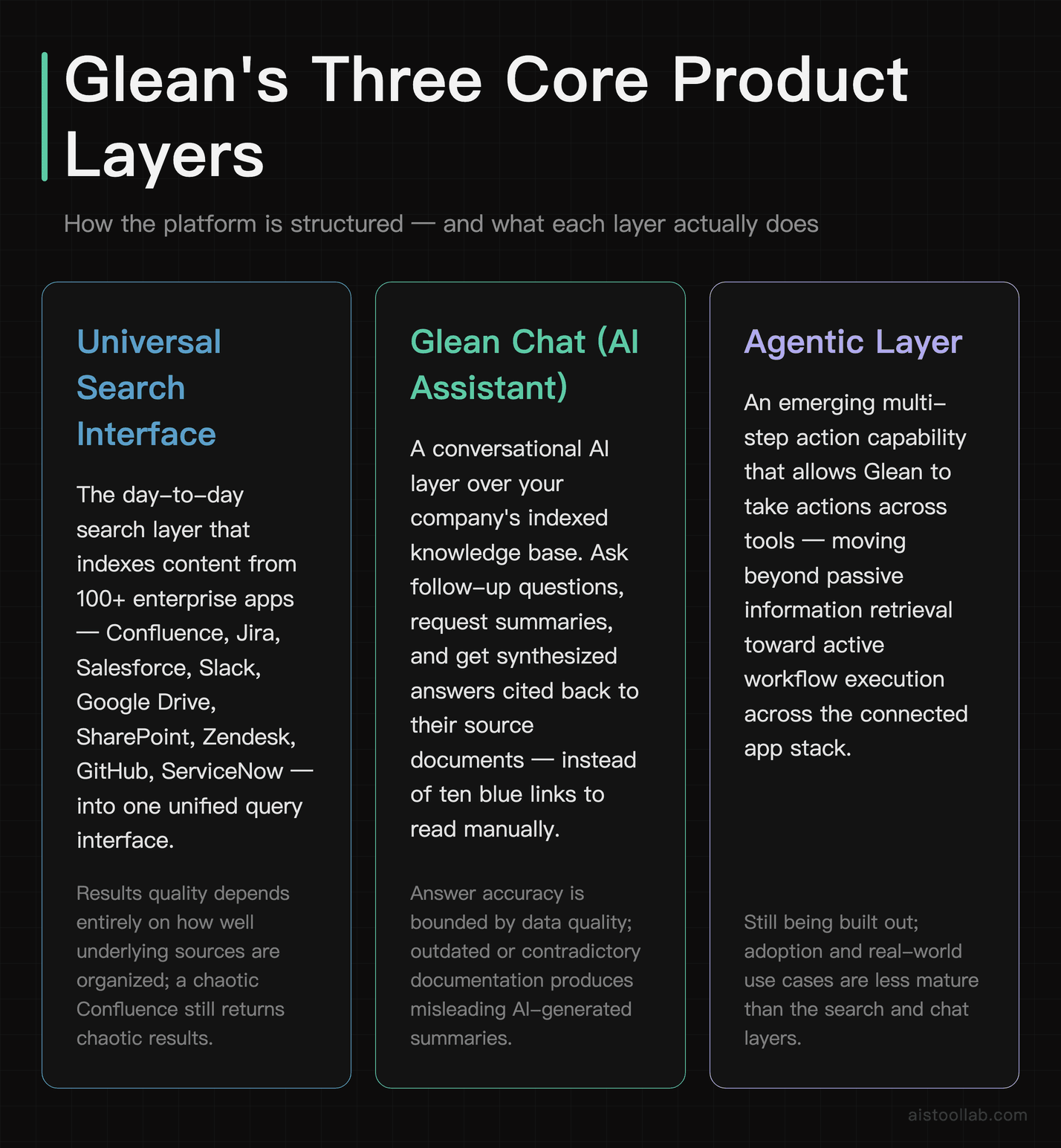
Glean is a workplace search platform built specifically for large organizations. It indexes content from over 100 enterprise applications — think Confluence, Jira, Salesforce, Slack, Google Drive, SharePoint, Zendesk, GitHub, ServiceNow, and more — and then applies AI to that unified index so employees can ask natural language questions and get synthesized answers instead of a list of ten blue links they still have to read through manually.
The core product has a few distinct components. There’s the universal search interface, which is the thing most people use day-to-day. There’s the AI assistant layer (Glean Chat), which lets you have a back-and-forth conversation with your company’s knowledge base — asking follow-up questions, requesting summaries, getting answers cited back to their source documents. And there’s an agentic layer that Glean has been building out, allowing the system to take multi-step actions across tools, not just retrieve information passively.
What Glean is not is a content management system. It doesn’t store your documents. It indexes them where they already live. If your Confluence is a dumpster fire of outdated pages, Glean will search that dumpster fire more efficiently — it won’t clean it up for you. That distinction matters a lot when thinking about implementation, and I’ll come back to it.
The platform is enterprise-only and priced accordingly. Glean doesn’t publish pricing publicly, but it’s positioned at the higher end of the market — typically discussed in the context of mid-market to large enterprise deals, often with annual contracts negotiated by sales. This is not a $30/month self-serve tool. If you’re a small team, stop reading now and check out the Best AI Tools for Small Business Owners in 2026 roundup instead.
How Traditional Enterprise Search Actually Works (And Why It Falls Short)
To fairly compare Glean against “traditional enterprise search,” it helps to be specific about what that actually means. Traditional enterprise search tools — think older versions of Microsoft Search, Elastic-based internal search implementations, or platforms like Coveo and Sinequa in their pre-AI iterations — operate primarily on keyword matching and document indexing. You type words, the system finds documents containing those words, and ranks them by some combination of relevance scoring and recency.
The fundamental problem is that language doesn’t work the way keyword search assumes it does. If someone searches for “Q3 pricing strategy,” they probably want the document where someone wrote “our approach to monetization for the second half of the year.” Those two strings share almost no words. Keyword search either misses the document entirely or buries it behind a dozen technical files that happened to contain the word “pricing” in a footer.
There’s also the permission and freshness problem. Traditional enterprise search tools are notoriously bad at handling the fact that your company’s data lives across a dozen systems with completely different permission models. Getting a single coherent search experience across Salesforce, Slack, and SharePoint with proper access controls is a serious technical undertaking. Many organizations end up deploying search only within individual tools — so you have Confluence search, and you have Salesforce search, and they never talk to each other. Employees just open five tabs and search five times.
The result is a situation where search exists but people don’t trust it. They default to asking colleagues, digging through their own inboxes, or just recreating work that already exists somewhere. This is the actual cost that tends to get underestimated in enterprise productivity conversations.
Head-to-Head: Glean vs. Traditional Enterprise Search
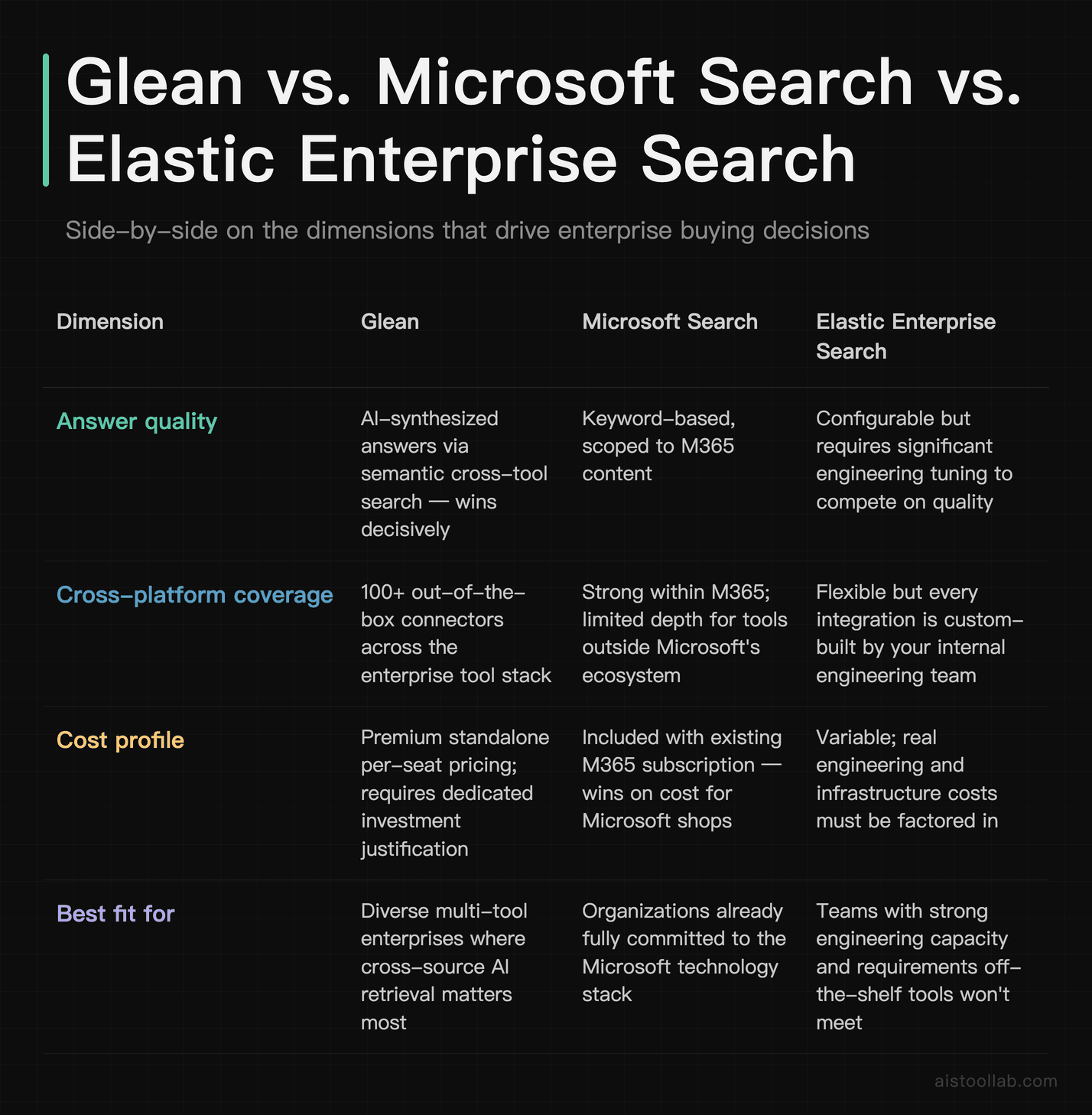
Let’s get specific. Here’s how Glean stacks up against a representative traditional enterprise search setup — I’m using Microsoft Search (built into Microsoft 365) and Elastic Enterprise Search as the benchmarks, since they’re the two most commonly deployed alternatives at scale.
The headline takeaway: Glean wins decisively on answer quality and cross-platform coverage, Microsoft Search wins on cost if you’re already in the M365 ecosystem, and Elastic wins if you have a strong engineering team and specific requirements that off-the-shelf tools won’t meet. None of these is a universal slam dunk.
Deep Dive: The Dimensions That Actually Matter
Search Quality in Practice
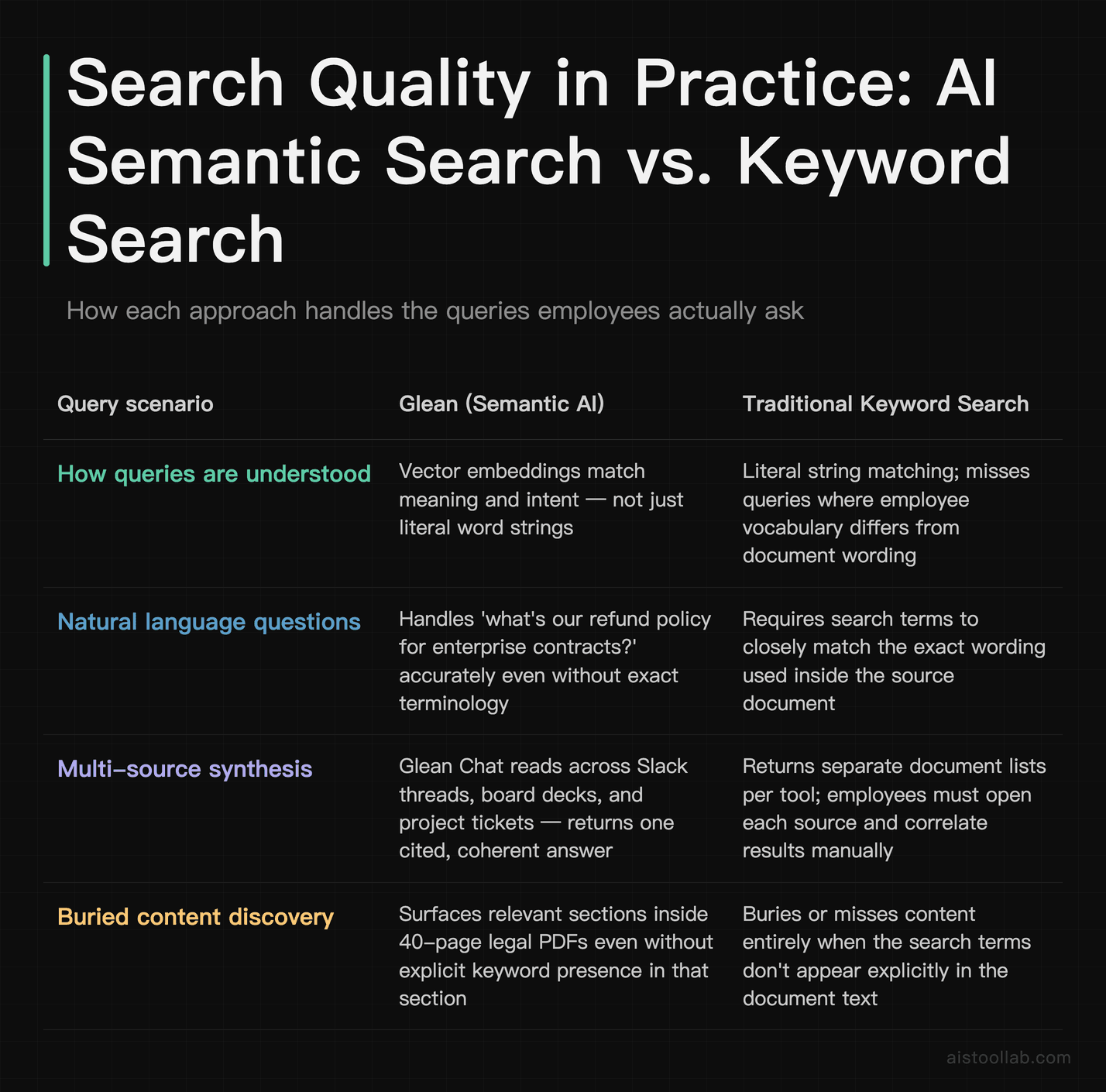
The gap between semantic search and keyword search is most visible when employees ask questions the way they actually think, not the way an IT team imagined they would search. Glean’s underlying architecture uses vector embeddings to understand meaning, which means a query like “what’s our refund policy for enterprise contracts” can surface a relevant section buried inside a 40-page legal PDF, even if that section doesn’t use the words “refund” or “policy” explicitly. Traditional keyword search would miss this entirely or bury it.
The AI assistant layer (Glean Chat) goes further. Instead of returning a list of documents, it reads across multiple sources and synthesizes a coherent answer with citations. For something like “what did we decide about the Madrid office expansion in Q4” — a question that might span a Slack conversation, a board deck, and a project management ticket — this is genuinely useful. You get one answer instead of three separate searches you have to correlate manually.
That said, AI-generated answers come with the usual caveats. The quality is heavily dependent on the quality and freshness of your underlying data. If your Confluence documentation is contradictory or outdated, Glean will surface contradictory or outdated answers — just more confidently and in a nicer format. This is not a Glean-specific failure; it’s a fundamental characteristic of RAG-based systems.
Implementation Complexity: The Real Picture
Glean markets itself as fast to deploy, and compared to building a custom Elastic implementation, it genuinely is. The pre-built connectors for major tools handle a lot of the heavy lifting. But “fast” is relative. Deploying Glean across a 500-person organization with 15 different data sources still requires real work: connector authentication for each source, tuning relevance for your specific use cases, setting up the right identity mapping for permissions, and driving user adoption.
IT and security teams at larger companies will spend meaningful time on the data governance piece. The question of “what should Glean be allowed to index?” is not a trivial one. You probably don’t want HR compensation data surfacing in engineering team searches, even if technically both teams have access to the same Google Drive. Getting this right takes deliberate configuration, not just clicking “connect.”
The adoption problem is arguably harder than the technical problem. Enterprise search tools have a long track record of being deployed and then ignored. If employees don’t trust that search will give them good answers — and that trust is built slowly, one good search result at a time — they’ll keep pinging colleagues on Slack instead. Glean is aware of this and has put resources into things like browser extensions, Slack integration, and surfacing proactive suggestions to try to meet employees where they already are rather than asking them to build a new habit.
ROI: What the Math Actually Looks Like
The ROI conversation for a tool like Glean almost always comes down to one number: how much time does your average knowledge worker spend searching for information per week? Industry research bodies like IDC and McKinsey Global Institute have published estimates over the years suggesting knowledge workers spend a significant portion of their workweek — often cited in the range of one to two hours daily — on finding information, though figures vary widely by role and industry, and I’d encourage organizations to measure their own baseline rather than relying on aggregated benchmarks.
The Glean ROI argument is straightforward: if you can cut that search and discovery time meaningfully for a 500-person organization, even modest per-person time savings compound into significant recovered productivity across the year. The challenge is that “time saved” is notoriously hard to measure because it doesn’t show up cleanly in any system of record. Employees rarely track that they spent 45 minutes hunting for a document. The time just evaporates.
Where the ROI case is most concrete is in specific, measurable workflows. Customer support teams where ticket resolution time can be tracked before and after. Sales teams where competitive intelligence or contract lookup time is measurable. Engineering teams where incident response relies on quickly surfacing past runbooks. In these contexts, productivity improvements are observable rather than theoretical.
The ROI case is weakest for general “information access” across an organization, where the benefits are real but diffuse and hard to tie to a specific business outcome. Large organizations used to doing rigorous software ROI analysis should go in with realistic expectations and try to identify two or three concrete workflows where they can measure impact before assuming company-wide benefit.
Use Cases: Who Gets the Most Out of Glean
The Customer Success Team at a Mid-Market SaaS Company
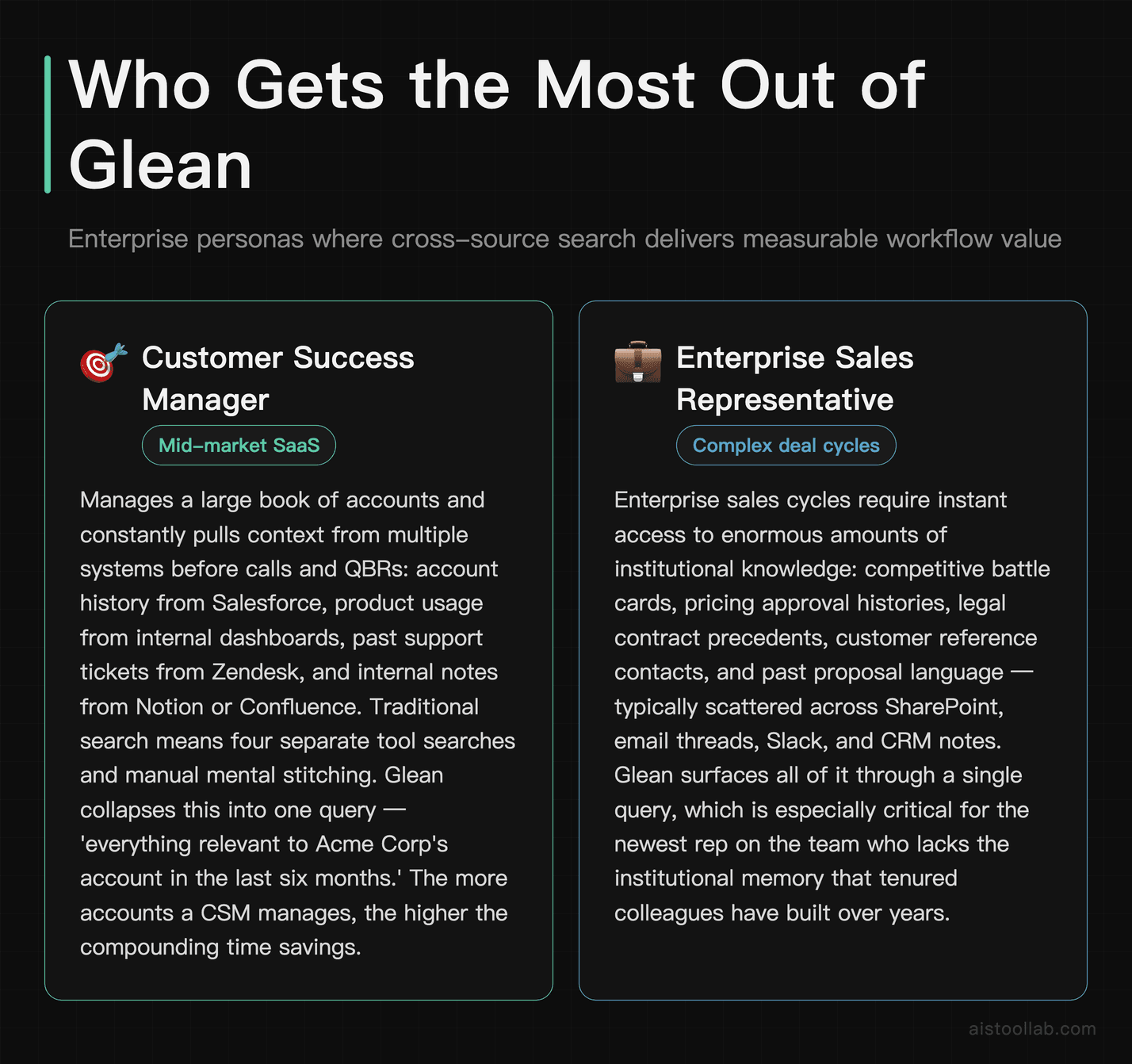
A customer success team managing a large book of accounts is constantly needing to pull context from multiple systems: account history from Salesforce, product usage from internal dashboards, past support tickets from Zendesk, and internal notes from Notion or Confluence. Traditional search means opening four different tools and running four different searches, then mentally stitching the results together before a call or QBR. Glean’s ability to search across all of these simultaneously and surface a synthesized answer — “here’s everything relevant to Acme Corp’s account in the last six months” — is a genuinely material time saver in this context. The more accounts a CSM manages, the more valuable this becomes.
The Enterprise Sales Rep Preparing for Complex Deals
Enterprise sales cycles involve enormous amounts of institutional knowledge: competitive battle cards, pricing approval histories, legal contract precedents, customer reference contacts, past proposal language. This information is typically scattered across SharePoint, email threads, Slack, and CRM notes, and the newest rep on the team has almost no way to find it quickly. Glean acts as a kind of institutional memory that makes the ramp time for new sales hires shorter and helps experienced reps stop re-inventing the same research. For organizations where a single deal can be worth hundreds of thousands of dollars, shaving a few hours off deal prep time per rep per month has a real dollar value attached to it.
The Engineering Team During an Incident Response
When something breaks at 2am, the last thing an on-call engineer needs is to dig through a hundred Confluence pages to find the relevant runbook, the last time this specific error appeared in a post-mortem, or the Slack thread where someone explained the workaround six months ago. This is exactly the kind of cross-source, time-pressured information retrieval where Glean’s speed and answer quality can have a direct impact on mean time to resolution. Engineering teams at companies that take system reliability seriously often find this the most immediately compelling use case, particularly when they can see the before/after on incident timelines.
The New Employee Trying to Ramp Quickly
Onboarding is a systematically underappreciated use case for enterprise search. New employees spend a disproportionate amount of their first few months either searching for context they can’t find or interrupting existing colleagues to ask questions. Glean functions as an always-available answer to “how does X work here?” — surfacing relevant documentation, past decisions, and process notes without requiring a new hire to already know who to ask. For companies that hire in volume or have high turnover, the compounding value of faster onboarding can be substantial.
Glean vs. Competitors: The Broader Landscape
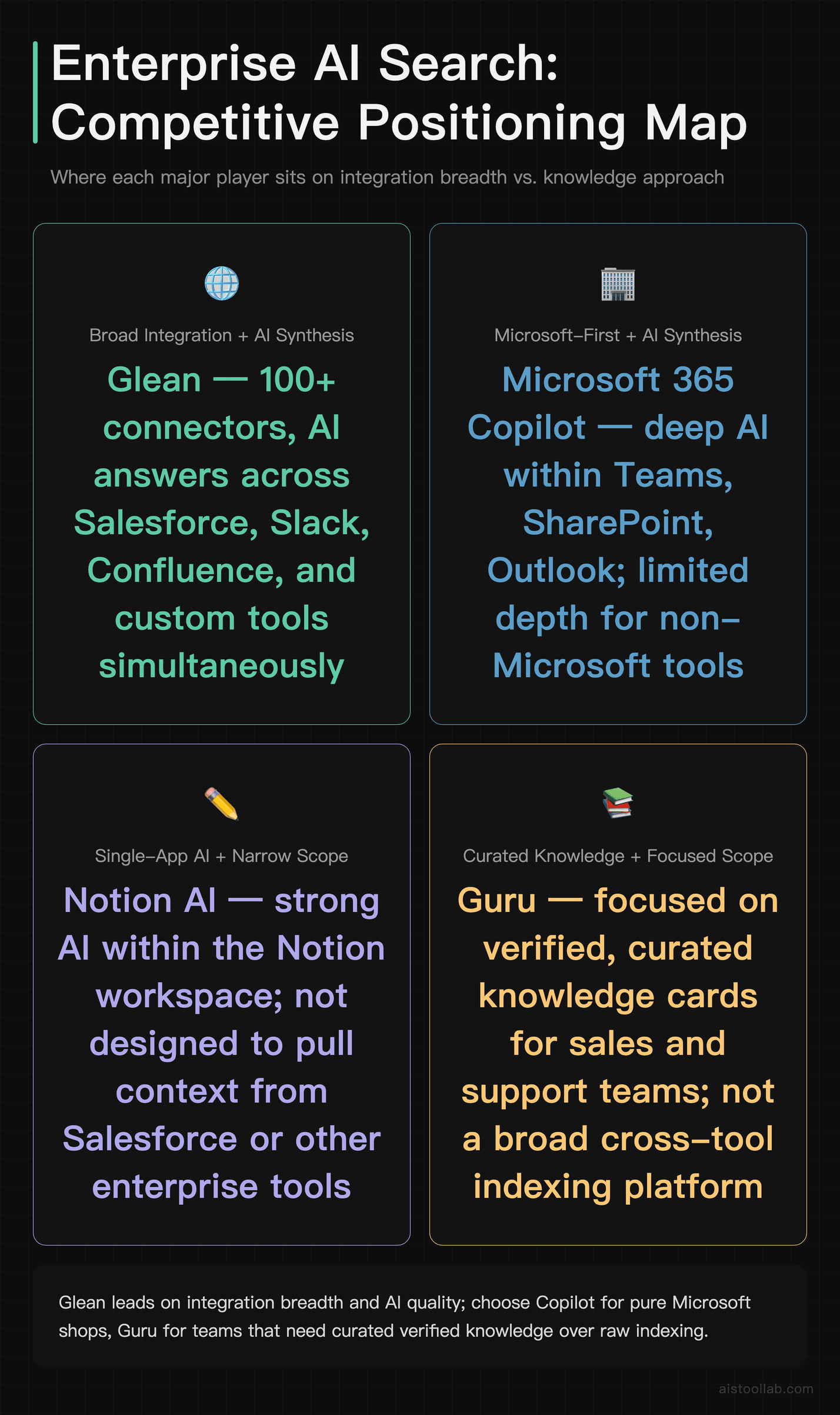
Glean isn’t the only player in this space. Best Perplexity AI Alternatives in 2026: 5 AI Search Tools Compared covers the broader AI search landscape, but at the enterprise level, the most relevant comparisons are with Microsoft 365 Copilot, Notion AI (for teams that live in Notion), and a couple of more direct competitors worth knowing.
Microsoft 365 Copilot is the most obvious alternative for organizations already on Microsoft’s stack. It integrates with Teams, SharePoint, Outlook, and the rest of the M365 suite, and for organizations that haven’t diversified heavily outside Microsoft tools, it may be sufficient. The limitation is that it’s inherently Microsoft-first — it’s not designed to pull context from Salesforce or your custom internal tools with the same depth that Glean handles those connections. If your company is a pure Microsoft shop, Copilot deserves serious consideration before committing to Glean’s price point.
Guru is a knowledge management tool that overlaps with Glean in some use cases, particularly around sales and support teams. Guru is more focused on curated, verified knowledge cards than on indexing everything across your tool stack. It’s a meaningful difference: Glean tries to make your existing messy knowledge base searchable; Guru encourages you to create a cleaner, curated layer on top of it. Depending on how much you trust the quality of your existing documentation, one approach may suit you better than the other.
Moveworks targets a similar enterprise audience with an AI-first approach but leans more heavily into the IT service desk and employee support automation angle. Where Glean is primarily a search and knowledge retrieval product, Moveworks is more focused on automating the resolution of common IT and HR requests. There’s overlap, but they’re answering slightly different questions.
Pros and Cons: The Unvarnished Version
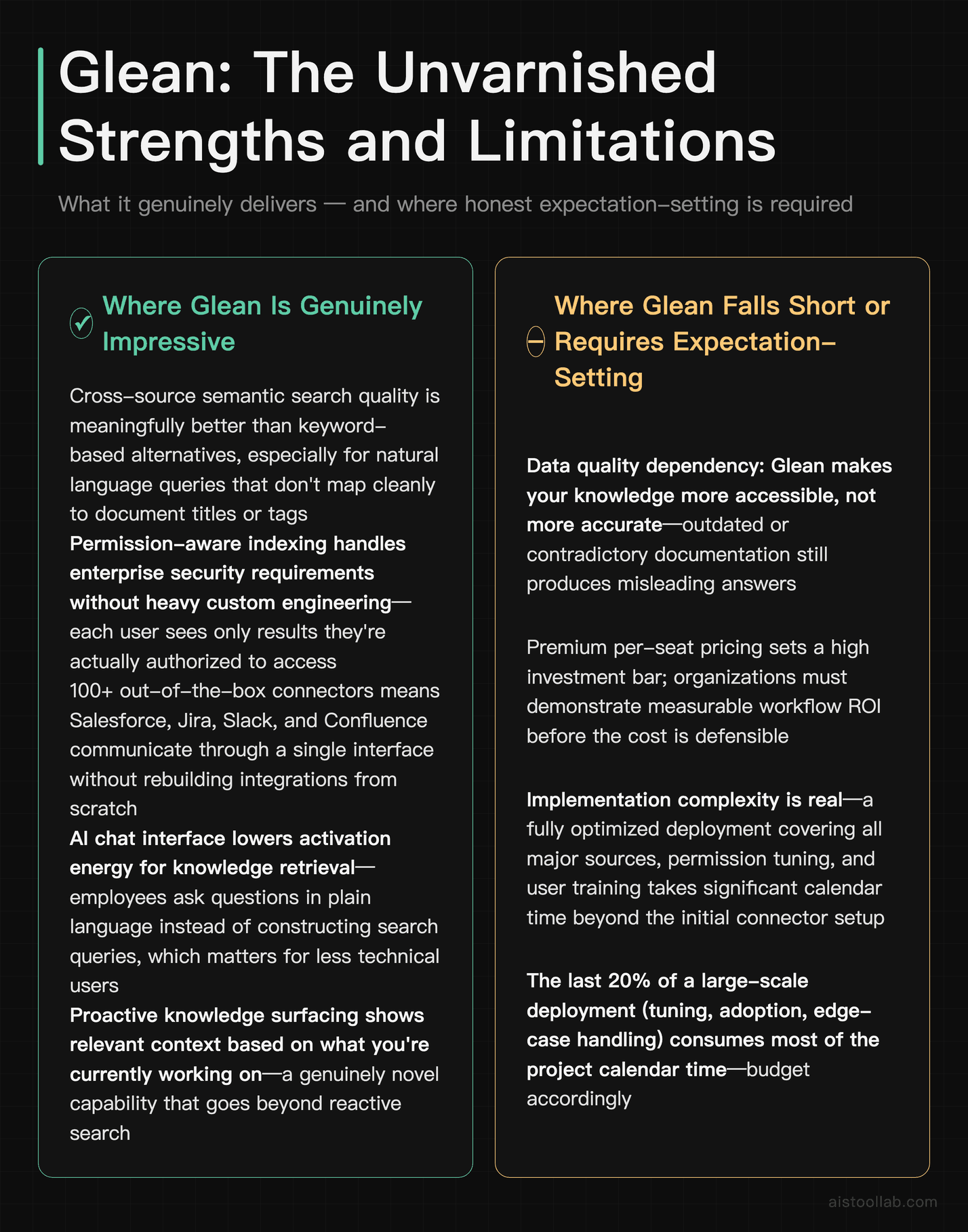
Where Glean Is Genuinely Impressive
- Cross-source search quality is meaningfully better than anything keyword-based, particularly for natural language queries that don’t map cleanly to document titles or tags.
- Permission-aware indexing handles the enterprise security requirement without requiring heavy custom engineering — each user sees results they’re actually allowed to see.
- Connector breadth means you’re not rebuilding integrations from scratch for every data source. Having Salesforce, Jira, Slack, and Confluence talking to each other through a single interface is genuinely difficult to achieve otherwise.
- The AI chat interface lowers the activation energy for knowledge retrieval — employees can ask a question instead of constructing a search query, which matters for less technical users.
- Proactive knowledge surfacing (showing relevant context based on what you’re currently working on) is a genuinely novel feature that goes beyond reactive search.
Where Glean Falls Short or Requires Realistic Expectation-Setting
- Data quality dependency: Glean makes your knowledge more accessible, not more accurate. If your documentation is outdated or contradictory, you’ll get outdated or contradictory answers — faster.
- Enterprise pricing: There’s no getting around the fact that this is a premium product at a premium price. Organizations need to do genuine ROI modeling before committing, not assume benefits will materialize automatically.
- Adoption isn’t guaranteed: Deploying the technology is the easy part. Getting a 500-person organization to change their search habits is a change management challenge, not a software challenge.
- Agentic features are still maturing: The multi-step, action-taking capabilities Glean has been developing are promising but represent newer territory. Organizations evaluating Glean primarily for agentic workflows should ask for specific demos of those capabilities against their actual use cases.
- Not a substitute for knowledge management discipline: Companies that have never invested in documentation culture or information architecture won’t get Glean’s full value. Better search on top of a neglected knowledge base only goes so far.
My Recommendation: Who Should Seriously Consider Glean, and Who Shouldn’t
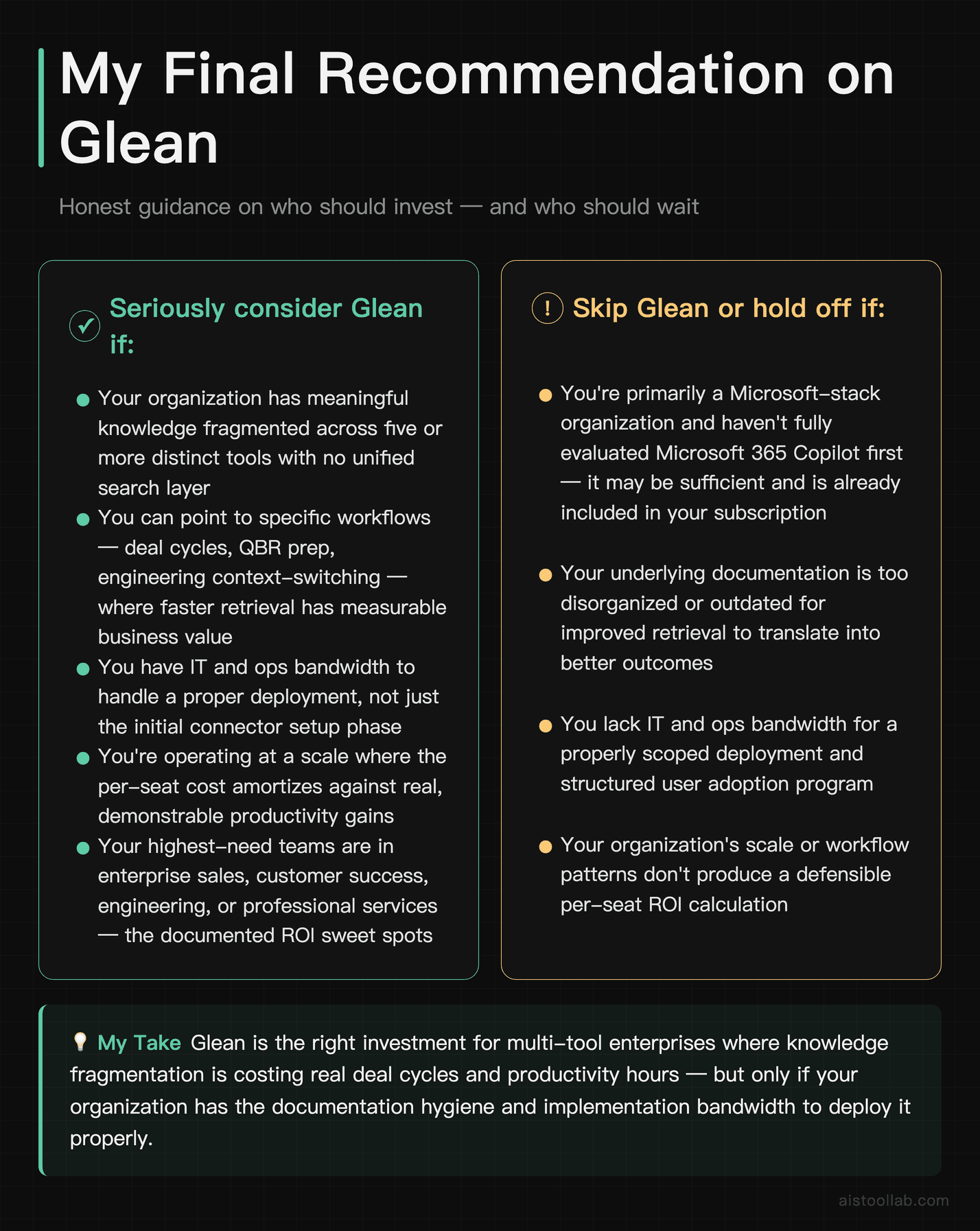
If you’re a knowledge worker at a 300-plus person company who has ever lost an hour of your day to hunting for something that definitely existed somewhere, Glean is addressing a real problem you have. The technology is genuinely better than traditional enterprise search for the scenarios where cross-tool knowledge retrieval matters most, and the connector breadth means you don’t have to build the integrations yourself.
But technology solving the right problem doesn’t mean it’s the right investment for every organization. Here’s how I’d break down the decision:
Seriously consider Glean if: Your organization has meaningful knowledge fragmented across five or more distinct tools, you can point to specific workflows where faster information retrieval has measurable business value, you have IT and ops bandwidth to handle a proper deployment, and you’re operating at a scale where the per-seat cost amortizes against real productivity gains. Large enterprise sales, customer success, engineering, and professional services teams are the sweet spot.
Skip Glean or hold off if: You’re primarily in the Microsoft ecosystem and haven’t fully evaluated Copilot yet, your documentation quality is poor enough that better search would just surface bad information faster, you don’t have change management resources to drive user adoption, or you’re a smaller organization where the pricing structure doesn’t make economic sense. If you’re a smaller company or startup, you’ll get far more leverage from the tools listed in Best AI Tools for Small Business Owners in 2026 before you need anything at Glean’s scale.
The time-wasting problem that Glean is solving is real. The question isn’t whether the technology works — in the right conditions, it does — it’s whether your organization is ready to make it work. If you are, it’s worth a serious look. If you’re not, buying better software won’t fix a people and process problem.
Frequently Asked Questions
How long does Glean actually take to implement for a large organization?
Implementation timelines vary significantly based on the number of data sources you’re connecting, the complexity of your permission structures, and how much customization and tuning you want before rolling out to users. Based on publicly available information and customer reports, a reasonably scoped deployment — covering the six to eight most important data sources for a few hundred users — can often reach a functional state within a few weeks to a couple of months. However, getting to a fully optimized deployment that covers all major sources, has been tuned for your specific query patterns, and has been rolled out with proper user training and adoption support typically takes longer. Organizations that have done large-scale enterprise software deployments before will recognize the pattern: the first 80 percent of the deployment goes faster than expected, and the last 20 percent takes most of the calendar time. Budget for the full cycle, not just the connector setup phase.
Does Glean work if our company doesn’t have great documentation to begin with?
This is probably the most important honest question to ask before buying Glean, and the answer is nuanced. Glean can make poor documentation more accessible — it can surface that half-finished Confluence page from 2022 faster than any keyword search would. But it cannot make that documentation accurate, complete, or current. An AI that confidently summarizes an outdated policy is arguably worse than no search at all, because employees may trust the answer without questioning it. If your organization has significant documentation debt — outdated wiki pages, inconsistent process documentation, information that lives only in people’s heads — the right first investment might be a knowledge management initiative, not a better search layer on top of the existing mess. Glean works best when the underlying content is reasonably well-maintained. It amplifies what’s there; it doesn’t substitute for it.
How does Glean handle data security and privacy for sensitive enterprise information?
Glean’s security architecture is built around respecting the source-level permissions of every connected system. If a user doesn’t have access to a specific Salesforce record or a confidential HR Confluence space in the native tool, they won’t see it in Glean search results either. The platform is designed with enterprise security requirements in mind, including SOC 2 Type II compliance and data residency options. That said, any organization in a regulated industry — healthcare, financial services, legal — should conduct their own security and compliance review with Glean’s team before deployment. The general architecture is sound, but the specifics of what gets indexed, how data is stored, and what logging and audit capabilities are available all matter for enterprise security teams and deserve detailed scrutiny in the procurement process.
Is Glean worth it if we’re already using Microsoft 365 Copilot?
This depends almost entirely on how diversified your tool stack is. If your organization lives primarily in the Microsoft ecosystem — SharePoint, Teams, OneDrive, Outlook, and maybe Dynamics — Microsoft 365 Copilot will cover most of your knowledge retrieval needs at a lower incremental cost, since many organizations are already paying for M365 at the level where Copilot is available. Where Glean makes a compelling case even against Copilot is when your employees’ daily work spans tools that are outside Microsoft’s ecosystem: Salesforce, Slack, Notion, Linear, Zendesk, GitHub, Jira. Copilot’s ability to index and reason across those sources is limited compared to Glean’s purpose-built connector library. If a significant portion of your institutional knowledge lives outside Microsoft, Glean’s breadth justifies the additional cost consideration. If your company is genuinely Microsoft-first, be skeptical of the incremental Glean investment.
What’s the realistic ROI case for a 500-person company?
The honest answer is that the ROI is real but harder to measure cleanly than most vendors will admit. The strongest ROI cases tend to come from specific workflow improvements you can measure: reduced ticket resolution time for support teams, faster deal prep for sales, faster incident resolution for engineering. For these use cases, you can often construct a before/after comparison within three to six months of deployment. The weaker ROI cases are the diffuse “everyone saves a little time” arguments, which are real but notoriously hard to tie to business outcomes. My recommendation for a 500-person organization is to identify two or three high-value workflows upfront — ones where you can actually measure the time before Glean — and use those as your primary ROI metric. If Glean delivers meaningful improvement there, the broader organizational value is likely following behind it even if you can’t instrument it as precisely.
How does Glean compare to just improving our Confluence or SharePoint search?
Improving search within a single tool is a meaningful but fundamentally limited intervention. Confluence’s native search has gotten meaningfully better over time, and Microsoft has invested heavily in Search within SharePoint and Teams. But the core problem these improvements don’t solve is that your organizational knowledge doesn’t all live in one tool. The value of Glean isn’t better search within any individual tool — it’s unified search across all of them simultaneously. If your honest assessment is that 90 percent of the information your employees need lives in a single system and the other 10 percent is marginal, then improving that system’s native search is probably sufficient and dramatically cheaper. But most organizations of meaningful size have information critically scattered across at least five to eight systems, and that’s where cross-source search becomes hard to replicate by improving any individual tool in isolation.
What do employees actually think of Glean over time?
User sentiment around Glean tends to follow a recognizable arc based on available customer reports and case studies. Initial adoption can be slow — employees who have been burned by enterprise search before are skeptical, and understandably so. The turning point usually comes when an employee uses Glean to find something they genuinely couldn’t have found otherwise, or finds it in 30 seconds that would have taken 30 minutes. That experience builds trust, and trust builds habit. After that inflection point, user satisfaction tends to be strong, particularly among roles that are information-heavy: sales, customer success, legal, engineering, and HR. The employees who tend to get the least value are those in very process-structured roles where their information environment is narrow and well-defined — they often find that their existing tool-specific search is adequate for their needs. Organizations should think about targeted rollout to high-value user groups rather than assuming uniform value across the entire headcount.
Are there alternatives to Glean that are worth considering for enterprise knowledge search?
Yes, and you should absolutely compare before committing to any enterprise-level platform investment. The main alternatives worth evaluating at the enterprise level are Microsoft 365 Copilot (strongest if you’re Microsoft-heavy), Guru (if you want to invest in curated knowledge management rather than indexing everything), Moveworks (if employee service desk automation is the primary use case), and Coveo (for organizations that want more customization control and have technical resources to build on top of a platform). There are also newer AI search entrants worth watching, though most haven’t yet accumulated the enterprise deployment track record that helps you evaluate them against the implementation risks of a large rollout. For a broader view of AI-powered search tools, the Best Perplexity AI Alternatives in 2026: 5 AI Search Tools Compared piece covers some adjacent ground, though it skews toward consumer and prosumer contexts rather than pure enterprise deployments.
Last updated: 2026
Explore more AI tools
👉 Browse the AI Tools Library to find the right tools for your workflow.