
The Plot Twist Nobody Tells You: Two of These Tools Are the Same Company
Picture this: you’re a startup founder at 11pm, trying to find every company building in a niche corner of climate tech. Google gives you listicles and SEO sludge. ChatGPT confidently invents three companies that don’t exist. So you start googling “AI search tools” and you land on three names that keep coming up — Perplexity, Exa, and Metaphor — and you think, great, a three-way showdown.
Here’s the thing the comparison blogs rarely lead with: Metaphor and Exa are the same product. Metaphor Systems rebranded to Exa back in 2023. So if you’re comparing “Exa vs Metaphor,” you’re essentially comparing a tool to its own maiden name. That’s not a knock — it’s actually the single most useful fact in this entire article, because it saves you from spending an afternoon trying to sign up for a “Metaphor API” that quietly redirects to exa.ai.
So what we’re really looking at is two genuinely different philosophies of AI search: Perplexity AI, which wants to be your answer engine and hand you a synthesized response with citations, versus Exa (the artist formerly known as Metaphor), which wants to be the search layer that finds the exact pages a language model would predict — and then lets you build on top of it. Throughout this piece I’ll keep the “Metaphor” thread alive where it matters historically, because how Metaphor’s “link prediction” idea evolved into Exa explains a lot about why these tools behave so differently on real queries. This is a compiled analysis drawn from official documentation, release notes, and public user reviews — not a lab test — but the differences are stark enough that the verdict isn’t really in doubt.
Three Tools, Two Completely Different Jobs
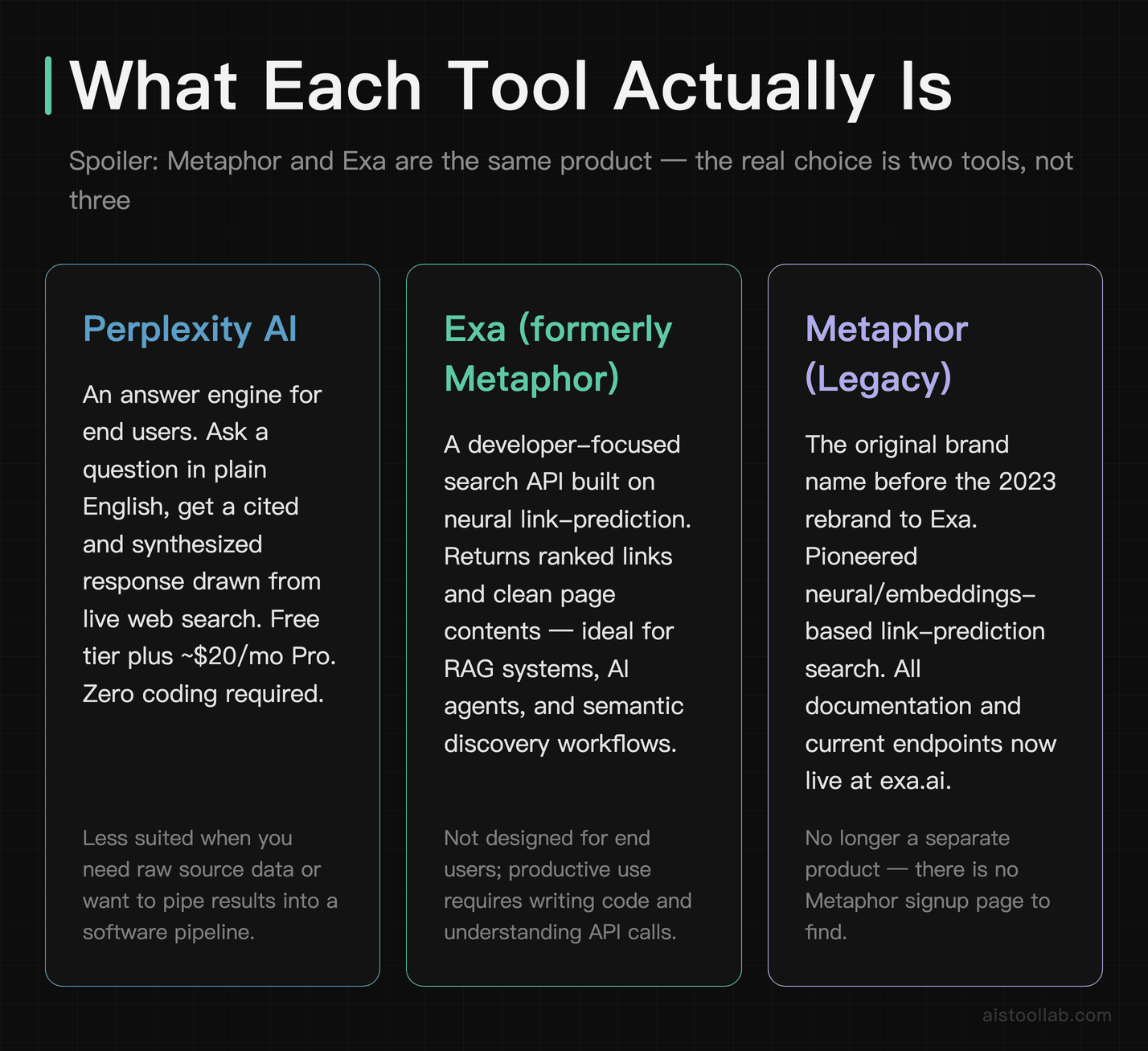
Before the table, it’s worth being clear about what each one is actually for, because half the confusion online comes from people comparing a finished sandwich to a loaf of bread.
Perplexity AI is an answer engine aimed at end users. You ask a question in plain English, it runs live web searches, reads the results, and writes you a cited summary. Think of it as the love child of Google and ChatGPT, with footnotes. It’s the one your non-technical colleague can use without reading a single page of docs. According to Perplexity’s official materials, it offers a free tier, a Pro subscription (commonly listed at around $20/month — roughly the cost of a Netflix Standard plan), and access to multiple underlying models including frontier LLMs.
Exa (formerly Metaphor) is a search API built for developers and AI applications. Its original Metaphor pitch was genuinely novel: instead of keyword matching, it was trained to predict the kind of link a person would share if they were writing about a topic — a “neural” or embeddings-based approach to search. Exa carries that DNA forward, offering semantic/neural search, traditional keyword search, “find similar links,” and — crucially for the AI era — endpoints that return clean page contents ready to feed into a model. It’s the tool you reach for when you’re building RAG pipelines or a research agent, not when you want a quick answer over coffee.
Metaphor, then, is best understood as Exa’s origin story rather than a separate live product. If a tutorial or a Reddit thread references Metaphor’s API, mentally translate it to Exa and check the current docs, since endpoints and pricing have changed since the rebrand.
What “real-world performance” actually means here
Because these tools do different jobs, judging them on a single axis is misleading — a recurring theme I keep hitting in pieces like Production vs Synthetic: Why AI Model Benchmark Metrics Don’t Predict Real-World Performance in 2026. A clean benchmark score tells you almost nothing about whether a tool survives contact with a messy query at midnight. So the dimensions that matter for real workflows are: how each handles current events, technical depth, niche discovery, freshness of results, raw speed, interface friction, and how easily it slots into something you’re actually building.
How Each Performs Across Real Query Types
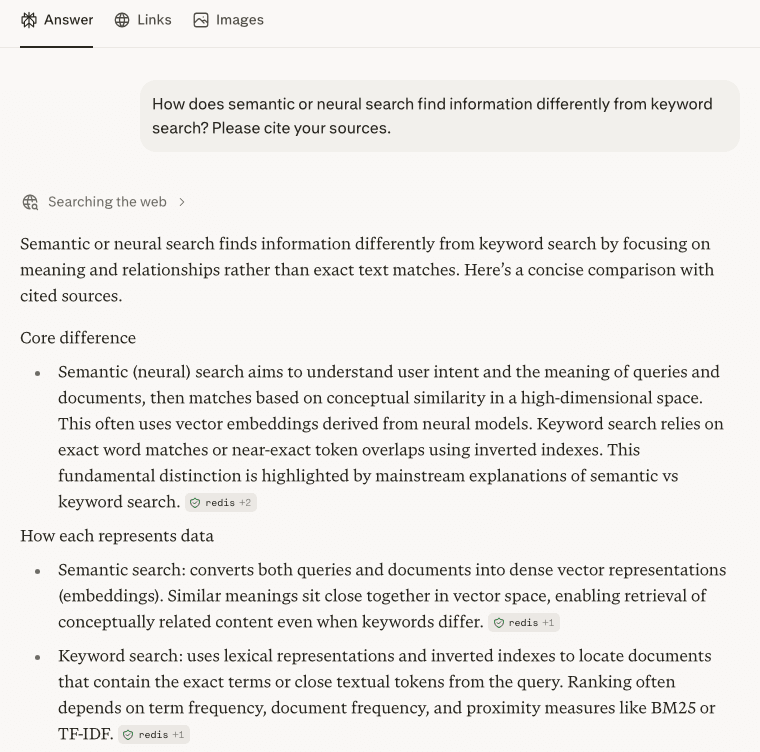
To ground the query-type comparison, here’s a quick free-tier check (no login): asked how neural/semantic search differs from keyword search, the tool explained meaning-based matching (not just term overlap) and marked a source beside each claim — the exact behavior that separates these tools across different query types.
Based on the documented capabilities and the consensus across public reviews (Reddit, Hacker News, G2, and developer write-ups), here’s how the three approaches tend to shake out on the query categories most people care about.
Current events and breaking news
This is Perplexity’s home turf. Because it runs live searches and synthesizes on the fly, it’s the natural pick when you’re asking “what happened with X this week” — exactly the scenario where older, statically-trained models fall flat. The whole point of a search-augmented answer engine is that it is designed to reduce reliance on a static training cutoff by searching the web at answer time. Reviewer consensus is broadly positive here, with the usual caveat that any synthesized answer can still misread a source, so the citations exist for a reason — click them.
Hands-on: Perplexity on a current-events query (free, no login)
Since current events are the scenario the section calls Perplexity’s home turf, I ran a live one on the free tier, without logging in — asking which major AI models had launched so far in 2026. Here is the actual result.
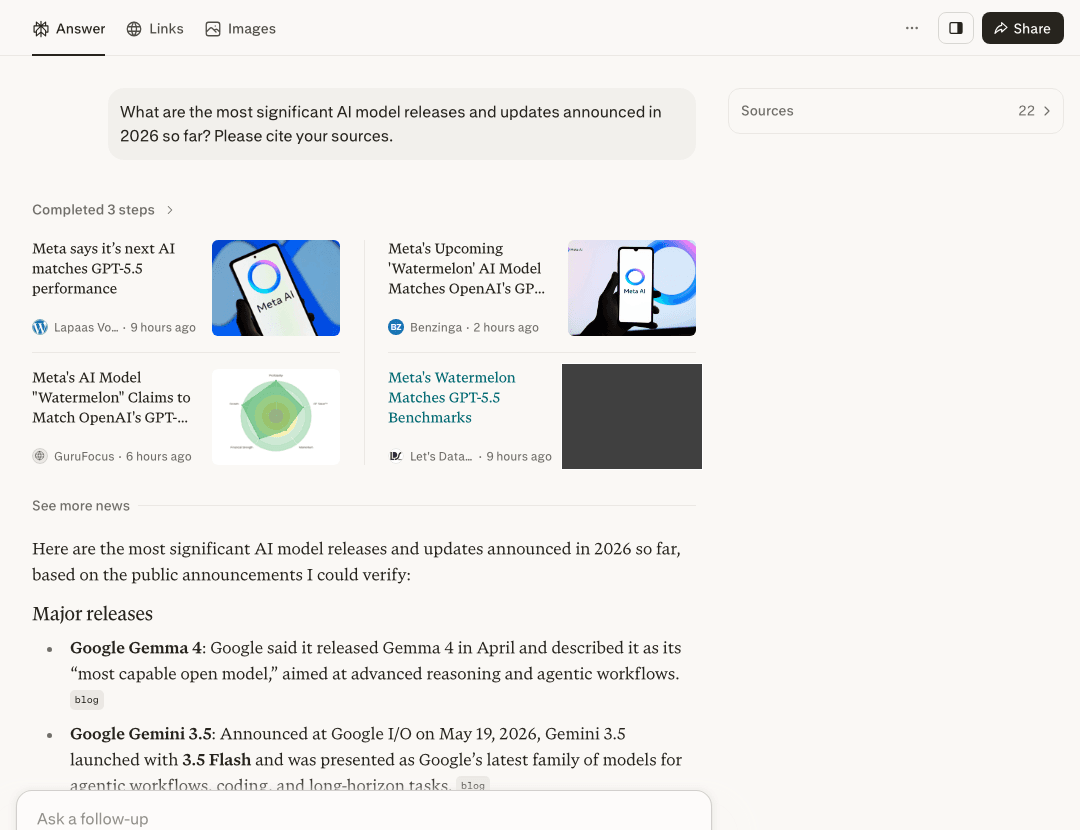
What I saw in this run: it searched live (the on-screen Sources panel showed a couple of dozen pages — 22 in this run), surfaced genuinely recent items — some news cards were timestamped just hours earlier — and wrote them up as a short summary with a source label sitting next to most points. That is the “answer engine on current events” behaviour the section describes, working on the free plan without an account.
Honest limits from this single run: I only viewed the source labels on screen — I did not click each one to confirm the link works or check what the page actually says, and a synthesised answer can still misread a source (which is exactly why those labels matter). One practical note on the “no login” part: I did have to dismiss a cookie banner and a sign-in prompt before using it. This is one free-tier run at this moment, not a benchmark.
Exa can absolutely surface fresh content too — its index and date-filtering let you constrain results to recent windows — but it hands you links and contents, not a tidy paragraph. For a developer building a news-monitoring agent, that’s a feature. For a human who just wants the gist, it’s extra steps. So on raw “tell me what’s happening” convenience, Perplexity wins; on “give my app a clean feed of recent, relevant sources,” Exa is the stronger primitive.
Technical and developer queries
Here it gets interesting. Perplexity is solid for “explain this concept” or “what’s the difference between these two libraries,” and its Pro tier’s reasoning models help with multi-step technical questions. But when you’re hunting for a specific obscure blog post, a particular GitHub discussion, or papers semantically related to one you already have, Exa’s neural search shines. Its “find similar” capability — the direct descendant of Metaphor’s original link-prediction idea — is genuinely good at the “more pages like this one” problem that keyword search handles poorly.
If you’re evaluating models or digging through ML literature, Exa pairs naturally with the kind of workflow I describe in How to Evaluate AI Model Performance Like a Pro: Advanced Techniques for Reading and Applying 2026 Benchmarks — you can programmatically pull a corpus of relevant papers instead of clicking through ten Google pages.
Niche and discovery-based research
This is the category where the “Metaphor” philosophy earns its keep. Discovery search — “find me all the indie companies doing X,” “show me essays that argue Y” — is exactly what neural search was built for, and it’s where Exa pulls ahead of a keyword engine and arguably ahead of Perplexity’s summarize-first model. Perplexity will give you a great summary of a niche, but if your goal is an exhaustive list of sources to comb through yourself, Exa’s discovery results are usually the richer raw material. So the rule of thumb: Perplexity for understanding a niche, Exa for mapping one.
Side-by-Side Comparison
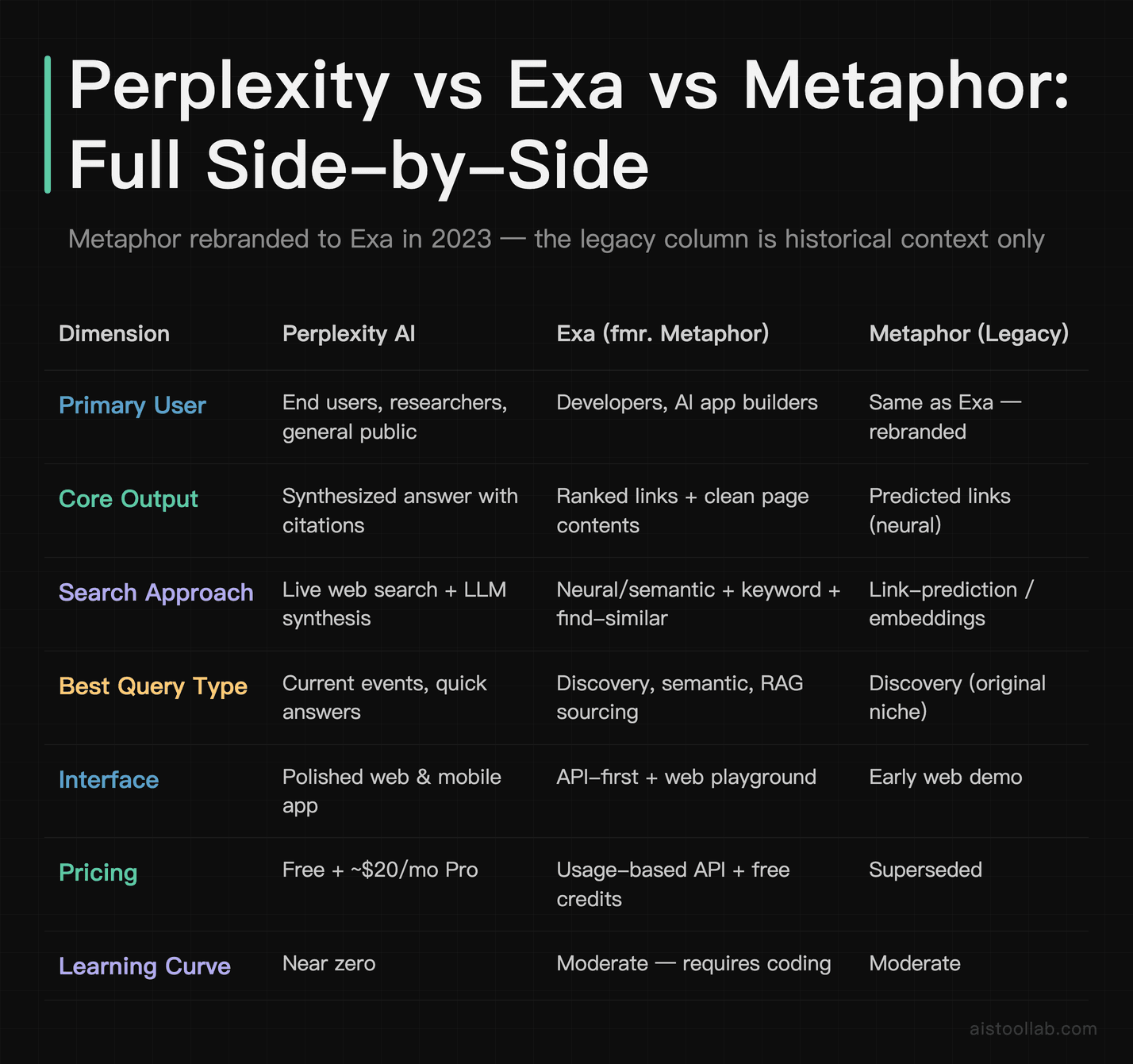
The honest takeaway from this table: the “Metaphor” column exists mostly to stop you chasing a ghost. Treat Exa and Metaphor as one entity, and the real decision is Perplexity (a product you use) versus Exa (a tool you build with). They overlap less than the marketing might suggest.
Speed, Interface, and Integration in Authentic Workflows
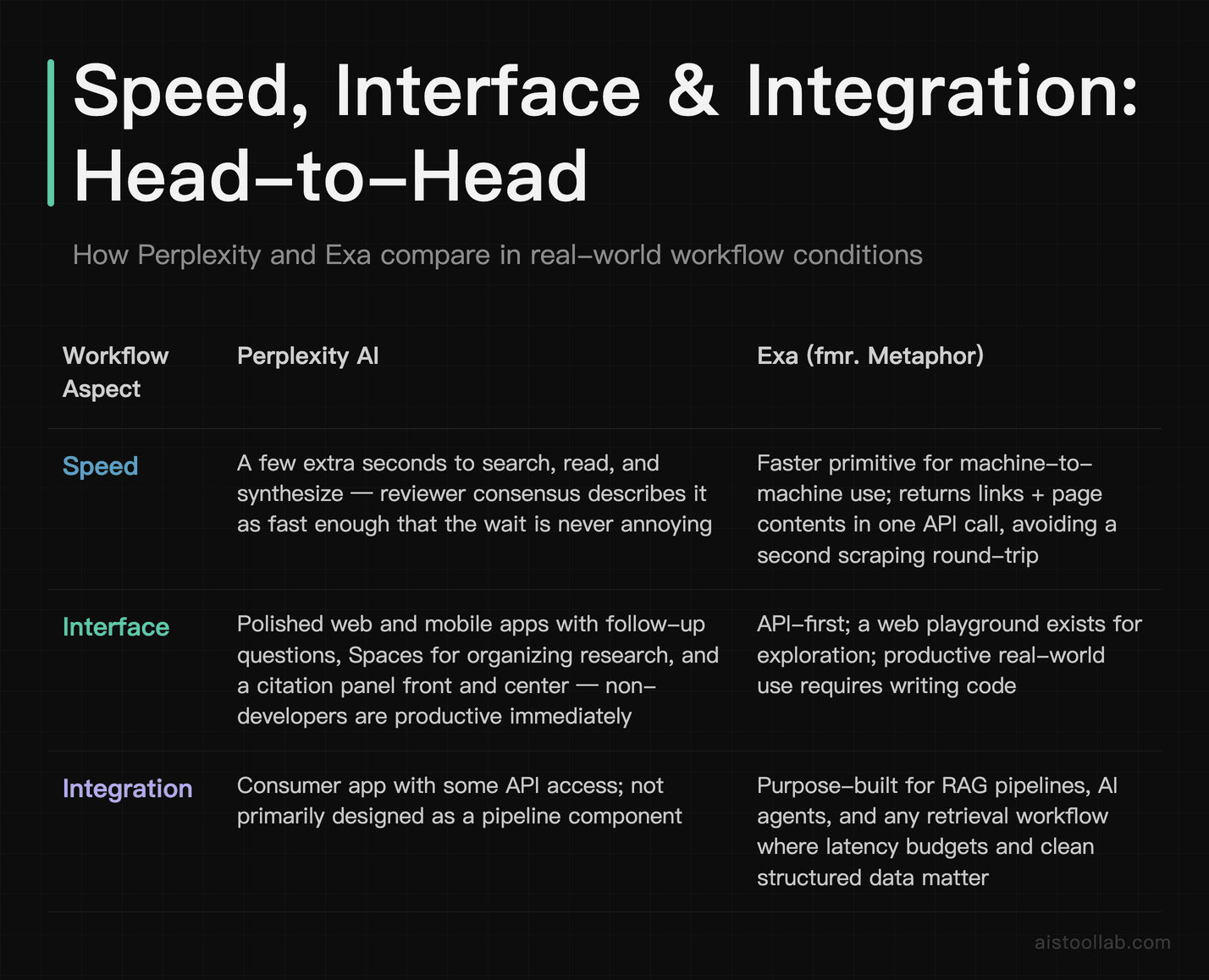
Raw speed is genuinely hard to compare fairly because the two tools are doing different amounts of work. Perplexity has to search, read, and write — so a thorough answer takes a few seconds longer than a bare search call, which is the trade-off for getting a finished paragraph. Public reviews generally describe Perplexity as fast enough that the wait never feels annoying, especially on the standard (non-reasoning) modes. Switch on a heavy reasoning model and, predictably, you trade speed for depth.
Exa, returning links and contents rather than prose, is the faster primitive for machine-to-machine use — it’s designed to be called inside a pipeline where latency budgets matter. According to Exa’s documentation, you can request page contents alongside results so your app doesn’t have to make a second round-trip to scrape each URL, which in practice shaves real time off building a retrieval step.
Interface usability
For interface, there’s no contest for non-developers: Perplexity’s web and mobile apps are clean, with follow-up questions, a Discover feed, Spaces for organizing research, and the citation panel front and center. You can hand it to a marketer or a founder and they’re productive in 30 seconds. Exa has a usable web playground for testing queries, but its center of gravity is the API and docs — which is exactly right for its audience, just not for someone who wants a chat box.
Integration capabilities
This is where Exa’s purpose-built nature pays off. If you’re wiring search into a RAG system, an autonomous research agent, or an internal tool, Exa is designed for that from the ground up — semantic retrieval, similar-link expansion, and content extraction are first-class. Perplexity is increasingly offering API access too, but its DNA is the consumer answer engine, so for deep custom integration the developer consensus leans toward Exa. If your build also touches model hosting or inference, it slots in neatly alongside platforms I’ve covered like Together AI Review 2026: Affordable Inference Platform for AI Models.
Use Cases: Who Should Actually Pick Which
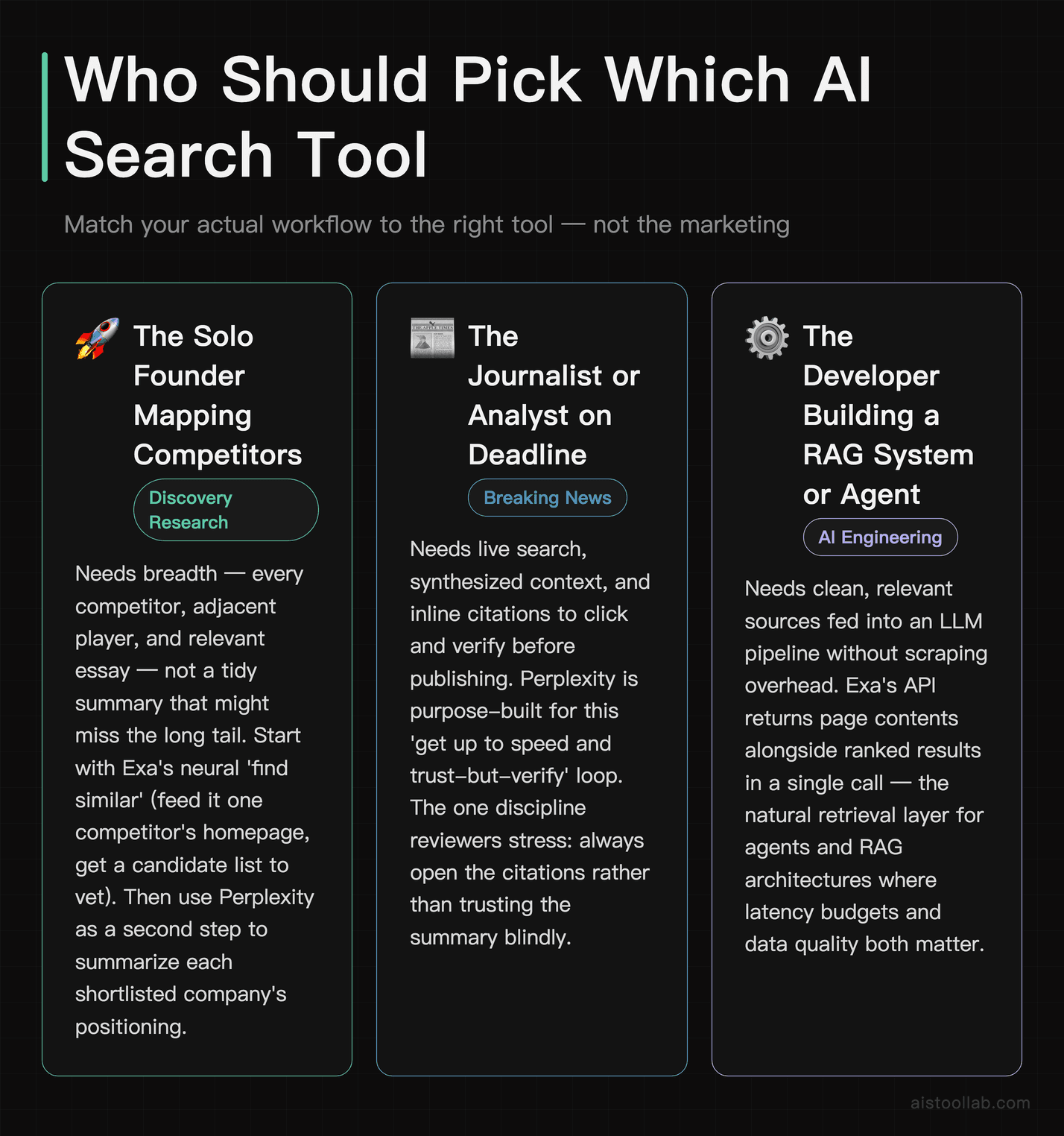
The solo founder doing competitive research
Imagine a bootstrapped founder in Austin mapping out who else is building in their space before a fundraise. They need breadth — every competitor, adjacent player, and relevant essay — not a tidy summary that might miss the long tail. This is a discovery problem, and it’s where Exa’s neural “find similar” lineage earns its place. Feed it one competitor’s homepage, ask for similar companies, and you get a candidate list to vet. Perplexity is great as the second step here — paste the shortlist and ask it to summarize each company’s positioning — but for the initial sweep, the discovery engine wins.
The journalist or analyst on a deadline
A reporter in London needs to understand a breaking story fast, with sources they can verify and quote. Perplexity is the obvious pick: live search, synthesized context, and inline citations they can click to confirm before publishing. The cited-answer format is purpose-built for exactly this “I need to get up to speed and trust-but-verify” loop. The one discipline required — and reviewers stress this repeatedly — is to actually open the citations rather than trusting the summary blindly, because synthesis can occasionally smooth over a nuance the source didn’t intend.
The developer building an AI research assistant
A two-person AI startup is shipping a tool that pulls relevant papers and articles into a model’s context window. They don’t want a chat UI; they want a clean, fast, semantically-aware search endpoint that returns page contents ready for embedding. Exa is the natural fit. The original Metaphor vision — predicting the link a knowledgeable human would share — maps almost perfectly onto “retrieve the documents the model should read,” which is why so many RAG tutorials reach for it. Pair it with solid evaluation habits from the Top AI Model Performance Benchmarks Ranked by Relevance and Adoption in 2026 writeup and you’ve got a serious retrieval stack.
The marketer doing content research
A SaaS content lead with a small team needs to research topics, find authoritative sources, and draft outlines. Perplexity’s Pro tier handles the “research and summarize” half beautifully, and the Spaces feature helps keep projects separate. If they later want to programmatically discover backlink targets or similar high-authority pages, that’s an Exa job — but most marketers will live happily inside Perplexity.
The Verdict: Match the Tool to the Job, Not the Hype
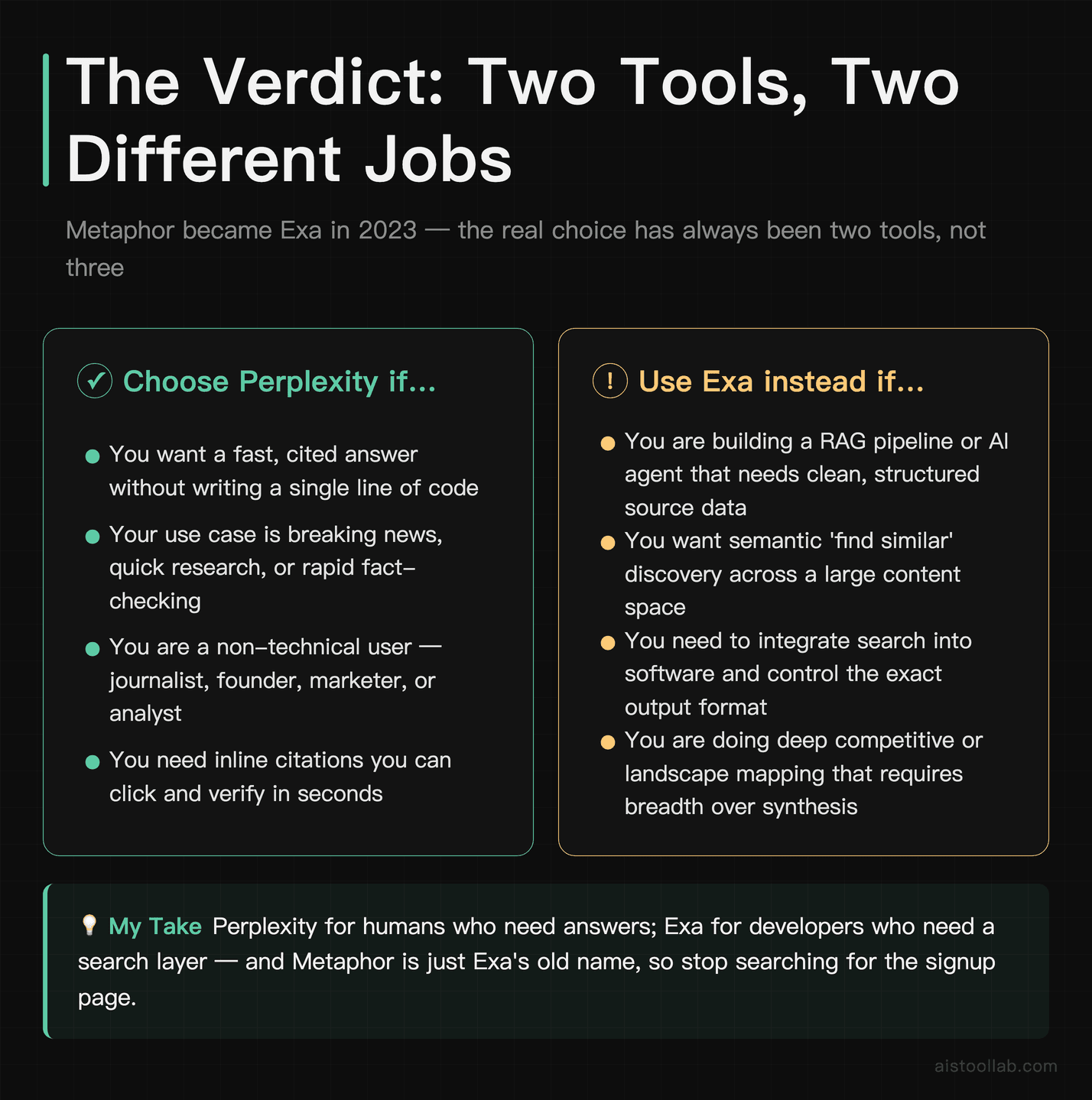
If it were my money and my workflow on the line, here’s how I’d split it. For general research, breaking news, and any situation where you want a trustworthy answer in seconds without writing a line of code, go with Perplexity — it’s the most polished answer engine of the group and the freshness advantage over static chatbots is real and useful. For semantic search, discovery-heavy research, and especially for building RAG systems or AI agents, go with Exa, the tool that grew out of Metaphor’s clever link-prediction idea and remains purpose-built for feeding clean, relevant sources into software.
And Metaphor? File it under “good to know.” The single most practical thing this comparison can give you is the reminder that you’re not choosing between three tools — you’re choosing between two, because Metaphor became Exa. Stop looking for the Metaphor signup page; it’s exa.ai now.
The deeper lesson is one I keep returning to across these reviews: a tool’s benchmark score or marketing tagline tells you far less than matching its actual design to your actual job. Perplexity and Exa aren’t really competitors so much as two different answers to “what does AI search mean” — one for humans who want answers, one for machines that want sources. Figure out which of those you are this week, and the choice makes itself. Both have free entry points, so the fastest way to settle it is to run your own thorniest query through each and see which output you’d actually use. You’ll know within twenty minutes.
Frequently Asked Questions
Are Exa and Metaphor really the same tool?
Yes — Metaphor Systems rebranded to Exa in 2023, so they are the same company and product, not two competitors. This matters more than it sounds, because a lot of older blog posts, tutorials, and Reddit threads still reference “Metaphor” and its API, which can send you hunting for a product that no longer exists under that name. If you find documentation or a code sample mentioning Metaphor, treat it as historical: the concepts (neural search, link prediction, find-similar) carry over, but the current endpoints, pricing, and SDKs live under Exa at exa.ai. The core idea that made Metaphor interesting — a search engine trained to predict the link a knowledgeable person would share rather than just matching keywords — is exactly what Exa still builds on. So when you see this comparison framed as a three-way race, mentally collapse it into two real options: Perplexity the answer engine, and Exa the developer-focused search layer. That reframing alone will save you a confusing afternoon.
Which is better for everyday research, Perplexity or Exa?
For everyday research where you want a fast, readable answer with sources, Perplexity is the better pick for most people, full stop. It’s a finished product: you type a question, it searches the live web, and it returns a synthesized answer with clickable citations, all inside a polished app that requires zero technical setup. Exa, by contrast, returns links and page contents — fantastic raw material, but you (or your code) have to do the reading and synthesis. So unless you’re building software or you specifically need an exhaustive list of sources rather than a summary, Perplexity will feel dramatically more convenient for daily use. The exception is discovery-heavy research — “find me everything like this” — where Exa’s semantic search genuinely outperforms a summarize-first approach. A practical workflow many people land on is using Exa or its discovery features to gather a broad source list, then dropping those into Perplexity to summarize and compare. Different tools, different jobs.
Does Perplexity actually handle recent information older models missed?
This is the central advantage of any search-augmented answer engine, and it’s the main reason people use Perplexity over a vanilla chatbot. Because Perplexity runs a live web search for each query rather than relying solely on a model’s training data, it can surface information that postdates any given model’s knowledge cutoff — recent product launches, this week’s news, freshly published papers. That’s structurally different from asking a static model, which can only tell you what it learned during training and will sometimes “hallucinate” plausible-sounding but wrong details about recent events. That said, freshness isn’t magic: the quality of the answer depends on what’s actually published and indexed at query time, and synthesis can still misinterpret a source. The discipline that experienced users recommend is simple — open the citations and confirm the specific claim you care about, especially for anything time-sensitive or high-stakes. Treat Perplexity as a very fast, very well-read research assistant who occasionally needs fact-checking, not an infallible oracle.
Can I use Exa without being a developer?
Partially. Exa offers a web playground where you can run searches, try neural versus keyword modes, and experiment with find-similar without writing code, so a curious non-developer can absolutely poke around and get value. But Exa’s real power — content extraction, integration into RAG pipelines, automated discovery at scale — lives in its API, which assumes you can make HTTP requests or use an SDK. If the phrase “API key” makes you nervous, you’ll get more done, faster, in Perplexity. The honest framing is that Exa is a developer tool with a friendly demo attached, whereas Perplexity is a consumer product with developer access attached. Choose based on which describes you. If you’re non-technical but the discovery use case really appeals to you, it may be worth either learning the basics of API calls or partnering with someone who can wire it up, because the semantic discovery capability is genuinely hard to replicate in keyword-based tools.
How much do these tools cost?
Perplexity offers a free tier that covers casual use, plus a Pro subscription commonly listed at around $20/month, which unlocks more frequent access to advanced reasoning models, higher limits, and features like file uploads. That’s roughly the price of a standard streaming subscription, and for anyone doing daily research it’s an easy value case. Exa uses a usage-based pricing model typical of developer APIs — you generally get some free credits to start and then pay according to the number of searches and the volume of content you pull. That structure is great if your usage is spiky or you’re prototyping, and it scales with you as your app grows. The two pricing models reflect the two audiences: a flat monthly fee makes sense for an individual using a product, while metered usage makes sense for an application whose costs should track its traffic. Always check the current pricing pages directly, since both companies have iterated on tiers and limits over time and figures can shift between releases.
Which tool is best for building a RAG or AI agent?
For building retrieval-augmented generation systems or autonomous research agents, Exa is the stronger choice, and this is the clearest “winner” in the whole comparison. It was designed from the ground up as a search layer for AI applications: semantic retrieval finds documents by meaning rather than keyword overlap, find-similar expands a seed set, and content endpoints return clean page text so you can embed it directly without building your own scraper. That combination maps almost perfectly onto what a RAG pipeline needs — relevant documents, fast, in a model-ready format. Perplexity is increasingly exposing API access and can be useful where you want pre-synthesized answers, but for the retrieval layer specifically, developer consensus across public discussions favors Exa. If you go this route, pair it with disciplined evaluation of your end-to-end system rather than trusting component benchmarks alone — the gap between benchmark numbers and production behavior is a recurring theme worth taking seriously when you assemble these pieces.
Is Perplexity’s accuracy trustworthy enough to cite in professional work?
Cautiously, yes — with verification. Perplexity’s design intentionally supports professional use by attaching inline citations to its claims, which is precisely what distinguishes it from a citation-free chatbot. The right mental model is that it does the legwork of finding and summarizing sources, but you remain responsible for confirming any claim you put your name on. In practice that means clicking through to the cited source and checking that it actually says what the summary claims, especially for statistics, dates, quotes, or anything legally or financially sensitive. Reviewer consensus is that Perplexity is impressively reliable for getting oriented quickly, but like any LLM-based synthesis it can occasionally misattribute or over-generalize. For low-stakes work, the summary plus a quick glance at sources is plenty. For published journalism, legal analysis, or anything where being wrong is expensive, treat it as a research accelerator that surfaces sources for you to verify, not as a primary source itself. That habit turns it from “risky” into genuinely valuable.
Should I use all three, or just pick one?
Since Metaphor and Exa are the same thing, the realistic question is whether to use Perplexity, Exa, or both — and for many people, both is the smart answer because they cover different stages of research. A common and effective pattern: use Exa’s semantic and discovery search to cast a wide net and pull a comprehensive set of relevant sources, then use Perplexity to read across those sources, summarize, and answer specific follow-up questions with citations. Discovery first, synthesis second. If you’re a pure consumer who just wants answers, you can happily ignore Exa and live in Perplexity. If you’re a developer building a product, you may use Exa as your retrieval layer and never need Perplexity’s consumer app at all. The “use both” sweet spot is mainly for power researchers, analysts, and founders who need both breadth of sources and speed of understanding. There’s no penalty for starting with one and adding the other once you hit its limits — both have free entry points.
Last updated: 2026
Found this review helpful?
👉 Browse the AI Tools Library to find the right tools for your workflow.