

Two Subscriptions, One Productivity Budget — Which One Earns Its Keep?
Picture a fairly normal Tuesday. You’ve got a $20 ChatGPT subscription, a Notion AI feature (now bundled into a Notion Business seat at US$20/member/month billed annually, per notion.com/pricing; the standalone $10 add-on was retired), a Grammarly seat someone in your team insisted on, and now two more AI tools sitting in your browser tabs whispering “just $15 a month, you’ll save hours.” One of them transcribes and summarizes your meetings. The other turns your spoken ramble into clean text anywhere you can type. Both look genuinely useful. Both want a slice of the same monthly budget.
That’s the awkward spot a lot of solopreneurs, developers, and content folks find themselves in heading into 2026. Granola and Wispr Flow get lumped together in “AI productivity tools you should be paying for” threads on Reddit, but here’s the thing nobody says out loud upfront: they don’t actually do the same job. Granola is an AI meeting notepad. Wispr Flow is a voice-to-text dictation layer. Comparing them feels a bit like comparing a really good notebook to a really good pen — except both cost real money every single month, and most people can only justify one new line item at a time.
So the honest question isn’t “which tool is better?” — it’s “which subscription delivers more value per dollar for the kind of work you actually do?” That’s what this breakdown is about: the pricing, the hidden costs, and the real-world ROI for three different user profiles. No spec-sheet worship, just a clear read on where your money goes furthest.
Contents
Quick Take: What Each Tool Actually Is
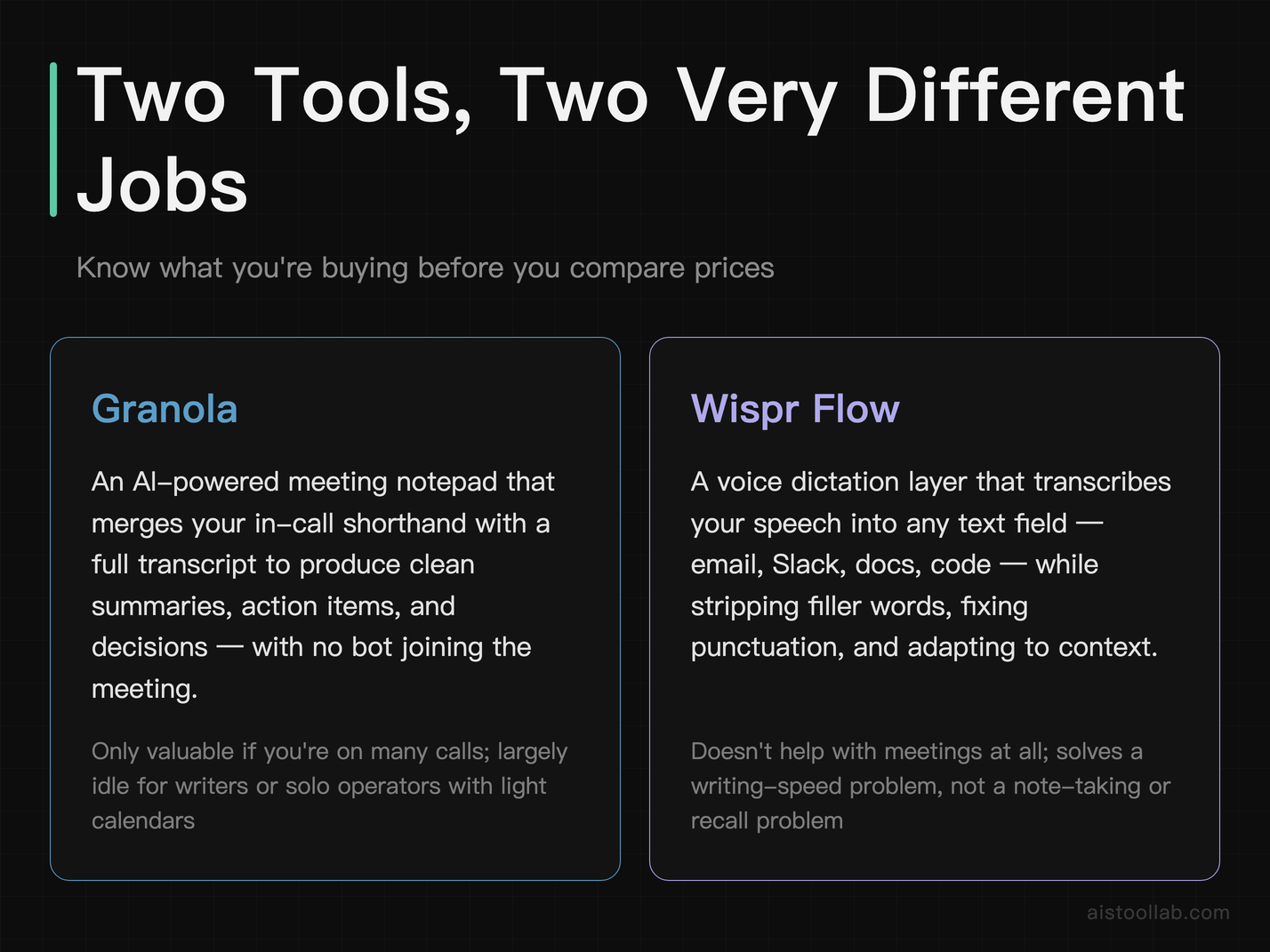
Granola is an AI-powered meeting notepad. You take rough notes during a call the way you normally would, and after the meeting it merges your shorthand with a full transcript to produce a clean, structured summary — action items, decisions, the works. It runs as a desktop app (originally Mac-first, with Windows and mobile support having expanded over time) and it doesn’t drop a clunky meeting bot into your call. It listens locally to your system audio, which is part of its appeal for people who hate the “Otter.ai bot has joined the meeting” awkwardness.
Wispr Flow is a voice dictation tool. You hold a hotkey, speak naturally, and it transcribes your speech into whatever text field you’re focused on — email, Slack, a code comment, a Google Doc — while cleaning up filler words, fixing punctuation, and adapting to context. It’s designed to replace typing, not to summarize meetings. The pitch is speed: most people speak far faster than they type, and Wispr Flow tries to make dictation accurate enough that you actually trust it for real work.
See the problem already? One captures conversations you’re in. The other helps you produce text faster. Some people genuinely need both. Most need to pick the one that maps to their biggest daily friction. Let’s get concrete.
Pricing and Value at a Glance
Here’s the head-to-head across the dimensions that actually affect your wallet and your workflow. Pricing reflects each tool’s published plans as of early 2026 — always double-check the official pricing page before you commit, because both companies have adjusted tiers more than once.
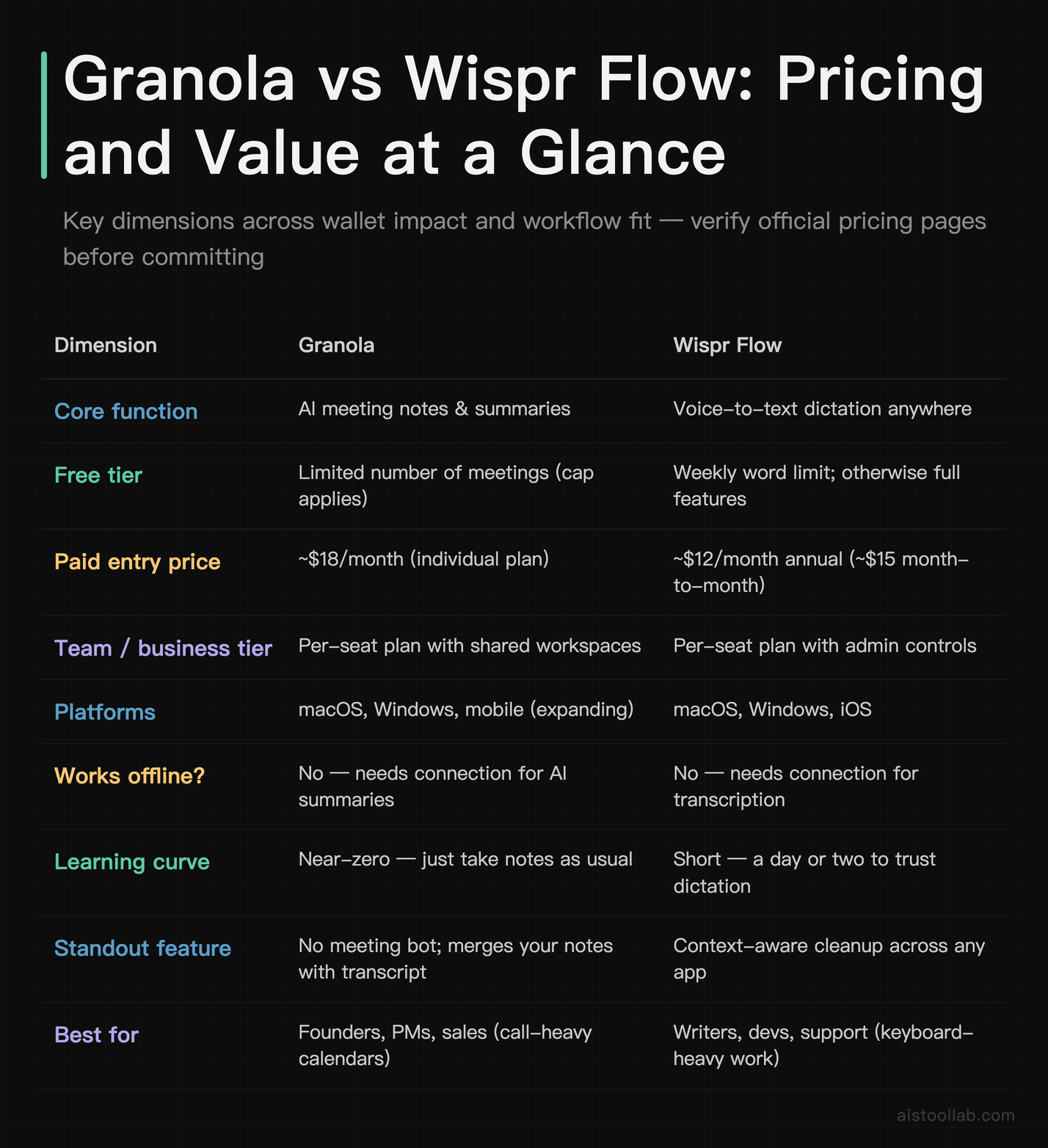
The headline takeaway: Wispr Flow is the cheaper monthly commitment, and its free tier is more genuinely usable for casual needs because it caps words rather than locking you out after a handful of sessions. Granola costs more, but if your day is wall-to-wall meetings, the value math changes fast — which we’ll get into.
Breaking Down the Money: Where Each Dollar Goes
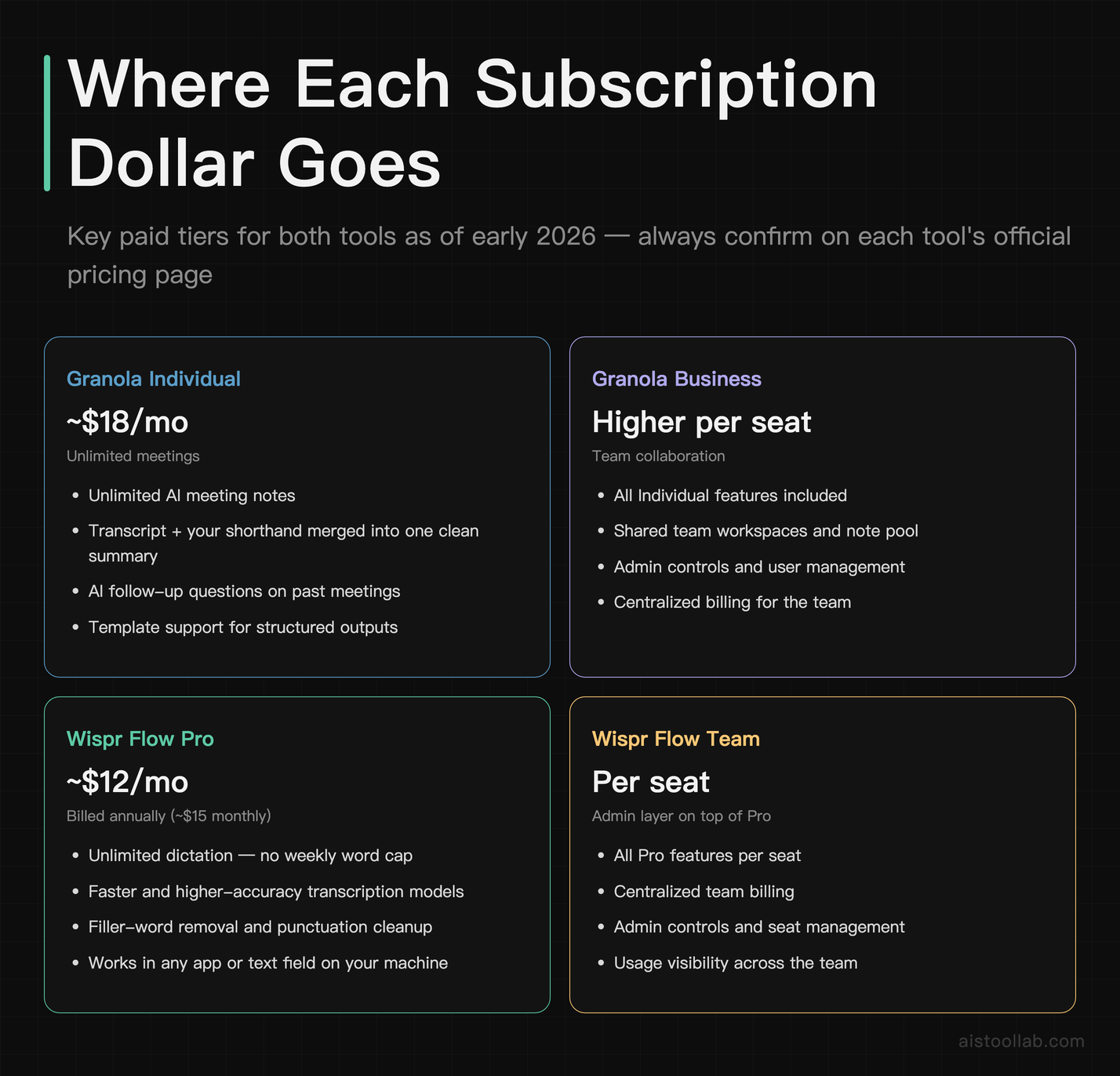
Let’s talk about what you’re actually buying, because the sticker price only tells half the story.
With Granola, you’re paying for time you’d otherwise lose to writing up meetings. The free plan gets you a taste, but it caps how many meetings you can run through the AI, which is a soft nudge toward the paid individual plan sitting at roughly $18/month. For that you get unlimited meeting notes, the full transcript-plus-your-notes merge, AI follow-up questions on past meetings, and template support. The business tier costs more per seat and adds shared workspaces and admin features — relevant if your whole team is dropping notes into a common pool.
With Wispr Flow, you’re paying for typing speed and reduced friction. The free tier hands you the full experience but throttles you with a weekly word allowance, which is honestly a smart design — light users may never need to pay, while heavy users hit the ceiling fast and upgrade. The Pro plan, around $12/month on annual billing (closer to $15 if you pay month-to-month), removes the cap and unlocks unlimited dictation plus the better/faster transcription models. There’s a team plan layered on top with centralized billing and admin controls.
The interesting wrinkle is annual versus monthly billing. Both tools nudge you toward annual with a discount, and that’s where the “subscription trap” risk lives. Committing $144 upfront for a tool you use twice a week is how productivity subscriptions quietly become dead weight. If you’re not sure, pay monthly for the first stretch even though it costs a few dollars more — the flexibility is worth it until the habit sticks.
Real-World ROI by User Profile
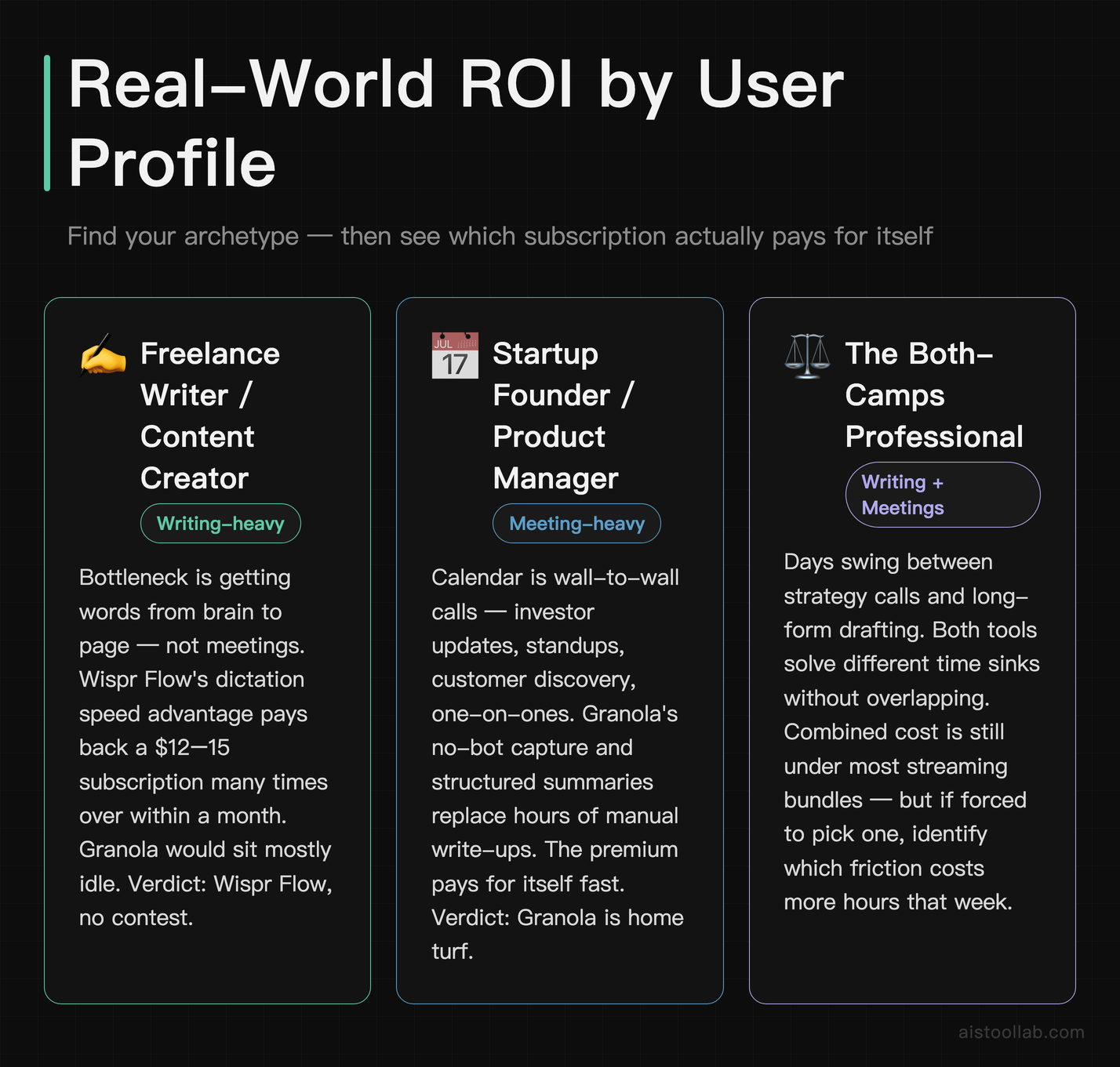
Pricing only means something relative to how much value you pull out. Here’s how the math shakes out for three common readers.
The freelance writer / content creator
Say you’re a freelance writer billing hourly, drafting blog posts, newsletters, and client emails all day. Your bottleneck is getting words out of your head and onto the page — not meetings. Wispr Flow is the obvious ROI winner here. If dictation lets you draft a first pass noticeably faster than typing (and most people do speak meaningfully faster than they type), even a modest daily time saving pays back a $12–15 subscription many times over within a month. A YouTuber scripting videos or a newsletter writer banging out 2,000 words a day will feel the difference. Granola, for this person, is mostly idle — they’re not in enough meetings to justify $18/month. Verdict: Wispr Flow, no contest.
The startup founder / product manager
Now flip it. You’re a founder or PM whose calendar is a wall of back-to-back calls — investor updates, standups, customer discovery, one-on-ones. Your pain isn’t writing; it’s remembering what got decided and who owns what across a dozen conversations a week. This is Granola’s home turf. The value isn’t just transcription — it’s walking out of a call with a clean summary and action items without that bot-in-the-meeting weirdness, then being able to ask follow-up questions about past calls. For someone whose time is genuinely expensive, $18/month to never again scramble for “wait, what did we agree on?” is trivially worth it. Verdict: Granola earns its keep here, and it’s not close.
The solo developer juggling client projects
Here’s where it gets murky. A freelance developer working solo on three client projects writes a lot — commit messages, documentation, Slack updates, code comments — but also sits in periodic client calls. Wispr Flow speeds up all the writing, and dictating into a terminal comment or a GitHub issue actually works surprisingly well. But the occasional client call where decisions get made? That’s Granola territory. For most solo devs, the writing happens daily while the meetings happen weekly, so I’d lean Wispr Flow first — but this is the one profile where running both could genuinely pay off if the budget allows. The good news: combined, they’re still less than two streaming services and a couple of coffees.
Hidden Costs and Subscription Traps to Watch
The monthly price is never the whole cost. A few things to keep your eye on before you commit.
Annual lock-in regret. Both tools discount annual billing hard, and that’s where money leaks. A $144 annual plan for a tool you stop opening after three weeks is the classic productivity-app graveyard. Start monthly, confirm the habit, then switch to annual once you’re sure. The few extra dollars are cheap insurance.
The “I’ll use it for everything” overestimate. People buy Granola imagining they’ll process every meeting, then realize half their calls are casual and don’t need a formal summary. Same with Wispr Flow — you might assume you’ll dictate constantly, then find you still type for short stuff. Be honest about realistic usage, not aspirational usage, when you judge value.
Stacking overlap with tools you already pay for. If you already run Notion AI, Otter, Fireflies, or a Zoom AI Companion seat, Granola may overlap with meeting features you’re paying for elsewhere. Likewise, if you already lean on built-in dictation (macOS and Windows both ship free voice typing), Wispr Flow has to clear a higher bar to justify the spend — its edge is accuracy and cross-app cleanup, not the mere existence of dictation. Audit your stack before adding another line item.
Privacy and data handling. Both tools process audio. For Granola that means meeting conversations; for Wispr Flow that means whatever you dictate, which sometimes includes sensitive text. If you’re in a regulated field or handle client confidential data, read each tool’s data policy properly rather than assuming. This isn’t a hidden dollar cost, but a compliance misstep can get expensive in a way no subscription discount offsets.
Feature-per-Dollar: Who Wins the Value Math?
If you force a single answer purely on dollars-per-feature, Wispr Flow looks like the better deal on paper — lower entry price, a more usable free tier, and a benefit (faster writing) that applies to almost everyone who works at a keyboard. The transcription speed matters too; dictation only feels good when the lag between speaking and seeing text is low, which is the same low-latency principle that makes or breaks any real-time AI tool. I dug into why responsiveness matters so much in my piece on AI Model Performance Metrics 2026 — latency is the invisible thing that determines whether you keep using a tool or quietly abandon it.
But “cheaper per feature” isn’t the same as “more valuable to you.” Granola’s value is concentrated and high-stakes: if you live in meetings, the ROI per dollar is enormous because the alternative (manually writing up calls, or forgetting decisions entirely) is genuinely costly. A tool can be more expensive and still deliver better ROI when it solves a more expensive problem. That’s the trap with raw feature-per-dollar thinking — it rewards breadth over depth, and sometimes depth is exactly what you’re paying for.
The most useful framing I can offer: Wispr Flow wins on universal, everyday value (almost everyone types), while Granola wins on concentrated, role-specific value (meeting-heavy people get outsized returns). Match the tool to your biggest recurring friction and the value question answers itself.
Use Cases: Concrete Scenarios
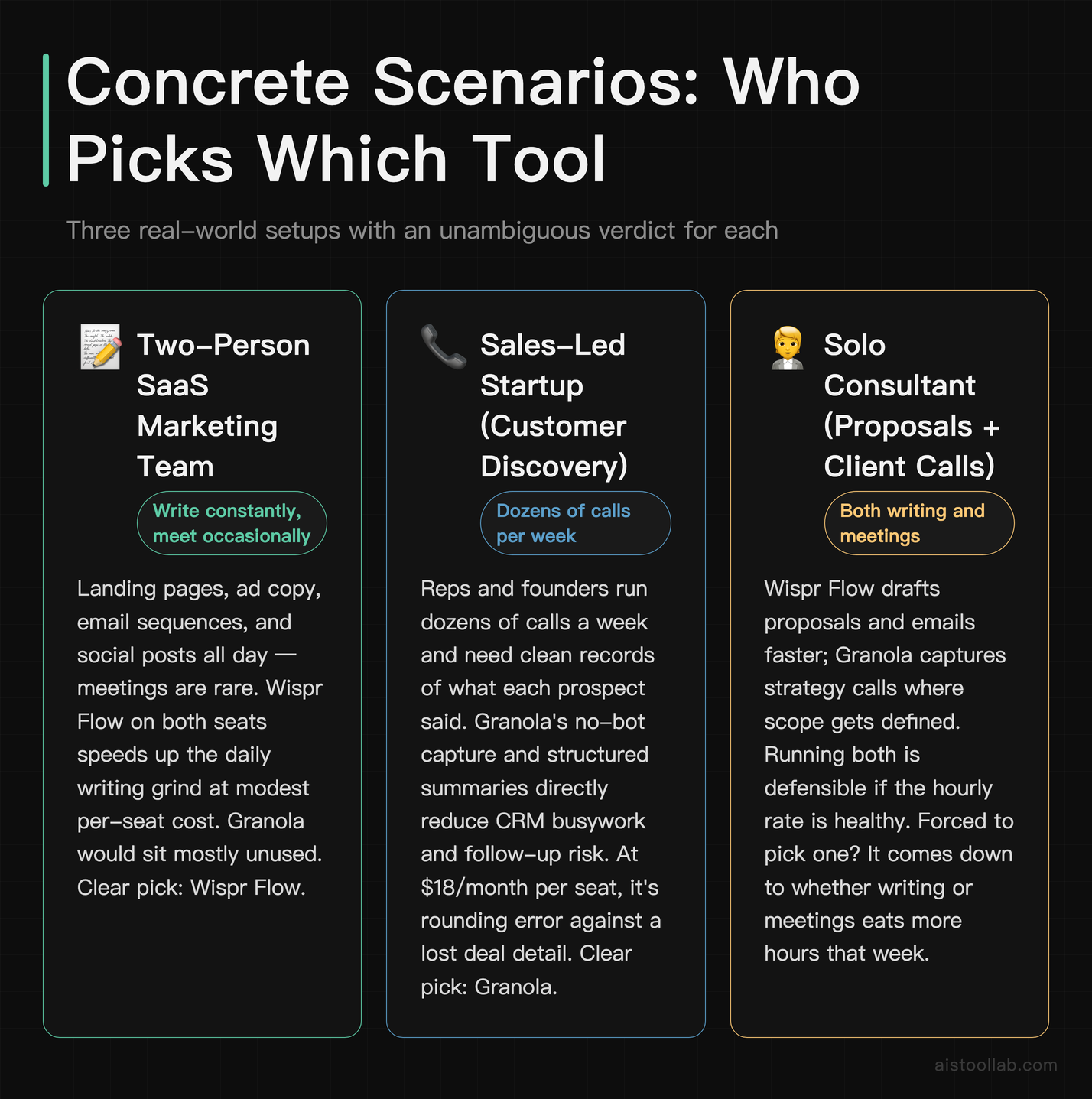
1. A two-person SaaS marketing team
They write constantly — landing pages, ad copy, email sequences, social posts — and meet occasionally. Wispr Flow on both seats speeds up the daily writing grind, and the per-seat cost stays modest. Granola would sit mostly unused. Clear pick: Wispr Flow.
2. A sales-led startup doing heavy customer discovery
Reps and founders run dozens of calls a week and need clean records of what each prospect said. Granola’s no-bot capture and structured summaries directly reduce the busywork of CRM updates and follow-ups. The $18/month per person is rounding error against the value of never losing a deal detail. Clear pick: Granola.
3. A solo consultant who both writes proposals and runs client calls
This is the genuine both-tools case. Wispr Flow drafts proposals and emails faster; Granola captures the strategy calls where scope gets defined. Combined cost still lands under what many people spend on streaming. If the consultant’s hourly rate is healthy, running both is an easy yes — but if forced to choose one, it comes down to whether writing or meetings eats more hours that week.
The Verdict: Where I’d Put My Money
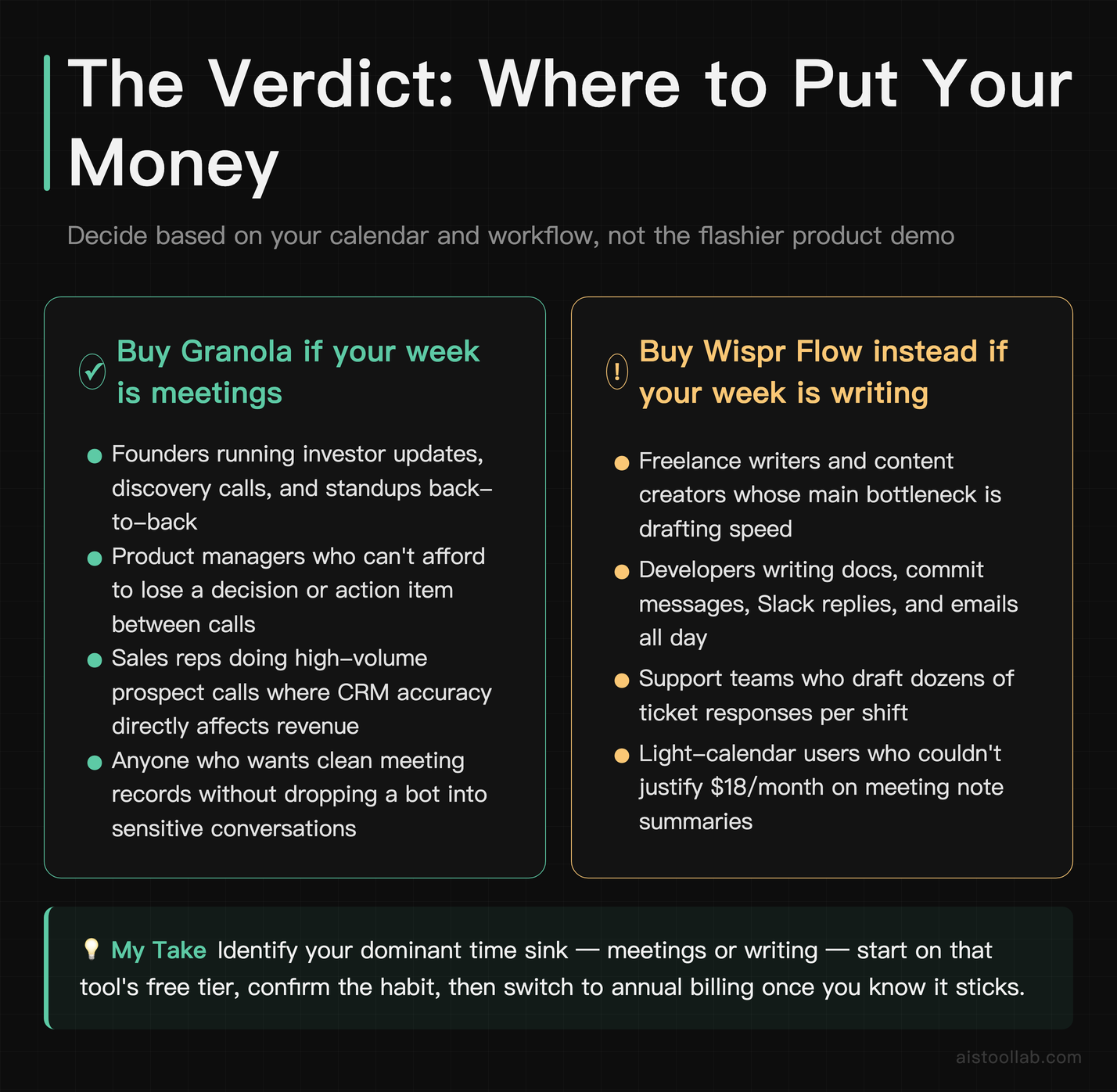
If it were my money on the line, here’s how I’d decide — and I’d decide based on my calendar, not on which tool has the flashier demo.
If your week is dominated by writing — drafting content, emails, docs, code comments — Wispr Flow is the better buy. It’s cheaper, its free tier is genuinely usable, and the benefit applies to basically everything you do at a keyboard. For freelance writers, developers, support teams, and anyone whose bottleneck is getting words out, it’s the higher-ROI subscription and the easier one to justify.
If your week is dominated by meetings — discovery calls, standups, investor updates, client check-ins — Granola is worth its higher price. The value is concentrated where it matters: never losing a decision, never scrambling to write up a call, and skipping the bot-in-the-meeting awkwardness entirely. For founders, PMs, and sales-led teams, the premium pays for itself fast.
And if you’re the genuine both-camps person whose days swing between calls and writing, running both is a defensible call — combined, they cost less than a couple of streaming services, and they cover two different time sinks without overlapping. My one firm rule for everyone: start on monthly billing, prove the habit on your real work for a few weeks, and only then lock in the annual discount. The free trials cost you nothing but twenty minutes — and twenty minutes is usually all it takes to know whether a tool is going to live in your daily workflow or your subscription graveyard.
Frequently Asked Questions
Are Granola and Wispr Flow even direct competitors?
Not really, and that’s the most important thing to understand before you spend a dollar. Granola is a meeting notepad that listens to your calls and produces summaries; Wispr Flow is a dictation tool that turns your speech into typed text anywhere on your computer. They get compared because they’re both buzzy AI productivity subscriptions that landed on a lot of “must-have tools” lists, and because they both ask for a similar monthly fee. But they solve different problems. The right way to choose between them isn’t to look for the “better” tool in some absolute sense — it’s to figure out which friction costs you more time each week. If you’re drowning in meetings and forgetting decisions, that’s a Granola problem. If you’re slow at getting words from your brain onto the screen, that’s a Wispr Flow problem. Some people legitimately have both problems and run both tools, since their combined cost is still modest. But for a single-subscription decision, identify your dominant pain point first.
Is the free version of either tool actually usable long-term?
It depends on how lightly you use them. Wispr Flow’s free tier is the more genuinely sustainable of the two for casual users because it gives you the full feature set and only caps your weekly word count. If you dictate occasionally — a few emails here, a Slack message there — you might never hit the ceiling and never need to pay. Heavy daily dictators, though, will burn through the weekly allowance quickly and feel real pressure to upgrade. Granola’s free plan works more like an extended trial: it limits how many meetings you can process through the AI, so once you’re past that cap you’re effectively pushed toward the paid plan. For someone with only the occasional important call, the free tier might stretch fine; for anyone in regular meetings, it runs out fast. Bottom line: Wispr Flow’s free tier can be a permanent home for light users, while Granola’s free tier is better understood as a way to test the workflow before committing.
Which one offers better value for money in 2026?
On pure price, Wispr Flow is the cheaper monthly commitment and applies to nearly everyone who types, which makes it the safer “value” pick if you’re unsure. But value isn’t only about the lowest number — it’s about how expensive the problem you’re solving is. For a meeting-heavy founder or salesperson, Granola’s higher price delivers better ROI because the cost of disorganized meetings (lost decisions, dropped follow-ups, manual write-ups) is far higher than the subscription. For a writer or developer whose bottleneck is producing text, Wispr Flow wins the value race easily. The mistake is treating “value for money” as a universal ranking. The genuinely useful answer is conditional: Wispr Flow offers broader everyday value at a lower price, while Granola offers concentrated, role-specific value that justifies its premium for the right user. Map the tool to your actual workflow and the value question stops being abstract.
Do I really need to pay, or can I use free built-in alternatives?
This is worth asking honestly before you add another subscription. For dictation, both macOS and Windows ship free voice typing, and they’ve improved a lot. Wispr Flow’s justification is accuracy, smarter cleanup of filler words and punctuation, and consistent behavior across every app — if those built-in tools already work well enough for your needs, you may not need to pay at all. Test the free options first. For meetings, the alternatives are messier: most free meeting-note tools rely on a bot joining your call, which is exactly the friction Granola is built to avoid, and many video platforms now bundle their own AI summary features that might cover your needs if you’re already paying for them. The honest advice: audit what you already have access to. If your Zoom or Teams plan includes AI summaries and you’re fine with them, Granola becomes a nice-to-have rather than a necessity. Don’t pay for a problem your existing stack already solves.
How accurate is Wispr Flow’s transcription for technical or accented speech?
Based on official descriptions and public user reviews, Wispr Flow handles general dictation well and includes context-aware cleanup that improves on raw transcription, but accuracy with heavy technical jargon, code-specific terms, or strong accents varies by user — this is true of essentially every voice tool on the market, not a Wispr Flow-specific flaw. Reviewer consensus on Reddit and similar communities is broadly positive on everyday speech and more mixed on niche vocabulary. If you work with unusual product names, programming terminology, or specialized medical or legal language, expect to do some correction, at least early on while the tool adapts to your patterns. The practical test is simple and cheap: use the free tier for a week on your real work — your actual emails, your actual code comments — and judge the correction burden for yourself. If you’re spending more time fixing transcription errors than you’d have spent typing, it’s not worth it for your speech profile. For most general-purpose writing in clear speech, though, public feedback suggests it clears the bar comfortably.
Does Granola work without a meeting bot, and why does that matter?
Yes — and it’s one of Granola’s defining selling points. Instead of sending a bot to join your call (the approach many older meeting-transcription tools use), Granola captures your computer’s audio locally and works alongside the notes you type yourself. Why does this matter beyond avoiding awkwardness? A few reasons. First, no bot means no “an unknown participant has joined” moment that can make clients or candidates uncomfortable, which is a real concern in sales calls, interviews, and sensitive discussions. Second, it works across different meeting platforms without you needing to configure integrations for each one, since it’s listening at the system level rather than plugging into a specific app. Third, blending your own shorthand with the full transcript tends to produce summaries that reflect what you actually cared about, not just a flat recap of everything said. The trade-off is that it relies on capturing system audio on your device, so you’ll want to understand how that works on your setup and confirm it fits your privacy requirements, especially if you handle confidential client conversations.
What are the biggest hidden costs with these subscriptions?
The single biggest one is annual lock-in on a tool you stop using. Both Granola and Wispr Flow discount annual billing aggressively, which is great if you genuinely use the tool daily and a quiet waste if you don’t. Paying $144 upfront for something that gets abandoned after a month is the most common productivity-subscription trap, so start monthly and only switch to annual once the habit is real. The second hidden cost is overlap with tools you already pay for — if your video conferencing already bundles AI summaries, or you already run another dictation or note tool, you may be double-paying for capabilities you have. The third is the overestimation of your own usage; people buy these tools imagining they’ll process every meeting or dictate everything, then settle into much lighter real-world use that doesn’t justify the spend. And finally, for regulated industries, the “cost” of a data-handling misstep dwarfs any subscription fee, so factor compliance review into your decision rather than treating it as free.
Can I run both tools together, and is that overkill?
You can absolutely run both, and for certain people it’s genuinely smart rather than excessive. Because they solve different problems — Granola for capturing meetings, Wispr Flow for producing text faster — they don’t overlap, so you’re not paying twice for the same capability. The people who benefit most from running both are those whose work is split fairly evenly between meetings and writing: solo consultants, fractional executives, founders who both pitch on calls and write a lot of copy and documentation. For them, the combined monthly cost still lands below what many households spend on streaming subscriptions, and the time saved on both fronts adds up. Where it tips into overkill is when one side of the equation barely applies — a writer who’s almost never in meetings shouldn’t pay for Granola, and a sales rep who rarely writes long-form shouldn’t pay for Wispr Flow. The test is whether both pain points genuinely cost you meaningful time each week. If only one does, buy only one; if both do, running both is a reasonable, even efficient, choice.
Last updated: 2026
Found this review helpful?
👉 Browse the AI Tools Library to find the right tools for your workflow.