
ChatGPT Is Good — But It’s Not Always the Right Tool for Everyone
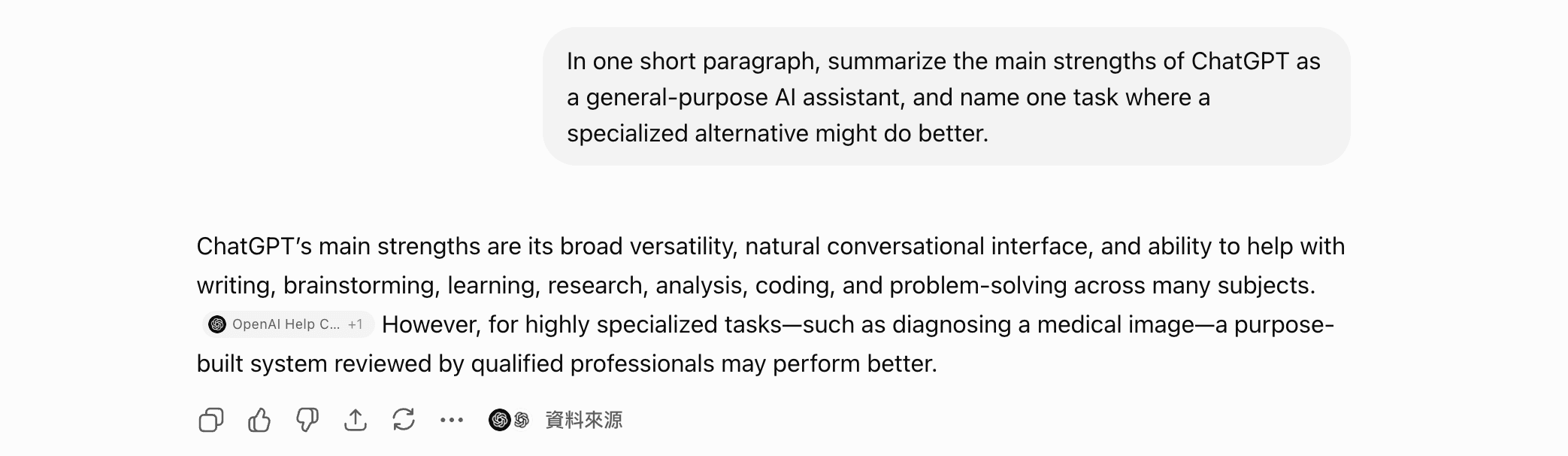
Before we get to the alternatives, here’s the baseline from the tool itself. We ran a quick hands-on check on ChatGPT (logged-in paid account): its real strength is breadth — writing, brainstorming, research, and coding in one place, with a conversational interface that needs almost no learning curve. But even ChatGPT flagged the catch: for narrow, high-stakes tasks it isn’t automatically the best pick. The rest of this guide is about those cases — where a more focused tool earns the switch.
Let’s be honest: ChatGPT is probably the reason most people got excited about AI in the first place. It’s capable, versatile, and has a massive ecosystem behind it. But with daily use, the frustrations start to surface. ChatGPT’s rate limits kick in right when you’re in the middle of something important. The free tier doesn’t have access to real-time information. And if you’re a power user running through tokens on complex tasks, that $20/month for Plus — or significantly more for Team or Enterprise — adds up fast. Then there’s the hallucination problem, which hasn’t gone away as quietly as OpenAI would like.
None of that means ChatGPT is bad. It’s still one of the most capable general-purpose AI assistants available, the plugin and GPT ecosystem is genuinely useful, and its flagship model is strong for a wide range of tasks. But “best overall” doesn’t mean “best for you specifically.” Depending on whether you’re a developer, a researcher, a writer, or just someone who wants quick answers without hitting a paywall, there are real alternatives that might serve you better.
This guide covers seven ChatGPT alternatives worth seriously considering in 2026 — what each one does better, where it falls short, and who should actually make the switch.
Why People Look for ChatGPT Alternatives
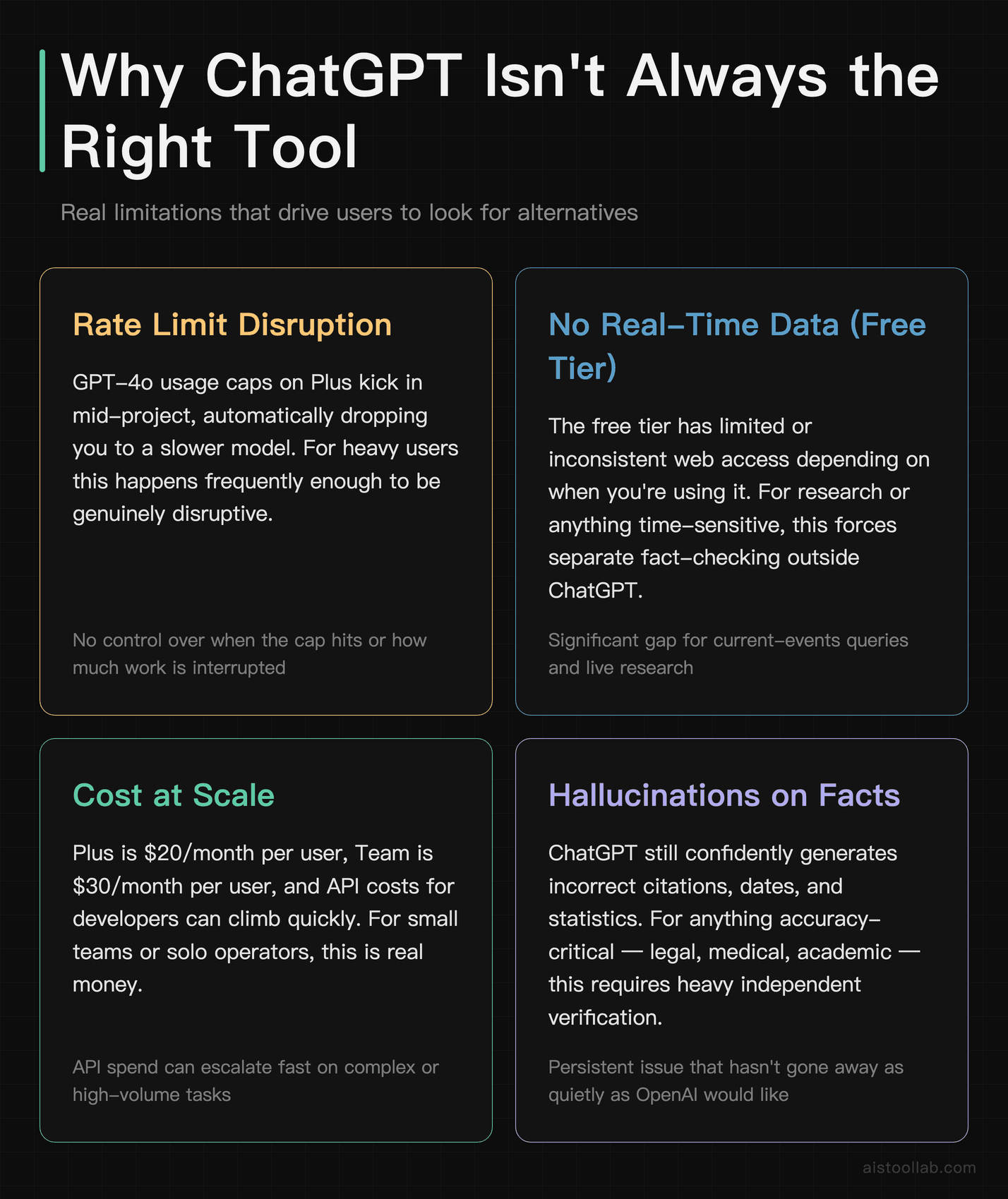
Before diving into the tools, it’s worth naming the specific pain points that drive people to look elsewhere. These aren’t just abstract complaints — they’re real limitations that affect how useful ChatGPT actually is in practice.
- ChatGPT rate limits on Plus: If you hit your usage cap mid-project, ChatGPT automatically drops you to a slower or less capable model. For heavy users, this happens frequently enough to be genuinely disruptive.
- No real-time data on the free tier: The free version of ChatGPT still has limited or inconsistent web access depending on when you’re using it. For research or anything time-sensitive, this is a significant gap.
- Cost at scale: The Plus plan is $20/month per user, Team is $30/month per user, and API costs for developers can climb quickly. For small teams or solo operators, this is real money.
- Hallucinations on factual tasks: ChatGPT still confidently generates incorrect citations, dates, and statistics. For anything where accuracy matters — legal, medical, academic — this requires heavy fact-checking.
- Context window limitations for free users: Longer documents or extended conversations can hit limits faster than expected on lower tiers, forcing you to break up work in inconvenient ways.
Claude: Best for Long-Form Writing and Complex Reasoning
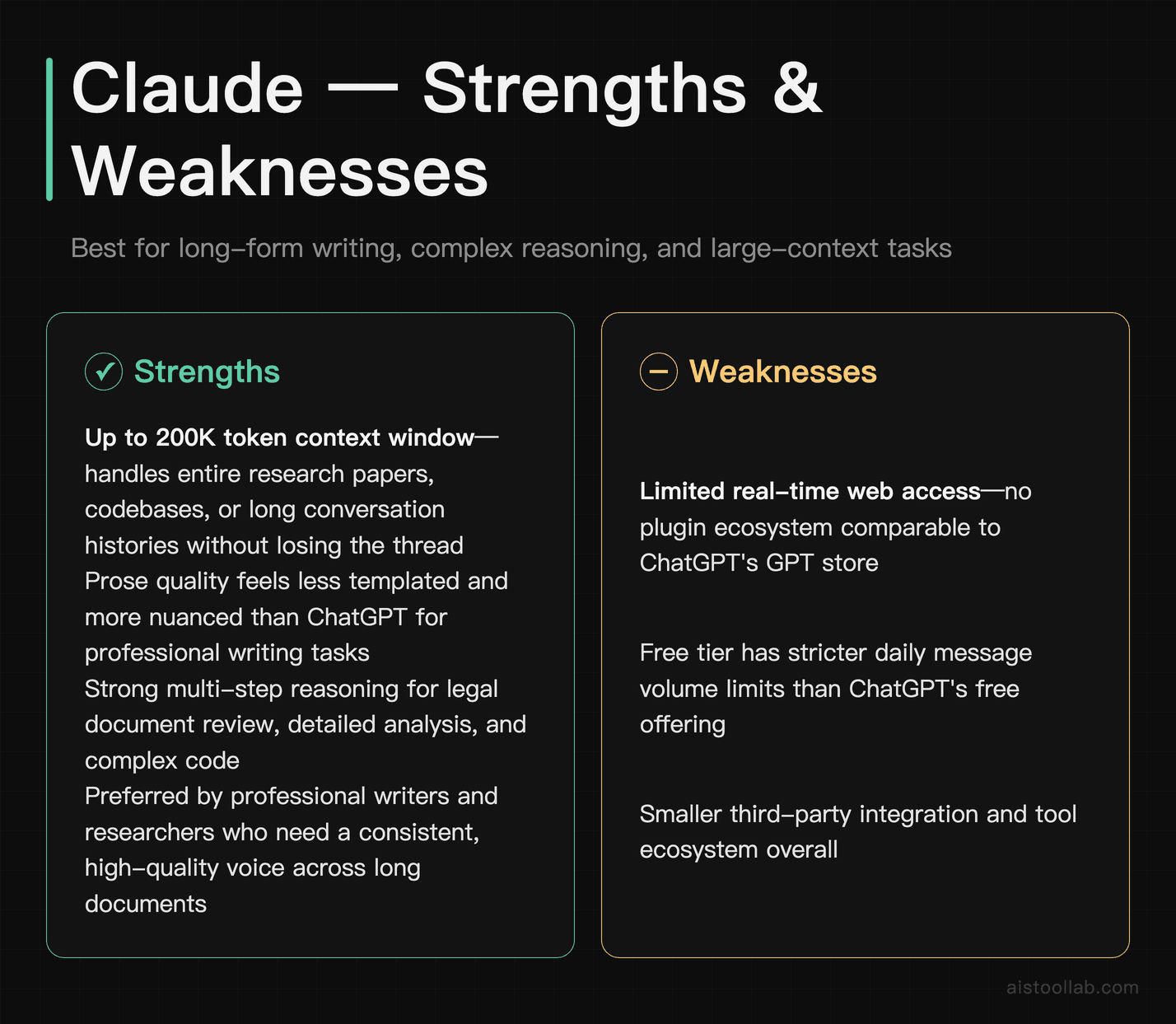
Anthropic’s Claude has become the go-to alternative for people who spend serious time writing — long reports, detailed analysis, nuanced content that requires a consistent voice. Claude tends to produce prose that feels less templated than ChatGPT, and its handling of large context windows (up to 200K tokens on Claude’s flagship models) is genuinely impressive. You can paste in an entire research paper, a codebase, or a long conversation history and ask Claude to reason across all of it without losing the thread.
Where Claude has historically lagged is in real-time web access and tool integrations — it doesn’t have the same plugin ecosystem as ChatGPT. The free tier is also more limited in terms of daily message volume. But for pure language quality and handling complex, multi-step reasoning tasks, many professional writers and researchers now prefer it to ChatGPT.
If you’re doing legal document review, long-form content creation, or detailed code analysis where you need the model to hold a lot of context at once, Claude is arguably the strongest option available right now.
Pricing: Free tier available; Claude Pro is $20/month and gives access to the most capable models with higher usage limits.
Perplexity AI: Best for Research and Real-Time Information
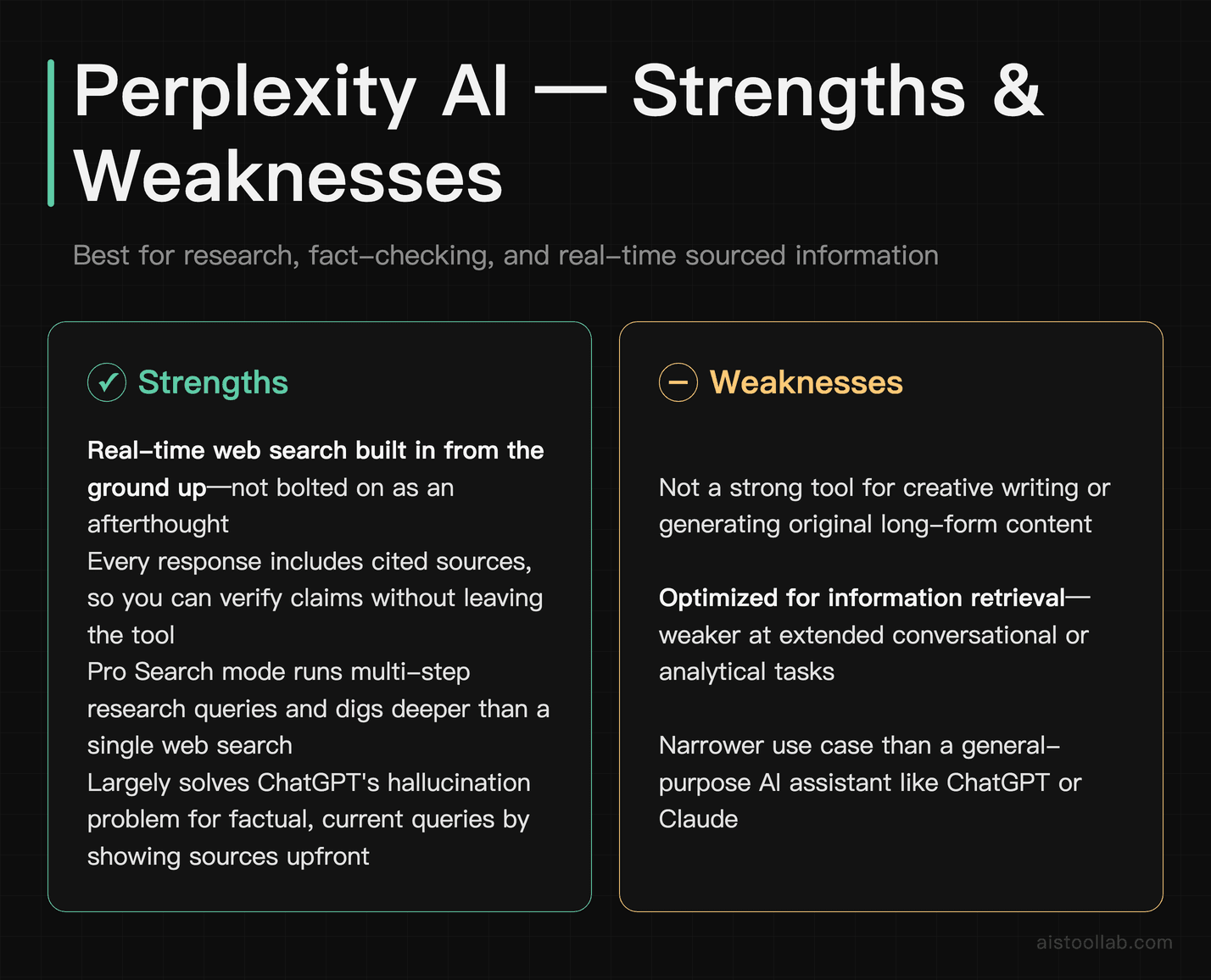
Perplexity sits in a different category from most AI chatbots — it’s built around real-time web search from the ground up, not bolted on as an afterthought. Every response comes with cited sources, which means you can actually verify what it’s telling you. For researchers, journalists, analysts, or anyone who needs current information and cares about where it’s coming from, this is a fundamental difference from the standard ChatGPT experience.
The honest weakness: Perplexity isn’t a great creative writing tool. It’s optimized for information retrieval and synthesis, not for generating original content or handling long conversational tasks. Think of it less as a general-purpose assistant and more as an AI-powered research engine. For that specific job, it’s excellent. It also has a Pro Search mode that can run multi-step research queries and dig deeper into topics than a single web search would.
If you frequently find yourself asking ChatGPT questions and then having to verify everything separately because you can’t trust the sources — Perplexity largely solves that problem by showing you the sources upfront.
Pricing: Free tier with limited Pro searches per day; Perplexity Pro is $20/month with unlimited Pro searches and access to multiple underlying models including GPT-5-generation OpenAI models and Claude.
A Quick Hands-On Check: Perplexity’s Free Tier for Fact-Checking
To see how the “research with sources upfront” idea actually behaves, I ran a single fact-checking query on Perplexity’s free tier without logging in — asking whether remote work really reduces team productivity, and to lay out the evidence on both sides with sources. Here is what that one run returned:
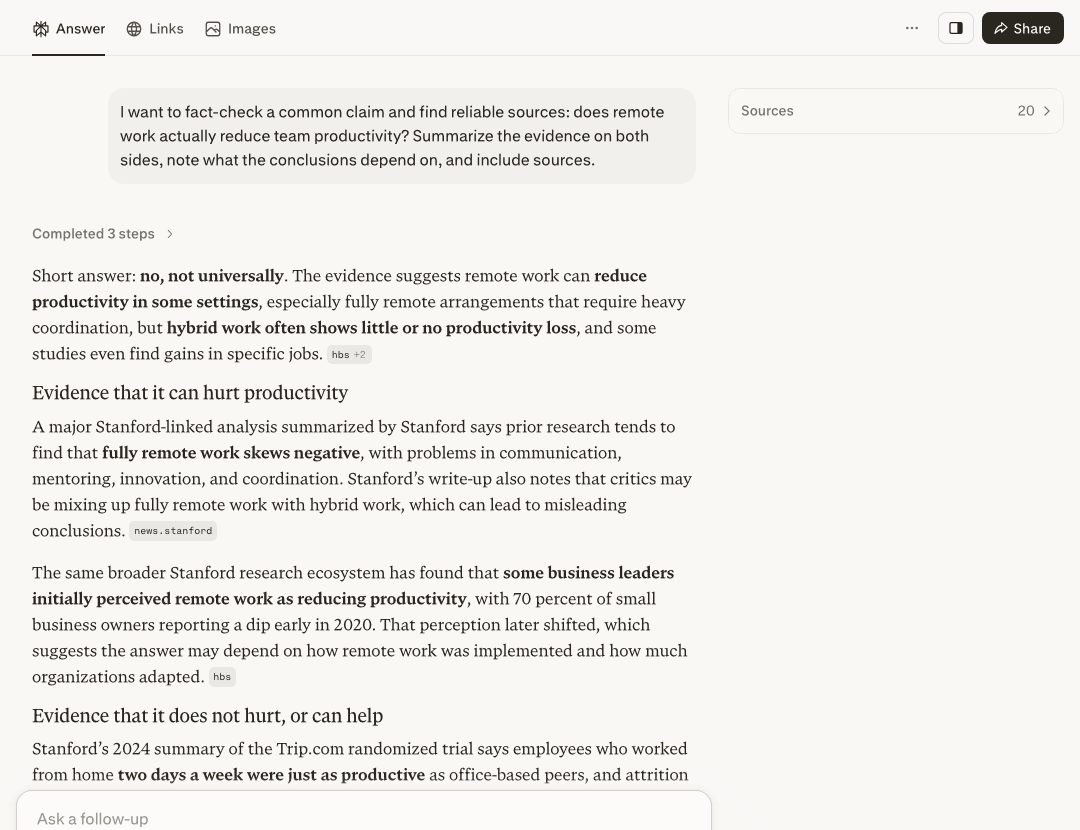
What stood out in this run: instead of picking a side, it opened with a hedged “Short answer: no, not universally,” then split the response into “Evidence that it can hurt productivity” and “Evidence that it does not hurt, or can help.” Several points carried a compact source label, and in this run those labels pointed to institutions like Stanford, HBS and NBER, with a “Sources” list alongside the answer. For quickly mapping where a contested claim actually stands, that both-sides-plus-attribution layout is more useful than an unsourced summary.
The honest limits of this quick test: this was the free tier, not logged in, and a single query on one day — not a benchmark, and I had to dismiss a cookie banner and a sign-up popup first. The source labels are compact, and in this run I did not open each one or trace whether it truly supports the sentence it sits next to. In this particular run the answer also appeared to get cut off at the final sentence. Source quality can also vary from query to query — it happened to lean on strong institutions here, but as the section above notes, this is a research and discovery tool: it surfaced and organized the evidence, but verifying it is still your job.
Google Gemini: Best for Google Workspace Users
Google Gemini (formerly Bard) has improved substantially since its rocky launch. Its recent versions handle multimodal inputs well, supports very long context windows, and integrates tightly with Google’s ecosystem: Gmail, Docs, Drive, Sheets. If your workflow lives in Google Workspace, the native integration alone is a compelling reason to give Gemini a serious look.
The real-time data access is also strong — Gemini has direct Google Search integration and tends to be up-to-date on current events. For casual users who already pay for Google One or use Google Workspace at work, Gemini Advanced may already be included in a plan they’re paying for, which changes the cost calculus significantly compared to a separate ChatGPT Plus subscription.
The weakness is consistency. Gemini can be hit-or-miss on nuanced writing tasks and occasionally gives responses that feel more like search results summarized than genuinely synthesized analysis. For developers, the API access through Google AI Studio is solid, but the model behavior is less predictable than ChatGPT for complex reasoning chains.
Pricing: Free tier available; Google’s paid AI plans are listed on its official plans page as Google AI Plus, Google AI Pro and Google AI Ultra; Google AI Pro is US$19.99 per month there (checked 2026-07-26). Storage allowances differ by tier, so check the official page.
Microsoft Copilot: Best for Microsoft 365 Users
Microsoft Copilot is essentially OpenAI’s models wrapped in Microsoft’s ecosystem, which is both its strength and its limitation. If you work in Word, Excel, PowerPoint, Teams, or Outlook daily, the Copilot integrations are genuinely useful — summarizing long email threads, drafting documents from bullet points, generating formulas in Excel. The standalone Copilot web app also has free access to current-generation models with Bing search integration, which gives it real-time data access even on the free tier.
The catch is that the truly useful Copilot features — the deep Office integrations — require Microsoft 365 Copilot, which is priced for enterprise users and well above what most individuals will want to pay. The free standalone version is a solid ChatGPT alternative for light use, but the experience can feel inconsistent, and it doesn’t match the depth of customization you get with ChatGPT’s custom GPTs or Claude’s extended context.
For individuals or small businesses already paying for Microsoft 365, checking whether Copilot is included in your plan before paying for a separate ChatGPT subscription is worth doing. For enterprise teams, the Word and Teams integrations have real productivity value.
Pricing: Free tier available via copilot.microsoft.com; Microsoft 365 Copilot for enterprise starts at $30/user/month on top of a Microsoft 365 subscription.
Mistral: Best for Developers Who Want API Flexibility
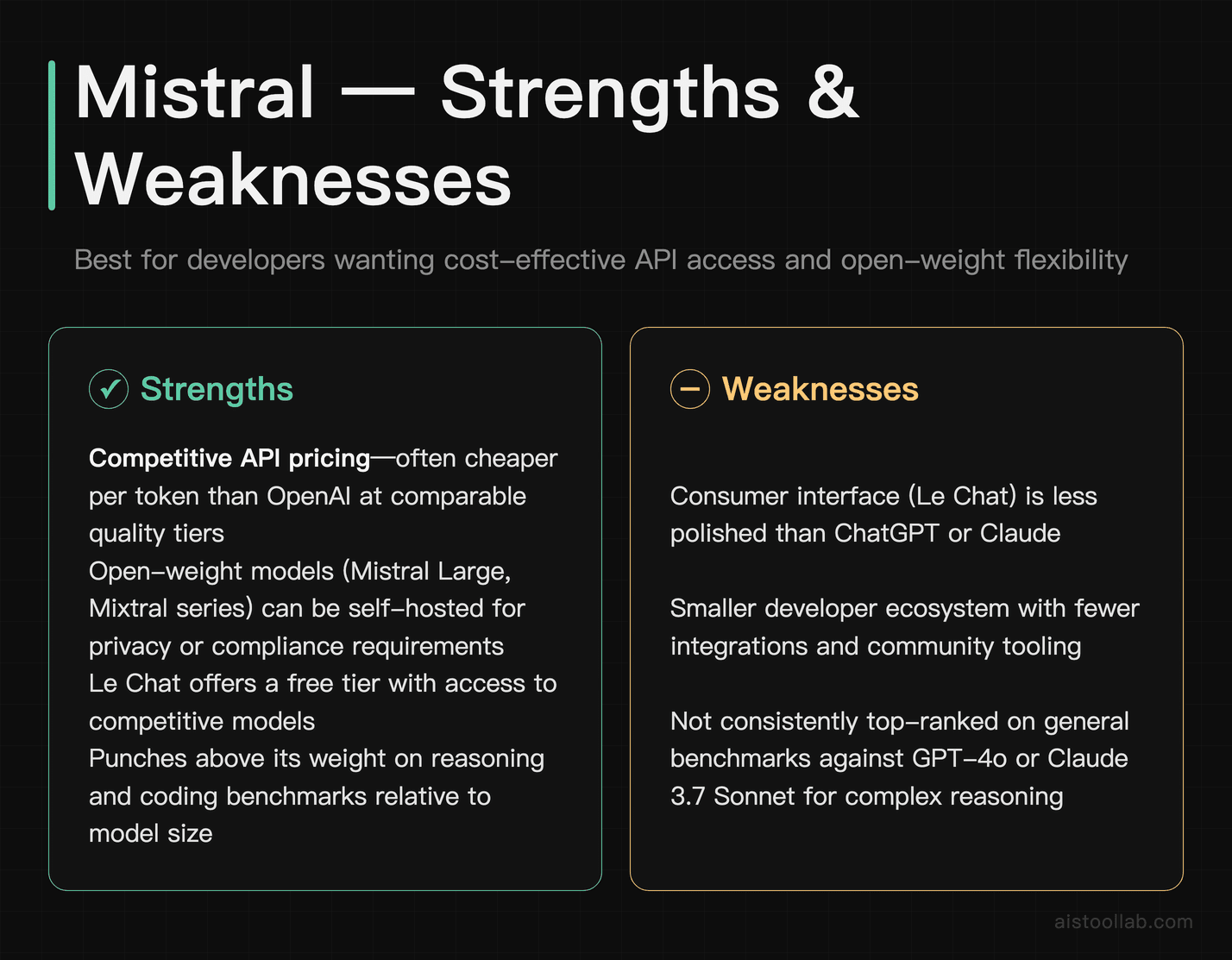
Mistral is a French AI company that has quietly built some of the most efficient open-weight models available. If you’re a developer who wants capable models without the cost structure of OpenAI’s API, Mistral is worth a serious look. Their models — particularly Mistral Large and the Mixtral series — punch above their weight on reasoning and coding tasks, and their API pricing is competitive. The open-weight models can also be self-hosted if you have the infrastructure, which is a meaningful option for teams with privacy or compliance requirements.
Mistral’s consumer-facing product, Le Chat, has improved significantly and offers a free tier with access to competitive models. For most end users, the interface is less polished than ChatGPT or Claude, and the ecosystem around it is smaller. But for developers benchmarking models, building applications, or looking for cost-effective API access, Mistral is a legitimate alternative to OpenAI’s API — often cheaper per token at comparable quality tiers.
The honest limitation: Mistral’s models are strong but not consistently at the top of general benchmarks against ChatGPT or Claude on complex reasoning. The value proposition is efficiency and cost, not maximum capability at any price.
Pricing: Le Chat has a free tier; API pricing varies by model and is generally competitive with OpenAI — check Mistral’s current API pricing page for exact figures as these change regularly.
DeepSeek: Best for Cost-Conscious Developers and Researchers
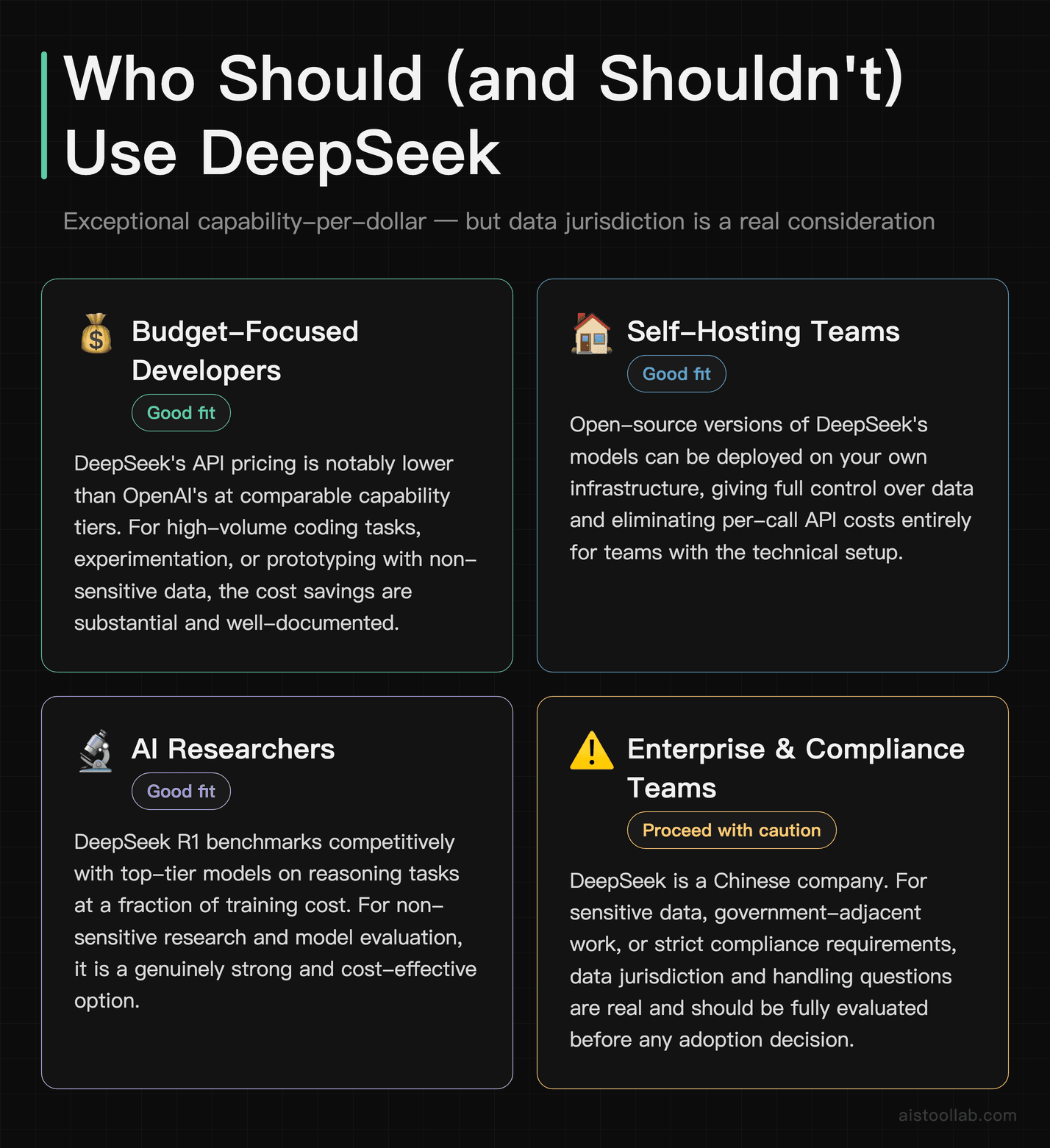
DeepSeek made waves in early 2025 when its R1 model delivered reasoning performance that benchmarked competitively with top-tier models at a fraction of the training cost. For developers and researchers, the implications were significant: capable models don’t have to be prohibitively expensive. DeepSeek’s API pricing has been notably low compared to OpenAI, and the open-source versions of their models can be run locally or deployed on your own infrastructure.
It’s worth being direct about the considerations here: DeepSeek is a Chinese company, and depending on your use case — especially anything involving sensitive data, enterprise compliance, or government-adjacent work — the data handling and jurisdiction questions are real and worth thinking through carefully. For many developers doing general coding tasks, experimentation, or research with non-sensitive data, this may not be a blocking concern. But you should go in with eyes open.
The model quality on reasoning and coding tasks is genuinely strong. For pure capability-per-dollar, DeepSeek R1 and its successors are hard to beat. The chat interface is functional but basic. Think of this as a developer-first tool rather than a polished consumer product.
Pricing: Free tier on chat.deepseek.com; API pricing is low relative to comparable models — check current rates on their API pricing page, as figures have changed frequently.
Meta AI: Best for Casual Users Who Want Free, No-Strings Access
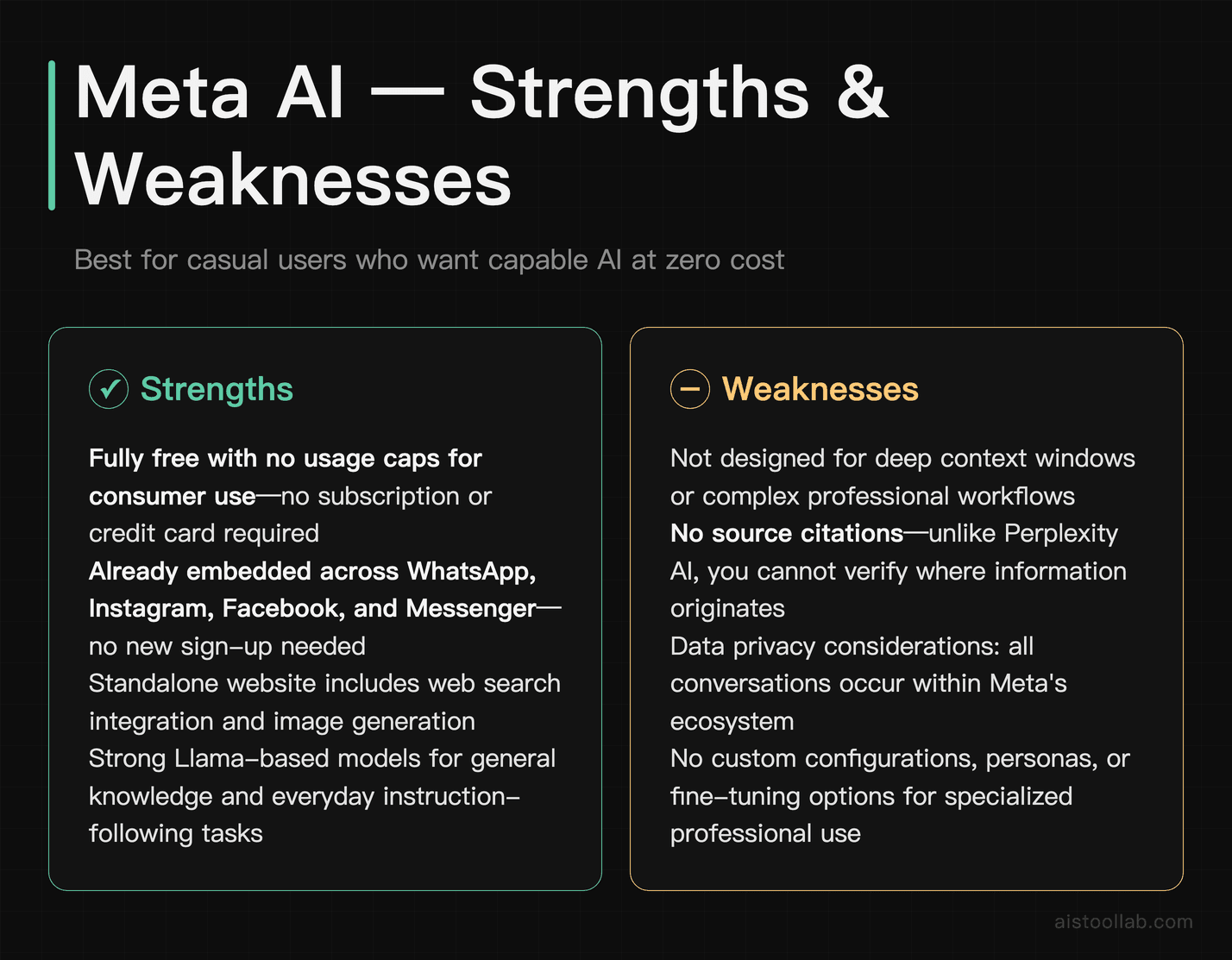
Meta AI, powered by the Llama family of models, is now embedded across WhatsApp, Instagram, Facebook, and Messenger — which means if you’re already using any of those platforms, you have access to a capable AI assistant without signing up for anything new. The standalone Meta AI website also offers a solid free experience with web search integration and image generation.
For casual users who just want to ask questions, brainstorm ideas, or get help with everyday tasks without paying a subscription, Meta AI is a genuinely good option. The underlying Llama models are strong, particularly on general knowledge and instruction-following tasks. The social platform integrations make it uniquely accessible — you can ask Meta AI something directly in a WhatsApp conversation without switching apps.
The honest limitation: Meta AI is not the right tool for professionals who need deep context windows, precise source citations, or custom configurations. It also raises the same data privacy questions any Meta product does — your conversations are happening within Meta’s ecosystem. For casual use cases, that trade-off is often fine. For sensitive professional work, it’s worth thinking about.
Pricing: Entirely free at the consumer level, included within Meta’s platforms. No paid tier currently available for individual users.
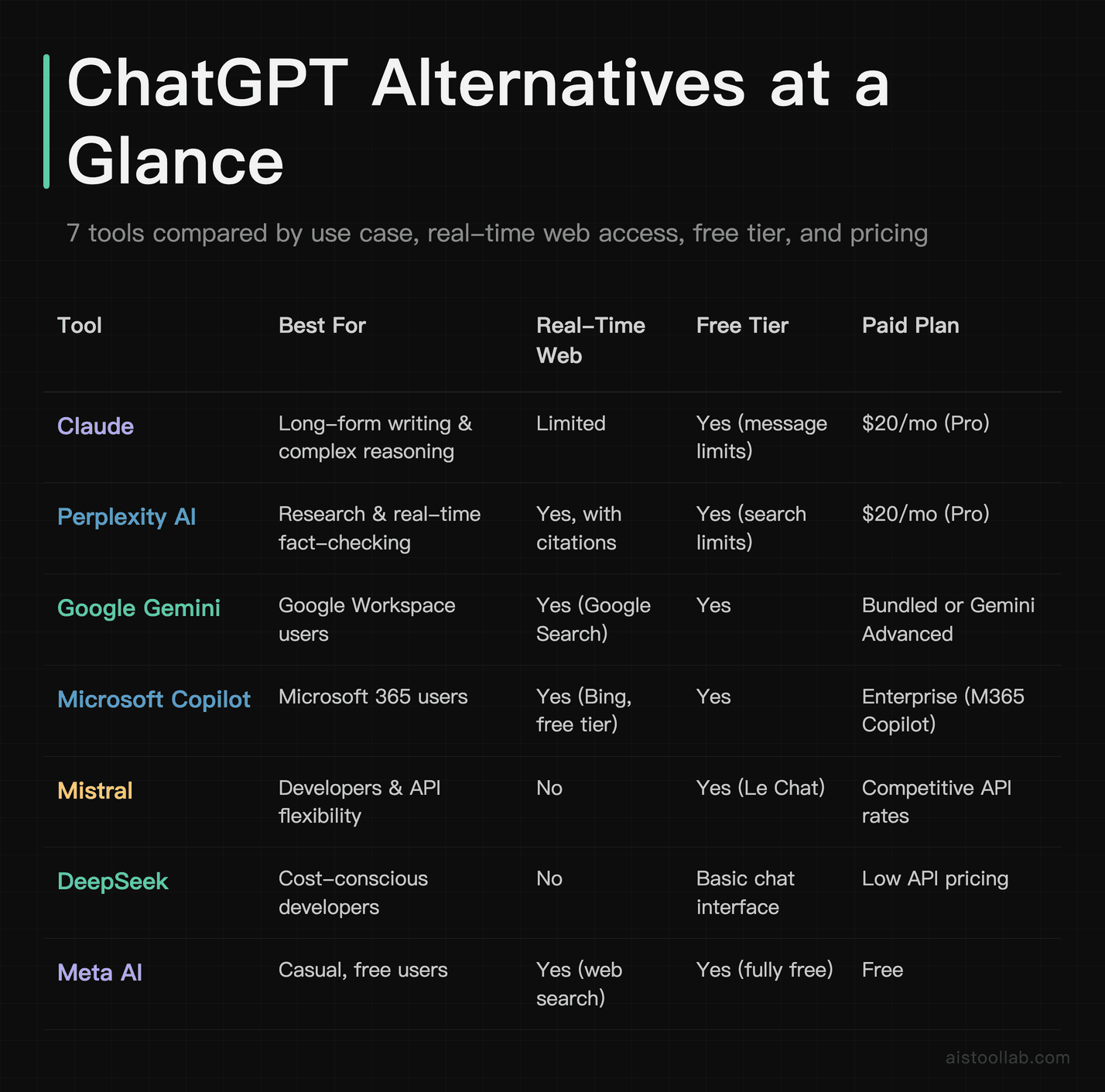
ChatGPT Alternatives Comparison Table
Which Alternative Is Right for You
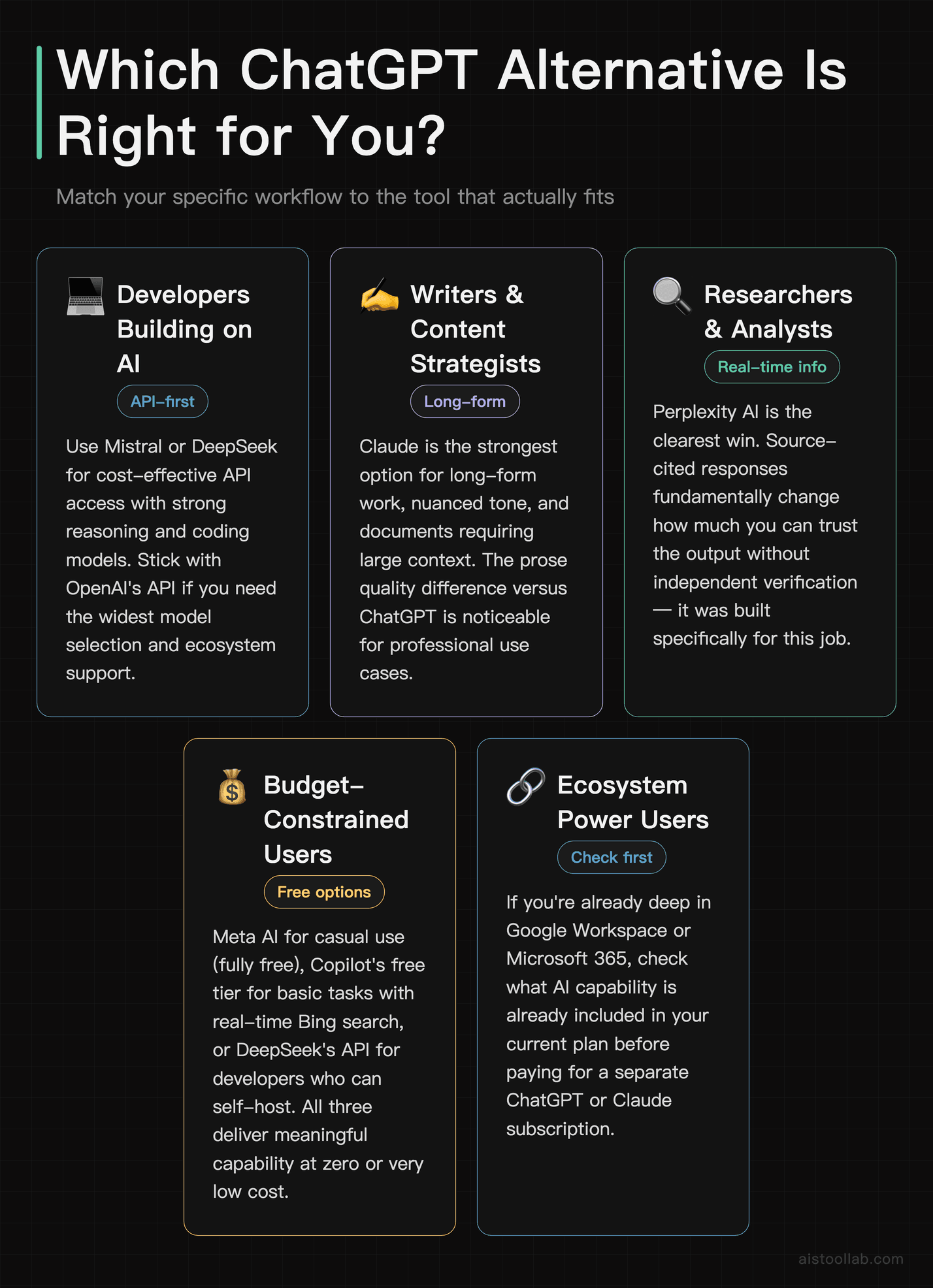
- If you’re a developer building on top of AI models: Mistral or DeepSeek for cost-effective API access; OpenAI’s API if you need the widest model selection and ecosystem support. If you’re also writing a lot of code in your editor, see our for a comparison of inline coding tools.
- If you’re a writer, editor, or content strategist: Claude is the strongest option for long-form work, nuanced tone, and documents that require holding a lot of context. The quality difference in generated prose is noticeable for professional use cases.
- If you’re a researcher or analyst who needs current information: Perplexity AI is the clearest win here. The source-cited responses change how much you can trust the output without independent verification.
- If budget is your primary constraint: Meta AI for casual use (fully free), Copilot’s free tier for basic tasks with real-time search, or DeepSeek’s API if you’re a developer who can self-host. All three give you meaningful capability at zero or very low cost.
- If you’re already deep in Google or Microsoft’s ecosystem: Don’t pay for a separate AI subscription before checking what’s already included in your existing plan. Google’s AI features are sold through its Google AI Plus / Pro / Ultra plans; Copilot is increasingly bundled with Microsoft 365. Either could cover your needs without an additional $20/month.
- If you want the best all-around experience and cost isn’t a major factor: Honestly, ChatGPT Plus and Claude Pro are roughly comparable at the top. Try both free tiers first — your preference will likely come down to writing style and which integrations matter more to your workflow.
When using any AI writing tool, these two free utilities are useful alongside: the Readability Score tool checks whether your AI-assisted content hits the right complexity level, and the Word Counter verifies word counts before publication — both zero-install, browser-based.
Frequently Asked Questions
Is there a completely free ChatGPT alternative that’s actually good?
Yes, a few. Meta AI is fully free with no usage caps for consumer use and uses capable Llama-based models. Microsoft Copilot’s free tier includes real-time web search powered by current-generation models. Google Gemini’s free tier is also solid for general tasks. None of them match the customization or raw depth of a paid ChatGPT Plus subscription, but for everyday questions, drafting, and research, any of the three is genuinely useful at no cost.
Is ChatGPT still worth paying for in 2026?
For most general users, yes — but it’s no longer the only good option at that price point. Claude Pro is $20/month and arguably better for long-form writing and complex reasoning. Perplexity Pro is also $20/month and better for research with cited sources. Whether ChatGPT Plus is worth it depends on whether you actively use the GPT store, need code interpreter, or want the broadest range of built-in tools in one place. If you’re mainly chatting and writing, try Claude’s free tier first.
What’s the best ChatGPT alternative for coding?
For general coding questions and explanation in a chat interface, Claude handles code well and has strong context retention for longer codebases. DeepSeek R1 also performs surprisingly well on coding benchmarks. If you want inline code suggestions in your actual editor rather than a chat interface, that’s a different category of tool — AI coding assistants like GitHub Copilot or Cursor are the better comparison there.
Does Perplexity AI actually solve the hallucination problem?
It reduces the problem significantly for factual queries because it cites its sources inline — you can verify claims directly. But it’s not immune to errors, particularly when sources themselves contain outdated or conflicting information. The key difference is transparency: you can see where the information came from and judge the source quality yourself, which is a meaningful improvement over getting confident-sounding answers with no attribution.
Is DeepSeek safe to use for work?
That depends heavily on your use case and your organization’s data policies. For personal projects, experimentation, or working with non-sensitive data, the capability-per-cost ratio is hard to beat. For enterprise use cases, sensitive client data, or anything in regulated industries, the jurisdiction and data handling questions around DeepSeek as a Chinese-operated service are real considerations. Many enterprises have already blocked it on corporate devices. Check your organization’s policy and make an informed call rather than assuming it’s fine by default.
Last updated: 2026
All prices in this article were verified against official pricing pages in July 2026; plans and fees may change, so please refer to the official page for current details.