
Three platforms, one question: which one actually serves your model without burning your GPU budget?
Picture this. You’ve fine-tuned a compact open-weight model — a small Llama-family build, say — that does exactly what your product needs. The demo works beautifully on your laptop. Then your founder asks the question that turns every ML engineer’s stomach: “Great — can it handle a thousand concurrent users without costing us a fortune?” Suddenly the model isn’t the hard part anymore. The serving stack is.
This is where vLLM, TensorRT-LLM, and Ollama enter the conversation, and they are genuinely not interchangeable. One is built for cloud-scale throughput, one is designed to squeeze token-per-second out of NVIDIA silicon, and one is the friendliest “double-click and it runs” tool in the local-inference world. Pick wrong and you’ll either overpay for GPUs or ship something that struggles the moment traffic spikes.
A note on method before we dive in: this comparison is compiled from each project’s official documentation, their own published benchmarks, and the broad consensus across Hacker News, r/LocalLLaMA, and various engineering blogs. It is not an independent, hands-on benchmark of our own — where performance is involved, treat the trends below as directional and verify against your own workload. With that caveat set, here’s how the three actually differ when you move past the demo and into production. The “best” one depends heavily on whether you’re serving from a large GPU cluster or from a Mac Mini under your desk.
Quick intros: what each platform actually is
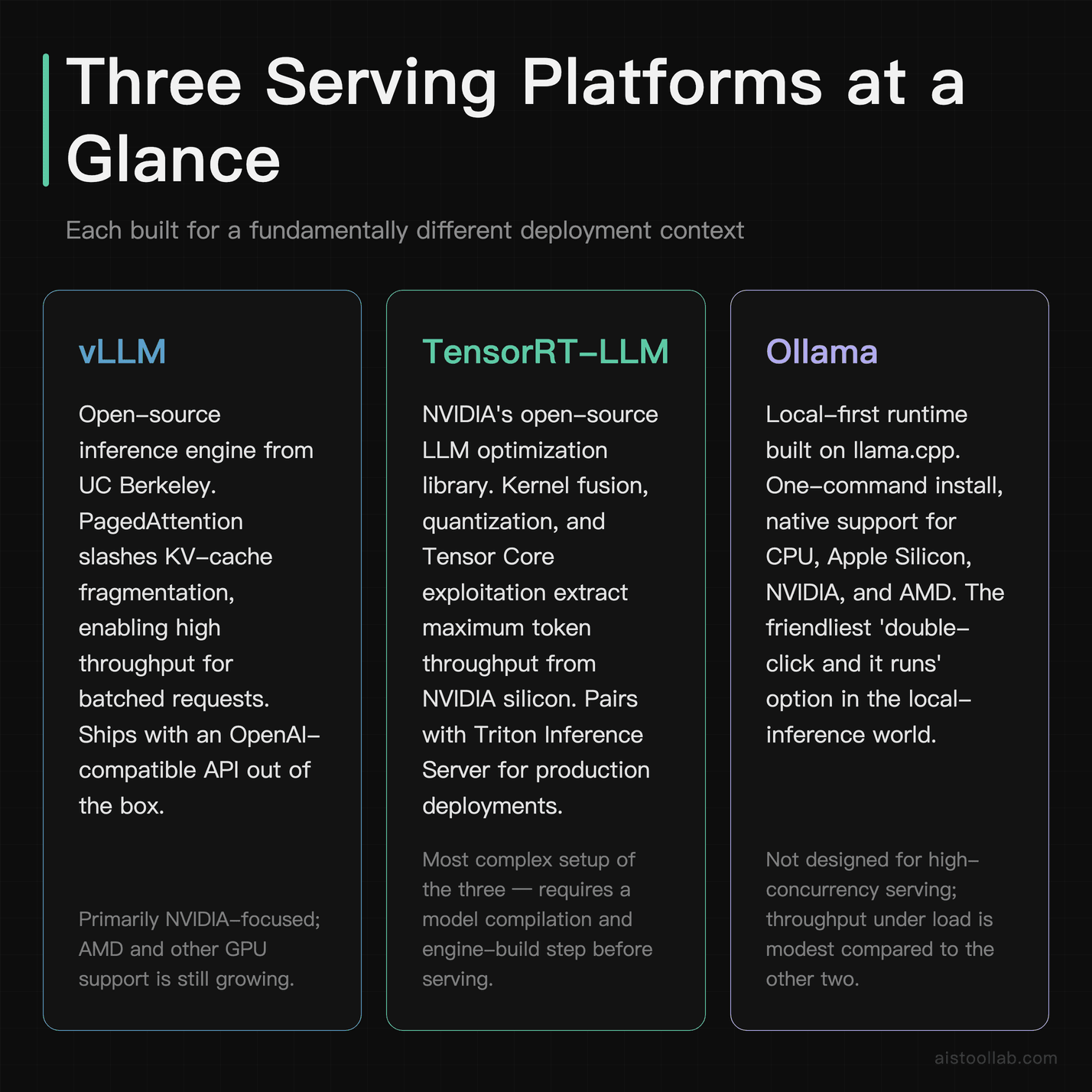
vLLM is an open-source inference and serving engine that came out of UC Berkeley’s Sky Computing Lab. Its claim to fame is PagedAttention — a memory-management technique inspired by virtual memory and paging in operating systems — which reduces waste in the KV cache. The practical upshot, according to the project’s published benchmarks, is higher throughput when you’re batching many requests at once. It speaks an OpenAI-compatible API out of the box, which means a lot of teams can swap it in without rewriting client code.
TensorRT-LLM is NVIDIA’s open-source library for optimizing large language model inference specifically on NVIDIA GPUs. It compiles models into optimized engines using kernel fusion, quantization, and hardware-specific techniques that exploit Tensor Cores. It’s the most “metal” option here — and the most fiddly. You typically pair it with NVIDIA Triton Inference Server for production serving. When NVIDIA publishes low-latency records for a given GPU, TensorRT-LLM is usually the thing producing them.
Ollama is the odd one out, and deliberately so. It’s a local-first runtime built on top of llama.cpp that makes running open models remarkably easy: ollama run <model> and you’re chatting in your terminal. It handles model downloads, quantization formats (GGUF), and a local API server with minimal config. It runs on Mac (Apple Silicon), Windows, and Linux, with or without a discrete GPU. It is not trying to win throughput benchmarks — it’s trying to get a model running on your machine in a few minutes.
So already you can feel the split: two production-grade serving engines and one developer-experience champion. That tension runs through this entire comparison.
Head-to-head comparison table
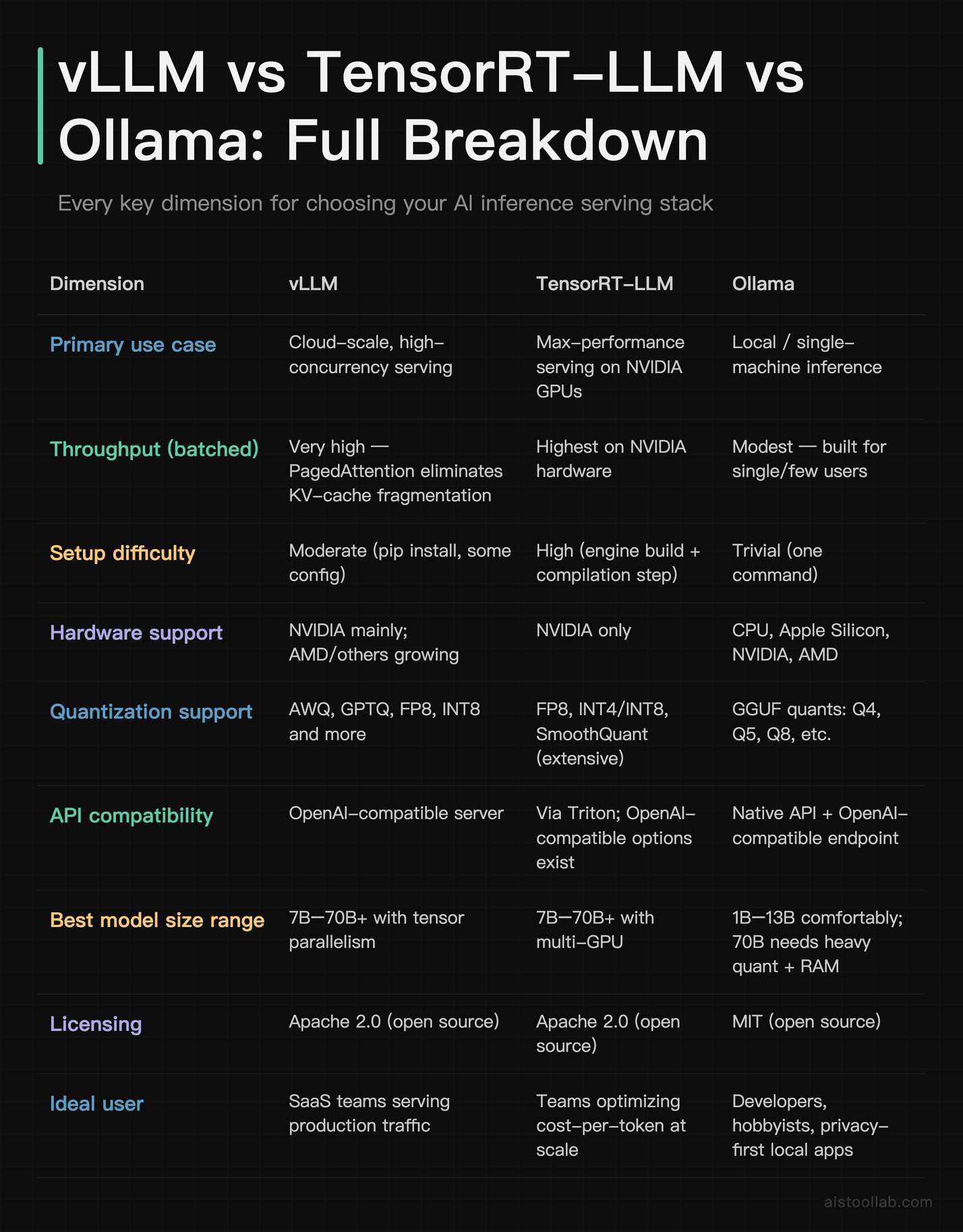
If you only skim one thing, skim that table. The rest of this article is essentially the long-form justification for each row — and the places where the simple summary breaks down.
Latency and throughput: the numbers that actually matter
Here’s where honesty is required, because this is exactly the kind of topic where the internet is awash in confidently-stated benchmark numbers that nobody can reproduce. The truthful version is messier: throughput and latency depend on your model size, quantization, GPU, batch size, sequence length, and how you measure. Two engineers benchmarking “the same” setup can land on different numbers because they batched differently.
That said, the directional consensus from published project benchmarks and community testing is fairly stable, so let’s talk in terms of trends rather than invented precision — and treat any specific figure you see elsewhere as something to reproduce yourself.
Throughput under load
For high-concurrency serving — think dozens or hundreds of simultaneous requests — vLLM’s PagedAttention is the headline feature for a reason. By eliminating most of the KV-cache fragmentation that plagues naive implementations, it can keep GPU utilization high and pack more requests into the same memory. The project’s own benchmarks have shown large throughput gains over baseline Hugging Face Transformers serving, and that broad finding is widely echoed in independent community testing. If your bottleneck is “how many tokens per second can I serve across all users,” vLLM is a strong default.
TensorRT-LLM is designed to extract maximum performance from NVIDIA hardware — that’s the whole point of compiling hardware-specific engines — and NVIDIA’s published latency and throughput records are produced with it. Whether it comes out ahead of vLLM on raw throughput in your case depends heavily on tuning and configuration; the two are close enough that you should benchmark on your own workload rather than trust a headline number. And “properly tuned” is doing real work in that sentence: getting there involves a build step, engine configuration, and a steeper learning curve. You’re trading engineering hours for peak performance.
Latency for a single user
Two metrics matter here: time to first token (TTFT) — how long before the response starts streaming — and inter-token latency — how fast tokens arrive after that. For a chatbot-style experience, TTFT is what makes an app feel snappy or sluggish.
TensorRT-LLM tends to do well in low-latency, single-stream scenarios because of its aggressive kernel optimization. vLLM is competitive and improves with each release; it’s optimized more for throughput-under-batching but holds its own on latency. Ollama, running locally, has a different latency story entirely: there’s no network round-trip to a cloud, so for a single user on capable hardware (an M-series Mac, say), the perceived responsiveness can be excellent for small-to-mid models — but it simply isn’t designed to keep that up across many concurrent users.
Model size scaling (7B to 70B)
At the 7B–8B size class, all three can run, and the choice comes down to deployment context rather than raw capability. Ollama on a modern Mac with enough unified memory handles an 8B-class model comfortably for personal use. vLLM and TensorRT-LLM will serve that same model to many users far more efficiently per dollar.
At the 70B size class, the picture changes sharply. You’re now in multi-GPU territory for unquantized or lightly quantized weights. vLLM and TensorRT-LLM both support tensor parallelism to split the model across GPUs, which is what production 70B serving realistically requires. Ollama can technically run a heavily-quantized 70B model (a Q4 GGUF, for instance) on a sufficiently large machine, but you’ll feel the speed drop, and it’s not the tool you’d reach for to serve that size class at scale.
Cost-per-inference and resource efficiency
This is the section your CFO actually cares about, so let’s be concrete about how to reason about it — without inventing a dollar figure that can’t be sourced.
Cost-per-inference is fundamentally a function of throughput per GPU and the price of that GPU-hour. If platform A serves twice as many tokens per second on the same hardware, your cost per million tokens is roughly halved. This is why throughput-focused engines like vLLM and TensorRT-LLM matter so much for production economics: higher batch efficiency directly translates to fewer GPUs for the same traffic.
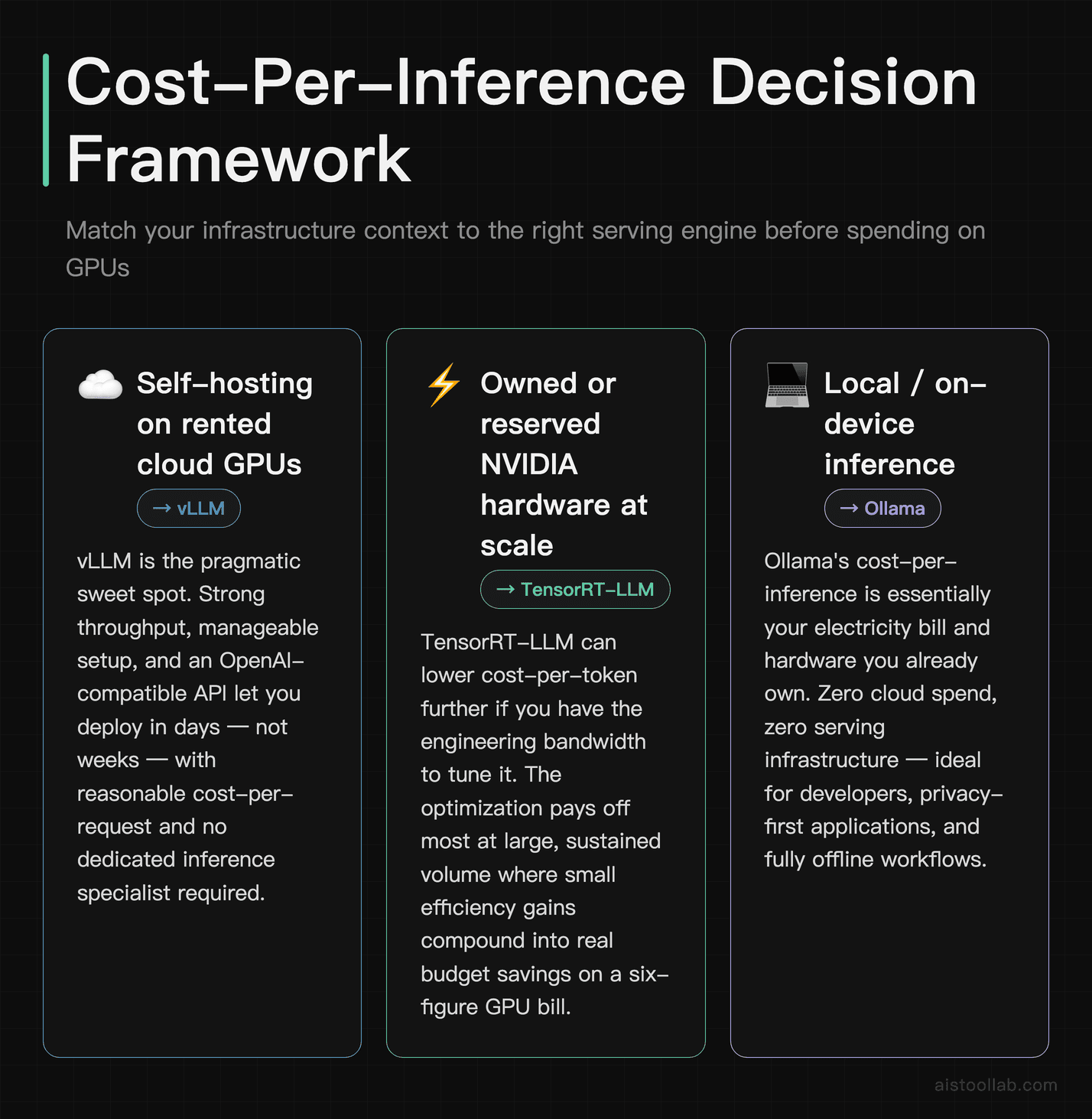
The practical decision tree looks like this:
- Self-hosting on rented cloud GPUs: vLLM is often a pragmatic sweet spot — strong throughput, manageable setup, OpenAI-compatible API. You get much of the efficiency without a multi-week optimization project.
- Squeezing maximum value from owned or reserved NVIDIA hardware: TensorRT-LLM may lower cost-per-token further if you have the engineering bandwidth to tune it — but this depends on GPU, config, and workload, so verify with your own measurements. The optimization pays off most at large, sustained volume where small efficiency gains compound.
- Local / on-device: Ollama’s cost-per-inference is essentially your electricity bill and the hardware you already own. For internal tools, prototypes, or privacy-sensitive workloads, that can be very cheap — no per-request API cost.
Quantization is the other big lever. Running a model in FP8 or INT4 instead of FP16 cuts memory footprint and can boost throughput, letting you fit bigger models on smaller GPUs or serve more requests per card. All three platforms support quantization, but they speak different dialects: vLLM and TensorRT-LLM lean on formats like AWQ, GPTQ, and FP8; Ollama lives in the GGUF ecosystem with its Q4/Q5/Q8 variants. The trade-off is always the same — lower precision saves resources but can nibble at output quality, and how much depends on the model and task. If you’re evaluating that quality trade-off, it’s worth pairing this with a structured approach to How to Evaluate AI Model Performance Like a Pro so you’re measuring the right thing.
Real-world deployment: how each behaves with popular open models
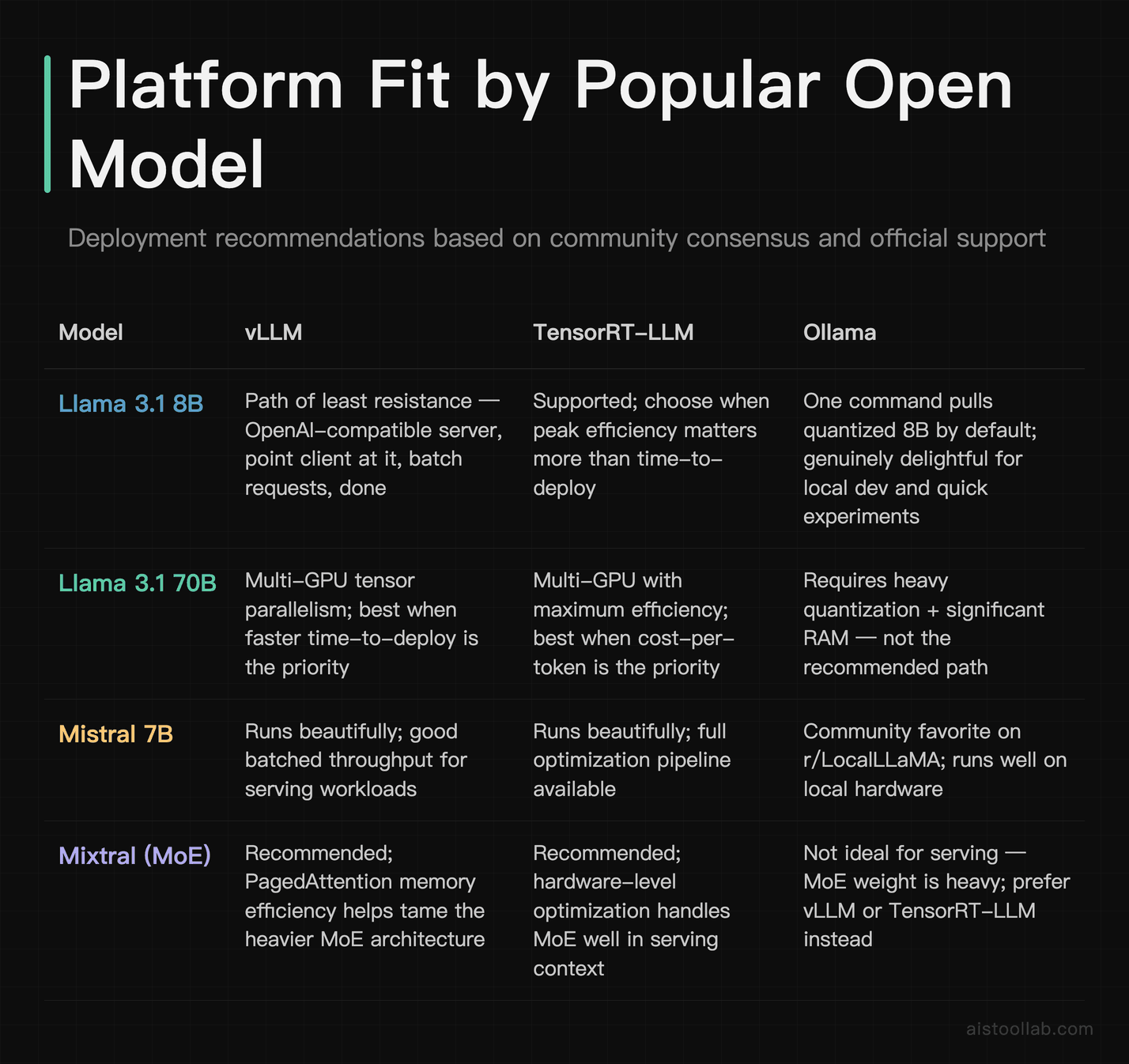
Specs are nice; deployment reality is what bites you. Here’s how the three tend to play out with the open models people actually serve. One important caveat up front: the exact models and versions each platform supports are governed by their official docs and change over time, so check the current support list before you commit.
Llama-family models (8B and 70B classes)
Llama-family models are among the most-served open models, and the three platforms broadly support the popular open-weight families (with current versions such as Llama 4 arriving through each project’s own release cadence — verify what a given engine actually ships against its docs). For an 8B-class deployment serving an app, vLLM is often the path of least resistance: spin up the OpenAI-compatible server, point your client at it, batch requests, done. For a 70B-class production deployment, you’re choosing between vLLM and TensorRT-LLM with tensor parallelism across multiple GPUs — and the decision hinges on whether peak efficiency (TensorRT-LLM) or faster time-to-deploy (vLLM) matters more to you.
On the Ollama side, ollama run <model> pulls a quantized build and gets you chatting immediately, which is genuinely convenient for local development and quick experiments.
Mistral-family models
Mistral-family models are popular in the local-LLM community, spanning compact dense models and heavier mixture-of-experts variants (with current releases such as Mistral Large 3). The smaller variants are light enough to run in a wide range of setups; the mixture-of-experts variants are heavier and benefit from the memory efficiency of vLLM or the optimization of TensorRT-LLM in a serving context. Community reports on r/LocalLLaMA consistently praise Mistral-family models for punching above their weight — just remember that which specific versions run on which engine, and how well, depends on your hardware and the project’s current support.
The “it works on my machine” trap
One recurring theme in public reviews and engineering write-ups: a model that runs great in Ollama locally doesn’t automatically translate to a production vLLM or TensorRT-LLM deployment. Tokenizer settings, prompt templates, sampling parameters, and quantization format can all differ. Teams routinely get tripped up assuming “it worked in Ollama” means “it’ll behave identically in production.” It usually won’t, exactly — so test in the environment you’ll actually ship on. This is the same principle behind Production vs Synthetic: Why AI Model Benchmark Metrics Don’t Predict Real-World Performance in 2026: the environment shapes the result.
Who should use which — concrete use cases
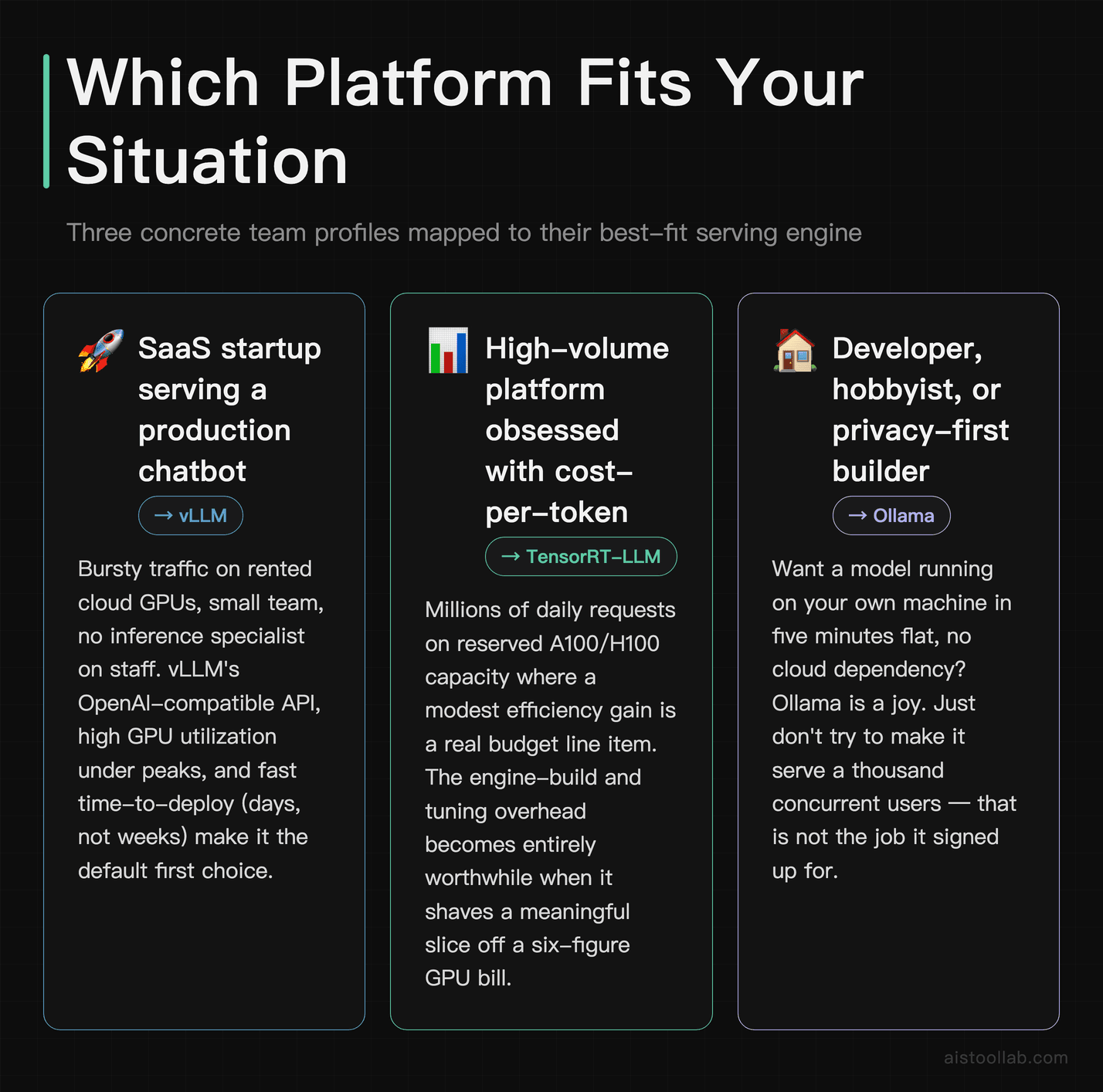
Use case 1: A SaaS startup serving a production chatbot
You’re a 15-person SaaS company adding an AI assistant to your product. You expect bursty traffic — quiet at 3am, hammered during US business hours — and you’re renting GPUs on a cloud provider. vLLM is a good fit here. The OpenAI-compatible API means your existing client code barely changes, PagedAttention helps keep GPU utilization high during peaks, and you don’t need a dedicated inference-optimization specialist to get a solid result. You’ll typically deploy in days, not weeks, and your cost-per-request should be reasonable out of the gate. If you later hit serious scale and every cent per token matters, that’s when you investigate TensorRT-LLM.
Use case 2: A high-volume platform focused on cost-per-token
You’re running inference at large, sustained volume — think a feature that processes millions of requests daily on reserved NVIDIA A100 or H100 capacity. At that scale, a modest efficiency gain is real budget. This is TensorRT-LLM’s home turf. The engine-build step and tuning effort that feel like overkill for a startup can become worthwhile when they shave a meaningful slice off a large GPU bill — though whether they do is something to verify with your own cost-per-token measurements. You’ll likely pair it with Triton Inference Server, invest in proper benchmarking, and treat inference optimization as an ongoing discipline rather than a one-time setup.
Use case 3: A privacy-first developer or solo builder
You’re a freelance developer building an internal tool for a client who can’t send data to third-party APIs for compliance reasons, or you’re a solopreneur prototyping an AI feature and you don’t want to pay for cloud GPUs while you experiment. Ollama is well-suited to this. Install it, pull a compact open model (a small Llama- or Mistral-family build), and you’ve got a local API endpoint with no ongoing cost and no data leaving the machine. For desktop apps, local-first products, and rapid prototyping, it removes nearly all friction. The moment you need to serve that model to hundreds of strangers, you graduate to vLLM — but for the build-and-test phase, nothing’s faster to start.
Use case 4: A research team comparing model variants
If your job is evaluating which fine-tune or quantization performs best, Ollama makes rapid local iteration painless, while vLLM gives you a reproducible serving setup for more rigorous, batched evaluation. Many teams use both: Ollama for the “does this even work” pass, vLLM for the structured comparison runs. Pair this with a solid methodology — the Hugging Face Model Hub Tutorial 2026 is a good companion for sourcing and comparing the models themselves.
The verdict: match the platform to your deployment, not the hype
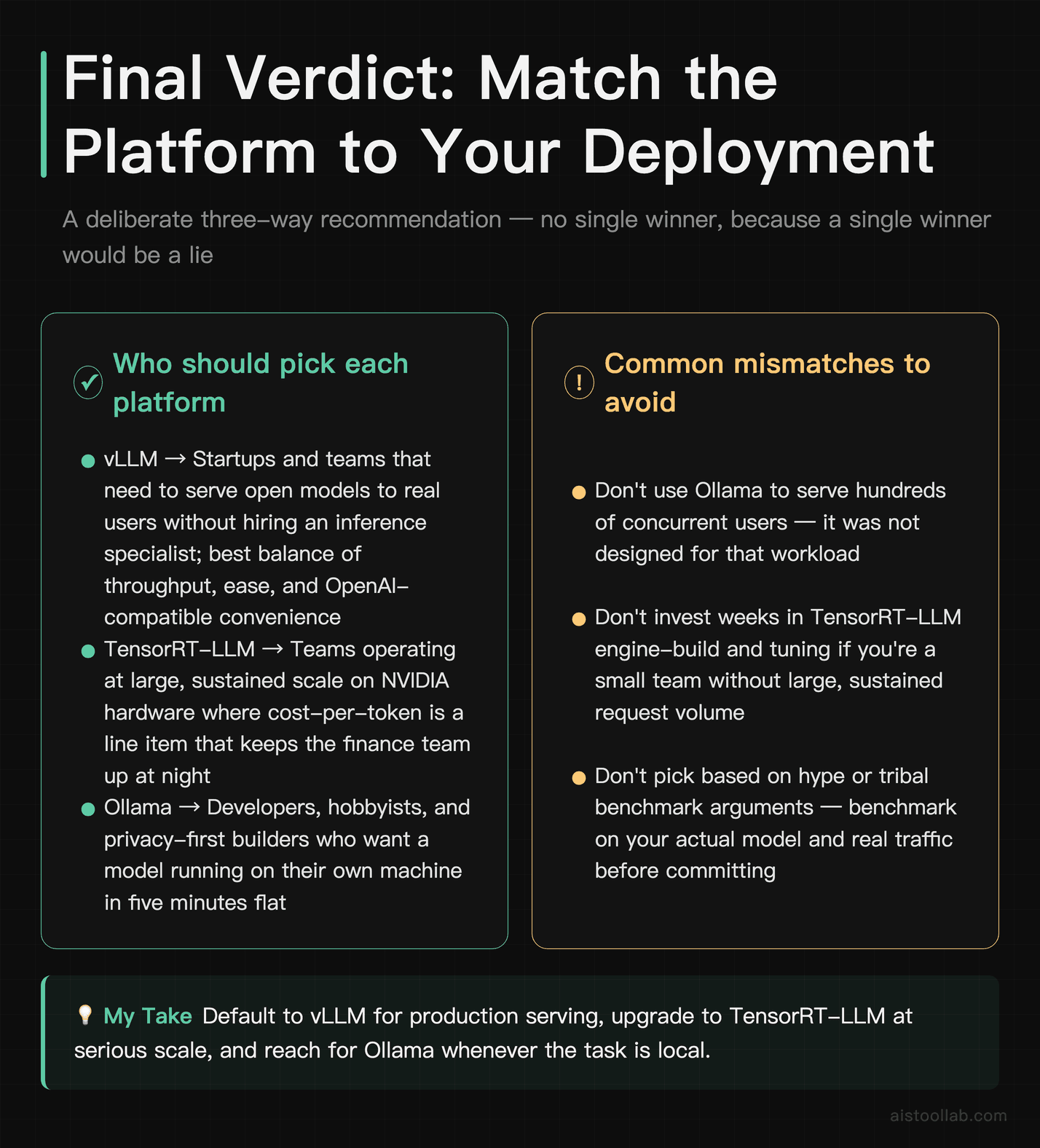
After weighing the documented capabilities, published benchmarks, and the reviewer consensus across the community, here’s where I land — and it’s deliberately not a single winner, because a single winner would be a lie.
If you’re a startup or team that needs to serve open models to real users without hiring an inference specialist, vLLM is a strong default. It balances throughput, ease, and OpenAI-compatible convenience, and it’ll carry you a long way before you outgrow it. It’s the one I’d reach for first.
If you’re operating at large, sustained scale on NVIDIA hardware and cost-per-token is a line item that keeps your finance team up at night, it’s worth investing in TensorRT-LLM. The tuning effort is real, and so are the potential savings when efficiency gains multiply across millions of requests — measure them for your own workload before you commit. It’s the specialist’s tool, and at scale, specialism can pay.
And if you’re a developer, hobbyist, or privacy-first builder who wants a model running on your own machine in a few minutes, Ollama is a joy and you shouldn’t overthink it. Just don’t try to make it serve a thousand concurrent users — that’s not the job it signed up for.
The genuine mistake isn’t picking the “wrong” platform — it’s picking based on someone else’s benchmark instead of your own. Grab whichever one fits your scenario above, deploy your actual model with your actual traffic pattern, and measure cost-per-token yourself. You’ll learn more in one afternoon of real testing than in a week of reading benchmark tables — including this one.
Frequently Asked Questions
Is vLLM faster than TensorRT-LLM?
The honest answer is “it depends, and the gap is narrower than tribal arguments suggest.” For raw throughput on NVIDIA hardware with everything tuned, TensorRT-LLM is designed to extract maximum performance from NVIDIA’s own silicon through kernel fusion and hardware-specific optimization, and NVIDIA’s published records tend to use it for exactly that reason — but whether it comes out ahead of vLLM in your case depends on tuning and configuration. vLLM is extremely competitive, especially for high-concurrency batched workloads where PagedAttention shines, and it improves with nearly every release. The bigger practical difference isn’t peak speed — it’s effort. vLLM gets you to “very good” with far less work, while TensorRT-LLM requires an engine-build and tuning step to reach its best numbers. For most teams, vLLM’s combination of strong performance and low friction is compelling. For teams operating at massive scale where small efficiency gains compound, the extra tuning effort of TensorRT-LLM can be worth it. Benchmark both on your actual model and traffic before committing — synthetic comparisons rarely match your reality.
Can Ollama be used in production?
It can, but you need to be clear-eyed about what “production” means in your case. Ollama is designed for single-user or low-concurrency scenarios: internal tools, desktop applications, privacy-sensitive deployments where a model runs on a dedicated machine, or edge deployments. For those, it’s stable, simple, and genuinely production-viable. Where it falls short is high-concurrency serving — handling many simultaneous users efficiently is not its design goal, and you’ll hit throughput ceilings that vLLM or TensorRT-LLM wouldn’t. Think of it this way: if your “production” is a thousand concurrent users hitting an API, Ollama is the wrong tool, and forcing it there means overpaying on hardware to compensate for lower batching efficiency. If your production is a desktop app where each user runs the model locally, or an internal assistant for a small team, Ollama is a reasonable and refreshingly low-maintenance choice. Match the tool to the concurrency profile and you’ll be fine.
Which platform is cheapest for production inference?
There’s no single answer because “cheapest” depends on your deployment shape. For on-device or local inference, Ollama is essentially free at the margin — your only cost is hardware you likely already own and electricity, with no per-request API fees. For cloud-hosted serving at moderate scale, vLLM is often a pragmatic balance of throughput and setup effort: high throughput means fewer GPUs for the same traffic, and minimal engineering time to deploy. For very high sustained volume on NVIDIA hardware, TensorRT-LLM may deliver a lower cost-per-token if you invest in tuning, because small per-token efficiency gains multiply across millions of requests — but confirm that with your own measurements rather than assuming it. The mistake teams make is optimizing prematurely — spending weeks tuning TensorRT-LLM for traffic that vLLM could handle cheaply enough. Start with the simplest option that meets your needs, measure your actual cost-per-token, and only graduate to heavier optimization when the numbers justify the engineering investment. Cost efficiency is a moving target, so re-measure as your traffic and model choices evolve.
Do I need an NVIDIA GPU for these platforms?
For TensorRT-LLM, yes — it’s NVIDIA-only by design, built around CUDA and Tensor Cores, so AMD or Apple Silicon are non-starters. vLLM is primarily NVIDIA-focused but has been expanding support for other hardware, including AMD GPUs and additional accelerators, though NVIDIA remains the best-supported and most-documented path. Ollama is the flexible one: it runs on NVIDIA GPUs, AMD GPUs, Apple Silicon (where it’s genuinely strong thanks to unified memory), and even CPU-only setups, albeit slowly for larger models. If you’re on a Mac and want to run models locally, Ollama is effectively your best option of the three. If you’re committed to AMD hardware for cost reasons, check vLLM’s current documentation for the state of support, as it changes release to release. And if you’re building on NVIDIA and want maximum performance, you’ve got all three available, with TensorRT-LLM as the hardware-specialist option. Always verify current hardware support in official docs before you commit, since these projects move quickly.
How hard is it to set up each one?
The difficulty gap here is large and worth weighing. Ollama is among the easiest software you’ll install all year — download the app or run a one-line install, then ollama run <model>, and you’re chatting in minutes. No config files, no compilation, no GPU driver wrangling beyond the basics. vLLM sits in the middle: a pip install gets you going, and launching the OpenAI-compatible server is a single command, but you’ll spend some time on configuration — model paths, tensor parallelism settings, memory tuning — to get production-ready. It’s very manageable for anyone comfortable with Python and Linux. TensorRT-LLM is the steepest climb: you typically build an optimized engine from your model, which involves a compilation step, version compatibility considerations, and often integration with Triton Inference Server for serving. It rewards expertise and punishes the impatient. Budget real time for it. The rule of thumb: Ollama for minutes, vLLM for an afternoon, TensorRT-LLM for a project sprint. Match that to how much engineering time you can actually spare.
What about quantization — which one handles it best?
All three support quantization, but in different ecosystems, and “best” depends on what you value. Ollama lives in the GGUF world, offering quantization levels like Q4, Q5, and Q8 that trade quality for smaller memory footprint and faster CPU/Apple Silicon inference. It’s beautifully simple — you just pull the quantized variant you want. vLLM supports formats including AWQ, GPTQ, and FP8, giving you production-grade quantization with good quality retention for served workloads. TensorRT-LLM offers one of the most extensive quantization toolkits — FP8, INT4, INT8, SmoothQuant and more — designed to maximize throughput on NVIDIA hardware while managing quality loss carefully. The universal caveat: quantization always involves a quality trade-off, and how much you lose depends heavily on the model and the task. A Q4 model might be indistinguishable from full precision for casual chat but noticeably worse on complex reasoning. Test quantized output on your actual use case rather than trusting that lower precision is “good enough” — the impact varies more than people expect.
Can I run a 70B model on a single machine?
It depends entirely on the machine and how much quantization you accept. A 70B model in full FP16 precision needs a large amount of GPU memory — realistically multiple high-end GPUs — which is why production 70B serving on vLLM or TensorRT-LLM uses tensor parallelism to split the model across cards. On a single consumer machine, your only realistic path is heavy quantization: a Q4 GGUF of a 70B model can run via Ollama on a machine with enough RAM or unified memory (a high-spec Apple Silicon Mac, for instance), but you’ll feel the speed drop, and it’s a single-user experience, not a serving solution. So: yes, technically, with aggressive quantization and patience for local experimentation; no, not practically for serving 70B to many users from one box. If 70B at production scale is your goal, plan for multi-GPU and reach for vLLM or TensorRT-LLM. If you just want to poke at a 70B locally, quantized Ollama is the most accessible on-ramp, just temper your throughput expectations.
Should I use one of these or just pay for a hosted inference API?
This is the question that actually saves money, and it’s worth asking before you self-host anything. Hosted inference platforms handle the entire serving stack for you — you call an API, they manage the GPUs, scaling, and optimization. For many teams, especially early-stage ones or those without ML infrastructure expertise, that’s the smarter call: you skip the operational burden entirely. Self-hosting with vLLM or TensorRT-LLM makes sense when you have predictable high volume (where per-token costs of hosted APIs add up), strict data-privacy or compliance requirements, or a need for custom models the hosted providers don’t offer. Ollama makes sense for local, on-device, or fully private deployments. The break-even math depends on your volume and engineering capacity. It’s worth comparing against managed options — one such service is covered in the Together AI Review 2026, and for a lot of teams a hosted platform is a saner starting point until volume justifies running your own serving stack. Don’t self-host out of principle; do it when the numbers and requirements genuinely call for it.
Last updated: 2026
Found this review helpful?
👉 Browse the AI Tools Library to find the right tools for your workflow.