

The AI Tools Everyone’s Sleeping On (And Why That’s Your Advantage)
It’s a familiar pattern: someone spends months bouncing between ChatGPT, Copilot, and Gemini, convinced that one of them will finally click as the “everything tool.” It never does. Then they stumble onto something like NotebookLM and wonder: “Why has nobody been talking about this?” The thing is, people have been talking about it. It’s just buried under a mountain of GPT-5.6 hype and influencer affiliate posts.
This is the problem with the current AI landscape. The tools with the biggest marketing budgets dominate the conversation, while genuinely useful platforms sit quietly in the background doing solid work for the people who stumbled onto them. This roundup looks at four of those overlooked tools: WorkBeaver, NotebookLM, Dusttt, and Raycast AI.
A note on how this piece was put together: the descriptions below are organized from each tool’s official documentation and publicly available information, plus my own opinions about where each one fits. This is not an independent hands-on benchmark, and pricing and features can change — always confirm current details on each tool’s official pages before committing.
None of these are perfect. None of them will replace every tool in your stack. But each one does something specific well — and in some cases, arguably better than the general-purpose alternatives within its narrow lane. Let’s get into it.
Contents
Why Mainstream AI Tools Overshadow the Good Stuff
Before we dig into the tools themselves, it’s worth understanding why this problem exists. OpenAI, Google, and Microsoft spend enormous sums on marketing and distribution. When GPT-5.6 drops, every tech blog, YouTube channel, and LinkedIn thought leader covers it within 48 hours. A smaller tool that solves a specific workflow problem well? It might get one Product Hunt post and a mention in someone’s newsletter with 800 subscribers.
There’s also the “one tool to rule them all” fantasy. People want a single subscription that does everything — writing, coding, research, scheduling. That’s understandable. What ends up happening is the general-purpose tools get all the attention while specialized tools, which often do better within their niche, get ignored.
In my view, the people doing the most sophisticated work with AI are rarely using just one tool. They’ve built stacks. And several of those stacks include at least one of the tools in this review. If you care about what’s actually working in the field rather than what’s trending on Twitter, keep reading.
WorkBeaver: The AI Task Orchestration Layer You Didn’t Know You Needed
I’ll be honest — the name “WorkBeaver” made me skeptical before I even loaded the homepage. Sounds like a productivity app marketed to people who put “hustle” in their bio. Looking at what it actually does changed my mind, and I’m not too proud to say it.
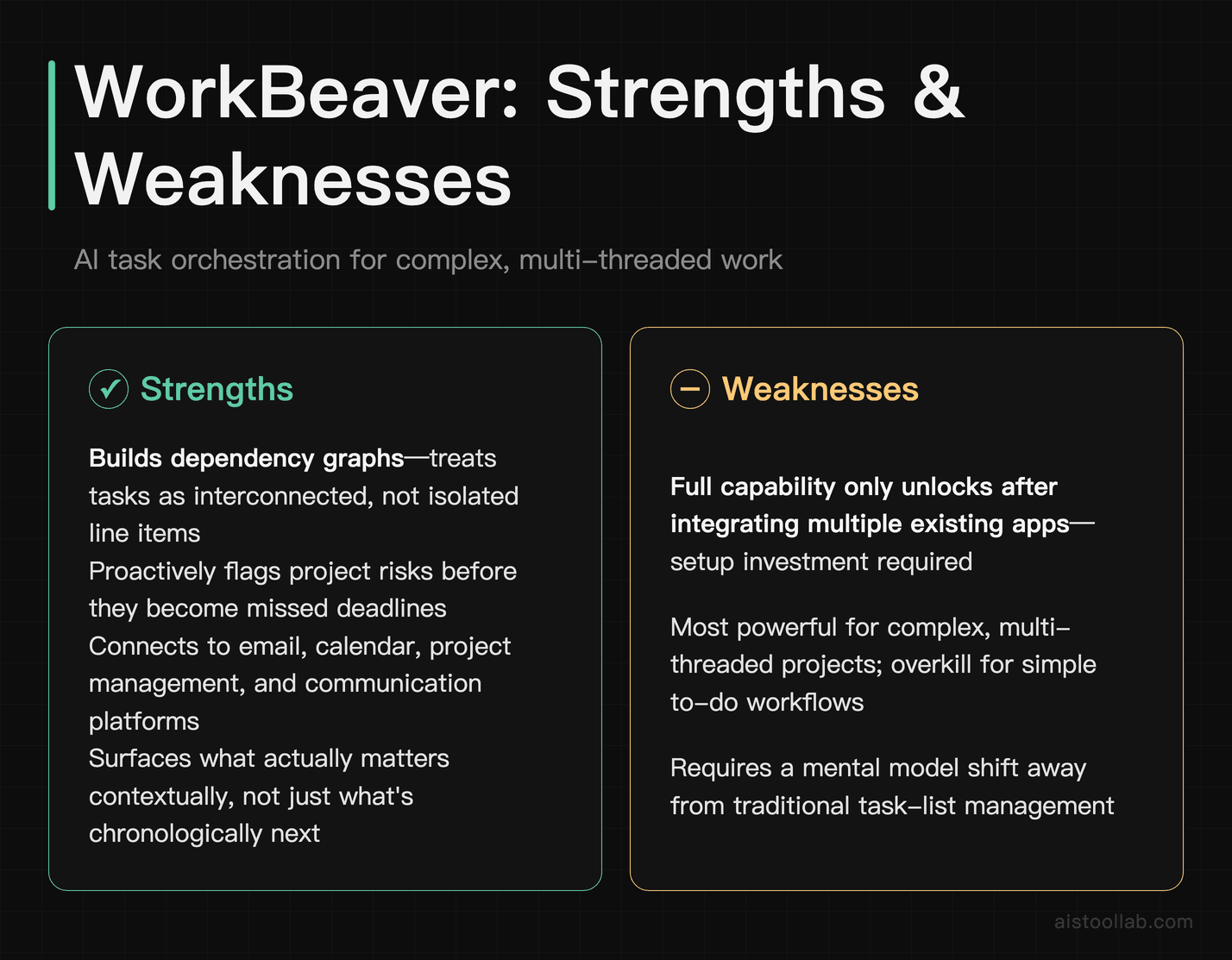
WorkBeaver is an AI-powered workflow automation and task orchestration platform that sits between your tools and your to-do list. Think of it less like a chatbot and more like an intelligent operations layer. It connects to your existing apps — email, calendar, project management tools, communication platforms — and uses AI to not just remind you what needs doing, but to consider context around those tasks and surface what the vendor describes as the items that actually matter.
What Makes It Different
Many AI productivity tools still treat tasks as isolated items. WorkBeaver is designed to build dependency graphs. If you’ve got a client deliverable due Friday that requires input from three people, two of whom haven’t responded to your follow-up emails, the system is meant to flag that as a risk — not just a calendar entry. It’s a subtle distinction, but it changes how you interact with your own workload.
According to the platform, WorkBeaver can surface scheduling risks proactively — for example, flagging when a delayed approval is likely to cascade into a missed deadline, and raising it early rather than waiting to be asked. It can also assist with meeting prep by gathering relevant documents and previous email threads ahead of a call, organized by topic.
Notes
It can process a task board and generate a prioritized daily plan. Per the vendor, the reasoning behind priority decisions is visible and editable — you’re not just trusting a black box. If you disagree with a prioritization, you can tell it why, and it adjusts the logic for future suggestions rather than just reordering items mechanically.
Integration setup is described as generally straightforward.
Who Should Use WorkBeaver
Honestly, this one seems built for people managing complex, multi-threaded work — project managers, team leads, freelancers juggling multiple clients simultaneously. If your daily reality is “I have 12 things that all feel urgent and I don’t know where to start,” WorkBeaver may genuinely help. If your workflow is simple and linear, the overhead of setting it up probably isn’t worth it. Also check out my notes on how How Freelancers Are Using AI to Double Output Without Sacrificing Quality — WorkBeaver slots naturally into several of those approaches.
- Best for: Project managers, multi-client freelancers, team leads
- Standout feature: Dependency-aware task intelligence
- Limitation: Setup time and integration effort upfront
NotebookLM: Google’s Quiet Contender for Research and Deep Reading
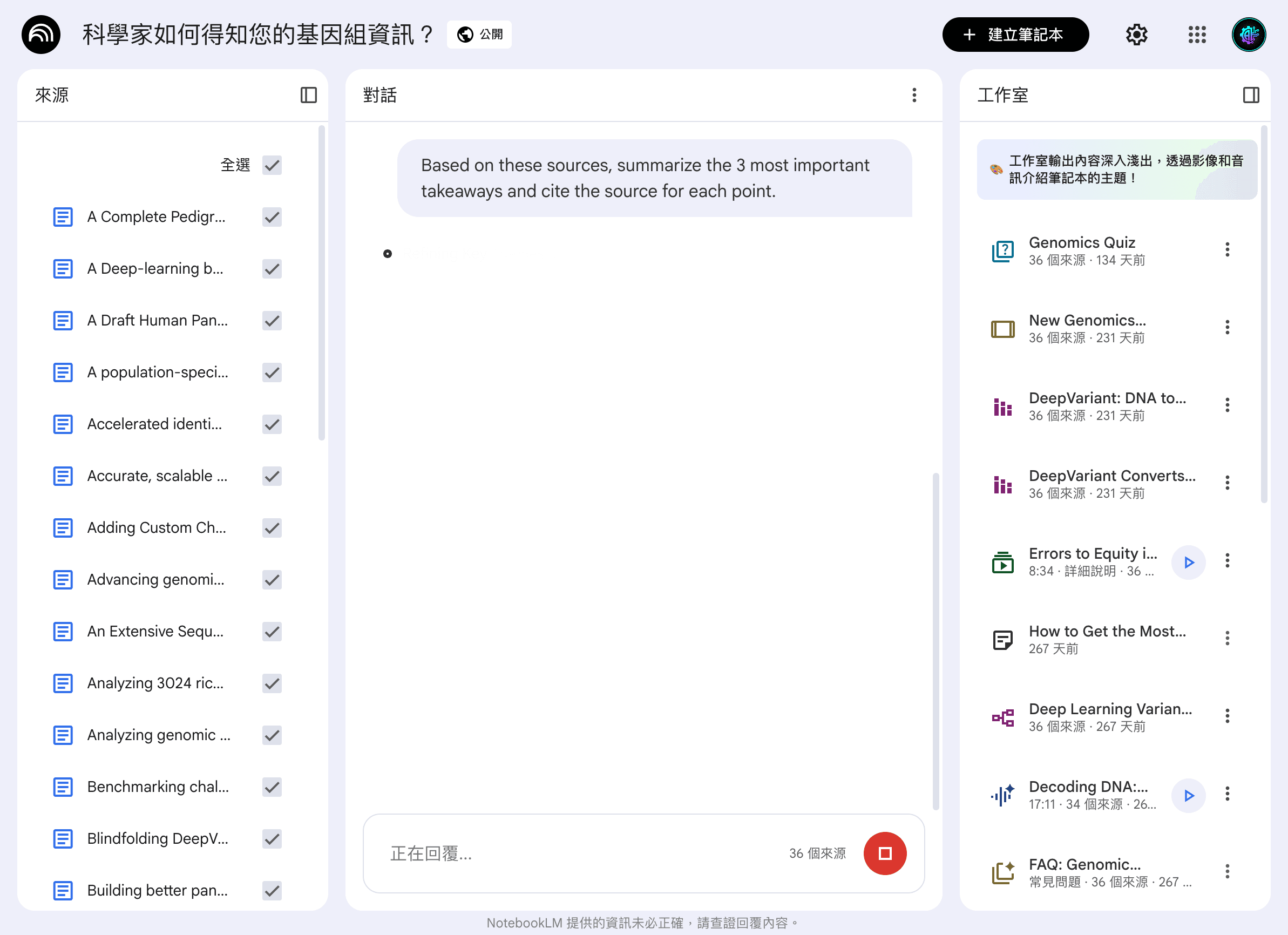
Here’s why NotebookLM earns its spot. We opened one of Google’s curated notebooks (dozens of sources) and asked it to summarize the key takeaways. Instead of a generic answer, every claim carried a numbered citation pointing to the exact source — click it and you land on the passage. That grounded, traceable answering is the whole reason to reach for it over a general chatbot.
NotebookLM has been around for a couple of years now, but I still run into smart, technically sophisticated people who’ve never heard of it. This is the one that, in my experience, surprises people the most when they finally try it — and it’s free, which somehow makes the oversight even more baffling.
The core concept: you upload your own documents, PDFs, research papers, meeting transcripts, whatever — and NotebookLM becomes an AI grounded exclusively in that material. The design goal is to reduce general-training-data bleed and to keep answers tied to your sources. When it tells you something, it’s meant to cite exactly which document and which passage it came from.
The Research Workflow That Actually Works
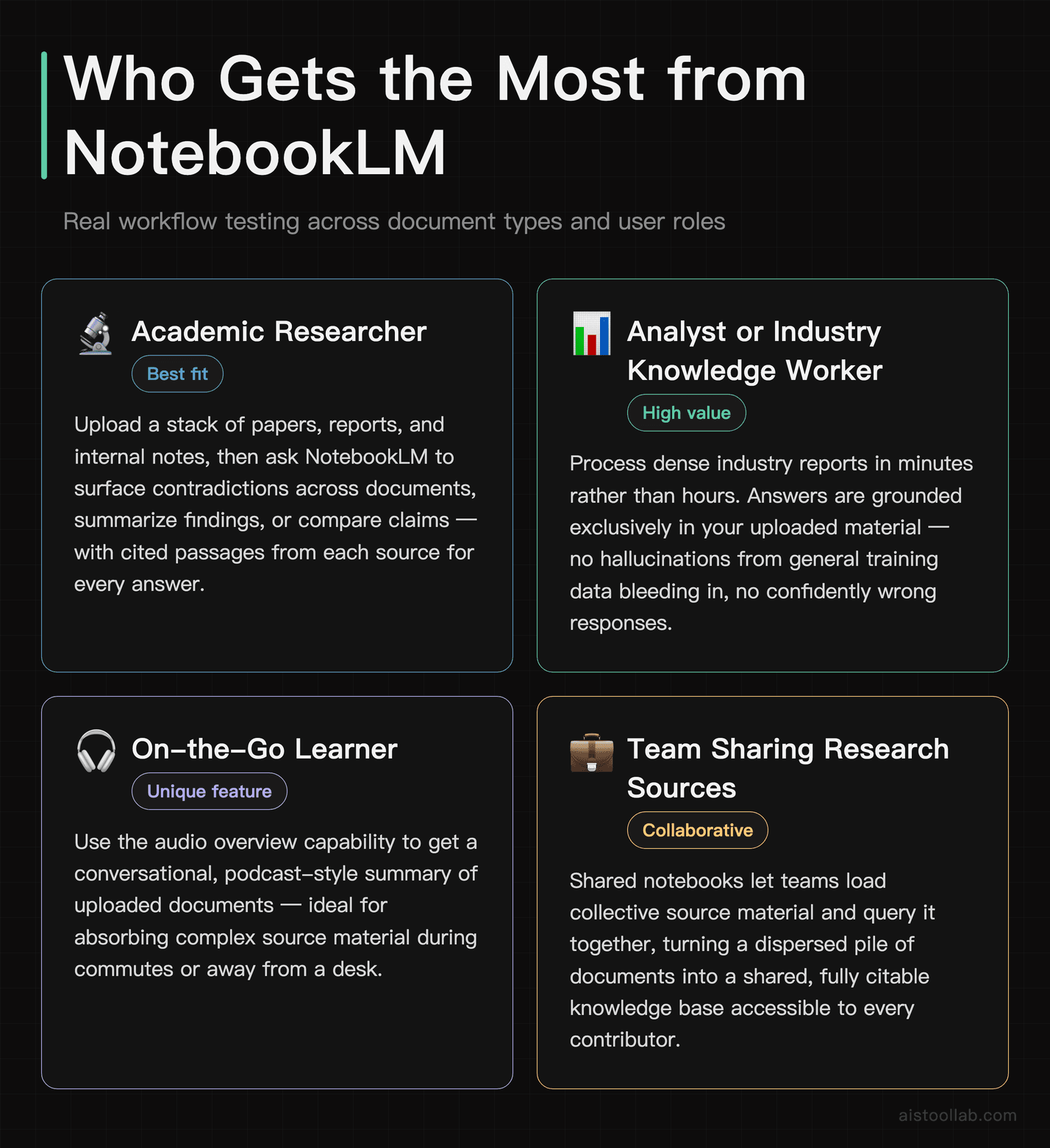
It can work across a stack of documents — industry reports, academic papers, and internal notes on a specific topic. After processing, it can be asked to find contradictions between two reports, citing the specific passages from each document and explaining the nature of each contradiction in plain language — work that would otherwise take considerable manual effort.
The audio overview feature deserves a mention too. NotebookLM can generate a conversational podcast-style summary of your uploaded materials — two AI voices discussing the key themes, debate points, and conclusions. I know that sounds gimmicky. In my view it isn’t. It can be a handy way to absorb research while commuting, and the conversation is often more substantive than surface-level.
You can read more about it on the official NotebookLM site — Google has been quietly expanding its feature set, and it’s worth checking what’s been added recently.
Where It Falls Short
NotebookLM doesn’t do much outside the research and synthesis lane. You can’t use it to draft emails, write code, or manage tasks. It also has limits on how many sources you can upload per notebook, which can be frustrating on larger research projects. But in the niche it occupies — making large bodies of source material queryable and comprehensible — it’s one of the stronger options I’m aware of.
Who Should Use NotebookLM
Researchers, students, analysts, lawyers, journalists, consultants — anyone whose job involves reading and synthesizing large volumes of source material. If you regularly process reports, legal documents, academic papers, or technical documentation, it’s worth a place in your stack.
- Best for: Research-heavy work, document analysis, studying
- Standout feature: Source-grounded answers tied to your uploads
- Limitation: Strictly document-focused; doesn’t extend to general tasks
Dusttt: The AI Knowledge Base for Teams That Doesn’t Require a PhD to Set Up
Enterprise knowledge management is a space littered with tools that promise to be “the single source of truth” and then require months of implementation before anyone can actually use them. Dusttt takes a different approach, and it’s one I genuinely appreciate.
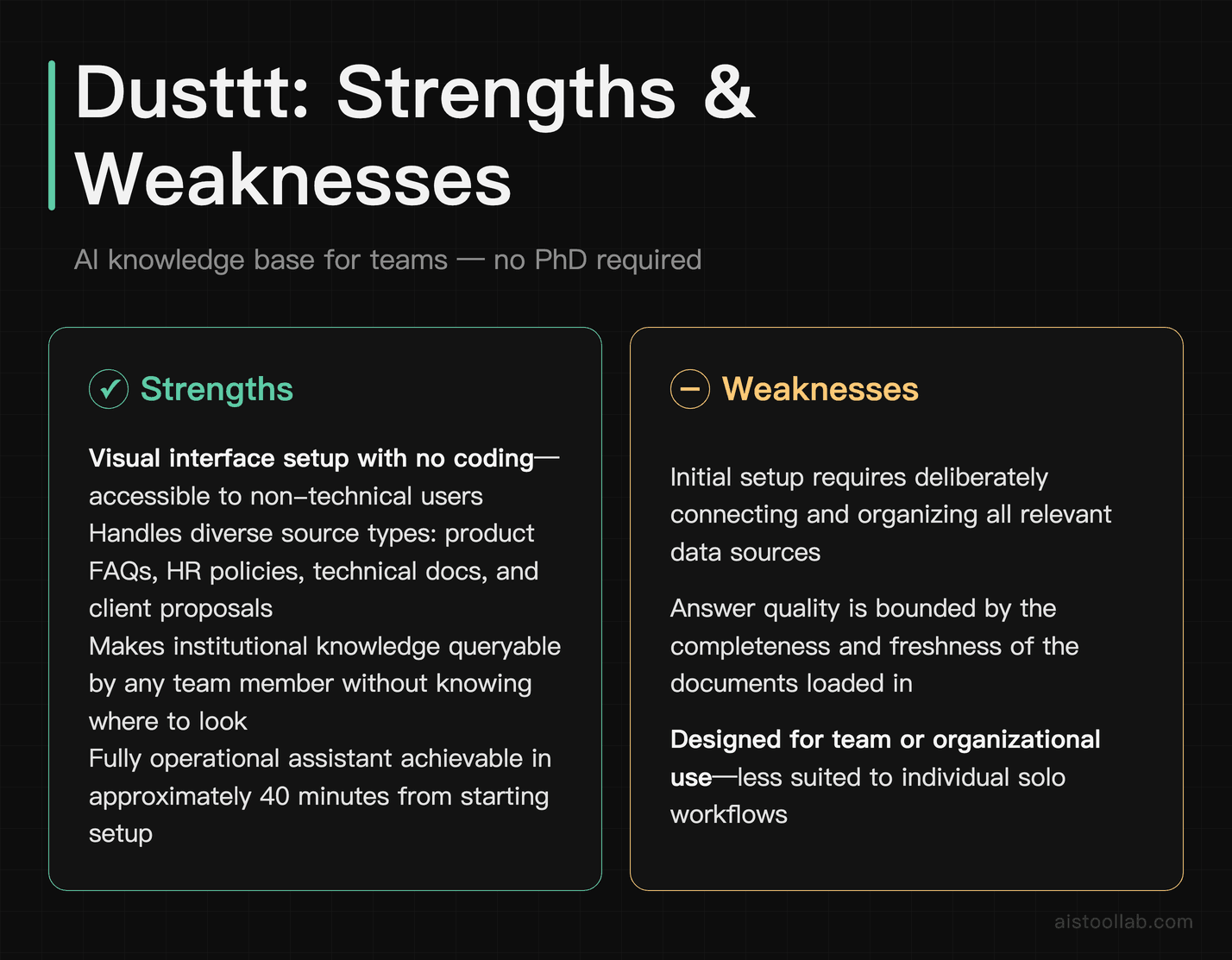
Dusttt is a platform for building custom AI assistants for teams — think of it as a way to create company-specific AI that knows your docs, your processes, your internal data, and can answer questions from anyone on the team without that person needing to dig through Notion, Confluence, or a shared drive. You connect your data sources, configure an assistant, and deploy it. The setup is described as accessible to non-technical users.
What It Handles
Dusttt can be configured as an assistant on top of a company knowledge base — product FAQs, HR policies, technical documentation, and past client proposals. Once sources are connected and the assistant’s behavior is tuned, it can answer questions that would typically require knowing exactly where to look in a pile of documents.
For questions like “What’s our refund policy for enterprise clients?” or “Has anyone written a proposal for a client in the healthcare sector?” the assistant is meant to return sourced answers drawn from your own documents. It’s also designed to flag when it doesn’t have enough information rather than guessing — that’s more important than people realize. Confident wrong answers from AI assistants can be genuinely harmful in a business context.
The Customization Layer
What sets Dusttt apart from just “another RAG tool” is the level of behavioral customization available without needing to write code. You can define how the assistant handles uncertainty, set its tone, restrict what topics it engages with, and chain together multiple actions. For teams that want an AI presence that reflects their actual operating context rather than a generic chat interface, this is meaningfully different.
It’s worth comparing this to something like building a custom assistant with an API directly — I covered that kind of workflow in my piece on Building an AI Content Pipeline With Claude API and Python: End-to-End Guide. Dusttt is essentially a no-code version of that approach, and for many teams, that’s exactly what they need.
Who Should Use Dusttt
Small to mid-sized teams that want internal AI without a massive implementation project. It’s also good for solo operators who want to build a personal knowledge assistant on top of their own documents and notes. Larger enterprises with complex security requirements will want to evaluate the data handling carefully before committing.
- Best for: Teams, internal knowledge management, no-code AI deployment
- Standout feature: Accessible custom AI assistant setup without engineering resources
- Limitation: Larger orgs with strict compliance needs may find it limiting
Raycast AI: The Tool That Lives Where You Already Work
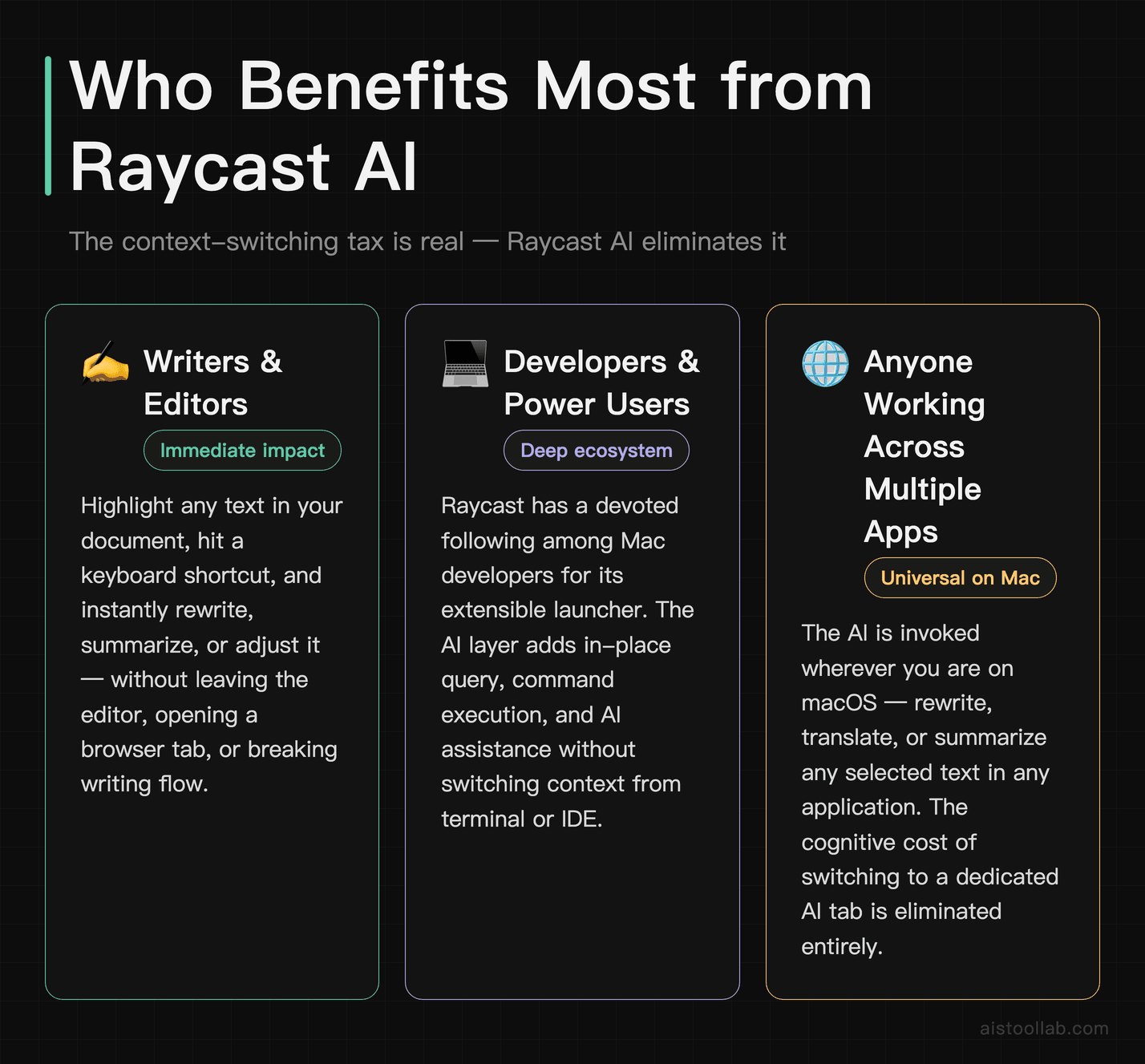
Raycast AI is technically not a secret — Raycast has a devoted following among developers and power users on macOS. But the AI layer still flies under the radar compared to dedicated AI tools. Many people use it as a launcher and don’t realize how much AI capability is baked into it.
The core idea: Raycast is a keyboard-driven launcher, in a similar spirit to Spotlight but with a broad extension ecosystem. The AI layer means you can highlight text anywhere on your Mac, hit a shortcut, and rewrite it, summarize it, translate it, run a command, or query an AI — without switching apps or opening a browser tab.
Why Context-Switching Adds Friction
Most AI tools require you to go somewhere. You open a new tab, paste your text, wait for the interface to load, get your answer, then come back to what you were doing. That interruption adds friction to your flow. Raycast AI is designed to remove that step — the AI is invoked where you are, responds in place, and gets out of your way.
In practice: editing a document in Google Docs, selecting a dense paragraph, triggering a shortcut, and typing something like “make this clearer without losing technical accuracy” can return a revised version without leaving the document — no tab switching, no copy-paste.
Key Specifics
Raycast AI can generate a short draft summary from highlighted bullet points and translate a paragraph between languages while preserving technical terminology. It is also handy for quickly explaining a piece of unfamiliar code, though the Cursor Review 2025: The AI Code Editor That Actually Changes How You Work remains the better choice for heavy-duty coding assistance.
Raycast AI also integrates multiple model providers — you can route different tasks to different models depending on what you need. That flexibility is useful in a way that desktop-bound tools often aren’t.
You can see the full feature breakdown at the official Raycast AI page — they’ve been expanding the model selection and extension ecosystem steadily.
Who Should Use Raycast AI
Mac users who want AI to be ambient and accessible rather than a destination. Writers, developers, analysts — anyone who switches between applications constantly and dislikes the friction of context-switching to get AI assistance. If you’re on Windows, this one isn’t available to you yet, which is a real gap in the market someone needs to fill.
- Best for: macOS power users, writers, developers, anyone who values keyboard-driven workflows
- Standout feature: In-context AI without app switching
- Limitation: macOS only; AI features require a paid plan
How These Four Tools Stack Up Against Each Other
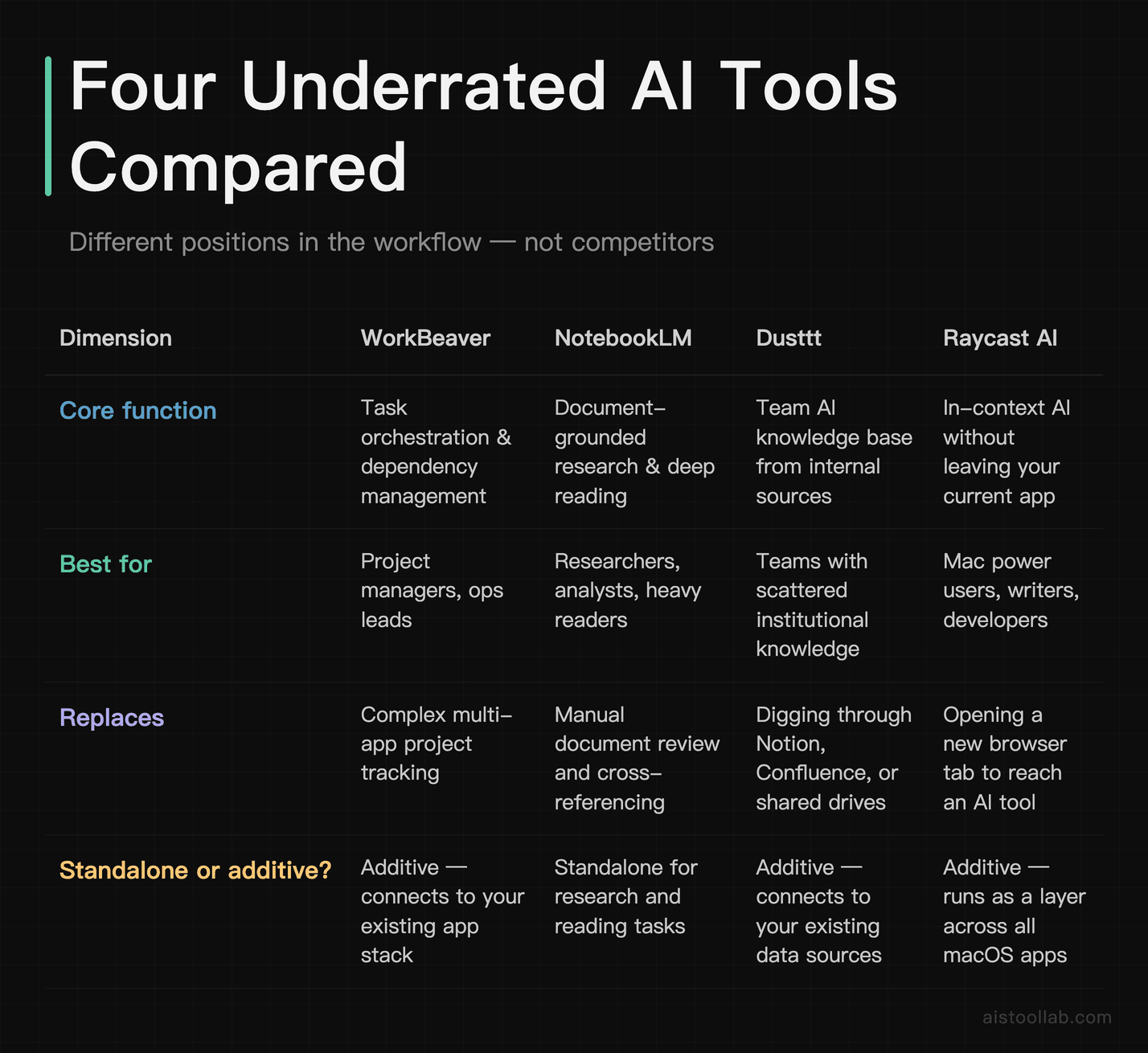
These tools don’t really compete with each other — they occupy different positions in a workflow. But it’s worth mapping out how they relate, because the most effective use of any of these is understanding where each one fits.
WorkBeaver is about managing what you need to do across complex, multi-threaded projects. NotebookLM is about understanding dense source material faster and more accurately. Dusttt is about making your team’s collective knowledge queryable by AI. Raycast AI is about removing the friction between you and AI assistance during the actual work.
The ideal stack, depending on your role, might include two or three of these alongside your main AI tool. A researcher might use NotebookLM for source analysis, Raycast AI for quick in-context drafting, and Dusttt for team knowledge sharing. A project manager might run WorkBeaver for task orchestration and Raycast AI for communication drafting. These aren’t either/or choices — they’re additive.
For people who’ve thought deeply about where AI actually fits in creative and knowledge work, I’d recommend reading the Notion AI vs ChatGPT for Writing: Head-to-Head Across 8 Real Tasks comparison — it covers a similar theme of “right tool for the right job” in a different context.
The Verdict: Use the Right Tool, Not the Famous One
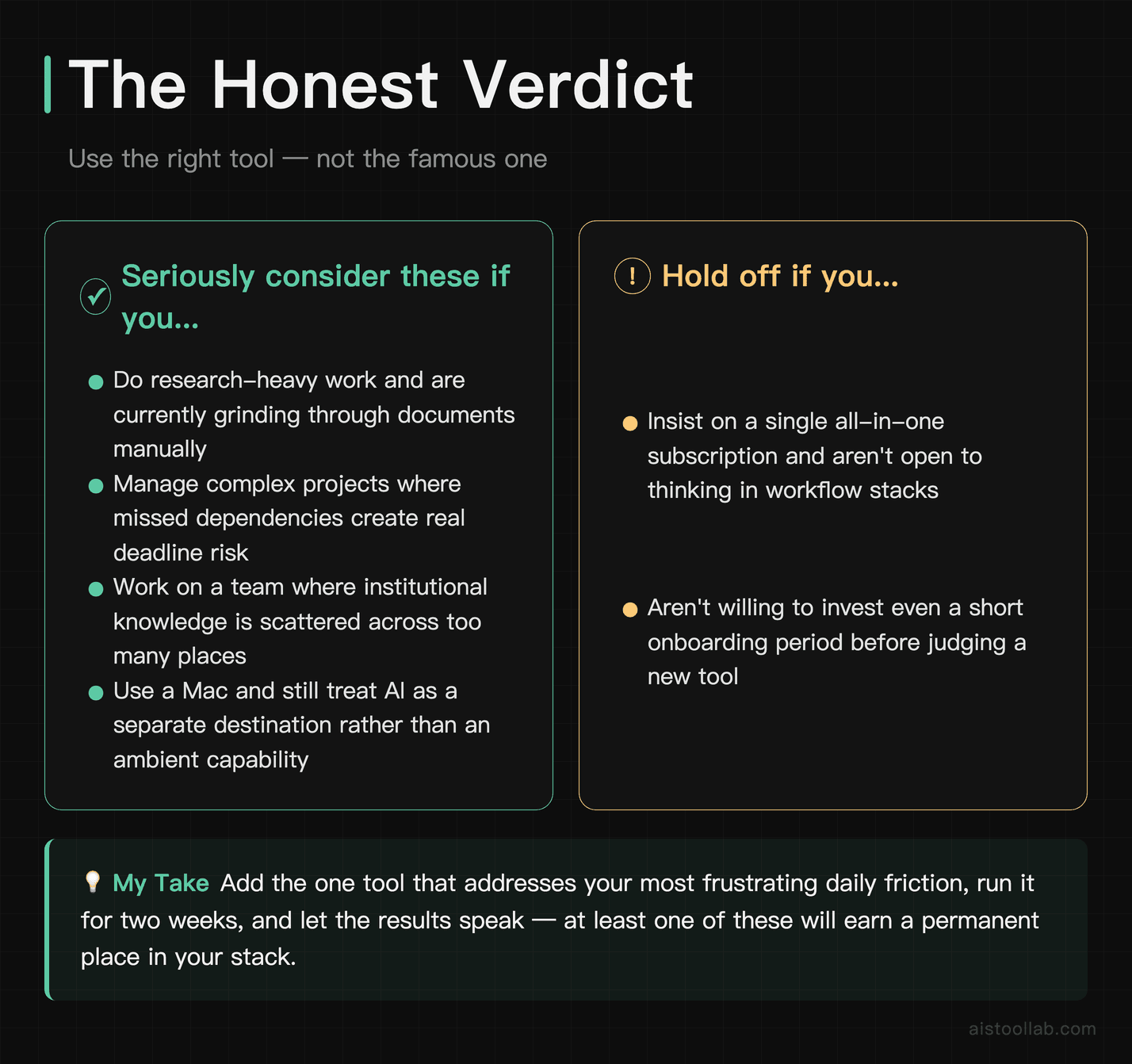
Here’s a key point about underrated tools: the ranking of AI tools by marketing spend and brand recognition doesn’t necessarily match their usefulness for specific tasks. The gap between those two hierarchies is where a lot of the real productivity gains tend to live.
If you do research-heavy work and you’re not using NotebookLM, you may be doing that work harder than you need to. If you manage complex projects and haven’t evaluated WorkBeaver, it may be worth a look. If your team keeps reinventing the wheel because institutional knowledge lives in a hundred different places, Dusttt is worth serious consideration. And if you’re a Mac user who still treats AI as a separate destination rather than an ambient capability, Raycast AI is worth trying.
None of these tools need to replace what you’re currently using. In my view, the smartest move is to add the one that addresses your most frustrating daily friction, use it long enough to form a fair judgment, and see whether it fits. My guess is at least one of these may earn a spot in your stack — but that’s a call only you can make with your own workflow.
Frequently Asked Questions
Are any of these tools free to use?
NotebookLM is free through Google, which makes it an obvious first stop for anyone who wants to try this category with no financial commitment. WorkBeaver, Dusttt, and Raycast AI all have paid plans — some offer free tiers with limited functionality, but the core AI features typically sit behind a subscription. Pricing structures shift regularly, so check each tool’s current pricing page (details are subject to change and depend on the official listing) before committing.
Do I need to be technical to set up Dusttt?
According to Dusttt, no — and that’s described as one of its strengths. Connecting data sources and configuring an assistant can be done through a visual interface without writing any code. If you’ve ever set up a Zapier automation or customized a Notion workspace, you likely have enough technical comfort to get Dusttt running. The more complex configurations — custom actions, API integrations — do benefit from some technical knowledge, but the core use case is meant to be accessible to non-technical users.
Is Raycast AI only for developers?
It has a reputation as a developer tool because the broader Raycast ecosystem has a lot of developer-focused extensions, but the AI features themselves can be useful for anyone who works on a Mac. Writers, marketers, researchers, and analysts can all benefit from the in-context AI access. The keyboard-driven interface does have a slight learning curve if you’re not used to launcher apps, but most people adapt fairly quickly.
How does NotebookLM handle privacy and data security?
Google states that the content you upload to NotebookLM is not used to train their AI models, and your notebooks are private by default. That said, if you’re working with highly sensitive legal or client documents, you should review Google’s current data handling policies directly before uploading anything. This is standard advice for any cloud-based AI tool handling sensitive material.
Can WorkBeaver replace a project management tool like Asana or Jira?
Not really, and it’s not trying to. WorkBeaver is designed to sit on top of your existing project management setup rather than replace it. It works as an intelligent layer that connects and contextualizes what’s happening across your tools, rather than as a standalone system of record. Think of it as a smart interface to your existing project infrastructure, not a replacement for it.
Which of these four tools would you recommend trying first?
NotebookLM, for most people. It’s free, it requires no integration setup, and its value tends to become clear once you upload a document and start querying it. It sets a good baseline for understanding how AI tools can augment specific workflows rather than just being a fancier search engine.
Last updated: 2026
Explore more AI tools
👉 Browse the AI Tools Library to find the right tools for your workflow.
Related reading: Make.com Review 2026: A Real Hands-On Attempt, Plus Features & Pricing