

The Moment I Realized I Was Using the Wrong Tool
A few weeks ago, a content manager I know told me she’d been using Notion AI to write blog posts and ChatGPT to take meeting notes — the exact opposite of what I’d recommend. When I asked why, she shrugged and said, “I just started using whichever one was open at the time.” Honestly? I’ve been there. When you’re juggling deadlines, you reach for whatever’s closest.
But here’s the thing: using the wrong AI for the wrong task isn’t just a minor inefficiency. It’s the difference between getting a polished draft in ten minutes versus spending an hour cleaning up something that almost works. I’ve developed some pretty strong opinions about which one wins in specific scenarios — and the answer is rarely “it depends” (the laziest take in tech journalism).
This comparison looks at both tools across eight common writing scenarios — the kind you’d actually face on a Tuesday afternoon, not contrived demo prompts — looking at output quality, editing time, context retention, and cost.
Quick Tool Background: Who Are These For?
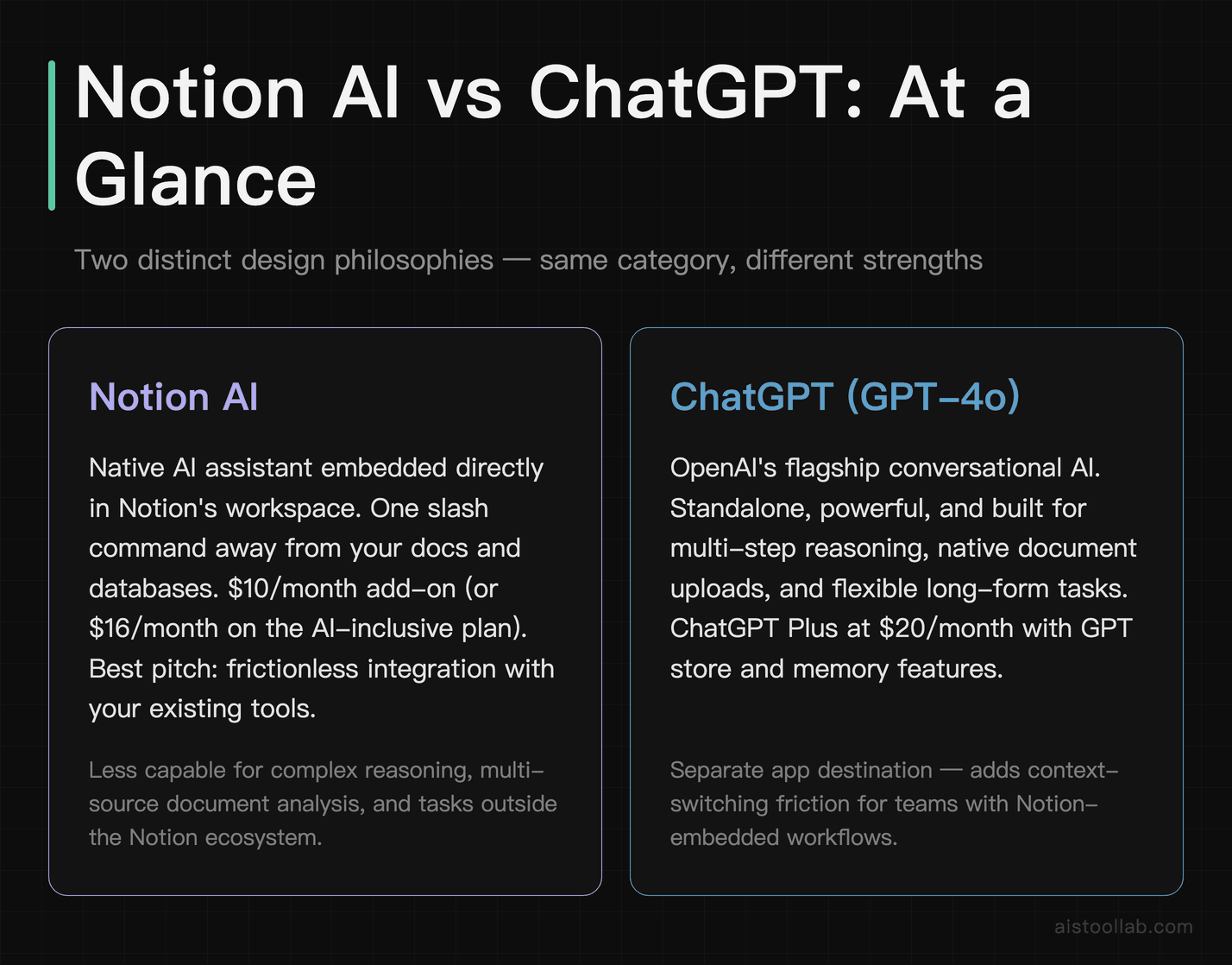
Notion AI is Notion’s native AI assistant, baked directly into their workspace platform. It launched in 2023 and has steadily matured. The key pitch is frictionless integration — your docs, databases, and AI assistance live in the same place. You’re not copy-pasting between tabs. As of 2026, Notion no longer sells AI as a separate add-on: Notion AI is bundled into the Business plan at US$20 per member per month (Free and Plus users only get a limited trial).
ChatGPT, specifically GPT-4o, is OpenAI’s flagship conversational AI. It’s a standalone tool — powerful, flexible, and capable of handling complex, multi-step reasoning tasks. ChatGPT Plus runs $20/month, and you also get access to the GPT store, memory features, and the ability to upload documents directly for analysis.
Neither tool is objectively “better.” But for specific tasks? There are clear winners. Let me show you exactly where each one shines and where it frustrates.
Task 1 — Blog Post Drafting: Structure, Depth, and Editing Required
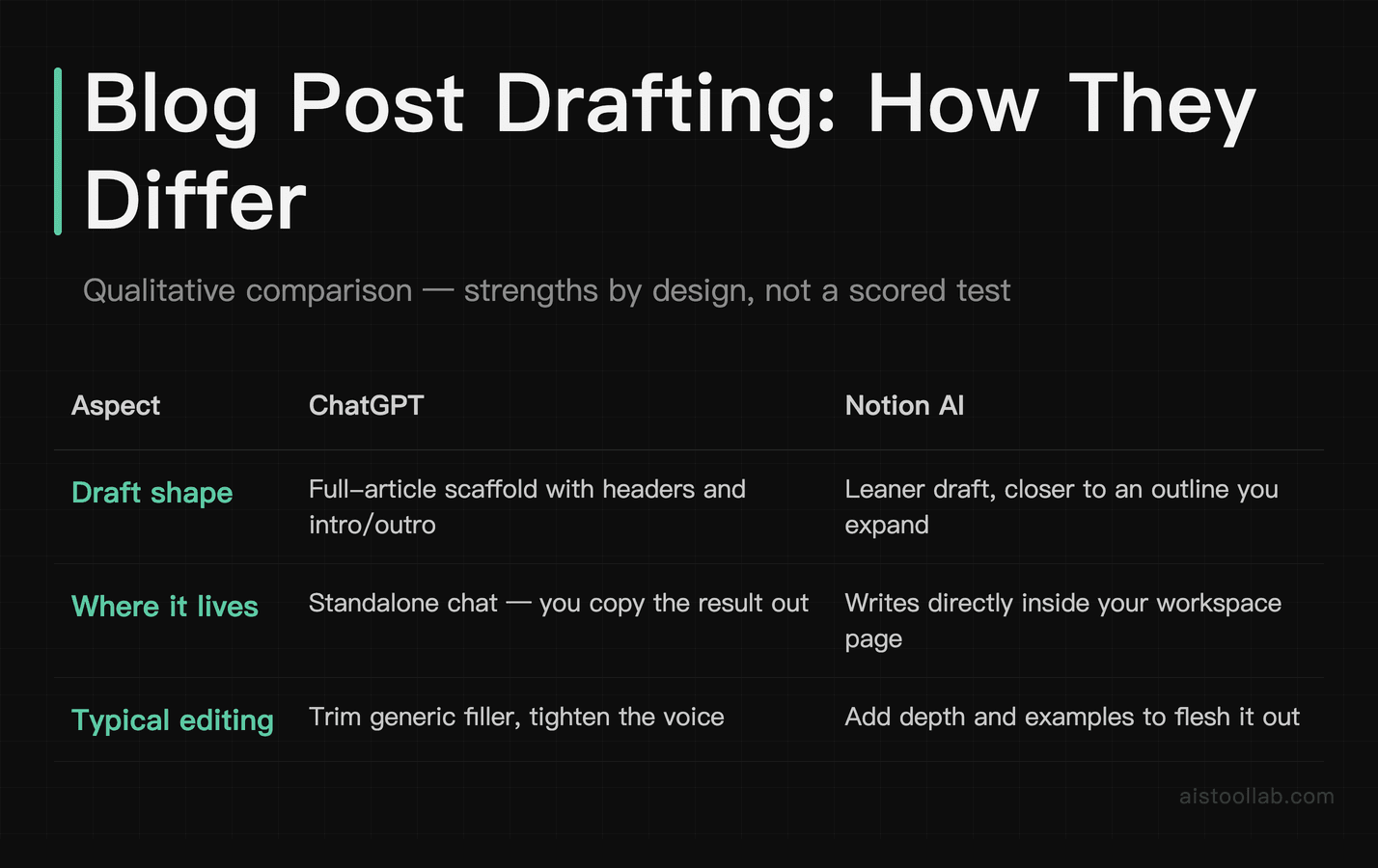
A common writing prompt for both tools: write a 1,000-word blog post for a SaaS marketing audience titled “Why Your Onboarding Emails Aren’t Converting,” with no additional context and no examples.
ChatGPT’s output tends to be a structured post with a hook, several substantive sections, a real conclusion with a call to action, and specific examples like referencing a 3-email sequence vs. a 7-email drip. It isn’t always perfect — the intro can lean slightly generic and may need light editing.
Notion AI’s output was cleaner in format — it defaulted to a well-structured document that looked great in Notion’s editor immediately. But the depth was noticeably shallower. The sections felt more like expanded bullet points than real prose. I spent significantly more time editing, mostly adding substance and replacing vague statements like “personalization is important” with anything actually useful.
Notion AI has a nice trick here though: the “Continue writing” prompt lets you iteratively expand sections without leaving the document. That workflow is genuinely smooth. But if you need a strong first draft with minimal intervention, ChatGPT wins this round decisively.
Winner: ChatGPT — better depth, more actionable content out of the gate, less total editing time.
Task 2 — Meeting Notes Summarization: Accuracy and Action Item Extraction
For summarising a raw meeting transcript into key decisions and action items, both tools can handle this kind of task.
ChatGPT handled this exceptionally well. It correctly identified four decisions, extracted six action items with the responsible party named, and flagged one ambiguous item as “unclear — needs follow-up.” That last bit is genuinely useful — it didn’t hallucinate an owner for a task that wasn’t clearly assigned in the transcript.
Notion AI produced a tighter, more visually appealing summary — bullet points in a format that fits neatly into a Notion meeting notes template. But it missed one action item entirely and misattributed ownership of another. For a quick recap, it’s perfectly fine. For something you’re distributing to a team with accountability expectations? That’s a problem.
The Notion workflow advantage is real here though. If you’re already taking notes in Notion during the meeting, you can highlight the transcript and hit “Summarize” without ever switching apps. That’s worth something. But accuracy matters more than convenience when decisions are on the line.
Winner: ChatGPT — better accuracy on action item extraction, with the added bonus of flagging ambiguous ownership instead of guessing.
Task 3 — Email Writing Assistance: Tone and Length Control
Calibration matters for a task like writing a follow-up email to a prospect who went cold after a demo — professional but warm, under 150 words, with a soft call to action.
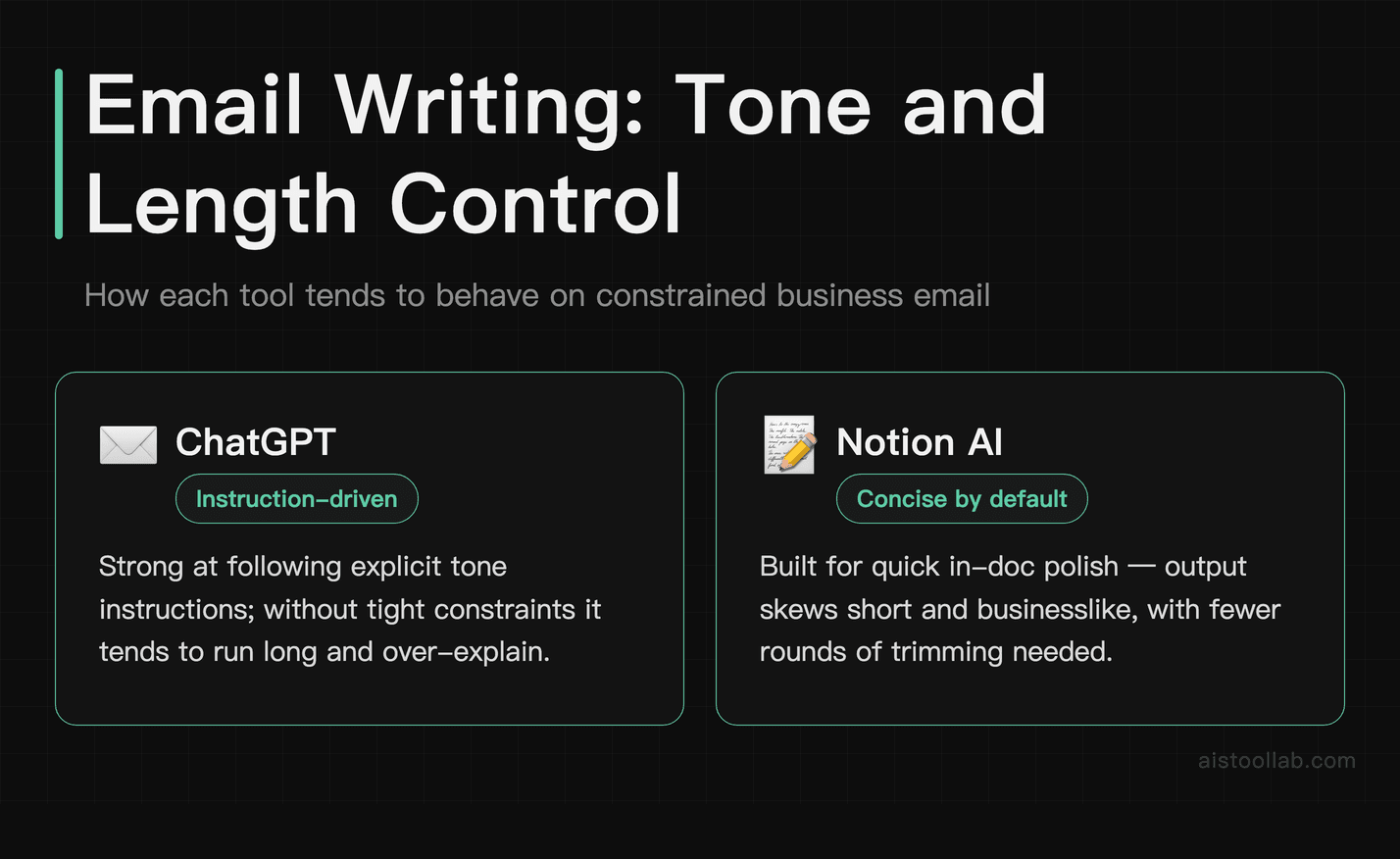
Notion AI can be surprisingly strong here. It tends to hit the right tone quickly and produce a natural, non-pushy CTA — the kind of draft you could send with one light edit to personalize the opening line.
ChatGPT can produce a solid email, though it may run over a specified word limit, and trimming without breaking the flow takes more effort than people admit. ChatGPT also tends to add a slightly more formal sign-off that can need softening.
Both tools do better with more context (who’s the prospect, what was discussed in the demo, etc.), but on a cold prompt with a word limit, Notion AI was more disciplined. It respects constraints better in short-form tasks, which tracks with its design philosophy of fitting into structured workflows.
Winner: Notion AI — better constraint adherence and more natural tone out of the box for short-form professional writing.
Task 4 — Creative Brief and Content Planning
Both tools can generate a content calendar for a B2B software company — for example, a month of blog and social posts with topic ideas, target keywords, and suggested formats.
ChatGPT built a comprehensive table — eight blog post ideas with working titles, suggested keywords, word count targets, and linked social post angles for each. The strategic variety was impressive: thought leadership pieces, comparison posts, customer-pain-focused how-tos. It wasn’t just generating filler titles.
Notion AI created a nice-looking database format in Notion (genuinely useful if you want to turn it directly into a content calendar database), but the topic ideas were more generic and the keyword suggestions were surface-level. It also didn’t volunteer the social post angles without a follow-up prompt.
If you’re building your content plan inside Notion, the database output from Notion AI is genuinely handy. But for raw strategic quality, ChatGPT’s output tends to need less reworking. The workflow I’d recommend: use ChatGPT to generate the strategy, then paste into Notion for execution tracking.
If you’re curious how content teams are systematizing this kind of workflow, I covered it in my piece on How Content Creators Are Using AI Tools to Scale Production in 2025.
Winner: ChatGPT — stronger strategic output and topic variety, less generic filler.
Task 5 — Research Synthesis: Handling Multiple Sources
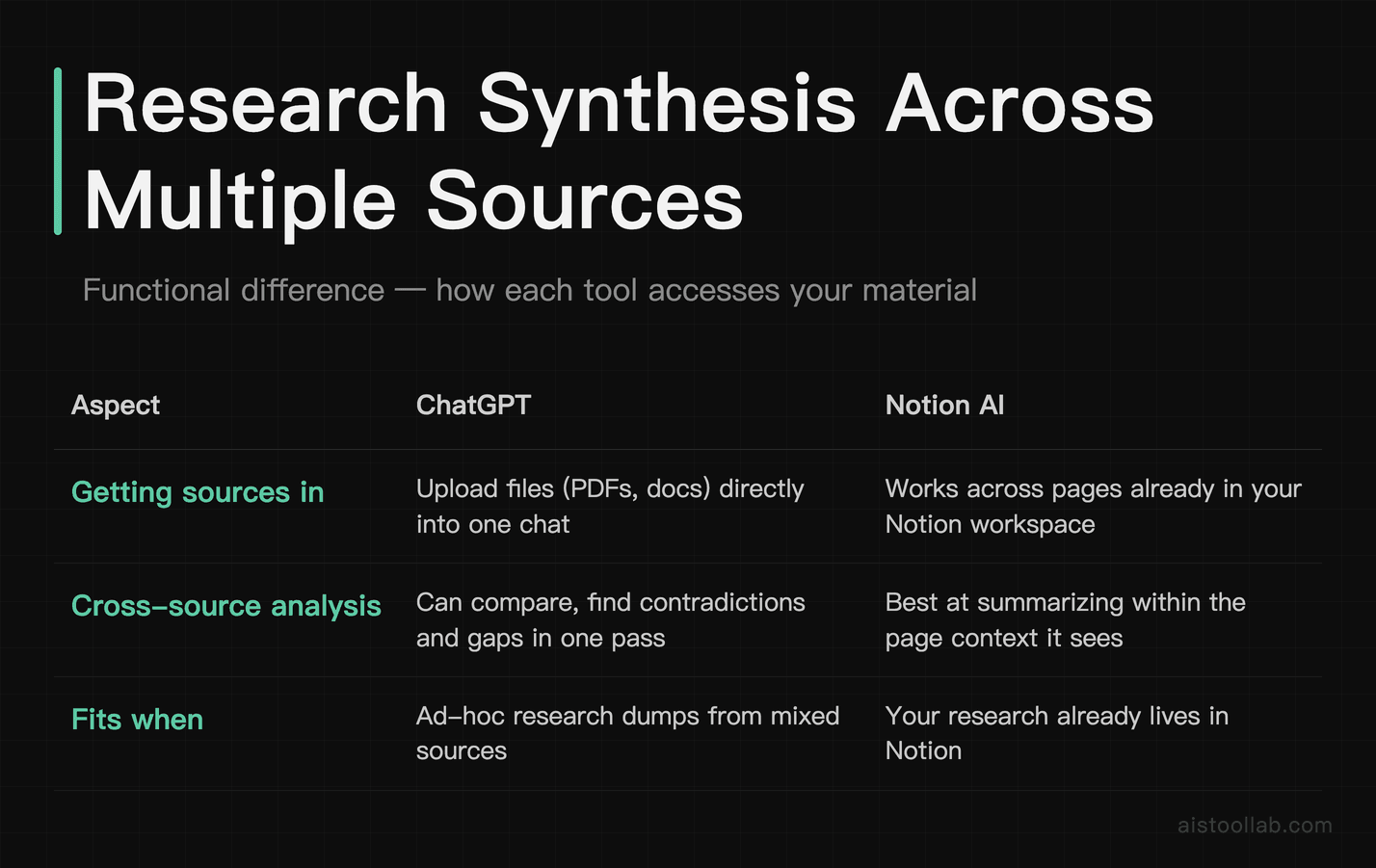
This is where things get interesting — and where the tools diverge most sharply. A common challenge here is uploading a mix of documents — PDFs, copied article text, and research notes — and asking for a synthesized summary that identifies common themes, contradictions, and research gaps.
ChatGPT with GPT-4o handles document uploads natively. It can synthesize source materials, identify recurring themes, point out contradictions between sources, and flag research gaps through logical inference rather than only restating what each document states explicitly.
Notion AI can work with text inside Notion pages, but it doesn’t accept external document uploads in the same way — content has to be pasted into a Notion page first. Its summarization tends to be decent for individual documents but weaker at cross-document synthesis, often summarizing each section’s content without meaningfully identifying the contradictions across sources.
For deep research synthesis, Notion AI simply isn’t built for it. If this is a regular part of your workflow, you might also want to look at dedicated research tools — I compared those in detail in my Perplexity AI vs ChatGPT for Research: Which Wins for Deep Dives? piece.
Winner: ChatGPT — by a significant margin. Native document upload, cross-source synthesis, and logical inference make it the clear choice for research-heavy tasks.
Task 6 — Integration Value: The Real Cost of Context Switching
This one isn’t a traditional output quality test — it’s about workflow reality. How much friction does each tool add to your actual workday?
Notion AI’s biggest strength is that it lives where your work already lives. If your team uses Notion for docs, wikis, and project management, the AI is literally one slash command away. No new tab, no copy-paste loop, no losing your train of thought while you switch contexts. For teams that are deeply embedded in the Notion ecosystem, this is genuinely underrated.
Switching between a separate ChatGPT tab and Notion for a writing task that’s Notion-adjacent adds transition friction — finding the right doc, copying context, pasting back. It doesn’t sound like much, but across a full workday of content work it can add up.
ChatGPT’s integration story has improved with custom GPTs and the API, but for most non-technical users, it’s still a separate destination you have to deliberately navigate to.
The honest take: if 80% of your writing tasks are happening in Notion anyway, the integration value of Notion AI might be worth more than the raw output quality gap. If you’re a solo creator, researcher, or someone whose work spans multiple platforms, ChatGPT’s flexibility wins.
Winner: Notion AI — for teams already living in Notion. ChatGPT for everyone else.
Task 7 — Editing and Rewriting Existing Content
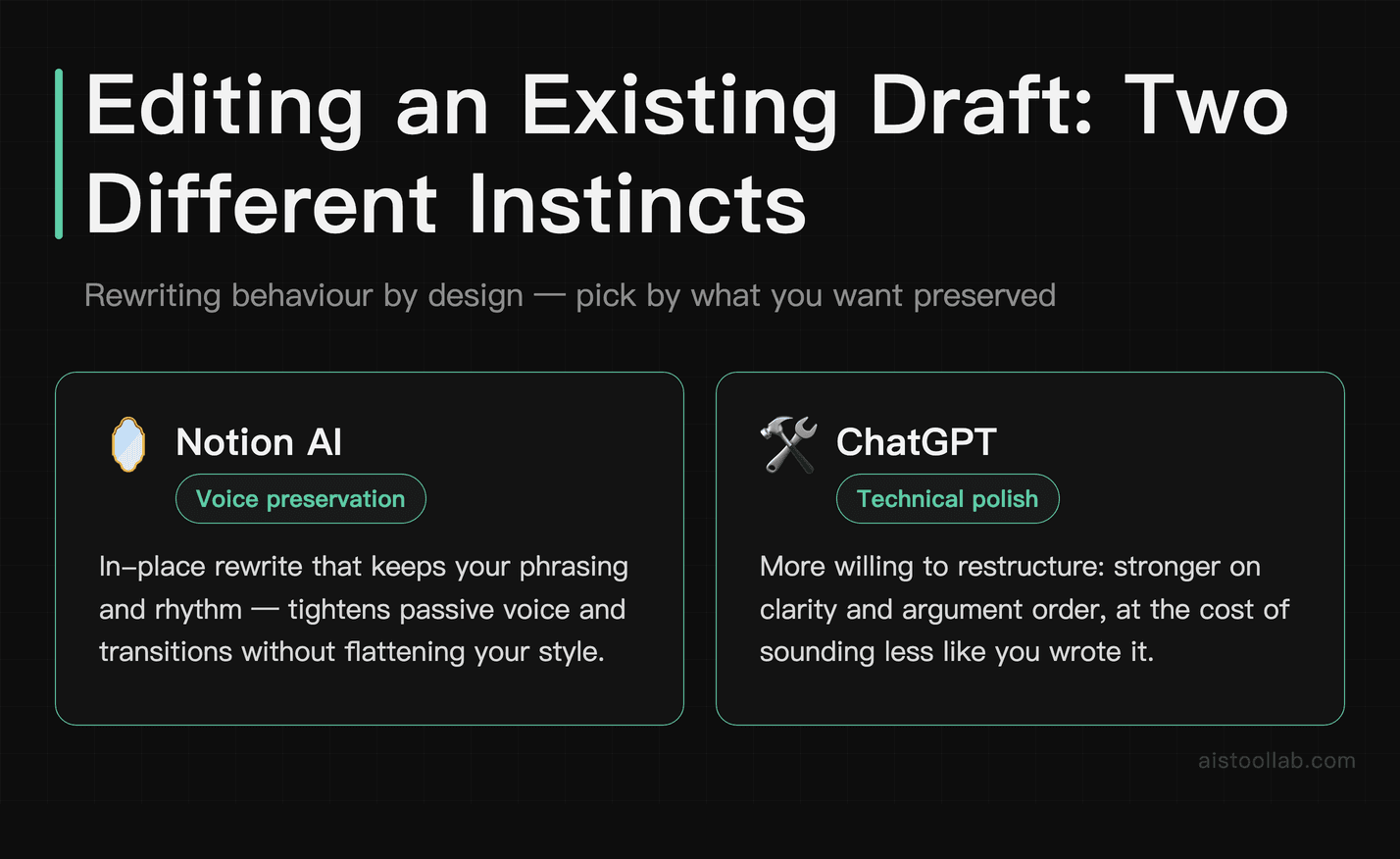
Both tools can take a rough, clunky draft — passive voice, weak transitions, a buried thesis — and rewrite it for clarity and impact without changing the core argument.
Notion AI shone here. The rewrite preserved my voice better than I expected, tightened the passive voice throughout, and improved the transitions without making the piece feel like it was written by a different person. The “Improve writing” function in Notion AI is one of the most genuinely polished features in the product.
ChatGPT‘s rewrite was technically cleaner and arguably more polished — but it sanded down my voice a bit too much. The output sounded more like a blog post in a standard AI register than something I’d actually written. Useful if you’re starting from scratch, less ideal if you’re refining your own work.
This comes down to what you’re optimizing for. If you want clean prose fast and don’t care about voice preservation, ChatGPT delivers. If you’re a writer who wants AI as a collaborator rather than a ghostwriter, Notion AI handles this task with more finesse. And if you’re wondering how much of this comes down to prompt quality, the answer is: more than you think. I wrote about this in my Prompt Engineering That Works: 20 Techniques With Real Before-and-After Examples piece.
Winner: Notion AI — better voice preservation and more surgical editing on existing drafts.
Task 8 — Cost Per Task: The Math That Actually Matters
Let’s do some honest accounting. Both tools are subscription-based, so “cost per task” is really about value per dollar across your actual use pattern.
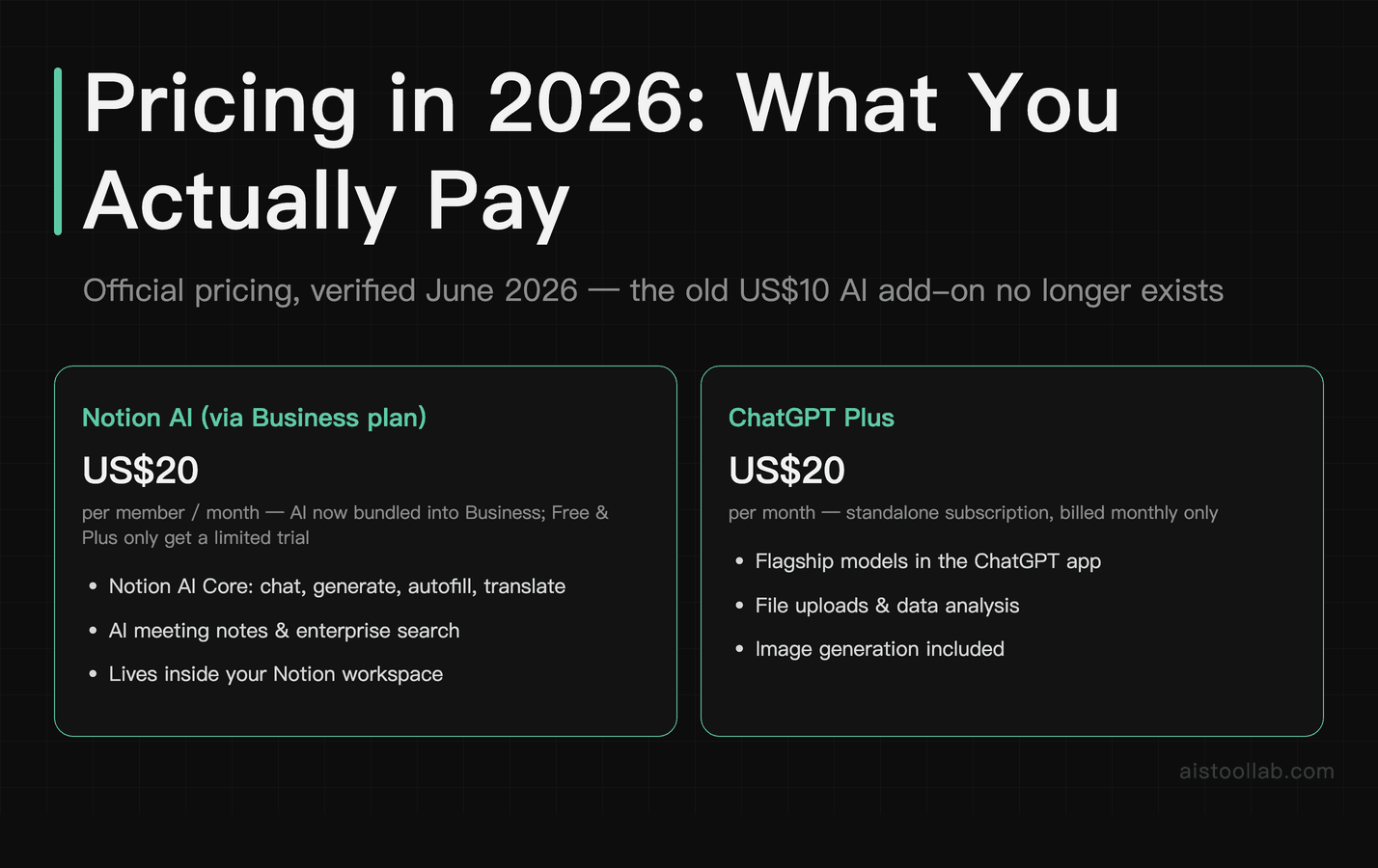
The old pricing gap has closed: Notion AI now effectively costs US$20 per member per month via the Business plan — the same sticker price as ChatGPT Plus at US$20/month. If you’re a Notion power user who primarily needs writing assistance, email polish, and editing help within your existing workspace, Notion AI keeps everything inside the workspace you already live in. You’re paying for AI that’s embedded in your daily tool — whether that’s a reasonable deal depends on how much of your work already lives in Notion.
ChatGPT at $20/month earns its premium through raw capability depth: document analysis, complex reasoning, stronger first drafts, and significantly better research synthesis. If you’re regularly doing content research, long-form drafting, or multi-source analysis, the subscription can pay for itself in time saved.
The worst outcome is paying for both at full price and using each one half-heartedly. If budget is a constraint, pick based on your primary workflow: Notion-centric work goes to Notion AI, everything else goes to ChatGPT.
Overall Ratings
Who Should Use What: The Actual Recommendation
I’ll be direct here, because vague hedging helps no one.
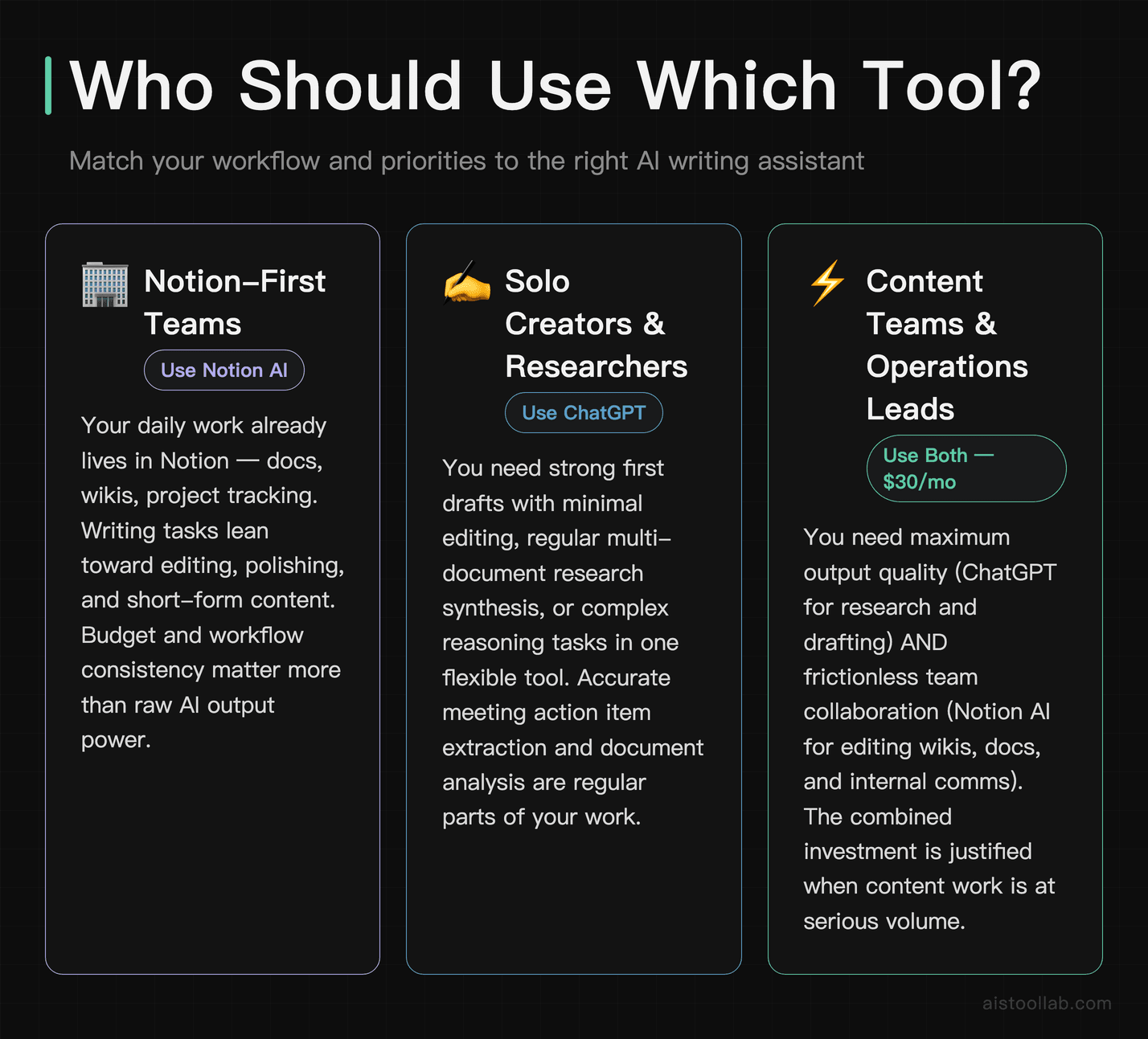
Use Notion AI as your primary tool if:
- Your daily work already happens in Notion — docs, wikis, project tracking
- Your writing tasks lean toward editing, polishing, and short-form content
- You’re on a team that values workflow consistency over raw AI power
- Budget matters and you need AI embedded in your workspace, not layered on top of it
Use ChatGPT as your primary tool if:
- You need strong first drafts that require minimal editing
- Research synthesis and document analysis are regular parts of your work
- You’re a solo creator, freelancer, or researcher without a single-platform workflow
- You want the flexibility to handle complex, multi-step tasks in one tool
- Meeting accountability and accurate action item extraction actually matter in your organization
Use both if: You’re a content team lead or operations manager who needs the best possible output quality (ChatGPT for research and drafting) AND frictionless team collaboration (Notion AI for editing docs, writing in wikis, polishing internal communications). Paying $30/month total for both is genuinely justified if you’re doing serious content work at volume.
For what it’s worth, the improvements coming down the pipeline from OpenAI will likely widen the capability gap further — but Notion AI’s integration moat will remain its strongest advantage. And if you’re wondering how ChatGPT compares to other AI models for reasoning and writing depth, my piece on the GPT-5 Breakdown: What Actually Changed and Whether You Should Upgrade covers the model evolution in detail.
One more thing: if you’re new to AI tools in general and feeling overwhelmed by the options, Notion AI’s onboarding is actually one of the gentler entry points into the space. It’s low-stakes, contextual, and doesn’t require you to learn prompt engineering from scratch just to get useful output.
The Bottom Line
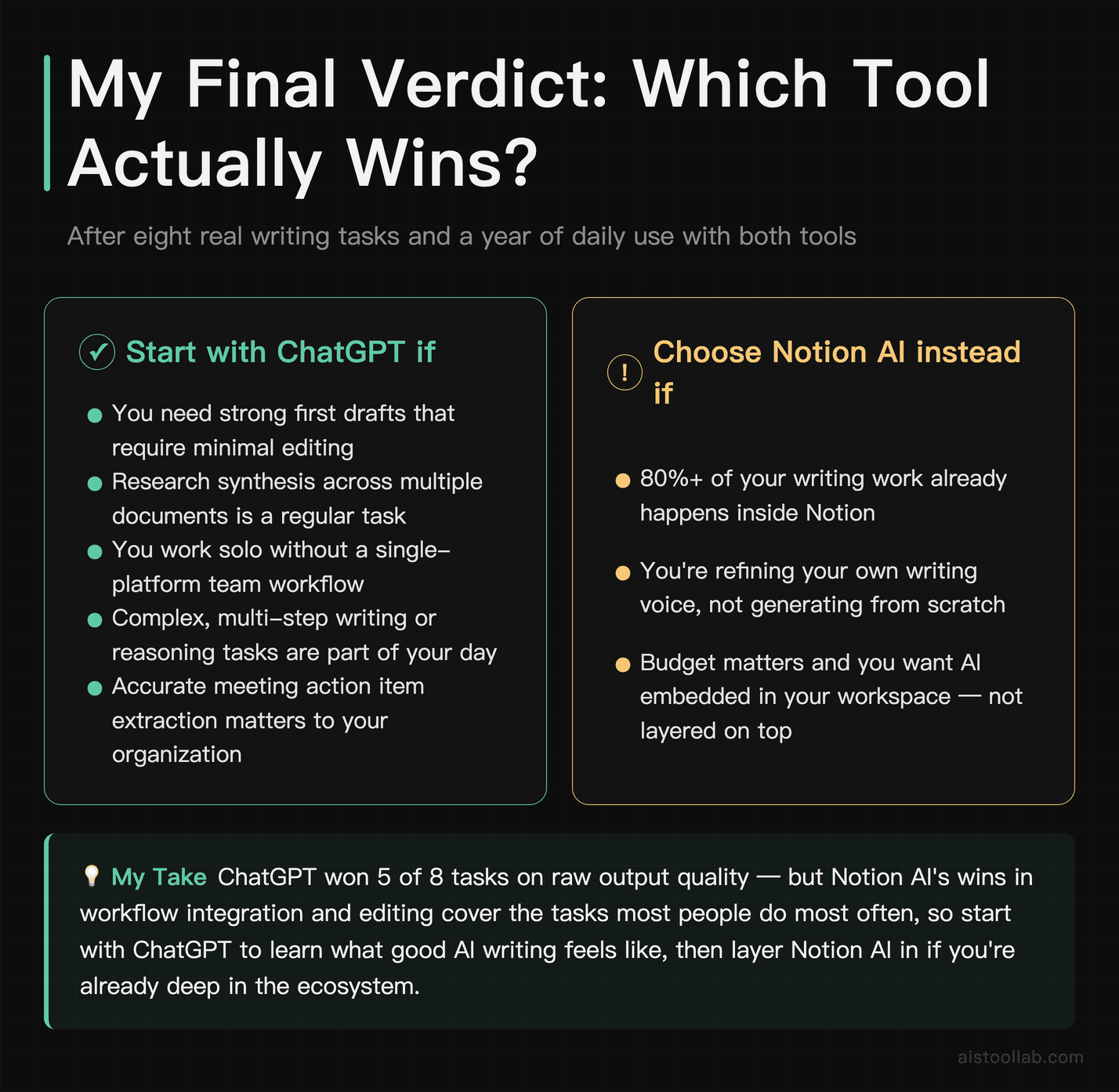
ChatGPT is the more powerful writing tool. Notion AI is the more practical one for teams already invested in the Notion ecosystem. That’s not a cop-out — it’s the actual answer. Across eight real tasks, ChatGPT won five and Notion AI won three. But two of Notion AI’s wins — workflow integration and editing — are the tasks most people do most often, which makes it a harder call than the score suggests.
My honest default recommendation for someone starting fresh: start with ChatGPT, learn what good AI writing assistance feels like, then evaluate whether Notion AI’s integration is worth layering in. If you’re already deep in Notion, flip that order. The tool that’s actually open when you need it will always beat the theoretically better one that requires a detour.
Frequently Asked Questions
Is Notion AI free, or do I need to pay for it?
Notion AI is not included in Notion’s free plan. It now requires the Business plan — US$20 per member per month (official pricing, 2026); the old standalone AI add-on is no longer sold to new customers. Business is itself the workspace plan, so there is no separate AI line item anymore — but it is priced per member, which means costs can still add up quickly for teams. That said, Notion does occasionally offer limited free trials of the AI features so you can test it before committing. For solo users already on a paid Notion plan who live inside the workspace daily, the added cost is often justifiable given the time saved on drafting, summarizing, and editing documents without ever leaving the app. For casual Notion users or those who only need occasional writing help, the recurring cost may be harder to justify when free or cheaper alternatives exist.
Is ChatGPT free, and what do you actually get on the free plan?
Yes, ChatGPT has a genuinely useful free tier that gives you access to GPT-3.5, which is capable of handling a wide range of writing tasks including drafting emails, blog outlines, social media posts, and basic editing. The free plan does have limitations: you won’t get access to GPT-4 or GPT-4o, which are noticeably more capable for nuanced writing, complex reasoning, and longer-form content. Free users also face usage caps during high-traffic periods. ChatGPT Plus costs $20 per month and unlocks GPT-4o, faster response times, access to plugins, and the ability to upload files and images. For writers who want the best output quality consistently, the Plus plan is worth the investment. Compared to Notion AI’s pricing, ChatGPT Plus is often the better value for standalone writing work if you’re not heavily embedded in the Notion ecosystem.
Can Notion AI actually replace ChatGPT for serious writing projects?
For most serious long-form writing projects, Notion AI falls short of fully replacing ChatGPT. Notion AI excels at working within your existing documents — summarizing notes, expanding bullet points, adjusting tone, and generating first drafts based on context already in your workspace. However, it tends to produce more generic output when asked to create content from scratch without existing source material to draw from. ChatGPT, especially on GPT-4o, demonstrates stronger creative range, better instruction-following on complex prompts, and more consistent quality across varied writing styles. For researched articles, persuasive essays, nuanced brand copy, or anything requiring iterative back-and-forth refinement, ChatGPT is the more powerful standalone writing tool. Notion AI is better understood as a productivity enhancer within a workflow rather than a full creative writing engine.
Which tool is better for business writing like emails and reports?
Both tools handle business writing competently, but they shine in different scenarios. Notion AI has a clear edge when your email or report is rooted in information already stored in your Notion workspace — it can pull context from meeting notes, project databases, and existing documents to produce highly relevant drafts without requiring you to manually paste in background information. This makes it especially efficient for internal communications and status reports tied to ongoing projects. ChatGPT, on the other hand, is more versatile for standalone business writing tasks where you’re starting fresh. Its ability to adapt tone, match brand voice with precise prompting, and iterate quickly through revisions makes it excellent for client-facing emails, executive summaries, and formal reports. For teams already operating in Notion, the native integration often wins on speed. For individual professionals or those using other project management tools, ChatGPT is the more flexible choice.
Does Notion AI retain context between sessions the way ChatGPT does?
This is actually one of the most important practical differences between the two tools. Notion AI doesn’t maintain conversational memory between sessions in the same way ChatGPT does with its memory feature enabled. Within a single document or page, Notion AI can reference the content present in that workspace context, which is a form of persistent context — but it’s document-bound rather than conversationally persistent. ChatGPT’s memory feature (available to Plus users) allows it to remember details about you, your preferences, your projects, and your writing style across completely separate conversations. This is a significant advantage for writers who want the AI to learn their voice over time or who return to ongoing projects frequently. If context retention across sessions is important to your workflow, ChatGPT currently has the stronger implementation of this capability.
How does Notion AI compare to other AI writing tools like Jasper or Copy.ai?
Notion AI, Jasper, and Copy.ai occupy somewhat different niches despite surface-level similarities. Jasper and Copy.ai are purpose-built marketing and copywriting platforms with specialized templates for ad copy, product descriptions, landing pages, and social content — they’re optimized for marketing teams producing high volumes of structured content. Notion AI is a workspace-integrated assistant that prioritizes productivity and document management alongside writing support. It’s less specialized for marketing copy but far more useful for knowledge workers who write in many different formats. In terms of raw writing quality, ChatGPT (particularly GPT-4o) generally outperforms all three for complex, nuanced writing. Jasper and Copy.ai have advantages in workflow automation and team collaboration features for marketing use cases. Notion AI wins on seamless integration for teams already using Notion as their operating system. For pure writing quality and flexibility, ChatGPT remains the benchmark.
What are the biggest limitations of Notion AI I should know before subscribing?
Before subscribing to Notion AI, it’s worth understanding several notable limitations. First, its output quality is noticeably more dependent on the quality of existing content in your workspace — it struggles more than ChatGPT when generating from thin or no source material. Second, it doesn’t support the same depth of conversational iteration; you can’t have an extended back-and-forth refinement dialogue the way you can with ChatGPT. Third, the AI features are only accessible within the Notion interface, so if your writing workflow spans multiple tools, you’ll be switching contexts anyway. Fourth, at US$20 per member per month on the Business plan, it can become expensive for larger teams. Finally, Notion AI doesn’t yet support file uploads, image analysis, or web browsing the way ChatGPT Plus does, which limits its usefulness for research-heavy writing tasks.
Is Notion AI worth the money if I’m already paying for ChatGPT Plus?
If you’re already paying $20 per month for ChatGPT Plus and you’re a heavy Notion user, the question becomes whether the workflow convenience of Notion AI justifies a second US$20-per-member subscription via the Business plan. The honest answer depends almost entirely on how deeply embedded you are in Notion. If your entire professional life — meeting notes, project plans, knowledge base, and documents — lives in Notion, then the in-context AI assistance can genuinely save meaningful time each week by eliminating the constant switching between apps. For those users, yes, it’s likely worth it. However, if you only use Notion casually, or if you find yourself frequently starting writing tasks from scratch without relevant workspace context, you’ll probably get better value sticking exclusively with ChatGPT Plus. Most power users who need both tools regularly tend to use ChatGPT for initial ideation and complex drafts, then bring the refined content into Notion where the AI assists with polish, formatting, and document-specific adjustments.
Last updated: 2025