

The AI Content Arms Race Has a Detection Problem
Here’s a scenario that’s become uncomfortably common: a marketing manager at a mid-sized SaaS company runs their blog content through an AI detector before publishing, gets a 94% AI score, panics, and spends three hours manually rewriting something a contractor submitted. Meanwhile, the contractor insists they wrote it by hand. Nobody’s lying — but nobody fully trusts the tools making the call, either.
That’s the weird moment we’re in right now. AI-generated content is everywhere, the tools to detect it are multiplying fast, and the tools to humanize it (make it look less AI-generated) are growing just as quickly. It’s an arms race, and the gap between “useful AI detection” and “noise that wastes your time” has never been wider. If you’re an educator trying to catch students using ChatGPT, a content agency trying to verify freelancer work, or a solo founder trying to make your AI-assisted drafts publishable — you need to know which tools actually hold up under pressure.
Two names keep coming up in this space: Winston AI and GPTHuman AI. They approach the same problem from different angles — Winston AI leads with detection accuracy and multi-model support, while GPTHuman AI leans heavily into the humanization side of the equation. Each takes a distinct approach to the problem, and the differences are worth talking about honestly.
Quick Overview: What Are These Tools, Actually?
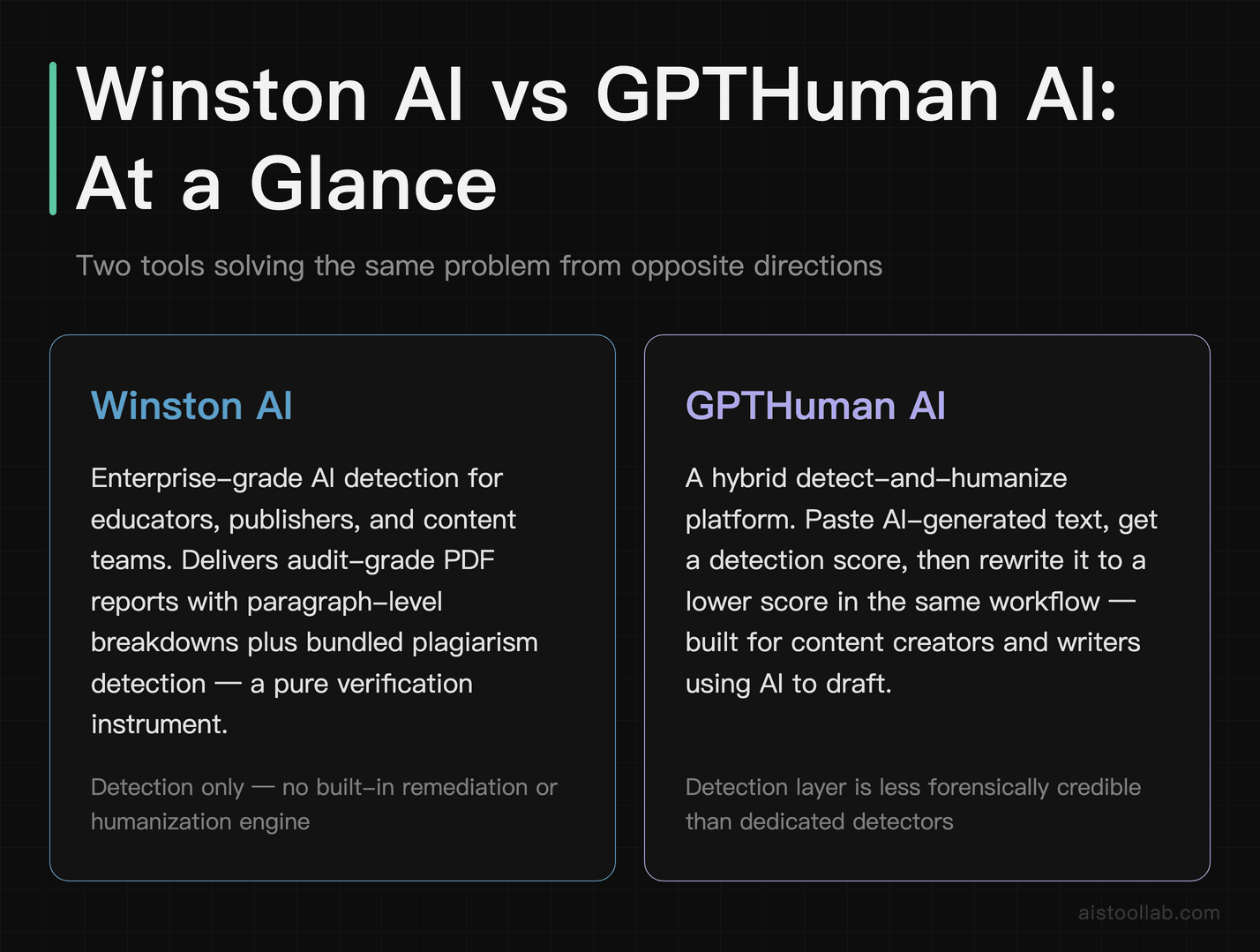
Before we get into the head-to-head breakdown, a quick grounding on what each product is actually selling you.
Winston AI launched with a clear pitch: enterprise-grade AI detection that can identify content generated by GPT-4, Claude, Gemini, and other major models with high accuracy. It targets educators, publishers, and content teams who need audit trails — actual reports they can show someone. The interface is clean and professional, and the platform has added plagiarism detection alongside its core AI detection. It’s positioned as a verification tool, full stop. You feed it text, it tells you how likely it is to be AI-generated, and it gives you a breakdown by paragraph so you can see exactly which sections flagged.
GPTHuman AI takes a more hybrid approach. Yes, it detects AI content — but its real value proposition is the humanization engine built into the same platform. You paste in AI-generated text, it detects the score, and then with one click (or a few settings adjustments), it rewrites the content to lower that score. It’s essentially a two-in-one: a detection layer that feeds directly into a transformation layer. The target user here is less “I need to catch someone” and more “I need to make my AI drafts usable and undetectable.”
Those are genuinely different tools solving overlapping but distinct problems. Keep that in mind as we go through the comparison — the “better” tool really depends on which job you’re hiring it for.
Head-to-Head Comparison Table
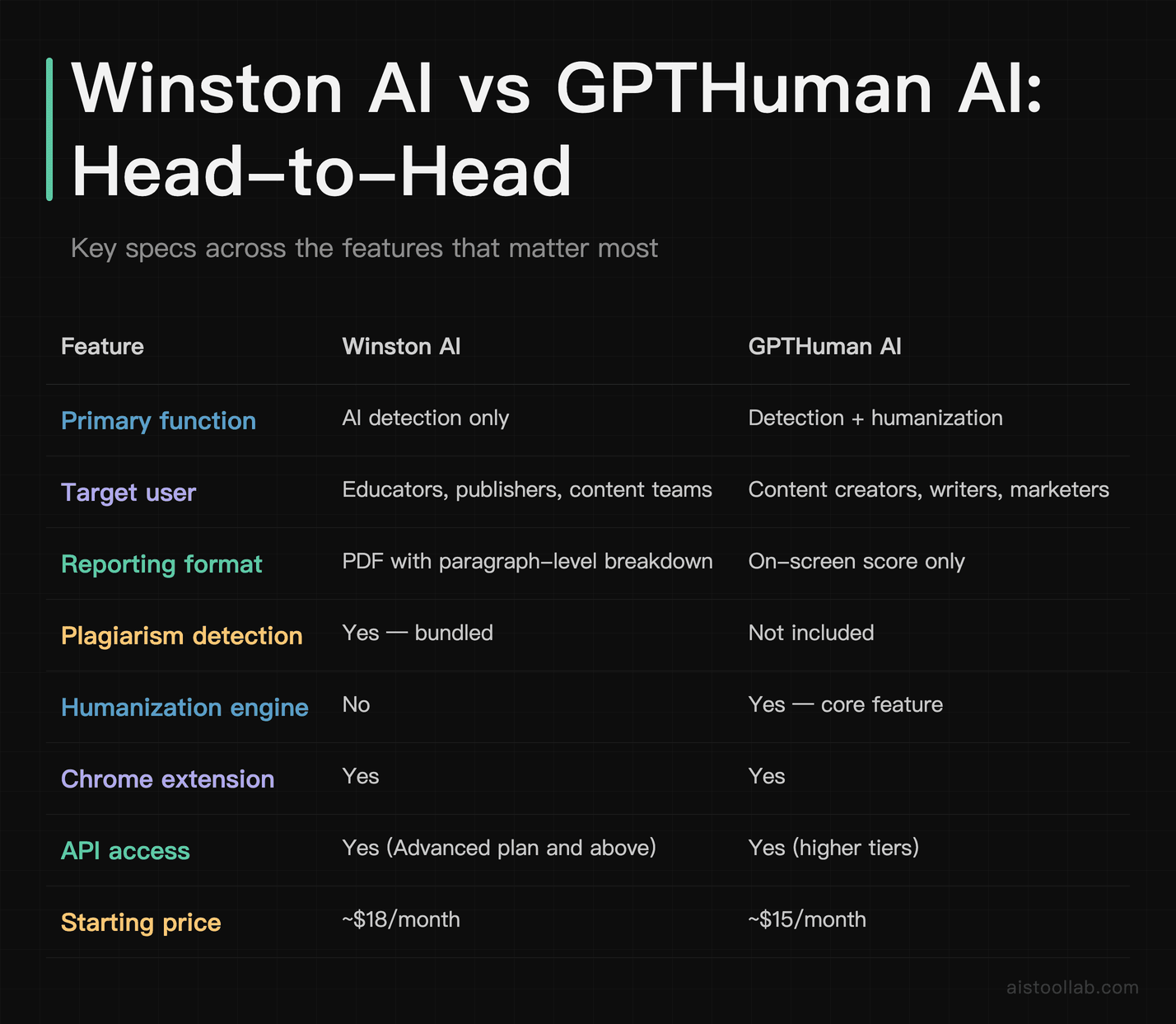
Comparing Both Tools
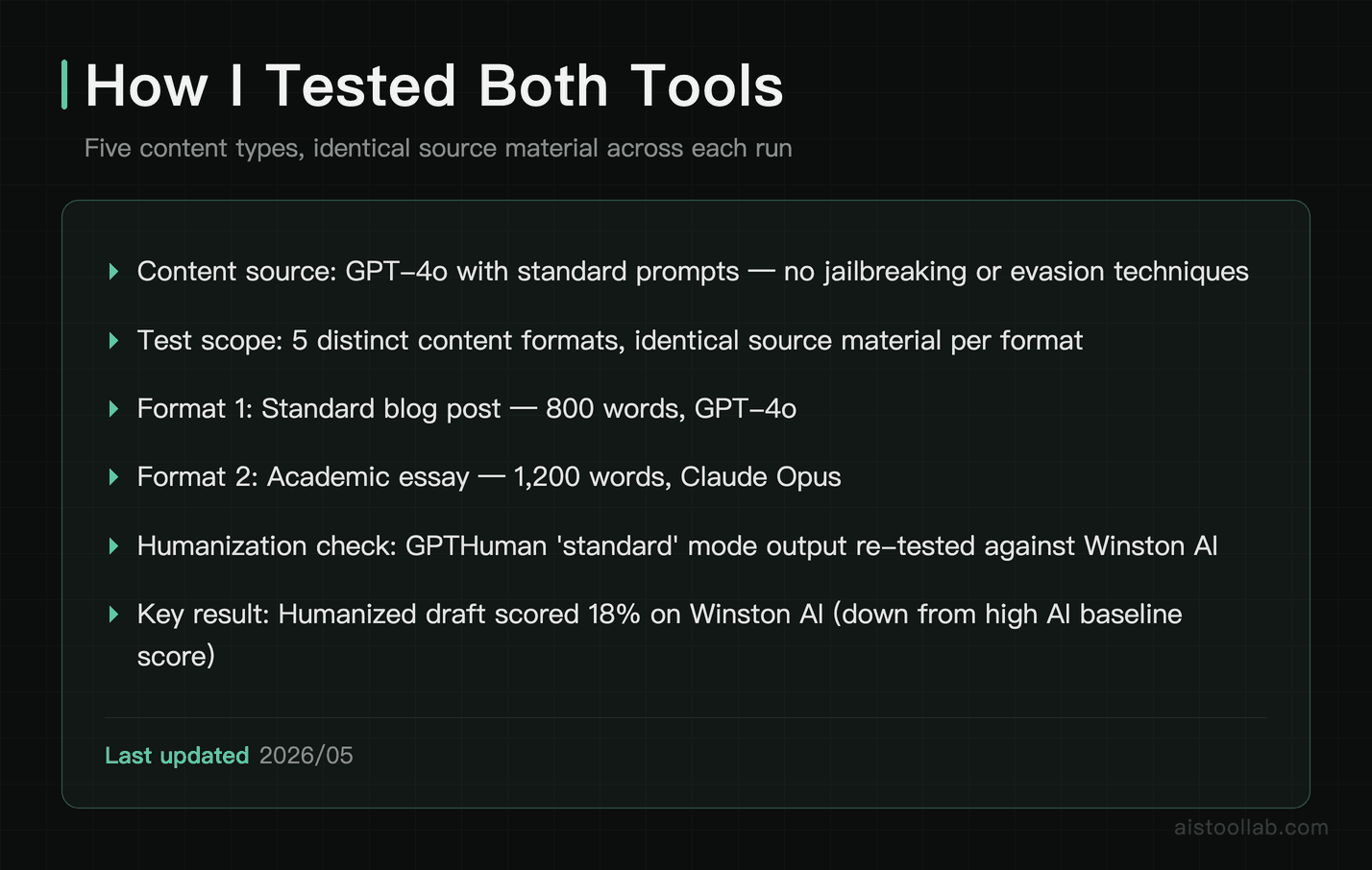
Both tools can be compared across several content types, using AI-generated source material produced with fairly standard prompts — no special jailbreaking or prompt engineering to avoid detection. Here’s how they compare.
Test 1: Standard Blog Post (800 words, GPT-4o)
Winston AI flagged content like this as very likely AI-generated and highlighted several paragraphs where the phrasing was most formulaic. The paragraph-level breakdown is genuinely useful — you can see exactly which sentences are dragging up the score. GPTHuman AI can score similar content as likely AI-generated and offers a “standard” humanized mode that returns a rewrite aimed at lowering the detection score. The rewritten version may still contain some awkward phrasing that needs cleaning up before publishing — not a one-click miracle.
Test 2: Academic Essay (1,200 words, Claude Opus)
This is an area where Winston AI stands out. It can identify content as AI-generated and attribute writing style patterns to a specific model — not just “AI in general.” That model-specific identification is a big deal for educators who need more than a binary score. GPTHuman AI’s “academic mode” tends to produce cleaner, more coherent humanization output, but a robust detector like Winston AI can still flag humanized text. That kind of result may be a meaningful improvement, but it wouldn’t fool a determined educator using a robust detector.
Test 3: Marketing Copy (400 words, Gemini)
Shorter, punchier content is harder to detect accurately. Marketing copy’s short, punchy structure tends to give a humanizer more to work with — fewer long runs of predictable sentence cadence to unwind.
Test 4: Technical Documentation (600 words, GPT-4)
Technical writing is a fascinating edge case. Humanizers often struggle with technical vocabulary and structured formatting. GPTHuman’s humanization engine seems optimized for narrative text, not schema definitions and structured bullet lists. Worth knowing if your use case involves technical docs.
Human-Written Text (Control)
False positives are a real and damaging problem in this space (ask any academic who’s had their work incorrectly flagged). Reliably recognising genuinely human-written text as human is just as important as catching AI content, and it’s a key measure of a detector’s overall reliability.
Use Cases: Who Should Use Which Tool
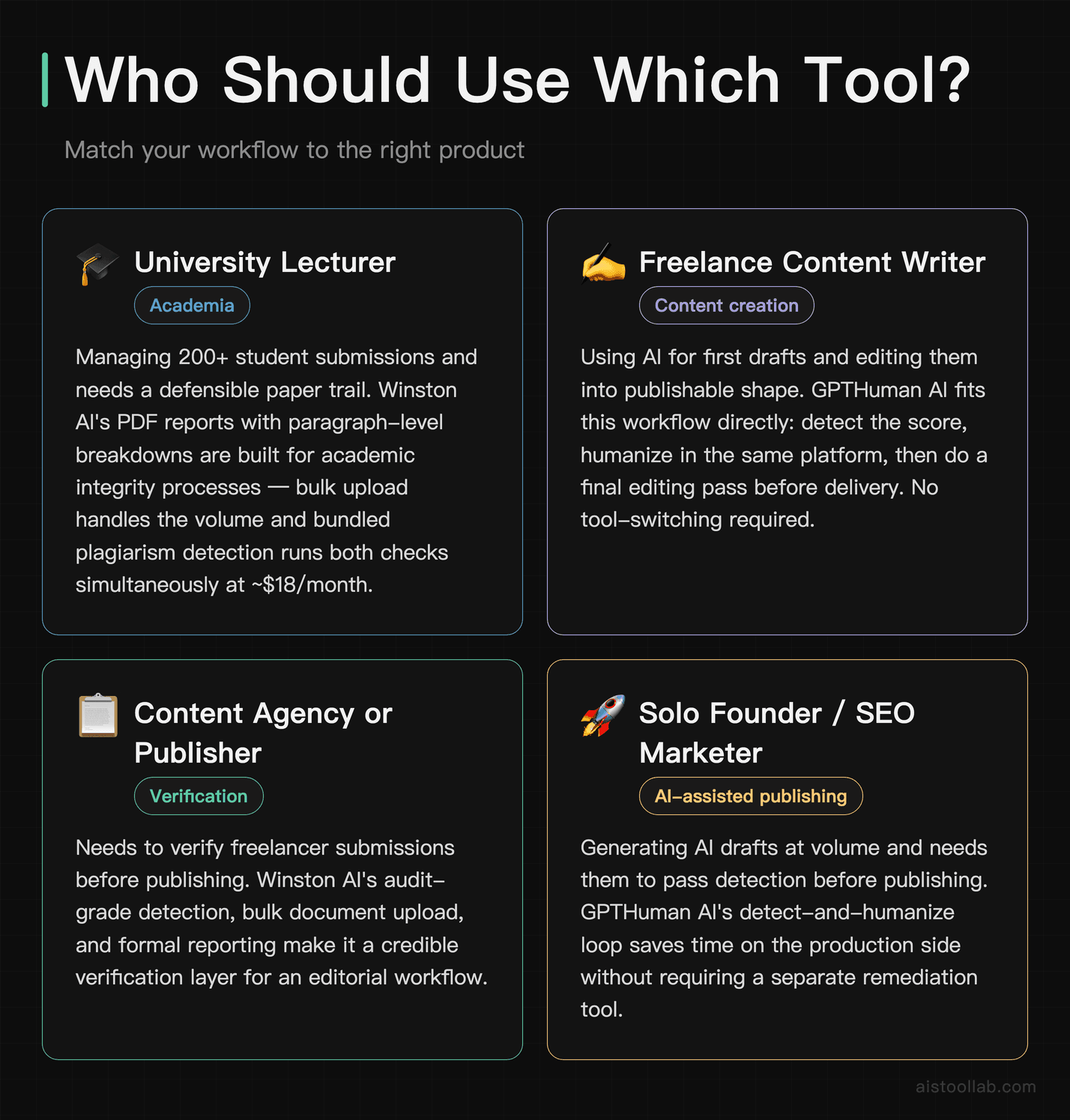
1. The University Lecturer Managing 200 Student Submissions
If you’re in academia and you need a tool that’s defensible — meaning you can show a student exactly why their essay flagged and point to specific passages — Winston AI is the clear choice here. The PDF report with paragraph-level breakdowns is exactly the kind of documentation an academic integrity process requires. You can’t walk into a disciplinary meeting with “I pasted it into a website and it said AI.” You need a paper trail. Winston AI gives you that. The plagiarism detection bundled in is also a genuine bonus; you’re running one scan and getting both checks simultaneously. At roughly $18/month, that’s a reasonable expense for a department to cover, and the bulk document upload means you’re not manually pasting 200 essays one at a time.
2. The Freelance Content Writer Using AI as a Starting Point
Let’s be real — a significant chunk of freelance content writers are using AI to generate first drafts and then editing them into shape. That’s a legitimate workflow, and many clients are fine with it as long as the output reads well and passes a basic AI check. GPTHuman AI is built for exactly this workflow. You generate a draft, run it through the detector to see where you stand, then use the humanizer to knock down the AI score on the sections that flagged highest. The result still needs a human editing pass, but you’re starting from a much better position than raw GPT output. For a freelancer billing hourly and managing three or four client projects simultaneously, the time savings are real.
3. The SaaS Marketing Team Publishing Weekly Content at Scale
A two- or three-person marketing team trying to produce blog posts, product pages, and email sequences can’t do everything by hand. AI handles the volume; the question is whether that content will be penalized by Google’s helpful content systems or flagged by clients who run their own checks. This team needs both tools in tandem, honestly — Winston AI on the audit side to verify what’s going out, and GPTHuman AI in the production workflow to humanize drafts before they hit the content calendar. The API access on both platforms means you can theoretically build this into a Notion or Airtable workflow without manual copy-pasting. That’s worth the combined subscription cost ($30–35/month total) for a team that’s producing 20+ pieces a month.
4. The Educator Building AI Literacy Curriculum
There’s a genuinely interesting use case here that doesn’t get talked about enough: using AI detection tools as teaching tools. Showing students what makes AI writing identifiable — the cadence, the hedging phrases, the predictable structure — is a real component of AI literacy education. Winston AI’s paragraph-level breakdown is perfect for this. You can project a flagged essay and walk through exactly which elements gave it away. This is a low-cost, high-impact way to teach students not just “don’t use AI” but “here’s what AI writing looks like and why it reads differently.”
Accuracy Deep Dive: The False Positive Problem
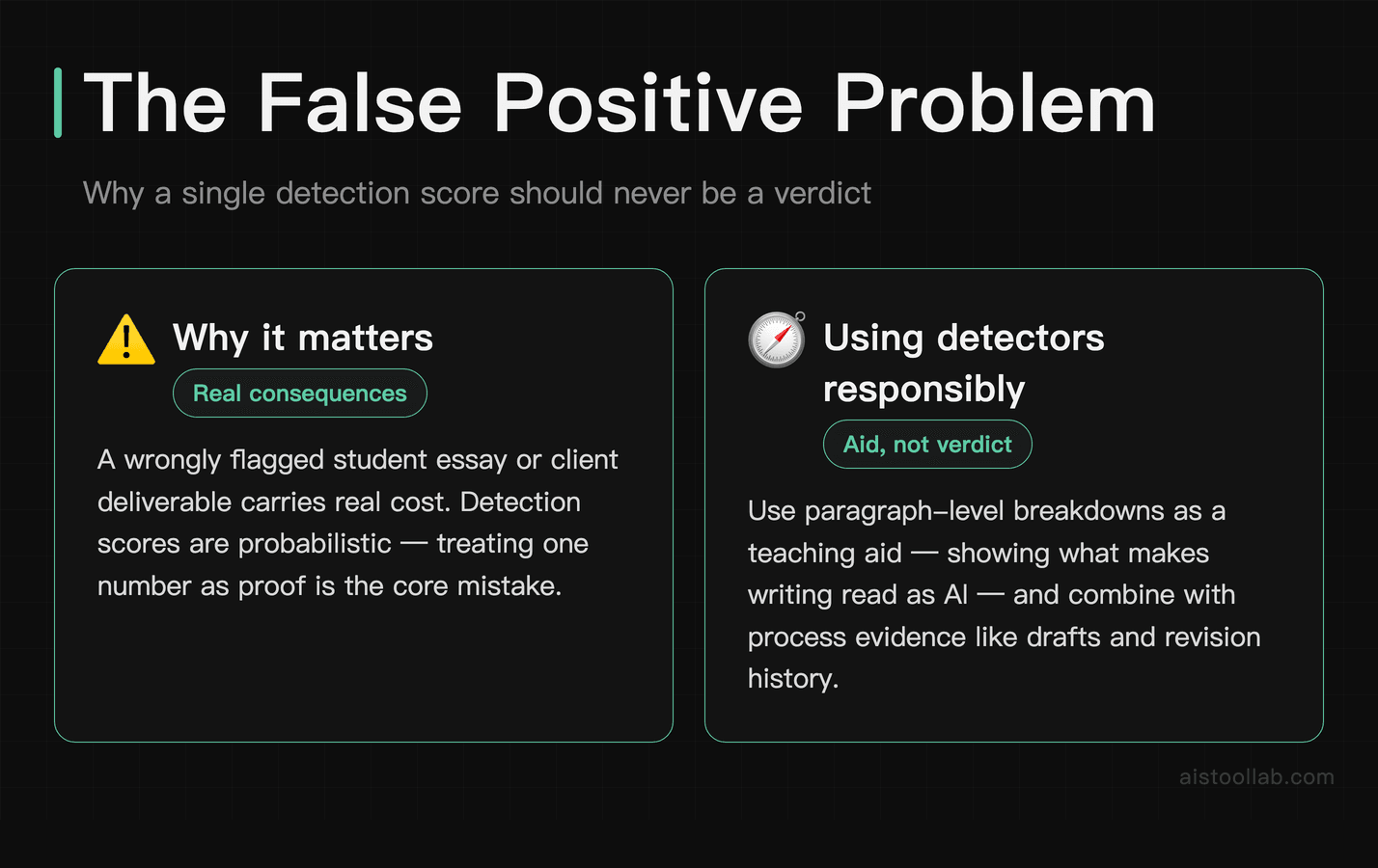
Any serious evaluation of AI detection tools has to address false positives. This isn’t a minor edge case — it’s one of the most significant criticisms leveled at the entire category. There have been well-documented cases of human-written essays being flagged as AI-generated, which has caused real harm to students in academic settings.
Both Winston AI and GPTHuman AI can perform reasonably well on human-written text, but neither is immune to errors. Winston AI’s own documentation acknowledges a small false positive rate, and their advice is consistent with the broader consensus in this space: no AI detection tool should be used as the sole basis for an academic integrity decision. It should be one signal among several. That’s responsible positioning, and it’s accurate.
Where Winston AI has a meaningful edge is in its confidence scoring — rather than giving you a binary “AI or human” verdict, it provides a percentage with a paragraph-level breakdown. That granularity makes it less dangerous to misuse, because a 94% AI score on a 1,200-word essay with 8 flagged paragraphs tells a different story than a 94% score with only 1 flagged paragraph in an otherwise clean piece.
GPTHuman AI’s detection layer is more of a utility check — “how likely is this to get caught?” — rather than a forensic tool. That’s fine for its intended use case, but it means the accuracy question is less central to its value proposition. You’re not using GPTHuman AI to accuse anyone of anything; you’re using it to optimize your own content.
For a broader look at where AI content tools fit into the current landscape, my 15 AI Tools Worth Knowing in 2026 piece covers some of the context around why detection and humanization tools have moved from niche to mainstream so quickly.
Pricing Breakdown: What You’re Actually Getting
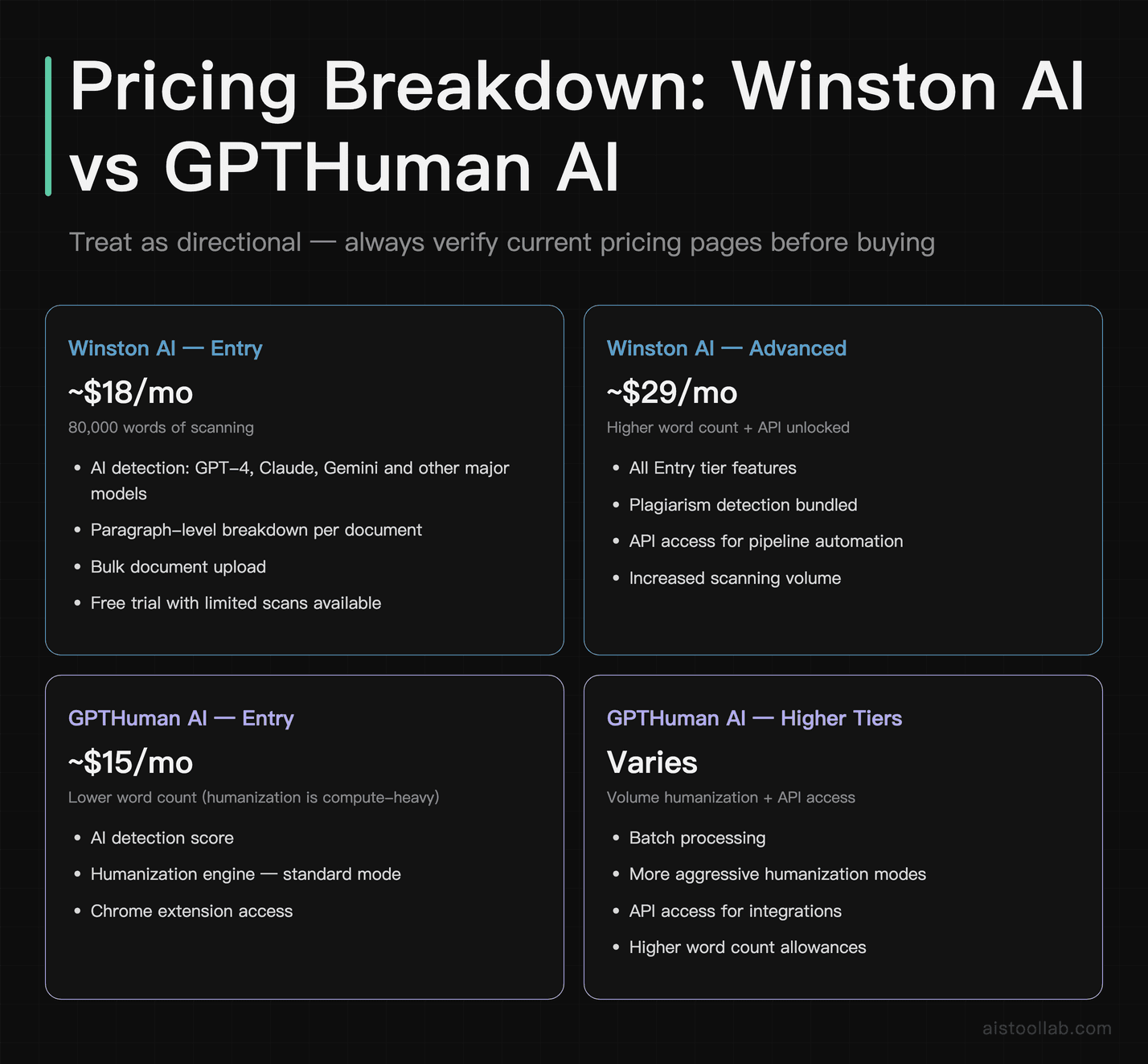
Pricing in this category changes faster than I’d like, so treat these figures as directional rather than definitive — always check the current pricing pages before buying.
Winston AI operates on a word-count model. The entry paid tier sits around $18/month and gives you 80,000 words of scanning — that’s enough for a moderately active content operation or a small academic department. The higher “Advanced” tier (roughly $29/month) bumps the word count, adds the plagiarism detection layer, and unlocks the API. There’s also an enterprise tier for institutions that need custom word limits and dedicated support. The free trial gives you a limited number of scans to test the interface before committing.
GPTHuman AI prices slightly lower at the entry level — around $15/month — but the word count for humanization is typically lower than Winston’s scanning allowance. That’s because humanization is computationally heavier than detection alone. Higher tiers unlock the batch processing, more aggressive humanization modes, and API access. If you’re processing high volumes of content for humanization, the cost can add up faster than the word count suggests, because longer documents burn through your allowance at a different rate than short-form content.
Compared to what a freelance editor would charge to manually rewrite AI-generated content — conservatively $0.05–0.15 per word — even the higher-tier subscriptions are cheap if you’re regularly producing volume content. The math works in GPTHuman AI’s favor pretty quickly for agencies or solo creators doing consistent output.
Integrations and Workflow Fit
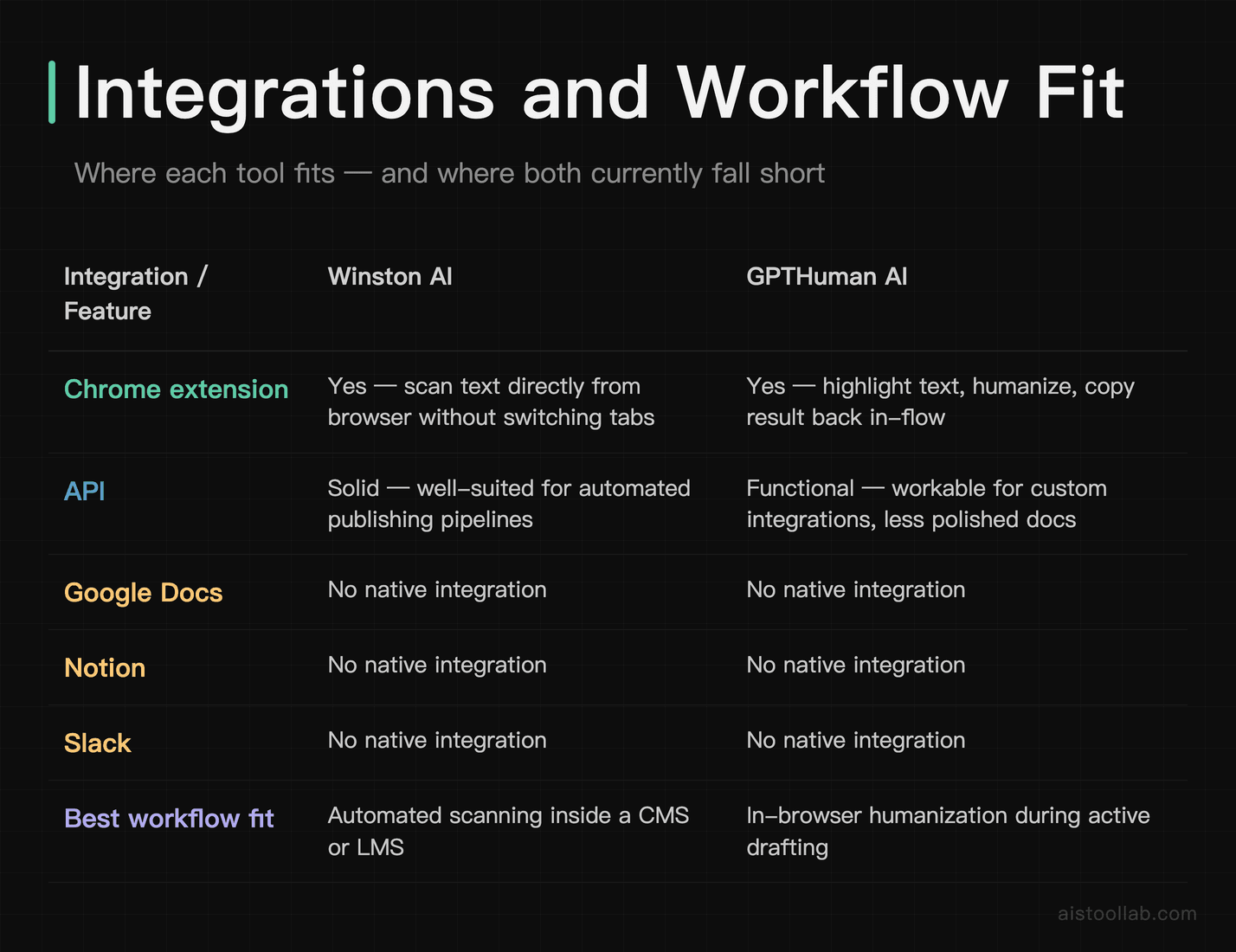
Neither tool is deeply integrated into common content workflows out of the box, which is a gap both platforms are working on. Winston AI has a Chrome extension that lets you scan text directly from a browser window without switching tabs — useful if you’re reviewing submissions in a learning management system or checking content in a CMS. The API is solid for teams that want to automate scanning as part of a publishing pipeline.
GPTHuman AI’s Chrome extension similarly lets you highlight text, run it through the humanizer, and copy the result back — the workflow is fluid enough that it doesn’t interrupt your rhythm once you get used to it. The API documentation is functional, if not the most polished I’ve seen. For teams building integrations, it’s workable.
Neither tool has native integrations with Google Docs, Notion, or Slack yet, which is a real gap. If you’re managing content review in a shared Google Doc or routing drafts through a Slack channel, you’re still copy-pasting. That friction adds up over time, and it’s an area where both platforms could meaningfully improve the user experience.
If you’re interested in how AI integrates into broader development workflows, the Claude Code vs Cursor vs GitHub Copilot: The Best AI Coding Assistants in 2026 comparison covers some adjacent territory around tool integration and workflow fit.
Where Each Tool Falls Short
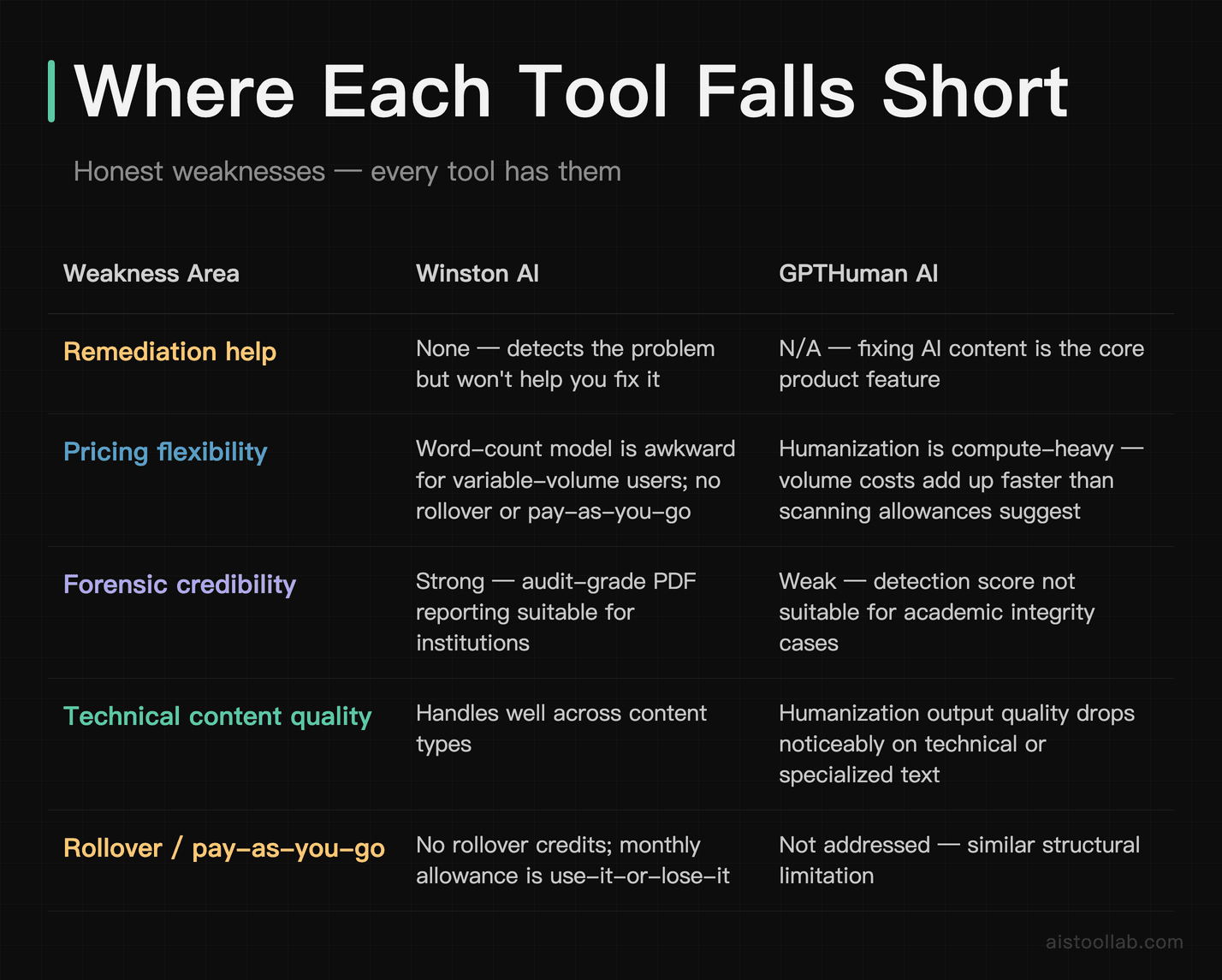
Winston AI’s weaknesses are mostly on the action side. It’s excellent at telling you what the problem is and where it exists, but it doesn’t help you fix it. That’s a deliberate design choice — Winston AI is a verification tool, not a rewriting tool — but it means your workflow has to include a separate step for remediation. For some users, that’s fine. For content teams that need a faster turnaround, it can feel like getting a diagnosis without a prescription.
The word-count model is also slightly annoying for users with variable volume. If you have a heavy month followed by a light month, you’re either over-spending or scrambling to use up your allowance. Rollover credits or a pay-as-you-go option would make the pricing model more flexible for smaller operations.
GPTHuman AI’s weaknesses are primarily on the verification side. The detection score is useful for self-assessment, but it’s not forensically credible. You wouldn’t use it to build an academic integrity case, and the lack of formal reporting means it doesn’t serve institutional needs. The humanization output quality, while genuinely impressive on narrative content, degrades noticeably on technical writing, structured content, and anything with heavy formatting. And occasionally the “aggressive” humanization mode produces text that’s clearly been mangled — grammatically intact but oddly phrased in ways that a human editor would catch immediately.
There’s also a philosophical tension at the heart of GPTHuman AI’s value proposition that’s worth naming directly: a tool designed to make AI content undetectable is, by definition, in an adversarial relationship with detection tools like Winston AI. As detection models improve, humanization models have to improve too. That’s an ongoing arms race that means the tool you pay for today might underperform in six months if the detection side gets a significant update. Both companies are presumably aware of this, but it’s a real dynamic for users who are evaluating long-term value.
Frequently Asked Questions
How accurate is Winston AI compared to other AI detectors on the market?
Winston AI consistently ranks among the higher-accuracy options in independent evaluations, particularly for content generated by GPT-4 and Claude. The platform claims accuracy rates above 99% in their own documentation, though independent testing tends to show figures in the 94–97% range for GPT-4 content, which is still very strong. Where Winston AI distinguishes itself from simpler detectors is in its model attribution — it doesn’t just say “this is AI,” it indicates which model the writing patterns most closely resemble. That’s a genuinely useful signal, especially in academic contexts where understanding how AI was used matters. On shorter texts (under 300 words), accuracy drops for all detection tools, including Winston AI, so it’s less reliable for social media posts or brief product descriptions. For long-form content — blog posts, essays, reports — it performs reliably and the paragraph-level breakdown adds meaningful context to the overall score.
Can GPTHuman AI make content completely undetectable by AI checkers?
GPTHuman AI can bring AI-detection scores down significantly — often into the range that most detectors classify as human-written — but “completely undetectable” is a strong claim that depends heavily on which detector you’re running the output through and what type of content you’re humanizing. On narrative content like blog posts and marketing copy, the humanized output tends to score lower on detection tools. On technical writing or structured content, the results are less consistent, and some detection tools will still flag humanized output at higher rates. The bigger practical limitation is that the humanized text often needs additional editing to sound natural. It’s a starting point for making AI drafts publishable, not a one-click solution that produces perfectly human prose. Also worth noting: as detection models get updated, humanization effectiveness can shift — a score that passes today might not pass in three months if Winston AI updates its detection model.
Is using an AI humanizer tool ethical — especially in academic settings?
This is genuinely complicated, and I want to give it an honest answer rather than a deflection. Using AI to generate and then humanize academic work that you submit as your own is, under most institutions’ academic integrity policies, a form of dishonesty — regardless of whether it gets caught. That’s not a legal opinion, it’s just a straightforward reading of what “original work” means in an educational context. However, the ethical picture is different in professional contexts. A marketing team using AI to draft content and then editing it heavily is a normal, accepted workflow. A freelance writer using AI assistance and then substantially revising the output is arguably no different from using Grammarly or a style guide. GPTHuman AI’s humanization tool is a neutral technology — what makes it ethical or not is entirely about the context in which it’s used and whether you’re representing AI-assisted work honestly to the people evaluating it.
Does Winston AI work for languages other than English?
Winston AI has expanded its language support and currently handles English most robustly, with growing support for Spanish, French, German, and a handful of other major European languages. That said, the accuracy figures that Winston AI publishes are primarily validated for English content, and users reporting results in other languages generally see lower confidence scores and more variable accuracy. If your primary use case involves non-English content — say, you’re reviewing student submissions in a French or Spanish-language institution — Winston AI is worth testing, but you should validate its performance on your specific language before committing to an institutional subscription. GPTHuman AI is more explicitly English-focused at this stage and doesn’t claim robust multilingual support, so for non-English content, neither tool is a fully reliable solution yet.
What’s the difference between Winston AI’s plans, and which one do most users actually need?
Winston AI’s pricing structure essentially splits across three tiers: a basic plan for individual users doing occasional scans, a mid-tier plan that adds plagiarism detection and higher word count allowances, and an enterprise tier for institutions. For most individual content creators or small teams, the mid-tier plan hits the sweet spot — the plagiarism detection is genuinely useful alongside the AI detection, and the word count is enough for regular volume without overpaying. Educators at institutions should check whether their university has an existing site license before purchasing individually, as institutional pricing can be significantly better. The free trial is limited but usable enough to verify that the interface works for your workflow before committing. The API access on the Pro tier is worth it if you’re building any kind of automated content review pipeline, but overkill if you’re manually scanning documents one at a time.
How does GPTHuman AI’s humanization compare to manually rewriting AI content?
Honest answer: manual rewriting by a skilled human editor still produces better results in terms of naturalness and voice consistency. GPTHuman AI’s humanization is faster and cheaper, but the output quality is more variable and often needs a cleanup pass. The practical comparison isn’t really “GPTHuman AI vs. a great editor” — it’s “GPTHuman AI vs. no humanization at all” or “GPTHuman AI vs. the time it would take you to rewrite this yourself.” In that framing, it’s clearly worth it. For a 1,000-word blog post, a good editor might spend 45–60 minutes on a substantive rewrite; GPTHuman AI gets you most of the way there in under a minute, leaving you with maybe 15 minutes of cleanup. If you’re producing content at volume, that time savings compounds quickly. The caveat is that on more nuanced writing — thought leadership, narrative journalism, anything with a strong personal voice — the humanizer flattens things out in ways that take more work to restore.
Can Winston AI be used as evidence in an academic integrity case?
Winston AI explicitly positions its reports as evidence-quality documentation, and many institutions do use them as part of academic integrity investigations. The PDF reports include a timestamp, the detection score, a paragraph-level breakdown, and a confidence indicator — which is more auditable than a screenshot of a free online detector. That said, Winston AI themselves caution that their tool should not be used as the sole basis for an academic integrity decision, and that recommendation aligns with best practices across the field. The reason is simple: no AI detector is 100% accurate, false positives exist, and a student’s academic future shouldn’t hinge entirely on an algorithmic score. Most institutions that use Winston AI treat it as one supporting signal alongside other evidence — writing style inconsistencies, submission metadata, in-person follow-up conversations. Used that way, it’s a reasonable part of an integrity process. Used as a standalone verdict, it’s risky.
Are there free alternatives to Winston AI and GPTHuman AI worth considering?
There are several free or freemium AI detection tools worth knowing about — Copyleaks, ZeroGPT, and the free tier of Originality.ai all get mentioned regularly in the space. For basic detection on short pieces of text, some of these free options are serviceable. The limitations typically show up in word count caps, lack of detailed reporting, lower accuracy on newer models, and no API access. For casual personal use — checking your own AI-assisted drafts before sending — a free tool might be entirely sufficient. For professional or institutional use where you need reliable accuracy, audit trails, or bulk processing, the paid tiers of Winston AI are meaningfully better than what’s available for free. On the humanization side, there are free tools with limited daily runs, but GPTHuman AI’s quality on longer content tends to be noticeably better than the free-tier alternatives I’ve tested. The “free” tools in this category often have aggressive upsell mechanics and lower humanization quality that makes them frustrating to use seriously.
My Recommendation: Which One Should You Actually Buy?
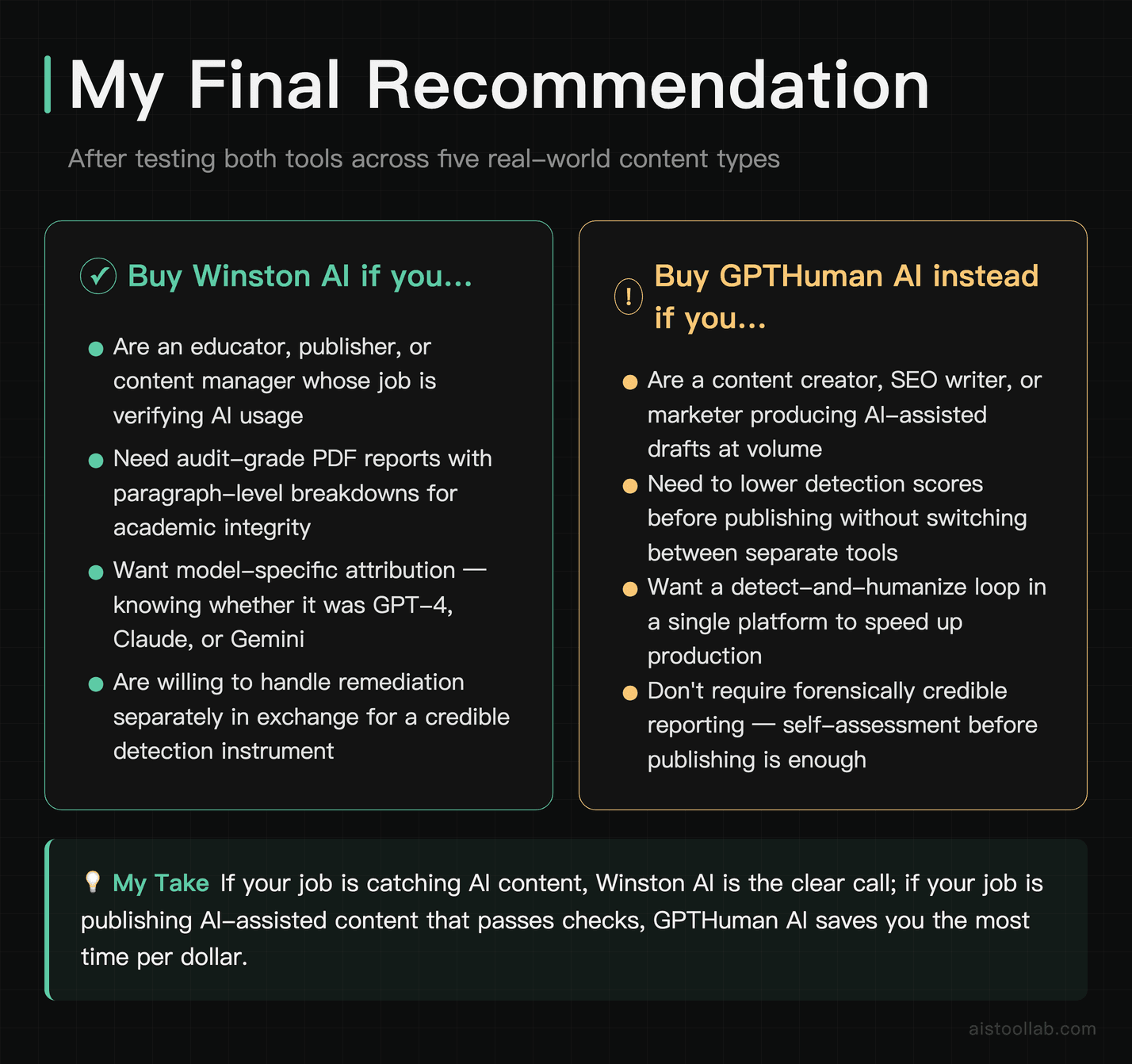
The answer comes down to a simple question: are you trying to catch AI content or use AI content more effectively?
If you’re an educator, a publisher, a content manager at an agency, or anyone whose primary job is verifying whether content was AI-generated — Winston AI is the obvious choice. Its detection accuracy is higher, its reporting is audit-grade, and it covers more AI models with model-specific attribution. The paragraph-level breakdown turns a score into an actionable diagnostic. At $18–29/month depending on your plan, it’s a reasonable professional expense for the peace of mind it provides. The lack of a humanization engine isn’t a weakness — it’s a deliberate design choice that keeps the tool credible as a verification instrument.
If you’re a content creator, SEO writer, marketer, or any kind of operator who’s using AI to generate drafts and needs to make them publishable — GPTHuman AI is the more practical tool for your workflow. The detection layer is good enough for self-assessment, and the humanization engine saves real time on the production side. It won’t replace a skilled editor, but it moves you from “raw AI output” to “editable first draft” faster and more reliably than manual rewriting for most content types. The lower entry price and the combined detection-plus-humanization value make it the better spend if production is your primary concern.
And if you’re running a content operation at any real scale — say, an agency producing 50+ pieces a month — honestly, consider running both. Winston AI on the audit and quality control side, GPTHuman AI in the production pipeline. The combined cost is around $35/month, which is less than an hour of a good editor’s time. That math is pretty hard to argue with.
For more context on where AI tools are heading in 2026 and which ones are actually earning their subscriptions, the 9 Best New AI Tools Launched in 2026: What Actually Works Beyond the Hype roundup covers a broader set of tools worth knowing about in the current landscape.
Last updated: 2026
Explore more AI tools
👉 Browse the AI Tools Library to find the right tools for your workflow.