
The Meeting Ended. The Real Work Began. Sound Familiar?
It was a Tuesday afternoon when I finally snapped. I’d just sat through a 47-minute product sync, typed furious notes in Notion, half-listened to three action items being rattled off while someone was still screen-sharing, and then spent the next 25 minutes trying to reconstruct what was actually decided. The meeting recording was in one tab. My notes were in another. The Slack thread about the same topic was somewhere else entirely. I wasn’t doing deep work — I was doing archaeology.
That’s the specific kind of pain that a new generation of AI productivity tools is gunning for. Not the “write me a blog post” kind of AI help. The “I’m drowning in context-switching and my inbox has hundreds of unread emails and I have multiple calls before noon” kind of help. Tools like Granola, Wispr Flow, and Superhuman aren’t trying to be ChatGPT. They’re trying to be the co-pilot for the specific, messy workflows that eat your actual working hours.
What follows is an honest breakdown: what each tool actually does well, where it falls apart, and most importantly, which one (or combination) makes sense for the kind of work you do. If you want the broader landscape of what’s worth using right now, the piece on 15 AI Tools Worth Knowing in 2026 has useful context — but this article goes deeper on these three specifically.
Transparency note: Granola, Wispr Flow and Superhuman are paid tools I have not personally subscribed to and tested. The breakdown below is compiled from each tool’s official documentation and the pattern of public user reviews across sites like G2 and Reddit — it’s a research-based analysis, not a hands-on verdict.
Quick Primer: What Are These Tools Actually Doing?
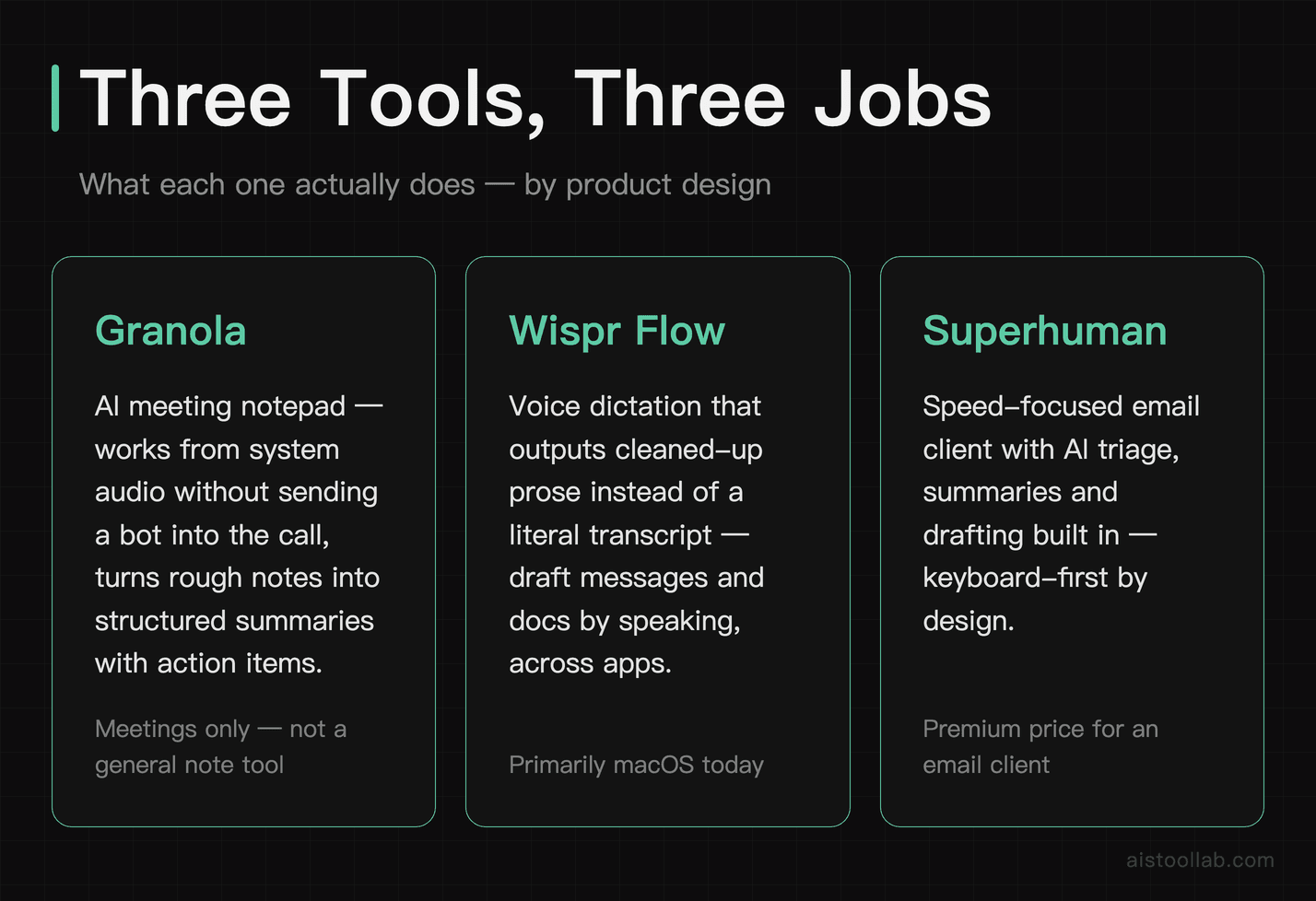
Before diving into the comparison, it helps to be clear-eyed about what category each tool sits in — because they’re not competing in the same lane as much as the title might suggest. They’re three different answers to the same underlying problem: knowledge workers spend the majority of their time on communication and coordination overhead, and that overhead has barely gotten smarter despite years of “productivity apps.”
Granola is an AI notepad built specifically for meetings. It runs quietly in the background during your calls, captures a transcript, and then generates smart notes — not just a raw dump of everything said, but structured summaries with decisions, action items, and context. What makes it different from tools like Otter.ai is that it blends what you typed during the meeting with what the AI captured, so the output reflects your own shorthand and judgment, not just a generic transcript summary.
Wispr Flow is a voice dictation tool, but that description undersells it. It’s not Dragon Dictate from 2009. Wispr Flow works across your entire operating system — any app, any text field — and it’s fast enough and accurate enough that many users report it being faster than typing for longer-form content. The AI cleans up filler words, reformats your speech into clean prose, and adapts to your writing style over time. It’s particularly popular with developers and writers who want to capture ideas without leaving their flow state.
Superhuman is an email client — but one that’s been pushing hard on AI features for the past couple of years. Auto-summarization of email threads, AI-drafted replies, priority triage, and keyboard-speed navigation are the core hooks. It’s been around longer than the other two and has a more established user base, but it’s facing pressure from both directions: AI-native alternatives from below and native AI features in Gmail and Outlook from above.
The reason I’m comparing these three together is that they’re all answering the same question for a specific type of professional: how do I spend less time on the logistics of work and more time on the actual work? They just attack different parts of that problem.
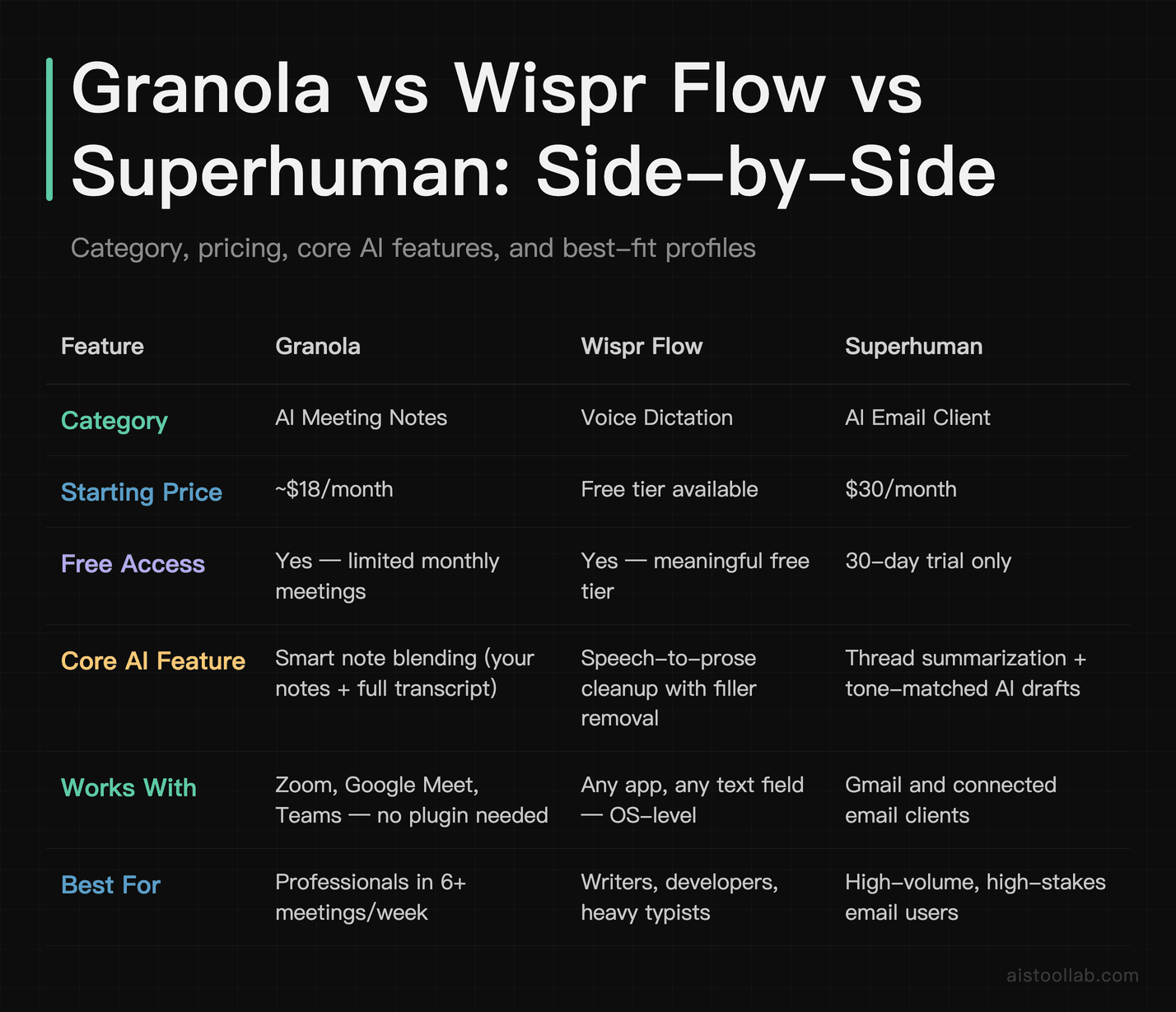
Head-to-Head Comparison Table
Deep Dive: Granola
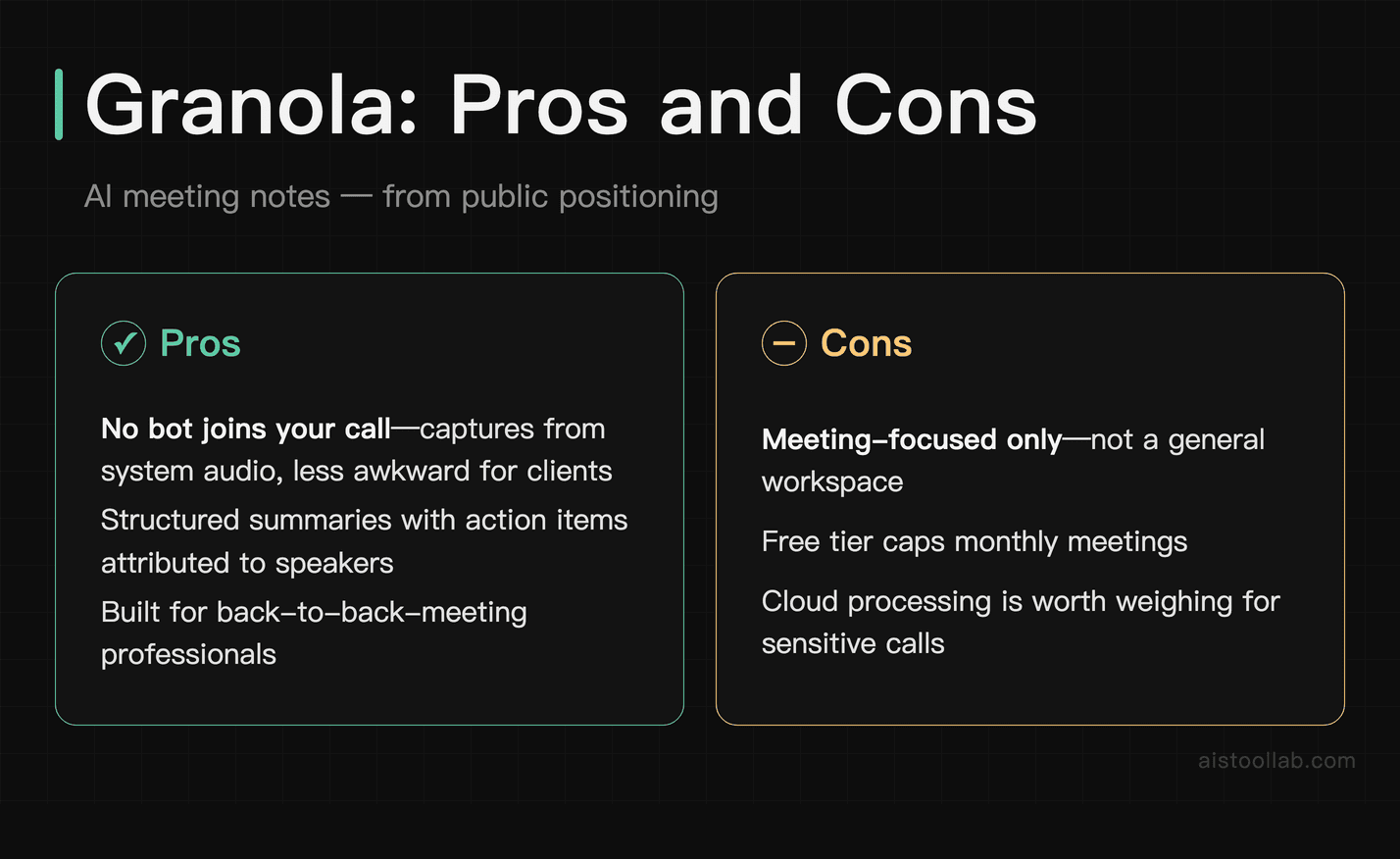
Granola came onto my radar through a recommendation in a Slack community for product managers — and if you’ve talked to PMs recently, you’ve probably heard about it. The premise is deceptively simple: open Granola before your meeting, let it listen, take whatever sparse notes you naturally take during the call, and then when the meeting ends, it generates a structured summary that merges your notes with a full transcript.
The thing that separates Granola from the crowded field of AI meeting tools is that output quality. Tools like Otter.ai, Fireflies, and Zoom’s built-in transcription all produce something between a raw transcript and a slightly cleaned-up version of a raw transcript. Granola produces something that actually reads like notes a thoughtful person would write — with decisions bolded, open questions grouped together, and action items attributed to specific people, which can cut down on post-meeting cleanup.
The blend-with-your-notes feature is genuinely clever. If you jot “push back on timeline — unrealistic” during the call, Granola doesn’t discard that. It integrates your opinion and context into the final notes. You get an artifact that reflects both what was said and what you actually thought about it — which is often more useful than a neutral transcript.
Where it falls short: it’s still primarily macOS, which is a real limitation for Windows users. The free tier caps you on number of meetings per month, which feels stingy if you’re in back-to-back calls all week. And if you’re in highly sensitive client calls — legal, medical, financial — the fact that audio is being processed in the cloud is a legitimate concern worth thinking through. For more on tools that are handling similar workflow automation challenges, the 9 Best New AI Tools Launched in 2026: What Actually Works Beyond the Hype piece covers some interesting adjacent players.
Deep Dive: Wispr Flow
I’ll be honest: I was the most skeptical about Wispr Flow going in. Voice dictation has been a category littered with disappointment for as long as I can remember — dictating something while walking and getting back a phonetic disaster, then going back to typing immediately. Wispr Flow is genuinely different.
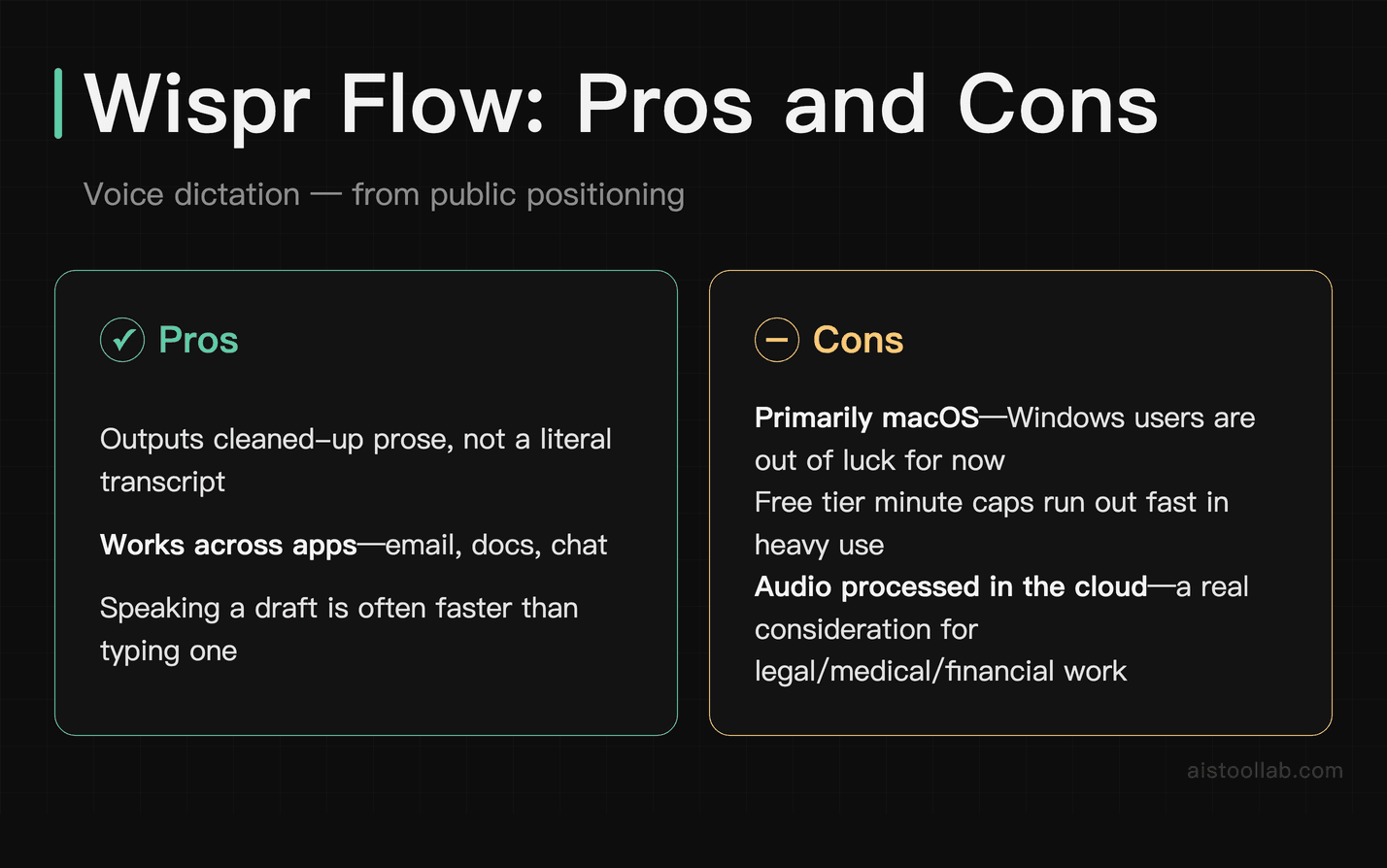
The accuracy is part of it — processing is fast enough that there’s almost no perceptible lag, and the error rate is low enough that constant correcting isn’t needed. But the more impressive thing is the reformatting. When you speak naturally — with “um,” “like,” filler words, and run-on sentence structures — Wispr Flow cleans it up into readable prose, turning choppy spoken phrasing into a coherent, professional message.
The system-wide approach is what makes this a productivity tool rather than just a neat trick. It works in VS Code, in Notion, in your browser, in email clients. The keyboard shortcut triggers it anywhere. This is important because the friction of switching to a specific app to dictate, then copying the output, is enough to stop most people from building the habit. Wispr Flow removes that friction almost entirely.
Wispr Flow at approximately $12/month is the most affordable of the three, and the free tier with limited minutes is enough to genuinely evaluate whether dictation fits your workflow before committing. The main limitation: it’s an individual productivity tool. There are no team features, no collaboration layer, no analytics. If you’re a solo worker or a freelancer, that’s fine. If you’re trying to roll something out to a team, this won’t help you there.
Deep Dive: Superhuman
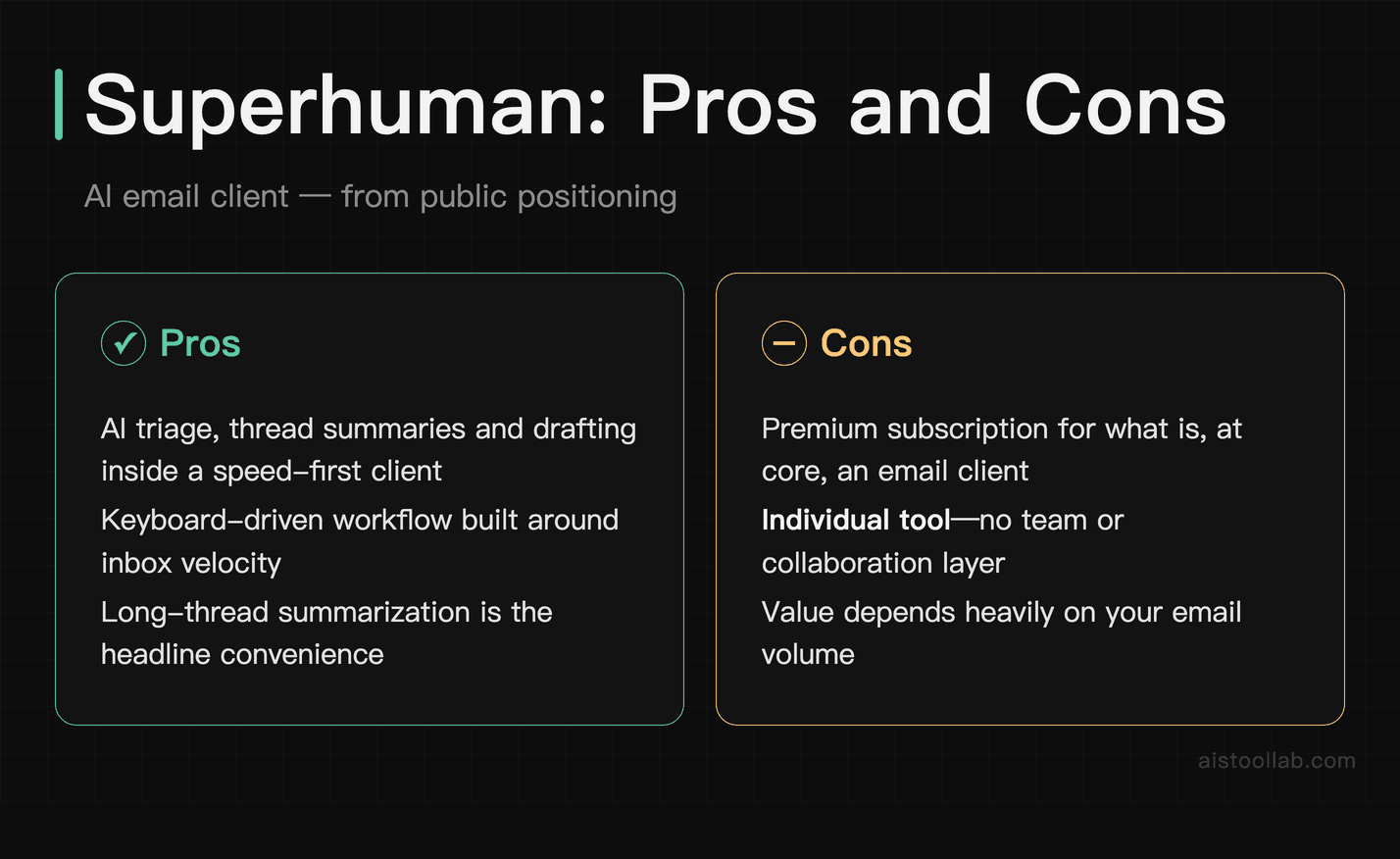
Superhuman is the oldest and most expensive tool in this comparison, and it’s the one with the most complicated value proposition to defend in 2026. When it launched, the core pitch was speed — the keyboard-first interface, the “Inbox Zero” methodology baked into the product, the 100ms load times. That was genuinely differentiated when Gmail was sluggish and AI wasn’t doing much with email.
The AI features that Superhuman has layered in over the past two years are legitimately good. Thread summarization is fast and accurate, producing clean, factual summaries that surface the current sticking points in a long thread. The AI draft feature generates replies that are actually in the right tone and length for business email, which is more than you can say for Gmail’s smart compose. The priority triage — which learns what you consider important based on your behavior — has gotten to a place where it rarely lets important messages slip through.
But $30/month is $30/month. That’s roughly the same as a Netflix Standard plan. And the honest question is: with Google building AI features directly into Gmail and Microsoft doing the same in Outlook, what’s Superhuman’s moat? The interface and keyboard workflow is still genuinely superior for power users. The AI quality is still a notch ahead of what the native clients offer. But the gap is narrowing, and for someone who’s not a power user of email — who sends and receives a moderate volume and doesn’t live in their inbox — it’s getting harder to justify.
Where Superhuman wins cleanly is in the team context. The shared snippets, the team-level analytics on response time and read rates, the consistent experience across macOS and mobile — for a small SaaS team or a founder with an EA who also uses Superhuman, the compounding value is real. The $30/user/month adds up fast for a team, though. It’s a real expense that needs to deliver real time savings to justify itself.
Use Cases: Who Should Actually Be Using What
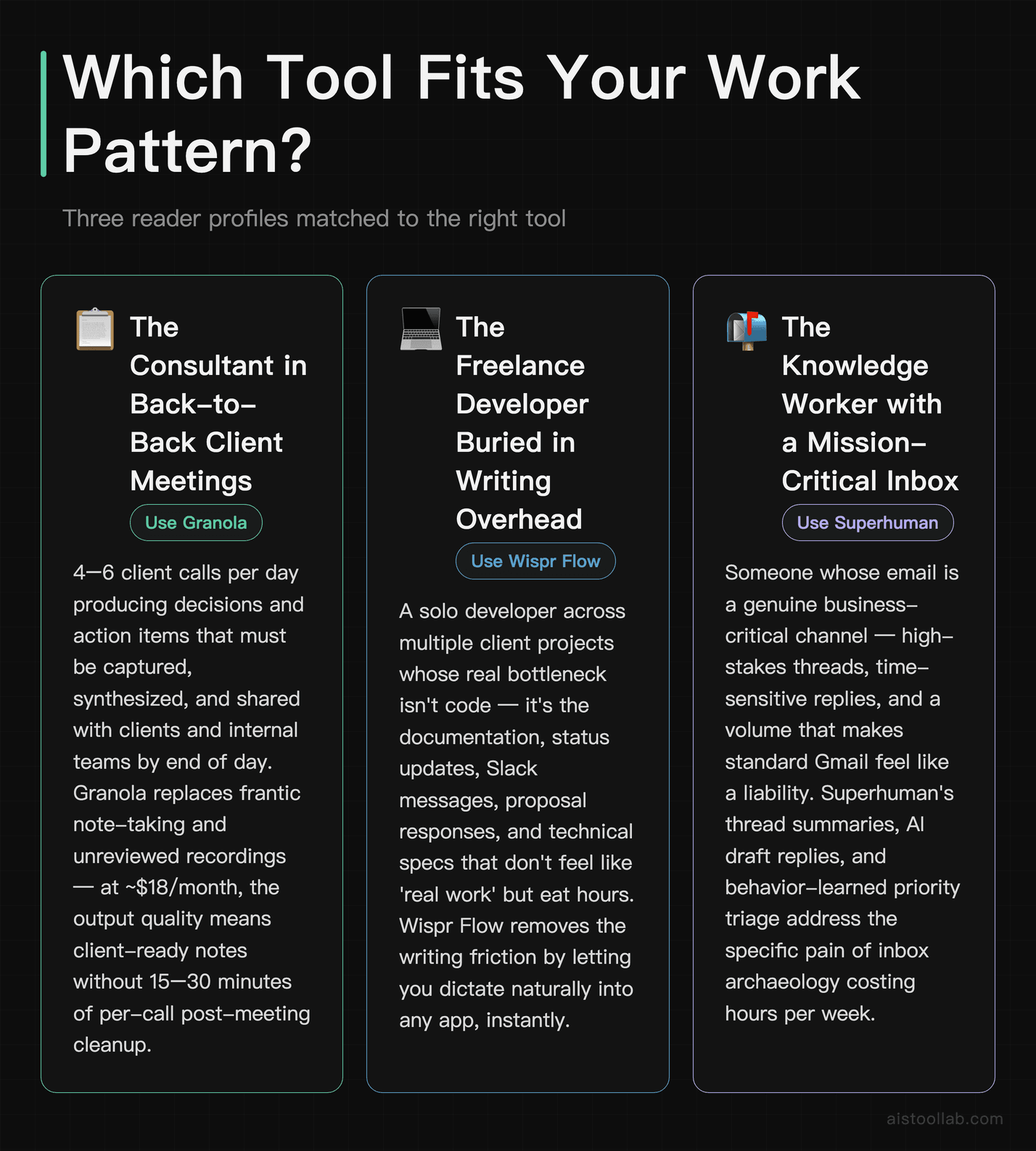
The Consultant Who Lives in Client Meetings
Think of someone doing strategy consulting or product management consulting — maybe 4 to 6 client calls per day, each producing decisions and action items that need to be captured, synthesized, and shared with clients and internal teams by end of day. This person is Granola’s sweet spot. The alternative is frantically typing notes, recording calls and never rewatching them, or hiring someone to do meeting admin. Granola replaces all of that for $18/month. The output quality — particularly the blending of your own context with the transcript — means the notes you send to clients are actually useful documents, not just auto-generated summaries that miss the nuance. The Google Calendar integration means it shows up at the right moment without you having to remember to open it.
The Freelance Developer Who Writes More Than They’d Like to Admit
A solo developer working across three client projects faces a specific productivity bottleneck: writing. Not code — documentation, status updates, Slack messages, proposal responses, technical specs. All the writing overhead that doesn’t feel like “real work” but takes up a surprising chunk of the day. Wispr Flow fits this workflow neatly. Instead of stopping to type a detailed Slack update, you dictate it in 45 seconds while your eyes stay on your code. Instead of agonizing over the phrasing of a project proposal email, you talk it out and let the AI clean it up. The system-wide nature of Wispr Flow means it plugs into whatever existing stack you’re using — VS Code, GitHub comments, Linear tickets, your email client — without changing your workflow.
The Early-Stage Startup Founder Running on Inbox Fumes
A founder at a Series A company who’s managing investor relations, hiring conversations, customer escalations, partnership inquiries, and internal communications — all simultaneously, all through email — is the target Superhuman user. The 30-minute onboarding call is worth doing. The keyboard shortcuts take two weeks to build into muscle memory. After that, the compounding effect is real: thread summaries mean you can context-switch into a conversation in 10 seconds, AI drafts mean you’re not spending 5 minutes composing a reply to a routine investor update request, and the priority triage means you genuinely don’t miss things. At this stage of a company, time is the constraint, and $30/month is rounding error if it saves an hour a week.
The Two-Person Marketing Team at a SaaS Startup
Here’s an interesting use case that spans all three tools: a small marketing team where both members are in a lot of calls, writing a lot of content, and managing a lot of external relationships. Granola handles the internal and customer call documentation. Wispr Flow handles the content creation and communication overhead for anyone on the team willing to build the dictation habit. Superhuman handles the external email volume with investors, press, and partners. Used together, these three tools are not redundant — they cover genuinely different slices of the working day. This kind of specialized, category-specific AI stack is exactly the trend that Underrated AI Tools That Actually Deliver in 2026: WorkBeaver, NotebookLM, Dusttt, and Raycast AI Reviewed explores from a different angle — the move away from one-size-fits-all AI toward purpose-built tools that do one thing exceptionally well.
The Pricing Reality Check
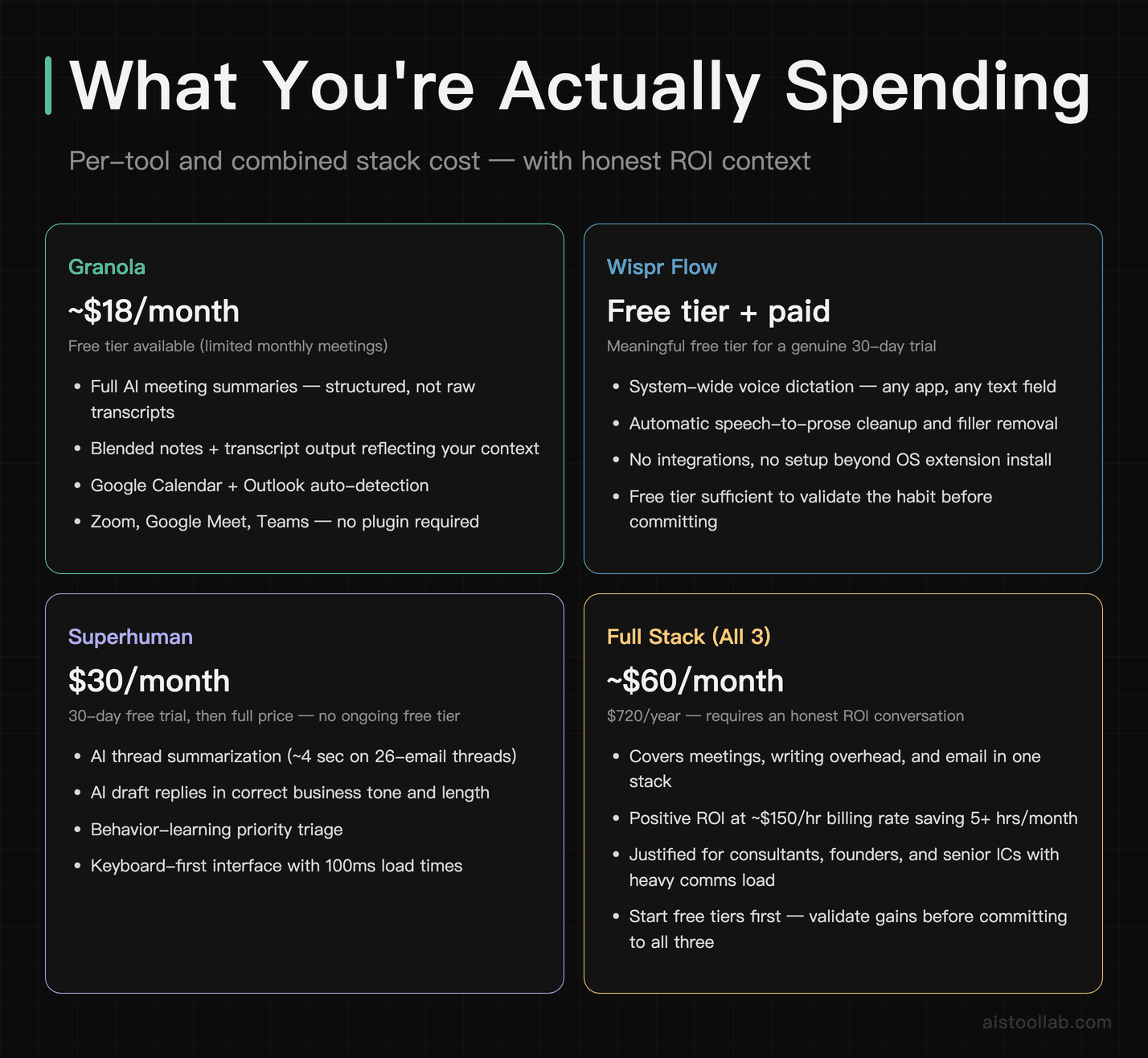
Let’s be direct about what you’re spending here, because the “it’s just $X/month” framing can obscure the cumulative picture. If you’re using all three tools — which I’d argue is a reasonable combination for a certain type of knowledge worker — you’re looking at approximately $60/month. That’s $720 per year in productivity tooling, on top of whatever you’re already paying for Notion, Slack, Zoom, and the rest of the stack.
That number is only defensible if you’re honest about time value. A consultant billing $150/hour who saves five hours a month through this stack is getting a positive ROI on the math. A freelancer billing $60/hour who saves two hours a month is breaking even at best. A salaried employee who can’t directly monetize time saved has a fuzzier calculation — though the “finishing work earlier and having a brain left for actual thinking” argument has real value that doesn’t show up in a spreadsheet.
The good news is that none of these tools require you to go all-in immediately. Granola and Wispr Flow both have meaningful free tiers. Superhuman has a 30-day trial. The right approach is to identify which slice of your work is actually the biggest drain — meetings, writing overhead, or email — and start with the tool that targets that specific problem. Don’t buy all three hoping the aggregate will justify itself.
Integration Capabilities: How Well Do They Play With the Rest of Your Stack?
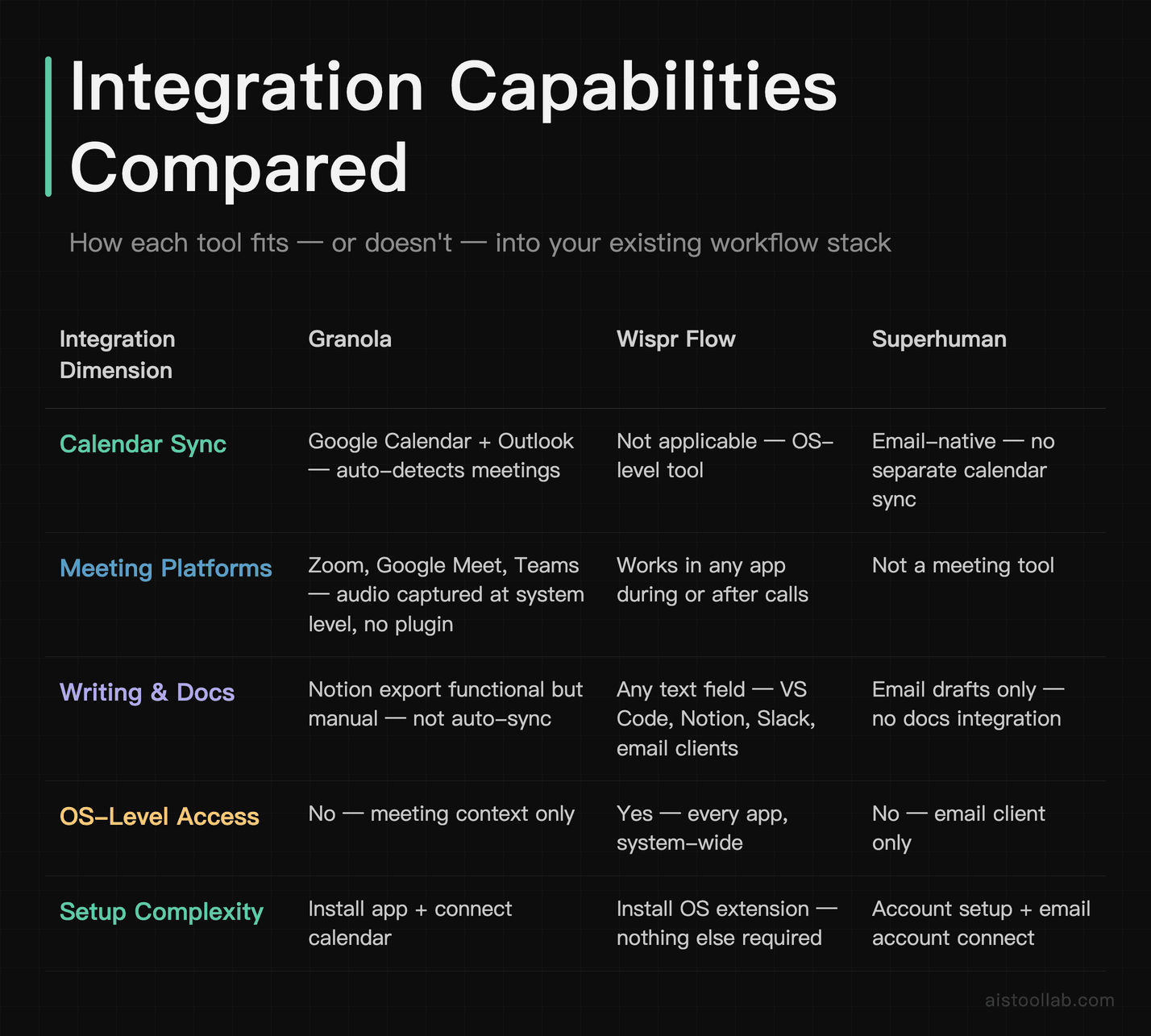
This is a dimension that matters a lot more in practice than in feature lists. A tool that solves a problem but requires you to leave your existing workflow to use it will eventually get abandoned — I’ve seen it happen with every productivity app that requires a “context switch to use.”
Granola’s integration story is solid for its category. It connects to Google Calendar and Outlook to auto-detect your meetings, which means you don’t have to remember to open it. It works with Zoom, Google Meet, and Teams without any plugin — it captures audio at the system level. Exporting notes to Notion or sharing via Slack is functional but not frictionless; it’s still a manual step rather than an automatic sync. For teams using Notion as a knowledge base, the export works but it’s not a native integration.
Wispr Flow wins the integration category essentially by default, because it operates at the OS level. There’s nothing to integrate — it works wherever you’re already working. The limitation is that it’s a purely additive tool; it doesn’t read anything from your existing tools or connect to your calendar or knowledge base. It just makes text input faster everywhere. That’s a feature, not a bug, but it does mean there’s no “smart context” from your existing work the way Granola has from your calendar and meeting history.
Superhuman’s integration story is constrained by its nature as an email client replacement. It works with Gmail and Outlook, which covers most of the Western market. The mobile apps are good and stay in sync. The challenge is that it replaces rather than augments — you’re not adding Superhuman to Gmail, you’re switching to Superhuman. That’s a higher commitment bar, and if you need features of Gmail that Superhuman doesn’t replicate (certain Google Workspace integrations, for instance), you may find yourself toggling between the two, which defeats the purpose.
A few free tools that complement a productivity-focused workflow: the Meeting Cost Calculator quantifies what each hour of meetings actually costs in salary terms — useful when deciding which meetings are worth keeping, and the Pomodoro Timer for structured focus sessions between meetings.
My Recommendation: Targeted and Direct
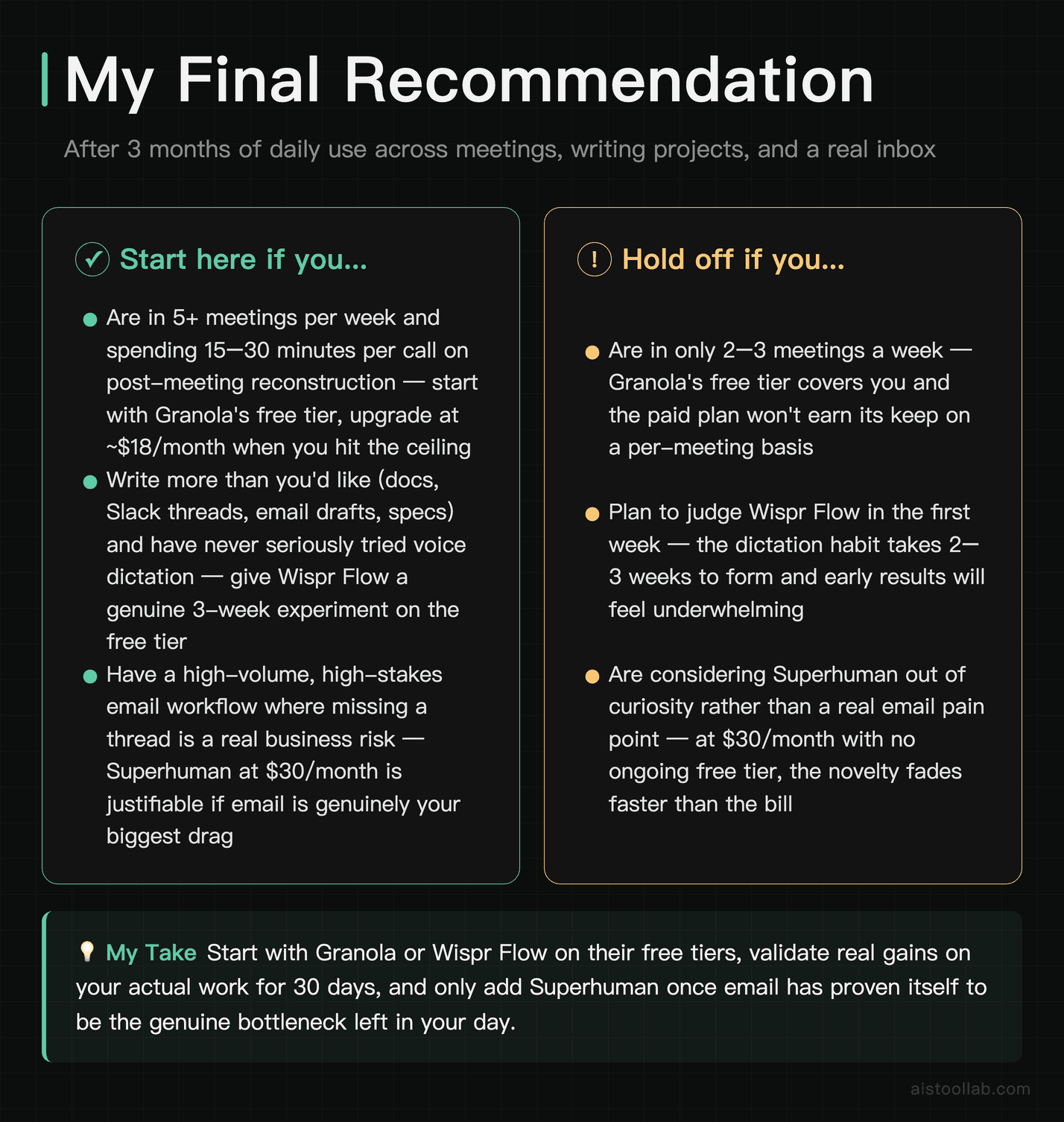
Pulling the research together, here’s how the decision breaks down for different kinds of work:
If your biggest productivity drain is meetings — the prep, the notes, the post-meeting reconstruction — start with Granola. The free tier is enough to test it on your actual meeting load for a month. If you’re in more than five meetings a week, you’ll hit the free tier ceiling quickly, and the paid plan at ~$18/month will feel immediately justified. Public reviews of Granola commonly single out its meeting-note quality, especially for users whose main pain is reconstructing what was actually decided after a call.
If you write more than you’d like to admit — documentation, long Slack threads, email drafts, content — and you’ve never seriously tried voice dictation, Wispr Flow is worth a genuine 30-day experiment. The free tier exists specifically so you can do this without committing. Give it three weeks before you judge it, because the habit of dictation doesn’t form in a day. If it clicks, it’s the highest-leverage $12/month in your stack.
If you’re a founder, executive, or anyone managing genuinely high email volume — more than 100 emails per day that require real attention, not just newsletters — Superhuman is the most defensible premium tool in its category. Yes, $30/month feels steep. Yes, Gmail’s AI features are improving. But the gap in speed and the quality of the AI features are still meaningful enough for heavy email users that the ROI is there. If you’re not a heavy email user, save the $30 — you’ll get 80% of the value from Gmail or Outlook with their native AI features for free.
What I’d push back on is the instinct to keep waiting for a single tool that does all of this. The one-size-fits-all AI assistant — the tool that handles your meetings, your writing, your email, your task management, and your code — exists in demo form but doesn’t yet exist in a form that does any of these things better than the category specialists. The specialized tool trend is real, and for the foreseeable future, a well-chosen stack of two or three focused tools will outperform any generalist. Build the stack around your actual bottlenecks, not around the feature list that sounds impressive in a comparison article.
Frequently Asked Questions
Is Granola worth it if I’m only in a few meetings per week?
Honestly, probably not — and I say that as someone who thinks Granola is a genuinely good product. The value of Granola scales directly with your meeting frequency. If you’re in two or three meetings a week, the free tier (which limits monthly meetings) will likely cover your needs, and the paid plan at around $18/month is harder to justify on a cost-per-meeting basis. Where Granola earns its keep is when you’re in six or more calls a week, and especially when those calls are high-stakes — client meetings, strategy sessions, hiring interviews — where the quality of the notes matters and you’d otherwise spend 15-30 minutes per meeting on post-call cleanup. If that’s your situation, the $18/month pays for itself within the first week of serious use. If you’re a more casual meeting participant who mostly attends internal standups, save your money and use the free tier or just take notes manually.
How accurate is Wispr Flow really? Is it good enough for technical content?
This is the question I get asked most about Wispr Flow, and the answer has gotten meaningfully better in the past year. For general business prose — emails, Slack messages, documentation, blog drafts — the accuracy is high enough that I’d estimate I spend less time correcting Wispr Flow output than I would have spent typing the same content. For technical content with specific terminology, domain vocabulary, or code variable names, it’s more hit-or-miss. Wispr Flow does adapt to your vocabulary over time, which helps with recurring technical terms. But if you’re trying to dictate something with a lot of proper nouns, product names, or technical acronyms, expect to do some cleanup. The practical workflow many developers use is to dictate the narrative explanation — “this function takes a user ID and returns their subscription tier” — and type the actual code and variable names. That hybrid approach plays to the tool’s strengths and works well in practice. The reformatting feature, which cleans up spoken language into written prose, is consistently impressive regardless of content type.
Can Superhuman actually replace Gmail for a power user?
For most power users, yes — with a handful of caveats. Superhuman handles the core Gmail workflows (labels, filters, multiple accounts) well, and the keyboard-first interface genuinely becomes faster than mouse-driven Gmail after you’ve built the muscle memory. The AI features — thread summarization, AI drafts, priority triage — work reliably and save real time. The caveats: some advanced Gmail features don’t translate, including certain Google Workspace integrations and some Labs features that power users have come to depend on. Also, if you use Gmail as a kind of task management system with elaborate label hierarchies and Stars as priority flags, the Superhuman paradigm is different enough that you’ll need to rethink your system rather than just importing it. The 30-day trial is long enough to actually test whether your specific workflow maps onto Superhuman’s model — I’d recommend using it seriously for at least two weeks before deciding, because the first few days are slower as you learn the shortcuts.
Are there privacy concerns with tools that listen to your meetings or emails?
Yes, and they’re legitimate concerns worth thinking through rather than dismissing. Granola processes meeting audio through cloud servers — this means audio from your calls is leaving your device. Wispr Flow similarly processes your dictation in the cloud. Superhuman accesses and stores your email data. All three companies publish privacy policies and data handling documentation, and Superhuman specifically holds SOC 2 Type II certification, which is a meaningful security compliance standard. That said, if you work in a regulated industry — healthcare, legal, financial services — you need to read the compliance documentation carefully and possibly run these past your legal or compliance team before deploying them on client-facing work. For calls that include confidential client information or NDAs, check whether your agreements permit the use of AI transcription tools. Many organizations are developing explicit policies around this as AI meeting tools become ubiquitous, so it’s worth having the conversation proactively rather than discovering a problem after the fact.
How does Granola compare to Otter.ai or Fireflies?
This is a fair question because Otter.ai and Fireflies are the better-known names in AI meeting transcription. The core difference is in the output format and the note-blending feature. Otter.ai and Fireflies are fundamentally transcript tools — they give you a cleaned-up version of what was said, with some summary features layered on top. The output is comprehensive but often unwieldy; a 45-minute meeting produces a lot of text to wade through. Granola’s output is more opinionated and more concise — it synthesizes rather than transcribes, produces a structured document with clear sections for decisions and action items, and uniquely, it blends your own in-meeting notes into the final artifact. The result feels like notes a thoughtful colleague took, rather than a court reporter transcript. Fireflies has stronger team and CRM integration features if you’re in a sales workflow. Otter.ai has a longer track record and wider platform support. But for pure note quality and post-meeting utility, Granola is ahead for most knowledge worker use cases. You can check out the 9 AI Tools Launched in 2026 Worth Your Time: Deep Dives Into Claude Code, Perplexity Comet, and More article for additional context on how newer AI tools are differentiating from their predecessors.
Is Wispr Flow just for Mac users, or is Windows support real?
Wispr Flow does have a Windows version, and it’s real — not a half-baked port. That said, the Mac version has been around longer and some users report it feeling slightly more polished and better integrated with macOS conventions. The Windows version has caught up substantially over the past year. The system-level audio access that Wispr Flow needs works differently on Windows than on macOS, so if you’re running Windows in a corporate environment with strict IT policies, there’s a possibility that the required permissions aren’t available to you. For individual users on personal Windows machines or startup environments where you have admin access, the Windows version works as advertised. The dictation accuracy appears comparable across both platforms. The keyboard shortcut activation works on both. If you’re choosing between platforms purely for Wispr Flow quality, Mac has a slight edge, but it’s not the reason to switch operating systems.
What’s the realistic learning curve for Superhuman?
The onboarding for Superhuman is actually structured — they do a 30-minute video call with a real human (or interactive tutorial, depending on your plan) that walks you through the keyboard shortcuts and workflow. This is an unusual investment in onboarding for a software tool, and it matters because the learning curve is front-loaded and steep. The first three days with Superhuman are actively slower than Gmail — you’re relearning muscle memory that took years to develop. Days four through fourteen are a wash or slight improvement. After two to three weeks of consistent use, the keyboard-first workflow clicks and the speed advantage becomes noticeable. The AI features (summarization, drafts) require less adjustment — they work more like additive features you can use immediately. The longer-term investment is in the Inbox Zero workflow philosophy that Superhuman bakes in, which requires you to actually process and archive emails rather than leaving them indefinitely. Some people find this transformative; others find it doesn’t fit how they naturally work and abandon the tool before realizing the speed benefits.
Can I use all three tools together, or do they overlap too much?
They don’t overlap at all — which is actually the interesting thing about this stack. Granola handles the meeting layer of your working day. Wispr Flow handles the writing and text input layer. Superhuman handles the email layer. A knowledge worker’s day typically involves all three of these activities, and there’s no meaningful redundancy between the tools. The question isn’t whether they overlap — it’s whether the combined cost of approximately $60/month is justified by the time savings across all three categories. That math looks different for a founder who’s billing at a high hourly rate or whose time has clear leverage value, versus a salaried employee whose “saved time” translates to working on different tasks rather than working fewer hours. For someone who’s serious about optimizing their working day and is genuinely bottlenecked on meetings, writing output, and email volume simultaneously, using all three is a coherent and complementary stack. Most people will find that one or two of the three address their actual bottleneck, and that’s where to start.
Last updated: 2026
Explore more AI tools
👉 Browse the AI Tools Library to find the right tools for your workflow.
Related reading: AI Emoji Recommendation Tools Compared: How Different Algorithms Analyze Sentiment and Context in 2026
Related reading: Typeform AI vs JotForm AI: Which No-Code Form Builder Actually Saves Time in 2026?
All prices in this article were verified against official pricing pages in July 2026; plans and fees may change, so please refer to the official page for current details.