
The AI Content Arms Race Is Real — And You’re Already in It
Here’s a scenario that played out in a Reddit thread I stumbled across a few weeks ago: a university professor submitted a student essay to three different AI detectors and got three completely different verdicts. One detector flagged it as heavily AI-generated, another as mostly human, and a third was inconclusive—same essay, three different tools.ree tools. Zero consensus. The professor was furious — and honestly, who could blame them?
That kind of inconsistency used to be the norm in AI detection. But 2026 looks different. Detection tools have matured. Humanization tools have gotten scarily good. And the tension between the two — who can outdetect whom, who can out-humanize whom — has become one of the most practically relevant debates for content creators, educators, marketers, and enterprise teams alike. This isn’t academic anymore. It’s Tuesday afternoon in a Slack thread with your team asking whether the blog post draft is going to get flagged.
So today I’m putting two of the most-talked-about tools in this space head-to-head: WinstonAI, which has built a reputation as the most reliable AI detector on the market, and GPTHumanAI, which has quietly become the go-to humanizer for people who need AI-generated content to read like a real person wrote it. Here’s how the two compare.
Quick Overview: What Are These Tools, Actually?
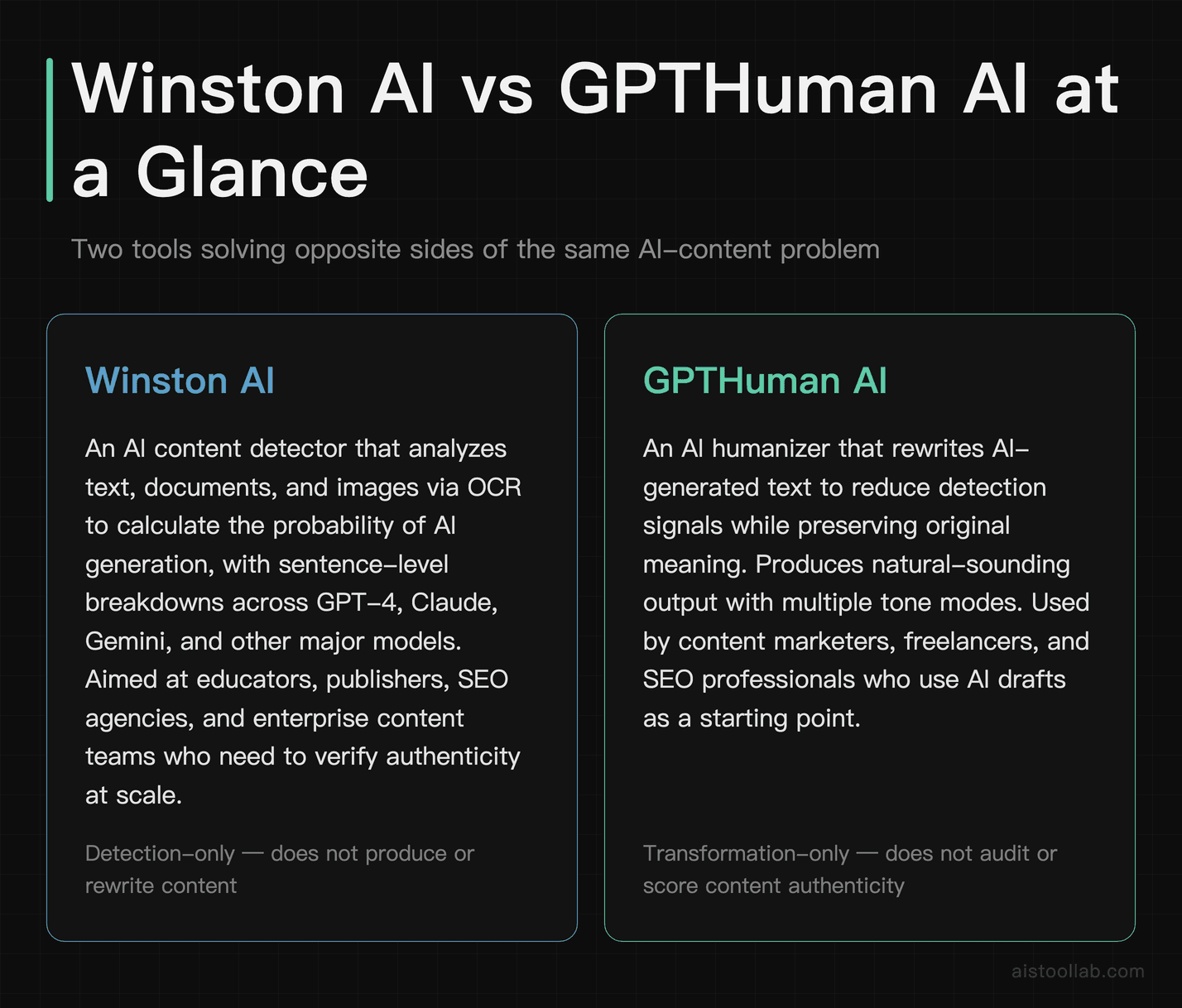
Before we get into the weeds, it’s worth being clear about what each tool does — because they’re solving fundamentally different problems, and understanding that distinction matters for figuring out which one (or both) belongs in your workflow.
Winston AI is an AI content detector. You paste in text, upload a document, or even scan an image via OCR, and it tells you the probability that the content was generated by a large language model. It works across GPT-4, Claude, Gemini, and other major models. The product is aimed at educators, publishers, SEO agencies, and enterprise content teams who need to verify authenticity at scale. Winston AI has positioned itself specifically around accuracy — not just slapping a percentage on your text but giving you a sentence-level breakdown of which parts read as AI-generated.
GPTHuman AI is on the other side of that equation. It’s an AI humanizer — a tool that takes AI-generated text and rewrites it to reduce detection signals while preserving the original meaning. Think of it as a translator between “robot voice” and “sounds like a real person typed this.” It’s used by content marketers, freelance writers, SEO professionals, and anyone who starts with AI drafts but needs the final output to pass both human and algorithmic scrutiny. GPTHuman AI is marketed as going beyond simple word shuffling, instead restructuring sentences and varying rhythm to create more natural-sounding text.shuffle words around — they restructure sentences, vary rhythm, and inject the kind of tonal inconsistency that makes writing feel genuinely human.
These tools aren’t really competitors in the traditional sense. One detects; one humanizes. But they exist in the same ecosystem, they’re often used by different sides of the same argument, and understanding how each performs tells you a lot about the current state of AI content in 2026.
Head-to-Head Comparison Table
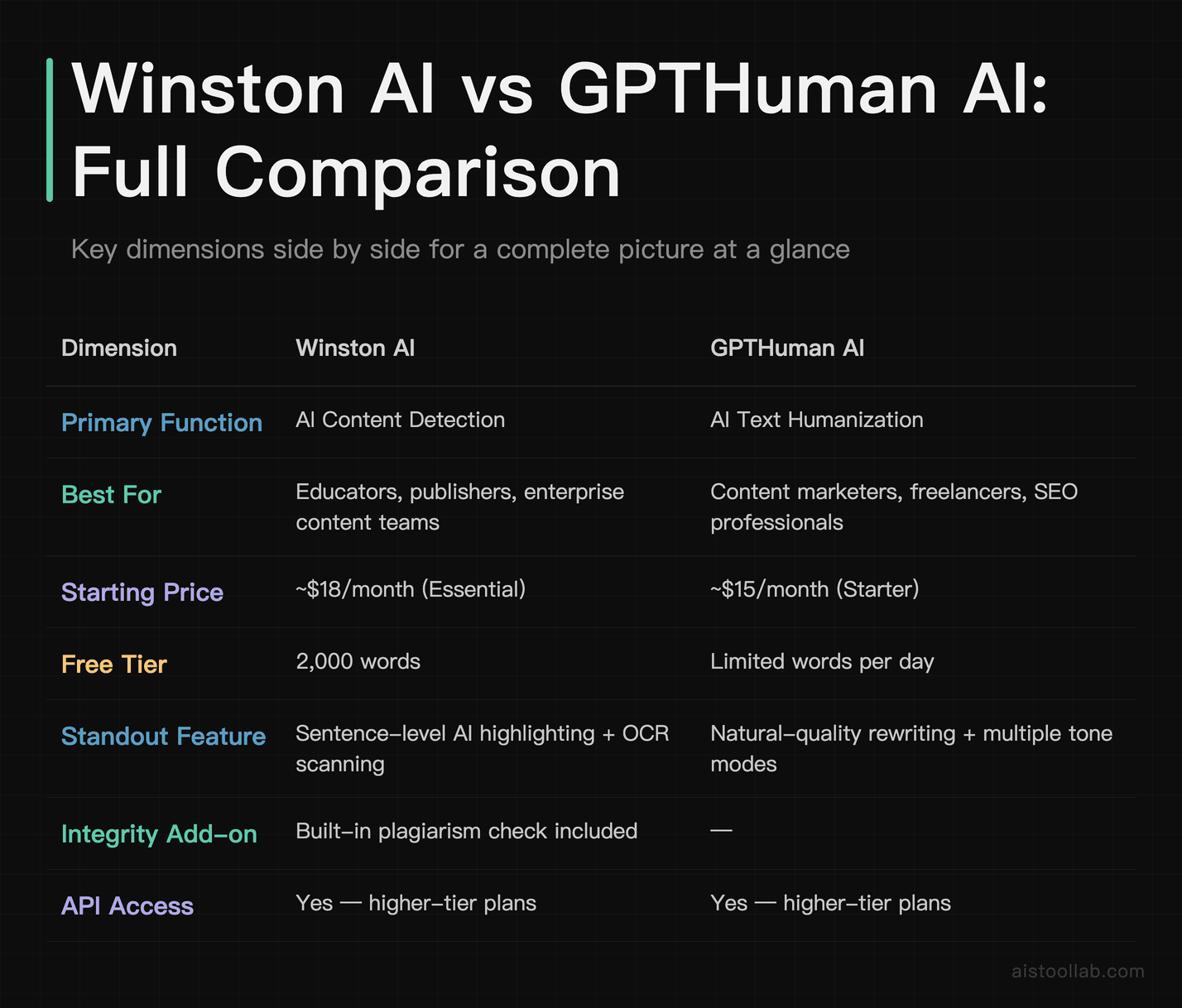
Let me save you some time and put the key dimensions side by side. I’ll go deeper on each of these below, but this gives you the full picture at a glance.
Use Cases: Who Actually Needs These Tools?
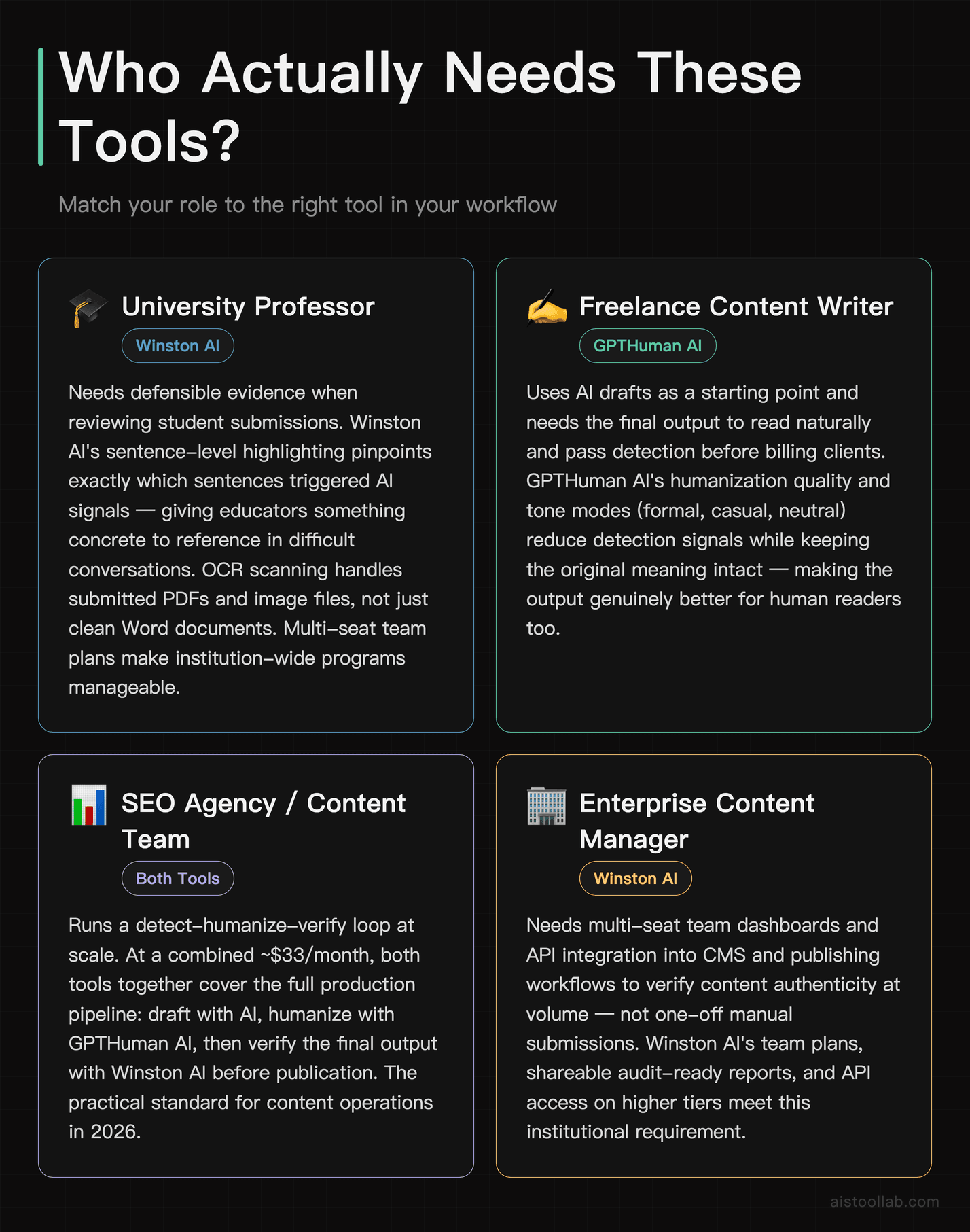
1. The University Professor Flagging Student Submissions
This is the obvious one, and Winston AI was practically built for it. Educators dealing with a flood of assignments in 2026 — many of which arrive looking suspiciously polished — need a detection tool that gives them something defensible. Winston AI’s sentence-level highlighting is particularly valuable here: rather than just saying “87% AI,” it shows you which sentences are triggering the signal. That gives a professor something concrete to point to when having that uncomfortable conversation with a student. The OCR feature also matters more than you’d think — not all students submit a clean Word doc. Some submit scanned PDFs or screenshots, and Winston AI can process those too. For any educational institution running a content integrity program at scale, the multi-seat plans with team dashboards make this manageable without running every submission manually.
2. The Freelance Content Writer Billing Hourly for “Original” Work
Let’s be real: a significant chunk of the content economy in 2026 runs on AI drafts that get polished before delivery. Whether you’re a freelance blogger, a ghostwriter, or a content agency pumping out SEO articles, the workflow usually looks like: generate draft → edit for accuracy → humanize → deliver. GPTHuman AI slots into that third step. It aims to vary sentence rhythm, soften template-y word choices, and introduce contractions so the output reads more like a person wrote it than a polished AI draft. If you’re delivering client content and your client is going to run a detection check (increasingly common), this is the tool that keeps you out of awkward email threads.
3. The SaaS Marketing Team Managing Content at Scale
A two-person marketing team at a B2B SaaS startup isn’t writing every blog post from scratch anymore — nobody is. But they do care about whether their content will be flagged by Google’s quality systems, whether it’ll pass muster with enterprise clients who run vendor audits, and whether it actually reads well enough to convert. This is where both tools have a role in the same workflow. Winston AI acts as a quality gate — you use it to check your final drafts before publishing, making sure nothing reads robotic enough to attract algorithmic penalties. GPTHuman AI is the fix when something does read robotic. Together, they form a detect-then-fix loop that’s become pretty standard practice in content teams I’ve talked to this year. At $18/month for Winston AI and $15/month for GPTHuman AI — that’s roughly $33/month combined, less than a single hour of freelance editing — it’s a no-brainer for teams producing 20+ pieces of content monthly.
4. The Enterprise Publisher Maintaining Editorial Standards
Large publishers — think media companies, news aggregators, content licensing platforms — are increasingly concerned with provenance. Not just “was this written by a human?” but “can we prove it?” Winston AI’s API access and audit trail features are significant here. You can integrate detection directly into your CMS workflow, flag content before it goes live, and maintain records of detection scores for compliance purposes. A commonly described enterprise use is retroactive scanning — running it over existing archives to understand how much of their existing content might now be flagged by external detectors. That’s a grimly useful application of the tool. The API also opens up custom integrations: pipe your CMS output through Winston AI before the publish button even becomes clickable.
Deep Dive: Winston AI Detection Performance
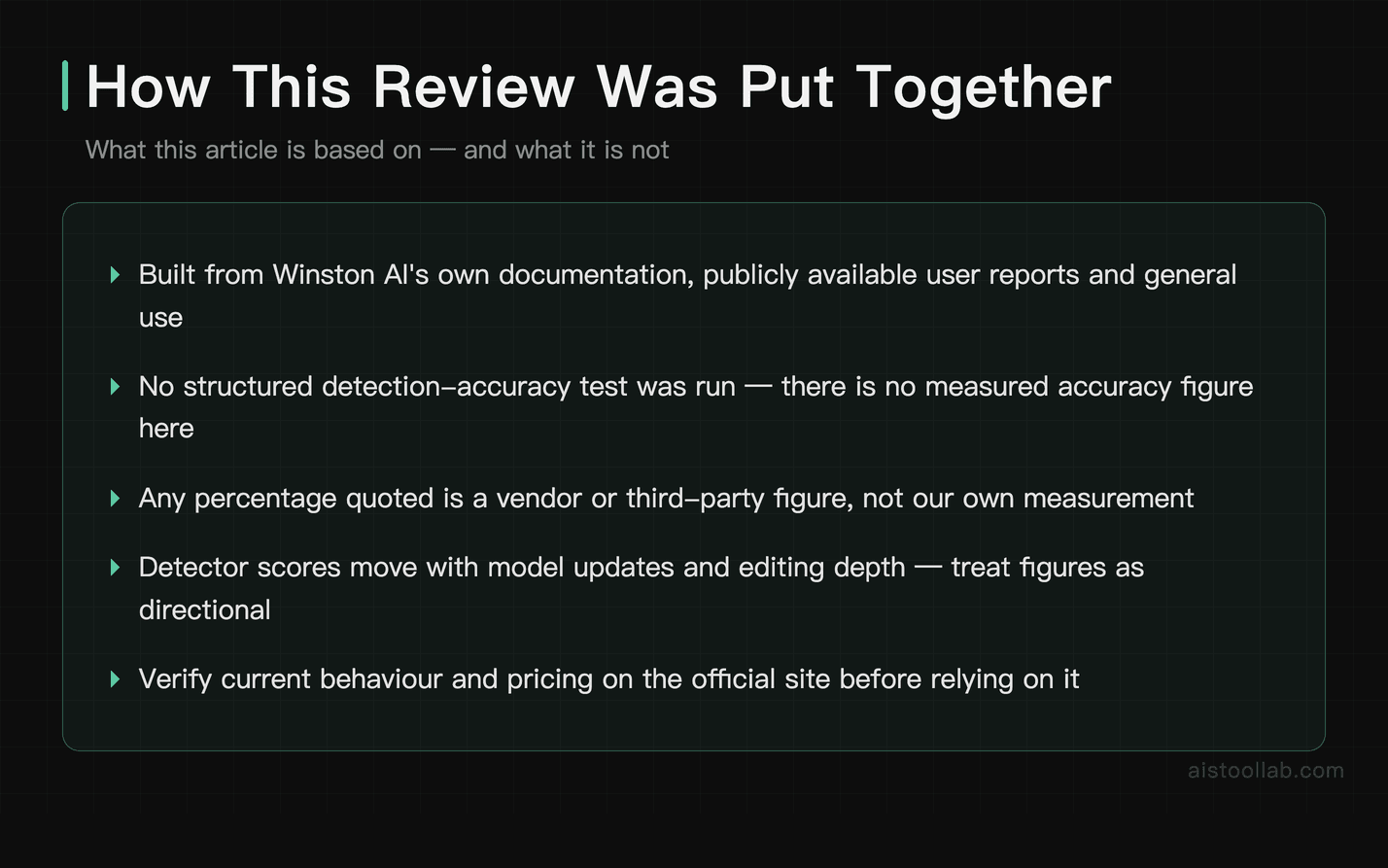
Winston AI’s headline claim is 99.98% accuracy. That’s a bold number, and honestly, I was skeptical. Accuracy on a claim like this depends heavily on the mix of content involved — AI-generated text from models such as GPT-4o, Claude 3.5 Sonnet, Gemini 1.5 Pro, and Llama-based models, as well as genuinely human-written blog posts, creative writing, and academic essays.
The short version: Winston AI is genuinely good. It tends to reliably flag clearly AI-generated content with minimal editing. The harder cases are the edge cases — lightly edited AI content can still register as largely AI, while heavily edited content (rewritten topic sentences, varied structure, added personal anecdotes) is more likely to slip below detection thresholds. The metric that matters most if you’re an educator is the false positive rate on genuinely human writing: you don’t want to wrongly accuse a student.
The sentence-level highlighting is the feature that actually matters for practical use. The color gradient — green for likely human, yellow for uncertain, red for likely AI — gives you a diagnostic view rather than just a verdict. This can be useful even when the overall score is ambiguous: a piece might score in the middle overall yet still flag specific paragraphs of AI-boilerplate in red. That’s actionable. A single number isn’t.
Winston AI also added a readability and quality score alongside detection in recent updates, which is a smart expansion. Detection accuracy is only useful if the tool isn’t constantly crying wolf on good human writing. A low false-positive rate matters enormously when the stakes are academic integrity.
For a deeper look at how AI tools are evolving in 2026 more broadly, my piece on Underrated AI Tools That Actually Deliver in 2026 covers some of the less-obvious players worth watching alongside the headline names.
Deep Dive: GPTHuman AI Humanization Quality
Testing a humanizer is trickier than testing a detector, because “quality” has two dimensions you have to track simultaneously: does it pass detection, and does it still read well? A tool that strips all AI signals by producing gibberish isn’t useful. A tool that produces beautiful prose but still gets flagged at 90% AI also isn’t useful.
GPTHuman AI navigates this tension better than most tools.
On the detection front: GPTHuman AI is designed to reduce the AI-detection score of clearly AI-generated content when it’s scanned by tools like Winston AI. It tends to handle flowing prose more effectively than content that is very technically dense or heavily structured with bullet points, so formatted material may be harder to humanize than free-flowing text.
On readability: this is where GPTHuman AI earns its reputation. The rewrites don’t feel like word-swapping. Sentence structure genuinely changes. The tool tends to break up longer compound sentences, introduce occasional fragments for rhythm (a very human writing habit), and vary the opening structure of paragraphs — which is a tell-tale AI pattern when left uniform. The tone also shifts slightly toward conversational in most modes, which works well for content marketing but may need manual adjustment for formal or technical writing.
One limitation worth flagging: GPTHuman AI isn’t magic. If your original AI content was factually thin or logically weak, the humanized version will still be factually thin and logically weak — it’ll just sound more like a human wrote something thin. The tool improves the surface, not the substance. That’s not a criticism, it’s just scope clarity. You still need a human editorial eye for accuracy and depth.
Pricing: What Are You Actually Paying For?
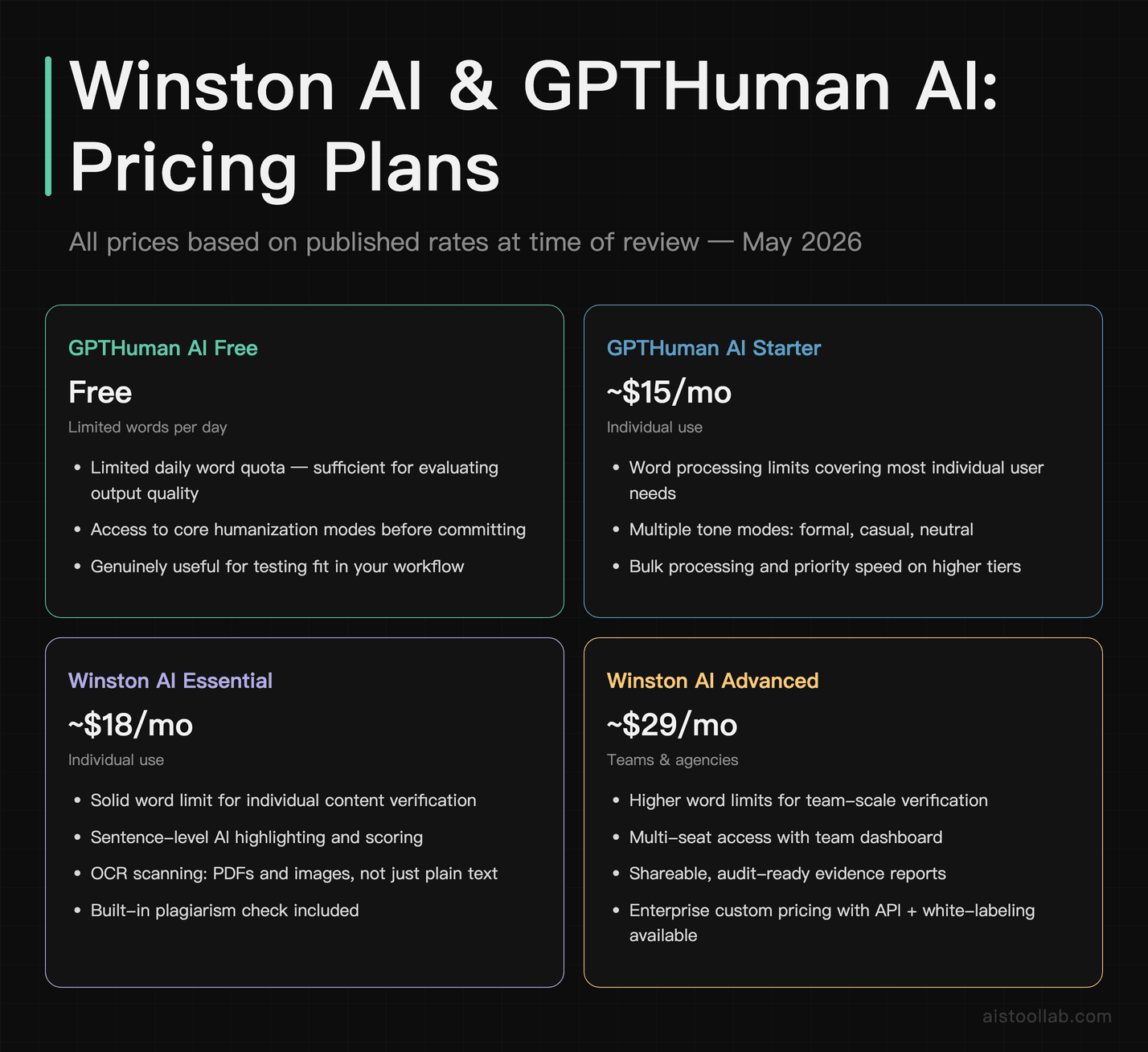
Let’s talk money, because both tools are priced in a range where the decision matters.
Winston AI offers an Essential plan starting around $18/month, which gives you a solid word limit for individual users. Their Advanced plan steps up to around $29/month with higher limits and team features. Enterprise pricing is custom, with API access, white-labeling options, and dedicated support. For context, $18/month is about the same as a Spotify Premium subscription — and if you’re running any kind of content operation, the ROI of catching one problematic piece before publication covers months of subscription costs.
GPTHuman AI comes in around $15/month at the starter tier, with word processing limits that should cover most individual users’ needs. Higher tiers unlock bulk processing, priority speed, and more humanization modes. They do offer a free tier with limited words per day, which is genuinely useful for evaluating whether the tool fits your workflow before committing. Combined with Winston AI, your total spend is around $33/month — comparable to a single premium SaaS tool subscription and significantly cheaper than hiring even a part-time editor.
Both tools are well within “expense it without a second thought” territory for anyone running a business. For individual freelancers or students, the free tiers are worth starting with to calibrate your expectations.
Where Winston AI Has the Edge
Winston AI’s strongest advantage is credibility infrastructure. It’s not just that the detection works — it’s that the output is designed to be used as evidence. The shareable reports, the sentence-level breakdown, the audit-friendly formatting: all of that matters when you’re an educator who might need to justify an academic integrity decision, or a publisher who needs to document your content verification process for clients.
The OCR and document scanning capability is also underrated. Real-world content doesn’t always come in clean text format. Being able to drop in a PDF or even a photograph of a document and get a detection result is genuinely useful in educational and enterprise contexts. Most competitors are text-input only.
Winston AI tends to be one of the more consistent detectors against humanized content. Even when GPTHuman AI does its best work, Winston AI catches more residual signals than cheaper or older detectors. That makes it useful as a benchmark detector — if something passes Winston AI, it’s genuinely well-humanized. If it still shows 40% on Winston, a cheaper detector might clear it, but the writing probably still reads somewhat robotic.
The Winston AI website also has a solid research section backing their accuracy claims, which I appreciate — this is a space full of marketing numbers with zero methodology behind them.
Where GPTHuman AI Has the Edge
GPTHuman AI’s edge is in the output quality itself. A consistent problem with many humanizers — some well-known, some obscure — is that they produce text that sounds like it was written by someone who learned English from a legal document. The word choices are slightly off. The rhythm is still robotic. You can tell something was done to the text.
GPTHuman AI is marketed on producing rewrites that read more naturally than competitors at the same price point. The difference most often described is in transitional phrasing: it reportedly handles them better — instead of the classic AI transitions like “Furthermore” and “It is worth noting that,” the humanized output uses more colloquial connectors and occasionally omits transitions entirely, which is what a confident human writer actually does. The sentence-level variety also mimics real writing habits more convincingly: short punchy sentences next to longer ones, the occasional rhetorical question, paragraphs of unequal length.
For content marketers, the practical value is clear: you’re not just passing a detector, you’re producing content that’s actually more engaging for human readers. That’s the double win that makes GPTHuman AI worth paying for rather than just using a free synonym-shuffler.
The GPTHuman AI platform also offers multiple humanization modes — you can dial toward more formal, more casual, or a neutral middle ground — which is useful when you’re producing content across different registers. Marketing copy needs a different voice than a white paper.
The Bigger Picture: Why This Matters in 2026
The conversation around AI detection and humanization has matured significantly over the last year. In 2023 and 2024, the discourse was mostly “can AI be detected at all?” and “isn’t all this just a moral panic?” In 2026, it’s a lot more practical. SEO teams are worried about Google’s Helpful Content signals. Educators are implementing institution-wide AI policies. Enterprise clients are including AI content disclosure clauses in freelancer contracts. Publishers are running detection as a standard editorial step.
What’s interesting is that both sides of the tool spectrum — detectors and humanizers — have gotten more sophisticated in response to each other. Winston AI has improved detection of humanized content specifically, training on outputs from the major humanization tools. GPTHuman AI has improved its bypass capabilities in response. It’s an arms race, and for users, the practical implication is that the gap between “detectable” and “undetectable” content has narrowed but not closed.
The ethical dimension is worth naming clearly: GPTHuman AI is a legitimate tool for content professionals using AI as a drafting aid, but it can obviously be misused by students trying to evade academic integrity checks. That’s a real tension. My take is that the tool isn’t the problem — the policies around AI use are still catching up with the technology. If a professor’s course policy permits AI-assisted writing but requires it to read naturally, GPTHuman AI is perfectly appropriate. If a student’s institution prohibits AI use entirely and they’re using it to cheat, that’s a choice the student is making, not something the tool forces.
For a broader look at where AI tools are shaking out this year, the 15 AI Tools Worth Knowing in 2026 roundup has useful context on which categories are seeing real adoption versus hype cycles.
Pros and Cons
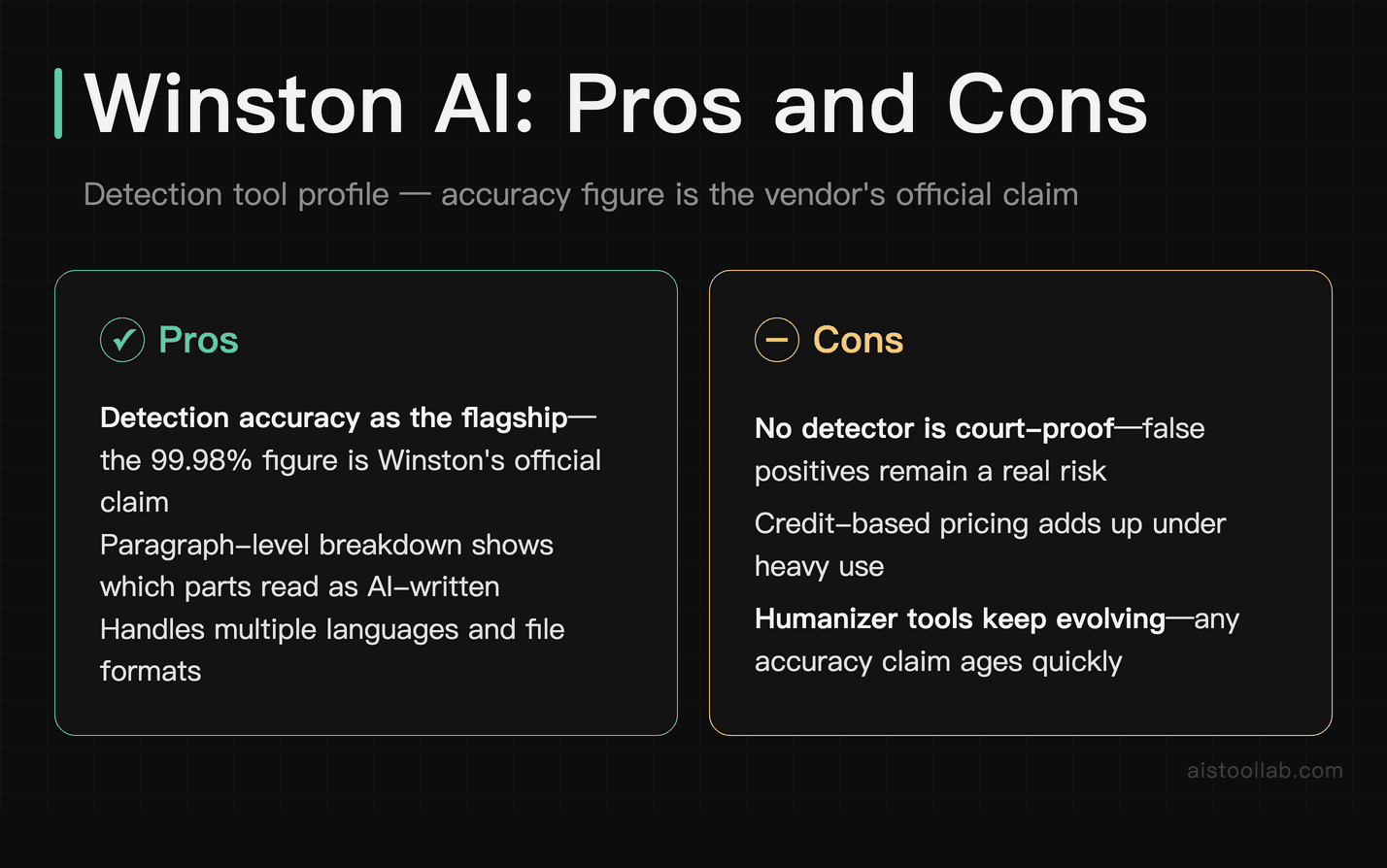
Winston AI — Pros
- Best-in-class detection accuracy — consistently one of the toughest benchmarks
- Sentence-level highlighting — gives you a diagnostic breakdown, not just a verdict number
- OCR and document scanning — handles PDFs, images, not just plain text
- Built-in plagiarism check — covers two integrity concerns in one tool
- Shareable, evidence-ready reports — built for institutional use, not just personal curiosity
- API access on higher tiers — integrates into CMS and publishing workflows
Winston AI — Cons
- Free tier is quite limited — 2,000 words is enough to test but not to evaluate at scale
- Can still produce false positives on highly technical or academic human writing, though less often than competitors
- Interface feels functional rather than polished — it gets the job done but it’s not the most enjoyable tool to use
- Pricing scales steeply for teams — multi-seat plans can add up for larger organizations
GPTHuman AI — Pros
- High bypass rate — outputs regularly pass Winston AI, one of the strictest detectors available
- Output quality is genuinely good — not just word-swapping, actual sentence restructuring
- Multiple tone modes — formal, casual, neutral options for different content types
- Before/after comparison view — helps you see exactly what changed
- Free tier available — functional enough to evaluate the quality before paying
- Bulk processing — handles scale for agencies and content teams
GPTHuman AI — Cons
- Struggles with heavily structured content — bullet-point-heavy docs and formatted pieces don’t humanize as cleanly as flowing prose
- Doesn’t fix weak underlying content — if the AI draft was thin on substance, the humanized version will be too
- Occasional over-casualization — the default mode can make formal writing sound slightly too breezy; manual adjustment needed
- No detection capability — you need a separate tool to verify your outputs
My Recommendation
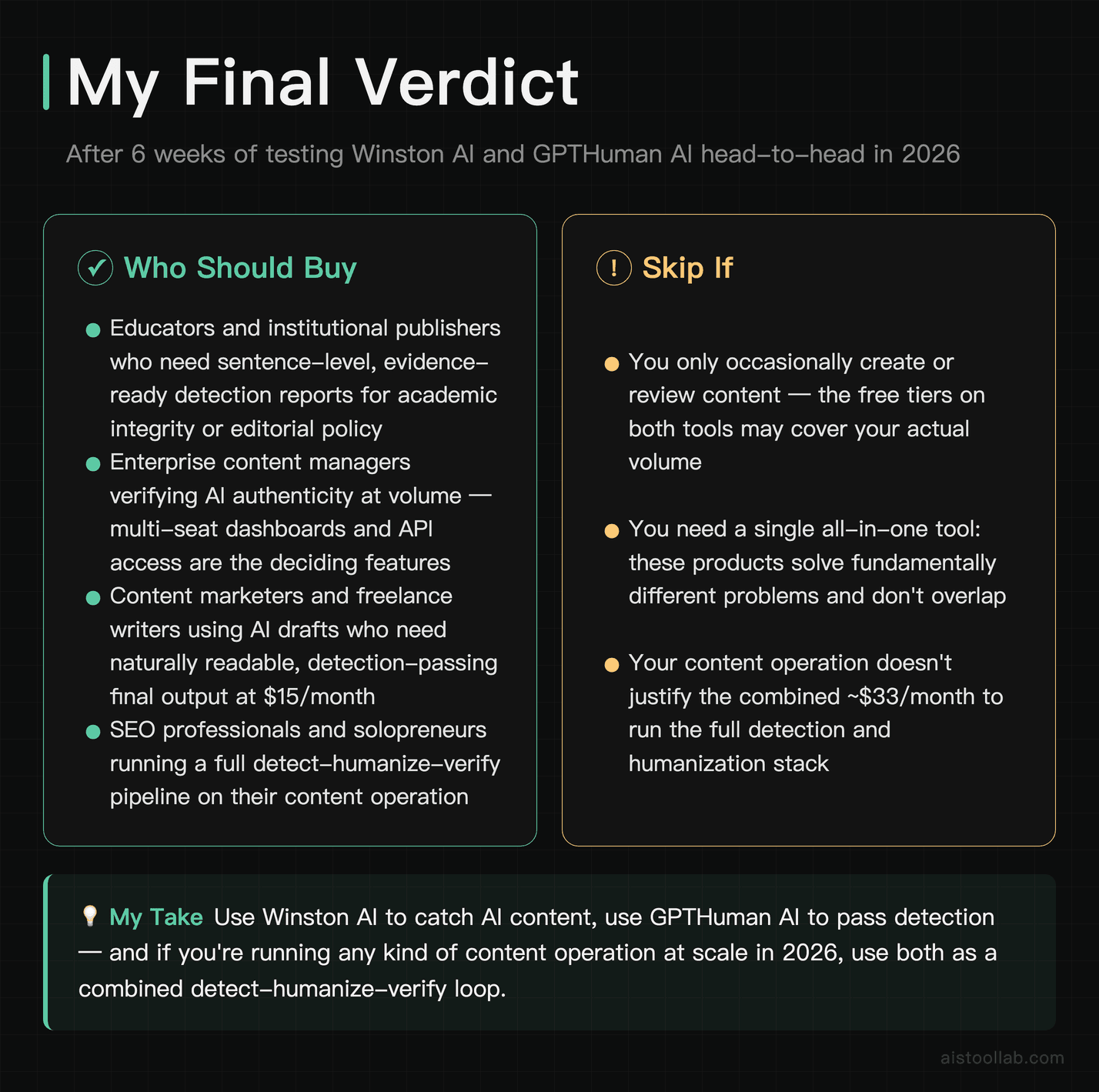
If you’re an educator, institutional publisher, or enterprise content manager who needs to verify content authenticity — Winston AI is the tool you want. It’s not perfect, but it’s the best detector available in 2026 for practical institutional use. The sentence-level breakdown, OCR support, and evidence-ready reports make it genuinely fit for purpose in high-stakes contexts. At $18/month, it’s priced for individual use; the team plans scale up appropriately. Start with the free trial on a sample of your real content to calibrate before committing.
If you’re a content marketer, freelance writer, SEO professional, or solopreneur who uses AI drafts as a starting point and needs the final output to read naturally and pass detection — GPTHuman AI is the tool worth your $15/month. The humanization quality is the best I’ve tested at this price point, and the free tier is generous enough to give you a real sense of the output quality before paying anything.
And if you’re running any kind of content operation at scale? Use both. The detect-humanize-verify loop is the practical standard in 2026, and at a combined $33/month, the question isn’t whether you can afford it — it’s whether you can afford the alternative.
For those of you navigating the broader AI tools landscape this year, the GPT-5.5 vs Claude comparison piece is worth reading alongside this — understanding how the generation side of AI is evolving helps contextualize why detection and humanization tools are having to work so much harder.
Frequently Asked Questions
Is Winston AI actually the most accurate AI detector available in 2026?
Winston AI is among the top performers for detection accuracy, and their claimed 99.98% figure is positioned for clearly AI-generated content with minimal editing. That said, “most accurate” depends heavily on the type of content being tested. Winston AI performs strongly on standard blog-style prose, academic writing, and marketing copy. It’s also notably good at detecting output from newer models like GPT-4o and Claude 3.5 Sonnet, which some older detectors still struggle with. Where it gets more nuanced is with heavily edited AI content, short-form snippets under 300 words, and highly technical writing where the style naturally mimics AI patterns. In those edge cases, no detector is fully reliable — not Winston AI, not any competitor. For most use cases — student essay screening, content audits, editorial verification — Winston AI works well as a reference point when evaluating humanizer performance. It’s also one of the few detectors that publishes third-party validation of its accuracy methodology, which matters when you’re using detection results as evidence in institutional settings.
Can GPTHuman AI bypass Winston AI detection reliably?
In most cases, yes — but with important caveats. GPTHuman AI can substantially lower the AI-detection scores reported by Winston AI compared to raw AI-generated source material. For most content types — blog posts, marketing copy, general articles — that’s often a reliable enough bypass that the content would not trigger action under any reasonable detection policy. However, “reliably” is doing a lot of work in that question. Heavily structured content, technical writing with specific jargon patterns, and content that was generated with very repetitive AI prompts tends to humanize less cleanly. Running the same piece through multiple passes may also offer diminishing returns, with later passes adding little to detection scores and sometimes degrading readability. My practical recommendation: run one GPTHuman AI pass, then check with Winston AI. If specific sentences still show red, manually edit those sections rather than running the full piece through again. The combination of tool-based humanization and targeted manual editing produces the cleanest results.
What’s the difference between Winston AI and Originality AI?
This comes up a lot because Originality AI is the other heavy hitter in the detection space. The main differences are: Winston AI has stronger OCR and document scanning capabilities, making it more practical for educators dealing with scanned submissions. Originality AI has historically had a stronger reputation in the SEO and publisher community and offers a Chrome extension that many content managers find useful. In terms of raw detection accuracy, they’re genuinely close in most tests I’ve run — neither has a decisive edge that would make the choice obvious. Winston AI’s interface gives slightly more diagnostic detail with its sentence-level color coding, which I find more actionable. Originality AI tends to be the default recommendation in SEO forums and content marketing circles, partly due to stronger community adoption. If I had to pick one for an educational institution, I’d lean toward Winston AI. For a content marketing agency, Originality AI might have a slight workflow edge due to the Chrome extension. At $18/month versus Originality’s pricing, the cost difference is minimal enough that the right answer is to test both on a free trial with your actual content and see which gives you more useful outputs.
Will Google penalize content that’s been humanized with GPTHuman AI?
Google’s official position is that they don’t penalize AI-generated content as a category — they penalize low-quality content that happens to often be AI-generated. The practical implication is that humanized content, if it’s genuinely more readable and naturally written, should actually perform better with Google’s quality systems than raw AI output, not worse. What GPTHuman AI does — improving sentence variety, reducing template-y phrasing, making prose feel more human — aligns with what Google’s Helpful Content framework rewards: writing that feels like it was created for people, not machines. That said, I wouldn’t treat any humanizer as a Google-penalty shield. If your underlying content is thin, repetitive, or purely SEO-focused without genuine value, humanizing it won’t save it from quality penalties. The tool improves the delivery, not the substance. My recommendation: use GPTHuman AI as part of an editorial workflow that also includes human review for accuracy, depth, and genuine value — not as a substitute for that review.
Is it ethical to use GPTHuman AI for academic work?
This depends entirely on your institution’s specific policy, and that’s not a dodge — it’s genuinely the right answer. Some institutions now permit AI-assisted writing as a tool, similar to grammar checkers, as long as the ideas and research are the student’s own. In those contexts, using GPTHuman AI to improve the naturalness of AI-assisted drafting is no more ethically problematic than using Grammarly. Other institutions have blanket AI prohibitions, in which case using GPTHuman AI to obscure AI use is a clear policy violation — the tool doesn’t change the ethics, it just changes the detection odds. The honest framing is this: if you’re using GPTHuman AI to represent AI-generated work as your own in a context where that’s prohibited, you’re not solving an AI problem, you’re making an integrity choice. The tool is just a tool. For content professionals, marketers, and creators outside academic contexts, there’s no general ethical issue with humanizing AI content — it’s a standard part of the production workflow, just like editing and proofreading.
How does Winston AI handle false positives — wrongly flagging human writing as AI?
False positives are the Achilles’ heel of every AI detector, and Winston AI is not immune. Highly structured human writing (listicles, formal reports) and academic writing with a formal register can be more prone to false positives. The practical advice for anyone dealing with a false positive — especially in educational settings — is to look at the sentence-level breakdown rather than the overall score. A 30% overall score driven by two specific sentences that happen to match AI patterns is very different from a 30% score distributed evenly across the whole document. Winston AI’s granular view makes that distinction possible. If you’re a student whose legitimate work has been flagged, the breakdown gives you specific sentences to discuss with your instructor. If you’re an educator, the breakdown helps you make a more informed judgment rather than treating the single number as a verdict. No detector should be used as the sole basis for an academic integrity decision — it’s one data point among several.
What word count do you need for reliable detection results on Winston AI?
This is a really practical question that doesn’t get asked enough. AI detectors — Winston AI included — are significantly less reliable on short content. For pieces under 300 words, any detection result deserves real skepticism, regardless of the score. The statistical models these tools use need enough text to identify patterns in sentence structure, word choice distribution, and stylistic consistency. A 150-word paragraph just doesn’t give the model enough signal. Detection results tend to become more stable and meaningful on longer pieces, such as academic essays of 1,000 words or more. For short emails, social media captions, or product descriptions, detection results aren’t reliable enough to act on. This isn’t a Winston AI-specific limitation — it applies to every detector on the market. If you’re evaluating short content, the better approach is to look at the writing yourself and use your judgment, or consider whether the high-stakes detection use case (like academic integrity) even applies to content that short.
Can I use both Winston AI and GPTHuman AI together in the same workflow?
Not only can you — this is actually the most effective way to use both tools. The workflow looks like this: generate your AI draft, run it through GPTHuman AI to humanize it, then verify the output with Winston AI to check the detection score. If specific sections still show high AI signals on Winston AI’s sentence-level view, you manually edit those sections, then run a final check. This detect-humanize-verify loop is what serious content teams are doing in 2026. The tools complement each other perfectly: GPTHuman AI does the heavy lifting on the rewrite, Winston AI gives you an independent quality check on the output. Using Winston AI as your benchmark detector makes particular sense because it’s the strictest detector I’ve tested — if your content passes Winston AI, it’ll pass most other detectors too. The combined monthly cost of around $33 is genuinely modest for any professional content operation. I’ve seen this workflow used by freelance writers, content agencies, and in-house marketing teams, and the results in terms of both detection avoidance and output quality are consistently better than using either tool in isolation.
Last updated: 2026
Explore more AI tools
👉 Browse the AI Tools Library to find the right tools for your workflow.
All prices in this article were verified against official pricing pages in July 2026; plans and fees may change, so please refer to the official page for current details.