

📌 Editor’s note (July 2026): This article reflects the AI models and versions current at the time of writing. The AI landscape moves quickly and newer model versions may have been released since. We’ve kept the original references as a snapshot from that period rather than rewriting the analysis.
Contents
When “Just Use ChatGPT” Stops Being Good Enough
Imagine spending three weeks manually researching, outlining, drafting, and editing 40 blog posts for a client. You use AI tools throughout — but you are the glue holding every step together. Copy-pasting between tabs, reformatting outputs, re-running prompts when something comes out wrong. You save time, but you also age five years.
That’s the gap between using AI and building with AI. Most people are still in the first camp — and honestly, for small volumes, that’s fine. But if you’re producing content at scale, whether that’s 20 articles a week, daily product descriptions, or automated newsletters, you need a pipeline, not a workflow. You need code doing the repetitive work, not you.
This guide walks through building a real, end-to-end content pipeline using Claude API and Python. We’re talking automated research aggregation, structured draft generation, quality checking, scheduled execution, and cost controls. This isn’t a toy example — it’s a foundation you can actually deploy. Let’s get into it.
The Architecture: Four Stages That Actually Work Together
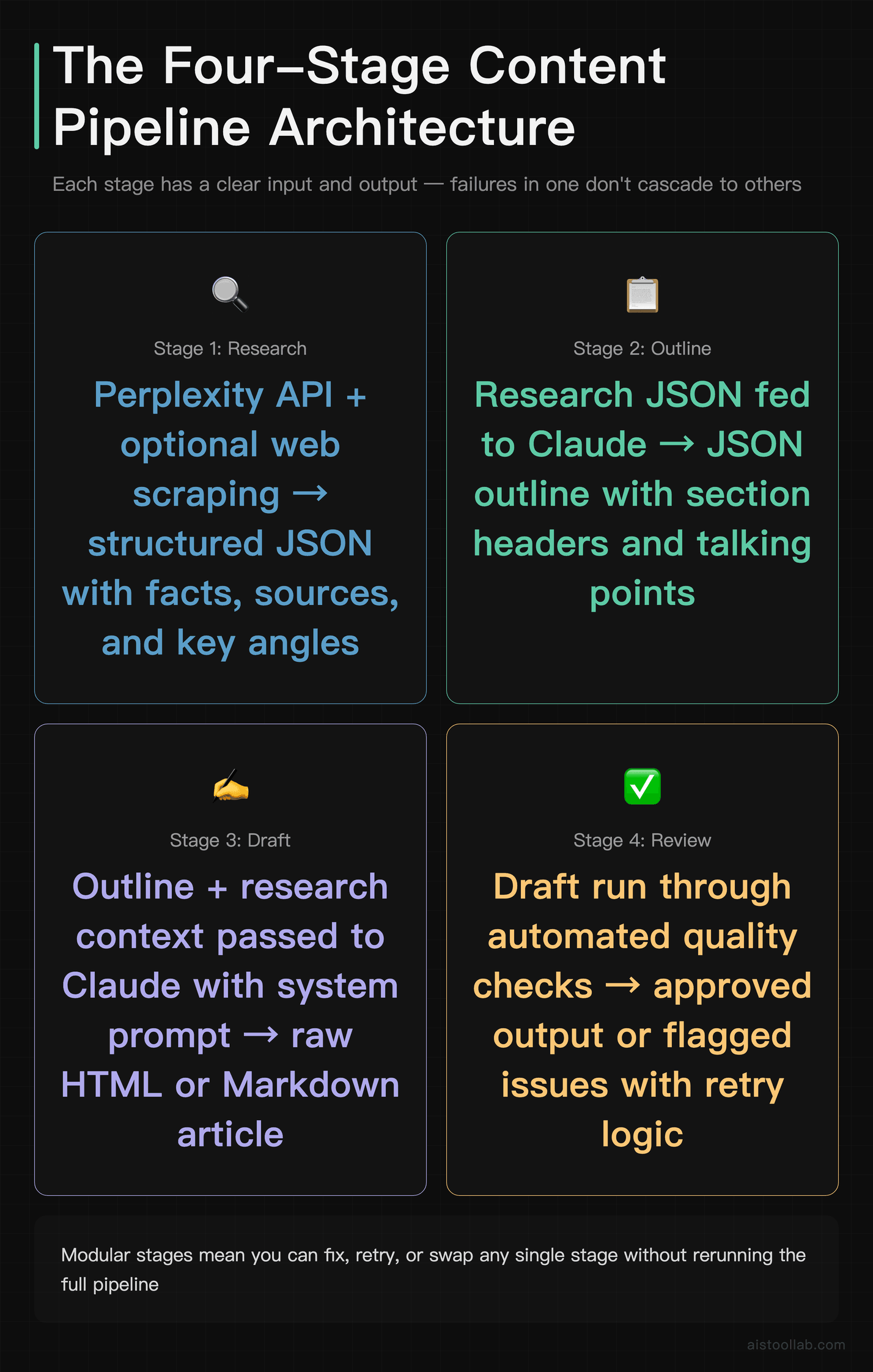
Before writing a single line of Python, it helps to think about the pipeline as four distinct stages, each with a clear input and output. The mistake most people make is treating content generation as one big blob — you throw a topic in and expect a polished article out. That’s not how good content works, and it’s not how good pipelines work either.
Here’s the structure we’re building:
- Research: Aggregate relevant information from Perplexity’s API and optional web scraping. Output is structured JSON with facts, sources, and key angles.
- Outline: Pass the research context to Claude to generate a structured outline with section headers and talking points. Output is a JSON outline.
- Draft: Use Claude with a carefully designed system prompt to write the full article from the outline. Output is raw HTML or Markdown.
- Review: Run automated quality checks — truncation detection, tone analysis, factual gap scanning — and flag or retry failed drafts.
Each stage is a separate Python function. This matters more than it sounds. When stage 3 fails, you don’t re-run stages 1 and 2. When you want to tweak the outline logic, you don’t touch the draft function. Clean separation of concerns saves you from debugging nightmares at 2am when a cron job goes sideways.
Stage 1: Automated Research Aggregation
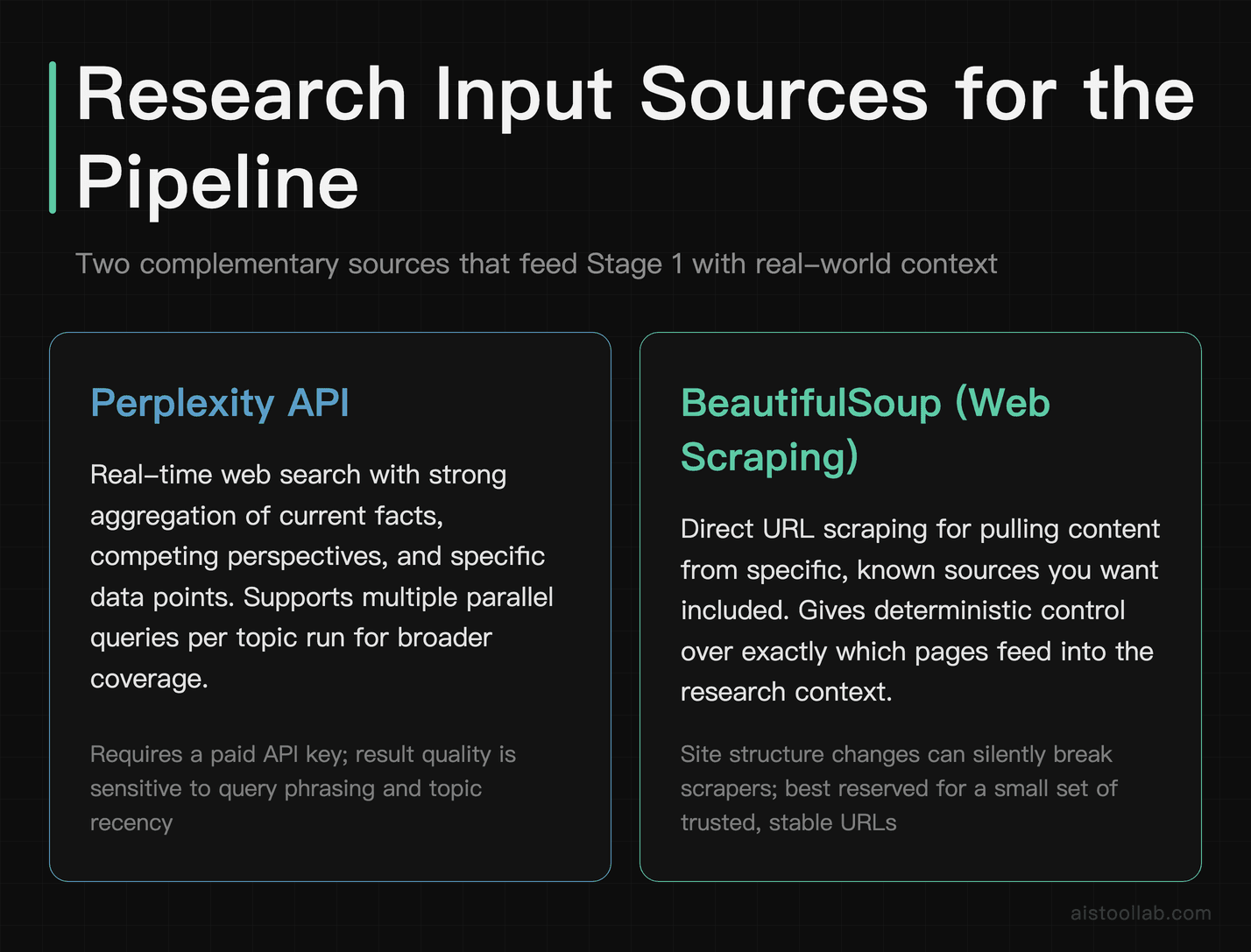
Good output starts with good input. If you feed Claude a topic and nothing else, you’ll get generic, surface-level content. Feed it actual research — recent facts, competing perspectives, specific data points — and the output quality jumps significantly. I’ve seen this firsthand: the same prompt with rich context versus bare context produces noticeably different articles.
We’re using two sources here: the Perplexity API for its excellent real-time web search capabilities, and optional BeautifulSoup scraping for specific URLs you want to pull from directly. If you haven’t seen what Perplexity can do for research, I covered this in the Perplexity AI vs ChatGPT for Research: Which Wins for Deep Dives? breakdown — the short version is it’s genuinely strong for aggregating current information.
import anthropic
import requests
from bs4 import BeautifulSoup
import json
import os

PERPLEXITY_API_KEY = os.environ.get("PERPLEXITY_API_KEY")
CLAUDE_API_KEY = os.environ.get("CLAUDE_API_KEY")

def research_topic(topic: str, num_queries: int = 3) -> dict:
    """Aggregate research from Perplexity API."""
    headers = {
        "Authorization": f"Bearer {PERPLEXITY_API_KEY}",
        "Content-Type": "application/json"
    }

    queries = [
        f"latest information and statistics about {topic} 2025",
        f"expert opinions and controversy around {topic}",
        f"practical examples and case studies {topic}"
    ]

    all_research = []

    for query in queries[:num_queries]:
        payload = {
            "model": "sonar-pro",
            "messages": [{"role": "user", "content": query}],
            "return_citations": True
        }
        response = requests.post(
            "https://api.perplexity.ai/chat/completions",
            headers=headers,
            json=payload
        )
        if response.status_code == 200:
            data = response.json()
            all_research.append({
                "query": query,
                "content": data["choices"][0]["message"]["content"],
                "citations": data.get("citations", [])
            })

    return {
        "topic": topic,
        "research_blocks": all_research,
        "source_count": sum(len(r["citations"]) for r in all_research)
    }
A few things worth noting here. First, we’re sending three different query angles for each topic — recency, controversy, and practical examples. This prevents the research from being one-dimensional. Second, we’re capturing citations. You won’t always use them verbatim, but having source URLs lets your quality checker verify claims later. Third, we’re reading the API key from environment variables — never hardcode credentials in a script that might end up in a Git repo.
For web scraping specific URLs, add a helper function using BeautifulSoup. Keep it simple — extract the main body text, strip navigation and footers, and return clean paragraphs. Rate limit your scrape requests to avoid getting blocked, and always check robots.txt before scraping a site in production.
Stage 2: Generating the Outline With Claude
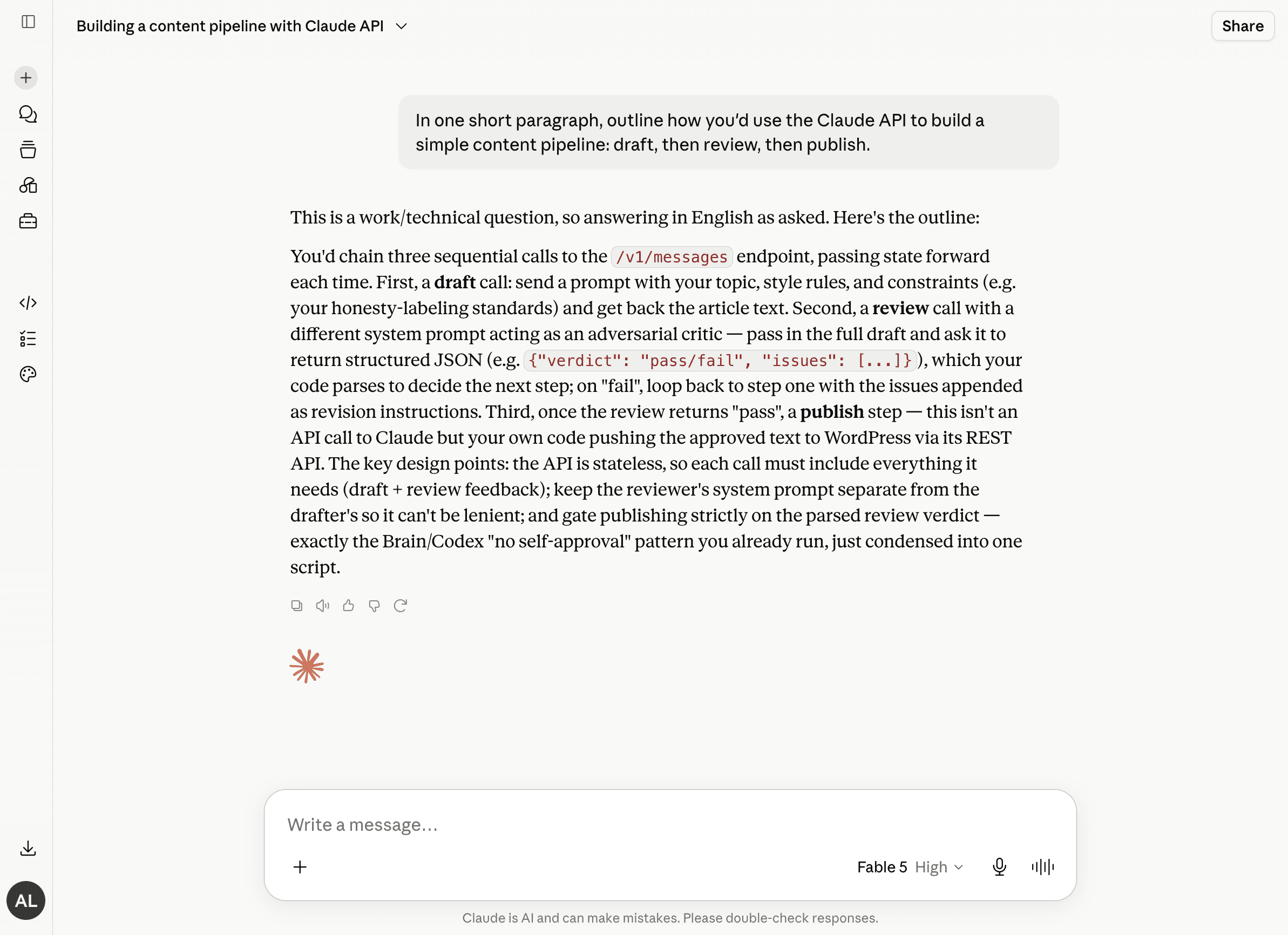
To ground the architecture, we asked the tool itself how it would wire up a draft-to-review-to-publish pipeline through its API. It described chaining sequential calls — each stage output feeding the next — which mirrors the four-stage design this article walks through. A useful sanity check that the pattern below is not just theory.
The outline stage is where Claude earns its keep for structure. Rather than asking it to write the whole article immediately, we ask it to think first — produce a logical skeleton that the draft stage will then flesh out. This two-step approach consistently produces better-organized content than single-shot generation.
def generate_outline(research_data: dict, content_type: str = "blog_post") -> dict:
    """Generate a structured outline from research data."""
    client = anthropic.Anthropic(api_key=CLAUDE_API_KEY)

    research_text = "\n\n".join([
        f"Research angle: {block['query']}\n{block['content']}"
        for block in research_data["research_blocks"]
    ])

    system_prompt = """You are a senior content strategist. Your job is to produce
    structured outlines in valid JSON format only. No explanation, no preamble —
    only the JSON object."""

    user_prompt = f"""Based on this research, create a detailed blog post outline
    for the topic: "{research_data['topic']}"

    Research:
    {research_text}

    Return a JSON object with this structure:
    {{
        "title": "...",
        "meta_description": "...",
        "sections": [
            {{
                "heading": "...",
                "talking_points": ["...", "..."],
                "target_word_count": 200
            }}
        ],
        "estimated_total_words": 1500
    }}"""

    message = client.messages.create(
        model="claude-opus-4-8",
        max_tokens=1500,
        system=system_prompt,
        messages=[{"role": "user", "content": user_prompt}]
    )

    raw_output = message.content[0].text
    # Strip any accidental markdown code fences
    cleaned = raw_output.strip().strip("```json").strip("```").strip()
    return json.loads(cleaned)
Notice the system prompt instructs Claude to return JSON only. This is a pattern that saves enormous headaches. When you tell Claude to “return JSON format,” it sometimes adds a little explanation before or after. When you tell it “only the JSON object,” it’s much more reliable. Still, we strip code fences defensively because model behavior can vary across updates. Parse failures should be caught with a try/except that logs the raw output and retries once before failing the job.
Stage 3: Draft Generation — System Prompt Design for Consistent Output
This is the heart of the pipeline, and the part most people get wrong. The quality of your system prompt determines whether you get consistent, on-brand output or a different writing style every single time. I’ve written about this dynamic before in the context of Why Prompt Engineering Is Overhyped (And What Actually Improves AI Output) — the headline is that structure and constraints matter more than clever phrasing.
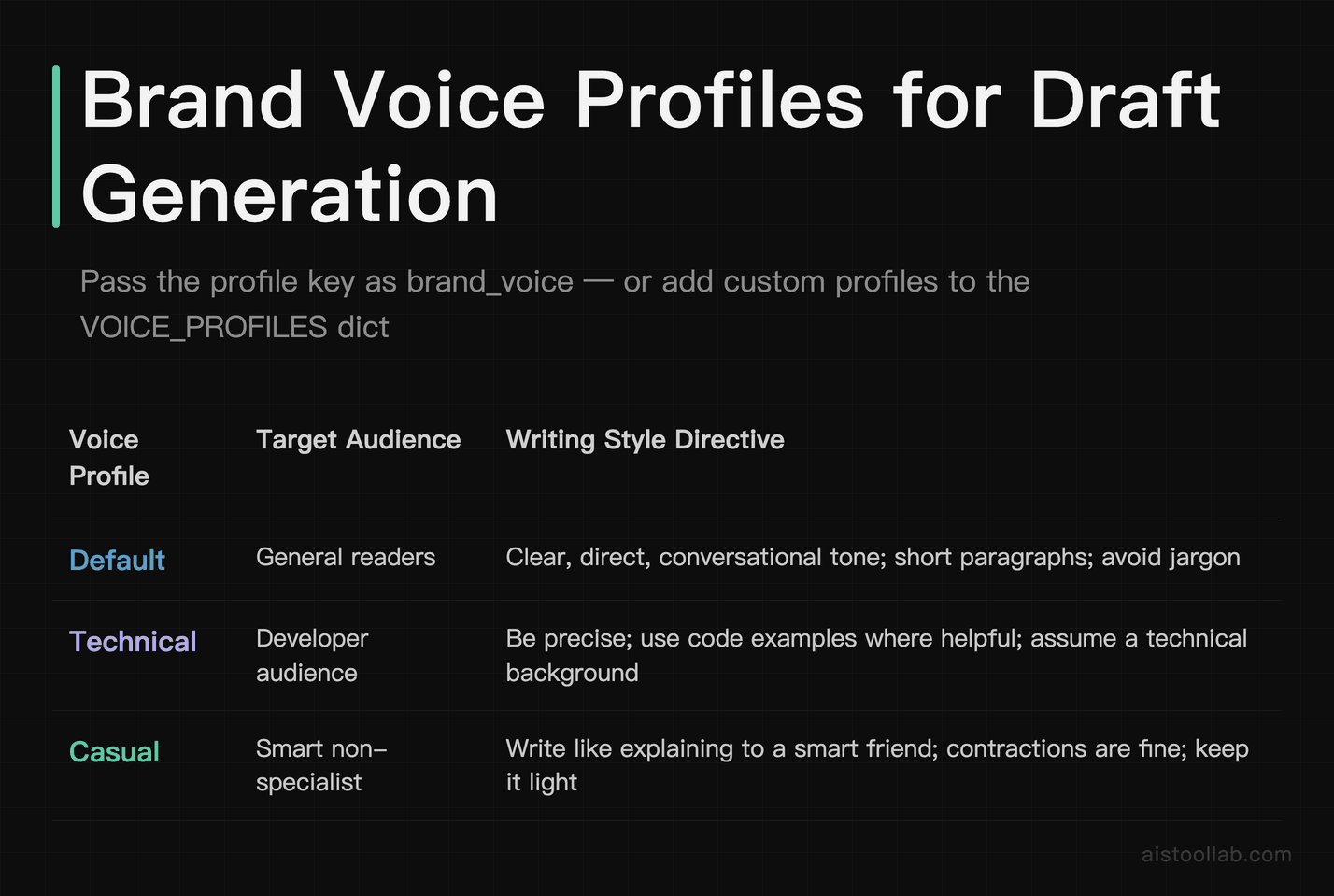
For production content pipelines, your system prompt needs to define: voice, format requirements, what to avoid, and how to handle uncertainty. Here’s a production-ready draft generation function:
def generate_draft(outline: dict, research_data: dict, brand_voice: str = "default") -> dict:
    """Generate full article draft from outline and research."""
    client = anthropic.Anthropic(api_key=CLAUDE_API_KEY)

    VOICE_PROFILES = {
        "default": "Write in a clear, direct, conversational tone. Use short paragraphs. Avoid jargon.",
        "technical": "Write for a developer audience. Be precise. Use code examples where helpful.",
        "casual": "Write like you're explaining to a smart friend. Contractions are fine. Keep it light."
    }

    voice_instruction = VOICE_PROFILES.get(brand_voice, VOICE_PROFILES["default"])

    research_summary = "\n".join([
        block["content"][:500] for block in research_data["research_blocks"]
    ])

    outline_text = json.dumps(outline, indent=2)

    system_prompt = f"""You are an expert content writer producing a complete,
    publication-ready article.

    Voice guidelines: {voice_instruction}

    Format rules:
    - Use HTML formatting (h2, h3, p, ul, ol, strong)
    - Do NOT use h1 tags
    - Each section must be at least 150 words
    - Do not truncate — complete every section fully
    - Do not add a conclusion unless the outline specifies one
    - Do not include placeholder text like [add example here]

    Quality rules:
    - Ground claims in the provided research
    - If research doesn't support a claim, acknowledge uncertainty
    - Do not fabricate statistics or quotes
    - Target exactly the word count specified per section"""

    user_prompt = f"""Write a complete article based on this outline and research.

    OUTLINE:
    {outline_text}

    RESEARCH CONTEXT:
    {research_summary}

    Write the full article now. Start directly with the first section — no preamble."""

    message = client.messages.create(
        model="claude-opus-4-8",
        max_tokens=4096,
        system=system_prompt,
        messages=[{"role": "user", "content": user_prompt}]
    )

    content = message.content[0].text
    stop_reason = message.stop_reason

    return {
        "content": content,
        "stop_reason": stop_reason,
        "input_tokens": message.usage.input_tokens,
        "output_tokens": message.usage.output_tokens,
        "model": message.model
    }
A few design decisions here worth explaining. We pass the stop_reason through to the next stage — if it’s max_tokens instead of end_turn, the draft was truncated and needs to be caught. We log token counts per draft because that’s your cost tracking data. And we cap the research context to 500 characters per block to manage input token consumption — you can adjust this based on your cost tolerance.
If you want to see the full range of what Claude can do with well-structured prompts, the Anthropic prompt engineering documentation is genuinely useful — not just marketing fluff. Also worth reading is my overview of Claude vs ChatGPT comparison if you’re deciding which model tier to run your pipeline on.
Stage 4: Automated Quality Checking
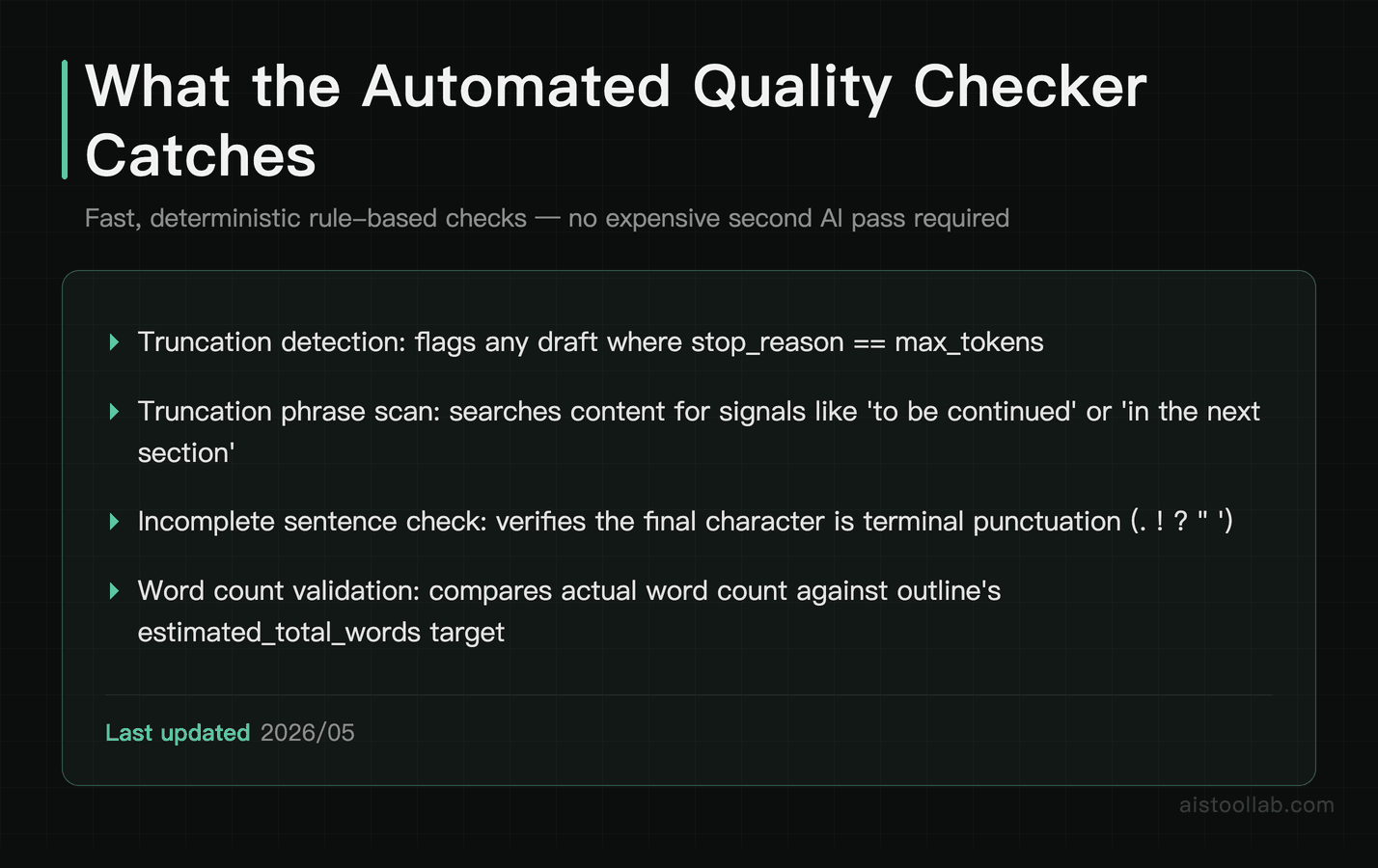
This is the stage most tutorials skip, and it’s the one that makes the difference between a pipeline you can trust and one you have to babysit. Quality checking doesn’t mean running another AI to “rate” the content — that gets expensive fast and isn’t reliable enough for production. What it means is running fast, deterministic checks that catch the most common failure modes.
def quality_check(draft: dict, outline: dict) -> dict:
    """Run automated quality checks on generated draft."""
    content = draft["content"]
    issues = []
    warnings = []

    # 1. Truncation detection
    if draft["stop_reason"] == "max_tokens":
        issues.append("TRUNCATED: Draft hit max_tokens limit before completion.")

    truncation_signals = [
        "to be continued", "in the next section", "we will cover",
        content.strip()[-1] not in ".!?\"'"
    ]
    if any(isinstance(s, str) and s.lower() in content.lower() for s in truncation_signals[:-1]):
        issues.append("POSSIBLE_TRUNCATION: Truncation phrase detected in content.")
    if truncation_signals[-1]:
        warnings.append("INCOMPLETE_SENTENCE: Draft may end mid-sentence.")

    # 2. Word count check
    word_count = len(content.split())
    target = outline.get("estimated_total_words", 1000)
    if word_count < target * 0.75:
        issues.append(f"SHORT: {word_count} words vs target {target}. Under 75% of target.")
    elif word_count < target * 0.9:
        warnings.append(f"SLIGHTLY_SHORT: {word_count} words vs target {target}.")

    # 3. Section coverage check
    expected_headings = [s["heading"].lower() for s in outline.get("sections", [])]
    for heading in expected_headings:
        # Check for partial match of key words in heading
        key_words = [w for w in heading.split() if len(w) > 4]
        if key_words and not any(kw in content.lower() for kw in key_words[:2]):
            warnings.append(f"MISSING_SECTION: Section '{heading}' may not appear in draft.")

    # 4. Placeholder detection
    placeholders = ["[add", "[insert", "[example here", "todo:", "placeholder"]
    for ph in placeholders:
        if ph.lower() in content.lower():
            issues.append(f"PLACEHOLDER: Found unresolved placeholder '{ph}' in content.")

    # 5. Fabrication risk signals
    suspicious_patterns = ["studies show that 100%", "experts unanimously", "always works"]
    for pattern in suspicious_patterns:
        if pattern.lower() in content.lower():
            warnings.append(f"REVIEW_CLAIM: Suspicious absolute claim detected: '{pattern}'")

    passed = len(issues) == 0

    return {
        "passed": passed,
        "issues": issues,
        "warnings": warnings,
        "word_count": word_count,
        "target_word_count": target
    }
The quality checker returns a structured result that the orchestrator can act on. Hard issues cause a retry (up to a configured max). Warnings get logged but don’t block the pipeline — you review those manually in a daily digest. This keeps the pipeline moving without letting serious failures slip through to publication.
The Orchestrator: Putting All Four Stages Together
Now we wire everything together with an orchestrator function that handles retries, logging, and output persistence:
import time
import logging
from datetime import datetime

logging.basicConfig(
    level=logging.INFO,
    format="%(asctime)s %(levelname)s %(message)s",
    handlers=[
        logging.FileHandler("pipeline.log"),
        logging.StreamHandler()
    ]
)

def run_pipeline(topic: str, content_type: str = "blog_post",
                 brand_voice: str = "default", max_retries: int = 2) -> dict:
    """Full pipeline orchestrator with retry logic."""
    run_id = datetime.now().strftime("%Y%m%d_%H%M%S")
    logging.info(f"[{run_id}] Starting pipeline for topic: {topic}")

    # Stage 1: Research
    logging.info(f"[{run_id}] Stage 1: Research")
    research = research_topic(topic)
    logging.info(f"[{run_id}] Research complete. Sources: {research['source_count']}")

    # Stage 2: Outline
    logging.info(f"[{run_id}] Stage 2: Outline")
    outline = generate_outline(research, content_type)
    logging.info(f"[{run_id}] Outline generated. Sections: {len(outline.get('sections', []))}")

    # Stage 3 + 4: Draft with retry loop
    for attempt in range(1, max_retries + 2):
        logging.info(f"[{run_id}] Stage 3: Draft attempt {attempt}")
        draft = generate_draft(outline, research, brand_voice)
        logging.info(f"[{run_id}] Draft generated. Tokens used: {draft['output_tokens']}")

        # Stage 4: Quality check
        qc = quality_check(draft, outline)
        logging.info(f"[{run_id}] QC result: {'PASS' if qc['passed'] else 'FAIL'} | Issues: {qc['issues']}")

        if qc["passed"]:
            break

        if attempt <= max_retries:
            logging.warning(f"[{run_id}] QC failed. Retrying in 5s...")
            time.sleep(5)
        else:
            logging.error(f"[{run_id}] QC failed after {max_retries + 1} attempts. Saving for manual review.")

    # Save output
    output = {
        "run_id": run_id,
        "topic": topic,
        "outline": outline,
        "draft": draft["content"],
        "quality_check": qc,
        "token_usage": {
            "input": draft["input_tokens"],
            "output": draft["output_tokens"]
        }
    }

    output_file = f"output/{run_id}_{topic[:30].replace(' ', '_')}.json"
    os.makedirs("output", exist_ok=True)
    with open(output_file, "w") as f:
        json.dump(output, f, indent=2)

    logging.info(f"[{run_id}] Pipeline complete. Output saved to {output_file}")
    return output
The Repo Structure
For reference, here’s a clean way to lay the project out — one module per stage keeps the separation of concerns honest:
content-pipeline/
├── pipeline/
│   ├── research.py        # Stage 1: research aggregation
│   ├── outline.py         # Stage 2: outline generation
│   ├── draft.py           # Stage 3: draft generation
│   ├── quality.py         # Stage 4: quality checks
│   └── orchestrator.py    # run_pipeline()
├── run_pipeline_job.py    # queue runner (cron entry point)
├── topics.csv             # input queue of topics
├── output/                # generated JSON, one file per run
├── prompts/               # versioned system prompts
├── .env                   # API keys (never commit this)
└── requirements.txt
Running as a Scheduled Job: Cron Setup and Error Notifications
A pipeline you have to manually trigger isn't a pipeline, it's a slightly fancier workflow. The goal is automated execution on a schedule, with alerts when things go wrong so you don't have to check logs manually.
Create a runner script at run_pipeline_job.py that reads a queue of topics from a CSV or database, processes them in sequence, and sends a notification on failure:
import csv
import smtplib
from email.mime.text import MIMEText

def send_failure_alert(topic: str, error: str, run_id: str):
    """Send email notification on pipeline failure."""
    smtp_user = os.environ.get("SMTP_USER")
    smtp_pass = os.environ.get("SMTP_PASS")
    alert_email = os.environ.get("ALERT_EMAIL")

    if not all([smtp_user, smtp_pass, alert_email]):
        logging.warning("Email credentials not configured. Skipping alert.")
        return

    msg = MIMEText(f"Pipeline failure\nRun ID: {run_id}\nTopic: {topic}\nError: {error}")
    msg["Subject"] = f"[Pipeline Alert] Failed: {topic[:40]}"
    msg["From"] = smtp_user
    msg["To"] = alert_email

    with smtplib.SMTP_SSL("smtp.gmail.com", 465) as server:
        server.login(smtp_user, smtp_pass)
        server.sendmail(smtp_user, alert_email, msg.as_string())

def process_topic_queue(queue_file: str = "topics.csv"):
    topics = []
    with open(queue_file, "r") as f:
        reader = csv.DictReader(f)
        topics = [row for row in reader if row.get("status") == "pending"]

    for row in topics:
        try:
            result = run_pipeline(
                topic=row["topic"],
                content_type=row.get("type", "blog_post"),
                brand_voice=row.get("voice", "default")
            )
            # Mark as done in your database or update the CSV
            logging.info(f"Completed: {row['topic']}")
        except Exception as e:
            logging.error(f"Fatal error for topic '{row['topic']}': {str(e)}")
            send_failure_alert(row["topic"], str(e), "unknown")

if __name__ == "__main__":
    process_topic_queue()
For the cron schedule, add this to your crontab (crontab -e) to run daily at 6am. If you want to tweak the timing, our free Cron Expression Builder generates and explains the schedule syntax:
0 6 * * * /usr/bin/python3 /home/user/content-pipeline/run_pipeline_job.py >> /var/log/content-pipeline.log 2>&1If you're running this on a cloud VM, make sure your environment variables are set at the system level (not just in your shell session). On Ubuntu, add them to /etc/environment or use a .env file loaded via python-dotenv. A failed cron job that fails silently because of missing API keys is a uniquely miserable debugging experience — don't ask me how I know.
Cost Optimization and Rate Limiting for High-Volume Use
This is where production pipelines live or die. Running Claude for 50 articles a day adds up fast if you're not deliberate about it. Here are the strategies that actually move the needle — not theoretical advice, but things that make a real cost difference.
A hard-won lesson from doing this myself: running a pipeline like this on the metered API, I spent roughly US$700 in a single month at my own usage level — that’s my own case, and your number will differ depending on volume. It pushed me to rebuild my cost strategy around the fundamentals below: use a tiered mix of models, measure cost per article, and set hard caps. Instrument cost from day one rather than discovering it on an invoice.
Right-Size Your Model Choice
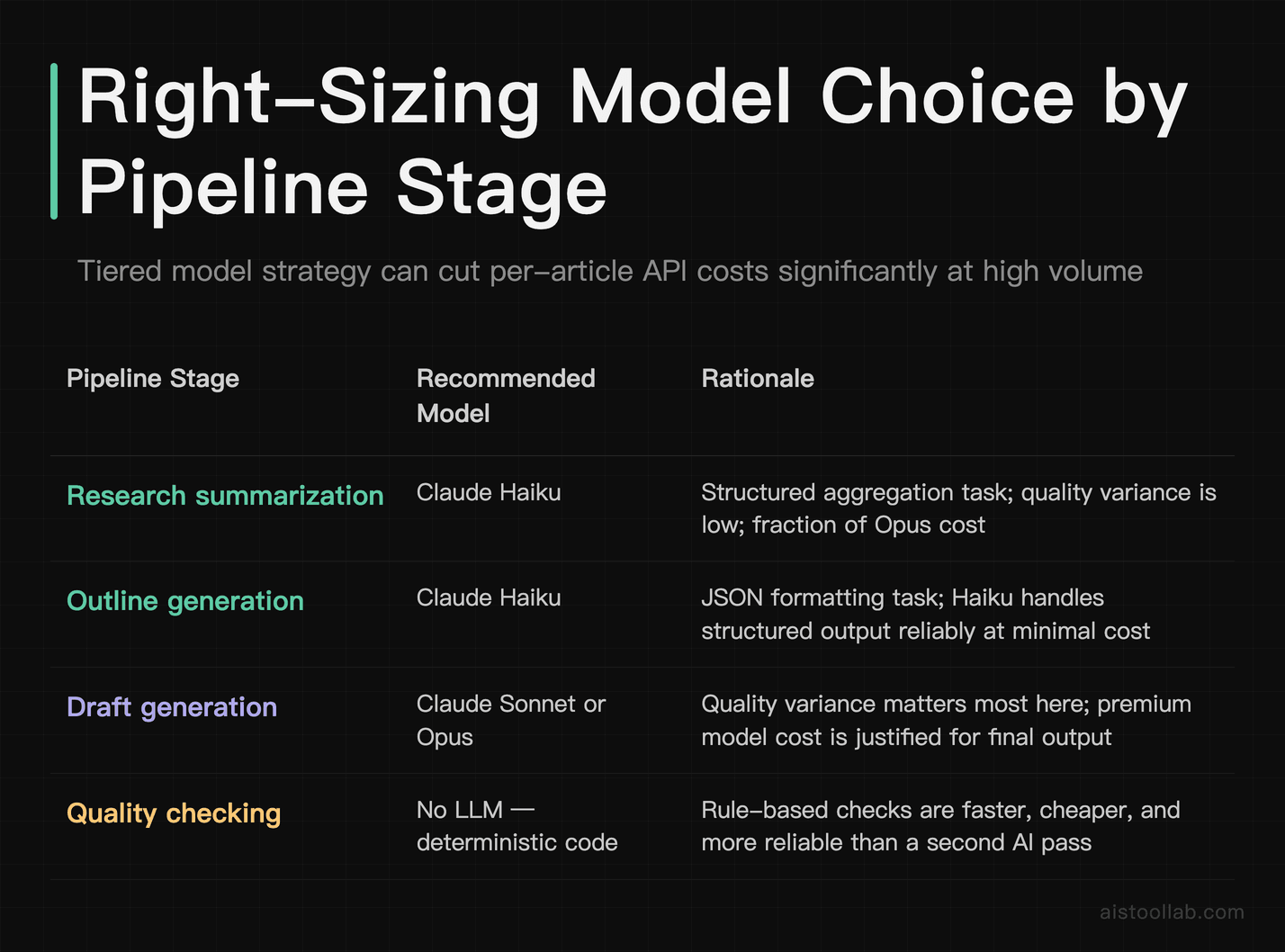
Not every stage needs your most powerful model. The outline stage is a structured reasoning task that Claude Haiku handles well at a fraction of the cost of Opus. Reserve the more powerful models for the draft stage where quality variance actually matters. In a high-volume setup, using Haiku for research summarization and outline generation, then Sonnet or Opus for drafting, can cut per-article API costs significantly. Check the current Anthropic pricing page and run the math for your volume before committing to a model tier.
Cache Your Research
If you're generating multiple articles on related topics, research results from Perplexity can be cached and reused within a time window. Store research output as JSON files keyed by a normalized topic hash. Before hitting the API, check if a cache file exists and is less than 24 hours old. For a content batch covering 10 articles on "email marketing," you might legitimately share 60-70% of the research context.
Implement Rate Limiting Properly
import threading
from collections import deque

class RateLimiter:
    """Token bucket rate limiter for API calls."""
    def __init__(self, max_calls: int, period: float):
        self.max_calls = max_calls
        self.period = period
        self.calls = deque()
        self.lock = threading.Lock()

    def wait_if_needed(self):
        with self.lock:
            now = time.time()
            # Remove calls outside the window
            while self.calls and now - self.calls[0] > self.period:
                self.calls.popleft()

            if len(self.calls) >= self.max_calls:
                sleep_time = self.period - (now - self.calls[0])
                if sleep_time > 0:
                    time.sleep(sleep_time)

            self.calls.append(time.time())

# Initialize: 50 requests per minute
claude_limiter = RateLimiter(max_calls=50, period=60)

# Use before every API call
claude_limiter.wait_if_needed()
message = client.messages.create(...)
Track Costs Per Article
Build cost tracking directly into your output JSON. With token counts already logged, calculating cost is arithmetic. Create a simple cost tracking function that takes input/output tokens and model name, looks up the per-token rate, and returns a dollar amount. Aggregate this daily and you'll quickly spot if a particular content type or topic category is consuming disproportionate tokens — which often signals a system prompt that needs tightening.
For teams producing content at real volume, this kind of infrastructure is what separates profitable AI content operations from ones that quietly hemorrhage API costs. If you want more context on how content creators are structuring their AI workflows at scale, the How Content Creators Are Using AI Tools to Scale Production in 2025 piece covers the business side of this well.
Pro Tips From Running This in Production
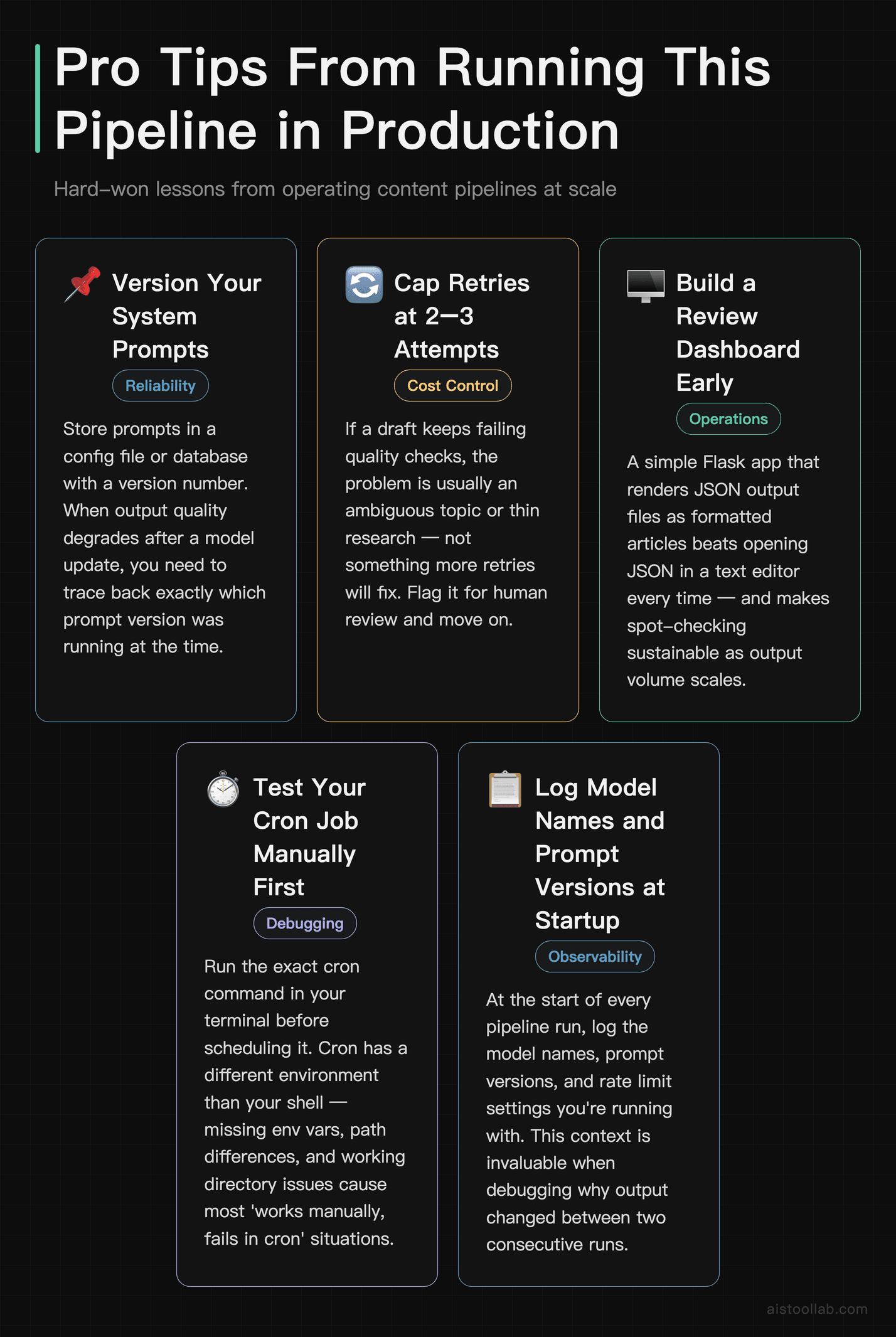
A few hard-won observations after running pipelines like this at scale:
- Version your system prompts. Store them in a config file or database with a version number. When output quality degrades after a model update, you need to know which prompt version was running at the time.
- Don't retry forever. Cap retries at 2-3 attempts. If a draft keeps failing quality checks, it usually means the topic is ambiguous or the research came back thin — problems that more retries won't fix. Flag it for human review and move on.
- Build a review dashboard early. Even with QC automation, you want a way to spot-check output. A simple Flask app that renders your JSON output files as formatted articles beats opening JSON in a text editor every time.
- Test your cron job manually first. Run the exact cron command in your terminal before scheduling it. Cron has a different environment than your shell — path differences, missing env vars, and working directory issues are the most common causes of "works fine manually, fails in cron" situations.
- Log everything at startup. At the start of every pipeline run, log the model names, prompt versions, and rate limit settings you're running with. This context is invaluable when debugging an issue that happened at 3am three days ago.
What This Pipeline Is Good For (And What It Isn't)
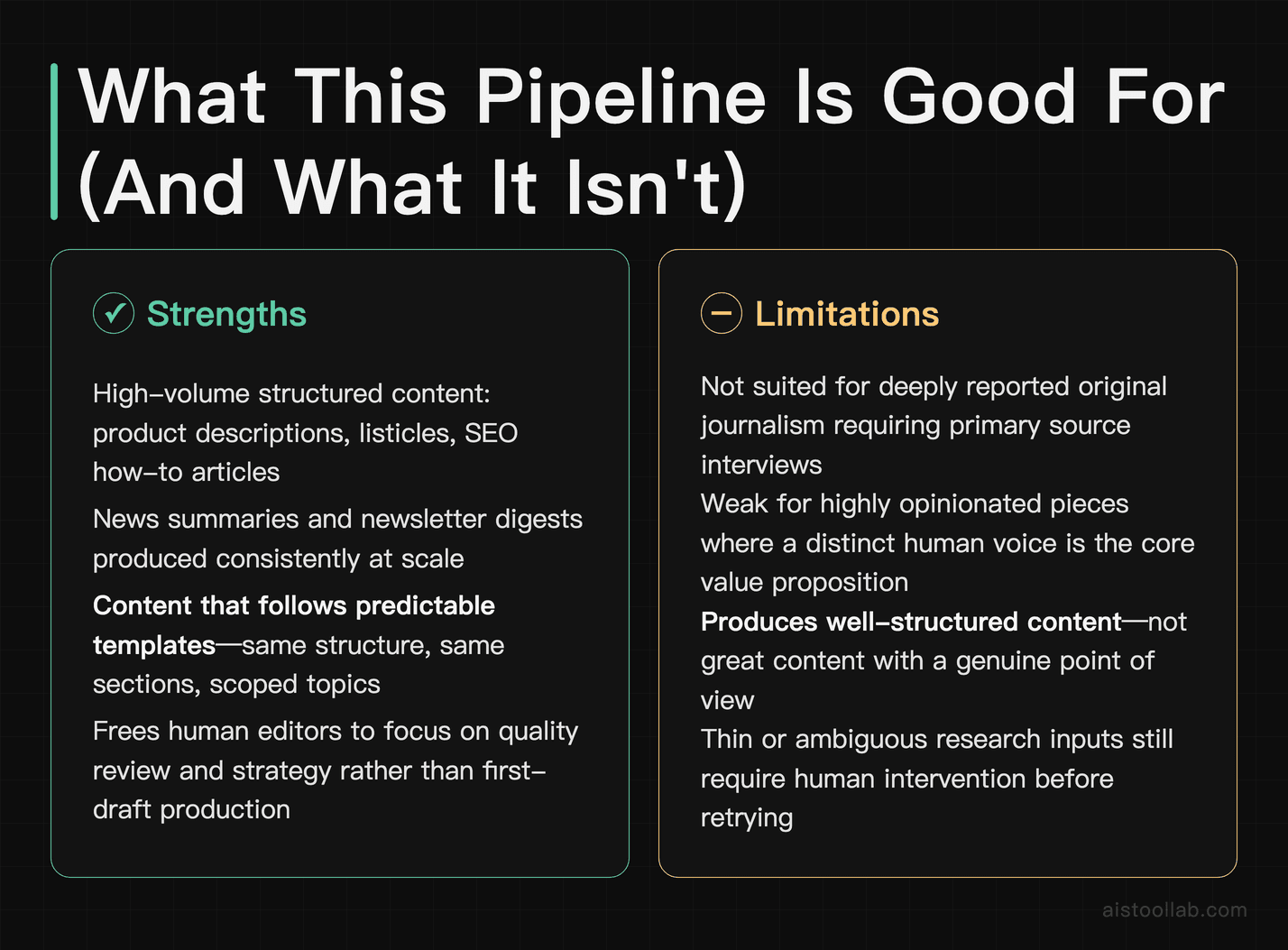
This setup genuinely shines for high-volume, structured content: product descriptions, listicles, news summaries, SEO-targeted how-to articles, and newsletter digests. It's particularly strong when your content follows consistent templates — same structure, same sections, predictable scope.
It's less appropriate for deeply reported original journalism, content requiring primary source interviews, or highly opinionated pieces where a distinct human voice is the entire value proposition. The pipeline produces good, well-structured content — not great content with a point of view. For the right use case, that's exactly what you need. If you're a freelancer thinking about how this fits into your practice, the How Freelancers Are Using AI to Double Output Without Sacrificing Quality piece has useful framing on where automation fits versus where your judgment needs to stay in the loop.
The goal was never to remove humans from content creation entirely — it's to remove humans from the parts that don't require them, so the parts that do get more attention. A pipeline that handles research aggregation, structure, and first drafts gives you back the time to actually think about what you're saying and why it matters. That's the trade worth making.
Now go build something that works while you sleep.
Use Cases
The scenarios below are illustrative examples of how a pipeline like this can be applied — composite situations, not measured case studies. Actual results vary widely with volume, content type, and how much editing each stage still needs.
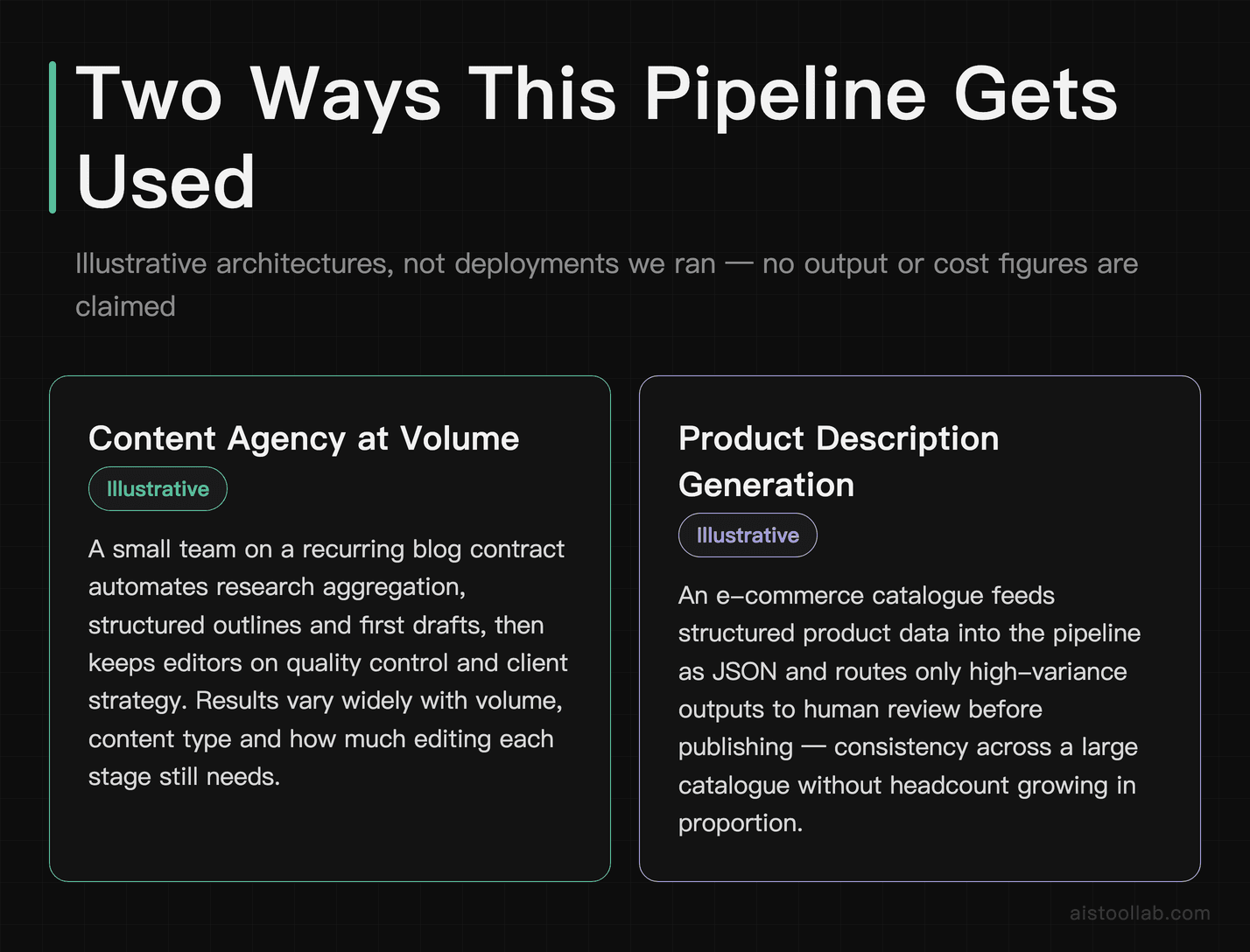
Freelance Content Agency Scaling From 20 to 200 Articles Per Month
Consider a freelance content agency based in Austin, Texas, run by a team of three writers and one editor. They landed a contract with a SaaS company requiring 50 product-focused blog posts per month, plus weekly newsletter content and bi-weekly case study drafts. Manually handling that volume meant hiring two more writers, which would slash margins to nothing. By building a Claude API pipeline in Python, the agency automated research aggregation from RSS feeds and Google Search APIs, structured outlines based on SEO briefs fed as JSON inputs, generated first drafts scored against a readability rubric, and routed only the highest-variance sections to human editors for review. The result: the team can take on substantially more volume with the same writers, each focusing on editing and strategy rather than drafting from scratch. Cost per article drops meaningfully because cheaper models handle the early stages, and editors get more bandwidth to focus on quality control rather than fighting deadlines.
E-Commerce Startup Automating Product Description Generation at Scale
A direct-to-consumer outdoor gear startup in Denver, Colorado, sells over 4,000 SKUs across its website. Their two-person marketing team was drowning in product description updates every time inventory changed or seasonal collections launched. A Claude API Python pipeline solved this by ingesting raw product data from their Shopify API — dimensions, materials, weight, use cases — and transforming it into SEO-optimized, brand-voice-consistent descriptions in batches of 500 overnight. The pipeline included a quality gate that flagged descriptions below a certain character count or missing required keywords, sending those back through a refinement prompt before human review. It also ran cost controls using token budgeting per batch so monthly API spend stayed predictable. The team can launch new collections far faster than the manual process allowed, and organic search traffic to product pages may improve over time as descriptions become more complete, consistent, and searchable across the entire catalog.
B2B Marketing Manager Running a Weekly Thought Leadership Newsletter
A senior marketing manager at a mid-sized cybersecurity firm in Chicago is responsible for producing a weekly newsletter sent to 12,000 subscribers — CISOs, IT directors, and security analysts. The newsletter requires curating five to seven industry news items, writing a 600-word original commentary piece, summarizing three recent research papers, and packaging everything with consistent formatting before it hits Mailchimp. Before automating with Claude API and Python, this consumed roughly 14 hours of her week. The pipeline she built now pulls from a curated list of RSS feeds and ArXiv search terms every Monday morning, runs Claude to summarize and rank items by relevance to her subscriber persona, drafts the commentary section based on the week's top theme, and outputs a formatted HTML email ready for light editing. Her weekly newsletter prep drops from most of a workday to a fraction of it. More importantly, she can now A/B test subject lines and intro hooks systematically because the pipeline generates several variations of each automatically, something she never had bandwidth to do before.
Frequently Asked Questions
Is there a free tier for the Claude API, and how much does it actually cost to run a content pipeline?
Anthropic does not currently offer a permanent free tier for the Claude API, though new accounts may receive limited free credits to get started. For production pipeline use, you'll be on a pay-per-token model. As of June 2026, current rates are roughly: Claude Haiku 4.5 (fastest, most cost-efficient) about $1 per million input tokens and $5 per million output; Claude Sonnet 4.6 about $3 input and $15 output; Claude Opus 5 about $5 input and $25 output. Always confirm current pricing on Anthropic’s official pricing page, since rates change. For a realistic content pipeline producing 50 blog posts per month at roughly 800 words each, expect to spend between $15 and $60 per month depending on how many pipeline stages you run and which models you use for each. The smart approach is to use Haiku for research summarization and initial outlining, then Sonnet only for final draft generation and quality passes. This tiered model strategy can cut costs substantially compared to running everything through the premium model, since the cheaper model absorbs the lighter stages (the exact saving depends on your workload mix). Always implement token budgeting and hard cost caps in your pipeline to avoid surprise bills.
What Python libraries and tools do I need to build this pipeline from scratch?
The core library you need is the official Anthropic Python SDK, installable via pip install anthropic. Beyond that, your stack depends on what your pipeline does. For HTTP requests and web scraping during research aggregation, requests and BeautifulSoup4 are standard choices. If you're pulling from RSS feeds, feedparser handles that cleanly. For structured data handling between pipeline stages, Pydantic is excellent for validating inputs and outputs at each step — it pairs naturally with Claude's structured output capabilities. For scheduling, you can start with Python's built-in schedule library or APScheduler for lightweight needs, then graduate to Apache Airflow or Prefect for production-grade orchestration with retry logic, logging, and monitoring dashboards. For storage, SQLite works fine for small pipelines; PostgreSQL via SQLAlchemy when you need durability and concurrency. Environment management should use python-dotenv to keep your API keys out of code. If you plan to run quality checks using external readability scores, textstat is a helpful lightweight library. The beauty of building in Python is that you assemble exactly what you need — there's no mandatory framework.
How do I prevent the pipeline from generating duplicate or repetitive content across multiple articles?
Duplicate and repetitive content is one of the most common problems in automated content pipelines, and it requires a multi-layered approach to solve properly. First, store embeddings of all previously generated content in a vector database like Pinecone, Weaviate, or even a local FAISS index. Before generating a new piece, embed the incoming brief and run a similarity search — if the cosine similarity to any existing article exceeds a threshold you define (typically 0.85 or higher), flag it for human review or redirect to a differentiated angle prompt. Second, include uniqueness instructions explicitly in your system prompt: tell Claude the existing titles and key angles of recent articles on the same topic and instruct it to approach from a distinct angle. Third, vary your research inputs — if every article on the same topic pulls from the same three sources, outputs will converge. Build source rotation and topic-specific source sets into your pipeline. Finally, run a post-generation deduplication check comparing key phrases and section headers across the current batch before publishing. These measures together keep your content library diverse even at high volume.
How does Claude compare to GPT-5 for content pipeline use specifically?
Both Claude and GPT-5 are excellent choices for content pipelines, and the honest answer is that the differences are meaningful but not dealbreaking for most use cases. Claude's primary advantages for pipeline work are its larger context window (200K tokens versus GPT-5's 128K), which lets you pass entire style guides, brand voice documents, and example articles in a single prompt without chunking; and its instruction-following consistency, which many developers find produces more predictable outputs across large batches without as much prompt drift. Claude also tends to produce more nuanced, less formulaic long-form content, which matters when you're publishing at scale and don't want everything sounding like the same template. GPT-5's advantages include a richer ecosystem of third-party integrations, broader community resources like LangChain cookbooks and pre-built agents, and the OpenAI moderation API if safety filtering is a priority for your use case. GPT-5 Mini is also highly competitive on cost for high-volume low-stakes pipeline steps. Many serious pipeline builders actually use both — Claude for generation and quality passes, OpenAI's embedding API for vector search, for example. The best choice depends on your specific quality bar, existing stack, and cost tolerance. (Model note: written during the GPT-5 generation; as of July 2026 OpenAI’s current flagship is the GPT-5.6 family — see OpenAI’s model docs.)
What are the main limitations of building a content pipeline with Claude API?
Several limitations are worth knowing before you invest significant build time. First, Claude's API does not support real-time web browsing or live search natively — you need to build your own research aggregation layer using RSS feeds, search APIs like SerpAPI or Brave Search API, or custom scrapers. This adds complexity but also gives you full control over source quality. Second, while Claude's instruction following is strong, very long or complex multi-part prompts can occasionally produce outputs that drop or misinterpret certain requirements, especially in batch runs — robust quality gates and retry logic are non-negotiable in production. Third, rate limits and latency become real concerns at high volume. Claude's API has tier-based rate limits that increase as your spend history grows; if you're starting fresh, expect to hit limits during large batch runs until your account tier increases. Fourth, cost unpredictability if you're not careful — long context windows are powerful but expensive if you're passing massive prompts unnecessarily. Always measure token usage per stage and optimize prompts for efficiency. Fifth, like all LLMs, Claude can produce factually incorrect information — human review or fact-checking integrations are essential for any content you publish under your brand.
How do I implement quality control in the pipeline without manual review of every article?
Automated quality control in a content pipeline is a combination of rule-based checks and LLM-powered evaluation — neither alone is sufficient. Start with rule-based checks that run instantly and cheaply: minimum and maximum word count, required keyword presence verified via simple string matching, readability score using a library like textstat targeting your audience's reading level, and structural checks confirming required sections like introduction, subheadings, and conclusion exist. These gate the output before it moves to the more expensive LLM evaluation step. For LLM-powered quality assessment, design a separate evaluator prompt — separate from your generation prompt — that scores the draft against criteria like factual coherence, relevance to the brief, tone consistency, and absence of filler phrases. Have Claude return a structured JSON score with a pass/fail flag and specific feedback on failing criteria. Articles that fail go through a targeted revision prompt addressing only the flagged issues rather than regenerating from scratch. Set a maximum retry count — typically two — and route anything still failing after retries to a human review queue rather than looping infinitely. This architecture means humans only touch the genuinely difficult cases, typically five to ten percent of volume in a well-tuned pipeline.
Can I run this pipeline on a schedule without leaving my computer on, and what's the cheapest infrastructure to do so?
Absolutely — and this is one of the biggest practical wins of building a proper pipeline rather than a manual workflow. The cheapest reliable option for solo developers or small teams is a small cloud virtual machine running continuously. A DigitalOcean Droplet at $6 per month or an AWS EC2 t3.micro instance (often free tier eligible for new accounts for 12 months) is more than sufficient to run a Python pipeline scheduler. You deploy your pipeline code to the server, use a tool like PM2, systemd, or simply screen to keep the process running, and configure your schedule in code using APScheduler or cron. For serverless approaches that cost literally nothing when not running, AWS Lambda or Google Cloud Functions can trigger your pipeline on a schedule via EventBridge or Cloud Scheduler — you only pay for execution time, which for most content pipelines is cents per month in compute costs. The API call costs dominate, not infrastructure. For teams that want observability and retry management without managing servers, Prefect Cloud's free tier handles scheduling and monitoring for lightweight pipelines. GitHub Actions is another zero-infrastructure option for pipelines that don't need sub-hourly scheduling — you can trigger workflows on a cron schedule directly from your repository.
Is building a Claude API content pipeline worth it compared to just using a managed tool like Jasper or Copy.ai?
The honest answer is: it depends entirely on your volume, technical comfort level, and need for customization. Managed platforms like Jasper and Copy.ai are genuinely excellent if you're producing under 30 to 40 pieces of content per month, don't have Python experience on your team, and primarily need marketing copy, social posts, or short-form content. The setup time is minutes, the interfaces are polished, and the integrations with tools like Surfer SEO and HubSpot save real time. But the economics and capability ceiling flip decisively when you scale up or need genuine customization. At 100 articles per month, a managed platform subscription costs $100 to $200 per month and gives you limited control. A Claude API pipeline at the same volume might cost $30 to $80 in API fees with infrastructure at near-zero cost — and you control every aspect of prompt logic, quality gates, source inputs, output formatting, and scheduling. More importantly, a custom pipeline can do things no managed tool offers: pulling from your proprietary data sources, enforcing brand-specific style rules programmatically, integrating directly with your CMS or Shopify store, and generating structured data alongside prose. If you're serious about content at scale and have or can hire basic Python skills, the pipeline approach pays for itself within the first two to three months of operation compared to managed platform subscription costs.
Last updated: June 2026