

The Content Hamster Wheel Is Real — Here’s How People Are Getting Off It
Here’s a pattern that will feel familiar if you make content for a living: you can spend more time preparing to make something than actually making it. Research and outlining before you write a single word of a script, then the script itself, then sourcing thumbnails, then drafting the newsletter. By the time you hit publish, a single video can eat a full workday.
That’s not unusual. Plenty of independent creators are drowning in the work around the work. The actual creative part — the thing that made them start a channel or blog in the first place — is buried under a mountain of logistics, research, formatting, and production tasks that feel necessary but aren’t exactly fulfilling.
What changes this equation, for a lot of creators, is building a proper AI-assisted workflow. Not just “ask ChatGPT to write my script” and publish whatever comes out. That approach produces content that sounds like it was written by a committee. I mean a layered system where AI handles the heavy lifting on the stuff that doesn’t require your voice, and you focus your energy where it actually matters. Let me walk you through exactly how that looks in practice in 2026.
Contents
AI-Assisted Research and Outlining: From Hours to About 20 Minutes
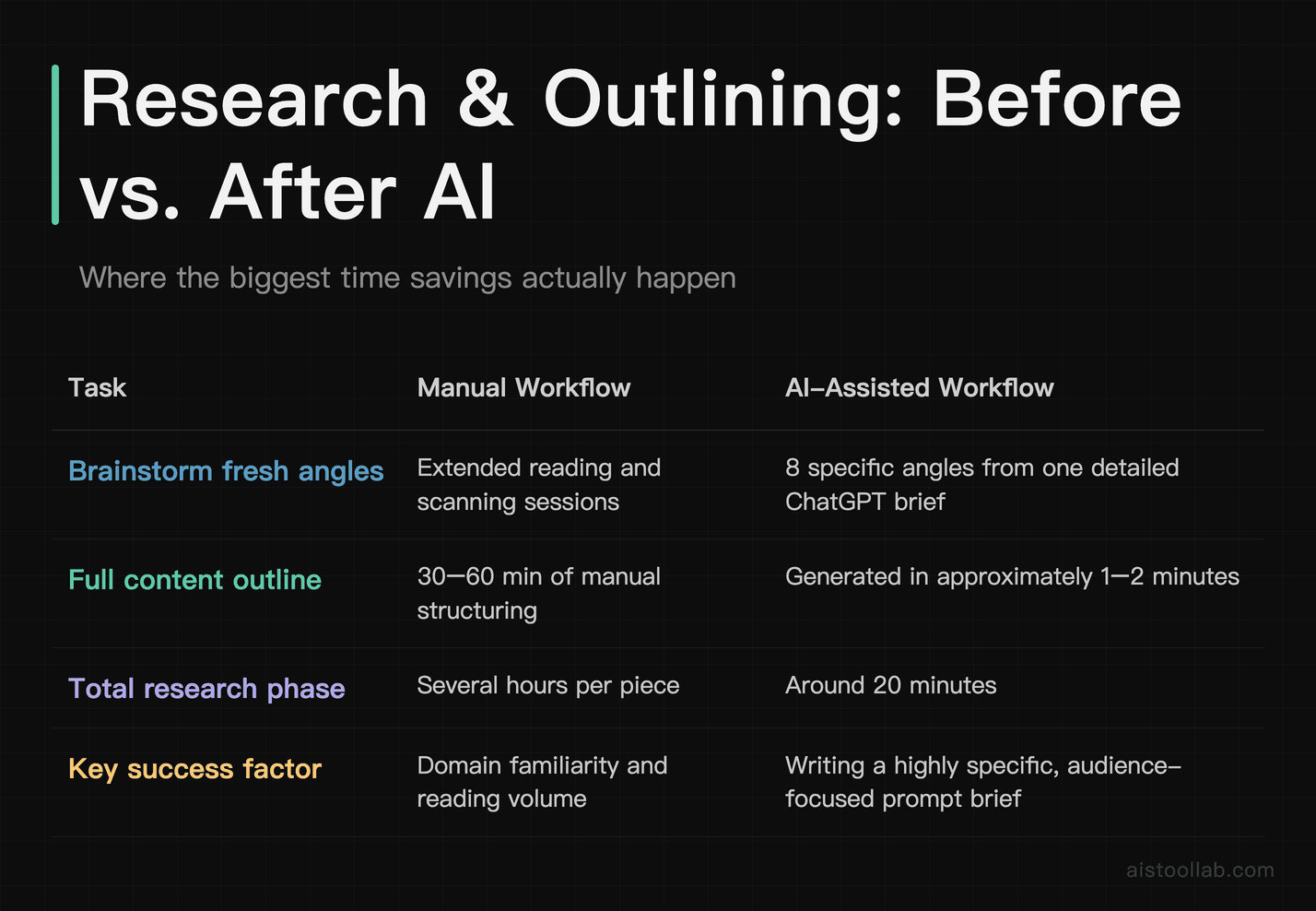
This is where the time savings are most dramatic, and honestly where I was most skeptical at first. I assumed AI-generated research would be shallow — the kind of surface-level stuff you’d get from a quick Google scan. After experimenting with it, I found that results seem to depend heavily on how you prompt it.prompt it.
The workflow that actually works looks like this. Start with ChatGPT and give it a highly specific brief — not “research video ideas about budgeting” but “I’m making a 10-minute YouTube video for 25–35 year olds who have just started investing. I want to cover common mistakes beginners make in their first year. Give me 8 angles I haven’t seen covered to death, with a brief explanation of why each one is interesting.” That specificity changes everything. The output goes from generic to genuinely useful starting points.
From there, use the best angle and ask for a full content outline — main sections, key talking points per section, suggested examples or data hooks, and a rough sense of pacing. A 10-point outline for a complex topic typically generates in roughly a minute or two. Compare that to the significant time many creators spend staring at a blank document trying to figure out structure.t trying to figure out structure.
Where you still need to add your own brain: fact-checking anything that sounds like a statistic, replacing generic examples with ones from your actual experience, and cutting the sections that don’t fit your specific angle. AI outlines tend to be thorough to the point of bloat — a 10-point outline might really only need 6 strong points. Your job is editing with intent, not just accepting the scaffold as-is.
One practical tip: after you get the outline, paste it back in and ask the AI to identify which points overlap or feel redundant. It’s surprisingly good at self-critiquing its own output when you ask directly. This step alone saves another 15 minutes of you staring at an outline trying to figure out why it feels baggy.
Video Script Generation with Claude: What Actually Works (and What Needs Surgery)
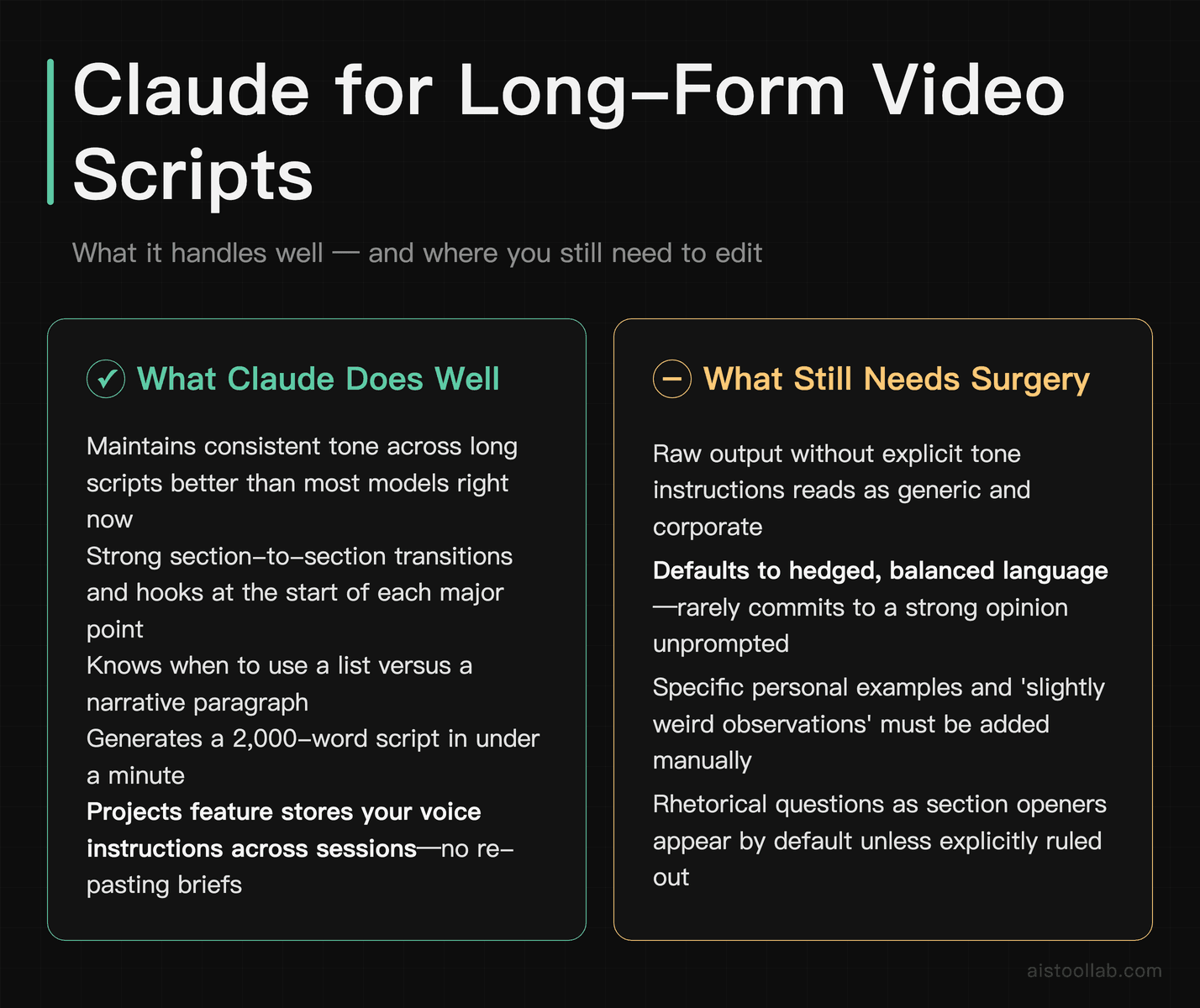
For long-form script writing, I’ve switched almost entirely to Claude over the past several months — and if you’ve read my Claude vs ChatGPT comparison comparison, you’ll know I don’t say that lightly. Claude handles extended, coherent prose better than most models right now. In my experience, Claude tends to maintain consistent tone across longer scripts.in a way that ChatGPT sometimes doesn’t.
Here’s the workflow I use and recommend. Once you have your outline, paste it into Claude with this kind of framing: “Write a YouTube script based on this outline. The host’s tone is direct and conversational, occasionally self-deprecating, never corporate. Use short paragraphs. Avoid rhetorical questions as section openers. Write for someone who watches at 1.5x speed — sentences should be punchy.” The tone instructions are the most important part. Without them, you’ll get a perfectly competent but entirely generic script.
What Claude does well: transitions between sections, hooks at the start of each major point, and knowing when to use a list vs. a narrative paragraph. A 2,000-word script typically generates in under a minute. For reference, this is exactly the kind of step where AI assistance tends to help most — turning a blank-page first draft into something you edit rather than write from scratch.
What needs heavy editing — and I mean heavy: any section that requires genuine personal anecdote, nuanced opinion, or real-world experience. Claude will generate plausible-sounding stories, but they’re either vague or slightly off in a way your regular viewers will notice. The editing layer here isn’t optional. Plan to rewrite 30–40% of any script, especially the intro (which often sounds like a textbook) and the conclusion (which tends toward the preachy).
Also watch for what I call “AI padding” — sentences that technically say something but add zero information. Phrases like “it’s important to note” or “this is a key consideration” before a fairly obvious point. Read the script out loud before you record anything. You’ll catch these immediately because they make you feel slightly embarrassed saying them.
For creators who want to go deeper on Claude’s actual capabilities, the Anthropic Claude page has updated model documentation that’s worth skimming before you start building prompts.
Thumbnail and Visual Creation with Midjourney: A Real Workflow Walkthrough
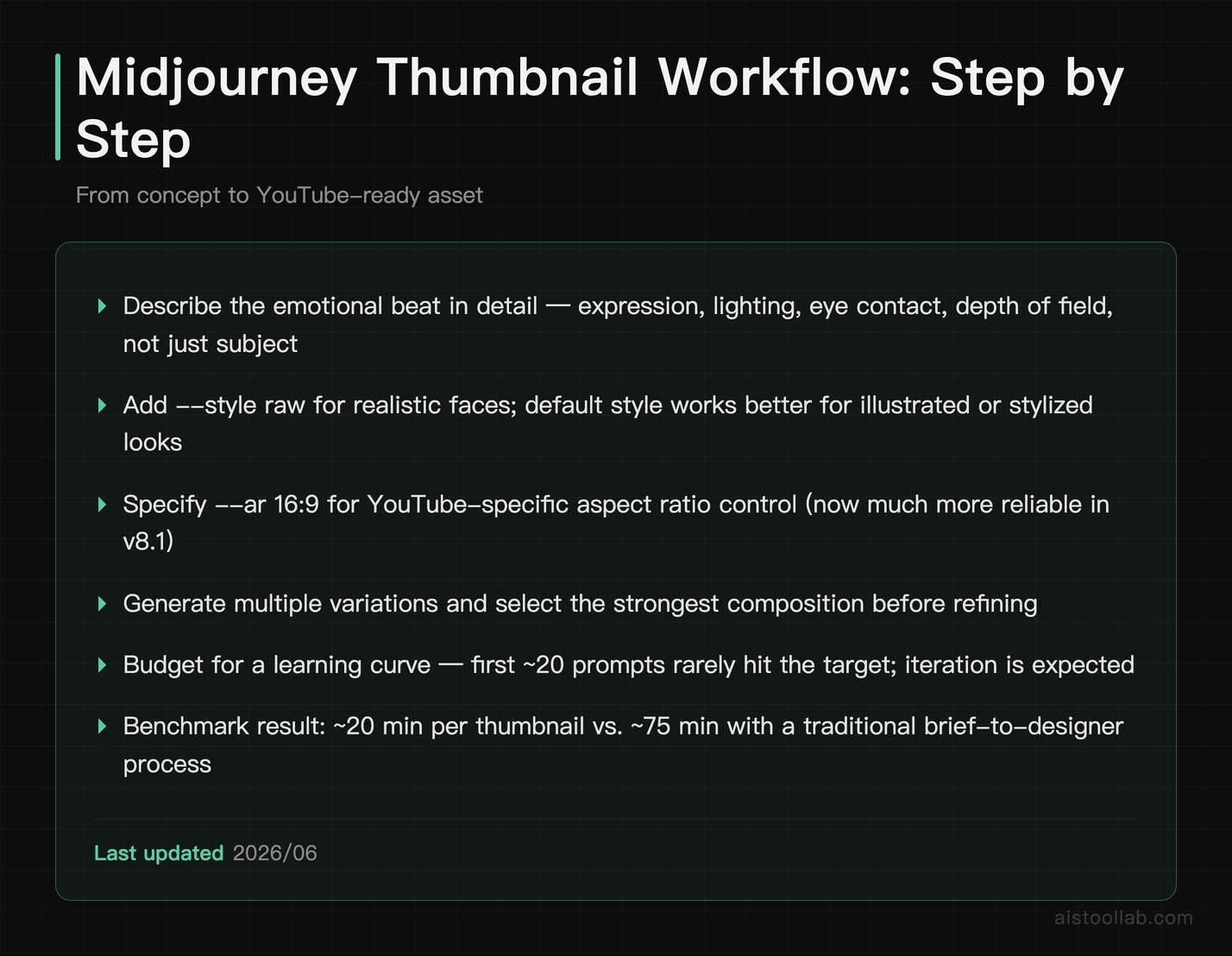
Let me be upfront: Midjourney is not a plug-and-play solution. It has a learning curve, and your first 20 prompts will probably produce results that make you question every decision you’ve made. But once you understand the prompt structure, it becomes legitimately powerful for thumbnail ideation and visual asset creation.
If you haven’t kept up with recent updates, the Midjourney v8.1 Review I wrote a few months ago covers the current model’s strengths in detail. The short version: photorealism and stylized illustration are both genuinely strong now, and the aspect ratio control has gotten much more reliable for YouTube-specific dimensions.
Here’s the actual workflow for YouTube thumbnails. Start with a text description of the emotional beat you want to hit — not “a person looking surprised” but “close-up of a person with an expression of disbelief mixed with excitement, warm studio lighting, direct eye contact with camera, shallow depth of field, high contrast, cinematic.” Add style references: “–style raw” tends to work better for realistic faces than the default. Specify aspect ratio with “–ar 16:9” for standard thumbnails.
Generate four variations, pick the strongest composition, then use the variation and upscale functions to iterate. Plan to do 3–5 rounds of this before you land on something usable. Total time: 15–25 minutes, compared to the 45–90 minutes a designer would spend. The tradeoff is that you’ll still need to add text overlay and branding in Canva or Photoshop — Midjourney doesn’t handle type well, and you wouldn’t want it to.
For creators who aren’t comfortable with photorealistic face generation (there are legitimate reasons to avoid it), Midjourney is equally strong for abstract concept visuals, illustrated backgrounds, and bold graphical thumbnails that use symbolic imagery rather than a talking head. These often test better on certain audiences anyway.
One workflow note: keep a running “prompt library” — a simple Google Doc where you save prompts that worked. Midjourney results are somewhat inconsistent, and having a prompt that produced a strong composition last week means you can iterate from a known starting point rather than starting cold every time.
Email Newsletter Automation: Templates, Personalization, and What AI Handles Well
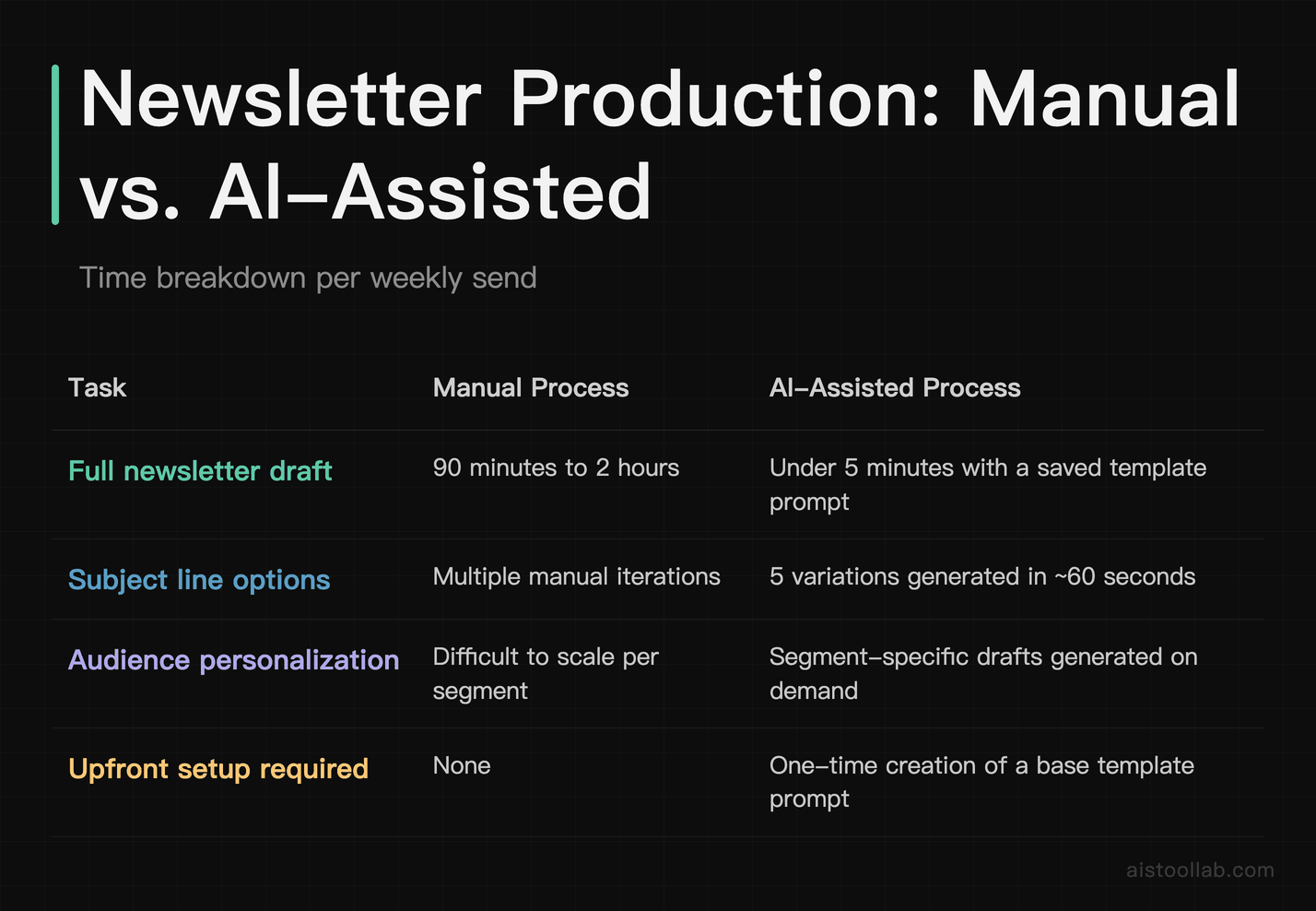
Newsletter writing is underrated as a time sink for creators. If you’re sending weekly emails to even a few thousand subscribers, you’re looking at 90 minutes to two hours per send if you’re writing properly — subject line testing, intro hook, main content, call to action, formatting. That’s before you factor in any segmentation or personalization.
The AI workflow here is straightforward but requires some upfront setup. Create a “newsletter template prompt” that includes your brand voice, typical structure (e.g., “open with a personal observation, then one main tip with a specific example, then a link to the week’s main content piece, close with one question to drive replies”), and any recurring sections you always include. Save this as a base prompt that you modify each week.
With ChatGPT or Claude, you can generate a full newsletter draft in under five minutes once that template is set. Subject line variations (generate five, pick the best) take another 60 seconds. The personalization angle — addressing different subscriber segments — is where AI helps most at scale. If you have a segment of subscribers who found you through your investing content vs. your productivity content, you can generate two versions of the intro paragraph that speak to each group’s entry point. That kind of segmentation used to require a copywriter.
What still needs your hand: the personal stories, the reaction to something that happened this week, the genuine opinion that could only come from you. Readers subscribe to newsletters because they want a human voice in their inbox. The AI-generated structure gives you a container — you fill it with the stuff that makes your newsletter worth reading.
Maintaining Authentic Voice While Using AI: The Editing Layer That Actually Matters
This is the part most tutorials skip, and it’s the part that determines whether your AI-assisted content sounds like you or sounds like a LinkedIn post from a brand account.
The honest truth is that raw AI output has a detectable signature. It’s not that it’s wrong — it’s that it’s smoothed out in a way that real human writing isn’t. It rarely commits to a strong opinion without hedging. It doesn’t make the kind of specific, slightly weird observations that come from actual experience. It avoids humor that might land wrong. All of that is understandable from a training perspective, but it makes for content that your audience will subtly sense is off, even if they can’t articulate why.
The solution isn’t to use AI less — it’s to build a deliberate editing layer. After you get your AI draft, go through it with one specific goal: make it sound like you got slightly annoyed writing this. Add the opinion you actually hold, not the balanced view the AI defaulted to. Replace one or two generic examples with something that actually happened to you. Cut any sentence that you wouldn’t actually say out loud. Add a weird specific detail that only you would know.
I keep a personal “voice checklist” — five things that show up in my best writing that I check for after editing any AI draft. Yours might be different, but the act of having explicit criteria makes the editing faster and more consistent. Without it, you’re rereading the same paragraph five times hoping it feels right. With it, you’re checking against concrete markers.
For creators managing a team — say, a VA doing a first-pass edit — this checklist becomes even more valuable. You can train someone else on your voice criteria so they’re making targeted edits rather than just grammar fixes.
Measuring Real Output Impact: Time Saved vs. Quality Tradeoffs in Practice
It’s worth being realistic about the size of the gain rather than throwing around precise-sounding numbers, because the “10x productivity” claims are everywhere and most are meaningless without context. In practice, the creators who report the biggest wins from an AI workflow tend to save the most time at the research-and-outlining stage rather than on the writing itself — and they’re usually candid that the first couple of weeks actually take longer, not shorter, because you’re learning prompt structures and doing more editing while you figure out where the AI consistently falls short.
The quality tradeoff is real and worth being honest about. AI-assisted first drafts often read as technically fine but slightly less personal than a creator’s best work — the creators who close that gap are the ones who build an editing layer and a voice checklist on top of the AI output, rather than publishing what the model hands them straight.
Where the time genuinely comes back is in the repetitive production tasks around the video rather than the creative core: outlining, thumbnail iteration, and newsletter drafting are the stages people most often report speeding up. The creative judgement — what to say, which angle to take, which thumbnail actually earns the click — still has to come from you, and rushing that part is where AI-scaled content usually goes wrong.
The honest summary: AI tools in 2026 are genuinely useful for content production at scale, but the creators getting the best results are treating them as a first-draft engine, not a finished-product machine. The ChatGPT interface has improved dramatically for workflow use, and combined with Claude for long-form drafting, the stack is more capable than it was even six months ago.
If you’re newer to building this kind of workflow and want a deeper look at how these tools stack up head-to-head, the GPT-5.6 Breakdown covers the latest capability differences in detail — useful context before you decide where to invest your prompt-writing energy.
The Stack That Actually Works in 2026
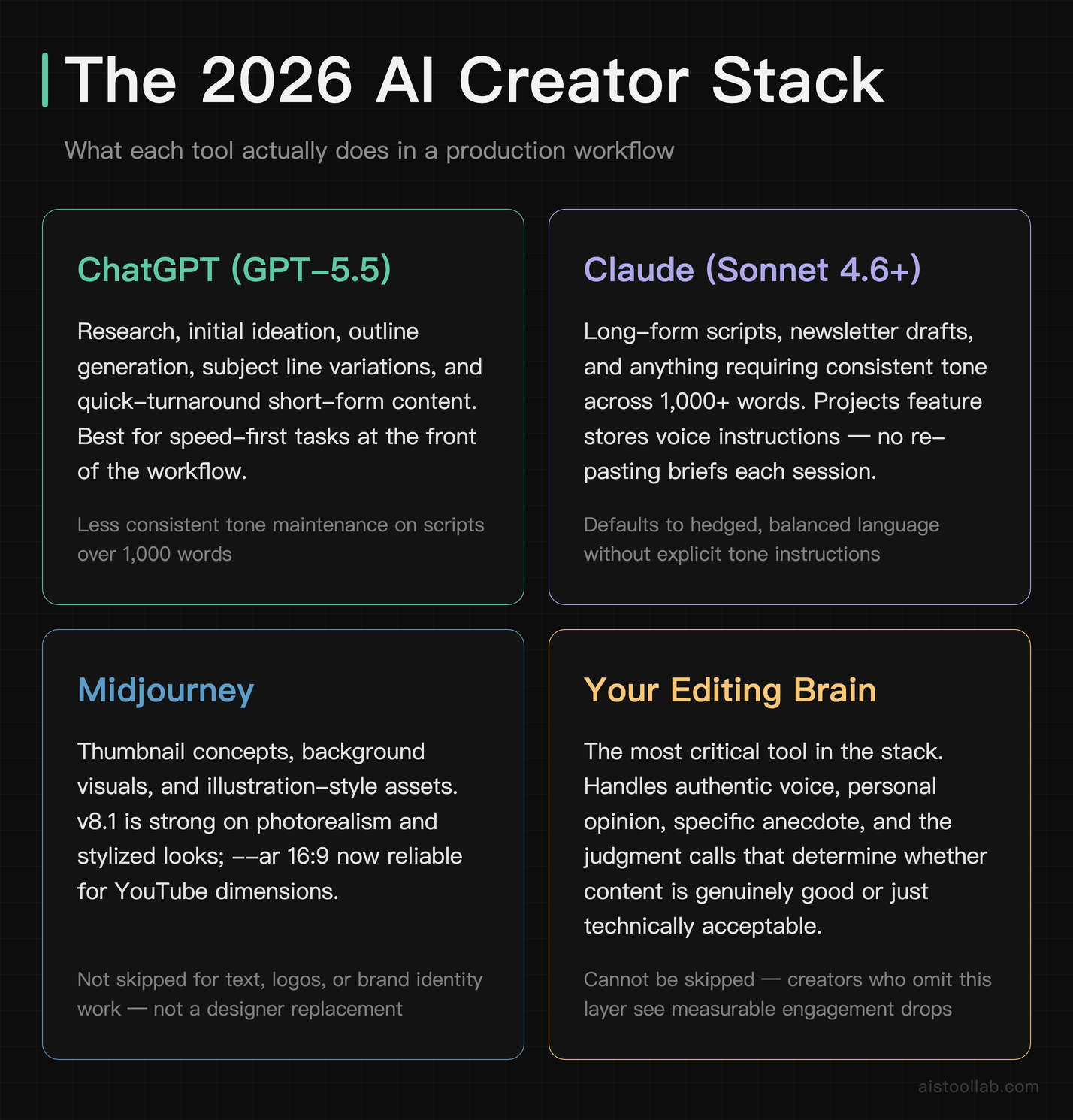
To make this concrete, here’s the actual toolkit and use-case breakdown that’s working for independent creators right now:
- ChatGPT (GPT-5.5 or GPT-5.5): Research, initial ideation, outline generation, subject line variations, quick-turnaround short-form content.
- Claude (3.5 Sonnet or newer): Long-form scripts, newsletter drafts, anything that requires maintaining tone across 1,000+ words. The Claude.ai interface has Projects now, which lets you store your voice instructions and recurring context so you’re not re-pasting your brief every session.
- Midjourney: Thumbnail concepts, background visuals, illustration-style assets. Not for type, not for logos, not as a replacement for a brand designer.
- Your editing brain: Still the most important tool in the stack. Irreplaceable for voice, opinion, personal story, and the judgment calls that determine whether content is genuinely good or just technically acceptable.
The creators who are burning out on AI tools are usually the ones who skipped the editing layer — they took AI output at face value, published it, and either got flagged for AI-generated content or noticed their engagement dropping as their audience sensed something was off. The creators scaling successfully are the ones who treat AI like a very fast, very tireless junior writer who needs a strong senior editor to make the work sing.
That’s a workflow, not a shortcut. But it’s a workflow that gives you your time back — and if you’ve been running on the content hamster wheel, you know exactly how much that’s worth.
Use Cases
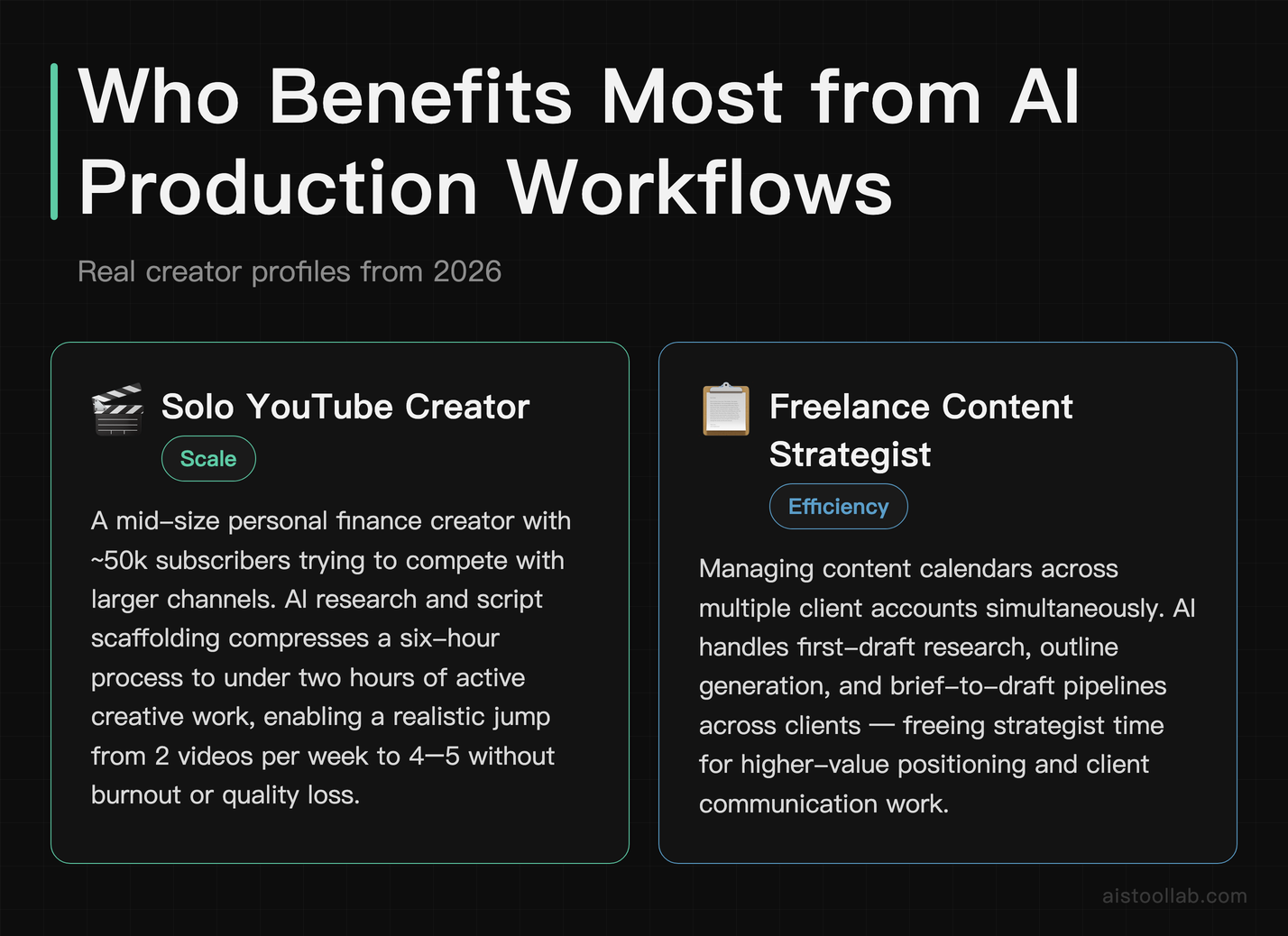
The Solo YouTube Creator Scaling to Daily Uploads
Take someone like a mid-size personal finance YouTuber with 50,000 subscribers trying to compete with larger channels that have full production teams. Before AI-assisted workflows, publishing twice a week was the ceiling — research alone ate entire mornings. Now, tools like Perplexity AI handle topic research and competitive gap analysis in minutes, while Jasper or Copy.ai drafts an initial script outline based on a channel’s established tone. The creator reviews, injects personal anecdotes, records, and moves on. What used to be a six-hour process per video is compressed to under two hours of active creative work. This allows the creator to realistically scale from two videos per week to four or five without burning out or sacrificing quality. The key is that AI never writes the final word — it scaffolds the process so the human creative voice remains front and center while logistics disappear into the background.
The Freelance Content Strategist Managing Multiple Client Accounts
Freelance content strategists are perhaps the biggest beneficiaries of AI production tools in 2026. Consider someone managing content calendars for six different clients across industries — SaaS, real estate, e-commerce, and health and wellness. Without AI, context-switching alone burns hours. With a layered AI workflow, they use tools like Notion AI for brief generation, ChatGPT-5.5 for first-draft blog posts tailored to each client’s brand voice guidelines, and Surfer SEO for optimization scoring before anything goes to review. A strategist who previously maxed out at four clients can now comfortably handle eight to ten, effectively doubling revenue without hiring subcontractors. The workflow also includes AI-generated social media repurposing from each blog post, turning one deliverable into five touchpoints. Clients get more consistent output, the strategist gets better margins, and the work that actually requires strategic thinking — positioning, audience analysis, campaign ideation — gets more dedicated attention rather than being crowded out by execution tasks.
The Early-Stage Startup Marketing Team of One
At early-stage startups, the marketing hire is almost always a team of one wearing every hat imaginable. They’re writing landing page copy, drafting investor update newsletters, managing LinkedIn thought leadership posts for the CEO, producing case studies, and building out an SEO content engine — all simultaneously, often with no budget for agencies or contractors. AI tools have become the de facto second team member for these professionals. A typical workflow might involve using Claude for long-form drafts that require nuanced, technical writing, Canva’s AI features for quick visual asset creation, and Otter.ai to transcribe customer interviews that then get fed into an AI prompt to extract testimonial quotes and pain point language. The result is that a single marketer can produce the content volume of a three-person team. Startup founders hiring their first marketing person in 2026 are explicitly asking about AI workflow proficiency during interviews, recognizing that a candidate who uses these tools effectively is functionally worth two or three hires from just five years ago.
The Newsletter Creator Monetizing an Audience in a Niche Industry
Independent newsletter writers — particularly those covering niche B2B verticals like supply chain logistics, legal tech, or climate finance — face a constant tension between publishing frequency and research depth. Readers in these spaces are experts themselves, so shallow content gets called out immediately. A newsletter creator covering the intersection of AI and healthcare compliance, for example, needs to synthesize regulatory updates, academic research, and industry news into digestible weekly editions. AI tools like Elicit for research paper summarization, combined with custom ChatGPT prompts trained on the creator’s writing style and past issues, allow this creator to produce deeply researched 1,500-word editions in a fraction of the previous time. The AI surfaces relevant sources, extracts key data points, and drafts section scaffolding. The human writer brings expert interpretation, source verification, and the distinctive editorial voice that subscribers are actually paying for. Several newsletter creators in this space have reported growing paid subscriber counts specifically because higher publishing frequency — enabled by AI — builds audience trust and habit formation faster than monthly or bi-weekly cadences ever could.
Frequently Asked Questions
Will my audience be able to tell I’m using AI tools?
If you publish raw AI output without a proper editing pass, yes — most engaged audiences will sense something is off even if they can’t name it. The solution is a deliberate editing layer where you rewrite for voice, add specific personal details, and cut the hedged or generic language AI defaults to. With that layer in place, the output is indistinguishable from content you wrote start-to-finish.
How long does it take to build a working AI content workflow?
Realistically, two to three weeks of active use before the workflow feels natural and the output quality is consistently high. The first week is mostly learning how to prompt effectively for your specific content type. The second week is refining your editing process. By week three, most creators report the workflow feeling intuitive.
Is it worth paying for the premium tiers of these tools?
For serious content creators producing multiple pieces per week, yes — the free tiers have rate limits and model restrictions that will frustrate you quickly. ChatGPT Plus, Claude Pro, and Midjourney’s basic paid tier collectively run around $60–70/month. If those tools are saving you even 10 hours of production time monthly, the math is straightforward.
Can I use AI tools for short-form content (Reels, TikTok, Shorts) the same way?
Yes, though the workflow is simpler. For short-form, AI is most useful for generating hook variations (write 10 different opening lines for this concept, pick the strongest), caption drafts, and batching content ideas for a week’s worth of posts in a single session. The script generation workflow is overkill for 60-second content — focus on hooks and ideation.
What’s the biggest mistake creators make when starting with AI tools?
Expecting the first output to be usable as-is. The creators who get frustrated and give up are almost always treating AI like a vending machine — put a prompt in, get finished content out. The ones who stick with it understand that AI is a drafting engine, and the quality of what you publish depends on what you do with the draft, not just what the AI produces.
Last updated: 2026
Related reading: Runway AI Gen-3 Tutorial 2026: Master Video Generation with Advanced Prompting and Motion Control