
The “Best AI Video Tool” Lists Are Lying to You
Every ranking article about AI video tools seems to reach the same conclusion: Runway is great for filmmakers, Descript is great for podcasters, Synthesia is great for business. Then you spend $49 a month on something that’s completely wrong for how you actually work, and you’re back to square one two weeks later.
This article contains affiliate links. If you buy through them I may earn a commission at no extra cost to you. All opinions are my own.
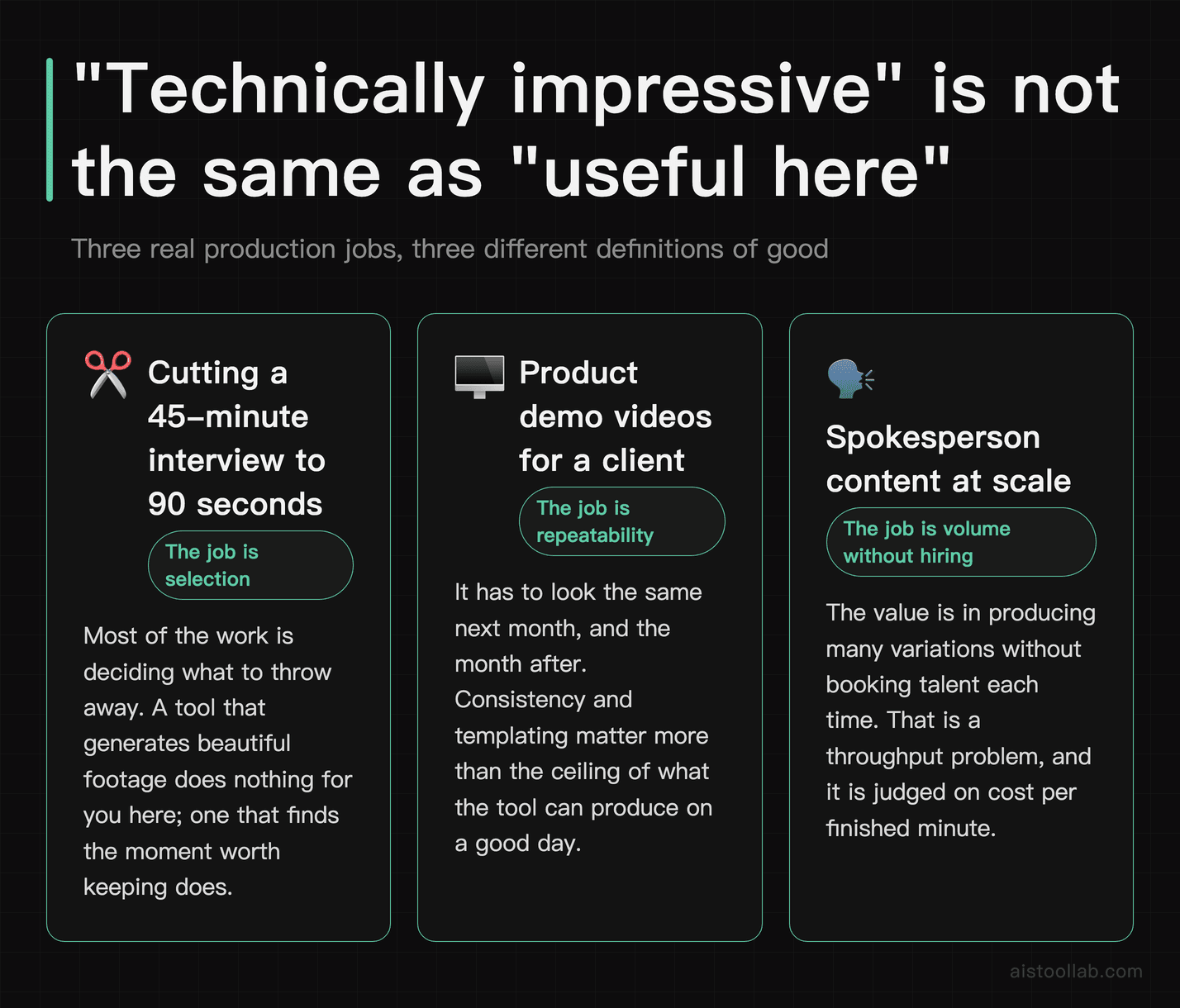
These tools are built for real production workflows — not five-minute demos. Cutting a 45-minute interview down to a 90-second reel. Building product demo videos for a SaaS client. Generating spokesperson content at scale without hiring talent. The gap between “technically impressive” and “actually useful for your specific situation” is enormous. The tools are maturing fast — faster than most people in the writing and coding AI space give them credit for — but picking the wrong one wastes real money and real time.
So this list is structured differently. Instead of ranking by raw capability, I’m ranking by who should actually use each tool. Solo YouTubers have completely different needs than a two-person agency team or an enterprise L&D department. The best tool for one is genuinely terrible for another. Let’s get into it.
How I Evaluated These Tools
Before the rankings, here’s what matters when evaluating these tools. Each one is suited to real tasks like repurposing long-form content into short clips, generating or editing talking-head footage, and producing something polished enough that a client or audience wouldn’t immediately clock it as AI-generated. That last goal is harder than it sounds in 2026.
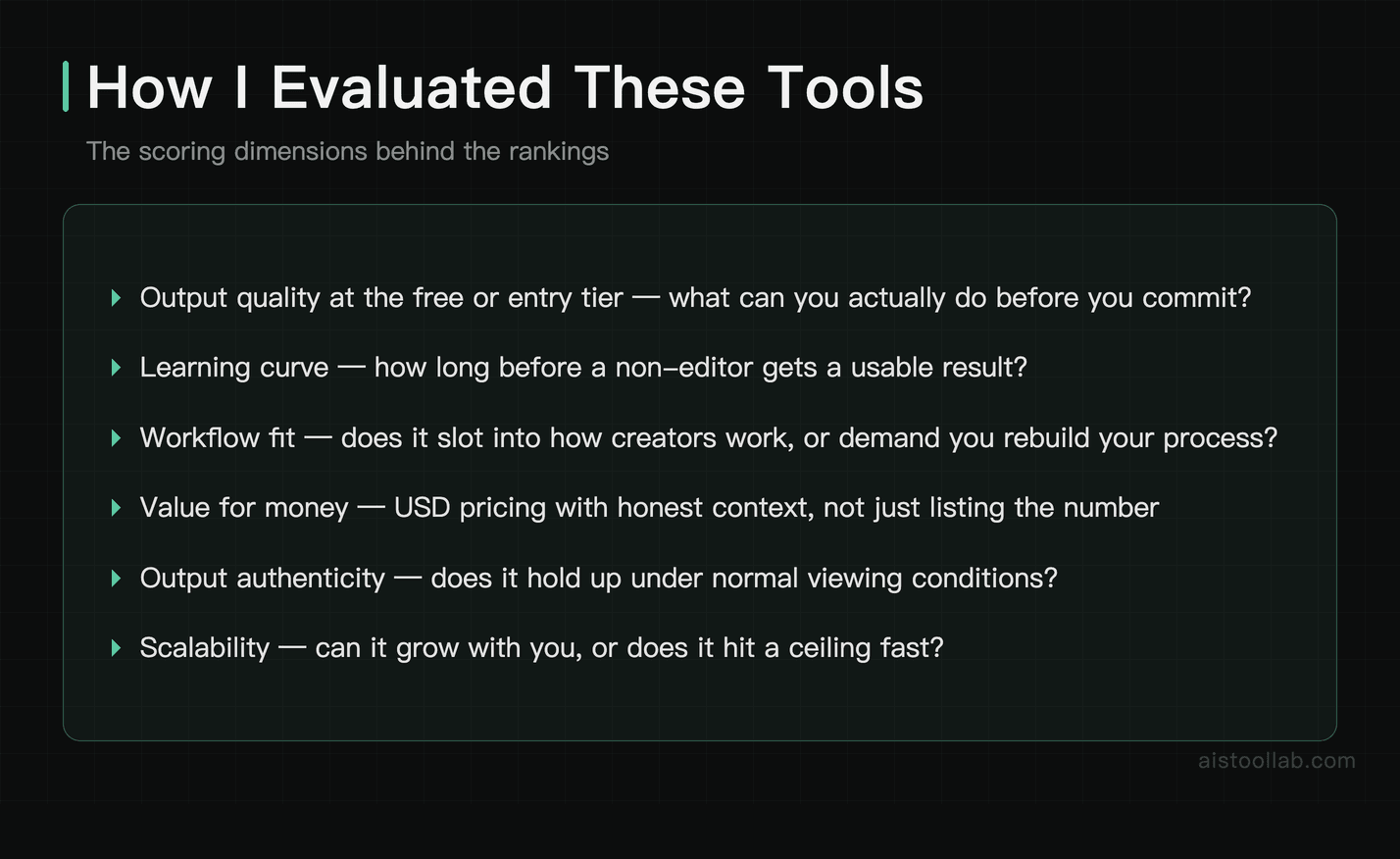
Scoring dimensions I weighted:
- Output quality at the free or entry tier — what can you actually do before you commit?
- Learning curve — how long before a non-editor gets a usable result?
- Workflow fit — does it slot into how creators or teams actually work, or does it demand you rebuild your whole process?
- Value for money — USD pricing with honest context, not just listing the number
- Output authenticity — does the AI-generated content hold up under normal viewing conditions?
- Scalability — can it grow with you, or does it hit a ceiling fast?
Real-world usage patterns beat feature lists every time — day-to-day usability counts for more here than spec-sheet feature lists.
Full Comparison Table: 15 AI Video Tools at a Glance
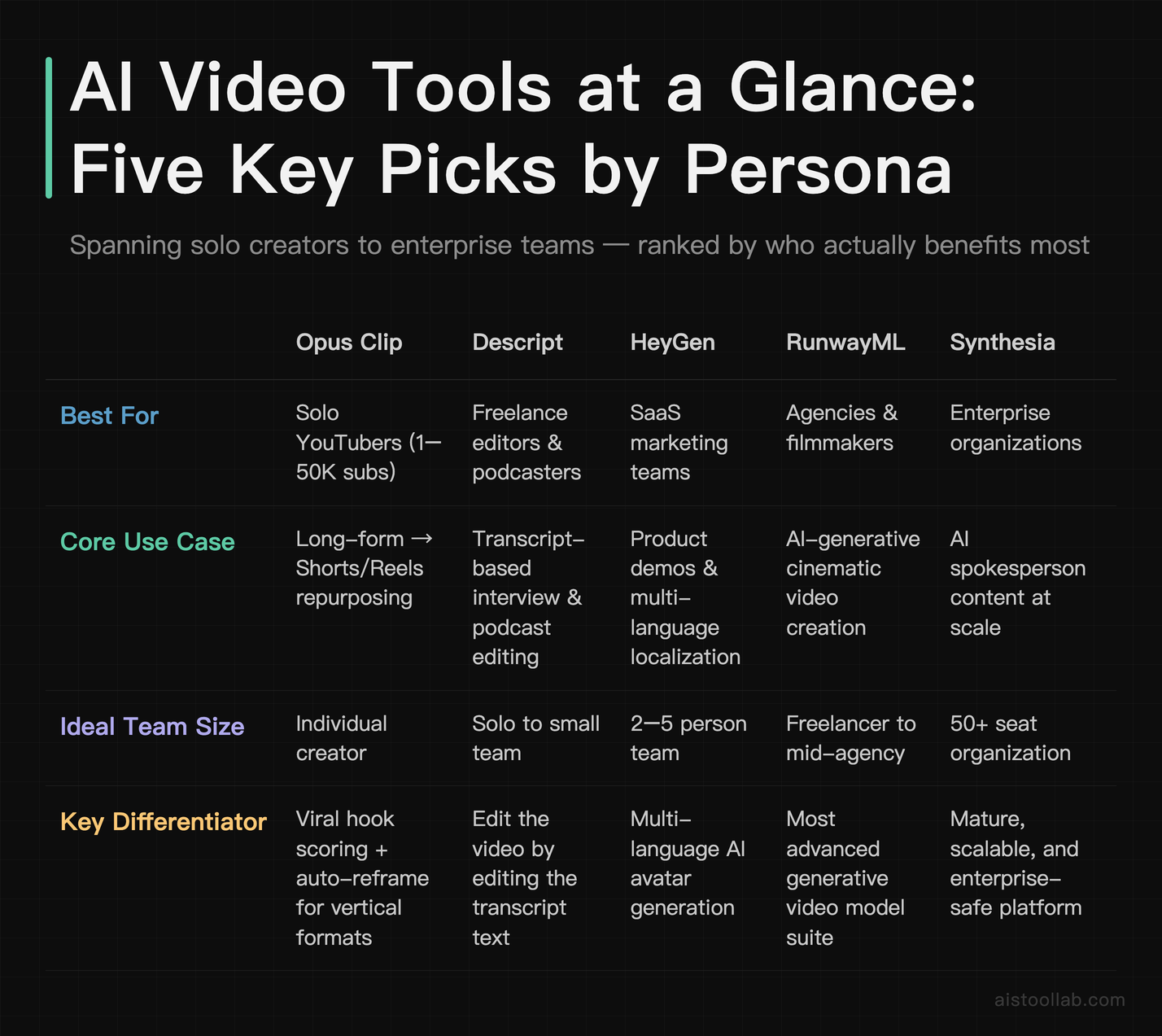
The Rankings: Profiled by Who You Are
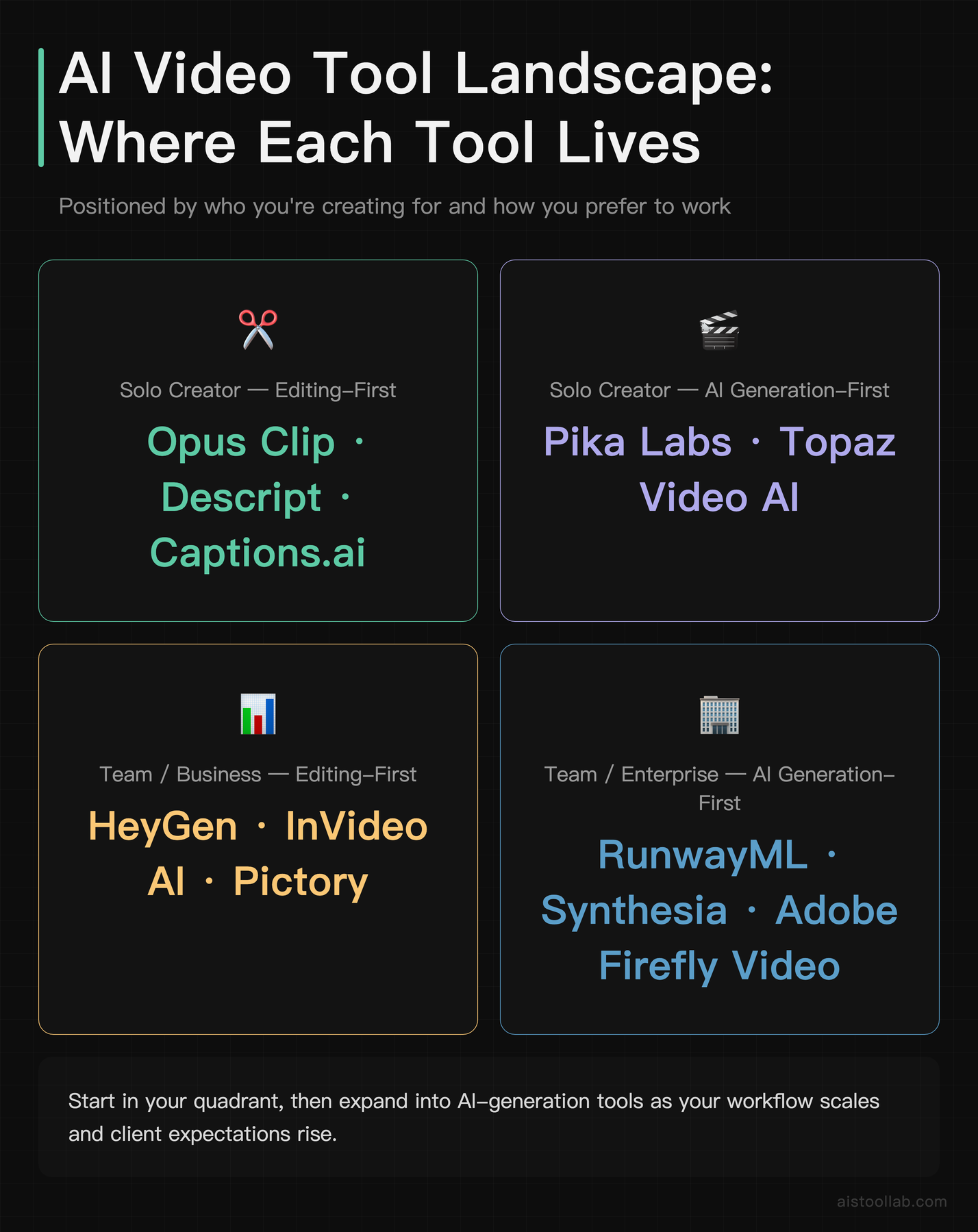
#1 — Opus Clip: Best for Solo YouTube Creators Repurposing Long-Form Content
Opus Clip sits at number one not because it’s the most powerful tool on this list — it isn’t — but because it delivers the highest immediate ROI for the largest segment of people asking “which AI video tool should I start with?” If you’re uploading 20–60 minute YouTube videos and not turning them into Shorts and Reels, you’re leaving real growth on the table. Opus Clip essentially automates that entire workflow.
You paste in a YouTube URL or upload a video, and it identifies the most “hook-worthy” moments using an AI scoring system that weights engagement signals. The clips come out with auto-captions, reframing for vertical format, and suggested titles. The viral hook score is genuinely useful — not just a gimmick — for prioritizing which clips to actually post. At around $15/month, that’s less than you’d pay for a single hour of a video editor’s time. The free tier lets you try it before committing, which I always respect.
Where it falls short: it has almost no manual editing capability, and if your source video has multiple speakers or a complex structure, the AI sometimes clips at awkward moments. You’ll still need to review outputs before posting. But for a solo creator who isn’t a trained editor and needs to be on three platforms at once, this is the practical choice.
#2 — Descript: Best for Podcasters, Interviewers, and Talking-Head Creators
Descript is the tool I’ve personally recommended more than any other in this category. The core concept — edit video by editing the transcript like a Word document — sounds like a marketing line until you actually use it. Then you realize how much time you’ve been wasting scrubbing timelines to find where someone said “um” 47 times.
The AI-powered filler word removal works reliably well. The Studio Sound feature cleans up audio recorded in less-than-ideal conditions — a home office, a car, a hotel room — in a way that used to require an audio engineer. Overdub, their voice cloning feature, lets you fix a word or sentence in post without re-recording, which is a genuinely useful capability if you do any kind of voiceover work. Check out the ElevenLabs Review 2026 (try free →) for context on how Descript’s voice quality stacks up against dedicated voice AI tools.
The pricing around $24/month is fair for what you get, though the free tier is quite limited. This isn’t a tool for creating AI-generated video from scratch — it’s for editing real footage, fast. If that’s your workflow, it’s arguably the best investment on this entire list.
#3 — Captions.ai: Best for TikTok and Reels Creators Working Mobile-First
Captions.ai is the sleeper hit of this list. Most ranking articles don’t give it enough credit because it looks simple on the surface. But for a specific type of creator — someone filming themselves on a phone and posting to TikTok, Instagram Reels, or YouTube Shorts — it handles more of the annoying production work than anything else at its price point.
The auto-caption accuracy is consistently good, and the styling options are on-trend rather than generic. But the feature that genuinely surprised me is the eye contact correction: it uses AI to make it look like you’re looking directly at the camera even when you’re reading from a teleprompter or looking slightly off-axis. For creators who film solo without a director, that subtle difference in connection with the audience is real. At around $7/month, it’s about the price of a coffee and a half. The mobile app is the main interface, which is either a strength or a limitation depending on your workflow.
#4 — Synthesia: Best for Enterprise Training and Corporate Communications
Synthesia is not a tool for individual creators, and it doesn’t pretend to be. It’s built for organizations that need to produce talking-head video content at scale without cameras, studios, or on-screen talent. Corporate onboarding videos, compliance training, internal communications, product walkthroughs — if you work in L&D, HR, or internal comms at a company of any real size, Synthesia is worth a serious look.
The avatar quality has improved noticeably over the past year. They’re not photorealistic in the uncanny-valley-free sense — most viewers can tell something is slightly off — but for internal corporate use, that threshold is rarely the deciding factor. The multilingual support is the genuinely enterprise-grade feature: produce a video once, translate and re-lip-sync it into dozens of languages without re-recording. For global organizations, that’s a legitimate cost saving.
Starting at around $29/month, it’s accessible for small teams, but the real value proposition kicks in at the enterprise tier with custom avatars and API access. If you’re a solo creator or freelancer, this is probably overkill — look at HeyGen instead.
#5 — HeyGen: Best for Marketing Teams Doing Video Localization
If Synthesia is the enterprise training tool, HeyGen is the marketing team’s secret weapon — specifically because of its video translation and lip-sync capability. You upload an existing video of a real person speaking, and it translates the audio into another language while convincingly syncing the lip movement. For teams trying to reach international markets without re-filming content in multiple languages, the workflow implications are significant.
The avatar creation from a real person’s footage (with their consent) is also strong, and the interface is friendlier for small marketing teams who aren’t technically deep. The free tier is extremely limited — one minute of video per month — so you’ll need to commit to at least the $29/month plan to actually work with it. That said, if you’re currently paying for translation services, video localization, or regional content production, the math can work in your favor fairly quickly.
#6 — RunwayML: Best for Visual Storytellers, Indie Filmmakers, and Designers
RunwayML is where AI video gets genuinely cinematic. This is the tool that creative professionals and indie filmmakers have been building workflows around, and the Gen-3 Alpha model (their current text-to-video and image-to-video generation system) produces results that are, frankly, striking. Not perfect — motion consistency over longer sequences is still a known limitation — but impressive enough that it shows up in actual commercial work.
The learning curve is higher than the other tools on this list. Getting good results from RunwayML requires understanding how to prompt effectively for visual content, which is a different skill set than writing prompts for a chatbot. Lighting descriptions, camera movement instructions, mood cues — these all matter. For designers and filmmakers who are willing to put in that learning time, the ceiling is much higher than anything else on this list.
The credit-based pricing model can feel opaque at first — you’re buying credits that get consumed per generation — and costs can add up faster than expected if you’re iterating a lot. The ~$15/month entry plan gives limited credits, and serious users typically end up on higher tiers. Worth it for creative professionals; probably frustrating for content marketers who just want reliable output fast. This connects well to the broader shift in AI capabilities that I discussed in Multi-Modal AI and Foundation Models in 2026.
#7 — Adobe Firefly Video: Best for Creative Pros Already in the Adobe Ecosystem
Adobe Firefly Video doesn’t need to win on raw AI capability — it wins on integration. If you’re already paying for Adobe Creative Cloud and spending most of your editing life in Premiere Pro or After Effects, Firefly Video’s generative capabilities inside those tools are a different kind of valuable than any standalone app.
The commercially safe content generation is the headline feature for agency and studio work. Adobe has been explicit that Firefly-generated content is trained on licensed material, which matters enormously for any professional use where IP questions could become legal questions. That peace of mind has real dollar value in client-facing work. The quality of generative clips and text-to-video features is solid, though RunwayML still has the edge on pure creative output at the time of writing.
If you’re not already a Creative Cloud subscriber, building your workflow around Firefly Video specifically probably doesn’t justify the full CC subscription cost. But if you’re already paying for it, not using these features is leaving real capability on the table.
#8 — Kling AI: Best for Creators Wanting High-Realism Generation at a Competitive Price
Kling AI has quietly become one of the more impressive AI video generation tools available, particularly for the price point. Coming from Kuaishou, it produces motion that holds up well against more established Western tools, with a daily free credit system that lets you experiment without commitment before deciding on a paid plan.
The realism of human movement — how people walk, turn, interact with objects — is an area where Kling has shown particular strength. This matters for creators trying to generate b-roll, conceptual footage, or stylized scenes that need to feel physically grounded rather than floaty. At around $10/month for meaningful access, it’s a strong value proposition for creators who want generative video capability without RunwayML’s steeper learning curve or higher credit costs.
#9 — Pictory: Best for Bloggers and SEO Teams Turning Written Content into Video
Pictory solves a very specific problem very well: you have a blog post, script, or article, and you need a video version with minimal effort. The pipeline — paste text, get video with stock footage, voiceover, and captions — is exactly as straightforward as it sounds. For content marketing teams and bloggers trying to establish a video presence without a dedicated video production budget, this is a practical entry point.
The output isn’t going to win any creative awards, and the stock footage can feel generic if you’re not intentional about curating it. But for SEO-driven video content or repurposing existing written content for YouTube, the time savings are genuine. At around $23/month, it’s competitive with other template-driven tools while being more specifically focused on the text-to-video pipeline than broader tools like InVideo.
#10 — InVideo AI: Best for Marketing Teams Wanting Template-Driven Volume
InVideo AI is the Swiss Army knife of this list — it does a lot, none of it badly, which makes it useful for marketing teams that need consistent video output without specialized expertise. The text-to-video capability, broad template library, and built-in stock media make it easy to produce reasonable-quality marketing videos at volume.
The free tier includes watermarked video, which is fine for testing but not for client-facing work. At around $25/month for the paid tier, it competes directly with Pictory and InVideo’s positioning is broader — social ads, promotional videos, explainer content — rather than Pictory’s text-repurposing focus. If your team needs one tool that can handle multiple video content formats without deep technical skill, InVideo is a reasonable answer.
#11 — Luma Dream Machine: Best for Prompt Experimenters and Concept Visualizers
Luma Dream Machine sits in an interesting spot: it produces some of the smoothest, most photorealistic motion of any generative video tool I’ve tested, but the lack of fine-grained control can be frustrating if you’re trying to achieve something specific. It excels when you give it a strong visual prompt and let it interpret — less so when you need precise compositional control.
For creative directors, concept artists, or anyone who needs to quickly visualize a scene, mood, or environment without filming it, Dream Machine is a genuinely useful addition to the toolkit. At around $30/month for meaningful generation capacity, it’s not the cheapest option, but the output quality justifies the price for the right use case.
#12 — Pika Labs: Best for Social Media Designers and Short Clip Animators
Pika Labs has carved out a specific niche: fast, stylized image-to-video animation for social media content. Upload an image, describe a motion or effect, get a short animated clip. The workflow is nearly instant compared to more complex generation tools, and the stylization options give you creative range beyond simple movement.
It’s not built for long-form or complex storytelling — the clips are typically short by design. But for social media designers, digital artists, and creators who want to add kinetic energy to static imagery, Pika is genuinely fun to work with. At around $8/month, it’s an easy add-on tool rather than a primary production platform.
#13 — Topaz Video AI: Best for Videographers Upscaling and Restoring Footage
Topaz Video AI is solving a completely different problem than every other tool on this list. It’s not about generating or editing — it’s about enhancing existing footage: upscaling old or low-resolution video to 4K or higher, reducing noise, improving motion clarity, restoring archival footage. For documentary filmmakers, event videographers working with mixed-quality source material, or anyone dealing with old footage that needs a modern look, it’s in a category of its own.
The one-time purchase option (around $199 with periodic sales bringing it lower) is unusual in a market full of subscriptions, which many professionals appreciate. Processing is local on your machine rather than cloud-based, meaning a capable computer is required — and processing time for long clips can be significant. But the output quality for enhancement tasks is hard to match with any other tool.
#14 — Wondershare Filmora (AI Features): Best for Intermediate Creators Wanting Guided AI Edits
Wondershare Filmora has been steadily adding AI features to what was already a user-friendly mid-level editor. The AI smart cutout, auto beat sync for music videos, and AI-generated backgrounds are genuinely useful additions rather than marketing window dressing. It sits comfortably between the simplicity of CapCut and the professional ceiling of Premiere Pro.
For creators who have outgrown beginner tools but aren’t ready or willing to invest the time in a professional NLE, Filmora’s AI features provide meaningful workflow acceleration. At around $50/year, it’s competitively priced and the watermark-free output on paid plans is clean. Not the most exciting tool on this list, but one of the most reliably useful for its target audience.
#15 — CapCut (AI Features): Best for Beginners and Budget-Conscious Social Creators
CapCut sits at the bottom of the ranking not because it’s bad — it’s excellent for what it is — but because its ceiling is lower than everything above it. If you’re just getting started with video content, or if you’re creating personal social media content without commercial intent, CapCut is legitimately one of the most capable free tools available. The AI auto-cut, background removal, text effects, and trending template system are all functional and fast.
The limitations kick in when you need precision, brand consistency, or output quality that holds up beyond mobile screens. And for commercial work, the data privacy considerations associated with ByteDance-owned tools have been a genuine concern in some markets — worth researching for your specific use case and jurisdiction. But as a free entry point into AI video editing, it’s hard to beat.
Who Should Use Which: Decision Guide by Persona
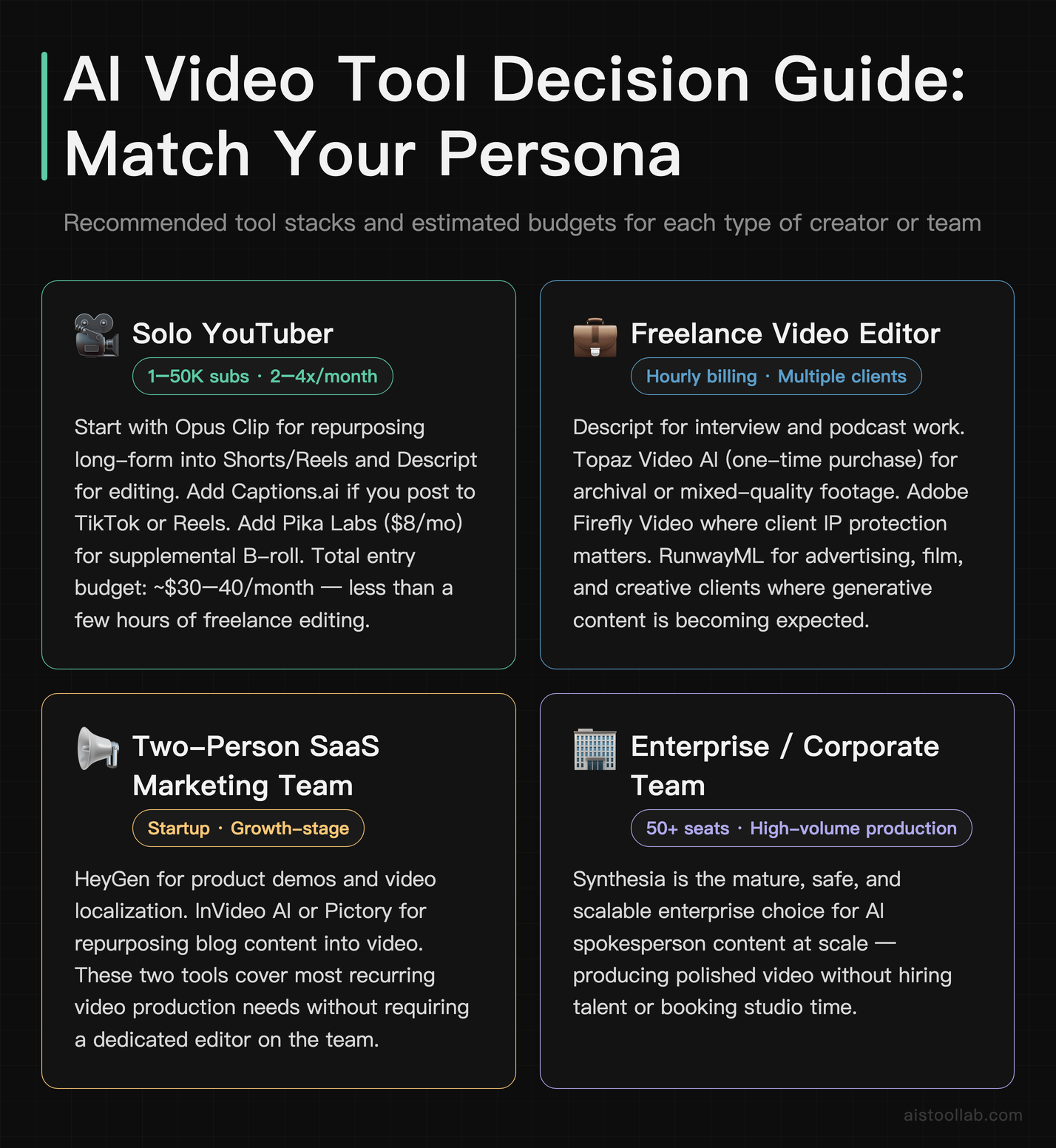
The Solo YouTuber (1–50K subscribers, posting 2–4x/month)
Start with Opus Clip for repurposing and Descript for editing. If you’re primarily talking-head content, Descript alone may be enough. Add Captions.ai if you’re posting to TikTok or Reels. Total budget: $30–40/month covers all three entry tiers, and that’s likely under what you’d pay for even a few hours of freelance editing. For generating supplemental B-roll visuals, Pika Labs at $8/month is a low-risk add-on.
The Freelance Video Editor (billing hourly, multiple clients)
Descript for interview and podcast work. Topaz Video AI as a one-time purchase if you work with archival or mixed-quality footage. Adobe Firefly Video if your clients are already on Creative Cloud and IP protection matters to them (it usually does). RunwayML if any clients are in advertising, film, or creative industries where generative visual content is becoming expected. The combination of Descript plus RunwayML covers the widest range of freelance video work without excessive tool sprawl.
The Two-Person Marketing Team at a SaaS Startup
HeyGen for product demo and localization video. InVideo AI or Pictory for repurposing blog and documentation content into video. If your founders or PMs are camera-shy or you need polished spokesperson content quickly, HeyGen’s custom avatar creation is worth the investment. Adobe Firefly Video if your designer is already CC-dependent. Keep CapCut on hand for quick social-native cuts that don’t need to go through a formal review cycle.
The Enterprise L&D or Internal Comms Team
Synthesia is the clear primary choice here. The avatar quality, language support, and enterprise security features are purpose-built for this use case. Complement it with Descript if you’re doing any real-footage training videos alongside avatar content. For organizations with global reach needing to localize existing video assets, HeyGen’s translation pipeline pairs well with Synthesia’s production capabilities.
The Indie Filmmaker or Visual Artist
RunwayML as the creative centerpiece. Luma Dream Machine for concept visualization and photorealistic scene generation. Topaz Video AI if you’re working with any non-native-resolution footage. This combination gives you a generative video stack that can genuinely support professional creative work, not just social media output. Budget $50–80/month across these three and you have capabilities that would have cost orders of magnitude more in production resources just a few years ago. The AI systems underpinning these tools are getting more capable rapidly — for context on where this is heading, the Agentic AI in 2026 piece gives useful background on how these models are evolving beyond simple generation.
My Final Verdict
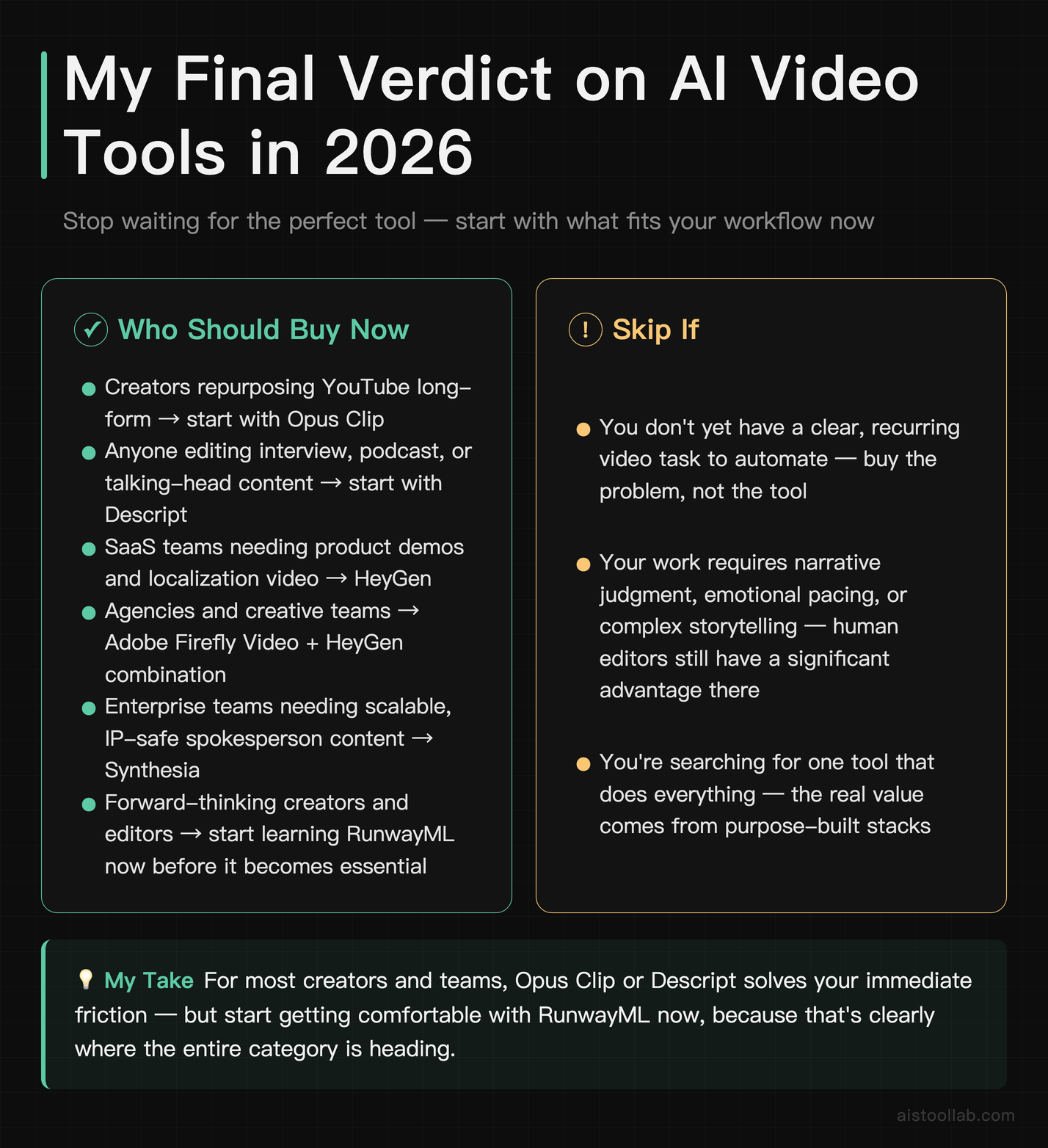
If I had to give one recommendation to the widest possible audience reading this, it would be: stop waiting for the perfect tool and start with Opus Clip if you’re a creator, or Descript if you’re doing any interview or talking-head content. Both have meaningful free tiers, both integrate into existing workflows without demanding you rebuild your whole production process, and both solve real, daily friction for the people they’re designed for.
The more interesting recommendation is this: RunwayML is the tool on this list most likely to look like an obvious must-have in two years’ time. The generative video space is moving faster than any other category in AI right now — the underlying models are improving at a pace that’s genuinely hard to keep up with, as the How AI Models Actually Compare in 2026 breakdown illustrates. Getting comfortable with RunwayML’s interface and prompting approach now, even if the outputs aren’t yet where you need them for professional work, positions you ahead of where this is clearly going.
For enterprises: Synthesia is the mature, safe, scalable choice. For agencies: Adobe Firefly Video plus HeyGen covers the most ground with the fewest IP headaches. For indie creatives: RunwayML plus Topaz Video AI is a stack worth serious investment. The era of “AI video is a gimmick” ended sometime last year. The question now is just which part of your workflow you want to improve first.
Frequently Asked Questions
Are AI video tools good enough to replace a human video editor in 2026?
Honestly, it depends heavily on what “video editor” means in your context. For straightforward editing tasks — cutting out filler words, trimming silence, adding captions, resizing for different platforms — AI tools like Descript and Opus Clip have reached a point where they handle these tasks faster and more reliably than most human editors would. If your video content is interview-based, podcast-based, or repurposed long-form content, you can run a very capable production operation with minimal or no human editing intervention.
Where human editors still have a clear and significant advantage is in narrative judgment, emotional pacing, creative storytelling decisions, and anything that requires understanding the full context of what a piece of content is trying to achieve. An AI can cut out dead air; it can’t always tell you that a particular moment is more powerful because of the pause before it. For commercial creative work, brand campaigns, documentary filmmaking, and anything where storytelling is the core value, human editorial judgment remains important. The realistic picture in 2026 is a collaboration model: AI handles the repetitive, time-consuming mechanical work; humans direct the creative and strategic decisions. That combination is genuinely more efficient than either working alone.
What’s the best free AI video editing tool right now?
For genuinely useful free access without immediately hitting a wall, CapCut has the most complete free tier for social video editing — auto-cut, background removal, captions, and templates are all functional on the free plan. Opus Clip’s free tier lets you process a meaningful number of clips before requiring an upgrade, which is useful for testing whether it fits your workflow. RunwayML provides free credits for generation, but they go quickly if you’re experimenting seriously.
The honest answer is that “free” in this category usually means “watermarked” or “severely credit-limited.” Most of these tools have designed their free tiers to let you experience the value proposition before committing, not to be a fully functional production tool in perpetuity. If you’re serious about incorporating AI video tools into your workflow, budgeting even $15–25/month for a single tool will unlock meaningful capability that the free tiers won’t. That said, starting free to validate fit before paying is always the right approach — and Opus Clip and Captions.ai both have free tiers worth genuinely testing before you decide.
How does Synthesia compare to HeyGen for business video production?
These two tools are often compared because they overlap on the AI avatar video use case, but they’re optimized for meaningfully different workflows. Synthesia is built for organizations producing training, compliance, and internal communication video at scale. The platform is more structured, the avatar library is larger, and the enterprise feature set — custom avatars, API access, SSO, security compliance documentation — is more developed. If you’re in an L&D department producing dozens of training videos a month, Synthesia’s workflow is purpose-fit.
HeyGen’s differentiating strength is video translation with lip sync. If you have existing video footage and need to convert it to multiple languages convincingly, HeyGen does this better than Synthesia at the time of writing. HeyGen also has a somewhat more accessible interface for marketing teams who are less technically oriented. The pricing is similar at entry level (both around $29/month), so the decision usually comes down to: are you producing new avatar content at scale (Synthesia) or localizing existing footage (HeyGen)? If you need both, some teams use both tools in parallel rather than trying to force one into a role it wasn’t designed for.
Is RunwayML worth it for someone without a filmmaking background?
RunwayML is worth it if you’re willing to invest time in learning how to prompt effectively for visual content, which is a genuinely different skill than text prompting. The tool rewards patience and experimentation — users who dive in expecting to type one sentence and get a professional-quality video clip are typically disappointed. Those who treat it as a creative medium with its own language tend to find it increasingly powerful over time.
For someone without a filmmaking background who primarily needs reliable content marketing video, InVideo AI or Pictory will deliver more consistent results with less friction. But if you’re creative, curious, and drawn to the visual storytelling side of video — even without formal training — RunwayML’s ceiling is high enough that the learning investment pays off. There are extensive communities on Discord and Reddit where RunwayML users share prompting techniques, and the quality of community knowledge has grown substantially. Starting on the free tier to explore the interface before committing financially is definitely the right move.
Can these AI video tools handle content in languages other than English?
Multilingual capability varies significantly across this list. Synthesia and HeyGen are the clear leaders here — Synthesia supports more than 120 languages for avatar video generation, and HeyGen’s translation and lip-sync feature is specifically designed for multilingual content. Captions.ai supports automatic caption generation in a range of languages beyond English, though accuracy varies by language. Descript’s transcription-based editing works in multiple languages, though its filler word removal and other language-specific features are primarily optimized for English.
For teams specifically building multilingual content strategies, HeyGen’s video translation pipeline is one of the more practically impactful features in this entire category. Being able to produce a video once and distribute it across language markets without re-recording is a genuine competitive advantage for international businesses. Tools like RunwayML and Pika, being primarily visual generation tools, are effectively language-agnostic — the language dimension matters less when you’re generating visual footage rather than spoken content.
What are the copyright and commercial use implications of AI-generated video?
This is one of the most important practical questions for anyone using these tools for client or commercial work, and the answers are evolving as legal frameworks develop. Adobe Firefly Video has the clearest commercial safety story — Adobe has built Firefly on licensed content and provides explicit IP indemnification for enterprise users, which is why it’s particularly valuable for agency and studio work where client IP concerns are real. Synthesia and HeyGen provide terms of service that cover commercial use of their generated avatar content on paid plans.
For tools like RunwayML, Kling, Luma, and Pika that generate video from large training datasets, the commercial use rights are generally granted to the user on paid plans, but the underlying training data questions remain a legal grey area in many jurisdictions. The practical advice: read the current terms of service for any tool you’re using commercially, use paid tiers (which typically carry clearer commercial rights), and for high-stakes client work, Adobe Firefly’s explicit IP protection is worth factoring into your tool selection. This area is developing quickly as court decisions and regulatory guidance accumulate.
How much should a solo creator budget for AI video tools monthly?
You can build a genuinely capable AI video production stack for $30–50/month if you’re strategic about which two or three tools actually fit your workflow. The temptation is to subscribe to five things and use each one occasionally — that’s how you end up spending $150/month and feeling like none of it is working. The better approach is to identify your single biggest time sink in video production, solve that with one tool, actually integrate it into your workflow, and only then add a second tool for the next biggest friction point.
For most solo YouTubers, that sequence is: Opus Clip first (repurposing, ~$15/mo), then Descript if you do any talking-head content (~$24/mo). Those two together cover the majority of a typical creator’s video production needs and cost less per month than most people spend on streaming subscriptions combined. If you’re TikTok-first rather than YouTube-first, Captions.ai at ~$7/month plus Opus Clip gets you very far. Resist the urge to tool-collect before you’ve fully extracted value from the ones you already have.
Which AI video tool is best for a complete beginner with no editing experience?
CapCut is the most genuinely accessible entry point for someone with zero editing experience — the interface is designed around social media workflows, the AI automation handles most technical decisions, and the free tier is functional enough to produce real content. If you’re filming yourself talking and want the result to look polished without learning to edit, Captions.ai is arguably even more targeted for that specific use case.
The important nuance for beginners is that AI assistance lowers the skill floor but doesn’t eliminate the need for content judgment. The best results from any of these tools still come from people who have thought about what story they’re trying to tell, what message they want to land, and who their audience is. The AI handles the mechanical production; you still need to bring the creative direction. Start with a tool that keeps the interface simple — CapCut or Captions.ai — get comfortable producing content, and then upgrade to more capable tools as your needs grow and your eye for quality develops.
Last updated: 2026
Explore more AI tools
👉 Browse the AI Tools Library to find the right tools for your workflow.