

The Mental Model That’s Holding You Back
Here’s an assumption I hear from smart, tech-savvy people who use AI tools every single day: vision language models are basically two systems stitched together. A vision module “looks” at the image and generates a text description, that description gets fed into a language model, and then the actual thinking happens. Tidy pipeline. Makes intuitive sense.
It’s also not quite what’s happening — and once you understand the actual mechanism, you’ll use these tools differently. The reason modern AI can look at a screenshot of a broken React component and explain exactly why the useState hook is firing at the wrong time isn’t because it “saw” the image and then separately “thought” about it. It’s because image information and text information are flowing through the same attention-based reasoning process simultaneously. The model isn’t narrating your screenshot to itself. It’s processing your screenshot the same way it processes your words.
This distinction matters because it explains both the genuine capabilities and the real limitations of every major AI tool you’re probably already paying for. So let’s dig into how this actually works — from the architecture to the practical implications — without assuming you have a machine learning PhD.
What Vision Language Models Actually Are
A vision language model (VLM) is a neural network that can process both images and text as inputs and produce text as output. The key word is unified. Unlike older systems that used entirely separate pipelines — a convolutional neural network for vision, a separate language model for text — modern VLMs run both modalities through a shared processing architecture.
The practical upshot: you can hand a VLM a photo of a whiteboard covered in scrawled notes, a chart from a research paper, a screenshot of your invoicing software, or a photo of a misbehaving plant, ask a question in natural language, and get a response that genuinely draws on both the visual and textual context you’ve provided. The model isn’t switching between two modes. It’s doing one thing, with both types of input at once.
In 2026, this isn’t exotic anymore. Claude, ChatGPT, Gemini, and a growing list of open-source alternatives all ship with vision capabilities built in. The more interesting question isn’t “does this tool do vision?” — it’s “how well does it reason across modalities, and where does it still fall apart?”
The Architecture Under the Hood (Without the PhD)
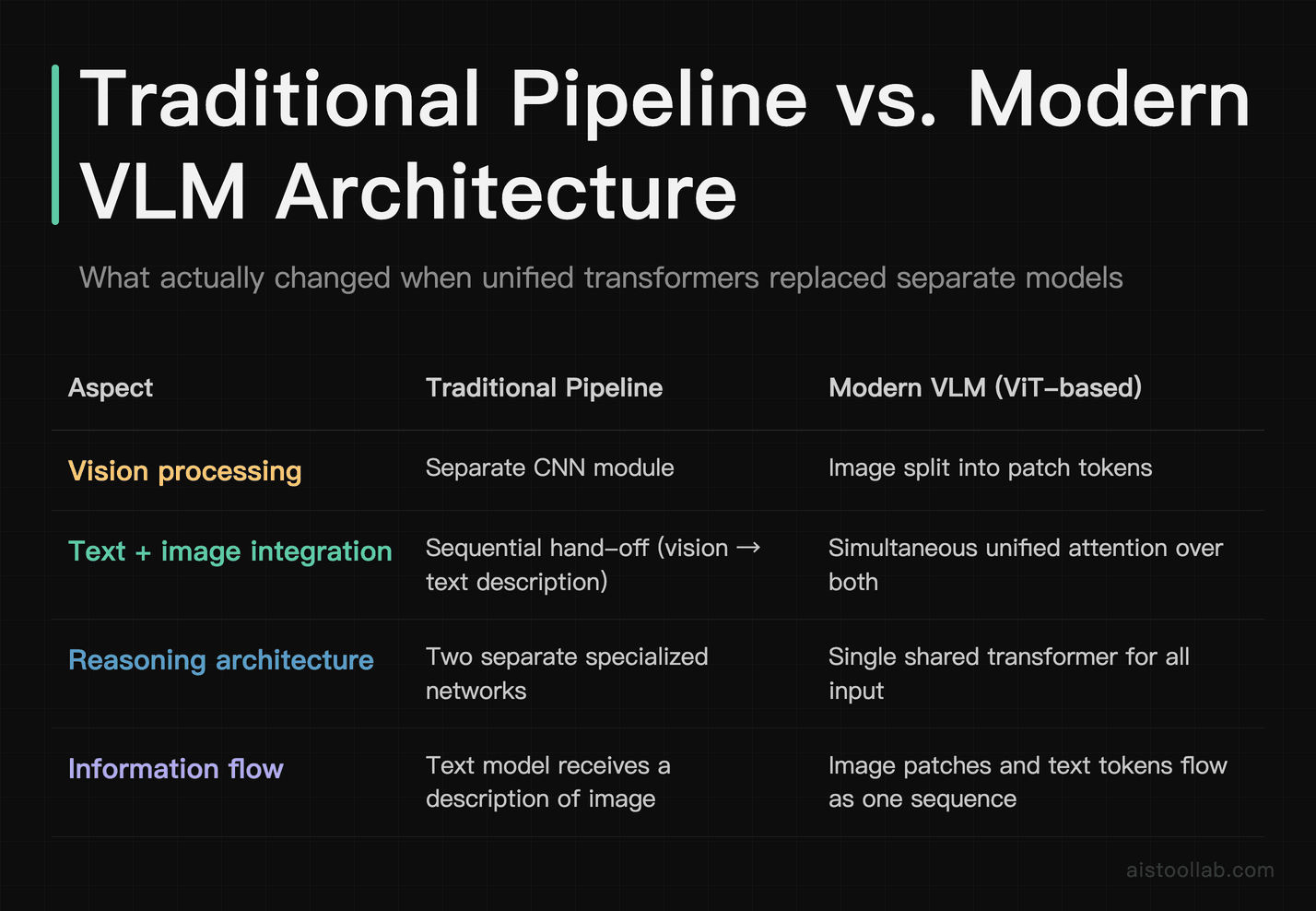
To understand how VLMs work, you need two things: how images get turned into something a language model can process, and how that information gets reasoned about alongside text.
Turning Images into Tokens
Language models work with tokens — chunks of text that get converted into numerical representations called embeddings. Images don’t naturally come in that format. The solution, pioneered in the Vision Transformer (ViT) architecture introduced by Google Research (Dosovitskiy et al., published 2020), is surprisingly elegant: split the image into a grid of small square patches, and treat each patch like a word. Each patch becomes an image token, a vector in the same embedding space the model uses for text.
So when you upload a photo to Claude or ChatGPT, the model doesn’t “see” a picture. It receives a sequence of patch embeddings — potentially hundreds of them, depending on the model’s configuration — alongside the text tokens from your prompt. From that point on, the model treats them all as items in a sequence to be reasoned about. There’s no separate “image brain” and “text brain.” They’re in the same room.
Attention: The Mechanism That Ties It Together
The transformer architecture, described in the landmark 2017 paper “Attention Is All You Need” (Vaswani et al., Google Brain), introduced a mechanism called self-attention that lets every element in a sequence look at every other element when building its representation. This is what makes transformers powerful for language: the word “bank” in “river bank” can attend to “river” and understand the context, even if those words are far apart in a long passage.
In a VLM, that same mechanism operates across image patches and text tokens simultaneously. A text token like “the label on the left axis” can attend directly to the image patches representing that region of the image. This cross-modal attention is why VLMs can answer specific, localized questions about an image rather than just producing generic scene descriptions. The model isn’t looking at the image as a whole and then answering your question — it’s weaving image and text understanding together continuously as it generates each word of its response.
Different architectures handle this in different ways. Flamingo, introduced by DeepMind in 2022, used dedicated cross-attention layers to connect vision and language. Other approaches interleave image and text tokens in a single unified sequence from the start. For everyday users, the practical implication is the same: image understanding and language reasoning are genuinely integrated, not bolted together after the fact.
Why CLIP Was a Turning Point
One piece of research worth knowing about: OpenAI’s CLIP (Contrastive Language-Image Pre-Training), published in 2021. CLIP trained a model to match images with text descriptions by learning from an enormous dataset of image-caption pairs. The result was a vision encoder that understood images in terms of concepts that map onto natural language — not just “there’s a dog here” but a rich, flexible representation of image content that a language model can actually reason about. CLIP-style encoders became foundational to many of the VLMs in use today, and the basic idea — pre-training a vision encoder using natural language supervision — is still reflected in how most commercial VLMs are built.
Who’s Actually Using VLMs and How
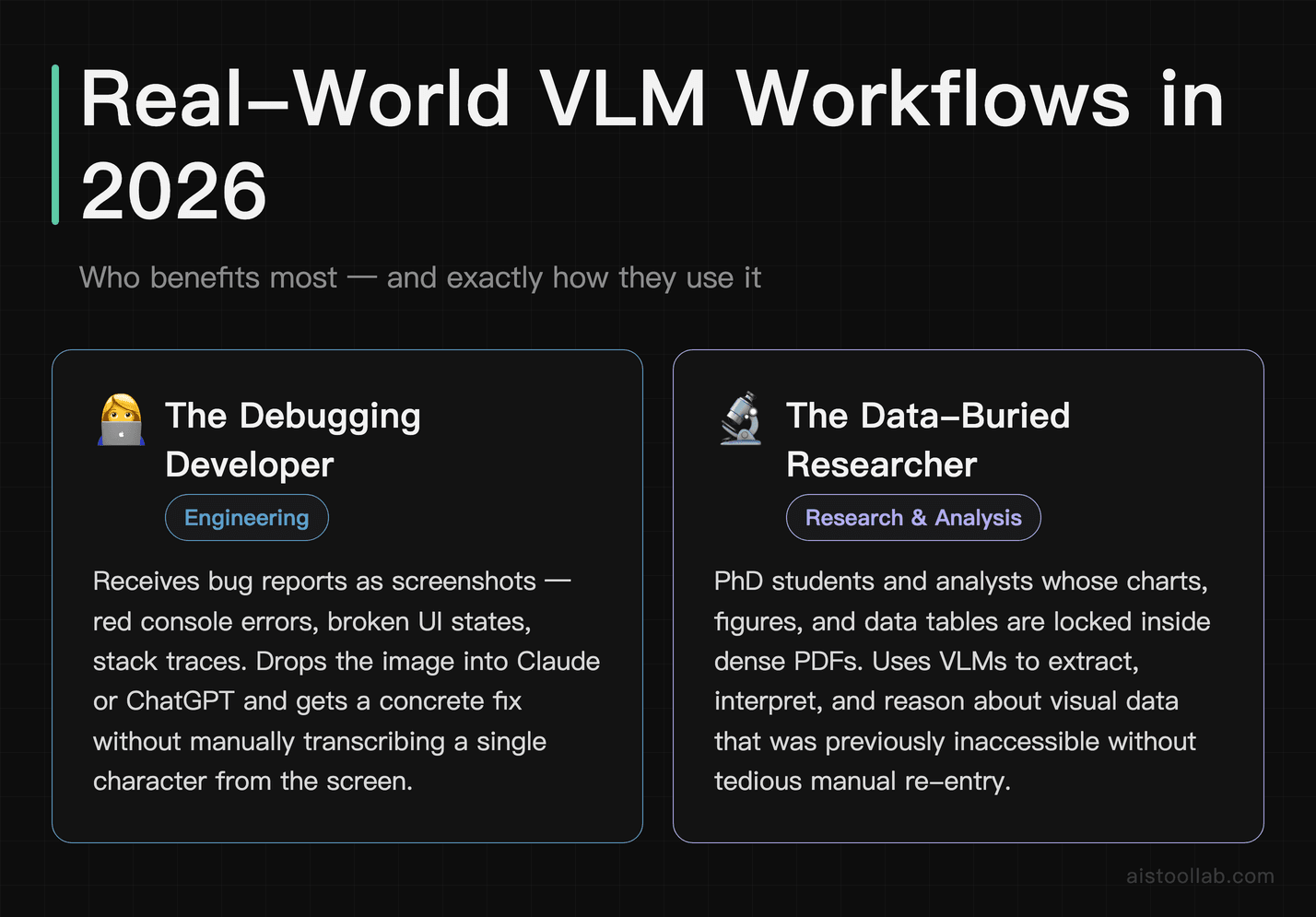
The architecture is interesting. The more useful question is what it unlocks in the real world. Here are three scenarios that come up constantly among the developers, founders, and freelancers who read this site.
The Developer Who’s Done Manually Transcribing Error Messages
A freelance developer working across three client projects gets bug reports as screenshots. The error is right there in the image — a red console message, a broken UI state, a stack trace — and she used to have to manually type it out before she could paste it anywhere useful. Now she screenshots the error, drops it into Claude or ChatGPT, and asks “what’s causing this and how do I fix it?” The model reads the error directly from the image, understands the code context, and gives a concrete next step. It’s a genuinely annoying workflow problem that quietly disappeared. VLMs are at their most immediately useful when they eliminate the gap between visual information that exists in the world and your ability to act on it.
The Researcher Drowning in Charts and PDFs
A PhD student or analyst dealing with dense academic papers has charts, figures, and data tables locked inside PDFs — formats that traditional text extraction tools either mangle or skip entirely. Uploading a paper and asking “summarize the key findings from Figure 3 and explain whether the methodology supports those conclusions” is now a reasonable thing to do. VLMs can read axis labels, interpret trend lines, and connect visual data to the surrounding written context. It’s not perfect — models can still misread complex chart types or hallucinate values — but it’s dramatically faster than doing it manually. The Best AI Tools for Students and Researchers in 2026 roundup covers a fuller picture of how these tools fit into a research workflow.
The Solopreneur Who Needs a Design Sanity Check
A solopreneur running an e-commerce store needs to understand why their product photos aren’t converting. They upload the images to an AI tool and ask: “What’s wrong with these product photos compared to what customers expect from a premium skincare brand?” The model can assess lighting, background consistency, composition, and how the product is framed — and give actionable feedback that used to require hiring a creative director or at least an experienced freelancer. It’s not a replacement for real design expertise, but as a first-pass sanity check, it’s surprisingly useful. The Best AI Tools for Small Business Owners in 2026 article covers more scenarios like this in depth.
How the Major VLM Tools Stack Up in 2026
Almost every leading AI tool now ships with vision capabilities, but they’re not all equal. Here’s how the main options compare across the dimensions that actually matter for day-to-day use:
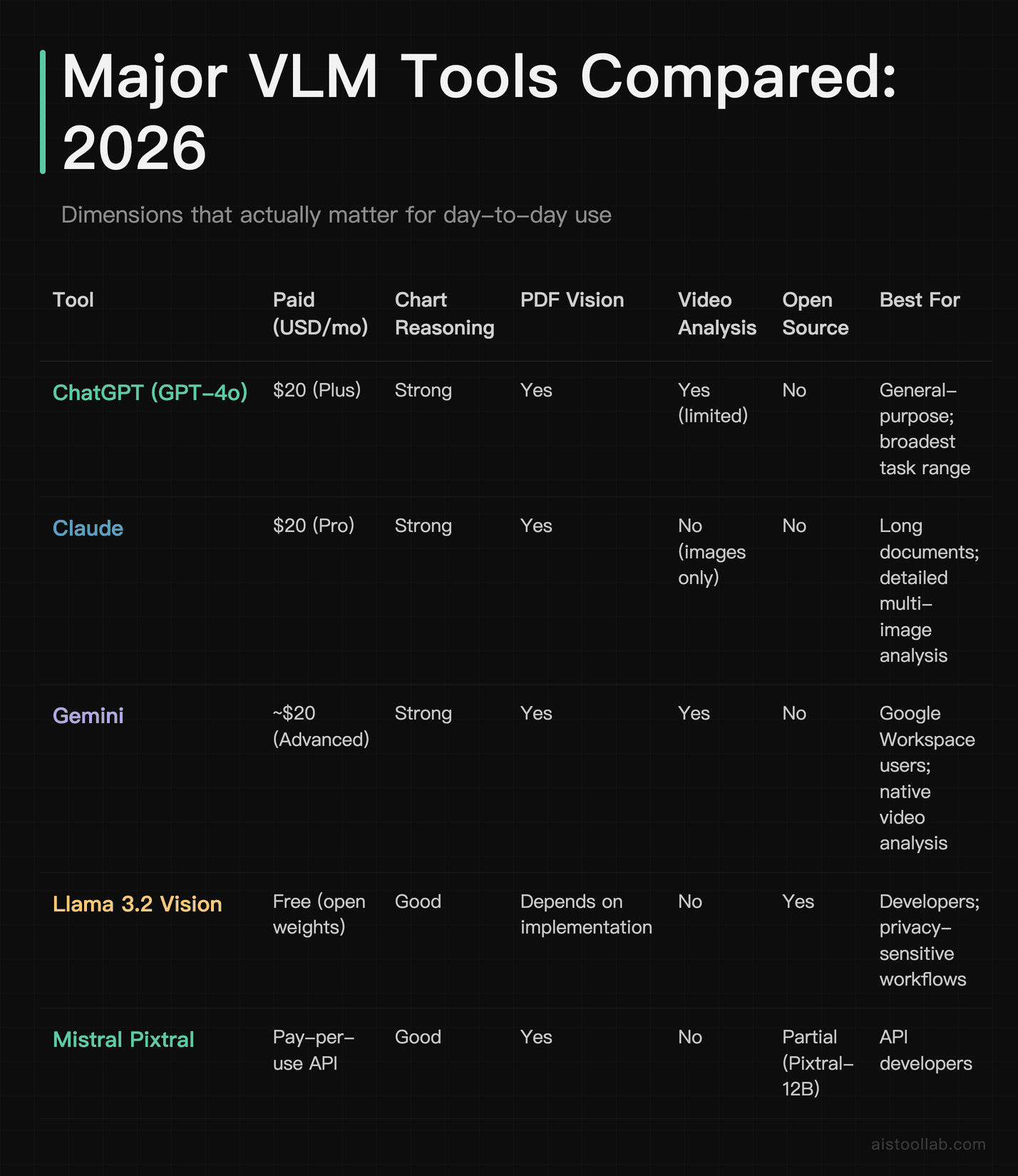
A few notes: “natively multimodal” means the model was designed with vision from the ground up, not retrofitted after the fact. Gemini was arguably the most deliberate about this from launch. The video analysis row is worth watching — most models work with static images, not continuous video, and quality varies significantly among those that technically support it. And “open source” matters more than it used to: Llama 3.2 Vision running locally is increasingly practical for developers who can’t send sensitive images to third-party servers.
Why Vision Has Stopped Being a Premium Feature
A few years ago, image analysis in AI tools was genuinely a premium offering — something locked behind enterprise tiers, specialized APIs, or multi-service integrations. That’s largely not true anymore. Free tiers of ChatGPT, Claude, and Gemini all include at least some vision capabilities, and the underlying technology has become commoditized enough that open-source models can run on consumer hardware and produce genuinely useful results.
This changes the baseline expectation in a meaningful way. If you’re building a product, you can reasonably assume your users have access to multimodal AI without paywalling them. If you’re evaluating tools for your team, vision capability is now table stakes — the question is depth and reliability, not presence. And if you’re integrating these models into workflows via API, the cost per image analysis call has fallen significantly as competition across providers has intensified.
The more interesting differentiation is moving elsewhere: not “can the model process an image” but “can it reason across multiple images in context, handle video streams efficiently, take actions based on what it sees, and integrate with external tools?” That’s where VLMs are converging with broader agentic AI development — a theme covered in detail in the Agentic AI Systems Explained piece on this site.
What Current VLMs Still Can’t Do Well
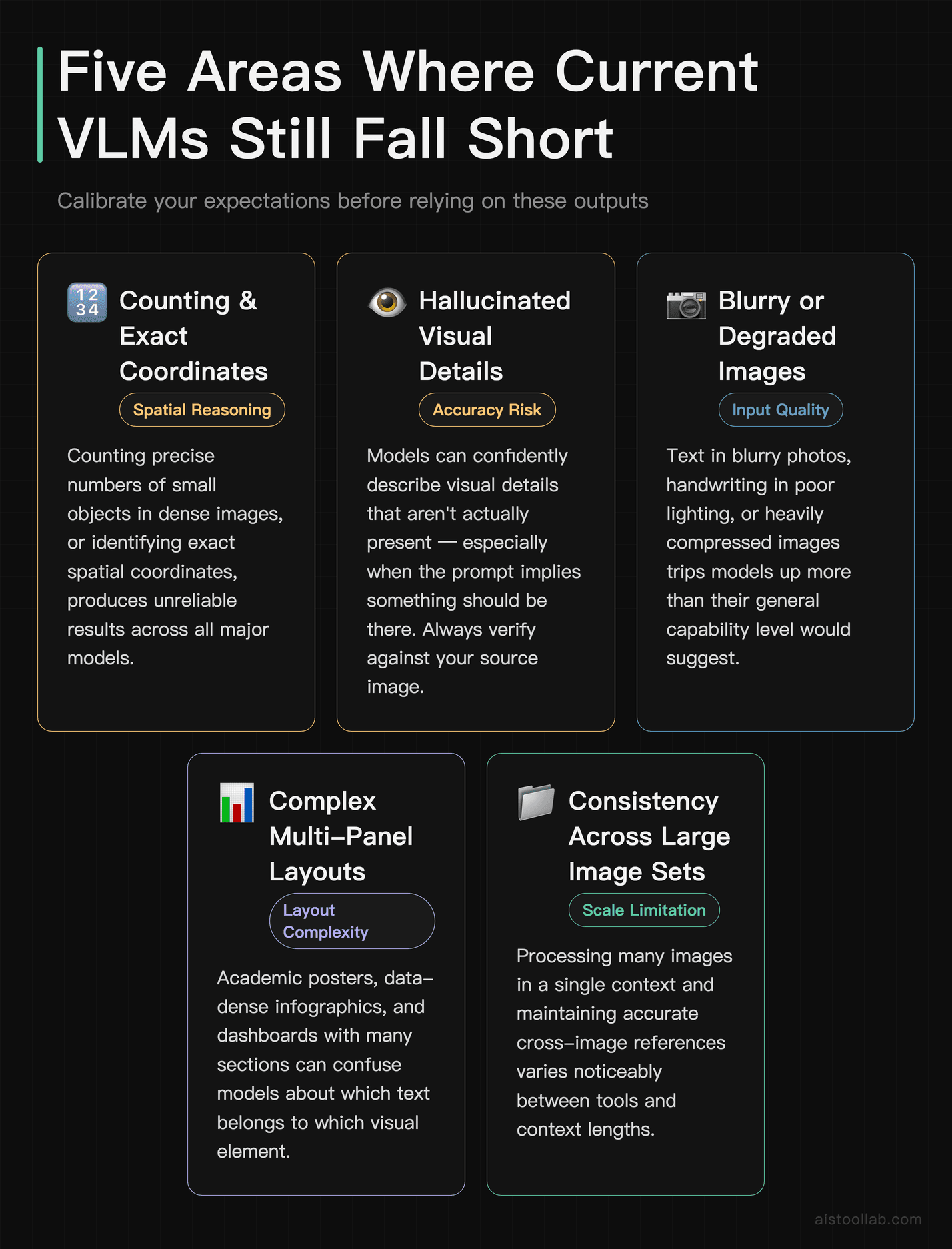
Being honest about limitations is part of actually understanding a technology, especially if you’re just getting started and need to calibrate your expectations.
- Fine-grained spatial reasoning: Counting precise numbers of small objects in dense images, or identifying exact coordinates, tends to produce unreliable results across all major models.
- Hallucinating image content: Models can confidently describe visual details that aren’t actually present — especially when the prompt implies something should be there. Always verify against your source image.
- Low-resolution or degraded images: Text in blurry photos, handwriting in poor lighting, or heavily compressed images trip models up more than you’d expect given their general capability.
- Complex multi-panel layouts: Academic posters, data-dense infographics, or dashboards with many sections can confuse models about which text belongs to which visual element.
- Consistency across large image sets: Processing many images in a single context and maintaining accurate references across all of them is an area where quality still varies noticeably between tools and context lengths.
None of these are showstoppers for most practical use cases. They’re calibration information — knowing where the floor is helps you use these tools without getting burned by overconfident outputs, especially in situations where accuracy genuinely matters.
Frequently Asked Questions
What’s the difference between a vision language model and traditional image recognition?
Traditional image recognition systems — the kind that have powered Google Photos, facial recognition software, and industrial quality control for years — are typically trained to do one specific task: classify what’s in an image into predefined categories, detect and locate specific objects, or flag anomalies against a known baseline. They produce structured outputs like “dog: high confidence” or “face detected at coordinates X, Y.” They’re narrow, specialized, and not designed to answer open-ended questions about anything other than what they were trained to identify.
A vision language model operates completely differently. Rather than classifying an image into predefined buckets, a VLM can answer arbitrary natural language questions about an image, describe complex relationships between objects, read and interpret text appearing within the image, reason about what’s happening in a scene, connect visual information to broader world knowledge, and carry that reasoning across a multi-turn conversation. The output isn’t a label or a confidence score — it’s natural language that reflects genuine reasoning about what the model saw.
The practical difference is enormous. A traditional image recognition system can tell you there’s a graph somewhere in your document. A VLM can tell you what the graph shows, whether the trend supports the author’s stated conclusion, and what might be misleading about the way the data has been visualized. That’s not an incremental improvement — it’s a fundamentally different kind of tool, solving a different kind of problem.
Do I need a paid subscription to use vision features in ChatGPT or Claude?
As of 2026, both ChatGPT and Claude offer image analysis on their free tiers, but with meaningful restrictions. Free users typically face limits on how many images they can upload per conversation or per day, and may be routed to less capable model versions during high-traffic periods. For occasional use — dropping in an image once in a while to ask a quick question — the free tier is genuinely functional and a reasonable place to start.
Where paid subscriptions make a real difference is in consistent access to the most capable model versions, higher limits on image uploads per session, longer context windows that let you include more images alongside more text, and access to features like extended document analysis or priority processing. If vision is central to your workflow — you regularly upload screenshots, charts from reports, product photos, or scanned documents — the $20/month Pro or Plus tier typically pays for itself in reduced friction fairly quickly. Gemini Advanced is similarly priced and bundled into Google’s broader productivity suite via Google One AI Premium, which makes it the obvious choice if you’re already in the Google Workspace ecosystem and want vision built into your daily tools rather than accessed through a separate app.
How accurate are vision language models at reading text in images?
This is one of the areas where VLMs have made genuinely impressive strides. Reading clearly printed text in well-lit, high-resolution images is now quite reliable across all major models. Business cards, printed signs, documents, code on a monitor, slides from a presentation — these tend to work well. The models also handle a reasonable range of fonts, some stylized text, and text embedded in complex layouts like PowerPoint decks and marketing materials.
Where accuracy degrades is in handwritten text — particularly cursive — low-contrast text on busy backgrounds, heavily stylized decorative fonts, and images where text is small relative to the overall image dimensions. Rotated or perspective-distorted text, like a sign photographed from a steep angle, also causes more errors than you might expect given how good the models are in clean conditions.
For most practical use cases, VLM-based text extraction is fast and accurate enough, especially as a first pass you can quickly verify. For mission-critical accuracy in document processing workflows — legal contracts, medical records, financial statements where errors have real consequences — you’d want to validate the output carefully or use dedicated OCR tools alongside VLM analysis rather than relying solely on the model’s interpretation. Treating the output as a smart draft, not a guaranteed transcript, keeps you out of trouble.
Can vision language models analyze video, not just still images?
This depends heavily on the specific tool, and the honest answer is that the quality varies more than vendors typically advertise. Gemini has been designed to process video frames and can analyze clips directly, which is a genuine architectural advantage for video-heavy workflows. Other models — including Claude, as of the current version — work with static images only, meaning video analysis requires extracting individual frames and uploading them, which is workable but adds friction.
The more important distinction is between “can accept video as input” and “genuinely understands video.” True video understanding involves tracking changes over time, reasoning about motion and causality, and maintaining coherent analysis across a temporal sequence — not just describing individual frames in isolation. That’s significantly harder than image analysis, and the depth of “video understanding” varies considerably between tools that technically support it.
For most practical workflows — reviewing a product demo, checking a recorded presentation, extracting information from a screen-captured tutorial — frame extraction and image analysis gets you most of the way there even without native video support. Whether you need native video processing depends largely on how central moving-image content is to your daily work and whether you need to ask questions about what changes between moments rather than what’s present in any given frame.
Are there privacy concerns with uploading images to AI tools?
Yes, and this is worth taking seriously before you get into a habit of uploading everything. When you upload an image to a commercial AI tool, that image is sent to the company’s servers for processing. Data handling policies differ by provider and by subscription tier — enterprise plans typically offer stronger privacy guarantees, including options to opt out of using your inputs for model training, and may include data processing agreements that specify exactly how your information is handled.
For sensitive images — medical photos, confidential internal business documents, personal identification, customer data, proprietary designs — you should read the provider’s current privacy policy carefully before uploading. The short version: free tiers generally offer the weakest data privacy protections because the product economics lean on using interactions to improve the model; enterprise or API tiers with explicit data processing agreements offer the strongest protections.
If data privacy is a hard requirement rather than a preference, open-source VLMs like Llama 3.2 Vision are increasingly worth evaluating. Running a model locally means your images never leave your machine — the tradeoff is that setup requires technical ability, and the model performance may not match the frontier commercial options for complex tasks. But for developers working with sensitive client data, or teams operating in regulated industries like healthcare or finance, local deployment is now practically accessible in a way it wasn’t eighteen months ago.
How well do vision language models handle charts and graphs?
Better than you might expect, with caveats that are worth knowing upfront. Current VLMs from the major providers can generally read axis labels correctly, identify the chart type (bar, line, scatter, pie, area), describe the overall trend or pattern, and extract approximate values from clearly labeled data points. For standard business chart types with clean formatting — the kind you’d find in a company quarterly report or a marketing dashboard — this works reliably and is genuinely useful for quickly summarizing data-heavy content you’d otherwise have to read carefully yourself.
The failure modes are worth understanding. Models can misread precise values, especially in bar or line charts that don’t have explicit data labels on each point. Unusual chart types, dual-axis plots where the two scales need to be tracked simultaneously, or charts where the visual encoding is subtle — such as area charts with transparency or bubble charts with size encoding — cause more errors than standard formats. Statistical plots like box plots, violin plots, or correlation matrices are more hit-or-miss depending on the model.
The most reliable workflow is to use VLM analysis for high-level interpretation and trend identification, then verify any specific numbers you plan to cite or act on against the original data source. Think of the model’s output as a smart first read — not a guaranteed data extraction. That framing keeps you productive without setting you up for embarrassment when a specific figure turns out to be slightly off.
What are the biggest limitations of current vision language models I should know about before relying on them?
Several limitations matter for practical use beyond the technical ones already covered. First, VLMs have no persistent memory of images across separate sessions. Each new conversation starts fresh, so if you need a model to reference an image from last week’s conversation, you need to re-upload it. This is a workflow consideration that shapes how you build processes around these tools — you can’t treat them like a database that remembers what you showed it.
Second, the models are fundamentally probabilistic. They generate the most likely description or analysis based on training, which means they can produce plausible-sounding but incorrect interpretations, especially for ambiguous or unusual images. The tendency to “hallucinate” visual details — confidently describing something that isn’t there — is a known and actively researched problem across all major VLMs. It’s less pronounced than it was two years ago, but it hasn’t been eliminated.
Third, working with many images in a single context is either expensive via API or constrained by the tool’s interface limits. If your workflow involves analyzing a large set of images together — comparing fifty product photos, reviewing a full document with many figures — you’ll hit practical limits that require breaking the work into smaller chunks. This is improving as context windows expand, but it’s a real constraint today. Knowing these limitations going in lets you design your workflows around them rather than discovering them at an inconvenient moment.
Will vision language models replace specialized image analysis tools?
In some domains, they’re already displacing simpler tools — particularly anywhere that previously required manually reading text from images, describing what’s in a photo, extracting high-level insights from visual content, or routing images based on their contents. The general-purpose capability of VLMs is good enough for a wide range of tasks that previously required specialized software, dedicated integrations, or human effort to bridge the gap between visual information and actionable text.
But specialized tools in domains like medical imaging, satellite imagery analysis, industrial quality control, and precision scientific measurement are not being replaced anytime soon. Those applications require calibrated, auditable accuracy; domain-specific training data; regulatory compliance; and reliability guarantees that general-purpose VLMs don’t currently provide and may not be designed to provide. A VLM can help a radiologist quickly summarize what they’re looking at or draft preliminary notes. It’s not replacing the radiologist, the specialized DICOM viewing software, or the regulatory framework around diagnostic imaging.
The more likely pattern over the next few years is that VLMs become the interface layer on top of specialized systems — you interact in natural language, the VLM interprets your intent and mediates the interaction, and purpose-built analysis tools do the precision work underneath. That hybrid architecture is already starting to appear in enterprise software, and it’s probably where most serious visual analysis workflows will land as the technology matures.
My Take: The Right Time to Actually Learn This
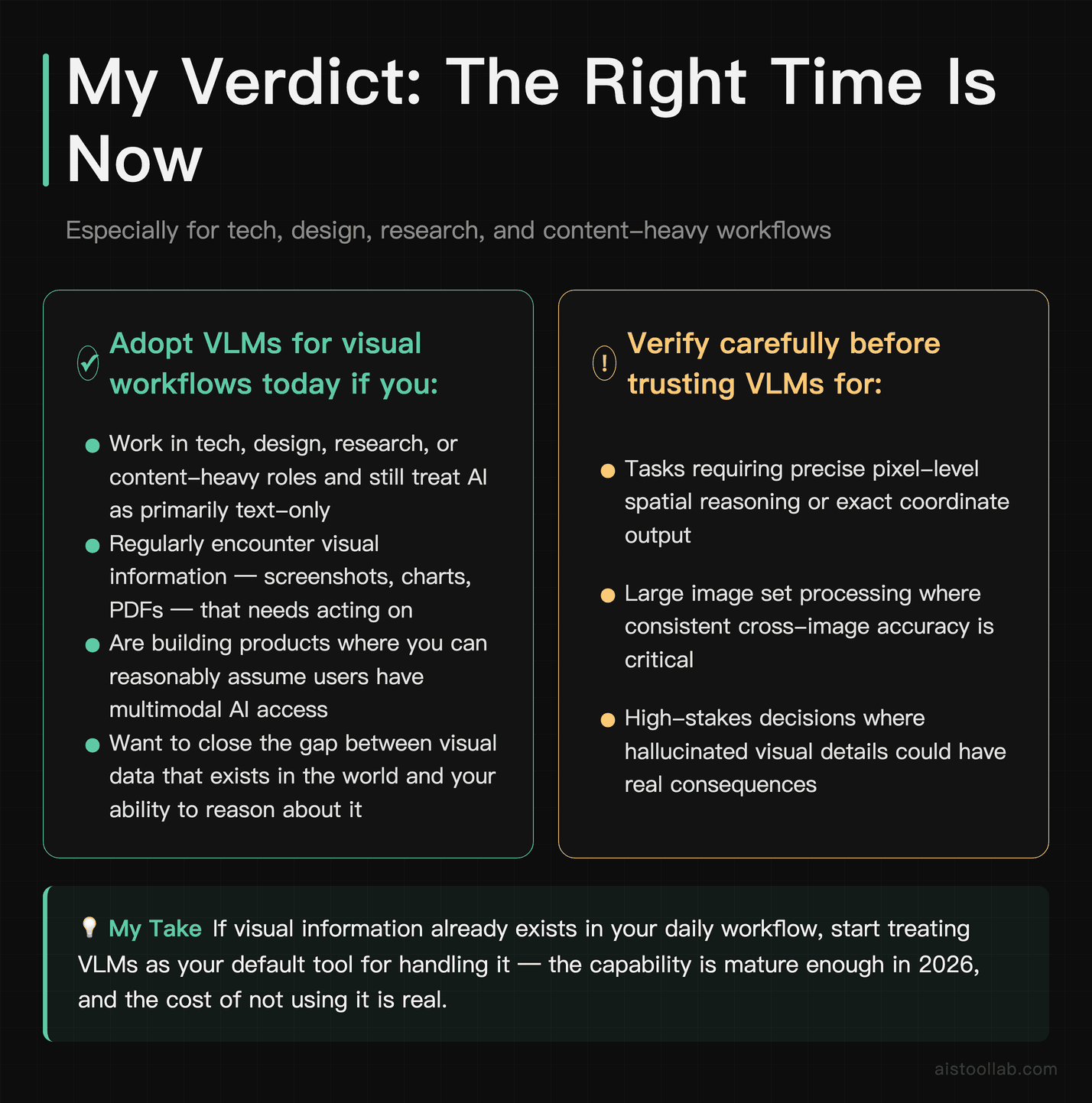
If you work in tech, design, research, or any content-heavy field and you’re still treating AI tools as primarily text-only in your daily workflow, you’re genuinely leaving capability on the table. Vision language models have crossed the threshold from “impressive research demo” to “useful default feature” — and understanding how they actually work, rather than treating them as magic boxes, helps you prompt them more effectively, interpret their outputs more critically, and know when to trust the result versus when to verify it.
The underlying architecture — transformers processing image patches and text tokens through shared attention — is elegant and increasingly well-understood outside specialist circles. What remains genuinely uncertain is where the ceiling is. Spatial reasoning at fine scale, reliable video understanding, reducing hallucination in visual contexts, and processing large collections of images in a single coherent workflow are all active areas of development. The models available in 2026 are substantially more capable than what existed even eighteen months ago, and that trajectory hasn’t clearly plateaued.
Here’s the most concrete advice I can give you: pick the VLM-enabled tool you already use for text, find the image upload button, and spend twenty minutes throwing images at it that represent your actual work. Bug screenshots. Charts from reports you’re analyzing. Product photos. Handwritten notes from a meeting. A dense PDF with figures. The gap between what you expected and what it can actually do is usually more surprising than you’d think — in both directions. That’s the fastest way to calibrate your own mental model, which is worth more than any benchmark comparison.
Last updated: 2026
Explore more AI tools
👉 Browse the AI Tools Library to find the right tools for your workflow.