

From Zero to Working App — Faster Than You Think
A colleague pinged me last month with a message that I’ve probably received a dozen variations of: “I want to build something with Claude’s API but I don’t know where to start and the docs are kind of overwhelming.” I told him the same thing I’m going to tell you — the API itself is genuinely well-designed, and once you get past the initial setup friction, you’ll be surprised how fast you can ship something real.
I’ve been building with Claude API for the better part of a year now, and I’ve gone through the full arc: initial excitement, hitting rate limits in production, scratching my head at unexpected token costs, and eventually landing on patterns that actually work. This tutorial condenses all of that into something you can follow in about 30 minutes with a working app at the end.
We’re building a document Q&A bot — you paste in a document, ask questions about it, and get smart, grounded answers back. It’s simple enough to follow but practical enough that you’ll actually use it as a foundation for something bigger. Let’s get into it.
Step 1: Getting Your API Key and Understanding the Cost Model
Head over to console.anthropic.com and create an account. Once you’re in, navigate to the API Keys section and generate a new key. Copy it somewhere safe — you won’t be able to see it again after you close that modal, and yes, I learned that the hard way.
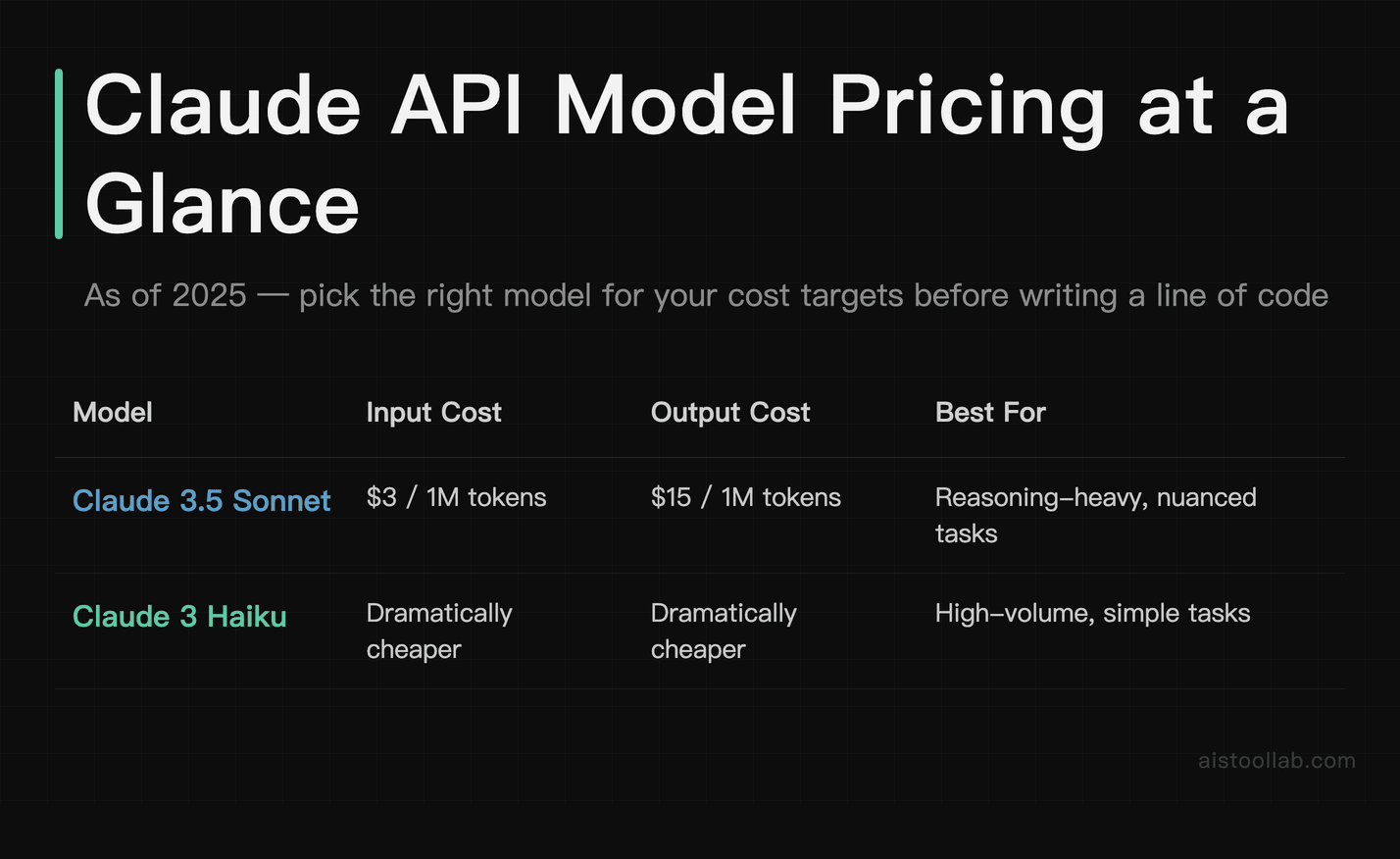
Before you write a single line of code, spend five minutes understanding the pricing structure. As of 2025, Claude’s models are priced per million tokens on both input and output. Claude vs ChatGPT comparison sits at $3 per million input tokens and $15 per million output tokens — which sounds like a lot until you realize that a million tokens is roughly 750,000 words. For most hobbyist or small-scale projects, you’re looking at pennies per session. Claude 3 Haiku, the lightweight model, is dramatically cheaper and worth knowing about for high-volume use cases.
Here’s the thing most tutorials skip: set a spending limit before you do anything else. In the console, go to Plans & Billing and set a monthly hard cap. I keep mine at $20 for development work. Without a cap, a bug in a loop can rack up charges before you even notice something is wrong. It takes 30 seconds and it will save you at least one stressful morning. You can also set up usage alerts at specific dollar thresholds — use both.
Now install the Python SDK:
pip install anthropicStore your API key as an environment variable rather than hardcoding it. Create a .env file in your project root and add ANTHROPIC_API_KEY=your_key_here. Then load it with the python-dotenv package. This is non-negotiable if you ever plan to push code to GitHub.
Step 2: The Messages API — Single Turn, Multi-Turn, and System Prompts
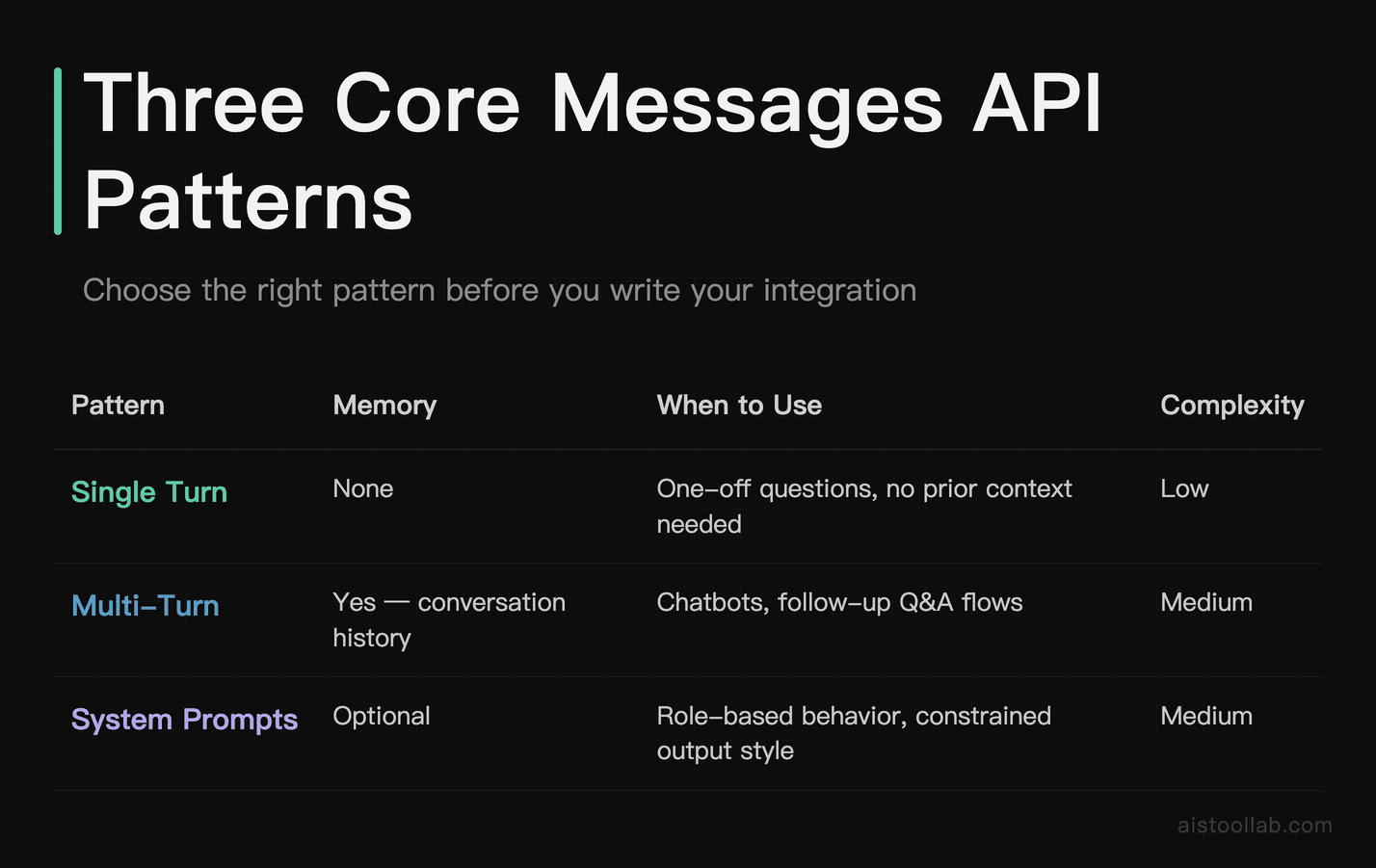
The core of everything you’ll build is the Messages API. It’s a clean, well-thought-out interface once you understand its three main patterns. Let’s walk through each one with real code.
Single Turn: The Simplest Possible Request
A single-turn request is just one question, one answer. No memory, no context. Here’s the full working code:
import anthropic
import os
from dotenv import load_dotenv

load_dotenv()

client = anthropic.Anthropic(api_key=os.environ.get("ANTHROPIC_API_KEY"))

message = client.messages.create(
    model="claude-3-5-sonnet-20241022",
    max_tokens=1024,
    messages=[
        {"role": "user", "content": "What's the difference between a list and a tuple in Python?"}
    ]
)

print(message.content[0].text)
Run this and you’ll get a solid Python explanation back in about 2–3 seconds. The max_tokens parameter controls how long the response can be — it doesn’t affect cost on the input side, only the output side. Setting it too low cuts off responses mid-sentence, so err on the generous side unless you’re trying to constrain costs aggressively.
System Prompts: Giving Claude a Job Title
System prompts are where Claude starts becoming genuinely useful for building products. They let you define a persona, set constraints, and give context that persists across the entire conversation. Think of it as the instruction manual you hand to a new hire before their first day.
message = client.messages.create(
    model="claude-3-5-sonnet-20241022",
    max_tokens=1024,
    system="You are a concise technical assistant. Answer questions in plain English. Always include a one-line code example when relevant. Never use bullet points — use short paragraphs instead.",
    messages=[
        {"role": "user", "content": "How do I reverse a string in Python?"}
    ]
)

print(message.content[0].text)
The system prompt is billed as input tokens, so keep it tight. I’ve seen people write 2,000-word system prompts when 200 words would do the same job. Every token in your system prompt gets sent with every single request, so if you’re making thousands of API calls, a bloated system prompt starts adding up fast.
Multi-Turn Conversations: Building Memory Manually
Here’s something that surprises people: the Claude API is stateless. It doesn’t remember previous messages. You build “memory” by passing the full conversation history with each request. The SDK makes this straightforward:
conversation_history = []

def chat(user_message):
    conversation_history.append({
        "role": "user",
        "content": user_message
    })

    response = client.messages.create(
        model="claude-3-5-sonnet-20241022",
        max_tokens=1024,
        system="You are a helpful assistant.",
        messages=conversation_history
    )

    assistant_message = response.content[0].text
    conversation_history.append({
        "role": "assistant",
        "content": assistant_message
    })

    return assistant_message

# Example usage
print(chat("My name is Alex."))
print(chat("What's my name?"))
The second call correctly returns “Your name is Alex” — because you included the full history. This is also why costs scale with conversation length. A 20-turn conversation means you’re sending the entire 20-turn history with every new message. For long sessions, this is where the 200K context window becomes both a superpower and a cost consideration — more on that in a minute.
Step 3: Building the Document Q&A Bot
Now let’s put this together into something useful. This bot will accept a document as text, store it as context, and answer questions about it. This is honestly one of the most practical things you can build with a large context model, and it comes together in about 60 lines of clean Python.
import anthropic
import os
from dotenv import load_dotenv

load_dotenv()

client = anthropic.Anthropic(api_key=os.environ.get("ANTHROPIC_API_KEY"))

class DocumentQABot:
    def __init__(self, document_text: str):
        self.document = document_text
        self.conversation_history = []
        self.system_prompt = f"""You are a document analysis assistant.
You have been given a document to analyze. Answer questions based ONLY on the content
of the provided document. If the answer is not in the document, say so clearly.
Do not speculate or add information from outside the document.

DOCUMENT:
{self.document}"""

    def ask(self, question: str) -> str:
        self.conversation_history.append({
            "role": "user",
            "content": question
        })

        response = client.messages.create(
            model="claude-3-5-sonnet-20241022",
            max_tokens=1500,
            system=self.system_prompt,
            messages=self.conversation_history
        )

        answer = response.content[0].text
        self.conversation_history.append({
            "role": "assistant",
            "content": answer
        })

        # Return answer and usage stats for cost tracking
        usage = response.usage
        print(f"[Tokens used — Input: {usage.input_tokens}, Output: {usage.output_tokens}]")

        return answer

    def reset_conversation(self):
        """Clear conversation history but keep the document."""
        self.conversation_history = []
        print("Conversation history cleared.")

# --- Main usage ---
if __name__ == "__main__":
    # Load your document — from a file, a database, wherever
    with open("sample_document.txt", "r") as f:
        doc_text = f.read()

    bot = DocumentQABot(doc_text)

    print("Document loaded. Ask questions (type 'quit' to exit, 'reset' to clear history):\n")

    while True:
        user_input = input("You: ").strip()
        if user_input.lower() == "quit":
            break
        elif user_input.lower() == "reset":
            bot.reset_conversation()
        elif user_input:
            answer = bot.ask(user_input)
            print(f"\nClaude: {answer}\n")
I’ve included token usage logging in the response because when you’re building something production-adjacent, you want to see that data in real time. Watching the input token count climb as conversation history grows is a useful gut check that makes the “stateless + manual history” model click for most people the first time they see it.
For the sample document, try pasting in a product specification, a research paper abstract, or even a long legal document. The difference between asking Claude cold versus giving it the document as context is dramatic — it stays grounded, cites specific sections, and won’t hallucinate facts that aren’t there (as long as your system prompt holds it accountable).
Step 4: Understanding and Using the 200K Context Window
Claude’s 200,000-token context window is legitimately one of its standout features — and it’s something I covered when looking at how it stacks up against GPT-4o in my Claude vs ChatGPT comparison comparison. To put 200K tokens in human terms: that’s roughly 150,000 words, or about the length of a full novel. You can feed in entire codebases, lengthy contracts, academic papers, or a full day’s worth of customer service transcripts.
But “you can” and “you should” are different questions. Here’s a practical framework for thinking about when to use large context:
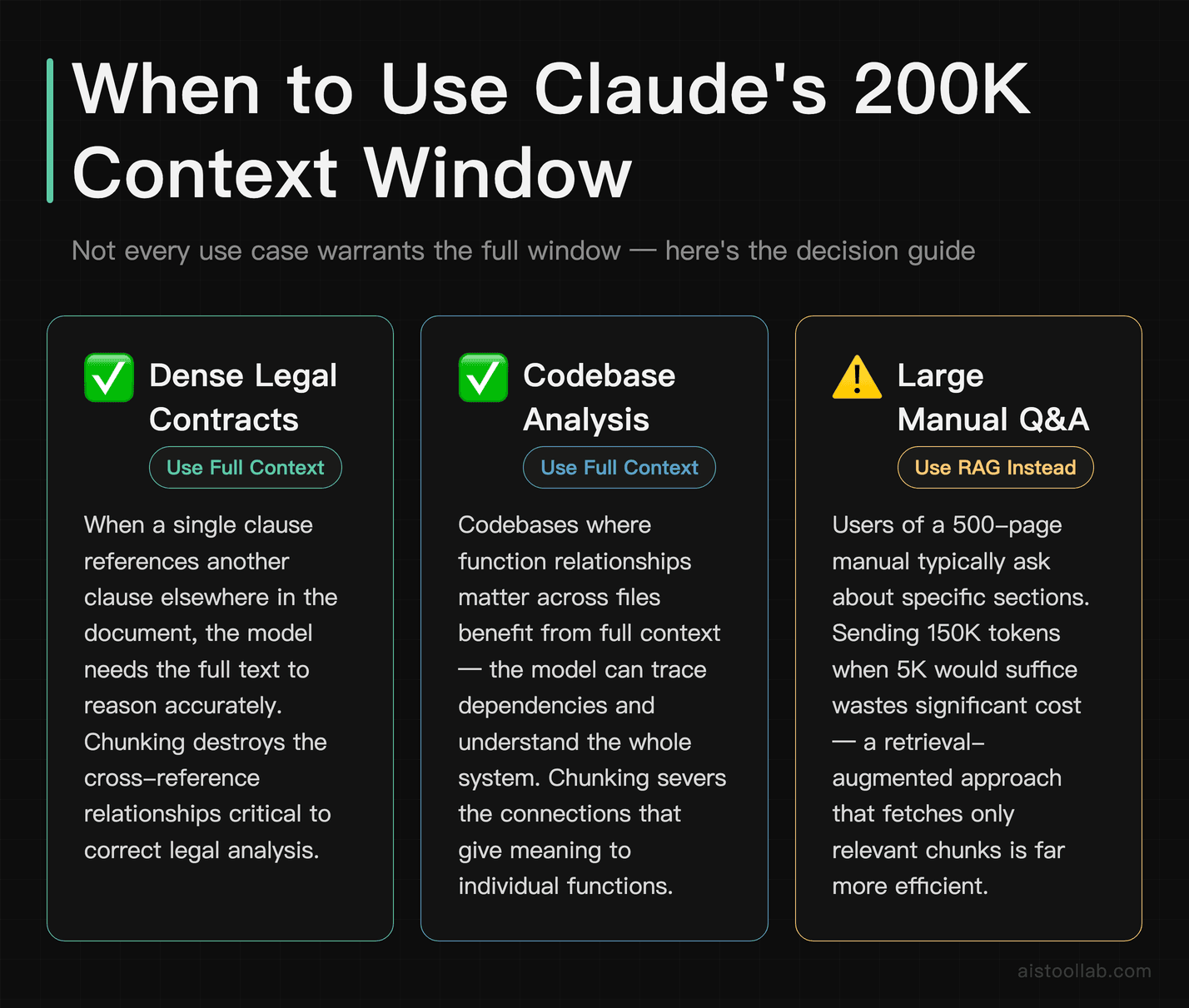
- Do use it when the document truly needs to be held in full — dense legal contracts where a single clause references another, codebases where function relationships matter, or research papers with figures and methodology that are interdependent.
- Don’t use it as a lazy substitute for chunking and retrieval. If you’re building a Q&A bot over a 500-page manual and users only ever ask about specific sections, you’re far better off with a retrieval-augmented approach that fetches only the relevant chunks. Sending 150K tokens per query when 5K would suffice is how you burn through a budget fast.
- Be aware of attention degradation. Even with a 200K window, Claude (like all LLMs) can struggle with information buried deep in the middle of a very long context. Critical information tends to be best retained when placed at the beginning or end of the context. This is sometimes called the “lost in the middle” problem.
For our document bot, keeping the document in the system prompt is the right call for documents up to maybe 50–80 pages. Beyond that, you’d want to look at a chunking strategy with something like a vector database sitting in front of the API.
Step 5: Error Handling and Rate Limits in Production
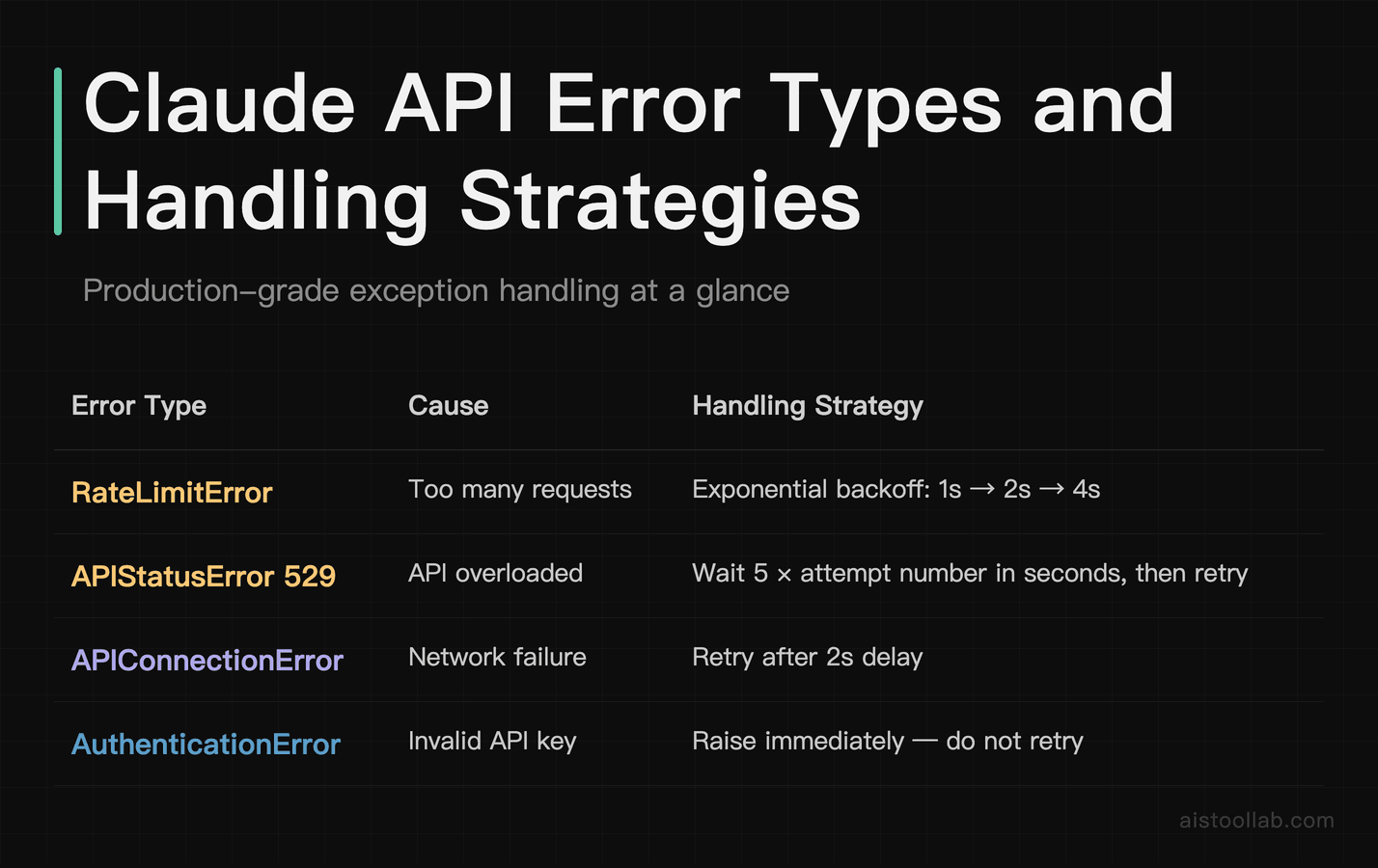
The Anthropic SDK throws specific exception types that you should be handling explicitly, not just catching a generic Exception and hoping for the best. Here’s a robust wrapper around the API call that handles the most common production scenarios:
import anthropic
import time

def safe_api_call(client, model, messages, system, max_tokens, max_retries=3):
    for attempt in range(max_retries):
        try:
            response = client.messages.create(
                model=model,
                max_tokens=max_tokens,
                system=system,
                messages=messages
            )
            return response

        except anthropic.RateLimitError as e:
            wait_time = 2 ** attempt  # Exponential backoff: 1s, 2s, 4s
            print(f"Rate limit hit. Waiting {wait_time}s before retry {attempt + 1}/{max_retries}")
            time.sleep(wait_time)

        except anthropic.APIStatusError as e:
            if e.status_code == 529:  # Overloaded
                wait_time = 5 * (attempt + 1)
                print(f"API overloaded. Waiting {wait_time}s...")
                time.sleep(wait_time)
            else:
                print(f"API error {e.status_code}: {e.message}")
                raise  # Don't retry on non-transient errors

        except anthropic.APIConnectionError as e:
            print(f"Connection error: {e}. Retrying...")
            time.sleep(2)

        except anthropic.AuthenticationError:
            print("Invalid API key. Check your ANTHROPIC_API_KEY environment variable.")
            raise  # Don't retry authentication errors

    raise Exception(f"API call failed after {max_retries} attempts")
A few things worth knowing about Anthropic’s rate limits: they’re applied at the organization level and they scale with your usage tier. New accounts start with fairly conservative limits — around 50 requests per minute for Claude 3.5 Sonnet. As you spend more or contact support to request higher limits, those caps go up. Check the official rate limits documentation for current tier thresholds because they do get updated.
Exponential backoff (the 2 ** attempt in the code above) is the correct pattern for rate limit retries. Don’t hammer the API with immediate retries — you’ll just keep hitting the limit. Wait, then retry. For anything production-facing, also consider adding a queue in front of your API calls so traffic spikes don’t cascade into failures.
Step 6: Cost Optimization Without Killing Quality
This is the section I wish someone had walked me through earlier. Optimizing costs isn’t about being cheap — it’s about being smart. A poorly designed prompt that wastes 500 tokens per request might cost you 10x more than a clean one at scale.
Choose the Right Model for the Job
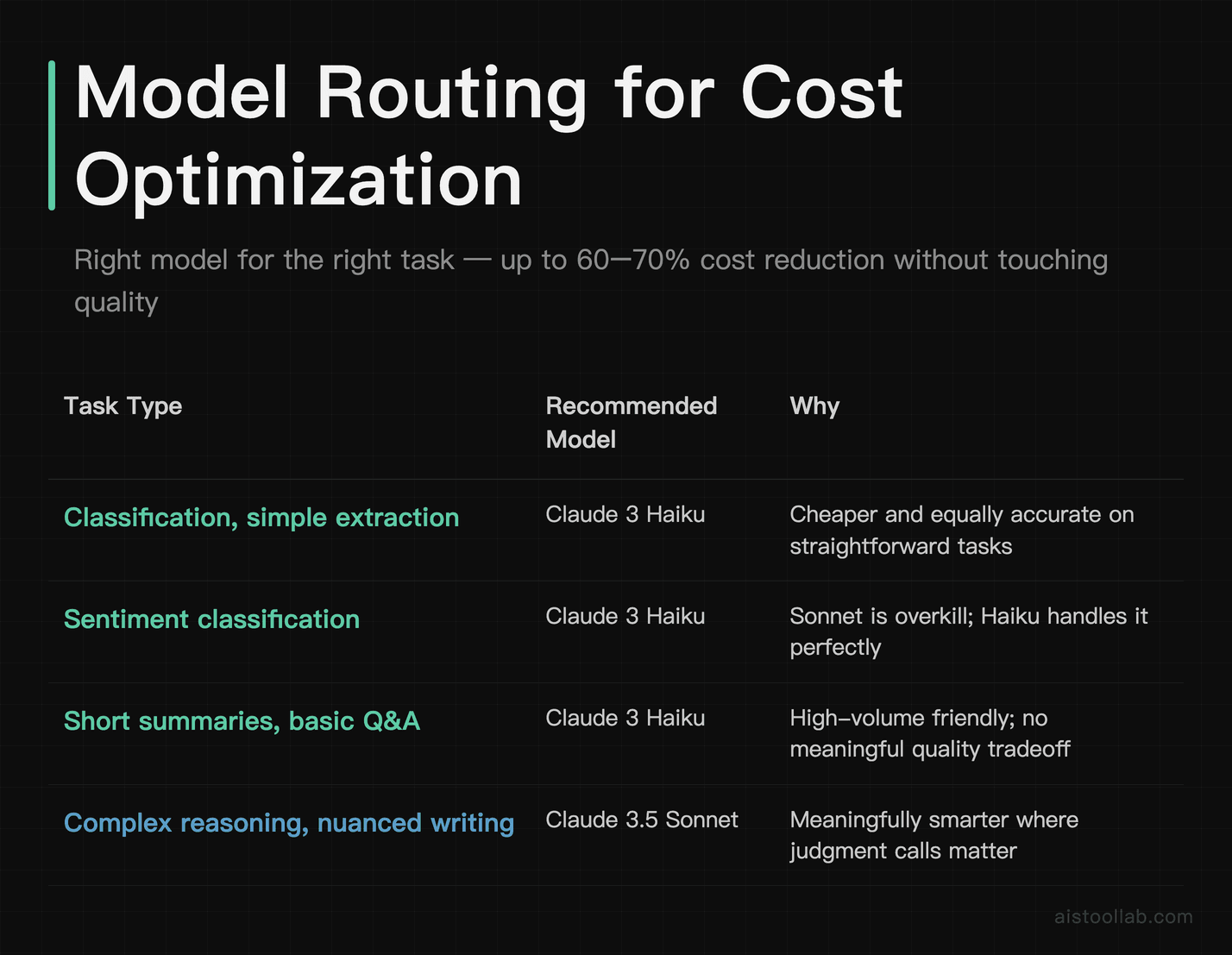
Not everything needs Claude 3.5 Sonnet. For tasks like classification, simple extraction, or short summaries, Claude 3 Haiku is significantly cheaper and often just as accurate. I’ve seen pipelines where people used Sonnet for a basic sentiment classification step that Haiku handles perfectly at a fraction of the cost. Build a model routing layer — use Haiku for easy tasks, Sonnet for reasoning-heavy ones, and you can cut costs by 60–70% without touching quality on the outputs that matter.
Trim Your System Prompt
I keep coming back to this because it’s the most underestimated optimization. Audit your system prompt ruthlessly. Remove repetition. Cut hedging language. If a sentence doesn’t change Claude’s behavior in a measurable way, cut it. Here’s a before/after to illustrate the difference:
Before (182 tokens): “You are a highly knowledgeable and experienced technical assistant with deep expertise in software engineering, computer science, and related fields. Your job is to provide helpful, accurate, and detailed answers to technical questions. Please always be professional, clear, and concise in your responses. When answering questions, make sure to consider the user’s level of expertise and adjust your explanations accordingly…”
After (38 tokens): “You are a technical assistant. Answer questions clearly and at an appropriate level for the user’s apparent expertise.”
Same effective behavior. 144 tokens saved per request. At 10,000 requests per day, that’s 1.44 billion tokens per month less in input costs. You can do the math.
Use max_tokens Thoughtfully
Set max_tokens based on what you actually need. If you’re asking for a yes/no classification with a brief reason, max_tokens=100 is fine. If you’re generating a detailed code review, you might need 2,000. The model doesn’t always use the full allocation — you’re only billed for what’s actually generated — but setting a reasonable ceiling is good practice for keeping individual call costs predictable.
Cache Expensive Context
Anthropic offers prompt caching for large repeated contexts. If you’re building an app where the same document gets queried repeatedly by different users, prompt caching can reduce costs on those repeated input tokens significantly. It’s worth reading through Anthropic’s prompt caching documentation if you’re hitting a high-volume use case — for document Q&A specifically, it can be a major cost lever.
Conversation History Management
For multi-turn bots, don’t let conversation history grow unbounded. Once a conversation exceeds, say, 20 turns, consider truncating or summarizing the oldest messages. A simple strategy: keep the last N turns verbatim and replace everything older with a brief summary generated by a cheap model call. This keeps context relevant while preventing token costs from compounding into something painful.
Taking This Further
The document Q&A bot we built is a real, working foundation. From here, the natural next steps are: swapping the text file for a PDF parser (the pypdf library works well), adding a simple web interface with Flask or Streamlit, or connecting it to a vector database for retrieval over larger document collections.
If you want to go deeper on how Claude itself compares to the competition before committing to it as your production AI backend, I’d recommend checking out my Claude vs ChatGPT comparison comparison — the reasoning and cost tradeoffs are laid out in detail there. And if you’re specifically evaluating the more powerful Claude 4 Opus for complex reasoning tasks, the Claude 4 Opus review goes deep on what it can and can’t do in real-world conditions.
The API is genuinely good. The documentation has improved a lot over the past year. And honestly, the 200K context window alone opens up use cases that would have required complex infrastructure workarounds six months ago. If you’ve been waiting for the right moment to start building — this is it. You already have the code.
Frequently Asked Questions
Do I need a credit card to get an API key?
Yes. Anthropic requires a payment method on file to access the API, even if you’re just exploring. There’s no permanent free tier for API access, though new accounts do receive a small initial credit in some cases. Set a spending limit immediately after adding your card — don’t wait.
Can I use the Claude API for commercial projects?
Yes, commercial use is permitted under Anthropic’s usage policies. Review the acceptable use policy in the console to make sure your specific use case isn’t in a restricted category, but for the vast majority of business applications — chatbots, document tools, coding assistants — you’re fine.
What’s the difference between claude-3-5-sonnet and claude-3-haiku for most projects?
Sonnet is meaningfully smarter on complex reasoning, nuanced writing, and tasks requiring judgment calls. Haiku is fast, cheap, and plenty capable for classification, simple extraction, short Q&A, and anything that doesn’t require deep reasoning. A good default: prototype with Sonnet, then test whether Haiku meets quality bar before committing to Sonnet costs in production.
Is the 200K context window available on all Claude models?
Context window availability varies by model. Claude 3.5 Sonnet and Claude 3 Opus support the 200K context window. Claude 3 Haiku supports 200K as well, though performance characteristics at the extreme end of the context window differ between models. Always check the current model cards on the Anthropic console for the latest specs.
How do I handle very long documents that exceed what I want to send in a single request?
For documents that are too large to send in full, or where sending the full document isn’t cost-efficient, the standard approach is Retrieval-Augmented Generation (RAG). You chunk the document into smaller pieces, embed them into a vector database (Pinecone, Chroma, or Weaviate are popular options), and at query time you retrieve only the most relevant chunks before passing them to the API. This dramatically reduces per-query token costs and often improves answer quality on very large corpora because the model isn’t drowning in irrelevant context.
Use Cases
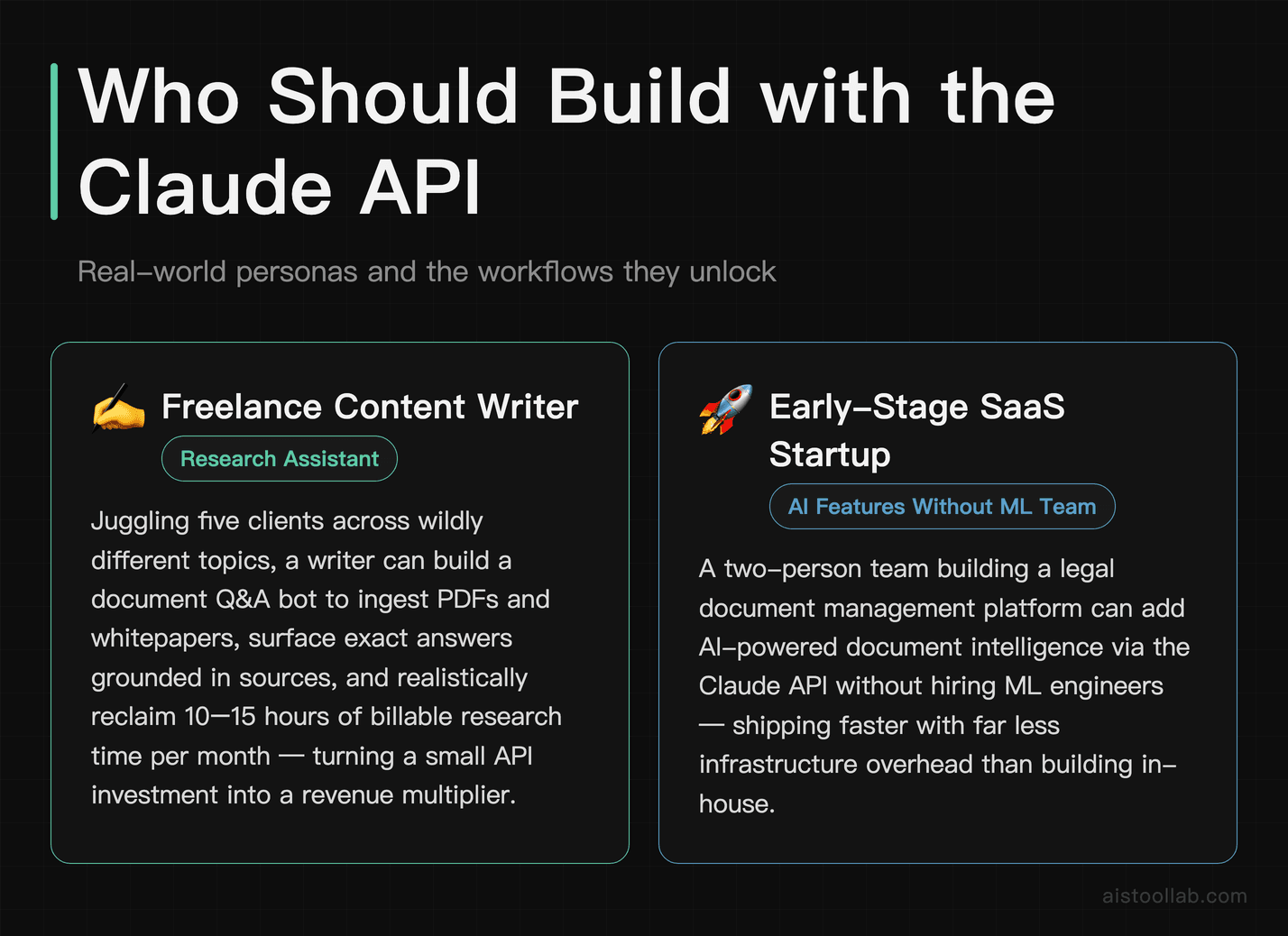
Freelance Content Writer Building a Research Assistant
Imagine you’re a freelance content writer juggling five clients simultaneously, each demanding well-researched articles on wildly different topics. Using this Claude API tutorial as your foundation, you can build a personal research assistant that ingests PDFs, whitepapers, and long-form reports, then answers specific questions grounded in those documents. Instead of skimming a 40-page industry report to find three relevant statistics, you paste the document into your Q&A bot and ask targeted questions in plain English. The tool surfaces exact answers with the relevant context, cutting your research time from hours to minutes. Over a month, a freelancer billing at $80/hour could realistically reclaim 10–15 hours of billable time, turning a small API investment into a significant revenue multiplier. The document Q&A format also means the AI stays grounded in real sources rather than hallucinating, which matters enormously when your byline is on the piece.
Early-Stage SaaS Startup Adding AI Features Without a Full ML Team
A two-person SaaS startup building a legal document management platform wanted to offer intelligent clause summarization and risk flagging to their clients, but hiring an ML engineer was completely out of budget. Using the patterns from this tutorial, their backend developer integrated the Claude API in a single afternoon sprint. They built a document ingestion pipeline where uploaded contracts are chunked, passed to the API with a carefully engineered system prompt, and returned with structured summaries highlighting key obligations, renewal dates, and unusual clauses. Their early beta users immediately pointed to the AI features as the primary reason they chose the platform over competitors. The startup avoided a six-figure ML engineering hire while shipping a genuinely differentiated product feature — exactly the kind of asymmetric leverage that defines early-stage survival.
Customer Support Lead Automating Tier-1 Ticket Resolution
A customer support team lead at a mid-sized e-commerce company was drowning in repetitive Tier-1 tickets — order status questions, return policy inquiries, and basic troubleshooting that didn’t require human judgment but still consumed 60% of her team’s time. Using this tutorial’s document Q&A architecture, she built an internal tool that ingests the company’s entire help center, return policy PDFs, and product documentation, then automatically drafts responses to incoming tickets. Agents review and approve the drafts rather than writing from scratch, cutting average handle time by roughly 40%. The system prompt was engineered to always cite which policy document the answer came from, which gave her team confidence in the responses and made the occasional error easy to catch and correct. What started as a personal project during a slow Friday afternoon is now a core part of their support operations.
Independent Management Consultant Creating Client-Facing Deliverable Tools
A management consultant specializing in operational efficiency realized that clients were paying for her analytical thinking but spending enormous time waiting for her to manually synthesize interview transcripts and workshop notes into coherent insight reports. By building on the Claude API tutorial’s foundation, she created a private web app where she pastes raw interview transcripts and asks the tool to extract recurring themes, contradictions between stakeholder perspectives, and specific pain points by department. What used to take two days of synthesis work now takes two to three hours, with the API handling the pattern recognition and her focusing on strategic framing and client communication. She’s been careful to keep the system prompt focused on extracting and organizing what’s actually in the documents rather than generating new claims — a discipline the grounded Q&A architecture naturally enforces. The tool has effectively let her take on 30% more client work without burning out.
Last updated: 2025